steering wheel AUDI S3 SEDAN 2017 Owner's Manual
[x] Cancel search | Manufacturer: AUDI, Model Year: 2017, Model line: S3 SEDAN, Model: AUDI S3 SEDAN 2017Pages: 400, PDF Size: 67.32 MB
Page 128 of 400
Assistance systems
(D Tips
-A maximum of 30 lap times (ana log instru
ment cluster) or 99 lap t imes (Audi virtual
cockpit*) can be measured.
- If timing is paused, you can continue it later
even if you switch the ignition off.
- Saved lap times cannot be individually de
l eted from the total resu lts.
- The saved lap timer values will remain after
switching the ignition off .
Lap statistics
Applies to: vehicles with lap timer
Display ing lap statistics
You can d isplay the number of laps driven, the
fastest lap" +", the s lowest lap" -", and the aver
age time
"0" in the instrument cluster.
~ Applies to: vehicles with analog instrument
cluster: select
Statistics in the menu using the
multifunction steering wheel.
~ Applies to: vehicles with Audi virtual cockpit: on
the multifunction steering wheel, select: left
control button
> Lap statistics or Statistics .
~ Turn the thumbwheel down or up to display the
individual lap times.
~ To retur n to the lap t iming that was begun,
press the left thumbwheel.
Resetting lap statistics
Applies to: vehicles with Audi virtual cockpit
~ On the multifunction steer ing wheel, select:
the right control button
> Reset statistics.
(D Tips
- The lap statistics list the lap times for the
last 30 laps.
-Applies to: vehicles with Audi virtual cock
pit: the fastest and slowest lap times from
up to 99 timed laps will be disp layed.
126
Audi adaptive cruise
control
Description
Applies to: vehicles with Audi adaptive cruise control
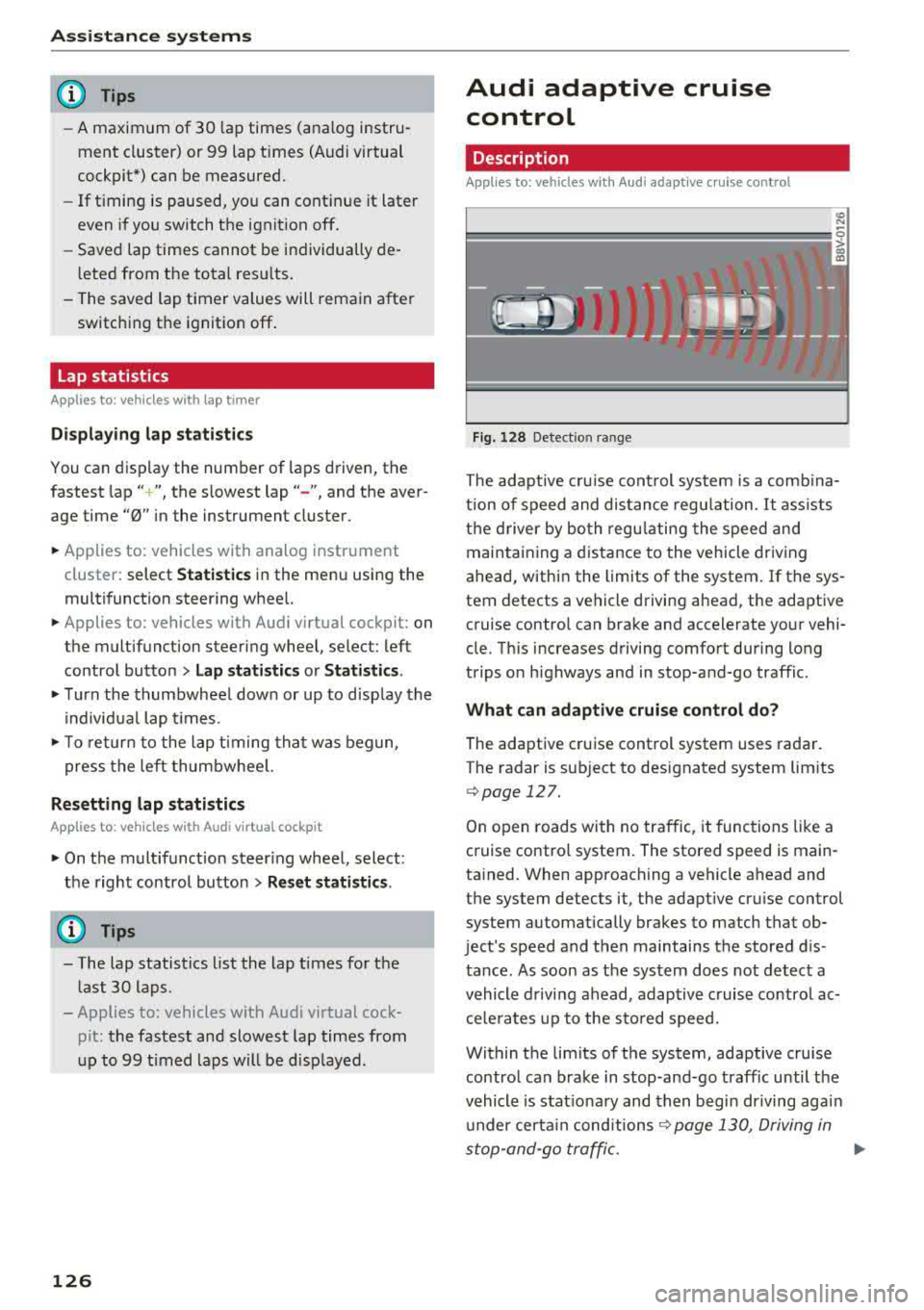
Fig. 128 Detect ion range
> (0 (0
The adaptive cru ise control system is a comb ina
tion of speed and dis tance regu lation.
It ass ists
the d river by both regulating the speed and
maintaining a distance to the vehicle driving
ahead, within the limits of the system. If the sys
tem detects a vehicle driving ahead, the adaptive
cruise contro l can brake and accelerate your vehi
cle. Th is increases driving comfort during long
trips on highways and in stop-and-go traffic.
What can adaptive cruise control do?
The adaptive cruise control system uses radar.
The radar is sub ject to designated system lim its
q poge 127.
On open roads with no traffic, it functions like a
cruise contro l system. The stored speed is main
tained. When approaching a vehicle ahead and
the system detects it, the adapt ive cru ise control
system automatically brakes to match that ob
ject's speed and then maintains the stored dis
tance. As soon as the system does not detect a
vehicle driving ahead, adaptive cruise contro l ac
celerates up to the stored speed.
Within the limits of the system, adaptive cruise control can brake in stop-and-go traffic until the
vehicle is stat ionary and then begin driving agai n
under certain
conditions ~ page 130, Driving in
stop-and-go traffic.
ll>
Page 131 of 400
a, a, ..... N
" N ..... 0 N > 00
The stored speed in the LED line is erased.
@ Indicator lights
It -Adaptive cruise control is switched on. No
vehicles are detected ahead. The stored speed is
maintained .
B-A vehicle driving ahead was detected. The
adaptive cruise control system regulates the
speed and distance to the vehicle ahead and
brakes/accelerates automatically.
r51 -Adaptive cruise control is switched on. Ave
hicle was detected ahead. Your vehicle remains
stopped and will not start driv ing automat ically.
•-The automatic braking is not enough to
maintain a sufficient distance to a veh icle driving
ahead. You must intervene
c::> page 132, Driver
intervention request.
@ Instrument cluster display
I f adaptive cruise control is not shown in the in
strument cluster display, yo u can call it up using
the mu ltifunction steering wheel buttons
c::> page 13.
Based on the g raphics in the disp lay, you can de
termine if the system is maintaining a distance to
a vehicle ahead and what that distance to th is ve
hicle is:
No vehicle -no vehicle was detected driving
ahead.
Silver vehicle -a veh icle was detec ted dr iv in g
ahead .
Red vehicle -request for driver intervention
<=:>page 132 .
The five distance bars on the gauge © represent
the set d istance (refer to
c::> page 131 for infor
mat ion on how to change the distance) .
If you
fal l below the selected distance, the distance
bars become red from the bottom upward.
A WARNING
If you press the !SETI button when driving at
speeds below 20 mph (30 km/h), the vehicle
accelerates automatically up to 20 mph (30
Assistance systems
km/h), which is the minimum speed that can
be set.
(D Tips
-If you switch the ignition or the adaptive
cruise control system off, the set speed is
erased for safety reasons .
-The e lectronic stabilization control (ESC)
and the anti-slip -regulation (ASR) are auto
matically switched on when the adaptive
cruise control is switched on.
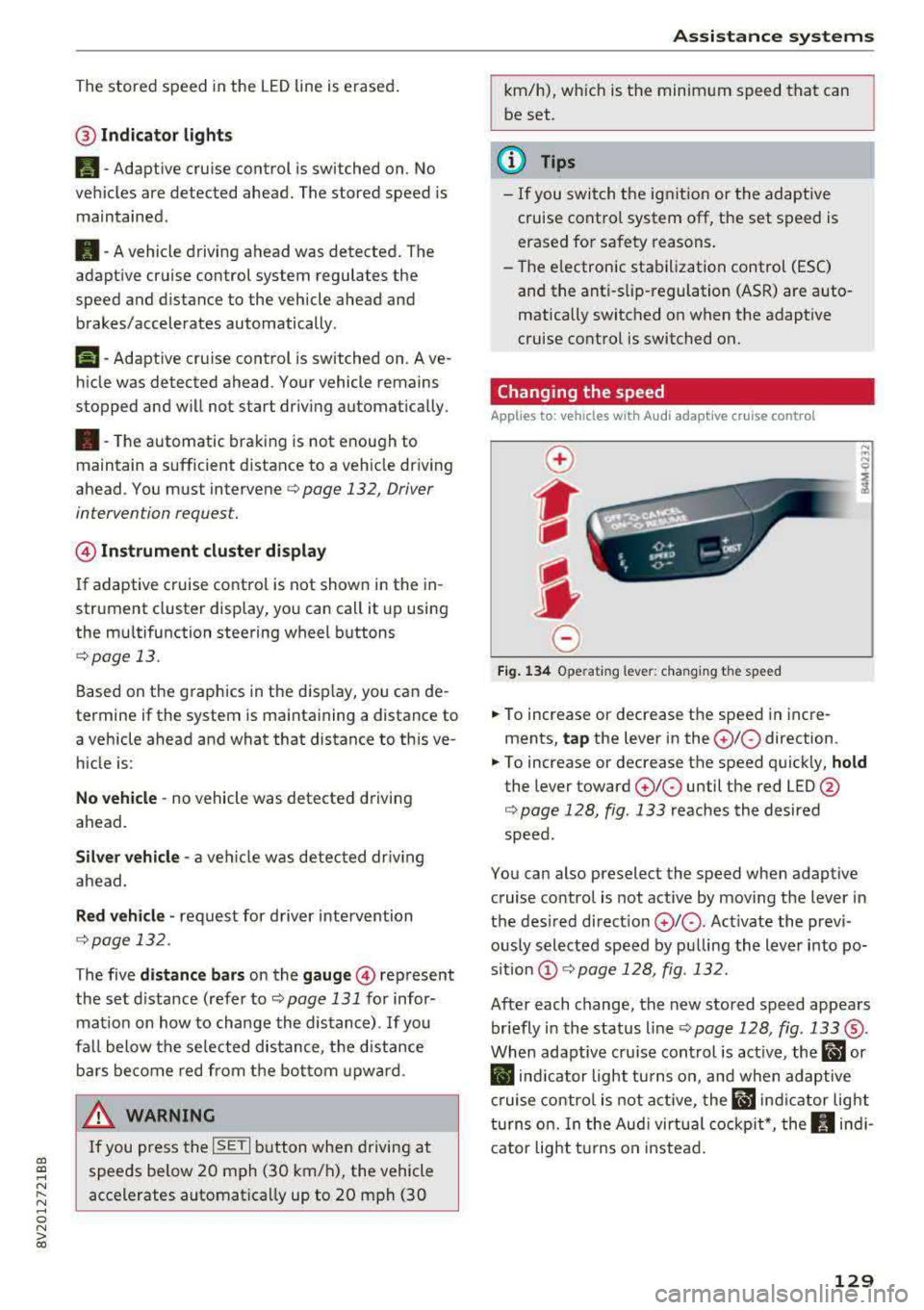
Changing the speed
Applies to: vehicles with Audi adaptive cruise control
0
f
J
0
Fig. 134 Operat ing lever: changing the speed
.. To increase or decrease the speed in incre
ments,
tap the lever in the 0 10 direction .
.. To increase or decrease the speed quickly, hold
the lever toward 010 until the red LED @
c::> page 128, fig. 133 reaches the desired
speed.
You can also preselect the speed when adaptive cruise control is not active by moving the lever in
the desired direction
0 10 . Act ivate the previ
ously selected speed by pulling the lever into po
s ition
@ c::> page 128, fig . 132.
After each change, the new stored speed appears
briefly in the status line
c::> page 128, fig. 133 ®·
When adaptive cru ise control is active, the ill or
• indicator light turns on, and when adaptive
cruise control is not active, the
ill ind icator light
turns on. In the Audi virtual cockpit*, the
II indi
cator light t urns on instead.
129
Page 138 of 400
Assistance systems
by this. Have an authorized Audi dealer or au
thorized Audi Service Facility check their func
tion.
(D Tips
- You can cancel the braking with increasing
force that is initiated by the system by brak
ing yourself, by accelerating noticeably or
by swerving.
- Certain pre sense front functions switch off
when ESC is switched off (sport mode) or
when driving in reverse.
- If you restrict or switch off the ESC, the pre
sense also switches itself off ¢
page 152.
Settings in the Infotainment system
Applies to: vehicles with Audi pre sense front/Audi adaptive
cruise control
~ Select in the Infotainment system: I MENU I but
ton
> Vehicle > left control button > Driver as
sistance
> Audi pre sense.
System -
the pre sense functions can be switched
on/off.
If the system is switched off, it switches on again
automatically once the ignition is switched on
again.
Prewarning -the early warning can be switched
off permanently or the pre sense front warning
point can be set
(Early/Medium/Late).
Messages
Applies to: vehicles with Audi pre sense
IIJ Audi pre sense: malfunction! Please contact
Service
This message appears when the pre sense func
tion is affected. For example, this could be
caused by a faulty sensor. If the message stays
on, drive immediately to an authorized Audi deal
er or authorized Audi Service Facility to have the
malfunction corrected.
IIJ Audi pre sense currently restricted. Restrict
ed sensor vision due to surroundings.
This message appears if the sensor view is ob
structed, for example by leaves, snow, heavy
136
spray or dirt. Clean the sensor if necessary
¢page 127, fig. 129.
II] Audi pre sense: currently restricted
This message appears if the ESC is restricted or
switched off, for example .
II] Audi pre sense: currently restricted. See
owner's manual
This message appears when there is a temporary
failure in a subsystem, such as the ESC. If this
message appears repeatedly, drive to an author
ized Audi dealer or authorized Audi Service Facili
ty to have the malfunction corrected .
fl] Audi pre sense: emergency braking system
off
This message appears if the pre sense functions
are switched off through the Infotainment sys
tem or if the system is not ready.
Audi active lane assist
Description
Applies to: vehicles with Audi active lane assist
Active lane assist (lane departure warning) de
tects lane marker lines within the limits of the
system using a camera in the windshield. If you
are approaching a detected lane marker line and
it appears likely that you will leave the lane, the
system will warn you with corrective steering.
You can override this steering at any time. If you pass over a line, the steering wheel will vibrate
lightly. In order for this warning vibration to oc
cur, it must first be switched on in the Infotain
ment system. Active lane assist is ready for oper
ation when the lane marker line is detected on at
least one side of the vehicle.
The system is designed for driving on express
ways and highways and therefore only activates
at speeds above approximately 40 mph (65 km/
h).
Applies to: vehicles with Audi side assist
If you activate a turn signal when active lane as
sist is ready and it classifies a lane change as crit
ical because of vehicles traveling alongside you or
approaching you, there will be noticeable
.,.
Page 139 of 400
a, a, ..... N
" N ..... 0 N > 00
corrective steering shortly before you leave the lane . This will attempt to keep your vehicle in the
lane .
Appl ies to: veh icles without Audi sid e assist
The system will not warn you before crossing a
lane marker line if you have activated the turn
signal. In this case , it ass umes that you are
changing lanes intent ionally.
& WARNING
- The system warns the driver that the vehicle
is leaving the lane using corrective steering.
The driver is always responsib le for keeping
the vehicle within the lane.
- The system can help you keep the vehicle in
the lane, but it does not drive by itself. Al
ways keep your hands on the steering
wheel.
- Corrective steering may not occur in certain
situations, such as during heavy brak ing.
- There may be cases where the camera does not recogni ze all lane marker lines. Correc
t ive steering can only take p lace on the side
of the veh icle where lane marker lines are
detected.
- Other road structures or objects could possi
bly be identified unintentionally as lane
marker lines . As a result , corrective steering
may be unexpected or may not occur.
- The camera view can be restr icted, for ex
amp le by vehicles driv ing ahead or by rain,
snow, heavy spray light shining into the
camera or by d irt on the window. This can
result in active lane ass ist not detecting the
lane marker l ines or detecting them incor
rectly .
- Under certain conditions such as ruts in the road, an inclined roadway or crosswinds, the
corrective steering alone may not be enough
to keep the vehicle in the middle of the lane.
- For safety reasons, active lane assist m ust
not be used when there are poor road and/
or weather conditions such as slippery
roads, fog, gravel, heavy ra in, snow and the
potent ial for hydroplaning . Using active lane
assist unde r these conditions may increase
the risk of a crash.
A ss is ta nce syst ems
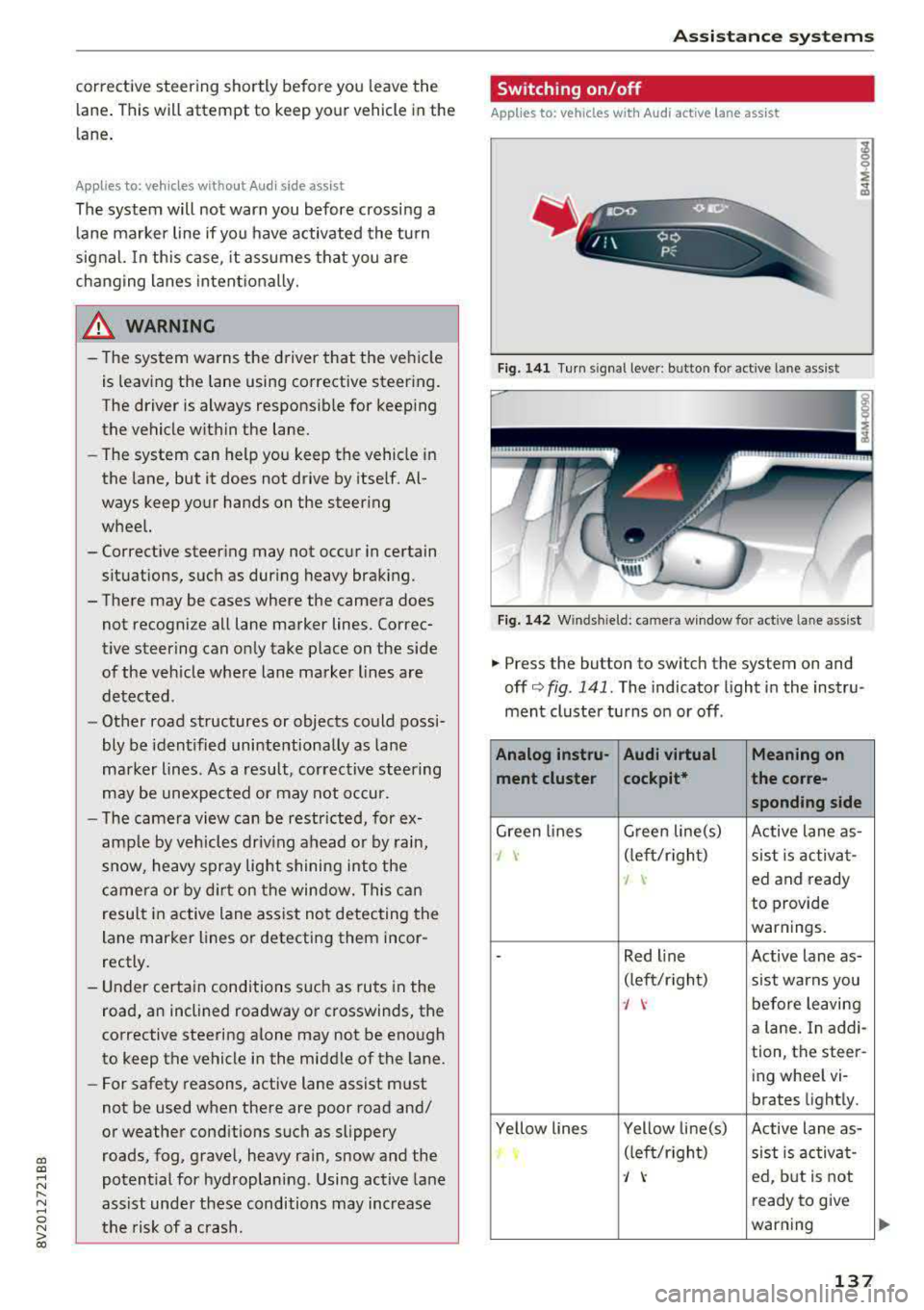
Switching on/off
Applies to: vehicles with A udi active lane ass ist
Fig. 141 Turn signal leve r: bu tto n fo r a ctive lan e ass ist
Fi g. 142 Winds hield : camera w indow fo r active lane a ssist
.,. Press the button to swi tch the sys tem on and
off
c'.> fig . 141. The indicator light in the instru
ment cluster turns on or off .
Analog instru- Audi virtual Meaning on
ment clu ster cockpit* the co
rre-
sponding s ide
Green lines G
reen line(s)
Active lane as-
J \· (left/rig ht)
sist is activa t-
I ed and ready
to provide
warnings.
-Red l ine Active lane as-
(lef t/r ight)
sist warns you
J \· before leaving
a lane. In addi-
tion, the steer-
ing wheel vi-
brates light ly.
Ye llow lines Yellow line(s)
Active lane as-
(left/r ight)
sist is activa t-
J ed, but is not
ready to give
warning
137
Page 140 of 400
Ass is tance sy stems
If the system is switched on but is not ready to
provide warn ings, one of the following cou ld be
the cause:
- T here is no lane marker line .
- The re levant lane marker lines are not detected
(for example, markings in a constru ction zone
or because they are obstructed by snow , dirt,
water or lighting).
- T he vehicle speed is below the ac tiva tion speed
of approx imately 40 mph (65 km/h).
- T he lane is too narrow or too wide .
- T he curve is too nar row .
- The driver's hands are not on the steering
whee l.
@ Tips
-Make sure the camera 's field of view
¢ fig . 142 is not obst ructed by sticke rs o r
anything else . For informat ion on cleaning,
see
i::> page 347.
- In certain markets: if the system is switched
on, it will sw itch on automat ically each time
the ig nition is swi tched on.
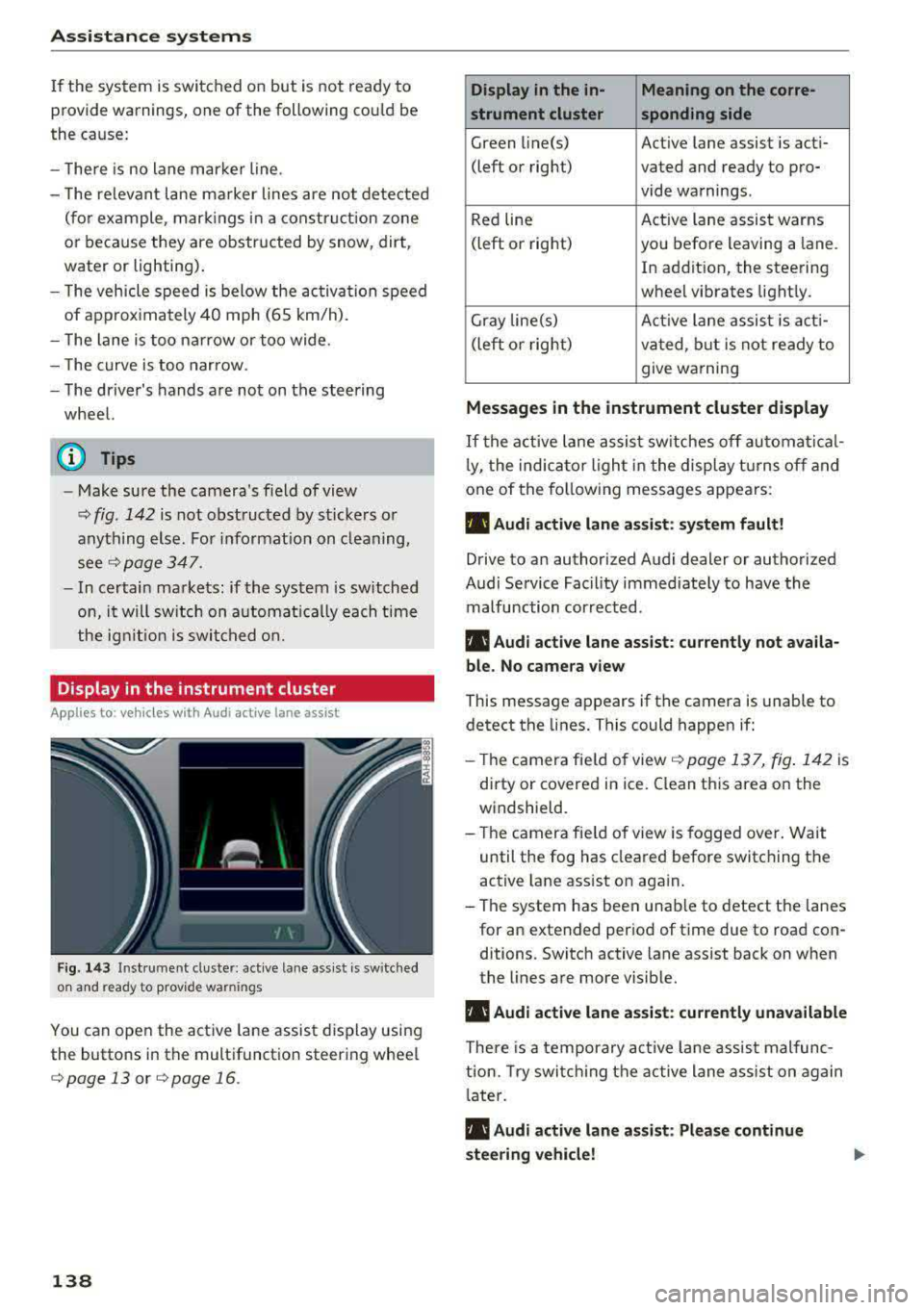
Display in the instrument cluster
Applies to: ve hicles with Audi active lane assist
Fig . 14 3 Instrum ent cluste r: act ive lane as sis t is sw itc hed
on and read y to p rov id e wa rnin gs
You can open the act ive lane assist display using
the buttons in the multifunct io n steering wheel
¢ page 13 or ¢ page 16 .
138
Display in the in- Meaning on the corre-
strument cluster sponding side
Green line(s) Act ive lane assist is act i-
(left or right) vated and ready to pro- vide warnings.
Red line Act
ive lane assist warns
(left or right) you befo re leaving a lane.
In addition, the steering
wheel vibrates light ly.
Gray line(s) Active lane assis t is act i-
(left o r right) va ted , b ut is not ready to
give warning
Messag es in the instrument cluster display
If the active lane assist sw itches off au tomati cal
l y, the indica to r li ght in the display t urns off and
one of the fo llow ing messages appears :
• Audi active lane assist: sy stem fault!
Drive to an authori zed Audi dealer or authori zed
Audi Service Facil ity immediate ly to have the
malfunction corrected.
• Audi active lane a ssist : cu rrently not a vaila
bl e. No came ra view
This message appears if the camera is unable to
detect the lines. This could happen if:
- Th e camera fie ld of view
¢ page 137, fig . 142 is
dirty or covered in ice . Clean this area on the
windsh ield.
- The camera fie ld of view is fogged over. Wait
until the fog has cleared before switching the
active lane assist on again.
- The system has been unable to detect the lanes for an extended per iod of time due to road con
ditions . Switch active lane assist back on when
the lines are more visib le.
• Audi active lane a ssist: currently una vailable
There is a temporary act ive la ne assis t malfunc
tion. Try swi tch ing the active lane a ss ist on again
l ate r .
• Audi active lane a ssist : Please continue
steering vehicle!
Page 141 of 400
a, a, ... N
" N ..... 0 N > 00
This message appears if you are not steering by
yourself . Active lane assist is activated, but is not
ready to give warning
Setting the vibration warning
Ap plies to: ve hicles with Audi active lane assist
You con adjust individual Audi active lone assist
settings in the Infotainment system .
.,. Select in the Infotainment system: !MENUI but
ton
> Vehicle > left control button > Driver a s
sistance > Audi active lane assist.
Vibration warning
You can switch the additional vibration warning
in the steering wheel on or off.
_& WARNING ,..__
With the vibration warning switched off,
there will also be no visual warning in the in
strument cluster display when crossing a lane
marker line.
(D Tips
Your settings are automatically sto red and as
signed to the remote contro l key being used.
Audi side assist
Description
Applies to: vehicles with Audi side assist
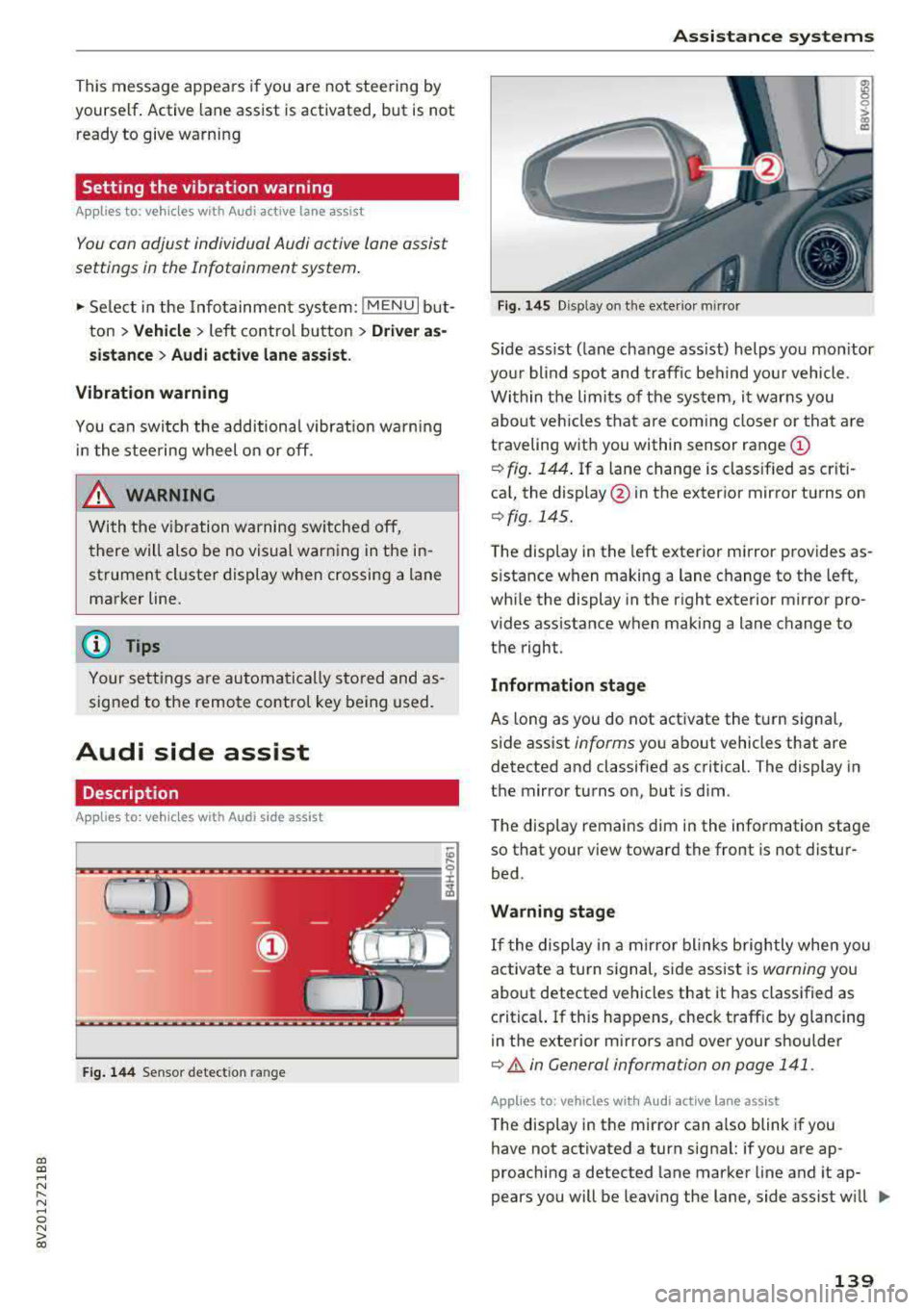
Fig. 144 Sensor detect ion ran ge
Assistance systems
Fig. 145 Disp lay on t he exterio r m irr or
ffl 0 0
> (X)
"'
Sid e assist (lane change ass ist) helps you mon itor
your blind spot and traffic behind yo ur vehicle .
Within the limits of the system, it warns you
about vehicles that are com ing closer or that are
traveling with you within sensor range
(D
¢ fig. 144. If a lane change is classified as criti
cal, the display @in the exterior mirror turns on
¢ fig . 145.
The display in the left exterior mirror provides as
s istance when making a lane change to the left,
while the display in the right exterio r mir ror pro
vides assistan ce when making a lane change to
the righ t.
Information stage
As long as you do not activate the tu rn signal,
side assist
informs yo u about vehicles that are
detected and classified as critical. The display in
the mirror turns on, but is dim .
The display remains dim in the information stage
so that your view toward the front is not distur
bed.
Warning stage
If the display in a mirror blinks brightly when you
activate a turn signal, side assist is
warning you
about detected vehicles that it has classified as
critical. If this happens, check traff ic by glancing
in the exterior m irrors and over your shoulder
¢ & in General information on page 141 .
Applies to: vehicles with Audi act ive lane ass ist
The display in the mirror can also blink if you
have not activated a turn signal: if you are ap
proaching a detected lane marker line and it ap
pears you will be leaving the lane, side assist w ill
liJl,,
139
Page 151 of 400
a, a, ..... N
" N ..... 0 N > 00
-Only use the rearview camera to assist you if
it shows a good, clear p icture. For examp le,
the image may be affected by the sun sh in
ing into the lens, dirt on the lens, or if there
is a malfunction.
- Use the rearview camera only if the luggage
compartment lid is completely closed . If the
luggage compartment l id is open the orien
tation lines and blue su rfaces are hidden .
Make su re any objects you may have mount
ed on the luggage compar tme nt lid do not
block the rearview camera.
- T he came ra lens enlarges and distorts the
field of v is ion. The object appea rs both al
tered and inaccurate on the screen.
- In cert ain situations, people or objec ts in
the display appear closer or farther away:
- For objects that do not touch the ground,
such as the bumper of a parked vehicle, a
tra iler hitch or the rear of a truck . Do not
use the orientation lines in this case.
- If driven from a level surface onto an in
cline , or a downward slope.
- If driven toward protrud ing objects .
- If the veh icle is carry ing too much load in
the rear.
(D Note
- Always read and follow the applicable warn
i ngs
<* 0 in General information on
page 146 .
-The orange-colored orientatio n lines in the
Infotainment display show the veh icle path
based on the steering wheel angle. The
front of the vehicle swings out more than
the rear of the veh icle. Ma inta in p lenty of
distance so that an exterio r mirror or a cor
ner of the veh icle does not co llide with any
obstacles.
Switching on /off
Appl ies to: ve hicles with rearv iew camera
Switching on
• S hift into reverse , or
• Press the P' 1! bu tton in the center console
~ page 147 , fig. 152 . A short confirmat ion
Parking systems
tone sounds and the LED in the button turns
on.
Switching off
• Dr ive faste r th an 6 mp h (10 km/h), o r
• Press the p, q! button, or
• Switch t he ignit ion off .
(0 Tips
- The visu al display in the righ t part of the
display sho uld help you de te ct the c riti cal
vehicle area .
- Yo u can ch ange the vol ume o f the signa ls
and the display ¢
page 150.
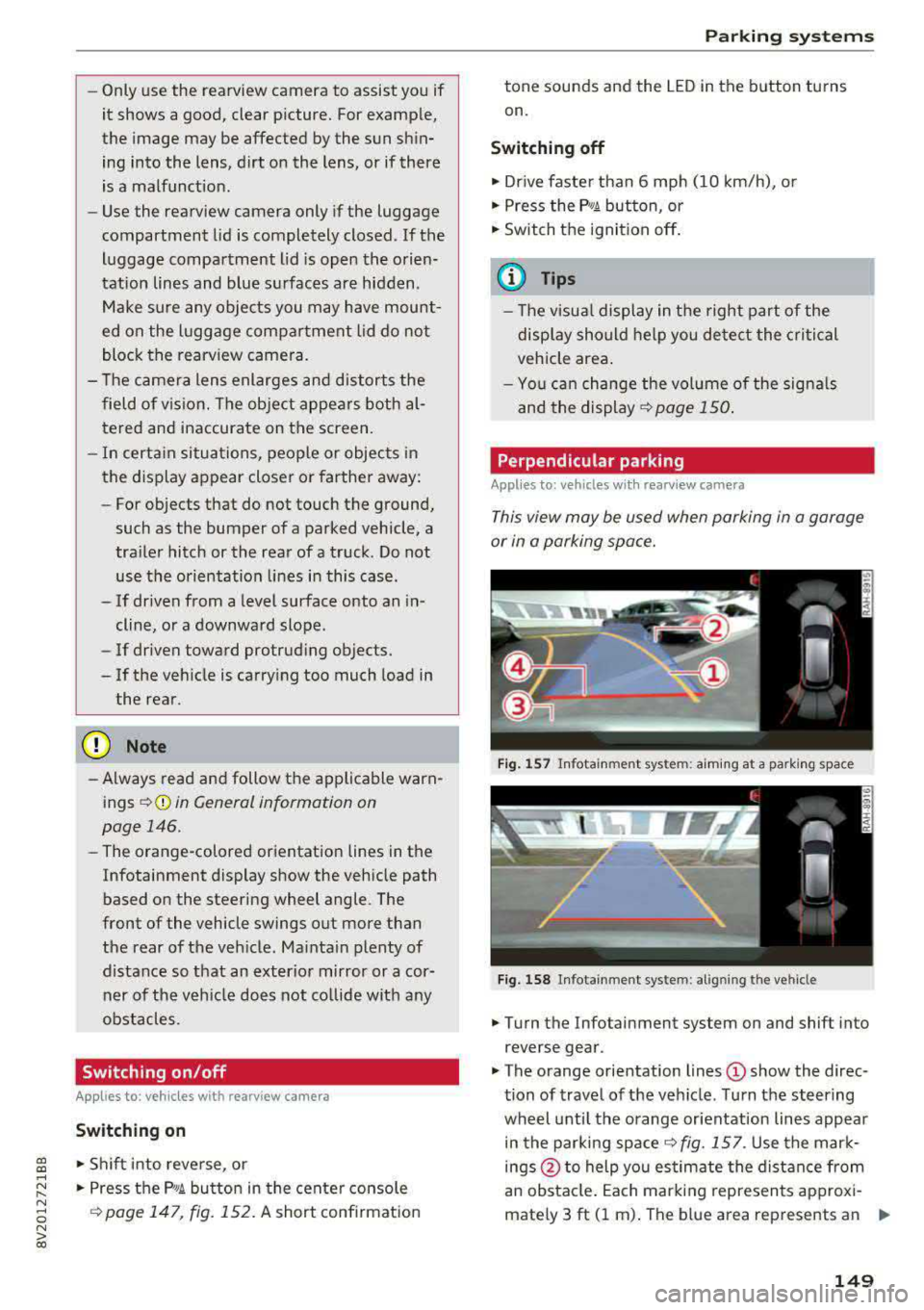
Perpendicular par king
Applies to: veh icles w ith rearv iew camera
This view may be used when parking in a garage
or in a parking space.
Fi g. 157 In fota inme nt sys tem: a im ing at a par king space
Fig . 1 58 In fotai nment syste m: alig ning t he vehicl e
.. Turn the Infotainment system on and shift into
reverse gear .
• The orange orientation lines (D show the direc
tion of travel of the vehicle . Turn the steering
wheel unti l the orange or ientation lines appea r
in the parking
space ~ fig. 157. Use the mar k
ings @to help you es timate the distance from
an obsta cle. Each marking represents approxi
mately 3 ft (1 m) . The b lue area represents an
.,..
149
Page 153 of 400
CXl CXl .... N ,.__
N .... 0 N > 00
Intelligent Technology Electronic Stabilization
Control (ESC)
Description
Electronic Stabilization Control ( ESC) supports
driver safety . It reduces the risk of slipping and
improves dr iving stability. ESC detects critica l sit
uations such as the vehicle oversteering and un
dersteer ing or the wheels are spinning. The vehi
cle is stabilized by apply ing the brakes or reduc
ing engine torque . When the ESC engages, the
G1 indicato r light b links in the instrume nt clus
ter.
The follow ing systems are integrated in the ESC:
Anti-loc k bra king system (ABS)
ABS prevents the whee ls from locking when brak
ing. The vehicle can still be steered even during
hard brak ing. Apply steady pressure to the brake
pedal. Do not pump the pedal. A pulsing in the
b rake pedal indicates that the system is act ing to
stabilize the vehicle .
Brake a ssist system
The brake assist system can decrease braking dis
tance. It increases brak ing power when the driver
presses the brake pedal quick ly in emergency sit
uations . You must press and hold the brake pedal
u nti l the dangerous sit uat io n is ove r. In veh icles
with adaptive cr uise contro l*, the bra ke assist
s ys tem is more sensitive if t he d istance detec ted
to the veh icle dr iv ing ahe ad is too small.
Anti -slip regulation (ASR)
ASR reduces eng ine power when the drive wheels
begin spinning and adapts the force to the road
conditions . This makes i t eas ie r to sta rt, acceler
ate and dr ive up hill s.
Electronic differential lock (EDL )
The EDL applies the brakes to a wheel that starts
spinning and transfers t he drive power to the
other driving wheel or wheels ( if the veh icle is
eq uipped w ith all whee l dr ive*) . T his function is
n o t available at higher speeds.
Intellig ent Technology
In extreme cases, ED L automat ica lly switches off
to keep the brake o n the braked whee l from over
heating. The veh icle is still working correct ly. EDL
will switch on again automatically when condi
t ions have returned to normal.
Ste ering recommendation
The ESC he lps to s tabilize the vehicle by changing
the steering torque.
Select ive wheel torque control
Se lective wheel to rque cont rol is used w hen driv
i ng on curves. The fron t whee l on the inside of
the curve or bo th wheels on the i nside of the
c u rve are braked se lective ly as needed . This al
l ows more precise driving in c urves.
Automatic post-collision braking system
T he "automat ic pos t-collision braking system"
c an help to reduce the risk of sliding an d of addi
tiona l co llisions a fter an acciden t. If the ai rbag
contro l modu le detects a co llision above a certain
vehicle speed, the veh icle is bra ked by the ESC.
T he vehicle does not bra ke autorn,;1tically if;
- t he dr ive r presses the acce le rator pedal, or
- the ESC, the brake system or the veh icle elect ri-
cal system are not functioning .
A WARNING
-The ESC and its integ rated systems cannot
overcome the lim its imposed by natura l
phys ic al laws. This is especially important
on sli ppery or wet roads . If the sy stems be
gin acting to stabilize your vehicle, you
should immediately alter your speed to
match the road and traffic conditions. Do
not let the inc reased safety provided tempt
you into taking risks. This could increase
your r isk of a coll is ion.
- Please n ote the r isk of a coll is ion increases
when dr iv ing fast, especially t hrough curves
a nd on slippery or wet roads, and when dr iv
ing too close to objects ahead. The ESC and
its integrated systems ca nnot always pre
vent collisions
-there is st ill a ris k of ac ci-
dents!
..,.
151
Page 156 of 400
Intelligent Technology
- Never let the vehicle roll while the engine is
stopped beca use this increases the risk of an
acc ident.
@ Note
- Never let the brakes "rub" by pressing the
pedal light ly when bra king is not actually
necessary. This causes the brakes to over
h eat and inc reases bra king d istance and
causes wear .
- Befo re dr iv ing on a long stretch w ith steep
s lopes, red uce your speed a nd shift to the
next lower gear This makes use of t he en
g ine bra king effect a nd relieves the b rakes.
If you need to bra ke a dd it iona lly, bra ke in
in te rv a ls and no t conti nuou sly.
@ Tips
- If the brake booste r is no t wo rking , you
must pr ess the brake pedal wi th much more
f orc e th an norma l.
- If you re trofit you r vehicle with a front spoil
e r, whee l cove rs o r similar ite ms, m ake sure
that the air flow to the front wheels is not
i n te rrupt ed. Ot he rw ise the bra ke sys tem
ca n become too hot.
Electromechanical
steering
The electromechanical steering supports the
driver's steering movements.
Powe r steering adapts electronically based on
the vehicle speed.
Indicator lights and messages
• Do not dr ive vehicle: steering defective
If thi s in dicator light t urns o n and stays o n and
this message appears, t he power s teer ing may
h a ve fa iled.
Stop the veh icle in a safe locat io n as soon as pos
sib le. Do
not continue driving. See an author ized
Aud i deale r or auth o riz ed Au di Serv ice F acility fo r
assis tance.
l~ij Steering: malfunction! You can continue
driving
154 I
f the indica to r li gh t turns on, the s teering w hee l
may be more difficult to move or more sens itive
t h an usua l. The steer ing whee l may a lso be at an
angle when driving straight.
Drive slowly to an a uth o rized Audi dea ler or au
thorized Audi Serv ice Facility to have the mal
funct ion corrected .
(D Tips
If t h e . or £-y.ij in dicator light on ly s tays on
fo r a short time, yo u may continue driving.
All wheel drive (quattro)
App lies to : vehicles wi th all w heel drive
In oil wheel drive, oil four wheels ore powered .
General information
In all wheel drive, the dr iv ing power is divided be
tween all fou r whee ls . This happens autom atic al
l y depending on yo ur driv ing beh avior as we ll as
the cur rent road conditions . Also see
c:> page 151, Electronic Stabilization Control
(ESC).
The all whee l drive concep t is designed for high
engine power. Yo ur vehicle is exce ptiona lly pow
erfu l and has excellent driving cha racteristics
both under normal driving conditions and on
snow and ice. A lways read and follow safety pre
cautions
c:> .&. .
Winter t ires
By using all whee l drive, your veh icle has goo d
forward motion with standard tires in winter con
dit ions. However, using w inter or all season t ires
o n
all four wheels in the winter is recommended,
because th is w ill imp rove the
braking effect .
Snow chains
If there are s now chain laws, snow cha ins m ust
also be used on veh icles with all wheel drive
c:> page 342, Snow chains.
Replacing tires
Fo r vehicles wi th a ll w hee l drive, o nly wheels wi th
the same rol ling circ umfe rence sho uld be used .
Avoid using tires with different tread depths
c:> page 335, New tires or wheels. IJI>
Page 160 of 400
Multi Media Interface
Multi Media Interface
Traffic safety information
Aud i recommends performing certa in Infotain
ment system functions, such as entering a desti
nation, only when the vehicle is stationary . Al
ways be p repared to stop opera ting the Info tain
ment system i n the interest of your safety and
t he safe ty of other road users.
_& WARNING
Only use the In fotain ment sys tem w hen tra f
fic con ditions permit and always in a way that
allows you to ma inta in complete control ove r
your vehicle.
@ Tips
Cer tain functi ons are no t avail ab le wh ile driv
ing .
Introduction
The Multi Media Interface , or MMI for short,
combines various
systems for communication ,
navigation* and entertainment in your Audi . You
can operate the MMI using the MMI control pan
el, the multifunction steering wheel or the voice
recognition system* .
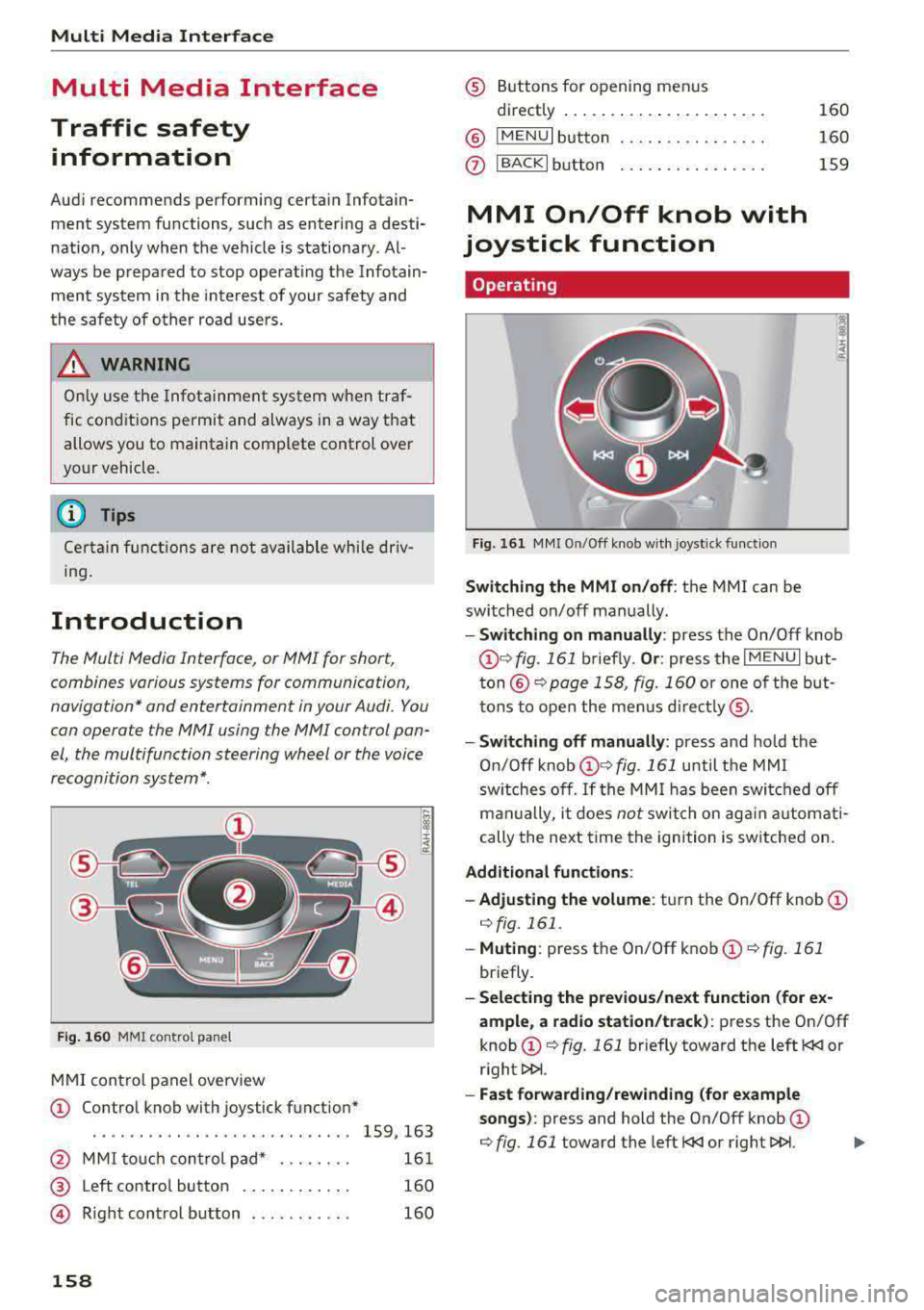
Fig. 16 0 MMI co ntro l panel
M MI cont rol panel overview
CD Contro l knob with joystick function"
. . . . . . . . . . . . . . . . . . . . . . . . . . . . 159, 163
@ MMI to uch con trol pad * . . . . . . . . 161
@ Left contro l button . . . . . . . . . . . . 160
@ R ight cont rol b utton . . . . . . . . . . . 160
158
® Buttons fo r opening men us
directly .... . .. .. .. .... .. .... .
@ IMENU I button
(J) I BACK I button . .. .. .... .. ... . .
MMI On/Off knob with
joystick function
Operating
Fig . 161 MM I On/Off k nob w ith joys tick f unctio n
Switching the MMI on /off : the MMI can be
swi tched on/off man ually. 160
160
159
- Switching on manually : press the On/Off knob
CD ¢ fig. 161 briefly. Or : press the I M ENU I but
ton @ ¢ page 1 58, fig. 160 or one of t he bu t
t ons to ope n the me nus d irectl y® ·
-Switch ing off manually : press and hold the
O n/Off knob
CD ¢ fig. 161 until t he M MI
sw itches off .
If the MM I has been swi tch ed off
m an ually, i t does
not swi tch on ag ai n au tomati
cally the ne xt time the ignition is sw itched on.
Additional function s:
- Adjusting the volume :
turn the On/Off knob CD
¢fig. 161 .
-Muting : press the On/Off knob CD¢ fig. 1 61
briefly.
- Selecting the previous/ne xt function (for ex
ample , a r adio station/t rack) :
press the On/Off
knob
CD ¢ fig. 161 briefly toward the left l
l>!>i .
-Fast forwarding /rewinding (fo r example
songs) :
press and hold the On/Off knob CD
¢ fig. 161 toward the left l