warning AUDI S3 SEDAN 2017 Manual PDF
[x] Cancel search | Manufacturer: AUDI, Model Year: 2017, Model line: S3 SEDAN, Model: AUDI S3 SEDAN 2017Pages: 400, PDF Size: 67.32 MB
Page 122 of 400
Trailer towing
Trailer towing
Driving with a trailer
General information
Your Audi was designed primarily for passenger
transportation.
If you plan to tow a trailer, please remember that
the additional load will affect durability, econo
my and performance.
Trailer towing not on ly places more stress on the
ve hicle, it also ca lls for more concentration from
the dr iver.
F or this reason, always follow the operating and
driving instructions provided and use common
sense.
Technical requirements
Trailer hitch
Use a weight-carrying hitch conforming to the
gross tra iler weight. The hitch must be suitab le
for your veh icle and tra iler and must be mounted
securely on the vehicle's chassis at a technically
sound
locat ion . Use on ly a trailer hitch with a re
movable ba ll mount . Always che ck with the t rail
er hitch man ufac tur er to make s ure t hat you are
using the co rrect hi tc h.
Do not use a bumper hitch.
The hitch must be installed in such a way that it
does not interfere with the impact -absorbing
bumper system. No mod ificat ions should be
made to the vehicle exhaust and b rake systems .
Fr om t ime to t ime, che ck tha t all hitch mo unti ng
bol ts rem ain securely f aste ned.
W hen you are not tow ing a tra iler, remove the
tra ile r hitc h ba ll mount . This prevents the hit ch
from caus ing damage s hou ld your veh icle be
s truck from be hind
c> ,&. .
Trailer brakes
If your trailer is equipped with a brak ing system,
check to be su re that it conforms to all regula
tions .
120
The t rai ler hydraulic bra ke system must not be
directly connected to the vehicle's hydraulic
bra ke system.
Safety chains
A lways use s afety chains between you r vehi cle
and t he tra ile r.
Trailer lights
Traile r lights must meet all regula tions . B e s ure
to check w ith your Aud i dea le r fo r cor rect wir ing,
switches and relays .
Mirrors
If you are unable to see t he traffic behind you us
i ng t he regular outs ide mir rors, then yo u
must in
stall extended mirro rs . It is impo rtant that you
always have clear vision to the rear.
&, WARNING
Afte r remov ing the tr ailer hi tch, do not s to re
i t i n yo ur vehicle. In case o f su d den braking,
the hitch could fly fo rwa rd and injure you or
your passengers .
Operating instructions
Maximum trailer weight
A tra iler f or yo ur vehicle is lim ite d to a typical
class 1 or class 2 trailer.
Trailer load distribution
Be sure the load in the t rai le r i s he ld se curely in
pla ce to p revent i t from shi fting forward, bac k
ward or si deways.
Never allow a passenger to ride in a trailer c> &.
in Driving instructions on page 121.
Engine cooling system
Towing a tra iler makes the engine work harder. It
is important that the cooling system's perform
ance is up to the additional load . Make sure tha t
the coo ling system has enoug h flu id.
Tire pressure
When towing a trailer, inf late the tires of your
vehicle to the tire pressure listed under "Full load" on the label
c> page 336. Inflate trailer
Page 123 of 400
CXl CXl .... N ,.__
N .... 0 N > 00
tires to trailer and tire manufacturers' specifica
tions.
Lights
Check to make sure both vehicle and trailer lights
are working p roperly.
Safety chains
Be sure trailer safety chains are properly connect
ed from the tra iler to the hitch on the vehicle.
Leave enough slack in the chains to permit turn
in g corners . When you install safety cha ins, ma ke
sure they w ill not drag on the road when yo u are
driving .
The chains shou ld cross under the trailer tongue
to prevent it from dropping in case of separat ion
from the hitch.
Driving instructions
Driving with a trailer always requires extra care
and consideration.
Weight distribution
Towing a loaded trailer w ith an empty car results
in a highly unstable distribution of weight . If this
cannot be avo ided, drive at very low speeds only
to avoid the risk of losing steering control.
A "balanced" rig is easier to operate and control.
This means that the tow vehicle should be loaded
to the extent possible and permissible, while
keep ing the tra iler as light as possib le under the
circumstances. Whenever possib le, t ransfer
some cargo to the luggage compartment of the
tow vehicle whi le observing tongue load require
ments and vehicle loading considerations .
Speed
The higher the speed, the more difficult it be
comes for the driver to control the rig. Do not
drive at the maximum permissible speed. Reduce
your speed even more if load, weather or wind
conditions are unfavorable
-particu larly when
going downhill.
Reduce vehicle speed
immediately if the trailer
shows the s lightest sign of swaying .
Do not try
to stop the swaying by accelerating.
Tra iler towing
Observe speed limits. In some a reas, speeds for
vehicles towing trailers are lower than for regular
vehicles .
Always apply brakes early. When driving down
hill, shift into a lower gear to use the engine
braking effect to slow the vehicle. Use of the
brakes alone can cause them to overheat and fa il.
Coolant temperature
T he coo lant tempe rature gauge ~ page 11 must
be observed carefully . The coolant temperature
can increase if you drive on long inclines in a low
gear at high engine speeds. Reduce your speed
immediately if the LEDs in the top part of the dis
play turn on.
For more information about indicator lights, re
fer
to . ~page 28.
A WARNING ,-
Anyone not properly restrained in a moving
vehicle is at a much greater risk in an acci
dent. Never let anyone ride in your car who is
not properly wearing the restraints provided
by Aud i.
Trailer towing
information
Important to know
Your vehicle handles differently when towing a
trailer because of the addit ional weight and dif
ferent weight distribution . Safety, performance
and economy will g reatly depend on how careful
ly you load your trailer and operate yo ur rig.
Before you actually tow your trailer, pract ice
turning, stopping and backing up in an area away
from traffic. Keep practic ing until you have be
come complete ly familiar w ith the way your vehi
cle-trailer combination behaves and responds.
Backing up is difficult and requires practice.
Backing up with a t railer genera lly requires steer
i ng action opposite to that when backing up your
vehicle without a tra iler.
Maintain a greater distance between your vehicle
and the one in front of you. You will need more
.,,.
121
Page 125 of 400
a, a, ..... N
" N ..... 0 N > 00
Assistance systems Electronic speed limiter
Applies to: vehicles with electronic speed lim iter
Your vehicle may be factory equipped with tires
that are rated for a maximum speed of 130 mph
(210 km/h). This is less than the maximum speed
of your vehicle. To reduce the risk of sudden tire
failure and loss of control if the vehicle is operat
ed at excessive speeds, your vehicle also has an
electronic speed lim iter . The electronic speed
limiter prevents your vehicle from going faster
than the tir e speed rating. For more information
¢page 335.
If the engine control unit receives faulty vehicle
road speed s ignals, the Malfunction Indicator
L amp (MIL)
II! will illuminate . If this occurs,
contact the nearest authorized Audi dealer for
assistance .
& WARNING
Always observe the posted speed limits and
adjust your speed to suit prevailing road, traf
fic and weather conditions. Never drive your
vehicle faster than the max imum speed rat ing
of the tires installed.
Speed warning system
Applies to: vehicles with speed warning system
The speed warning system helps you to stay be
low a specified maximum speed that can be set,
changed or deleted in the Infotainment system .
The speed warning system warns you if you are
exceeding the maximum speed that you have set.
A warning tone will sound as soon as your speed
exceeds the stored value slightly . The
101 (USA
models) /
[01 (Canada mode ls) indicator light
and the corresponding message appear in the in
strument cluster display at the same time. The
[OJ (USA models)/ (•j (Canada models) indicato r
light and the message turn
off when the vehicle
speed drops below the stored maximum speed.
Setting a threshold is recommended if you would
like to be reminded when you reach a certain
maximum speed. Situations where you may want
to do so include driving in a country with a gener-
Assistance systems
al speed limit or if there is a specified maximum
speed for winter tires.
Setting the warning threshold
• Select in the Infotainment system: I MENU ! but
ton
> Vehicle > left control b utton > Driver as
sistance
> Speed warning > Manual.
(0 Tips
Regardless of the speed warning system, you
shou ld always monitor your speed using the
speedometer and make sure you are following
the lega l speed limit.
Cruise control system
Switching on
Applies to: vehicles wit h cruise control system
The cruise control system makes it possible to
drive at a constant speed starting at 15 mph (20kmlh) .
0
f
~
0
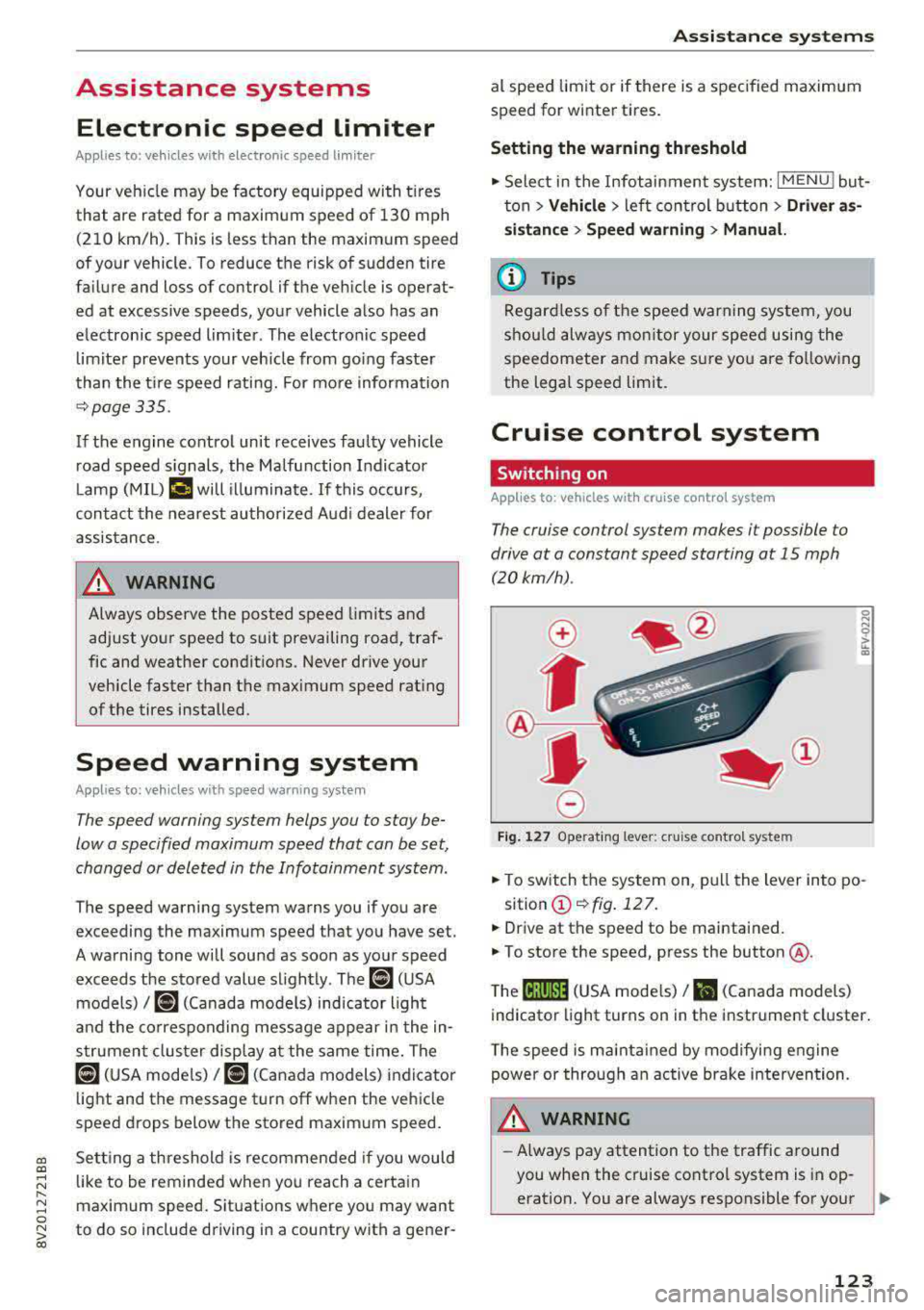
Fig. 127 Operat ing lever: cruise control system
i;:i N 0 > ... m
• To switch the system on, pull the lever into po-
sition
(D ¢fig . 127.
• Drive at the speed to be maintained.
.. To store the speed, press the button @.
T he
(ij;jl)~1i (USA mode ls)/ Bl (Canada models)
indicator light turns on in the instrument cluster.
T he speed is maintained by modifying engine
power or through an active brake intervention.
.i\, WARNING
-Always pay attention to the traffic around
-
you when the cruise control system is in op
eration. You are always responsible for your
..,
123
Page 127 of 400
CXl CXl .... N ,.__
N .... 0 N > 00
Switch ing the ign ition o ff will erase the stored
speed .
Switching off automatically
[ij;{ij~i~ (USA model s)11) (Canada models )
Speed control system : currently unavailable.
See owner's manual
The c ruis e contro l syst em was a utomat ica lly
turned off be ca use the system has dete cted a
mal funct ion th at is imp air in g t he cr uise con trol
f u nction. Try switc hing t he cr uise con trol system
on again la ter .
A WARNING
You s hould only resume the stored s peed if it
is not too high for exist ing traffic condit ions.
Otherwise you can increase the r isk of an acci
de nt.
Lap timer
Introduction
Appl ies to : vehicles with lap t imer
You can measure and analyz e lap times with the
lap tim er in the display.
Opening the lap timer
.. Open the first Vehicle tab (t rip computer) using
the
l <1 1> I butto n on the mult ifunct ion steer ing
wheel.
• Applies to: vehicles with analog instrument
cl uster: Press
thP l== I button on the m ultifu nc
t io n s teer ing whee l an d sele ct
Lap timer in t he
me nu.
• Applies to: vehicles with A udi virtual cockpit: on
t h e m ultif unct io n steer ing whee l, select: left
contro l button
> Lap times.
Operating the lap timer
• O n t he mult if u nct io n steer ing whee l, t urn t he
l eft thumbwhee l
0 ¢ page 13 or (D ¢ page 16
until t he desired menu i tem is dis played in the
inst rument cluste r.
• Press the left thumbwhee l to confirm the selec
t ion.
Assistance systems
A WARNING
Your focus shou ld always be on dr iv ing you r
vehicle safe ly . As the driver , you have com
pl ete res pons ibility for safety in traff ic . O nl y
use the functi ons such as the la p tim er in su ch
a way th at yo u always maint ain com plete con
t rol over yo ur vehicle in all traffic situations.
(D Tips
You can retr ieve informa tion from t he tr ip
com puter while t he la p timer stopwa tch is
run nin g.
Lap times and timing
Applies to: vehicles with lap t imer
R eq uireme nt: t he lap tim er mus t be ope n
¢page 1 25.
Timing laps
-
.. To s ta rt tim ing, select Lap 1 -press OK or Start
lap 1
in t he m enu .
• App lies to: veh icles with Audi virtual cockpit: to
s t ar t t im ing au tom atic ally w hen yo u start dr iv
in g, selec t
Start lap 1 by driving off or Start by
driving off
i n the menu .
• To measure t he lap time, select New lap -press
OK or New lap
in the menu . This sta rts tim ing
the next lap at the same t ime.
A fter completing , the difference betwee n the
l ast lap and the p revious best lap t ime will be in
dicated with
a" -"/ . or "+ "/ • .
Pausing timing and displaying a split time
• To i nsert a pause m , sele ct Pause in the menu .
• To cont in ue timing, se lect Press OK to resume
or Resume in the menu.
• To display a sp lit t ime, select Split time in the
menu. The split
time [~] appears for approx i
mate ly 10 seconds in the instr ument cluster.
The tim ing of the current lap continues .
Resetting tim ing
• Using the mult ifunct io n steer ing whee l, select
Reset or Reset times in the menu.
125
Page 129 of 400
a, a, ..... N
" N ..... 0 N > 00
Which functions can be contr oll ed?
When you sw itch adaptive cruise control on, you
can set the current speed as the "control speed"
¢ page 128 , Switching on/off .
When driving, you can stop cruise co ntro l
¢ page 130 or change the speed ¢ poge 129 at
any time .
You can also set the distance to the veh icle ahead
and set t he adaptive cruise contro l dr iv ing pro
g ram
¢ page 131 .
General information
Applies to: vehicles with Audi adaptive cruise control/Audi pre
sense front
F ig. 129 Fro nt o f vehicl e: sensor
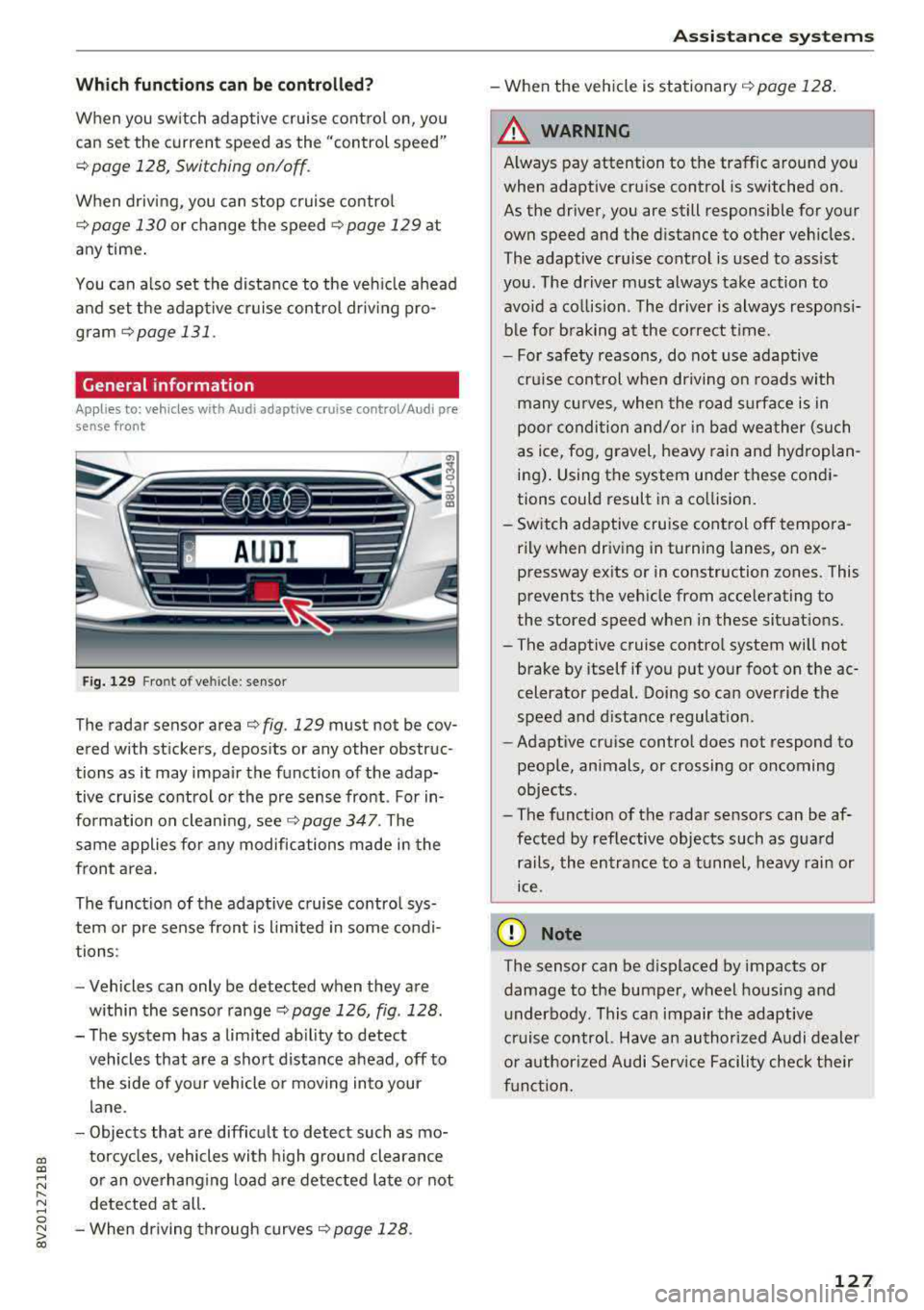
T he radar sensor area ¢ fig . 129 mus t not be cov
ered with st ickers, deposits or any other obstruc
tions as it may impair the function of the adap tive c ruise control or the pre sense front . For in
formation on clean ing ,
see ¢ page 347 . The
same applies fo r any modifications made in the
front area .
The funct ion of the adaptive cruise contro l sys
tem or pre sense fron t is l imited in some cond i
tions :
- Vehicles can only be detected when they are
within the senso r
range¢ page 126, fig . 128 .
- The system has a limited abil ity to detect
vehicles that are a short distance ahead, off to
t h e side of your vehicle or moving into your
lane .
- Objects that are difficu lt to detect such as mo
torcycles, vehicles with high ground clearance
or an overhanging load are detected late or not detected at all .
- When driving through curves
¢ page 128 .
Ass is ta nce syst ems
-When the vehicle is stationary ¢ page 128.
A WARNING
Always pay attention to the traffic around you
when adaptive cruise control is switched on.
As the driver , you are still responsible for your
own speed and the d istance to other veh icles .
The adaptive cruise control is used to ass ist
you . The driver m ust always take action to
avo id a co llision . The d river is always responsi
b le for b raking at the co rrect t ime.
- For safety reasons, do not use adaptive
cru ise control when driving on roads with
many cu rves , when the road s urface is in
poor conditio n and/or in bad wea ther (such
as ice, fog, gravel, heavy rain and hyd roplan
ing) . Using the system under these condi
tions could result in a co llision.
- Sw itch adaptive cruise control off tempora
rily when driving in turning lanes, on ex pressway ex its or in construction zones . This
prevents the veh icle from acce lerating to
the stored speed when i n these situat ions.
- The adaptive cruise contro l system will not
brake by itself if you put you r foot on the ac
celerator pedal. Doing so can override the
speed and d istance regulat ion .
- Adapt ive cruise control does not respond to
peop le, animals, or crossing or oncoming
objects .
- The funct ion of the radar sensors can be af
fected by reflective objects such as gua rd
rails, the en trance to a t unnel, heavy rain or
ice .
(D Note
The sensor can be displaced by impacts or
damage to the bumper, wheel housing and underbody. This can impair the adaptive
cruise control. Have an authorized A udi dealer
o r authorized Audi Service Facility check t heir
f u nct ion.
127
Page 131 of 400
a, a, ..... N
" N ..... 0 N > 00
The stored speed in the LED line is erased.
@ Indicator lights
It -Adaptive cruise control is switched on. No
vehicles are detected ahead. The stored speed is
maintained .
B-A vehicle driving ahead was detected. The
adaptive cruise control system regulates the
speed and distance to the vehicle ahead and
brakes/accelerates automatically.
r51 -Adaptive cruise control is switched on. Ave
hicle was detected ahead. Your vehicle remains
stopped and will not start driv ing automat ically.
•-The automatic braking is not enough to
maintain a sufficient distance to a veh icle driving
ahead. You must intervene
c::> page 132, Driver
intervention request.
@ Instrument cluster display
I f adaptive cruise control is not shown in the in
strument cluster display, yo u can call it up using
the mu ltifunction steering wheel buttons
c::> page 13.
Based on the g raphics in the disp lay, you can de
termine if the system is maintaining a distance to
a vehicle ahead and what that distance to th is ve
hicle is:
No vehicle -no vehicle was detected driving
ahead.
Silver vehicle -a veh icle was detec ted dr iv in g
ahead .
Red vehicle -request for driver intervention
<=:>page 132 .
The five distance bars on the gauge © represent
the set d istance (refer to
c::> page 131 for infor
mat ion on how to change the distance) .
If you
fal l below the selected distance, the distance
bars become red from the bottom upward.
A WARNING
If you press the !SETI button when driving at
speeds below 20 mph (30 km/h), the vehicle
accelerates automatically up to 20 mph (30
Assistance systems
km/h), which is the minimum speed that can
be set.
(D Tips
-If you switch the ignition or the adaptive
cruise control system off, the set speed is
erased for safety reasons .
-The e lectronic stabilization control (ESC)
and the anti-slip -regulation (ASR) are auto
matically switched on when the adaptive
cruise control is switched on.
Changing the speed
Applies to: vehicles with Audi adaptive cruise control
0
f
J
0
Fig. 134 Operat ing lever: changing the speed
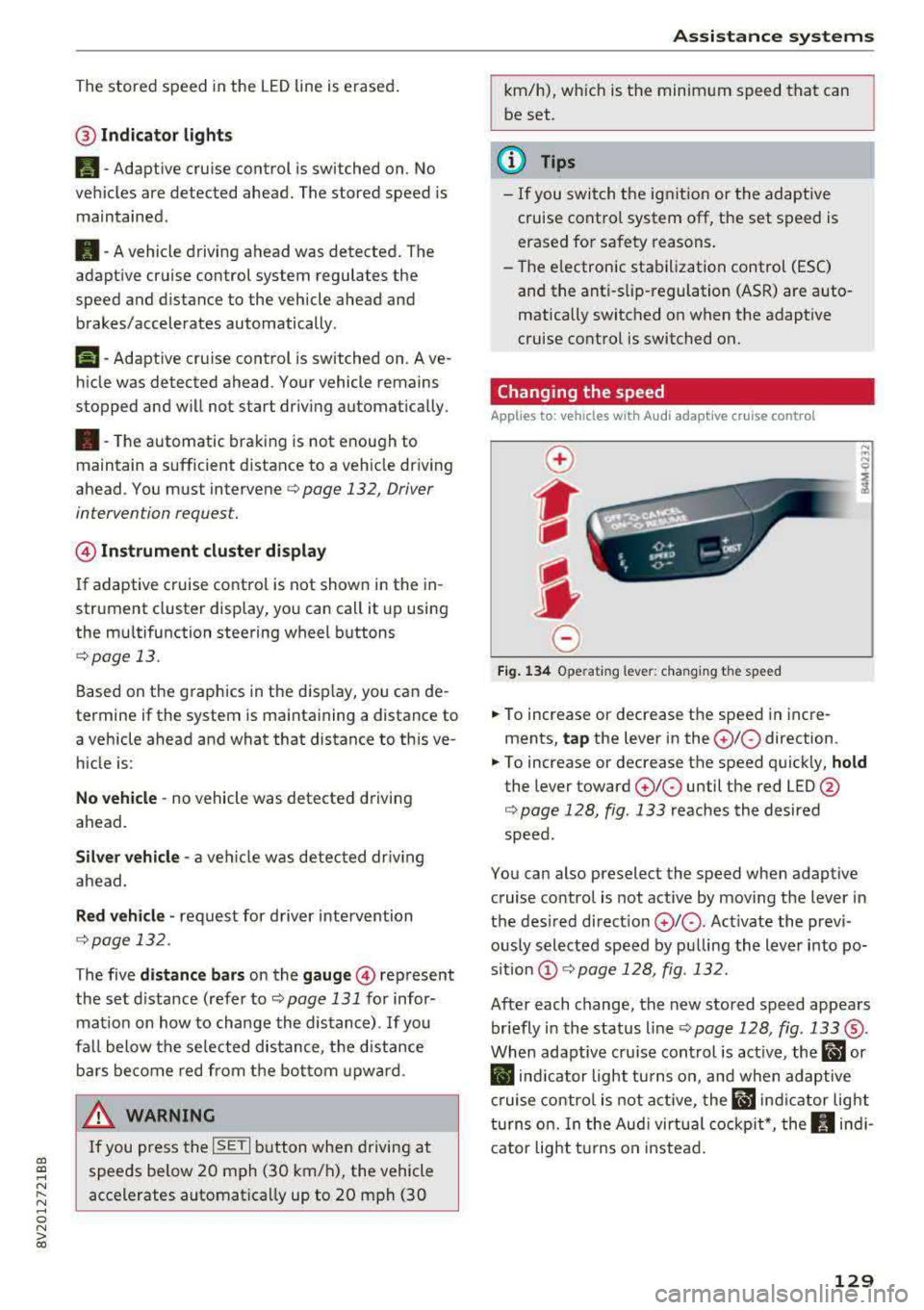
.. To increase or decrease the speed in incre
ments,
tap the lever in the 0 10 direction .
.. To increase or decrease the speed quickly, hold
the lever toward 010 until the red LED @
c::> page 128, fig. 133 reaches the desired
speed.
You can also preselect the speed when adaptive cruise control is not active by moving the lever in
the desired direction
0 10 . Act ivate the previ
ously selected speed by pulling the lever into po
s ition
@ c::> page 128, fig . 132.
After each change, the new stored speed appears
briefly in the status line
c::> page 128, fig. 133 ®·
When adaptive cru ise control is active, the ill or
• indicator light turns on, and when adaptive
cruise control is not active, the
ill ind icator light
turns on. In the Audi virtual cockpit*, the
II indi
cator light t urns on instead.
129
Page 132 of 400
Assistance systems
Driving in stop-and-go traffic
Applies to: vehicles with Audi adaptive cruise contro l
Fig. 135 In str um ent cluster : sa fe sta rt mo nitor
The adaptive cruise control system assists you in
stop -and -go traffic . If a vehicle that is detected
ahead stops, your vehicle will brake and stay at a
stop , within the limits of the system.
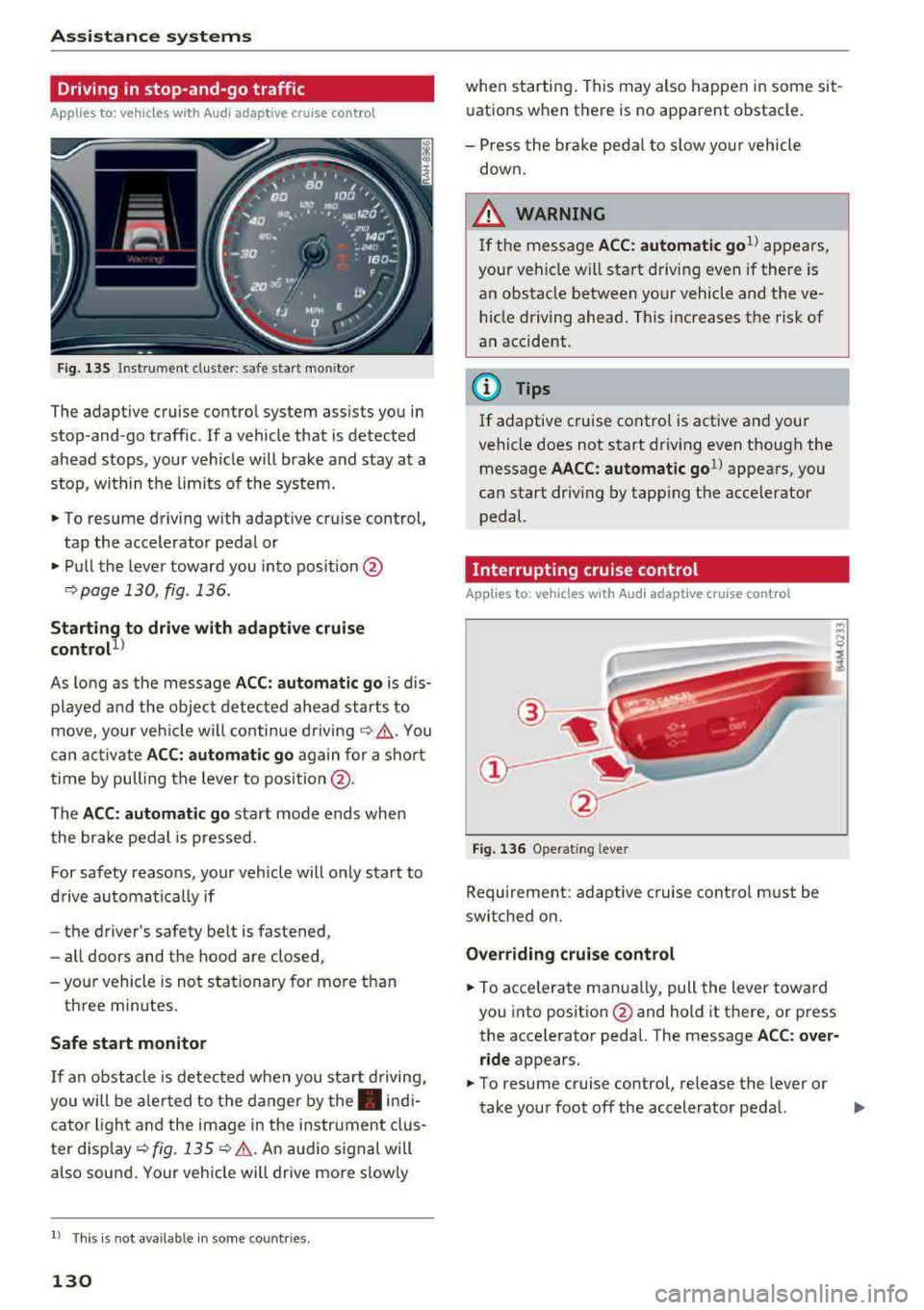
.,. To resume driving with adaptive cruise control,
tap the accelerator pedal or
... Pull the lever toward you into position @
9 page 130, fig. 136.
Starting to drive with adaptive cruise
control
1 )
As lo ng as the message ACC: automatic go is dis
p layed and the object detected ahead starts to
move, your veh icle will continue driving
9 ,1.. You
can activate
ACC: automatic go again for a short
time by pulling the lever to position @.
The
ACC : automatic go sta rt mode ends when
the brake pedal is pressed.
For safety reasons, your vehicle will only start to
drive automatical ly if
- the driver's safety belt is fastened ,
- all doors and the hood are closed ,
-your vehicle is not stationary for more than
three minutes.
Safe start monitor
If an obstacle is detected when you sta rt driving,
you will be alerted to the danger by
the. indi
cator light and the image in the instrument clus
ter disp lay
9 fig. 135 9 &. . An audio signal will
also sound . Your vehicle will drive more s low ly
l) Thi s is not a vailable in som e coun trie s.
130
when starting . This may also happen in some sit
uations when there is no apparent obstacle.
- Press the brake pedal to slow yo ur vehicle
down.
&_ WARNING
If the message ACC : automatic go 1
l appears,
your vehicle w ill start driving even if there is
an obstacle between your vehicle and the ve
hicle driving ahead. This increases the risk of
an accident.
(D Tips
If adaptive cruise control is active and your
vehicle does not start driving even though the
message
AACC: automatic go1l appears, you
can start driving by tapp ing the accelerator
pedal.
Interrupting cruise control
Applies to: vehicles with Audi adaptive cruise control
Fig. 136 Operating leve r
Requirement: adaptive cruise control must be
switched on.
Overriding cruise control
... To accelerate manua lly, pull the lever toward
you into posit ion @ and hold it there, or press
the accelerator pedal. The message
ACC: over
ride
appears.
.,. To resume cruise control, release the lever or
take your foot off the accelerator pedal.
.,.
Page 133 of 400
a, a, ..... N
" N ..... 0 N > 00
Inte rr upting crui se control while driving
• Move the lever into posit ion @. The message
AC C: standb y appears. Or
• press the brake pedal.
• To resume the stored speed, move the lever in
to position
@ .
In te rrupting crui se contr ol when stopped
• Push the lever away from you into position @.
The message
A CC: sta ndb y appears.
• To resume cruise control, press the brake pedal
and pull the lever toward you into position @.
A WARNING
It is dangerous to activate cruise control and
resume the stored speed when the current
road, traffic or weather conditions do not per
m it this . This inc reases the risk of an acc ident.
Setting the distance
Applies to: vehicles with Audi adaptive cruise contro l
,
0
Fig. 137 Operat ing lever : setting the d istance
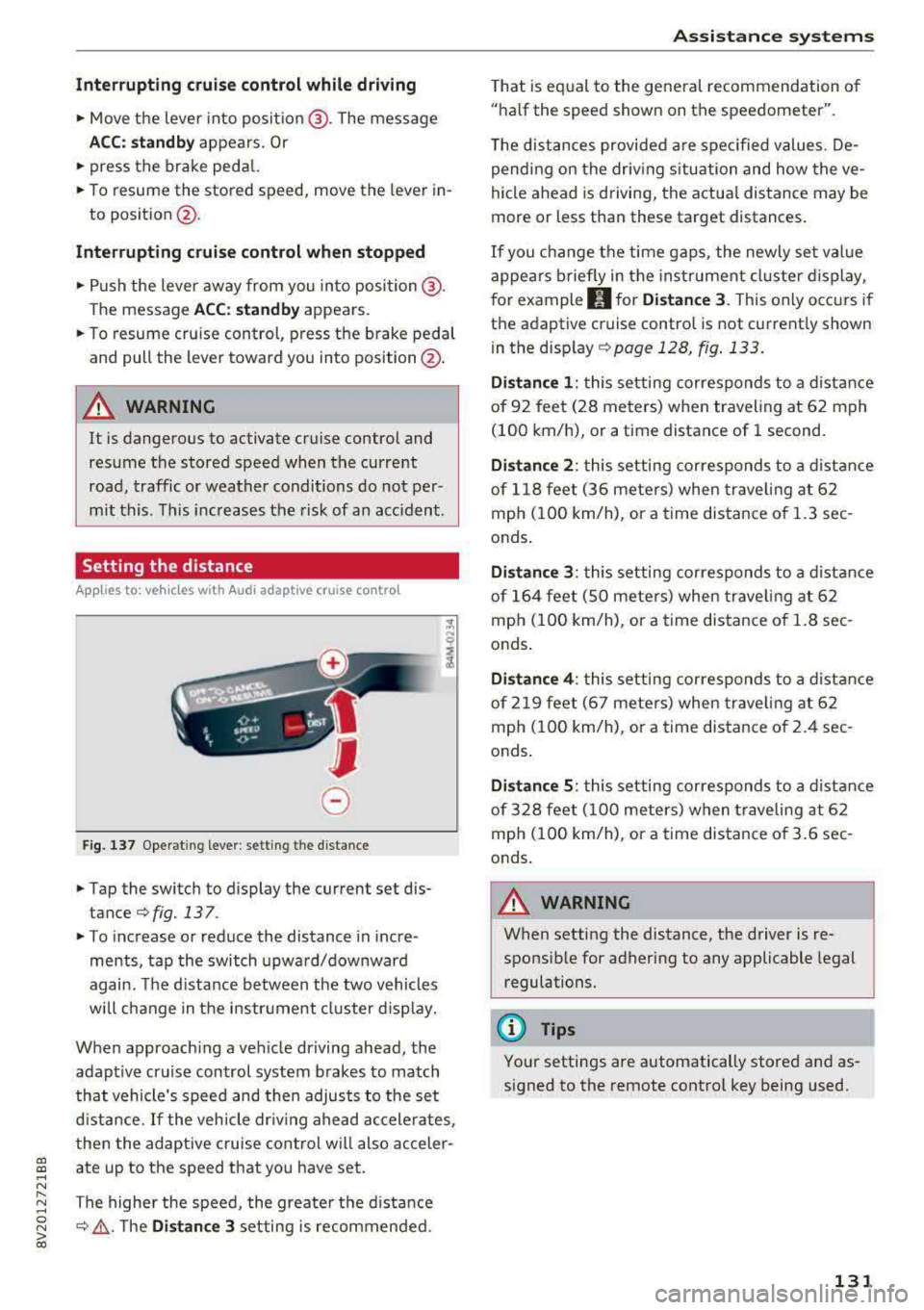
• Tap the switch to display the current set dis
tance
¢fig. 137 .
• To increase or reduce the distance in incre
ments, tap the switch upward/downward
again. The d istance between the two vehicles
wi ll change in the instr ument cluster d isp lay.
When approach ing a vehicle driving ahead, the
adapt ive cruise control system brakes to match
that vehicle's speed and then adjusts to the set
d istance.
If the vehicle dr iv ing ahead ac celerates,
then the adaptive cruise control wi ll also acceler
ate up to the speed that you have set.
The higher the speed, the greate r the d ista nce
¢ &, .T he Di stan ce 3 setting is recommended.
A ss is ta nce syst ems
That is equal to the general recommendation of
"ha lf the speed shown on the speedometer".
T he distances provided a re specified values. De
pend ing on the driv ing s ituation and how the ve
hicle ahead is d riving, the actua l distance may be
more or less than these target distances.
If you change the time gaps, the newly set value
appea rs briefly in the instrument cl uster d isplay,
f or example
II for Di stan ce 3 . This only occurs if
the adaptive cruise contro l is not current ly shown
i n the display ¢
page 128, fig. 133.
Dista nce 1 : this setting corresponds to a distance
of 92 feet (28 meters) when traveling at 62 mph
(100 km/h), or a time distance of 1 second.
Di stance 2 : this setting corresponds to a dist ance
of 118 feet (36 mete rs) when traveling at 62
mph (100 km/h), or a time distance of 1.3 sec
onds .
Distance 3: this setting corresponds to a distance
of 164 feet (SO mete rs) when traveling at 62
mph (100 km/h), or a time distance of 1.8 sec
onds .
Distance 4 : this setting corresponds to a dist ance
of 219 feet (67 mete rs) when traveling at 62
mph (100 km/h), or a time distance of 2.4 sec
onds .
Distance 5 : this setting corresponds to a distance
of 328 feet (100 meters) when traveling at 62
mph (100 km/h), or a time distance of 3.6 sec
onds .
A WARNING
-
When setting the distance, the driver is re -
sponsible for adhering to any applicable legal
regulations.
(D Tips
Your settings are automatically stored and as
signed to the remote control key being used.
131
Page 134 of 400
Ass is tance sy stems
Setting the driving program
Applies to: ve hicles w ith Audi adaptive cruise co ntro l
Depending on the se lected dr iv ing program and
d istance, driving behav ior when accelerating w il l
vary from dynamic to com fortable.
Setting the driv ing pro gram on vehicles
without dri ve s ele ct *
• Se lect in the Infotainment system : I MENU I but
ton
> Vehi cle > left contro l bu tton > Driver a s
s is ta nc e
> Audi adapt iv e cr uise contr ol > Dr iv
i ng p rogram
> Com fort , Standard or Dynami c.
Setting the driv ing mode on vehicles w ith
d riv e se le ct*
Refer to ~ page 144.
@ Tips
Your sett ings are automa tically stored and as
signed to the remote control key being used.
Driver intervention request
A pp lies to: ve hicles with Audi adaptive cruis e co ntrol
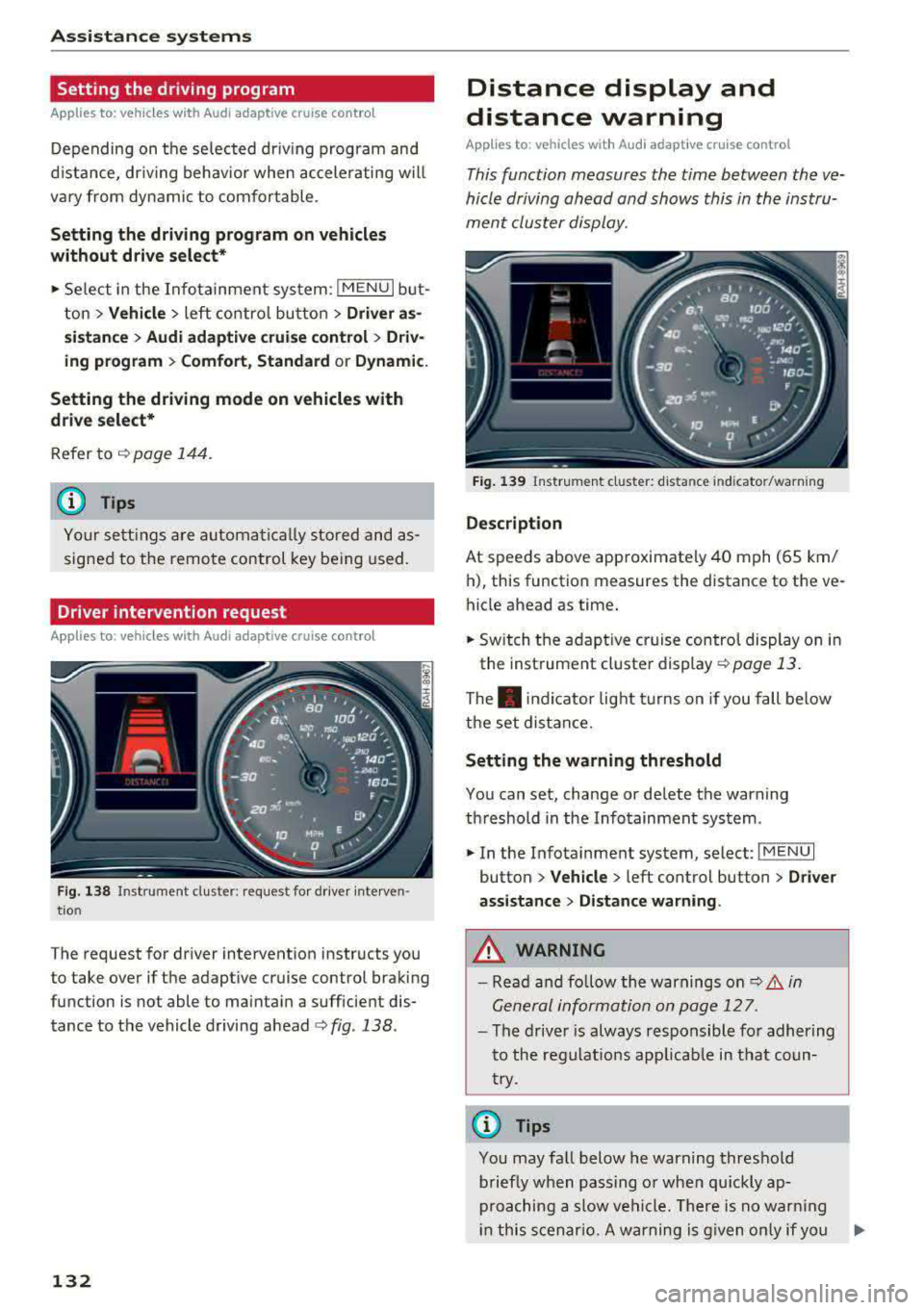
F ig . 138 Instrument cluster: request for drive r interven
t io n
The request for driver intervention instructs you
to take over if the adaptive cruise control braking
function is not able to maintain a sufficient dis
tance to the vehicle driving
ahead ¢ fig. 138.
132
Distance display and
distance warning
App lies to : vehicles wit h Audi ada ptive c ru ise con trol
This function measures the time between the ve
hicle driving ahead and shows this in the instru
ment cluster display.
Fig . 139 Instrument cluster: dista nce indicato r/warning
D es cript ion
At speeds above approximately 40 mph (65 km/
h), this function measures the distance to the ve
hicle ahead as time.
• Switch the adaptive cruise control display on in
the instrument cluster
display ~ page 13.
The . indicator light t urns on if you fall below
the set distance.
Sett ing the w arnin g thre shold
You can set, change or delete the warning
threshold in the Infotainment system.
• In the Infotainment system, select: I MENU I
button > Vehicle > left control button > Driver
assis ta nc e > Di st a nc e wa rning.
,& WARNING
-Read and fo llow the warnings on q .&. in
General information on page 127.
- The driver is always responsible fo r adher ing
to the regulat ions app licab le in tha t coun
try.
(D Tips
You may fa ll below he warning threshold
briefly when passing o r when qu ickly ap
proaching a slow vehicle. There is no warn ing
in this scenar io. A warning is g iven only if you
Page 135 of 400
CXl CXl .... N ,.__
N .... 0 N > 00
fall below t he warn ing t hreshold for an ex
tende d pe riod of time .
Messages
Applies to: veh icles with Audi adaptive cruise control
ll'J ACC: unavailable
The system ca nnot guaran tee that it will detec t
ve hicl es co rrectly a nd it h as sw it c he d off . T he
sensor was moved or is fau lty . Dr ive to an au tho r
i z ed A udi dealer or au thori zed A udi Service Fac ili
ty immediately to have the malfunction cor rect
ed .
Ill ACC : currently unavailable . No sensor vision
II ACC: currently unavailable. Sensor vision re
stricted due to surroundings . See owner's man
ual
This message appears if the sensor view is ob
structed, for example by leaves, snow, heavy
sp ray o r d i rt. C lean the sensor
r:::;, page 12 7,
fig. 12 9.
II ACC : currently unavailable . Gradi ent too
steep
The road exceeds the maximum possib le ang le
for safe adaptive cruise control operation . The
adapt ive cr uise control cannot be sw itched on .
II ACC: only available in D, Sor M
Select the D/S or M se lector lever posi tion.
Ill ACC : parking brake applied
The adaptive cruise co ntro l system switches off
automatically if the parking brake is set. T he
adapt ive cr uise control is ava ilable aga in a fter re
l easi ng the par king brake .
ll'J ACC: currently unavailable. Stabilization
c ontrol input
T his message appea rs if the Electronic Stabiliza
tion Control (ESC) is tak ing action to stabili ze the
ve hicle. In this case, adapt ive cruise control
sw itches off automatically.
II) ACC off: manual control!
This message appea rs if the veh icle rolls back
when sta rting on a slight in cline , even though
Assistance systems
ACC is ac tive . Press t he b rake pedal to preven t
t h e vehi cle from rolling o r starting to move.
Distance warning: malfunction! Please contact
Service
T he system canno t gua rantee that it will detect
vehicles cor rect ly and it has switc hed off. The ra
dar sensor was move d or is faulty. Drive to an a u
thorized Aud i de aler o r au thori zed Audi Service
F acility immed iate ly to have the ma lfunction co r
rected.
Distance warning: currently unavailable. Sensor
view restricted due to surroundings.
T h is message appears if the senso r view is ob
str ucted, for examp le by leaves, snow, heavy
s pra y or dirt. Cle an t he
sensor <> page 12 7,
fig. 129 .
Distance warning: currently unavailable. See
owner's manual
This message appears if the system has a tempo rary fa ilure.
If this occurs m ultiple t imes, drive to
an a uth orized Aud i dea le r or a uth orized Audi
Se rvice Facility i mmed ia te ly to h ave the ma lfu nc
t ion co rre cte d.
Fasten seat belt
The system is not complete ly ava ilable if the dr iv
er 's seat belt is unfastened.
Stat. obj. ahead
T h is m ess age appears if yo u wo uld like to switch
t h e sys tem on and t here is a s ta ti onary objec t di
rectly in front o f yo ur vehicle.
Door open
The system is not available whe n the vehicle is
stationary and the driver's door is open.
Audi pre sense
Introduction
Appl ies to : vehicles wit h Aud i pre sense
Within t he limits of the system, the pre sense
f unct ions can initiate measures in pa rtic ularly
dange rous situations to protect the vehicle pas-
sengers and other road users.
..,.
133