fog light AUDI S3 SEDAN 2017 Owners Manual
[x] Cancel search | Manufacturer: AUDI, Model Year: 2017, Model line: S3 SEDAN, Model: AUDI S3 SEDAN 2017Pages: 400, PDF Size: 67.32 MB
Page 53 of 400
a, a, ..... N
" N ..... 0 N > 00
Lights and Vision
Exterior Lighting
Switching lights on and off
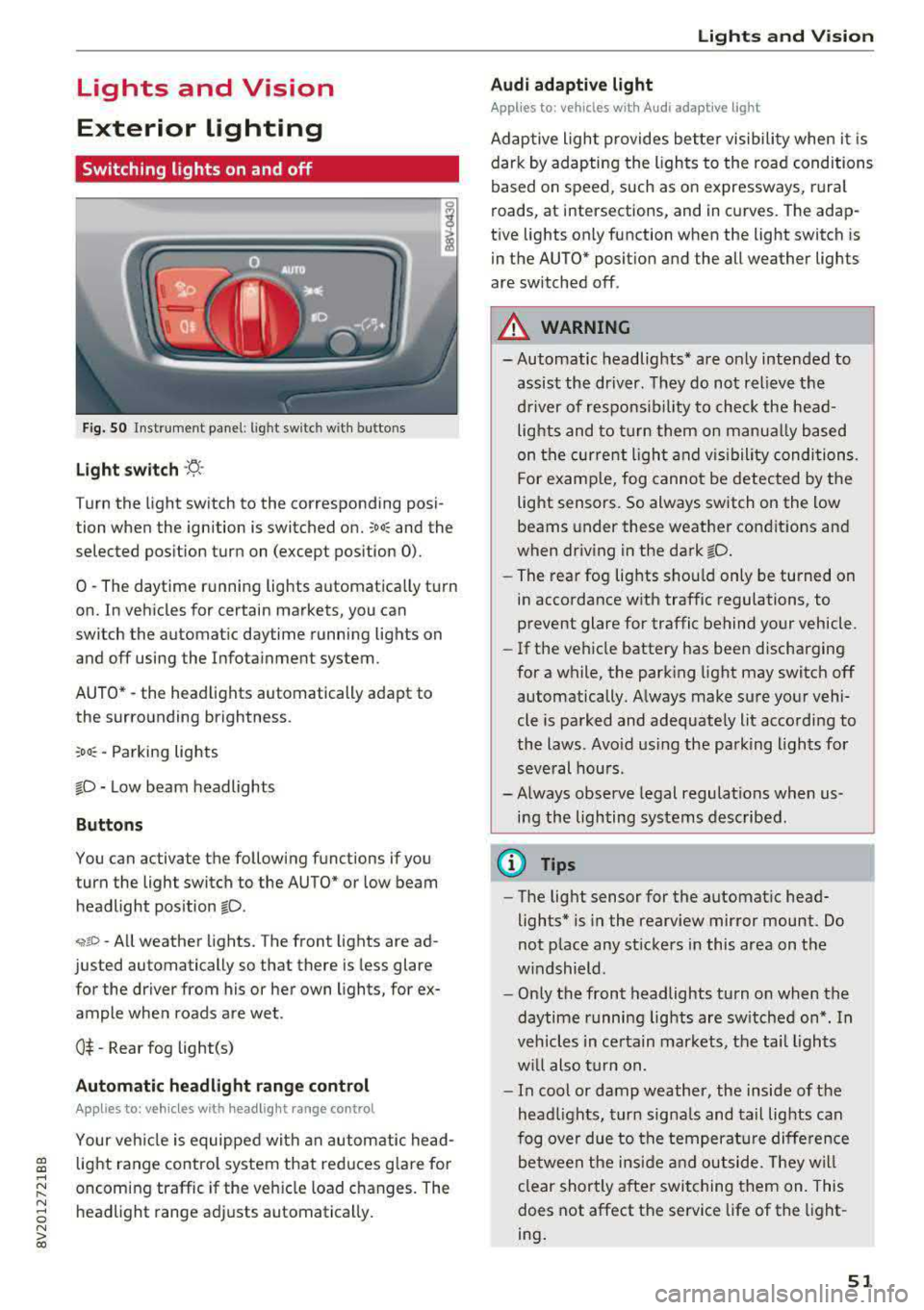
Fig . 50 Instrument panel: l ig ht switc h w ith buttons
Light switch ·'t! ·
Turn the light sw itch to the corresponding posi
tion when the ignition is switched on.
;oo: and the
selected pos ition turn on (except pos ition 0).
0
-The daytime r unning lights automat ica lly t urn
on. In vehicles for certain markets, you can
switch the automatic daytime running lights on
and
off using the Infota inment system.
AUTO*
-the head lights automatically adapt to
the surro unding brightness.
:oo~ -Parking lights
fD -Low beam headlights
Button s
You can activate the following functions if you
turn the light switch to the AUTO* or low beam
headlight pos ition
fD .
~ro -All weather lights. The front lights are ad
justed automatically so that there is less glare
for the driver from his or her own lights, for ex
ample whe n roads are wet .
0$ -Rear fog light(s)
Automatic headlight range control
Applies to: vehicles with headlight range control
Your vehicle is equipped with an autom atic head
light range control system that red uces g lare for
oncoming traffic if the veh icle load changes. The
headlight range adj usts automatically .
Lights and V ision
Audi adaptive light
Appl ies to: veh icles w ith Audi adaptive light
Adaptive light provides bette r visibili ty when i t is
dark by adapting the ligh ts to the road condi tions
based on speed, such as on e xpressways, rura l
roads, at intersections, and in curves. The adap
t ive lights only function when the light switch is
in the AUTO* posit ion and the all weather lights
are switched off .
A WARNING
-
- Automatic headlights * are on ly intended to
assis t the dr iver. They do not relieve t he
d river of respons ibi lity to check the head
lights and to turn them on manua lly based
on the cur re nt ligh t and v isibility condition s.
For e xamp le, fog cannot be detected by the
light senso rs . So always switch on the low
beams under these weather con dit ions an d
when dr iv ing in the dark
fD.
- The rear fog lights sho uld only be turned on
in accordance wit h traffic regulations , to
prevent glare for traffic behind your vehicle.
- If the ve hicle battery has bee n discharging
for a wh ile, the park ing light may switch
off
automatically. A lways make su re your vehi
cle is parked and adequate ly lit acco rdi ng to
the laws . Avo id us ing the parking ligh ts for
seve ral hou rs .
- Always observe legal regulations when us
i n g the lighting systems described.
@ Tips
- The lig ht sensor for the automat ic head
lights* is in the rearview mirror mount. Do
not p lace any st ickers in this area on t he
w indshield .
- Only the front headlights turn on when the
daytime running lig hts are sw itched on *. In
veh icles in ce rtain markets, the tai l lights
w ill also tu rn on.
- In cool or damp weathe r, the inside of the
head lights, t urn sign als and tail lights can
fog ove r due to t he tempera ture diffe rence
b etween the ins ide an d ou tside. They wi ll
clear shortly a fter swi tching them on. This
does not affect the service life of the light
ing .
51
Page 55 of 400
a, a, ..... N
" N ..... 0 N > 00
~ Headlight assista nt: m alfun cti on! See own
e r's manual
Drive to an autho rized Aud i deale r or a uthorized
Aud i Service Facility immedia tely to have the
malfunct ion corrected. You can still switch the
high beams on or off manually.
ID High beam as sis t : currently unavailable. No
ca mera vie w
~ Headlight a ssi stant: currently un available .
Camera view re strict ed du e to surroundin gs.
See owner 's manual
The camera view is blocked, for example by a
sticker or debris. Please clean the windshie ld .
The sensor is located in the inter ior rearview mir
ror mount . Do not place any stickers in this area
on the windsh ield .
& WARNING
High beam assistant is only intended to assist
the drive r. The dr iver is still responsible for
con troll ing the headlights and may need to
switch t hem on and off manually depending
on light and visibility conditions . It may be
necessaty to operate them manua lly in s itua
tions such as:
- In adverse weather conditions such as fog,
heavy rain, b low ing snow or spraying water.
- On roads where oncoming traffic may be partially obscu red, such as expressways .
-If there are road users with poor lighting,
such as bicyclists .
- In tight c urves and on s teep hills.
- In poorly lit areas.
- With strong reflecto rs, such as s igns.
- If the area of the windsh ield near the sensor
is fogged over, dirty, icy or covered with a
st icker.
ll Th is fun ctio n is not a vail able in al l countries.
Lights and V ision
Adjusting the exterior lighting
T he functions are adjusted in the Infotainment
system .
.,. Select in the Infotainment system: I MENU ! but
ton
> V ehicle > left control button > V ehicle
setting s> Exterior light ing .
Aut omat ic h eadlight s*
You can adjust the following settings in the Au
tomati c headlights
menu :
Activation tim e* -you can adjust if the head
lights sw itch on
Earl y, Medium or Late acco rding
to the sensitivity of the light s ensor .
Headlight a ss is tant * -you can switch the h igh
beam assistant * on and off .
Entry/exit lighting*
You can switch the entry/exit lighting* on and
off. When it is dar k, it illum inates the area
around the vehicle when un loc king t he ve hicle
and after sw itchi ng off the ignition and opening
the driver's door .
T he entry/exit lighting only work s whe n it is da rk
and the light sw itch is in the
AUTO * position .
Daytime running lights1
)
The daytime runni ng lig hts can be turned on and
off . When daytime r unning lights are turned on,
the lights w ill stay on continuously whenever the
i gni tion is sw itched on .
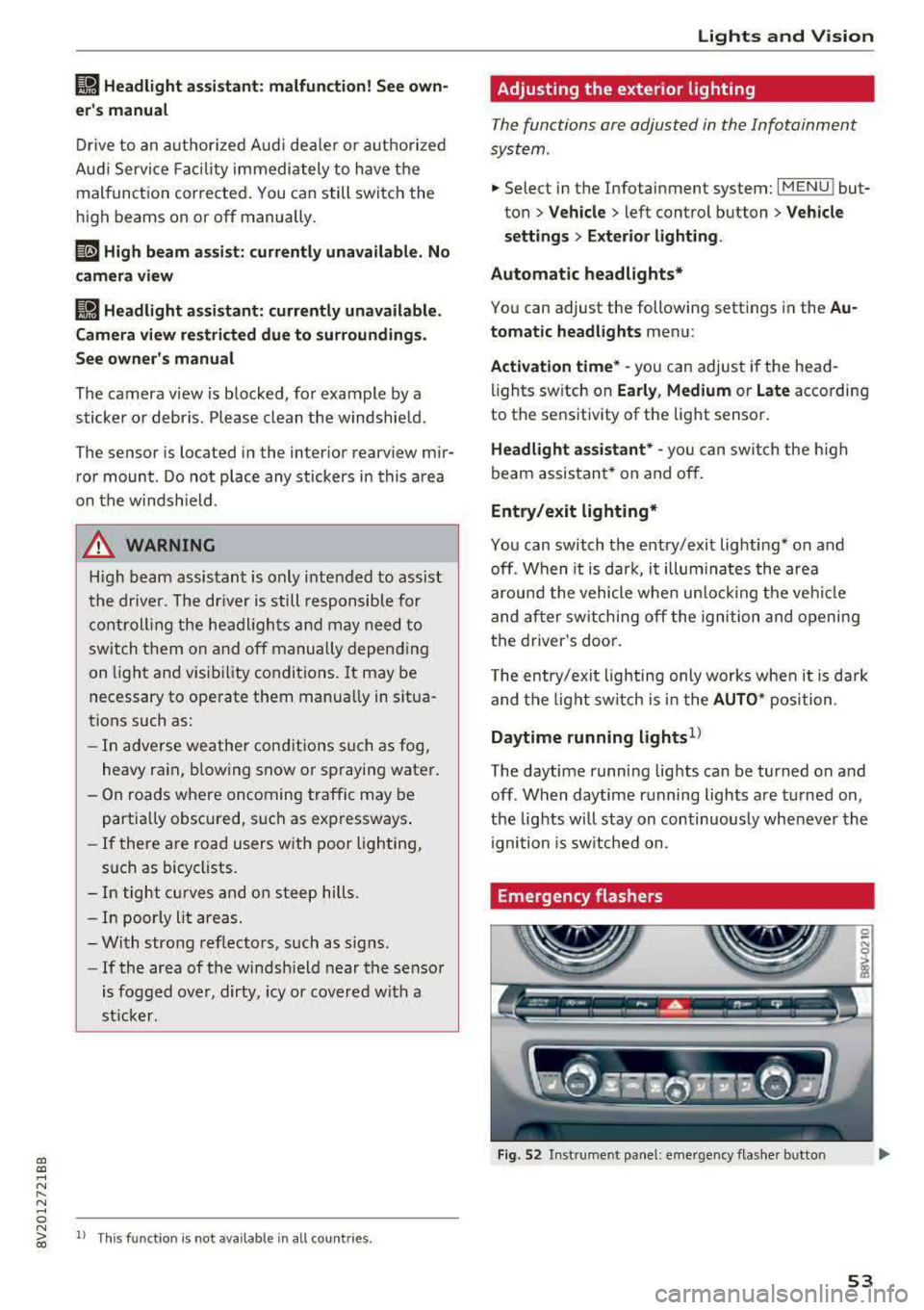
Emergency flashers
Fig. 52 Instrume nt pa nel : eme rge ncy flas her b utto n
53
Page 73 of 400
Warm and cold
Automatic climate control system
App lies to: ve hicles with a utomat ic clima te contro l syste m
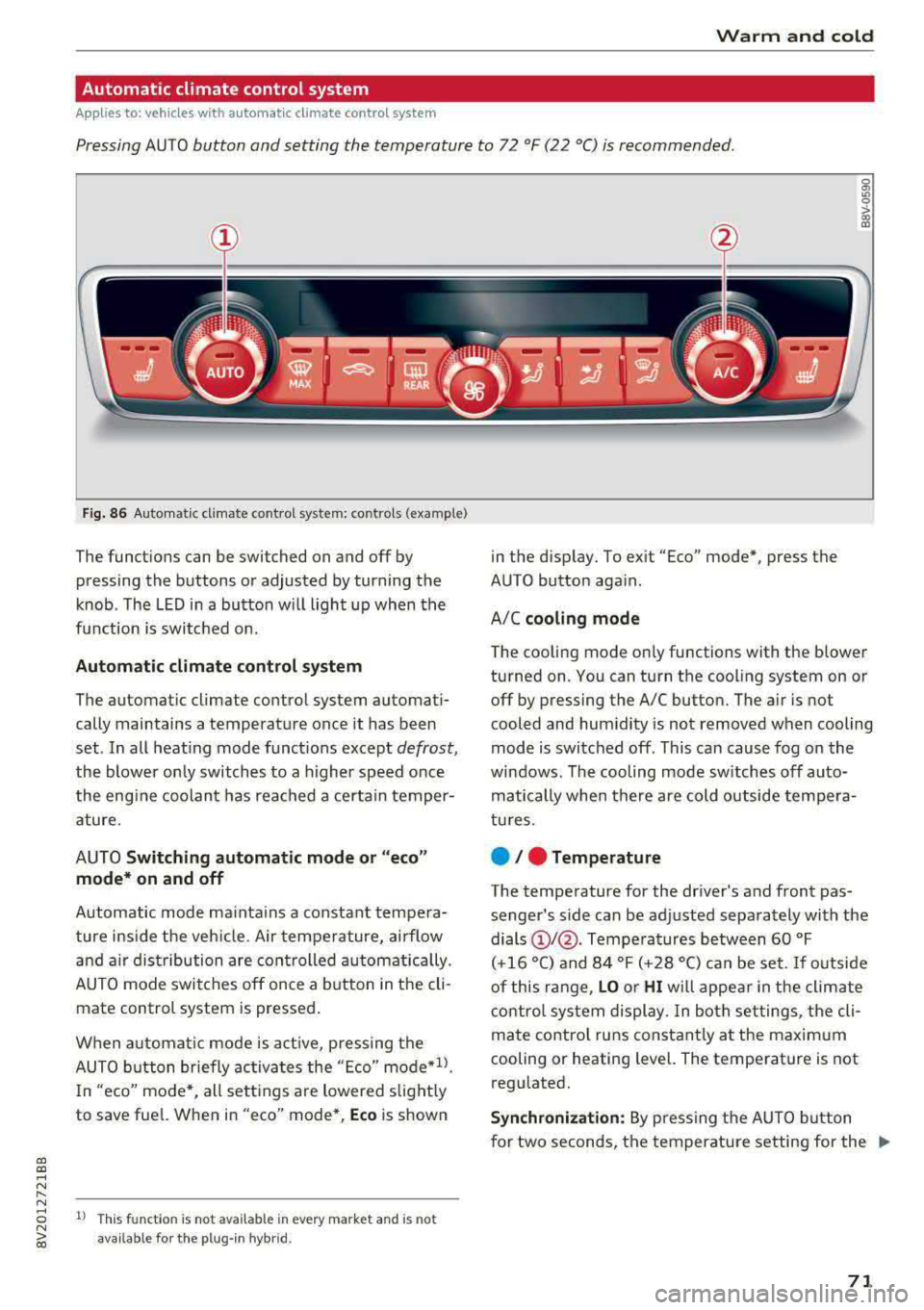
Pressing AUTO button and setting the temperature to 72 °F (22 °C) is recommended.
a, a, ..... N
" N
Fig. 86 Automatic cl imate con trol system: controls (exa mple)
The funct io ns can be switched on and off by
pressing the buttons or adjusted by turning the
k n ob. The LED i n a butto n w ill light up wh en the
f u nction is switched o n.
Automatic climate control system
The automat ic climate control system automati
cally maintains a temperatu re once it has been
set . In all heat ing mode funct ions e xcep t
defrost,
the blower on ly switches to a higher speed once
the eng ine coolan t has reached a cer ta in temper
ature.
AUTO
Switching automatic mode or "eco "
mode* on and off
Automatic mode ma inta ins a constant tempera
ture ins ide the veh icle. Air tempe rature, airflow
and a ir dist ribution are cont rolled automat ically.
AUTO mode switches off once a b utton in t he cli
mate control system is pressed .
When a utomat ic mode is a ct ive, pressing the
AUTO b utton briefly activa tes the "E co"
mode*ll.
In "eco" mode'<-, all sett ings are lowered slight ly
to save fue l. When in "eco" mode*,
Eco is shown
8 1l Thi s funct ion is not available in every market and is not N ~ availab le fo r the plug- in hyb rid.
in the disp lay. To ex it "Eco" mode*, press the
AUTO button aga in.
A/C
cooling mode
T he cooling mode on ly functions with the blower
turned on. You can turn the cooling system on or
off by pressing the A/C button. The air is not
cooled and humidity is not removed when cooling
mode is switched off. This can cause fog on the
windows . The cooling mode sw itches off auto
matically when there are cold outside tempera
tu res.
e / e Temperature
The temperature for the driver's and front pas
senger's side can be ad justed separately with the
dials
(D I@ . Tempe ra tures between 60 °F
(+16 °() and 84 °F (+ 28 °() ca n be set. If o utside
of this range,
LO o r HI w ill appe ar in the climate
contro l system display. In bot h set tings, the cli
mate contro l runs constant ly a t the maxim um
cooling or heating level. The temperature is not
regu lated.
Synchronization: By pressing t he AUTO b utton
for two seconds, the temperature setting for the
.,..
71
Page 77 of 400
CXl CXl .... N ,.__
N .... 0 N > 00
next traffic light is red. This produces an engine
braking effect, which helps to protect the brakes
and tires and reduces the emissions and fuel con
sumption to zero (fuel shut-off during decelera
tion).
Shift efficiently
An effective way to save fuel is to upshift earlier.
Staying in a gear too long uses fuel unnecessari
ly .
Press down on the accelerator pedal slowly and
avoid "kick-down".
Avoid full acceleration
You should rarely travel at the maximum vehicle
speed. High speeds cause a disproportionately
high increase in fuel consumption, emissions and
traffic noise. Slower driving saves fuel.
Reduce idling time
The Start/Stop system* helps to reduce the idling
time automatically. In vehicles without the Start/
Stop system, it is efficient to switch the engine
off when stopped
at railroad crossings and long
red lights. Depending on the version of the en
gine, stopping the engine for as little as five sec
onds once it has reached operating temperature
still saves more fuel than leaving the engine run ning
-even when taking into account the amount
of extra fuel that is used to restart the engine.
It takes a very long time in idle to warm the en
gine up to operating temperature. Wear and
emissions are especially high in the warm-up
phase. Therefore, you should begin driving im
mediately after starting the engine. Avoid high
RPMs while doing this.
Have maintenance performed regularly
By having maintenance performed regularly on
your vehicle, you can help to reduce fuel con
sumption before you even start to drive. The maintenance condition of your vehicle not only
affects traffic safety and long-term value but al
so impacts
fuel consumption. A poorly main
tained engine can lead to fuel consumption that
is 10% higher than normal.
Driving
Avoid short trips
The engine and emissions control system must
reach their optimal
operating temperature to ef
fectively reduce consumption and emissions.
A cold engine uses a disproportionately high
amount of fuel. The engine reaches operating
temperature and consumption normalizes only
after approximately 2.5 miles (4 km).
Check the tire pressure
To save fuel, make sure the tires are always in
flated to the correct pressure
r=;, page 33 5. The
fuel consumption can increase by S% if the pres
sure is only 0.5 bar too low. Due to the increased
rolling resistance, low tire pressures will also
lead to greater tire
wear and will affect driving
behavior.
Do not drive on
winter tires year-round, as this
will consume up to 10% more fuel.
Eliminate unnecessary weight
Since every kilogram of extra weight increases
fuel consumption, a quick inspection of the lug
gage compartment may be worth it to avoid un
necessary weight.
When not being used, a roof rack should be re
moved to decrease the wind resistance of the ve
hicle. You will save approximately 12% of your
fuel when at speeds from 62-75 mph
(100-120 km/h).
Save energy
The engine drives the generator, which generates
electricity; the fuel consumption also increases
with the demand for electricity. Therefore, switch
electrical equipment off when you no longer
need it. Examples of equipment that uses a lot of
energy are air blowers at a high setting, the rear
window defogger and seat heating*.
(D Note
- Do not leave engine idling unattended after
starting. If warning lights should come on
to indicate improper operation, they would go unheeded. Extended idling also produces
heat, which could result in overheating or
IJ,-
75
Page 102 of 400
e-tron
Setting plug -in hybrid drive modes
Applies to: vehicles with plug -in hybrid drive
You con select between one electric mode and
two hybrid modes .
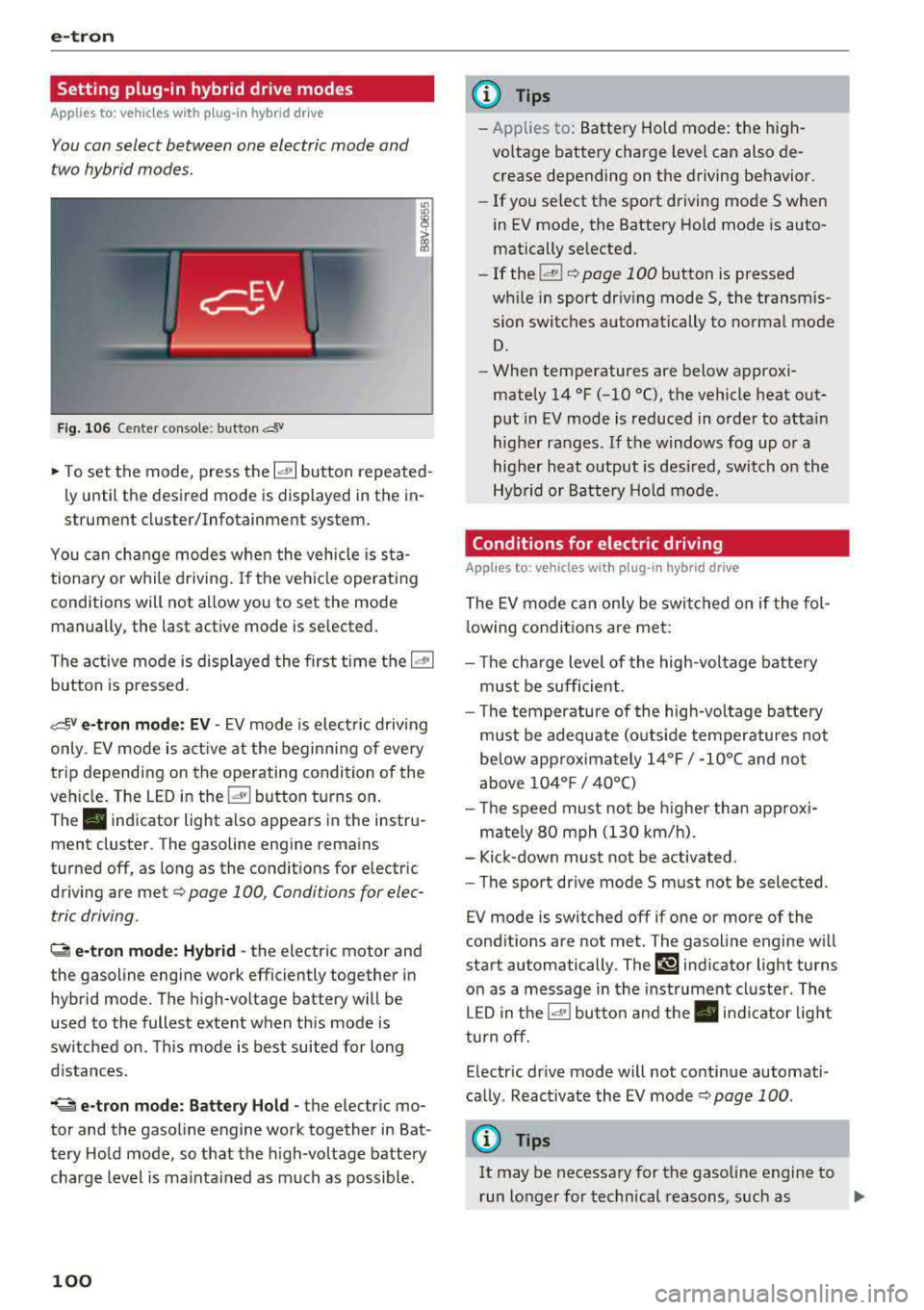
Fig. 10 6 Center conso le: button &
"' "'
i (0
~ To set the mode, press the ld' I button repeated
ly until the desired mode is displayed in the in
strument cluster/Infotainment system.
You can change modes whe n the vehicle is s ta
tionary or while driving . If the ve hicle operat ing
conditions will not allow you to set the mode
manually, the last active mode is selected.
The active mode is displayed the first t ime t he
ld• I
button is pressed.
av e -tron mode : EV -EV mode is elec tric dr iv ing
only. EV mode is active at the beginning of every
tr ip depending on the operating condition of the
veh icle . The LED in the
lal button turns on.
The . indicator light also appears in the instru
ment cluster. The gasoline engine remains
turned off, as long as the condit ions for electric
driving are met
c:;, page 100 , Conditions for elec
tric driving .
~ e-tron mode: Hybrid -the electric motor and
the gasoline engine work efficiently together in
hybrid mode. The high-voltage battery will be
used to the fullest extent when th is mode is
sw itched on . Th is mode is bes t suited for long
d istances .
.. ~ e-tron mode : Battery Hold -the electric mo
tor and the gasoli ne engine work together in Bat
tery Hold mode, so that the high-voltage battery
charg e level is ma inta ined as much as possible .
100
@ Tips
-Applies to: Battery Hold mode : the high
voltage battery charge level can also de crease depending on the driving behavior.
- If you select the sport driving mode S whe n
in EV mode, the Battery Hold mode is auto
matically se lected.
- If
the !& ! c:;, page 100 button is pressed
wh ile i n sport driv ing mode S, the transm is
sion switches automatically to normal mode
D.
- When temperatures are below approxi
mately
14 °F ( -10 °(), the vehicle heat out
put in EV mode is reduced in orde r to attai n
highe r ra nges. If the windows fog up o r a
highe r heat output is desi red, switch on the
Hyb rid or Battery Hold mode.
Conditions for electric driving
Applies to : vehicles with plug-in hybrid drive
The EV mode c an only be swi tc h ed o n if the fol
l owing condit ions are met:
- T he cha rge level of the high-vol tage batte ry
m ust be sufficient .
- Th e temperature of the hig h-vol tag e batte ry
m ust be adequate (o utside temper atures not
below app roxima tely
1 4 °F / -10°( an d no t
above
1 04° F / 40°()
- Th e speed must not be higher th an approxi-
mate ly
80 mph (13 0 km/h).
- Kick-down must no t be a ctivated.
- Th e sport drive mode S m ust no t be selected .
EV mode is switched off if one or more of the
cond it ions are not met . The gasoline engine w ill
start automatically . The
111 ind icator light turns
o n as a message in the instrument cl uster . The
L ED in t he
l.c! 'I bu tto n and the . in dicator lig ht
tu rn off.
E lectric dr ive mode will not co ntinue automati
ca lly . React ivate the EV mode
¢ pag e 100 .
(D Tips
It may be necessary for the gaso line e ngine to
r un lo nger for technical reasons, such as
..,.
Page 126 of 400
Ass is tan ce sys tems
speed and the distance between your
vehicle and other vehicles.
- For safety reasons, cruise control should not
be used in the city, in stop-and-go traffic, on
winding roads and when road condit ions are
poor (such as ice, fog, gravel, heavy rain and
hydroplaning), because th is increases the
r isk of an accident.
- Switch the cruise control off temporar ily
when driving in turn ing lanes, h ighway exits
or in construction zones.
- Please note that unconsciously "resting" yo ur foot on the accelerator pedal prevents
the cruise control from braking. This is be
ca use p ressing the acce le rato r pedal ove r
rides the c ruise contro l system.
- If a bra ke system ma lf u nction such as over
heating occu rs when the c ruise contro l sys
tem is sw itched on, the braking function in
the system may be switched off . The rest of
the cr uise control system f unctions remain
active as long as the
(lj;(i)~i~ (USA models) /
Bl (Canada models) indicator light is on.
(D Note
Before driving downhill a long distance on a
steep hill, decrease your speed and select a
lower gear. Th is makes use of the eng ine
braking effect and relieves the brakes.
@ Tips
The brake lights turn on when the brakes a re
activated.
Changing the speed
A pp lies to: ve hicles w ith c ruise contro l system
.,. To increase or decrease the speed in incre
ments,
tap the lever in the 0 10 d irection
¢ page 123, fig . 127 .
.,. To inc rease o r decrease the speed quickly, hold
the leve r in the 0 / 0 direct io n until the de
s ir ed speed is reached.
124
' Overriding the speed
App lies to : vehicles wit h cruise co ntrol system
You can press the acce lera to r pedal to increase
you r speed, fo r example if you want to p ass
someone. The speed you set ear lier will resume
as soon as you release the acce lerator pedal.
However, if yo u are d rivi ng considerably faste r
t h an the s to red speed for a lo ng period of time
time, the cr uise con trol sys tem w ill temporari ly
switch off . The
(lj;(i)~i~ (USA models) !Bl (Canada
models) indicato r light in the instrument cluste r
turns off and the stored speed is maintained.
Preselecting a speed
App lies to : vehicles wi th cruise co ntrol system
You can pre -select your desired speed when the
vehicle is stationary.
.,. Switch the ignit io n on.
.,. Pull the lever into position (D ¢ page 123,
fig. 127 .
.,. To increase or decrease the speed, tap the lever
in the
0 10 direction.
This function makes it possible, for example, to
save the speed you want before d riving on t he
highway. Once on the highway, activate the
cruise contro l system by pu lling the lever toward
the position
(D .
' Switching off
App lies to: vehicles wit h cruise co ntrol system
Deactivating temporarily
.,. Press the brake pedal, or
.,. Press the lever into position @ (not clicked into
place) ¢ page 123, fig . 12 7, or
Switching off completely
.,. Press the lever into position @(clicked into
place), or
.,. Switch the ignit io n off.
The speed you stored will be maintained if the cruise contro l has been switched off temporarily .
To resume the stored speed, release the brake pedal and pull the lever to position
(D . ..,.
Page 139 of 400
a, a, ..... N
" N ..... 0 N > 00
corrective steering shortly before you leave the lane . This will attempt to keep your vehicle in the
lane .
Appl ies to: veh icles without Audi sid e assist
The system will not warn you before crossing a
lane marker line if you have activated the turn
signal. In this case , it ass umes that you are
changing lanes intent ionally.
& WARNING
- The system warns the driver that the vehicle
is leaving the lane using corrective steering.
The driver is always responsib le for keeping
the vehicle within the lane.
- The system can help you keep the vehicle in
the lane, but it does not drive by itself. Al
ways keep your hands on the steering
wheel.
- Corrective steering may not occur in certain
situations, such as during heavy brak ing.
- There may be cases where the camera does not recogni ze all lane marker lines. Correc
t ive steering can only take p lace on the side
of the veh icle where lane marker lines are
detected.
- Other road structures or objects could possi
bly be identified unintentionally as lane
marker lines . As a result , corrective steering
may be unexpected or may not occur.
- The camera view can be restr icted, for ex
amp le by vehicles driv ing ahead or by rain,
snow, heavy spray light shining into the
camera or by d irt on the window. This can
result in active lane ass ist not detecting the
lane marker l ines or detecting them incor
rectly .
- Under certain conditions such as ruts in the road, an inclined roadway or crosswinds, the
corrective steering alone may not be enough
to keep the vehicle in the middle of the lane.
- For safety reasons, active lane assist m ust
not be used when there are poor road and/
or weather conditions such as slippery
roads, fog, gravel, heavy ra in, snow and the
potent ial for hydroplaning . Using active lane
assist unde r these conditions may increase
the risk of a crash.
A ss is ta nce syst ems
Switching on/off
Applies to: vehicles with A udi active lane ass ist
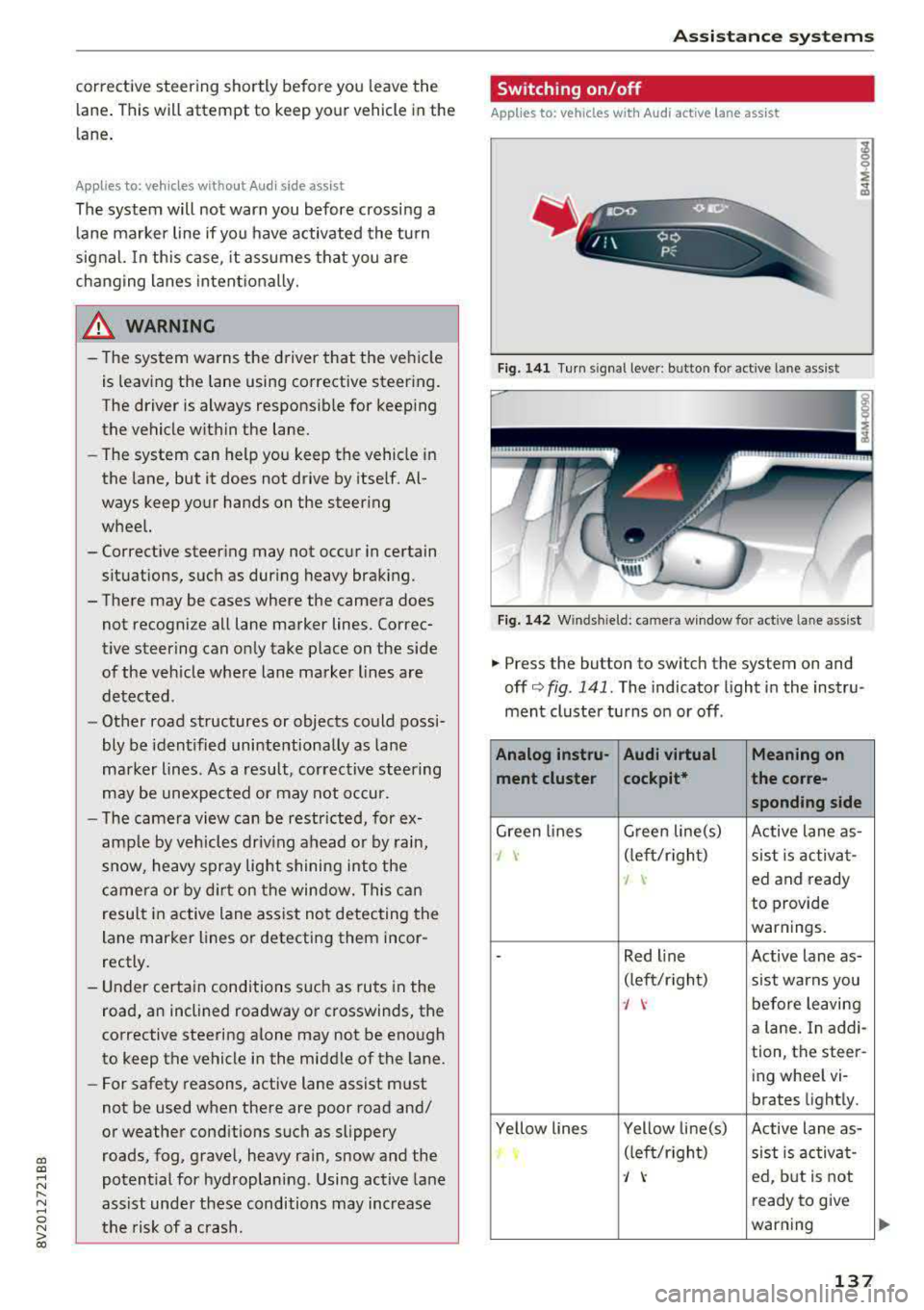
Fig. 141 Turn signal leve r: bu tto n fo r a ctive lan e ass ist
Fi g. 142 Winds hield : camera w indow fo r active lane a ssist
.,. Press the button to swi tch the sys tem on and
off
c'.> fig . 141. The indicator light in the instru
ment cluster turns on or off .
Analog instru- Audi virtual Meaning on
ment clu ster cockpit* the co
rre-
sponding s ide
Green lines G
reen line(s)
Active lane as-
J \· (left/rig ht)
sist is activa t-
I ed and ready
to provide
warnings.
-Red l ine Active lane as-
(lef t/r ight)
sist warns you
J \· before leaving
a lane. In addi-
tion, the steer-
ing wheel vi-
brates light ly.
Ye llow lines Yellow line(s)
Active lane as-
(left/r ight)
sist is activa t-
J ed, but is not
ready to give
warning
137
Page 140 of 400
Ass is tance sy stems
If the system is switched on but is not ready to
provide warn ings, one of the following cou ld be
the cause:
- T here is no lane marker line .
- The re levant lane marker lines are not detected
(for example, markings in a constru ction zone
or because they are obstructed by snow , dirt,
water or lighting).
- T he vehicle speed is below the ac tiva tion speed
of approx imately 40 mph (65 km/h).
- T he lane is too narrow or too wide .
- T he curve is too nar row .
- The driver's hands are not on the steering
whee l.
@ Tips
-Make sure the camera 's field of view
¢ fig . 142 is not obst ructed by sticke rs o r
anything else . For informat ion on cleaning,
see
i::> page 347.
- In certain markets: if the system is switched
on, it will sw itch on automat ically each time
the ig nition is swi tched on.
Display in the instrument cluster
Applies to: ve hicles with Audi active lane assist
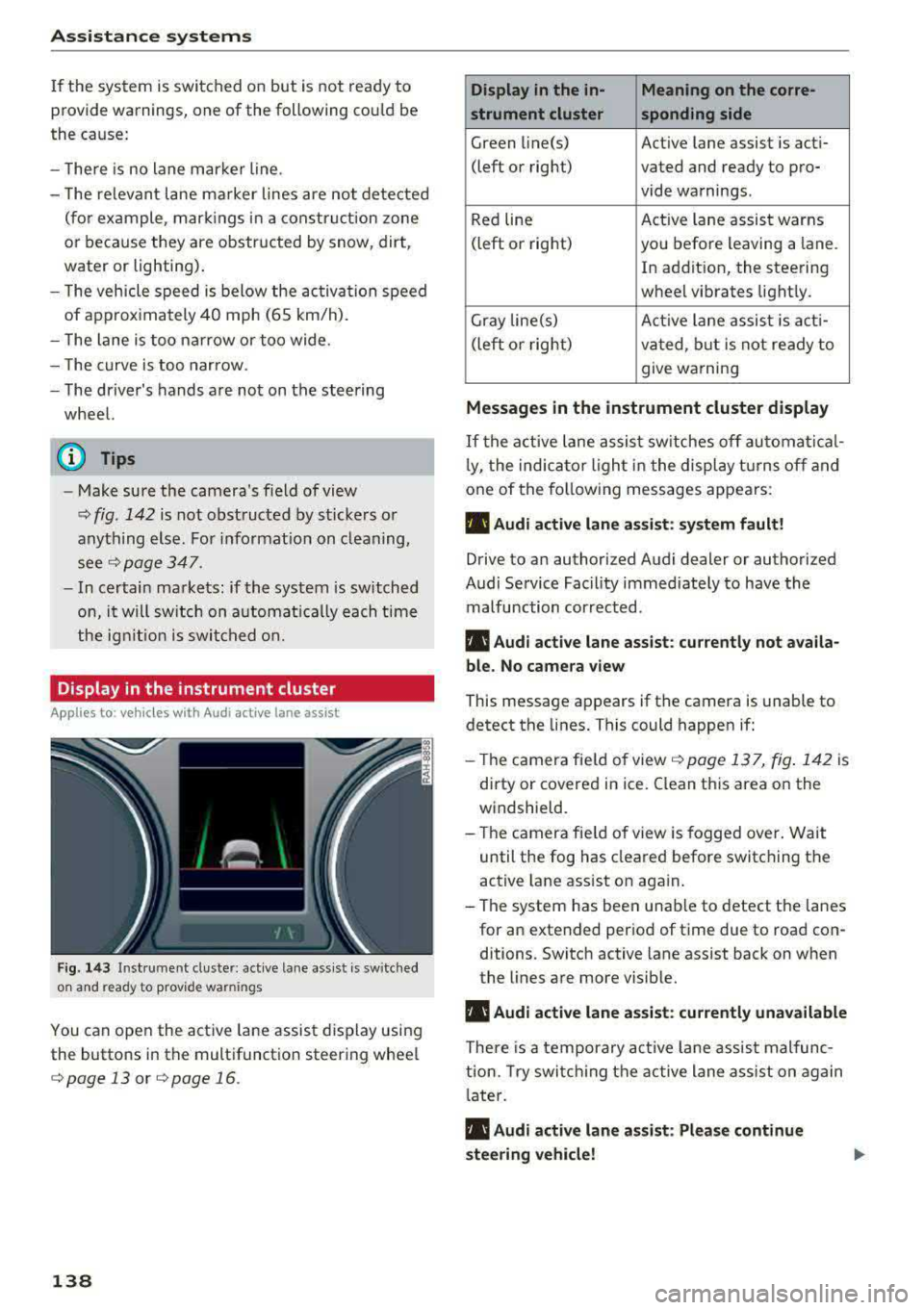
Fig . 14 3 Instrum ent cluste r: act ive lane as sis t is sw itc hed
on and read y to p rov id e wa rnin gs
You can open the act ive lane assist display using
the buttons in the multifunct io n steering wheel
¢ page 13 or ¢ page 16 .
138
Display in the in- Meaning on the corre-
strument cluster sponding side
Green line(s) Act ive lane assist is act i-
(left or right) vated and ready to pro- vide warnings.
Red line Act
ive lane assist warns
(left or right) you befo re leaving a lane.
In addition, the steering
wheel vibrates light ly.
Gray line(s) Active lane assis t is act i-
(left o r right) va ted , b ut is not ready to
give warning
Messag es in the instrument cluster display
If the active lane assist sw itches off au tomati cal
l y, the indica to r li ght in the display t urns off and
one of the fo llow ing messages appears :
• Audi active lane assist: sy stem fault!
Drive to an authori zed Audi dealer or authori zed
Audi Service Facil ity immediate ly to have the
malfunction corrected.
• Audi active lane a ssist : cu rrently not a vaila
bl e. No came ra view
This message appears if the camera is unable to
detect the lines. This could happen if:
- Th e camera fie ld of view
¢ page 137, fig . 142 is
dirty or covered in ice . Clean this area on the
windsh ield.
- The camera fie ld of view is fogged over. Wait
until the fog has cleared before switching the
active lane assist on again.
- The system has been unable to detect the lanes for an extended per iod of time due to road con
ditions . Switch active lane assist back on when
the lines are more visib le.
• Audi active lane a ssist: currently una vailable
There is a temporary act ive la ne assis t malfunc
tion. Try swi tch ing the active lane a ss ist on again
l ate r .
• Audi active lane a ssist : Please continue
steering vehicle!
Page 158 of 400
Intelligent Technology
and at cold times of the year. A lot of energy is
used but little is generated. It is also critical
when the engine is not running but electrical
equipment is switched on. In this case, energy is
used but none is generated.
In situations like this, energy management will
actively regulate the distribution of energy.
Long periods without use
If you do not drive your vehicle for several days or
weeks, electrical equipment is gradually scaled
back or switched off. This reduces energy use and
ensures the vehicle will be able to start after long
periods of time. Some convenience functions
such as opening with the remote control key may not be available. These convenience functions
will be available again once you switch the igni tion on and start the engine.
With the engine switched off
The vehicle battery will drain if you use Infotain
ment functions such as listening to the radio
while the engine is switched off.
If the vehicle's ability to start may be impaired by
the energy use, a message will appear in the In
fotainment system display. The message indi
cates that the system will switch off automatical ly soon . If you would like to continue using the
functions, you must start the engine.
With the engine running
Although electrical energy is generated while
driving, the vehicle battery can drain . This can
happen if little energy is generated but much is
used, and the charge level of the vehicle battery
is not optimal.
To restore the balance of energy, components that require large amounts of energy are temporar ily scaled back or switched off. Heating sys
tems in part icular require a great deal of energy .
If you notice, for example, that the seat heating*
or rear window defogger is not working, then it
has been temporarily reduced or switched off.
These systems are available again as soon as the
energy supply has been restored .
In addition , you may notice that the idle speed
has slightly increased. That is normal and no
156
cause for concern . By increasing the idling speed,
the additional required energy will be generated
and the vehicle battery will be charged.
Notice about data
recorded by the Event
Data Recorder and
vehicle control modules
Event Data Recorder
This vehicle is equipped with an Event Data Re
corder (EDR). The main purpose of an EDR is to
record, in certain crash or near crash-like situa
tions, such as an airbag deployment or hitting a road obstacle, data that will assist in understand
ing how a vehicle's systems performed . The EDR
is designed to record data related to vehicle dy
namics and safety systems for a short period of
time, typically 30 seconds or less. The EDR in this
vehicle is designed to record such data as:
- How various systems in your vehicle were oper
ating;
- Whether or not the driver and passenger safety
belts were buckled/fastened;
- How far (if at all) the driver was depressing the
accelerator and/or brake pedal; and,
- How fast the vehicle was traveling.
These data can help provide a better understand
ing of the circumstances in which crashes and in
juries occur. NOTE: EDR data are recorded by your
vehicle only if a non-trivial crash situation occurs;
no data are recorded by the EDR under normal
driving conditions and no personal data (e.g .,
name, gender, age, and crash location) are re
corded . However, other parties, such as law en
forcement, could combine the EDR data with the
type of personally identifying data routinely ac
quired during a crash investigation .
To read data recorded by an EDR, special equip
ment is required, and access to the vehicle or the
EDR is needed . In addition to the vehicle manu
facturer, other parties, such as law enforcement,
that have the special equipment, can read the in
formation if they have access to the vehicle or the EDR.
~
Page 353 of 400
CXl CXl .... N ,.__
N .... 0 N > 00
-Never use abrasive cleaning materials or
alcohol to clean the camera lens. This
could cause scratches and cracks.
-Power top
-Remove bird droppings immediately.
-Never use gasoline, spot remover, ben-
zene, paint thinner or other solvents to re
move.
-Door windows
-Remove snow and ice on windows and ex-
terior mirrors with a plastic scraper. To
avoid scratches, move the scraper only in
one direction and not back and forth.
-Never remove snow or ice from door win
dows and mirrors using warm or hot water
because this could cause cracks to form.
-To avoid damage to the rear window de
fogger, do not apply any stickers on the heating wires on the inside of the window.
-Decorative parts/trim
-Never use chrome care or cleaning prod-
ucts.
-Paint
-To reduce the risk of scratches, the vehicle
must be free of dirt and dust before pol
ishing or waxing.
-To prevent paint damage, do not polish or
wax the vehicle in direct sunlight .
-To reduce the risk of paint damage, do not
polish away rust spots .
-Remove cosmetics and sunscreen immedi
ately- these could damage the paint.
-Displays/instrument cluster
-The displays/instrument cluster and the
trim surrounding them must not be
cleaned with dry cleaning methods be
cause they could be scratched.
-Make sure that the instrument cluster is
switched off and has cooled off before
cleaning it.
-Make sure no fluids enter the spaces be
tween the instrument cluster and the
trim, because that could cause damage.
-Controls
-Make sure that no fluids enter the con-
trols, because this could cause damage.
-Safety belts
Care and cleaning
-Do not remove the safety belts to clean
them.
-Never clean safety belts or their compo
nents chemically or with corrosive fluids
or solvents and never allow sharp objects
to come into contact with the safety belts.
This could cause damage to the belt web bing .
-If there is damage to the webbing, the
connections, the retractors or the buckles
,
have them replaced by an authorized Audi
dealer or authorized Audi Service Facility .
-Textiles/artificial leather/ Alcantara
-Never treat artificial leather/Alcantara
with leather care products, solvents , floor
polish, shoe polish, spot remove or similar
products.
-Have a specialist remove stubborn stains
to prevent damage.
-Never use steam cleaners, brushes , hard
sponges, etc. when cleaning.
-Do not turn on the seat heating* to dry the
seat.
-Objects with sharp edges, such as zippers
or rivets on clothing or belts, can cause
damage to the surface.
-Open hook and loop fasteners, for exam
ple on clothing, can damage seat covers .
Make sure hook and loop fasteners are
closed.
-Natural leather
-Never treat leather with solvents, floor
polish, shoe polish, spot remover or simi
lar products.
-Objects with sharp edges, such as zippers
or rivets on clothing or belts, can cause
damage to the surface.
-Never use steam cleaners, brushes, hard
sponges, etc . when cleaning.
-Do not turn on the seat heating* to dry the
seat.
-To help prevent the leather from fading,
do not leave the vehicle in direct sunlight
for long periods of time. If leaving the ve
hicle parked for long periods of time, you
should cover the leather to protect it from
direct sunlight.
Ill>
351