seats AUDI S3 SEDAN 2017 Owners Manual
[x] Cancel search | Manufacturer: AUDI, Model Year: 2017, Model line: S3 SEDAN, Model: AUDI S3 SEDAN 2017Pages: 400, PDF Size: 67.32 MB
Page 4 of 400
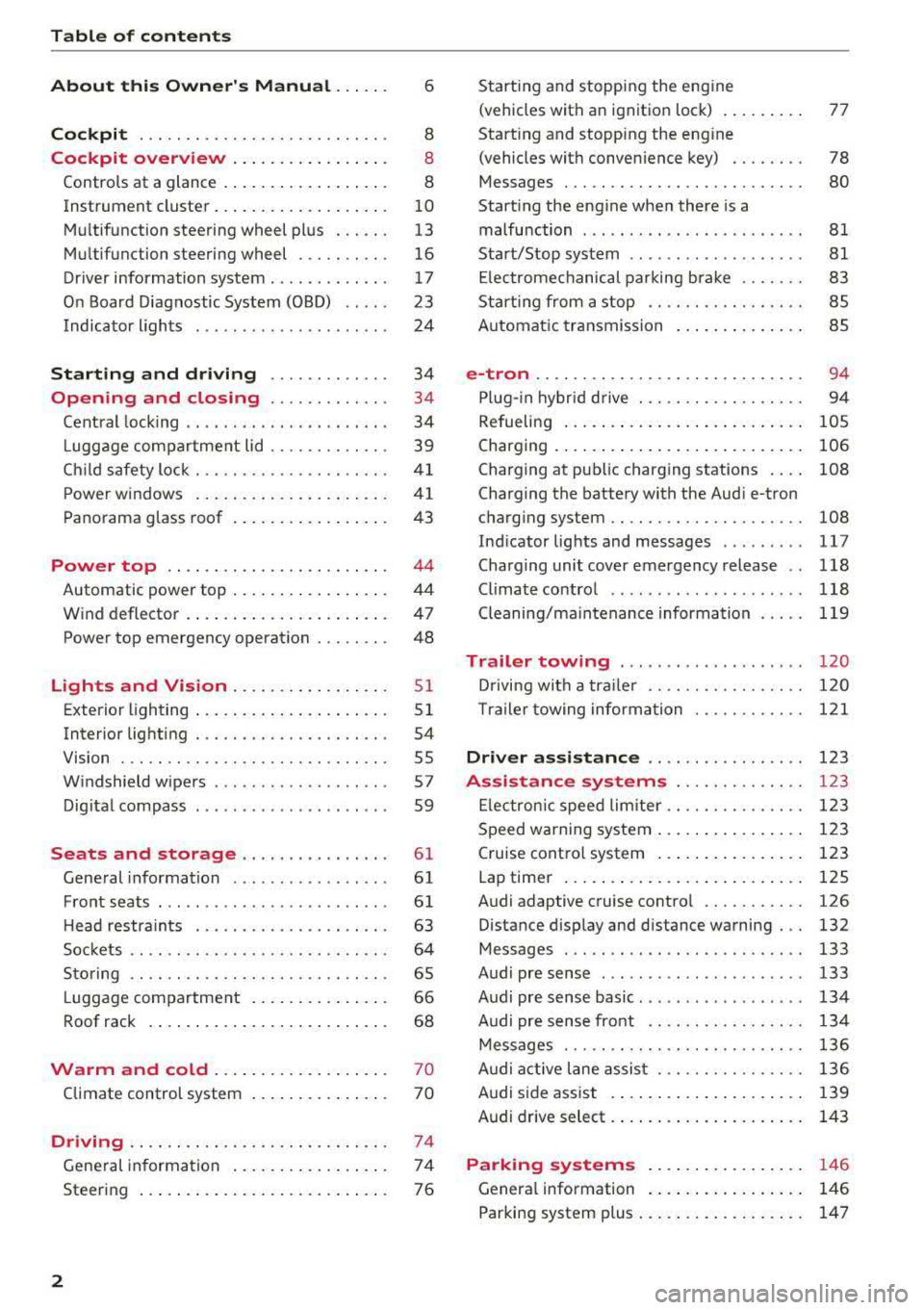
Table of content s
About this Owne r's Manual . .. .. .
6
Cockpi t ... .. ............... .... .. . 8
Cockpit overview . . . . . . . . . . . . . . . . . 8
Controls at a glance . . . . . . . . . . . . . . . . . . 8
Instrument cluster . . . . . . . . . . . . . . . . . . . 10
Mu ltifunction steering wheel plus . . . . . . 13
Mu ltifunction steering wheel . . . . . . . . . . 16
Driver information system . . . . . . . . . . . . . 17
On Board Diagnostic System (OBD) . . . . . 23
Indicato r lights . . . . . . . . . . . . . . . . . . . . . 24
Start ing and dr iving . . . . . . . . . . . . . 34
Opening and closing . . . . . . . . . . . . . 34
Central lock ing . . . . . . . . . . . . . . . . . . . . . . 34
L uggage compartment lid . . . . . . . . . . . . . 39
Ch ild safety lock . . . . . . . . . . . . . . . . . . . . . 41
Power w indows . . . . . . . . . . . . . . . . . . . . . 41
Panorama glass roof . . . . . . . . . . . . . . . . . 43
Power top . . . . . . . . . . . . . . . . . . . . . . . . 44
Automatic power top . . . . . . . . . . . . . . . . . 4 4
Wind deflector . . . . . . . . . . . . . . . . . . . . . . 47
Power top emergency operation . . . . . . . . 48
Lights and Vision .. ..... ... .. .. .. .
Exterior lighting ... .. ...... ... .. .. .. .
Interior lighting ... ........... .... .. .
V1s1on ... .. .. ... ............ .... .. .
W indshield wipers ............... ... .
Dig ital compass ........... ...... ... . 51
5 1
54
55
57
59
Seats and storage . . . . . . . . . . . . . . . . 61
General information . . . . . . . . . . . . . . . . . 61
Front seats . . . . . . . . . . . . . . . . . . . . . . . . . 61
H ead restra ints . . . . . . . . . . . . . . . . . . . . . 63
So ckets . . . . . . . . . . . . . . . . . . . . . . . . . . . . 64
S to ring . . . . . . . . . . . . . . . . . . . . . . . . . . . . 65
L uggage compar tment . . . . . . . . . . . . . . . 66
R oof rack . . . . . . . . . . . . . . . . . . . . . . . . . . 68
Warm and cold . . . . . . . . . . . . . . . . . . . 70
Climate control system . . . . . . . . . . . . . . . 70
Driving . . . . . . . . . . . . . . . . . . . . . . . . . . . . 74
General in formation . . . . . . . . . . . . . . . . . 74
Steering . . . . . . . . . . . . . . . . . . . . . . . . . . . 76
2
Starting and stopping the eng ine
(vehicles with an ignition lock) . . . . . . . . . 77
Start ing and stopping the eng ine
(vehicles with conven ience key) . . . . . . . . 78
Messages . . . . . . . . . . . . . . . . . . . . . . . . . . 80
Start ing the engine whe n there is a
malfunction . . . . . . . . . . . . . . . . . . . . . . . . 81
Start/Stop system . . . . . . . . . . . . . . . . . . . 81
El ectromechanical parking brake . . . . . . . 83
Start ing from a stop . . . . . . . . . . . . . . . . . 8S
Automa tic transmission . . . . . . . . . . . . . . 8S
e-tron ...... .. .. .. .. .. ........... .. 94
P lu g- in hybrid drive . . . . . . . . . . . . . . . . . . 94
Re fueling . . . . . . . . . . . . . . . . . . . . . . . . . . lOS
Charging . . . . . . . . . . . . . . . . . . . . . . . . . . . 106
Charging at pub lic charging stations . . . . 108
Charging the battery with the Aud i e-tron
charg ing system . . . . . . . . . . . . . . . . . . . . . 108
Ind icator lights and messages ......... 117
Charg ing unit cover emergency release . . 118
Climate contro l . . . . . . . . . . . . . . . . . . . . . 118
Cleaning/ma intenance information 119
Trailer towing . . . . . . . . . . . . . . . . . . . . 120
D rivi ng with a tra ile r .. ... ........... .
T ra ile r t owing information .......... . .
D . . nver assi
stance .. ... ... .... ... . .
Assis tance systems ............ . .
El ectron ic speed limite r ............. . .
Speed warning system ... .. .. .... ... . . 120
1 2 1
123
123
1 23
123
Cruise control system . . . . . . . . . . . . . . . . 123
Lap timer . . . . . . . . . . . . . . . . . . . . . . . . . . 125
Audi adaptive cruise contro l . . . . . . . . . . . 126
Distance disp lay and distance warning . . . 132
Messages . . . . . . . . . . . . . . . . . . . . . . . . . . 133
Audi pre sense . . . . . . . . . . . . . . . . . . . . . . 133
Audi pre sense basic . . . . . . . . . . . . . . . . . . 134
Audi pre sense front . . . . . . . . . . . . . . . . . 134
Messages . . . . . . . . . . . . . . . . . . . . . . . . . . 136
Audi active lane assist . . . . . . . . . . . . . . . . 136
Audi s ide ass ist . . . . . . . . . . . . . . . . . . . . . 139
Audi drive select . . . . . . . . . . . . . . . . . . . . . 143
Parking systems . . . . . . . . . . . . . . . . . 146
Genera l information . . . . . . . . . . . . . . . . . 146
Parking system plus . . . . . . . . . . . . . . . . . . 147
Page 6 of 400
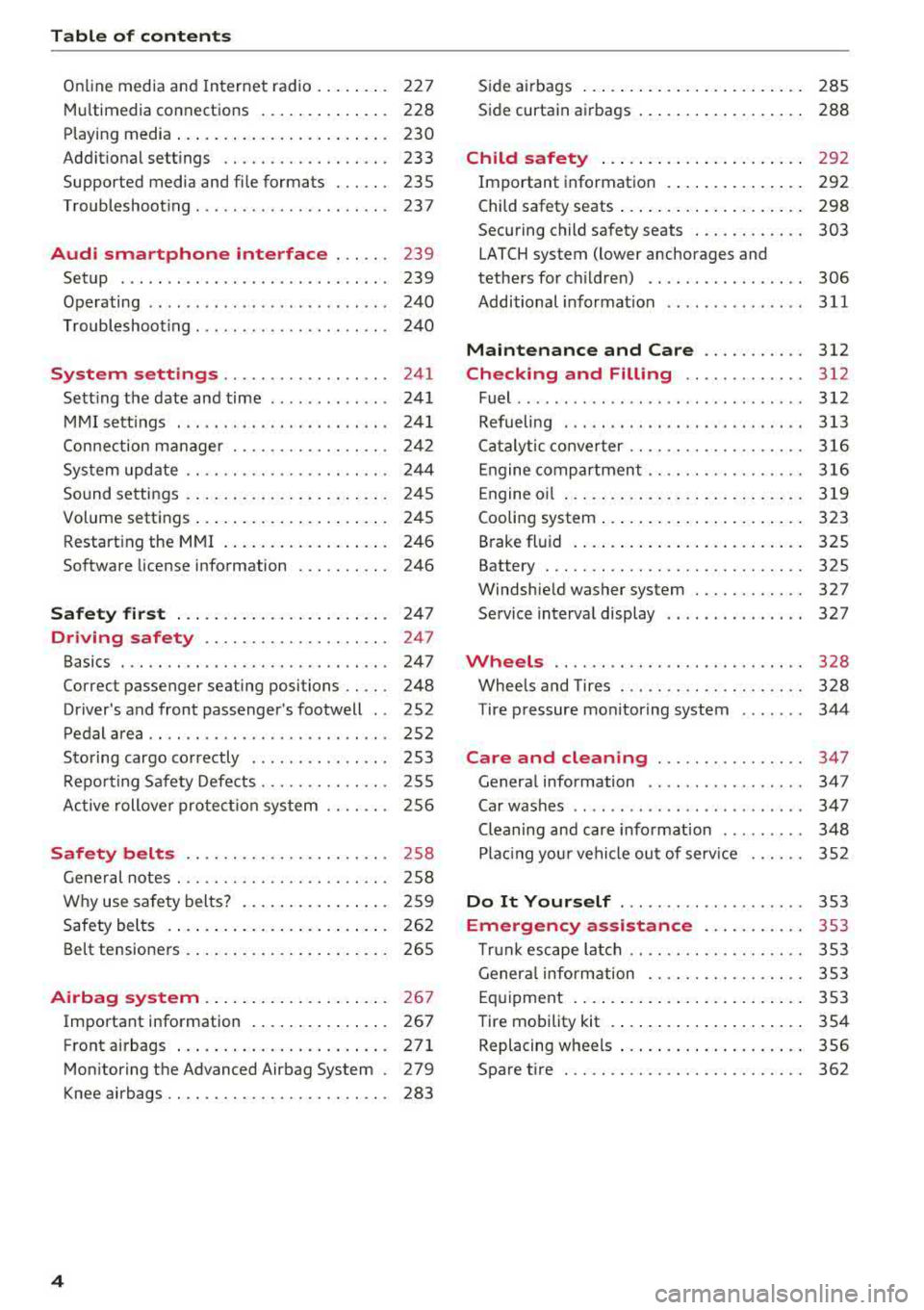
Table of content s
Online media and Internet radio . . . . . . . . 227
Mu ltim edia connections . . . . . . . . . . . . . . 228
Playing media . . . . . . . . . . . . . . . . . . . . . . . 230
Addit ional se ttings . . . . . . . . . . . . . . . . . . 233
Supported media and file formats . . . . . . 235
Troubleshoot ing ................. ... . 237
Audi smartphone interface . . . . . . 239
Setup . . . . . . . . . . . . . . . . . . . . . . . . . . . . . 239
Operating . . . . . . . . . . . . . . . . . . . . . . . . . . 240
Troubleshoot ing . . . . . . . . . . . . . . . . . . . . . 240
System settings . . . . . . . . . . . . . . . . . . 241
Sett ing the date and time . . . . . . . . . . . . . 24 1
MMI se ttings . . . . . . . . . . . . . . . . . . . . . . . 241
Con nection ma nager . . . . . . . . . . . . . . . . . 242
System update . . . . . . . . . . . . . . . . . . . . . . 244
Sound settings . .... .. ..... ... .. .. .. .
Volume settings .... .. ..... ... .. .. .. .
Restarting the
MMI . .. ..... ... .. .. .. .
Software license information 2
4 5
245
246
246
Safety first . . . . . . . . . . . . . . . . . . . . . . . 247
Driving safety . . . . . . . . . . . . . . . . . . . . 247
Basics . . . . . . . . . . . . . . . . . . . . . . . . . . . . . 247
Correct passenger seating positions . . . . . 248
Driver 's and front passenger's footwell . . 252
Pedal area . . . . . . . . . . . . . . . . . . . . . . . . . . 252
Sto ring cargo co rrectly . . . . . . . . . . . . . . . 253
R epo rting Safety Defects . . . . . . . . . . . . . . 255
Ac tive rollove r prote ct io n system 256
Safety belts . . . . . . . . . . . . . . . . . . . . . . 258
Gene ral notes . . . . . . . . . . . . . . . . . . . . . . . 258
W hy use safety belts? . . . . . . . . . . . . . . . . 259
Safety belts . . . . . . . . . . . . . . . . . . . . . . . . 262
Belt tensione rs . . . . . . . . . . . . . . . . . . . . . . 265
Airbag system . . . . . . . . . . . . . . . . . . . . 26 7
Important information . . . . . . . . . . . . . . . 267
Front airbags ... ... ... .... ... .. .. .. . 271
Mon itor ing the Advanced Airbag System . 279
K nee airbags . . . . . . . . . . . . . . . . . . . . . . . . 283
4
S ide a irbags . . . . . . . . . . . . . . . . . . . . . . . . 285
Side curtain airbags . . . . . . . . . . . . . . . . . . 288
Child safety . . . . . . . . . . . . . . . . . . . . . . 292
Important information . . . . . . . . . . . . . . . 292
Child safety seats . . . . . . . . . . . . . . . . . . . . 298
Securing child safety seats . . . . . . . . . . . . 303
LATCH system (lower anchorages and
tethers for c hildren) . . . . . . . . . . . . . . . . . 306
Additional informat ion ........ ..... .. 311
Maintenance and Care ........... 312
Checking and Filling . . . . . . . . . . . . . 312
Fuel ......... .... ... ............... 312
Refueling . . . . . . . . . . . . . . . . . . . . . . . . . . 313
Ca talytic conve rter .. .. .. ........... .. 316
Engine compar tment .. ... .......... .. 316
Engine o il . . . . . . . . . . . . . . . . . . . . . . . . . . 3 19
Cooling system . . . . . . . . . . . . . . . . . . . . . . 323
Brake fluid . . . . . . . . . . . . . . . . . . . . . . . . . 325
Battery . . . . . . . . . . . . . . . . . . . . . . . . . . . . 325
Windshie ld washer system . . . . . . . . . . . . 327
Service interva l display 327
Wheels .... .. . ... .. .. ........... .. 328
Wheels and Tires . . . . . . . . . . . . . . . . . . . . 328
Tire pressure monitoring system 344
Care and cleaning . . . . . . . . . . . . . . . . 347
Genera l information . . . . . . . . . . . . . . . . . 347
Car washes . . . . . . . . . . . . . . . . . . . . . . . . . 347
Cleaning and care informat ion . . . . . . . . . 348
Plac ing your vehi cle ou t of serv ice 352
Do It Yourself . . . . . . . . . . . . . . . . . . . . 353
Emergency assistance . . . . . . . . . . . 353
T ru nk escape la tch . . . . . . . . . . . . . . . . . . . 353
Genera l info rmation . . . . . . . . . . . . . . . . . 353
Eq uipment . . . . . . . . . . . . . . . . . . . . . . . . . 353
T ire mobility kit . . . . . . . . . . . . . . . . . . . . . 354
Replacing wheels . . . . . . . . . . . . . . . . . . . . 356
Spare t ire . . . . . . . . . . . . . . . . . . . . . . . . . . 362
Page 50 of 400
Power top
-Be careful when installing so you do not
pinch your fingers.
-Pay attention to the traffic when insta lling
the wind def lector. Install the w ind deflec
tor from the s ide of the vehicle that is away
from traffic.
(D Note
Do not lean against the veh icle when insta l
ling the wind deflector. Hard objects and dec
orations on clothing such as belt buckles can
scratch the pa int.
{!) Tips
-The wind deflector works best when a ll of
the w indows are rolled up wh ile driving.
- Only store the wind deflector in the storage
bag * when it is dry.
Power top emergency
operation
General information
A pp lies to: ve hicles w ith power top
The power top can be closed manually if there is
a malfunction .
.,. Set the parking brake.
.,. Open all windows.
,.. Switch the ignition of f .
.,. Pu ll the button @ for approximately 10 to
15 seconds to reduce the pressure in the power
top hydraulics
r::;, page 44, fig. 35.
Only close the power top manua lly in an emer
gency . Have a second person assist . Drive to an
authorized Audi dealer or author ized Audi Service
Facility immediately to have the malfunction cor
rected.
A WARNING
-There is a r isk of pinching the hands or othe r
people during all of the powe r top emergen
cy operat ion steps.
-Ma ke sure a ll windows a re lowered d uring
emergency operation.
48
-Do not reach into the power top supports
or other mov ing components.
-Never drive when the power top is not
locked correct ly. The wind from driving
could cause the power top to open. This can
result in injur ies and damage to the vehicle.
{!) Tips
The power top storage compartment cover is
not latched after the emergency operation is
complete. Dr ive to an authorized Audi dealer
or authorized Audi Service Facility immediate ly to have the malfu nction corrected.
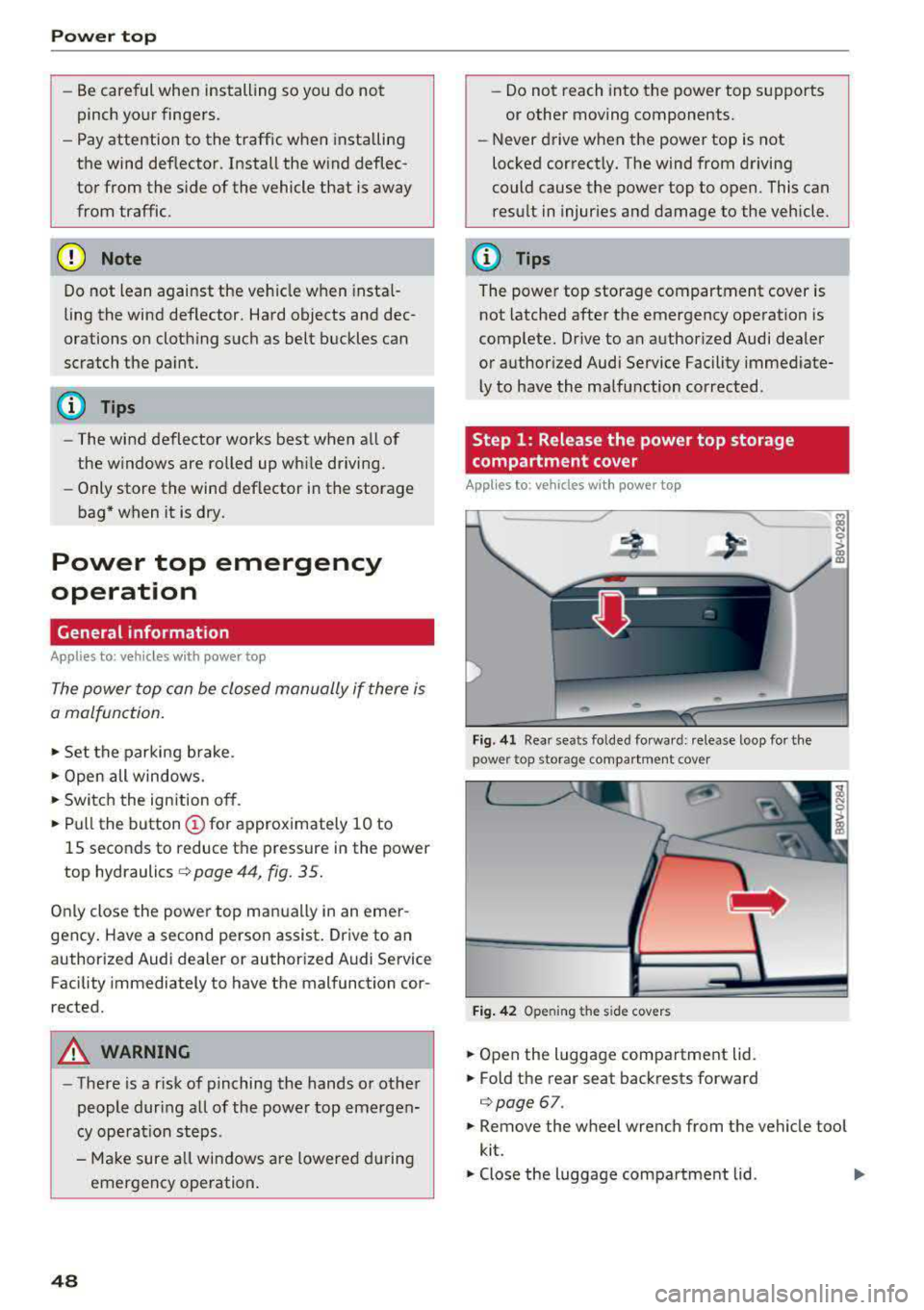
Step 1: Release the power top storage
compartment cover
App lies to: vehicles wi th power top
Fig. 41 Rear seats fo lded fo rward: release loop fo r the
power top storage compartment cover
Fig. 4 2 Opening the side covers
.,. Open the luggage compartment lid .
.,. Fold the rear seat backrests forward
c:;, page 67.
.,. Remove the wheel wrench from the vehicle too l
kit.
.,. Close the luggage compartment lid . Ill>
Page 63 of 400
a, a, ..... N
" N ..... 0 N > 00
Seats and storage
General information
A WARNING
Refer to the chapter Driving Safely
~ page 247, Driving safety for important in
formation, tips, suggestions and warnings
that you should read and follow for your own
safety and the safety of your passengers.
Front seats
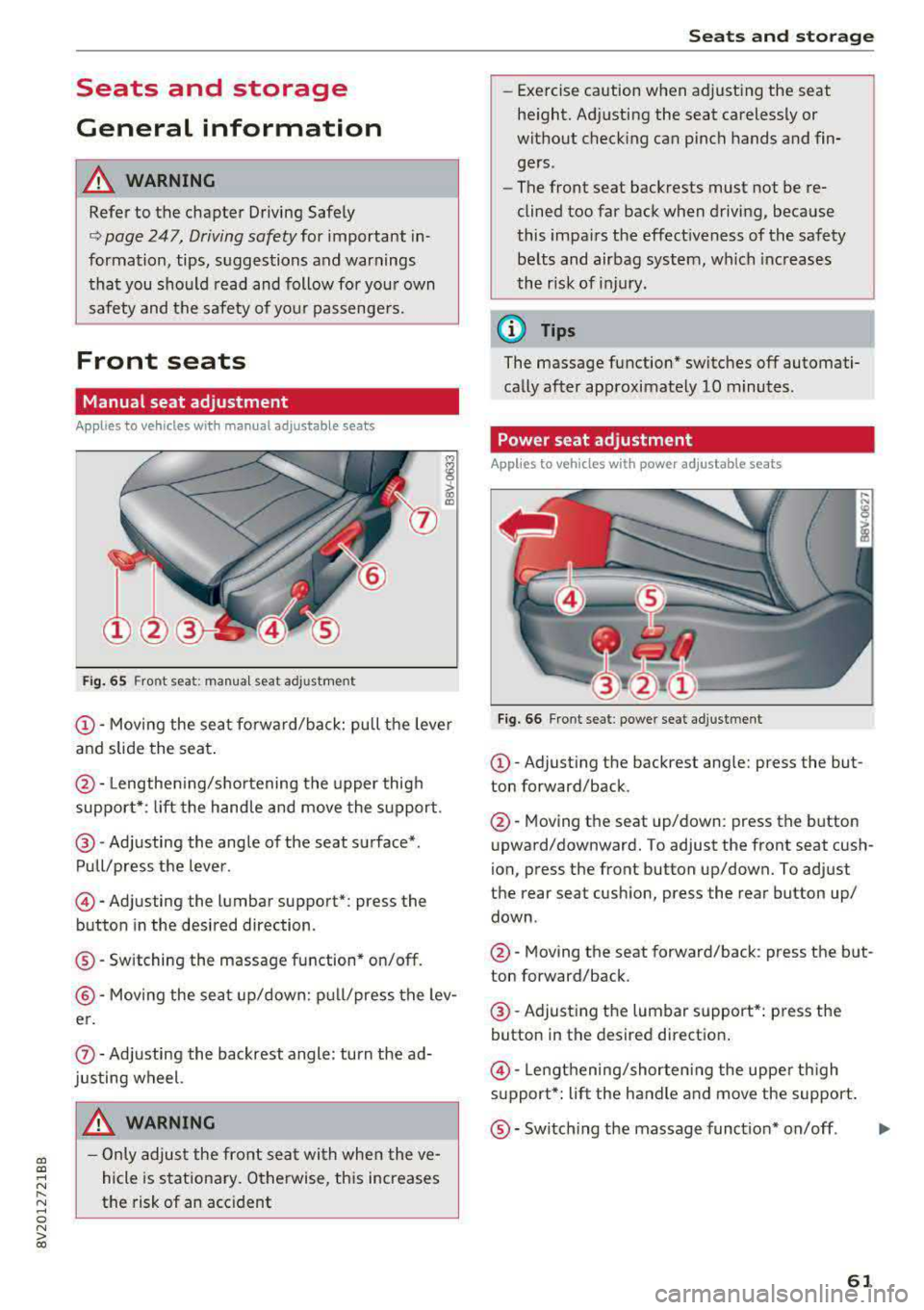
Manual seat adjustment
Applies to vehicles with manual adjustable seats
Fig. 65 Fro nt seat: manual seat adj ustment
@ -Moving the seat forward/back: pu ll the lever
and slide the seat .
@-Lengthening/shortening the upper thigh
support* : lift the handle and move the support.
@-Adjusting the angle of the seat surface*.
Pull/press the lever .
@-Adjusting the lumbar support* : press the
button in the desired direction .
®-Switching the massage function* on/off.
@ -Moving the seat up/down: pull/press the lev
er.
0 -Adjusting the backrest angle : turn the ad
justing wheel.
A WARNING
- Only adjust the front seat with when the ve
hicle is stationary. Otherwise, this increases
the risk of an accident
Seats and storage
-Exercise caution when adjusting the seat
height. Adjusting the seat carelessly or
without checking can pinch hands and fin
gers .
- The front seat backrests must not be re
clined too far back when driving, because
this impairs the effectiveness of the safety
belts and airbag system, which increases
the risk of injury.
(D Tips
The massage function* switches off automati
cally after approximately 10 minutes.
Power seat adjustment
Applies to vehicles w ith power adjustab le seats
Fig. 66 Front seat : power seat adj ustment
@ -Adjusting the backrest angle: press the but
ton forward/back .
@-Moving the seat up/down: press the button
upward/downward. To adjust the front seat cush
ion, press the front button up/down. To adjust
the rear seat cushion, press the rear button up/
down .
@-Moving the seat forward/back : press the but
ton forward/back .
@-Adjusting the lumbar support*: press the
button in the desired direction .
@-Lengthening/shortening the upper thigh
support*: lift the handle and move the support.
®-Switching the massage function* on/off .
61
...
Page 64 of 400
Sea ts and stor age
_& WARNING
- Only adjust the front seat with when the ve
hicle is stat ionary . Otherwise, this increases
the risk of an acc ident
- The power adjustment for the front seats al
so works with the ignition switched off or
with the ignition key removed . For this rea
so n, children should never be left unattend
ed in the veh icle
-they co uld be inj ured!
- Exercise caution when adjusting the seat
height. Uns upervised or careless seat ad
justment can p inch fingers or hands causing
injur ies .
- T he front seat backrests m ust not be re
cl ined too far back when driving, because
this impairs the effectiveness of the safety
belts and airbag system, which increases
the risk of injury .
(Di Tips
The massage function* switches off a utomat i
cally after approximately 10 mi nutes.
Entry assistance
Applies to: vehicles with entry ass istance
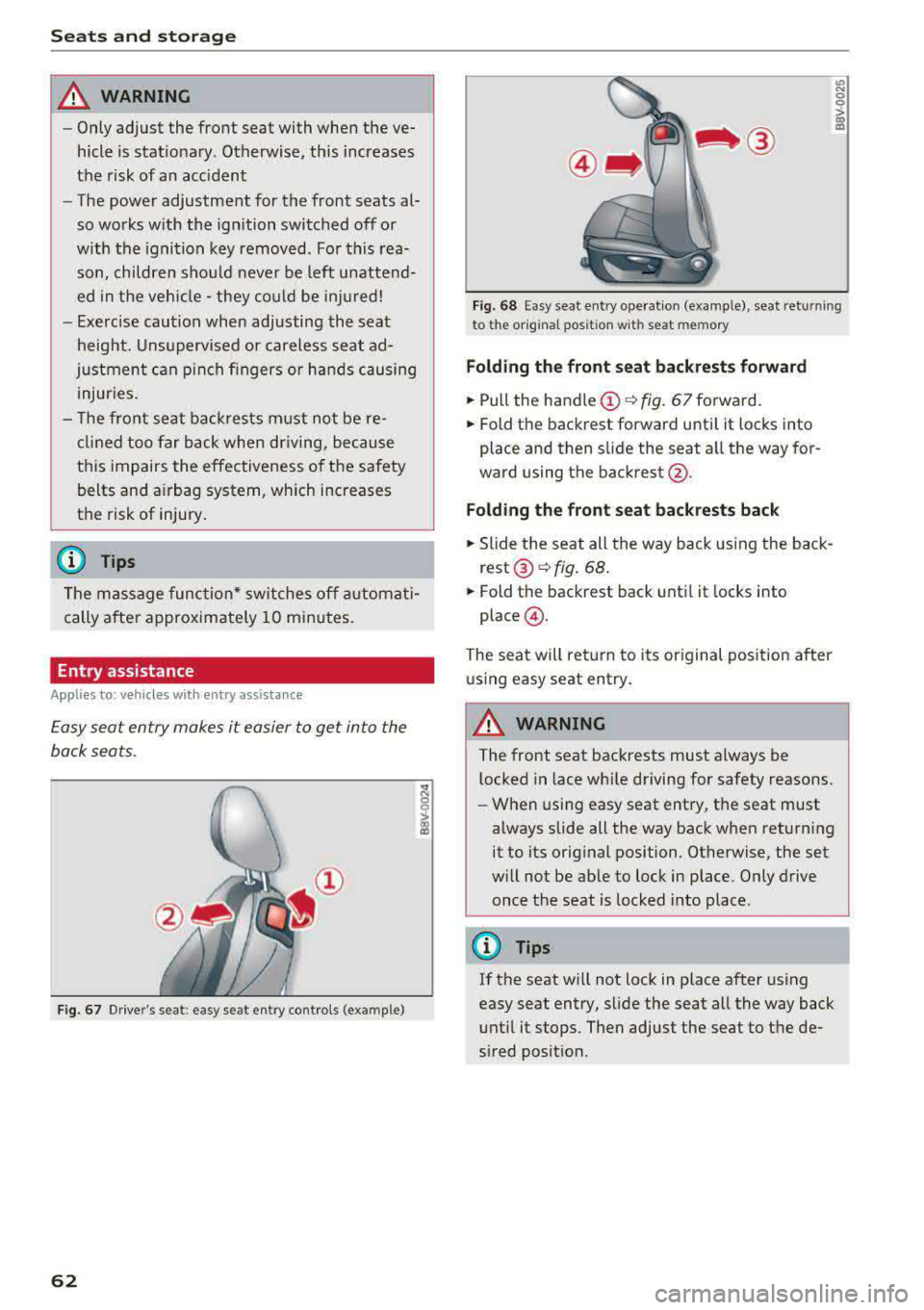
E asy seat entry makes it easier to get into the
back seats .
Fig. 67 Dr ive r's seat : easy se at ent ry controls (ex ample )
62
'° ::: 0 ::l-a) 113
F ig. 6 8 Easy sea t en try ope rat io n (examp le) , seat ret urnin g
t o t he origina l pos ition w it h se at mem ory
Fold ing th e front seat backrests forward
.,. Pull the handle (!)¢ fig. 67 forward.
.,. Fold the backrest forward unti l it locks into
place and then slide the seat a ll the way for
ward using the backrest @.
Fold ing the front seat back rests back
.,. Slide the seat all the way back using the back
rest ®~ fig. 68 .
.,. Fold the backrest back until it locks into
place @.
The seat will ret urn to its original posit ion after
u sing easy seat entry.
A WARNING
-The front seat backrests must a lways be
l ocked in lace wh ile driving for safety reasons.
- When using easy seat entry, t he seat must
always slide all the way back when returning
it to its orig inal position . Otherwise, the set
w ill not be ab le to lock in place. Only drive
once the seat is locked into place .
(D Tips
If the seat w ill not lock in place after using
easy seat entry, slide the seat all the way back
unt il it stops. Then adjust the seat to the de
sired posit ion.
Page 65 of 400
a, a, ..... N
" N ..... 0 N > 00
Front center armrest
Applies to vehicles with a front center armrest
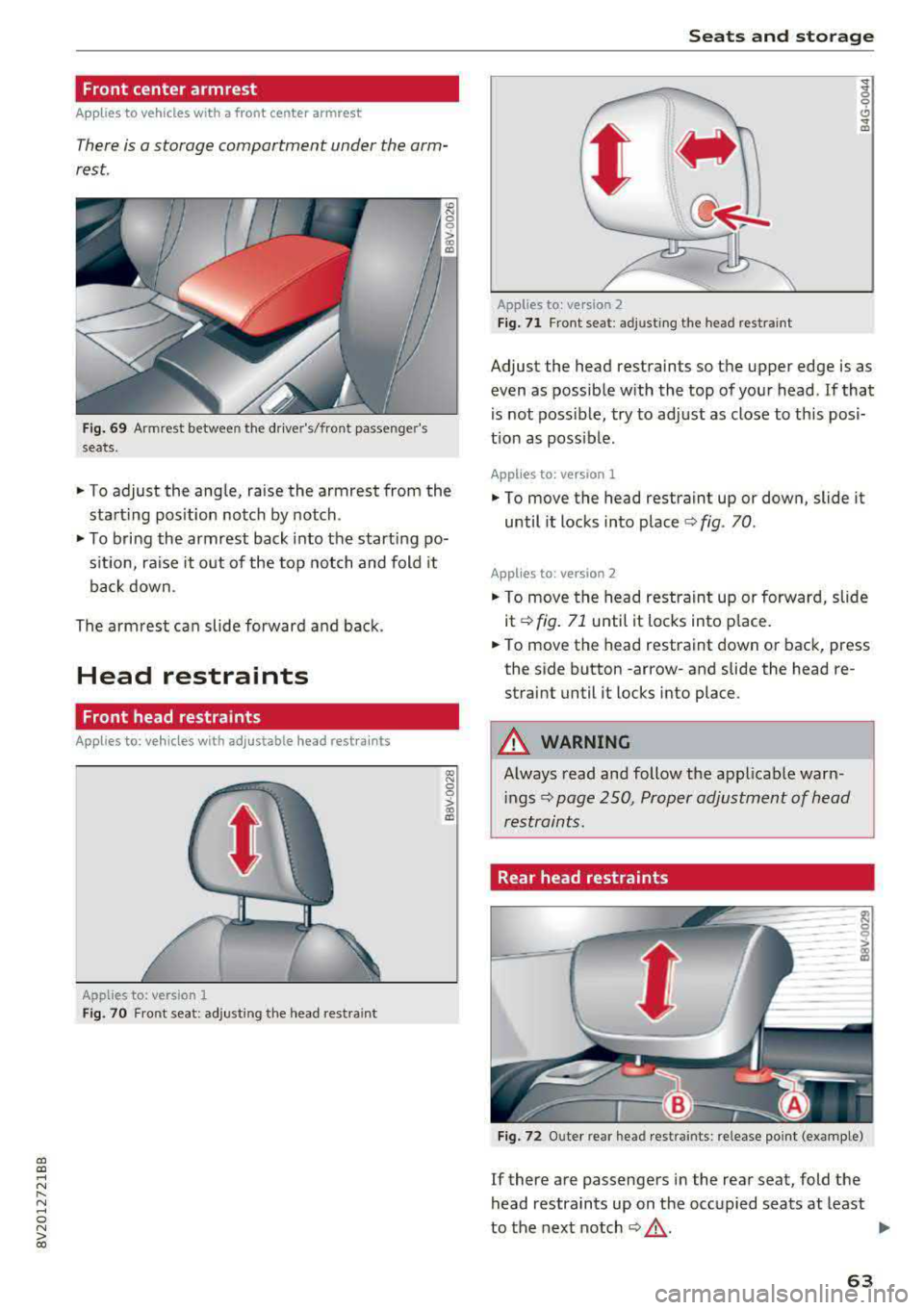
There is a storage compartment under the arm
rest.
Fi g. 69 Armrest between the driver's/front passenge r's
seats.
.. To adjust the angle, raise the armrest from the
start ing pos ition notch by notch.
.. To bring the armrest back into the starting po
s it ion, ra ise it out of the top notch and fold it
back down .
The armrest can slide forward and back.
Head restraints
Front head restraints
Applies to: ve hicles with ad justable head rest ra in ts
Applies to: version 1
Fig. 70 Fr ont seat: adjusting the head restraint
Seats and storag e
Applies to: vers ion 2
F ig . 71 Front seat: adjusting the head restra int
Adjust the head restraints so the upper edge is as
even as possible with the top of you r head . If that
is not possible, try to adjust as close to th is posi
t ion as poss ible .
Applies to: version 1
.. To move the head restraint up or down, slide it
until it locks into place
c:> fig. 70 .
Applies to : version 2
.. To move the head restraint up or forward, slide
it
c:>fig . 71 until it locks into p lace.
.. To move the head restraint down or back, press
the side button
-arrow-and slide the head re
straint until it locks into place.
_& WARNING
-A lways read and follow the applicable warn-
i ngs
c:> page 250, Proper adjustment of head
restraints.
Rear head restraints
F ig . 72 O ute r rear head rest rain ts: release point (exam ple)
If there are passengers in the rear seat, fold the
head restraints up on the occupied seats at least
-
to the next notch c:> _& . Iii-
63
Page 67 of 400
a, a, ..... N
" N ..... 0 N > 00
Storing
Cup holders
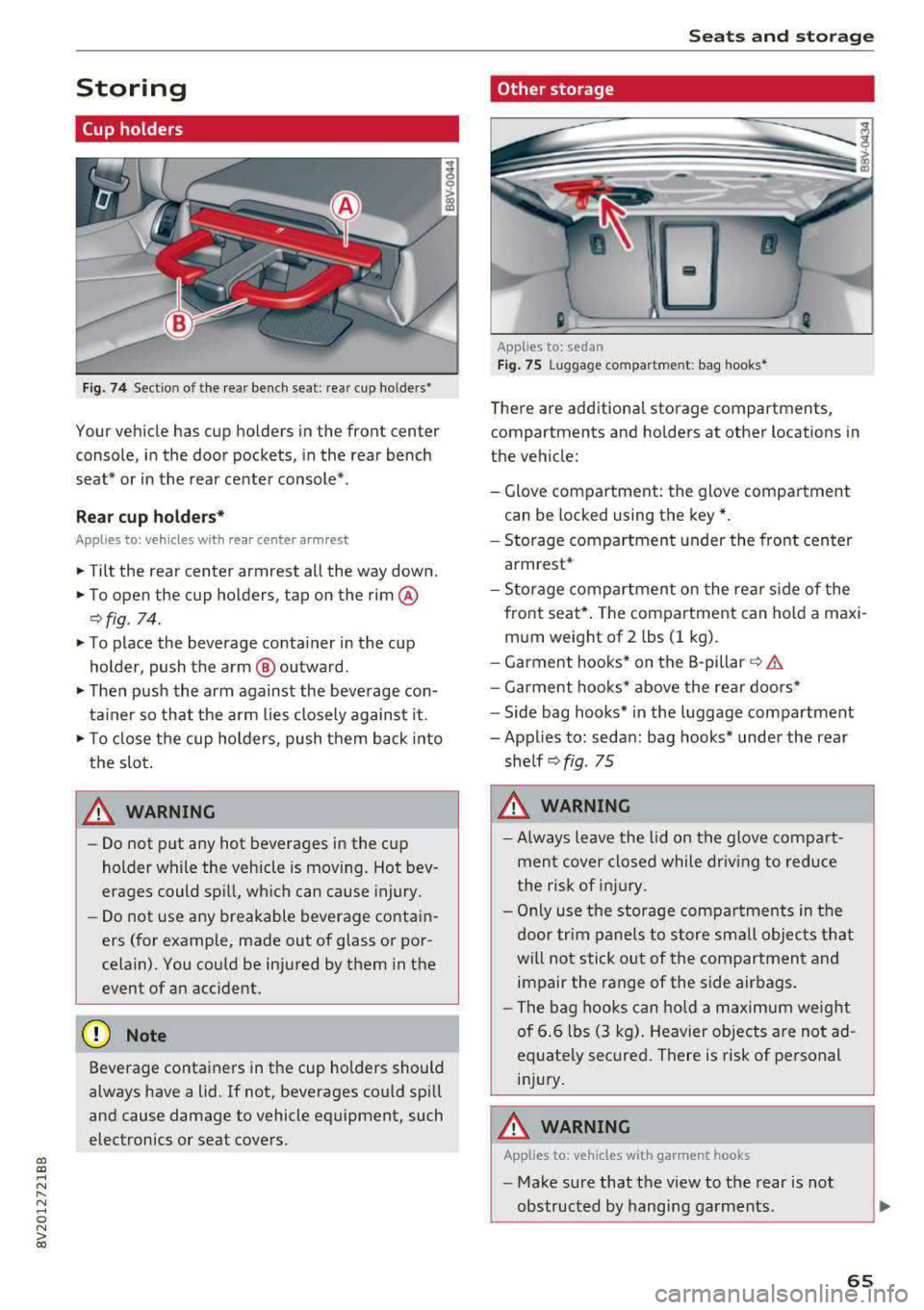
Fig. 74 Sectio n of the rear bench seat : rea r cup ho lders•
Your vehicle has cup holders in the front center
console, in the door pockets, in the rear bench
seat* or in the rear center console*.
Re ar cup ho lders*
Applies to: ve hicles with rear center arm rest
.,. Tilt the rear center armrest all the way down.
.,. To open the cup holders, tap on the rim @
r:=>fig . 74.
.,. To place the beverage co nta iner in the cup
holder , push the arm @ outward .
.,. Then push the arm against the beve rage con
ta iner so that the a rm lies closely against it .
.,. To close the cup holders, push t hem back into
the slot .
A WARNING -
-Do not put any hot beverages in the cup
holder while the vehicle is moving. Hot bev
erages could spill, wh ic h can cause injury.
- Do not use any breakable beverage contai n
ers (for example, made out of glass or por
celain). You co uld be injured by them in the
event of a n accident .
(D Note
Beverage containers in the cup holders should
always have a lid. If not, beverages cou ld sp ill
and cause damage to vehicle equipment, such
electronics or seat covers .
Seats and storage
Other storage
Applies to: sedan
Fig. 75 Lu gga ge compar tm en t: bag hooks *
There are add itiona l storage compartments,
compartments and holders at other locations in
the vehicle:
- Glove compartment: the glove compa rtme nt
can be locked using the key* .
- Storage compartment under the front cen ter
armrest*
- Storage compartment o n the re ar side of the
front seat*. The com partment can hold a maxi
m um weight of 2 lbs (1 kg) .
- Garment hooks* on the B -pillar
r=> &.
- Garment hoo ks* above the rea r doo rs *
- Side bag hooks* in the luggage compartment
- Applies to: sedan : bag hooks* under the rear
she lf
r=> fig . 75
A WARNING
-Always leave the lid on the glove compa rt
men t cover closed while driv ing to red uce
t he risk of injury .
- Onl y use t he storage compa rtme nts in the
door trim panel s to sto re sm all obje cts th at
will not sti ck ou t of the compartmen t and
impair the range of the side air bags .
- Th e bag hoo ks c an ho ld a m aximum weight
of 6.6 lbs (3 kg) . Heavier objects are no t ad
equate ly secured . There is risk of pe rsonal
inj ury.
A WARNING
-App lies to: ve hicles with garment hooks
- Make sure that the view to the rear is not
obs tructed by hangi ng garments .
-
65
Page 69 of 400
a, a, ..... N
" N ..... 0 N > 00
Cargo net/cargo bag
Applies to: vehicles with luggage compartment cargo net/car
go bag
The cargo net prevents light objects from sliding,
and it can also be used as a cargo bog.
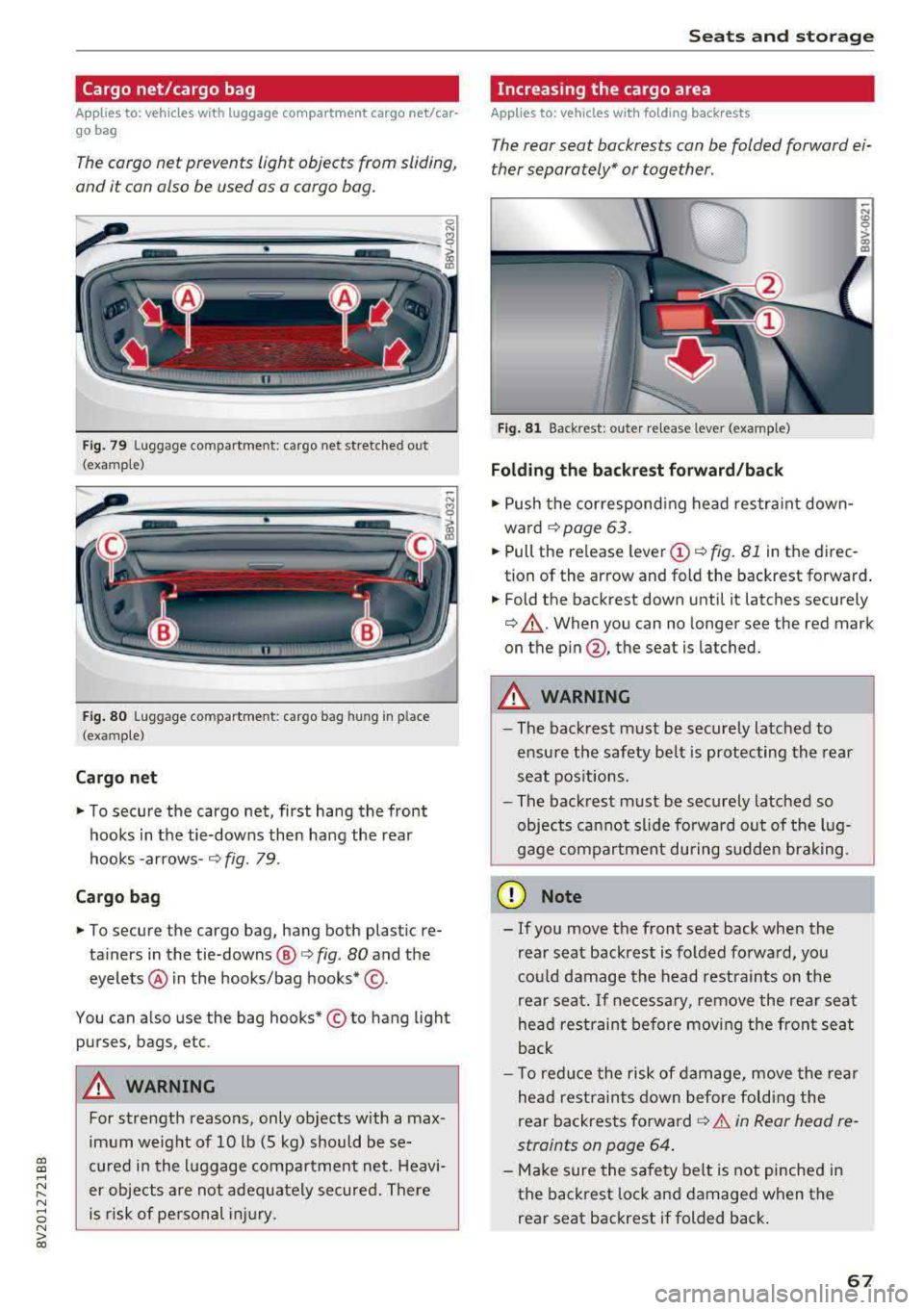
Fig. 79 Luggage compartment: cargo net stretched out
(examp le)
F ig . 80 Luggage compartme nt: cargo bag hung in place
(examp le)
Cargo net
.. To secure the cargo net, first hang the front
hooks in the tie-downs then hang the rear
hooks
-arrows-¢ fig. 79.
Ca rgo b ag
.. To secure the cargo bag, hang both plastic re
tainers in the tie-downs @
c> fig. 80 and the
eyelets @ in the hooks/bag
hooks* @.
You can also use the bag hooks* © to hang light
purses, bags, etc .
&_ WARNING
For strength reasons, only objects with a max
imum weight of 10 lb (5 kg) should be se
cured in the l uggage compartment net. Heavi
er objects are not adeq uately secured. There
is risk of personal injury .
Seats and storag e
Increasing the cargo area
Applies to: vehicles with folding backrests
The rear seat backrests con be folded forward ei
ther separately" or together .
n
Fig. 81 Backrest: outer re lease lever (example)
Folding the b ackrest forward /back
.. Push the correspond ing head restraint down
ward
¢page 63 .
.. Pull the release lever (D ¢ fig. 81 in th e direc
tion of the arrow and fold the backrest forward .
.. Fold the backrest down until it latches securely
¢ .,&.. When you can no longer see the red mark
on the
pin @ , the seat is latched.
&_ WARNING
~ -
-The backrest must be sec urely latched to
ensu re the safety belt is protecting the rear
seat pos it ions.
- The back rest must be securely latched so
objects ca nnot slide fo rwa rd out of the lug
gage compartment during sudden brak ing.
(D Note
- If you move the front seat back when the
rear seat backrest is folded fo rwa rd, you
co uld damage the head restrain ts on t he
rear seat.
If ne cessary, remove the rea r seat
he ad restraint before mov ing the front seat
back
- T o red uce the risk of damage, move the rea r
he ad rest raints down before fo ldi ng the
rear backrests
forward¢ .&. in Rear head re
straints on page 64 .
-Make sure the safety belt is not pinched in
the back rest lock a nd damaged when the
rear seat backrest if folded back .
67
Page 74 of 400
Warm and cold
driver is transferred to the front passenger's
side . This applies a t emperature change to the
front passenger's side .
8/r Blower
Using the regulator 8£?, you can manually adjust
the volume of air generated by the blower to your
p reference . The blower shou ld always run at a
low setting to prevent the windows from fogging
and to ensure a continuous exchange of air inside
the vehicle . To have the blower regulated auto
mat ically , press the AUTO button.
~/ :,0/ ~ Air distribution
The air distribution can adjusted with the but
tons. To have the air distribution regulated auto mat ically, press the AUTO button.
The round air vents in the cockpit are adjustable
qpage 73.
To keep the front s ide windows from fogging up
in damp weathe r, we recommend opening the
side air vents and tilting them to the side .
Foot vents are located under the front seats and
adjustable vents on the end of the center console
to heat the rear of the vehicle .
::!_ Defrosting
The windsh ield and s ide windows are defrosted
or cleared of condensation as qu ickly as possible .
The max imum amount of air flows ma inly from
the vents below the windshield. Recirculation
mode switches off. The temperature shou ld be
set at +72°F (22°() o r higher. The temperature is
controlled automatica lly. In the
;Ix setting, the
A/C cooling mode switches on automatically , d e
pending on the outside air temperature.
The AUTO button switches the defroster off.
cE) Recirculation mode
The recirculation mode can be turned on manua l
ly or automatically*.
- Switching manual recirculation mode on and
off: Press
the~ button.
72
- Automatic * reci rculation mode: auto recircula
tion needs to be activated in the Infotainment
system. Select in the Infotainment system:
I MENU I but ton > Vehicle > left control button >
Air conditioning > Auto recirculation
The air
quality sensor that is designed for diesel and
gasoline exhaust automatically sw itches the re
circulation mode on or off depending on the
level of pollutants in the outside air.
In rec irculat ion mode, the air inside the vehicle is
c ir culated and filtered. This prevents the unfil
tered air outs ide the veh icle from entering the
vehicle inte rior. Switching rec irculation mode on
whe n driving through a tunnel or when sitting in
traffic is recommended
q .&..
Pressing the~ button, AUTO or the ;fx button
switches recircula tion mode off.
T he system switches to recirculation mode when
driv ing in reverse when the engine is cold .
SP. Rear window defogger
If the rear window defogger is activated when
the igni tion is switched on, the battery manage
ment determines based on the battery charge if
i t is possible to turn on . Otherwise, the rear w in
dow defogger functions with the engine running
and switches off automatically after approxi
mately 10 -20 minutes, depending on the out
side temperature .
To prevent the rear window defogger from
switching off automat ica lly, press and hold the
!fP. button for more than two seconds. This re
mains stored up to approximate ly 15 minutes af
te r turning off the ignition.
J Seat heating*
Pressing the J button switches the seat heat ing
on at the highest setting (level 3) . The LEDs indi
cate the temperat ure level. To reduce the tem
perature , press the button again. T o switc h the
seat heating off, press the button repeatedly un
ti l the LED turns off .
After approximately 10 minutes, the seat heating
a utomat ically switches from level 3 to level 2.
.,..
Page 75 of 400
a, a, ..... N
" N ..... 0 N > 00
_& WARNING
-You should not use the recirculation mode
for an extended period of time, because no
fresh a ir is drawn in and the windows can
fog when coo ling mode* is switched off .
T his increases the r is k of an accide nt.
- Individuals with reduced sensitivity to pain
o r temperat ure cou ld develop burns when
using the seat heating fu nction . To reduce
the risk of injury, these ind iv iduals should
not use seat heating.
(D Note
To avoid damage to the heat ing elements in
the seats, do not kneel on the sea ts or place
heavy loads on a small area of the seat.
@ Tips
-The setting for the seat heating on the driv
er's side is ass igned to the key that is in use.
-If the front passenger's seat heat ing is
turned on, it will not turn on again automat
i ca lly if more than 10 m inutes have passed
between sw itching the ign ition off and
switching it on again .
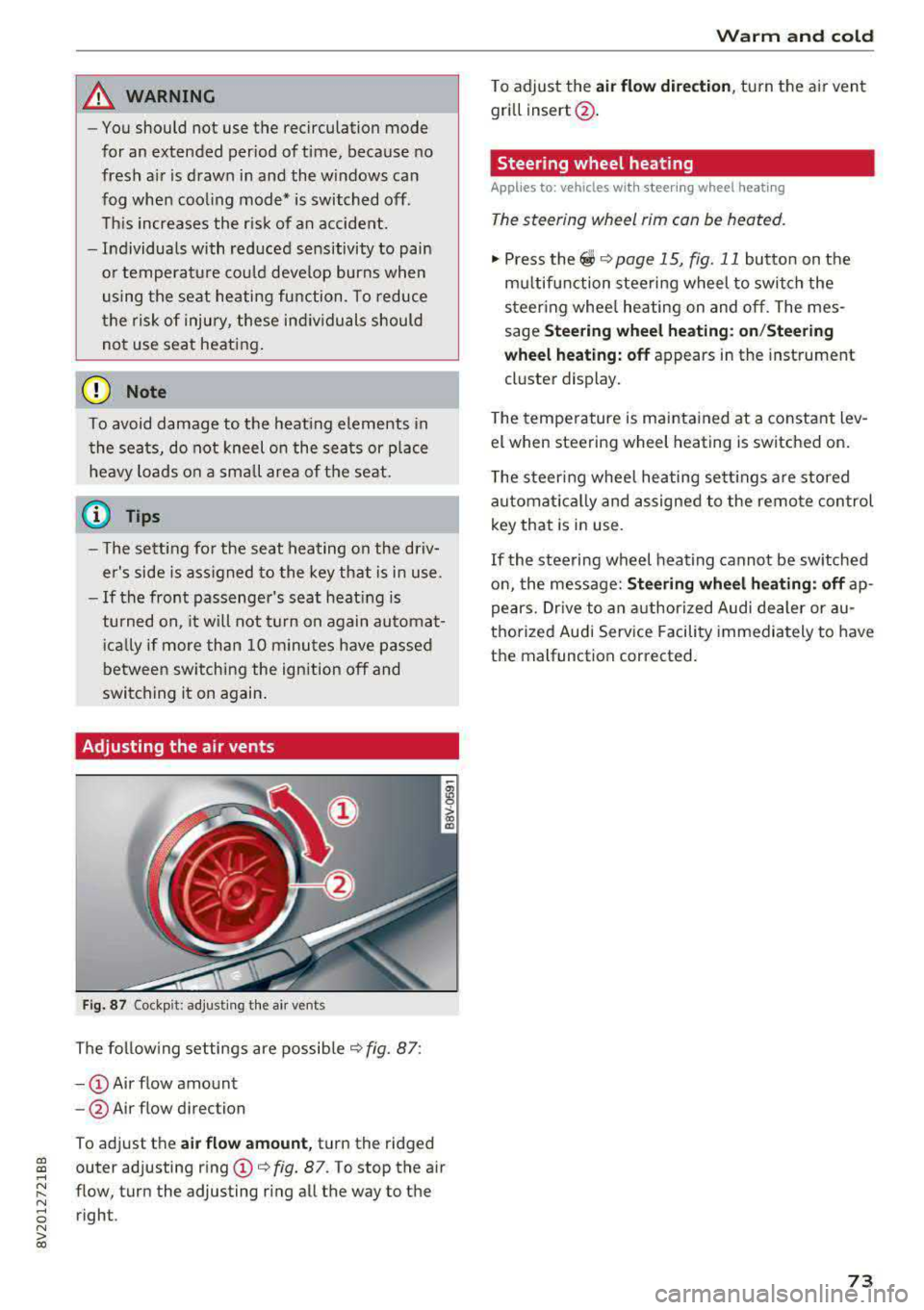
Adjusting the air vents
Fig. 87 Cockp it: adjust ing the air vents
The fol low ing settings are possib le ¢fig. 87:
- CD Air flow amount
-@ Air flow direction
To adjust the
air fl ow a mount , turn the ridged
outer adjusting ring
CD ¢ fig. 87. To stop the air
flow, turn the adjusting ring all the way to the right .
Warm and cold
To adjust the air fl ow directio n, turn the air vent
gri ll insert @.
Steering wheel heating
Applies to: vehicles with steering wheel heating
The steering wheel rim can be heated.
"' Press the ~ ¢ page 15, fig. 11 button on the
mu ltifunction steering wheel to switch the
steering whee l heating on and off. The mes
sage
St ee ring wheel h eatin g: on/St eering
w hee l heating: off
appears in the instrument
cluster display.
T he temperature is mainta ined at a constant lev
el when steering wheel heating is switched on.
T he s teering wheel heating settings a re stored
automat ica lly and assigned to the remote control
key that is in use .
If the steering wheel heating cannot be sw itched
on, the message:
S te e ring wh eel h eating : off ap
pears. Dr ive to an authorized Audi dea ler or au
thorized Audi Service Facility immediately to have
the malfunction corrected.
73