buttons AUDI S3 SEDAN 2018 User Guide
[x] Cancel search | Manufacturer: AUDI, Model Year: 2018, Model line: S3 SEDAN, Model: AUDI S3 SEDAN 2018Pages: 404, PDF Size: 62.3 MB
Page 137 of 404
LL co .... N
" N .... 0 N > co
Analog instru- Audi virtual Meaning on ment cluster cockpit* the corre-
sponding side
Green lines Green li ne(s) Active lane as-
'/ \' (left/right) sist is activat-
'/ 'r ed and ready
to prov ide
warnings.
-Red line Active lane as-
(left/right) sist warns you
'/ \ · before leaving
a lane . In add i-
tion , the steer-
ing wheel vi-
brates lightly.
Yellow lines Yellow line(s) Active lane as-
(left/right) sist is act ivat-
'/ \· ed, but is not
ready to give
warning
If the system is switched on but is not ready to
p rovide warnings, one of the following cou ld be
the cause:
-There is no lane marker line.
-The relevant lane marker lines are not detected
(for example, mark ings in a construction zone
or because they are obstructed by snow, dirt,
water or lighting).
-The veh icle speed is below the activation speed
of approx imately 40 mph (65 km/h) .
-The lane is too narrow or too wide .
-The curve is too narrow.
-The driver's hands are not on the steering
wheel.
@ Tips
-Make sure the camera's field of view
¢ fig. 136 is not obstructed by stickers or
anything else. For informat ion on cleaning,
see
¢ page 354.
-In certain markets: if the system is switched
on, it will switch on automatically each t ime
the ignit ion is switched on.
Assistance systems
Display in the instrument cluster
Applies to : veh icles w it h Audi act ive la ne ass ist
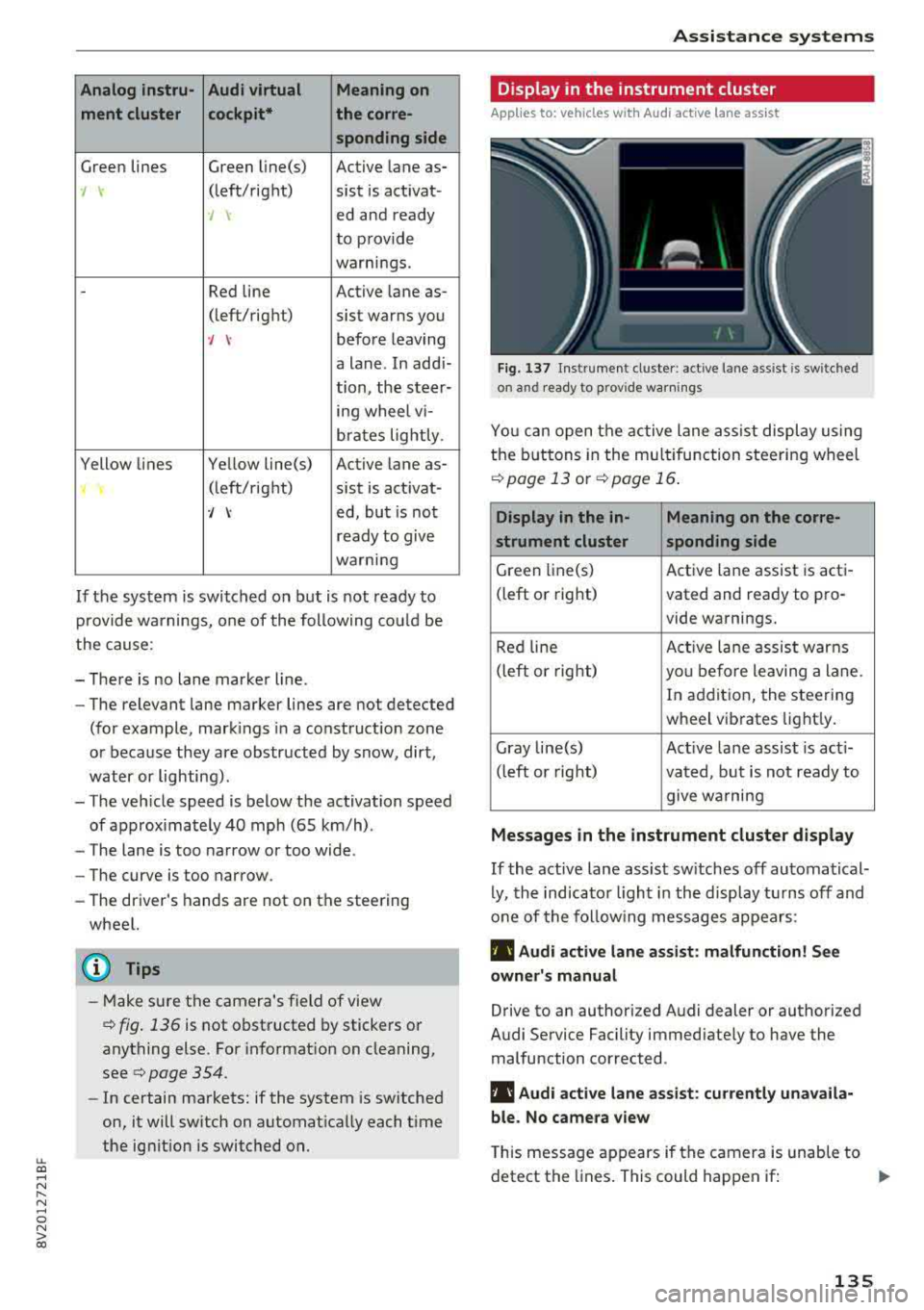
Fig . 137 Ins trumen t cluster: active lane assist is sw it c hed
on and ready to prov ide warnings
You can open the active lane ass ist display using
the buttons in the multifu nction steering wheel
¢ page 13 or¢ page 16.
Display in the in- Meaning on the corre-
strument cluster sponding side
Green li ne(s) Active lane assist is acti-
(left or right) vated and ready to pro-
vide warnings.
Red line Active lan e assist warns
(left or right)
you before leaving a lane.
In addition, the steering
wheel vibrates lightly.
Gray line(s) Act ive lane assist is act i-
(left or right)
vated, but is not ready to
give wa rning
Messages in the instrument cluster display
If the active lane assist sw itches off automatical
ly, the indicator light in the display turns off and
one of the following messages appears:
Ill Audi active lane assist : malfunction! See
owner's manual
Drive to an authorized Audi dealer or authorized
Audi Service Facility immed iate ly to have the
malfunction corrected .
Ill Audi active lane assist : currently unavaila
ble. No camera view
This message appears if the camera is unable to
detect the lines. This could happen if:
.,.
135
Page 156 of 404
Multi Media Interface
Multi Media Interface
Traffic safety information
Aud i recommends performing certain Infotain
ment system functions, such as entering a desti
nation, only when the vehicle is stationary . Al
ways be prepared to stop operat ing the Infotain
ment system in the interest of your safety and
the safety of other road users.
_& WARNING
Only use the Infotainment system when traf
fic cond itions permit and always in a way that
allows you to maintain complete control over
your vehicle .
@ Tips
Certain functions are not available whi le driv
ing .
Introduction
The Multi Media Interface , or MMI for short,
combines various systems for communication ,
navigation* and entertainment in your Audi. You
can operate the MMI using the MMI control pan
el, the multifunction steering wheel or the voice
recognition system* .
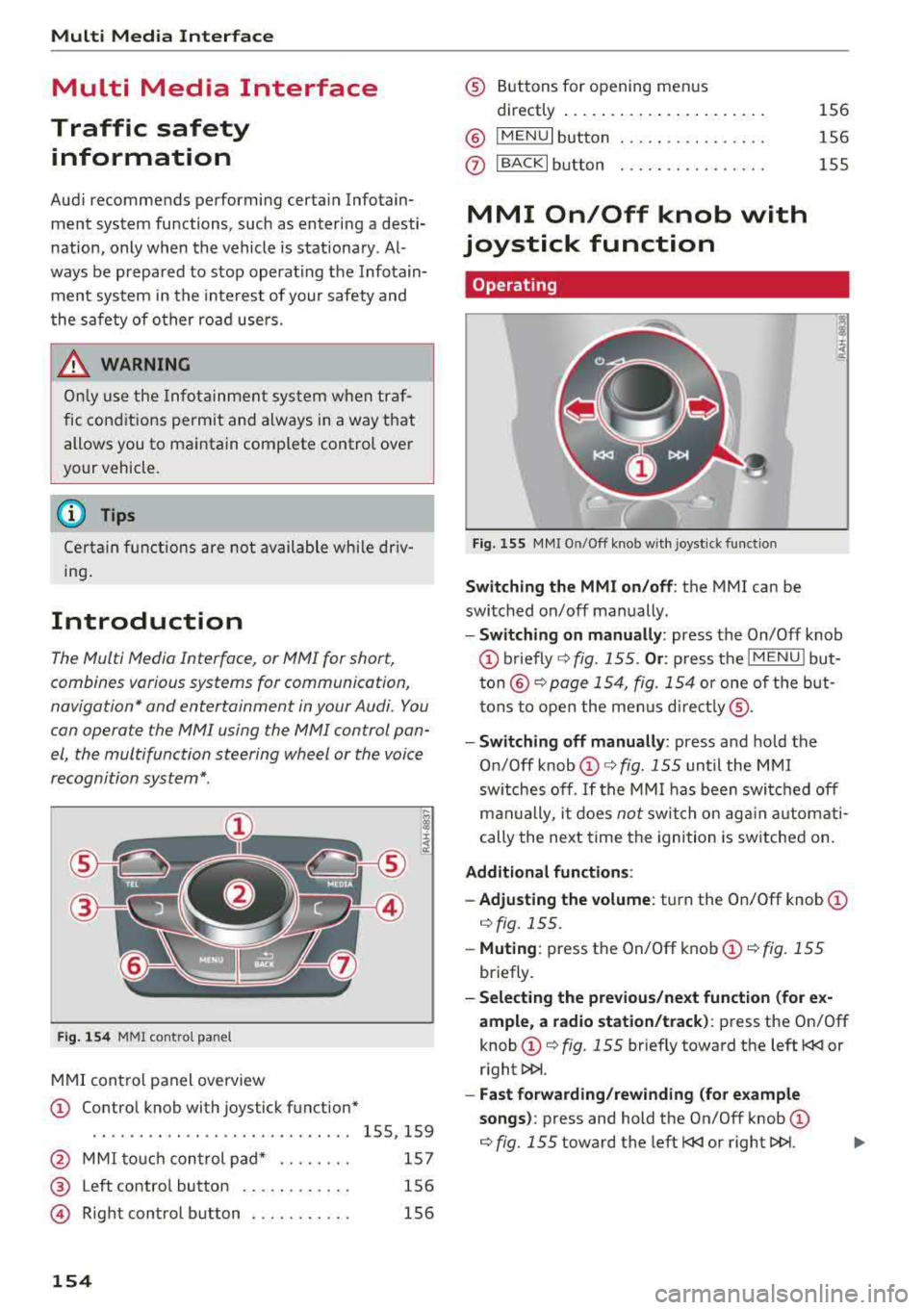
Fig. 154 MMI control panel
MMI control panel overview
CD Control knob with joystick function*
....... .... ........... ...... 155, 159
@ MMI touch control pad* . . . . . . . . 157
® Left contro l button . . . . . . . . . . . . 156
@ R ight control b utton . . . . . . . . . . . 156
154
® Buttons for opening men us
directly ......... .. .......... .
® IMENUI button
0 I BACK I button .. . .. ...... .... .
MMI On/Off knob with
joystick function
Operating
Fig . 155 MMI On/Off knob w ith joystick function
Switching the MMI on /off : the MMI can be
switched on/off manually. 156
156
155
- Switching on manually : press the On/Off knob
CD briefly c:::> fig. 155 . Or: press the I MENU ! but
ton@ c:::> page 154, fig. 154 or one of the but
tons to open the menus directly ®·
-Switching off manually: press and hold the
O n/Off knob
CD c:::> fig. 155 until the MMI
switches off .
If the MMI has been switched off
manually, it does
not switch on again automati
cally the next time the ignition is switched on.
Additional function s:
- Adjusting the volume:
turn the On/Off knob CD
c:::> fig. 155.
-Muting : press the On/Off knob CD c:::> fig. 155
briefly.
-Selecting the previous/next function (for ex
ample , a radio station/track):
press the On/Off
knob
CD c:::> fig. 155 briefly toward the left l
l>l>i .
-Fast forwarding/rewinding (for example
songs) :
press and hold the On/Off knob CD
c:::> fig. 155 toward the left l
Page 158 of 404
Multi Media Interface
Opening the main menu
~ Press the IMENU! button ® ¢page 154,
fig . 154.
The MMI menus (such as Radio ) are
displayed
¢ fig. 157. Then yo u can select and
confirm a function using the control knob.
Opening a menu directly
~ Press the applicable button to directly open the
menus ®
¢page 154, fig. 154 in the direction
of the desired menu (such
as!RADIO !). Then
you can select and confirm a f unction using the
control knob.
Opening the selection menu /options menu
with the control buttons
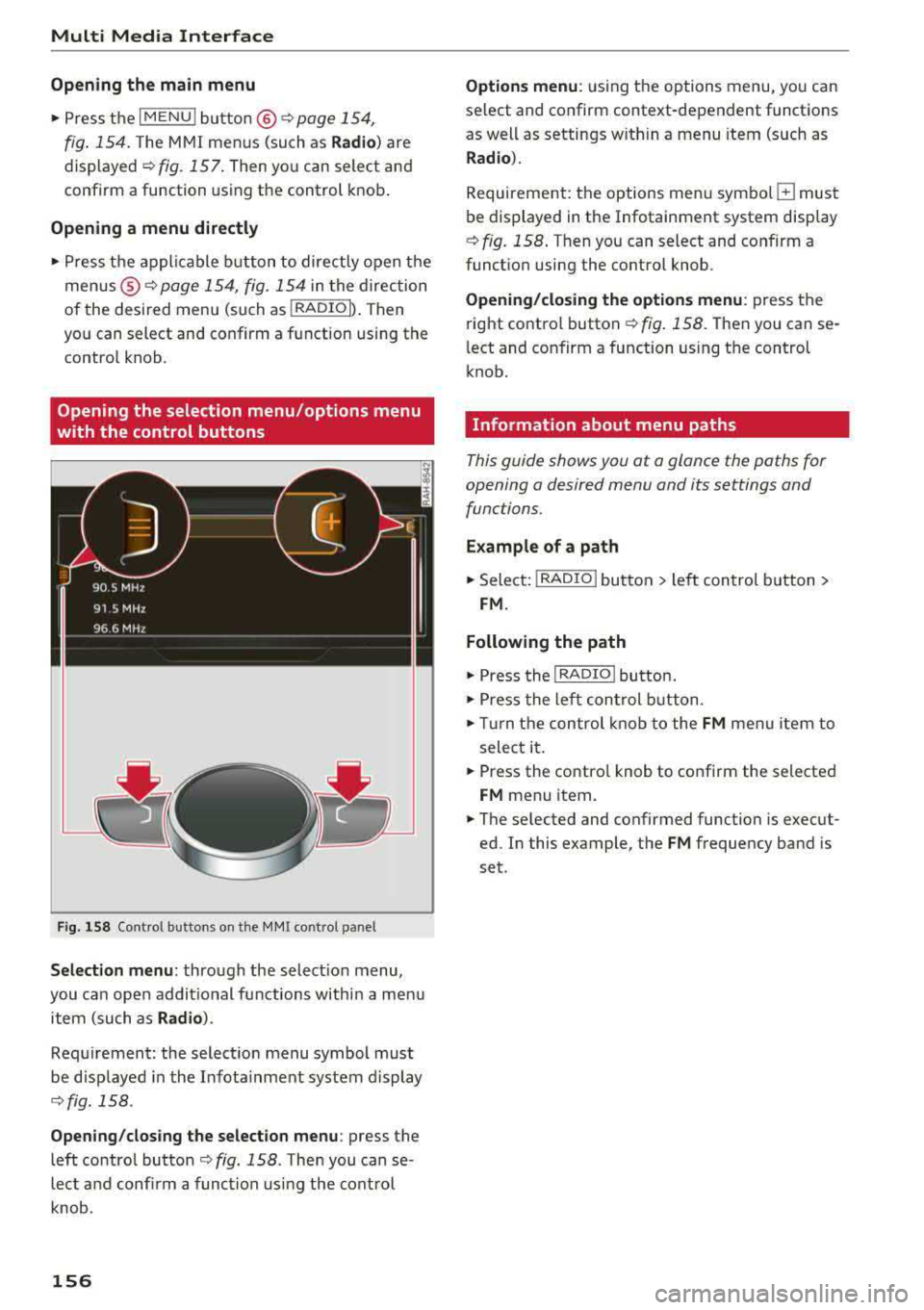
F ig. 158 Control buttons on the MMI cont rol pane l
Selection menu: through the select ion menu,
you can open addit ional functions within a men u
item (such as
Radio ).
Requirement: the select ion menu symbol must
be disp layed in the Infota inment system display
¢ fig. 158 .
Opening /closing the selection menu: press the
left control
button ¢ fig. 158 . Then you can se
lect and confirm a function using the control
knob .
156
Options menu : using the options menu, you can
select and confirm context-dependent functions
as well as settings w ith in a menu item (such as
Radio ).
Requirement: the options menu symbo l G must
be displayed in the Infotainment system display
¢ fig. 158 . Then you can select and confirm a
funct ion using the control knob.
Opening/closing the options menu: press the
right control
button ¢ fig. 158. Then you can se
l ect and confirm a function using the control
knob.
Information about menu paths
This guide shows you at a glance the paths for
opening a desired menu and its settings and
functions .
Example of a path
~ Select: I RADIO I button > left control button >
FM.
Following the path
~ Press the I RADIO I butto n.
~ Press the left control button.
~ Turn the control knob to the FM menu item to
select it.
~ Press the contro l knob to confirm the selected
FM menu item.
~ The selected and confirmed function is execut
ed. In this example, the
FM frequency band is
set .
Page 250 of 404
System settings
Adjusting the system volume
.,. Select : I MENU I button> Sound> left control
button.
Telephone
Applies to: vehicles with telephone
Mute telephone: messages and ringtones are set
to mute.
Ringtone : see c::> page 188, Ringtone and volume
settings .
Ringtone volume:
you can adjust the volume of
the selected ringtone by turning the contro l
knob.
Message volume: you can adjust the volume of
the notification for an incoming text message by
turning the control knob.
Microphone input level : you can adjust the call
volume during a phone call by turning the control
knob.
Navigation
Applies to: vehicles with navigation system
Voice guidance: see c::>page 210.
Voice guidance during phone call: see
c::> page 210.
Voice guidance volume: you can adjust the vo ice
gu idance volume by turning the control knob.
Or:
you can adjust the vo ice guidance volume during
active route guidance by turning the On/Off
knob .
Entertainment fader : the volume of audio play
back can be temporarily lowered when the park
ing system or vo ice gu idance is active .
Voice recognition system
Applies to: vehicles with voice recognition system
Command display : see c::> page 243.
Short dialog : see c::> page 243.
Volume : see c::> page 243 .
Individual speech training : see c::> page 243.
1> Not availa ble in all vehicl es.
248
Parking aid*
You can adjust the volum e of the signal tone by
turning the control knob.
-Adjusting the Front volume: select and con
firm
High , Medium or Low .
- Adjusting
the Rear volume : select and confirm
High , Medium or Low .
MMI touch*
Turn the control knob to adjus t the volume of the
spoken prompts from the
MMI touch* .
Restarting the MMI
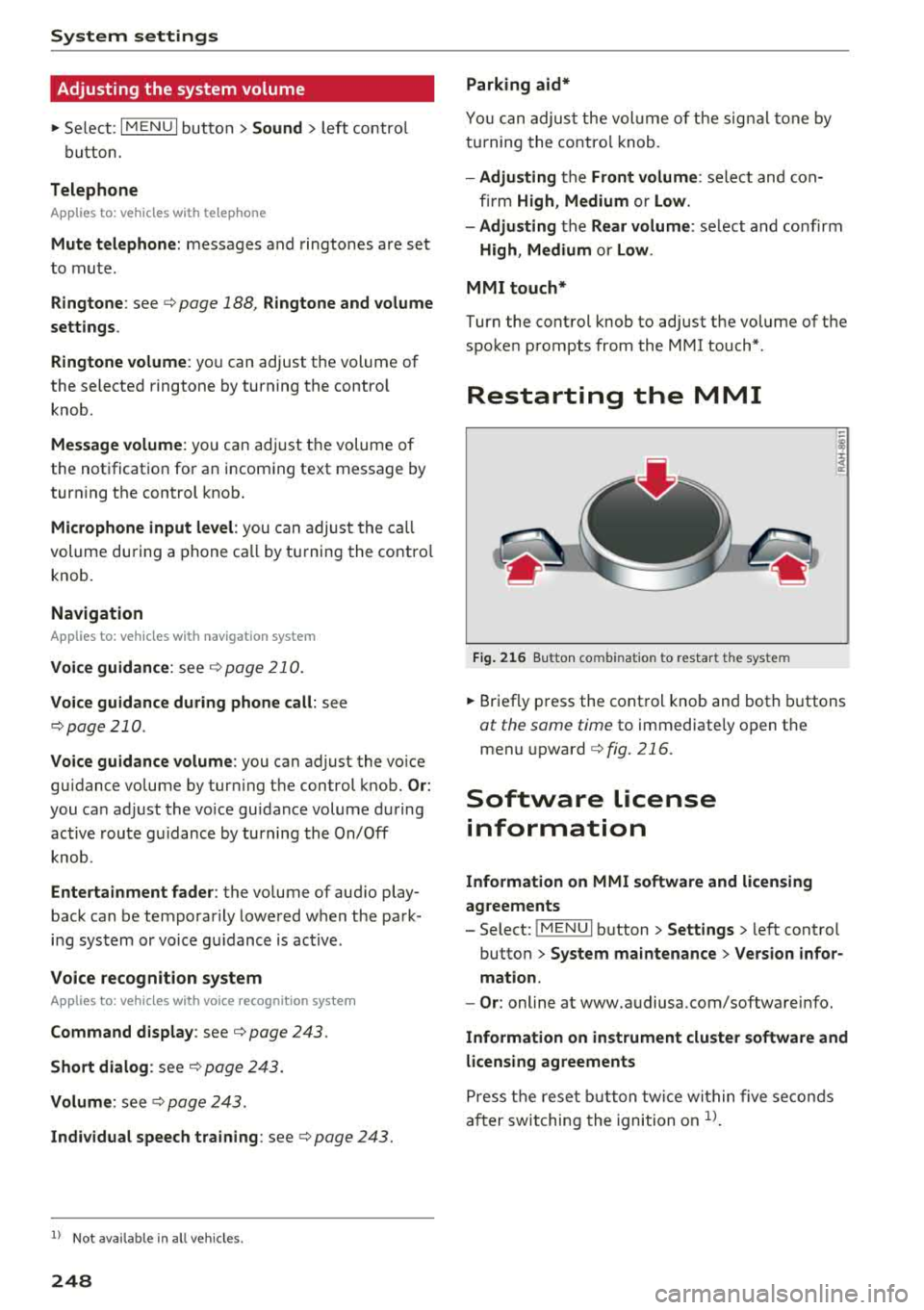
Fig. 216 Button co mbinatio n t o restar t th e sys te m
.,. Briefly press the control knob and both buttons
at the same time to immediately open the
menu upward
c::> fig. 216.
Software license
information
Information on MMI software and licensing
agreements
- Select: ~
I M~E=N~U~ I button >Settings > left control
button>
System maintenance > Version infor
mation.
- Or : online at www.audiusa.com/softwareinfo.
Information on instrument cluster software and
licensing agreements
Press the reset button twice within five seconds
after switching the ignition on
ll.
Page 390 of 404
Index
Audi pre sense . . . . . . . . . . . . . . . . . . . . . . . 130
Messages . . . . . . . . . . . . . . . . . . . . . . 130, 133
Aud i Service Repair Manuals and Literature 383
Audi side assist . . . . . . . . . . . . . . . . . . . . . . . 136
Cleaning the sensors . . . . . . . . . . . . . . . . . 355
Messages . . . . . . . . . . . . . . . . . . . . . . . . . . 140
Rear cross-traffic assist . . . . . . . . . . . . . . . 139
Audi smartphone interface . . . . . . . . . 241, 245
Aud i virtual cockp it
refer to Instrument cluster . . . . . . . . . . . . . 10
AUTO
Automatic climate control system . . . . . . .
69
Automatic headlights . . . . . . . . . . . . . . . . . 49
Auto Lock (centr al locking system) . . . . . . . . 31
Automatic belt retractor . . . . . . . . . . . . . . . 264
Automatic climate control system
refer to Climate control system
(automatic) . . . . . . . . . . . . . . . . . . . . . .
68, 69
Automatic power top
refer to Power top . . . . . . . . . . . . . . . . . . . . 42
Automatic transmission . . . . . . . . . . . . . . . . . 83
Driving tips . . . . . . . . . . . . . . . . . . . . . . . . . . 86
Emergency mode . . . . . . . . . . . . . . . . . . . . . 89
Hill descent control . . . . . . . . . . . . . . . . . . . 87
Kick -down . . . . . . . . . . . . . . . . . . . . . . . . . . .
88
Launch control program . . . . . . . . . . . . . . . 89
Malfunction . . . . . . . . . . . . . . . . . . . . . . . . . 84
Manual shift ing (tiptronic mode) . . . . . . . . 88
Selector lever . . . . . . . . . . . . . . . . . . . . . . . . 86
Selector lever emergency re lease . . . . . . . . 90
Selector lever lock . . . . . . . . . . . . . . . . . . . . 84
Selector lever positions . . . . . . . . . . . . . . . . 84
Shift padd les . . . . . . . . . . . . . . . . . . . . . . . . 88
Automatic wipe/wash system . . . . . . . . . . . . 55
Auto Safety Hotline . . . . . . . . . . . . . . . . . . .
258
Auxiliary climate contro l . . . . . . . . . . . . . . . 116
AUX input . . . . . . . . . . . . . . . . . . . . . . . . . . . 230
Average consumption ........... .... . 17, 18
Average speed . . . . . . . . . . . . . . . . . . . . . 17, 18
B
BACK button . . . . . . . . . . . . . . . . . . . . . . . . . 154
Bag hooks . . . . . . . . . . . . . . . . . . . . . . . . .
63, 65
Balance (sound) . . . . . . . . . . . . . . . . . . . . . . 247
Bass (sound) . . . . . . . . . . . . . . . . . . . . . . . . . 247
388
Battery
In the key . . . . . . . . . . . . . . . . . . . . . . . . . . .
32
also refer to High-voltage battery . . . . . . . 92
also refer to Vehicle battery . . . . . . . . . . . 326
Before driv ing . . . . . . . . . . . . . . . . . . . . . . . . 249
Belt tensioners . . . . . . . . . . . . . . . . . . . . . . . 267
Blended gasoline . . . . . . . . . . . . . . . . . . . . . 314
Blower
Automat ic climate control system . . . . . . .
70
Bluetooth
Audio player . . . . . . . . . . . . . . . . . . . . . . . .
226
Connecting a cell phone . . . . . . . . . . . . . . 177
Settings . . . . . . . . . . . . . . . . . . . . . . . . . . . 246
Boost . . . . . . . . . . . . . . . . . . . . . . . . . . . . . . . . 19
Booster seats . . . . . . . . . . . . . . . . . . . . . . . . 304
Boost pressure indicator . . . . . . . . . . . . . . . . 19
Brakes . . . . . . . . . . . . . . . . . . . . . . . . . . . . . . 150
Brake assist . . . . . . . . . . . . . . . . . . . . . . . . 148
Brake fluid . . . . . . . . . . . . . . . . . . . . . . . . . 326
Electromechanical parking brake . . . . . . . . 81
Emergency braking function . . . . . . . . . . . . 82
New brake pads . . . . . . . . . . . . . . . . . . . . . 150
Break-in security feature . . . . . . . . . . . . . . . . 36
Breaking in
New brake pads . . . . . . . . . . . . . . . . . . . . .
150
New engine . . . . . . . . . . . . . . . . . . . . . . . . . 72
New tires . .... .. .. .. ............. .. 337
Browser
refer to Media center . . . . . . . . . . . . . . . . . 233
Bulbs . . . . . . . . . . . . . . . . . . . . . . . . . . . . . . . 373
Buttons
Control panel (MMI) . . . . . . . . . . . . . . . . .
154
Multifunction steering wheel . . . . . . . . 13, 16
Programming (multifunction steering
wheel) . . . . . . . . . . . . . . . . . . . . . . . . . . . . . . 15
Switching the Infotainment system display
on/off . . . . . . . . . . . . . . . . . . . . . . . . . . . . .
155
C
Cable (USB adapter/AUX connector cable) 229
California Proposition 65 Warning . . . . . . . 319
Battery specific . . . . . . . . . . . . . . . . . . . . . 327
Call list . . . . . . . . . . . . . . . . . . . . . . . . . . . . . 180
Call options . . . . . . . . . . . . . . . . . . . . . . . . . . 188
Page 392 of 404
Index
Compass in the mirror . . . . . . . . . . . . . . . . . . 57
Compl iance . . . . . . . . . . . . . . . . . . . . . . . . . . 386
connect e-tron services ......... .... .. .
Connection manager
Connections 199
244
refer to Med ia . . . . . . . . . . . . . . . . . . 223, 232
Consumer I nformat ion . . . . . . . . . . . . . 258, 383
Consumpt ion (f uel) . . . . . . . . . . . . . . . . . 17 , 18
Contact ing NHT5A . . . . . . . . . . . . . . . . . . . . 258
Contacts . . . . . . . . . . . . . . . . . . . . . . . . . . . . 186
Additional directory . . . . . . . . . . . . . . . . . . 245
Impo rt ing/exporting . . . . . . . . . . . . . . . . . 187
Memory capacity . . . . . . . . . . . . . . . . . . . . 188
Storing as dest ination . . . . . . . . . . . . . . . . 208
Control buttons (operating the M MI) . . . . . 156
Contro l knob with joystick f unction (MMI op
e ration) . . . . . . . . . . . . . . . . . . . . . . . . . . . . . 159
Convenience key Emergency operat ion . . . . . . . . . . . . . . . . . . 79
Starting/stopping the engine . . . . . . . . . . . 76
Unlock ing/ lock ing . . . . . . . . . . . . . . . . . . . . 34
Convenience opening/closing . . . . . . . . . . . . 40
Conve rtible ch ild safety sea ts . . . . . . . . . . . 302
Convert ible locking retractor
Activating . . . . . . . . . . . . . . . . . . . . . . . . . . 307
D eactivating . . . . . . . . . . . . . . . . . . . . . . . . 308
Using to secure a child safety seat . . . . . . 307
Cooling down . . . . . . . . . . . . . . . . . . . . . . . . . 72
Cooling mode Automatic climate control system . . . . . . . 69
Cooling system Add ing coolant . . . . . . . . . . . . . . . . . . . . . . 325
Coolan t . . . . . . . . . . . . . . . . . . . . . . . . . . . . 324
Coolant leve l checking . . . . . . . . . . . . . . . . 325
Coolant temperature indicator . . . . . . . . . . 11
C ru ise contro l system . . . . . . . . . . . . . . . . . . 120
Cup holders . . . . . . . . . . . . . . . . . . . . . . . . . . . 62
Curre nt cons umption . .. ..... ... .. .. . 17 , 18
D
Data co nnect ion . . . . . . . . . . . . . . . . . . . . . . 196
Data pro tec tio n . . . . . . . . . . . . . . . . . . . . . . . 197
D ata recorder . . . . . . . . . . . . . . . . . . . . . . . . 152
D ate ..... ... .. .. ................ ... . 24 3
Date display . . . . . . . . . . . . . . . . . . . . . . . . . 243
Daytime runni ng lights . . . . . . . . . . . . . . . . . 49
390
Decla ration of compliance . . . . . . . . . . . . . . 386
Defrosting (windows) Automat ic cl imate cont ro l system . . . . . . . 70
DEF (instrument cluster) . . . . . . . . . . . . . . . . 12
De luxe automa tic climate contro l
refer to Climate control system
(automatic) . . . . . . . . . . . . . . . . . . . . . . 68, 69
De mo mode
refer to Pr esen ta ti on mode . . . . . . . . . . . . 209
Determ ining correct load lim it . . . . . . . . . . 345
Digital compass . . . . . . . . . . . . . . . . . . . . . . . 57
D igital R ights Ma nagement . . . . . . . . . . . . . 223
D imensions . . . . . . . . . . . . . . . . . . . . . . . . . . 381
D imm ing t he exterior mi rro rs . . . . . . . . . . . . 5 4
D imm ing t he rearv iew m irror . . . . . . . . . . . . 54
D irecto ry
refer to Contacts . . . . . . . . . . . . . . . . . . . . 186
D isplay . . . . . . . . . . . . . . . . . . . . . . . . . . . . . . 13
Cleaning . . . . . . . . . . . . . . . . . . . . . . . . . . . 357
Infotainment system disp lay . . . . . . 155, 244
Instrument cluster . . . . . . . . . . . . . . . . . . . . 16
Mult ifunct ion steer ing whee l . . . . . . . . . . . 13
D ista nce . . . . . . . . . . . . . . . . . . . . . . . . . . 17 , 18
Doors Child safety lock . . . . . . . . . . . . . . . . . . . . . . 39
Door con tact sw itch . . . . . . . . . . . . . . . . . . . 52
E mergency release . . . . . . . . . . . . . . . . . . . . 36
also refer to Unl ocking/locking .... 3 1, 33 , 34
Driver informat ion system
Chang ing v iews . . . . . . . . . . . . . . . . . . . . . . 13
E conomy tips (analog instrument cluster) . 19
E ffic iency program . . . . . . . . . . . . . . . . . . . . 19
E ne rgy cons ume rs (Aud i v ir tu al co ckpit) . . 18
Ou tside temperat ure display. . . . . . . . . . . . 12
Service interva l display . . . . . . . . . . . . . . . 328
T rip computer (analog instrument cl uster . 18
Tr ip comp uter (A udi v irtual cockpit) . . . . . . 17
V iew . . . . . . . . . . . . . . . . . . . . . . . . . . . . . . . 14
Drive r seating position . . . . . . . . . . . . . . . . . 250
Drives
refer to M edia . . . . . . . . . . . . . . . . . . 223, 232
D rive select
refer to Aud i drive select . . . . . . . . . . . . . . 140
Drivi ng econom ica lly . . . . . . . . . . . . . . . . . . . 73
D rivi ng safely . . . . . . . . . . . . . . . . . . . . . . . . 249
Driving thro ugh water . . . . . . . . . . . . . . . . . . 72