individual AUDI S3 SEDAN 2018 User Guide
[x] Cancel search | Manufacturer: AUDI, Model Year: 2018, Model line: S3 SEDAN, Model: AUDI S3 SEDAN 2018Pages: 404, PDF Size: 62.3 MB
Page 200 of 404

Audi connect (Infotainment)
Troubleshooting
Applies to vehicles with Audi connect (Infotainment)
Problem Solution
Audi connect Infotainment serv·
Some Audi connect Infotainment services must be activated/con-
ices: individual Audi connect Info- figured through your personal myAudi account before using
ta inment serv ices are grayed out or them for the first time. You can find deta iled information on line
not available . atwww.audiusa.com/myaudi.
Wi-Fi hotspot : it is not possible to Delete all existing Wi-Fi connections on your mobi le device and
connect through Wi-Fi. restart it.
198
Page 201 of 404
u. 00 .-< N l' N .-< 0 N > 00
Audi connect e-tron services
Introduction
Applies to: vehicles with Audi connect e-tron services
With Audi connect e-tron services l), you can ac
cess various information or control individual
functions remotely using mob ile dev ices (such as
a smartphone) or a web portal.
- Trip
data¢ page 199.
- Doors and lights ¢page 199.
-Vehicle status report ¢ page 200.
- Car
Finder ¢ page 200.
- Charging
¢ page 200.
- Climate
control¢ page 200 .
A WARNING
Also read and follow the instructions regard
ing traffic safety
¢ page 154.
Setup
Applies to: vehicles with Audi connect e-tron services
To use Audi connect e-tron services 1), please
note the following:
Requirements
-An authorized Audi dealer must complete a
one-time activation of Audi connect e-tron serv
i ces for your veh icle before you can reg ister on
line .
- Then register at etron.audiusa .com . You can
use and manage the Audi connect e-tron serv
ices there .
- If you require assistance w ith your Aud i connect
e-tron services, please contact an authorized
Audi dealer or authorized Audi Service Facility.
- Your mobile devices must be compatible .
1> The mob ile network service is offered by a serv ice provid
e r. Yo u can obtain more informa tion abou t your mobile
network provider at an au th or ized Aud i dealer. Connected
dev ices are not always 4G-compatible. Th e ava ilability o f a
high -speed network may be red uced dur ing pea k usage or
b y your location, the reception, and other factors . Ne t
wo rk coverage ca nnot be guaranteed everywhere. Fo r
mo re info rmation on mobile cove rage, see the Audi con
n ect overv iew from your mobile network provider.
Audi connect e-tron services
Trip data
Applies to: vehicles with Audi connect e-tron services
The Driver Information System collects data un
der certain conditions and sends it to a server.
When data is stored, you can access values such
as these using the service:
- driving durat ion,
- average speed driven,
- distance driven,
- average electric consumption.
Doors and lights
Applies to: vehicles with Audi connect e-tron services
You can access and disp lay the current status of
the following vehicle data on your mobile devices
without having to be inside the vehicle.
- If the vehicle doors and lids are open/closed,
- Parking lights are on/off.
For additional information on opening and clos
i ng the doors or for the vehicle lighting, refer to
¢ page 31, Opening and closing or to ¢ page 49,
Exterior lighting.
(D Tips
-If the high-voltage battery is not charged,
the amount of access requests is limited to
15 after switching off the ignition. This
helps conserve the 12 vo lt vehicle battery.
You cannot contro l functions or access in
formation if the charge leve l of the 12 volt
vehicle battery is too low.
- If at least two minutes have passed after
the last time the ignition was switched off,
you can reset the access counter back to "O" as needed after switch ing the ignit ion on/
off again.
199
Page 207 of 404
LL co ..... N
" N ..... 0 N > co
(D Tips
Always read the chapter¢ page 196, Audi
connect (Infotainment) general information .
Accessing destinations from myAudi
account
Applies to: veh icles with a navigation system and Audi con
nect (Infotainment)
Import individual destinations from your myAudi
account into the
MMI.
Req uirement:
The requ iremen ts for Aud i connect (Infotain
ment) must be met
¢ page 190 .
You must have a registered myAudi account at
www .audiusa .com/myaudi . You must have
ave
hicle assigned to your myAudi account and yo u
must have sto red one or mo re destinations .
... Press the I NAV/MAPI button repeatedly until
the
Ent er destination menu is displayed
¢ page 201, fig . 182 .
... Select: left cont rol button > myAudi contacts .
... If necessary, enter your myAudi user data o r
yo ur myAud i PIN¢
page 190 . The contacts
stored in myAudi are d isp layed.
- Se lect and confir m a conta ct.
- Se lect and confirm a priva te or b usiness desti-
nation .
- Select and co nfirm
Start route guidance .
(D Tips
-You only need to enter the myAud i user data
one time.
- You can receive your myA udi PIN if you have
set up a myAudi account.
- Fo r additional informat ion, visit
www.audiusa.com .
Entering a destination using geo
coordinates
App lies to: vehicles with navigation system
... Press the I N AV/MAPI but ton repeated ly un til
t h e
Enter de stination menu is dis played
¢page 201 , fig . 182.
Na viga tion
... Sele ct: left control button > Geographi cal coor
dinates .
-Sele ct Latitude /Longitude .
-Press the cont ro l knob to set the individ ual va l-
ue s.
- Tur n the control knob to the left/ right to
change the selected va lue.
- Select and confirm
Start route guidance .
Adding a stopover
Applies to: vehicles with navigation system
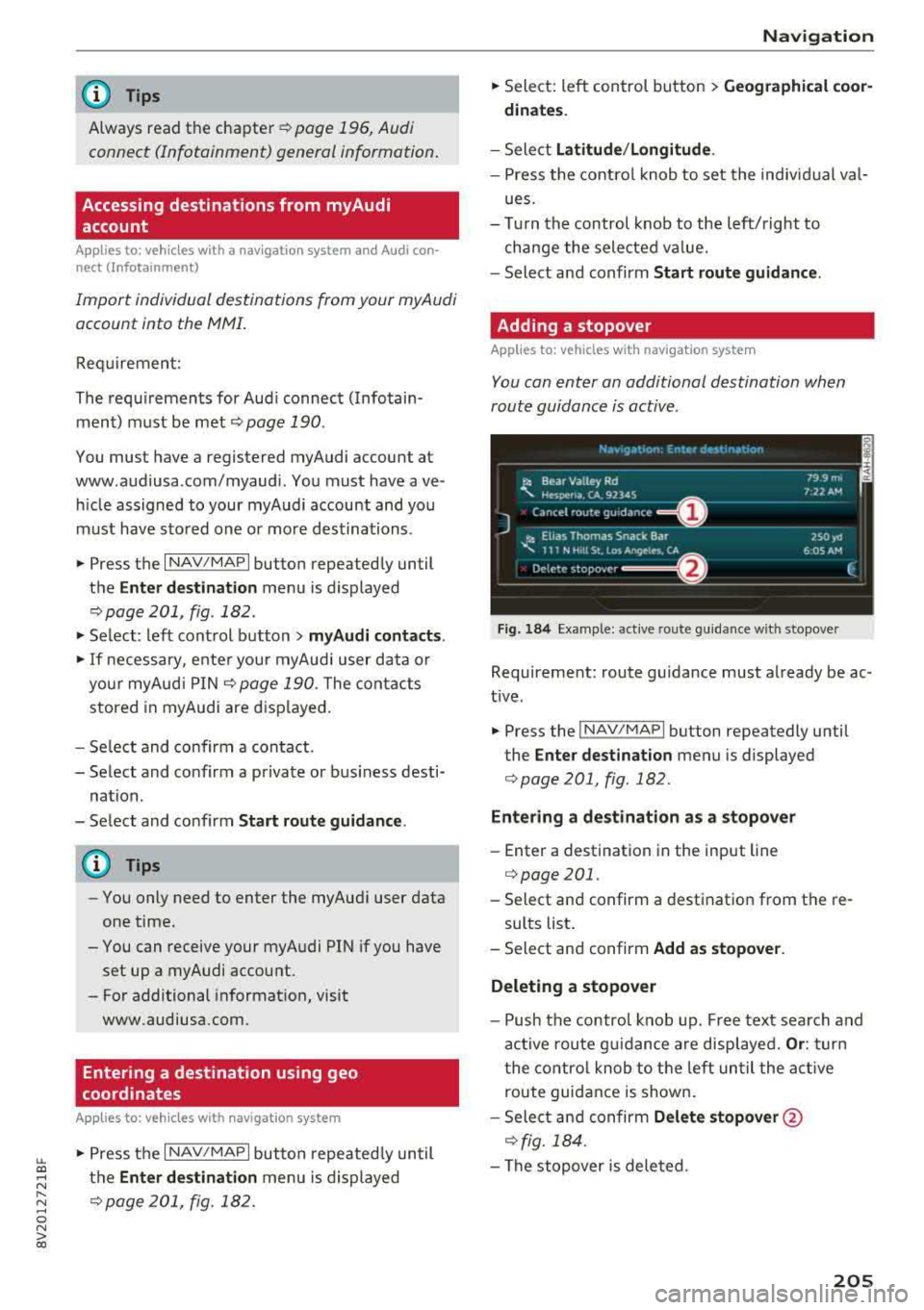
You can enter an additional destination when
route guidance is active .
Fig. 184 Example: act ive route gu ida nce w it h stopover
Requireme nt: route guidance must already be ac
t ive.
... Press the ! NAV/MAP I button repeatedly unti l
the
Enter destination menu is displayed
¢ page 201 , fig.182 .
Entering a destination as a stopove r
-Enter a destination in the input line
¢ page 201 .
-Select an d confirm a destinat ion from the re -
sults list .
- Select and confirm
Add as stopover.
Deleting a stopover
- Push the contro l knob up. Fre e tex t sea rc h and
ac tive route g uidance are disp laye d.
Or : turn
t he co ntro l knob to t he left un til the act ive
route guid ance is shown.
- Sele ct and confirm
Delete stopover @
¢ fig. 184 .
-The stopove r is deleted .
205
Page 246 of 404
System settings
wait for the sig nal t one (bee p) to say a new
command.
Volume : you can a djust th e vol ume of th e
p romp ts by turning the con tro l k no b.
Individual speech training (on ly when the v ehi
cle is s ta ti onary): yo u ca n ad apt the vo ice recog
ni tion sy ste m to your voic e or pro nunciati on in
or der to im prove the sys tem's a bili ty to re co gni ze
your speec h. Indivi dua l speech train ing is com
p rised of 20 s peech ent ries t hat consist o f com
mands and sequences of numbers . You can de
lete the p rogrammed voice t rain ing with the
Re
set individual speech training
function.
Display brightness
You can a djust the brigh tness o f the Info tain
ment system disp lay by t urning the cont ro l knob.
Factory settings
D epe ndi ng on t he ve hicle eq uipme nt, th e fo llow
i ng fu nctio ns ca n b e rese t to factory se ttings :
-Sound settings
- Radio
- Media settings
- Jukebox *
- Directory
-Telephone
- Bluetooth and Wi-Fi*
- Navigation settings*
- Navigation and online memory *
- Speech dialog system*
- Message settings *
-Apps*
- Tool tips
- Audi connect*
- Audi smartphone interface *
You can select the des ired functions individually
or all at once with the option
Select all entries .
Select and confirm Restore factory settings .
(D Tips
-Make s ure that n ot on ly t he settings we re
d eleted but also the stored data, if ap plica
b le.
- Pleas e note t hat the vo ice reco gnit io n sys
te m* is not availab le in Cabr io lets .
244
Connection manager
Introduction
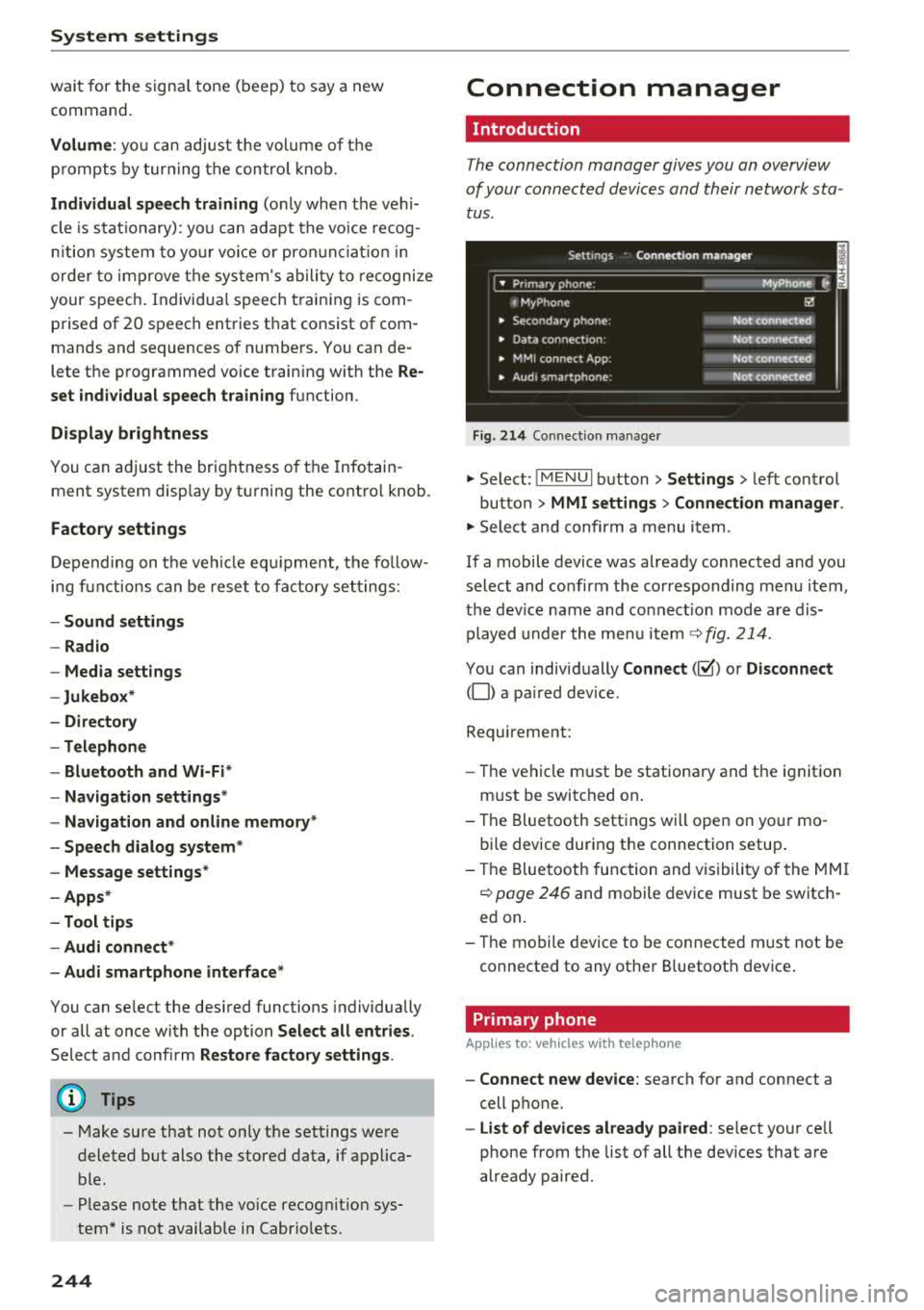
The connection manager gives you an overview
of your conn ected devic es and th eir network sta
tus .
Settings Conne -ction manager I
-====- ,.· • Prima hone: MyPhone .,.
c M yPhone
• Second ary phone :
• Data conn ection :
• MM I connect App :
• Audi smartphone:
Fig. 214 Co nnec tion man ag er
Ii'!
Not connected
Not
conn.,ct.,d
Not connected
Not
conn..cted
"' Select : !ME NUI bu tton> Settings > left con trol
bu tton >
MMI settings > Connection manager .
"'Sele ct a nd confirm a menu item.
If a mobile device was already connected and you
select and co nfirm the co rresponding menu item,
t h e dev ice name and co nnect ion mode a re dis
p layed under the menu i tem
r:!;> fig. 214 .
You can indiv id ually Connect (~ ) or Disconnect
(0) a pa ired device .
Requirement:
- The ve hicl e m ust be statio na ry and the ignit io n
m ust be switc hed on .
- Th e Bluetooth sett ings will open on yo ur mo
bi le device dur ing the connection setup .
- T he Blue tooth func tion and v is ibili ty of the MMI
c:!;> page 24 6 and mobile device must be switc h
ed on.
- T he mo bile device to be con nected m ust not be
connected to any othe r Bluetoot h dev ice .
Primary phone
App lies to: vehicles wit h telepho ne
- Connect new device: search for and connect a
cell p hone.
- List of devices already paired : select yo ur cell
phone from the list of all the dev ices that a re
already paired.
Page 249 of 404
-Ver sio n inf ormation : information on the MMI
software version and the navigation database*
software vers ion is displayed . T he
Softwa re in
form atio n
function a lso provides information
on the softwa re con tained in the MMI and the
l icensing agreement .
Sound settings
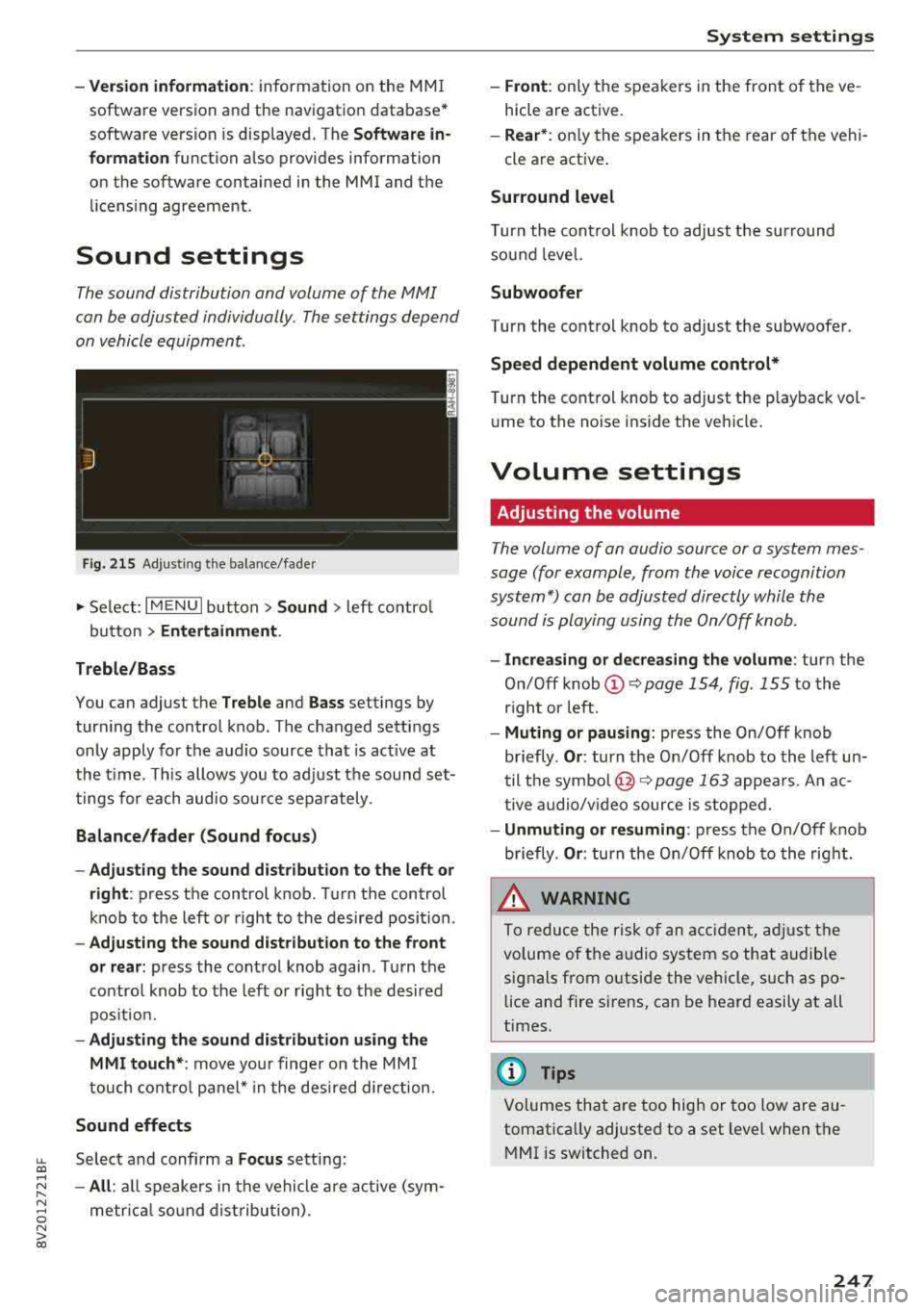
The sound distribution and volume of the MMI
can be adjusted individually . The settings depend
on vehicle equipment.
---- 1
J .-.6 . ·,
I
Fi g. 215 Adju sting the balan ce /fade r
.,. Select: I M ENU I button> Sound > left contro l
button
> Ent ertainm ent .
Treb le /Ba ss
You can adjust the Treble and Ba ss settings by
turning the control knob . The changed settings
only apply for the audio source that is act ive at
the t ime. This allows you to ad just the sound set
tings for each audio source separately .
Bal ance /fader (Sound focu s)
- Ad justing th e sou nd d ist ribut ion to the l eft or
right :
press the control k nob . Turn the control
knob to the left or right to the desired position .
-Adju sting t he sou nd d istribution to the fron t
or rear :
press the control knob again . T urn the
contro l knob to the left or right to the desired
pos ition.
- Adju sting the sound d istribution u sing th e
MMI t ouch* :
move your finger on the MM I
touch cont ro l panel* in the desi red direction.
Sound effects
LL Select and confirm a Fo cus setting: co ....
~ - All : all speakers in the vehicle a re a ctive (sym-
~ metr ica l sound dist ribution) . 0 N > co
Sys tem settings
-Front : only the speakers in the front of the ve
hicle are active.
- Rear *: on ly the speakers in the rear of the vehi
cle are active .
Surround level
Turn the cont rol knob to adjust the surround
sound level.
Subwoofer
Turn the control knob to adjust the subwoofer .
Speed dep end ent v olum e cont rol *
Turn the control knob to adjust the p layback vol
u me to the noise ins ide the veh icle.
Volume settings
Adjusting the volume
T he volume of an audio source or a system mes
sage (for example, from the voice recognition
system*) can be adjusted directly while the
sound is playing using the On/Off knob .
-Incr easing or decreas ing the volume : turn the
On/Off
knob @~ page 154, fig . 155 to the
r ight or left .
-Mu ting or pau sin g: press the On/Off knob
briefly .
Or: turn the On/Off knob to the left un
til the
symbo l@ ~ page 163 appea rs . An ac
tive a udio/v ideo source is stopped.
- Unmuting or re suming : press the On/Off knob
briefly .
Or: turn the On/Off knob to the rig ht.
.&_ WARNING
To reduce the risk of an accident, adj ust the
volume of the audio system so that audible
signals from o utside the vehicle, such as po
lice and fire sirens, can be heard easily at all
times.
(D Tips
Volumes that are too high or too low are au
tomatically adjusted to a set level when the
MMI is switched on.
.
247
Page 250 of 404
System settings
Adjusting the system volume
.,. Select : I MENU I button> Sound> left control
button.
Telephone
Applies to: vehicles with telephone
Mute telephone: messages and ringtones are set
to mute.
Ringtone : see c::> page 188, Ringtone and volume
settings .
Ringtone volume:
you can adjust the volume of
the selected ringtone by turning the contro l
knob.
Message volume: you can adjust the volume of
the notification for an incoming text message by
turning the control knob.
Microphone input level : you can adjust the call
volume during a phone call by turning the control
knob.
Navigation
Applies to: vehicles with navigation system
Voice guidance: see c::>page 210.
Voice guidance during phone call: see
c::> page 210.
Voice guidance volume: you can adjust the vo ice
gu idance volume by turning the control knob.
Or:
you can adjust the vo ice guidance volume during
active route guidance by turning the On/Off
knob .
Entertainment fader : the volume of audio play
back can be temporarily lowered when the park
ing system or vo ice gu idance is active .
Voice recognition system
Applies to: vehicles with voice recognition system
Command display : see c::> page 243.
Short dialog : see c::> page 243.
Volume : see c::> page 243 .
Individual speech training : see c::> page 243.
1> Not availa ble in all vehicl es.
248
Parking aid*
You can adjust the volum e of the signal tone by
turning the control knob.
-Adjusting the Front volume: select and con
firm
High , Medium or Low .
- Adjusting
the Rear volume : select and confirm
High , Medium or Low .
MMI touch*
Turn the control knob to adjus t the volume of the
spoken prompts from the
MMI touch* .
Restarting the MMI
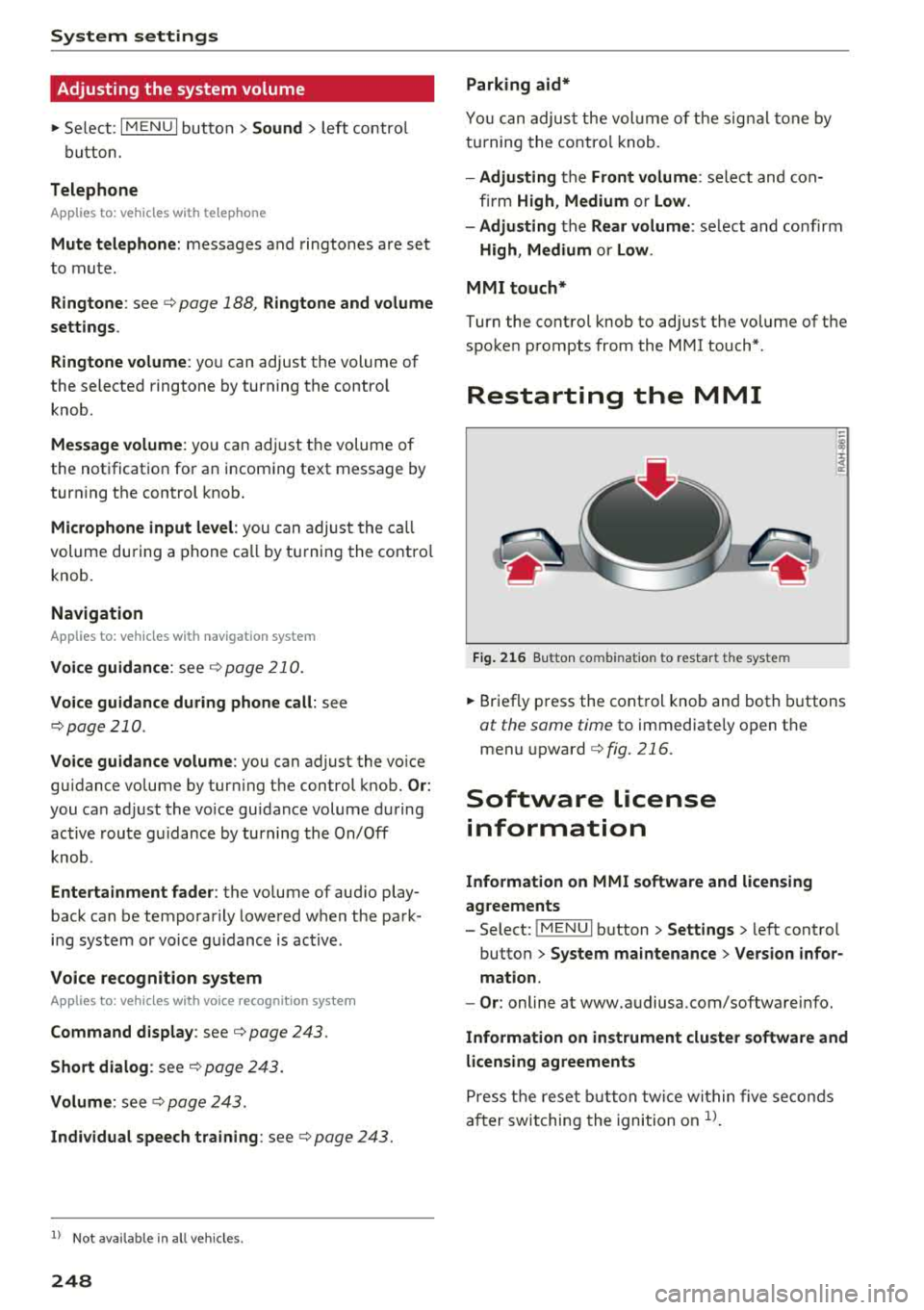
Fig. 216 Button co mbinatio n t o restar t th e sys te m
.,. Briefly press the control knob and both buttons
at the same time to immediately open the
menu upward
c::> fig. 216.
Software license
information
Information on MMI software and licensing
agreements
- Select: ~
I M~E=N~U~ I button >Settings > left control
button>
System maintenance > Version infor
mation.
- Or : online at www.audiusa.com/softwareinfo.
Information on instrument cluster software and
licensing agreements
Press the reset button twice within five seconds
after switching the ignition on
ll.
Page 251 of 404
u. 00 .-< N l' N .-< 0 N > 00
Driving safety
Basics
Safe driving habits
Please remember -safety first!
The individual safety features of your vehicle can
work together as a system to help protect you
and your passengers in a wide range of accidents.
These features cannot work as a system if they
are not always correctly adjusted and correctly
used .
This chapter contains important informat ion,
tips, instructions and warnings that you need to
read and observe for your own safety, the safety
of your passengers and others . We have summar
iz ed here what you need to know about safety
belts, airbags, child restraints as well as child
safety. Your safety is for us
priority number 1. Al
ways observe the information and warnings in
this section -for your own safety as well as that
of your passengers.
The informa tion in t his section applies to all
model versions of your vehicle. Some of the fea
tures described in this sections may be standard
eq uip ment on some models, or may be optional
equ ipment on others. If you are not sure, ask
your author ized Audi dealer.
A WARNING
-Always make sure that you follow the in
struct ions and heed the WARNINGS in this
Manual. It is in your interest and in the in
terest of your passengers .
-
-Always keep the complete Owner's Litera
ture in your Audi when you lend or sell yo ur
vehicle so that this important information
w ill always be available to the driver and
passengers.
-Always keep the Owner's literature handy so
that you can find it easily if you have ques
tions .
Driving safety
Important things to do before driving
Safety is everybody 's job ! Vehicle and occupant
safety always depends on the informed and care
ful driver .
For your safety and the safety of your passen
gers,
before driving always:
.. Make sure that a ll lights and signals are operat
ing correctly.
.. Make sure tha t the tire pressure is correct .
.. Make sure that all w indows are clean and afford
good vis ibility to the outs ide.
.. Secure all luggage and othe r items ca refully
c::> page 63, c::> page 63 .
.. Make sure that nothing can interfere with the
peda ls .
.. Adjust front seat, head restraint and mirrors
correct ly for your height.
.. Instruct passengers to adjust the head re
straints according to their height.
.. Make sure to use the right child restraint cor
rectly to protect children
c::> page 294, Child
safety .
.. Sit properly in your seat and make sure t hat
your passengers do the same
c::> page 59, Front
seats .
.. Fasten your safety belt and wear it properly. Al
so instruct your passengers to fasten their safe
ty belts properly
c::> page 260.
What impairs driving safety?
Safe driving is directly related to the condition of
the vehicle , the driver as well as the driver 's abili
ty to concentrate on the road without being dis
tracted.
The driver is responsible for the safety of the ve
hicle and a ll of its occupants. If your ability to
drive is impa ired, safety risks for everybody in the
vehicle increase and you a lso become a hazard to
everyone else on the road
c::> &_ . Therefore:
.. Do not let yourse lf be distracted by passengers
or by using a cellular telephone .
.. NEVER drive when your driving abi lity is im
pa ired (by med ications, alcohol, drugs, etc .) .
.. Observe all traffic laws, rules of the road and
speed lim its and plain common sense .
.,.
249
Page 271 of 404
u. 00 .-< N l' N .-< 0 N > 00
Airbag system Important information
Importance of wearing safety belts and
sitting properly
Airbags are only supplemental restraints. For
airbags to do their job, occupants must always
properly wear their safety belts and be in a prop
er seating position.
For your safety and the safety of your passen
gers, before driving off, always :
.,. Adjust the driver's seat and steering wheel
properly~ page 250,
.,. Adjust the front passenger's seat properly
~page 251,
.,. Wear safety belts properly ~page 263,
.. Always properly use the proper child restraint
to protect children
r=> page 294.
In a collision, airbags must inflate within the
blink of an eye and with considerable force. The
supplemental airbags can cause injuries if the
driver or the front seat passenger is not seated
properly. Therefore in order to help the airbag to
do its job, it is important, both as a driver and as
a passenger to sit properly at all times .
By keeping room between your body and the
steering wheel and the front of the passenger
compartment, the airbag can inflate fully and
completely and provide supplemental protection in certain frontal collisions
r=> page 250, Correct
passenger seating positions .
For details on the
operation of the seat adjustment controls
r=>page 59.
It's especially important that children are proper
ly restrained
r::> page 294 .
There is a lot that the driver and the passengers
can and must do to help the individual safety fea
tures installed in your Audi work together as a
system .
Proper seating position is important so that the
front airbag on the driver side can do its job. If
you have a physical impairment or condition that prevents you from sitting properly on the driver
seat with the safety belt properly fastened and
Airbag system
reaching the pedals, or if you have concerns with
regard to the function or operation of the Ad
vanced Airbag System, please contact your au
thori zed Audi dealer or qualified workshop, or
call Audi Customer Relations at 1-800-822-2834
for possible modifications to your vehicle.
When the airbag system deploys, a gas generator
will fill the airbags, break open the padded cov ers, and inflate between the steering wheel and
the driver and between the instrument panel and
the front passenger. The airbags will deflate im
mediately after deployment so that the front oc
cupants can see through the windshield again
without interruption.
All of this takes place in the blink of an eye, so
fast that many people don't even realize that the
airbags have deployed. The airbags also inflate
with a great deal of force and nothing should be
in their way when they deploy. Front airbags in
combination with properly worn safety belts slow
down and limit the occupant's forward move
ment . Together they help to prevent the driver
and front seat passenger from hitting parts of
the inside of the vehicle while reducing the forces acting on the occupant during the crash . In this
way they help to reduce the risk of injury to the
head and upper body in the crash. Airbags do not
protect the arms or the lower parts of the body.
Both front airbags will not inflate in all frontal
collisions . The triggering of the airbag system de
pends on the vehicle deceleration rate caused by
the collision and registered by the electronic con
trol unit . If this rate is below the reference value
programmed into the control unit, the airbags
will not be triggered, even though the car may be badly damaged as a result of the collision. Vehi
cle damage, repair costs or even the lack of vehi
cle damage is not necessarily an indication of
whether an airbag should inflate or not .
Since the circumstances will vary considerably between one collision and another, it is not possi
ble to define a range of vehicle speeds that will
cover every possible kind and angle of impact
that will always trigger the airbags . Important
factors include, for example, the nature (hard or
soft) of the object which the car hits, the angle of
impact, vehicle speed , etc. The front airbags will
.,.
269
Page 316 of 404
Checking and Filling
Checking and Filling Fuel
Gasoline grade
A pp lies to: ve hicles w ith gasoline engines
The correct gasoline grade is stated on the inside
of the fuel filler door .
The vehicle is equipped with a catalytic converter
and must only be driven with
unleaded gasoline .
Audi recommends using TOP TIER Detergent Gas
oline. Additional information on TOP TIER Deter
gent Gasoline can be found on the official web
site (www .toptiergas.com).
The individual gasoline grades are differentiated
by
octane ratings. This value is given with (R +M)/
2 equating to AKI or in RON.
The following headings match the corresponding
sticker in the fuel filler door .
UNLEADED FUEL ONLY MIN. (R+M)/2 87
Regular/ MIN. RON 91 Regular
Use regular gasoline with minimum 87 AKI/
91 RON
i::>@ .
The max imum eng ine power is only reached if
p rem ium gasol ine 91 AKI/ 95 RON is used.
UNLEADED FUEL ONLY PREMIUM MIN. (R
+M)/2 91 / SUPER MIN. RON 95
Using premium gaso line with minimum 91 AKI/
95 RON is recommended.
If premium gasoline is not available, you can also use regular gasoline 87 AKI/ 91 RON . However
this does reduce th e engine powe r slight ly.
0 Note
- Fillin g the tank just one time with leaded
fuel or other metallic additives will cause
permanent deter iorat ion to the catalytic
converter function.
- When gasoline with an octane rat ing that is
too low is used , h igh speeds or heavy engine
load can lead to engine damage.
314
(D Tips
The vehicle may be filled with fuel that has a
h igher octane rating than what is required by
the eng ine.
Blended gasoline
App lies to : vehicles wi th gaso line e ngi ne
Use of gasoline containing alcohol or MTBE
(methyl tertiary butyl ether)
You may use unleaded gasoline blended with al
cohol or MTBE (commonly referred to as oxygen
ates) if the blended mixture meets the following
criteria:
Blend of gasoline methanol (wood alcohol or
methyl alcohol)
- Anti-knock index must be 87 AKI or h igher.
- Blend must contain no more than
3% metha-
nol.
- Blend must contain more than
2% co-solvents.
Blend of gasoline and ethanol (grain alcohol or
ethyl alcohol)
-Anti-knock index must be 87 AK I or h igher.
- Blend must not conta in more than 15% etha-
nol.
Blend of gasoline and MTBE
- Anti -knock index must be 87 AKI or higher.
- Blend must not contain more than 15% MTBE.
Seasonally adjusted gasoline
Many gasoline grades are blended to perform es
pecially well for winter or summer dr iv ing . Dur
i ng seasonal change-over, we suggest that you
fill up at busy gas stat ions where the seasonal
adjustment is more lik ely to be made in t ime.
@ Note
- Methanol fuels which do not meet these re
quirements may cause corrosion and dam
age to plastic and rubber components in the
fuel system.
- Do not u se fue ls that fail to meet the speci-
fied criteria in this chapter.
...
Page 351 of 404
u. 00 .-< N l' N .-< 0 N > 00
individual tires. If the pressure changes in one or
more tires, this is indicated in the instrument
cluster display with an
RE ind icator light and a
message . If only one tire is affected, the location
of that tire w ill be ind icated.
The tire pressures must be stored in the menu
d isp lay aga in each time the press ures c hange
(sw itching between part ial and fu ll load p res
sure) or after changing or replac ing a tire on your
ve hicle
r=>page 349 . The t ire pressure monitor
in g sys tem only monito rs t he tire pressure you
have stored . Refe r to the ti re p ressure labe l for
the recommended ti re p ressure for you r veh icle
r=>page 341, fig. 278.
Tire tread circumference and v ibrat ion character
i stics can change a nd cause a t ire pressure warn
in g if:
- the tire pressure i n one or more tires is too low
- the tire has structura l damage
- the tire was replaced o r the tire p ressure was
changed and it was not stored
r=> page 349
- one si de of the vehicle is more heavily loaded
than the other
- th e whee ls on one ax le are mo re heavi ly loaded
t h an the others (for examp le, w hen tow ing a
trailer or when driv ing up and down hills)
- snow c hains a re installed
- the spare t ire* is ins talle d
- on ly one tire w as replaced on each ax le
Indicator lights
RE -loss of pressu re in at least one tire r=> ,&. .
Check the ti res and rep lace o r repa ir if necessary .
C heck/ co rrect t he p ressures of a ll four tires. Then
s to re t he ti re p ressures i n the men u
r=> page 349 .
mm (Ti re Pressure Monitori ng System) Tire
pressure: malfunction! See owner's manual. If
mm appears after switching t he ign it io n on o r
while driving and the
RE i ndicato r light in the in
s trumen t cluster blinks fo r approxim ately one
minu te and t hen stays o n, there is system ma l
f u nction. Check/cor rect the pressu res on all fo ur
tires an d sto re t he p ressures
r=> page 349. If the
ind icator light does turn
off or turns on again af
ter a short per iod of t ime, drive to an author ized
Wheels
Audi dealer or author ized A udi Se rvice Fac ility im
med iate ly to have the ma lfu nction co rrected.
A WARNING
--
- If the tire p ressure ind icator appears in the
instr ument cluster disp lay, reduce your
speed immediately and avoid any hard
steer ing o r braking maneuvers . Stop as soon
as poss ible and check the tires and the ir
p ressures.
- The drive r is responsible fo r maintain ing the
correct tire press ures . You must check the
tire p ressures regularly.
- Unde r ce rtain condit ions (such as a sporty
d riving s tyle, win ter condi tions or unpaved
roads), the pressu re moni tor indicator may
be de layed.
- Do not use run -flat tires on your vehicle. Us
ing them when no t pe rm itted can lead to
veh icle d amage o r acc id en ts .
(D Tips
- The tire p ressure mon itoring system can al
so s top working w hen
th ere is a n ESC/ ABS
m alfunc tion.
- Us ing snow chains may resul t in a system
m alfu nction.
- The tire p ressure mon itoring system in your
Audi was calibrat ed with "Audi Original
Ti res"
r=>page 33 7. Usi ng these tires is rec
ommende d.
- The tire p ressure mon itoring system can on
ly moni to r the tire p res sure o f the d riving
t ires. Check the tir e press ure o f the spare
wheel in the l uggage compa rtment so tha t
if necessary it is ready for use .
Storing tire pressures
Applies to: vehicles wit h Tir e Pressure Monito rin g Syste m in·
dicator
A change in tire pr essure or a change in tires
must be stored in the system.
Make su re before stori ng that the tire p ressures
of all fo ur tir es meet the specified val ues and a re
adapted to the load
r=> pag e 339. .,,.
349