remote AUDI S3 SEDAN 2018 User Guide
[x] Cancel search | Manufacturer: AUDI, Model Year: 2018, Model line: S3 SEDAN, Model: AUDI S3 SEDAN 2018Pages: 404, PDF Size: 62.3 MB
Page 70 of 404
Warm and cold
Warm and cold Climate control system
Description
The climate control system circulates , warms or
coo ls, and removes humid ity from the air in the
veh icle interior . It is the most effective when the
windows and panorama g lass roof* or power top*
are closed. If there is a build-up of heat inside
the vehicle, ventilation can help to speed up the
coo ling process.
Pollutant filter
The pollutant filter removes pollutants such as
dust and po llen from the air.
Key recognition
Various sett ings are stored and ass igned to the
remote control key being used.
These settings are different when the power top* is open or closed .
Presetting
Several functions can be preset in the Infotain
ment system.
Select in the Infotainment system:
IMENU ! but
ton
> Vehicle > left control button > Air condi
tioning
A WARNING
Poor visibility can lead to accidents.
- For safer driving, keep all windows free of
ice, snow and fog.
- Become familiar with the correct use and
function of the climate control system as
quickly as poss ible, espec ia lly with the de
frosting and defogging functions.
- When the temperature is below freezing, only use the windsh ield washer system after
68
the windshield has been warmed by the cli
mate control system. The washer fluid could
freeze on the windshie ld and impair visib ili
ty .
@ Note
-If you suspect that the climate contro l sys
tem is damaged, switch the system off to
prevent further damage and have it checked
by an authorized Aud i dealer or authorized
Audi Serv ice Facility.
- Repa irs to the Aud i climate control system
require special technical knowledge and
special tools . See an authorized Aud i dealer
o r authorized Aud i Serv ice Facility .
@ For the sake of the environment
-To save fuel, turn off the climate control
system cooling mode by press ing the A/C
button. This w ill also reduce emissions . The
climate control system is off when the LED
in the button turns off.
- In vehicl es w ith the efficie ncy prog ram*,
yo u can find other consumpt ion information
and more economy tips ¢ page 19.
© Tips
- To prevent int erference with the heat ing
and cooling output and to prevent the win
dows from fogging over, the air intake in
front of the windshie ld must be free of ice,
snow or leaves.
- Condensation from the cooling system* can
drip and form a pudd le of water under the
vehicle . This is normal and does not mean
there is a leak.
- Th e energy management system may tem
porarily switc h off certain functions, such as
the seat heating* or rear window defogger.
These systems are ava ilable again as soon
as the energy supply has been restored.
Page 73 of 404
LL co .... N
" N .... 0 N > co
_& WARNING
-You should not use the recirculation mode
for an extended period of time, because no
fresh a ir is drawn in and the windows can
fog when coo ling mode is sw itched off. This
increases the risk of an accident .
-Individuals with reduced sensitivity to pain
o r temperature could develop burns when
using the seat heating function. To reduce
the risk of injury, these indiv iduals should
not use seat heating.
(D Note
To avoid damage to the heat ing elements in
the seats, do not kneel on the seats or place
heavy loads on a small area of the seat.
@ Tips
-The setting for the seat heating on the driv
er's side is ass igned to the key that is in use .
-If the front passenger's seat heating is
turned on, it will not turn on again automat
icall y if more than 10 minutes have passed
between switching the ign ition off and
switching it on again.
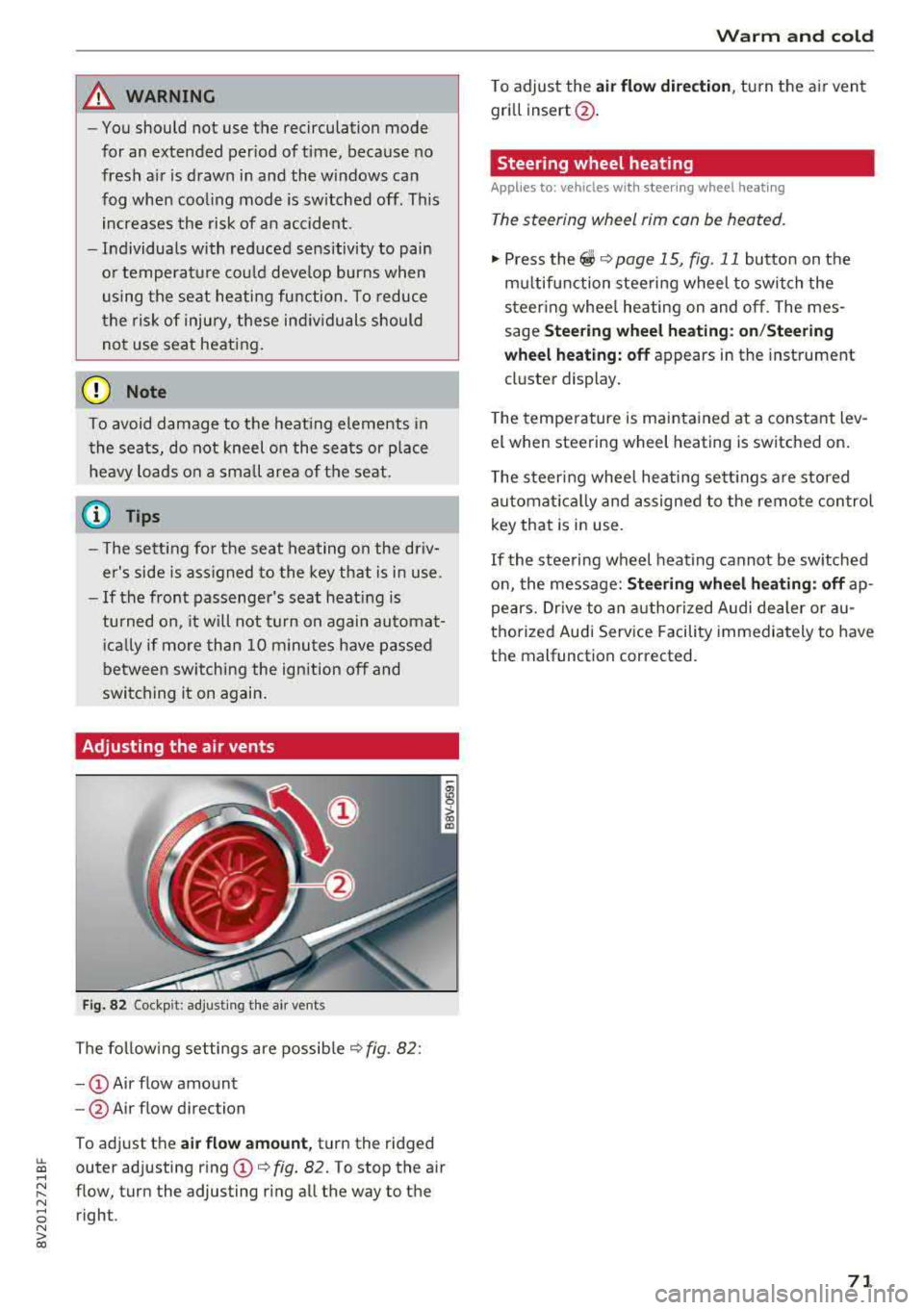
Adjusting the air vents
Fig. 82 Cockp it: adjust ing the a ir vents
The following settings are possible ¢ fig. 82 :
-CD Air flow amount
- @ Air flow direction
To adjust the
air flow amount, turn the ridged
outer adjusting ring
CD ¢ fig. 82. To stop the air
flow, turn the adjusting ring all the way to the right .
Warm and cold
To adjust the air flow dire ction , turn the air vent
gri ll insert @.
Steering wheel heating
Applies to: veh icles w ith steering whee l heating
The steering wheel rim can be heated.
"' Press the ~ ¢ page 15, fig. 11 button on the
mu ltifunction steering wheel to switch the
steering whee l heating on and off. The mes
sage
Steering wheel heating: on/Steering
wheel heating: off
appears in the instrument
cluster display.
T he temperature is maintained at a constant lev
el when steering wheel heating is switched on .
The steering wheel heating sett ings are stored
automat ically and assigned to the remote control
key that is in use .
If the steering wheel heating cannot be switched
on, the message:
Steering wheel heating : off ap
pears. Drive to an authorized Audi dealer or au
thorized Audi Service Facility immediately to have
the malfunction corrected.
71
Page 80 of 404
Drivin g
for at idle fo r approximately two minutes
before shutting it off.
(D Tips
For up to 10 m inutes after stopp ing the en
gine, the rad iator fan may t urn on again auto
matically or it may continue to run (even if
the ignition is sw itched off) for the following
reasons:
- The coolant temperature is increasing due
to trapped heat.
- If the engine is warm and the engine com
partment also heats up from strong sun
li ght.
Messages
Engine runn ing. W arning! Turn off ignition be ·
fore le aving vehicl e
This m essage appears and a warning tone sounds
if you open the driver 's door when the engine is
running .
Press ing start /stop button again will swi tch off
engine.
This message appea rs when you press the
IS TAR T ENG IN E STOP I* button wh ile d riving
¢ page 77, Emergency off function.
Engine start system: malfunction! Ple ase con
tact S ervice
The engine automatic start system has a mal
function . Drive to an author ized Audi dealer or
author ized Audi Se rvice Facility immed iate ly to
have the ma lfunct ion co rrected. To sta rt the en
g ine , turn the key to pos it io n @ ¢
page 75 or
p ress and ho ld the
I S TART ENGINE ST OP ! button
until the engine is running .
DJ Key not r ecogniz ed . See own er' s manual
This message appears if there is no convenience
key inside the vehicle or if the system does not
recognize the key . T he conven ience key may not
be recognized, for examp le, if it is cove red by an
object that
disrupts the s ignal (s uch as a b rief
case), o r if the key ba tte ry is weak. Elect ronic de
vices s uch as cell phones can also interfere wit h
the signal.
78
To still be ab le to start or stop the engine, re fer
to
¢ page 79.
DJ Re mo te c ontro l ke y: hold back of ke y
again st the de signated ar ea . S ee owner 's man
ual
If the indicato r light turns on and this message
appea rs, there is a ma lfunction ¢
page 79.
Ill Key not in v ehicle?
Ill Remote control ke y: key not r ecogni zed. Is
t he key still in the vehicle ?
The Ill indicator light turns on and this message
app ears if the conv eni ence k ey was r emoved from
the veh icle when the engine was running.
If the
convenience key is no longer in the ve hicle, you
cannot sw itch the ignition on or start the eng ine
once you stop it . You also cannot lock the vehicle
from the outside .
Please press the bra ke pedal
This message appears if you do not step on the
brake peda l to start the engine on a vehicle with
an automat ic transmission.
Plea se select N or P
This message appears w hen start ing or stopping
t h e engine if t he se lecto r lever is not in t he "N " or
"P " pos ition. The eng ine will not sta rt/stop.
Turn off igniti on befor e le av ing vehicle . Batter y
i s di sc harging
This message appears and a warning tone sounds
i f you open the driver's door w hen the ign it ion is
switched on . Sw itch the ignit ion off so that the
vehicle battery will not discharge.
S hift to P , othe rwi se vehicle can roll aw ay.
Door s do not lo ck if l ever is not in P
This message appears for safety reasons if the
selector lever for the automa tic transmission is
not in the P position after the ignition is switched
off . Move the selector lever to the P posit ion .
Otherwise the ve hicle is not protected from roll
i ng and it cannot be locked .
Page 81 of 404
LL co .... N
" N .... 0 N > co
Starting the engine
when there is a
malfunction
Applies to: vehicles with conven ience key
It may not be possible to start the engine under
certain circumstances, for example, if the bat
tery in the vehicle key is drained, if interference is
affecting the key or if there is o system mo/func
tion.
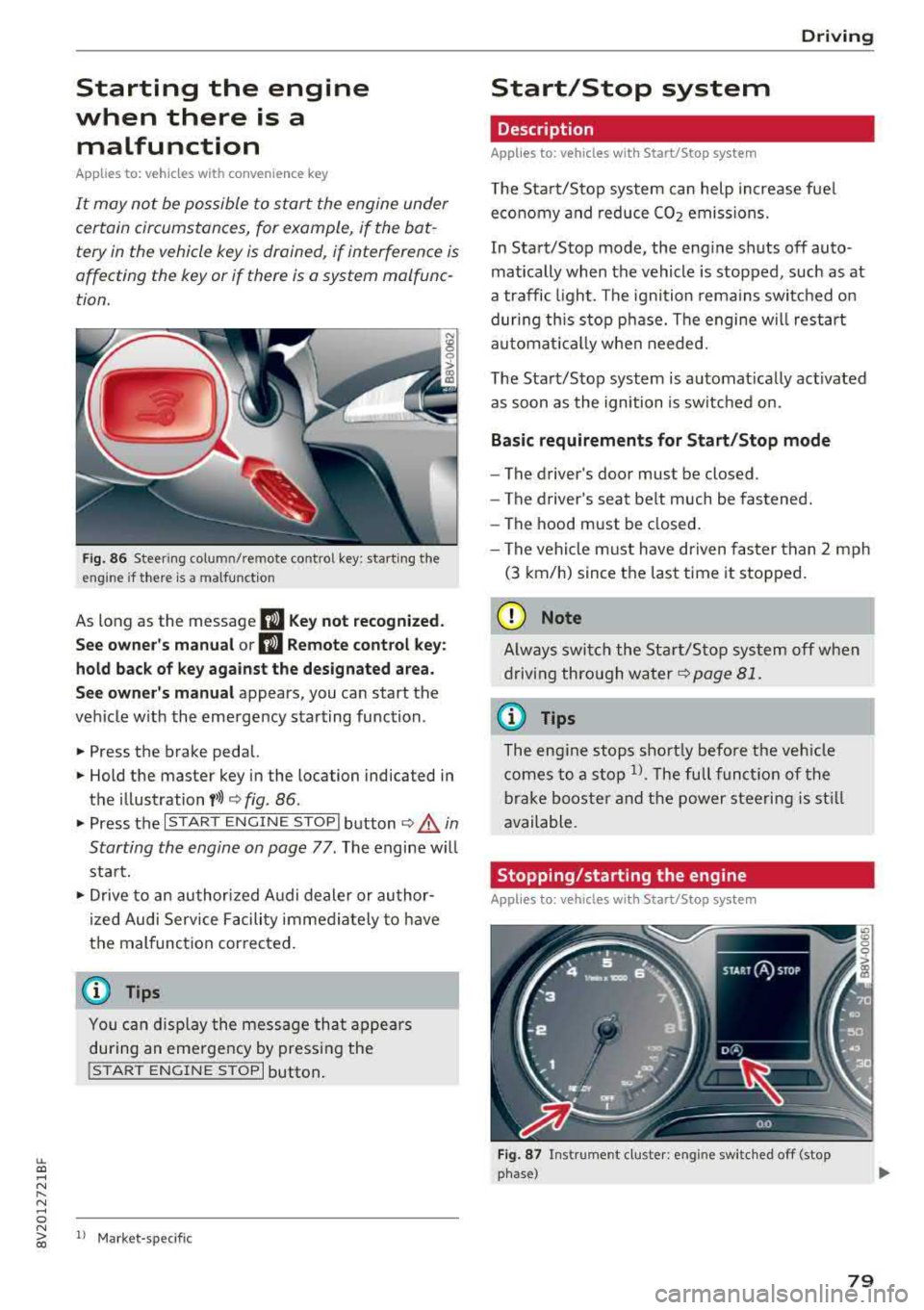
Fig. 86 Steering col umn/remote co ntro l key: starting the
eng ine if there is
a malfunction
As long as the message II Key not recognized.
See owner's manual or
II Remote control key:
hold back of key against the designated area.
See owner's manual
appears, you can start the
vehicle with the emergency starting function .
.. Press the brake pedal.
.. Hold the master key in the location indicated in
the illustration
y>l) c> fig. 86.
.. Press the I START ENGINE STOPI button c> .& in
Starting the engine on page
77 . The engine will
start.
.,. Drive to an authorized Audi dealer or author
ized Audi Service Facility immediately to have
the malfunction corrected.
@ Tips
You can display the message that appears
during an emergency by pressing the
!START ENGINE STOPI button.
l) Market -spe cific
Driving
Start/Stop system
Description
Applies to: vehicles wit h Start/Stop system
The Start/Stop system can help increase fuel
economy and reduce CO2 emissions.
In Start/Stop mode, the engine shuts off auto
matically when the vehicle is stopped, such as at
a traffic light. The ignition remains switched on
during this stop phase. The engine w ill restart
automat ically when needed.
The Start/Stop system is automatically activated
as soon as the ignition is switched on.
Basic requirements for Start/Stop mode
-The driver's door must be closed .
- The driver's seat belt much be fastened.
- The hood must be closed.
- The vehicle must have driven faster than
2 mph
(3 km/h) since the last time it stopped.
(D Note
Always switch the Start/Stop system off when
driving through water
c> page 81.
(D Tips
The engine stops shortly before the vehicle
comes to a stop
ll. The full function of the
brake booster and the power steering is still
available.
Stopping/starting the engine
Applies to: vehicles with Start/Stop system
Fig. 87 Instrument cluster: eng ine switched off (stop
phase)
79
Page 94 of 404
e-tron
e-tron Plug-in hybrid drive
Introduction
Applies to: vehicles with plug-in hybrid drive
General information
The plug- in hybrid drive is a drive concept that al
lows you to choose between driving w ith the elec
tr ic moto r, with the gaso lin e eng ine o r us ing a
comb inat io n of both.
All work done on the high-voltage system must
only be performed by certif ied h igh-voltage tech
n icians at autho rized Aud i dea le rs or authorized
Aud i Serv ice Facilities in accordance with A udi
gu idelines.
The high-voltage system is composed of the fol low ing high-voltage components: the h igh -volt
age battery, the powe r electron ics, the e lectr ic
motor, the high-voltage A/C compressor, the
high-vo ltage heater, the charging system and
charging port as well as the orange high -vo ltage
wiring.
The pedal referred to in this sect ion of the Own
er's Manua l is t he equivalent of the acce lerator
pedal (gas peda l) in a standard vehicle.
High-voltage battery
The high -voltage battery is located on the veh icle
underbody in front of t he rear ax le and does not
require any maintenance from t he d river. Addi
tional information about the high-vo ltage bat
tery can be found
under ¢ page 106.
A WARNING
The voltage in the h igh-vo ltage system is life
threaten ing. Touching a damaged high-volt
age component can result in a fatal e lectr ic
shock. The components in the high-voltage
system are ma rked w ith a warning label wh ich
wa rns against t he h igh-vo ltage.
- The voltage level in the high-voltage system
is still dangerous and potent ially life-threat
ening when t he ignit ion is switched off.
- Never perform work on orange high-voltage
cables or on high-voltage components. Only
92
authorized repair facilities that are certified may perform work on the high-vo ltage sys
tem.
- Never damage, alter or remove the orange
high-voltage cable or disconnect it from the
high-voltage system.
- Never perform any work using cutting, shap ing or sharp-edged too ls or heat sources
near the h igh-vo ltage system and hig h-volt
age cables .
- Aud i regulat ions must be followed during
all work performed on the high-voltage sys
tem and h igh-vo ltage components .
- When working on t he h igh-voltage system
and h igh-voltage compone nts, make sure
the remote cont rol key is kept far enough
away from the vehicle so that there is no
r is k of t he ignit io n be ing inadve rtent ly
sw itched on.
- Gases t hat escape from the high-vo ltage
b attery can be poisono us or flammab le.
- Damage to the h igh-voltage battery could
cause t he hi gh-vo ltage battery to lea k im
mediately or in the fut ure, and poisono us or
flammab le gases co uld escape . Do not in
ha le the gases!
- Do not expose yourse lf to any leaking fluids
and do not come into contact with them .
- The h igh -voltage battery e lec troly te flui d is
caustic. If electro lyte fluid comes into con
tact with the skin, flus h the affected area
for at least 15 minutes with clean water.
Then wash the affected area with soap.
H ave the affected area examined by a med i
cal professional.
- In the event of a technica l emergency, in
form the responders that the vehicle is
equ ipped with a high-voltage battery.
A WARNING
Neve r leave the vehicle unattended when in
drive ready mode
¢ page 94 with a gea r en
gaged . T he veh icle can start mov ing ("creep
i ng") even if the gaso line engine is swi tched
off, since the e lectr ic motor is still ope ra ting.
This may ca use coll is ions and severe or fata l
-
Page 130 of 404
Ass is tance sy stem s
Interrupting cruise contr ol while driving
• Move the leve r into position @. The message
AC C: s tandb y appears . Or
• Press the brake pedal.
• To resume th e stor ed speed, move the lever in
to position
@ .
Inter rupt ing crui se contr ol when stopped
• Push the lever away from you into position @.
The message
A CC : s tandb y appears.
• To resume cruise control , press the brake pedal
and pull the l ev er toward you into position @.
A WARNING
It is dangerous to activate cruise control and
resume the stored speed when the current
road, traffic or weather conditions do not per
mit this. This increases the risk of an accident.
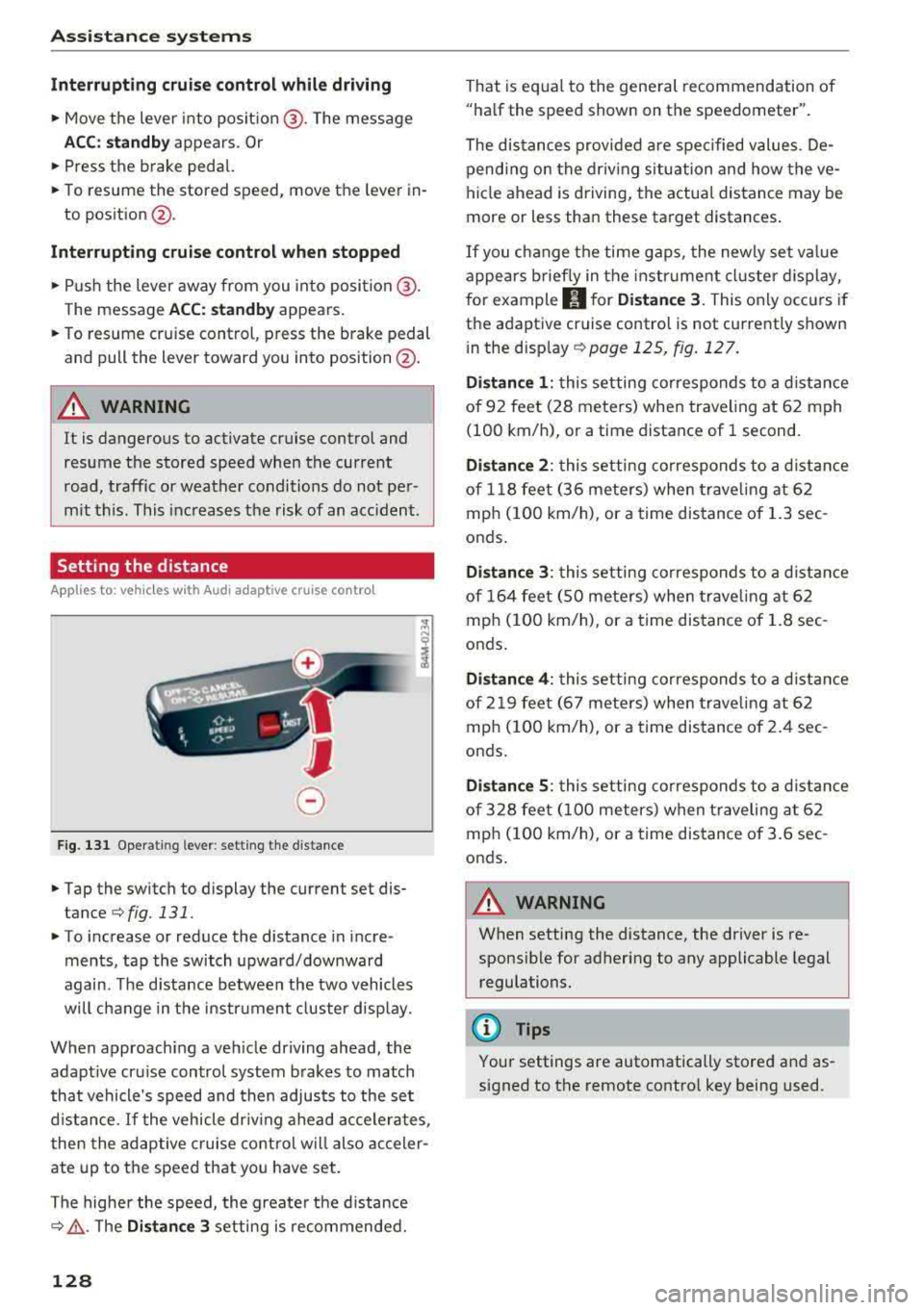
Setting the distance
App lies to: vehicles with Audi adaptive cruise contro l
,
0
Fig. 131 Oper ating lever: setting the distance
• Tap the switch to display the current set dis
tance
¢fig. 131.
• T o increase or reduce the distance in incre
ments, tap the switch upward/downward
again. The d istance between the two vehicles
will change in the instr ument cluster disp lay.
When approaching a veh icle driving ahead, the
adaptive cru ise control system brakes to match
that vehicle's speed and then adjusts to the set
d istance.
If the vehicle dr iv ing ahead accelerates ,
then the adaptive cruise control will also acceler
ate up to the speed that you have set.
The higher the speed, the greate r the d istance
c::;, ,&. . The Di stan ce 3 setting is recommended.
128
That is equa l to the general recommendation of
"ha lf the speed shown on the spe edometer".
The distances provided a re spec ified values . De
pending on the dr iv ing situation and how the
ve
hicle ahead is driving, the actual distance may be
more or less than these target distances .
If you c hange the time gaps, the newly set va lue
appears b rief ly in the instrument cl uster d isplay,
for example
II for Di stan ce 3. This on ly occurs if
the adaptive cruise control is not currently shown
i n the display
c::;, page 125, fig. 127.
Di stance 1 : this setting corresponds to a d istance
of 92 feet (28 meters) when traveling at 62 mph
(100 km/h), or a time distance of 1 second.
Di stanc e 2: this setting corresponds to a d istance
of 118 feet (36 meters) when trave ling at 62
mph (100 km/h), or a time distance of 1.3 sec
onds.
Di stanc e 3: this setting corresponds to a d istance
of 164 feet ( SO meters) when trave ling at 62
mph ( 100 km/h), or a time distance of 1.8 sec
onds .
Distanc e 4: this setting corresponds to a d istance
of 219 feet (67 meters) when trave ling at 62
mph ( 100 km/h), or a time distance of 2 .4 sec
onds .
Distance 5 : this setting corresponds to a d istance
of 328 feet ( 100 meters) when t raveling a t 62
mph ( 100 km/h), or a time distance of 3 .6 sec
onds .
A WARNING
When setting the distance, the driver is re
sponsible for adhering to any applicable legal
regulations.
(D Tips
-
Your settings are automatically stored and as
signed to the remote contro l key being used.
Page 131 of 404
LL co ..... N
" N ..... 0 N > co
Setting the driving program
Applies to: vehicles with Audi adaptive cruise contro l
Depending on the se lected dr iv ing program and
d istance, dr iv ing behav ior when ac celerating w ill
va ry from dy namic to comfortab le.
Setting the driving program on vehicles
w ithout drive sele ct*
• Se lect in the Infotainment sys tem: IM ENUI but
ton
> Vehicle > left contro l bu tto n > Dri ver a s·
si stan ce
> Audi adapt ive crui se contr ol > Dri v
ing p rogram
> Comfort , Standard or D yn am ic.
Setting the driving mode on vehicles with
d rive s elect *
See i::!) page 141.
@ Tips
Your sett ings are automa tic ally sto red and as
signed to the remote control key being used.
Driver intervention request
Applies to: vehicles with Audi adaptive cruise control
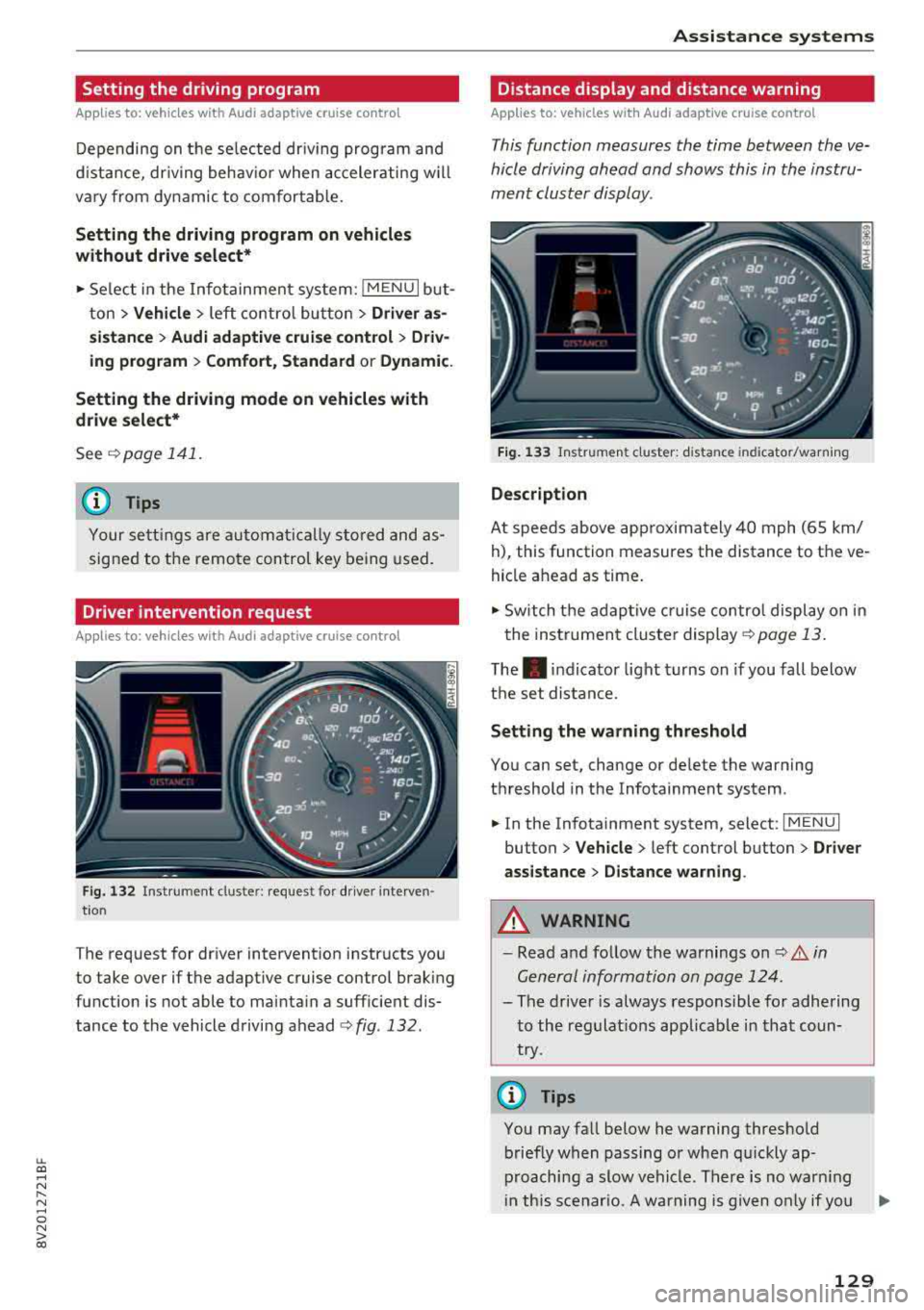
F ig . 132 Ins tru ment clust er: reques t for dr iver in ter ven
tio n
The request for driver intervention instructs you
to take over if the adaptive cruise control brak ing
function is not able to mainta in a suff icient dis
tance to the vehicle driving ahead
¢ fig . 132 .
Assi st a nce systems
Distance display and distance warning
Applies to: vehicles with Audi adaptive cruise control
This function measures the time between the ve
hicle driving ahead and shows this in the instru
ment cluster display.
F ig. 13 3 Instrumen t cluster : dista nce in dicato r/warn ing
D escription
At speeds above app roximately 40 mph (65 km/
h), this function measures the distance to the ve
hicle ahead as time .
• Switch the adaptive cruise contro l display on in
the instrument cluster
display ¢ page 13.
The. indicator light turns on if you fall below
the set distance.
Setting the wa rning threshold
You can set, change or de lete the warning
threshold in the Infotainment system .
• In the Infotainment system, select: I MENU I
button > Vehicle > left control button > Dri ver
assistance
> D istance warning .
A WARNING
-Read and follow the warnings on i::!) A in
Gen eral information on page 124 .
-
- The driver is always responsible for adhering
to the regulat ions applicab le in that coun
try.
(D Tips
You may fall below he warning threshold briefly when passing or when qu ickly ap
proaching a slow vehicle . There is no warn ing
i n th is scenar io. A warning is given only if you
..,.
129
Page 138 of 404
Ass is tance sy stem s
-The camera field of view ¢ page 134, fig. 136 is
dirty or covered in ice. Clean this area on the
windshield.
-The camera field of view is fogged over. Wait until the fog has cleared before switching the
active lane assist on again.
-The system has been unable to detect the lanes
for an extended period of time due to road con
ditions. Switch active lane assist back on when
the lines are more visible .
fl1 Audi acti ve lan e ass is t: curr entl y una vailabl e
There is a temporary active lane ass ist ma lf u n c
tion . Try sw itching the act ive lane assist on aga in
later.
fl1 Aud i activ e lane ass is t: Pl ea se ta ke over
stee ring!
This message appears if you are not steering by
yourse lf . Active lane assist is activated, but is not
ready to give wa rning
.&_ WARNING
Note that messages may be delayed or not
displayed on vehicles with accessor ies mount
ed on the steering whee l, s uch as a steering
wheel spinner knob . Always keep your hands
on the steering whee l.
Setting the vibration warning
Applies to: vehicles with Audi active lane assist
-
You can adjust individual Audi active lane assist
settings in the Infotainment system .
.. Select in the Infotainment system : I MENUI but
ton
> Vehi cle > left contro l bu tton > Dri ver a s
s is tan ce
> Audi active lane as sist .
V ibration warning
You can switch the additional vibration wa rning
in the steering wheel on or off.
.&_ WARNING
-
With the v ibration warning switched off,
there w ill also be no visual warn ing in the in
strument cluster display when crossing a lane
marker line.
136
@ Tips
Your settings are automatically stored and as
signed to the remote contro l key being used.
Audi side assist
Description
Applies to: vehicles with Audi side assist
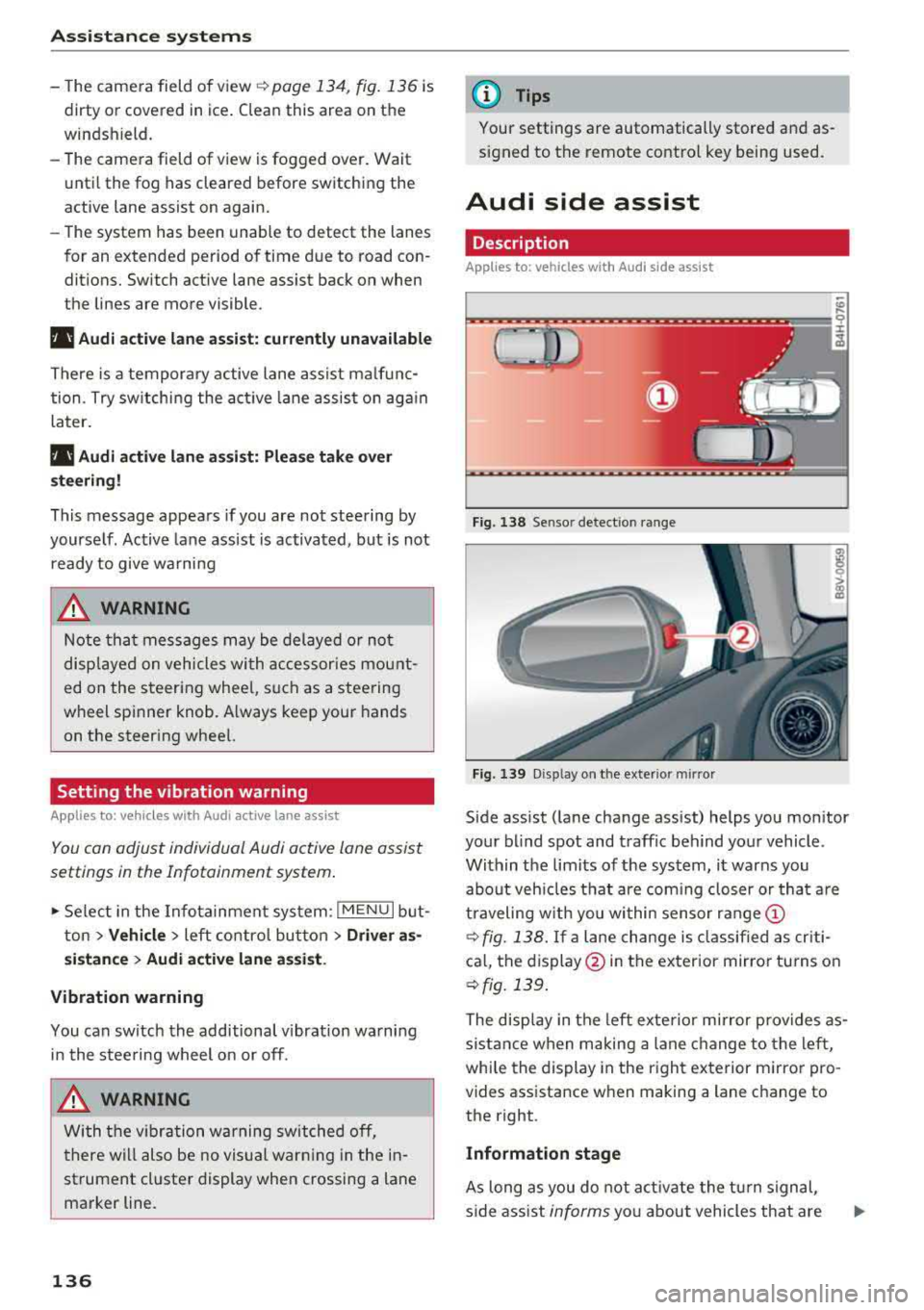
Fig. 138 Sensor detect ion range
Fig. 139 Dis pl ay on t he exterio r mir ror
Side assist (lane change ass ist) helps you monitor
your blind spot and traffic behind your vehicle .
Within the limits of the system, it warns you
about veh icles that are com ing closer or that are
traveling w ith you wi thin sensor range
(D
¢ fig. 138. If a lane change is classified as cr iti
ca l, the display @in the exterior mirror tu rns on
¢ fig. 139 .
The display in the left exte rior mirror provides as
s istance when making a lane change to the left,
whi le the display in the right exterior m irror pro
vides assistance when making a lane change to
the right.
Information stage
As long as you do not act ivate the tu rn signal,
side ass ist
informs you about vehicles that are
Page 141 of 404
LL co ..... N
" N ..... 0 N > co
(D Tips
-Side assist is not active w hile you are mak
i ng the ad justment.
- Your settings are automatically stored and
ass igned to the remote control key being
used.
Rear cross-traffic assist
App lies to: vehicles with rear cross-traff ic assist
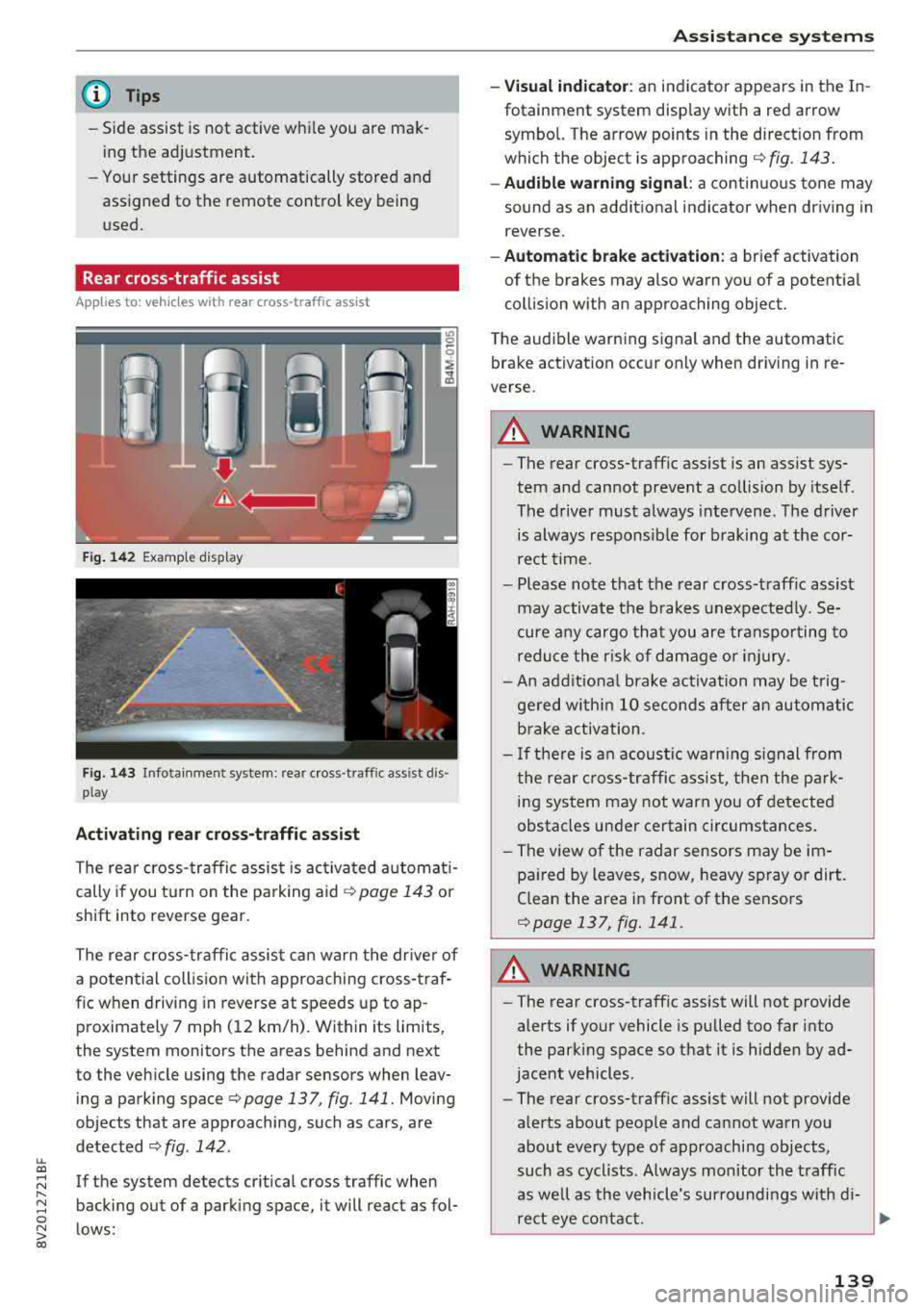
Fig. 14 2 Example display
Fig. 143 Infotainment system: rear cross -traffic ass ist dis
play
Activating rear cros s-traffic assist
The rear cross- traffic assist is ac tivated a utomat i
cally if you t urn on the pa rking aid
¢ page 143 or
shift into reverse gear.
The rea r cross- traffic assist can warn t he drive r of
a potential collis ion with approaching cross-traf
f ic when driving in reverse at speeds up to ap
proximately 7 mph ( 12 km/h). Within its limits,
the system monitors the areas behind and next
to the veh icle using the radar sensors when leav
ing a parking space
c:> page 137, fig . 141. Moving
objects that are approaching, such as cars, are
detected
c:> fig . 142.
If the system detects cr itical cross traffic when
backing out of a parking space, it will react as fol
lows:
A ssi st a nce systems
- Visual indicator : an indicator appears in the In
fotainment system disp lay with a red arrow
symbo l. The arrow points in the d irect ion from
which the object is
approaching ¢ fig. 143.
-Audible warning signal : a continuous tone may
sound as an addit ional indicator when dr iving in
reverse.
- Automat ic brake acti vation : a brief activation
of the brakes may also warn you of a potent ial
collision w ith an approaching object.
The audib le warning signal and the automatic
bra ke activation occur only when driv ing in re
verse.
A WARNING
-- The rear cross-traffic assist is an assist sys
tem and cannot prevent a co llision by itself .
The drive r must always intervene . T he d river
is always respons ible for b raking at the cor
rect t ime.
- Please note that the rear cross-traff ic assist
may activate the b rakes unexpe cted ly. Se
cure a ny cargo th at you are transpor ting to
redu ce t he risk of damage or i njury.
- An add itiona l brake activation may be t rig
ge red w ith in 10 seconds after an automatic
b rake activation.
- I f the re is an acoustic wa rn ing s ignal from
the rea r cross-traffic ass ist, t hen the p ark
ing sys tem may not warn you of detected
obstacles under certain circumstances.
- The v iew o f the radar sensors may be im
pa ired by leaves, s now, heavy sp ray or dirt.
Clean the area i n front of the sensors
c:>page 137, fig. 141 .
A WARNING
-
-The rear cross -traffic assist will not provide
alerts if your vehicle is pulled too far into
the parking space so that it is hidden by ad
jacent vehicles.
- The rear cross-traffic assist will not provide
alerts about people a nd can not warn you
about every type of approaching objects,
such as cyclists. Always monitor the t raff ic
as we ll as the vehicle's sur roundi ngs wit h di-
re ct eye contact .
~
139
Page 144 of 404
Assistance systems
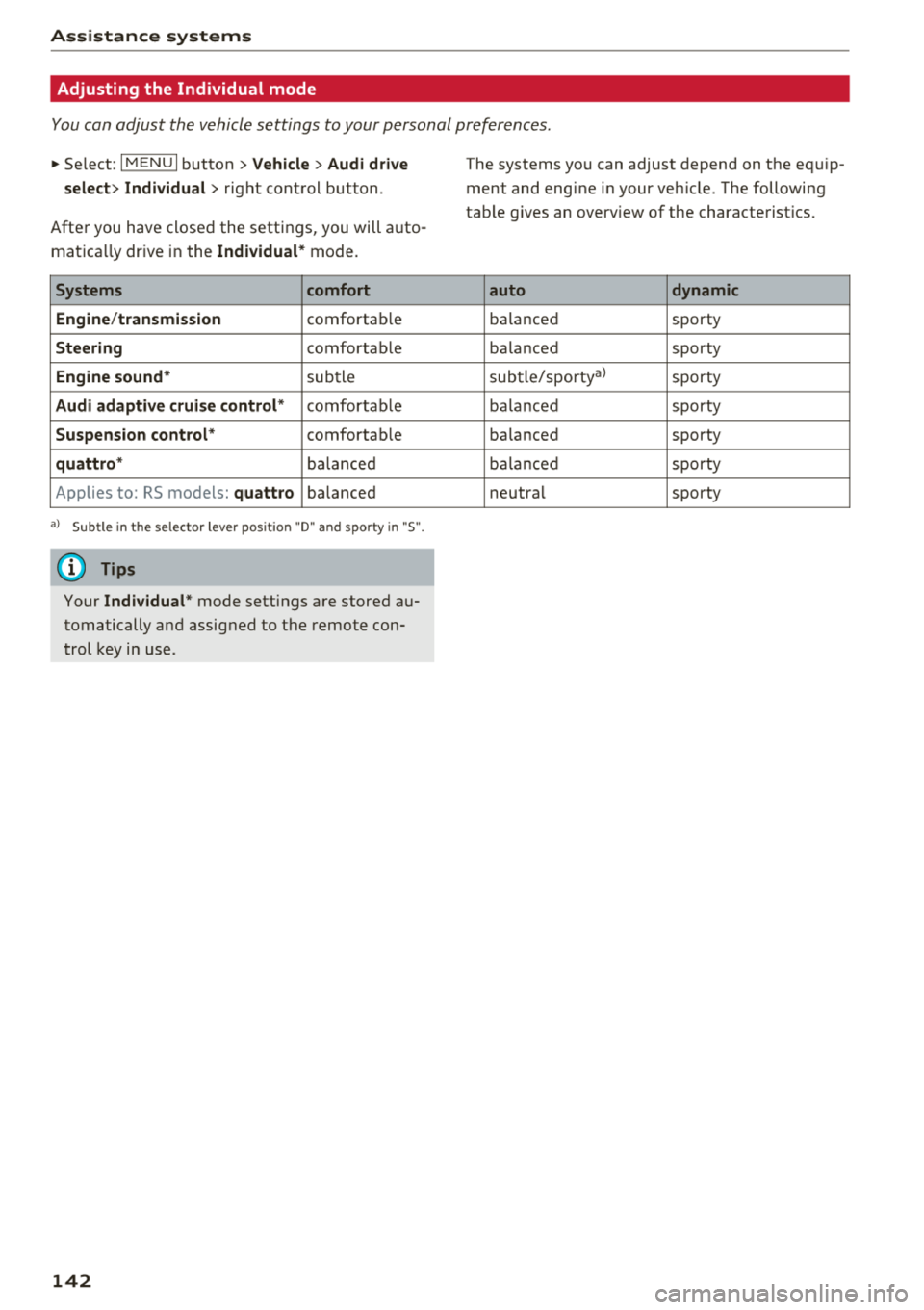
Adjusting the Individual mode
You can adjust the vehicle settings to your personal preferences.
~ Select: I MENU I button >Vehicle> Audi drive
select> Individual >
right control button.
After you have closed the settings, you will auto
mat ica lly dr ive in the
Individual * mode.
Systems comfort
Engine /transmission
comfortab le
Steering comfortab le
Engine sound* subtle
Audi adaptive cruise control* comfortable
Suspension control* comfortable
quattro * balanced
Applies to: RS models:
quattro balanced
a) Subtle in t he selector lever position "D" and sporty in "S".
(0 Tips
Your Individual * mode settings are stored au
tomatically and assigned to the remote con
trol key in use.
142
The systems you can adjust depend on the equip
ment and engine in your veh icle. The following
table g ives an overview of the characterist ics.
auto dynamic
ba
lanced sporty
ba lanced sporty
subtle/sportyal sporty
ba lanced sporty
ba lanced sporty
ba lanc ed sporty
neutral sporty