remote start AUDI S3 SEDAN 2018 Owners Manual
[x] Cancel search | Manufacturer: AUDI, Model Year: 2018, Model line: S3 SEDAN, Model: AUDI S3 SEDAN 2018Pages: 404, PDF Size: 62.3 MB
Page 24 of 404
Cockpit overv ie w
22
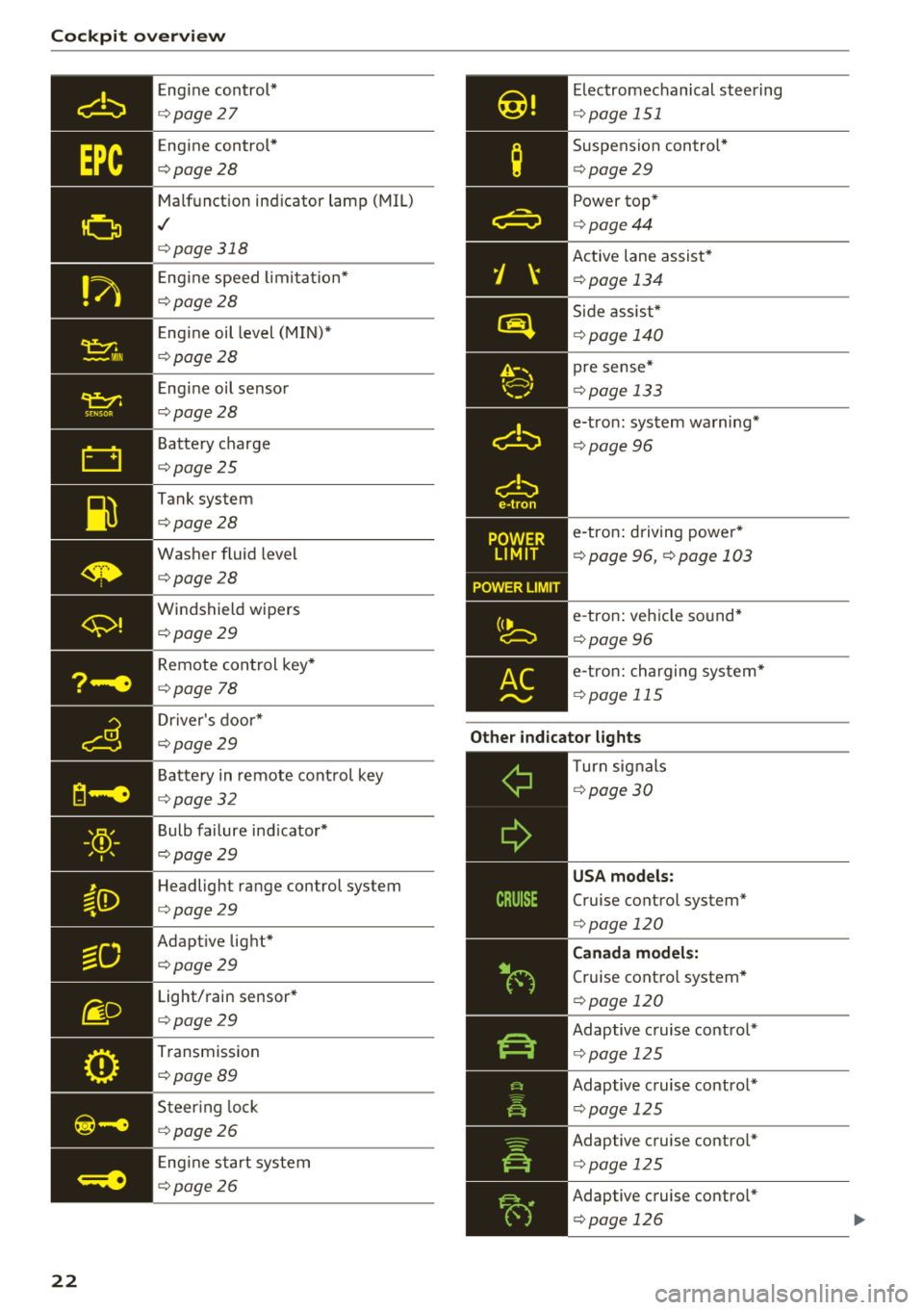
Eng ine control*
¢ page 27
Engine control *
¢page28
Malfunction indicator lamp (MIL)
,I
¢page318
Eng ine speed limi tat io n*
¢page28
Eng ine oil level (MIN)*
¢page28
E ng ine oil sensor
¢ page28
Battery charge
¢page25
Tank system
¢page28
Was her fluid level
¢page28
Windshield wipers
¢page29
Remote con trol key*
¢ page 78
Dr iver's door*
¢ page29
Battery in remote cont rol key
¢ page32
Bulb failure ind icator*
¢ page29
Headlight range control system
¢page29
Adaptive lig ht*
¢page29
Light/rain sensor*
¢page29
Transmission
¢ page 89
Steer ing lock
¢ page26
Eng ine start system
¢ page26
Elec tromechanical steering
¢ page 151
Suspension control*
¢page 29
Power top *
¢page44
Active lane assist*
¢page 134
Side assis t*
¢ page 140
pre sense*
¢page 133
e-tron : system wa rning*
¢ page 96
e-tron : driving power*
¢ page 96, ¢ page 103
e-tron : ve hicle so und*
¢ page 96
e-tro n: cha rging sys tem*
¢ page 115
Other indicator lights
--------------Turn sig nals
¢ page 30
USA models:
Cruise control system*
¢page 120
Canada model s:
Cruise contro l system*
¢ page 120
Adaptive c ruise contro l*
¢ page 125
Adaptive cruise control *
<=>page 125
Adaptive cruise contro l*
<=> page 125
Adaptive cruise contro l*
<=> page 126
Page 34 of 404
Opening and closing
Key set
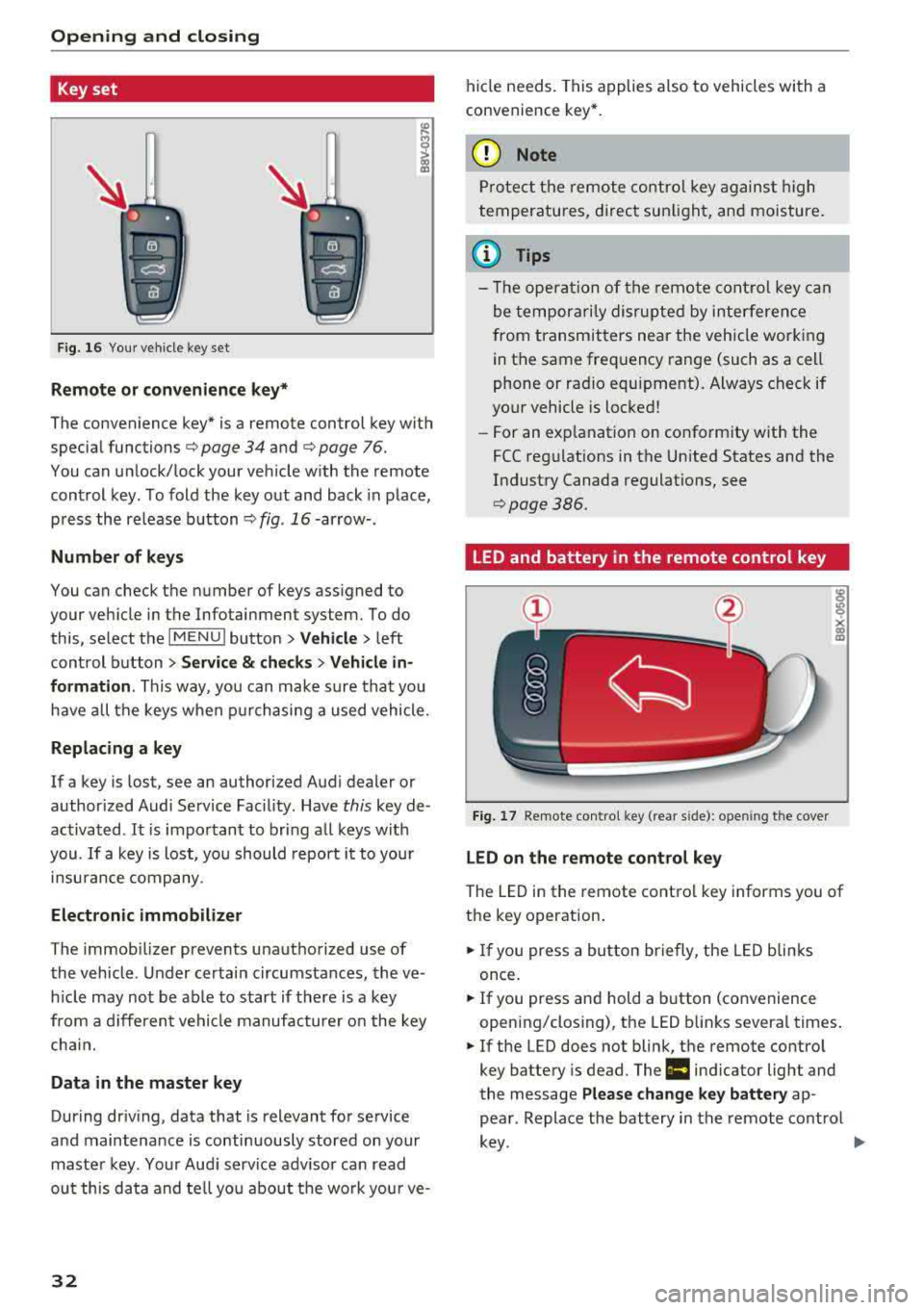
Fig. 16 Your vehicle key set
Remote or convenience key*
The convenience key* is a remote control key with
special functions
c::> page 34 and c::> page 76.
You can unlock/lock your veh icle w ith the remote
control key. To fold the key out and back in place,
press the release button
c::> fig . 16-arrow- .
Number of keys
You can check the number of keys assigned to
your vehicle in the Infotainment system. To do this, select the
IM ENU I button > Vehicle > left
control button
> Service & checks > Vehicle in
formation .
This way, you can make sure that you
have all the keys when purchasing a used vehicle.
Replacing a key
If a key is lost, see an authorized Audi dealer or
author ized Audi Service Facility. Have
this key de
activated .
It is important to bring all keys with
you.
If a key is lost, you should report it to your
insurance company.
Electronic immobilizer
The immob ilizer prevents unauthorized use of
the vehicle . Under certain circumstances, the ve
h icle may not be ab le to start if there is a key
from a different vehicle manufacturer on the key
chai n.
Data in the master key
During driv ing, data that is relevant for service
and maintenance is continuously stored on your
master key. Your Audi serv ice adv isor can read
out this data and tell you about the wo rk your ve-
32
hide needs . This applies also to vehicles with a
convenience key *.
(D Note
Protect the remote control key against high
temperatures, direct sunlight, and moisture .
(l} Tips
- The opera tion of the remote control key can
be temporarily disrupted by interference
from transmitters near the vehicle working
in the same frequency range (such as a cell
phone or radio equ ipment). Always check if
your vehicle is locked!
-For an explanat ion on conform ity with the
FCC regulations in the Un ited States and the
Industry Canada regulations, see
c::>pag e386.
LED and battery in the remote control key
Fig. 17 Remote contro l key (rear s ide): open ing the cover
LED on the remote control key
The LED in the remote control key informs you of
the key operation .
.. If you press a bu tton briefly, the LED blinks
once.
.. If you press and hold a button (convenience
opening/closing), the LED blinks several times .
.. If the LED does not blink, the remote control
key battery is dead. The
Ill indicator light and
the message
Please change key battery ap
pear . Replace the battery in the remote control
key. ~
Page 35 of 404
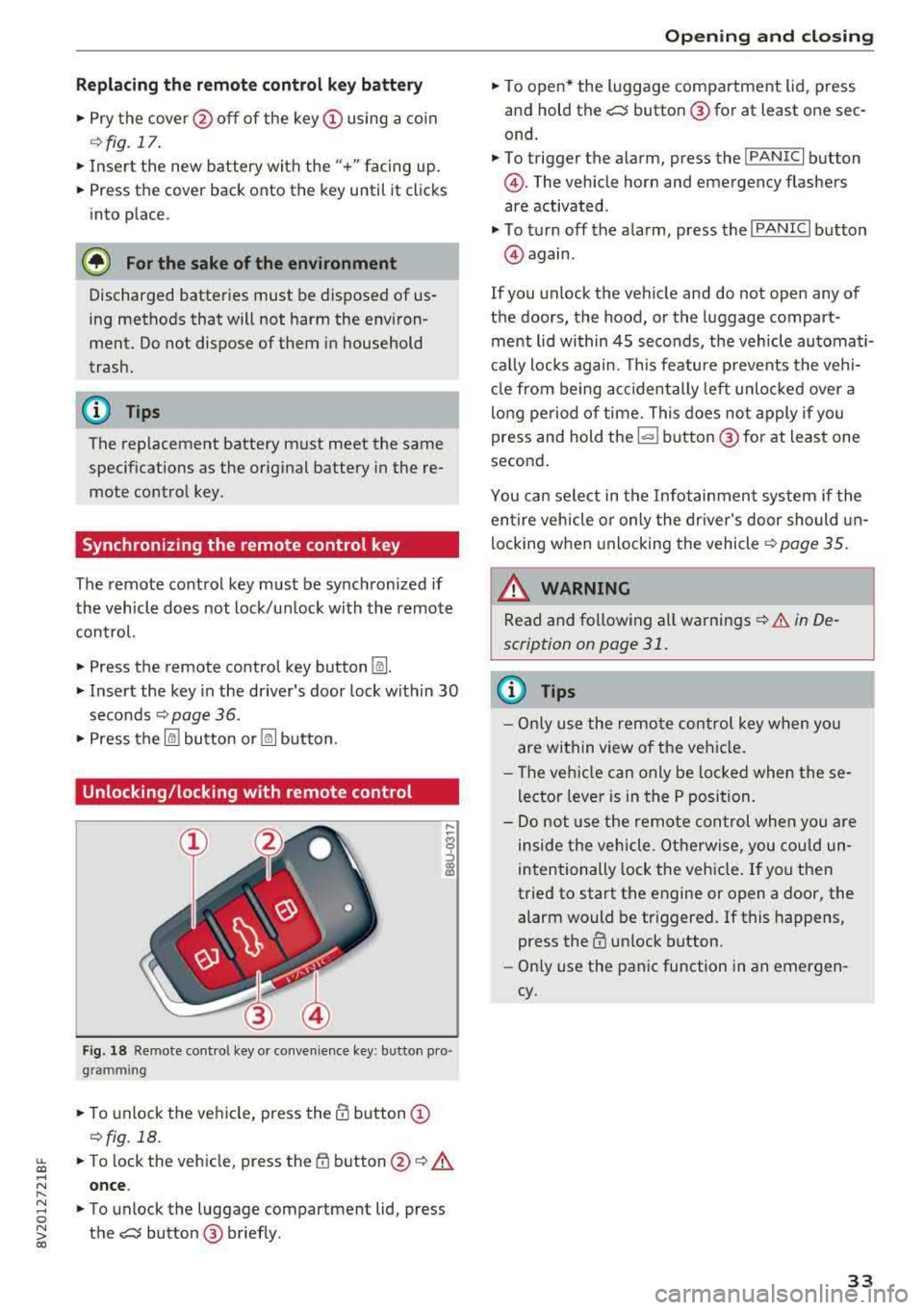
Replacing the remote control key battery
.,. Pry the cover@off of the key (Dusing a coin
¢fig.17.
... Insert the new battery with the" +" facing up.
... Press the cover back onto the key until it clicks
into place .
@) For the sake of the environment
Discharged batteries must be disposed of
us·
ing methods that will not harm the env iron
ment. Do not dispose of them in household
trash.
(D Tips
The replacement battery must meet the same
specif ications as the original battery in the re
mote control key .
Synchronizing the remote control key
The remote control key must be synchronized if
the vehicle does not lock/unlock with the remote
control.
... Press the remote control key button [:@:].
.,. Insert the key in the driver's door lock within 30
seconds c::> page 36 .
.,. Press the ~ button or~ button .
Unlocking/locking with remote control
F ig . 18 Re mote cont ro l key or convenience key : b utto n pro
g ram ming
.,. To unlock the vehicle, press the@ button (D
c::> fig. 18.
~ ... To lock the veh icle, press the {f) button @c::> A
.... N once .
" ~ ... To unlock the luggage compartment lid, press 0
~ the e:5 button @ briefly . co
Opening and closing
.,. To open* the luggage compartment lid, press
and hold the
e:5 button @for at least one sec
ond.
... To trigger the a larm, press the ! PANIC I button
@ . The vehicle horn and emergency flashers
are activated .
.,. To turn off the alarm, press the I PANIC I button
@again .
If you unlock the veh icle and do not open any of
the doors, the hood, or the luggage compart ·
ment l id within 45 seconds, the vehicle automati·
cally locks again. This feature prevents the vehi·
cle from being accidentally left unlocked over a
long period of time. This does not apply if you
press and hold
the~ button @for at least one
second .
You can select in the Infotainment system if the
entire vehicle or only the driver's door should un
locking when unlocking the
vehicle¢ page 35.
_&. WARNING
-Read and following all warnings c::> & in De·
scription on page 31 .
(D Tips
- Only use the remote control key when you
are within view of the vehicle .
- Th e vehicle can only be loc ked when these
lector lever is in the P position.
- Do not use the remote con trol when you are
inside the vehicle. Otherwise, you could un
intentionally lock the vehicle. If you then
tried to start the engine or open a door, the
alarm would be triggered. If this happens,
press the
III unlock button.
- Only use the panic function in an emergen
cy.
33
Page 36 of 404
Opening and clo sin g
Unlocking/locking with the convenience
key
Applies to: vehicles with convenience key
The doors and luggage compartment lid can be
unlocked/locked without using the remote con trol key.
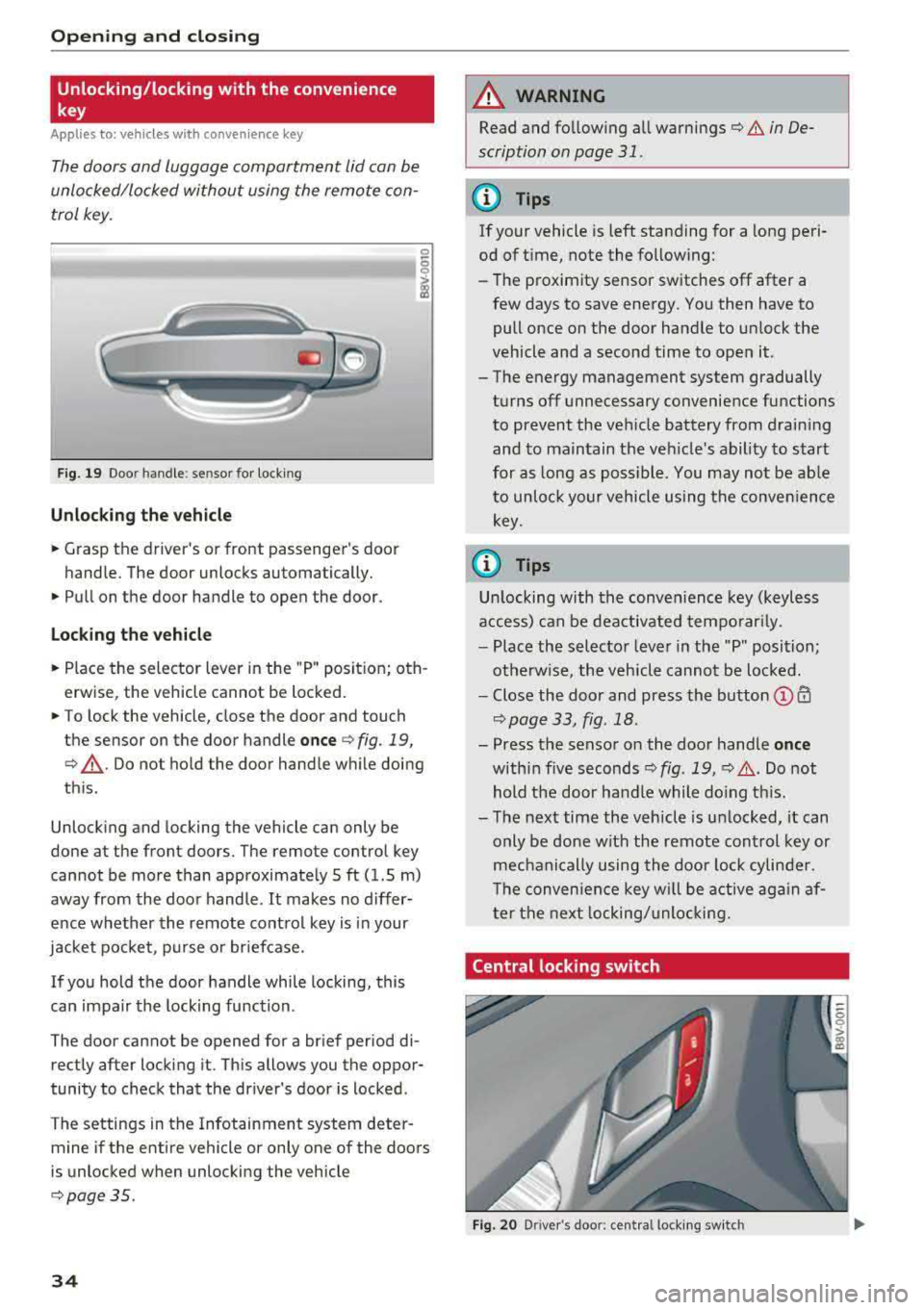
F ig. 19 Doo r handle : se nsor for locking
Unlocking the veh icle
.. Grasp the driver 's or front passenger's door
handle. The door unlocks automatically.
.. Pull on the door handle to open the door.
Loc king th e vehi cle
.. Place the selector lever in the "P " posit ion; oth
erwise, the vehicle cannot be locked .
.. To lock the vehicle, close the door and touch
the sensor on the door handle
o nce ¢ fig. 19,
¢ ,A .Do not hold the door handle while doing
th is.
Unlock ing and locking the vehicle can only be
done at the front doors. The remote control key
cannot be more than approximate ly 5 ft (1.5 m)
away from the door handle.
It makes no differ
ence whether the remote control key is in your
jacket pocket , purse or briefcase.
If you hold the door handle while locking, this
can impair the locking function .
The door cannot be opened for a brief period di rectly after locking it. This allows you the oppor
tunity to check that the driver's door is locked .
The settings in the Infotainment system deter mine if the entire vehicle or only one of the doors
is unlocked when unlocking the vehicle
¢ page 35 .
34
A WARNING
,-
Read and fo llowing all warnings¢ & in De-
scription on page
31.
(D Tips
If your vehicle is left standing for a long peri
od of t ime, note the following:
-The proximity sensor switches off after a
few days to save energy . You then have to
pull once on the door handle to un lock the
vehicle and a second time to open it.
-The energy management system gradually
turns off unnecessary convenience functions
to prevent the veh icle battery from draining
and to maintain the vehicle's ability to start
for as long as poss ible. You may not be ab le
to unlock your vehicle using the conven ience
key .
(0 Tips
Un locking with the conven ience key (keyless
access) can be deactivated temporar ily.
-Place the selector lever in the "P" position;
otherwise, the vehicle cannot be loc ked.
-Close the door and press the button © CD
¢page 33, fig .18.
-Press the sensor on the door handle onc e
within five seconds ¢ fig. 19, ¢,& .Do not
hold the door handle while do ing th is.
-The next time the vehicle is unlocked, it can
only be done with the remote control key or
mechanically using the doo r lock cylinder .
T he conven ience key w ill be active aga in af
ter the next locking/unlocking.
Central locking switch
Fig. 20 D river 's doo r: cen tral lo ck in g sw it c h
Page 42 of 404
Opening and clo sin g
® Central switc h* for opening or closing all side
windows at the same t ime
A WARNING
- If you leave the vehicle, switch the ignit ion
off and take the vehicle key with you . This
applies particularly when children remain in
the vehicle. Otherwise the children could
start the engine or operate electr ical equip
ment such as power windows.
- Pay careful attention when closing the win
dows . Pinching could cause serious injuries.
- When locking the vehicle from outside, the
vehicle must be unoccupied since the win dows can no longer be opened in an emer
gency .
@ Tips
After turning the ignition off you can still
open and close the windows for approximate-
ly 10 seconds. The power w indows do not
sw itch off until the dr iver's door or front pas
senger's door has been opened.
Convenience opening/closing
App lies to: ve hicles w ith conve nience opening/clos ing
All of the windows and the panorama glass roof*
can be opened/closed at the same time.
For power top conven ience opening/closing, refer
to the information in
Q page 43 .
Convenience opening feature
.. Press and hold the open button Im on the re
mote con trol key until all w indows and the pan
orama glass roof* have reached the desired po
s ition . Or
.,. Hold t he key in the d river's door lock unt il all
windows and the panorama g lass roof* have
reached the desired pos ition.
Convenience closing feature
.. Press the Im button on the remote control key
u nt il all windows and the panorama glass roof *
are closed
¢ _&.. . Or
.,. Applies to: vehicles wi th conven ience key: touch
the sensor on one of the fro nt door hand les and
continue touching it until a ll of the w indows
40
and the panorama glass roof* are closed . Do
not p lace your hand in th e door hand le when
doing this.
.. Ho ld the key in the dr iver 's door lock in the lock
position unti l all windows and the panorama
glass roof* are closed
¢ _&.. .
The funct ion can be switched on/off in the Info
ta inment system
Q page 35.
A WARNING
- Never close the w indows or panorama glass
roof* ca relessly or in an uncontrolled man
ne r, because this increases the risk of in jury.
- For secur ity reasons, the windows and the
panorama g lass roof* can only be opened
and closed with the remote control key at a
maxim um distance of app roximately 6.5
feet (2 m) away from the vehicle . Always
pay atten tion when using
t he ~ button to
close the windows and the panorama g lass
roof* so that no one is pi nched. The closing
process w ill stop immediately when
the ~
button is re leased.
Correcting power window malfunctions
You can reactivate the one-touch up/down func
tion if it malfunctions.
.. Pull the power wi ndow switch until the window
is completely raised .
.. Release the sw itch and pu ll it up again for at
least one second .
Panorama glass roof
Description
Applies to: vehicles with panorama glass roof
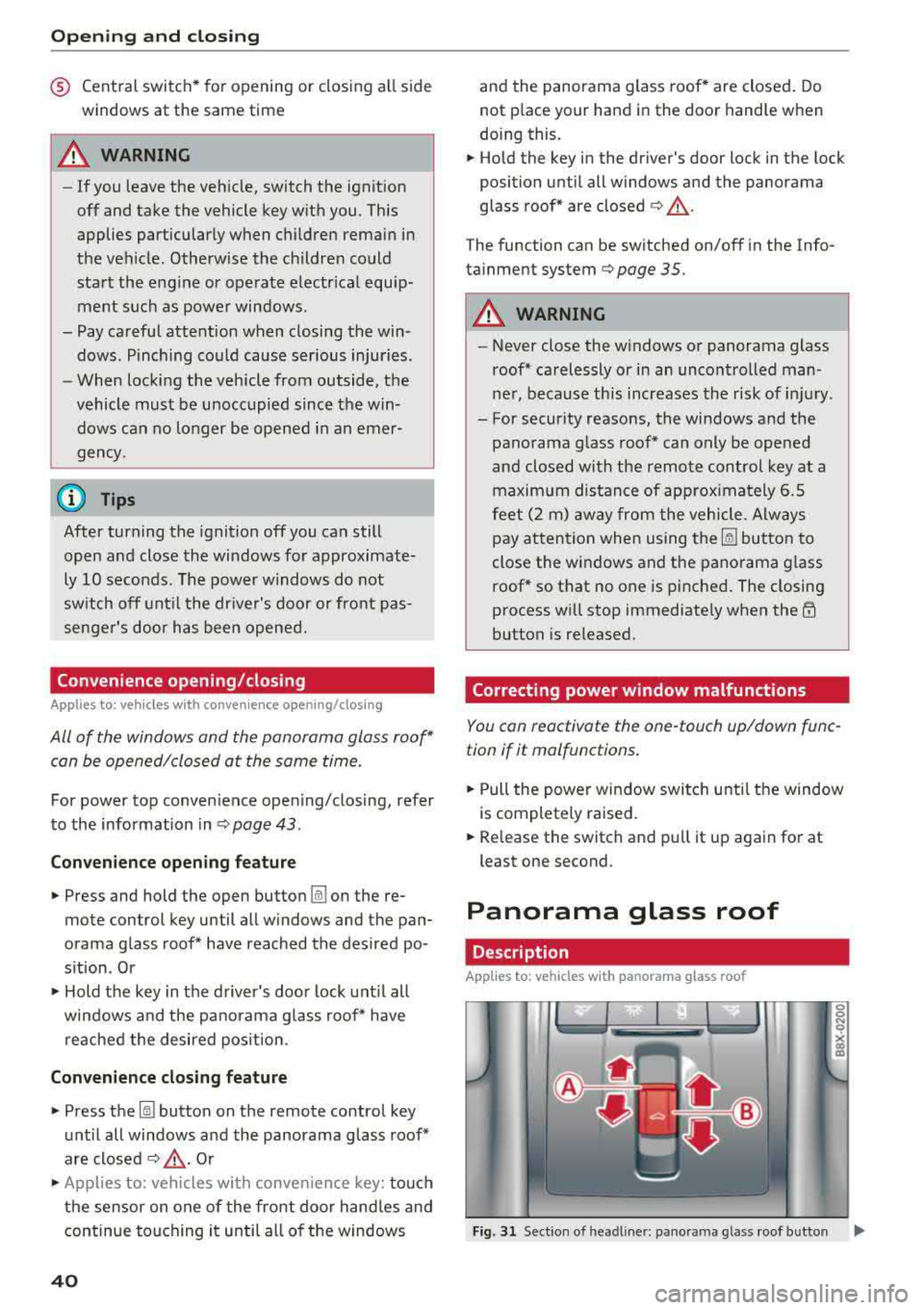
Fig. 31 Sect ion o f headl iner: pan orama glass roof button IJ,>
Page 80 of 404
Drivin g
for at idle fo r approximately two minutes
before shutting it off.
(D Tips
For up to 10 m inutes after stopp ing the en
gine, the rad iator fan may t urn on again auto
matically or it may continue to run (even if
the ignition is sw itched off) for the following
reasons:
- The coolant temperature is increasing due
to trapped heat.
- If the engine is warm and the engine com
partment also heats up from strong sun
li ght.
Messages
Engine runn ing. W arning! Turn off ignition be ·
fore le aving vehicl e
This m essage appears and a warning tone sounds
if you open the driver 's door when the engine is
running .
Press ing start /stop button again will swi tch off
engine.
This message appea rs when you press the
IS TAR T ENG IN E STOP I* button wh ile d riving
¢ page 77, Emergency off function.
Engine start system: malfunction! Ple ase con
tact S ervice
The engine automatic start system has a mal
function . Drive to an author ized Audi dealer or
author ized Audi Se rvice Facility immed iate ly to
have the ma lfunct ion co rrected. To sta rt the en
g ine , turn the key to pos it io n @ ¢
page 75 or
p ress and ho ld the
I S TART ENGINE ST OP ! button
until the engine is running .
DJ Key not r ecogniz ed . See own er' s manual
This message appears if there is no convenience
key inside the vehicle or if the system does not
recognize the key . T he conven ience key may not
be recognized, for examp le, if it is cove red by an
object that
disrupts the s ignal (s uch as a b rief
case), o r if the key ba tte ry is weak. Elect ronic de
vices s uch as cell phones can also interfere wit h
the signal.
78
To still be ab le to start or stop the engine, re fer
to
¢ page 79.
DJ Re mo te c ontro l ke y: hold back of ke y
again st the de signated ar ea . S ee owner 's man
ual
If the indicato r light turns on and this message
appea rs, there is a ma lfunction ¢
page 79.
Ill Key not in v ehicle?
Ill Remote control ke y: key not r ecogni zed. Is
t he key still in the vehicle ?
The Ill indicator light turns on and this message
app ears if the conv eni ence k ey was r emoved from
the veh icle when the engine was running.
If the
convenience key is no longer in the ve hicle, you
cannot sw itch the ignition on or start the eng ine
once you stop it . You also cannot lock the vehicle
from the outside .
Please press the bra ke pedal
This message appears if you do not step on the
brake peda l to start the engine on a vehicle with
an automat ic transmission.
Plea se select N or P
This message appears w hen start ing or stopping
t h e engine if t he se lecto r lever is not in t he "N " or
"P " pos ition. The eng ine will not sta rt/stop.
Turn off igniti on befor e le av ing vehicle . Batter y
i s di sc harging
This message appears and a warning tone sounds
i f you open the driver's door w hen the ign it ion is
switched on . Sw itch the ignit ion off so that the
vehicle battery will not discharge.
S hift to P , othe rwi se vehicle can roll aw ay.
Door s do not lo ck if l ever is not in P
This message appears for safety reasons if the
selector lever for the automa tic transmission is
not in the P position after the ignition is switched
off . Move the selector lever to the P posit ion .
Otherwise the ve hicle is not protected from roll
i ng and it cannot be locked .
Page 81 of 404
LL co .... N
" N .... 0 N > co
Starting the engine
when there is a
malfunction
Applies to: vehicles with conven ience key
It may not be possible to start the engine under
certain circumstances, for example, if the bat
tery in the vehicle key is drained, if interference is
affecting the key or if there is o system mo/func
tion.
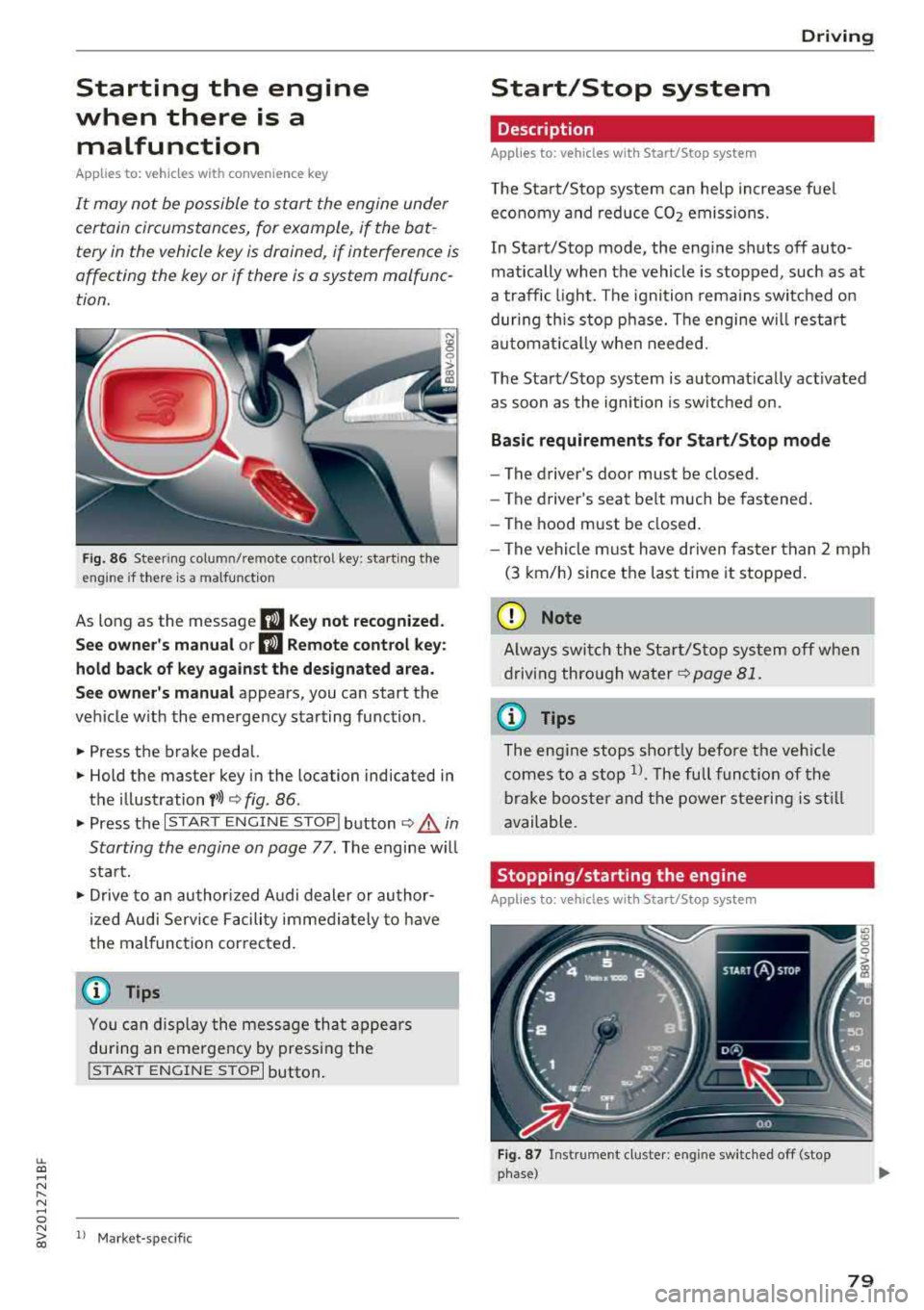
Fig. 86 Steering col umn/remote co ntro l key: starting the
eng ine if there is
a malfunction
As long as the message II Key not recognized.
See owner's manual or
II Remote control key:
hold back of key against the designated area.
See owner's manual
appears, you can start the
vehicle with the emergency starting function .
.. Press the brake pedal.
.. Hold the master key in the location indicated in
the illustration
y>l) c> fig. 86.
.. Press the I START ENGINE STOPI button c> .& in
Starting the engine on page
77 . The engine will
start.
.,. Drive to an authorized Audi dealer or author
ized Audi Service Facility immediately to have
the malfunction corrected.
@ Tips
You can display the message that appears
during an emergency by pressing the
!START ENGINE STOPI button.
l) Market -spe cific
Driving
Start/Stop system
Description
Applies to: vehicles wit h Start/Stop system
The Start/Stop system can help increase fuel
economy and reduce CO2 emissions.
In Start/Stop mode, the engine shuts off auto
matically when the vehicle is stopped, such as at
a traffic light. The ignition remains switched on
during this stop phase. The engine w ill restart
automat ically when needed.
The Start/Stop system is automatically activated
as soon as the ignition is switched on.
Basic requirements for Start/Stop mode
-The driver's door must be closed .
- The driver's seat belt much be fastened.
- The hood must be closed.
- The vehicle must have driven faster than
2 mph
(3 km/h) since the last time it stopped.
(D Note
Always switch the Start/Stop system off when
driving through water
c> page 81.
(D Tips
The engine stops shortly before the vehicle
comes to a stop
ll. The full function of the
brake booster and the power steering is still
available.
Stopping/starting the engine
Applies to: vehicles with Start/Stop system
Fig. 87 Instrument cluster: eng ine switched off (stop
phase)
79
Page 94 of 404
e-tron
e-tron Plug-in hybrid drive
Introduction
Applies to: vehicles with plug-in hybrid drive
General information
The plug- in hybrid drive is a drive concept that al
lows you to choose between driving w ith the elec
tr ic moto r, with the gaso lin e eng ine o r us ing a
comb inat io n of both.
All work done on the high-voltage system must
only be performed by certif ied h igh-voltage tech
n icians at autho rized Aud i dea le rs or authorized
Aud i Serv ice Facilities in accordance with A udi
gu idelines.
The high-voltage system is composed of the fol low ing high-voltage components: the h igh -volt
age battery, the powe r electron ics, the e lectr ic
motor, the high-voltage A/C compressor, the
high-vo ltage heater, the charging system and
charging port as well as the orange high -vo ltage
wiring.
The pedal referred to in this sect ion of the Own
er's Manua l is t he equivalent of the acce lerator
pedal (gas peda l) in a standard vehicle.
High-voltage battery
The high -voltage battery is located on the veh icle
underbody in front of t he rear ax le and does not
require any maintenance from t he d river. Addi
tional information about the high-vo ltage bat
tery can be found
under ¢ page 106.
A WARNING
The voltage in the h igh-vo ltage system is life
threaten ing. Touching a damaged high-volt
age component can result in a fatal e lectr ic
shock. The components in the high-voltage
system are ma rked w ith a warning label wh ich
wa rns against t he h igh-vo ltage.
- The voltage level in the high-voltage system
is still dangerous and potent ially life-threat
ening when t he ignit ion is switched off.
- Never perform work on orange high-voltage
cables or on high-voltage components. Only
92
authorized repair facilities that are certified may perform work on the high-vo ltage sys
tem.
- Never damage, alter or remove the orange
high-voltage cable or disconnect it from the
high-voltage system.
- Never perform any work using cutting, shap ing or sharp-edged too ls or heat sources
near the h igh-vo ltage system and hig h-volt
age cables .
- Aud i regulat ions must be followed during
all work performed on the high-voltage sys
tem and h igh-vo ltage components .
- When working on t he h igh-voltage system
and h igh-voltage compone nts, make sure
the remote cont rol key is kept far enough
away from the vehicle so that there is no
r is k of t he ignit io n be ing inadve rtent ly
sw itched on.
- Gases t hat escape from the high-vo ltage
b attery can be poisono us or flammab le.
- Damage to the h igh-voltage battery could
cause t he hi gh-vo ltage battery to lea k im
mediately or in the fut ure, and poisono us or
flammab le gases co uld escape . Do not in
ha le the gases!
- Do not expose yourse lf to any leaking fluids
and do not come into contact with them .
- The h igh -voltage battery e lec troly te flui d is
caustic. If electro lyte fluid comes into con
tact with the skin, flus h the affected area
for at least 15 minutes with clean water.
Then wash the affected area with soap.
H ave the affected area examined by a med i
cal professional.
- In the event of a technica l emergency, in
form the responders that the vehicle is
equ ipped with a high-voltage battery.
A WARNING
Neve r leave the vehicle unattended when in
drive ready mode
¢ page 94 with a gea r en
gaged . T he veh icle can start mov ing ("creep
i ng") even if the gaso line engine is swi tched
off, since the e lectr ic motor is still ope ra ting.
This may ca use coll is ions and severe or fata l
-
Page 202 of 404
Audi conn ect e-tron ser vic es
Vehicle status report
Applies to: vehicles with Audi connect e-tron services
You can access various vehicle statuses using the
services, such as:
- high-voltage battery charge level ,
- electric range,
- mileage,
- next inspection.
F or additional information, s ee
¢ page 95, Power
meter overview
and ¢ page 97, Range display.
A WARNING
Do not ignore messages and warning or indi
cator lights that turn on in the vehicle be
cause of the information in the status report.
Th is could lead to break downs in on the road,
accidents and se rious injuries.
Car Finder
Applies to: vehicles with Audi connect e-tron services
The vehicle collects data under certain conditions
and sends it to a server .
When data is stored, you can access values such
as these us ing the service:
- Vehicle location disp lay,
- Display of one's own location,
- Ro ute to your veh icle.
If your mobile device also has a nav igation func
tion, you can navigate to your last know n parking
locat ion.
@ Tips
- The new parking location cannot be deter
mined with this service if the vehicle is
moved after shutt ing the veh icle
off and
wi thout sw itching the ign ition on and
off
again, for example when be ing towed o r if
the vehicle is stolen .
- If the vehicle is moved an d shut
off again
us ing the second key, for example, the new
parking location is t ransmitted to the server
after switching the ignition off .
200
Charging
Applies to: vehicles with Audi connect e-tron services
You can control and access the hig h-voltage bat
tery c harging proc ess r emotely using these serv
i ces. You have the following options:
- check the battery charge leve l,
- star t/end t he cha rging process,
- prog ram the charging t imer with/w itho ut cl i-
mate cont rol,
- deactivate/activate the cha rg in g timer .
Fo r addi tional information,
see ¢ page 106,
Charging the battery with the Audi e-tron charg
ing system .
A WARNING
Only perform charging f unctions on the high
voltage battery if the vehicle is shut
off co r
rect ly, is connected to a suitable socket and if
the ign ition is swi tched off.
Temperature control
Applies to: vehicles with Audi connect e-tron services
You can contro l the climate control in your vehi
cle remotely using these services:
- start/end climate control ,
- program the timer,
- deactivate/activate the timer.
For addi tional informa tion, see
¢ page 116, Cli
mate control .
A WARNING
Only perform the climate control functions if
your vehicle was shut
off correct ly and the ig
n ition is switched off.
Page 388 of 404
Consum er Info rmation
Technical Modifications
Our guidelines must be complied with when tech
nical modifications are made .
Always consult an authorized Audi dealer before
starting work on any modificat ions.
This will he lp ensure that vehicle function, per
formance and safety are not impaired
c> &. .
Attempting to work on e lectronic components
and the software used with them can cause mal
functions. Because of the way electronic compo
nents are interconnected with each other, such
malfunct ions can also have an adverse effect on
other systems that are not directly involved. This
means that you risk both a substantial reduction
in the operational safety of your veh icle and an
i n creased wea r of ve hicle parts
c> ,&. .
Author ized Audi dealers w ill perform this work in
a profess io nal and competent manner or, in spe
cial cases, refer you to a p rofessional company
that spec ializes in such modificat ions.
.&_ WARNING
Improper repa irs and modificat ions can
c hange the way veh icle systems work and
c ause damage to the veh icle and ser ious per
sonal injury.
(UJ) Note
I f emergency rep air s mus t be pe rformed else
where, have the vehicle ex am ined by an a u
thorized A udi dealer as soon as possib le .
Declaration of
compliance for telecom munications equipment
and electronic systems
The manufacturer is not liable fo r rad io m alfu nc
tions that are caused by unauthori zed changes to
the equipment.
Equipment
The fo llow ing equipment comp lies w it h F CC sec
tion 15 and RSS -Gen:
386
- Audi adaptive cru ise control *
- Aud i side assist*
- Remote cont rol key
- Cell phone package*
- Tire pressure monitoring system*
FCC Part 15 .19
This device complies with part 1 S of the FCC
Rules . Operation is subject to the fo llowing two
cond it ions: (1) This device may not cause harmful
i nterference, and (2) this device must accept any
i nterference rece ived, includ ing interference that
may cause undesired operat ion.
FCC Part 15 .21
Changes or modifications not express ly approved
by the party responsible for compliance could
vo id the user's authority to operate the equ ip
ment .
RSS-Gen
This device complies with Ind ustry Canada's li
cense-exempt RSSs. Operation is subject to the
follow ing two conditions:
(1) This device may not ca use interference; and
(2) This dev ice m ust accept any interference, i n
clud ing inte rfe rence that may cause undes ired
operation of the device.
CNR-Gen
Le present appare il est conforme aux CNR d'I n
dust rie Canada app licables aux appare ils radio
exemp ts de licence. L'explo itation est autor isee
a ux deux condi tions su ivantes :
1) l'appareil ne doit pas produire de b rouillage;
2) l'appareil do it accepter tout brouillage
radioe
l ectr ique subi, meme si le brouillage est suscept i
ble d'en compromettre le fonct ionnement.