clutch AUDI S4 2008 User Guide
[x] Cancel search | Manufacturer: AUDI, Model Year: 2008, Model line: S4, Model: AUDI S4 2008Pages: 342, PDF Size: 15.01 MB
Page 164 of 342
Automatic gearbox
162Automatic gearboxmultitronic
®, tiptronic (6-speed
gearbox)
Applies to vehicles: with multitronic® or tiptronicIntroductionApplies to vehicles with multitronic
® gearbox
The vehicle is equipped with an electronically controlled continu-
ously variable transmission (multitronic
®). Unlike conventional
automatics, the gear ratios are not shifted in fixed steps but contin-
uously variable. This gives smoother transmission and makes for
better fuel economy.
The gearbox selects the gear ratio and shifts up or down automati-
cally according to the gear change programmes stored in the
control unit ⇒page 166 .
If desired, you can also select the gears manually (tiptronic mode)
⇒ page 166 .
Please note that on ve hicles with a multitronic® gearbox, torque is
transmitted via a multi- plate clutch, and not via a torque converter
as on conventional automatics. This means that the car will not
“creep” as much as conventional automatics when the engine is
idling if you stop temporarily with the selector lever in position D, S
or R.
Applies to vehicles with tiptronic gearbox
The vehicle is equipped with an electronically controlled 6-speed
automatic gearbox. The gearbox changes up and down automati-
cally .
If desired, you can also select the gears manually (tiptronic mode)
⇒ page 166 .
Applies to vehicles: with multitronic® or tiptronicGeneral notes on using multitronic
®
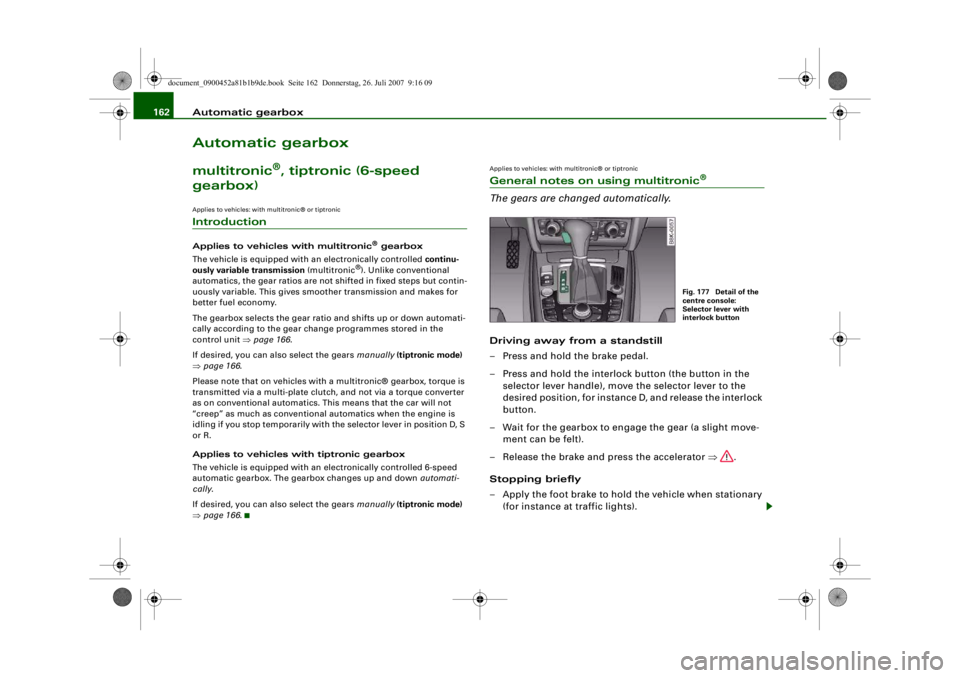
The gears are changed automatically.Driving away from a standstill
– Press and hold the brake pedal.
– Press and hold the interlock button (the button in the
selector lever handle), move the selector lever to the
desired position, for instance D, and release the interlock
button.
– Wait for the gearbox to engage the gear (a slight move- ment can be felt).
– Release the brake and press the accelerator ⇒.
Stopping briefly
– Apply the foot brake to hold the vehicle when stationary (for instance at traffic lights).
Fig. 177 Detail of the
centre console:
Selector lever with
interlock button
document_0900452a81b1b9de.book Seite 162 Donnerstag, 26. Juli 2007 9:16 09
--4 -
-T
-+ +-
•
Page 190 of 342
Safe driving
188Correct sitting positionsCorrect sitting position for driver
The correct driving position is important for safe and
fatigue-free driving.For your own safety, and to reduce the risk of injury in the
event of an accident, we re commend the following driving
position.
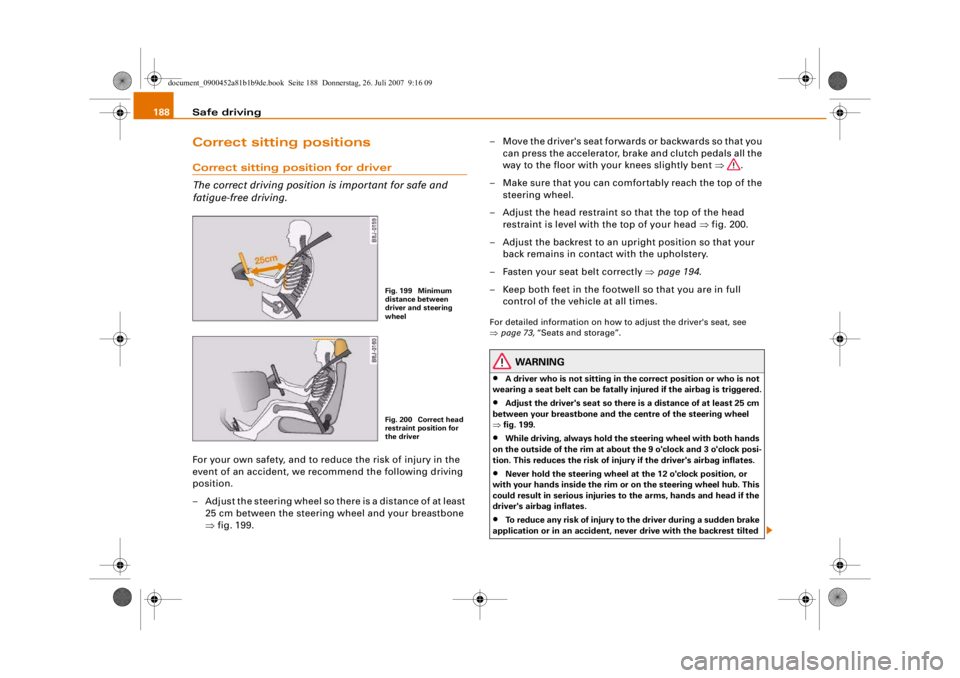
– Adjust the steering wheel so there is a distance of at least 25 cm between the steering wheel and your breastbone
⇒fig. 199. – Move the driver's seat forwards or backwards so that you
can press the accelerator, brake and clutch pedals all the
way to the floor with your knees slightly bent ⇒.
– Make sure that you can comfortably reach the top of the steering wheel.
– Adjust the head restraint so that the top of the head restraint is level with the top of your head ⇒fig. 200.
– Adjust the backrest to an upright position so that your back remains in contact with the upholstery.
– Fasten your seat belt correctly ⇒page 194 .
– Keep both feet in the footwe ll so that you are in full
control of the vehicle at all times.
For detailed information on how to adjust the driver's seat, see
⇒ page 73, “Seats and storage”.
WARNING
•
A driver who is not sitting in the correct position or who is not
wearing a seat belt can be fatally injured if the airbag is triggered.
•
Adjust the driver's seat so there is a distance of at least 25 cm
between your breastbone and th e centre of the steering wheel
⇒ fig. 199.
•
While driving, always hold the steering wheel with both hands
on the outside of the rim at about the 9 o'clock and 3 o'clock posi-
tion. This reduces the risk of injury if the driver's airbag inflates.
•
Never hold the steering wheel at the 12 o'clock position, or
with your hands inside the rim or on the steering wheel hub. This
could result in serious injuries to the arms, hands and head if the
driver's airbag inflates.
•
To reduce any risk of injury to the driver during a sudden brake
application or in an accident, neve r drive with the backrest tilted
Fig. 199 Minimum
distance between
driver and steering
wheelFig. 200 Correct head
restraint position for
the driver
document_0900452a81b1b9de.book Seite 188 Donnerstag, 26. Juli 2007 9:16 09
--4 -
-T
-+ +-
Page 193 of 342
Safe driving191
Controls
Safety
Driving tips
General maintenance
Self-help
Technical data
Examples of incorrect sitting positions
Occupants can suffer severe or fatal injuries injuries if
they sit in an incorrect position while the vehicle is
moving.Seat belts can only provide maximum protection if the belt
webbing is positioned correctl y. Sitting out of position
greatly reduces the effectiveness of the seat belts and
increases the risk of injury since the belt webbing is not
worn in the position for which it is designed. The driver is
responsible for the safety of all vehicle occupants, espe-
cially for children.
– Never allow anyone to sit out of position while the vehicle is moving ⇒.The following list shows just some examples of incorrect sitting
positions which can be dangerous to all occupants. The list is not
complete, but will help to make you aware of possible dangers
which can be avoided.
Therefore, whenever the vehicle is moving:•
never stand up in the vehicle,
•
never stand on the seats,
•
never kneel on the seats,
•
never travel with the backrest reclined too far,
•
never lean against the dash panel,
•
never lie down on the rear seat,
•
never sit on the front edge of a seat,
•
never sit sideways,
•
never lean out of the window,
•
never put your feet out of the window,
•
never put your feet on the dash panel,
•
never put your feet on the seat cushion,
•
never ride in the footwell,
•
never travel on a seat with out wearing the seat belt,
•
never climb into the luggage compartment.
WARNING
Sitting out of position increases the risk of severe injuries.•
Sitting out of position exposes the occupants to potentially
fatal injuries: if the airbags inflate they can strike any occupant
who is not in one of th e designed seat positions.
•
Before starting a trip, sit in the correct position and stay in this
position as long as the vehicle is moving. Before every trip, make
sure all passengers are sitting in the correct positions and remain
correctly seated at all times ⇒page 73, “Seats and storage”.
Pedal are aPedal s
The pedals must always be free to move and must never
be obstructed by floor mats or any objects in the footwell.– Make sure that the accelerator, brake and clutch pedals
are not obstructed and can be pressed all the way down
to the floor.
– Make sure that all pedals are able to return freely to their original positions.Only use floor mats which leave the pedal area free and can be
securely fastened in the footwell.
If one of the brake circuits should fail, increased brake pedal travel
will be required to bring the vehicle safely to a stop.
document_0900452a81b1b9de.book Seite 191 Donnerstag, 26. Juli 2007 9:16 09
--4 -
-T
•
-+ +-
Page 264 of 342
Checking and topping up fluids
262
WARNING
•
The cooling system is under pr essure. Do not unscrew the cap
on the expansion tank when the engine is hot: you could be
scalded by escaping steam
•
The coolant and coolan t additive can be a health hazard. Store
the coolant additive in the original container in a safe place out of
reach of children – risk of poisoning.For the sake of the environment
Drained off coolant should not be used again. Drain off the used
coolant into a suitable container and dispose of it in the proper
manner (observe environmental regulations).Radiator fan
The radiator fan can start running spontaneously.The radiator fan is driven by the engine via a poly V-belt. The speed
of the fan is varied by a viscous clutch according to the temperature.
There is also an auxiliary electric fan, which cuts in automatically
whenever the temperature of the coolant and the engine compart-
ment rises above a certain level.
The auxiliary fan can continue to run for as long as 10 minutes after
stopping the engine – even after the ignition is switched off. It may
also start running suddenly ⇒ after a while if•
residual heat raises the coolant temperature, or
•
the hot engine compartment is ad ditionally heated up by the
sun.
WARNING
When working in the engine compa rtment be aware that the radi-
ator fan may start running suddenly – risk of injury.
Brake fluidChecking brake fluid level
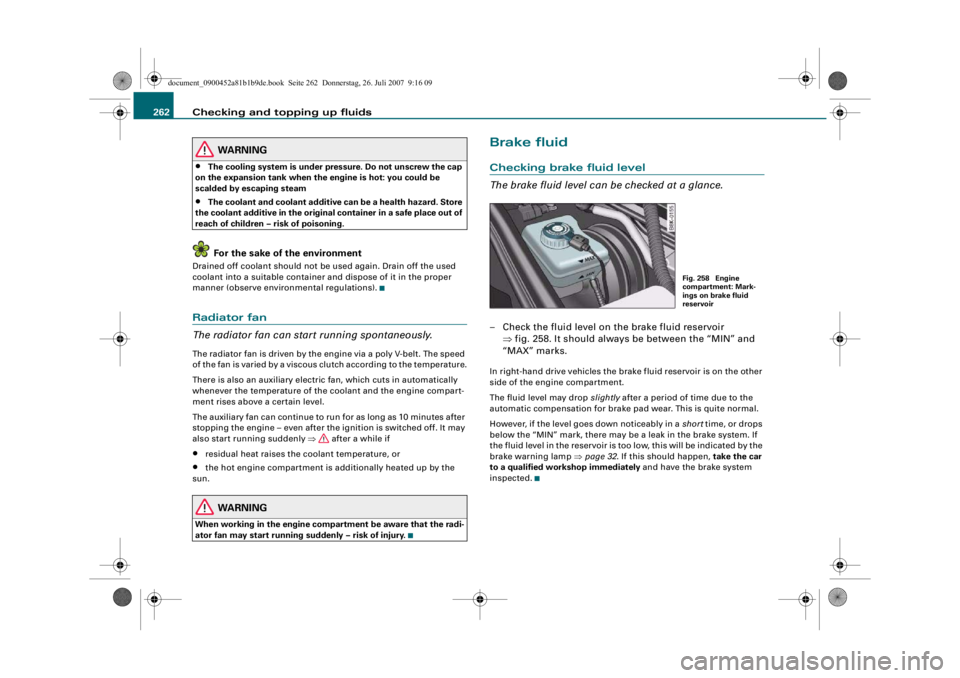
The brake fluid level can be checked at a glance.– Check the fluid level on the brake fluid reservoir ⇒fig. 258. It should always be between the “MIN” and
“MAX” marks.In right-hand drive vehi cles the brake fluid reservoir is on the other
side of the engine compartment.
The fluid level may drop slightly after a period of time due to the
automatic compensation for brake pad wear. This is quite normal.
However, if the level goes down noticeably in a short time, or drops
below the “MIN” mark, there may be a leak in the brake system. If
the fluid level in the reservoir is too low, this will be indicated by the
brake warning lamp ⇒page 32 . If this should happen, take the car
to a qualified workshop immediately and have the brake system
inspected.
Fig. 258 Engine
compartment: Mark-
ings on brake fluid
reservoir
document_0900452a81b1b9de.book Seite 262 Donnerstag, 26. Juli 2007 9:16 09
--4 -
-T
•
-+ +-
•
. I
Page 297 of 342
Self-help295
Controls
Safety
Driving tips
General maintenance
Self-help
Technical data
terminal must not touch metal parts of the vehicle: this can cause
short circuiting.
•
Do not bend over the batteries – risk of acid burns.
•
The screw plugs on the battery ce
lls must be screwed in firmly.
•
Keep sparks, flame and lighted cigarettes away from batteries:
the gases given off can cause an explosion.
•
If jump-starting another vehicle, position the jump leads in
such a way that they cannot come into contact with any moving
parts in the engine compart ment of the other vehicle.Caution
Please note that the above method of connecting the leads is meant
for jump-starting your vehicle. If jump-starting another vehicle, you
should not connect the negative lead (–) to the negative terminal of
the discharged battery, but directly to the engine block or a solid
metal part bolted to the engine bl ock. If the battery of the other
vehicle does not have a gas vent, there is a risk that a mixture of
oxygen and hydrogen gas can accumulate and cause an
explosion.Tow-starting and towing awayGeneral notes
Points to observe when tow-starting or towing awayIf you use a towrope:
Notes for the driver of the towing vehicle
– The towrope must be taut before driving off. – Engage the clutch very gently when starting to move; on
vehicles with automatic gearbox press the accelerator
slowly.
Notes for the driver of the towed vehicle
– The ignition should be switched on so that the turn signals, horn, windscreen wipers and washers can be
used. Please ensure that the steering wheel is unlocked
when you switch on the ignition, and that it moves freely.
–Put gear lever in neutral (manual gearbox) or move
selector lever to position N (automatic gearbox).
– The brake servo and power steering only work when the engine is running. Considerably more effort is required
on the brake pedal and steering wheel when the engine
is switched off.
– Ensure that the towrope remains taut at all times when towing.
Towrope or towbar
It is easier and safer to tow a vehicle with a tow bar. You should only
use a tow rope if you do not have a towbar.
A towrope should be slightly elasti c to reduce the loading on both
vehicles. It is advisable to use a towrope made of synthetic fibre or
similar material.
Attach the tow-rope or tow-bar only to the towing anchorages
intended for this purpose ⇒page 296 or ⇒page 297 .
Driving technique
Towing requires some experience – especially when using a
tow rope . Both drivers should be familiar with the technique required
for towing. Inexperienced drivers sh ould not attempt to tow-start or
tow away another vehicle.
WARNING (continued)
document_0900452a81b1b9de.book Seite 295 Donnerstag, 26. Juli 2007 9:16 09
--4 -
-T
CD
-+ +-
•
Page 299 of 342
Self-help297
Controls
Safety
Driving tips
General maintenance
Self-help
Technical data
Rear towline anchorage
Vehicles which do not have a factory-fitted towing
bracket* have a towline anchor age on the right side of the
rear bumper.Vehicles with towline anchorage
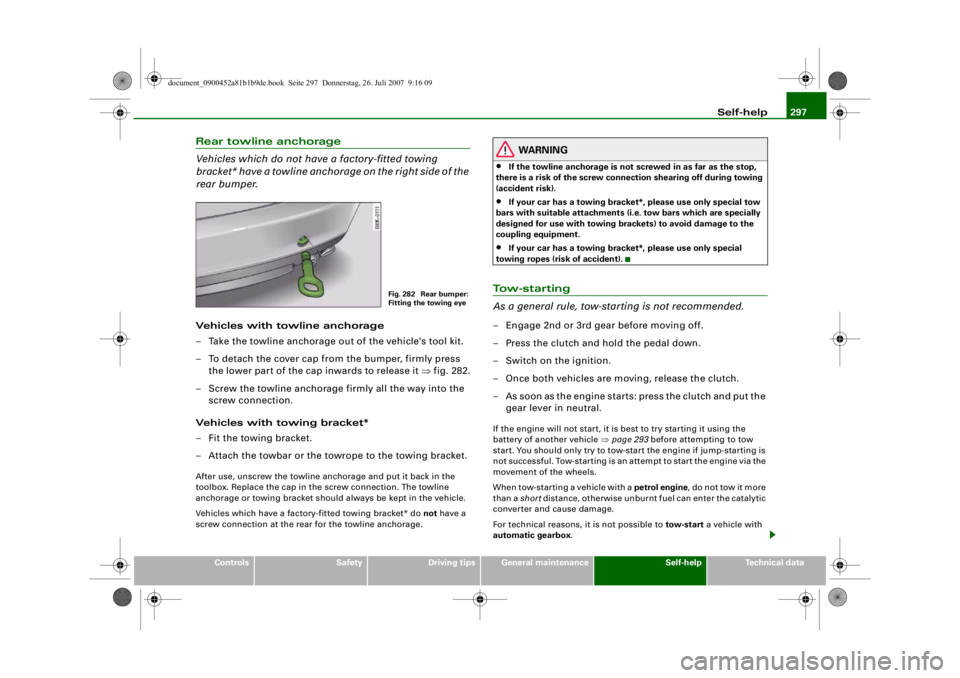
– Take the towline anchorage out of the vehicle's tool kit.
– To detach the cover cap from the bumper, firmly press
the lower part of the cap inwards to release it ⇒fig. 282.
– Screw the towline anchorage firmly all the way into the screw connection.
Vehicles with towing bracket*
– Fit the towing bracket.
– Attach the towbar or the towrope to the towing bracket.After use, unscrew the towline anchorage and put it back in the
toolbox. Replace the cap in the screw connection. The towline
anchorage or towing bracket should always be kept in the vehicle.
Vehicles which have a factory-fitted towing bracket* do not have a
screw connection at the rear for the towline anchorage.
WARNING
•
If the towline anchorage is not screwed in as far as the stop,
there is a risk of the screw connection shearing off during towing
(accident risk).
•
If your car has a towing bracket*, please use only special tow
bars with suitable attachments (i .e. tow bars which are specially
designed for use with towing brac kets) to avoid damage to the
coupling equipment.
•
If your car has a towing bracket*, please use only special
towing ropes (risk of accident).
To w - s t a r t i n g
As a general rule, tow-s tarting is not recommended.– Engage 2nd or 3rd gear before moving off.
– Press the clutch and hold the pedal down.
– Switch on the ignition.
– Once both vehicles are moving, release the clutch.
– As soon as the engine starts: press the clutch and put the
gear lever in neutral.If the engine will not start, it is best to try starting it using the
battery of another vehicle ⇒page 293 before attempting to tow
start. You should only try to tow-start the engine if jump-starting is
not successful. Tow-starting is an attempt to start the engine via the
movement of the wheels.
When tow-starting a vehicle with a petrol engine, do not tow it more
than a short distance, otherwise unburnt fuel can enter the catalytic
converter and cause damage.
For technical reasons, it is not possible to tow-start a vehicle with
automatic gearbox .
Fig. 282 Rear bumper:
Fitting the towing eye
document_0900452a81b1b9de.book Seite 297 Donnerstag, 26. Juli 2007 9:16 09
--4 -
-T
---- &
•
-+ +-
Page 303 of 342
Fuses and bulbs301
Controls
Safety
Driving tips
General maintenance
Self-help
Technical data
The seats with electrical adjustment are protected by circuit
breakers
. These reset automatically after a few seconds when the
overload has been corrected.
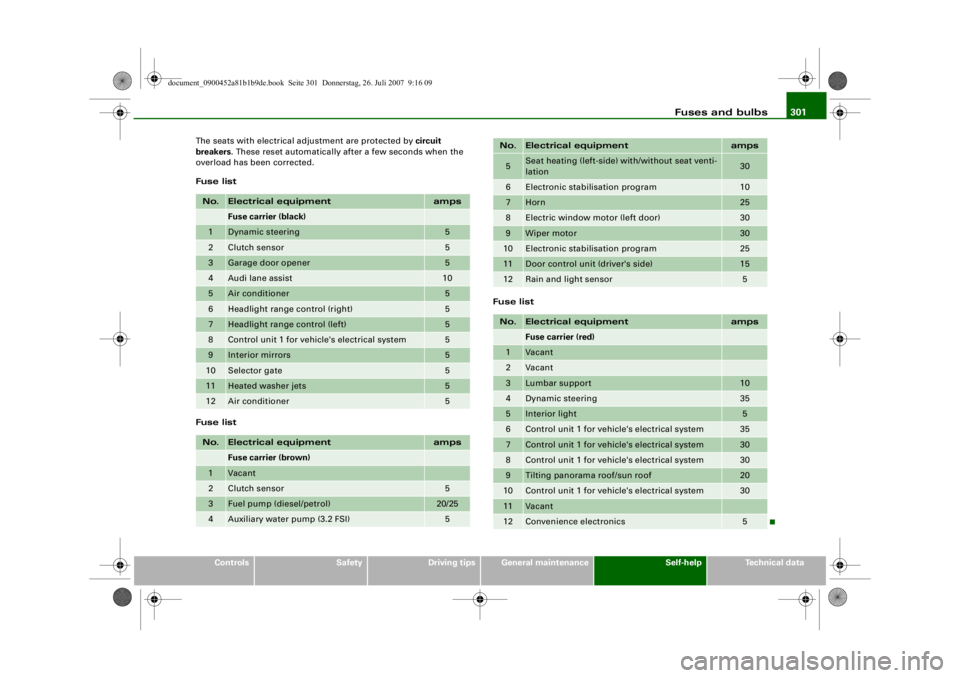
Fuse list
Fuse list Fuse list
No.
Electrical equipment
amps
Fuse carrier (black)
1
Dynamic steering
5
2
Clutch sensor
5
3
Garage door opener
5
4
Audi lane assist
10
5
Air conditioner
5
6
Headlight range control (right)
5
7
Headlight range control (left)
5
8
Control unit 1 for vehicle's electrical system
5
9
Interior mirrors
5
10
Selector gate
5
11
Heated washer jets
5
12
Air conditioner
5
No.
Electrical equipment
amps
Fuse carrier (brown)
1
Vacant
2
Clutch sensor
5
3
Fuel pump (diesel/petrol)
20/25
4
Auxiliary water pump (3.2 FSI)
5
5
Seat heating (left-side) with/without seat venti-
lation
30
6
Electronic stab
ilisation program
10
7
Horn
25
8
Electric window motor (left door)
30
9
Wiper motor
30
10
Electronic stabilisation program
25
11
Door control unit (driver's side)
15
12
Rain and light sensor
5
No.
Electrical equipment
amps
Fuse carrier (red)
1
Vacant
2
Vacant
3
Lumbar support
10
4
Dynamic steering
35
5
Interior light
5
6
Control unit 1 for vehicle's electrical system
35
7
Control unit 1 for vehicle's electrical system
30
8
Control unit 1 for vehicle's electrical system
30
9
Tilting panorama roof/sun roof
20
10
Control unit 1 for vehicle's electrical system
30
11
Vacant
12
Convenience electronics
5
No.
Electrical equipment
amps
document_0900452a81b1b9de.book Seite 301 Donnerstag, 26. Juli 2007 9:16 09
--4 -
-T
1111
-
-
1111
--
1111
-
-
1111
-
-+
1111
--
+-
1111
--
1111
--
-
1111
-
-
1111
--
1111
--
•
~