park assist AUDI S4 2008 User Guide
[x] Cancel search | Manufacturer: AUDI, Model Year: 2008, Model line: S4, Model: AUDI S4 2008Pages: 342, PDF Size: 15.01 MB
Page 165 of 342
Automatic gearbox163
Controls
Safety
Driving tips
General maintenance
Self-help
Technical data
– To prevent the vehicle from rolling away, apply the
parking brake before moving off on steep gradients
⇒ .
– As soon as you accelerate as normal, the parking brake will automatically be released and the vehicle will start
moving.
Pa rking the c ar
– Press and hold the brake pedal ⇒.
– Apply the parking brake.
– Press and hold the interlock button, move the selector lever to P and release the interlock button.The engine c an only be started when the selector lever is at P or N.
On level ground it is sufficient to move the selector lever to P. On a
gradient the parking brake should be applied first and the selector
lever should be moved to P. This reduces the load on the locking
mechanism and makes it easier to move the selector lever out of
position P.
Vehicles with multitronic® gearbox: Your vehicle is equipped with
the hill hold assist function which makes it easier to drive away on
a slope. The system is activated when you press and hold the brake
pedal for a few seconds . When you release the brake pedal the
braking force will be maintained for a moment in order to prevent
the vehicle rolling back when you drive away.
WARNING
•
Do not press the accelerator while selecting a gear with the
vehicle stationary and the engine running, as this could cause an
accident.
•
Please note that some power will still be transmitted when you
stop temporarily with the selector lever in position D, S or R. For this reason, to avoid ri
sking an accident, appl y the footbrake firmly
when stopping to prevent the vehicle rolling away.
•
Never move the selector lever to R or P when driving, as this
could cause an accident.
•
Vehicles with multitronic® gearbox: Please note that some
power will still be transmitted when you stop temporarily with the
selector lever in position D, S or R. For this reason, to avoid risking
an accident, apply the footbrake fi rmly when stopping to prevent
the vehicle rolling away.
Applies to vehicles: with multitronic® or tiptronicSelector lever positions
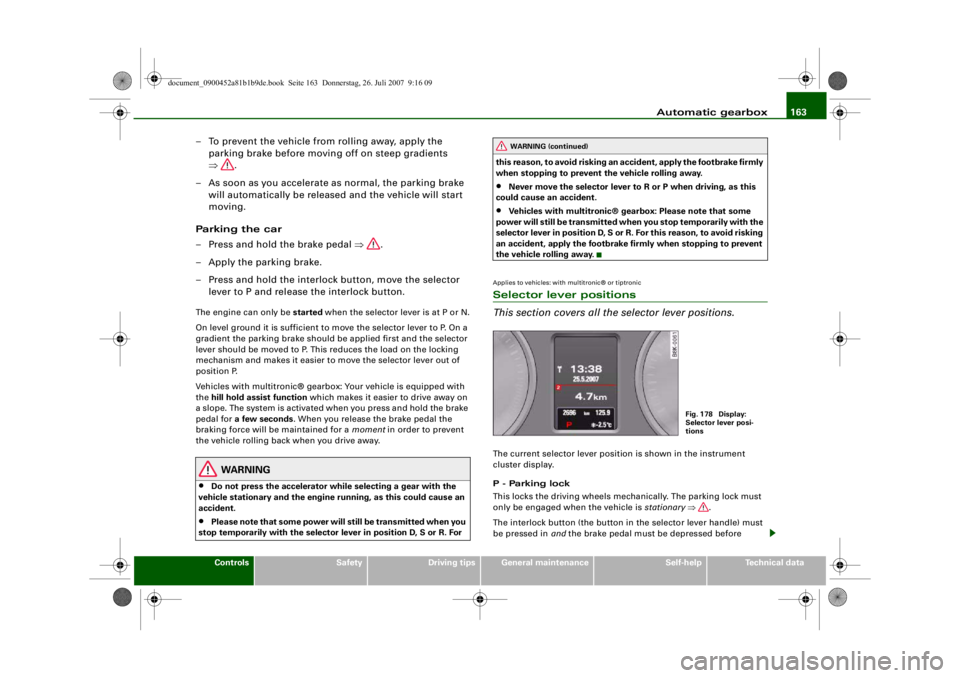
This section covers all the selector lever positions.The current selector lever position is shown in the instrument
cluster display.
P - Parking lock
This locks the driving wheels mechanically. The parking lock must
only be engaged when the vehicle is stationary ⇒.
The interlock button (the button in the selector lever handle) must
be pressed in and the brake pedal must be depressed before
WARNING (continued)
Fig. 178 Display:
Selector lever posi-
tions
document_0900452a81b1b9de.book Seite 163 Donnerstag, 26. Juli 2007 9:16 09
--4 -
-T
•
-+ +-
Page 171 of 342
Parking aid169
Controls
Safety
Driving tips
General maintenance
Self-help
Technical data
Parking aidApplies to vehicles: with Audi parking system/plus/advancedGeneral notesVarious systems are available to help you when parking or manoeu-
vring in tight spaces, depending on the equipment fitted on your
vehicle.
The Audi parking system gives an acoustic warning if there are any
obstacles behind the car ⇒page 169 .
When you are parking, the Audi parking system plus warns you
acoustically and optically about obstacles in front of and behind the
vehicle ⇒page 170 .
In conjunction with a reversing camera, the Audi parking system
advanced shows a picture of the area behind the vehicle. This
picture helps you to manoevre the vehicle backwards and sideways.
In addition, you are assisted by the acoustic signals and graphic
display of the parking aid ⇒page 171 .
Note
To ensure that the acoustic parking aid works properly, the sensors
must be kept clean and free of snow and ice.Audi parking systemApplies to vehicles: with Audi parking systemDescription
The Audi parking system is an acoustic parking aid.Sensors are located in the rear bumper. When the sensors detect an
obstacle, you are alerted by acoust ic signals (beeps). The measuring
range of the sensors starts at about: The acoustic signals sound with increasing frequency as you
approach the obstacle. A warning tone will sound continuously
when the vehicle is less than appr
ox. 0.30 m away from the obstacle.
Stop reversing immediately!
The volume of the warning beeps will be gradually reduced after
about 4 seconds if the vehicle remains at a constant distance from
a detected obstacle (it will not be reduced if the obstacle is closer
than 0.30 m).
The parking aid is switched on automatically when reverse gear is
engaged. You will hear a brief acknowledgement tone.
WARNING
•
The parking aid cannot replace the full concentration of the
driver. The driver is always resp onsible for safety during parking
and other manoeuvres.
•
The sensors have blind spots in which obstacles are not regis-
tered. It is particular ly important to ensure that there are no small
children or animals near the vehicle, as the sensors may not
always be able to detect them.
•
Always keep a close watch on the area around the vehicle and
make full use of the rear-view mirrors.Caution
Please note that low obstacles detected by the system may no
longer be registered by the sensors as the car moves closer, so the
system will not give any further warning. Certain kinds of obstacles
(such as wire fences, chains, thin painted posts or trailer draw bars, Rear
Side
0.60 m
Centre
1.60 m
document_0900452a81b1b9de.book Seite 169 Donnerstag, 26. Juli 2007 9:16 09
--4 -
-T
-+ +-
II]
•
CD
Page 176 of 342
Parking aid
174•
Only use the reversing camera to assist you if it is supplying
you with a good and clear picture. The quality of the picture could
be impaired by adverse light, dirt on the lens or a defect (accident
risk).
•
Only use the reversing camera when the boot lid is completely
c lo s e d . P l e a se m a k e su re t h a t t h ere are no objects mounted to the
rear end of the vehicle which coul d block the view of the reversing
camera.Note
•
If your vehicle is near an obstacle, the graphic display will also
appear in the reversing camera image. This superimposed graphic
helps the driver to localise the critical area of the vehicle.
•
You can change the display and adjust the volume and pitch of
the beeps ⇒ page 177.
•
Please refer to the notes on towing ⇒ page 177.
•
There is a slight delay in the picture display.
Applies to vehicles: with Audi parking system advancedParking perpendicular to the roadside
Parking mode 1 can be used when parking your vehicle in
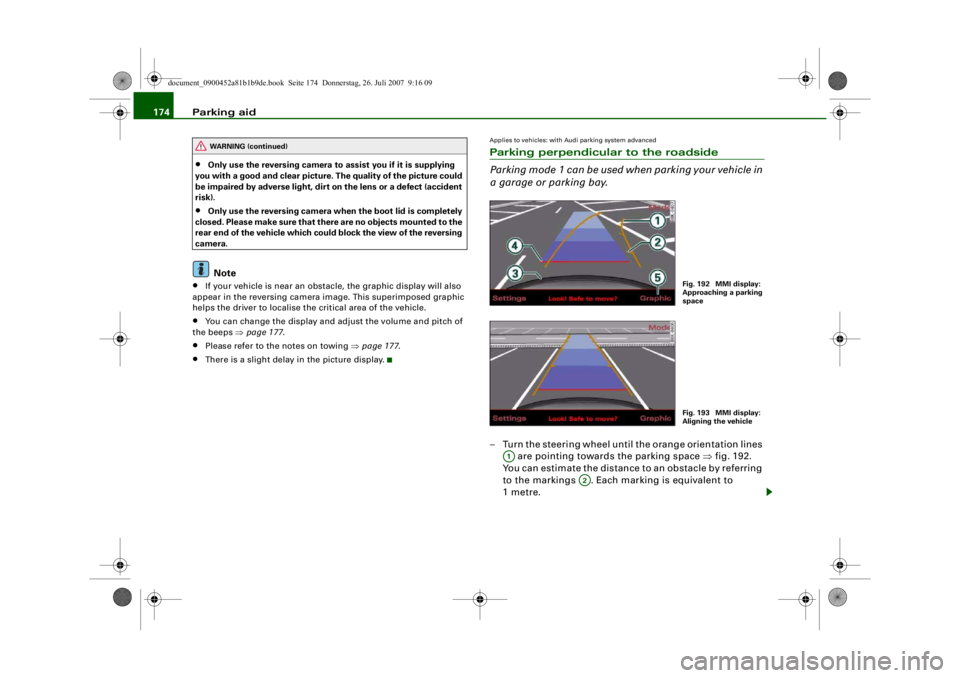
a garage or parking bay.– Turn the steering wheel until the orange orientation lines
are pointing towards the parking space ⇒fig. 192.
You can estimate the distance to an obstacle by referring
to the markings . Each marking is equivalent to
1metre.
WARNING (continued)
Fig. 192 MMI display:
Approaching a parking
spaceFig. 193 MMI display:
Aligning the vehicle
A1
A2
document_0900452a81b1b9de.book Seite 174 Donnerstag, 26. Juli 2007 9:16 09
--4 -
-T
[I]
-+
•
+-
Page 177 of 342
Parking aid175
Controls
Safety
Driving tips
General maintenance
Self-help
Technical data
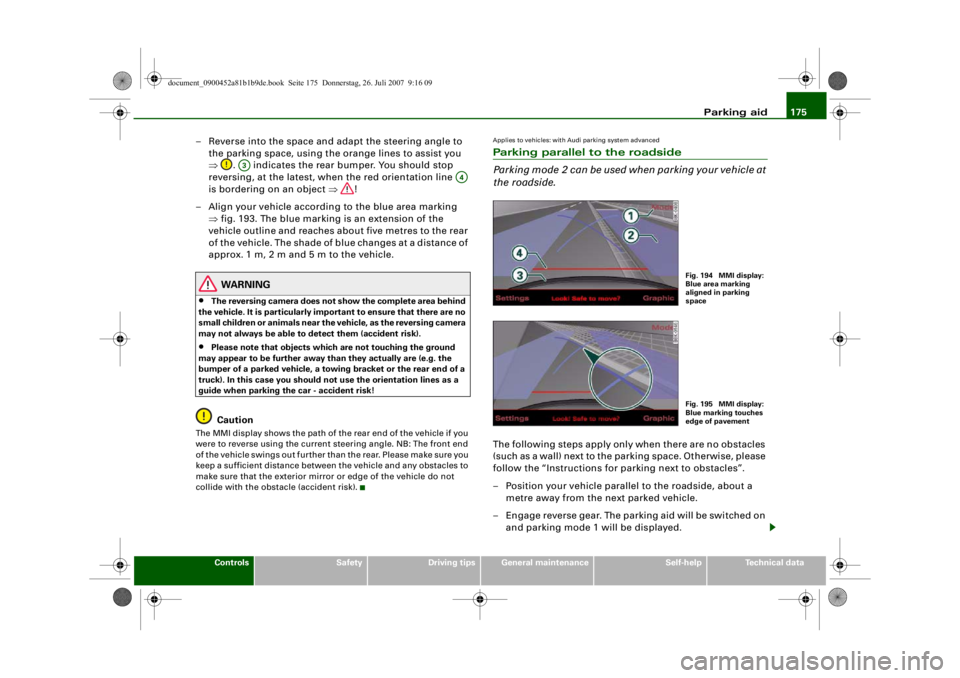
– Reverse into the space and adapt the steering angle to
the parking space, using the orange lines to assist you
⇒ . indicates the rear bumper. You should stop
reversing, at the latest, when the red orientation line
is bordering on an object ⇒!
– Align your vehicle according to the blue area marking ⇒fig. 193. The blue marking is an extension of the
vehicle outline and reaches about five metres to the rear
of the vehicle. The shade of blue changes at a distance of
approx. 1m, 2m and 5m to the vehicle.
WARNING
•
The reversing camera does not show the complete area behind
the vehicle. It is part icularly important to ensure that there are no
small children or animals near the vehicle, as the reversing camera
may not always be able to detect them (accident risk).
•
Please note that objects whi ch are not touching the ground
may appear to be further away th an they actually are (e.g. the
bumper of a parked ve hicle, a towing bracket or the rear end of a
truck). In this case you should not use the orientation lines as a
guide when parking the car - accident risk!Caution
The MMI display shows the path of th e rear end of the vehicle if you
were to reverse using the current steering angle. NB: The front end
of the vehicle swings out further th an the rear. Please make sure you
keep a sufficient distance between the vehicle and any obstacles to
make sure that the exterior mirror or edge of the vehicle do not
collide with the obstacle (accident risk).
Applies to vehicles: with Audi parking system advancedParking parallel to the roadside
Parking mode 2 can be used when parking your vehicle at
the roadside.The following steps apply only when there are no obstacles
(such as a wall) next to the parking space. Otherwise, please
follow the “Instructions for parking next to obstacles”.
– Position your vehicle parallel to the roadside, about a metre away from the next parked vehicle.
– Engage reverse gear. The parking aid will be switched on and parking mode 1 will be displayed.
A3
A4
Fig. 194 MMI display:
Blue area marking
aligned in parking
spaceFig. 195 MMI display:
Blue marking touches
edge of pavement
document_0900452a81b1b9de.book Seite 175 Donnerstag, 26. Juli 2007 9:16 09
--4 -
-T
CD
-+ +-
0
•
Page 227 of 342
Intelligent technology225
Controls
Safety
Driving tips
General maintenance
Self-help
Technical data
WARNING
•
When applying the brakes to clean off deposits on the pads and
discs, select a clear, dry road. Be sure not to inconvenience or
endanger other road users; do not risk an accident.
•
Never let the car coast with the engine switched off (this can
cause accidents).Caution
•
Never let the brakes “drag” by leaving your foot on the pedal
when you do not really intend to brake. This overheats the brakes,
resulting in longer stopping distances and greater wear.
•
Before driving down a long, steep gradient, it is advisable to
reduce speed and move the selector lever to a lower gear. In this
way you will make use of the engine braking effect and relieve the
load on the brakes. If you still have to use the brakes, it is better to
brake firmly at intervals than to apply the brakes continuously.Note
•
If the brake servo is out of action due to a malfunction, or if the
car has to be towed, you will have to press the brake pedal consid-
erably harder to make up for the lack of servo assistance.
•
If you wish to equip the car with accessories such as a front
spoiler or wheel covers, it is impo rtant that the flow of air to the
front wheels is not obstructed, otherwise the brakes can overheat.
Power steering (servotronic)The power steering assists th e driver when turning the
steering wheel (with the engine running).The power steering assists the driver by reducing the force needed
to turn the steering wheel. The degree of power assistance is
adapted electronically , depending on the speed. If a fault should occur in the
servotronic system the power steering
will still operate. The degree of power assistance will, however, no
longer adapt to different speeds. If the electronic regulating system
is not working properly, this is most noticeable when turning the
steering wheel at low speeds (for instance when parking) – more
effort will be required than usual. The fault should be corrected by
a qualified workshop as soon as possible.
The power steering does not function when the engine is switched
off. In this case the steering wheel is very hard to turn.
If the steering is held at its turning limit when the car is stationary,
this will place an excessive load on the power steering system. In
this case, the power steering system will make noises. It will also
reduce the idling speed of the engine.
Caution
Do not keep the steering in the full-lock position for longer than
15 seconds when the engine is running – this could cause damage
to the power steering system.
Note
•
If the power steering should fail at any time or the engine is
switched off (for instance when being towed), the car can still be
steered. However, more effort will be required to turn the steering
wheel.
•
If the system is leaking or malfunctioning, please take the car to
a qualified workshop as soon as possible.
•
The power steering requires a special hydraulic fluid. The fluid
reservoir is located at the front of the engine compartment on the
left ⇒page 256 . The correct fluid level in the reservoir is important
for the power steering to function properly. The hydraulic fluid level
is checked at the Inspection Service.
document_0900452a81b1b9de.book Seite 225 Donnerstag, 26. Juli 2007 9:16 09
--4 -
-T
CD
-+
CD
[I]
[I]
+-
•
•
Page 288 of 342
Self-help
286The TMS can be used at outside temperatures down to – 20 °C.
WARNING
After repairing a tyre please note the following points:•
Do not drive faster than 80 km/h.
•
Avoid heavy acceleration, hard braking and fast cornering.
•
Vehicle handling could be impaired.
•
Tyres which have been sealed using the TMS are only suitable
for temporary use. Damaged tyres must be renewed.
•
The TMS must NOT be used,
− on cuts and punctures larger than 4 mm
− if the wheel rim has been damaged
− if you have been driving with very low pressure or a
completely flat tyre
•
Seek professional assistance if th e repair of a tyre puncture is
not possible with the sealing compound.
•
Do not allow the sealant to come into contact with your eyes,
skin or clothing.
•
If you do come into contact wi th the sealant immediately rinse
the eyes or skin affected with clean water.
•
Change clothing immediately if it becomes soiled with the tyre
sealant.
•
Make sure you do not breathe in the fumes!
•
If any of the tyre sealant is a ccidentally ingested, immediately
rinse the mouth thoroughly and drink lots of water.
•
Do not induce vomiting. Immediately contact a doctor!
•
If any allergic reactions should occur get medical help immedi-
ately.
•
Keep the sealant away from children.
For the sake of the environment
Used bottles of sealing compound can be returned to an Audi dealer
for disposal.
Note
•
If sealant should leak out, leave it to dry. When it has dried, you
can pull it off like a piece of foil.
•
Observe the expiry date stated on the sealing compound can.
Have the sealing compound exchanged by a qualified workshop.
Repairing a tyrePreparations
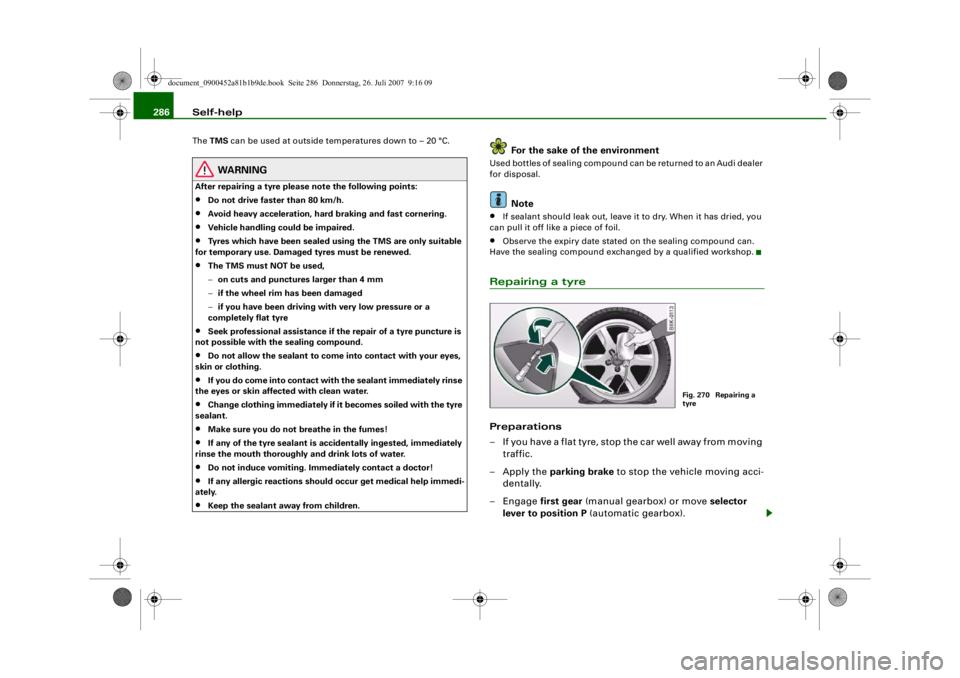
– If you have a flat tyre, stop the car well away from moving traffic.
– Apply the parking brake to stop the vehicle moving acci-
dentally.
–Engage first gear (manual gearbox) or move selector
lever to position P (automatic gearbox).
Fig. 270 Repairing a
tyre
document_0900452a81b1b9de.book Seite 286 Donnerstag, 26. Juli 2007 9:16 09
--4 -
-T
[I]
•
-+ +-
Page 290 of 342
Self-help
288•
Seek professional assistance if th e repair of a tyre puncture is
not possible with the sealing compound.
•
If tyre pressure is less than 1.3 bar after driving about 10
minutes, the tyre is too badly damaged. Do not drive on. You
should obtain professional assistance.Caution
Take special care if you have to repair a tyre on a gradient.
Note
•
Do not use the compressor for longer than 6 minutes at a time,
as it could overheat. When the compressor has cooled down, you
can use it again.
•
If tyre sealant should leak out, leave it to dry and then pull it off
like foil.
•
After carrying out a tyre repair remember to buy a new tyre
sealant can at a qualified workshop. This will ensure that the Tyre
Mobility System is operative again.
•
Please observe the relevant regulations.
Changing a wheelPreparations
Some preparations are necessary before changing a
wheel.– If you have a flat tyre, stop the car well away from moving traffic. Choose a location that is as level as possible.– All passengers should
leave the car. They should wait in
a safe place (for instance behind the roadside crash
barrier).
– Apply the parking brake to stop the vehicle moving acci-
dentally.
–Engage first gear (manual gearbox) or move selector
lever to position P (automatic gearbox).
– When towing a trailer: unhitch the trailer from your vehicle.
– Take the tools ⇒ page 283 and the spare wheel*
⇒ page 284 out of the luggage compartment.
WARNING
If you have a puncture in moving traffic, switch on the hazard
warning lights and place the warning triangle in a visible location.
This is for your own safety and also warns other road users.
Caution
If you have to change the tyre on a gradient, block the wheel oppo-
site the wheel being changed by placing a stone or similar object
under it to prevent the vehicle from rolling away.
Note
Please observe the relevant regulations.How to change a wheel
Change the wheel as described below.–Pull off the hub cap . Also refer to ⇒page 289, “Hub
caps”.
WARNING (continued)
document_0900452a81b1b9de.book Seite 288 Donnerstag, 26. Juli 2007 9:16 09
--4 -
-T
0 [I)
-+
I&
+-
0
•
•
Page 306 of 342

Fuses and bulbs
304BulbsChanging bulbs
Changing bulbs requires a certain degree of practical
skill.You can change the following bulbs for exterior lights yourself:•
Halogen headlights: Bulb for dipped headlights
•
Halogen headlights: Bulb for main beam headlights
•
Bulb for fog light
•
Bulbs for rear lights in boot lid
•
Bulbs for rear lights in side panel
•
Bulbs for number plate light
The following bulbs should only be changed by a qualified work-
shop :
•
Halogen headlights: Bulb for turn signals
•
Halogen headlights: Bulb for side lights
•
Xenon headlights*: Bulb for turn signals
•
Xenon headlights*: Light source for daytime running
lights/parki ng lights
•
Bulb for headlights: Bi-xenon lights ⇒
•
Light source for turn signal in exterior mirror housing
•
Light source for high-level brake light
As a rule, you require a certain degree of practical skill to change
defective bulbs. This applies in particular to those bulbs which are
only accessible from the engine compartment.
If in doubt, we recommend that you have defective bulbs changed
by a qualified workshop or qualified mechanic.
If you do decide to change bulbs in the engine compartment your-
self, be aware of the safety risks involved ⇒page 255 ⇒ .
Types of bulbs
You must only replace a bulb with a bulb of the same type. Informa-
tion regarding e.g. the wattage can be found on the base of the
bulb.
4
Cigarette lighter
15
5
Parking aid
5
6
Phone pre-installation without handsfree sys-
tem (VDA interface)
5
7
Control unit for adap tive cruise control
15
8
Vacant
9
EPB switch (electro-mechanical parking brake)
5
10
Lane change assist feature
5
11
Seat heating, rear
5
12
Airbag
5
No.
Electrical equipment
amps
Front bulb (12 V)
Vers io n
Dipped-beam headlights (halogen)
55 W (H7)
Main beam headlights (halogen)
55 W (H7)
Front fog lights
55 W (H7)
Rear bulb (12 V)
Vers io n
Brake lights / tail lights
P 21 W
Turn signals (rear)
P 21 W
Reversing lights
W 16 W
Rear fog light
H 21 W
Number plate lights
5 W
document_0900452a81b1b9de.book Seite 304 Donnerstag, 26. Juli 2007 9:16 09
--4 -
1111
-
T
1111
-
6
1111
-
1111
-
1111
-
•
6
-+ +-
Page 332 of 342
Index
330AAbroad
Changing headlight dip settings . . . . . 59
ABS See Anti-lock brake system . . . . . . . . . 19
AC mode . . . . . . . . . . . . . . . . . . . . . . . 98, 107
Acceleration figures See Performance, weights and
dimensions . . . . . . . . . . . . . . . . . . . . 323
Accessories . . . . . . . . . . . . . . . . . . . . . . . . 277 Trailer . . . . . . . . . . . . . . . . . . . . . . . . . . 235
Acoustic parking aid . . . . . . . . . . . . . . . . 169
Adapter for anti-theft wheel bolts . . . . . 292
adaptive cruise control . . . . . . . . . . . . . . 128 Driver intervention prompt . . . . 130, 138
Driver messages . . . . . . . . . . . . . . . . . 134
Driving program . . . . . . . . . . . . . . . . . 139
Error messages . . . . . . . . . . . . . . . . . . 136
Indicator lamps . . . . . . . . . . . . . . . . . . 134
No vehicle in front . . . . . . . . . . . . . . . 130
Overriding . . . . . . . . . . . . . . . . . . . . . . 130
Setting a new speed . . . . . . . . . . . . . . 131
Setting distance . . . . . . . . . . . . . . . . . 133
Setting speed . . . . . . . . . . . . . . . . . . . 131
Setting time interval . . . . . . . . . . . . . . 133
Settings . . . . . . . . . . . . . . . . . . . . . . . . 139
Status messages . . . . . . . . . . . . . . . . . 136
Switching off (with memory function) . . .131, 132
Switching on and off . . . . . . . . . . . . . 131
System limitations . . . . . . . . . . . . . . . 140
Vehicle in front . . . . . . . . . . . . . . . . . . 130 Vehicles with manual gearbox . . . . . . 129
Volume of warning tone . . . . . . . . . . . 139
adaptive light . . . . . . . . . . . . . . . . . . . . . . . 61 Defective . . . . . . . . . . . . . . . . . . . . . . . . 39
advanced key Locking and unlocking the vehicle . . . 47
START ENGINE STOP button . . . . . . . 118
Starting the engine . . . . . . . . . . . . . . . 118
Switching on the ignition . . . . . . . . . . 118
Air conditioner . . . . . . . . . . . . . . . . . . 93, 101 AC mode . . . . . . . . . . . . . . . . . . . . . . . . . 98
See also Deluxe automatic air conditioner
93
Air recirculation mode Deluxe automatic air conditioner . . . . 97
Deluxe automatic air conditioner plus . . .105
Airbag . . . . . . . . . . . . . . . . . . . . . . . . . . . . 201 Deactivating . . . . . . . . . . . . . . . . . . . . . 208
Front airbags . . . . . . . . . . . . . . . . . . . . 203
Head-protection airbag . . . . . . . . . . . 207
Key-operated switch for front passenger's airbag . . . . . . . . . . . . . . . . . . . . . . . . . 208
Side airbags . . . . . . . . . . . . . . . . . . . . . 205
Triggering . . . . . . . . . . . . . . . . . . . . . . 202
Warning lamp . . . . . . . . . . . . . . . . . . . . 17
Alarm system See Anti-theft alarm system . . . . . . . . . 42
Alterations to the vehicle . . . . . . . . . . . . . 277
Alternator Fault . . . . . . . . . . . . . . . . . . . . . . . . . . . . 32
Anti-dazzle interior mirror . . . . . . . . . . . . . 69
Anti-freeze additive . . . . . . . . . . . . . . . . . 260 Anti-knock properties of petrol . . . . . . . . 251
Anti-lock brake system
How the system works . . . . . . . . . . . . 222
Warning lamp . . . . . . . . . . . . . . . . . . . . 19
Anti-theft alarm system . . . . . . . . . . . . . . . 42 Interior monitor . . . . . . . . . . . . . . . . . . . 50
Tow-away protection . . . . . . . . . . . . . . 50
Anti-theft wheel bolts . . . . . . . . . . . . . . . . 292
Armrest (front) Adjusting . . . . . . . . . . . . . . . . . . . . . . . . 78
Storage compartment . . . . . . . . . . . . . . 78
Ashtrays Front . . . . . . . . . . . . . . . . . . . . . . . . . . . . 86
Rear . . . . . . . . . . . . . . . . . . . . . . . . . . . . . 86
Audi braking guard . . . . . . . . . . . . . . . . . . 142 Error messages . . . . . . . . . . . . . . . . . . 143
Settings . . . . . . . . . . . . . . . . . . . . . . . . 144
Status messages . . . . . . . . . . . . . . . . . 143
Switching on and off . . . . . . . . . . . . . . 144
Audi drive select . . . . . . . . . . . . . . . . . . . . 159 Dynamic steering . . . . . . . . . . . . . . . . 159
Suspension control . . . . . . . . . . . . . . . 159
Audi hold assist . . . . . . . . . . . . . . . . . . . . 124 Warning lamp . . . . . . . . . . . . . . . . . . . . 19
Audi lane assist See lane assist . . . . . . . . . . . . . . . . . . . 145
Audi parking system . . . . . . . . . . . . . . . . . 169
Audi parking system advanced . . . . . . . . 171
Audi parking system plus . . . . . . . . . . . . 170
Auto Lock . . . . . . . . . . . . . . . . . . . . . . . . . . . 42
Auto-check control . . . . . . . . . . . . . . . . . . . 30
document_0900452a81b1b9de.book Seite 330 Donnerstag, 26. Juli 2007 9:16 09
--4 -
-T
-+ +-
Page 333 of 342

Index331
Controls
Safety
Driving tips
General maintenance
Self-help
Technical data
Automatic air conditioner plus
See Deluxe automatic air conditioner plus
101
Automatic cruise control See adaptive cruise control . . . . . . . . 128
Automatic gearbox Dynamic gear control program . . . . . 166
Kick-down feature . . . . . . . . . . . . . . . . 165
Manual release (multitronic®) . . . . . . 168
multitronic® . . . . . . . . . . . . . . . . . . . . . 162
Paddle levers (tiptronic mode) . . . . . . 167
Safety interlock for ignition key . . . . . 116
Selector lever lock . . . . . . . . . . . . . . . . 165
Selector lever positions . . . . . . . . . . . 163
Steering wheel with paddle levers . . 167
tiptronic . . . . . . . . . . . . . . . . . . . . 162, 166
Automatic headlight control . . . . . . . . . . . 57
Automatic headlights . . . . . . . . . . . . . . . . . 59
Auxiliary heating Deluxe automatic air conditioner plus . . 110
Description . . . . . . . . . . . . . . . . . . . . . . 110
Remote control . . . . . . . . . . . . . . . . . . 113
Running time . . . . . . . . . . . . . . . . . . . . 112
Switching on/off immediately . . . . . . 111
Timer . . . . . . . . . . . . . . . . . . . . . . . . . . . 111
Average fuel consumption . . . . . . . . . . . . . 25
Average speed . . . . . . . . . . . . . . . . . . . . . . . 25
Axle weights See Performance, weights and
dimensions . . . . . . . . . . . . . . . . . . . . 323
BBattery
Charging . . . . . . . . . . . . . . . . . . . . . . . . 265
Low charge . . . . . . . . . . . . . . . . . . . . . . 226
Power level . . . . . . . . . . . . . . . . . . . . . . 226
Power management . . . . . . . . . . . . . . 226
Replacing . . . . . . . . . . . . . . . . . . . . . . . 266
Winter conditions . . . . . . . . . . . . . . . . 263
Battery power . . . . . . . . . . . . . . . . . . . . . . . 38
Bayonet fastener Bulb . . . . . . . . . . . . . . . . . . . . . . . . . . . . 305
Bulb holder . . . . . . . . . . . . . . . . . . . . . . 306
Belt tensioners . . . . . . . . . . . . . . . . . . . . . . 199
Bicycle rack Trailer . . . . . . . . . . . . . . . . . . . . . . . . . . 235
Biodiesel . . . . . . . . . . . . . . . . . . . . . . . . . . . 251
Bioethanol fuel . . . . . . . . . . . . . . . . . . . . . 251
Blower Deluxe automatic air conditioner . . . . . 96
Deluxe automatic air conditioner plus . . 104
Bonnet Closing . . . . . . . . . . . . . . . . . . . . . . . . . 256
Opening . . . . . . . . . . . . . . . . . . . . . . . . 254
Releasing . . . . . . . . . . . . . . . . . . . . . . . 254
Boot See Loading luggage compartment . 192
See Luggage compartment . . . . . . . . . . 79
Boot lid Central locking system . . . . . . . . . . . . . 51
Manual release . . . . . . . . . . . . . . . . . . . . 52 Brake system
Brake assist system . . . . . . . . . . . . . . . 222
Brake fluid . . . . . . . . . . . . . . . . . . . . . . . 262
Brake light defective . . . . . . . . . . . . . . . 37
Brake pads worn . . . . . . . . . . . . . . . . . . 37
Brake servo . . . . . . . . . . . . . . . . . . . . . . 224
Electro-mechanical parking brake . . . 121
General notes . . . . . . . . . . . . . . . . . . . . 224
Malfunction . . . . . . . . . . . . . . . . . . . . . . 32
Warning lamp . . . . . . . . . . . . . . . . . . . . . 20
braking guard See Audi braking guard . . . . . . . . . . . . 142
Bulb holder Bayonet fastener . . . . . . . . . . . . . . . . . 306
Bulb monitor . . . . . . . . . . . . . . . . . . . . . . . . 37
Bulbs Bayonet fastener . . . . . . . . . . . . . . . . . 305
Changing (general notes) . . . . . . . . . . 304
Bulbs, changing . . . . . . . . . . . . . . . . . . . . . 304 Brake lights . . . . . . . . . . . . . . . . . . . . . . 311
Bulb holder with bayonet fastener . 305, 306
Dipped headlights . . . . . . . . . . . . . . . . 308
Front fog lights . . . . . . . . . . . . . . . . . . . 310
Main beam headlights . . . . . . . . . . . . . 307
Number plate light . . . . . . . . . . . . . . . . 315
Rear fog light . . . . . . . . . . . . . . . . . . . . 314
Rear lights . . . . . . . . . . . . . . . . . . . . . . . 311
Reversing light . . . . . . . . . . . . . . . . . . . 314
Turn signals (rear) . . . . . . . . . . . . . . . . 311
Business equipment . . . . . . . . . . . . . . . . . 278
document_0900452a81b1b9de.book Seite 331 Donnerstag, 26. Juli 2007 9:16 09
--4 -
-T
-+ +-