headlights AUDI S4 2008 Owner's Manual
[x] Cancel search | Manufacturer: AUDI, Model Year: 2008, Model line: S4, Model: AUDI S4 2008Pages: 342, PDF Size: 15.01 MB
Page 308 of 342
Fuses and bulbs
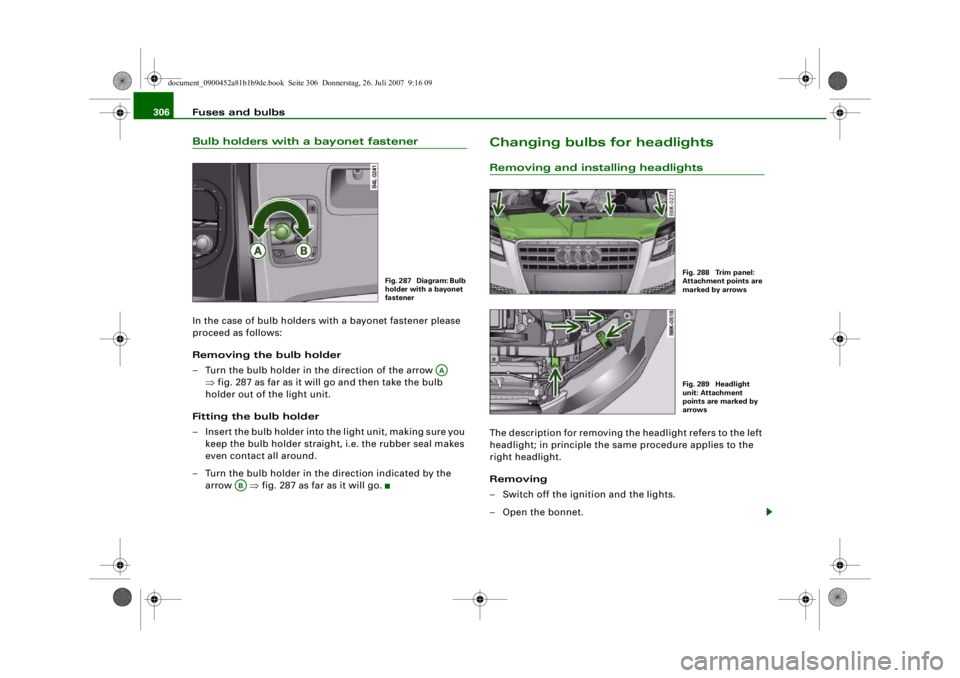
306Bulb holders with a bayonet fastenerIn the case of bulb holders with a bayonet fastener please
proceed as follows:
Removing the bulb holder
– Turn the bulb holder in the direction of the arrow
⇒fig. 287 as far as it will go and then take the bulb
holder out of the light unit.
Fitting the bulb holder
– Insert the bulb holder into the light unit, making sure you keep the bulb holder straight , i.e. the rubber seal makes
even contact all around.
– Turn the bulb holder in the direction indicated by the arrow ⇒fig. 287 as far as it will go.
Changing bulbs for headlightsRemoving and installing headlightsThe description for removing the headlight refers to the left
headlight; in principle the same procedure applies to the
right headlight.
Removing
– Switch off the ignition and the lights.
– Open the bonnet.
Fig. 287 Diagram: Bulb
holder with a bayonet
fastener
AA
AB
Fig. 288 Trim panel:
Attachment points are
marked by arrowsFig. 289 Headlight
unit: Attachment
points are marked by
arrows
document_0900452a81b1b9de.book Seite 306 Donnerstag, 26. Juli 2007 9:16 09
--4 -
-T
-+ +-
•
Page 309 of 342

Fuses and bulbs307
Controls
Safety
Driving tips
General maintenance
Self-help
Technical data
– Take the screwdriver and the interchangeable Torx socket
out of the vehicle tool kit.
– Remove the screws ⇒page 306, fig. 288 that secure the
trim panel to the lock carrier and detach the trim panel.
– Slacken the two screws that secure the headlight to the lock carrier and the two screws at the underside of the
headlight (the screws at the underside should not be
slackened more than five turns) ⇒page 306, fig. 289.
– Carefully pull the headlight forward about 60 mm.
– Release and unplug th e electrical connector.
– Carefully take the headlight out towards the front (swivel it slightly if necessary).
Installing
– Perform all of the above steps in reverse sequence.The headlight must be inserted in two guides (on the underside of
the headlight). This is the only w ay to ensure that the headlight is
installed in the correct position. To determine whether the headlight
is correctly installed, check that it is aligned flush with adjacent
body parts (such as the wing panel).
Do not interchange the securing screws.
Caution
Please take particular care not to damage or scratch the adjacent
parts of the body when removing or installing the headlights.
Removing bulb for main beam headlights– Remove the headlight ⇒page 306 .
– Take off the rubber cap ⇒fig. 290 ⇒ in “Changing
bulbs” on page 304.
– Press the connector in the direction of the arrow ⇒fig. 291.
– Remove the connector together with the bulb from the headlight housing.
– Disconnect the connector from the base of the bulb ⇒ in “Changing bulbs” on page 304.
Fig. 290 Headlight
unit: Rubber cap is
highlightedFig. 291 Bulb holder
for main beam head-
lights
document_0900452a81b1b9de.book Seite 307 Donnerstag, 26. Juli 2007 9:16 09
--4 -
-T
-+ +-
CD
•
& •
Page 310 of 342

Fuses and bulbs
308Installing the bulb for the main beam headlights
When installing a bulb, the lug on the base of the bulb
must be inserted into the appropriate mounting on the
bulb housing.– Attach the new bulb to the connector ⇒ in “Changing
bulbs” on page 304.
– Insert the bulb carefully into the bulb housing. Start by placing the base of the bulb directly behind one of the
retaining hooks so that the lug fits into the recess on the
bulb housing. – Press the connector in the direction of the arrow
⇒fig. 293 until the bulb engages.
– Check that the bulb is securely seated in the bulb housing.
– Fit the rubber cap and install the headlight ⇒page 306 .
– Check whether the new bulb is working.
– Have the headlight settings checked.
Note
Ensure that the rubber cap is seated correctly so that no water can
enter the unit.Removing bulb for dipped headlights
Fig. 292 Bulb with
connector: The lug on
the base of the bulb is
highlightedFig. 293 Fitting bulb
for main beam head-
lights
Fig. 294 Headlight
unit: Cover
document_0900452a81b1b9de.book Seite 308 Donnerstag, 26. Juli 2007 9:16 09
--4 -
-T
[I]
•
-+
0 ! .,
+-
Page 311 of 342
Fuses and bulbs309
Controls
Safety
Driving tips
General maintenance
Self-help
Technical data
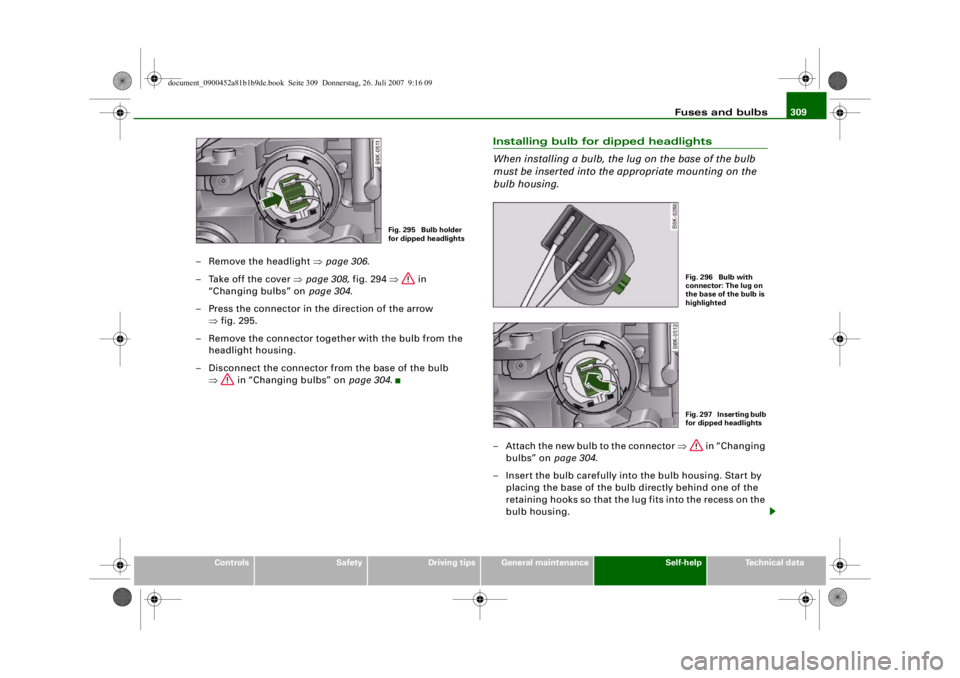
– Remove the headlight ⇒page 306.
– Take off the cover ⇒page 308, fig. 294 ⇒ in
“Changing bulbs” on page 304.
– Press the connector in the direction of the arrow ⇒fig. 295.
– Remove the connector together with the bulb from the headlight housing.
– Disconnect the connector fr om the base of the bulb
⇒ in “Changing bulbs” on page 304.
Installing bulb for dipped headlights
When installing a bulb, the lug on the base of the bulb
must be inserted into the appropriate mounting on the
bulb housing.– Attach the new bulb to the connector ⇒ in “Changing
bulbs” on page 304.
– Insert the bulb carefully into the bulb housing. Start by placing the base of the bulb directly behind one of the
retaining hooks so that the lug fits into the recess on the
bulb housing.
Fig. 295 Bulb holder
for dipped headlights
Fig. 296 Bulb with
connector: The lug on
the base of the bulb is
highlightedFig. 297 Inserting bulb
for dipped headlights
document_0900452a81b1b9de.book Seite 309 Donnerstag, 26. Juli 2007 9:16 09
--4 -
-T
! .,
-+ +-
•
Page 312 of 342
Fuses and bulbs
310
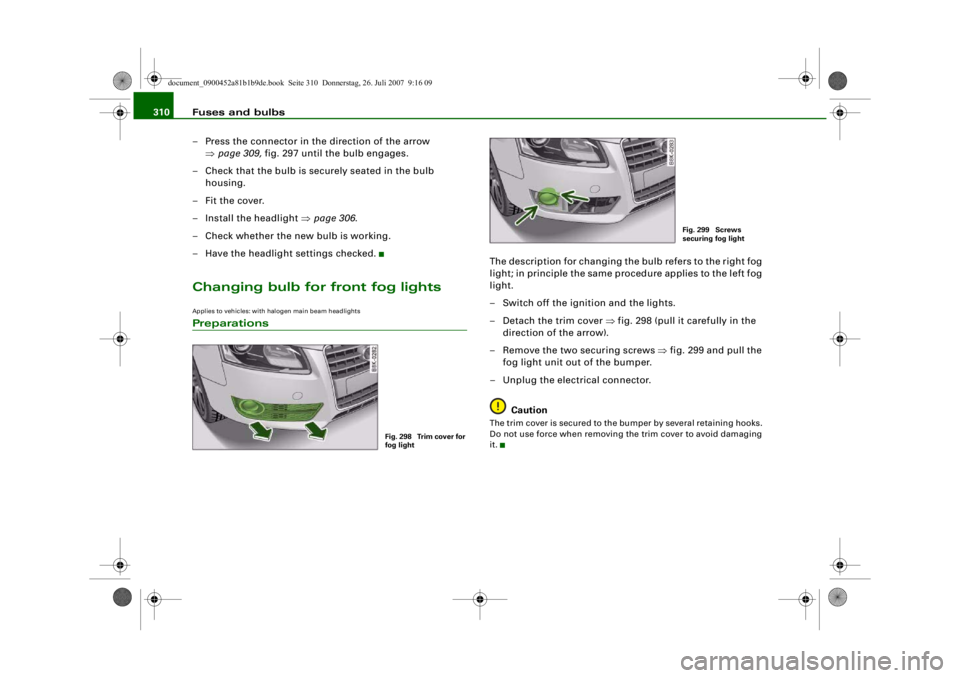
– Press the connector in the direction of the arrow ⇒page 309, fig. 297 until the bulb engages.
– Check that the bulb is securely seated in the bulb housing.
–Fit the cover.
– Install the headlight ⇒page 306.
– Check whether the new bulb is working.
– Have the headlight settings checked.Changing bulb for front fog lightsApplies to vehicles: with halogen main beam headlightsPreparations
The description for changing the bulb refers to the right fog
light; in principle the same procedure applies to the left fog
light.
– Switch off the ignition and the lights.
– Detach the trim cover ⇒fig. 298 (pull it carefully in the
direction of the arrow).
– Remove the two securing screws ⇒fig. 299 and pull the
fog light unit out of the bumper.
– Unplug the electrical connector.
CautionThe trim cover is secured to the bumper by several retaining hooks.
Do not use force when removing the trim cover to avoid damaging
it.
Fig. 298 Trim cover for
fog light
Fig. 299 Screws
securing fog light
document_0900452a81b1b9de.book Seite 310 Donnerstag, 26. Juli 2007 9:16 09
--4 -
-T
•
-+ +-
CD •
Page 313 of 342
Fuses and bulbs311
Controls
Safety
Driving tips
General maintenance
Self-help
Technical data
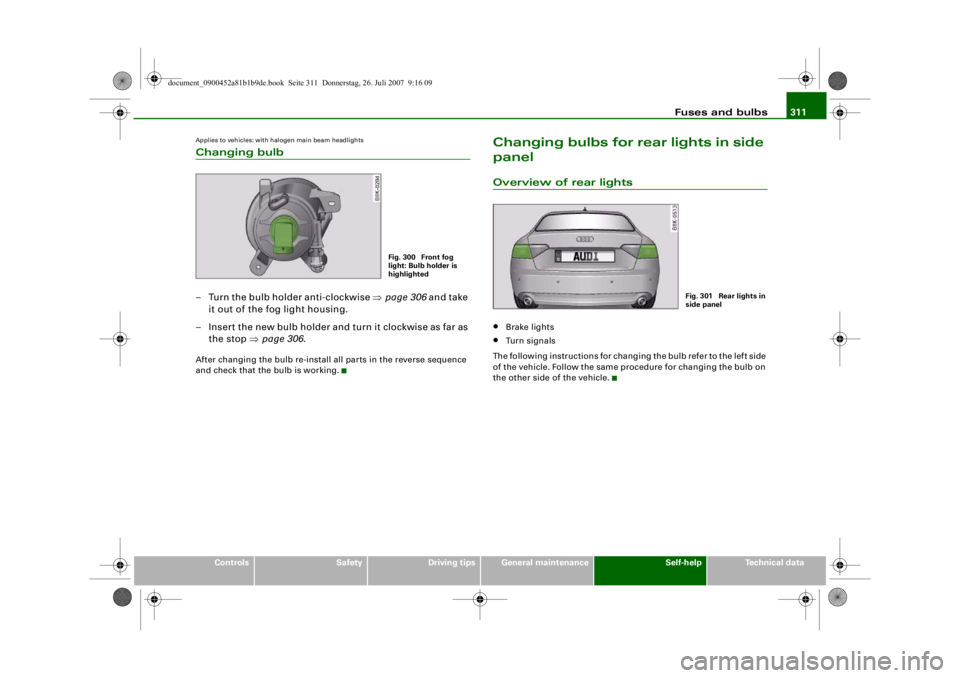
Applies to vehicles: with halogen main beam headlightsChanging bulb– Turn the bulb holder anti-clockwise ⇒page 306 and take
it out of the fog light housing.
– Insert the new bulb holder and turn it clockwise as far as the stop ⇒page 306 .After changing the bulb re-install all parts in the reverse sequence
and check that the bulb is working.
Changing bulbs for rear lights in side
panelOverview of rear lights•
Brake lights
•
Turn signals
The following instructions for changing the bulb refer to the left side
of the vehicle. Follow the same procedure for changing the bulb on
the other side of the vehicle.
Fig. 300 Front fog
light: Bulb holder is
highlighted
Fig. 301 Rear lights in
side panel
document_0900452a81b1b9de.book Seite 311 Donnerstag, 26. Juli 2007 9:16 09
--4 -
-T
-+ +-
•
•
Page 314 of 342
Fuses and bulbs
312Applies to vehicles: with halogen main beam headlightsRemoving rear light
To change the bulbs, you must remove the rear light.
Removing the light requires a certain degree of practical
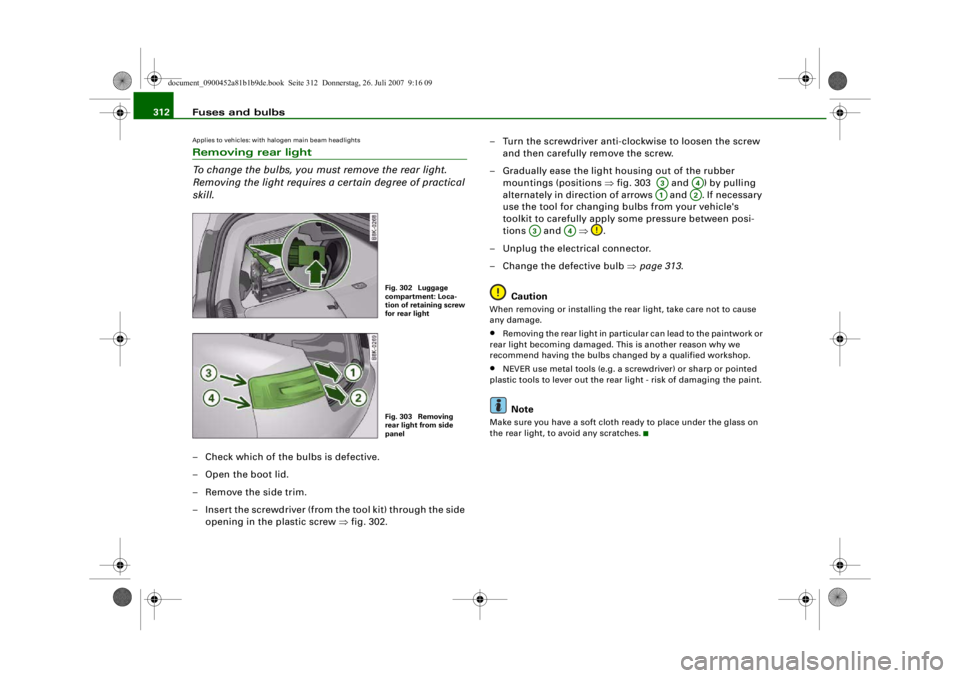
skill.– Check which of the bulbs is defective.
–Open the boot lid.
– Remove the side trim.
– Insert the screwdriver (from the tool kit) through the side
opening in the plastic screw ⇒fig. 302. – Turn the screwdriver anti-clockwise to loosen the screw
and then carefully remove the screw.
– Gradually ease the light housing out of the rubber mountings (positions ⇒fig. 303 and ) by pulling
alternately in direction of arrows and . If necessary
use the tool for changing bulbs from your vehicle's
toolkit to carefully apply some pressure between posi-
tions and ⇒.
– Unplug the electrical connector.
– Change the defective bulb ⇒page 313.
Caution
When removing or installing the rear light, take care not to cause
any damage.•
Removing the rear light in particular can lead to the paintwork or
rear light becoming damaged. Th is is another reason why we
recommend having the bulbs changed by a qualified workshop.
•
NEVER use metal tools (e.g. a screwdriver) or sharp or pointed
plastic tools to lever out the rear light - risk of damaging the paint.Note
Make sure you have a soft cloth ready to place under the glass on
the rear light, to avoid any scratches.
Fig. 302 Luggage
compartment: Loca-
tion of retaining screw
for rear lightFig. 303 Removing
rear light from side
panel
A3
A4
A1
A2
A3
A4
document_0900452a81b1b9de.book Seite 312 Donnerstag, 26. Juli 2007 9:16 09
--4 -
-T
0
CD
-+ +-
•
Page 315 of 342
Fuses and bulbs313
Controls
Safety
Driving tips
General maintenance
Self-help
Technical data
Changing bulbs
All bulbs can be changed easily after removing the rear
light.– Detach the bulb carrier.
– Renew the defective bulb (pull to remove from plug-in
holder or turn to remove from bayonet holder)
⇒page 305 .
– Attach the bulb carrier.
– Re-install the rear light ⇒page 313.
Applies to vehicles: with halogen main beam headlightsInstalling rear light
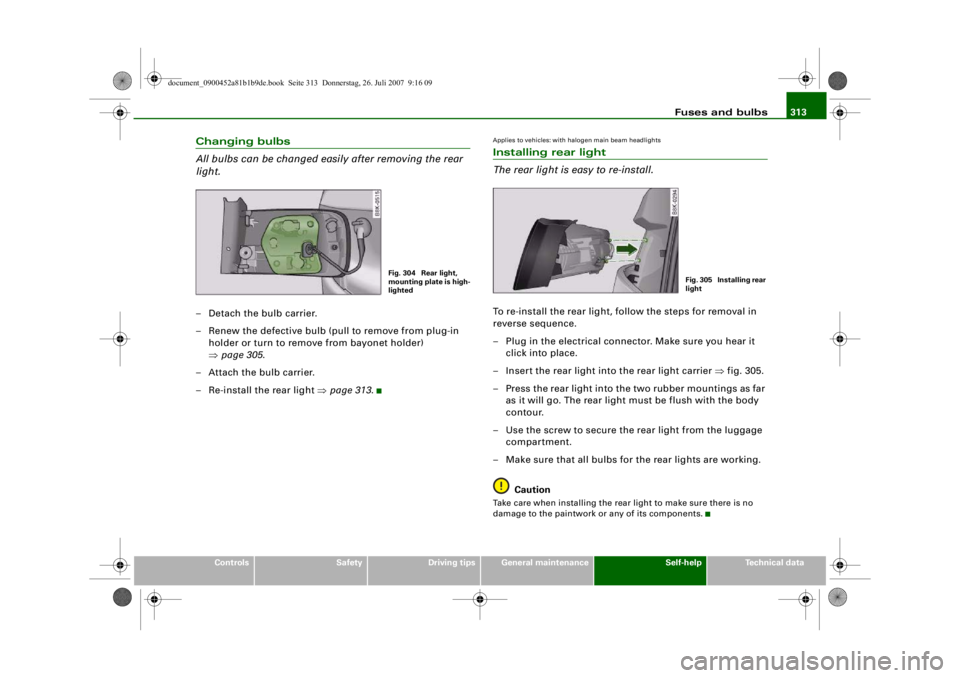
The rear light is easy to re-install.To re-install the rear light, follow the steps for removal in
reverse sequence.
– Plug in the electrical connector. Make sure you hear it click into place.
– Insert the rear light into the rear light carrier ⇒fig. 305.
– Press the rear light into the two rubber mountings as far as it will go. The rear light must be flush with the body
contour.
– Use the screw to secure the rear light from the luggage compartment.
– Make sure that all bulbs for the rear lights are working.
CautionTake care when installing the rear light to make sure there is no
damage to the paintwork or any of its components.
Fig. 304 Rear light,
mounting plate is high-
lighted
Fig. 305 Installing rear
light
document_0900452a81b1b9de.book Seite 313 Donnerstag, 26. Juli 2007 9:16 09
--4 -
-T
-+ +-
•
CD
•
Page 317 of 342
Fuses and bulbs315
Controls
Safety
Driving tips
General maintenance
Self-help
Technical data
Changing bulb / installing bulb carrier– Renew the defective bulb (pull to remove from plug-in
holder or turn to remove from bayonet holder)
⇒page 305 .
– Insert the bulb carrier into the rear light. Make sure you hear the retaining tab click into place.
– Fit the cover back in the interior trim so that it engages.
– Put the screwdriver back into the tool kit.
– Make sure that all bulbs for the rear lights are working.
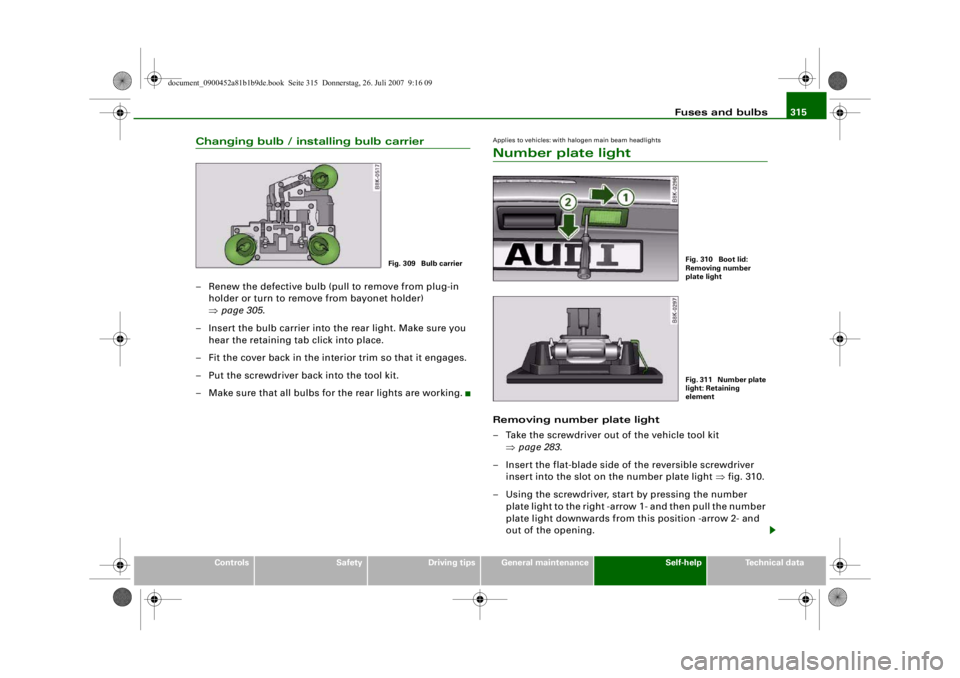
Applies to vehicles: with halogen main beam headlightsNumber plate lightRemoving number plate light
– Take the screwdriver out of the vehicle tool kit ⇒page 283.
– Insert the flat-blade side of the reversible screwdriver insert into the slot on the number plate light ⇒fig. 310.
– Using the screwdriver, start by pressing the number plate light to the right -arrow 1- and then pull the number
plate light downwards from th is position -arrow 2- and
out of the opening.
Fig. 309 Bulb carrier
Fig. 310 Boot lid:
Removing number
plate lightFig. 311 Number plate
light: Retaining
element
document_0900452a81b1b9de.book Seite 315 Donnerstag, 26. Juli 2007 9:16 09
--4 -
-T
-+ +-
•
Page 333 of 342
Index331
Controls
Safety
Driving tips
General maintenance
Self-help
Technical data
Automatic air conditioner plus
See Deluxe automatic air conditioner plus
101
Automatic cruise control See adaptive cruise control . . . . . . . . 128
Automatic gearbox Dynamic gear control program . . . . . 166
Kick-down feature . . . . . . . . . . . . . . . . 165
Manual release (multitronic®) . . . . . . 168
multitronic® . . . . . . . . . . . . . . . . . . . . . 162
Paddle levers (tiptronic mode) . . . . . . 167
Safety interlock for ignition key . . . . . 116
Selector lever lock . . . . . . . . . . . . . . . . 165
Selector lever positions . . . . . . . . . . . 163
Steering wheel with paddle levers . . 167
tiptronic . . . . . . . . . . . . . . . . . . . . 162, 166
Automatic headlight control . . . . . . . . . . . 57
Automatic headlights . . . . . . . . . . . . . . . . . 59
Auxiliary heating Deluxe automatic air conditioner plus . . 110
Description . . . . . . . . . . . . . . . . . . . . . . 110
Remote control . . . . . . . . . . . . . . . . . . 113
Running time . . . . . . . . . . . . . . . . . . . . 112
Switching on/off immediately . . . . . . 111
Timer . . . . . . . . . . . . . . . . . . . . . . . . . . . 111
Average fuel consumption . . . . . . . . . . . . . 25
Average speed . . . . . . . . . . . . . . . . . . . . . . . 25
Axle weights See Performance, weights and
dimensions . . . . . . . . . . . . . . . . . . . . 323
BBattery
Charging . . . . . . . . . . . . . . . . . . . . . . . . 265
Low charge . . . . . . . . . . . . . . . . . . . . . . 226
Power level . . . . . . . . . . . . . . . . . . . . . . 226
Power management . . . . . . . . . . . . . . 226
Replacing . . . . . . . . . . . . . . . . . . . . . . . 266
Winter conditions . . . . . . . . . . . . . . . . 263
Battery power . . . . . . . . . . . . . . . . . . . . . . . 38
Bayonet fastener Bulb . . . . . . . . . . . . . . . . . . . . . . . . . . . . 305
Bulb holder . . . . . . . . . . . . . . . . . . . . . . 306
Belt tensioners . . . . . . . . . . . . . . . . . . . . . . 199
Bicycle rack Trailer . . . . . . . . . . . . . . . . . . . . . . . . . . 235
Biodiesel . . . . . . . . . . . . . . . . . . . . . . . . . . . 251
Bioethanol fuel . . . . . . . . . . . . . . . . . . . . . 251
Blower Deluxe automatic air conditioner . . . . . 96
Deluxe automatic air conditioner plus . . 104
Bonnet Closing . . . . . . . . . . . . . . . . . . . . . . . . . 256
Opening . . . . . . . . . . . . . . . . . . . . . . . . 254
Releasing . . . . . . . . . . . . . . . . . . . . . . . 254
Boot See Loading luggage compartment . 192
See Luggage compartment . . . . . . . . . . 79
Boot lid Central locking system . . . . . . . . . . . . . 51
Manual release . . . . . . . . . . . . . . . . . . . . 52 Brake system
Brake assist system . . . . . . . . . . . . . . . 222
Brake fluid . . . . . . . . . . . . . . . . . . . . . . . 262
Brake light defective . . . . . . . . . . . . . . . 37
Brake pads worn . . . . . . . . . . . . . . . . . . 37
Brake servo . . . . . . . . . . . . . . . . . . . . . . 224
Electro-mechanical parking brake . . . 121
General notes . . . . . . . . . . . . . . . . . . . . 224
Malfunction . . . . . . . . . . . . . . . . . . . . . . 32
Warning lamp . . . . . . . . . . . . . . . . . . . . . 20
braking guard See Audi braking guard . . . . . . . . . . . . 142
Bulb holder Bayonet fastener . . . . . . . . . . . . . . . . . 306
Bulb monitor . . . . . . . . . . . . . . . . . . . . . . . . 37
Bulbs Bayonet fastener . . . . . . . . . . . . . . . . . 305
Changing (general notes) . . . . . . . . . . 304
Bulbs, changing . . . . . . . . . . . . . . . . . . . . . 304 Brake lights . . . . . . . . . . . . . . . . . . . . . . 311
Bulb holder with bayonet fastener . 305, 306
Dipped headlights . . . . . . . . . . . . . . . . 308
Front fog lights . . . . . . . . . . . . . . . . . . . 310
Main beam headlights . . . . . . . . . . . . . 307
Number plate light . . . . . . . . . . . . . . . . 315
Rear fog light . . . . . . . . . . . . . . . . . . . . 314
Rear lights . . . . . . . . . . . . . . . . . . . . . . . 311
Reversing light . . . . . . . . . . . . . . . . . . . 314
Turn signals (rear) . . . . . . . . . . . . . . . . 311
Business equipment . . . . . . . . . . . . . . . . . 278
document_0900452a81b1b9de.book Seite 331 Donnerstag, 26. Juli 2007 9:16 09
--4 -
-T
-+ +-