ignition AUDI S4 2008 Repair Manual
[x] Cancel search | Manufacturer: AUDI, Model Year: 2008, Model line: S4, Model: AUDI S4 2008Pages: 342, PDF Size: 15.01 MB
Page 162 of 342
Audi drive select
160
Note•
You can select the sport program for gear changes on vehicles
with an automatic gearbox* by activating the DYNAMIC mode. There
is no S position on the selector lever.
•
You may hear a noise on vehicles with dynamic steering* when
you start or stop the engine. This is no cause for concern.
Applies to vehicles: with Audi drive selectSelecting the driving mode
You can choose between COMFORT, AUTO, DYNAMIC and
INDIVIDUAL*.
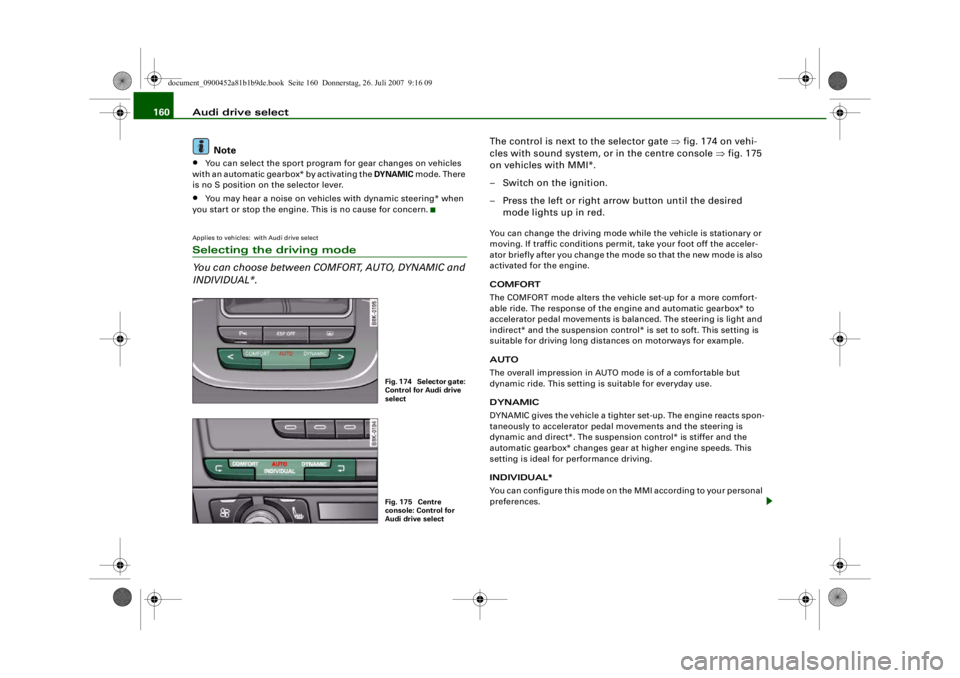
The control is next to the selector gate ⇒fig. 174 on vehi-
cles with sound system, or in the centre console ⇒fig. 175
on vehicles with MMI*.
– Switch on the ignition.
– Press the left or right arrow button until the desired mode lights up in red.You can change the driving mode while the vehicle is stationary or
moving. If traffic conditions permit , take your foot off the acceler-
ator briefly after you change the mo de so that the new mode is also
activated for the engine.
COMFORT
The COMFORT mode alters the vehicle set-up for a more comfort-
able ride. The response of the engine and automatic gearbox* to
accelerator pedal movements is balanced. The steering is light and
indirect* and the suspension control* is set to soft. This setting is
suitable for driving long distances on motorways for example.
AUTO
The overall impression in AUTO mode is of a comfortable but
dynamic ride. This setting is suitable for everyday use.
DYNAMIC
DYNAMIC gives the vehicle a tighter set-up. The engine reacts spon-
taneously to accelerator pedal movements and the steering is
dynamic and direct*. The suspension control* is stiffer and the
automatic gearbox* changes gear at higher engine speeds. This
setting is ideal for performance driving.
INDIVIDUAL*
You can configure this mode on th e MMI according to your personal
preferences.
Fig. 174 Selector gate:
Control for Audi drive
selectFig. 175 Centre
console: Control for
Audi drive select
document_0900452a81b1b9de.book Seite 160 Donnerstag, 26. Juli 2007 9:16 09
--4 -
-T
•
-+ +-
Page 163 of 342
Audi drive select161
Controls
Safety
Driving tips
General maintenance
Self-help
Technical data
WARNING
Always keep an eye on the traffic wh en using the Audi drive select
controls - Risk of accident!
Note
If you remove the ignition key, the AUTO mode will be selected auto-
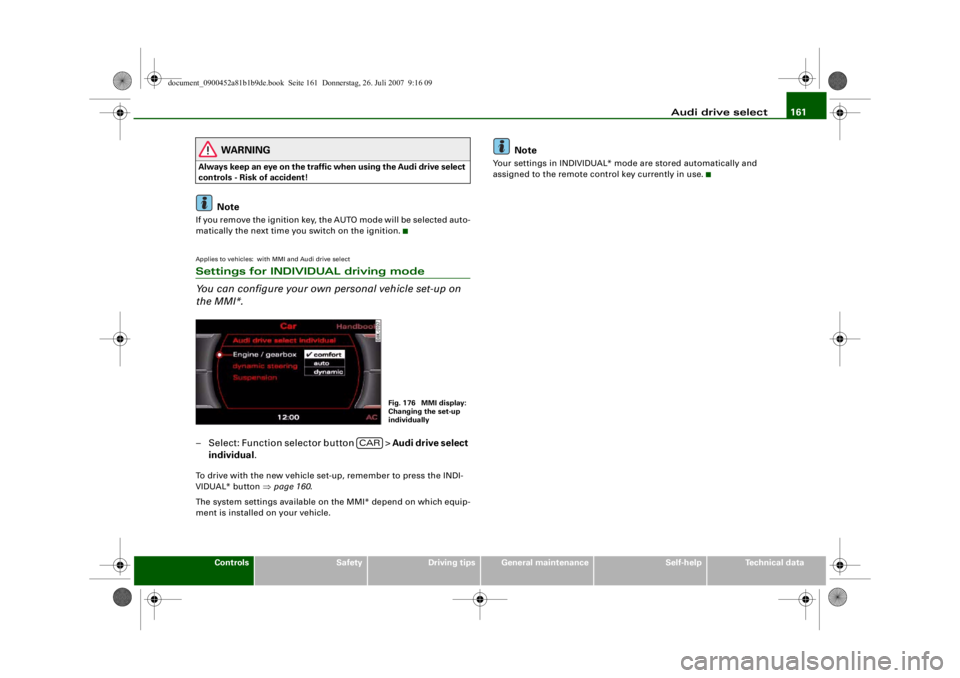
matically the next time yo u switch on the ignition.Applies to vehicles: with MMI and Audi drive selectSettings for INDIVIDUAL driving mode
You can configure your own personal vehicle set-up on
the MMI*.– Select: Function selector button > Audi drive select
individual .To drive with the new vehicle set-up, remember to press the INDI-
VIDUAL* button ⇒page 160 .
The system settings available on the MMI* depend on which equip-
ment is installed on your vehicle.
Note
Your settings in INDIVIDUAL* mode are stored automatically and
assigned to the remote control key currently in use.
Fig. 176 MMI display:
Changing the set-up
individually
CAR
document_0900452a81b1b9de.book Seite 161 Donnerstag, 26. Juli 2007 9:16 09
4----
--4 -
- -T
f--------1& --------11
rn
T
•
[1]
•
-+ +-
Page 166 of 342
Automatic gearbox
164moving the selector lever either in or out of position P. The lever can
only be moved out of position P when the ignition is on.
R - Reverse gear
When reverse gear is engaged the gearbox automatically selects the
lowest gear ratio.
Reverse gear must only be engaged when the vehicle is stationary
and the engine is idling ⇒.
To move the selector lever to position R, press in the interlock
button and at the same time press the brake pedal. Depending on
the model, one or two reversing lights will come on in selector lever
position R (when ignition is switched on).
N - Neutral
In this position the gearbox is in neutral ⇒.
D - Drive (forwards)
In this position the gearbox auto matically selects the best gear
ratio. This depends on the engine load, the road speed and the
dynamic gear control program (DCP).
Press the brake pedal when moving the selector lever from N to D if
the vehicle is stationary or at speeds below 5 km/h ⇒.
In some situations (such as on mountain roads or when towing a
trailer or caravan) it can be advantageous to switch temporarily to
tiptronic mode ⇒page 166 , so that the gear ratios can be selected
manually to suit the driving conditions.
S - Sport position
Select this position if you wish to take full advantage of the car's
performance. This setting makes use of the engine's maximum
power output. When accelerating the gear shifts will be noticeable.
Press the brake pedal when moving the selector lever from N to S if
the vehicle is stationary or at speeds below 5 km/h ⇒.
WARNING
•
Never move the selector lever to R or P when driving, as this
could cause an accident.
•
In selector position D or S the vehicle must always be held with
the foot brake when the engine is running. This is because an auto-
matic gearbox still transmits powe r even at idling speed, and the
vehicle tends to “creep”. The throttle must on no account be
opened inadvertently (for instan ce by hand from the engine
compartment) when a ge ar is engaged with the vehicle stationary.
The vehicle could otherwise star t moving immediately (in some
cases even if the parking brake is engaged) and possibly cause an
accident.
•
To avoid accidents, apply th e parking brake and put the
selector lever in position P befor e opening the bonnet and working
on the vehicle with the engine running. Please observe the impor-
tant safety warnings ⇒page 255, “Working on components in the
engine compartment”.Note
You can select the sport program for gear changes on vehicles with
Audi drive select* by activating the DYNAMIC mode. There is no S
position on the selector lever.•
Applies to vehicles with tiptronic gearbox:
•
If the lever is moved accidentally to N when driving, release the
accelerator and let the engine speed drop to idling before selecting
D or S again.
•
For the sake of fuel economy (and the environment), the gearbox
ratios on some models are designed so that maximum speed is only
obtained when the selector lever is at position S.
document_0900452a81b1b9de.book Seite 164 Donnerstag, 26. Juli 2007 9:16 09
--4 -
-T
&
&
-+
[I]
+-
&
•
&
Page 167 of 342
Automatic gearbox165
Controls
Safety
Driving tips
General maintenance
Self-help
Technical data
Applies to vehicles: with multitronic® or tiptronicSelector lever lock
The selector lever lock prevents gears from being
engaged inadvertently, so that the vehicle is not set in
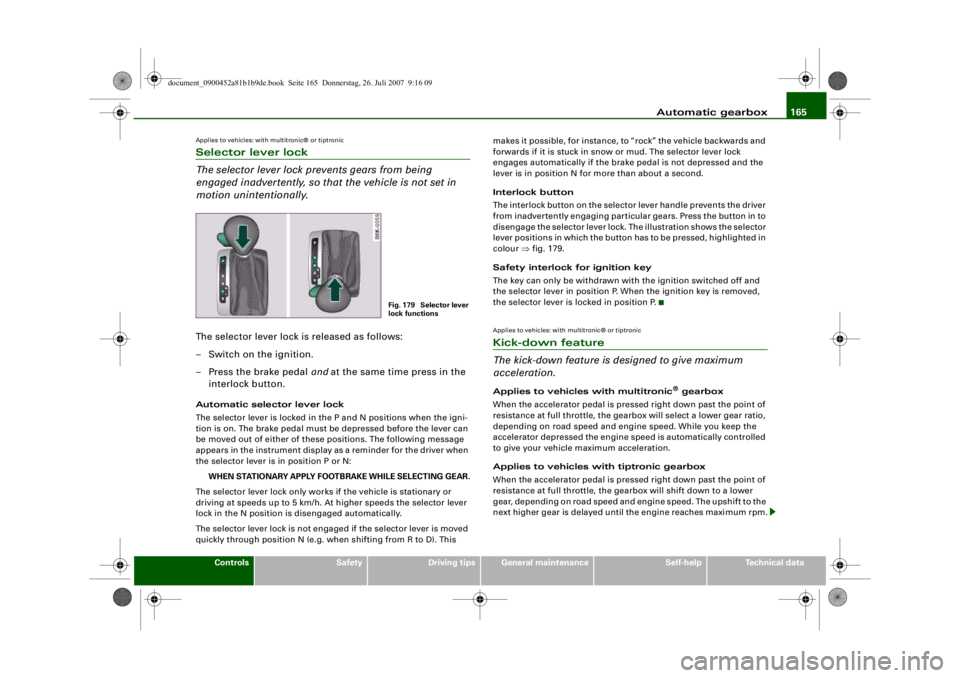
motion unintentionally.The selector lever lock is released as follows:
– Switch on the ignition.
– Press the brake pedal and at the same time press in the
interlock button.Automatic selector lever lock
The selector lever is locked in the P and N positions when the igni-
tion is on. The brake pedal must be depressed before the lever can
be moved out of either of these positions. The following message
appears in the instrument display as a reminder for the driver when
the selector lever is in position P or N:
WHEN STATIONARY APPLY FOOTBRAKE WHILE SELECTING GEAR.
The selector lever lock only works if the vehicle is stationary or
driving at speeds up to 5 km/h. At higher speeds the selector lever
lock in the N position is disengaged automatically.
The selector lever lock is not engaged if the selector lever is moved
quickly through position N (e.g. when shifting from R to D). This makes it possible, for instance, to “rock” the vehicle backwards and
forwards if it is stuck in snow or mud. The selector lever lock
engages automatically if the brake pedal is not depressed and the
lever is in position N for more than about a second.
Interlock button
The interlock button on the selector lever handle prevents the driver
from inadvertently engaging particular gears. Press the button in to
disengage the selector lever lock. The illustration shows the selector
lever positions in which the button has to be pressed, highlighted in
colour
⇒fig. 179.
Safety interlock for ignition key
The key can only be withdrawn with the ignition switched off and
the selector lever in position P. When the ignition key is removed,
the selector lever is locked in position P.
Applies to vehicles: with multitronic® or tiptronicKick-down feature
The kick-down feature is designed to give maximum
acceleration.Applies to vehicles with multitronic
® gearbox
When the accelerator pedal is pressed right down past the point of
resistance at full throttle, the gearbox will select a lower gear ratio,
depending on road speed and engine speed. While you keep the
accelerator depressed the engine speed is automatically controlled
to give your vehicle maximum acceleration.
Applies to vehicles with tiptronic gearbox
When the accelerator pedal is pressed right down past the point of
resistance at full throttle, the gearbox will shift down to a lower
gear, depending on road speed and engine speed. The upshift to the
next higher gear is delayed unti l the engine reaches maximum rpm.
Fig. 179 Selector lever
lock functions
document_0900452a81b1b9de.book Seite 165 Donnerstag, 26. Juli 2007 9:16 09
-+
., ., : ""
•
--4 -
-T +-
Page 170 of 342
Automatic gearbox
168
– Briefly pull the left-hand pa ddle lever to change down
to a lower gear.
– Briefly pull the right-hand paddle lever to change up to a higher gear.The paddle levers are activated when the selector lever is in position
D or S, or the position for the manual shift programme (tiptronic).
The manual shift programme can, of course, still be operated using
the selector lever in the centre console.Applies to vehicles: with multitronic® or tiptronicManual release of selector lever
The selector lever can be rele ased manually if the elec-
trical power supply should fail.
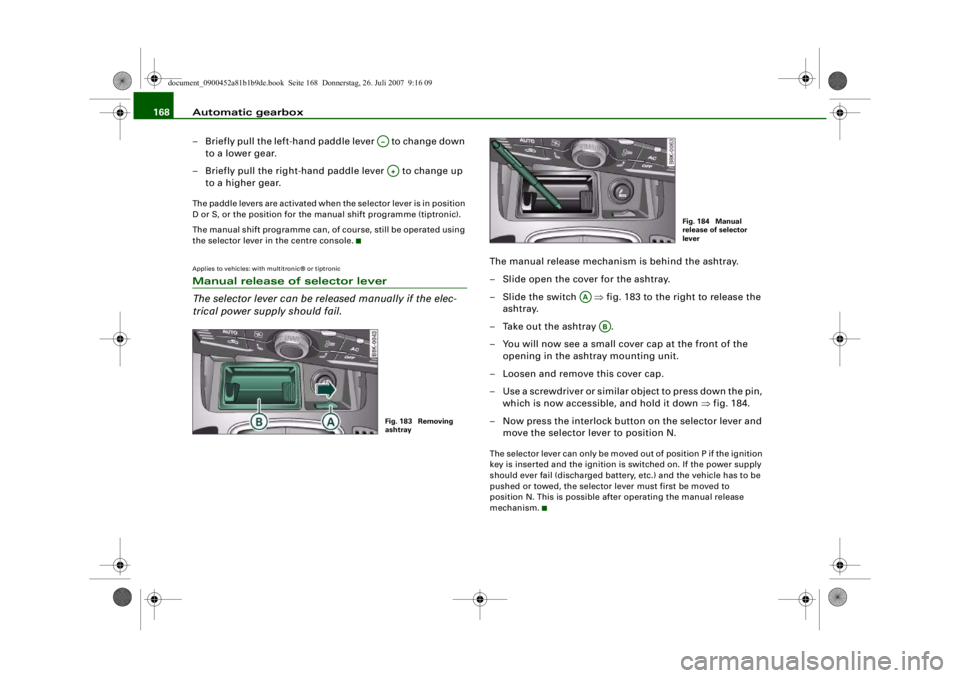
The manual release mechanism is behind the ashtray.
– Slide open the cover for the ashtray.
–Slide the switch ⇒ fig. 183 to the right to release the
ashtray.
– Take out the ashtray .
– You will now see a small cover cap at the front of the
opening in the ashtray mounting unit.
– Loosen and remove this cover cap.
– Use a screwdriver or similar object to press down the pin, which is now accessible, and hold it down ⇒fig. 184.
– Now press the interlock button on the selector lever and move the selector lever to position N.The selector lever can only be moved out of position P if the ignition
key is inserted and the ignition is switched on. If the power supply
should ever fail (discharged battery, etc.) and the vehicle has to be
pushed or towed, the selector lever must first be moved to
position N. This is possible after operating the manual release
mechanism.
A–A+Fig. 183 Removing
ashtray
Fig. 184 Manual
release of selector
lever
AA
AB
document_0900452a81b1b9de.book Seite 168 Donnerstag, 26. Juli 2007 9:16 09
--4 -
-T
•
-+ +-
•
Page 173 of 342
Parking aid171
Controls
Safety
Driving tips
General maintenance
Self-help
Technical data
– Press the switch
, or
– Switch off the ignition.
Segments in the graphic display
You can estimate the distance to an obstacle by referring to the red
segments at the front and rear of the vehicle ⇒page 170, fig. 186.
The closer the vehicle gets to the obstacle the closer the segments
move towards the vehicle in the graphic. At the latest when the
penultimate segment is highlighted the vehicle has reached the
danger (collision) zone. Stop moving immediately ⇒!
WARNING
•
The parking aid cannot replace the full concentration of the
driver. The driver is always resp onsible for safety during parking
and other manoeuvres.
•
The sensors have blind spots in which obstacles are not regis-
tered. It is particularly important to ensure that there are no small
children or animals near the vehicle, as the sensors may not
always be able to detect them.
•
Always keep a close wa tch on the area around the vehicle and
make full use of the rear-view mirrors.Caution
Please note that low obstacles detected by the system may no
longer be registered by the sensors as the car moves closer, so the
system will not give any further warning. Certain kinds of obstacles
(such as wire fences, chains, thin painted posts or trailer draw bars,
etc.) may not always be detected by the system, so take care not to
damage the vehicle in such cases.
Note
•
You can change the display and adjust the volume and pitch of
the beeps ⇒page 177 .
•
Please refer to the notes on towing ⇒page 177 .
•
There is a slight delay in the picture display.
Audi parking system advancedApplies to vehicles: with Audi parking system advancedIntroductionA reversing camera is integrated in vehicles with the Audi parking
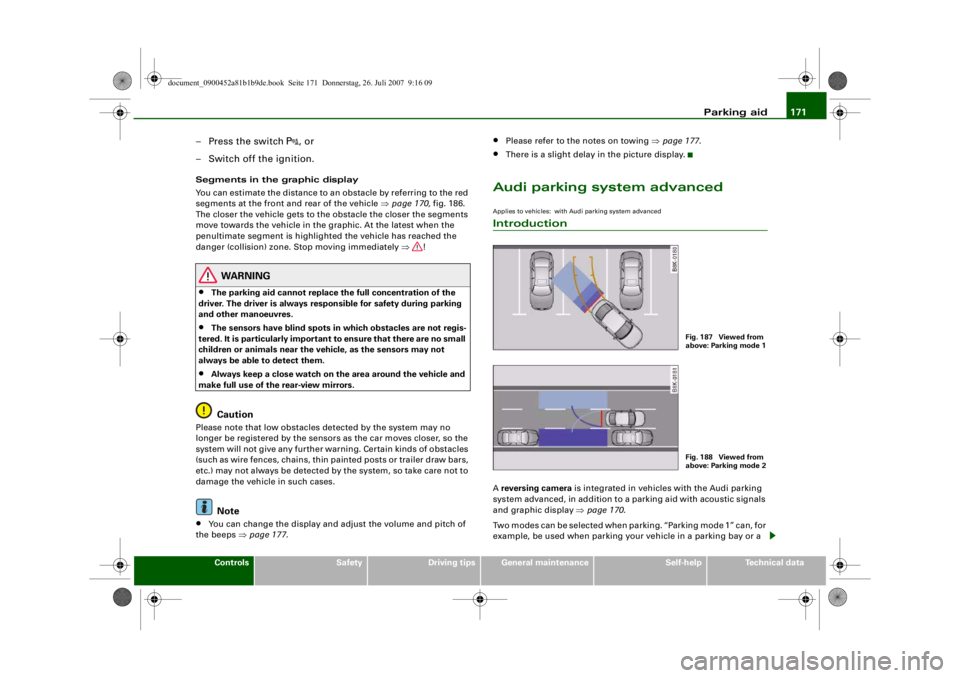
system advanced, in addition to a parking aid with acoustic signals
and graphic display ⇒page 170 .
Two modes can be selected when parking. “Parking mode 1” can, for
example, be used when parking your vehicle in a parking bay or a
Fig. 187 Viewed from
above: Parking mode 1Fig. 188 Viewed from
above: Parking mode 2
document_0900452a81b1b9de.book Seite 171 Donnerstag, 26. Juli 2007 9:16 09
--4 -
-T
•
-+ +-
CD
Page 175 of 342
Parking aid173
Controls
Safety
Driving tips
General maintenance
Self-help
Technical data
•
Moisten the lens using a commercially available, alcohol-based
glass cleaning agent and clean the lens with a dry cloth ⇒.
•
Use a small brush to remove snow and a de-icer spray to remove
ice ⇒ .
WARNING
•
The parking aid cannot replace the full concentration of the
driver. The driver is always resp onsible for safety during parking
and other manoeuvres.
•
Always keep a close wa tch on the area around the vehicle and
make full use of the rear-view mirrors.
•
Do not allow the camera images in the MMI display to distract
you from watching the traffic.
•
For safety reasons, you should not use the system if the posi-
tion and installati on angle of the camera have been changed, e.g.
in a rear-end collision. Have it checked by a qualified workshop.Caution
•
Please note that low obstacles detected by the system may no
longer be registered by the sensors as the car moves closer, so the
system will not give any further warning. Certain kinds of obstacles
(such as wire fences, chains, thin painted posts or trailer draw bars,
etc.) may not always be detected by the system, so take care not to
damage the vehicle in such cases.
•
Never remove snow and ice from the lens of the reversing
camera using warm or hot water - da nger of cracks appearing on the
lens.
•
Never use abrasive cleaning agents on the lens.
Applies to vehicles: with Audi parking system advancedSwitching on/off
The reversing camera is au tomatically switched on
together with the acoustic signals and graphic display
when you select reverse gear.Switching on
– Switch on the MMI system.
– Engage reverse gear, or
– Press the switch
in the centre console ⇒page 170,
fig. 185. You will hear a brief acknowledgement tone and
the diode in the switch will light up.
Switching off
– Drive forwards faster than 10 km/h, or
– Press the switch
, or
– Switch off the ignition.
Changing display via MMI
– Press the control button for Graphic ⇒ page 174, fig. 192
to show the graphic display on the screen.
– Press the control button for Rear View to display the
picture from the reversing camera.
WARNING
•
Some objects (e.g. narrow posts or bars), recesses in the
ground or protruding parts on other vehicles may not be displayed
in a satisfactory manner or may no t be displayed at all on the MMI
screen.A5
document_0900452a81b1b9de.book Seite 173 Donnerstag, 26. Juli 2007 9:16 09
--4 -
-T
0
0
-+
CD
+-
•
Page 180 of 342
Parking aid
178reversing camera will then be shown without orientation lines and
blue area markings.Applies to vehicles: with Audi parking system/plus/advancedError messagesIf you hear a long beep for a few seconds and the diode in the switch * starts flashing when you switch on the parking aid, a system
fault has occurred. Please h a v e t h e fa u l t c o rre c t e d b y a n A u d i d e a l e r
or qualified workshop.Note
If the fault is not corrected before you switch off the ignition, it will
only be indicated by the flashing diode in the switch
* the next
time you switch on the parking aid.
document_0900452a81b1b9de.book Seite 178 Donnerstag, 26. Juli 2007 9:16 09
--4 -
-T
•
[I)
-+
•
+-
Page 182 of 342
HomeLink
180
At the operating unit
1. Switch on the ignition (do not start the engine).
2. Press and hold down the two outer HomeLink buttons ⇒page 179, fig. 197 until the indicator diode
⇒ page 179, fig. 197 begins to flash after about
20 seconds. This procedure will delete the standard
factory settings and does not need to be repeated when
programming the other buttons.
3. Press the particular HomeLink button which you would like to program.
4. Wait until the diode begins to flash. The HomeLink module now remains in trai ning mode for 5 minutes.
5. Now step in front of your vehicle with the original hand-
held transmitter for the garage door opener or any other
device you wish to assign to the HomeLink control
button.
At the radiator grille
6. Hold the original hand-held transmitter at or near the
centre of your car's radiator grille ⇒ page 179, fig. 198.
7. Press the activator button on the original hand-held
transmitter .
8. As you do so, watch the tu rn signals on your vehicle.
HomeLink confirms successful programming by flashing
all four turn signals three times.
9. If the turn signals fail to flash three times, repeat the procedure with the transmitter held at a different
distance from the radiator grille.
The proper distance between the hand-held transmitter and the
HomeLink module at the radiator grille depends on the system you
want to train. It may require several attempts.
The turn signals will flash once if the time limit for the programming
mode has been exceeded. In this case the programming procedure
needs to be performed again. Repe at the sequence at the operating
unit starting with step 3.
The programming instructions above also apply to the other control
buttons. Start with step 3 if you wish to proceed and program the
other two buttons.
If the garage door or other devices st ill fail to be activated with the
HomeLink control buttons after programming is completed, it is
possible that these systems might be working with a rolling code
instead of the normal fixed security code. If this is the case, a rolling
code programming is required in addition to the steps described
above. ⇒page 180Applies to vehicles: with HomeLinkRolling code programming
Some devices require rolling code programming of the
HomeLink universal transmitter.Identifying a rolling code
– Press the already programmed HomeLink button again
and hold it down.
–Watch HomeLink diode ⇒ page 179, fig. 197. If the
diode starts flashing rapidly and turns into a constant
light after about 2 seconds, this indicates that the device
you wish to operate (e.g. a garage door opener) is
equipped with a rolling code.
– Program the rolling code as follows:
AA
AA
AA
document_0900452a81b1b9de.book Seite 180 Donnerstag, 26. Juli 2007 9:16 09
--4 -
-T
-+
•
+-
Page 183 of 342
HomeLink181
Controls
Safety
Driving tips
General maintenance
Self-help
Technical data
Activating the garage door opener drive unit
– Locate the programming button on the garage door
drive. The exact location and colour of the button may
vary depending on the type of garage door opener.
– Press the programming button on the door drive unit (this will normally cause a “programming mode indicator
lamp” on the unit to light up). You now have about 30
seconds to start and complete the programming of the
HomeLink control button on the operating unit.
Programming at the operating unit in the
headliner
– Press and release the already programmed HomeLink button.
– Press the HomeLink button again to complete rolling code programming.After programming at the operating unit in the headliner, the
garage door opener should rec ognize the HomeLink signal and
respond when the HomeLink button is pressed. Now the other
control buttons can be programmed as required.
Note
•
Having a second person assist you makes programming of the
rolling code easier and faster. For some makes of garage door
openers the HomeLink button may have to be pressed a third time
to complete the tr aining sequence.
•
If you encounter problems progr amming the rolling code you
may find helpful information in the operating instructions of the
garage door opener or other device you wish to operate.
Applies to vehicles: with HomeLinkOperating HomeLink
The programmed devices are activated by means of the
HomeLink control buttons in the headliner.– Make sure that the ignition is on.
– Press the programmed HomeLink button ⇒page 179,
fig. 197. The device assigned to that button (e.g. garage
door) will be activated.The HomeLink indicator diode ⇒page 179, fig. 197 will light up
when you press the button.Applies to vehicles: with HomeLinkErasing the button programming
You can erase the complete HomeLink programming by
pressing the two outer buttons.– Switch on the ignition (do not start the engine).
– Press and hold down the two outer buttons until the indi- cator diode starts to flash ⇒ page 179, fig. 197.
– Then release the buttons.After the programming of the HomeLink buttons has been erased,
the system will return to the training mode and is ready to be re-
programmed at any time.
Note
•
Programmed buttons cannot be erased individually.
•
For security reasons it is advisable to erase the programming of
the HomeLink buttons prior to selling your vehicle.
document_0900452a81b1b9de.book Seite 181 Donnerstag, 26. Juli 2007 9:16 09
--4 -
-T
•
-+ +-
[I]
[I]
•
•