Child AUDI S4 2013 User Guide
[x] Cancel search | Manufacturer: AUDI, Model Year: 2013, Model line: S4, Model: AUDI S4 2013Pages: 302, PDF Size: 75.61 MB
Page 74 of 302
7 2 Seats and storage
If not hing is hung on the hooks, they wi ll fold
back in by themselves .
I n a coll is ion, the laws of phys ics mean that
even smaller items that are loose in the vehi
cle will turn into heavy missiles that can ca use
serio us injury . Items in the vehicle p ick up ki
netic energy which varies w ith the vehicle and
the we ight of the item . Veh icle speed is the
most significant factor .
F or example, in a frontal collisio n at a speed
of 30 mph (48 km/h), the forces acting on a 10- lb (5 kg) object a re about
20 times the
normal weight of the item . Th is means that
the we ight of the item would suddenly be the
equ ivalent of about 200 lbs (90 kg). O ne can
eas ily imagine the injuries that an item of that
weight flying free ly through the passenger
compartmen t can ca us e in a co llision a t a
speed considered relat ively low .
8_ WARNING
Weak, damage d or improper straps used
to secure items to tie -downs can fail du r
ing hard b rak ing or in a col lision and cause
serious personal in jury.
- Always use suitab le retaining straps and
properly secure items to the tie-downs in
t h e luggage compartment to help pre
vent items from shifting or flying for
wa rd .
- Never attac h a child seat tether strap to
a tie -down.
- For st rength-related reasons, the mount
ing hooks can only be used to secure ob
jects weighing up to 10 lb . (5 kg) . Heav i
er objec ts w ill not be a dequately secured
- the re is a r isk of injury.
Tie-downs
Applies to vehicles: with tie-downs
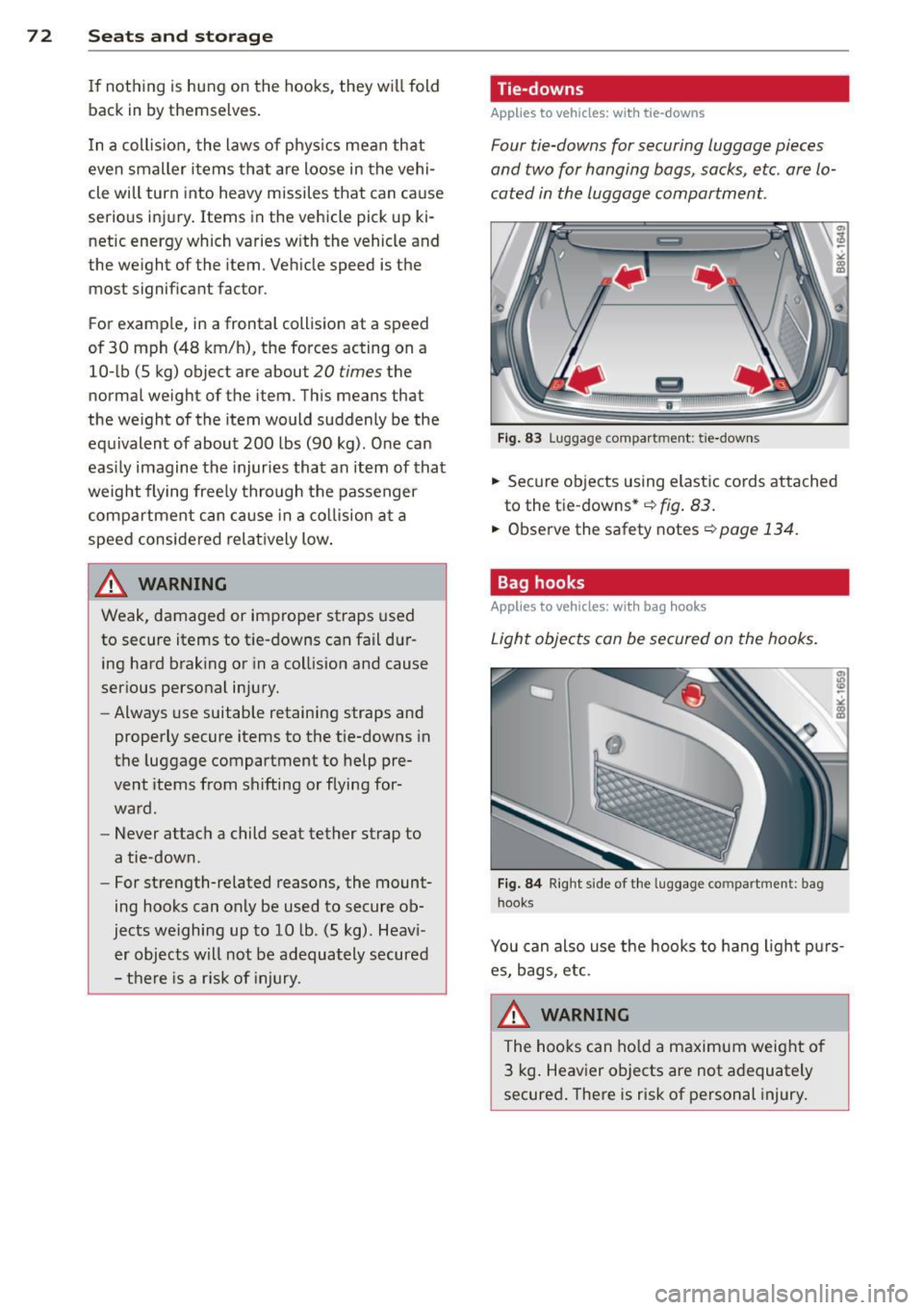
Four tie-downs for securing luggage pieces
and two for hanging bags , sacks, etc. are
lo
cated in the luggage compartment.
F ig . 83 Lu gg age compart ment: tie-down s
,.. Secure ob jects using elastic cords attached
to the t ie -downs*
~ fig . 83.
,.. Observe the safety notes ~ page 134 .
Bag hooks
Applies to vehicles: with bag hooks
Light objects can be secur ed on the hooks.
Fi g. 84 R ig ht side of t he lu ggage co mpartment : bag
h ook s
You can also use the hooks to hang ligh t pu rs
es, bags, e tc.
8_ WARNING
The hoo ks can ho ld a maximum weight of
3 kg . Heav ier objects are not a dequately
secure d. There is risk of personal injury.
Page 84 of 302
82 On the road
Starting the vehicle with the emergency
key
Applies to vehicles: with ig ni tion lock
You can use the emergency key as an ignition
key in on emergency.
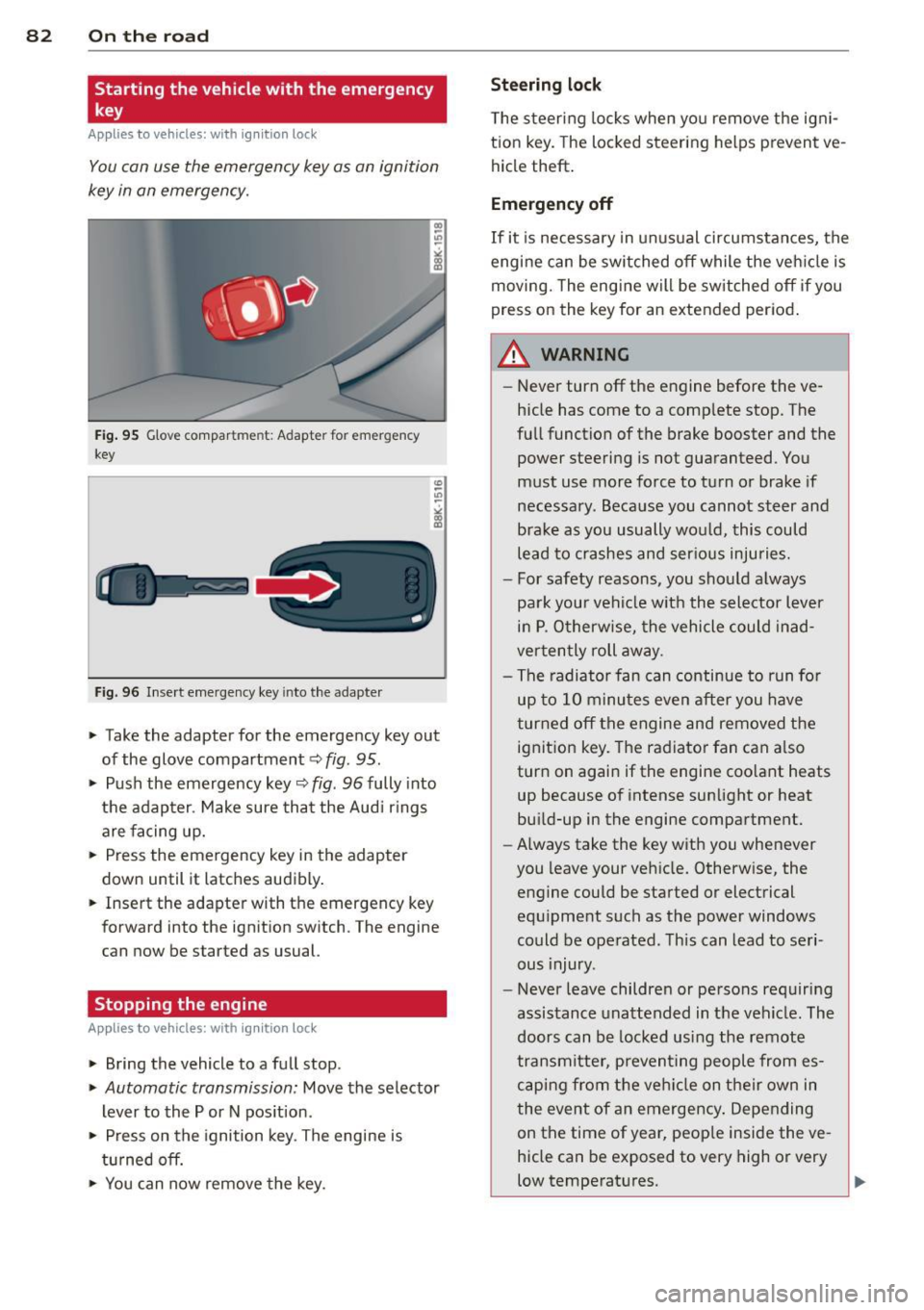
Fig. 95 G love compar tment: Adapter for emergency
key
Fig. 96 Insert emergency key into the adapter
.. Take the adapter for the emergency key out
of the glove compartment
c!> fig. 95 .
.. Push the emergency key c::> fig . 96 fully into
the adapter . Make sure that the Audi rings
are facing up.
.. Press the emergency key in the adapter
down until it latches audibly.
.. Insert the adapter with the emergency key
forward into the ignition switch. The engine
can now be started as usual.
Stopping the engine
App lies to vehicles: with ig n ition lock
.. Bring the vehicle to a full stop.
.. Automatic transmission: Move the selector
lever to the P or N position .
.. Press on the ignition key. The engine is
turned off.
.. You can now
remove the key.
Steering lock
The steering locks when you remove the igni
tion key. The locked steering helps prevent
ve
hicle theft.
Emergency off
If it is necessary in unusual circumstances, the
engine can be switched off while the vehicle is
moving. The engine will be switched off if you
press on the key for an extended period.
A WARNING ~
- Never turn off the engine before the ve
hicle has come to a complete stop. The
full function of the brake booster and the power steering is not guaranteed. You
must use more force to turn or brake if
necessary. Because you cannot steer and
brake as you usually would, this could lead to crashes and serious injuries.
- For safety reasons, you should always
park your vehicle with the selector lever
in P. Otherwise, the vehicle could inad
vertently roll away.
- The radiator fan can continue to run for
up to 10 minutes
even after you have
turned off the engine and removed the
ignition key. The radiator fan can also
turn on again if the engine coolant heats
up because of intense sunlight or heat
build-up in the engine compartment.
- Always take the key with you whenever
you leave your vehicle. Otherwise, the
engine could be started or electrical
equipment such as the power windows
could be operated. This can lead to seri
ous injury.
- Never leave children or persons requiring
assistance unattended in the vehicle . The
doors can be locked using the remote
transmitter, preventing people from es caping from the vehicle on their own in
the event of an emergency. Depending
on the time of year, people inside the
ve
hicle can be exposed to very high or very
low temperatures .
Page 85 of 302
CD Note
If the engine has been under heavy load
for an extended period, heat builds up in
the engine compartment after the engine
is switched off- there is a risk of damaging
the engine . Allow the engine to run at idle
for about two minutes before switching it
off.
Convenience key
Starting the engine
Applies to vehicles: with convenience key
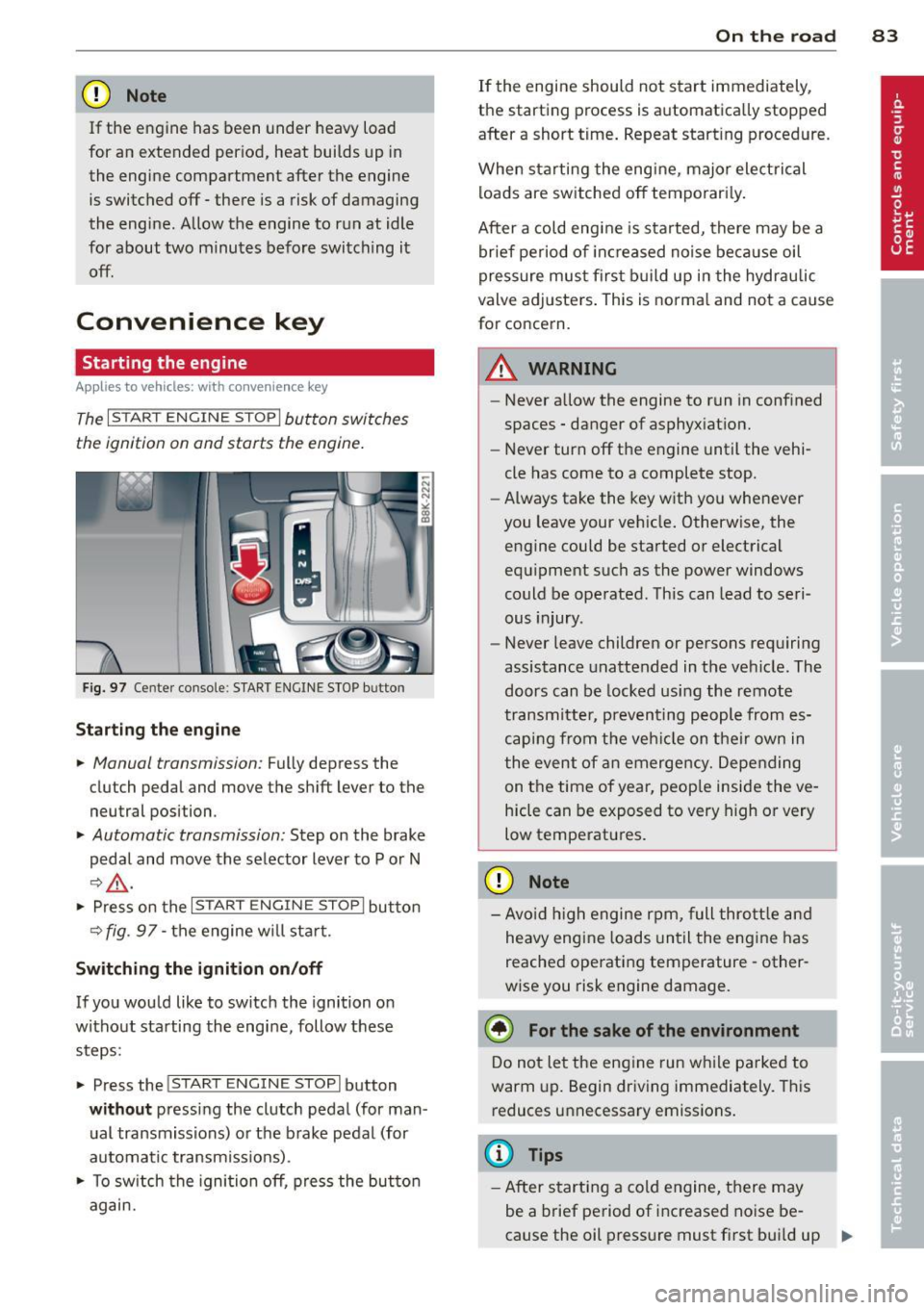
The I STAR T ENGINE ST OPI button switches
the ignition on and starts the engine.
Fig. 97 Center console : S TART ENGINE STOP b utto n
Starting the engine
.. Manual transmission: Fully depress the
clutch pedal and
move the shift lever to the
neutral position .
.. Automatic transmission: Step on the brake
pedal and
move the selector lever to P or N
~ .&, .
.. Press on the I STAR T ENGINE S T OPI button
~fig . 97-the engine will sta rt.
Switching the ignition on/off
If you would like to switch the ignition on
without starting the engine, follow these
steps :
.. Press the
!START E NGIN E STOPI button
without pressing the clutch pedal (for man
ual transmissions) or the brake pedal (for
automatic transmissions) .
.. To switch the ignition off, press the button
again.
On the road 83
If the engine should not start immediately,
the starting process is automatically stopped
after a short time. Repeat starting procedure .
When starting the engine , major electrical
loads are switched off temporari ly.
After a cold engine is started, there may be a
brief period of inc reased noise because oil
pressure must first build up in the hydraulic
valve adjusters. This is norma l and not a cause
for concern.
A WARNING
- Never allow the engine to run in confined
spaces - danger of asphyxiation.
- Never turn off the engine until the vehi
cle has come to a complete stop.
- Always take the key with you whenever
you leave your vehicle. Otherwise, the
engine could be started or electrical
equipment such as the power windows
could be operated . This can lead to seri
ous injury .
- Never leave children or persons requiring
assistance unattended in the vehicle. The
doors can be locked using the remote
transmitter, preventing people from es
caping from the vehicle on their own in
the event of an emergency. Depending
on the time of year, peop le inside the ve
hicle can be exposed to very high or very
low temperatures .
CD Note
-Avo id high engine rpm, full throttle and
heavy engine loads until the engine has
reached operating temperature - other
wise you risk engine damage.
@ For the sake of the environment
Do not let the engine run while parked to
warm up. Begin driving immediately. This
reduces unnecessary emissions.
(D Tips
-After starting a cold engine, there may
be a brief period of increased noise be-
cause the oil pressure must first bui ld up
II-
Page 88 of 302
86 On the road
Emerg ency b rake function
An emergency brake ensures t hat the vehicle
can be slowed down even if the
normal brakes
fail
c::> page 87 , Emergency broking.
Indicat or light s
-If the par king b rake is closed w ith the igni
t ion
s witc hed on the . (USA models) /
• (Canada mode ls) indica tor lights come
on in the instrum ent cluster and the switch .
-If the parking brake is closed w ith the igni
tion
s witc hed off the . (USA models) /
• (Canada mode ls) indicator lights come
on in the instrument clust er and th e switch
for about 20 seconds .
A WARNING
If a gear or a drive range (automat ic trans
m ission) is engaged with the vehicle sta
tionary and the engine runn ing, you must
in no instance accelerate o r release the
cl utch * careless ly. Otherw ise the vehicle
w ill sta rt to move immediately- r isk of an
accident .
@ Note
If the . symbol in the display or the
.. (USA models) . (Canada models)
ind icator light in the instr ume nt cl uster
flashes, there is a ma lf u nction in the brake
system. By pressing the
ISETI button, you
can bring up a driver message which ex
plains the malfunction in more detail. If
the driver message
Pa rking brake! ap
pears, there is an operating malfunction in
the park ing brake which you should have
repaired immediately by an authorized
Aud i deale r or other qualified workshop
c::> page 15.
(D Tips
- You can apply the parking brake at any
time - even w ith the ignition switched
off . Th e ignit ion must be t urned on in o r
der to release the par king brake. - Occasional noises when the parking
bra ke is applied and released are normal
and are not a cause for concern.
- When the vehicle is parked , the parking
brake goes through a self-test cycle at
regu lar interva ls. Any associated noises
are normal.
Parking
Parking
.,. Press the br ake ped al to s top the veh icle .
.,. Pull the button
@ c::> page 85, fig. 98 to set
the parking brake.
.,. Automatic transmission: Move the selector
lever to P.
.,. Tur n the engine off
c::> ,& .
.,. Man ual transmission: Shift into 1st gear.
In addition on inclines and gr ades
.,. Turn the steering wheel so that you r vehicle
w ill roll aga inst the curb in case it shou ld
s tart to move.
A WARNING
- When you leave yo ur vehicle -even if on
ly briefly -always remove the igni tion
key. This app lies particularly when chi l
dren remain in the vehicle. Otherwise the
children could start the eng ine, release
the park ing brake or operate electrical
equ ipme nt (e .g . power windows). There
is the risk of an acc ident .
- When the veh icle is locked, no one -par
ticularly not children should rema in in
the vehicle . Locked doors ma ke it mo re
d ifficult for em ergency worke rs to get in
to the vehicle -putting lives at r isk .
Starting from rest
The starting assist function ensures that the
parking brake is released automatically upon starting.
Stopping and applying parking brake
.,. Pull the switch @ c::> page 85 , fig . 98 to ap-
ply the parking brake . .,.
Page 119 of 302
_& WARNING
-Sensors have dead spaces in which ob
jects cannot be detected. Be especially
alert for small children and animals,
since they are not always detected by the
sensors.
- The acoustic park ing system is not a sub
st itute for the driver 's own caut ion and
alertness. U ltimate responsibi lity always
remains with the driver during parking
and simi lar maneuvers . Always watch
where you are driving.
- You should always adjust the vo lume and
frequency of the warning tones so that
yo u can easily hear the acoustic distance
warning even if the radio is p laying, the
air-cond itioner blower is on High or there
is a high level of outside noise .
- Check the settings whenever anyone else has driven the vehicle before you.
(D Note
-Remember that low obstacles for wh ich
a warn ing has already been iss ued may
"dive" below the system's sensing zone if
the veh icle is being backed up closer. In
th is case, the warn ing sound shutting off
does
not i ndicate that you have cleared
the obstacle . Instead, impact is immi
nent.
- Objects such as trailer hitches, chains,
narrow posts or fences covered by a th in
l ayer of paint may not always be detect
ed by the system. They can still damage
your vehicle without warning.
@ Tips
Keep the sensors in the rear bumper clean
and free of snow and ice so that the acous
tic parking assist system can function
properly.
Par k ass ist 11 7
Adjusting the warning tones
Applies to vehicles: with parking system (rear)
The warning tones can be adjusted in the
MM!*.
.. Select: I CAR ! function button > Parking sys
tem .
Or
.. Select:
I CAR I function button > Car sy s
t e m s*
control button > Dr iver a ssist > Pa rk
ing a id .
- Rear volum e -
rear sensor volume
-Rear fre quenc y -rear sensor frequency
-Mus ic volume whi le par king -when the
parking system is switched on, the volume
of the active audio source is lowered.
The newly ad justed value is briefly heard from
the signal generator. The settings are auto
matically stored and assigned to the master
key with remote control.
Parking system (rear,
with rear view camera)
Introduction
Applies to vehicles: with parking system (rear, with rear
v iew camera}
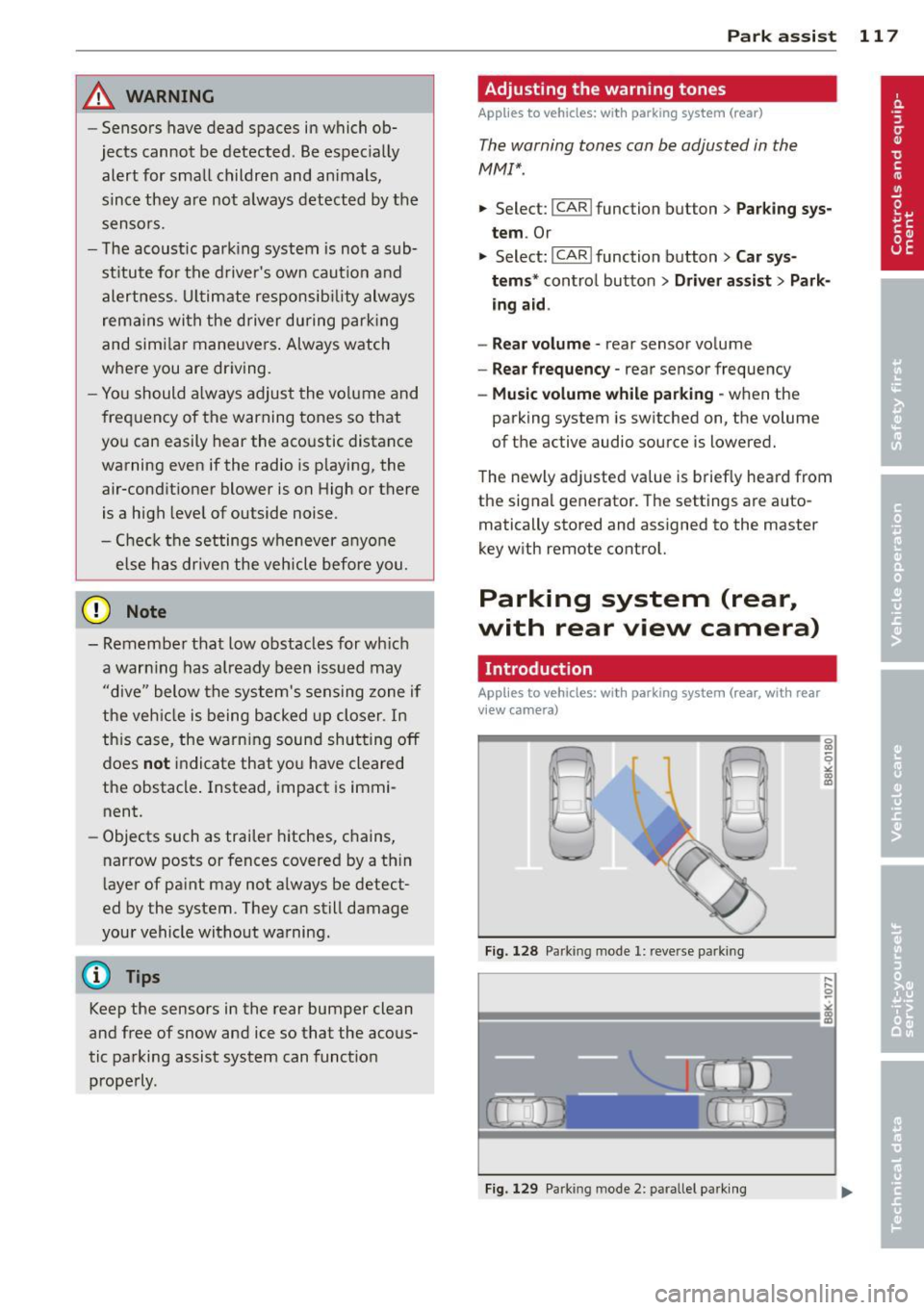
Fig. 128 Parking mode 1: reve rse parking
Fig. 129 Park ing mode 2: parallel park ing
Page 122 of 302
120 Park ass is t
@ Tips
- The rear view camera picture is avai lable
as soon as the MMI Display or the MMI is
switched on, or the start-up phase is
completed.
- Keep the sensors in the rear bumper and the rear view camera lens clean and free
of snow and ice, so that the parking sys
tem can work properly . Please follow the
additional notes on
~ page 122.
Reverse Park ing
App lies to vehicles: with parking system (rear, wit h rear
view came ra)
Parking mod e 1 can be used when parking in
a garage or parking space.
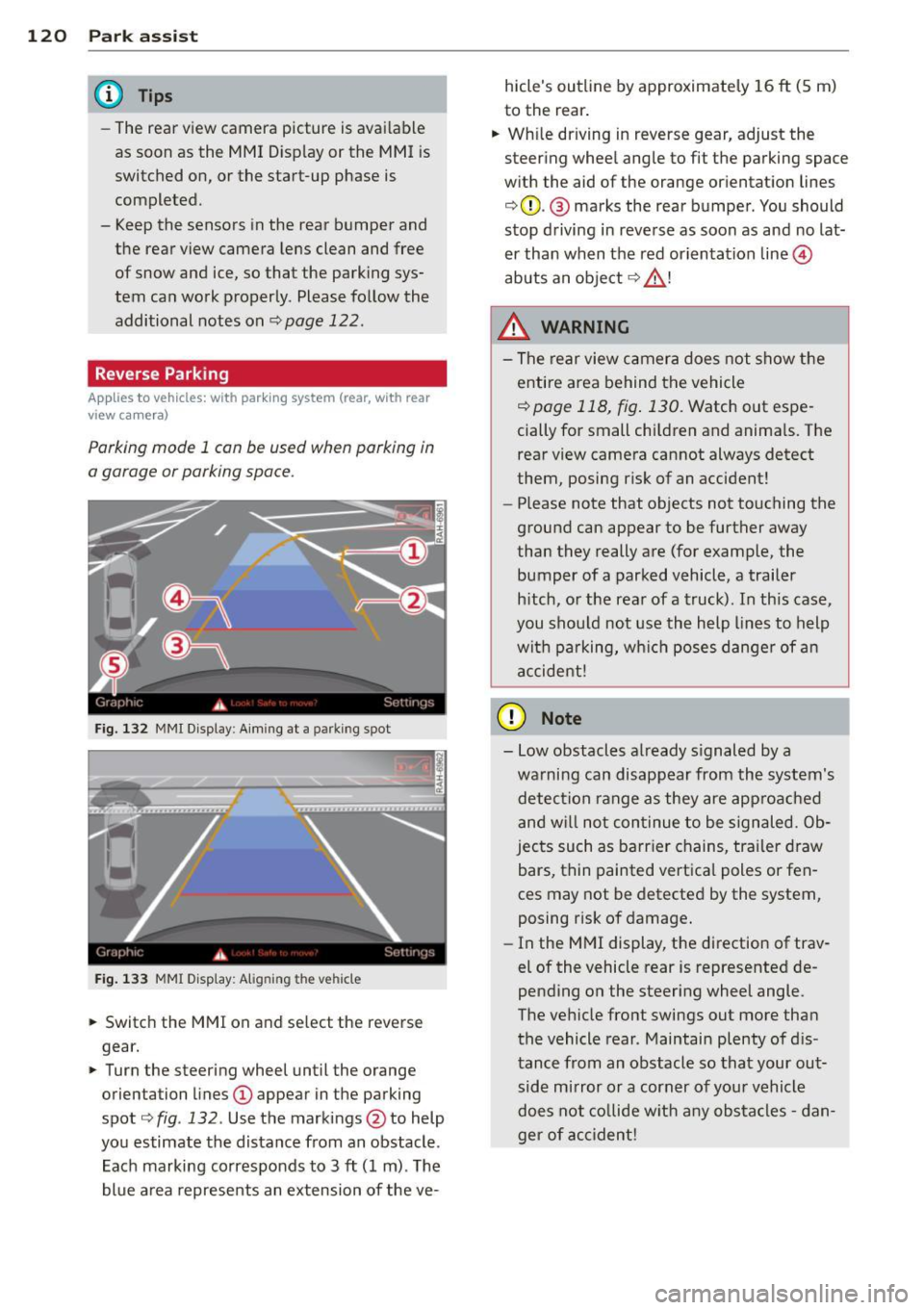
F ig. 132 MMI Display : Aim ing at a p arkin g spot
Fig . 133 MMI Disp lay: Ali gning th e vehi cle
"' Switch the MMI on and se lect the reverse
gear.
"' Turn the steering wheel until the orange
orienta tion lines
(D appear in the parking
spot ¢
fig. 132 . Use the mark ings @to help
yo u estimate the distance from an obstacle .
Each marking corresponds to 3
ft (1 m) . T he
blue a rea represents an extension of the ve- hicle's outline by approximate
ly 16
ft (5 m)
to the rear .
"' Wh ile driving in reverse gear, adjust the
steering whee l angle to fit the parking space
w ith the aid of the orange or ientation lines
¢ 0 . @ marks the rear bumper . You should
stop d riving in reve rse as soon as and no lat
er than when the red orientation line©
abuts an object ¢ _&. !
_& WARNING
-The rear view c amera does not show t he
e ntire area behind t he vehicle
¢ page 118, fig . 130. Watch out espe
cially for small children and anima ls. The
rear view camera cannot always detect
them, posing risk of an accident!
- Please note that objects not touching the
ground can appear to be further away
than they really a re (for example, the
bumper of a parked vehicle , a trailer
h itch, o r the rear of a truck). In this case,
you shou ld not use the h elp lines to help
wit h pa rking, wh ich poses danger of an
a ccident!
(D Note
- Low obstacles a lready s ignaled by a
wa rning can disappear from th e system's
detec tion range as they are approac hed
and w ill not con tinue to be signaled. Ob
jec ts such as barr ier chains, tr ailer draw
bars, thin painted vertica l poles or fen
ces may not be detecte d by the system,
posing risk of damage.
- In the MMI display, t he direction of trav
el of the vehicle rear is represented de
pending on the steering wheel angle.
The ve hicle fro nt swings out more tha n
the vehicle rear . Maintain plenty of d is
tance from an obstacle so that your out side mirror o r a corner of you r vehicle
does not co llide w it h any obs ta cl es -d an
ger of ac cident!
Page 123 of 302
Parallel Parking
Applies to vehicles: with parking system (rear, with rear
view ca mera)
Use parking mode 2 to help you pork on the
edge of o street.
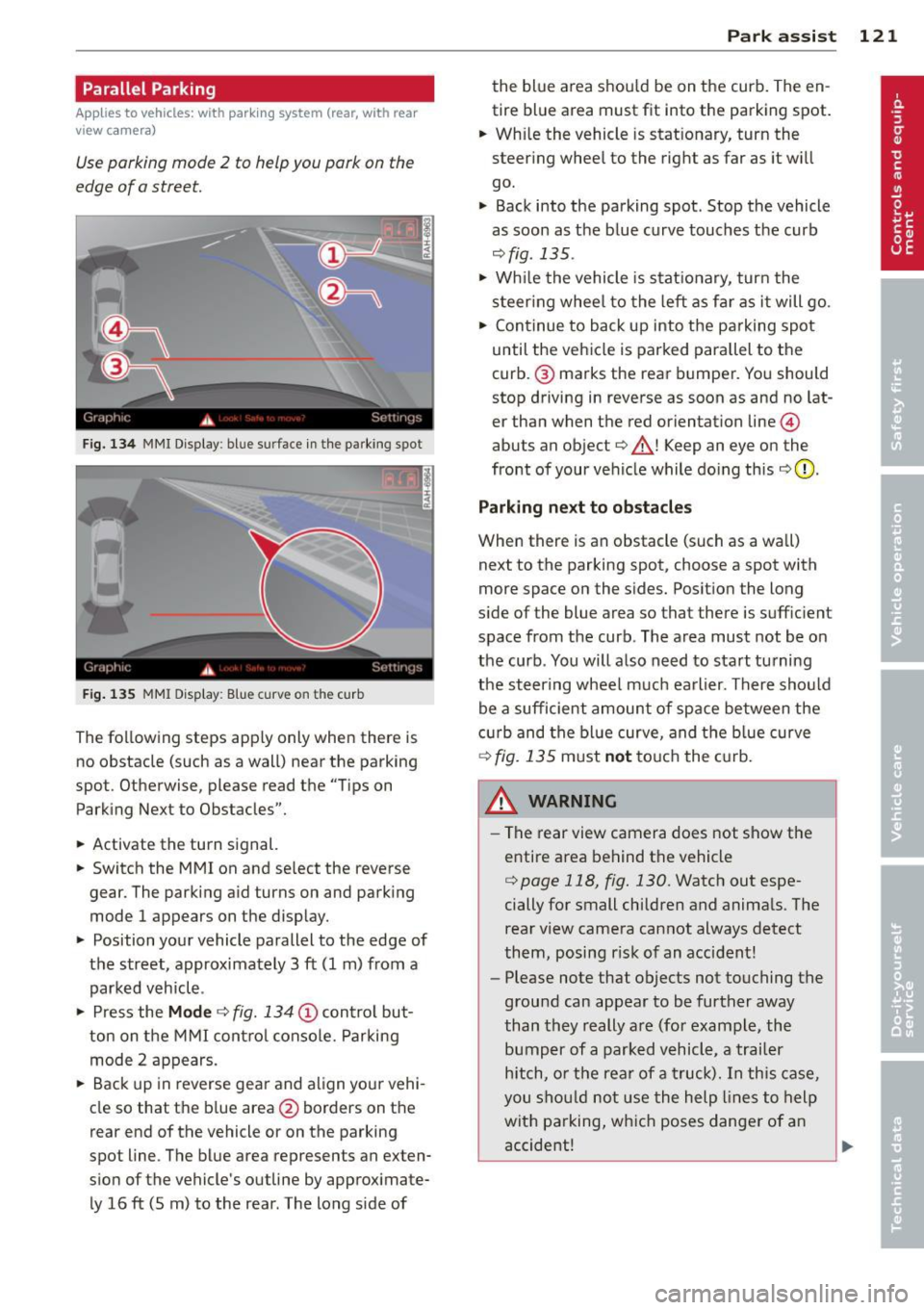
F ig. 134 MMI Display : bl ue s urface in the park ing spot
Fig. 135 MMI Display: Blue curve on t he cur b
The following steps apply only when there is
no obstacle (such as a wall) near the parking
spot. Otherwise, please read the "Tips on
Parking Next to Obstacles".
• Activate the turn signal.
• Switch the MM I on and se lect the reverse
gear. The parking aid turns on and parking
mode 1 appears on the display.
• Position your vehicle parallel to the edge of
the street, approximately 3 ft (1 m) from a parked vehicle .
• Press the
Mode ¢ fig. 134 (D control but
ton on the MMI control console. Parking
mode 2 appears.
• Back up in reverse gear and align your vehi
cle so that the blue area
@ borders on the
rear end of the vehicle o r on the parking
spot line . The blue area represents an exten
sion of the vehicle's outline by approximate ly 16 ft (5 m) to the rear . The long s ide of
Park assist 121
the blue area shou ld be on the curb. The en
tire blue area must fit into the parking spot.
• Wh ile the vehicle is stat ionary, turn the
steer ing whee l to the right as far as it wi ll
go.
• Back into the parking spot . Stop the vehicle
as soon as the blue curve touches the curb
¢ fig . 135 .
• Wh ile the vehicle is stationary, turn the
steering wheel to the left as far as it will go.
• Continue to back up into the parking spot
until the vehicle is parked parallel to the
curb .@ marks the rear bumper. You should
stop driving in reverse as soon as and no lat
er than when the red orientation line@
abuts an object¢_& ! Keep an eye on the
front of your vehicle while doing this
¢ 0 .
Parking next to obstacles
When there is an obstacle (such as a wall)
next to the parking spot, choose a spot with
more space on the sides. Posit ion the long
s ide of the blue area so that there is suff ic ient
space from the curb. The area must not be on
the curb . You will also need to start tu rning
the steering wheel much earlier. There should
be a sufficient amount of space between the
c urb and the blue curve, and the blue curve
¢ fig. 135 must not touch the curb.
&_ WARNING
- The rear view camera does not show the
entire area behind the vehicle
¢ page 118, fig. 130. Watch out espe
cially for small children and animals. The
rear view camera cannot always detect
them, posing risk of an accident!
- Please note that objects not touching the
ground can appear to be further away
than they really are (for example, the
bumper of a parked vehicle, a trailer
hitch, or the rear of a truck). In this case,
you should not use the help lines to help
with parking, which poses danger of an
accident!
.__ _____________ _J ...
Page 129 of 302
Driving Safely
General notes
Safe driving habits
Please remember -safety first!
This chapter contains important information,
tips, instructions and warnings that you need
to read and observe for your own safety, the
safety of your passengers and others . We have
summarized here what you need to know
about safety belts, airbags, child restraints as
well as child safety. Your safety is for us
priori
ty number 1.
Always observe the information
and warnings in this section - for your own
safety as well as that of your passengers.
The information in this section applies to all
model versions of your vehicle . Some of the
features described in this sections may be
standard equipment on some models, or may
be optional equipment on others. If you are
not sure, ask your authorized Audi dealer.
A WARNING
- Always make sure that you follow the in
structions and heed the WARNINGS in
this Manual. It is in your interest and in
the interest of your passengers.
- Always keep the complete Owner's Liter
ature in your Audi when you lend or sell
your vehicle so that this important infor
mation will always be available to the
driver and passengers.
- Always keep the Owner's literature handy
so that you can find it easily if you have
questions.
Safety equipment
The safety features are part of the occupant
restraint system and work together to help
reduce the risk of injury in a wide variety of
accident situations .
Your safety and the safety of your passengers
should not be left to chance. Advances in
technology have made a variety of features
available to help reduce the risk of injury in an
Driving Safely 127
accident. The following is a list of just a few of
the safety features in your Audi :
- sophisticated safety belts for driver and all
passenger seating positions,
- belt force limiters for the front seats,
- belt pretensioners for the seats,
- head restraints for each seating position,
- front airbags,
- side airbags in the front seats,
- side curtain airbags ,
- special LATCH anchorages for child re-
straints,
- adjustable steering column.
These individual safety features, can work to
gether as a system to help protect you and
your passengers in a wide range of accidents.
These features cannot work as a system if
they are not always correctly adjusted and cor
rectly used.
Safety is everybody's responsibility!
Important things to do before driving
Safety is everybody's job! Vehicle and occu
pant safety always depends on the informed and careful driver.
For your safety and the safety of your passen
gers,
before driving always:
"' Make sure that all lights and signals are op
erating correctly .
"' Make sure that the tire pressure is correct .
"' Make sure that all windows are clean and
afford good visibility to the outside.
"' Secure all luggage and other items carefully
qpage 64.
"' Make sure that nothing can interfere with
the pedals.
"' Adjust front seat, head restraint and mir
rors correctly for your height.
"' Instruct rear seat passengers to adjust the
head restraints according to their height.
"' Make sure to use the right child restraint
correctly to protect children
q page 166,
and~~fy. ~
•
•
Page 131 of 302
~ Always keep both feet in the footwell so
that you are in control of the vehicle at all
times.
For detailed information on how to adjust the
driver's seat, see
c:;, page 60.
A WARNING
Drivers who are unbelted, out of position
or too close to the airbag can be seriously
injured by an airbag as it unfolds. To help
reduce the risk of serious personal injury:
- Always adjust the driver's seat and the
steering wheel so that there are at least
10 inches (25 cm) between your breast
bone and the steering wheel.
- Always hold the steering wheel on the
outside of the steering wheel rim with
your hands at the 9 o'clock and 3 o'clock positions to help reduce the risk of per
sonal injury if the driver's airbag inflates.
- Never hold the steering wheel at the
12 o'clock position or with your hands at
other positions inside the steering wheel
rim or on the steering wheel hub. Hold
ing the steering wheel the wrong way
can cause serious injuries to the hands,
arms and head if the driver's airbag de
ploys.
- Pointing the steering wheel toward your
face decreases the ability of the supple
mental driver's airbag to protect you in a
collision .
- Always sit in an upright position and nev
er lean against or place any part of your
body too close to the area where the air
bags are located.
- Before driving, always adjust the front
seats and head restraints properly and
make sure that all passengers are prop
erly restrained.
- Never adjust the seats while the vehicle
is moving . Your seat may move unexpect
edly and you could lose control of the ve
hicle.
- Never drive with the backrest reclined or
tilted far back! The farther the backrests
are tilted back, the greater the risk of in-
Driving Safely 129
jury due to incorrect positioning of the
safety belt and improper seating posi
tion .
- Children must always ride in child safety
seats
c:;, page 166. Special precautions
apply when installing a child safety seat
on the front passenger seat
c:;, page 145 .
Proper seating position for the front
passenger
The proper front passenger seating position
is important for safe, relaxed driving .
For your own safety and to reduce the risk of
injury in the event of an accident, we recom
mend that you adjust the seat for the front
passenger to the following position :
~ Move the front passenger seat back as far
as possible. There must be a minimum of 10 inches (25 cm) between the breastbone
and the instrument panel
c:;, &, .
~ Adjust the angle of the seatback so that it is
in an upright position and your back comes
in full contact with it whenever the vehicle is
moving.
~ Applies to vehicles with adjustable head re
stra ints: Adjust the head restraint so the up
per edge is as even as possible with the top
of your head. If that is not possible, try to
adjust the head restraint so that it is as
close to this position as possible .
~ Keep both feet flat on the floor in front of
the front passenger seat .
~ Fasten and wear safety belts correctly
c:;, page 140.
For detailed information on how to adjust the
front passenger's seat, see
c:;, page 58.
A WARNING
-
Front seat passengers who are unbelted,
out of position or too close to the airbag
can be seriously injured or killed by the air
bag as it unfolds. To help reduce the risk of
serious personal injury:
•
•
Page 132 of 302
130 Driving Saf ely
- Passengers must always sit in an upright
posit ion and never lean against or place
any part of their body too close to the
area where the airbags are located.
- Passengers who are unbelted, out of po
sit ion or too close to the airbag can be
seriously injured by an airbag as it un
folds with g reat force in the blink of an
eye.
-Always make sure that there are at least 10 inches (25 cm) between the front
passenge r's breastbone and the inst ru
ment pane l.
- Each passenger must always s it on a seat
of the ir own and properly fasten and
wea r the safety belt be long ing to that
seat.
- Before driv ing, a lways adjust the front
passenge r seat and head restra int prop
er ly .
- Always keep your feet on the f loor in
front of the seat . Never rest them on the
seat, instrument pane l, out of the win
dow, etc . The airbag system and safety
belt w ill not be ab le to protect you prop
erly and can even increase the risk of in
jury in a crash .
- Never drive with the backrest recl ined or
t ilted far back! The farther the backrests
are t ilted back , the greater the risk of in
jury due to incorrect positioning of the
safety belt and improper seating posi
t ion.
- Children must always ride in child safety
seats ¢
page 166 . Special precautions
apply when installing a child safety seat
on the front passenge r seat ¢
page 145.
Proper seating positions for passengers
in rear seats
Rear seat passengers must sit upright with
both feet on the floor consistent with their
physical size and be properly restrained whenever the vehicle is in use.
To reduce the risk of injury caused by an incor
rect seating position in the event of a s udden
braking maneuver or an accident, your pas- sengers on the rear bench seat must always
observe the following:
.. Make s ure that the seatback is secure ly
la tched in the up right pos ition ¢
page 69.
.. If there is a passenger on the rear center
seating position, slide the center head re
straint upward at least to the next notch .
.. Keep both feet flat in the footwell in front
of the rear seat.
.. Fasten and wear safety be lts properly
¢ page 140 .
.. Make sure that children are always properly
restrained in a child rest raint that is appro
priate fo r the ir s ize and age¢
page 166.
& WARNING ~ -
Passengers who are improperly seated on
the rear seat can be seriously injured in a
crash .
- Each passenger must always sit on a seat of their own and properly fasten and
wear the safety belt belonging to that seat .
- Safety belts only offer maximum protec
tion when the seatback is sec urely latch
ed in the upright position and the safety belts are properly posit ioned on the
body . By not sitting upright, a rear seat
passenger increases the risk of personal
injury from improperly positioned safety
be lts!
- Always adjust the head restraint properly
so that it can give maximum protection.