automatic transmission AUDI S4 2013 User Guide
[x] Cancel search | Manufacturer: AUDI, Model Year: 2013, Model line: S4, Model: AUDI S4 2013Pages: 302, PDF Size: 75.61 MB
Page 94 of 302
92 Transmission
vehicle to accelerate without a noticeable in
terruption in traction.
tiptronic transmission
I n the tiptronic transmission, power is trans
ferred by a torque converter.
Selector lever positions
Applies to vehicles: with multitronic/5 tronic/tiptronic
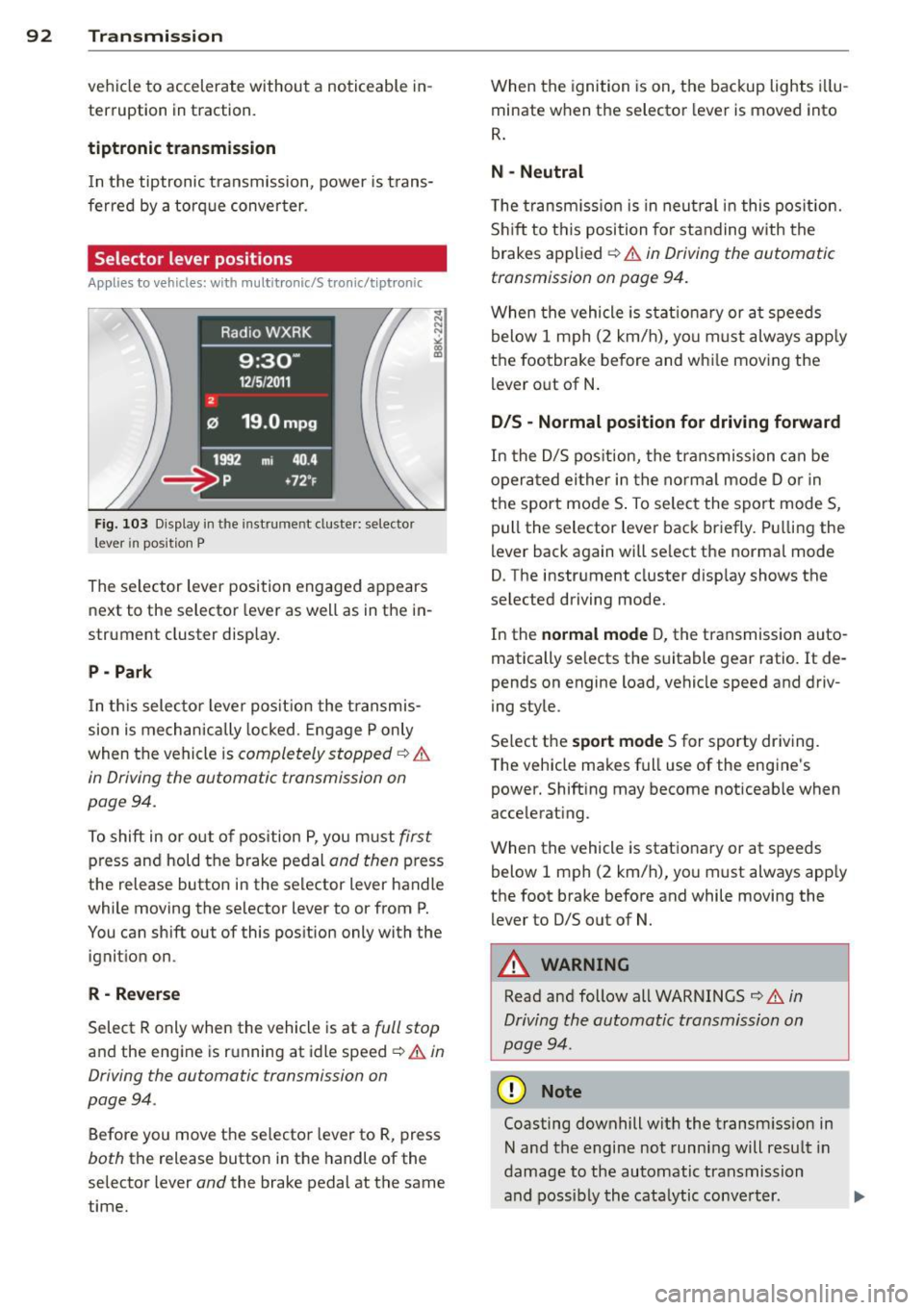
Fig. 103 Display in the in stru me nt duste r: selecto r
lever in position P
The selector lever position engaged appears
next to the selector lever as well as in the in
strument cluster display.
P - Park
In this selector lever position the transmis
sion is mechanically locked. Engage P only
when the vehicle is
completely stopped ¢ &
in Driving the automatic transmission on
pag e 94 .
To shift in or out of pos ition P, you must first
press and hold the brake pedal and then press
the release button in the selector lever handle
wh ile mov ing the se lector lever to or from P.
You can shift out of this position only with the
ignition on .
R-Reverse
Select R only when the vehicle is at a full stop
and the engine is running at idle speed ¢ & in
Driving the automatic transmission on
page 94 .
Before you move the selector lever to R, press
both the release button in the handle of the
selector lever
and the brake pedal at the same
time. When the
ignition is on, the backup lights illu
minate when the selector lever is moved into
R.
N -Neutral
The transmission is in neutral in this position .
Shift to this position for standing with the
brakes applied ¢
& in Driving the automatic
transmission on page 94.
When the vehicle is stat ionary or at speeds
below 1 mph (2 km/h), yo u must always apply
the footbrake before and whi le moving the
lever out of N.
D/S - Normal position for driving forward
In the D/S position, the transmission can be
operated either in the normal mode D or in
the sport mode S . To select the sport mode S,
pull the selector lever back briefly. Pulling the
lever back again will se lect the normal mode
D. The instrument cluster disp lay shows the
selected driving mode.
In the
normal mode D, the transmission auto
matically selects the suitable gear ratio.
It de
pends on engine load, vehicle speed and driv
ing style .
Select the
sport mode S for sporty driving .
T he vehicle makes full use of the engine's
power. Shift ing may become noticeable when
accelerating.
When the vehicle is stationary or at speeds
below 1 mph (2 km/h), you must always app ly
the foot brake before and while moving the lever to D/S out of N.
A WARNING
Read and follow all WARNINGS ¢ & in
Driving the automatic transmission on
page 94 .
(D Note
Coasting downhill with the transm ission in
N and the engine not running will result in
damage to the automatic transmission
and possibly the catalytic conve rter. .,..
Page 95 of 302
@ Tips
-On vehicles with drive select*, you can
adjust the sporty shift characteristics in
the
Dynamic driving mode.Swill appear
in the instrument cluster display instead
ofD.
- If you accidentally select N while driving,
take your foot off the accelerator pedal
immediately and wait for the engine to
slow down to idle before selecting D/S.
- If there is a power failure, the selector
lever will not move out of the P position .
The emergency release can be used if
th is happens ~
page 98.
Automatic Shift Lock (ASL)
Applies to vehicles: with multitronic/5 tronic/tiptron ic
The Automatic Shift Lock safeguards you
against accidentally shifting into a forward or
the reverse gear and causing the vehicle to
move unintentionally.
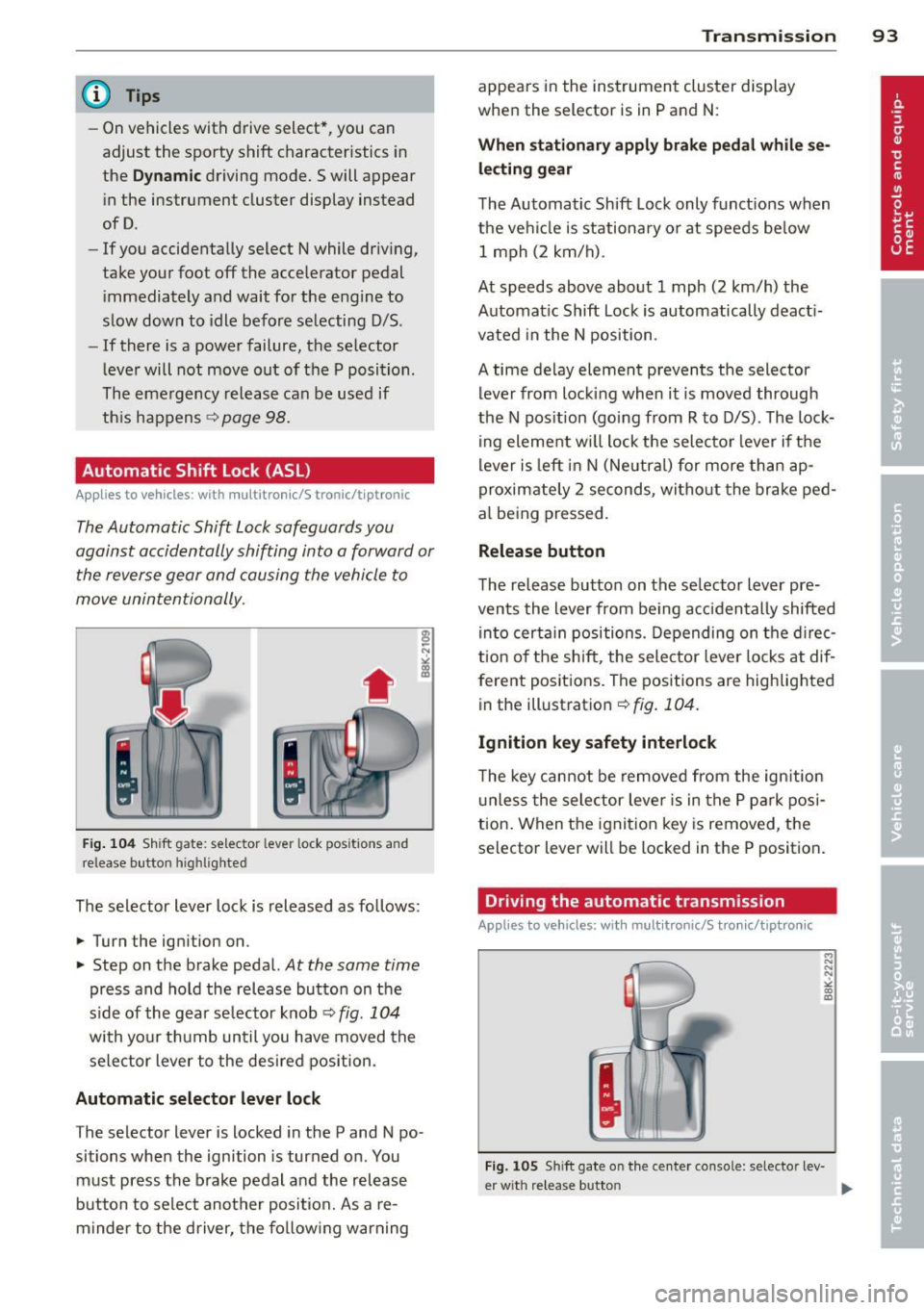
Fig. 104 Shift gate: selector lever lock positions and
release button highlighted
The selector lever lock is released as follows:
... Turn the ignition on .
... Step on the brake pedal.
At the same time
press and hold the release button on the
side of the gear se lector knob ¢
fig. 104
with your thumb until you have moved the
selector lever to the desired position.
Automatic selector lever lock
The selector lever is locked in the P and N po·
sitions when the ignition is turned on . You
must press the brake pedal and the release
button to select another position. As a re·
m inder to the driver, the following warning
Transmission 93
appears in the instrument cluster display
when the selector is in P and N:
When stationary apply brake pedal while se
lecting gear
The Automatic Shift Lock only functions when
the vehicle is stationary or at speeds below 1 mph (2 km/h).
At speeds above about 1 mph (2 km/h) the
Automatic Shift Lock is automatically deacti
vated in the N position .
A time delay element prevents the selector lever from locking when it is moved through
the N position (going from R to D/S). The lock
ing element will lock the selector lever if the
lever is left in N (Neutral) for more than ap
proximately 2 seconds, without the brake ped
al being pressed.
Release button
The release button on the selector lever pre
vents the lever from be ing accidentally shifted
into certain positions. Depending on the direc
tion of the shift, the selector lever locks at dif
ferent positions. The positions are highlighted
in the illustration¢
fig. 104 .
Ignition key safety interlock
The key cannot be removed from the ignition
unless the selector lever is in the P park posi
tion. When the ignition key is removed, the
selector lever will be locked in the P position.
Driving the automatic transmission
Applies to vehicles; with mult itronic/S tronic/tiptronic
Fig. 105 Sh ift gate on the center console: selector lev-
er w it h re lease button ..,_
Page 96 of 302
94 Transmission Starting the engine
.. The selec to r l eve r must be in P or N.
Starting off
.. Press and hold the brake pedal.
.. Press and hold the release button in these
lector lever handle, select t he des ired selec
tor lever position such as D/S and release
the b utton .
.. Wait briefly until the transmission has shift
ed (you will feel a slight movement) .
.. Remove your foot from the brake pedal and
acce lerate.
Stopping temporarily
.. Keep the vehicle stationary using the b rak
ing peda l, for examp le at traffic lights .
.. Do not press the accelerator pedal when do
ing this.
.. To prevent the vehicle from rolling when
you start dr iving, set the parking brake
when stopping on steep inclines ¢&_ .
.. The parking brake will release automatically
and the vehicle w ill start moving once you
press the accelerator peda l.
Stopping/parking
If the selector lever is not in the P position
when you open the dr iver's door, the vehicle
could roll. The message
Transmission: Car
may roll! Shift to park!
appears.
.. Press and hold the brake pedal unt il the ve
hicle has come to a complete stop .
.. Apply the parking brake¢
page 86, Park-
ing .
.. Se lect the P selector lever position ¢ &.-
Stopping on an incline
.. Always press the brake pedal to hold the ve
hicle in place and prevent it from "rolling
back"
¢ &_ . Do not try to prevent the vehi
cle from "rolling back" when a gear is en
gaged by increasing the engine speed ¢Q).
Starting on an incline
.. Activate the parking brake.
.. With the driving gear selected, press the ac
celerator pedal carefully . The parking brake will release automatically if your seat
belt is
fastened .
Under certain circumstances, such as driving
in the mountains, it may be usefu l to switch
temporarily to the manual shift program in or
der to adjust the gears to the driving condi
tions by hand ¢
page 96.
On s lopes, activate the parking brake first and
then move the selector lever to the P position .
This prevents too much stress from being
placed on the locking mechanism .
Vehicles with multitronic transmission: Your
vehicle is equipped with
hill hold assist allow
ing yo u to start while on an incline. The sys
tem is activated when the brake pedal is
pressed down and he ld
for a few seconds . The
brake pressure will hold for
a moment after
the brake pedal loosens to prevent the vehicle
from roll ing backwards w hile starting up .
A WARNING
-The vehicle can also roll when the engine
is stopped.
-Unintended vehicle movement can cause
serious injury.
- Never leave your vehicle with the engine
r un ning while in gear. If you must leave
your veh icle when the engine is running,
activate the parking brake and move the
selector lever to P.
- Power is still transmitted to the wheels
when the engine is runn ing at idle. To
prevent the vehicle from "creeping", you
must keep your foot on the brake when
the engine is running and the selector
lever is in 0/5 or R or "t iptronic" mode is
selected .
- Do not press the accelerator pedal when changing the selector lever position
while the veh icle is stationary and the
engine is running.
- Never shift into R or P while driving.
- Before driving down a steep s lope, re-
duce your speed and shift into a lower
gear with "tiptronic" .
Page 97 of 302
-Do not ride the brakes or press the brake
pedal too often or too long when driving
down a hill. Constant braking causes the
brakes to overheat and substantially re
duces braking performance, increases
braking distance or causes complete fail
ure of the brake system.
- To prevent the vehicle from rolling back
when stopping on inclines, always hold it
in place with the brake pedal or parking
brake.
- Never hold the vehicle on an incline with
a slipping clutch. The clutch opens auto
matically when it becomes too hot from
the overload. An indicator lamp
[O] illu
minates and a driver message appears
¢ page 9 7 when the clutch is overload
ed .
- If the engine must remain running, never
have any driving position engaged when
checking under the hood. Make sure the
selector lever has securely engaged and
is locked in P with the parking brake set
¢ page 213, Engine compartment . Oth
erwise, any increase in engine speed may
set the vehicle in motion, even with the
parking brake applied .
0 Note
-S tronic ®- and tiptronic transmission:
When stopping on an incline, do not try
to hold the vehicle in place by pressing
the accelerator pedal while a driving gear
is selected. This can cause the transmis
sion to overheat and can damage it. Acti
vate the parking brake or press the brake
pedal to prevent the vehicle from rolling.
- S tronic ®- and tiptronic transmission: Al
lowing the vehicle to roll when the en
gine is stopped and the selector lever is in N will damage the transmission be
cause it is not lubricated under those cir
cumstances .
(D Tips
For safety reasons, the parking brake is re
leased automatically only when the driv
er's safety belt is engaged in the buckle.
Transmission 95
Hill descent control
App lies to veh icles: w it h m ult itro nic/S tro nic/t iptro nic
The hill descent control system assists the
driver when driving down declines .
Hill descent control is activated when these
lector lever is in D/S and you press the brake
pedal. The transmission automatically selects
a gear that is suitable for the incline. Hill de scent control tries to maintain the speed ach
ieved at the time of braking, within physical
and technical limitations. It may still be nec
essary to adjust the speed with the brakes.
Hill descent control switches off once the de
cline levels out or you press the accelerator
pedal.
On vehicles with the cruise control system*
¢ page 89 , hill descent control is also activat
ed when the speed is set.
.&_ WARNING
-
Hill descent control cannot overcome
physical limitations, so it may not be able
to maintain a constant speed under all
conditions. Always be ready to apply the brakes.
Page 98 of 302
96 Transmission
Manual shift program
Appl ies to vehicles: with multitronic/S tronic/t iptronic
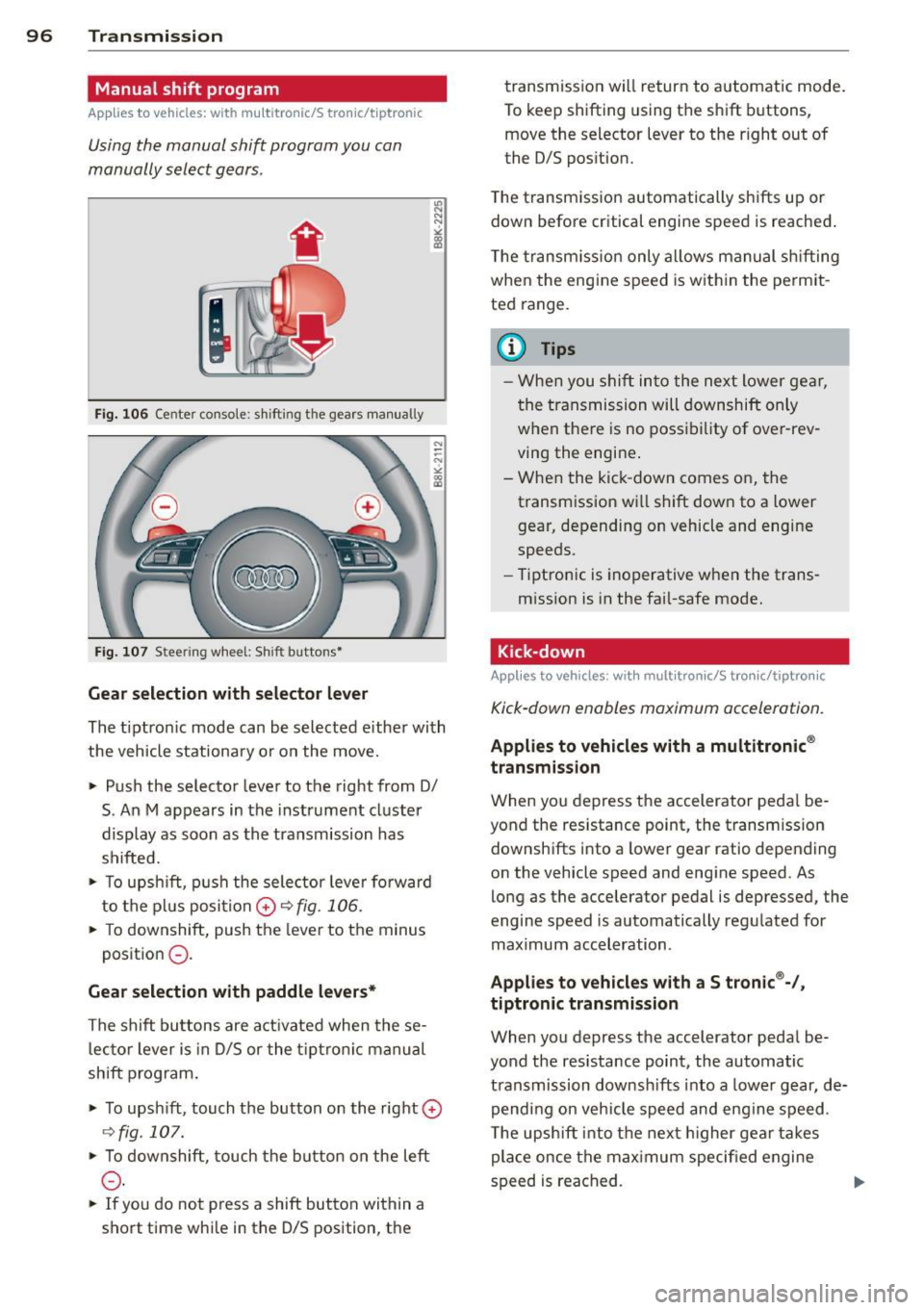
Using the manual shift program you can
manually select gears .
Fig . 10 6 Center co nsole: s hifting the gears manu ally
Fig . 10 7 Steer ing w heel: Shift buttons•
Gear selection with selector lever
"' N
N
~
" a> CD
The tiptron ic mode can be selected e ither with
the vehicle stationa ry or on the move.
• Push the selector lever to the right from 0/
S. An M appears in the instrument cl uster
display as soon as the transmission has
shifted.
• To upsh ift, p ush the sele ctor leve r fo rw ard
to the pl us posi tion
0 r:::,fig . 106.
• To downshift , push the lever to the minus
position
0 -
Gear selection with paddle levers*
The s hift bu ttons are act ivated when the se
l ec to r lever is in D/S or the t ip tr on ic manu al
shift program .
• To upsh ift, touch the button on th e right
0
C:, fig . 107.
• To downshift, touch the bu tton on the left
0 -
• If you do not press a shift button wi thin a
s h ort time whi le in the D/S position, t he transmission will return to a
utomatic mode .
To keep shifting using t he sh ift bu ttons,
move the selector lever to the r ight out of
the 0/S pos ition.
T he t ransm iss io n automatically sh ifts up or
down before critical engine speed is reached .
T he transm iss io n only a llows manual sh ifting
when the engine speed is w it hi n the pe rmit
ted range .
@ Tips
-Whe n you s hift into the ne xt l ower ge ar,
the transmission will downshift only
w hen the re is no poss ib ility of ove r-rev
ving the engine .
- W hen the kic k-down comes on, the
transm ission w ill shift d ow n to a lower
gear, depending on vehicle and engine
speeds.
- Tiptro nic is inoperative when the trans
m ission is in the fai l-safe mode.
Kick-down
Applies to vehicles : wit h mult itronic/S t ro ni c/tip tro nic
Kick-down enables maximum acceleration.
Applies to vehicles with a multitronic ®
transmission
W hen you depress the accelerator peda l be
yond the res istance point, the transm ission
downsh ifts into a lower gear ratio depend ing
on the vehicle speed and engine speed. As
lo ng as the acce lerator pedal is depressed, the
engine speed is automatically regu lated for
maximum acceleration .
Applies to vehicles with a S tronic ®-/,
tiptronic transmission
When you depress the accelerator peda l be
yond the resistance point, the automatic t ra nsmission downsh ifts into a lowe r gear, de
pend ing on veh icle s peed an d eng ine speed .
T he upsh ift int o th e nex t higher gea r takes
place once the max imum speci fied engine
s p eed is reached .
Page 109 of 302
Audi adaptive cru ise control and brakin g guar d 107
-Sedan: I f you switch the A SR/ESC off,
braking guard switches off automatically
¢ page 187 .
-allroad : If you switch the offroad mode
on, braking g uard switches off automati
cally
¢ page 188.
-Switch braking guard off when you are
l oading the veh icle onto a vehicle carr ier,
tra in, sh ip or other type of transporta
tion. This can prevent undesired warn i ngs from the braking guard system .
Messages
Applies to vehicles: with Audi adaptive cruise co ntrol
B rak ing guard: Off
This driver message appears if the system is
turned off via the radio/MM I*. Otherwise, if
the system is turned off, the information ap
pears every time shortly after the start of the
tr ip.
B ra king gua rd: Act ivated
This drive r message appe ars if sharp brake
pressu re was applied due to an acute warning.
•••
Three white dots appear if a setting cannot be
selected with the operat ing lever . For exam
p le, this happens if you want to raise/lowe r
the speed even though there was no p revious
l y saved speed.
AC C: D eactiv ation
The driver message appears in vehicles with
manual transmission . If the clutch pedal was
pressed down for too long, the adaptive cruise
control turns off. A chime sounds as a rem ind
er.
ACC : Sensor blocked
This message appears if the sensor view is ob
structed, for example by leaves, snow, heavy
spray or dirt. C lean the sensor ¢
page 99,
fig. 110.
ACC: not available
The drive r message appears if there is a ma l
f u nction. The adap tive cruise cont rol tu rns off. A chime sounds as a
reminder. Have the sys
tem checked by an authorized Audi dea ler or
authorized Aud i Service Fac ility.
ACC: unavailable
The driver message appears if, for example,
t h e b ra ke tempe ratu re is too hig h. T he adap
tive cru ise con trol is temporarily u nav ail able.
A ch ime sounds as a remin der .
Engine sp eed !
This dr iver message appears in vehicles with
manua l transm ission if the drive r had not up
shifted or dow nsh ifted in t ime w hile using
adaptive c ruise contro l braking or accelerat
ing, caus ing the veh icle to exceed or not reach
the pe rm itted lim it speed. The adap tive cruise
control turns off. A chime sounds as a remind
er.
Shift lev er po sition!
Vehicles with an automat ic t ransm iss ion: the
drive r message appears if the se lecto r lever is
sh ifted to the N position. The adapt ive cruise
c o ntrol is not ava ilable while in th is posit ion.
Vehicles with manua l transm ission: the driver
message appears for vehicles with manua l
transmission if there is no forward gea r en
gaged, meaning if the reverse gea r or the 1st
ge ar is engaged o r if the sele ctor leve r is i n
the ne utra l posi tion. The ad apt ive cr uise con
tro l is not available while in th is posi tion.
Stabilization control (ESC )
This message appears if the e lectronic stab ili
zation control (ESC) is taking action to stab i
liz e the veh icle. The adaptive c ruise co ntrol
turns off. A chime sounds as a reminder .
Speed too low
This message appears if the current speed is
too low
to set or to maintain the desired
speed.
T he speed being saved must be at least
20 mp h (30 km/h). The cru ise contro l is
turned off for speeds lowe r than 12 mph
(20 km/h). The adaptive cruise control re
mains turned on for speeds above 95 mph
Page 115 of 302

Audi drive select Driving settings
Introduction
Appl ies to vehicles: wit h Audi drive select
Drive select provides the possibility to experi
ence different types of vehicle settings in one
veh icle. For instance, using the three
Com
fort, Auto and Dynamic modes, the driver can
switch from a sporty to a comfortab le driving
mode with the press of a button.
Addit ionally, in vehicles with
MM I*, the vehi
cle setup for
Individual* mode can be cus
tomized by you. This makes it possib le to
combine settings such as a sporty engine tun
ing with comfortable steering.
A WARNING
Improper use of the Audi drive select can
cause collisions, other acc idents and seri
ous personal injury.
Description
Applies to vehicles: w it h Audi drive select
The vehicle setup in each mode depends on
the vehicle's features. However, the engine,
automatic t ransmission* and steering are al
ways involved.
-
Engine and automatic transmission*
Depending on the mode, the engine and the
automatic transmission respond quicker or in
a more ba lanced manner to accelerator pedal
movements. In the sporty dynamic mode, the
automatic transmission shifts at higher RPMs .
Steering
The steering adapts in terms of steering effort
and steering ratios. Indirect steer ing that
moves easily, like the steering in comfort
mode, is best su ited to long dr ives on a high
way. In contrast, dynamic mode prov ides
sporty, direct steering.
The follow ing applies to vehicles with dynam ic
steer ing*: the steering ratio changes based on
veh icle speed in order to maintain optimum
Audi drive select 113
steering effort for the driver at all times. This
sets the steering to be less sensitive at higher
speeds in order to provide improved vehicle
control. At reduced speeds, however, steering
is more direct in order to keep the steering ef
fort as minimal as possible when the driver is
maneuveri ng the vehicle . At low and average
speeds, dynamic steering addit iona lly pro
vides more responsive steering performance.
Adaptive dampers*
The adaptive dampers* use sensors to record
information regarding steering movements,
braking and acceleration operations by the
drive r, road surface, driving speed, and load.
T his makes it possible to adapt damp ing to
the driving situation virtually i n rea l time.
Drive select also makes it possible to satisfy
the desire for sporty suspension (Dynamic)
and comfortab le suspension (Comfort) with
out giving up balanced tuning (Auto) .
Sport differential*
As a component of the all wheel dr ive system
(quattro ®)
q poge 191, the sport differential*
distributes the driving power to the rear axle
depending on the situation . The distribution
of power varies depending on the mode se lected. The goal is a high level of agility and
ability to accelerate on curves . The vehicle is
very respons ive to steering .
Audi adaptive cru ise control*
The behavior when accelerating can be adjust
ed from comfortab le to sporty, depending on
the drive select mode. Adaptive cruise control
also responds to the driving behavior of the
vehicle ahead in a more conservative or sporty
manner .
Engine sound*
The sound of the engine is adapted to the se
lected mode and ranges from subtle to sporty.
0) Tips
-In some models, the maximum vehicle
speed can only be reached in the
Auto
and Dynamic modes.
Page 222 of 302
220 Checking and filling
-To reduce the risk of being burned, never
open the hood if you see or hear steam
or coolant escaping from the engine
compartment . Wait until no steam or
coolant can be seen or heard before care
fully opening the hood .
- Keep children away from the engine com
partment .
- Never spill fluids on hot engine compo
nents. They can cause a fire.
- Never touch the radiator fan. The auxili
ary electric fan is temperature controlled
and can switch on suddenly.
- Never open the coolant reservoir cap
when the engine is still warm. The cool
ant system is pressurized and hot cool
ant could spray out.
- Protect your face, hands and arm from
steam or hot engine coolant by placing a
thick rag over the cap when you open the
coolant reservoir .
- Do not remove the engine cover under
any circumstances. This increases the
risk of burns.
- If work on the fuel system or the electri
cal system is necessary:
- Always disconnect the battery.
- Never smoke or work near heaters or
open flames. Fluids in the engine com partment could start a fire.
- Keep an approved fire extinguisher im
mediately available.
- To avoid electrical shock and personal in
jury while the engine is running or being
started, never touch:
- Ignition cables
- Other components of the high voltage
electronic ignition system.
- If you must perform a check or repair
with the engine running:
- First, fully apply the parking brake,
move selector lever of automatic trans- mission to
"P" (Park); put manual
transmission in Neutral.
- Always use extreme caution to prevent
clothing, jewelry, or long hair from get
ting caught in the radiator fan, V-belts
or other moving parts, or from contact ing hot parts . Tie back hair before
starting, and do not wear clothing that
will hang or droop into the engine .
- Minimize exposure to emission and
chemical hazards
~ /1. .
A WARNING
=
California Proposition 65 Warning:
- Engine exhaust, some of its constituents,
and certain vehicle components contain
or emit chemicals known to the State of
California to cause cancer and birth de
fects and reproductive harm. In addition,
certain fluids contained in vehicles and
certain products of component wear con
tain or emit chemicals known to the
State of California to cause cancer and
birth defects or other reproductive harm.
- Battery posts, terminals and related ac
cessories contain lead and lead com
pounds, chemicals known to the State of
California to cause cancer and reproduc
tive harms. Wash hands after handling.
(D Note
When adding fluids, always make sure that
they are poured into the proper container
or filler opening, otherwise serious dam
age to vehicle systems will occur.
@) For the sake of the environment
To detect leaks in time, inspect the vehicle
floor pan from underneath regularly. If
you see spots from oil or other vehicle flu ids, have your vehicle inspected by an au
thorized Audi dealer.
Page 261 of 302
~ Unscrew the valve stem from the spare tire.
~ Screw the tire filler hose from the compres
sor firmly onto the valve of the spare tire.
~ Insert the plug from the compressor into a
socket of the vehicle¢
page 64.
~ Switch the compressor on .
~ Let the compressor run until the value
specified on the tire pressure label is
reached
¢ page 238, fig. 192. Switch the
compressor off after running for 12 minutes
at the most -danger of overheating!
A WARNING
The compressor and the tire filler hose can
become extremely hot while they are run
ning -danger of burns!
(D Note
Switch the compressor off after running
for 12 minutes at the most -danger of
overheating! Allow the compressor to cool
down for a few minutes before you use it
again.
Changing a wheel
Before changing a wheel
Observe the following precautions for your
own and your passenger's safety when chang
ing a wheel .
~ After you experience a tire failure, pull the
car well away from moving traffic and try to
reach
level ground before you stop¢ L!)..
~ All passengers should leave the car and
move to a safe location (for instance, behind
the guardrail) ¢
A.
~ Engage the parking brake to prevent your
vehicle from rolling unintentionally ¢
A.
~ Shift into 1st gear on vehicles with manual
transmission, or move the
selector lever to
the P position
on vehicles with automatic
transmission .
~ If you are towing a trailer: unhitch the trail
er from your vehicle.
~ Take the jack¢ page 256 and the spare tire
¢ page 257 out of the luggage compart
ment.
What do I do now? 259
A WARNING
You or your passengers could be injured
while changing a wheel if you do not fol
low these safety precautions:
- If you have a flat tire, move a safe dis
tance off the road. Turn off the engine,
turn the emergency flashers on and use
other warning devices to alert other mo
torists.
- Make sure that passengers wait in a safe
place away from the vehicle and well
away from the road and traffic.
- To help prevent the vehicle from moving
suddenly and possibly slipping off the
jack, always fully set the parking brake
and block the wheel diagonally opposite
the wheel being changed with the fold
ing chocks or other objects. When one
front wheel is lifted off the ground, plac ing the Automatic Transmission in "P"
(Park) will
not prevent the vehicle from
moving .
- Before you change a wheel, be sure the
ground is level and firm. If necessary,
use a sturdy board under the jack.
- Always store the vehicle tool kit, the
jack* and the replaced tire in the luggage compartment
¢page 133.
(D Note
If you are changing the wheel on a steep
incline, use a rock or similar object to
block the opposite wheel to prevent the
vehicle from moving.
(D Tips
Obey all laws.
Changing a wheel
When you change a wheel , follow these
quence described below step-by-step and in
exactly that order.
l. Remove the decorative wheel cover* or
-
the wheel bolt caps*. For more details see..,.
•
•
Page 271 of 302
Emergency situations
General
This chapter is intended for trained emer
gency crews and working personnel who
have the necessary tools and equipment to
perform these operations.
Starting by pushing or
towing
(D Note
Vehicles with an automatic transmission
cannot be started by pushing or towing .
Starting with jumper
cables
If necessary, the engine can be started by
connecting it to the battery of another vehi
cle.
If the engine should fail to start because of a
discharged or weak battery, the battery can be
connected to the battery of
another vehicle,
using a
pair of jumper cables to start the en
g ine.
Jumper cables
Use only jumper cables of sufficiently
largecross section to carry the starter current
safe ly. Refer to the manufacturer's specifica
tions.
Use only jumper cables with
insulated termi
na l clamps which are distinctly marked:
plus(+) cable in most cases colored red
minus(-) cable
in most cases colored black .
A WARNING
Batteries contain electricity, acid, and gas.
Any of these can cause very serious or fatal
injury. Follow the instructions below for
safe handling of your vehicle's battery.
- Always shield your eyes and avoid lean
ing over the battery whenever possible.
Emergency situations 269
-A discharged battery can freeze at tem
peratures just below 32 °F (0 °C). Before
connecting a jumper cable, you must
thaw the frozen battery completely, oth
erwise it could explode.
- Do not allow battery acid to contact eyes
or skin . Flush any contacted area with
water immediately .
- Improper use of a booster battery to
start a vehicle may cause an explosion.
- Vehicle batter ies generate explosive gas
es. Keep sparks, flame and lighted c iga
rettes away from batteries.
- Do not try to jump start any veh icle w ith
a low ac id level in the battery.
- The voltage of the booster battery must
also have a 12-Volt rating. The capacity
(Ah) of the booster battery should not be
lower than that of the discharged bat
tery. Use of batteries of diff erent voltage
or substantially different "Ah" rat ing
may cause an exp losion and personal in
jury.
- Never charge a frozen battery. Gas trap
ped in the ice may cause an explosion.
- Never charge or use a battery that has
been frozen . The battery case may have
be weakened.
- Use of batter ies of different voltage or
substantially different capacity (Ah) rat
ing may cause an exp losion and injury .
The ca pa city (Ah) of the booster battery
should not be lower than that of the dis
charged battery.
- Before you check anything in the engine
compartment, always read and heed all
WARNINGS¢
page 213, Engine com
partment.
(D Note
- App lying a higher voltage booster bat
tery will cause expensive damage to sen
sit ive electronic components, such as
control units, relays, rad io, etc .
- There must be no electrical contact be
tween the vehicles as otherwise current
could already start to flow as soon as the
posit ive(+) terminals are connected. ..,. •
•