buttons AUDI S4 2013 User Guide
[x] Cancel search | Manufacturer: AUDI, Model Year: 2013, Model line: S4, Model: AUDI S4 2013Pages: 302, PDF Size: 75.61 MB
Page 127 of 302
Programming the transmitter (version
B)
Applies to vehicles: with Horne link
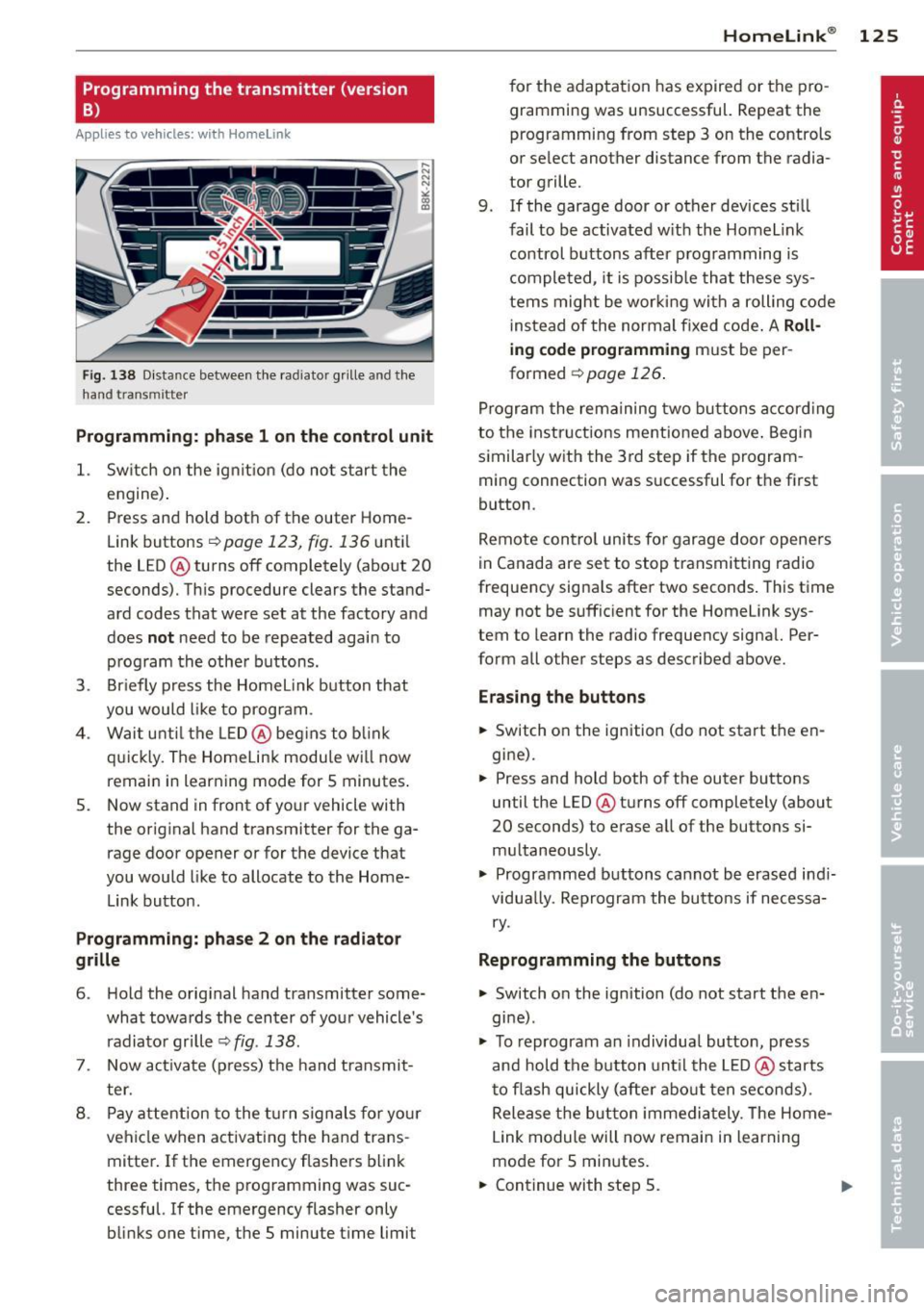
Fig. 1 38 D istance between t he rad ia tor grill e and t he
hand transmitte r
Programming: phase 1 on the control unit
1. Sw itch on the ig nit io n (d o n ot start the
e ngine ).
2. P ress and hold bot h of the outer Home
Link buttons
r=> page 123, fig. 136 unt il
the LED @ turns off completely (about
20
seconds). Th is procedure clears the stand
ard codes that were set at the factory and
does
not need to be repeated agai n to
p rog ram th e othe r buttons.
3. Briefly press the Homelink button that
you would like to prog ram .
4 . Wai t until the LED@ beg ins to blink
q ui ckly. The Home Lin k modu le wi ll now
remai n in learning mode for
5 minutes .
5. Now stand in front of your vehicle with
the original hand transmitter for the ga rage door opener o r for the device that
you would like to allocate to the Home
Link button.
Programming: pha se 2 on the radiator
grille
6 . Hold the o rig inal hand transmitter some
what towa rds the center o f you r vehicle 's
radiato r gr ille
r=> fig . 138 .
7. Now activate (p ress) t he hand transmit
ter.
8 . Pay a ttention to the t urn sign als for yo ur
vehicle when activating the ha nd trans
mitter . If t he emergency flashers b link
three times, the programming was suc
cessful. If the emergency flasher only
bli nks one time, the 5 minute t ime limit
Homelink ® 125
for the adaptat ion has expired or the pro
gram ming was unsuccessful. Repeat the
programming from step 3 on the controls
o r se lect another distance from the radia
tor grille.
9. If the garage door or other devices sti ll
fail to be activated w it h the Homelink
control buttons after p rogramming is
comple ted, it is possib le tha t these sys
tems might be wor king with a roll ing code
ins tead of the normal fixed code .
A Roll
ing code programming must be per
formed
r=> page 126 .
Program the rema ining tw o b uttons a ccord ing
to the instructions mentioned above . Beg in
similar ly w ith the 3rd step if the program
m ing connection was successful for t he first
button .
Remote con trol units fo r garage door opene rs
in Canada are set to stop transmitting radio
frequency signa ls after two seconds . This time
may not be suffic ient for the Homelink sys
tem to learn the radio frequency signa l. Per
form all other steps as described above.
Erasing the buttons
.,. Switch o n the ignition (do not start the en
gi ne).
.,. Press and hold both of the outer buttons
until the LED @ turns off completely (about
20 seconds) to erase all of the buttons si
m ultaneously .
.,. Programmed buttons cannot be erased ind i
vidua lly. Reprogram the buttons if necessa
ry .
Reprogramming the buttons
.,. Switch on the ignition (do not start the en
gine) .
.,. To reprogram an individua l butto n, press
and hold the button unt il the LED @ starts
to f lash quickly (after abo ut ten seconds) .
Release t he bu tton imme dia tely. The Home
L ink module will now remain in learning
mo de for 5 minutes.
.,. Continue with step 5.
Page 128 of 302
126 Hom eli nk®
-The required distance between the hand
transmitter and the HomeLink module in
the radiator grille
c:> fig. 138 depends on
the system that you are programming.
- Depend ing on the model of the garage
door opener, you may need to release the
button on the remote and press it again
when programming . When program
ming a new dev ice, keep the button
pressed for at least 15 seconds befo re
trying again with the transmitter in a dif
ferent pos it ion. Wa tch out fo r the emer
gency flasher during that time .
Programming the rolling code
Applies to vehicles: with Home link
Additionally, a rolling code programming for
the HomeLink universal remote control is re
quired for some systems .
Identifying the rolling code
.. Press the prev ious ly programmed Homelink
button aga in and hold i t down .
.. Look at the LED@ c:>
page 123, fig. 136 . If
the LED b links quickly , the features, s uch as
the garage door opener, are equipped with
the rolling code .
.. Program the roll ing code as fo llows:
Act ivating the g arage door opener motor
unit
.. Locate the sett ing button on the garage
door opener motor unit . The exact location
and co lor of the button may vary depending
on the garage door opener manufacturer .
.. Press the sett ing button on the garage door
opener motor unit (usually th is w ill act ivate
a "sett ing light d isp lay" on the motor unit).
Now you w ill have about
30 second s time to
perform the HomeL ink button programming
on the cont ro ls.
Programming on the controls
.. Press the Home L ink button that was already
programmed and hold for two seconds . ..
To end ro lling code programm ing, press and
hold the Home link button for two seconds
aga in .
.. The Homelink button may need to be press
ed a third t ime to end the adjus tment proce
dure for some garage door openers .
After the controls have been programmed, the garage door opener should recogni ze the
Homelink signal and operate when the Home
Li nk button is pressed . Now you may program
the other buttons as needed .
(D Tips
-Programming the rolling code can be
performed quicker and more easily with
the help of a second person .
- If d iff iculties should arise when pro
gramming the rolling code, consult the
operating instructions for the garage
door opener or o ther dev ices for po ssible
solutions.