trailer AUDI S4 2013 User Guide
[x] Cancel search | Manufacturer: AUDI, Model Year: 2013, Model line: S4, Model: AUDI S4 2013Pages: 302, PDF Size: 75.61 MB
Page 123 of 302
Parallel Parking
Applies to vehicles: with parking system (rear, with rear
view ca mera)
Use parking mode 2 to help you pork on the
edge of o street.
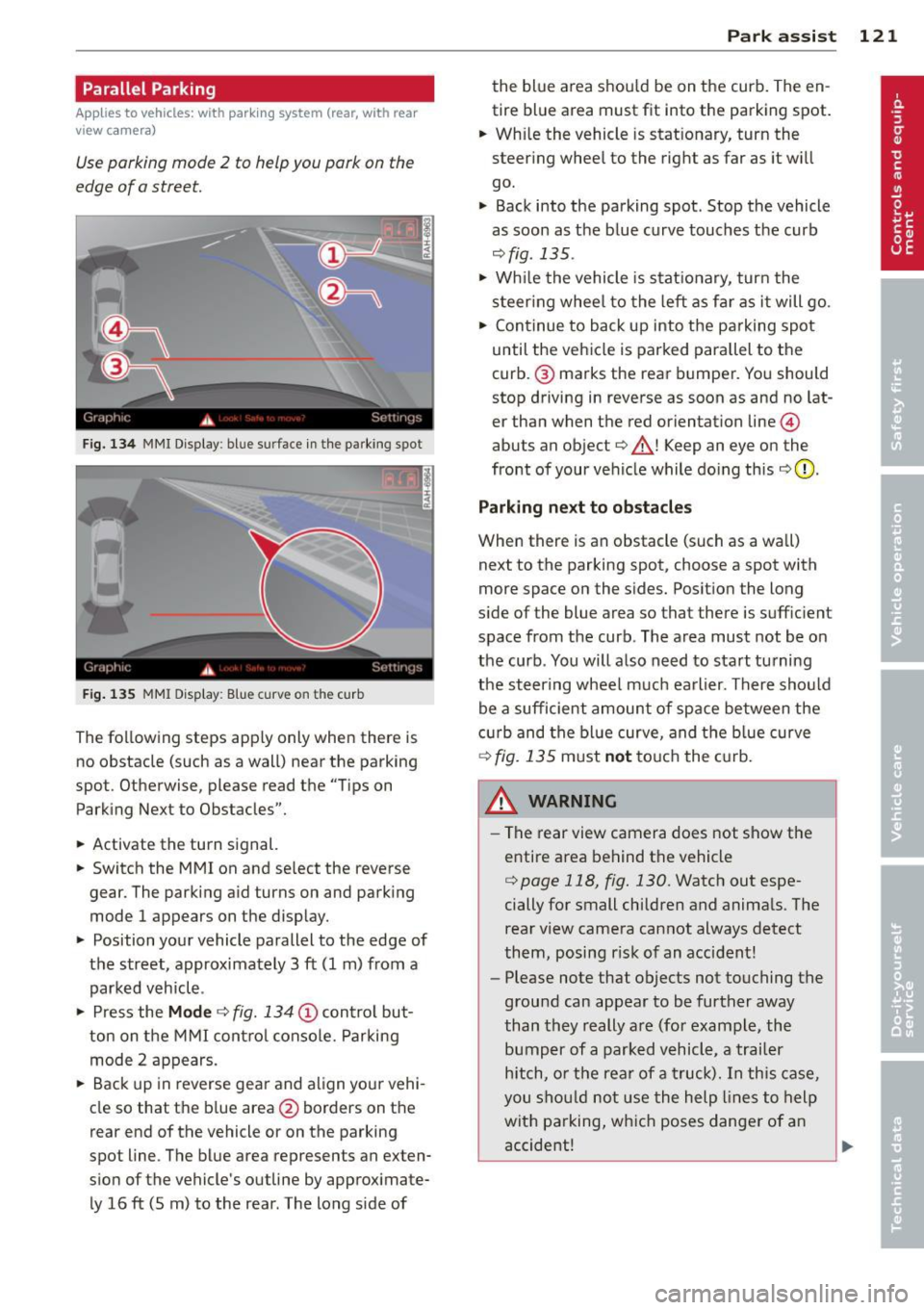
F ig. 134 MMI Display : bl ue s urface in the park ing spot
Fig. 135 MMI Display: Blue curve on t he cur b
The following steps apply only when there is
no obstacle (such as a wall) near the parking
spot. Otherwise, please read the "Tips on
Parking Next to Obstacles".
• Activate the turn signal.
• Switch the MM I on and se lect the reverse
gear. The parking aid turns on and parking
mode 1 appears on the display.
• Position your vehicle parallel to the edge of
the street, approximately 3 ft (1 m) from a parked vehicle .
• Press the
Mode ¢ fig. 134 (D control but
ton on the MMI control console. Parking
mode 2 appears.
• Back up in reverse gear and align your vehi
cle so that the blue area
@ borders on the
rear end of the vehicle o r on the parking
spot line . The blue area represents an exten
sion of the vehicle's outline by approximate ly 16 ft (5 m) to the rear . The long s ide of
Park assist 121
the blue area shou ld be on the curb. The en
tire blue area must fit into the parking spot.
• Wh ile the vehicle is stat ionary, turn the
steer ing whee l to the right as far as it wi ll
go.
• Back into the parking spot . Stop the vehicle
as soon as the blue curve touches the curb
¢ fig . 135 .
• Wh ile the vehicle is stationary, turn the
steering wheel to the left as far as it will go.
• Continue to back up into the parking spot
until the vehicle is parked parallel to the
curb .@ marks the rear bumper. You should
stop driving in reverse as soon as and no lat
er than when the red orientation line@
abuts an object¢_& ! Keep an eye on the
front of your vehicle while doing this
¢ 0 .
Parking next to obstacles
When there is an obstacle (such as a wall)
next to the parking spot, choose a spot with
more space on the sides. Posit ion the long
s ide of the blue area so that there is suff ic ient
space from the curb. The area must not be on
the curb . You will also need to start tu rning
the steering wheel much earlier. There should
be a sufficient amount of space between the
c urb and the blue curve, and the blue curve
¢ fig. 135 must not touch the curb.
&_ WARNING
- The rear view camera does not show the
entire area behind the vehicle
¢ page 118, fig. 130. Watch out espe
cially for small children and animals. The
rear view camera cannot always detect
them, posing risk of an accident!
- Please note that objects not touching the
ground can appear to be further away
than they really are (for example, the
bumper of a parked vehicle, a trailer
hitch, or the rear of a truck). In this case,
you should not use the help lines to help
with parking, which poses danger of an
accident!
.__ _____________ _J ...
Page 187 of 302
Intelligent technology Notice about data
recorded by vehicle
control modules
Your vehicle is not equipped with an Event Da
ta Recorder (EDR), installed by some manu
facturers for the express purpose of capturing
data for retrieval after an accident or crash
event. EDR's are sometimes called "crash re
corders".
Some state laws restrict the retr ieval or down
loading of data stored by EDR's that were in
stalled in a vehicle for the express purpose of
retrieving data after an accident or crash
event without the owner's consent.
Although your vehicle is not equipped with an
EDR, it is equipped with a number of electron
ic control modules for various vehicle systems
such as, for examp le, engine function, emis
sion control, as well as for the airbags and
safety belts.
These electronic control modules also record
vehicle-related data during norma l vehicle op
eration for diagnostic and repair purposes.
The recording capacity of the electronic con
trol modules is limited to data (no sound is re
corded) and only a small amount of data is ac
tually recorded over a very limited period of
time and stored when a system fault or other
condition is sensed by a control unit. Some of
the data then stored may relate to vehicle
speed, direction, braking as we ll as restraint
system use and performance in the event of a
crash or other condition. Stored data can only be read and downloaded with special equip
ment.
Electronic Stabilization
Control (ESC)
Description
ESC helps to improve road holding and vehicle
dynamics to help reduce the probability of
skidding and loss of veh icle control. It works
only when the engine is running. ESC detects
Intelligent technology 185
certain difficult driving situations, including
when the vehicle is beginning to spin (yaw)
out of control and helps you to get the veh icle
back under control by se lectively braking the
wheels, and/or reducing engine power and
providing steering ass istance to help hold the
vehicle on the driver's intended course. The in
dicator light
JjJ in the instrument cluster
blinks when ESC is taking action to help you
control the vehicle.
ESC has limitations .
It is important to remem
ber that ESC cannot overcome the laws of
physics.
It will not always be able to help out
under all conditions you may come up against.
For example, ESC may not always be able to
help you master situations where there is a
sudden change in the coefficient of friction of
the road surface. When there is a section of dry road that is suddenly covered with water,
slush or snow, ESC cannot perform the same
way it would on the dry surface. If the vehicle
hydroplanes (rides on a cushion of water in
stead of the road surface), ESC will not be
able to help you steer the vehicle because con
tact with the pavement has been interrupted
and the vehicle cannot be braked or steered .
During fast cornering, particularly on winding
roads, ESC cannot always deal as effectively
with difficult driving situations than at lower
speeds. When towing a trailer, ESC is not able
to help you regain control as it would if you
were not tow ing a trailer.
A lways adjust your speed and driving style to
road, traffic and weather conditions. ESC can
not override the vehicle's physical limits, in
crease the available traction, or keep a vehicle
on the road if road departure is a result of
driver inattention. Instead, ESC improves the
poss ibility of keeping the vehicle under con
trol and on the road dur ing extreme maneu
vers by using the driver's steering inputs to
help keep the vehicle going in the intended di
rection. If you are traveling at a speed that
causes you to run off the road before ESC can
provide any assistance, you may not experi
ence the benefits of ESC.
•
•
Page 201 of 302
Trailer towing Driving with a trailer
General information
Your Audi was designed primarily for passen
ger transportation .
If you plan to tow a tra iler, p lease remember
that the addit ional load will affect durab ility,
economy and performance .
T railer towing not on ly places more stress on
the vehicle, it also calls for more concentra
tion from the driver.
F or this reason, a lways fo llow the operating
and driving instructions provided and use
common sense.
Technical requirements
Traile r hitch
Use a weight-carrying hitch conforming to the
gross trailer we ight. The hitch must be suita
b le for your veh icle and trailer and must be
mounted secure ly on t he veh icle's chassis at a
technically sound location . Use only a t railer
h itch w ith a removab le ball moun t. A lways
check with the tr ailer hitch man ufac tur er to
make sure that you are using the correct
hitch.
Do not use a bumper hitch.
T he hitc h must be installed in such a way that
it does not inte rfe re with the impac t-absorb
i ng b umper syst em. No modifica tions should
be made to the vehicle exhaus t and b rake sys
tems . From t ime to time, check that a ll hitch
mo unt ing bolt s remain securely fas tened.
W hen you are not tow ing a trailer, remove the
trai le r hi tch ball moun t. T h is prevents the
hi tch from causing damage sho uld your ve hi
cle be str uck from be hind
¢ &. .
Trailer brakes
If yo ur tra iler is equ ipped w it h a braking sys
tem, check to be su re that it conforms to a ll
r eg ulat io ns.
Trailer towin g 199
The trailer hyd ra ulic bra ke system must not be
direct ly connected to the vehicle's hydraulic
brake system
¢ &. .
Safety chains
Alw ays use s afety chains between your ve hicle
and t he tra ile r.
Trailer lights
Tra ile r lights m ust meet all reg ulations . Be
su re to check w ith your authorized Audi dealer
fo r c orrec t w iri ng, sw itches, and relays.
Mirrors
If you a re unable to see the traffic behind you
u sing the regula r outside m irrors, then you
must insta ll ext ended mir ro rs. It is important
t h at you
always have clea r vis io n to the rear .
.8, WARNING
- If a trai ler has elec trica l br ake s plea se
no te th at t hese bra kes are not activat ed
by the fa ctory -fit ted control unit -risk of
accident!
- After removing the t railer hi tch, do no t
s to re it in yo ur vehicle . In case of sudden
brak ing, the hitch could fly fo rward and
in ju re you or yo ur passenge rs .
Operating instructions
Maximum traile r we ight
-
A trai ler fo r you r vehicle is limited to a typical
class 1 or class 2 tra iler.
Trailer load distribution
B e sure the lo ad in the tra iler is h eld secure ly
i n p lace to p reven t it from shifting fo rward,
backward or sideways.
Never allow a passenger to ride in a trailer
¢ &. in Driving instru ctions on page 200.
Engine cooling system
T owing a t railer ma kes t he engine wor k hard
er . It is impo rta nt that the cooling system's
perfo rman ce is up to the additional load.
Make sure tha t the coo ling sys tem h as enough
f lu id . .,..
•
•
Page 202 of 302
200 Trailer towing
Tire pressure
When towing a trai le r, inflate the tir es of your
vehicle to the cold tire pressure listed under
"Full load" on the label located on the driver 's
side B-pillar (visible when the door is open).
Inflate trailer tires to trailer and tire manufac
turers' specifications.
Lights
The headlight settings should be checked with
the trailer attached before dr iving off. Check
to make sure both vehicle and tra iler lights
are working properly.
Safety chains
Be sure trailer safe ty cha ins are properly con
nected from the trailer to the hitch on the ve
hicle. Leave eno ugh slack in the chains to per
mit turning corners. When you install safety
cha ins, make sure they w ill not drag on the
road when you are driving.
The chains shou ld cross under the trai ler
tongue to prevent it from dropping in case of
separation from the hitch.
Driving instructions
Driving with a trailer always requires extra
care and consideration.
To obtain the best possible handling of vehicle
and trai ler, p lease note the following:
.,. Do not tow a loaded trailer when your car it
self is not loaded .
.,. Be especia lly careful when passing other
vehicles .
.,. Observe speed limits .
.,. Do not drive at the maximum permissible
speed.
.,. Always apply brakes early.
.,. Monitor the temperature gauge.
Weight distribution
Towing a loaded trai ler with an empty car re
sults in a highly unstable distribution of
weight . If this cannot be avo ided, drive at very
low speeds only to avoid the risk of losing
steering control. A "ba
lanced'' rig is easier to operate and con
trol. This means that the tow vehicle should be loaded to the extent possible and permissi
ble, while keep ing the trailer as light as possi
ble under the c ircumstances. Whenever poss i
ble, transfer some cargo to the luggage com
partment of the tow veh icle while obse rving
tongue load requ irements and vehicle load ing
considerations.
Speed
The higher the speed, the more d iff icu lt it be
comes for the driver to control the rig. Do not
drive at the maximum permissible speed. Re
duce your speed even more if load, weather or
wind conditions are unfavorable -pa rticularly
whe n going downhill.
Reduce veh icle speed
immediately if the trail
er shows the slightest s ign of sway ing.
Do not
try to stop the swaying by accelerating.
Observe speed limits. In some areas, speeds
for vehicles tow ing trailers are lower than for
regular vehicles .
Always apply brakes early. When driving
downh ill, shift into a lower gear to use the en
gine braking effect to slow the vehicle . Use of
the brakes alone can cause them to overheat
and fail.
Coolant temperature
The coolant temperature gauge c> page 10
must be observed carefully . If the needle
moves close to the upper end of the scale, re
duce speed immediately and/or turn off the
air conditioner.
If the coolant temperature warning light •
in the in strument cluster starts flashing, pull
off the road, stop and let the engine
idle for
abo ut two minutes to prevent heat build-up .
_& WARNING
Anyone not properly restrained in a mov
in g vehicle is at a much greater risk in an
accident. Never let anyone ride in your car
who is not p roperly wea ring the restraints
provided by Audi.
-
Page 203 of 302
Trailer towing tips
Important to know
Your vehicle hand les different ly when tow ing
a trailer because o f the addit ional weight and
d iffe ren t weight distribution . Safety, pe rform
ance and economy w ill greatly depend on how
caref ully you load your trailer and operate
your rig.
B efore you actua lly tow your trailer, pr actice
turning, stopp ing and bac king up in an area
away from traffic. Keep practicing until you have become comp lete ly fam iliar with the way
your veh icle-trailer comb ination behaves and
responds.
Backing up is d ifficu lt a nd requires practice .
Backing up with a tra iler genera lly requires
steer ing action opposite to that when backing
up your vehicle without a trailer.
M aintain a g reater distance betwee n your ve
h icle and the one in front o f you . You will need
mo re room to stop. To compensate for the
trailer, you will need a larger than normal
turning radius .
W hen pass ing, remember that yo u cannot ac
celerate as fast as yo u normally wo uld be
cause of the added load. Ma ke s ure you have
e nough room to pass . After passing , allow
p lenty o f room fo r your tra iler before chang
in g la nes aga in .
Avoid jerky starts, sharp turns or rap id lane
changes.
(D Tips
- Do not tow a tra iler during the break-in
period of you r vehicle.
- If you tow a trailer, your A udi may re
quire more frequent maintenance due to
the extra load
o page 280.
Trailer towin g 201
Parking on a slope
Do not park on a slope with a trailer . If it can
not be avoided, do so only after doing the fol lowing:
When parking:
.. App ly the foot brake.
.. Have someone p lace chocks under both the
veh icle and the tra iler wheels .
.,. With chocks in place, slowly release t he
bra kes unt il t he whee l choc ks absorb the
load .
.. Tur n the whee ls towa rds t he curb .
.,. App ly the parking brake.
.. Place an a utomat ic t ransm ission* in P, re
spectively a manual transmission in first or
reverse gear.
When restarting after parking:
.. App ly the foot br ake .
.. Sta rt t he engine.
.. Move the se lector lever to D/S, respectively
a man ual transmiss ion in first gear .
.. Release the parking brake and s low ly pull
out and away from the wheel chocks .
.. Stop and have someone retr ieve the wheel
chocks.
@ Tips
If you move the selector leve r of the auto
matic transmissio n* to P before applying
the pa rking brake and befor e bloc king the
whee ls, you may hav e to use mor e forc e
la ter to m ove the lever out of the P p osi
tion.
•
•
Page 242 of 302
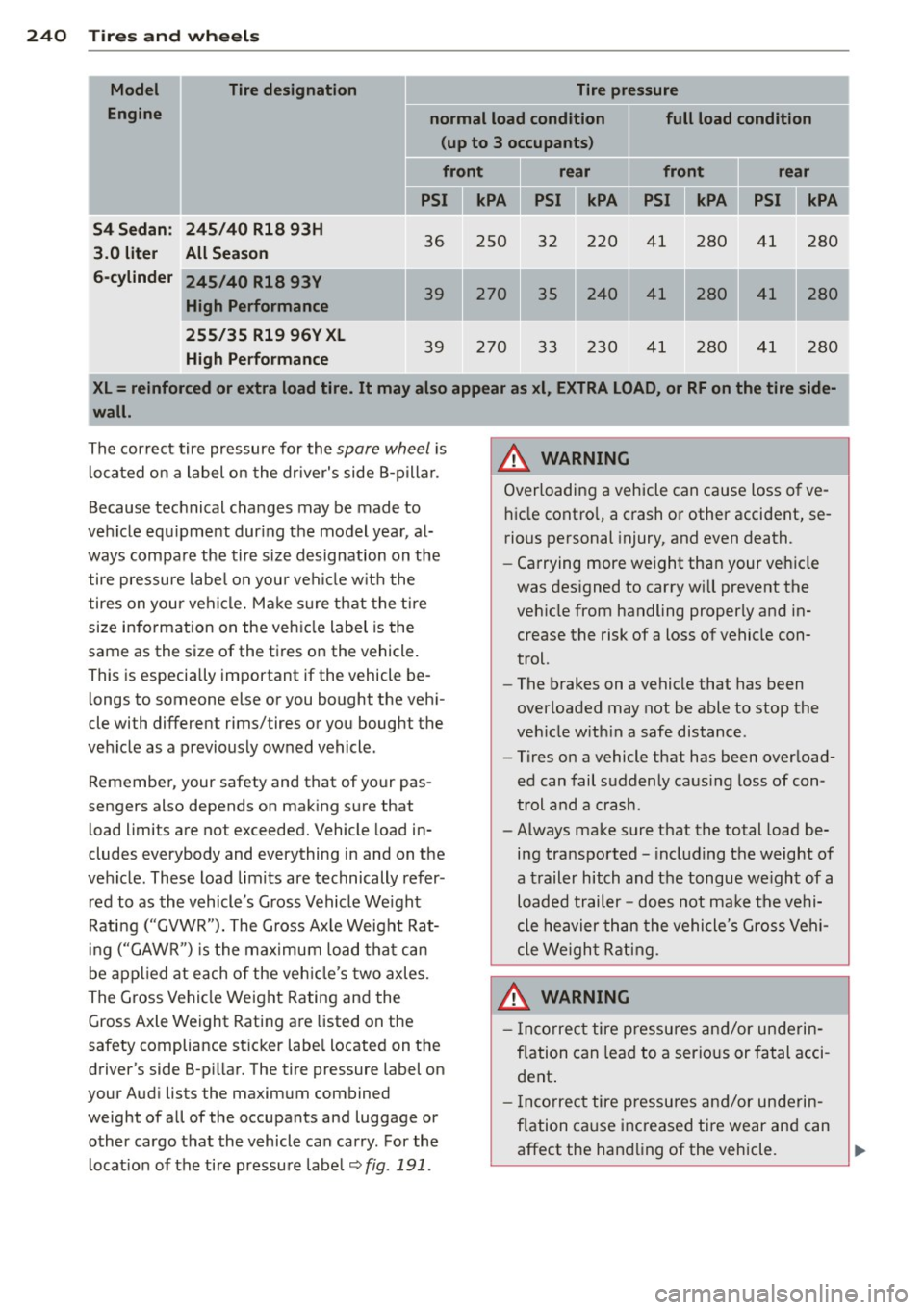
240 Tires and wheels Model Tire designation Tire pressure
Engine normal load condition full load condition
(up to 3 occupants )
front rear front rear
I
PSI II kPA PSI II kPA PSI II kPA PSI II kPA :
S4 Sedan : 245 /40 Rl8 93H
3 .0 liter All Season
36 250 32 220 41 280 41
280
6-cylinder
24S/40 Rl8 93V
I High Performance
39 270 35 240 41 280 41 280
255/35 Rl9 96V XL
High Performance
39 270 33 230 41 280 41 280
XL= reinforced or extra load tire. It may also appear as xl
, EXTRA LOAD, or RF on the tire side
wall.
The correct tire pressure for the spare wheel i s
l o cated on a label on the dr ive r's side B-p illa r.
Because tec hnical cha nges may be made to
ve hicle equ ipment dur ing the model yea r, a l
ways compa re the tire siz e designation on the
tire pressure labe l o n you r vehi cle w it h the
tires on your vehicle. M ake s ure that the t ire
size info rmation on the veh icle label is the
same as the size of the t ire s on the vehicle.
This is especially important if the vehicle be
l ongs to someone else or you bought the veh i
cle with different rims/tires or you boug ht the
ve hicle as a p reviously owned vehicle.
Remembe r, your safety and that of your pas
sengers also depends on mak ing s ure that
load limits are not exceeded. Vehicle load in
cludes everybody and everything in and on t he
ve hicle . These load lim its are technically refer
red to as th e vehicle's G ross Vehicle We ight
Rati ng ("GVWR"). The G ross Ax le Weight Rat
i ng ( "GA WR ") is the ma ximum load tha t can
be applied at each o f the veh icle 's two axles.
T he G ross Vehicle We ig ht Rating and the
Gross Axle Weight Rating a re listed on the
safety compliance st ic k er labe l located on the
driver's side B-p illar. The tire pressure label on
your Aud i lists the maximum combined
A WARNING
Overloadin g a vehicle can cause loss of ve
h icle cont ro l, a c rash or other accident, se
rious pe rsonal injury, and even death.
- Ca rrying more we ight tha n your veh icle
was des igned to carry will prevent the
veh icle from handling properly and in
crease the risk of a loss of vehicle con
trol.
- The brakes on a vehicle that has been
overloaded may not be able to stop the
veh icle w ith in a safe distanc e.
- Tires on a vehicle that has been overload
ed can fail s uddenly ca us ing loss of con
trol and a crash.
- Always make sure that the total load be
i n g transported - including the weight of
a trailer hitch and t he tongue we igh t of a
loaded tr ail er -does not ma ke t he ve hi
cle he avier th an the vehicle' s Gro ss V ehi
cle Weigh t Ra tin g.
.&_ WARNING
- In cor rect tire pressure s and /or u nderin
fl ation can lead to a serio us or fatal acci
dent .
- I nco rrec t tire pressures an d/or un derin
fla tion ca use increased ti re wear an d can
'
I
weight of all of the occupants and luggage or
other cargo tha t the vehicl e can carry . For the
l ocat io n of the ti re pressu re labe l~
fig . 191 .
affect the handling of the vehicle. ..,_
Page 245 of 302
not exceeded . Vehicle load includes everybody
and everything in and on the vehicle. These
l oad limits are techn ica lly referred to as the
ve hicle's
Gross Veh icle Weight Rat ing
("GVWR").
The "GVWR" includes the weight of the basic
veh icle, all factory insta lled accessories, a full
tank of fu el, oil, coolant and other fluids plus
maximum load. The maximum load includes
the number of passengers that the vehicle is
in tended to carry ("seating capacity") w ith a n
assumed weight of 150 lbs . (68 kg) for each
passenger at a des igna ted sea ting pos ition
and the tota l we ight of any l uggage in the ve
h icle. If you tow a trailer, the weig ht o f the
trailer hitch and the tong ue weight of the
l oaded trailer must be included as part of the
veh icle load.
The
Gro ss A xle Weight Rating ("GAWR") is
the maximum load that can be applied at each
of the vehicle's two ax les.
The G ross Vehicle We ight Rating and the
Gross Axle Weight Rating are listed on the
safety compliance sticker labe l located on the
driver's side B -pi llar .Your Audi has 5 seating
positions, 2 in the front and 3 in the rear for
tota l seating capacity of 5. Each seating posi
tion has a seat belt¢
page 137, Safety belts.
The fact that there is an upper limit to your
veh icle's Gross Vehicle Weight Rating means
that the tota l weight of whatever is being car
ried in the vehicle (including the weight of a
trailer hitch and the tongue weight of the
loaded trailer) is limited. The more passen
ge rs in the veh icle or passengers who are
h eav ier than the standa rd weights assumed
mean that less weight can be ca rr ied as l ug
gage.
The tire pressure labe l on you r Audi also lists
the maximum combined we ight of all of the
oc cu pants and luggage o r othe r ca rgo that
the vehicle can carry . For the location o f the
l abe l
¢page 238, fig. 191.
Tires an d wheel s 243
A WARNING
Overloading a vehicle can cause loss of ve
h icle contro l, a crash or other accident, se
rious pe rsonal injury, and even death.
- Carrying more we ight than your veh icle
was des igned to carry will prevent the
veh icle from handling properly and in
crease the risk of the loss of vehicle con
trol.
- The brakes on a vehicle that has been
overloaded may not be able to stop the
veh icle w ith in a safe distance.
- Tires on a vehicle that has been overload
ed can fail suddenly, incl uding a blowout
and sudden defla tion, causing loss of
contro l and a crash.
- Always ma ke sure that the total load be
ing transpor ted - incl uding the weight of
a trailer hitch and the tongue weight of a loaded trailer -does not ma ke the vehi
cle heavier than the vehicle's Gross Vehi
cle We ight Rating.
Determining correct load limit
U se th e example below to ca l
culate the total weight of the
pa ssengers and lu ggage or oth
e r thing s that you pl an t o tran s
po rt so that you can make sur e
that your vehicle will not b e
o verloaded.
Steps for Determining
Correct Load Limit
1 . Lo cate th e statement "THE
C OMBINED WEIGHT OF O C
CUPANTS AND CARGO
SHOULD NE VER E XCEED XXX
KG OR XXX LBS"on your vehi-
c le 's pla card (tire inflation ..,
•
•
Page 246 of 302
244 Tires and wheels
pressure label) ¢ page 238,
fig.191.
2. Determine the combined
weight of the driver and pas sengers that will be riding in
your vehicle.
3. Subtract the combined
weight of the driver and pas sengers from
"XXX" kilo
grams or
"XXX" pounds
shown on the sticker
¢ page 238, fig. 191.
4. The resulting figure equals
the available amount of car
go and luggage load capaci
ty. For example, if the
"XXX"
amount equals 1400 lbs.
and there will be five 150
lbs. passengers in your vehi
cle, the amount of available
cargo and luggage load ca
pacity is 650 lbs. (1400-750
(5
X 150) = 650 lbs.)
5. Determine the combined weight of luggage and cargo
being loaded on the vehicle .
That weight may not safely exceed the available cargo
and luggage load capacity
calculated in Step 4.
6. If your vehicle will be towing
a trailer, load from your trail
er will be transferred to your vehicle
. Consult this manual
to determine how this re duces the available cargo
and luggage load capacity of
your vehicle .
.., Check the tire sidewall
(¢ page 246, fig. 195) to de
termine the designated load rating for a specific tire.
Tire service life
The service life of tires depends on a lot of
different things including proper installation
and balancing, correct tire pressure and driv
ing style.
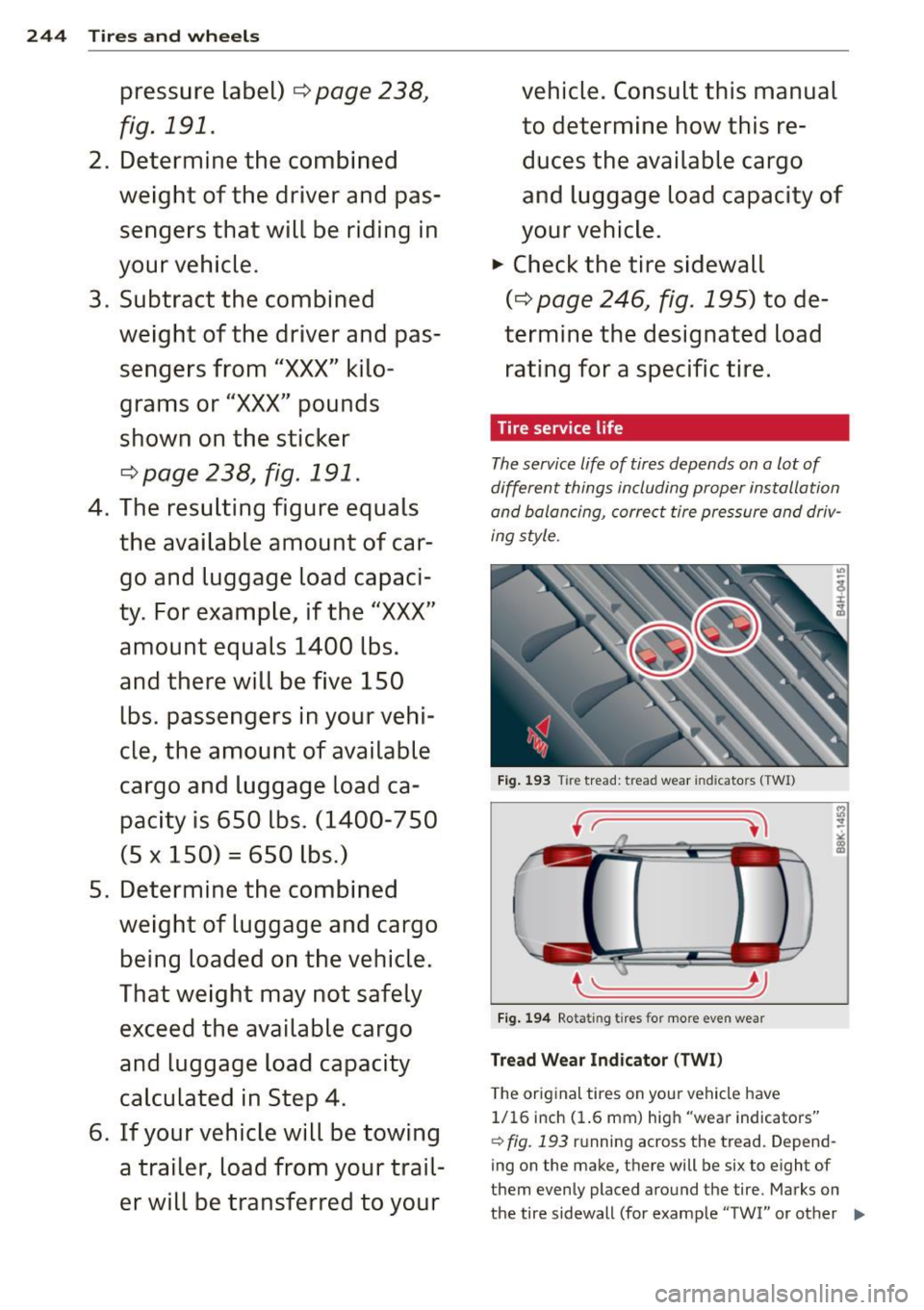
Fig. 193 T ire tread: tread wear ind icato rs (TWI)
____ Jj
Fig. 194 Rotating tires for more even wear
Tread Wear Indicator (TWI)
The original tires on you r vehicle have
1/16 inch (1.6 mm) high "wear indicators"
¢ fig. 193 running across the tread. Depend-
ing on the make, there will be six to eight of
them evenly placed around the tire. Marks on
the tire sidewall (for example "TWI" or other ..,
Page 261 of 302
~ Unscrew the valve stem from the spare tire.
~ Screw the tire filler hose from the compres
sor firmly onto the valve of the spare tire.
~ Insert the plug from the compressor into a
socket of the vehicle¢
page 64.
~ Switch the compressor on .
~ Let the compressor run until the value
specified on the tire pressure label is
reached
¢ page 238, fig. 192. Switch the
compressor off after running for 12 minutes
at the most -danger of overheating!
A WARNING
The compressor and the tire filler hose can
become extremely hot while they are run
ning -danger of burns!
(D Note
Switch the compressor off after running
for 12 minutes at the most -danger of
overheating! Allow the compressor to cool
down for a few minutes before you use it
again.
Changing a wheel
Before changing a wheel
Observe the following precautions for your
own and your passenger's safety when chang
ing a wheel .
~ After you experience a tire failure, pull the
car well away from moving traffic and try to
reach
level ground before you stop¢ L!)..
~ All passengers should leave the car and
move to a safe location (for instance, behind
the guardrail) ¢
A.
~ Engage the parking brake to prevent your
vehicle from rolling unintentionally ¢
A.
~ Shift into 1st gear on vehicles with manual
transmission, or move the
selector lever to
the P position
on vehicles with automatic
transmission .
~ If you are towing a trailer: unhitch the trail
er from your vehicle.
~ Take the jack¢ page 256 and the spare tire
¢ page 257 out of the luggage compart
ment.
What do I do now? 259
A WARNING
You or your passengers could be injured
while changing a wheel if you do not fol
low these safety precautions:
- If you have a flat tire, move a safe dis
tance off the road. Turn off the engine,
turn the emergency flashers on and use
other warning devices to alert other mo
torists.
- Make sure that passengers wait in a safe
place away from the vehicle and well
away from the road and traffic.
- To help prevent the vehicle from moving
suddenly and possibly slipping off the
jack, always fully set the parking brake
and block the wheel diagonally opposite
the wheel being changed with the fold
ing chocks or other objects. When one
front wheel is lifted off the ground, plac ing the Automatic Transmission in "P"
(Park) will
not prevent the vehicle from
moving .
- Before you change a wheel, be sure the
ground is level and firm. If necessary,
use a sturdy board under the jack.
- Always store the vehicle tool kit, the
jack* and the replaced tire in the luggage compartment
¢page 133.
(D Note
If you are changing the wheel on a steep
incline, use a rock or similar object to
block the opposite wheel to prevent the
vehicle from moving.
(D Tips
Obey all laws.
Changing a wheel
When you change a wheel , follow these
quence described below step-by-step and in
exactly that order.
l. Remove the decorative wheel cover* or
-
the wheel bolt caps*. For more details see..,.
•
•
Page 268 of 302

266 Fuses and bulbs
No.
5 Sound actuator/exhaust
sound tuning
6 Headlight
range control sys-
tern/cornering light
7 Headlight (cornering light)
Control modules (electro-
mechanical parking brake,
8 shock absorber, quattro
I
sport, trailer hitch), DCDC
converter
9 Adaptive cruise control
10 Shift gate
11 Side assist
12 Headlight range control,
parking system
13 Airbag
14 Rear wiper (allroad)
15 Auxiliary fuse (instrument
panel)
16 Auxiliary fuse
terminal 15
(engine area)
Fuse panel @ (brown)
2 Brake light sensor
3 Fuel pump
4
5 Left seat heating with/with-
out seat ventilation
6 E5C
7 Horn
-Front left door (window reg·
8 ulator, central locking, mir-
ror, switch, lighting)
9 Wiper motor
10 ESC
Two-door models: rear left
window regulator, Four-door
11 models: rear left door (win-
dow regulator, central
lock-
ing, switch, lighting)
12 Rain and light sensor
Fuse panel © (red)
3 Lumbar support
Amps
5/15
5/7,5 7,5
5
5
5
5
5
5
15
10
40
5
25
5
15/30
5
15
30
30
25
30
5
10
No. Consumer
4 Dynamic steering
6
7
8
9
Interior lighting (Cabriolet)
Windshield washer system ,
headlight washer system
Vehicle electrical system
control module 1
Vehicle electrical system
control module 1 Left rear window regulator
motor (Cabriolet)/sunroof
10 Vehicle electrical system
control module 1
11 Right rear window regulator
(Cabriolet)/sun shade motor
12 Anti-theft
alarm warning
system
Right cockpit fuse assignment Amps
35
5
35
20
30
7,5/20
30
7,5/20
5
Fig. 211 R ight cockpi t: fuse pane l wit h plastic cl ip
No. Consumer Amps
Fuse panel @ (black)
5 Steering column switch
5
module
7 Terminal 15 diagnostic
con-
nector 5
•
....