change time AUDI S4 2014 User Guide
[x] Cancel search | Manufacturer: AUDI, Model Year: 2014, Model line: S4, Model: AUDI S4 2014Pages: 296, PDF Size: 73.56 MB
Page 106 of 296
104 Audi adaptive cruise control and braking guard
Setting the distance
Applies to vehicles: wit h Aud i adapt ive cru ise co ntrol
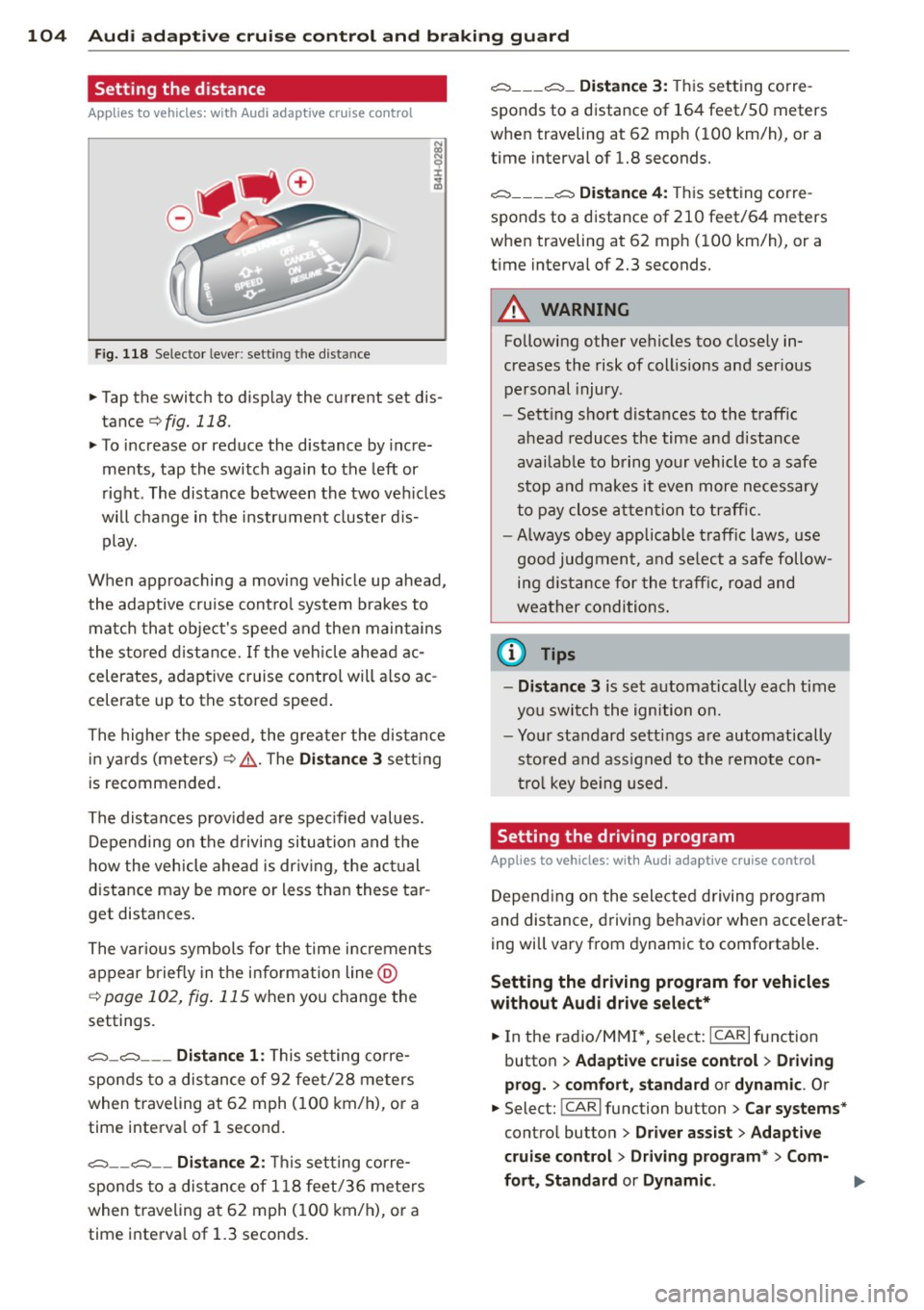
Fig. 118 Selector lever: setting the distance
~ Tap the switch to display the current set dis
tance
¢fig. 118.
~ To increase or reduce the distance by incre
ments, tap the switch again to the left or
right. The distance between the two vehicles
will change in the instrument cluster dis
play.
When approaching a moving vehicle up ahead,
the adaptive cruise control system brakes to match that object's speed and then maintains
the stored distance. If the vehicle ahead ac
celerates, adaptive cruise control will also ac
celerate up to the stored speed.
The higher the speed, the greater the distance
in yards (meters)¢ ,&.. The
Distance 3 setting
is recommended.
The distances provided are specified values.
Depending on the driving situation and the
how the vehicle ahead is driving, the actual
distance may be more or less than these tar
get distances.
The various symbols for the time increments
appear briefly in the information line @
c;, page 102, fig. 115 when you change the
settings.
c::::::,_c::::::, ___ Distance 1: This setting corre-
sponds to a distance of 92 feet/28 meters
when traveling at 62 mph (100 km/h), or a
time interval of 1 second.
c::::::, __ c::::::, __ Distance 2: This setting corre
sponds to a distance of 118 feet/36 meters
when traveling at 62 mph (100 km/h), or a
time interval of 1.3 seconds.
c::::::, ___ c::::::,_ Distance 3: This setting corre-
sponds to a distance of 164 feet/SO meters
when traveling at 62 mph (100 km/h), or a
time interval of 1.8 seconds.
c::::::, ____ c::::::, Distance 4: This setting corre-
sponds to a distance of 210 feet/64 meters
when traveling at 62 mph (100 km/h), or a
time interval of 2.3 seconds.
A WARNING
Following other vehicles too closely in
creases the risk of collisions and serious
personal injury .
- Setting short distances to the traffic
ahead reduces the time and distance
available to bring your vehicle to a safe
stop and makes it even more necessary
to pay close attention to traffic.
-
-Always obey applicable traffic laws, use
good judgment, and select a safe follow
ing distance for the traffic, road and
weather conditions.
0) Tips
- Distance 3 is set automatically each time
you switch the ignition on.
- Your standard settings are automatically
stored and assigned to the remote con
trol key being used.
Setting the driving program
Applies to veh icles: w ith Audi ada ptive c ruise control
Depending on the selected driving program
and distance, driving behavior when accelerat
ing will vary from dynamic to comfortable.
Setting the driving program for vehicles
without Audi drive select*
~ In the radio/MM!*, select: ICARlfunction
button
> Adaptive cruise control > Driving
prog.
> comfort, standard or dynamic. Or
~ Select: !CAR I function button > Car systems*
control button > Driver assist > Adaptive
cruise control> Driving program*
> Com-
fort, Standard
or Dynamic . ll-
Page 112 of 296
110 Audi side assist
General information
App lies to vehicles: with Audi side assist
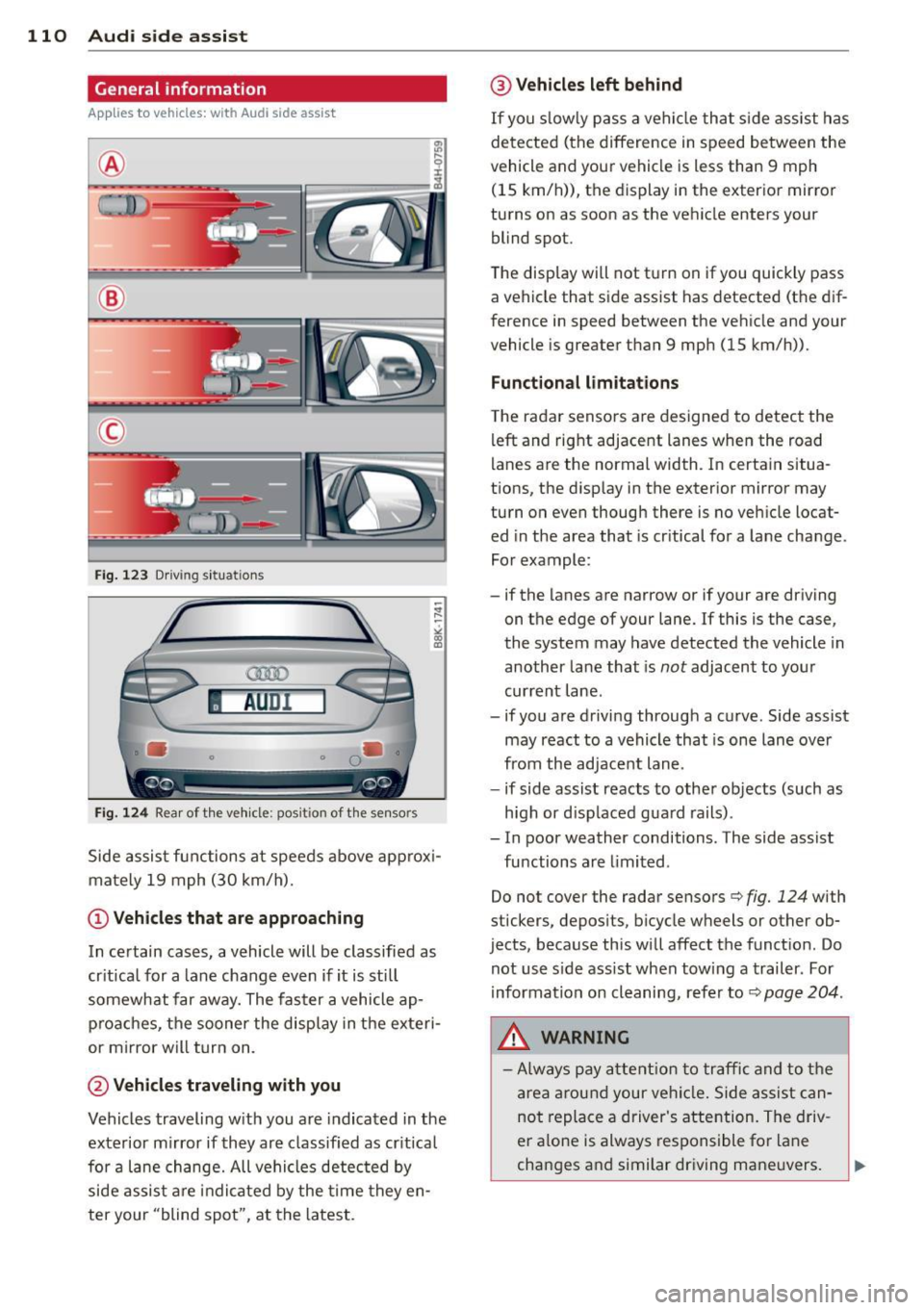
®
©
Fig. 12 3 Driving s it u at ions
AU Dr- l
• •
Fig . 124 Rear of th e ve hicle: pos it io n of t he se nso rs
Side assis t fu nctions at speeds above ap prox i
ma tely 19 mph (30 km/h).
(D V ehicles that are approaching
In certain cases, a vehicle will be classified as
cr itical for a lane change
even if it is still
somewhat far away. The fas ter a vehicle ap
p ro aches, the sooner the disp lay in the exteri
or m irror will t urn on.
@ Vehicles traveling with you
Vehicles traveling w ith you are indicated in the
exterior m irror if they are classified as cr it ical
for a lane change. All vehicles detec ted by
side assis t are in dicated by the time they en
ter your "blind spot", at the latest.
@ Vehicles left behind
If you s low ly pass a ve hicl e tha t sid e ass ist has
dete cted ( the difference in s peed between the
vehicle and you r vehicle is less than 9 mph
(15 km/h)), the display in the exter io r mirro r
turns on as soon as the vehicle enters your blind spot.
The disp lay wi ll not t urn on if you quickly pass
a vehicle that s ide assist has detected (t he d if
f erence in speed between the ve hicle and your
vehicle is greater than 9 mph (15 km/h)).
Functional limitations
T he radar senso rs are des igned to detect the
left and right adjacent lanes whe n the road
l anes a re the normal width. In certain situa
t ions, the d isp lay in the exterior mirror may
turn on even though there is no ve hicle locat
ed in the area that is cr itical fo r a lane cha nge.
For example:
- if the lanes are narrow or if your are driving on the edge of your lane. If this is the case,
the system may have detected the vehicle in
another la ne that is
not adjacent to your
cur rent lane .
- if you a re driving through a c urve . Side assis t
may react to a vehicle that is one lane ove r
from the ad jacent lane .
- if side assist reacts to other objects (such as
high or d isp laced gua rd rails) .
- In poor weather conditions. The side assist fu nctions are limited .
Do not
cover the radar sensors c::> fig. 124 with
stickers, depos its, bicycle wheels or other ob
jects , because this will affect the funct ion. Do
not use s ide ass ist when tow ing a trail er. For
information on cleaning, refe r to
c::> page 204 .
&_ WARNING
-Always pay a tten tion t o traffic and to the
ar ea around your ve hicl e. Side a ssist can
no t repla ce a driver's attention. The driv
er a lone is always respons ible fo r lane
cha nges a nd similar driving mane uvers.
Page 113 of 296
-Improper reliance on the side assist sys
tem can cause collisions and serious
personal injury:
- Never rely only on side assist when
changing lanes.
- Always check rear view mirrors to make
sure that it is safe to change lanes.
- Side assist cannot detect all vehicles un
der all conditions- danger of accident!
- Please note that side assist indicates
there are approaching vehicles, or
vehicles in your blind spot, only after
your vehicle has reached a driving speed
of at least 19 mph (30 km/h).
- In certain situations, the system may not
function or its function may be limited.
For example:
- if vehicles are approaching or being left
behind very quickly. The display may
not turn on in time.
- in poor weather conditions such as
heavy rain, snow or heavy mist .
- on very wide lanes, in tight curves or if
there is a rise in the road surface .
Vehicles in the adjacent lane may not
be detected because they are outside
of the sensor range.
(D Note
The sensors can be displaced by impacts or
damage to the bumper, wheel housing and
underbody. This can affect the system .
Have your authorized Audi dealer or au
thorized Audi Service Facility check their
function.
(D Tips
- If the window glass in the driver's door
or front passenger's door has been tint
ed, the display in the exterior mirror may be misinterpreted.
- For Declaration of Compliance to United
States FCC and Industry Canada regula
tions
~page 278.
Audi side assist 111
Activating and deactivating
App lies to vehicles : wi th Aud i side ass ist
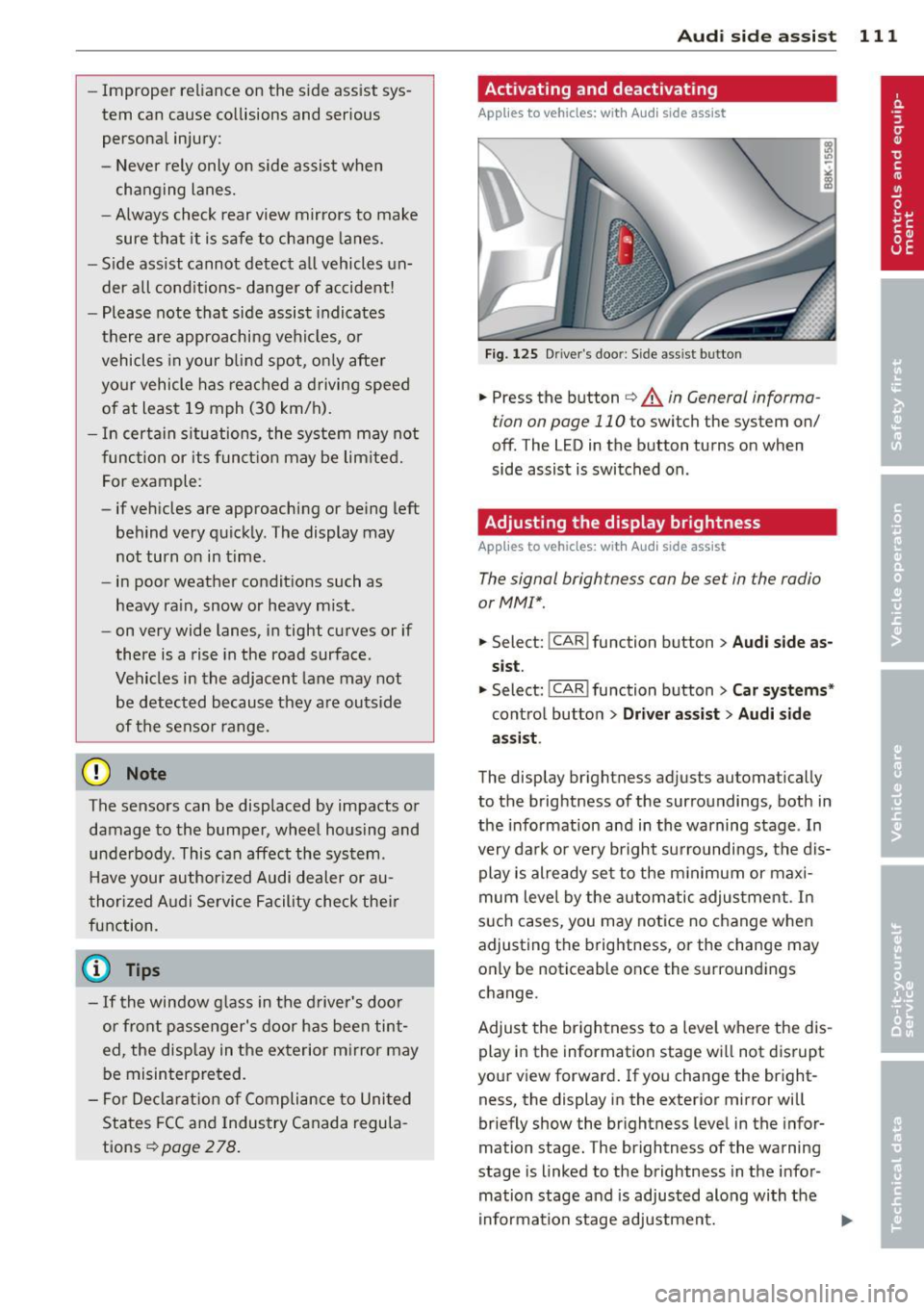
Fig. 125 Driver 's doo r: Side ass ist button
.,. Press the button ~ A in General informa
tion on page 110
to switch the system on/
off . The LED in the button turns on when
side assist is switched on.
Adjusting the display brightness
A pp lies to vehicles: wi th Audi side ass ist
The signal brightness can be set in the radio
orMMI* .
.,. Select: !CAR ! function button > Audi side as
sist.
.,. Select: I CAR I function button > Car systems*
control button > Driver assist > Audi side
assist .
The display brightness adjusts automatically
to the brightness of the surroundings, both in
the information and in the warning stage . In
very dark or very bright surroundings, the dis play is already set to the minimum or maxi
mum level by the automatic adjustment. In
such cases, you may notice no change when
adjusting the brightness, or the change may
only be noticeable once the surroundings
change.
Adjust the brightness to a level where the dis
play in the information stage will not disrupt
your view forward. If you change the bright
ness, the display in the exterior mirror will
briefly show the brightness level in the infor
mation stage. The brightness of the warning
stage is linked to the brightness in the infor
mation stage and is adjusted along with the
information stage adjustment.
Page 115 of 296
Audi drive select Driving settings
Introduction
App lies to vehicles: with Audi drive select
Drive select provides the possibility to experi
ence diffe rent types of vehicle sett ings in one
vehicle. For instance, using the three
Com
fort, Auto and Dynamic modes, the driver can
switch from a sporty to a comfortab le driving
mode with the press of a button.
Addit ionally, in vehicles with
MM I*, the vehi
cle setup for
Individual* mode can be cus
tomized by you. This makes it possib le to
combine settings such as a sporty engine tun
ing with comfortable steering.
A WARNING
Improper use of the Audi drive select can
cause collisions, other acc idents and seri
ous personal injury.
Description
Applies to vehicles: with Audi drive select
The vehicle setup in each mode depends on
the vehicle's features . However, the engine,
automatic t ransmission* and steering are al
ways involved.
-
Engine and automatic transmission*
Depending on the mode, the engine and the
automatic transmission respond quicker or in
a more ba lanced manner to acce lerator pedal
movements. In the sporty dynamic mode, the
automatic transmission shifts at higher RPMs .
Steering
The steering adapts in terms of steering effort
and steering ratios . Indirect steer ing that
moves easily, like the steering in comfort
mode , is best su ited to long dr ives on a high
way. In contrast, dynamic mode prov ides
sporty, di rect steering.
The follow ing applies to vehicles with dynam ic
steer ing*: the steering ratio changes based on
vehicle speed in order to maintain optimum
Audi drive select 113
steering effort for the driver at all times. This
sets the steering to be less sensitive at higher
speeds in order to provide improved vehicle
control. At reduced speeds, however, steering
is more direct in order to keep the steering ef
fort as minimal as possible when the driver is
maneuveri ng the veh icle . At low and average
speeds, dynamic steering addit iona lly pro
vides more responsive steering performance.
Adaptive dampers*
The adaptive dampers* use sensors to record
information regarding steering movements,
braking and acceleration operations by the
driver , road surface, driving speed, and load.
T his makes it possible to adapt damp ing to
the d riving situation v irtually i n rea l time.
Drive select also makes it possible to satisfy
the desire for sporty suspension (Dynamic)
and comfortab le suspension (Comfort) with
out giving up balanced tuning (Auto) .
Sport differential*
As a component of the all whee l dr ive system
(quattro)
~ page 192, the sport differential*
distributes the driving power to the rear axle
depending on the situation . The distribution
of power varies depending on the mode se lected. The goal is a high level of agility and
ability to accelerate on curves . The vehicle is
very respons ive to steering .
Audi adaptive cruise control*
The behavior when accelerating can be adjust
ed from comfortab le to sporty, depending on
the drive select mode. Adaptive cruise control
also responds to the driving behavior of the
vehicle ahead in a more conservative or sporty
manner .
Engine sound*
The sound of the engine is adapted to the se
lected mode and ranges from subtle to sporty.
0) Tips
-In some models, the maximum vehicle
speed can only be reached in the
Auto
and Dynamic modes.
Page 116 of 296
114 Audi drive select
-For vehicles with an automatic transmis
sion, selecting the
Dynamic mode re
su lts in sporty shifting characteristics .
The S gear position engages automati
cally.
- In vehicles that have dynamic steering*,
operating noise is heard when starting or
stopping the eng ine . This does not ind i
cate a problem .
Selecting the driving mode
Applies to vehicles: with Audi drive select
You can choose between Comfort, Auto, Dy
namic
and Individual * modes.
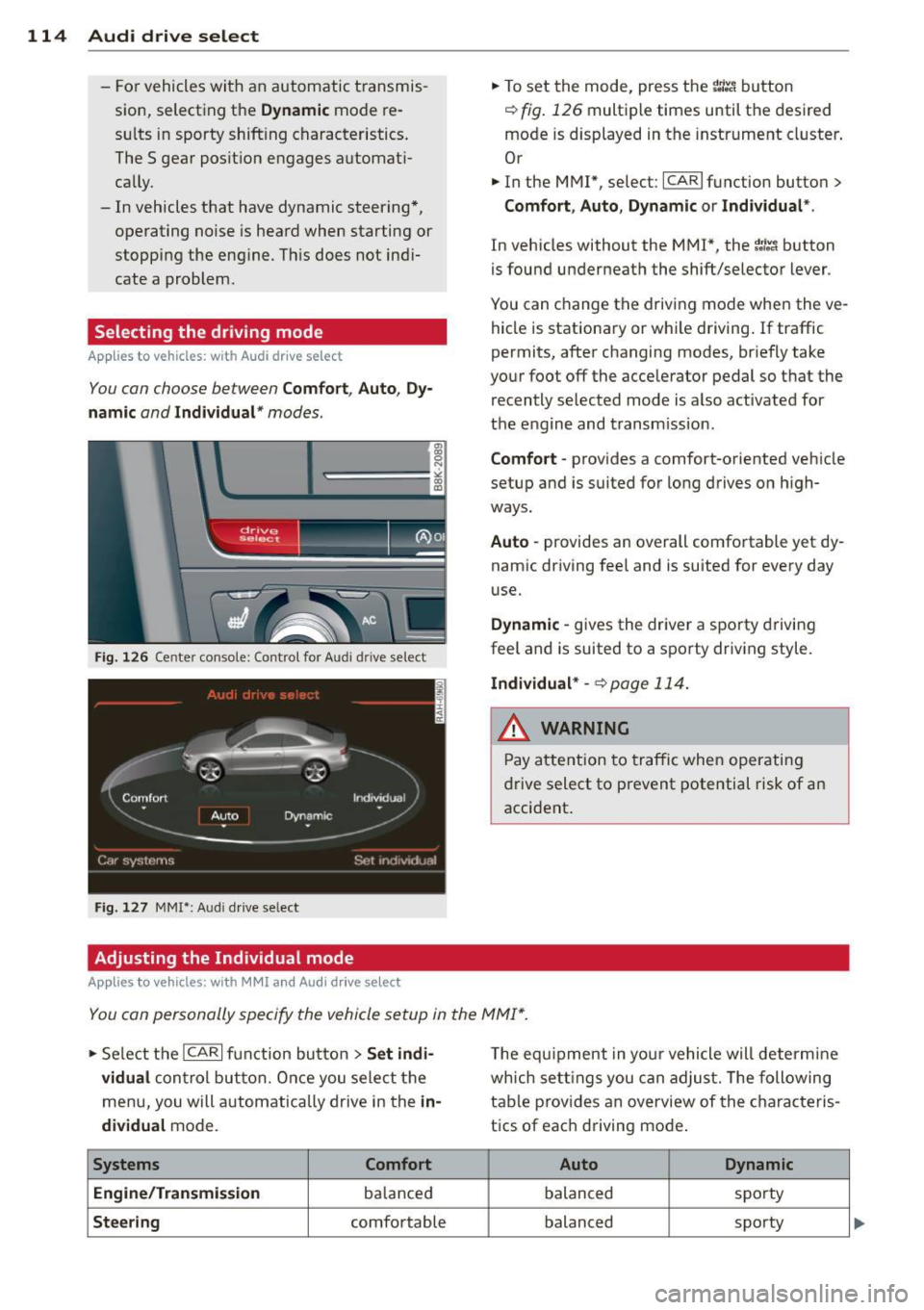
Fig. 126 Cen ter console: Control for Au di dri ve select
Fig. 127 MMI•: Aud i drive select
Adjusting the Individual mode
Applies to vehicles: with MMI and Aud i drive select
.,. To set the mode, press the r.:i:.~ button
~ fig. 126 multiple times until the desired
mode is displayed in the instrument cluster .
Or
.,. In the MMI", select:
ICARI function button>
Comfort, Auto, Dynamic or Individual *.
In vehicles without the MMI*, the~:/;,~ button
is found underneath the shift/selector lever .
You can change the driving mode when the ve hicle is stationary or wh ile driving . If traffic
permits, after changing modes, br iefly take
your foot off the acce lerator pedal so that the
recently selected mode is also activated for
the engine and transm ission .
Comfort -provides a comfort-oriented vehicle
setup and is suited for long drives on h igh
ways.
Auto -provides an overall comfortable yet dy
namic driving feel and is suited for every day
use.
Dynamic -gives the driver a sporty driving
feel and is suited to a sporty driving style.
Individual * -¢ page 114.
& WARNING
Pay atte ntion to traffic when operating
drive select to prevent potential risk of an
accident .
You can personally specify the vehicle setup in the MMI* .
.,. Se lect the ICAR I function button > Set indi·
vidual
control but ton. Once you select the
menu, you will automatically drive in the
in·
dividual
mode.
Systems Comfort
Engine /Transmission
balanced
Steering comfortable T
he equipment in your vehicle will determine
wh ich sett ings you can adjust. The following
table provides an overview of the characteris
tics of each driving mode .
Auto Dynamic
balanced spo
rty
balanced sporty
Page 122 of 296
120 Park ass is t
Sw it c hing off
.,. Drive faster than 9 mph (15 km/h), or
.,. take the vehicle out of reverse gear. The
acoustic parking system is immediately de
activated, and the rear view camera picture
is deactivated automatically after a per iod
of about 15 seconds, or
.,. switch off the ignition.
The delay in deactivating the camera provides an uninterrupted view behind the vehicle es
pec ially when maneuvering in tight parking
spaces and prevents the picture from turning
off the every time you sh ift out of reverse .
If the warning message appears in the display but not the rear view camera picture, read and
confirm the warning message. The acoustic
d istance signal is always active .
If you press a function button on the MMI
control console, the rear view camera picture
d isappears. The rear view camera picture reap
pears the next time you park.
Further information on the warn ing message
and the MMI control console can be found in
the MMI instruction booklet .
A WARNING
-Only use the rearview camera to assist
you if it shows a good, clea r picture. For
example, the image may be affected by
the sun sh in ing into the lens, dir t on the
lens or if there is a defect .
- Use the rearview camera only with the
rear lid completely closed. Make sure any
objects you may have mounted on the
rear lid do not block the rearview cam
era .
(D Tips
-The rear v iew camera picture is ava ila b le
as soon as the MM I Display or the MM I is
switched on, or the start-up phase is
completed.
- The sensors must be kept clean and free
of snow and ice for the park assist to op
erate. -
Yo u can change the vo lume and pitch of
the s ignals as we ll as the disp lay
¢ page 122 .
-What appea rs in the disp lay is time-de
layed.
· Reverse Parking
Applies to vehicles: with parking system (rear, with rear
v iew camera}
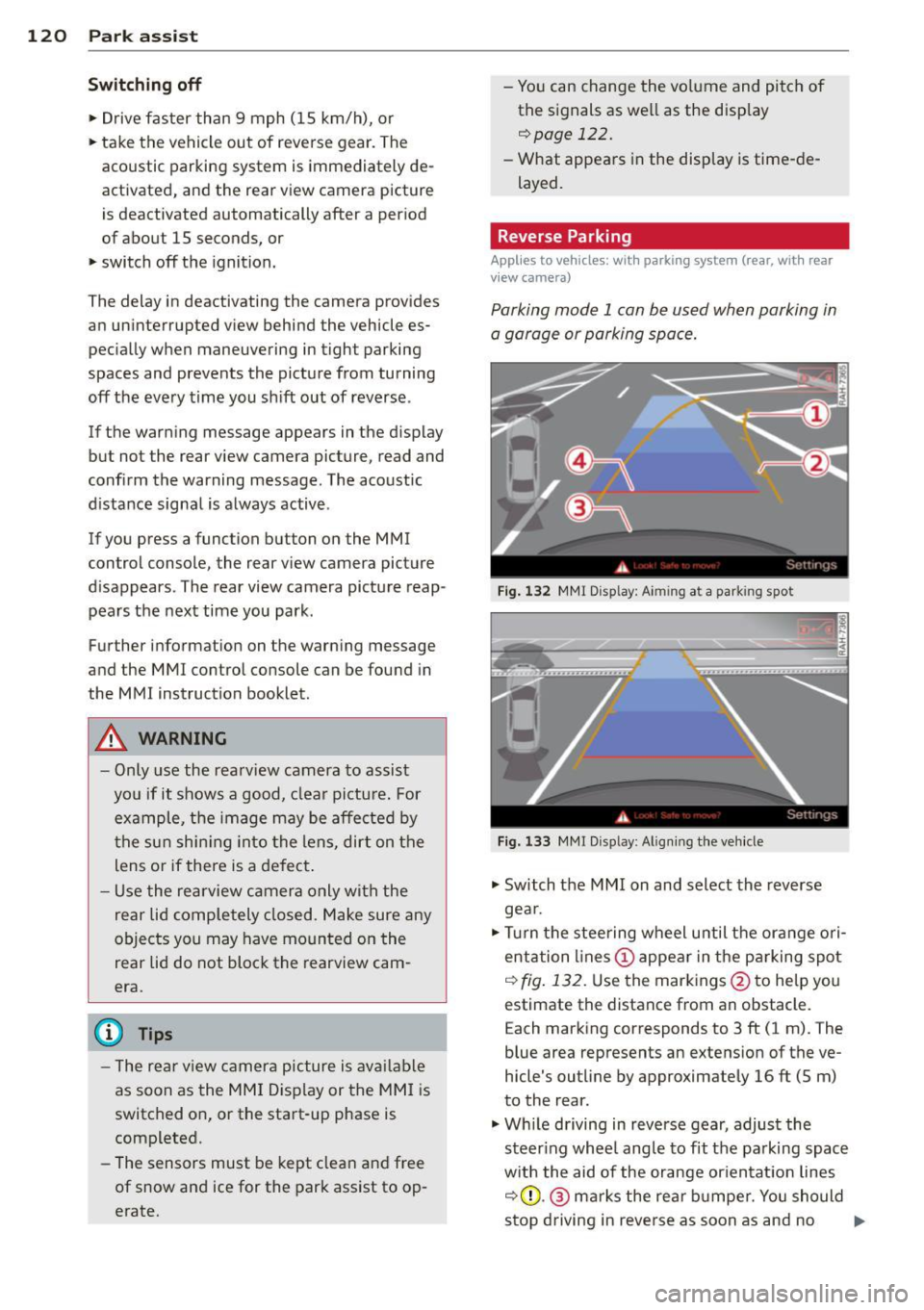
Parking mode 1 can be used when parking in
a garage or parking space.
F ig . 1 32 MMI Disp lay : A im ing a t a park ing spo t
Fig. 133 MMr Disp lay : A lig nin g the ve hicle
.,. Switch the MMI on and select the reverse
gea r.
.,. Turn the stee ring wheel u ntil the ora nge ori
entation lines(!) appea r in the pa rking spot
q fig . 13 2. Use the markings @to help you
estimate the distance from an obstacle. E ach marking corresponds to 3 ft (1 m). The
blue area represents an extens ion of the ve
hicle's outline by approximately 16 ft (5 m)
to the rear.
.,. Wh ile driving in reverse gear, adjust the
steer ing whee l angle to fit the parking spac e
w ith the aid of the orange or ien tat ion lines
q (D .@ marks the rear b umpe r. You should
stop driving in reve rse as soon as and no .,.
Page 161 of 296
possible that the airbag will inflate when
it is not supposed to, or will not inflate
when it should.
A WARNING
If the front airbag inflates, a ch ild without
a c hild restra int, in a rearward-facing c hild
safety seat or i n a forward-facing child re
st raint that has not been properly insta lled
w ill be seriously injured and can be k illed.
- Even though your veh icle is equipped
with an Advanced Airbag System, make certain that a ll children, especially 12
years and younge r, a lways ride on the
back seat properly restrained fo r their
age and size.
- Always instal l forw ard or rea r-facing
child safety seats on the rear seat -even
with an Advanced Airbag System.
- If you mus t install a rearward -facing
child safety seat on the front passenger
seat because of exceptional circ umstan
ces and the
PASSENGER AIR BAG OFF
light does not appear and stay on, imme
diately install the rear-fac ing ch ild safety
seat in a rear seating position and have
the a irbag system inspected by you r au
tho riz ed Aud i dea le r.
- A tight tether or other strap on a rear
wa rd-fac ing child restra int attached to
the fro nt passenger sea t can put too
much pressure on the weight-sens ing
mat in the seat and register mo re weight
than is ac tually on the seat. The heavier
weight registe red can make the system
wor k as though an adu lt were on the seat
and dep loy the Advanced Airbag when it
must be suppressed caus ing serious or
even fatal injury to the child .
- If, in exceptional circumstances, you
must install a forward-facing child re
st rain t on the front passenger seat, a l
ways move the seat into its rearmost po
sit ion in the seat's fo re and aft adjust
ment r ange, as far away from the airb ag
as possib le. The backrest m ust be adjus t
ed to an upr ight position. Make sure that
A irbag system 159
the PASSENGER AIR BAG OFF light
comes on and stays on all the time when
ever the ignition is switched on.
A WARNING
-
- If the PASSENGER AIR BAG OFF light
does not go out when an adult is sitting
on the front passenger seat after tak ing
the steps described above, make su re the
adu lt is prope rly seated and restra ined at
one o f the rea r seat ing pos itions.
- Have the airbag system inspected by
your author ized Audi dealer befo re trans
port ing anyone on the front pas senger
seat.
@ Tips
If t he weig ht-sensing mat in the front pas
senger seat detects an empty sea t, the
front airbag on the p assenger side will be
turned off, and
PASSENGER AIR BAG OFF
will stay on .
Repair, care and disposal of the airbags
Parts of the airbag system are installed at
many different p laces on your Aud i. Insta lling,
removing, servicing or repa iring a part in an
area of the vehicle can damage a part of an
a irbag system and p revent that system from
working p rope rly in a coll is ion.
There are some important t hings you have to
k n ow to make sure that the effectiveness of
t h e system w ill not be impaired and that d is
ca rded components do not cause injury o r pol
l ute the environment.
A WARNING
Im proper care, serv icing a nd rep air proce
d ur es can increase the risk of personal in
ju ry and death by preventing an a irbag
from deploying when needed or deploying
an a irbag unexpectedly:
- Never cover, obst ruct, or change the
steer ing whee l horn pad or airbag cover
or the instrument panel or mod ify them
in any way. •
•
Page 163 of 296
example, increase the force levels measured by the sensors and make the airbag system
deploy in crashes in which it would not deploy if the changes had not been made. Other
kinds of changes may reduce the force levels
measured by the sensors and prevent the air
bag from deploying when it should.
The sensors in the safety belt buckle for the
driver and front passenger seat tell the elec
tronic control module if the safety belt is
latched or not. If the safety belt is being used,
the front airbag will deploy at a slightly high
er rate of vehicle deceleration than if the safe
ty belt is not being used. Therefore, in a par
ticular collision, it is possible that an airbag
will not deploy at a seating position where the
safety belt is being used but will inflate at the
position where the safety belt is not being
used.
It is important that nothing interfere
with the safety belt buckles so that the sen
sors can send the correct information about
safety belt use to the electronic control unit .
& WARNING
Changing the vehicle's suspension includ
ing use of unapproved tire-rim combina
tions can change Advanced Airbag per
formance and increase the risk of serious personal injury in a crash.
- Never install suspens ion components
that do not have the same performance characteristics as the components origi
nally installed on your vehicle.
- Never use tire-rim combinations that
have not been approved by Audi.
A WARNING 1= -
Items stored between the safety belt
buckle and the center console can cause
the sensors in the buckle to send the
wrong information to the electronic con
trol module and prevent the Advanced Air
bag System from working properly.
- Always make sure that nothing can inter-
fere with the safety belt buckles and that
they are not obstructed.
Airbag system 161
Side airbags
Description of side airbags
The airbag system can provide supplemental
protection to properly restrained occupants .
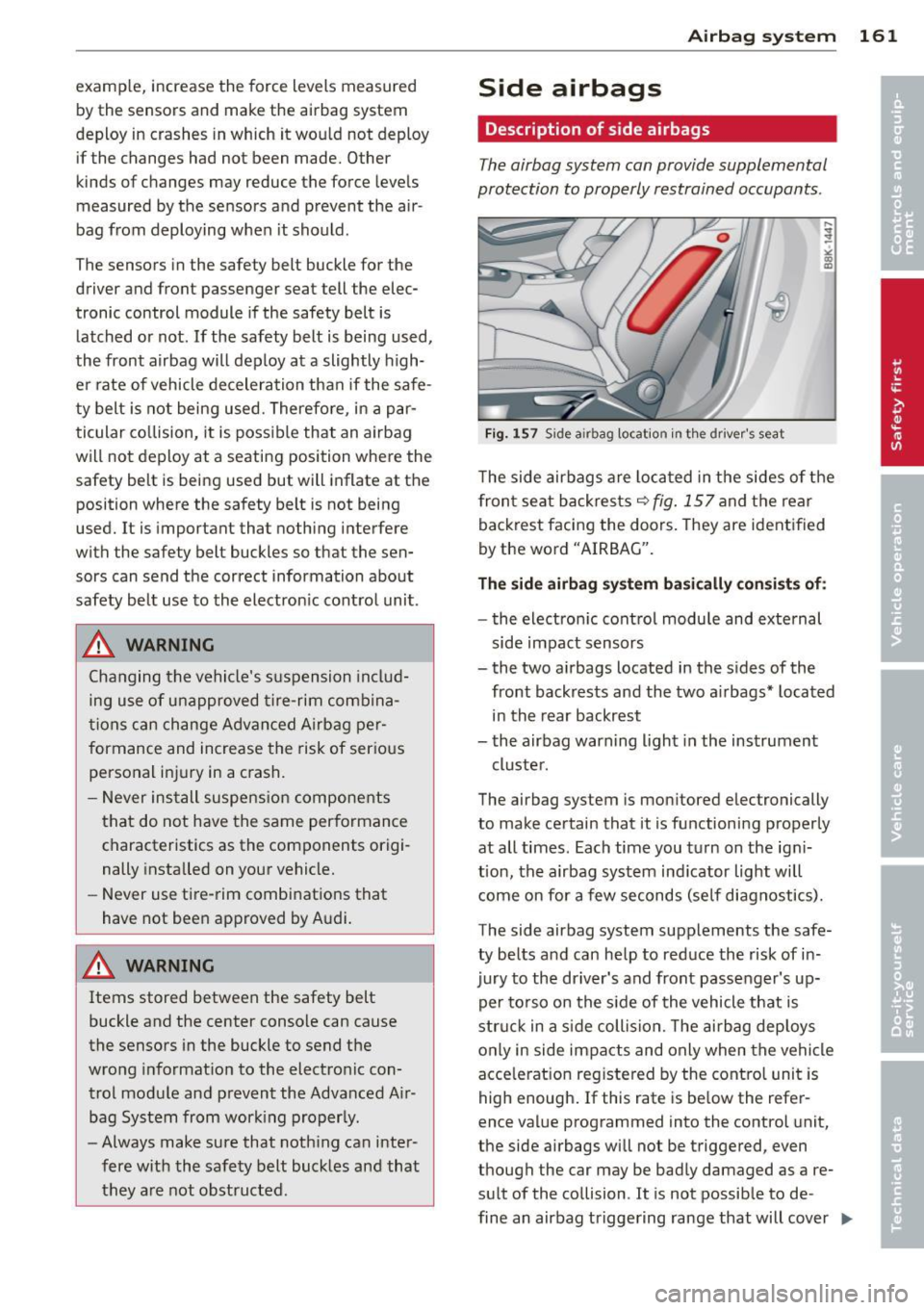
Fig. 157 Side a irbag locatio n in the driver 's seat
~ co Q)
The side airbags are located in the sides of the
front seat backrests~
fig. 157 and the rear
backrest facing the doors. They are identified
by the word "AIRBAG".
The side airbag system basically consists of:
- the electronic control module and external
side impact sensors
- the two airbags located in the sides of the front backrests and the two airbags* located
in the rear backrest
- the airbag warning light in the instrument
cluster .
The airbag system is monitored electronically
to make certain that it is functioning properly
at all times . Each time you turn on the igni
tion, the airbag system indicator light will
come on for a few seconds (self diagnostics).
The side airbag system supplements the safe
ty belts and can help to reduce the risk of in
jury to the driver's and front passenger's up
per torso on the side of the vehicle that is
struck in a side collision. The airbag deploys
only in side impacts and only when the vehicle
accelerat ion registered by the control unit is
high enough. If this rate is below the refer
ence value programmed into the control unit,
the side airbags will not be triggered,
even
though the car may be badly damaged as a re
sult of the collision . It is not possible to de -
fine an airbag triggering range that will cover
II>
Page 188 of 296
186 Intelligent technology
Intelligent technology
Notice about data
recorded by vehicle
control modules
Your veh icle is not equipped with an Event Da
ta Recorde r (EDR), ins talled by some manu
facture rs fo r the express p urpose of capturing
data for retrieval after an accident or cras h
event . EDR's are sometimes ca lled "crash re
corders".
Some state laws restr ict the retr ieval or down
loading of data stored by EDR's that were in
stalled in a vehicle for the express purpose of retrieving data after an accident or crash
event without the owner's consent.
A ltho ugh yo ur vehicle is not equ ipped wit h an
EDR, it is equipped with a number of electron
ic control modules for various vehicle systems
such as, for examp le, eng ine f unction, em is
sion control, as well as for the airbags and
safety belts.
These electronic contro l modules also record
vehicle-re lated data during norma l vehicle op
erat ion for diagnostic and repa ir purposes.
The recording capacity of the electronic con
trol modules is limited to data (no sound is re
corded) and only a small amount of data is ac
tually recorded ove r a ve ry limited pe riod of
time and stored when a sys tem faul t or o ther
cond ition is sensed by a cont ro l u nit. Some of
the data then stored may re late to vehicle
speed, direction, braking as we ll as restraint
system use and performance in the event of a
crash or other condit ion. Stored data can only
be read and downloaded w ith special equip
ment.
Electronic Stabilization
Control (ESC)
Description
ESC helps to improve road holding and vehicle
dynamics to help reduce the probability of
skidd ing and loss of ve hicle control. It works
only when the eng ine is running. ESC detects certain difficult driving situat
ions, including
when the vehicle is beginning to spin (yaw)
o ut of control and he lps you to get the veh icle
back under control by se lectively braking the
whee ls, and/or reducing eng ine power and
providing steer ing ass istance to he lp hold the
vehicle o n the dr iver's intended course. The in
dicator light
J.i) in the instrument cluster
blinks when ESC is ta king action to help yo u
control the veh icle.
ESC has limitations.
It is importa nt to remem
ber that ESC cannot overcome the laws of
physics. It will not always be able to help out
under a ll cond it ions you may come up aga inst.
F or example, ESC may not always be able to
help you master situations where there is a
s u dden change in the coefficient of friction of
the road surface. When there is a section of dry road that is sudden ly covered w ith water,
s lush or snow, ESC cannot perform the same
way it wou ld on the dry surface . If the ve hicle
hydroplanes (rides on a cushion of water in
stead of the road surface), ESC will not be
able to help you steer the vehicle be cause con
tact with the pavement has been in terrupted
and the vehicle cannot be braked or steered .
D uring fast cornering, particularly on winding
roads, ESC cannot always deal as effectively
with difficult driving situations than at lower
speeds. When towing a trailer, ESC is not able
to help you regain control as it would if you
were not tow ing a trailer.
Always adjust your speed and driving style to road, traffic and weather condit ions. ESC can
not override the vehicle's physical limits, in
crease the availab le tract ion, or keep a ve hicle
on the road if road departure is a result of
driver inattent io n. Instead, ESC imp roves the
poss ibil ity of keeping the vehi cle under con
trol and on the road during extreme maneu
vers by using the d river's steering inputs to
help keep the vehicle going in the intended di
rection . If you are traveling at a speed that
ca uses you to run off the road before ESC can
provide any assistance, you may not experi
ence the benefits of ESC.
Page 212 of 296
210 Fuel supply and filling your fuel tank
Seasonally adjusted gasoline
Many gasoline grades are blended to perform
especially well for winter or summer driving. During seasonal change-over, we suggest that
you fill up at busy gas stations where the sea
sonal adjustment is more likely to be made in
time.
CD Note
- Fuels containing a high percentage of
ethanol such as ESO and E85 may only be used in vehicles with flexible fuel en
gines. Using high ethanol fuel in vehicles not equipped with flexible fuel engines
can cause severe engine damage.
- Methanol fuels which do not meet these
requirements may cause corrosion and
damage to plastic and rubber compo nents in the fuel system.
- Do not use fuels that fail to meet the
specified criteria in this chapter .
- If you are unable to determine whether
or not a particular fuel blend meets the
specifications, ask your service station or
its fuel supplier.
- Do not use fuel for which the contents
cannot be identified.
- Fuel system damage and performance
problems resulting from the use of fuels
different from those specified are not
the responsibility of Audi and are not
covered under the New Vehicle or the
Emission Control System Warranties.
- If you experience a loss of fuel economy
or driveability and performance prob
lems due to the use of one of these fuel
blends, we recommend that you switch
to unblended fuel.
Ethanol fuel (Bio -ethanol)
App lies to vehicles: with flexible fuel e ngi ne
You con recognize vehicles with a flexible fuel
engine by looking at the label on the inside of the fuel filler flap.
Vehicles with flexible fuel engines may be op
erated with bio-ethanol fuels such as E85 (8S% ethanol and
15% gasoline) or with un
leaded gasoline (91 AKI/ROZ 95). The vehicle
may also be operated with a mixture of these
fuels.
Your fuel consumption will increase when us
ing bio-ethanol fuels due to the lower amount
of energy contained per unit volume in etha
nol.
Warming up the flexible fuel engine in low temperatures
Due to the chemical composition of bio-etha
nol, a certain amount of fuel ends up in the
engine oil when driving short distances in very
low temperatures . This fuel evaporates again
when the engine is warmed up.
II Please warm up engine.
If the driver message appears in the instru
ment cluster display, drive with a warm en
gine to reduce the oil level.
CD Note
- Never fill with methanol or with a higher
percentage of bio-ethanol than 85%
(E85). A higher percentage of bio-etha
nol in the fuel can cause damage to the
engine or to the fuel system.
- If you use only E85, it is recommended
to fill the fuel tank completely with un
leaded premium grade gasoline every
5,000 miles.
- If you experience starting, rough idle or
hesitation driveability problems, fill the
fuel tank completely with unleaded pre mium grade gasoline and drive it nor
mally until the gasoline is used. See your
authorized Audi dealer if the problem
persists.
- Inform your authorized Audi dealer that
you are operating or have operated the
vehicle with E85.
- Read and follow the information and tips
about gasoline
c::> page 209. .,.