steering AUDI S4 2014 User Guide
[x] Cancel search | Manufacturer: AUDI, Model Year: 2014, Model line: S4, Model: AUDI S4 2014Pages: 296, PDF Size: 73.56 MB
Page 86 of 296
84 On th e road
in the hy dra ulic valve adjusters. This is
norma l and not a cause for concern.
- If you leave the vehicle with the ignition
switched on, the ignition will switch
off
after a certain period of time . Please
note that e lectrica l equipment such as
exter ior lights w ill switch
off as well
when that happens.
Switching engine off
Applies to vehicles: with conven ience key
" Bring your vehicle to a complete stop.
"Automatic transmiss ion: Move the selector
lever to the P or N pos it ion.
" Press the
!START ENGINE STOPI button
r::!;page83, fig. 97.
Steering lock
The stee ring locks when you turn the engine
off us ing the I STAR T ENGINE STOP I button
and open the dr iver's door. The locked stee r
i ng helps preven t vehicle theft.
Emergency off
If necessary, the eng ine ca n be sw itched off
with the selector leve r in the R or D/S pos i
tions. To do so, step on the brake pedal and
p ress and hold the
I START ENGINE STOP I but
ton vehicle speed must be less than 6 mph (10 km/h).
_& WARNING
- Never turn off the eng ine before the ve
hicle has come to a complete stop . The
full function of the brake booster and the
power steering is not guaranteed. You
must use more force to turn or brake if
necessary . Because you cannot steer and
brake as you usua lly would, this could
lead to crashes and se rious injur ies.
- For safety reasons, you s hould always
par k your vehicle with the se lector lever
in P. Ot herwise, the ve hicle co uld inad
vertent ly roll away.
- T he radiator fan ca n continue to ru n for
up to 10 mi nutes even after yo u have
tu rne d
off the eng ine and remove d the ignition key. The radiator fan can a
lso
turn on again if the engine coo lant heats
up because of intense sunlight or heat
bu ild-up in the engine compartment.
- Always take the key w ith you whenever
you leave your ve hicle. Otherw ise, the
eng ine could be sta rted or electrical
equ ipme nt such as the power windows
could be ope rated. This can lead to seri
ous injury.
(D Note
If the engine has bee n under heavy load
for an extended pe riod, heat bu ilds up in
the engine compartment after the engine
i s sw itched
off -there i s a r is k of damag ing
the engine. A llow the eng ine to run at id le
for about two minutes before switching it
off.
Driver messages
Ignition i s on
This message appears and a warning tone
sounds if you open the d river's door when the
ignition is sw itched on.
No key id entified
This message appears when the
I S TART ENGINE STOPI button is pressed if
there is no master key ins ide the veh icle or if
the system does not recognize it . Fo r exam
ple, the master key cannot be recognized if it
is covered by an object (e.g. al uminum b rief
case) which
screens the radio s ignal. Elec tron
ic dev ices such as cell phones can also inter
fere with the radio s ignal.
Pres s brak e pedal to start engine
This message appears if you do not press the
brake pedal to start the eng ine in a veh icle
with an automat ic transm iss ion.
Press clutch pedal to sta rt engine
T his message appears if yo u do not press the
clutch pedal to start the engine in a vehicle
with a manual transmission. .,.
Page 99 of 296
A WARNING 1=
Please note that the drive wheels can spin
if kick-down is used on a smooth slippery
road - there is a risk of skidding.
Launch Control Program
App lies to vehicles: with S tronic
The Launch Control Program provides the
best acceleration possible when starting from
a stop .
Requirement : The engine must be at operat
ing temperature and the steering wheel must
not be turned .
~ Sedan: Press the l.e OFFI button ¢ page 188
while the engine is running . The II indica
tor light illuminates in the instrument clus
ter and
Stabilization cont ro l ( ES C): S port .
Warning! R estrict ed s tabilit y
appears in the
driver information system display.
~ all road: Press the l.e O FF I but to n
¢
page 188 while the engine is running.
T he
II indicator light illuminates in the in
strument cluster and
Stabilization control
( ES C): Off ro ad. W arning! Restri cted stabil
it y
appears in the driver information system
display.
~ Move the selector lever to the D/S pos ition
to select sport mode (S) or select the
dy
namic
driving mode in drive select*
¢ page 114.
~ Press the bra ke peda l st rongly wit h your left
foot and hold it dow n for at least 1 second.
~ At the same time, press the accelerator ped
al down complete ly with your right foot un
ti l the engine reaches and maintains a high
RPM .
~ Remove your foot from the brake pedal
within S seconds¢.& .
A WARNING
-Always adapt your driving to the traffic
flow .
- Only use the Launch Control Program when road and traffic condit ions allow it
and other dr ivers will not be endangered
-
Tran sm iss ion 97
or annoyed by your driving and the vehi
cle's acceleration.
- Please note that the driving wheels can
spin and the vehicle can break away
when sport mode/offroad mode is
sw itched on, especially when the road is
slippery.
- Once you have accelerated, you shou ld
sw itch sport mode/offroad mode off by
press ing the
I~ O FFI button .
(l) Tips
- The transmission temperature may in
crease s ignificantly after using the
Launch Control Program. If that hap-
pens, the program may not be availab le
for a few m inutes .
It will be ava ilable
again after a cool-down per iod.
- When accelerating using the Launch
Cont ro l program, a ll vehicle parts are
subjec t to heavy loads. This can result in
increase d wear.
Transmission malfunction
Applies to vehicles: with multitronic/S tronic/tiptronic
[il Transmission : Pre ss brake pedal and se
lect gear again.
Press the br ake peda l and select the desired
selector lever posi tion again. You ca n then
continue driving .
[il Transmi ssion overh eating : Pl ea se drive
con servatively .
The transm iss ion temperature has increased
s ignificantly due to the sporty d riving manner.
D rive in a less sporty ma nner until the tem
perature re turns to the normal range and the
i ndica tor ligh t switches o f.
[O] Transmission malfunction : You can con
tinu e driving
There is a system malfunction i n the transmis
s io n. You may cont inue d rivi ng . Drive to your
authorized Aud i dea le r or qualified repa ir fa
c ili ty soon to have the ma lfunction corrected. ..,.
Page 115 of 296
Audi drive select Driving settings
Introduction
App lies to vehicles: with Audi drive select
Drive select provides the possibility to experi
ence diffe rent types of vehicle sett ings in one
vehicle. For instance, using the three
Com
fort, Auto and Dynamic modes, the driver can
switch from a sporty to a comfortab le driving
mode with the press of a button.
Addit ionally, in vehicles with
MM I*, the vehi
cle setup for
Individual* mode can be cus
tomized by you. This makes it possib le to
combine settings such as a sporty engine tun
ing with comfortable steering.
A WARNING
Improper use of the Audi drive select can
cause collisions, other acc idents and seri
ous personal injury.
Description
Applies to vehicles: with Audi drive select
The vehicle setup in each mode depends on
the vehicle's features . However, the engine,
automatic t ransmission* and steering are al
ways involved.
-
Engine and automatic transmission*
Depending on the mode, the engine and the
automatic transmission respond quicker or in
a more ba lanced manner to acce lerator pedal
movements. In the sporty dynamic mode, the
automatic transmission shifts at higher RPMs .
Steering
The steering adapts in terms of steering effort
and steering ratios . Indirect steer ing that
moves easily, like the steering in comfort
mode , is best su ited to long dr ives on a high
way. In contrast, dynamic mode prov ides
sporty, di rect steering.
The follow ing applies to vehicles with dynam ic
steer ing*: the steering ratio changes based on
vehicle speed in order to maintain optimum
Audi drive select 113
steering effort for the driver at all times. This
sets the steering to be less sensitive at higher
speeds in order to provide improved vehicle
control. At reduced speeds, however, steering
is more direct in order to keep the steering ef
fort as minimal as possible when the driver is
maneuveri ng the veh icle . At low and average
speeds, dynamic steering addit iona lly pro
vides more responsive steering performance.
Adaptive dampers*
The adaptive dampers* use sensors to record
information regarding steering movements,
braking and acceleration operations by the
driver , road surface, driving speed, and load.
T his makes it possible to adapt damp ing to
the d riving situation v irtually i n rea l time.
Drive select also makes it possible to satisfy
the desire for sporty suspension (Dynamic)
and comfortab le suspension (Comfort) with
out giving up balanced tuning (Auto) .
Sport differential*
As a component of the all whee l dr ive system
(quattro)
~ page 192, the sport differential*
distributes the driving power to the rear axle
depending on the situation . The distribution
of power varies depending on the mode se lected. The goal is a high level of agility and
ability to accelerate on curves . The vehicle is
very respons ive to steering .
Audi adaptive cruise control*
The behavior when accelerating can be adjust
ed from comfortab le to sporty, depending on
the drive select mode. Adaptive cruise control
also responds to the driving behavior of the
vehicle ahead in a more conservative or sporty
manner .
Engine sound*
The sound of the engine is adapted to the se
lected mode and ranges from subtle to sporty.
0) Tips
-In some models, the maximum vehicle
speed can only be reached in the
Auto
and Dynamic modes.
Page 116 of 296
114 Audi drive select
-For vehicles with an automatic transmis
sion, selecting the
Dynamic mode re
su lts in sporty shifting characteristics .
The S gear position engages automati
cally.
- In vehicles that have dynamic steering*,
operating noise is heard when starting or
stopping the eng ine . This does not ind i
cate a problem .
Selecting the driving mode
Applies to vehicles: with Audi drive select
You can choose between Comfort, Auto, Dy
namic
and Individual * modes.
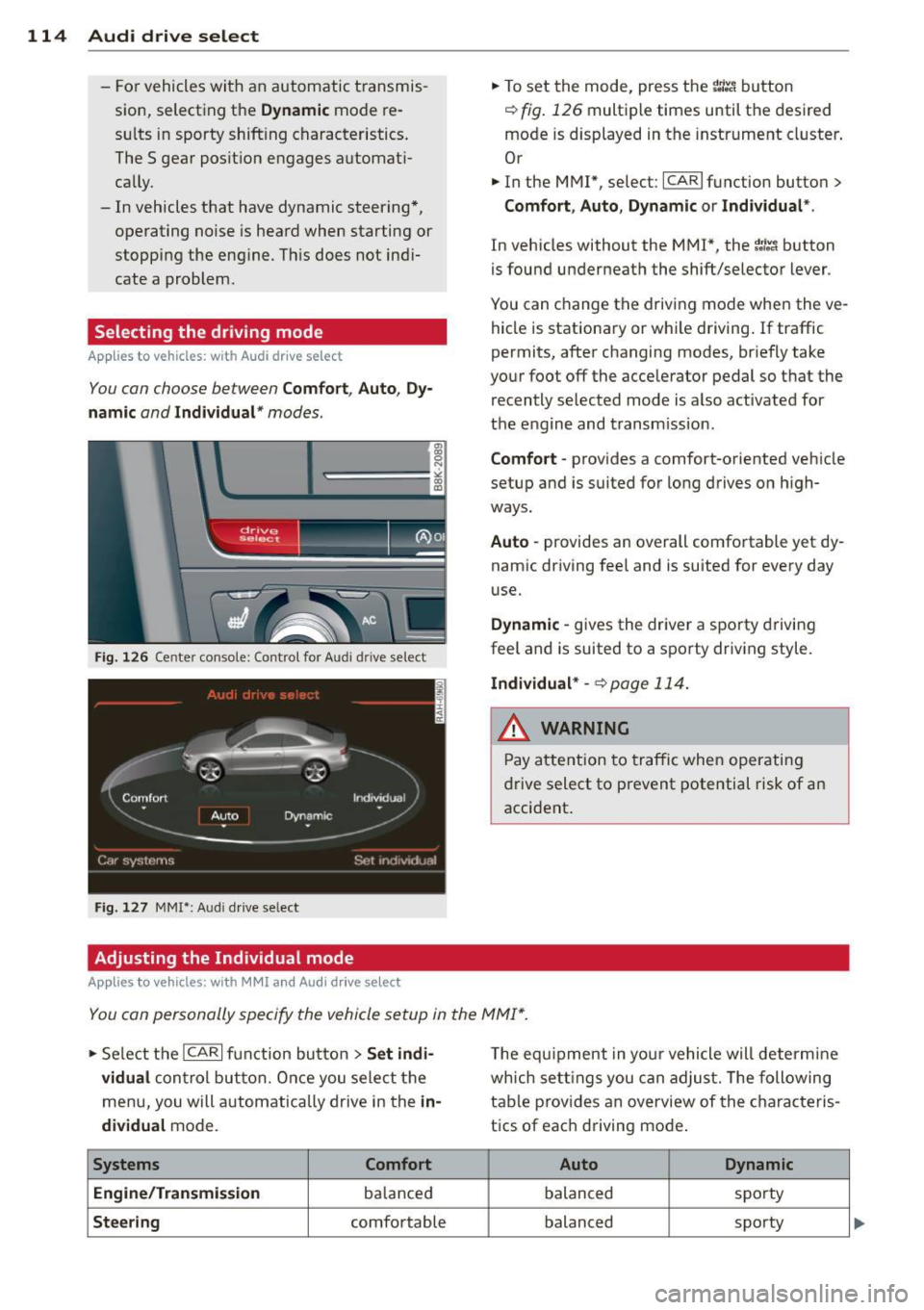
Fig. 126 Cen ter console: Control for Au di dri ve select
Fig. 127 MMI•: Aud i drive select
Adjusting the Individual mode
Applies to vehicles: with MMI and Aud i drive select
.,. To set the mode, press the r.:i:.~ button
~ fig. 126 multiple times until the desired
mode is displayed in the instrument cluster .
Or
.,. In the MMI", select:
ICARI function button>
Comfort, Auto, Dynamic or Individual *.
In vehicles without the MMI*, the~:/;,~ button
is found underneath the shift/selector lever .
You can change the driving mode when the ve hicle is stationary or wh ile driving . If traffic
permits, after changing modes, br iefly take
your foot off the acce lerator pedal so that the
recently selected mode is also activated for
the engine and transm ission .
Comfort -provides a comfort-oriented vehicle
setup and is suited for long drives on h igh
ways.
Auto -provides an overall comfortable yet dy
namic driving feel and is suited for every day
use.
Dynamic -gives the driver a sporty driving
feel and is suited to a sporty driving style.
Individual * -¢ page 114.
& WARNING
Pay atte ntion to traffic when operating
drive select to prevent potential risk of an
accident .
You can personally specify the vehicle setup in the MMI* .
.,. Se lect the ICAR I function button > Set indi·
vidual
control but ton. Once you select the
menu, you will automatically drive in the
in·
dividual
mode.
Systems Comfort
Engine /Transmission
balanced
Steering comfortable T
he equipment in your vehicle will determine
wh ich sett ings you can adjust. The following
table provides an overview of the characteris
tics of each driving mode .
Auto Dynamic
balanced spo
rty
balanced sporty
Page 117 of 296
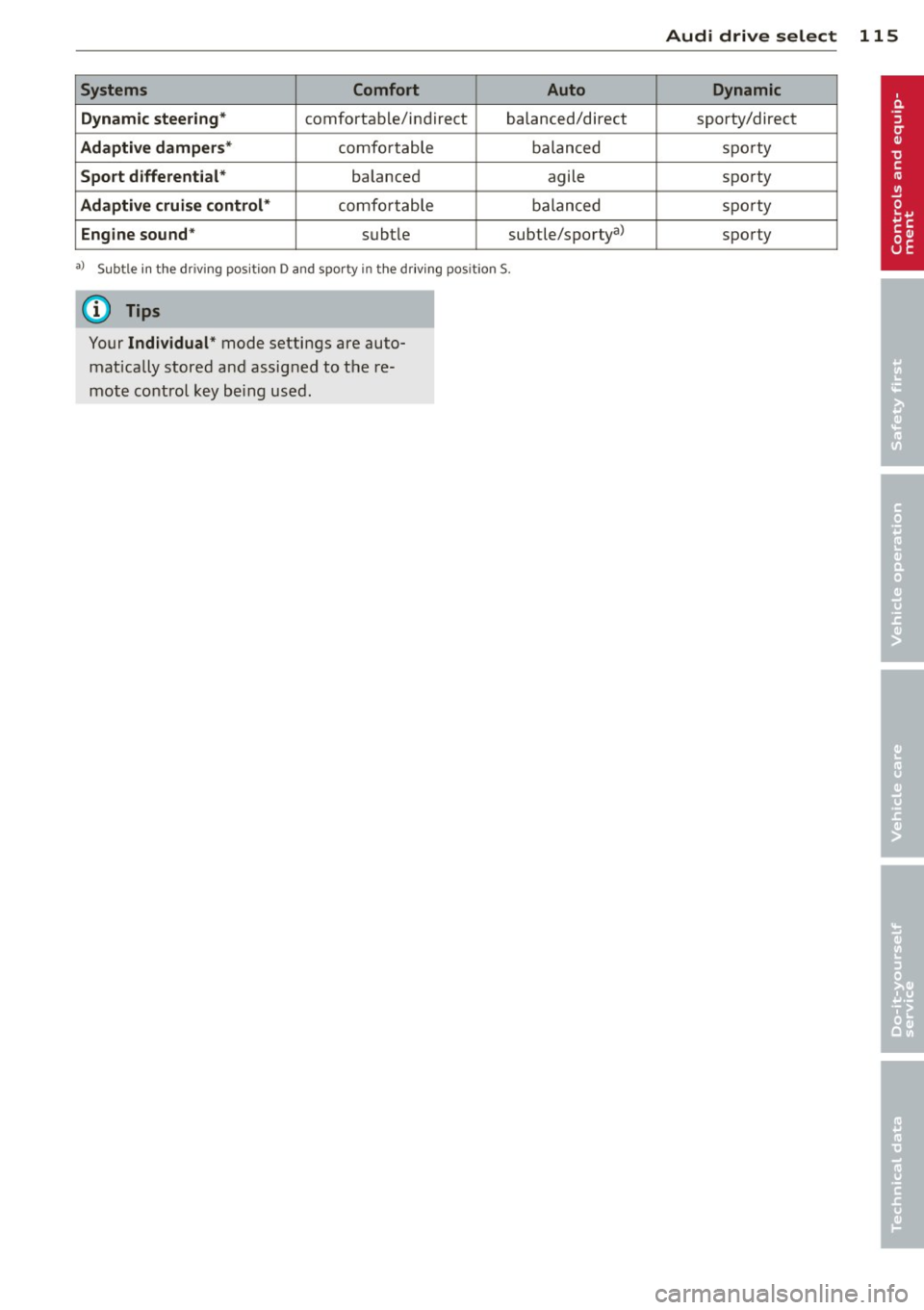
Systems Comfort
Auto
Dynamic steering*
comfortab le/ind ire ct balanced/direct
Adaptive damper s* comfo rtable balanced
Sport different ial* ba lanced agile
Adaptive cruise control* comfo rtable balanced
Engine sound* subtle subtle/sportya>
a)
Subt le in the dri ving pos ition D and sporty in t he dr iv ing pos ition S.
(D Tips
Your Individual * mode settings are auto
mat ically stored and assigned to the re
mote control key being used.
Audi drive select 115
Dynamic
sporty/direct
spo rty
spo rty
spo rty
sporty
Page 123 of 296
later than when the red orientation line©
abuts an object¢,&.!
A WARNING
- The rear view camera does not show the
entire area behind the vehicle
¢
page 118, fig. 130. Watch out espe
c ially for small children and animals. The
rear view camera cannot always detect
them, posing risk of an accident!
- Please note that objects not touch ing the
ground can appear to be further away
than they really are (for example, the
bumper of a parked vehicle, a trailer
hitch, or the rear of a truck). In this case,
yo u should not use the help lines to he lp
with parking, which poses danger of an
accident!
{[) Note
-Low obstacles already signaled by a
warning can disappear from the system's
detection range as they are approached
and will not continue to be signaled. Ob
j ects such as barrier chains, trailer draw
bars, thin pa inted vertical poles or fen
ces may not be detected by the system, posing risk of damage.
- In the MMI display, the direction of trav
el of the vehicle rear is represented de
pending on the steering wheel angle.
The vehicle front swings out more than
the vehicle rear. Maintain plenty of dis
tance from an obstacle so that your out
s ide mirror or a corner of your vehicle
does not collide with any obstacles -dan
ger of accident!
Park assist 121
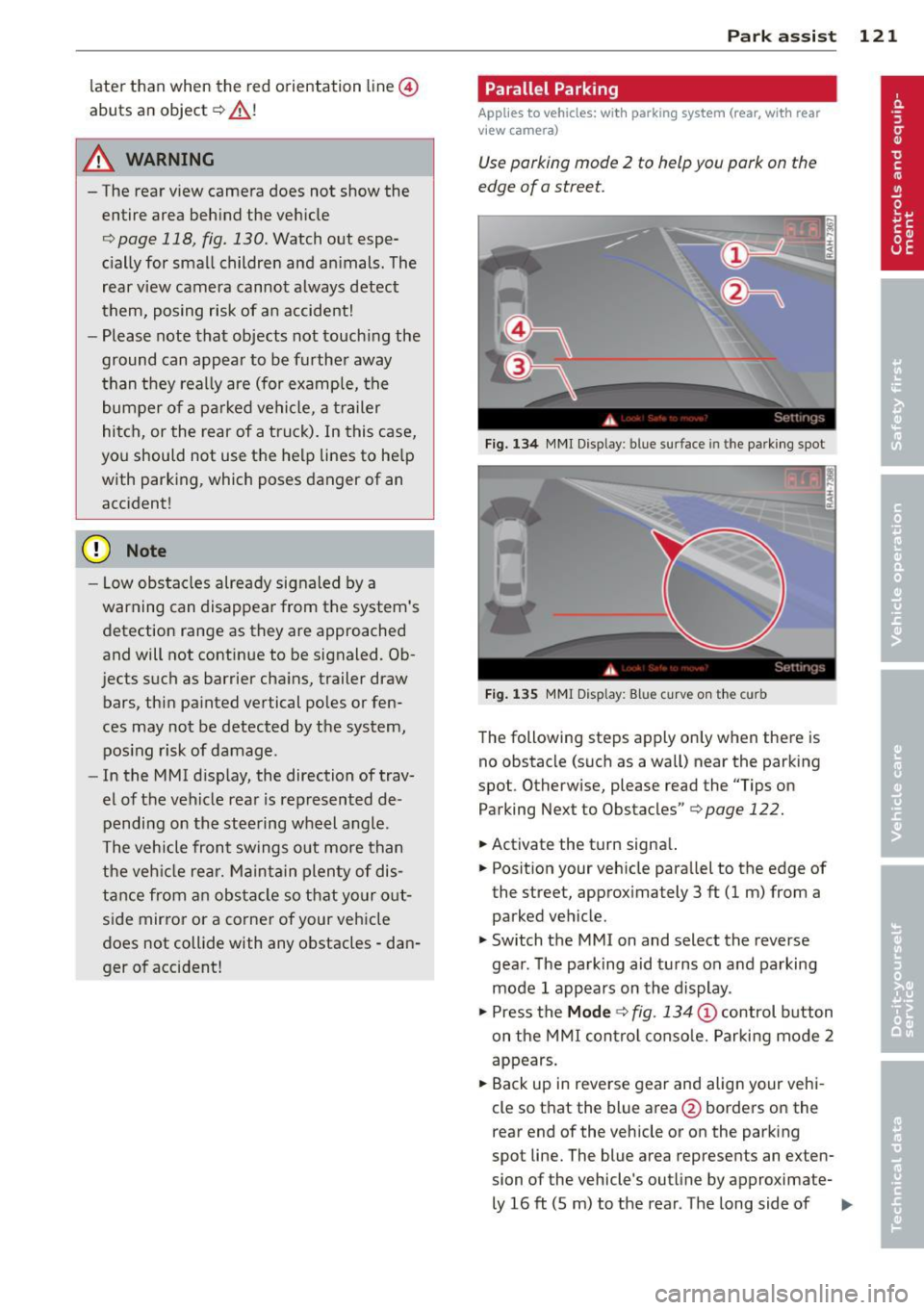
Parallel Parking
Applies to vehicles: with parking system (rear, with rear
v iew camera)
Use parking mode 2 to help you park on the
edge of a street.
Fig. 134 MMI Display: blue surface in the parking spot
Fig. 135 MMI Display: Blue curve on the curb
The following steps apply only when there is
no obstacle (such as a wall) near the parking
spot. Otherwise, please read the "Tips on Parking Next to Obstacles"¢
page 122.
.,.. Activate the t urn signa l.
.,.. Position your vehicle parallel to the edge of
the street, approximately 3
ft (1 m) from a
parked vehicle.
.,.. Switch the MMI on and select the reverse
gear. The parking aid turns on and parking
mode 1 appears on the display .
.,.. Press the
Mode ¢ fig. 134 (!) control button
on the MMI contro l conso le. Parking mode 2
appears .
.,.. Back up in reverse gear and align your vehi
cle so that the blue area @borders on the
rear end of the vehicle or on the parking
spot line. The blue area represents an exten
sion of the vehicle's outline by approximate-
ly 16
ft (5 m) to the rear. The long side of liJJ,
Page 124 of 296
122 Park assis t
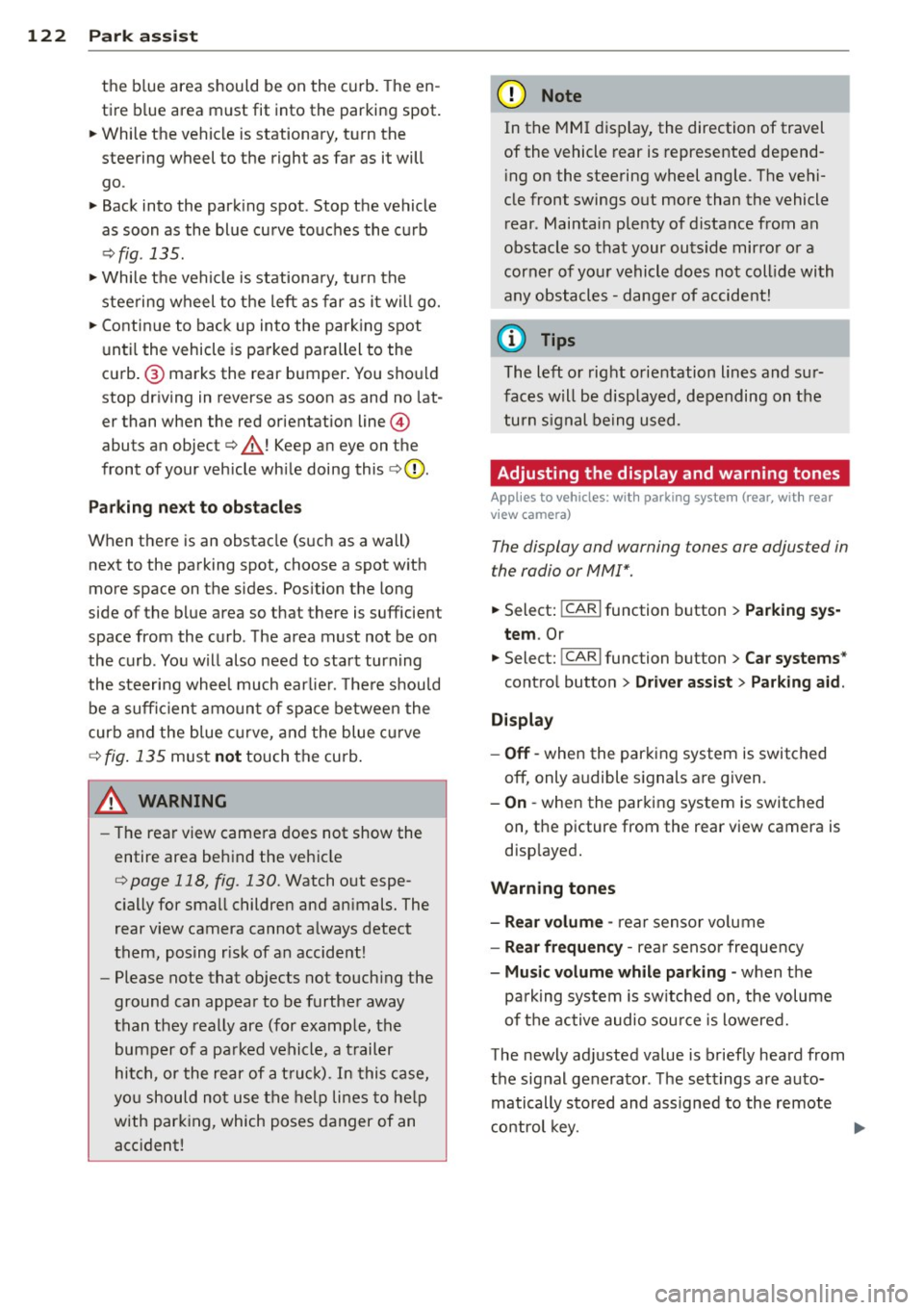
the b lue area should be on the curb. The en
ti re b lue area must fit into the parking spot.
• While the vehicle is stationary, turn the
steering wheel to the right as far as it will
go.
• Back into the park ing spot . Stop the vehicle
as soon as the blue curve touches the curb
¢ fig . 135.
• While the vehicle is stationa ry, turn the
steering wheel to t he left as far as i t wi ll go.
• Conti nue to bac k up into the park ing spot
unti l the vehicle is pa rked parallel to the
c ur b.® marks the rear bumper . You sho uld
stop dr iving in reverse as soon as and no lat
er than when the red orientation line@
abuts an object¢,&! Keep an eye on the
front of your veh icle wh ile doing this
c> (D .
Pa rking ne xt to obstacle s
When there is an obstacle (such as a wall)
next to the parking spot, choose a spot w ith
more space on the sides. Pos ition the long
side of the blue area so that there is sufficient
space from the curb . T he area must not be on
the curb . Yo u will also need to start turn ing
the steer ing whee l much ear lie r. T he re s hou ld
be a suff ic ient amoun t of sp ace between the
curb and the b lue curve, and the blue c urve
¢
fig . 135 must not touch the curb .
8_ WARNING
-The rea r view came ra does not show the
entire area beh ind the veh icle
¢
page 118, fig. 130. Watch o ut espe
cially for small children and an imals. The
rear view camera cannot a lways detect
them, pos ing risk of a n accide nt!
- Please note that objects not touch ing the
ground can appear to be further away
than they really are (for examp le, the
bumper of a pa rked vehicle, a t railer
hit ch, or the rear of a t ru ck ). In this case,
yo u shoul d no t use the help li nes to he lp
with par king, which poses danger of an
acc ident!
(D Note
In the M MI dis p lay, the direction of travel
of the vehicle rear is represented depend
i ng on the steering wheel angle . The vehi
cle front swings out more than the vehicle
rear. Mainta in plenty of dista nce from an
obstacle so that your outs ide mir ro r or a
corner of you r vehicle does not coll ide with
any obstacles - dange r of accide nt!
(D Tips
The left o r right orie ntation lines and su r
faces will be disp layed, depending on t he
t u rn s ignal being used .
Adjusting the display and warning tones
Applies to vehicles: with parking system (rear, with rear
view camera)
The display and warning tones are adjus ted in
the radio or MMI*.
.. Select: !CAR I function button> Parking sys
tem .
Or
--.. Select: !C AR I func tion but ton> Car systems "
control butto n> Driver assist > Parking aid .
Di splay
- Off -when the parking system is switched
off, only a udible s ignals a re given .
-On -when the par king system is switched
on, the picture from the rear view camera is
disp layed.
Warning tones
- Rear volum e -
rear sensor vo lume
- Rear frequency -rear senso r frequency
- Music volume whil e parking -when the
parking system is sw itched on, the volume
of the active audio sour ce is lowered.
The newly ad justed value is briefly heard from
the sig nal generato r. The sett ings are auto
matically stored and assigned to the remote
control key. ..,
Page 130 of 296
128 Driving Safely
Driving Safely
General notes
Safe driving habits
Please remember -safety first!
This chapter contains important information,
tips, instructions and warnings that you need
to read and observe for your own safety, the
safety of your passengers and others . We have
summarized here what you need to know
about safety belts, airbags, child restraints as
well as child safety. Your safety is for us
priori
ty number 1.
Always observe the information
and warnings in this section - for your own
safety as well as that of your passengers.
The information in this section applies to all
model versions of your vehicle . Some of the
features described in this sections may be
standard equipment on some models, or may
be optional equipment on others. If you are
not sure, ask your authorized Audi dealer.
A WARNING
- Always make sure that you follow the in
structions and heed the WARNINGS in
this Manual. It is in your interest and in
the interest of your passengers.
- Always keep the complete Owner's Liter
ature in your Audi when you lend or sell
your vehicle so that this important infor
mation will always be available to the
driver and passengers.
- Always keep the Owner's literature handy
so that you can find it easily if you have
questions.
Safety equipment
The safety features are part of the occupant
restraint system and work together to help
reduce the risk of injury in a wide variety of
accident situations.
Your safety and the safety of your passengers
should not be left to chance. Advances in
technology have made a variety of features
available to help reduce the risk of injury in an accident.
The following is a list of just a few of
the safety features in your Audi:
- sophisticated safety belts for driver and all
passenger seating positions,
- belt force limiters for the front seats,
- belt pretensioners for the seats,
- head restraints for each seating position,
- front airbags,
- side airbags in the front seats,
- side curtain airbags,
- special LATCH anchorages for child re-
straints,
- adjustable steering column.
These individual safety features, can work to gether as a system to help protect you and
your passengers in a wide range of accidents .
These features cannot work as a system if
they are not always correctly adjusted and cor
rectly used.
Safety is everybody's responsibility!
Important things to do before driving
Safety is everybody's job! Vehicle and occu
pant safety always depends on the informed and careful driver.
For your safety and the safety of your passen
gers,
before driving always:
.,. Make sure that all lights and signals are op
erating correctly.
.,. Make sure that the tire pressure is correct .
.,. Make sure that all windows are clean and af
ford good visibility to the outside.
.,. Secure all luggage and other items carefully
qpage 64 .
.,. Make sure that nothing can interfere with
the pedals.
.,. Adjust front seat, head restraint and mirrors
correctly for your height.
.,. Instruct rear seat passengers to adjust the
head restraints according to their height.
.,. Make sure to use the right child restraint
correctly to protect children¢
page 167,
Child Safety. "'
Page 131 of 296
.. Sit properly in your seat and make sure that
your passengers do the same
¢ page 58,
Seats and storage.
.. Fasten your safety belt and wear it properly.
Also instruct your passengers to fasten their
safety belts properly¢
page 138 .
What impairs driving safety?
Safe driving is directly related to the condi
tion of the vehicle , the driver as well as the
driver's ability to concentrate on the road
without being distracted .
The driver is responsible for the safety of the
vehicle and all of its occupants. If your ability
to drive is impaired, safety r isks for everybody
in the vehicle increase and you a lso become a
hazard to everyone else on the road
~ .&_.
Therefo re:
.. Do not let yourself be dist racted by passen
gers or by using a cellular telephone .
.. NEVER drive when yo ur driving ability is im
paired (by medicat ions, alcohol, drugs, etc.).
.. Observe all traffic laws, rules of the road
and speed limits and plain common sense .
.. ALWAYS adjust your speed to road, traffic
and weather conditions .
.,. Take frequent breaks on long trips. Do not
drive for more than two hours at a stretch.
.. Do NOT drive when you are t ired, under
pressure or when you are stressed .
& WARNING
Impaired driving safety increases the risk
of serious personal injury and death when
ever a vehicle is being used.
Driving Safely 129
Proper occupant
seating positions
Proper seating position for the driver
The proper driver seating position is impor
tant for safe, relaxed driving.
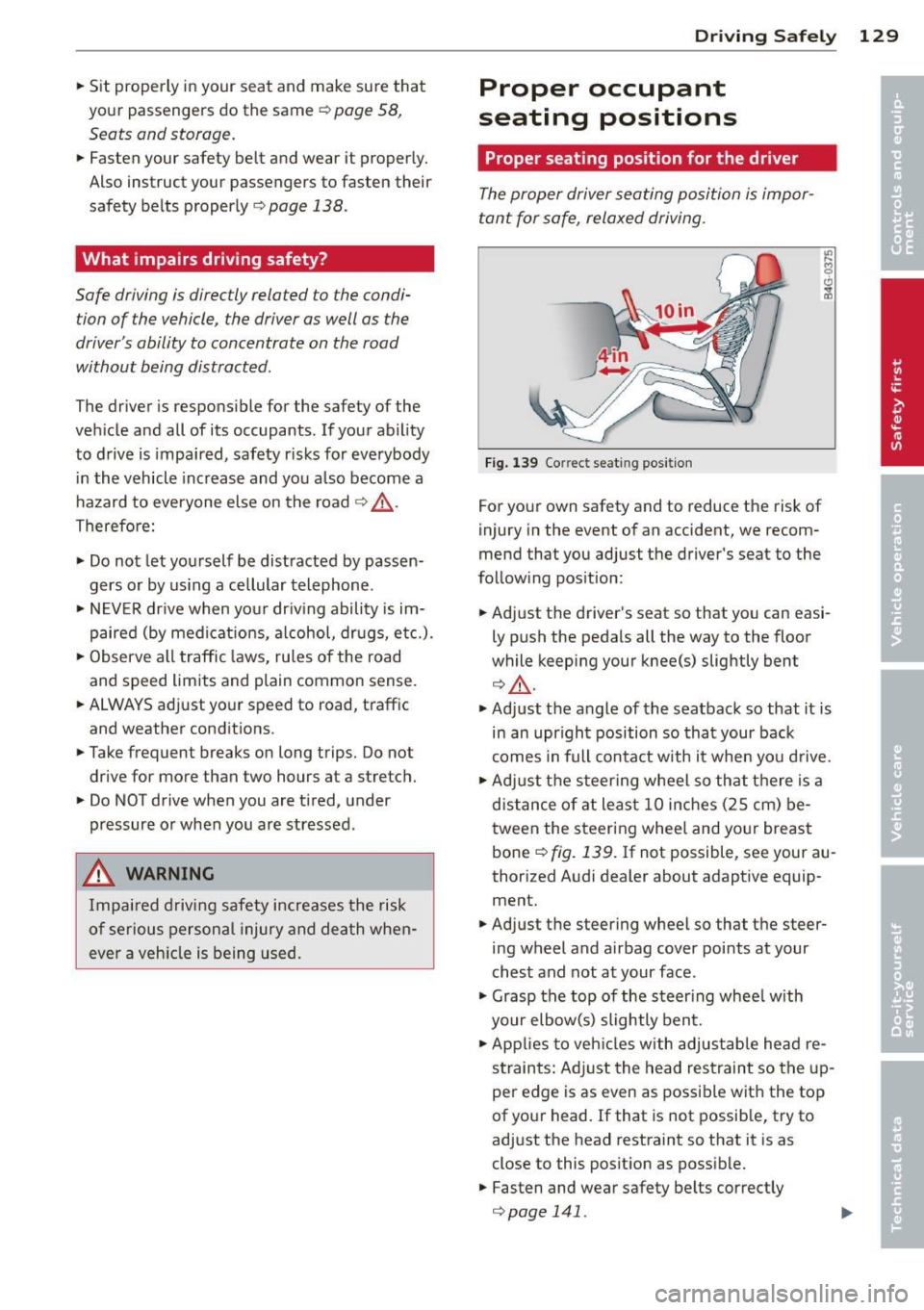
Fig. 139 Co rrect seat ing pos it ion
For your own safety and to reduce the risk of
injury in the event of an accident, we recom
mend that you adjust the driver's seat to the
follow ing position:
.. Adjust the driver's seat so that you can easi
ly push the pedals all the way to the floor
wh ile keeping your knee(s) slightly bent
¢&_ .
.. Adjust the angle of the seatback so that it is
in an upr ight position so that your back
comes in full contact w ith it when you drive.
.. Adjust the steering wheel so that th ere is a
distance of at least 10 inches (25 cm) be
tween the steering wheel and yo ur breast
bone
~ fig. 139. If not possible, see your au
thorized Audi dealer about adaptive equip
ment.
.. Adjust the steering wheel so that the steer
ing wheel and airbag cover points at your
chest and not at your face .
.,. Grasp the top of the steer ing whee l with
your elbow(s) slightly bent .
.. App lies to veh icles with adjustable head re
straints: Ad just the head restraint so the up
per edge is as even as possible with the top
of your head. If that is not possible, try to
adjust the head restraint so that it is as
close to this posit ion as possible .
.. Fasten and wear safety belts correctly
¢ page 141 . .,._
Page 132 of 296
130 Driving Safely
• Always keep both feet in the footwell so
that you are in control of the vehicle at all
times.
For detailed information on how to adjust the
driver's seat, see
¢page 60.
A WARNING
Drivers who are unbelted, out of position
or too close to the airbag can be seriously
injured by an airbag as it unfolds. To help
reduce the risk of serious personal injury:
- Always adjust the driver's seat and the
steering wheel so that there are at least
10 inches (25 cm) between your breast
bone and the steering wheel.
- Always hold the steering wheel on the
outside of the steering wheel rim with
your hands at the 9 o'clock and 3 o'clock positions to help reduce the risk of per
sonal injury if the driver's airbag inflates.
- Never hold the steering wheel at the
12 o'clock position or with your hands at
other positions inside the steering wheel
rim or on the steering wheel hub. Hold
ing the steering wheel the wrong way
can cause serious injuries to the hands,
arms and head if the driver's airbag de
ploys.
- Pointing the steering wheel toward your
face decreases the ability of the supple
mental driver's airbag to protect you in a
collision.
- Always sit in an upright position and nev
er lean against or place any part of your
body too close to the area where the air
bags are located.
- Before driving, always adjust the front
seats and head restraints properly and
make sure that all passengers are prop
erly restrained.
- Never adjust the seats while the vehicle
is moving . Your seat may move unexpect
edly and you could lose control of the ve
hicle.
- Never drive with the backrest reclined or
tilted far back! The farther the backrests
are tilted back, the greater the risk of in- jury due to incorrect positioning of the
safety belt and improper seating posi
tion.
- Children must always ride in child safety
seats ¢
page 167. Special precautions
apply when installing a child safety seat
on the front passenger seat¢
page 146.
Proper seating position for the front
passenger
The proper front passenger seating position
is important for safe, relaxed driving .
For your own safety and to reduce the risk of
injury in the event of an accident, we recom
mend that you adjust the seat for the front
passenger to the following position :
• Move the front passenger seat back as far as
possible . There must be a minimum of
10 inches (25 cm) between the breastbone
and the instrument panel¢,&. .
• Adjust the angle of the seatback so that it is
in an upright position and your back comes
in full contact with it whenever the vehicle is
moving.
• Applies to vehicles with adjustable head re
straints: Adjust the head restraint so the up
per edge is as even as possible with the top
of your head. If that is not possible, try to
adjust the head restraint so that it is as
close to this position as possible.
• Keep both feet flat on the floor in front of
the front passenger seat.
• Fasten and wear safety belts correctly
¢page 141.
For detailed information on how to adjust the
front passenger's seat, see
¢ page 58.
A WARNING
-
Front seat passengers who are unbelted,
out of position or too close to the airbag
can be seriously injured or killed by the air bag as it unfolds. To help reduce the risk of
serious personal injury: