brake light AUDI S4 2015 Owner's Manual
[x] Cancel search | Manufacturer: AUDI, Model Year: 2015, Model line: S4, Model: AUDI S4 2015Pages: 304, PDF Size: 74.86 MB
Page 98 of 304
96 Transmission Starting the engine
.. The selecto r lever must be in P or N.
Starting off
.. Press and hold the brake pedal.
.. Press and hold the release button in these
lector lever handle, se lect t he des ired selec
tor lever position such as D/S and release
the button .
.. Wait briefly unti l the transmission has shift
ed (you will feel a slight movement) .
.. Remove your foot from the brake pedal and
acce lerate.
Stopping temporarily
.. Keep the vehicle stationary usin g the brak
ing peda l, for examp le at traffic lights .
.. Do not press the accelerator pedal when do
ing this .
.. To prevent the veh icle from rolling when you
start driving, set the parking brake when
stopping on steep inclines
c> _& .
.. The parking brake will release automatically
and the vehicle w ill start moving once you
press the accelerator pedal.
Stopping/parking
If the selector lever is not in the P position
when you open the dr iver's door, the vehicle
could roll. The message
Transmission: Car
may roll! Shift to park!
appears.
.. Press and hold the brake pedal until the ve-
hicle has come to a complete stop .
.. Apply the parking brake
c> page 88, Parking .
.. Select the P selector lever position c> _&.
Stopping on an incline
.. Always press the brake pedal to hold the ve
hicle in place and prevent it from "rolling
back"
c> _& . Do not try to prevent the vehi
cle from "roll ing back" when a gear is en
gaged by increasing the eng ine speed
c> (D.
Starting on an incline
.. Activate the parking brake.
.. With the driving gear se lected, press the ac
celerator pedal carefully. The park ing brake will release automatically if your seat
belt is
fastened .
Under certain circumstances, such as driving
in the mo untains, it may be usefu l to switch
temporarily to the manual shift program in or
der to adjust the gears to the driving cond i
tions by hand
c> page 98.
On slopes, activate the parking brake first and
then move the selector lever to the P position .
This prevents too much stress from being
placed on the locking mechanism .
Vehicles with multitronic transmission: Your
vehicle is equipped with
hill hold assist allow
ing you to start while on an incline. The sys
tem is activated when the brake pedal is
pressed down and he ld
for a few seconds . The
brake pressure will hold for
a moment after
the brake pedal loosens to prevent the vehicle
from roll ing backwards wh ile starting up .
A WARNING
-The vehicle can also roll when the engine
is stopped.
- Unintended vehicle movement can cause
serious injury.
- Never leave your vehicle with the engine
r un ning while in gear. If you must leave
your veh icle when the engine is running,
activate the parking brake and move the
selecto r lever to P.
- Power is still transmitted to the wheels
when the engine is running at idle. To
prevent the vehicle from "creeping", you
must keep your foot on the brake when
the engine is running and the selector
lever is in D/S or R or "tiptronic" mode is
selected .
- Do not press the accelerator pedal when changing the selector lever position
while the veh icle is stationary and the
engine is running.
- Never shift into R or P while driving.
- Before driving down a steep s lope, re-
duce your speed and shift into a lower
gear with "tiptronic".
Page 101 of 304
"' N
0 ::.,: co ,...., \!) ..,.,
,...., ..,., ,....,
A WARNING 1=
Please note that the drive wheels can spin
if kick-down is used on a smooth slippery
road - there is a risk of skidding.
Launch Control Program
App lies to vehicles: with S tronic
The Launch Control Program provides the
best acceleration possible when starting from
a stop .
Requirement : The engine must be at operat
ing temperature and the steering wheel must
not be turned .
~ Sedan: Press the l.e OFFI button ¢ page 187
while the engine is running . The II indica
tor light illuminates in the instrument clus
ter and
Stabilization cont ro l ( ES C): S port .
Warning! R estrict ed s tabilit y
appears in the
driver information system display.
~ all road: Press the l.e O FF I but to n
¢
page 187 while the engine is running.
T he
II indicator light illuminates in the in
strument cluster and
Stabilization control
( ES C): Off ro ad. W arning! Restri cted stabil
it y
appears in the driver information system
display.
~ Move the selector lever to the D/S pos ition
to select sport mode (S) or select the
dy
namic
driving mode in drive select*
¢ page 116.
~ Press the bra ke peda l st rongly wit h your left
foot and hold it dow n for at least 1 second.
~ At the same time, press the accelerator ped
al down complete ly with your right foot un
ti l the engine reaches and maintains a high
RPM .
~ Remove your foot from the brake pedal
within S seconds¢.& .
A WARNING
-Always adapt your driving to the traffic
flow .
- Only use the Launch Control Program when road and traffic condit ions allow it
and other dr ivers will not be endangered
-
Tran sm iss ion 99
or annoyed by your driving and the vehi
cle's acceleration.
- Please note that the driving wheels can
spin and the vehicle can break away
when sport mode/offroad mode is
sw itched on, especially when the road is
slippery.
- Once you have accelerated, you shou ld
sw itch sport mode/offroad mode off by
press ing the
I~ O FFI button .
(l) Tips
- The transmission temperature may in
crease s ignificantly after using the
Launch Control Program. If that hap-
pens, the program may not be availab le
for a few m inutes .
It will be ava ilable
again after a cool-down per iod.
- When accelerating using the Launch
Cont ro l program, a ll vehicle parts are
subjec t to heavy loads. This can result in
increase d wear.
Transmission malfunction
Applies to vehicles: with multitronic/S tronic/tiptronic
[il Transmission : Pre ss brake pedal and se
lect gear again.
Press the br ake peda l and select the desired
selector lever posi tion again. You ca n then
continue driving .
[il Transmi ssion overh eating : Pl ea se drive
con servatively .
The transm iss ion temperature has increased
s ignificantly due to the sporty d riving manner.
D rive in a less sporty ma nner until the tem
perature re turns to the normal range and the
i ndica tor ligh t switches o f.
[O] Transmission malfunction : You can con
tinu e driving
There is a system malfunction i n the transmis
s io n. You may cont inue d rivi ng . Drive to your
authorized Aud i dea le r or qualified repa ir fa
c ili ty soon to have the ma lfunction corrected. ..,.
Page 106 of 304
104 Audi adaptive cruise control and braking guard
Switching on and off
Applies to vehicles: with Audi adaptive cruise control
Fig. 117 Se lec tor lever: switching on/off
Fig. 118 Instrument clus te r: A udi adap tive c ru ise co n·
trol
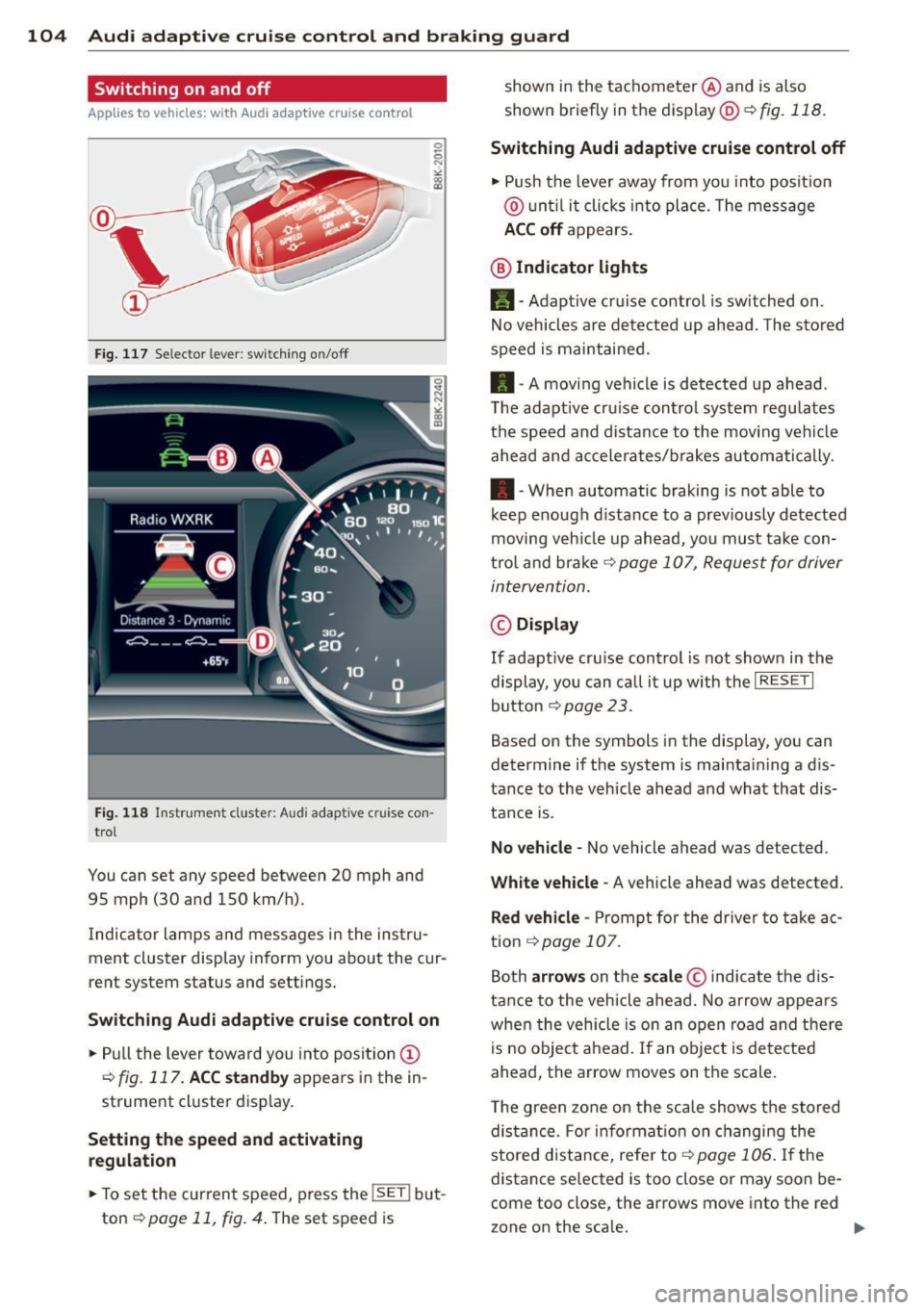
You can set any speed between 20 mph and
95 mph (30 and 150 km/h).
Indicator lamps and messages in the instru·
ment cluster display inform you about the cur·
rent system status and settings.
Switching Audi adaptive cruise control on
• Pull the lever toward you into position (D
¢fig. 117. ACC standby appears in the in ·
strument cluster display.
Setting the speed and activating
regulation
.. To set the current speed , press the !SE T! but·
ton
¢ page 11, fig . 4. The set speed is shown in
the tachometer @and is also
shown briefly in the display@¢
fig. 118.
Switching Audi adaptive cruise control off
• Push the lever away from you into position
@ until it clicks into place. The message
ACC off appears.
@ Indicator lights
11 · Adaptive cruise control is sw itched on.
No vehicles are detected up ahead. The stored
speed is maintained.
• · A moving vehicle is detected up ahead .
T he adaptive cru ise control system regulates
the speed and distance to the moving vehicle
ahead and accelerates/brakes automatically .
• · When automatic braking is not able to
keep enough distance to a previously detected
moving veh icle up ahead, you must take con·
trol and brake
¢ page 107, Request for driver
intervention.
© Display
If adapt ive cru ise control is not shown in the
display, you can call it up w ith the
I RESET I
button ¢ page 2 3 .
Based on the symbols in the display, you can
determine if the system is maintain ing a d is ·
tance to the vehicle ahead and what that dis
tance is.
No vehicle· No vehicle ahead was detected .
White vehicle -A vehicle ahead was detected .
Red vehicle -Prompt for the driver to take ac
tion
,=;, page 107.
Both arrows on the scale © indicate the dis·
tance to the vehicle ahead. No arrow appears
when the vehicle is on an open road and there
is no object ahead. If an object is detected
ahead, the arrow moves on the scale .
T he green zone on the scale shows the stored
distance. For information on changing the
stored distance, refer tor=;,
page 106 . If the
distance se lected is too close or may soon be·
come too close , the arrows move into the red
zone on the sca le. .,.
Page 109 of 304
M N
~ co
rl I.O
"' rl
"' rl
Audi adaptive cruise control and braking guard 107
Setting the driving mode for vehicles with
Audi drive select*
Refer to <=> page 116.
(D Tips
Your settings are automatically stored and
assigned to the remote control key being
used.
Request for driver intervention
Applies to vehicles: with Audi adaptive cruise control
Fig. 122 Inst rumen t cl us ter: reques t for drive r inte r·
vention
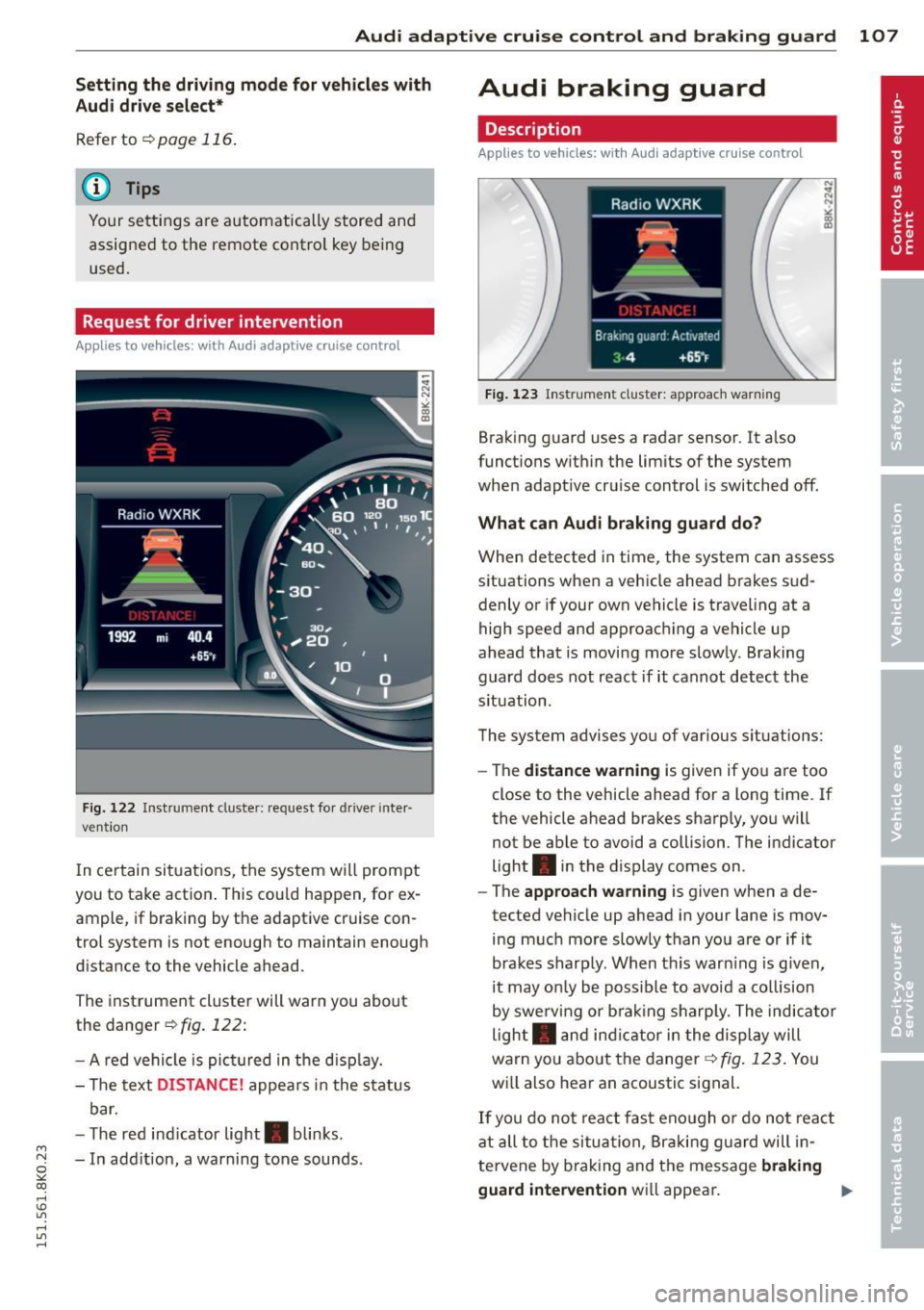
I n ce rtain situat ions, the system will prompt
you to take action . This cou ld happen, for ex
ample, if braking by the adaptive cruise con
trol system is not enough to maintain enough
distance to the vehicle ahead.
The instrument cluster will warn you about
the danger<=>
fig. 122:
- A red vehicle is pict ured in the disp lay.
- The text
DISTANCE! appears in the status
bar.
- T he red ind icator light . blinks.
- In add ition, a warning tone sounds.
Audi braking guard
Description
Applies to vehicles: with Audi adaptive cruise control
Fig. 123 Instr ument cluster: approach warning
Braking guard uses a radar sensor. It also
functions within the limits of the system
when adapt ive cruise control is switched off.
What can Audi braking guard do?
When detected in time, the system can assess
situations when a vehicle ahead brakes sud
denly or if your own vehicle is traveling at a
high speed and approaching a vehicle up
ahead that is moving more slowly. Braking
guard does not react if it cannot detect the
s ituation.
The system advises you of various situations:
- The
distance warning is given if you are too
close to the vehicle ahead for a long time. If
the vehicle ahead brakes sharply, you will
not be able to avoid a collision . The indicator
light . in the display comes on .
- The
approach warning is given when a de
tected vehicle up ahead in your lane is mov
ing much more slowly than you are or if it
brakes sharply. When thi s war ning is given,
it may on ly be possible to avoid a co llision
by swerving or brak ing sharp ly. The indicator
light . and indicator in the display will
warn you about the danger
r=.> fig. 123. You
wi ll also hear an acoustic signal.
If you do not react fast enough or do not react
at all to the situation, Braking guard will in
te rvene by brak ing and the message
braking
guard intervention
wi ll appear. ~
Page 187 of 304
@ Tips
Your vehicle may be equipped with Audi
connect. Your use of certain Aud i connect
features req uires wireless serv ices that are
provided by a third party wireless telecom
municat ions provider. For details regard
ing how information obtained through
Aud i connect is collected, processed,
transmitted, used, and shared, please see
your contra ct w ith the wire less telecom
municat ions provider and the "About A udi
connect" tab in your vehicle's MMI*:
!MENU ! button> Audi connect > About
Audi con nect .
Electronic Stabilization
Control (ESC)
Description
ESC helps to improve road holding and vehicle
dynamics to help reduce the probability of
skidd ing and loss of veh icle control. It works
only when the eng ine is running. ESC detects
certain difficult driv ing situations, including
when the vehicle is beginning to spin (yaw) out of cont ro l and he lps you to get the vehicle
back under control by select ively b rak ing the
wheels, and/or red ucing engine powe r and
p roviding steering assistance to help hold the
ve hicle on the driver's intended course . The in
dicator light
DJ in the instrument cluster
blinks when ESC is taking action to help you
control the vehicle.
ESC has limitations.
It is important to remem
ber that ESC cannot overcome the laws of
phys ics. It will not a lways be able to help out
under all conditions you may come up against.
For example, ESC may not always be able to
h elp you master situat ions where there is a
sudden change in the coefficient of fr iction of
the road surface. When there is a sect io n of
d ry road that is s udden ly cove red with water,
slush o r snow, ESC canno t perform the same
way it would on the dry su rface.
If the vehicle
hydroplanes (rides on a c ush ion of wate r in
stead of the road surface), ESC wi ll not be
ab le to he lp you steer the veh icle because con-
Int ellig ent technolog y 185
tact with the pavement has been interrupted
and the vehicle cannot be braked or steered .
D uring fast corner ing, particular ly on wind ing
roads, ESC cannot always deal as effectively
with difficult dr iv ing s ituations than at lower
speeds. When towing a trailer, ESC is not able
to help you regain control as it would if you
were not tow ing a trailer.
Always adjust your speed and driving style to road, traffic and weather conditions . ESC can
not override the vehicle's physical lim its, in
crease the availab le tract ion, or keep a veh icle
o n the road if road departu re is a result of
driver ina ttent io n. Instead , ESC imp roves the
poss ibility of keep ing t he vehicle under con
trol and on the road during extreme maneu
vers by using the driver's steering i nputs to
help keep the vehicle go ing in the intended di
rect ion. If you are traveling at a speed that
causes you to run off the road before ESC can
provide any assistance, you may not experi
ence the benefits of ESC.
ESC is switched on all the time. In certain sit
uat ions when you need less traction, you can
switch off ASR by pressing the butto n
[ill
~ page 187, fig. 174 or~ page 187,
fig. 175. Be sure to sw itch ASR on aga in when
you no lo nger need less traction.
The following systems are integrated in the
ESC:
Anti-lock bra king sy stem (ABS )
ABS prevents the whee ls from locking up
when brak ing. T he vehicle can st ill be steered
even dur ing hard braking. App ly steady pres
su re to the brake peda l. Do not pump the ped
al. A pulsing in the brake pedal ind icates that
the system is helping you to brake the veh icle .
Brake assi st system
The brake ass ist system can decrease braking
distance. It increases brak ing power when the
drive r presses the brake peda l quickly in emer
gency s ituations. You must press and hold the
brake pedal unti l the s ituation is over. In
vehicles wi th adap tive c rui se control*, the
brake assis t system is more sensitive if the
•
•
Page 188 of 304
186 Intelligent technology
distance detected to the vehicle ahead is too
smal l.
Anti-slip regulation (ASR )
ASR reduces eng ine power when the drive
wheels begin to spin and adapts the fo rce to
the road condit ions. This makes it eas ier to
start, accelerate and drive up hills .
Electronic differential lock (EDL)
The EDL brakes wheels that are spinn ing and
transfers the d rive powe r to the other drive
wheel or whee ls if the vehicle is equipped with
a ll-wheel drive* . This function is not avai lab le
at higher speeds.
I n extreme cases , EDL automat ica lly switches
off to help keep the brake on the braked whee l
from ove rheating . EDL wi ll switch on again au
tomatically when conditions have returned to
normal.
Steering recommendation
The ESC helps to stabilize the ve hicle by
changing the steering torque.
In vehicles with dynam ic steeri ng*, ESC also
he lps to stabilize the stee ring in critical s itua
tions.
Electronic interaxle differential lock* /
selective wheel torque control*
The electronic interaxle d ifferential lock (front
wheel drive) or the select ive wheel torque
con trol ( all wheel d rive) oper ates when driving
through curves . The front whee l on the inside
of the cu rve or both whee ls on the inside of
the curve are b raked se lectively as needed.
This a llows more prec ise driving in c urves. The
applicable system may not activate when driv ing i n wet or snowy conditions.
A WARNING
- The ESC and its integrated systems can
not overcome the laws of physics. This is
especially important on slippery o r wet
roads . If the systems begin acting to sta·
b iliz e your veh icle, you s hou ld immed i
a tely c ha n ge your speed to match the
road and traffic cond itions. Do not let
the increased safety provided by these
systems tempt you to take risks. Do ing
so will increase the risk of a loss of vehi
cle control, collision and serious personal
inj uries.
-Always adapt your speed to road, traffic and weather conditions. The risk of los
ing control of the vehicle increases when
d riving too fast, espec ially through
curves and on slippe ry or wet roads, and
when dr iv ing too close to vehicles up
ahead. The ESC a nd its integrated sys
tems canno t always p reven t collisions -
there is still a risk of acc idents!
- Always accelera te wi th spe cial care on
even, smooth s urfaces such as those that
are wet or covered with ice and snow.
The drive wheels can spin even with these assistance systems that cannot al
ways he lp to red uce the risk of loss of ve
h icle control.
(D Tips
- ABS and ASR only work cor rectly when
all four wheels are equipped with identi
cal tires. D ifferent tire sizes can lead to a
reduction in engine power .
- Yo u may hear noises when the systems
descr ibed are working.
- If the ind icator light
DJ or ml (USA
mode ls)l iiJ (Canada models) appears,
there may be a malfunction<=>
page 18,
<=>page 19 .
Page 190 of 304
188 Intelligent technology
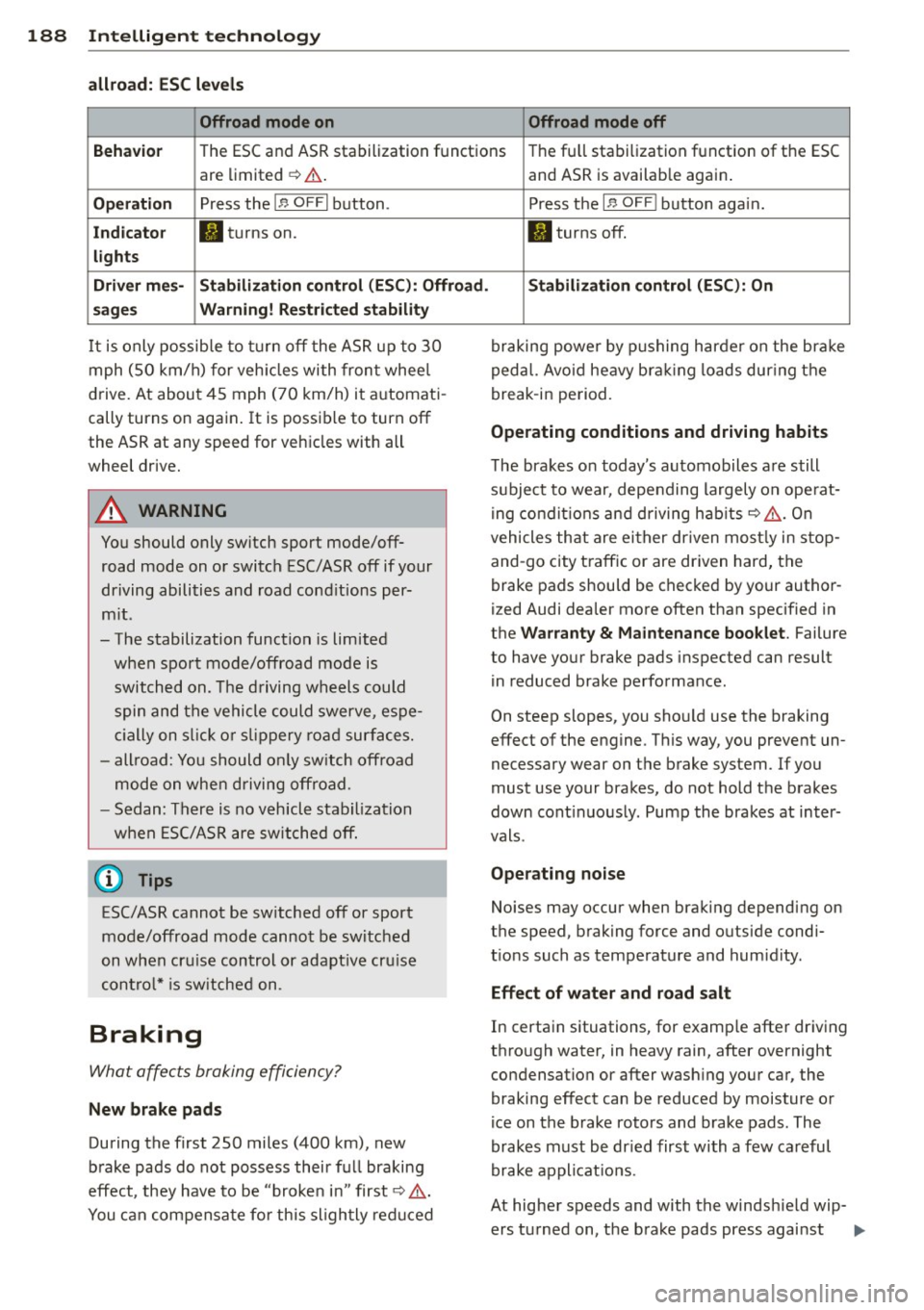
allroad: ESC level s
Offroad mode on Offroad mode off
Behavio r
The ESC and ASR stabilization functions The fu ll stabilization f unction of the ESC
are limited ¢& .
Op eration Press the I.a OFFI button .
Indicato r II turns on.
light s
Driver me s- Stabilization control (ESC) : Offroad .
s age s Warning! R est rict ed stabilit y
It is only possib le to turn off the ASR up to 30
mph (SO km/h) for veh icles with front whee l
d rive. At about 45 mph ( 70 km/h) it a utomat i
cally turns on aga in . It is possib le to turn off
the ASR at any speed for vehicles with all
wheel drive.
A WARNING
You should only switch sport mode/off
road mode on o r switch ESC/ASR off if your
driving abilities and road cond itions per
m it .
- The stabilization function is limited
when sport mode/offroad mode is switched on. The d riving wheels could
spin and the vehicle could swerve, espe
ci ally on s lick o r sli ppery ro ad sur faces.
- all road: You should o nly sw itch off road
mode on when driving offroad.
- Sedan: Th ere is no vehicl e stabiliza tion
w hen ESC/AS R are switched off .
(D Tips
ESC/ASR cannot be sw itched off or sport
mode/offroad mode cannot be switched
on when cru ise control or adapt ive cru ise
contro l* is sw itched on .
Braking
What affec ts braking efficiency?
New brake pads
During the first 250 miles (400 km) , new
b rake pads do not possess their fu ll braking
effect, they have to be "broke n in" first ¢,& .
You can compensate fo r th is sligh tly redu ced and ASR is availab
le agai n.
Press t he
I.a OFF I button aga in.
II turns off.
Stabil izati on c ontrol (ESC ): On
braking powe r by p ushing harder on the bra ke
peda l. Avoi d heavy bra king lo ads dur ing the
break -in pe riod.
Operating conditions and driving habits
T he brakes o n today 's automobiles a re still
s u bject to wear, depe nding largely on ope rat
i ng condi tions and driving habi ts¢ ,&. On
vehicles that are ei ther dr iven most ly in stop
and -go city traffic or are dr iven hard, the
brake pads should be checked by your author
ized Audi dea ler mo re often than specified in
the
Warranty & Maintenance booklet . Failure
to have your brake pads inspected can result in reduced brake performance .
On steep slopes, you sho uld use the braking
effect of the engine . This way, you prevent un
necessary wear on the brake system . If you
must use your brakes, do not hold the brakes
down cont inuous ly. Pump the brakes at inter
vals.
Operating noi se
Noises may occur when braking depending on
the speed, brak ing force and outside cond i
t ions such as temperature and humidity.
Effect of water and road salt
In certain situations, for examp le afte r driving
t hr ough water, in heavy rain, after overnight
condensation or after wash ing your car, the
braking effect can be reduced by moisture o r
ice on the brake rotors and brake pads. The
brakes must be dr ied first wi th a few ca reful
brake applicat io ns.
At higher speeds and with the windsh ield wip-
ers turned on, the brake pads press against
ll>
Page 192 of 304
190 Intelligent technology
overheat re ducin g the effectiveness of
the ent ire brake system.
- Failure of one brake circuit will impair
the braking capability resulting in an in
creased stopp ing distance. Avoid driv ing
the vehicle and have it towed to the near est author ized Audi dealer or qualified
workshop .
- Never let the vehicle ro ll to a stop w ith
the engine shut off.
- If the brake booster is not working, the
brake pedal must be pressed conside ra
bly harder to make up for the lac k of
booster assistance.
Electro-mechanical
power assist, dynamic
steering
The electro-mechanical power assist helps
the driver when steering.
Power stee ring adapts electronically based on
the vehicle speed.
Indicator lights and messages
• Steering defective! Do not drive vehicle!
If this ind icator lig ht tu rns on and stays on
an d th is message appears, t he power steer ing
may have f ailed.
D o
not cont in ue d riving. See yo ur autho rized
Aud i deale r or a q ua lifi ed r epa ir facility for as
sistance.
'1:I Dynamic steering : System fault! You can
cont inue driv ing
If the indicator light t urns on and the mes
sage appears, the steer ing may be more diffi
cul t to move or more se nsitive than usual. The
steer ing wheel may also be at an angle whe n
d riving straight .
Drive s low ly to your author ized Audi dealer or
q ua lified workshop to have the malfunction
cor rected .
'y.ij Dynamic steering: initializing
If this driver message appears and the indica
tor light is f lashing on the instrument panel,
dynam ic steer ing * is being re in it ia lized. After
starting the engine, the steering wheel will move s light ly. Re- initialization might be nec
essary if the steering wheel was moved hard
to the left and right wh ile the vehicle was not
moving . Th e display goes out as soon as ini ti
ali za tion is complete.
_& WARNING
Ha ve the dy namic stee ring * system m al
f u nction repa ired as soon as possib le by an
a uthorized Audi dea ler or qua lified work
shop -risk of acc ident !
@ Tips
-If the . or '1:I indic ator li ght only s tays
on fo r a shor t time, you m ay continue
dr iving.
- T he dynamic s teering * stabi lit y syste ms
are no t av ail ab le in the even t of a system
ma lf u nction.
- F or ad di tion al information on dynamic
steering *, refe r to
¢page 115 .
-
Driving with your
quattro
App lies to vehicles: wi th all-w hee l drive
With a/I-wheel drive, all four wheels are driv
en .
General information
With a ll-wheel d rive, power is distr ib uted to
all four wheels. This happens automatically
depending on your driving style and the road
co ndit ions at the time . See also
¢ page 185.
A center d ifferential distributes the driving
power variably to the front and rear axle. It
wor ks together with selective w heel torque
co ntrol, wh ich activates when dr iving t hrough
c ur ves
c::;,page 186. With the sport differe n
t ia l* , pow er d istr ibut ion to the rea r wheels is
variable a nd can be adjusted w ith drive se lect
c::;, page 115. .,..
Page 197 of 304
'"" N
0 ::.,: co ,...., \!) 1.1"1 ,...., 1.1"1 ,....,
-Have your vehicle maintained properly
and in accordance with the service rec
ommendations in your Warranty
&
Maintenance booklet.
- Lack of proper maintenance as well as
improper use of the vehicle will impair
the function of the emission control
system and could lead to damage.
@ For the sake of the environment
Even when the Emission Control System is
operating properly, the exhaust gas can
have a sulfur-like exhaust gas smell under
some operating states. This depends on
the sulfur content of the fuel being used .
Using a different brand of fuel may help,
or filling the tank with lead-free super
grade gaso line.
Shutting down vehicle
If you wou ld like your veh icle to remain inop
erat ive for a longer period of time, contact an
Aud i or other specialized dealer. They can ad
vise you on necessary precautions e .g. corro
sion prevention, maintenance and storage. Pay attention to add itional information con
cerning the battery. Refer to¢
page 222.
Operate your vehicle
economically and
minimize pollution
General
Your personal style of driving will determine
the economy of your vehicle , as well as ex
haust and noise levels .
Fuel economy, environmental impact, and
wear on your engine, brakes and tires largely
depend on three factors:
- your persona l driving style
- operating conditions
- technical lim itations
If you anticipate what you need to do next and
drive economically, you can easily cut your
fuel cons umption by 10-15 percent. This sec-
Driving and environment 195
tion wi ll give you some tips on how you can
help the environment and your pocketbook.
(0 Tips
The consumption estimates as published
by ENVIRONMENTAL PROTECTION AGENCY
(EPA) and Transport Canada may not corre
spond to your actual consumption on the
road, which will vary depending upon vehi
cle load and speed, road and weather con
dit ions, trip length, etc.
Drive smoothly and keep a lookout
ahead
Vehicles use the most fuel when they are ac
celerating .
.,. Avo id unnecessary accelerating and brak ing.
Vehicles use the most fue l when they are ac
ce lerat ing. If you anticipate what is going to
happen next, you will need to brake less and,
thus, accelerate less . Let the vehicle coast
whenever possible -for example when you see
that the next traff ic light is red.
Avoid full throttle
Driving at moderate speeds saves fuel and
improves your mileage .
.,. Try and keep well below your car's maximum
speed.
Acce lerating gently reduces fue l consump
tion, eng ine wear, and does not disturb the
environment .
Fuel consumption, exhaust emissions and en
gine noise increase disproportionately at high
speeds. If you drive at approximately three quarters of top speed, fuel consumption will
be reduced by one half. Never drive faster
than the posted speed l imit and weather con
ditions permit.
•
•
Page 199 of 304
'"" N
0 ::.,: co ,...., \!) ..,.,
,...., ..,., ,....,
the engine is at its proper operating tempera
ture and fuel economy has reached a normal
level. So you can see that you should avoid
short trips whenever possib le.
The
outside temperature is also critical in this
regard. Your car consumes more fuel in the
winter than in the summer .
allroad: Driving offroad
General information
Applies to vehicles: atlroad
When driving offroad, the funct ions for the
e lectronic stab ilization control (ESC) are ex
panded. The ESC-Offroad-Mode can be activat
ed in driving situations in which a wheel lock
or a differentia l lock function is needed
c::> page 187. In addition, your Audi provides
continuous all wheel drive .
Your Audi is however , not an offroad vehicle.
Never drive the vehicle in terrain which is not
suitable for the vehicle, or which exceeds
your driving skills. Never take any unneces
sary risks!
After driving offroad
-After driving offroad, remove branches and
other debris from the radiator grille, under
body, and wheels. Look especially for objects
(stones) that have been caught in the tire
tread .
- Clean the body and the vehicle underbody
and inspect the vehicle for possible damag
es.
- Clean off the dirty windows, headlights, tail
lights and the license plate.
- Perform a brake test (especially after driving through water).
A WARNING
- Be espec ially aware and attentive when
dr iv ing under diff icult conditions . Dam
ages to the vehicle and injuries may oc
cur when driving at an excess ively high
speed or with incorrect driving maneu
vers.
Driving and environment 197
- Always adjust your speed and handling
to the roads, terrain, traff ic and weather
conditions. Drive especially slow if off road with low visibility.
- Please note that the wheels can spin and
the vehicle can break away when the ESC
Offroad Mode is switched off, especially
when the road is slippery .
- Driving stability is reduced in the ESC
Offroad mode .
® For the sake of the environment
Avoid harming the environment and take
nature into cons ideration.
(D Tips
Only drive where it is allowed and always
stay on the provided roads and paths.
Driver messages
Applies to vehicles : a ll road
There is only one right way to drive in difficult
conditions: slowly and with caution!
When dr iving offroad, observe the following:
... Never drive the vehicle i n terrain which is
not suitab le for the vehicle, or which ex
ceeds your driv ing ski lls. Never take any un
necessary risks!
... Drive slow ly and cautiously!
... Pay attention to the
ground clearance of
your vehicle! This may vary depending on the load and composition of the ground and
the environment. The driver is therefore re
sponsible for deciding whether a veh icle can
handle a specific situation.
... Act ivate the
ESC -Offroad-Mode c::> page 18 7
as needed.
Difficult terrain
Never dr ive in areas that are not familiar to
you and drive slowly when offroad and be pre
pared and expect the unexpected (e.g. pot
holes, boulders, tree stumps, etc.)
To prevent the vehicle from bottoming and avo id damage to the underbody, you should
drive straight across severe bumps in the
IJII>
•
•