mirror AUDI S4 2016 User Guide
[x] Cancel search | Manufacturer: AUDI, Model Year: 2016, Model line: S4, Model: AUDI S4 2016Pages: 278, PDF Size: 70.26 MB
Page 111 of 278

.... N
0
""' CX)
.... I.Cl U"I
.... I.Cl ....
-Improper reliance on the side assist system
can cause collisions and serious personal in
jury:
- Never rely only on side assist when chang
ing lanes.
- Always check rear view mirrors to make
sure that it is safe to change lanes.
- Side assist cannot detect all vehicles under
all conditions- danger of accident!
- Please note that side assist indicates there
are approaching vehicles, or vehicles in your
blind spot, only after your vehicle has
reached a driving speed of at least 19 mph
(30 km/h).
- In certain situations, the system may not
function or its function may be limited. For
example:
- if vehicles are approaching or being left
behind very quickly. The display may not
turn on in time.
- in poor weather conditions such as heavy
rain, snow or heavy mist.
- on very wide lanes, in tight curves or if
there is a rise in the road surface. Vehicles
in the adjacent lane may not be detected
because they are outside of the sensor
range.
(D Note
The sensors can be displaced by impacts or
damage to the bumper, wheel housing and
underbody. This can affect the system. Have
your authorized Audi dealer or authorized
Audi Service Facility check their function.
(D Tips
-If the window glass in the driver's door or
front passenger's door has been tinted , the
display in the exterior mirror may be misin
terpreted.
- For Declaration of Compliance to United
States FCC and Industry Canada regulations
¢page 261.
Audi side assist
Activating and deactivating
Applies to vehicles: with A udi side ass ist
Fig. 127 Driver 's do or: Sid e assis t button
.,. Press the button ¢ & in General information
on page 108
to switch the system on/ off . The
LED in the button turns on when side assist is
switched on .
Adjusting the display brightness
Applies to vehicles: with Audi side assist
The signal brightness can be set in the radio or
MM!*.
.,. Select: !CAR ! function button> Audi side assist .
.,. Select: I CAR I function button > Car systems*
control button > Driver assist > Audi side as
sist.
The display brightness adjusts automatically to
the brightness of the surroundings, both in the
information and in the warning stage . In very
dark or very bright surroundings, the display is
already set to the minimum or maximum level by
the automatic adjustment. In such cases, you
may notice no change when adjusting the bright
ness, or the change may only be noticeable once
the surroundings change.
Adjust the brightness to a level where the display
in the information stage will not disrupt your
view forward. If you change the brightness, the
display in the exterior mirror will briefly show the
brightness level in the information stage. The
brightness of the warning stage is linked to the
brightness in the information stage and is adjust
ed along with the information stage adjustment.
Ill>
109
Page 120 of 278
Parking System
-You can change the volume and pitch of the
signals as well as the display ¢
page 120.
-What appears in the display is time-de
layed.
Reverse Parking
Applies to veh icles: with park ing system (rear, with rear view
camera)
Parking mode 1 can be used when parking in a
garage or parking space .
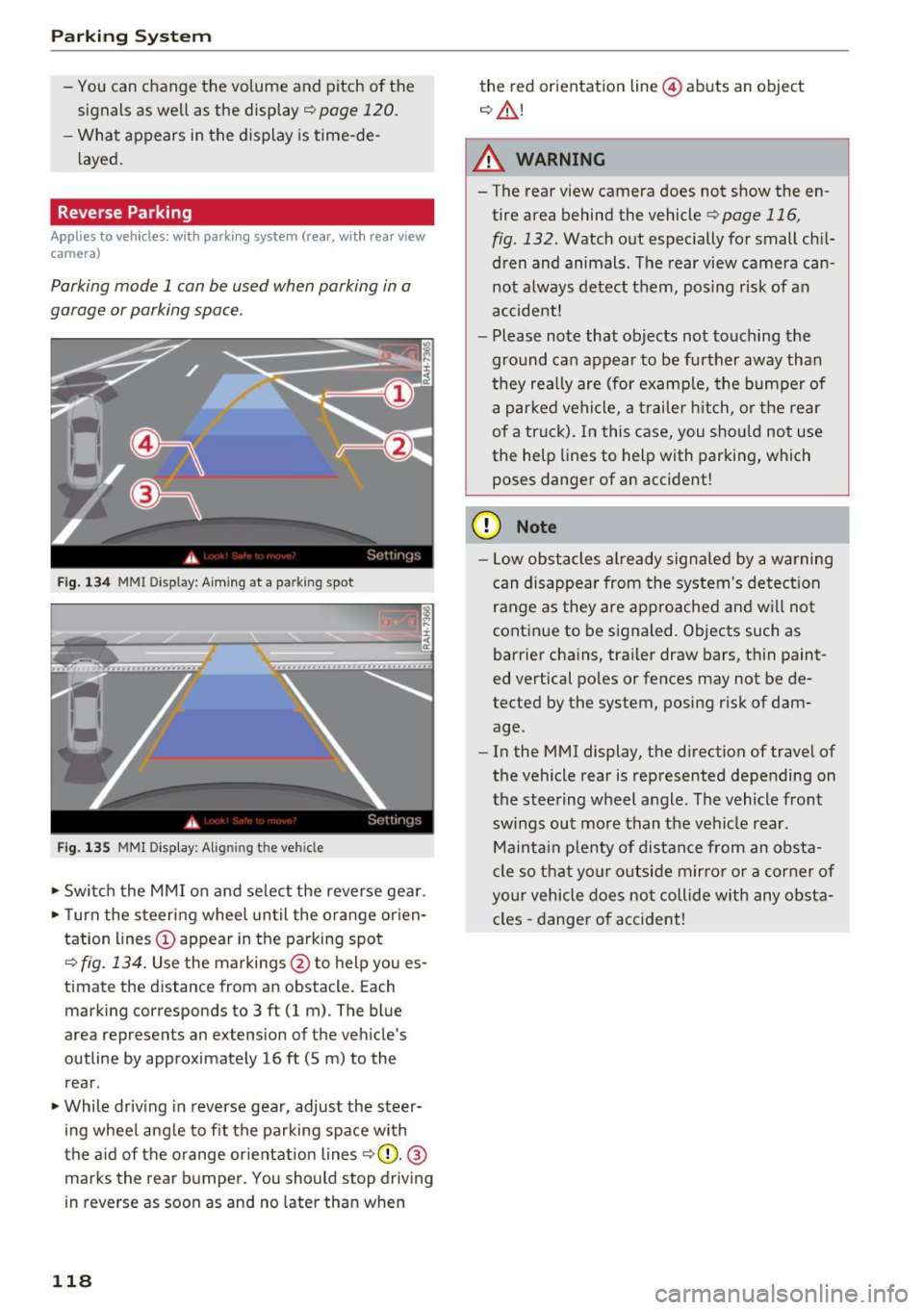
Fig. 134 MMI Di spla y: Aiming at a pa rk in g spot
Fig. 135 MM I Di splay: Alig ning the ve hicle
.-Switch the MMI on and select the reverse gear .
.- Turn the steering wheel until the orange orien
tation lines(!) appear in the parking spot
¢
fig. 134. Use the markings @to h elp you es
timat e the distance from an obstacl e. Each
marking corresponds to 3 ft (1 m). The blue
area represents an ex tension of the vehicle 's
outline by approximately 16
ft (5 m) to the
rear .
.- While driving in reverse gear, adjust the steer
ing wheel angle to fit the parking space with
the aid of the orange orientation lines
~ CD. @
marks the rear bumper. You should stop driving
in reverse as soon as and no later than when
118
the red orientation line@ abuts an object
¢ ,&. !
A WARNING
-The rear view camera does not show the en
tire area behind the vehicle
¢ page 116,
fig . 132.
Watch out especially for small chil
dren and animals. The rear view camera can
not always detect them, posing risk of an
accident!
- Please note that objects not touching the
ground can appear to be further away than
they really are (for example, the bumper of
a parked vehicle, a trailer hitch, or the rear
of a truck). In this case, you should not use
the help lines to help with parking, which
poses danger of an accident!
(D Note
- Low obstacles already signaled by a warning
can disappear from the system's detection
range as they are approached and will not
continue to be signaled. Objects such as
barrier chains, trailer draw bars, thin paint
ed vertical poles or fences may not be de
tected by the system , posing risk of dam
age .
- In the MMI display, the direction of travel of
the vehicle rear is represented depending on
the steering wheel angle. The vehicle front
swings out more than the vehicle rear .
Maintain plenty of distance from an obsta
cle so that your outside mirror or a corner of
your vehicle does not collide with any obsta
cles -danger of accident!
Page 122 of 278

Parking System
swings out more than the vehicle rear. Main
tain plenty of distance from an obstacle so
that your outside mirror or a corner of your
vehicle does not collide with any obstacles -
danger of accident!
(D Tips
The left or right orientation lines and surfaces
will be displayed, depending on the turn sig
nal being used.
Adjusting the display and warning tones
Applies to vehicles: w ith parking system (rear, with rear view
camera)
The display and warning tones ore adjusted in
the radio or MMI*.
.,. Select: ICARlfunction button> Parking system.
Or
.. Select: ICARI function button> Car systems*
control button > Driver assist > Parking aid.
Display
- Off -when the parking system is switched on,
only audible signals are given.
-On -when the parking system is switched on,
the picture from the rear view camera is dis
played.
Warning tones
- Rear volume -
rear sensor volume
-Rear frequency -rear sensor frequency
-Music volume while parking -when the park-
ing system is switched on, the volume of the
active audio source is lowered.
The newly adjusted value is briefly heard from
the signal generator. The settings are automati
cally stored and assigned to the remote control
key.
A WARNING
- Always make sure that the volume and fre quency of the warning tones is adjusted so
that you can easily hear the acoustic dis
tance signal even if the radio is playing, the
air-conditioner blower is on High or there is
a high level of outside noise.
120
- Check the settings whenever someone else
has driven the vehicle before you.
@ Tips
-The warning tones can also be adjusted di
rectly from the rear view camera image.
Simply press the Settings* control button.
- Changed settings are activated when park
ing assist is switched on again.
Error messages
Applies to vehicles: with parking system (rear, with rear view
camera)
If a warning tone is audible for about five sec
onds when you turn on the ignition, there is a
malfunction in the system. Have the problem
corrected by your authorized Audi dealer .
Keep the sensors in the rear bumper clean and
free from ice so that the acoustic park assist sys
tem can function properly.
Page 123 of 278
..... N
0 ::..:: co ,....,
Basics
Safe driving habits
Please remember -safety first!
This chapter contains important information,
tips, instructions and warnings that you need to
read and observe for your own safety, the safety
of your passengers and others . We have summar
ized here what you need to know about safety
belts, airbags, child restraints as well as child
safety. Your safety is for us
priority number 1. Al
ways observe the information and warnings in
this section - for your own safety as well as that
of your passengers.
The information in this section applies to all
model versions of your vehicle. Some of the fea
tures descr ibed in this sections may be standard
equipment on some models, or may be optional
equipment on others. If you are not sure, ask
your authorized Audi dealer.
A WARNING
- Always make sure that you follow the in
structions and heed the WARNINGS in this
Manual. It is in your interest and in the in
terest of your passengers .
-
-Always keep the complete Owner's Litera
ture in your Audi when you lend or sell your
vehicle so that this important information
will always be available to the driver and
passengers.
- Always keep the Owner's literature handy so
that you can find it easily if you have ques
tions.
Safety equipment
The safety features are part of the occupant re
straint system and work together to help reduce
the risk of injury in a wide variety of accident sit
uations.
Your safety and the safety of your passengers
should not be left to chance. Advances in tech
nology have made a var iety of features available
to help reduce the risk of injury in an accident.
Driving safety
The following is a list of just a few of the safety
features in your Audi:
- sophisticated safety belts for driver and all pas-
senger seat ing pos itions,
- be lt force limiters for the front seats,
- belt pretensioners for the seats,
- head restraints for each seating position,
- front airbags,
- side airbags in the front seats,
- side curtain airbags,
- specia l LATCH anchorages for child restraints,
- adjustable steering column.
These individual safety features, can work to gether as a system to help protect you and your
passengers in a w ide range of accidents. These
features cannot work as a system if they are not
always correctly adjusted and correctly used.
Safety is everybody's responsibility!
Important things to do before driving
Safety is everybody's job! Vehicle and occupant
safety always depends on the informed and care
ful driver.
For your safety and the safety of your passen
gers,
before driving always:
.. Make sure that all lights and signals are operat
ing correctly.
.. Make sure that the tire pressure is correct.
.. Make sure that all windows are clean and afford
good visibility to the outside .
.. Secure all luggage and other items carefully
c:::>page 65.
.. Make sure that nothing can interfere with the
pedals .
.. Adjust front seat, head restraint and mirrors
correctly for your height.
.. Instruct rear seat passengers to adjust the
head restraints according to their height.
.. Make sure to use the right child restraint cor
rectly to protect children
c:::> page 158, Child
safety .
.. Sit properly in your seat and make sure that
your passengers do the same
c:::> page 59, Seats
and storage.
121
Page 192 of 278
Trailer mod e
Trailer mode
Driving with a trailer
General information
Your Audi was designed primarily for passenger
transportation.
If you plan to tow a trailer, please remember that
the additional load will affect durability, econo
my and performance.
Trailer towing not only places more stress on the
vehicle, it also calls for more concentration from
the driver.
F or this reason, always follow the operating and
driving instructions provided and use common
sense.
Technical requirements
Tr aile r hitch
Use a weight-carrying hitch conforming to the
gross trailer weight. The hitch must be suitable
for your veh icle and trailer and must be mounted
securely on the vehicle's chassis at a technically
sound
location . Use only a trailer hitch with a re
movable ball mount . Always check w ith the t rail
er hitch man ufact urer to make su re that you are
using the co rrect hitch .
Do not use a bump er hit ch .
The hitch must be installed in such a way that it
does not interfere with the impact -absorbing
bumper system. No mod ificat ions should be
made to the vehicle exhaust and brake systems .
From t ime to t ime, check that a ll hitch mount ing
bolts rema in securely fastened.
When you are not tow ing a tra iler, remove the
tra iler hitch ba ll mount . This prevents the hitch
from caus ing damage shou ld your veh icle be
s truck from be hind ¢
,&..
Trailer brakes
If your trailer is equipped with a brak ing system,
check to be sure that it conforms to all regula
tions .
190
The trailer hydraulic brake system must not be
directly connected to the vehicle's hydraulic
brake system ¢&. .
Safety chains
Always use safety chains between you r vehicle
and the trailer.
Trailer lights
Traile r lights must meet all regulations . Be sure
to check w ith your author ized Audi dealer for cor
r ec t wiring , switches, and relays.
M irrors
If you are unable to see the traffic behind you us
ing the regular outs ide mirrors, then you
must in
stall extended mirrors . It is important that you
always have clear vision to the rear.
.&_ WARNING
- If a tra ile r has e lectr ica l brakes p lease no te
t hat these brakes are not activated by the
factory-fit ted contro l unit -risk of accident!
'
- After removing the trai ler hitch, do not
store it in your vehicle. In case of sudden
braking, the hitch co uld fly forward and in
jure you or yo ur passengers.
Operating instructions
Ma ximum traile r we ight
A trailer for your vehicle is limited to a typical
class 1 or class 2 trailer.
Trailer load distribution
Be sure the load in the trai ler is held securely in
place to p revent i t from shifting forward, back
ward or sideways.
Nev er allow a pa ssen ger to rid e in a trailer ¢ &.
in Driving instructions on page 191.
Engine cooling system
Towing a tra iler makes the engine work harder . It
i s important that the cooling system's perform
ance is up to the additional load. Make sure that
the cool ing system has enoug h fluid.
Page 196 of 278

Care and cleaning
wash operator to reduce the risk of acci
dents.
- To reduce the risk of cuts, protect yourself
from sharp metal components when was h
ing the underbody or the inside of the wheel
housings.
- A fter washing the vehicle, the braking effect
may be delayed due to mo isture on the
brake rotors or ice i n the winter. The brakes
must be dried first w it h a few careful brake
applications.
{U) Note
- If you wash the ve hicle in an automatic car
wash, you must fold the exterior m irrors in
to reduce the risk of damage to the mirrors.
Power folding exte rior m irrors* must on ly
be fo lded in and out us ing the power folding
f u nct io n.
- T o p revent paint damage, do not wash the
vehicle in di rect sunlight. -
To red uce the risk of damage to the s urface,
do not use insect removing sponges, k itchen
sponges o r similar items .
- Matte finish painted vehicle components:
- To reduce the r isk of damage to the sur-
face, do not use polishing agents or hard
wax.
- Neve r use protective wax. It can destroy
the matte finish effect .
- Do not place any stickers or magnetic
signs on vehicle parts painted with matte
finish paint. The paint could be damaged
when the stickers or magnets are re
moved.
@ For the sake of the environment
Only wash t he veh icle in facili ties spec ially de
s igned for that pu rpose. This will reduce the
r isk of dirty wate r cont am ina ted with o il from
en te ring the sewe r system.
Cleaning and care information
W hen clean ing and ca ring for ind ividua l vehicle
com ponents, refer to the fo llow ing tables. The
i n fo rmat ion conta ined there is s imply recom
mendations. For ques tions or for components that are
not listed, cons ult an autho riz ed Aud i
dealer or au thor ized A udi Servi ce Fac ility. Also
f o llow the informa tion fo und in ¢ .&, .
Exterior cleaning
Component Situation Solution
Wind shield wiper
Deposits ¢ page 55, Cleaning windshield wiper blades
blades
Headlights
/ Tail
Deposits Soft sponge with a m ild soap solutiona>
lights
Sensors /camera
Deposits Sensors: soft cloth with solvent-free cleaning solut ion
lenses Camera lenses: soft cloth w ith alcohol-free cleaning so lu-
tion
Snow/ice H
and br ush/solvent-free de-icing spray
Wheels Road salt Water
Brake dus t Acid
-free special clean ing solu tion
E x haust tail pipes Road salt Water, clean ing solution su itab le for stainless stee l, if nee -
essary
Decorative parts / Deposits Mild soap so
lution al, a cleaning so lution suitable for stain-
t rim less stee l, if necessary
194
Page 198 of 278

Care and cleaning
Component Situation Solution
Te xtil es
Deposits adhering to Vacuum cleaner
a rt ifici al le ather , the surface
Alcant ara Water-based deposits Absorben
t cloth and mild soap solutiona>
such as coffee, tea,
blood, etc.
O il-based deposits Apply a m ild soap solution a), blot away the dissolved oil or
such as oil, make-up, dye, treat afterward with water, if necessary
etc.
Special deposits such Special stain remover, b lot with absorbent material, treat
as ink, na il polish, la- afterward with mild soap solution, if necessary a)
tex paint, shoe pol-
ish, etc.
Natural leather Fresh stains Wool cloth with a mild soap so
lutiona)
Water-based deposits fresh sta ins: absorbent cloth
such as coffee, tea, d ried stains: stain remover suitable for leather
blood, etc.
Oil-based deposits Fresh staiins: absorbent cloth and stain remover suitable
such as oil, make-up, for leather
etc. dried stains: oil cleaning spray
Special deposits such Spot remover suitab le for leather
as ink, nai l polish, la -
tex paint, shoe pol-
ish, etc.
Ca re Regularly apply cond ition ing cream that protects from
light and penet rates into the materia l. Use specia lly-co l-
ored conditioning cream, if necessary.
Carbon parts Deposits clean the same way as plastic parts
a) Mild soap solution: maximum two tablesp oons of neutral soap in 1 quart (l liter) of water
_& WARNING
The windshie ld may not be trea ted with wa
ter-repelling windshield coating agents. Un
favorable conditions s uch as wetness, dark
ness, or low sun can result in increased glare .
Wiper blade chatter is also possible.
(D Note
- Headlights/tail light s
-Never clean headlights or tail lights with a
dry cloth or sponge.
- Do not use any cleaning product that con
tains alcohol, because they could cause
cracks to form.
- Wheels
196
-
- Never use any paint polish or other abra
sive materials.
- Damage to the protect ive layer on the
rims such as stone chips or scratches must
be repaired immediately.
- Sensors /camera lenses
- Neve r use wa rm or ho t wa ter to remove
snow or ice from the camera lens . This
could cause the lens to crack .
- N eve r use ab rasive cleaning materials or
a lcohol to clea n the camera lens . This
could cause scratches and cracks .
-Doo r window s
-Remove snow and ice on windows and ex-
terior mirrors with a plast ic scraper. To
Page 199 of 278
..... N
0 ::..:: co .....
one direction and not back and forth.
- Never remove snow or ice from door win
dows and mirrors using warm or hot water
because this could cause cracks to form.
- To avoid damage to the rear window de
fogger, do not apply any stickers on the
heating wires on the inside of the window.
- Decorative parts/trim
- Never use chrome care or cleaning prod-
ucts.
-Paint
- To reduce the risk of scratches, the vehicle
must be free of dirt and dust before pol
ishing or waxing.
- To prevent paint damage, do not polish or
wax the vehicle in direct sunlight.
- To reduce the risk of paint damage, do not
polish away rust spots.
- Remove cosmetics and sunscreen immedi
ately- these could damage the paint.
-Displays
-To avoid scratches, do not use dry cleaning
methods on displays.
-Controls
- Make sure that no fluids enter the con-
trols, because this could cause damage.
- Safety belts
- Do not remove the safety belts to clean
them.
- Never clean safety belts or their compo
nents chemically or with corrosive fluids
or solvents and never allow sharp objects
to come into contact with the safety belts.
This could cause damage to the belt web
bing.
- If there is damage to the webbing, the
connections, the retractors or the buckles,
have them replaced by an authorized Audi
dealer or authorized Audi Service Facility.
- Textiles/artificial leather/ Alcantara
- Never treat artificial leather/ Alcantara
with leather care products, solvents, floor
polish, shoe polish, spot remove or similar
products.
- Have a specialist remove stubborn stains
to prevent damage .
Care and cleaning
-Never use steam cleaners, brushes, hard
sponges, etc. when cleaning.
- Do not turn on the seat heating* to dry the
seat.
- Objects with sharp edges such as zippers,
rivets on clothing or belts can cause dam
age to the surface.
- Open hook and loop fasteners, for exam
ple on clothing, can damage seat covers.
Make sure hook and loop fasteners are
closed.
- Natural leather
- Never treat leather with solvents, floor
polish, shoe polish, spot remover or simi
lar products.
- Objects with sharp edges such as zippers, rivets on clothing or belts can cause dam
age to the surface.
- Never use steam cleaners, brushes, hard
sponges, etc. when cleaning.
- Do not turn on the seat heating* to dry the
seat.
- To help prevent the leather from fading,
do not leave the vehicle in direct sunlight
for long periods of time. If leaving the ve
hicle parked for long periods of time, you
should cover the leather to protect it from
direct sunlight.
(D Tips
-Insects are easier to remove from paint that
has been freshly waxed.
- Regular waxing can prevent rust spots from
forming.
Placing your vehicle out
of service
If you would like to take your vehicle out of serv
ice for a longer time, contact your authorized
Audi dealer or qualified repa ir facility. They will
advise you of important measures, su ch as corro
sion protection, maintenance and storage proce
dures. Also follow the information about the bat
tery
~ page 212.
197
Page 249 of 278

.... N
0
""' CX)
.... I.Cl U"I
.... I.Cl ....
Fuse panel @ (black)
No . Consumer
1 Dynamic steering
2 Electronic Stabilization Cont rol (mod ule)
A/C system press ure sensor, elect rome -
chan ica l park ing brake , Homelink, auto-
3 mat
ic dimming interior rear v iew mirror,
air q uality/outside a ir sensor, Electronic
Stabili zation Cont rol (button)
5 Sound actuator
6 Headlight range control/
headlight (cor-
ne ring light)
7 Headlight (corner ing light)
Con trol modules (e lectrom echan ica l par k-
8 ing brake , s hock ab so rbe r, q uattro s port),
DCDC converter
9 Adapt ive cru ise control
1 0 Shift ga te/clu tch se nsor
1 1 Side assist
12 Headlight range control
, p arkin g sys tem
13 Airbag
14 Rear wiper (a
llroad)
1 5 Auxiliary fuse (instrument panel)
1 6 Auxiliary fuse terminal 15 (engine area
)
Fuse panel@ (brown)
No . Consumer
2 Brake light senso r
3 Fuel pump
4 Clutch sensor
5
Left seat heating w it h /w it h out seat venti-
l a tion
6 Electronic Stabili zation Cont rol (e lectr ic)
7 Ho rn
8
F ront left door (window regulator, central
locki ng, mirror, switch, lig hting)
9 Windshield wiper moto r
10 Electronic Stabilization Cont rol (va lves)
Fuses and bulbs
No . Consumer
Two-door mode ls: rear left w indow reg ula-
1 1 tor; Four-door mode
ls: rear left door (w in-
dow regu lator, central locking, switch,
li ght ing)
1 2 Rain and
light sensor
Fuse panel © (red)
No . Consumer
3 Lumbar support
4 Dynam ic steering
5 Inter
io r ligh ting ( Cabr io let)
6 W
indshie ld washer system, headlight
wash er system
7 Vehicle e lectrica l system control module 1
8 Ve hicl e e lec trica l sy stem con trol module 1
9
Left rear window regu lator motor (Cabr io-
l et)/s unroof
1 0 Vehicle e lec tric al system con trol module 1
1 1 R
ight rear window regulator (Cabriolet)/
su n shade motor
1 2 A
nti- theft alarm warning system
Right cockpit fuse assignment
Fig. 20 7 Rig h t cockp it : f use pane l wit h plast ic cl ip
247
Page 258 of 278
Tech nical data
Gross Axle Weight Rating
The G ross Ax le We ight Rating is the max imum
load that can be applied at each axle of the vehi
cle ¢& .
Vehicle capacity weight
The vehicle capacity we ight (max. load) is l isted
on the d river's side 8-p illar.
_& WARNING
- T he ac tual Gross Axle Weight Rating a t the
front and rear axles sho uld not exceed the
permissible weights, and their combination
must not exceed the Gross Veh icle Weight
Rating.
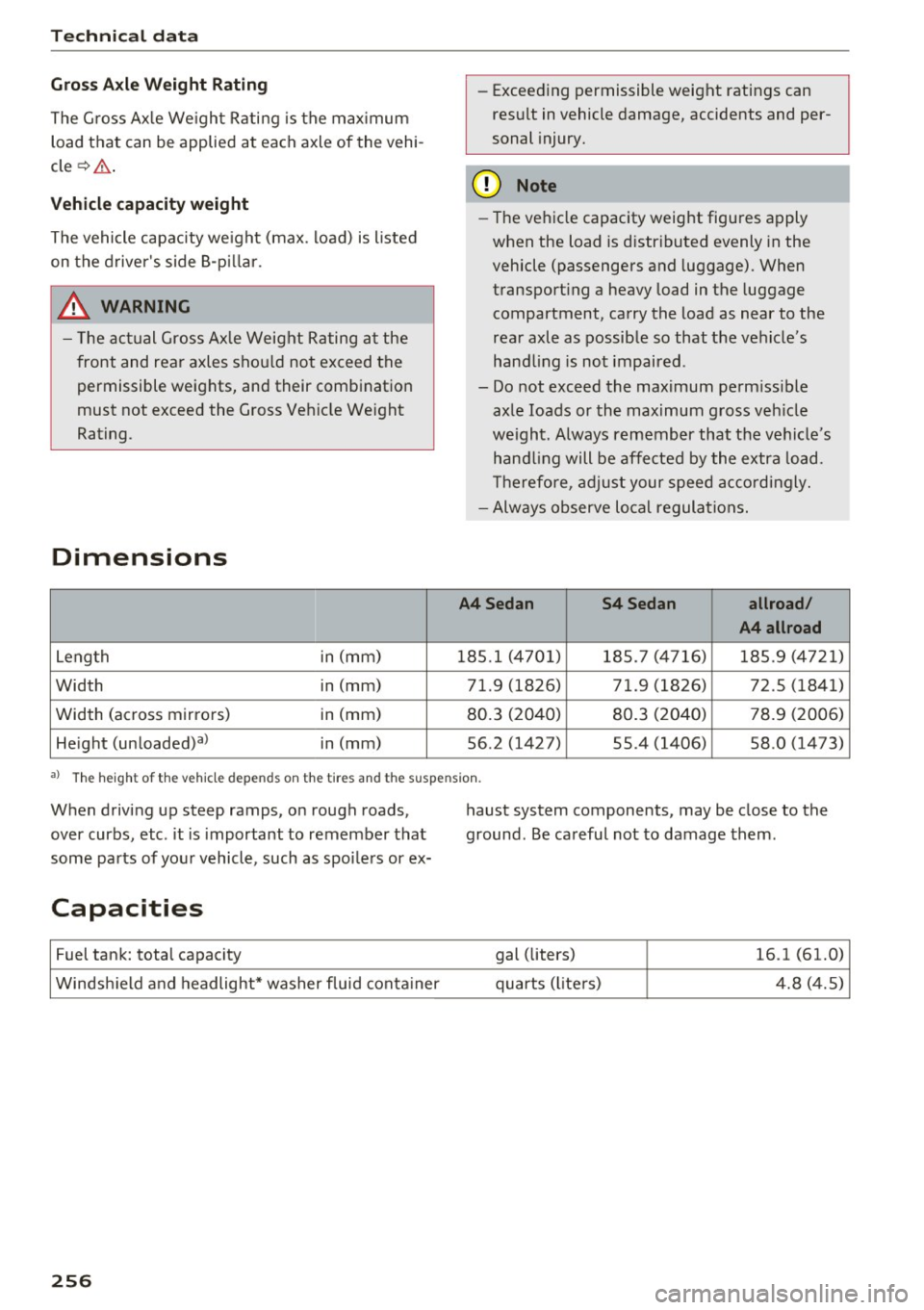
Dimensions
Leng th in
(mm)
Width in
(mm)
Width (across mirrors) in (mm)
He ight (unloaded)al in (mm) -
Exceed ing permissible weight ratings can
result in vehicle damage, accidents and per
sonal injury.
(D Note
- The vehicle capacity weight figures apply
when the load is d istr ibuted evenly in the
vehicle (passengers and luggage). When
t ransporting a heavy load in the luggage
compartment, carry the load as near to the
rea r axle as possib le so that the vehicle's
hand ling is not impaired .
- Do not exceed the max imum perm iss ible
axle loads or the maximum g ross veh icle
we ight. Always remember that the ve hicle's
han dling will be affe cted by the extra load.
T herefore, a djust your speed acco rd ingly.
- Always observe lo cal regulations.
A4Sedan S4Sedan
allroad/
A4 allroad
1 85.1 (4 70 1) 185. 7 (4716) 18 5.9 (4721)
71.9 (1826) 71.9 (1826) 72.5 (1841)
80.3 (20 40) 80.3 (20 40) 78.9 (2006)
56.2 (1427) 55.4 (1406) 58.0 (1473)
a) The height of th e veh icle depends on t he tir es and the suspens ion.
When driving up steep ramps, on rough roads,
over curbs, etc . it is important to remember that
some parts of you r vehicle, such as spoi lers or ex-
Capacities
Fuel tank: tota l capacity
Windsh ie ld a nd headlight* washer fluid conta iner
256
haust system components, may be close to the
ground. Be careful not to damage them .
gal (liters)
16.1 (61.0)
quarts (l ite rs) 4.8 ( 4.5)