automatic transmission AUDI S4 2016 Owner's Manual
[x] Cancel search | Manufacturer: AUDI, Model Year: 2016, Model line: S4, Model: AUDI S4 2016Pages: 278, PDF Size: 70.26 MB
Page 113 of 278

..... N
0 ::..:: co .....
Introduction
Applies to vehicles: with Audi drive select
Drive select provides the possibility to experience
d iff erent types of vehicle settings in one veh icle.
F or instance, using the three
Comfort, Auto and
Dynamic modes, the driver can switch from a
sporty to a comfortab le driving mode with the
press of a button.
Addit ionally, in vehicles with MM I*, the vehicle
setup for
Individual* mode can be customized by
you. This makes it possible to combine settings
such as a sporty engine tuning with comfortable
steering.
A WARNING
-
Improper use of the Audi drive select can
cause collisions, other accidents and serious
personal injury .
Description
Applies to vehicles: with Audi drive select
The vehicle setup in each mode depends on the
veh icle's features . However, the engine, auto
matic transmission* and steering are always in
volved.
Engine and automatic transmission*
Depending on the mode, the engine and the au
tomatic transm ission respond quicker or in a
more balanced manner to accelerator pedal
movements . In the sporty dynamic mode, the au
tomatic transmission shifts at higher RPMs.
Steering
The steering adapts in terms of steering effort
and steering ratios. Indirect steer ing that moves
eas ily, like the steering in comfort mode, is best
suited to long drives on a highway. In contrast,
dynamic mode provides sporty, direct steering.
The follow ing applies to vehicles with dynam ic
steer ing*: the steering rat io changes based on
vehicle speed in order to maintain optimum
steer ing effort for the driver at all times. This
Audi drive select
sets the steering to be less sensitive at higher
speeds in order to provide improved vehicle con
trol. At reduced speeds, however, steering is
more direct in order to keep the steering effort as
minimal as possible when the driver is maneuver
ing the vehicle. At low and average speeds, dy
nam ic steering additionally prov ides more re
spons ive steering performance .
Adaptive dampers*
The adaptive dampers* use sensors to record in
formation regarding steering movements, brak
ing and acceleration operations by the driver,
road surface, driving speed, and load . This makes
it possible to adapt damping to the driving situa
tion virtua lly in real time. Drive select also makes
it possible to sat isfy the desire for sporty suspen
sion (Dynamic) and comfortable suspension
(Comfort) without giving up balanced tuning (Au
to).
Sport differential*
As a component of the all whee l dr ive system
(quattro)
c::> page 182, the sport different ial* dis
tributes the driving power to the rear axle de
pending on the situation. The distribution of
power varies depending on the mode selected.
The goal is a high level of ag ility and ability to ac
celerate on curves. The vehicle is very responsive
to steering.
Audi adaptive cruise control*
The behavior when accelerating can be adjusted
from comfortable to sporty, depending on the
drive select mode. Adaptive cruise control also
responds to the driving behavior of the vehicle
ahead in a more conservative or sporty manner .
Engine sound*
The sound of the engine is adapted to the select
ed mode and ranges from subtle to sporty.
(D Tips
- In some models, the maximum vehicle
speed can only be reached in the
Auto and
Dynamic modes.
- For vehicles with an automatic transmis-
sion, se lecting the
Dynamic mode resu lts in ...,
111
Page 114 of 278
Audi drive select
sporty shifting characteristics . The S gear
position engages automatically.
- In vehicles that have dynamic steering*, op
erating noise is heard when starting or stop
ping the engine. This does not ind icate a
problem.
Selecting the driving mode
Applies to veh icles: w ith Aud i d rive select
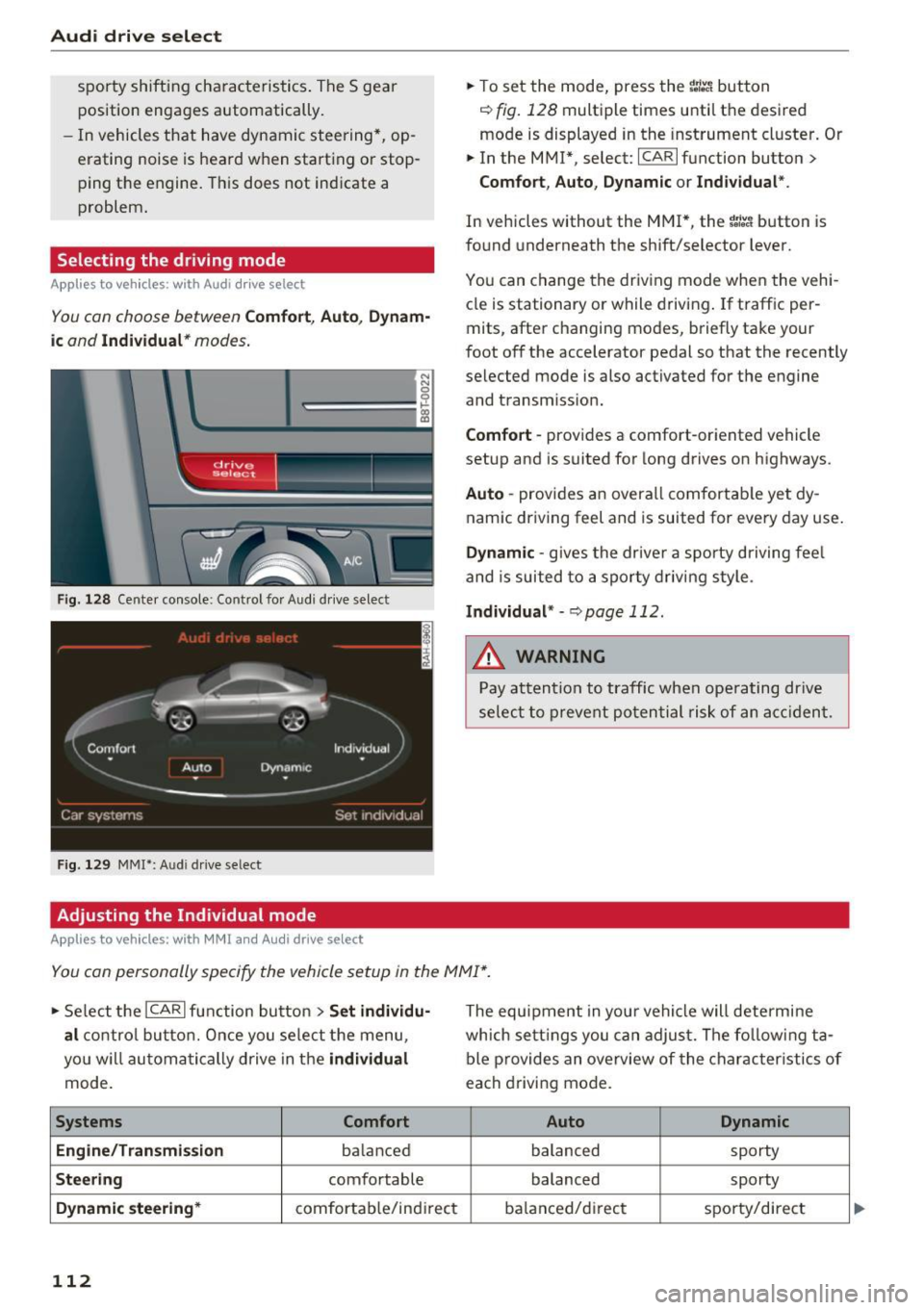
You con choose between Comfort, Auto , Dynam
ic and Individual * modes.
N N 0
0
'l::=====:::: 1-'gi
drive I sel,.c,ct _ J -~-
F ig . 128 Ce nter console : Co ntrol for Aud i dr ive select
Fig . 129 MMI*: A udi drive select
Adjusting the Individual mode
Applies to vehicles : w ith MMI a nd Audi drive select
.,. To set the mode, press the ~:i:a button
c::> fig. 128 multiple times until the desired
mode is displayed in the instrument cluster. Or
.,. In the MMI* , select: ICARlfunction button>
Comfort, Auto, Dynamic or Individual".
In vehicles without the MMI*, the ~:/:a button is
found underneath the shift/selector lever.
You can change the driving mode when the vehi
cle is stationary or while driving. If traff ic per
mits, after changing modes, briefly take your
foot off the accelerator pedal so that the recently
selected mode is also activated for the engine
and transm iss ion.
Comfort -provides a comfort-oriented vehicle
setup and is suited for long drives on highways.
Auto -provides an overall comfortable yet dy
namic driving feel and is suited for every day use.
Dynamic -gives the drive r a sporty driving fee l
and is suited to a sporty driving style .
Individual* -c::, page 112.
&_ WARNING
Pay attention to traffic when operating drive
select to prevent potential risk of an accident.
You can personally specify the vehicle setup in the MMI* .
.,. Select the ICAR I function button > Set individu
al
control button. Once you select the menu,
you w ill automatically drive in the
individual
mode.
Systems Comfort
Engine/Transmission
ba lanced
Steering comfortable
Dynamic steering* comfortab le/indi rect
112
The equipment in you r vehicle will determine
which settings you can adjust. The following ta
ble provides an overview of the characteristics of
each driving mode.
Auto Dynamic
balanced
sporty
balanced sporty
ba lanced/d irec t sporty/direct
Page 206 of 278
Checking and Filling
-To reduce the risk of being burned, never
open the hood if you see or hear steam or
coolant escaping from the engine compart
ment . Wait until no steam or coolant can be
seen or heard before carefully opening the hood.
- Keep children away from the engine com partment.
- Never spill fluids on hot engine compo
nents. They can cause a fire.
- Never touch the radiator fan. The auxiliary
electric fan is temperature controlled and
can switch on suddenly .
- Never open the coolant reservoir cap when
the engine is still warm. The coolant system is pressurized and hot coolant could spray
out.
- Protect your face, hands and arm from
steam or hot engine coolant by placing a
thick rag over the cap when you open the coolant reservoir.
- Do not remove the engine cover under any
circumstances. This increases the risk of
burns.
- If work on the fuel system or the electrical
system is necessary:
- Always disconnect the battery.
- Never smoke or work near heaters or open
flames. Fluids in the engine compartment could start a fire.
- Keep an approved fire extinguisher imme
diately available.
- To avoid electrical shock and personal injury
while the engine is running or being started,
never touch:
- Ignition cables
- Other components of the high voltage
electronic ignition system .
- If you must perform a check or repair with
the engine running:
- First, fully apply the parking brake, move
selector lever of automatic transmission
204
to "P" (Park); put manual transmission in
Neutral.
- Always use extreme caution to prevent
clothing, jewelry, or long hair from get
ting caught in the radiator fan, V-belts or
other moving parts, or from contacting hot parts . Tie back hair before starting,
and do not wear clothing that will hang or
droop into the engine.
- Minimize exposure to emission and chemi
cal hazards
c::> /.1. .
A WARNING
California Proposition 65 Warning:
- Engine exhaust, some of its constituents, and certain vehicle components contain or
emit chemicals known to the State of Cali
fornia to cause cancer and birth defects and
reproductive harm . In addition, certain flu
ids contained in vehicles and certain prod
ucts of component wear contain or emit
chemicals known to the State of California
to cause cancer and birth defects or other
reproductive harm.
- Battery posts, terminals and related acces
sories contain lead and lead compounds,
chemicals known to the State of California
to cause cancer and reproductive harms .
Wash hands after handling.
(D Note
When adding fluids, always make sure that
they are poured into the proper container or
filler opening, otherwise serious damage to
vehicle systems will occur.
@ For the sake of the environment
To detect leaks in time, inspect the vehicle
floor pan from underneath regularly . If you
see spots from oil or other vehicle fluids, have
your vehicle inspected by an authorized Audi
dealer.
Page 242 of 278
Emergency assistance
"'Let the compressor run until the va lue specified
on the tire pressure label is reach ed
¢ page 227, fig. 191 . Switch the compressor
off after running for 12 minutes at the mos t -
danger of overheating!
A WARNING
The compressor and the tire filler hose can become extremely hot while they are running
- danger of burns!
CD Note
Switch the compressor off after running for
12 minutes at the most -danger of overheat
ing! Allow the compressor to cool down for a
few minutes before you use it again.
Replacing wheels
Before changing a wheel
Observe the following precaut ions for your own
and your passenger's safety when changing a
wheel.
"' After you experience a tire failure, pull the car
well away from moving traffic and try to reach
level ground before you stop ¢.&_ .
"' All passengers shou ld
leave the car and move
to a safe location (for instance, behind the
guardrail) ¢.&_ .
"' Engage the
parking brake to prevent your vehi
cle from rolling unintentionally ¢&_ .
"' Sh ift into
1st gear on vehicles w ith manual
transmission, or move the
selector lever to the
P position
on vehicles with automatic transmis
sion .
"' If you are towing a trailer: unhitch the trailer
from your vehicle.
"' Take the
jack¢ page 237 and the spare tire
¢ page 238 out of the luggage compartment .
A WARNING
You or your passengers could be injured wh ile
chang ing a wheel if you do not follow these
safety precautions :
- If you have a flat tire, move a safe distance
off the road . Turn off the engine, turn the
240
emergency flashers on and use other warn
ing devices to alert other motorists.
- Make sure that passengers wait in a safe
place away from the vehicle and well away
from the road and traffic.
- To help prevent the vehicle from moving
suddenly and possibly slipping off the jack,
always fully set the parking brake and block
the wheel diagonally opposite the wheel be ing changed with the folding chocks or oth
er objects . When one front whee l is lifted
off the ground, placing the Automat ic
T ransmission in "P" (Par k) w ill
not prevent
the vehicle from moving.
- Before you change a wheel, be sure the
ground is level and firm . If necessary, use a
sturdy board under the jack.
- Always store the vehicle tool kit, the jack*
and the replaced tire in the luggage com
partment
¢ page 126.
CD Note
If you a re changing the wheel on a steep in
cline, use a rock or similar object to block the
opposite wheel to prevent the vehicle from
moving.
(D Tips
Obey all laws.
Changing a wheel
When you change a wheel, follow the sequence
described below step-by-step and in exactly that
order .
1. Remove the decorative wheel cover* or the
wheel bolt caps* . For more details see also
¢ page 241, Decorative wheel covers or
¢ page 241, Wheels with wheel bolt cops.
2. Loosen the wheel bolts ¢page 242.
3. Locate the proper mounting point for the
jack and align the jack below that point
¢ page 242.
4. Lift the car with the jack¢ page 242.
5. Remove the wheel with the flat tire and then
install the
spare tire ¢page 243.
6. Tighten all whee l bolts lightly .
Page 244 of 278
Emergency assistance
The caps are to protect and keep the whee l bolts
clean.
Loosening and tightening the wheel bolts
The wheel bolts must be loosened before raising
the vehicle.
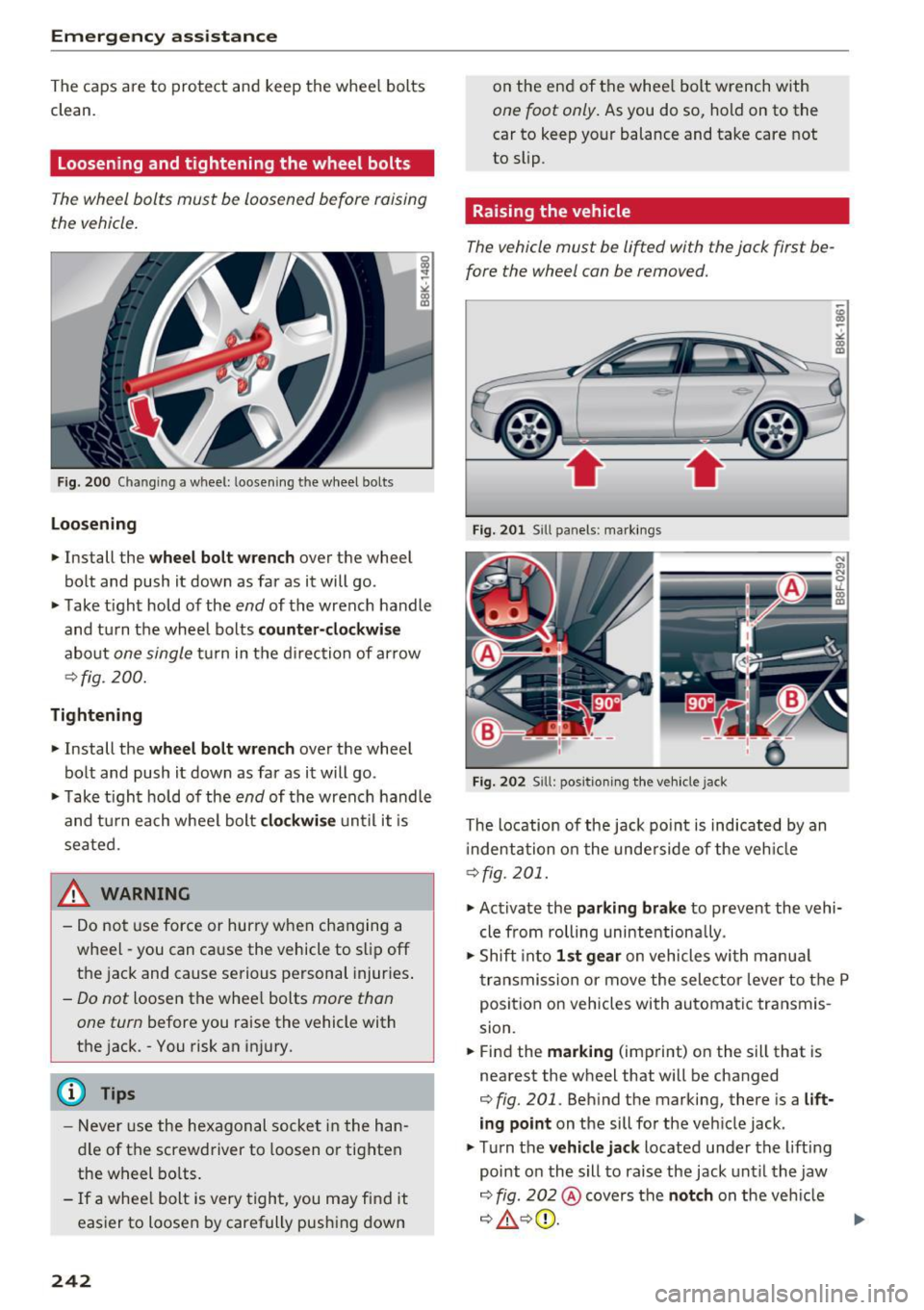
Fig . 200 Changing a wheel: loosening the wheel bolts
Loosening
• Install the wheel bolt wrench over the wheel
bolt and push it down as far as it will go.
• Take tight hold of the
end of the wrench handle
and turn the wheel bolts
counter-clockwise
about one single tur n in the direction of ar row
¢fig. 200.
Tightening
• Install the wheel bolt wrench over the wheel
bolt and push it down as far as it will go.
• Ta ke tight hold of the
end of the wrench handle
and turn each whee l bolt
clockwise until it is
seated.
_& WARNING
- Do not use force or hurry when changing a
wheel -you can cause the vehicle to slip off
the jack and cause serious personal injuries.
-Do not loosen the whee l bolts more than
one turn
before you raise the vehicle with
the jack. -You risk an injury .
(D Tips
-Never use the hexagonal socket in the han
dle of the screwdriver to loosen o r tighten
the wheel bolts.
- If a whee l bolt is very tight, you may find it
easier to loosen by carefully push ing down
242
on the end of the whee l bolt wrench with
one foot only. As you do so, hold on to the
car to keep your balance and take care not
to slip.
Raising the vehicle
The vehicle must be lifted with the jack first be
fore the wheel can be removed.
Fig. 201 Sill panels: marking s
Fig. 202 Sill: positio ning the vehicle jack
The location of the jack point is indicated by an
i ndentation on the underside of the vehicle
¢fig. 201.
• Activate the parking brake to prevent the vehi
cle from rolling unintentionally.
• Shift into
1st gear on vehicles with manua l
transmission or move the selector lever to the P
position on vehicles with automatic transmis
sion.
• Find the
marking (imp rint) on the sill that is
nearest the wheel that will be changed
¢ fig. 201. Behind the marking, there is a lift
ing point on the sill for the vehicle jack.
• Turn the
vehicle jack located under the lifting
point on the sill to raise the jack until the jaw
¢ fig. 202@covers the notch on the veh icle
¢ ~ ¢©. ~
Page 252 of 278
Emergency situations
Emergency situations
General
This chapter is intended for trained emergency crews and working personnel who have the nec
essary tools and equipment to perform these
operations.
Starting by pushing or
towing
CD Note
Vehicles with an automatic transmission
cannot be started by pushing or towing.
Starting with jumper
cables
If necessary, the engine con be started by con
necting it to the battery of another vehicle.
If the engine should fail to start because of a dis
charged or weak battery, the battery can be con
nected to the battery of
another vehicle, using a
pair of jumper cables to start the engine.
Jumper cables
Use only jumper cables of sufficiently largecross
section
to carry the starter current safely. Refer
to the manufacturer's specifications.
Use only jumper cables with
insulated terminal
clamps which are distinctly marked :
plus(+) cable in most cases colored red
minus(-) cable
in most cases colored black.
A WARNING
Batteries contain electricity, acid, and gas.
Any of these can cause very serious or fatal in
jury. Follow the instructions below for
safe
handling of your vehicle's battery.
-Always shield your eyes and avoid leaning
over the battery whenever possible.
-A discharged battery can freeze at tempera
tures just below 32 °F (0 °C). Before con
necting a jumper cable, you must thaw the
250
frozen battery completely, otherwise it could explode.
- Do not allow battery acid to contact eyes or
skin. Flush any contacted area with water immediately.
- Improper use of a booster battery to start a
vehicle may cause an explosion.
- Vehicle batteries generate explosive gases.
Keep sparks, flame and lighted cigarettes
away from batteries.
- Do not try to jump start any vehicle with a
low acid level in the battery.
- The voltage of the booster battery must also
have a 12-Volt rating. The capacity (Ah) of
the booster battery should not be lower
than that of the discharged battery. Use of
batteries of different voltage or substantial
ly different "Ah" rating may cause an explo
sion and personal injury.
- Never charge a frozen battery. Gas trapped in the ice may cause an explosion.
- Never charge or use a battery that has been
frozen . The battery
case may have be weak
ened .
- Use of batteries of different voltage or sub
stantially different capacity (Ah) rating may
cause an explosion and injury. The capacity
(Ah) of the booster battery should not be
lower than that of the discharged battery.
- Before you check anything in the engine
compartment, always read and heed all
WARNINGS
~page 203.
CD Note
-Applying a higher voltage booster battery
will cause expensive damage to sensitive
electronic components, such as control
units, relays, radio, etc.
- There must be no electrical contact between
the vehicles as otherwise current could al
ready start to flow as soon as the positive
(+) terminals are connected.
@ Tips
The discharged battery must be properly con-
nected to the vehicle's electrical system. .,..
Page 253 of 278
.... N
0
""' CX)
.... I.Cl U"I
.... I.Cl ....
When jump starting or charging the battery,
never connect the negative ground cable to
the battery negative post because the battery
manager system must be able to detect the
battery's state of charge. Always connect the
negative ground cable to the negat ive ground
post of the battery manager control unit .
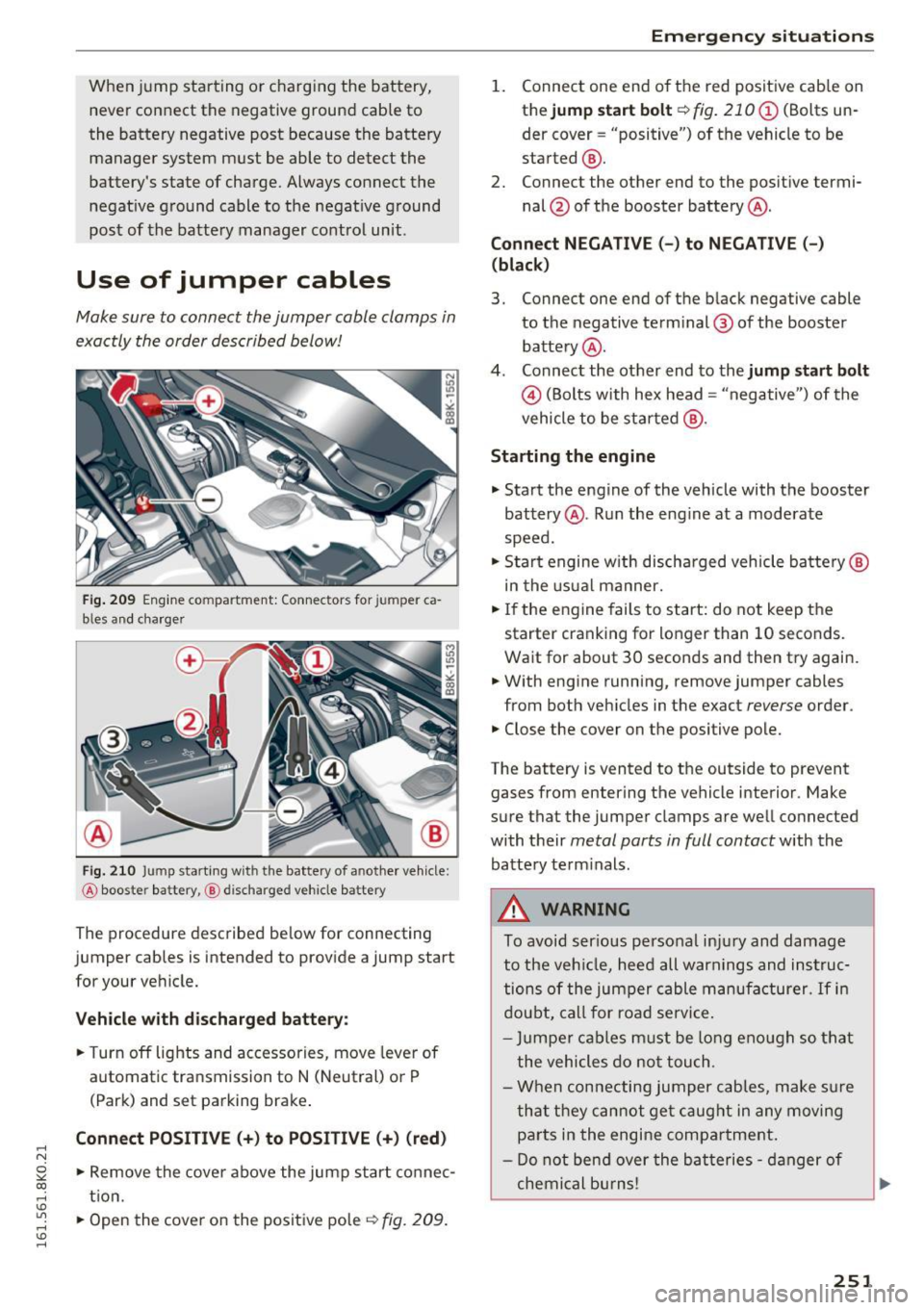
Use of jumper cables
Make sure to connect the jumper cable clamps in
exactly the order described below!
Fig. 209 Engine compartment: Connectors for jumper ca
bles an d charger
Fig. 210 Jump starting w ith the battery of another vehicle :
@ booster battery, ® discharged vehicle battery
The procedure described be low for connecting
jumper cables is intended to provide a jump start
for your vehicle.
Vehicle with discharged battery:
.. Turn off lights and accessories, move lever of
automatic transmission to N (Neutral) or P
(Park) and set parking brake .
Connect POSITIVE(+) to POSITIVE(+) (red)
.,. Remove the cover above the jump start connec
t ion .
.,. Open th e cover on the positive pole
¢ fig. 209 .
Emergency situations
1. Connect one end of the red positive cab le on
the
jump start bolt¢ fig. 210 (D (Bolts un
der cover= "positive") of the vehicle to be
started @.
2. Connect the other end to the positive termi-
nal @of the booster battery @.
Connect NEGATIVE (-) to NEGATIVE (- )
(black)
3. Connect one end of the black negative cable
to the negative terminal @ of the booster
battery @.
4. Connect the other end to the
jump start bolt
@(Bolts with hex head= "negative ") of the
vehicle to be started @.
Starting the engine
.. Start the engine of the vehicle with the booster
battery @. Run the eng ine at a moderate
speed .
.,. Start engine w ith discharged vehicle battery @
in the usual manner.
.,. If the engine fails to start: do not keep the
starter cranking for longer than 10 seconds.
Wait for about 30 seconds and then try again .
.. With engine running, remove jumper cables
from both vehicles in the exact
reverse order .
.. Close the cover on the positive pole.
The battery is vented to the outside to prevent
gases from entering the vehicle interior . Make
sure that the jumper clamps are well connected
with their
metal parts in full contact with the
battery term inals .
A WARNING
To avoid ser ious personal injury and damage
to the vehicle, heed all warnings and instruc
tions of the jumper cable manufacturer.
If in
doubt, call for road service.
- Jumper cables must be long enough so that
the vehicles do not touch .
- When connecting jumper cables, make s ure
that they cannot get caug ht in any moving
parts in the engine compartment.
- Do not bend over the batteries -danger of
chemical bu rns!
251
Page 261 of 278
..... N
0 ::..:: co .....
scope of maintenance and repairs which can be
carried out by vehicle owners.
Also, safety and
environmental
concerns place very strict limits
on the nature of repairs and adjustments to en
gine and transmission parts which an owner can perform .
Maintenance, adjustments and repairs usually re
quire special tools, testing devices and other
equipment available to specially trained work
shop personnel in order to assure proper per
formance, reliability and safety of the vehicle and its many systems.
Improper maintenance, adjustments and repairs
can impair the operation and reliability of your
vehicle and even void your vehicle warranty .
Therefore, proof of servicing in accordance with
the maintenance schedule may be a condition for upholding a possible warranty claim made within
the warranty period.
Above all , operational safety can be adversely af
fected, creating unnecessary risks for you and
your passengers.
If in doubt about any servicing, have it done by
your authorized Audi dealer or any properly equipped and qualified workshop. We strongly urge you to give your authorized Audi dealer the
opportunity to perform all scheduled mainte nance and necessary repairs. Your dealer has the
facilities, original parts and trained specialists to keep your vehicle running properly .
Performing limited maintenance yourself
The following pages describe a limited number of
procedures which can be performed on your vehi
cle with ordinary tools, should the need arise and
trained personnel be unavailable. Before per
forming any of these procedures, always thor
oughly read all of the applicab le text and careful
ly follow the instructions given . Always rigorously
observe the
WARNINGS provided .
Before you check anything in the engine com
partment, always read and heed all WARNINGS
c::> .&. and c::> .&. in Working in the engine compart
ment on page 203 .
Consumer information
A WARNING
-Serious personal injury may occur as a result
of improperly performed maintenance, ad
justments or repairs .
- Always be extremely careful when working
on the vehicle. Always follow commonly ac
cepted safety practices and general com
mon sense. Never risk personal injury.
- Do not attempt any of the maintenance,
checks or repairs described on the following pages if you are not fully familiar with these
or other procedures with respect to the ve hicle, or are uncertain how to proceed.
- Do not do any work without the proper tools
and equipment. Have the necessary work
done by your authorized Audi dealer or any
properly equipped and qualified workshop.
- The engine compartment of any motor vehi
cle is a potentially hazardous area. Never
reach into the area around or touch the radi
ator fan. It is temperature controlled and
can switch on suddenly - even when the en
gine is off and the ignition key has been re
moved. The radiator fan switches on auto
matically when the coolant reaches a certain
temperature and will continue to run until
the coolant temperature drops.
- Always remove the ignition key before any
one gets under the vehicle.
-Always support your vehicle with safety
stands if it is necessary to work underneath
the vehicle. The jack supplied with the vehi
cle is not adequate for this purpose and
could collapse causing serious personal in
jury.
- If you must work underneath the vehicle
with the wheels on the ground, always make
sure the vehicle is on level ground, that the
wheels are always securely blocked and that
the engine cannot be started.
- Always make sure the transmission selector
lever (automatic transmission) is in "P"
(Park position) or Neutral (manual transmis-
sion) and the park brake is firmly applied . ..,.
259
Page 264 of 278
Index
A
A/C (automatic climate control) . . . . . . . . . . 77
Accessories . . . . . . . . . . . . . . . . . . . . . . . 64, 260
Active lane assist
Cleaning the camera area . . . . . . . . . . . . . 194
adaptive cruise control Vehicles with manual transmission . . . . . . 99
Adaptive cruise control. . . . . . . . . . . . . . . . . . 98
Cleaning the sensor . . . . . . . . . . . . . . . . . . 194
Messages . . . . . . . . . . . . . . . . . . . . . . . . . . 105
R equ est for driver interven tio n . . . . . . . . . 103
Setting the driving program . . . . . . . . . . . 103
Adaptive dampers . . . . . . . . . . . . . . . . . . . . . 111
Adaptive light . . . . . . . . . . . . . . . . . . . . . . . . . 48
Adaptive Lig ht (defective) . . . . . . . . . . . . . . . 21
Adding Engine coolant .. .. .. ...... ... .. .. .. .
Engine oil .. .. .. .. . ... .... .. ... .. .. .
W indshield washer fluid ............. .
Additional accessories
Additives Eng ine oil .... .. .. . .. .......... .. .. .
Adjustable steer ing column .......... .. . .
Adjusting 210
207
216
260
207
80
Air distribution (automat ic climate control) .78
Instrumen t illum inat ion . . . . . . . . . . . . . . . 51
Steering column . . . . . . . . . . . . . . . . . . . . . . 80
Temperatu re (automatic climate control) . 78
Airbag . . . . . . . . . . . . . . . . . . . . . . . . . . . . . . 138
Warning/indicator lights . . . . . . . . . . . . . . . 19
Ai rbag system . . . . . . . . . . . . . . . . . . . . . . . . 153
Advanced Airbag-System . . . . . . . . . . . . . . 142
Advanced Airbag System components . . . 144
Care . . . . . . . . . . . . . . . . . . . . . . . . . . . . . . 151
Ch ildren . . . . . . . . . . . . . . . . . . . . . . . . . . . 159
Child restraints . . . . . . . . . . . . . . . . . . . . . 160
Components (front airbags) . . . . . . . . . . . 144
Danger of fitting a child safety seat on the
front passenger seat . . . . . . . . . . . . . . . . . 139
D ispos al . . . . . . . . . . . . . . . . . . . . . . . . . . . 151
Fr ont airbags . . . . . . . . . . . . . . . . . . . 142, 143
How do the front airbags work? . . . . . . . . 146
H ow many airbags does my vehicle have? 144
H ow the Advanced Airbag System compo-
nents work together . . . . . . . . . . . . . . . . . 146
Important information . . . . . . . . . . . . . . . 138
Monitoring 148
262
PASSENGER AIR BAG OFF light . . . . . . . . . 148
Repairs . . . . . . . . . . . . . . . . . . . . . . . . . . . . 151
Safety instructions . . . . . . . . . . . . . . . . . . . 150
Side air bags . . . . . . . . . . . . . . . . . . . . . . . . 152
S ide curta in air bags . . . . . . . . . . . . . . . . . . 155
Warning/Indicator lights . . . . . . . . . . . . . 148
Weight-sensing mat . . . . . . . . . . . . . . . . . 159
When must the system be inspected? . . . 148
a ll- wheel drive . . . . . . . . . . . . . . . . . . . . . . . 182
All season tires . . . . . . . . . . . . . . . . . . . . . . . 232
Alternator
refer to Generator . . . . . . . . . . . . . . . . . . . . 16
Anti-freeze
refer to Eng ine coolant system . . . . . . . . . 208
Ant i-lock braking system
Warning/indicator lights . . . . . . . . . . . . 18, 19
Anti-Lock Braking System . . . . . . . . . . . . . . 177
Anti-slip regulation
Warning/indicator lights . . . . . . . . . . . . . . . 18
Anti-Slip Regulation . . . . . . . . . . . . . . . . . . . 177
Anti-theft alarm system . . . . . . . . . . . . . . . . . 31
Anti-theft systems
E le ctronic immobilizer................. 37
Armrest . . . . . . . . . . . . . . . . . . . . . . . . . . . . . . 61
Ashtray . . . . . . . . . . . . . . . . . . . . . . . . . . . . . . 64
Audi braking guard
refer to braking guard . . . . . . . . . . . . . . . . . 98
Audi drive select . . . . . . . . . . . . . . . . . . . . . . 111
Adaptive dampers . . . . . . . . . . . . . . . . . . . 111
Description . . . . . . . . . . . . . . . . . . . . . . . . . 111
Dynam ic steering . . . . . . . . . . . . . . . . . . . . 111
Setting the driving mode . . . . . . . . . . . . . . 112
Sport differential . . . . . . . . . . . . . . . . . . . . 111
Audi Se rvice Repair Manuals and Literature 258
AUTO Automatic climate control . . . . . . . . . . . . . . 78
Automa tic headl ights . . . . . . . . . . . . . . . . . 48
Automatic belt retractor . . . . . . . . . . . . . . . 133
Automatic climate control Air vents . . . . . . . . . . . . . . . . . . . . . . . . . . . . 78
Operation . . . . . . . . . . . . . . . . . . . . . . . . . . . 77
Setup . . . . . . . . . . . . . . . . . . . . . . . . . . . . . . 79
Automat ic Shift Lock (ASL) . . . . . . . . . . . . . . 92
Automatic transmission . . . . . . . . . . . . . . . . . 90
Automat ic Shift Lock (ASL) . . . . . . . . . . . . . 92
Driving . . . . . . . . . . . . . . . . . . . . . . . . . . . . . 92
Eme rgency mode . . . . . . . . . . . . . . . . . . . . . 96
Page 271 of 278
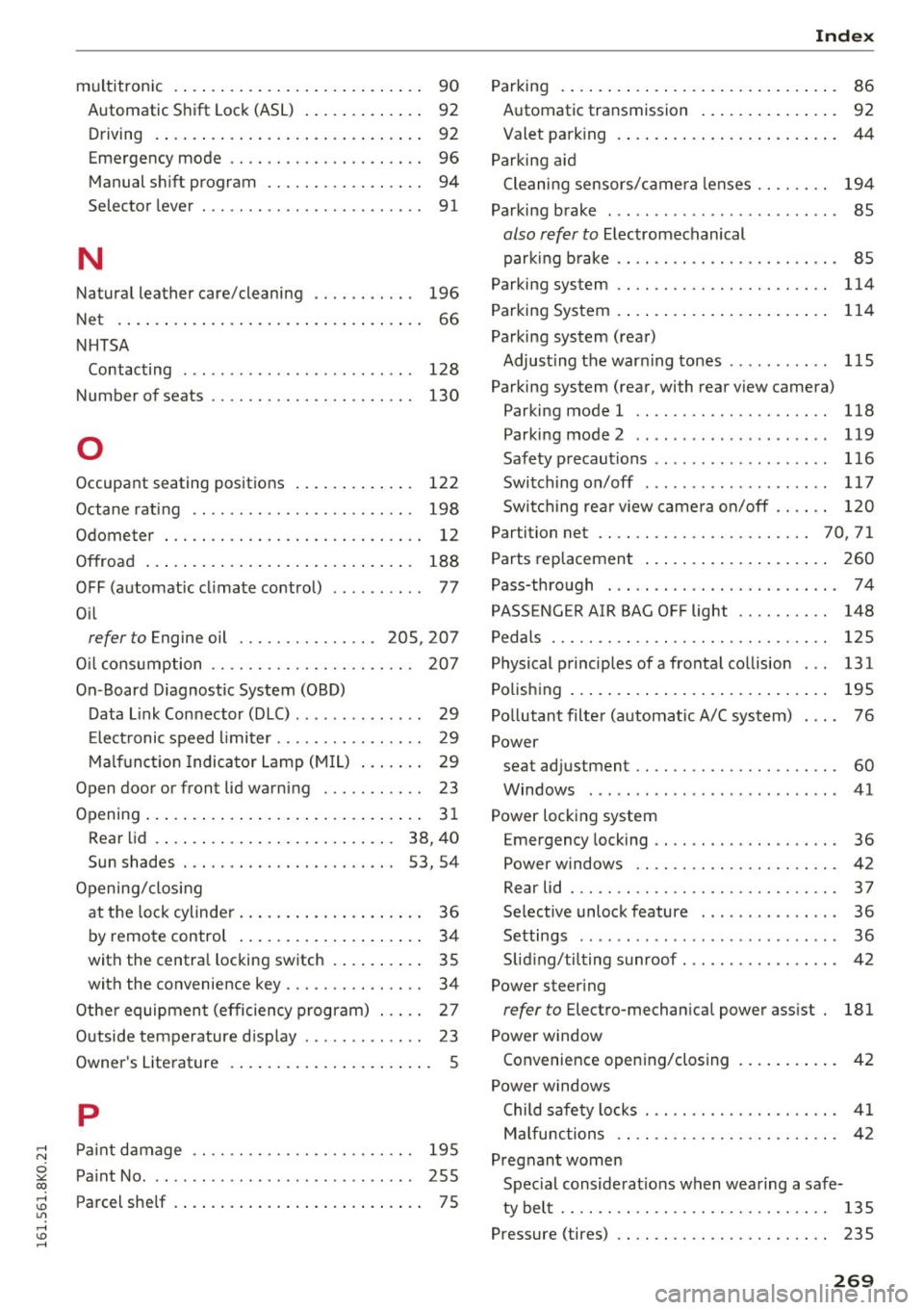
..... N
0 ::..:: co .....
Automatic S hift Lock (ASL) . . . . . . . . . . . . . 92
Driving . . . . . . . . . . . . . . . . . . . . . . . . . . . . . 92
Emergency mode . . . . . . . . . . . . . . . . . . . . . 96
Manual s hift program . . . . . . . . . . . . . . . . . 94
Selector lever . . . . . . . . . . . . . . . . . . . . . . . . 91
N
Natura l leather care/cleaning . . . . . . . . . . . 196
N et . . . . . . . . . . . . . . . . . . . . . . . . . . . . . . . . . 66
NHTSA Contacting . . . . . . . . . . . . . . . . . . . . . . . . . 128
Number of seats . . . . . . . . . . . . . . . . . . . . . . 130
0
Occupant seating posit ions 122
Octane rat ing . . . . . . . . . . . . . . . . . . . . . . . . 198
Odometer . . . . . . . . . . . . . . . . . . . . . . . . . . . . 12
Offro ad . . . . . . . . . . . . . . . . . . . . . . . . . . . . . 188
OFF (automatic cl imate control) . . . . . . . . . . 77
O il
refer to Engine oil . . . . . . . . . . . . . . . 205, 207
O il cons umption . . . . . . . . . . . . . . . . . . . . . . 207
On -Board D iagnostic System (OBD)
Data L ink Con nector (DLC) . . . . . . . . . . . . . . 29
E lect ronic speed limiter. . . . . . . . . . . . . . . . 29
M alf unctio n I ndica to r L amp (MIL) . . . . . . . 29
Open door or front lid warni ng . . . . . . . . . . . 23
Opening ... .. .. .. ... . .... ... .. .. .... .. 31
Rear lid . . . . . . . . . . . . . . . . . . . . . . . . . . 38, 40
Sun shades . . . . . . . . . . . . . . . . . . . . . . . 53, 54
Opening/clos ing
at the lock cylinde r. . . . . . . . . . . . . . . . . . . . 36
by remote control . . . . . . . . . . . . . . . . . . . . 34
with the centra l locking sw itch . . . . . . . . . . 35
with the convenience key . . . . . . . . . . . . . . . 34
Othe r equipmen t (efficiency prog ram) . . . . . 27
Outside temperature d isplay . . . . . . . . . . . . . 23
Owner's Literat ure
5
p
Paint damage . . . . . . . . . . . . . . . . . . . . . . . . 195
Pa int No . . . . . . . . . . . . . . . . . . . . . . . . . . . . . 255
Pa reel shelf . . . . . . . . . . . . . . . . . . . . . . . . . . . 7 5
Index
Parking . . . . . . . . . . . . . . . . . . . . . . . . . . . . . . 86
Automatic transmission . . . . . . . . . . . . . . . 92
Valet parking . . . . . . . . . . . . . . . . . . . . . . . . 44
Parking a id
Cleaning sensors/ came ra lenses . . . . . . . . 194
Parking brake . . . . . . . . . . . . . . . . . . . . . . . . . 85
also refer to Electromechanical
par king b rake . . . . . . . . . . . . . . . . . . . . . . . . 85
Parking system . . . . . . . . . . . . . . . . . . . . . . . 114
Parking System . . . . . . . . . . . . . . . . . . . . . . . 114
Parking system (rear) Adjust ing the war ning tones . . . . . . . . . . . 115
Parking system (rear, with rear v iew camera)
Parki ng mode 1 . . . . . . . . . . . . . . . . . . . . . 118
Parking mode 2 . . . . . . . . . . . . . . . . . . . . . 119
Safety precautions . . . . . . . . . . . . . . . . . . . 116
Switch ing on/off .................... 117
Swi tching rea r view came ra o n/off . . . . . . 1 20
Partition net . . . . . . . . . . . . . . . . . . . . . . . 70, 71
Parts replacement . . . . . . . . . . . . . . . . . . . . 260
Pass-through . . . . . . . . . . . . . . . . . . . . . . . . . 7 4
PASSENG ER AIR BAG OFF light . . . . . . . . . . 148
Pedals . . . . . . . . . . . . . . . . . . . . . . . . . . . . . . 1 25
Physical princip les of a frontal collision . . . 131
Polish ing . . . . . . . . . . . . . . . . . . . . . . . . . . . . 195
Po llutant filte r (automat ic A/C sys tem) . . . . 76
Power seat adjustment . . . . . . . . . . . . . . . . . . . . . . 60
Windows ....... .. .................. 41
Power locking system Emergency locking . . . . . . . . . . . . . . . . . . . . 36
Power windows . . . . . . . . . . . . . . . . . . . . . . 42
Rear lid . . . . . . . . . . . . . . . . . . . . . . . . . . . . . 37
Selective unlock feature . . . . . . . . . . . . . . . 36
Settings . . . . . . . . . . . . . . . . . . . . . . . . . . . . 36
S lid ing/ti lting sunroof. . . . . . . . . . . . . . . . . 42
Power steer ing
refer to Electro-mechan ica l power assist . 181
Power window Convenience open ing/closing . . . . . . . . . . . 42
P ower windows
Child safety locks . . . . . . . . . . . . . . . . . . . . . 41
M alfunctions . . . . . . . . . . . . . . . . . . . . . . . . 42
Pregnant women Spec ial considerat ions when wea ring a safe-
ty be lt . . . . . . . . . . . . . . . . . . . . . . . . . . . . . 135
Pressure (tires) . . . . . . . . . . . . . . . . . . . . . . . 235
269