lights AUDI S4 2016 Owner's Manual
[x] Cancel search | Manufacturer: AUDI, Model Year: 2016, Model line: S4, Model: AUDI S4 2016Pages: 278, PDF Size: 70.26 MB
Page 65 of 278
..... N
0 ::..:: co .....
Correctly adjusted head restraints and safety
belts are an extremely effective combination
of safety features .
Memory function
Description
Applies to vehicles: with memory function
The memory function allows you to quickly and
easi ly store and recall personal seating profiles
for the driver. The memory function is operated
through the master key and the memory buttons
in the driver 's door.
The driver's seating profile is stored and assigned
to the master key each time the vehicle is locked .
When you open the door , the seat profile is auto
matica lly recalled. If two people use one vehicle,
it is recommended that each person always uses
" t heir own" master key .
Up to 2 seat profi les can be stored in the memory
buttons in the driver's doo r. Once they are stor
ed, these seat profiles can be se lected at any
time.
In addition to the driver's seat settings, you can
also store and access the exterior mirror adjust ment settings* using the remote control key or
memory but ton.
Remote control key
Applies to vehicles: with seat memory
To assign the driver's seat settings to the remote
control key when locking the vehicle, the function
must be activated in the radio or MMI*
~ Select: I CARI function button > Seat adjust
ment > Driver's seat > Remote control key
>
on.Or
~ Select: ICARI function button> Car systems*
control button > Vehicle settings> Seats >
Driver's seat> Remote control key > On .
@ Tips
If you do not want another driver's settings to
be assigned to the remote key, switch off the
Seats and storage
memory function using the radio or MMI* or
the
I OF Fl button c:::> page 63.
Memory buttons
Applies to vehicles: with seat memory
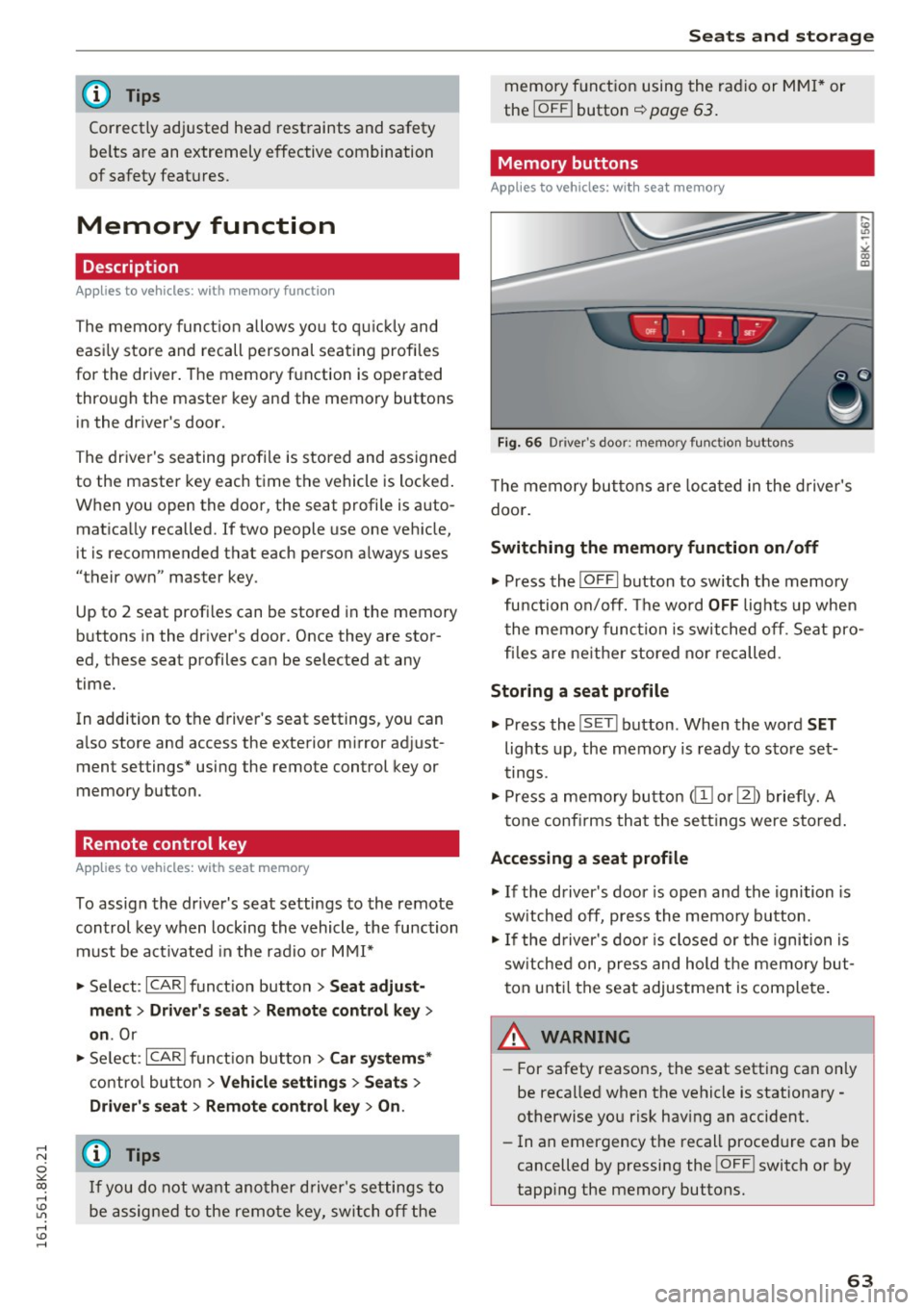
Fig. 66 Dri ver's door: memo ry func tion b uttons
The memory buttons are located in the driver's
doo r.
Switching the memory function on/off
~ Press the I OFFI button to switch the memory
fu nction on/off. The wo rd
OFF lights up when
the memory function is switched off. Seat pro
files are ne ither stored nor recalled .
Storing a seat profile
~ Press the IS E T I button . When the word SET
lights up, the memory is ready to store set
tings .
~ Press a memory button @or [Ii) briefly. A
tone confirms that the settings were stored.
Accessing a seat profile
~ If the driver's door is open and the ignition is
sw itched off, press the memory button .
~ If the driver's door is closed or the ignition is
sw itched on, press and hold the memory but
ton until the seat adjustment is complete.
.&_ WARNING
-For safety reasons, the seat setting can only
be recalled when the vehicle is stationary
otherwise you risk having an accident.
- In an emergency the recall procedure can be
cancelled by pressing the
! O FF ! switch or by
tapp ing the memory buttons.
63
Page 83 of 278
..... N
0 ::..:: co .....
peda l and move the se lector lever to the P or N
pos ition .
~ Press the key c::> fig. 96 - the engine will start.
Switchi ng the ignition on /off
If you wou ld like to switch the ig nition on with
out starting the engine, fo llow these steps :
~ Insert the key into the ignition lock.
~ Press t he key briefly withou t pressing the
clutch peda l (for manual transmissions) or the
brake pedal (for automatic transmissions).
~ To switch the ignition off, press the key again .
When start ing t he engine, major elec trical loads
are switched off tempora rily.
You can on ly remove the key with the ignition
switched off.
If the engine should not start immed iately, the
starting process is automat ically stopped after a
short time. Repeat sta rting procedu re .
_& WARNING
- Never allow the e ngine to ru n in confined
spaces - danger of asp hyxiation.
- Never remove the ign it io n key from the ig ni
t ion look while the vehicle is moving. O ther
wise, the stee ring lock cou ld suddenly en
gage and you would not be able to steer t he
vehicle.
- Always take the key wi th you whenever you
leave your vehicle . Otherwise, the engine
cou ld be started or electrical equipment
such as the power windows cou ld be operat
ed. This can lead to serious injury.
- Never leave children or persons requiring as
sistance unattended in the vehicle. The
doors can be locked using the remote trans
mitter, preventing people from escap ing
from the vehicle on the ir own in the event of
an eme rgency. Depend ing on the t ime of
year, peop le inside the vehicle can be ex
posed to very hig h or very low tempera
tures .
-
D riv ing
(D Note
Avoid high engine rpm, full throttle and heavy
engine loads unti l the engine has reached op
erating temperature - otherwise you risk en
gine damage.
@ For the sake of the environment
Do not let the engine run w hile parked to
warm up. Beg in driving immed iate ly. Th is re
duces unnecessary emissions.
(D Tips
- If the key cannot be removed from the ign i
tion lock, you have to pull the mechanical
key out of the master key in order to be able
to lock the vehicle c::>
page 34.
-Some noise after starting the engine is nor
mal and is no cause for concern.
- If you leave the vehicle w ith the ignition
switched on, the ignit ion w ill switch off af
ter a certain per iod of t ime. Please note that
electrical equipment such as exterior lights
w ill switch off as we ll w hen that happens.
8 1
Page 86 of 278
Driving
oil pressure must first build up in the hy
draulic valve adjusters. This is normal and not a cause for concern.
- If you leave the vehicle with the ignition
switched on, the ignition will switch off af
ter a certain period of time. Please note that
electrical equipment such as exterior lights
will switch off as well when that happens .
Switching engine off
Applies to veh icles: w ith conven ience key
" Bring your vehicle to a complete stop .
" Automatic transmission: Move the selector lev
er to the P or N position.
"Press the
I STA RT ENG INE S TOPI button
~ page 83, fig. 99.
Steering lock
The steering locks when you turn the engine off
using the
I START E NGINE STOP ! button and
open the driver's door. The locked steering helps
prevent vehicle theft.
Emergency off
If necessary, the engine can be switched off with
the selector lever in the R or D/S positions . The
engine stops if you press and hold the
I STAR T ENGIN E STOPI button at speeds below
6 mph (10 km/h) and press the brake pedal.
A WARNING
-Never turn off the engine before the vehicle
has come to a complete stop. The full func
tion of the brake booster and the power
steering is not guaranteed. You must use
more force to turn or brake if necessary. Be
cause you cannot steer and brake as you
usually would, this could lead to crashes
and serious injuries.
- For safety reasons, you should always park
your vehicle with the selector lever in P.
Otherwise, the vehicle could inadvertently
roll away .
- The radiator fan can continue to run for up
to 10 minutes even after you have turned
off the engine and removed the ignition key.
The radiator fan can also turn on again if the
84
engine coolant heats up because of intense
sunlight or heat build-up in the engine com
partment.
- Always take the key with you whenever you
leave your vehicle . Otherwise, the engine
could be started or electrical equipment
such as the power windows could be operat
ed. This can lead to serious injury.
(D Note
If the engine has been under heavy load for
an extended period, heat builds up in the en
gine compartment after the engine is switch
ed off - there is a risk of damaging the engine .
Allow the engine to run at idle for about two
minutes before switching it off.
Driver messages
Ignition is on
This message appears and a warning tone sounds
if you open the driver's door when the ignition is
switched on .
No key identified
This message appears when the
I STAR T ENGINE ST OP ! button is pressed if there
is no master key inside the vehicle or if the sys
tem does not recogni ze it. For example, the mas
ter key cannot be recognized if it is covered by an
object (e .g . aluminum brief case) which
screens
the radio signal. Electronic devices such as cell
phones can also interfere with the radio signal.
Press brake pedal to start engine
This message appears if you do not press the
brake pedal to start the engine in a vehicle with
an automatic transmission.
Press clutch pedal to start engine
This message appears if you do not press the
clutch pedal to start the engine in a vehicle with
a manual transmission.
Shift to N or P to start engine
This message appears when attempting to start
the engine if the selector lever for the automatic
transmission is not in the P or N position . The .,_
Page 87 of 278
.... N
0
""' CX)
engine can only be star ted with the se lector in
these positions .
!I Is the key in the v ehicle?
This message appears if the master key is re
moved from the vehicle with the engine run ning .
If the maste r key is no longer in the veh icle, you
cannot swi tch on the ignition after stopping the
engine and yo u also cannot start the engine
again. Moreover, you cannot lock the vehicle
from the outside with the key .
Shift to P otherwise vehicle can roll away . Door s
do not lo ck if l ever i s not in
P.
This message appears fo r safety reasons a long
with a warning signal. It appears if the selec to r
l eve r fo r th e automatic transmission is not in the
P posit ion when switching off the ignition . M ove
the selector leve r to the P position, otherwise the
ve hicle is not secured against rolling away. You
also cannot lock the vehicle using the locking button* on the door handle or using the remote
key.
Con venien ce key d efectiv e! Use ignition lo ck
This message appea rs if the engine mus t be
s t arted or stopped us ing t he igni tion key and no t
the
! START ENGINE STOPI button .
Electromechanical
parking brake
Operation
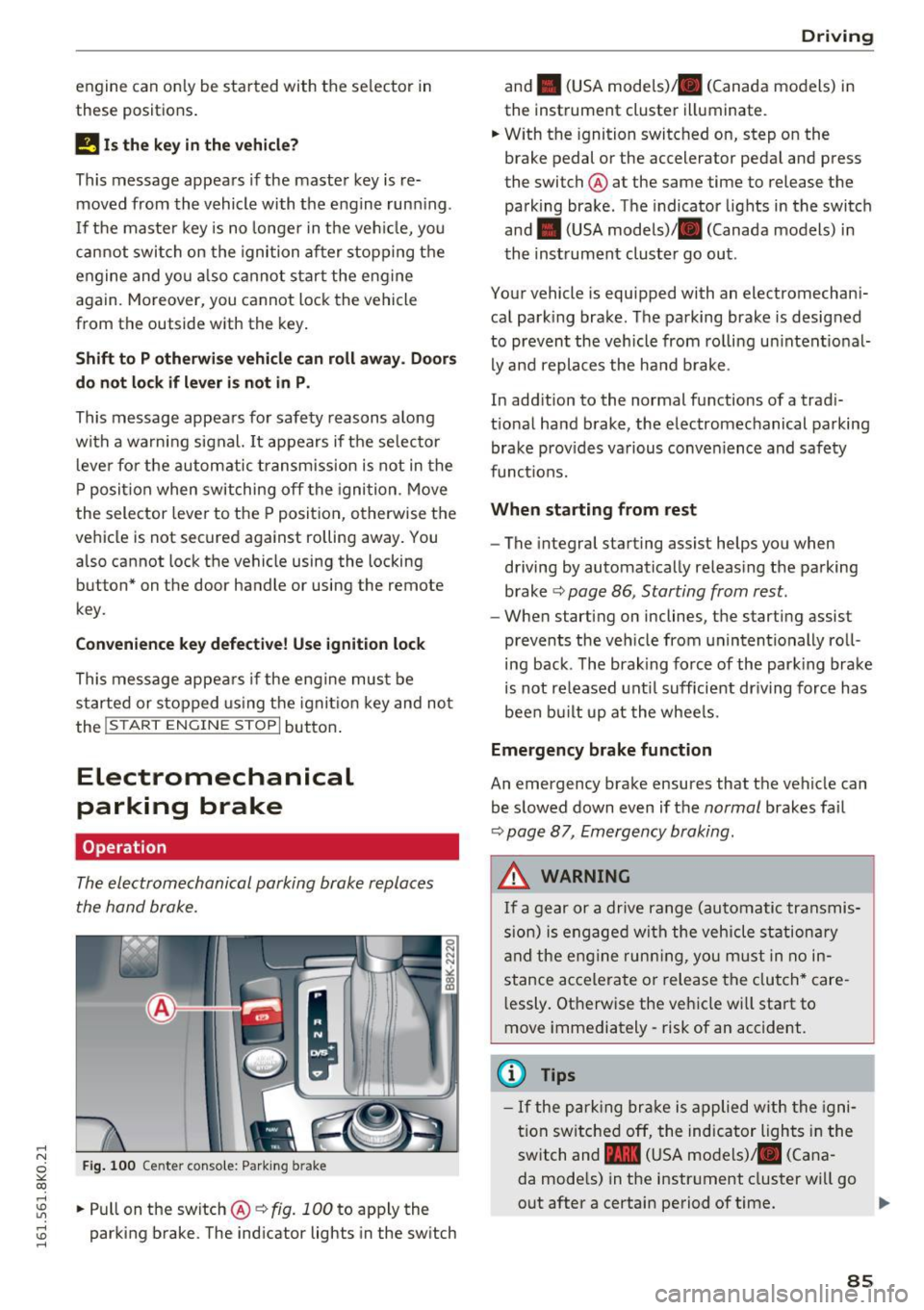
The electromechanical parking brake replaces
the hand brake.
Fig . 100 Ce nter conso le: Park ing b rake
....
~ .. Pull on the switch@~ fig. 100 to apply the
~ parking brake. The ind icator lights in the sw itch ....
D rivi ng
and . (USA mode ls)/ . (Canada models) in
the instrument cluster illuminate.
.. W ith the ignition switc hed on, step on the
brake pedal or the accelerator pedal and press
the switch @ at the same time to release the
parking brake . The indicator lights in the switch
and . (USA models)/ . (Canada models) in
the instrument cluster go out .
Your vehicle is equipped with an electromechani
cal park ing brake. The parking brake is designed
to prevent the vehicle from rolling un intent ional
ly and replaces the ha nd b rake .
In add ition to the normal functions of a trad i
t ional ha nd brake, the electromechanical parking
brake prov ides va rious conven ience and safety
funct ions.
When starting from rest
- The integral starting assist helps you when
driving by automatically releas ing the parking
brake ~
page 86 , Starting from rest.
- When start ing on inclines, the starting assist
prevents the veh icle from unintentionally roll
ing back . T he brak ing force of the park ing brake
is not re leased unt il sufficient dr iving force has
been bu ilt up at the whee ls.
Emergency brake function
An emergency brake ensures that the veh icle can
be slowed down even if the
normal brakes fa il
~ page 8 7, Emergency braking .
A WARNING
If a gear or a drive range (automatic transmis
s ion) is engaged wi th the vehicle stationa ry
a nd the engine runn ing, you must in no in
stance acce lera te or release the clutch* care
l essly. Otherwise the vehicle wi ll sta rt to
move immediately- risk of an accident.
(1) Tips
- If the pa rk ing br ake is a pplied with the igni
tion swi tche d off, the indicator lights i n the
switch and -(USA models) . (Cana
da mode ls) in the instr ument cluster wi ll go
out after a certain period of time .
85
Page 91 of 278
-For reasons of safety, cruise control should
not be used in the city, in stop-and-go traf
fic, on twisting roads and when road condi
t ions are poor (such as ice, fog, gravel,
heavy ra in and hydroplan ing) -risk of acci
dent .
- Turn
off the cruise control temporar ily when
enter ing turn lanes, h ighway exit lanes o r in
construction zones.
- Please note that inadvertently "rest ing"
your foot on the accelerator pedal causes
the cruise control not to brake. This is be
cause the cruise cont rol is overridden by the
dr iver's acceleration.
- If a brake system ma lf u nction such as over
heating occu rs when the c ruise contro l sys
tem is switched on, the braking function in
the system may be switched
off . The other
cruise contro l functions remain active as
long as the indicator light
[lj;(i )~i~ (US mod
els)/ .. (Canadian models) is on .
(D Tips
-Vehicles with manual transmission: You can
attain the set speed only if the gear that is
currently engaged will allow it, or if it does
not tax the engine and allows it to run
smooth ly. Therefore sh ift into a higher or
lower gear in a timely ma nner.
- The brake lights illuminate as soon as the
brakes apply automatically .
Changing speed
.,. To inc rease/decrease the speed in increments,
tap the lever in the
0 10 direction r:!> page 88,
fig. 102.
.,. To inc rease/decrease the speed qu ickly , ho ld
the leve r in the
0 10 direction until the de
si red speed is displayed .
You can a lso press the accelerator pedal down to
increase yo ur speed, e.g. if you want to pass
someone . The speed you saved earlier wi ll re -
,.... sume as soon as you let
off of the acce lerator N
~ pedal.
co
I f, however, you exceed your saved speed by
6 mph
( 1 0 km/h) for longer than 5 minutes, the
D riv ing
cruise contro l wi ll be turned off temporarily. The
green symbol in the display turns white. The
saved speed remains t he same.
Presetting your speed
You can preset your desired speed while the vehi
cle is not moving.
.,. Switch on the ign ition.
.,. Pull lever into position
(D r:!> page 88, fig . 102.
.,. Press the lever in the 0 or 0 direction to in-
crease or decrease your speed.
.,. Release the lever to save that speed.
This function makes it possible, for example, to save the speed you want before driving on the
highway . Once on the highway, activate the
cruise contro l by pull ing the lever toward
(D .
Switching off
Temporar y de acti vation
.,. Press the brake pedal, or
.,. Manual transmission: Keep the clutch pedal
pressed down
longer, or
.,. Press the lever into position @ (not clicked into
place)
~ page 88, fig. 102, or
.,. Dr ive fo r longer than 5 m inutes a t more than
6 mph (1 0 km/h) above the s to red speed.
Switching off completely
.,. Press lever into posit ion @ (clicked into p lace),
or
.,. Switch the ignit ion
off .
T he speed you saved will be retained if the cruise
control has been switched off temporarily . To re
s u me the saved speed , let up on the bra ke or
cl utch pedal and pull the lever to position
(D .
Switch ing the ignition off erases the saved speed .
A WARNING
--
You should only return to the saved speed if it
i s not too fast for the current t raffic condi
tions -ris k of an accident!
89
Page 92 of 278
Automatic transmission
Automatic transmission Manual transmission
Gearshift lever
A pp lies to veh icles: w ith manu al transmiss ion
The clutch pedal must be depressed all the way
before you can start the engine .
The manual transmission in your Audi is equip
ped with an
interlock-feature.
• Depress the clutch pedal a ll the way.
• Start the engine w it h the gearshift lever in Neu
tral and the clutch pedal depressed.
(D Note
Always depress the clutc h pedal fu lly when
chang ing gears. Do not ho ld the vehicle on a
hill with the clutch pedal partially depressed.
This may cause premature clutch wear or
damage.
@ Tips
- Resting your hand o n the gearshift leve r
k nob while driving will cause premature
wear in the transmiss io n.
- The back-up lights go on when you shift into
Reverse w ith the ignition o n.
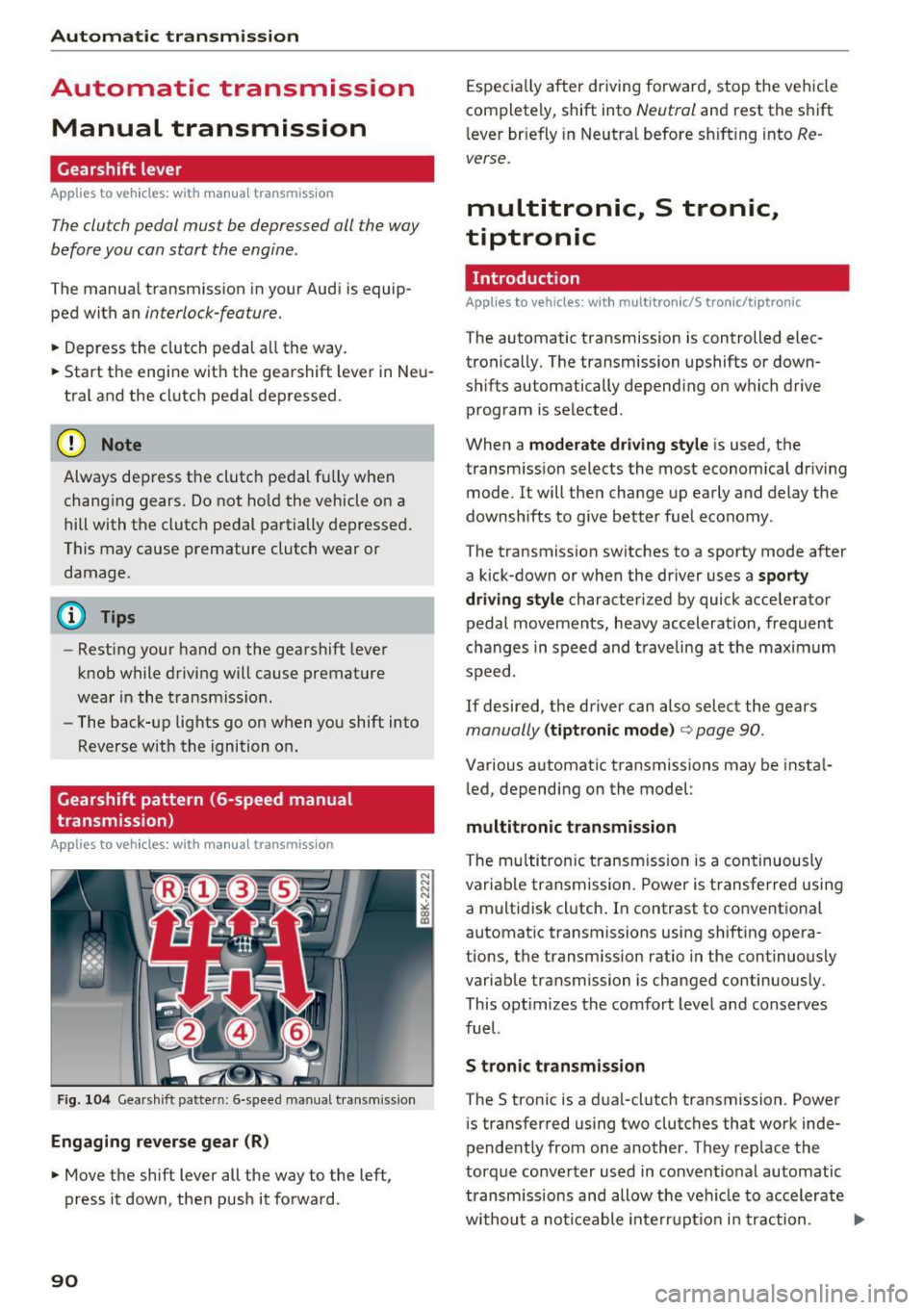
Gearshift pattern (6-speed manual
transmission)
Ap plies to veh icles: w ith man ual transmiss ion
F ig . 104 Gears h ift pattern: 6-speed manual transm iss io n
Engaging reverse gear (R)
• Move the shift lever all the way to the left,
press it down, the n push it forward.
90
Espec ia lly after driving forward, stop the vehicle
completely, shift into
Neutral and rest the shift
l ever br iefly in Neutra l before s hift ing into
Re
verse.
multitronic, S tronic,
tiptronic
Introduction
Applies to vehicles : wi th mult itro nic/S tro nic/ tip tronic
The automatic transmission is controlled elec
tronically. The transmission upshifts or down
shifts automatically depend ing o n which drive
program is se lected .
When a
moderate driving style is used, the
transm ission selects the most economica l driv ing
mode . It will the n change up early and delay the
downshifts to give better fuel economy .
The transmission switches to a sporty mode after
a kick-down or when the driver uses a
sporty
dri ving style
characterized by quick accelerator
pedal movements, heavy acceleration, frequent
c hanges in speed and traveling at the maxim um
speed.
If desired, the driver can also select the gears
manually (tiptronic mode ) ¢ page 90.
Various automatic transmissions may be insta l
l ed, depending on the model :
multitronic transmission
The mu ltitron ic t ransm iss ion is a continuously
variable transmission. Power is transferred using
a multidisk cl utch . In contrast to conventional
automat ic transmissions using shifting opera
tions, the transmission ratio in the continuously
variable transmission is changed continuously.
This opt imizes the comfort leve l and conserves
fuel.
S tronic t ran smission
The S tronic is a d ua l-clutch transmission. Power
i s transferred using two clutches that work inde
pendently from one another . They rep lace the
torque converter used in convent io nal automatic
transm issions and allow the vehicle to accelerate
withou t a noticeable inte rru pt io n in traction. ..,.
Page 93 of 278
,....,
N
0
""' CX) ,....,
I.Cl U"I ,....,
I.Cl ,....,
tiptronic transmission
In the tiptron ic tr ansmission, power is transfer
red by a torque converter.
Selector lever positions
Applies to vehicles: with multitronic/S tronic/tiptronic
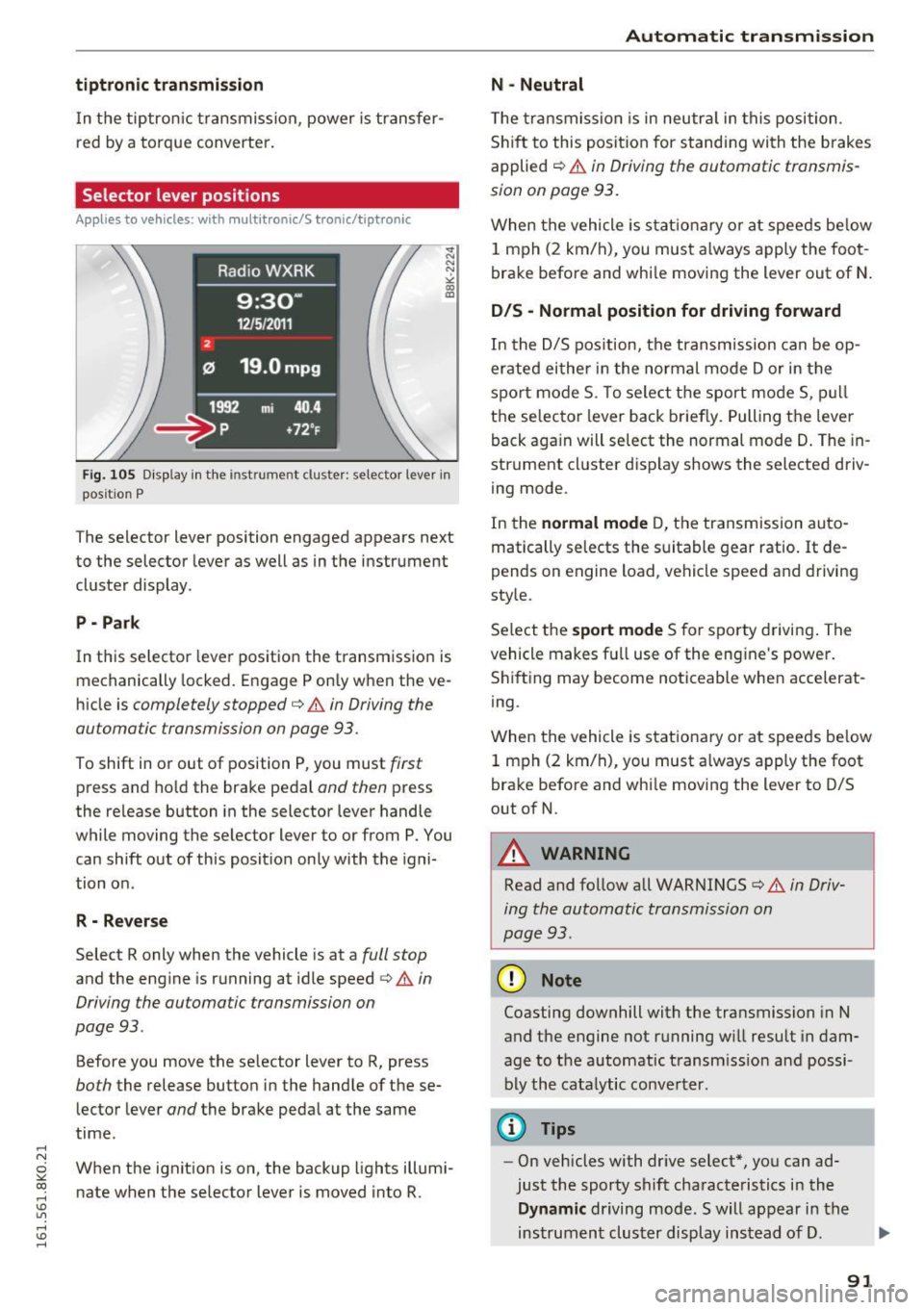
Fig. 105 Display in the instrume nt clus ter: selector lever in
pos it io n P
The selector lever position engaged appears next
to the selector lever as well as in the instrument
cluster display .
P • Pa rk
In this selector lever pos ition the transmission is
mechanically locked. Engage P only when the ve
hicle is
completely stopped¢ A in Driving the
automatic transmission on page 93.
To shift in or out of position P, you must first
press and ho ld the brake pedal and then press
the re lease button in the selector lever handle
while moving the selector lever to or from P. You can shift out of this position only with the igni
tion on .
R - Reverse
Select R only when the vehicle is at a full stop
and the engine is running at idle speed ¢&. in
Driving the automatic transmission on
page 93 .
Before you move the se lector lever to R, press
both the release button in the handle of these
lector lever
and the brake pedal at the same
time.
When the ignition is on, the backup lights illumi
nate when the selector lever is moved into R.
Automatic transmission
N -Neutral
The transmission is in neutra l in this position.
Shift to this position for stand ing with the brakes
applied
c:> A in Driving the automatic transmis
sion on page 93.
When the vehicle is stationary or at speeds below
1 mph (2 km/h), you must always apply the foot
brake before and whi le moving the lever out of N.
DIS -Normal position for driving forward
In the D/S position, the transmission can be op
erated either in the normal mode Dor in the
spo rt mode S. To select the sport mode S, pull
the selector lever back briefly. Pulling the lever
back aga in will select the normal mode D. The in
strument cluster display shows the selected driv
ing mode.
In the
normal mode D, the transmission auto
matically selects the suitable gear ratio.
It de
pends on engine load , vehicle speed and driving
style.
Se lect the
sport mode S for sporty driving. The
vehicle makes fu ll use of the engine 's power.
Shifting may become noticeable when accelerat
ing.
When the vehicle is stationary or at speeds be low
1 mph (2 km/h), you must always apply the foot
brake before and whi le moving the lever to D/S
out of N.
A WARNING
-Read and follow all WARNINGS¢ & in Driv-
ing the automatic transmission on
page 93 .
(D Note
Coasting downhill with the transmission in N
and the engine not running w ill result in dam
age to the automatic transmiss ion and possi
bly the catalytic converter.
@ Tips
-On vehicles with dr ive select*, you can ad
just the sporty shift characteristics in the
Dynamic driving mode.Swill appear in the
instrument cluster display instead of D.
91
Page 95 of 278
..... N
0 ::..:: co .....
tor lever handle, select the desired selector lev
er position such as D/5 and release the button.
~ Wait briefly until the transmission has shifted
(you w ill fee l a slight movement) .
~ Remove your foot from the brake pedal and ac
celerate .
Stopp ing tem pora ril y
~ Keep the vehicle stationary using the braking
pedal, for example at traffic lights.
~ Do not press the accelerator pedal when doing
th is .
~ To prevent the vehicle from rolling when you
start driving, set the park ing brake when stop
ping on steep inclines ¢
,&.
~ The pa rking brake w ill release automatically
and the vehicle will start moving once you press
the accelerator pedal.
Stopping /park ing
If the se lecto r lever is not in the P position when
you open the d river 's door, the vehicle could roll.
The message
Tr an smi ssion: Car ma y roll! Shift
t o pa rk!
appears .
~ Press and hold the brake pedal unt il the vehicle
has come to a comp lete stop.
~ Apply the pa rking brake ¢ page 86, Parking .
~ Select the P selector leve r position ¢ .&,.
Stopp ing on an incline
~ Always press the brake peda l to hold the vehi
cl e in place and prevent it from "rolling back"
¢
,& . Do not try to prevent the vehicle from
"ro lling back" when a gear is engaged by in
c reasing the eng ine speed ¢(!).
Starting on an incline
~ Activate the parki ng b rake .
~ With the driving gea r se lected, press the acce l
erator pedal caref ully. The parking b rake will
r e lease automatically if your seat belt is fas
tened .
Unde r ce rtain c ircumstances, suc h as dr iv ing in
the mountai ns, it may be usef ul to switch tempo
rari ly to the manua l shift program in order to ad-
Autom atic tran sm iss ion
just the gears to the driv ing conditions by hand
¢ page 94.
On slopes, act ivate the park ing brake first and
then move the selec to r l ever to the P posi tion .
T his prevents too m uch stress from being placed
on the locking mechanism .
Vehicles with mult itro nic tr ansmission : Your ve
hicle is equipped wi th
hill hold assist allowing
you to start whi le on an incl ine. The system is ac
tivated when the brake peda l is pressed down
and held
for a few second s. The brake pressure
will ho ld for
a momen t after the brake peda l
loosens to prevent the veh icle from rolling back
wards while starting up .
A WARNING
--The vehicle can also ro ll when the eng ine is
stopped .
- Unintended vehicle movement can cause se rious injury .
- Never leave your veh icle with the engine
running while in gear .
If you must leave
your ve hicle when the eng ine is running, ac
tivate t he pa rking brake and move the selec
tor lever to P.
- Power is still transmi tted to the wheels
when the engine is runn ing at idle. To pre
vent the vehicle from "creepi ng", yo u m ust
keep your foot on the brake when the en
gine is running and the selector lever is in D/
Sor R or "tiptronic" mode is se lected .
- Do not press the acce le ra t or peda l when
changing the se lector lever position while
the vehicle is stationary and the engine is
running.
- Never sh ift into R or P whi le driving.
- Before driving down a steep slope, reduce your speed and sh ift into a lower gear w ith
"t i ptronic".
- Do not ride the brakes or press the brake
pedal too often or too long when driving
down a hi ll. Constant brak ing causes the
brakes to overheat and substant ially re
duces brak ing performance, increases brak
ing d istance or causes comp lete failure of
the brake system.
~
93
Page 123 of 278
..... N
0 ::..:: co ,....,
Basics
Safe driving habits
Please remember -safety first!
This chapter contains important information,
tips, instructions and warnings that you need to
read and observe for your own safety, the safety
of your passengers and others . We have summar
ized here what you need to know about safety
belts, airbags, child restraints as well as child
safety. Your safety is for us
priority number 1. Al
ways observe the information and warnings in
this section - for your own safety as well as that
of your passengers.
The information in this section applies to all
model versions of your vehicle. Some of the fea
tures descr ibed in this sections may be standard
equipment on some models, or may be optional
equipment on others. If you are not sure, ask
your authorized Audi dealer.
A WARNING
- Always make sure that you follow the in
structions and heed the WARNINGS in this
Manual. It is in your interest and in the in
terest of your passengers .
-
-Always keep the complete Owner's Litera
ture in your Audi when you lend or sell your
vehicle so that this important information
will always be available to the driver and
passengers.
- Always keep the Owner's literature handy so
that you can find it easily if you have ques
tions.
Safety equipment
The safety features are part of the occupant re
straint system and work together to help reduce
the risk of injury in a wide variety of accident sit
uations.
Your safety and the safety of your passengers
should not be left to chance. Advances in tech
nology have made a var iety of features available
to help reduce the risk of injury in an accident.
Driving safety
The following is a list of just a few of the safety
features in your Audi:
- sophisticated safety belts for driver and all pas-
senger seat ing pos itions,
- be lt force limiters for the front seats,
- belt pretensioners for the seats,
- head restraints for each seating position,
- front airbags,
- side airbags in the front seats,
- side curtain airbags,
- specia l LATCH anchorages for child restraints,
- adjustable steering column.
These individual safety features, can work to gether as a system to help protect you and your
passengers in a w ide range of accidents. These
features cannot work as a system if they are not
always correctly adjusted and correctly used.
Safety is everybody's responsibility!
Important things to do before driving
Safety is everybody's job! Vehicle and occupant
safety always depends on the informed and care
ful driver.
For your safety and the safety of your passen
gers,
before driving always:
.. Make sure that all lights and signals are operat
ing correctly.
.. Make sure that the tire pressure is correct.
.. Make sure that all windows are clean and afford
good visibility to the outside .
.. Secure all luggage and other items carefully
c:::>page 65.
.. Make sure that nothing can interfere with the
pedals .
.. Adjust front seat, head restraint and mirrors
correctly for your height.
.. Instruct rear seat passengers to adjust the
head restraints according to their height.
.. Make sure to use the right child restraint cor
rectly to protect children
c:::> page 158, Child
safety .
.. Sit properly in your seat and make sure that
your passengers do the same
c:::> page 59, Seats
and storage.
121
Page 181 of 278
..... N
0 ::..:: co .....
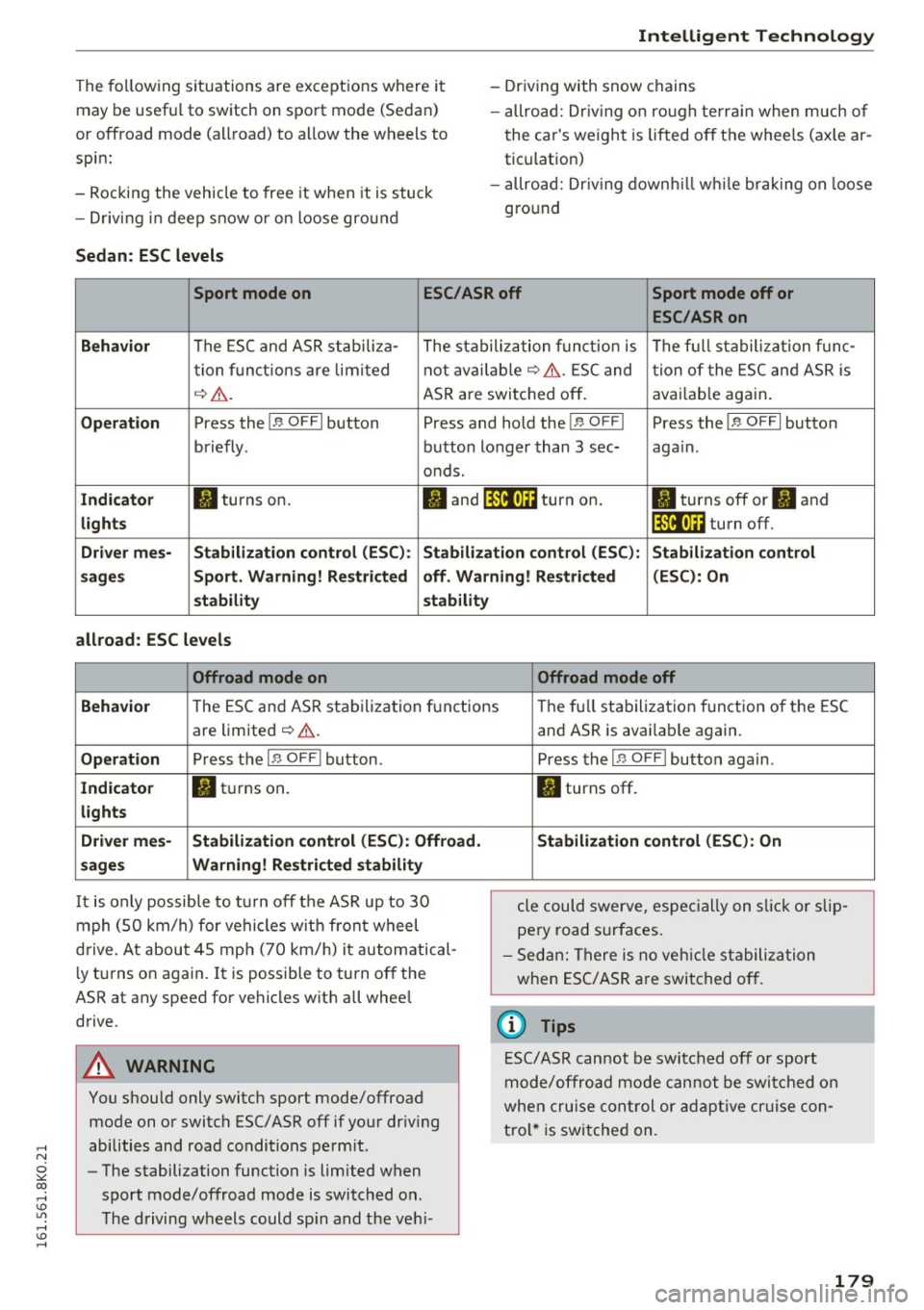
may be useful to switch on sport mode (Sedan)
or offroad mode (allroad) to allow the wheels to
spin:
- Rocking the vehicle to free it when it is stuck
- Driving i n deep snow or on loose gro und
Sedan : ESC levels
Intellig ent Technology
- Driving with snow chains
- allroad: Dr iv ing o n ro ugh te rra in when much of
the car's weight is lifted off the whee ls (axle ar
tic ulation)
- allroad: Dr iv ing down hill while brak ing on loose
gro und
Sport mode on ESC/ASR off Sport mode off or
ESC/ASRon
Behavi or
The ESC and ASR stabili za- The stabilization funct io n is The f ull stabilization f unc -
t ion f unct ions are lim ited not avai lab le
~ &. . ESC and tion of the ESC and ASR is
~ &. . ASR are switched off . avai
lab le aga in.
Op eration Press the!.$ OFFI button Press and hold the!.$ OFFI Press the!.$ OFFI button
briefly . button longer than 3 sec- aga in .
o nds.
Ind icato r II turns on. fl and It'll•)~~ turn on. II turns off or II and
lights It'll•)~~ turn off.
D river me s-Stabilization contr ol (ES C): Stabilization cont rol (ESC ): S tabilization control
s age s Sport. Warning! Re stricted off. W arning! Restricted (ESC
): On
s tability stabilit y
all road: ESC levels
Offroad mode on Offroad mode off
Behavio r
The ESC and ASR stabilization f unctions The fu ll stabiliza tion f unction of the ESC
are limited
¢ & .
Operation Press the I.$ OFF I button .
In d icato r fl turns on .
light s
Driv er me s- Stabi lization control (E SC): Offro ad .
sage s Warning! Re stri cted stabili ty
It is only possible to turn off the ASR up to 30
mph (50 km/h) for vehicles w it h front wheel
drive. At about 45 mph (70 km/h) it automatical
l y turns on again. It is possible to turn off the
ASR at any speed for vehicles with all whee l
drive.
A WARNING
You should only switch sport mode/offroad mode on or switch ESC/ ASR off if your dr iv ing
abilities and road conditions perm it .
- The stabilization function is limited when
sport mode/offroad mode is switched on .
The driving wheels could sp in and the veh i-
-
and ASR is avai lable again.
Press the I.$ OF FI button aga in .
II turns off.
Stabilizat ion control (ESC ): On
cle could swerve, espe cially on s lick o r slip
pery road surfaces.
- Sed an: There is no veh icle stabili zation
when ESC/ASR are switched off .
(D Tips
ESC/ASR cannot be switched off or sport
mode/offroad mode cannot be swi tched on
when cru ise cont rol or adapt ive cr uise con
tro l* is switched on.
179