airbag AUDI S4 2017 User Guide
[x] Cancel search | Manufacturer: AUDI, Model Year: 2017, Model line: S4, Model: AUDI S4 2017Pages: 386, PDF Size: 96.32 MB
Page 180 of 386
Audi connect (Infotainment)
-For additional information about the Audi
connect (Infotainment) services, visit
www.audiusa.com/audiconnect.
Configuring the data
connection
App lies to vehicles with Audi connect (Infotainment)
To use Audi connect (Infotainment) services, a
data connection must be configured.
.. Select: I MENU I button> right control button>
Connection manager.
"'Select: right control button> Online settings >
Data connection settings .
Using the Data connection settings menu, you
can set when an Internet connection should be
made . T he Internet connection disconnects auto
matica lly once the requested A udi connect (Info
tainment) service no longer require any data
packets.
The follow ing options can be selected:
Audi connect (MMI)
With the Audi connect (MMI) function, you can
Allow or Deny the use of Audi connect (Infotain
ment) services if the connect ion is set to
No re
quest
or With request.
Wi-Fi devices*
Using the Wi-Fi devices function, you can Allow
or Deny a connection to the Internet.
_&. WARNING
-As the driver, do not allow usage of the Wi
Fi hotspot to distract you from driving, as
this could increase the risk of an accident.
-It is only safe to use tablets, laptops, mo
bile devices and other similar devices when
the vehicle is stationary because, like all
loose objects, they could be thrown around
the inside of the vehicle in a crash and cause
serious injuries . Sto re these types of devices
securely whi le driving.
- Do not use any wireless devices on the front
seats w ithin range of the airbags while driv
ing. Also read the warnings in the chapter
c:> page 236.
178
(D Note
You are responsible for all precautions taken
for data protection, anti-v irus protection and
protection against loss of data on mobile de
v ices that are used to access the Internet
through the Wi-F i hotspot.
Audi connect
(Infotainment)
information
Audi connect (Infotainment) services
App lies to vehicles w ith Audi connect (Infotainment)
(D Tips
- Audi connect (Infotainment) services are
only available with an exist ing o r separate
cell phone contract and on ly within the mo
bile network coverage area . Depending on
your cell phone rates, there may be addi
tional costs when connecting to the Inter net using data packets, particularly with in
ternational service. Based on the high data
volume, using a flat rate data plan is highly
recommended.
- You can only use services supported by Aud i
connect (Infotainment) if you have the op
tional MMI Navigation plus equipment with
MMI touch* and Audi connect (Infotain
ment).
- Use of the L TE* mobile network standard is
not available in every country. Contact your
authorized Audi dealer or authorized Aud i
Service Facility or your cell phone service
prov ider for additiona l information.
- Usage of Audi connect (Infotainment) serv
ices depends on the avai lability of services
through third party providers.
- Also read the information in the chapter
c:> page 160, Telephone.
-The Audi connect (Infotainment) services
are avai lable in the USA. Audi connect (Info
tainment) services are currently not availa
ble in Canada or in Mexico.
- Availability, scope, providers, screen display
and costs of services may vary depending on
the country, model, mode l year, end device
ll>
Page 186 of 386
Audi connect emergen cy c all and servi ce
Audi connect emergency
call and service
Introduction
Applies to: ve hicles w ith Audi co nnect e merge ncy call a nd
service
Audi connect emergency ca ll and service includes
the following services:
- Emergency call¢
page 184.
- Online roads ide assistance~ page 185.
-Audi Service enquiry~ page 186.
@ Tips
-The services are provided through a SIM
card installed in the vehicle. The cost of the
ca ll and data connections is included in the
p rice for the se rvices. Services a re provided
assuming tha t the cell phone netwo rk re
qui red for the ins talled SIM c ard is fun ct ion
i ng and rea dy to operate . The available serv
i ces set by Aud i AG are only available within
the cell phone network cove rage area fo r
the cell phone service provider se lected by
Audi AG.
- You can read about the data that is trans
mitted at
www .audiusa .com /help/audi
connect .
-These serv ices cannot be deactivated using
the sett ings in the Infotainment system.
Emergency call
Description
Applies to: vehicles with Aud i connect emergency call and
service
You can request help whe n in an emergency or
dangerous situation using the emergency ca ll
f u nction
l) An emergency call is a combinat ion of
data transmission a nd a p ho ne c all. The da ta
tr ansmission from your veh icle forwar ds impor
tant information to the Audi emergency call cen
ter, such as the vehicle and position data.
1l Th e availab ility of the services offered depe nds on t he
c ountry and may change ove r time .
184
Making an emergency call
App lies to: vehicles with A udi connect emergency call and
serv ice
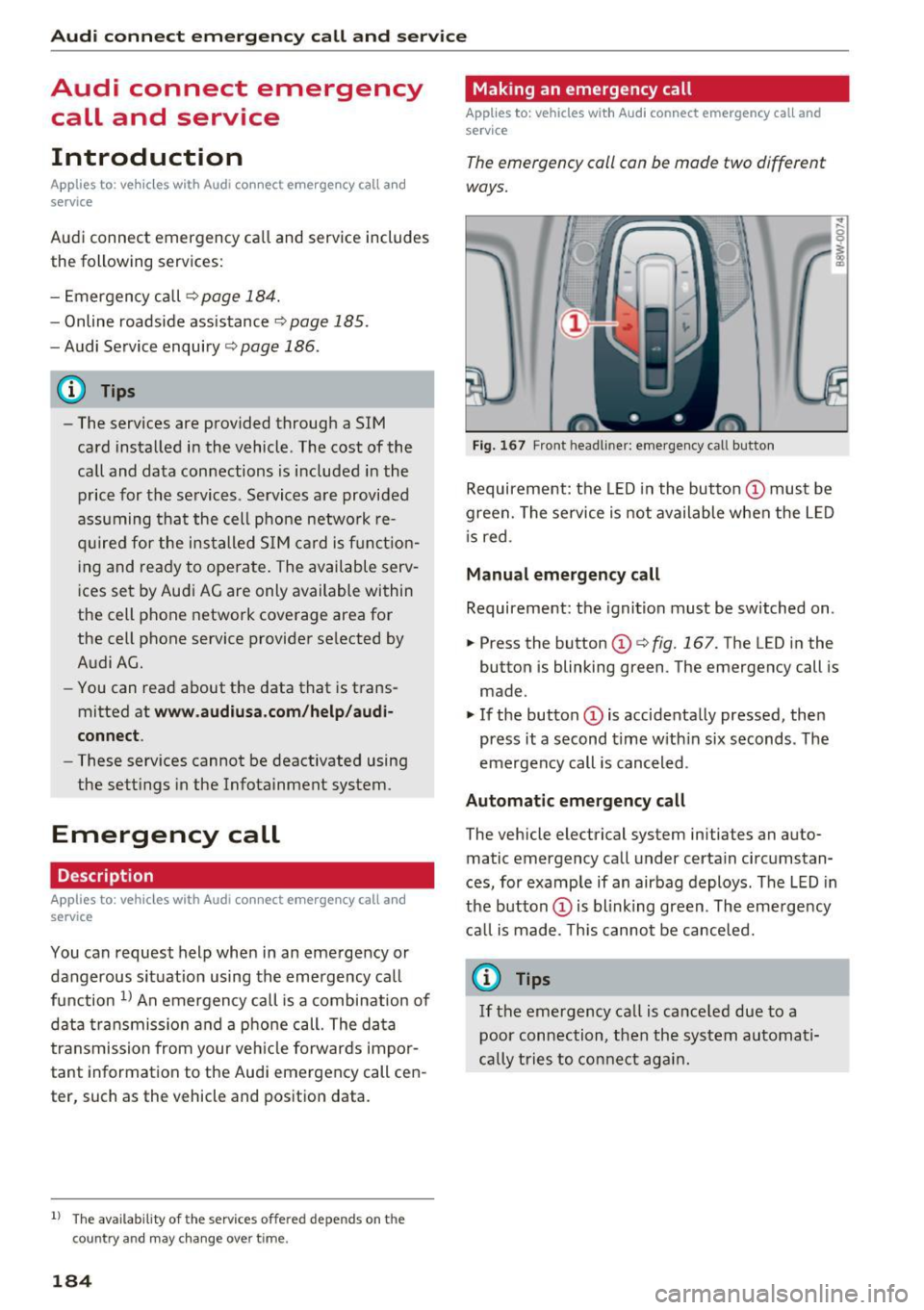
The emergency call can be made two different
ways.
Fi g. 1 67 Front head liner: emergency call butto n
Requireme nt: the LED in the button @must be
green. The se rvice is not available when the L ED
i s red.
Manual emergency call
Requireme nt: the ignition must be switched on.
.,. Press the button (D
¢fig. 167. The LED in the
button is blinking green. The emergency call is
made.
.. If the button (Dis accidenta lly pressed, then
press it a second time w ith in six seconds . The
emergency call is canceled .
Automatic emergency call
The vehicle electrical system initiates an auto
matic emergency call under certain circ umstan
ces, for example if an airbag deploys. The LED in
the button (Dis blink ing green. The eme rge ncy
ca ll is made. This cannot be canceled.
{!) Tips
If the emergency call is ca nce led due to a
poor conn ection, then th e system au toma ti
cally tries to con nect ag ain .
Page 215 of 386

<( a, .... N ,....
N .... 0 0
3 a,
automatica lly connect to the MM I when
they are within range.
- Multiple Bluetooth audio players can be
connected to the MMI, but only one mobile
device can be active.
- Bluetooth protocols AVRCP (1.0/ 1.3/ 1.4)
and A2DP are suppo rted.
- Note the volume setting o n your Bluetooth
device. Audi recommends setting your mo
bile device to the maxim um vo lume whe n
us ing it as a Bluetooth audio player.
- The supported media functions (such as
shu ffle) depend on the Bluetooth dev ice be
ing used.
- Fo r more information on the supported de
v ices, visit
www.audiusa. com /bluetooth or
contact your author ized Audi dealer.
Wi-Fi audio player
A ppl ies to: ve hicles with Wi· Fi
Using the Wi-Fi audio player media source on the
MMI, you can connect and operate your Wi-Fi-ca
pable media player (such as a smartphone) to
wirelessly ploy music from your media player li
brary. The media player is connected through the
vehicle's Wi -Fi hotspot. A UPnP Server opp or an
integrated UPnPIDLNA server on your media
player is required to access your media player
li
brary.
Req uirement: the W i-Fi function on your media
p layer must be switched on. The
Audi MMI con
nect
app or a UPnP server app must be installed
on your med ia p layer.
O r: you must be using a
media player with an integrated UPnP/DLNA
server.
- Connecting a media pla yer: press the I MEDIA !
button. Press the left control button unt il the
sources overview ¢
page 217 is disp layed. Se
lect and confirm
Wi -F i audio playe r 0
¢page 217, fig . 197.
- If necessary, select and confirm Wi -F i off >
Turn on Wi -Fi
to activate Wi-Fi in the MMI. Se
lect
Wi-Fi options , if necessary. Select the
same settings on the wireless media player
that are used for the Wi-Fi hotspot .
Media
-Starting the W i-F i audio pla yer : start the Aud i
MMI connect
app or a UPnP server app, or set
media permissions on your media p layer.
Operating the med ia pl ayer : the med ia p layer is
operated through the MMI.
- Press the left control button repeatedly until
the
Folders menu item appears . Select and con
firm
Folder s.
- Play ing mu sic from th e m edia player :
select
and confirm
M edi a ce nt er.
,&. WARNING '--
-As the d river, do not allow usage of the Wi-
Fi hotspot to distract yo u from driv ing, as
this could increase the r is k of an accident.
- I t is o nly safe to use tablets, laptops, mo
b ile dev ices and o ther simi lar devices when
the vehicle is s tationary because, like all
loose objects, they co uld be thrown around
the inside of the vehicle in a c rash and cause
serio us inj uries. Store these types of devices
securely while driving.
- Do not use any wireless devices on the front
seats within range of the airbags while driv ing. Also read and follow the warn ings in
¢ page 257, Front airbags.
(D Note
You are responsible for all precautions taken
for data protection, anti-virus protect ion and
protection aga inst loss of data on mobi le de
v ices that are used to access the Internet
through the W i-F i hotspot.
(j) Tips
- The W i-F i aud io player only needs to be
paired one time to the MMI using the Wi-Fi
hotspot. Depend ing on the media player be
ing used, a device that was already paired
w ill connect automatically with the MMI Wi
Fi hotspot when it is within range.
- Always read the chapter ¢
page 178, Audi
connect (Infotainment) information.
- Please note that a Wi-F i connection does
not automatically make it possible to use
the Internet. For addit ional info rmation, re-
fer to¢
page 172. ""
213
Page 216 of 386

Media
-To avoid interruptions during playback, de
activate the power saving function on the
media player or connect it to a charger.
- The loading t imes for the a udio data depend
on the med ia p layer used and the number of
files that it conta ins.
- A maximum of 2,000 entries per directory
are displayed in the MMI.
- Songs down loaded for offline use using mu
sic streaming services are stored on your mobile device (such as a smartphone) and
may be DRM protected. The Wi-Fi audio
player wil l not play DRM protected files.
- Contact your authorized Aud i dea ler or au
thorized Audi Service Facility for additional
i nformat ion on the Wi-Fi audio player .
Online media
Applies to: veh icles w ith Aud i connect
You can playback and operate different online
media services using the
MMI.
F ig . 193 Online me dia
" Press the I MEDIAi button . Press the left control
button until the so urces overview ¢
fig. 193 is
displayed.
Requirement:
- The
Audi MMI connect app must be insta lled
and open on your mobile device.
- You m ust be logged into your myAudi account
in the
Aud i MMI connect app and you must
have selected your vehicle.
- The Wi-Fi function on the mobile device and on
the MMI must be switched on.
- If necessary , check in the connection manager
¢ page 230 if the mobile device you connected
is selected under the
MMI connect app (~).
-The MMI must be connected to the network.
214
- T he Online media source (!)¢ fig. 193 must be
disp layed in the MMI.
- A s upported online med ia service must be ava il
able in yo ur country.
- You must have a n acco unt wit h a supported on
line media service.
- Depe nding on the online media service, yo u
must install and open an app on your mobile
device .
Starting Online media :
Press the I MEDIAi button. Press the left control
button until the so urces overview ¢
page 217 is
displayed .
Se lect and confirm an online media service.
A WARNING
- It is only safe to use tablets, laptops, mo
bile devices and other similar devices when
the vehicl e is stat ionary because, like a ll
loose objects, they co u ld be thrown a round
the inside o f the ve hicle in a c rash and ca use
serious inju ries. Store these types of devices
secure ly while driving .
-
-Do not use any wire less devices o n the front
seats within range of the airbags while dr iv
ing . Also read and follow the warnings in
¢ page 257, Front airbags.
(D Note
P lease no te that there ge nera lly are add itio n
a l costs when using an on line media service
account, espec ia lly when it is used interna
tionally.
@ Tips
- Mobile devices only need to be paire d with
the MM I one time using the Wi -Fi hotspot *.
Depending on the mobi le dev ice be ing used,
a device that was already paired will connect
automatically to the MMI Wi-Fi hotspot*
when it is within ra nge .
- Depending on the Inte rnet connection, a
connect io n loss can occur during playback of
online med ia services.
- Onl ine media usage depends on the service
availability of the third party provider. ..,.
Page 238 of 386
Driving sa fe ty
Driving safety
General notes
Safe driving habits
Please remember -safety first!
This chapter contains important information,
tips, instruct ions and warn ings that you need to
read and observe for your own safety, the safety
of your passengers and others. We have summar
ized here what you need to know about safety
be lts, a irbags, child restra ints as well as child
safety. Your safety is for us
priority number 1 . Al
ways observe t he i nfo rmation and wa rn ings in
this section - for your own safety as well as tha t
of yo ur passengers.
The information i n this section applies to all
model ve rsions of your vehicle . Some of the fea
tures descr ibed in t his sec tions may be s tanda rd
eq uipment on some models, or may be optional
equipment on others. If yo u are not sure, ask
your author ized Audi dealer.
A WARNING
-Always make sure that you follow the in
structions and heed the WARNINGS in th is
manual. It is in your inte rest and in the in
te rest of your passengers .
- Always keep all of the Owner's Lite rature
manuals in your Audi when you lend o r sell
yo ur vehicle so that this important informa
t ion w ill always be availab le to the dr iver
and passenge rs.
- Always keep the Owner 's Lite rature handy
so that you can find i t easi ly if yo u have
ques tions.
Safety equipment
The safety features are part of the occupant re
straint system and work together to help reduce
the risk of injury in a wide variety of occident si t
uations.
Your safety and the safety of yo ur passenge rs
should not be left to chan ce. Advan ces in tech
nology have made a var iety of features av ail ab le
to help reduce t he risk of injury in an accident .
236
The following is a list of just a few of the sa fety
features in your Audi :
- sophis tic ated safety be lts fo r dr ive r and all pas-
senge r seat ing pos itions,
- safety belt p re tensioners,
- be lt height adjustment for the front seats,
- head restraints for each seating position,
- front airbags,
- knee airbags fo r the front seats,
- side airbags in the front seats and outboard
rear seats *,
- side curtain airbags,
- special LA TC H anchorages for the outboard rear
seats and top tether anchorages for chi ld re
straints for all of the rear seats,
- adjustab le steering col umn.
These ind iv idual safety features, can work to
gether as a system to he lp protect you and your
pa ssengers in a wide range of a cciden ts. These
fea tures canno t wo rk as a sys tem if they a re not
a lways cor rec tly ad juste d and cor rect ly used.
Safety is everybod y's responsibilit y!
Important things to do before driving
Safety is everybody's job! Vehicle and occupant
safety always depends on the informed and care
ful driver .
For your safety a nd the safety of your passen
gers,
before driving alway s:
.,. Make sure that all lights and signals are operat
ing correctly .
.,. Make sure that the tire pressure is correct .
.,. Make sure that a ll windows a re clean and afford
good v is ibility to the outs ide.
.,. Se cur e all luggage and othe r items ca refully
q page 242.
.,. Make sure that noth ing can i nter fere with the
peda ls .
.,. Adjust front seat, head restraint and mirrors
correctly for yo ur height.
.,. Instruct passengers to adjust the head re
straints according to their he ight .
.,. Make sure to use the rig ht child restraint co r
rectly to protect chi ldren
q page 2 77 , Child
safety. ..,.
Page 239 of 386
.. Sit properly in your seat and make sure that
your passengers do the same¢
page 61, Front
seats .
.. Fasten your safety belt and wear it properly . Al
so instruct your passengers to fasten their safe
ty belts properly ¢
page 245 .
What impairs driving safety?
Safe driving is directly related to the condition of
the vehicle, the driver as well as the driver's abili
ty to concentrate on the road without being dis
tracted.
The driver is responsible for the safety of the ve
h icle and all of its occupants . If your ability to
drive is impaired, safety risks for everybody in the
veh icle increase and you also become a hazard to
everyone else on the road ¢_& .T herefo re :
.. Do not let yourself be distracted by passengers
or by using a cellular telephone .
.. NEVER dr ive when your dr iv ing ability is im
paired (by medications, alcohol, drugs, etc.) .
.. Observe a ll traff ic laws, rules of the road and
speed limits and plain common sense.
.. ALWAYS adjust your speed to road, traffic and
weather condit ions.
.. Take frequent breaks on long trips . Do not drive
for more than two hours at a stretch.
.. Do NOT drive when you are tired, under pres
sure or when you are stressed.
A WARNING
Impai red dr iv ing safety increases the risk of
ser ious personal inju ry and death whenever a
vehicle is being used .
Driving safety
Correct seating position
for passengers
Proper seating position for the driver
The proper driver seating position is important
for safe, relaxed driving.
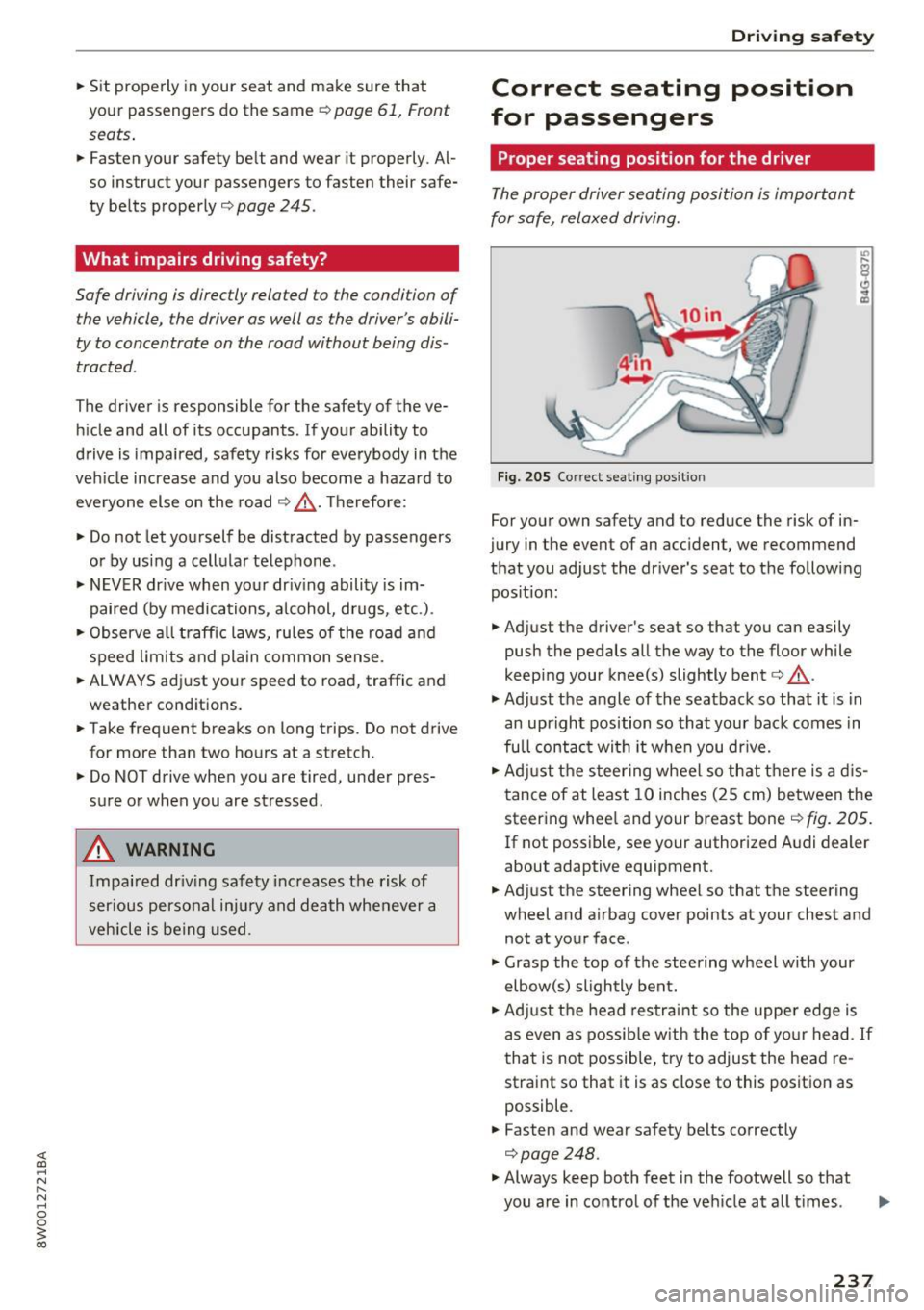
F ig. 20 5 Correct seating pos it io n
For your own safety and to reduce the risk of in
jury in the event of an accident, we recommend
that you adjust the driver 's seat to the fo llowing
pos ition:
.. Adjust the driver's seat so that you can easily
push the pedals all the way to the floor while
keep ing your knee(s) slightly bent¢_& .
.,. Adjust the angle of the seatback so that it is in
an upright position so that your back comes in
full contac t wi th it when you dr ive.
.. Adj ust the steer ing wheel so that there is a d is
tance of at least 10 inches (25 cm) between the steering whee l and your breast bone¢
fig. 205.
If not poss ible, see your author ized A udi dealer
about adaptive equipment.
.. Adjust the steering wheel so that the steering
wheel and airbag cover points at your chest and
not at your face .
.,. Grasp the top of the steering wheel with your
elbow(s) slightly bent .
.. Ad just the head res tra int so the upper edge is
as even as possib le w ith the top of yo ur head.
If
that is no t possib le, try to adjust the head re
straint so that it is as close to this position as
possible .
.. Fasten and wear safety belts correctly
¢page 248 .
.. Always keep both feet i n the footwell so that
you are in control of the veh icle at all t imes .
237
Page 240 of 386
Driving safety
For detailed information on how to adjust the
driver's seat, see
¢ page 61.
A WARNING
Drivers who are unbelted, out of position or
too close to the airbag can be seriously in
jured by an airbag as it unfolds. To help re
duce the risk of serious personal injury:
- Always adjust the driver's seat and the
steering wheel so that there are at least
10 inches (25 cm) between your breastbone
and the steering wheel.
- Always adjust the driver's seat and the
steering wheel so that there are at least
4 inches (10 cm) between the knees and the
lower part of the instrument panel.
- Always hold the steering wheel on the out
side of the steering wheel rim with your
hands at the 9 o'clock and 3 o'clock posi
tions to help reduce the risk of personal in
jury if the driver's airbag inflates.
- Never hold the steering wheel at the
12 o'clock position or with your hands at
other positions inside the steering wheel
rim or on the steering wheel hub. Holding
the steering wheel the wrong way can cause
serious injuries to the hands, arms and head if the driver's airbag deploys.
- Pointing the steering wheel toward your face decreases the ability of the supplemen
tal driver's airbag to protect you in a colli
sion.
- Always sit in an upright position and never
lean against or place any part of your body
too close to the area where the airbags are
located.
- Before driving, always adjust the front seats and head restraints properly and make sure
that all passengers are properly restrained.
- Never adjust the seats while the vehicle is
moving. Your seat may move unexpectedly
and you could lose control of the vehicle.
- Never drive with the backrest reclined or
tilted far back! The farther the backrests are
tilted back, the greater the risk of injury due
to incorrect positioning of the safety belt and improper seating position.
238
-
- Children must always ride in child safety
seats ¢
page 2 77. Special precautions ap
ply when installing a child safety seat on the
front passenger seat¢
page 253.
Proper seating position for the front
passenger
The proper front passenger seating position is
important for safe, relaxed driving .
For your own safety and to reduce the risk of in
jury in the event of an accident, we recommend
that you adjust the seat for the front passenger
to the following position :
.,. Adjust the angle of the seatback so that it is in
an upright position and your back comes in full
contact with it whenever the vehicle is moving.
.,. Adjust the head restraint so the upper edge is
as even as possible with the top of your head.
If
that is not possible, try to adjust the head re
straint so that it is as close to this position as
possible
¢ page 62.
.,. Keep both feet flat on the floor in front of the
front passenger seat.
.,. Fasten and wear safety belts correct
ly¢
page 248.
For detailed information on how to adjust the
front passenger's seat, see ¢
page 61.
A WARNING
Front seat passengers who are unbelted, out
of position or too close to the airbag can be
seriously injured or killed by the airbag as it
unfolds. To help reduce the risk of serious
personal injury:
- Passengers must always sit in an upright po
sition and never lean against or place any part of their body too close to the area
where the airbags are located.
- Passengers who are unbelted, out of posi
tion or too close to the airbag can be seri
ously injured by an airbag as it unfolds with
great force in the blink of an eye.
- Always make sure that there are at least 10
inches (25 cm) between the front passen-
ger's breastbone and the instrument panel.
Ill>
Page 241 of 386
-Always make sure that there are at least
4 inches (10 cm) between the front passen
ger's knees and the lower part of the instru
ment panel.
- Eac h passenger must always sit on a seat of
t h eir own and properly fasten and w ear the
safety belt belonging to that seat.
- Before driving, always adjust the front pas
senger seat and head restraint properly.
- Always keep your feet on the floor in front
of the seat. Never rest them on the seat, in
strument panel, out of the window, etc. The
airbag system and safety belt will not be
able to protect you properly and can even in
c rease the risk of injury in a crash.
- Never drive with the backrest recli ned or
t il ted fa r bac k! The farther the backrests are
t il ted back, the greater the risk of i njury due
to incorrect posi tioning of the safety bel t
and improper seating position.
- Children must always ride in child safety
sea ts¢
page 2 77. Spec ial precaut ions ap
ply when installing a chi ld safety seat on the
front passenger seat
c::> page 253.
Proper seating positions for passengers in
rear seats
Rear seat passengers must sit upright with both
feet on the floor consistent with their physical
size and be properly restrained whenever the ve
hicle is in use.
To reduce the r isk of injury caused by an incorrect
seating position in the event of a sudden braking
maneuver or a n accident, you r passengers on the
rear bench seat must always observe the follow
in g:
.,. If there are passengers on the outer rear seats,
adjust the head restraints so the upper edge is
as even as possible with the top of your head. If
that is not poss ible, try to adjust the head re
straint so that it is as close to this position as
poss ible.
If there is a passenger in the ce nte r
rea r seat, slide the head res traint upward
¢page 62.
.,. Make s ure that the seatback is sec urely latched
in t he upright position
c::> page 65.
Dr iving safety
.,. Keep both feet f lat in the footwell in front of
the rear seat.
.,. Fasten and wear safety belts properly
c::>poge248 .
.,. Make sure that children are always properly re
strained in a child restra int that is appropr iate
for their size and age
c::> page 2 77.
_&. WARNING
Passengers w ho are improperly seated on the
rear seat can be serio usly inju red in a crash.
- Each passenge r must always sit on a seat of
their own and properly fas ten and wear the
safety bel t belonging to tha t seat.
- Safety bel ts only offer maxim um protect ion
when the seatba ck is securely latched in t he
upright pos ition and the safe ty belts are
properly positioned on the body. By not sit
ting upright, a rear seat passenger increases
the risk of personal injury from improper ly
positioned safety belts!
- Always ad just the head restraint proper ly so
that it can give maximum protection.
Proper adjustment of head restraints
Correctly adjusted head restraints ore on impor
tant port of your vehicle's occupant restraint sys
tem and con help to reduce the risk of injuries in
occident situations.
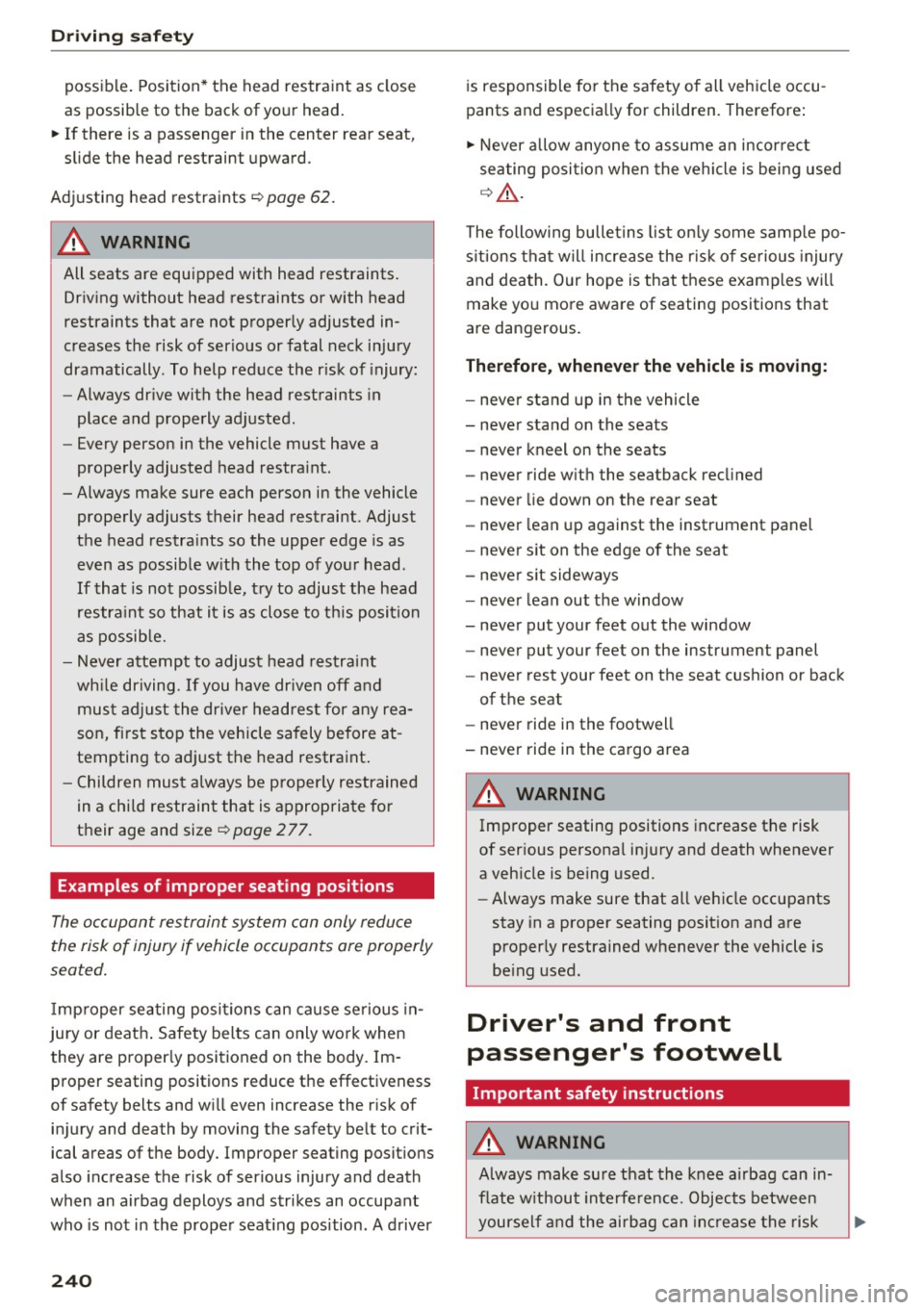
F ig. 20 6 Head restra int: v iewed from t he front
The head rest raints mus t be correct ly adjusted to
achieve the best protection.
.,. Ad just t he head restra ints so the upper edge is
as even as possib le w ith the top of you r head . If
that is not possib le, t ry to adjust the head re-
stra int so that it is as close to this pos it ion as .,.
239
Page 242 of 386
Driving sa fe ty
possible . Position* the head restraint as close
as possible to the back of your head.
~ If there is a passenger in the center rear seat,
slide the head restraint upward .
Adjusting head restraints
r=-, page 62.
A WARNING
All seats are equipped with head restraints .
Dr iv ing without head restraints or with head
restraints that are not proper ly adjusted in
creases the risk of ser ious or fatal neck injury
dramatically . To help reduce the r isk of injury:
- Always dr ive with the head restraints in
place and properly adjusted.
- Every person in the vehicle must have a
properly adjusted head restra int.
- Always make sure each person in the vehicle properly adjusts their head restraint. Adjust
the head restra ints so the upper edge is as
even as possib le w ith the top of your head.
If that is not possib le, t ry to adjust the head
restra int so that it is as close to t his position
as possib le.
- Never attempt to adjust head restrai nt
wh ile driving. If you have dr iven off a nd
mus t adjust the driver headrest for any rea
son, fi rst stop the vehicle sa fely before at
tempting to ad just the head restra int .
- C hildren must always be p roper ly restrained
in a chi ld restraint that is appropriate fo r
their age and size
i=-, page 2 77.
Examples of improper seating positions
-
The oc cupant restraint system can only reduce
the risk of injury if vehicle occupants are properly
seated .
Imp roper seating positions can cause se rious in
jury or deat h. Safety belts can only work when
they are proper ly positioned on the body. Im
proper seating positions reduce the effectiveness
of safety belts and w ill even increase the r isk of
in ju ry and death by moving the safety be lt to crit
ical areas of the body. Improper seating posit ions
also increase the risk of ser ious injury and death
when an airbag deploys and strikes an occupant
who is not in the prope r seat ing pos ition . A driver
240
is responsible fo r the safety o f all veh icle occu
pants and especia lly for children. Therefore :
~ Never allow anyone to assume a n incorrect
seating posi tion when the vehicle is being used
q _& .
The following bulletins list on ly some samp le po
s itions that w ill increase the r is k of se rious injury
and death. Our hope is that these examples wi ll
make yo u more aware of seating positions that
are dangerous.
Therefore , whenever the vehicle is moving :
-neve r sta nd up in the vehicle
- neve r stand on the seats
- never k neel on the seats
- never ride w it h the seatback recl ined
- never lie down on the rear seat
- never lean up against the instrument panel
- neve r sit on the edge of the seat
- neve r sit sideways
- neve r lean out the w indow
- never put your feet out the window
- neve r put your feet on the instrument panel
- never rest your feet on the seat c ushion or back
of the seat
- never ride in the footwell
- never ride in the cargo area
A WARNING
Imp roper seating positions inc rease the risk
of ser ious personal inju ry and death whenever
a veh icle is being used.
- Always make sure that all veh icle occupants
stay in a proper seating posit ion and a re
proper ly restrained whenever the vehicle is
be ing used.
Driver's and front
passenger's footwell
Important safety instructions
A WARNING
A lways make su re that the knee airbag can in
flate w ithout inte rfe rence. Objects between
yourself and the airbag can in cr ease the risk
Page 243 of 386

<( a, .... N ,....
N .... 0 0
3 a,
of injury in an accident by interfering with the
way the airbag deploys or by being pushed in
to you as the airbag deploys.
- No persons (children) or animals shou ld ride
in the footwell in front of the passenger
seat.
If the airbag deploys, this can result in
serious or fatal injuries .
- No objects of any kind should be carried in
the footwell area in front of the driver's or passenger's seat. Bulky objects (shopping
bags, for example) can hamper or prevent
proper deployment of the airbag. Small ob
jects can be thrown through the vehicle if
the airbag deploys and injure you or your
passengers.
Pedal area
Pedals
The pedals must always be free to move and
must never be interfered with by a floor mat or
any other object.
Make sure that all pedals move freely without in
terference and that nothing prevents them from
returning to their original positions.
Only use floor mats that leave the pedal area free
and can be secured with floor mat fasteners.
If a brake circ uit fails, increased brake pedal trav
e l is required to bring the vehicle to a full stop.
,8. WARNING
-
Peda ls that cannot move freely can cause loss
of vehicle control and increase the risk of seri
ous injury.
- Never place any objects in the driver's foot
well. An object cou ld get into the pedal area
and interfere with pedal function. In case of
sudden braking or an accident, you would
not be able to brake or accelerate!
- Always make sure that nothing can fall or
move into the driver's footwell.
Driving safety
Floor mats on the driver side
Always use floor mats that can be securely at tached to the floor mat fasteners and do not in
terfere with the free movement of the pedals .
""Make sure that the floor mats are properly se-
cured and cannot move and interfere with the pedals~ .&_.
Use only floor mats that leave the pedal area un
obstructed and that are firmly secured so that
they cannot slip out of position . You can obtain
suitable floor mats from your authorized Audi
dealer.
Floor mat fasteners are installed in your Audi.
Floor mats used in your vehicle must be attached
to these fasteners. Properly securing the floor mats will prevent them from sliding into posi
tions that could interfere with the pedals or im
pair safe operat ion of your vehicle in other ways .
,8. WARNING
=
Pedals that cannot move freely can result in a
loss of vehicle control and increase the risk of
serious personal injury.
- Always make sure that floor mats are prop
erly secured.
- Never p lace or install floor mats or other
floor coverings in the vehicle that cannot be
properly secured in place to prevent them
from slipping and interfering with the ped
als or the ability to control the vehicle.
- Never place or install floor mats or other
f loor coverings on top of already installed
f loor mats . Additional floor mats and other
coverings will reduce the size of the pedal
area and interfere with the pedals.
- Always proper ly reinsta ll and secure floor
mats that have been taken out for cleaning.
- Always make sure that objects cannot fall
into the driver footwell whi le the vehicle is
mov ing. Objects can become trapped under
the brake pedal and accelerator pedal caus ing a loss of vehicle control.
241