brakes AUDI S4 2017 User Guide
[x] Cancel search | Manufacturer: AUDI, Model Year: 2017, Model line: S4, Model: AUDI S4 2017Pages: 386, PDF Size: 96.32 MB
Page 94 of 386

Trailer towing
Backing up is difficult and requires practice .
Backing up with a trailer generally requires steer
ing action oppos ite to that when backing up your
veh icle w ithout a trailer .
Maintain a g reater distance between your vehicle
and the one in front of you. You w ill need more
room to stop. To compensate for the tra iler, you
will need a larger than normal turn ing radius.
When passing, remember that you cannot accel
erate as fast as you norma lly would because of
the added load. Make sure you have enough room
to pass. After passing, allow plenty of room for
your tra iler before chang ing lanes again .
Avoid jerky starts , sharp turns or rapid lane
changes .
@ Tips
- Do not tow a trailer during the break -in per i
od of your vehicle.
- If you tow a trailer, your Audi may require
more frequent maintenance d ue to the ex
tra load
~ page 363.
Parking on a slope
Do not pork on a slope with a trailer. If it cannot
be avoided, do so only o~er doing the following:
When parking:
.. Apply t he foo t brake .
.. Have someone place chocks under both t he ve
hicle and the tra ile r whee ls .
.. With chocks in p lace, slowly release t he brakes
u ntil the whee l chocks absorb the load .
.. Turn the wheels towards the curb .
.. Apply the parking brake .
.. Move the selector lever to P .
When restarting after pa rking:
.. Apply the foot brake .
.. Start the engine .
.. Move the selector lever to D/S .
.. Release the parking brake and slowly pull out
and away from the wheel chocks .
.. Stop and have someone retrieve t he wheel
chocks .
92
Page 96 of 386

Ass is t
The stored speed and the [ij;ji j~i4 (USA models)/
Ill (Canada mode ls) indicator light appear in the
instrument cluster disp lay . An add itiona l indica
tor appears in the Head -up display*.
The speed is maintained by modifying engine power or through an active brake intervention.
A WARNING
- Always pay attention to the traffic around
you when the cruise control system is in op
eration. You are always responsible for your
speed and the distance between your vehi
cle and other veh icles .
- For safety reasons, cruise control should not
be used in the city, in stop-and-go traffic, on
winding roads and when road condit ions are
poo r (such as ice, fog, gravel, heavy rain and
hydroplaning), because t his increases the
risk of an accident.
- Switch the cruise cont rol off temporar ily
when d riving i n turn ing lanes, h ighway exits
or in construction zones .
- Please note tha t unconsciously "resting"
yo ur foot on the accelerator pedal prevents
the cruise control from braking. This is be
cause pressing the acce lerato r pedal ove r
rides the cruise contro l system.
- If a brake system ma lf u nction such as over
heating occurs when the cruise control sys
tem is sw itched on, the braking function in
the system may be sw itched off. The rest of
the cruise control system functions remain
active as long as the
[ij;(l)~i4 (USA models) I
i:I (Canada models) indicator light is on.
(D Note
Before driving a long d istance on a steep
downward hill, decrease your speed and se
lect a lower driving gea r. This makes use of
the engine b raking effect and relieves the
brakes.
(0 Tips
The b rake lights turn on when the brakes are
app lied automatically .
94
· Changing the speed
Applies to: vehicles with cruise control system
.,. To increase/decrease the speed in 1 mph (1
km/h) incremen ts, briefly
tap the lever toward
0 10 c::> page 93, fig . 88 to the first level.
.. To increase/decrease the speed in
S mph (10
km/h) increments, briefly tap the lever toward
0 10 to the second leve l.
.. To increase or decrease the speed qu ickly,
hold
the lever toward 0 10 to the first or second
level unt il the desired speed is reached .
Overriding the speed
Applies to: vehicles with cruise control system
You can press the acce lerator pedal down to in
c rease yo ur speed, for example if you want to
pass someone. The speed yo u sto red earl ie r w ill
r esume as soon as yo u release the acceler ator
pedal.
Howeve r, if yo u are exceedi ng the stored speed
by a considerable amount fo r a long time, the
c ruise contro l system will temporarily switch off.
The m:iJm (U SA mode ls) ! Ill (Canada models) in
dicator light in the instrument cl uster turns off
and the stored speed is retained.
Preselecting a speed
App lies to: vehicles wit h cruise control system
You can pre -select your desired speed when the
vehicle is stationary.
.,. Switch o n the ignition.
.. Pull the lever into pos ition
(I) c::> page 93,
fig. 88 .
.. To increase or decrease the speed, tap the lever
in the
0 10 direction.
This function makes it possible, for example, to
save the speed you want before driving on the highway. Once on the expressway, act ivate the
cruise contro l by pull ing the lever into posit ion
(I) .
Page 98 of 386

Ass is t
A WARNING
Pay att ention to traffic a nd the area ar ound
yo ur vehicle wh en th e effici ency assist is
switched on . The dr iver is always respon sible
for correctly assess ing the traffic situation .
@ Tips
- The wording of the message may vary de
pending on the driving mode set in dr ive se
l ect*
r::::> page 121 and the current selector
l eve r pos ition . No messages a re displayed
whe n in the S selector leve r pos ition or in
d ynami c mode.
- When a route is planned using the naviga
tion system*, then the message fee d is
b ased on this rou te. W ithout rou te g uid
ance, the system uses an assumed ro ute for
the message feed.
- T here will not be a message for every si tua
tion ahead, for examp le if there is not
eno ugh distance remaining to react to the
situation.
- No messages are displayed when at s peeds
under 20 mph (30 km/h) .
Settings in the Infotainment system
A ppl ies to: ve hicles w ith predi ctive e fficiency assist
.. In the Infotainment system, select: I MENU I
button > Vehicle > left contro l button > Driver
assist
> Effi ciency assist .
Predictive messages are shown when this f unc
tion is sw itched on.
{D) Tips
No p redictive messages are shown on veh icles
w ithout a navigation system.
96
Audi adaptive cruise
control
Description
App lies to : vehicles wi th Audi adap tive c ru ise con trol
Fi g. 89 Detect io n range
The adaptive cru ise cont rol system is a comb ina
tion of speed and dis tance regu lation.
It ass ists
t h e d river by bo th regu lating the speed and
maintain ing a d is ta nce to the vehicle driv ing
ahead, within the limits of the system. If the sys
tem detects a vehicle d riving ahead, the adaptive
cruise contro l can brake and accelerate yo ur vehi
cle. T his makes driving more comfo rtable both
o n long st retches of hig hway and in stop-and-go
traffic .
What can adaptive cruise control do?
The adaptive cru ise control system uses video, ra
dar, ultrasound and navigat ion data . Vehicles
driv ing ahead can be recognized up to 650 feet
(200 m) away .
Pred ictive functions offer the drive r additional
comfort and contr ibute to the reduct ion in fuel
consumption a nd CO2 em issions
r::::> page 102.
On open roads with no traffic, it functions like a
cruise contro l system. The stored speed is main
ta ined . When approaching a vehicle d riving
ahead, the adaptive cruise contro l system auto
matically brakes to match that vehicle's speed
and then maintains the set dis tance. As soon as
the system do es not detect a vehicle dr iv ing
ahea d, adaptive cruise cont rol accelerates up to
t h e s to red spee d.
In stop-a nd-go traffic, adap tive cruise control can
brake until the veh icle is sta tionary a nd then can .,.
Page 100 of 386
Assist
(D Note
The sensors can be displaced by impacts or
damage to the bumper , whee l housing and
underbody. This can impair the adaptive
cruise control. Have an authorized Audi dea ler
or authorized Audi Service Fac ility check their
function .
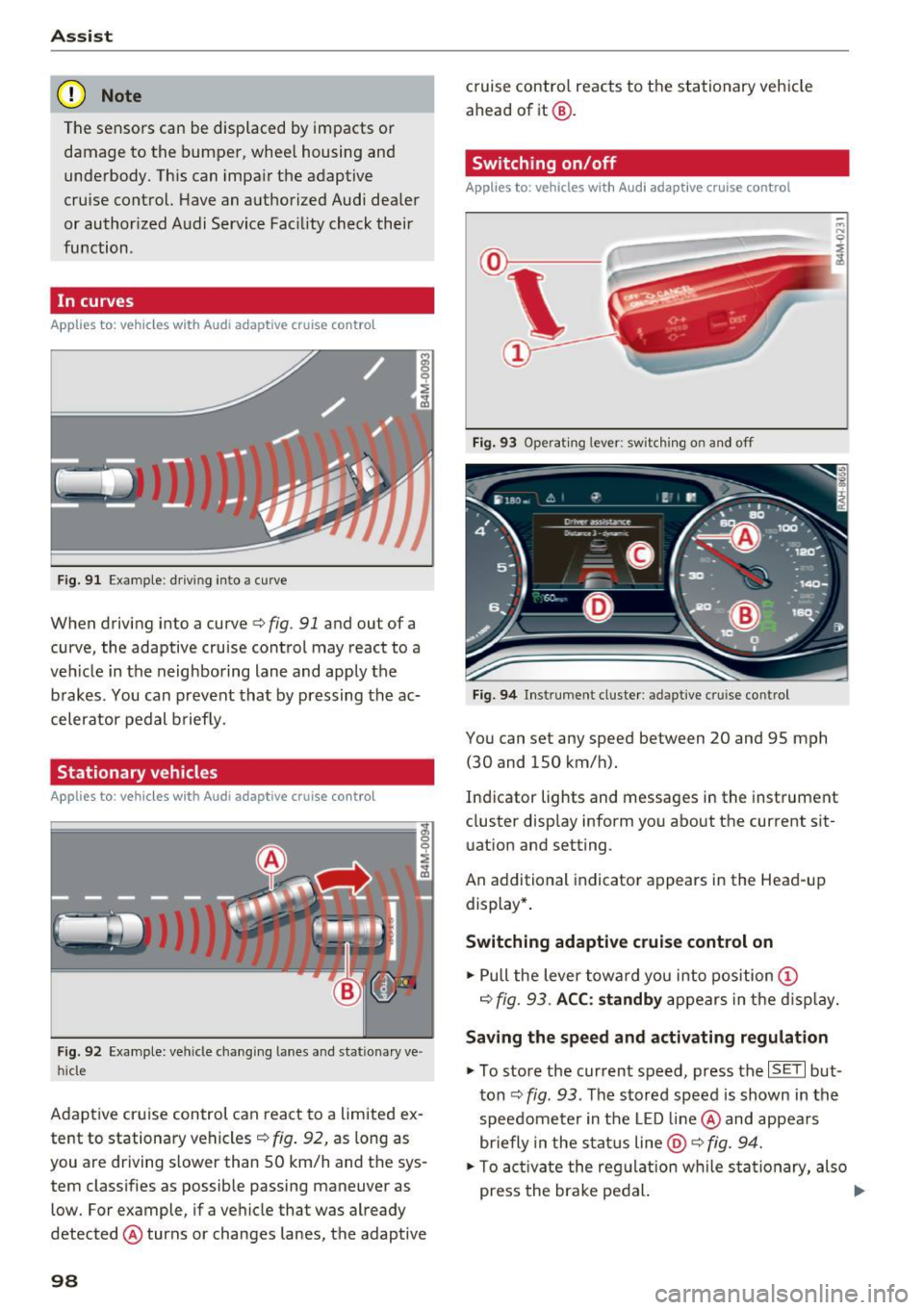
In curves
Applies to: vehicles with Audi adaptive cruise control
Fig . 9 1 Exa mple: drivin g in to a curve
When driving into a curve<=> fig. 91 and ou t of a
curve, the adaptive cruise control may react to a
veh icle in the neighboring lane and apply the
brakes . You can prevent that by pressing the ac
celerator pedal b rief ly.
Stationary vehicles
Applies to : vehicles with Aud i adaptive cruise contro l
Fig. 92 Example: vehicl e chang ing lane s and sta tiona ry ve
hi cle
Adaptive cruise control can react to a limited ex
tent to stationary vehicles
c:> fig . 92, as long as
you are driving slow er than SO km/h and the sys
tem classifies as possible passing maneuver as
low . For example, if a vehicle that was already
detected @turns or changes lanes, the adaptive
98
cruise contro l reacts to the stationary vehicle
ahead of it@ .
Switching on/off
Applies to: vehicles with Audi adaptive cruise control
Fig. 93 Operating lever : sw itc hin g on and off
Fig. 94 Inst rument cluster : adap tive cr uise cont rol
You can set any speed between 20 and 9S mph
(30 and lSO km/h).
Indicator lights and messages in the instrument
cluster display inform you about the cu rrent sit
uation and setting .
An add itional indicator appears in the Head-up
display *.
Switching adaptive cruise control on
.. Pull the lever toward you into position (D
c=> fig. 93. ACC: standby appears in the display.
Saving the speed and activating regulation
.. To store the current speed, press the ISE TI but
ton
c:> fig . 93 . The stored speed is shown in the
speedometer in the LED line@ and appears
briefly in the status line
@ c:> fig. 94.
.. To activate the regulation while sta tionary, also
press the brake pedal. .,.
Page 101 of 386

Switching adaptive cruise control off
• Push the lever away from you into position @
unti l it clicks into place. The message
ACC: off
appears.
@ Indicato r lights
I'll -adaptive cru ise control is switched on. No
vehicles are detected ahead. The stored speed is
maintained.
• -A vehicle driving ahead was detected. The
adapt ive cr uise control system regulates the
speed and distance to the vehicle dr iv ing ahead
and accelerates/brakes automatically.
• -adaptive cru ise cont rol is switched on . Ave
h icle was detected ahead. Yo ur vehicle is stat ion
ary and will not star t driving automatically.
(-j -adaptive cru ise control is switched on . No
vehicles we re detected ahead . Your vehicle is sta
tionary and will not start dr iving automati cally.
• -T he automatic brak ing is not enough to
maintain a sufficient distance to a veh icle dr iving
ahead . You must intervene
¢ page 102, Request
for driver intervention.
© In strum ent cluster display
If Dr ive r assis t is not shown in the instrument
cluster display, you can open it using the multi
function steering wheel buttons
¢ page 12.
Based on the graphic display, you can determine
if the system is maintaining a distance to the ve
h icle dr iving ahead and what that distance is .
No vehicle -no vehicle was detected driving
ahead .
Silver vehicle -a vehicle was detected driv ing
ahead.
Red vehicle -request for the dr iver to take action
¢page 102.
The five distance bar s on the gauge© rep resent
the set d istance (refer to
~ page 101 for infor
mat io n on how to change the dis tance) . If you
fa ll below the se lected distance, the distance
bars become red from the bottom upward.
A ss ist
A WARNING
If you press the !SET ! button when driv ing at
speeds below 20 mph (30 km/h), the veh icle
accelerates automatically up to 20 mph (30
km/h), wh ich is the minim um speed that can
be set.
@ Tips
- If you switch the ignition or the adaptive
cruise cont rol sys tem off, the set speed is
erased for safety reasons.
- The e lectronic stabilization control (ESC)
and the an ti-slip-regula tion (ASR) are auto
matically switched on when the adap tive
cruise cont rol is swit ched on.
Changing the speed
Appl ies to: vehicles wit h Aud i ada ptive cru ise control
0
f
'
0
Fi g. 95 Operat ing lever: changing the speed
"'To increase/decrease the speed in 1 mph (1
km/h) increments, b riefly
t a p the lever toward
0 10 ¢ fig. 95 to the firs t level.
• To increase/dec rease the speed in 5 mph
(5 km/h or 10 km/h) increments, brief ly
tap
the lever toward 0 10 to the second level.
• To increase or decrease the speed quick ly,
hold
the lever toward 0 10 up to the first or second
level unt il the red LED@ reaches the desired
speed¢
page 98, fig . 94 .
You can also preselect the speed when adaptive
cruise contro l is not act ive by moving the lever in
the des ired direction
0 10 . Activate the previ
ously selected speed by pulling the lever into po
sition
(D ¢ page 98, fig . 93 .
After every adjustment, the new stored speed ap
pears briefly in the status line ¢
page 98, fig. 94 ..,.
99
Page 103 of 386

.. To resume cruise control, release the lever or
take your foot off the acce lerator pedal.
Canceling cruise control while driving
.. Move the lever into posit ion @. The message
ACC: standby appears. Or
.. press the brake pedal.
.. To resume the stored speed, move the lever in
to position @.
Canceling cruise control when stopped
.. Push the lever away from you into position @.
The message
ACC : standby appears.
.. To resume cruise control, press the brake pedal
and pull the lever toward you into position@
A WARNING
It is dangerous to activate cruise control and
resume the stored speed when the current
road, traffic or weather conditions do not per
m it this . This increases the risk of an acc ident.
Setting the distance
A ppl ies to: ve hicles with Audi adaptive cruise co ntro l
,
0
Fig . 98 Operating lever: sett ing the dista nce
.. Tap the rocker switch to display the current set
distance
c:> fig. 98.
.. To increase or reduce the distance in incre
ments, tap the switch upward/downward
again . The distance between the two vehicles
will change in the instrument cluster display.
When approaching a veh icle driving ahead, the
adapt ive cruise control system brakes to match
that vehicle's speed and then adjusts to the set
d istance. If the vehicle driv ing ahead accelerates,
then the adaptive cruise cont rol w ill also acceler
ate up to the speed that you have set.
Assist
The higher the speed, the greater the distance
c:> &. The Distance 3 setting is recommended.
That is equal to the general recommendation of "ha lf the speed shown on the speedometer" .
T he distances provided are specified values. De
pending on the driving situation and how the ve
hicle ahead is driving, the actual distance may be
more or less than these target distances.
If you change the time gaps, the newly set value
appears brief ly in the instrument cluster display
II for example for Distance 3. This only occurs if
Driver assist is current ly not shown in the display
c:> page 98, fig. 94 .
Distance 1: this setting corresponds to a distance
of 92 feet (28 meters) when traveling at 62 mph
(100 km/h), or a time distance of 1 second .
Distance 2: this setting corresponds to a distance
of 118 feet (36 meters) when traveling at 62
mph (100 km/h), or a time distance of 1.3 sec
onds.
Distance 3: this setting corresponds to a distance
of 164 feet (SO meters) when traveling at 62
mph (100 km/h), or a time distance of 1.8 sec
onds.
Distance 4: this setting corresponds to a distance
of 210 feet (64 meters) when traveling at 62
mph (100 km/h), or a time distance of 2 .4 sec
onds.
Distance 5: this setting corresponds to a distance
of 328 feet (100 meters) when traveling at 62
mph (100 km/h), or a time distance of 3 .6 sec
onds.
A WARNING
-When setting the distance, the driver is re-
sponsible for adheri ng to any applicable legal
regulations.
@ Tips
- Distance
3 is set automatically each time
you switch the ignition on. If you would like
to set another distance as the standard set
ting, you can have the
Adaptive cruise con
trol
menu enabled by an authorized Audi
dealer or authorized Audi Service Facility.
101
Page 104 of 386

Assist
-Your settings are automatically stored and
assigned to the remote control key being
used.
Setting the driving program
A pp lies to: ve hicles w ith Audi adaptive cruise co ntro l
Depending on the selected driving program and
distance, driving behavior when accelerating will
vary from dynamic to comfortable.
Setting the driving program on vehicles
without drive select*
1>-In the Infotainment system, select: I MENU !>
Vehicle > left control button > Driv er assist >
Audi adaptive cruise control > Driving pro
gram > comfort, standard or dynamic .
Setting the driving mode on vehicles with
drive select*
Refer tor=;;, page 122 .
(D Tips
Your sett ings are automatically stored and as
signed to the remote control key being used.
Request for driver intervention
App lies to: ve hicles w ith Aud i ad aptive cruise co ntro l
Fig . 99 Instrument cluster: request for driver interve ntion
The request for driver intervent ion instructs you
to take over if the adaptive cruise contro l bra king
function is not able to mainta in a sufficient dis
tance to the vehicle driving ahead
c::> fig. 99.
l) Thi s is not ava ilab le in som e coun tri es .
102
Predictive control
(efficiency assist)
Description
App lies to: vehicles wit h Audi adap tive c ruise control and p re
dic tive efficiency ass ist
Fig. 100 In stru men t cl uster: p redict ive contro l
General information
The predict ive control 1> uses the map informa
tion from the navigation system in order to react
proactively when driving. Information from the
camera -based traffic sign recognition* is also ap
plied to recognize traffic signs
c::> page 24. When
coming up to areas with speed limits or changes
in the course of the road (such as curves, inter
sections or traffic c ircles), the system brakes au
tomatically and then accelerates back up to the
set speed .
When adaptive cruise control is switched off, the
system only provides notifications without con
trolled interventions
c::> page 95.
The driver can override the predictive contro l at
any time by pressing the accelerator or brake
pedal. If the system changes the veh icle speed to
adapt to speed limits, you can change the speed
using the lever
c::>page 99 , fig . 95.
Always switch off the predictive control in
the following situations:
-When increased attention is needed from the
driver .
- In poor weather conditions such as snow or
heavy rain .
- When driving on roads in poor cond ition.
Page 107 of 386
using the multifunction steering wheel buttons
¢
page 12. To activate congestion assist, you
must press the¢
fig. 101 button and switch on
the adaptive cruise control¢
page 98.
Indicator lights
11'1 and•-congestion assist is switched on .
Veh icles driving ahead were detected. Your vehi
cle adapts while driving
¢ fig. 102 .
•-Congestion ass ist switches off if the dr iver
does not take ove r stee ring after multip le driver
intervention requests . The system brakes the ve
hicle until it is stationary .
.&_ WARNING
Always keep your hands on the steering whee l
so you can be ready to steer at any time. The
driver is always responsib le for staying in a
lane and for assessing traffic situations cor
rectly . Read and follow the warnings on¢.&
in General information on page 97 . Never use
conge stion assist in the following si tuations
or yo u will increase t he ris k of an a cci den t.
- Drivi ng offroad or on unpaved roads. Con-
gestio n assist is only designed for use on
paved roads.
- In city dr ivi ng or in co nst ru ct ion zones.
- On curving stretches of road .
- In narrow lanes.
- In unclear traffic situations s uch as at inter-
sections or toll stations.
@ Tips
You are not necessarily g uided to the center
of yo ur lane.
A ss ist
Distance indicator and
distance warning
Description
Applies to: vehicles with Audi adaptive cruise control
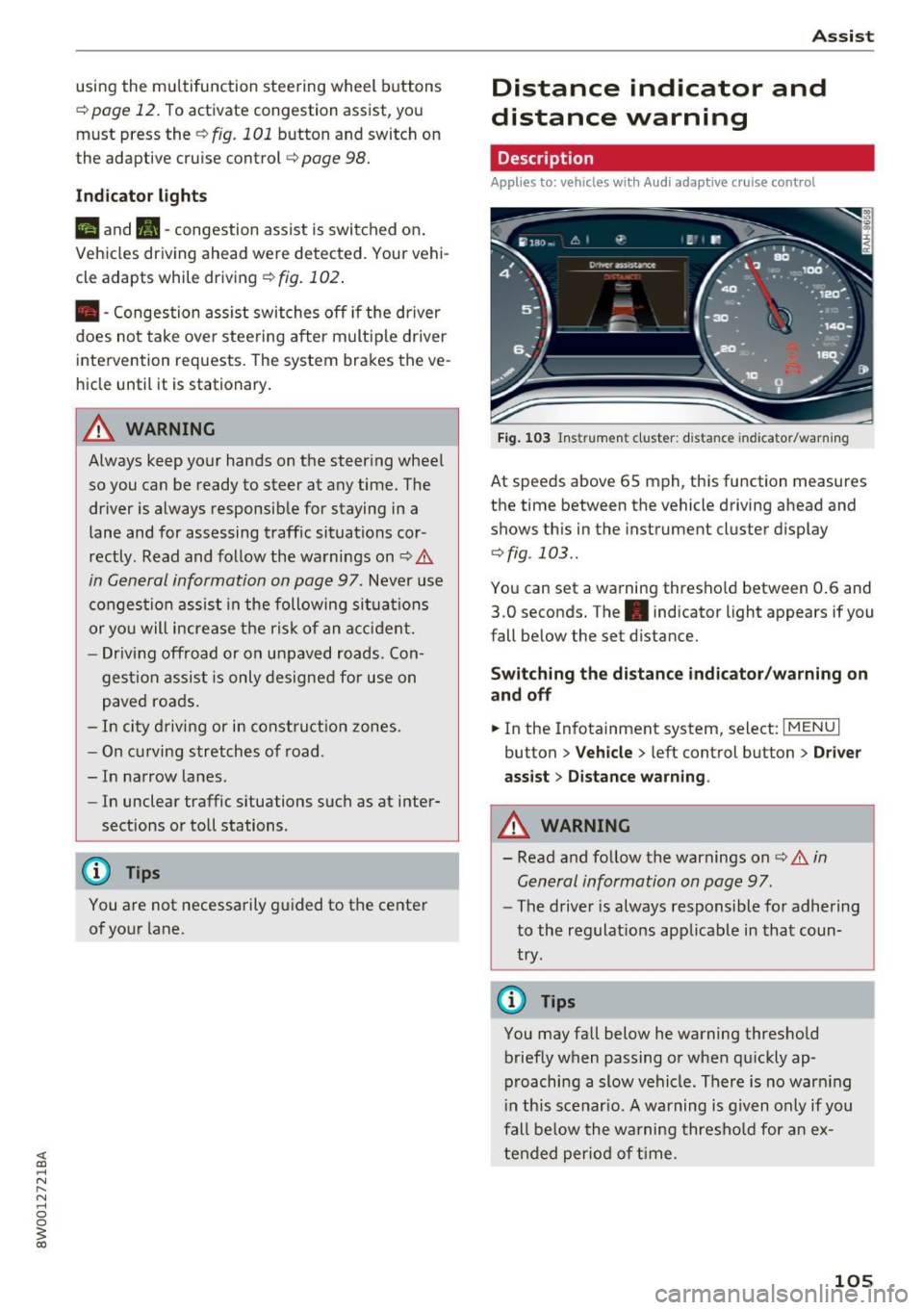
Fig . 1 03 Instrumen t cl uster: dist ance indicato r/warn ing
At speeds above 65 mph , this function measures
the time between the vehicle driving ahead and
shows th is in the instrument cluster display
¢ fig . 103 ..
You can set a wa rning thresho ld between 0 .6 and
3.0 seconds. The . indicator light appears if you
fall be low the set d istance.
Switching the distance indicator /warning on
and off
.. In the Infotainment system, select: I MENU I
button > Veh icle > left control button > Driver
ass ist> Distan ce warning .
.&_ WARNING
-
- Read and fo llow the warnings on¢.& in
General information on page
97.
-
- The drive r is always responsible fo r adhering
to the regulat ions app licab le in that coun
try .
@ Tips
You may fall below he warning thresho ld
briefly when passing or when q uickly ap
p roaching a slow vehicle. There is no war ning
i n this scenar io. A warning is g iven only if you
fall be low the warning thresho ld for a n ex
tended per io d of t ime.
105
Page 108 of 386
Assist
Messages
Applies to: vehicles with Audi adaptive cruise control
II ACC with Conge stion assist: unavailable. See
owner 's manual
Th e system c annot guarantee that it w ill detec t
ve hicl es co rre ctly and it h as swit ched
off. T he ra
dar senso rs have s hifted o r are faul ty . D rive to an
authorized Audi dealer or authorized Audi Se rvice
Facility immediately to have t he mal function cor
rected.
II ACC with Congestion assist: currently un
available. Sensor v ision restricted due to sur
roundings. See owner 's manual
T hi s message appears if the radar sensor view is
obs truc ted, for example by leaves, snow, heavy
spray or dirt. C lean the sensors ~
page 97,
fig . 90.
IIJ ACC with Congestion assist : currently un
available. Gradient too steep
T he road exceeds the maximu m possib le grade
for safe ope ra tion. The systems c annot be swi tch
e d on.
IIJ ACC with Congestion assist: only available in
D, Sor M
Select the D/S o r M selector lever position .
Bl ACC with Congestion assist: currently un·
a vailable . Parking brake applied
The systems sw itch off if yo u set the pa rk in g
brake. The systems a re availab le again after you
release the pa rking brake .
IIJ ACC with Congestion assist : currently un
available. Stabilization control (ESC ) input
This message appea rs if the Ele ct ro nic St abiliza
tion Cont rol (ESC) is ta king a ction to s tabilize the
ve hicl e. The sys tems sw itch
o ff in this s cenar io.
IIJ ACC with Congestion assist: manual control!
This message appea rs if the veh icle rolls bac k
when starting on a slight incl ine , even thoug h the
sys tems are ac tive . P ress the b rake pedal to pre
ve nt the vehicle from rolling o r sta rting to move.
106
ilJ ACC with Congestion a ssist: currently un
available. Downhill assist activated
Y ou canno t activ ate the sys te m when hill hold as
s ist is active.
tei ACC with Congestion assist: manual control!
This message appears if the driver does not take
over steering after multiple driver i ntervention
r equests and the system sw itches
o ff . The veh icle
brakes un til it is sta tionary .
tei Congestion assist: unava ilable . See owner's
manual
The system can no longer ensu re that the vehicle
will stay in t he lane and switches
off. Have your
vehicle checked by an authorized Audi dealer o r
aut horize d Aud i Serv ice Facility if the ma lf u nc
t ion is continuous .
II Congestion assist: Please take over steering!
This message app ears as soon as t he system
stops detect ing steering act iv ity when the system
li mits a re reached . Always keep your hands o n
t h e steer ing whee l so you can be ready to steer at
any t ime.
@ Conge stion assist: currently unavailable.
Please fasten seat belt
The system swi tches off when the drive r's safety
b elt is unfas tene d.
II ACC: efficiency as sist not available in thi s
country
The adaptation to speed lim its and rou tes ahead
i s not available in this co unt ry .
ii ACC: efficiency assist currently unavailable .
See owner's manual
The adaptation to speed lim its and routes ahead
switches off at speed limits under 20 mph
(30 km/h).
The message can also appear if the adaptation to speed limits and routes ahead has a temporary
failure. Have your vehicle checked by an a uthor
i zed Audi dealer or author ized Audi Se rvice Facili
ty if the malfunction is cont inuous.
Distance warning: malfunction! Please contact
Service
...
Page 109 of 386
<( a, .... N ,....
N .... 0 0
3 a,
The system cannot guarantee that it will detect
vehicles correctly and it has switched off. The ra
da r senso rs have sh ifted o r are faulty . Drive to an
author iz ed Audi dealer or author iz ed Audi Se rvice
Faci lity immediately to have the malfunction cor
rected .
Distance warning : currently una vailable . Sensor
v iew restricted due to surroundings. See own
er's manual
This message appears if the radar sensor view is
obstructed, for example by leaves, snow, heavy
spray or dirt . C lean the sensors ¢
page 97,
fig. 90 .
Distance warning: currently unavailable. See
owner 's manu al
This message appea rs if the sys tem has a tempo
rary fai lure. If this occ urs mult iple times, d rive to
an authorized Audi dealer or authorized A udi
Service Facility immediately to have the malfunc
tion corrected.
ACC: Please fa sten seat belt
The system is no t comp lete ly available if the d riv
e r' s sea t belt is u nfastened .
Stationary object ahead
This message appears if you would like to switch
the system o n and there is a stationary object di
rect ly in front of your vehicle.
Door open
The system is no t availab le when the door is
open .
Audi pre sense
Introduction
Applies to: ve hicles with Audi pre sense
W ith in the lim its of the system, t he pre sense
f u nctions can init iate measures in part icularly
dangerous sit uat ions to protect t he ve hicle pas
sengers and ot her road users.
- Because different veh icle systems such as the
ESC are i nterconnected , the
pre sense b asic in
t roduces p reempt ive safety meas ures for the
Assist
passengers i f an unstable driving si tuation is
detected.
- The
pre sen se front system uses the data from
the adaptive cruise contro l* radar sensors and
the camera to ca lculate the probability of a co l
lision . With in the lim its of the system, an im
pending co llision with vehicles can be detected
in both urba n and rural speed ranges. In t his
case, the system warns the driver visua lly,
acoust ica lly and w ith a jerk on the brakes if nec
essary. If needed, i t can in itiate a partia l o r fu ll
dece lerat ion to reduce the collision speed or to
avoid the collision under certa in circumstances.
I n conjunction with pre sense basic/rear, the
front safety belts are a lso reve rsibly tens ioned
when needed . The pre sense front is a lso active
when adaptive cruise control* is sw itched off.
- Pre sense rear contains pre sense basic func
tions. It uses the data from the side assist* ra
dar sensors and ca lculates within the limits of
the system the probability of a rear end colli
sion with t he vehicle behind you. Pre sense rear
is also act ive when side assist* is sw itched off .
- Within the limits of the system,
pre sense city
uses the camera data and can detect an im
pe nding collision with vehicles and pedestrians.
I n th is case , the system warns the driver visua l
ly , acous tic ally and wit h a jerk on the b rakes if
necessary. If needed, it c an initi ate a full dece l
erat io n to reduce the collis io n speed or to avoid
the collision under certain circumstances . In
conjunction with pre sense basic/rear, the front
safety belts are a lso reversibly tens ioned when
needed .
A WARNING
-
Read the genera l information on¢.&. in Gen -
eral information on page
97, c::> .&. in General
information on page 117 .
@ Tips
-Certa in pre sense funct ions sw itch off when
dr iving in reverse.
- The pre sense funct ions may not be availa
ble if there is a malfunct ion in the ESC sys
tem or t he a irbag control module .
107