parking brake AUDI S4 2017 User Guide
[x] Cancel search | Manufacturer: AUDI, Model Year: 2017, Model line: S4, Model: AUDI S4 2017Pages: 386, PDF Size: 96.32 MB
Page 86 of 386
Driving
Sel ector l ev e r lo ck
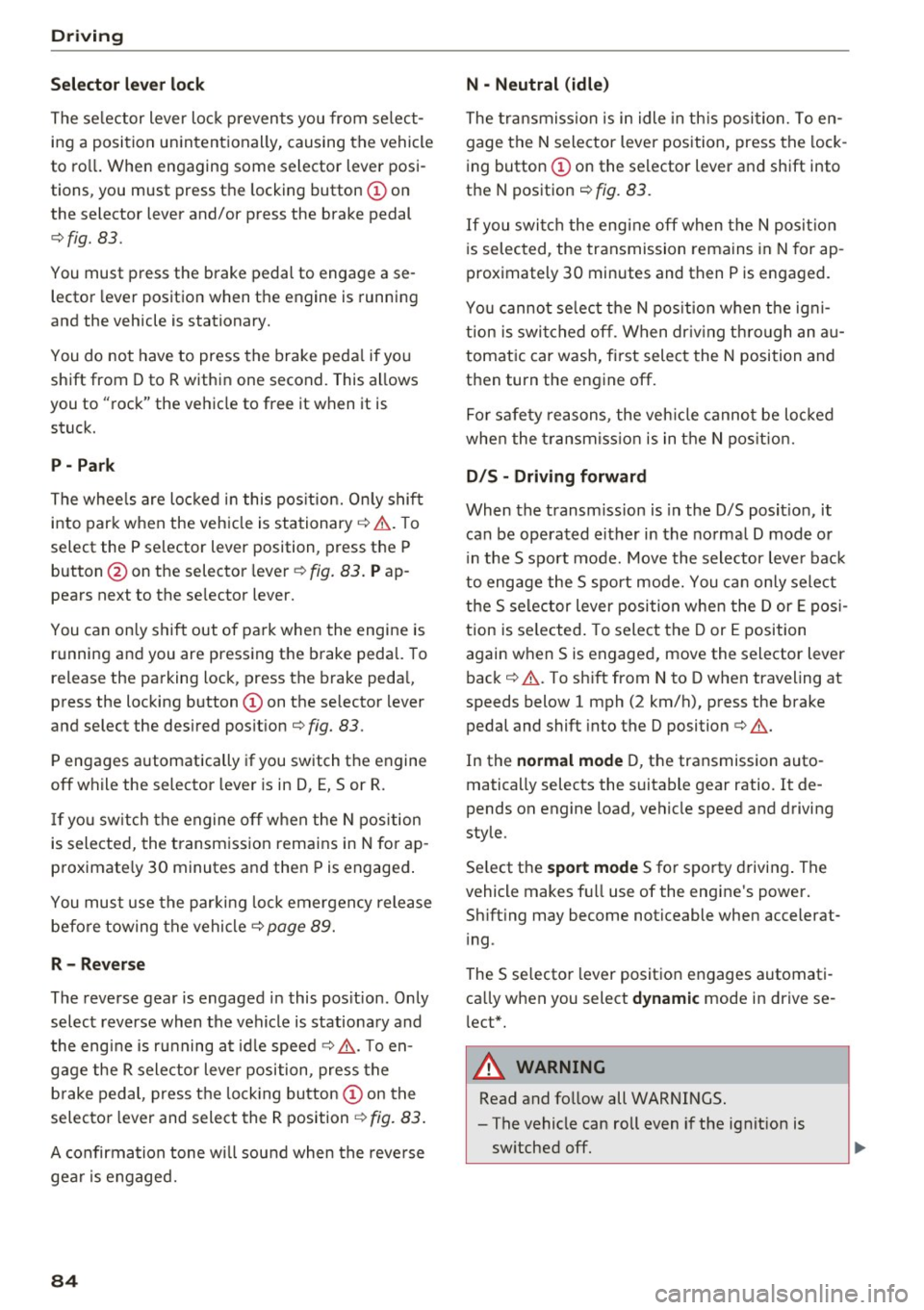
The se lector lever lock prevents you from se lect
ing a position unintentionally, causing the vehicle
to ro ll. When engaging some selector lever posi
tions, you must press the locking button
CD on
the selector lever and/or press the brake pedal
¢fig. 83.
You must press the brake pedal to engage a se
lector lever position when the engine is running
and the vehicle is stationary.
You do not have to press the brake peda l if you
shift from D to R within one second. This allows
you to "rock" the vehicle to free it when it is stuck.
P -Pa rk
The whee ls are loc ked in this pos it ion. On ly shift
into park when the veh icle is stationary ¢&. . T o
select the P selector lever position, press the P
button @on the selector lever ¢
fig. 83. Pap
pears next to the se lector lever.
You can only shift out of park when the engine is running and you are press ing the b rake pedal. To
release the parking lock, press the brake peda l,
press the locking button
CD on the selector lever
and select the desired pos it ion ¢
fig. 83.
P engages automat ically if you switch the engine
off while the selector lever is in D, E, Sor R.
If yo u sw itch the engine off when the N position
is selected, the transmission remains in N for ap
proximate ly 30 minutes and then Pis engaged .
You must use the par king loc k emergency release
before towing the vehicle¢
page 89.
R -Reverse
The reverse gear is engaged in this pos ition. Only
select reverse when the vehicle is stationa ry and
the engine is ru nning at id le speed ¢.&. . T o en
gage the R selector lever position, press the b rake pedal, press the lock ing button
CD on the
selecto r lever and select the R position ¢
fig. 83.
A confirmation tone wi ll sound when the reve rse
gear is engaged.
84
N -Neutral (idle )
The t ransmission is in idle in th is position. To en
gage the N selector lever position, press the lock
i ng button
CD on the se lector lever and shift into
the N position ¢
fig. 83.
If you switch the engine off when the N posit io n
i s selected, the transmission remains in N for ap
prox imately 30 minutes and then P is engaged.
You cannot se lect t he N pos ition when the ig ni
tion is swi tched off. When dr iv ing th rough an au
tomat ic car wash, fi rst select the N position and
then turn the eng ine off.
Fo r safety reasons, the veh icle canno t be loc ked
whe n the t ransmiss io n is in the N pos it ion.
D IS -Driving forward
When the transm iss ion is in the D/S posit ion, it
can be operated either in the norma l D mode or
i n the S sport mode. Move the selector lever bac k
to engage the S sport mode. You ca n only se lect
the S se lector lever position when the Dor E pos i
tion is se lected . To select the Dor E position
again when S is engaged, move the selector lever back ¢&. . To sh ift from N to D when traveling at
speeds below 1 mph (2 km/h), press the brake pedal and shift into the D position¢&. .
In the
normal mode D, the transmission auto
matically selects the suitable gear ratio. It de
pends on engine load, vehicle speed and driving
style.
Se lect the
sport mode S fo r sporty driving . The
vehicle makes f ull use of the engine 's power.
Sh ift ing may become noticeable when accelerat
i ng .
The S selector lever posit ion engages automati
ca lly when you select
dynamic mode in drive se
l ect*.
A WARNING
Read and follow all WARNINGS.
-The vehicle can roll even if the ignit ion is
sw itched off.
Page 87 of 386

-Power is st ill transmitted to the wheels
when the eng ine is r unning at idle. To pre
vent the veh icle from "creeping", you must
keep your foot on the brake in all selector
lever posi tions (except P and N) when the
engine is ru nning.
- Before opening the hood, se lect the P selec
tor leve r pos ition and set the parking bra ke.
T his redu ces the risk of an accid ent. Always
read and fo llow the appli cable warnings
¢ page 30 4, Wor king in the engine com
partment.
@ Tips
If you accidentally se lect N wh ile d riving, take
your foot off the a ccele rat or pedal an d wait
for the engine to s low down to idle before se
lect ing Dor S.
Driving tips
Starting the engine
.,. The P or N posi tion m ust be selected .
Starting from a stop
.,. Press and hold the brake pedal.
.,. Start the engi ne ¢
page 76.
.,. Press t he lo ck ing bu tton (D on the se le ctor lev
er and select the D, E, Sor R pos ition
¢ page 83.
.,. Wait a moment unti l the transmission shifts.
Yo u w ill notice a slight movement when the
gear engages .
.,. Release the brake pedal and press the acce lera
tor pedal ¢
A,.
Stopp ing temporarily
.,. Press t he brake peda l to stop the vehicle, fo r
example at a t raff ic light. Do not press the ac
ce le rator peda l when do ing this.
.,. To prevent the vehicle from rolling when you
sta rt driving, set the park ing brake when stop
ping on steep hill s¢
A, .
.,. The park ing bra ke w ill release automatically
;;§ and the vehi cle will s tart moving on ce you press ....
~ th e accelerator pedal.
N .... 0 0
3
Stopping /parking
If the selector lever is not in the P position when
yo u open the drive r's door, the vehicle cou ld ro ll.
.,. Press and hold the b rake pe dal¢
A, .
.,. Se t the par king bra ke.
.,. To sele ct the P se lec to r lever posit io n, press the
P button @on the selector lever¢
page 83,
fig. 83.
Un der certa in conditions , such as d riv ing i n the
moun tains o r whe n towi ng a t railer, it may be
helpful to swi tch to man ua l mode tempo rari ly
and shift
manually to adapt to the driv ing condi
t ions ¢
page 86 .
On hills, ac tivate the park ing brake fi rst and then
shi ft into the P position¢
page 81 . This preven ts
too much stress from being p laced on the locking
mechan ism .
A WARNING
----The vehicle can roll even when the eng ine is
sw itched off .
- Unintended vehicle movement can lead to
serio us inju ries .
- Do not press the acce le rator pedal when
chang ing the se lector lever position while
the vehicle is stationary and the engine is r u nning . This could result in a c rash .
- To reduce the r isk of an accident, never se
lect the R o r P positions while dr iv ing .
- Do not inadvertently p ress the accelerator
pedal when the vehicle is stationary. Other
wise the veh icle wi ll start to move immedi
ately , even i f the pa rking brake is set. This
could result in a c rash .
(D Tips
For safety reasons, the park ing bra ke only re
l eases automatically when the drive r's door is
closed .
Hill descent control
The hill descent control system assists the driver
when driving down hills .
Hill descent control activates when the t ransmis-
s io n is in the Dor 5 position and you press the ..,.
85
Page 90 of 386
Driving
There is a malfunction in the P button on these
lector lever. The transmission automatically en
gages in P when you switch off the engine . Drive
to an author iz ed Audi deale r or author iz ed Audi
Serv ice Facility immediately to have the malfunc
tion corrected .
[iJ Transmission : m alfun ction ! Sel. le ver pos.
can only be changed using both paddle le vers.
Ple ase contact Service
There is a system malfunction in the transmis
sion. You can contin ue driving with restricted
function . The selector lever is not working. Gears
can only be selected by tapping both sh ift pad
d les at the same time when the vehicle is station
ary ¢
page 86, fig. 85 . Pay attention to these
lected transm ission position i n the instrument
cluste r display . The park ing lock engages au to
mat ic all y w hen you t urn off the engine. Drive to
an author ized Audi dealer or author ized A udi
Service Facility immediately to have the malfunc
tion corrected.
[iJ Transmi ssion : plea se pre ss brake pedal and
se lect gear again
Press the brake pedal and se lect the desired se
lecto r leve r posit ion aga in. You can then continue
d riving.
[O] Transmi ssion : too hot . Plea se adapt dr iving
s tyle
The transm ission temperature has incre ased s ig
n ificantly due to the sporty driving manner . Drive
i n a less sporty ma nner until the temperature re
turns to the normal range and the indicator light
sw itches of .
[O] Transmi ssion : malfunct ion! You can contin
u e driving . See owner 's manual
There is a system malfunct ion in the transm is
sion . You may continue dr iving . Drive to your au
thor ized Audi dealer or authorized Audi Service
Facility soon to have the malfu nction corrected .
[O] Transmission : malfunct ion! You ma y contin
ue dri ving in D until engine off
There is a system malfunction in the transmis
sion . The transmission is switching to emergency
mode. If you turn the engine off, you will not be
88
able to se lect any othe r se lector lever positions
after starting the engine again . Drive to an au
thorized Audi dea ler or a uthorized Audi Service
Facility immediate ly to have the malfunction cor
rected .
[iJ Transmission: malfunction! You ma y contin
ue dr iving (limited functionality ). Please con
tact Serv ice
There is a system malfunction in the transmis
sion . The transmission is switching to emergency
mode. This mode only s hifts into certain gears or
will no longer shift at a ll. The eng ine may sta ll.
Drive to an authorized Audi dealer or authorized
Audi Service Facility immediate ly to have the
malfunction corrected .
[iJ Transmission: malfunction! You ma y contin
ue dr iving. No re verse gear
There is a system malfunction in the transmis
s ion. The transmission is switch ing to emergency
mode. This mode only s hifts into certain gears or
will no longer shift at a ll. The eng ine may sta ll.
You cannot engage the reverse gear . Dr ive to an
authorized Aud i dealer or a uth orized Aud i Serv ice
Facility immediate ly to have the malfunction cor
r ected .
[iJ Danger of rolling away! P not possible .
Pl ea se apply park ing brake
- The parking lock was re leased us ing the emer
gency release¢
page 89. Or
- The parking lock can no longer be engaged.
Dr ive to an authori zed Audi dealer or author
ized Aud i Service Facility immediately to have
the malfunction corrected .
[iJ Move selector lever to automatic position
There is a ma lfunction in the tiptron ic mode . End
tiptronic mode by pus hing the selector lever to
the left into the D/S position .
Page 91 of 386
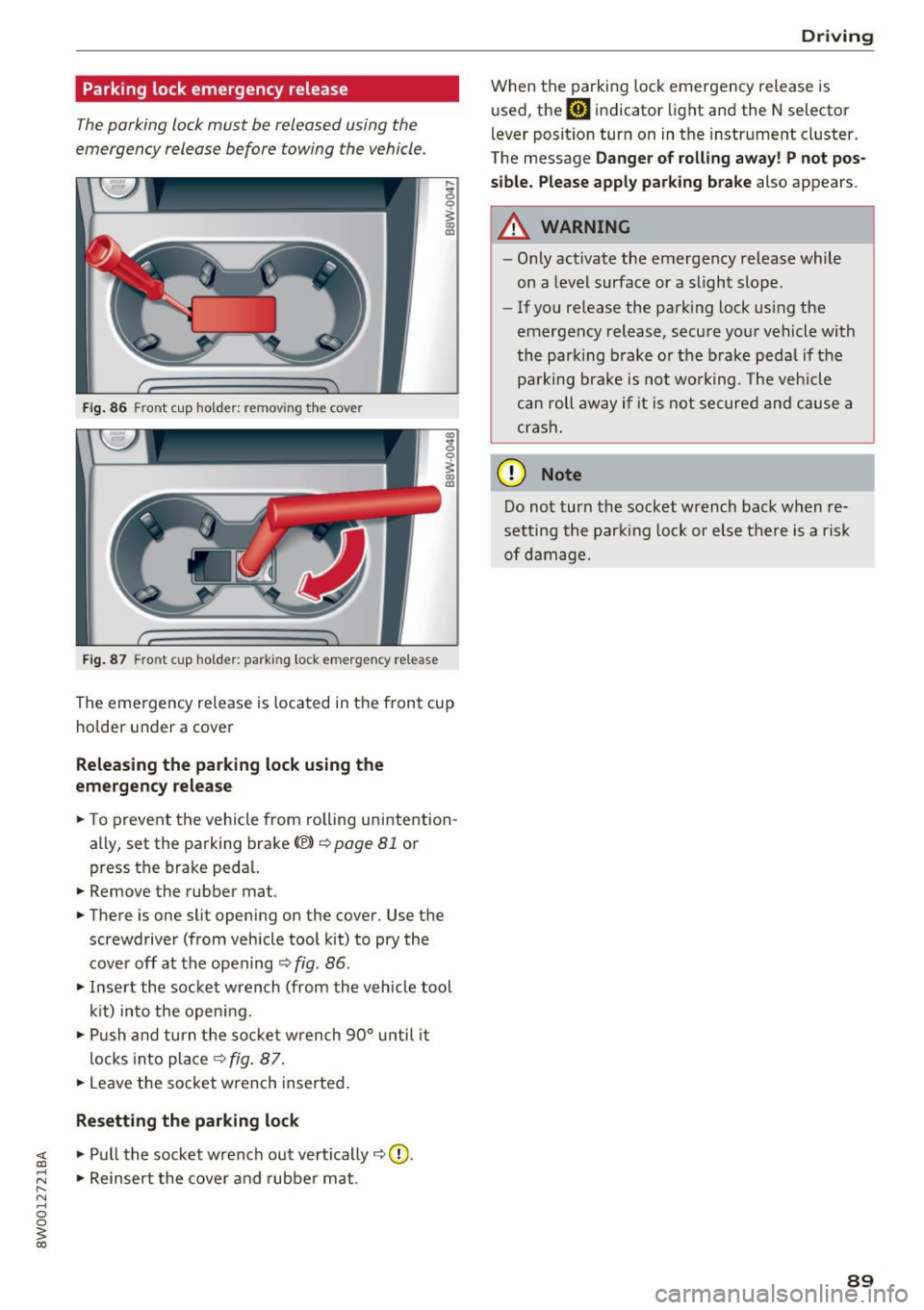
Parking lock emergency release
The parking lock must be released using the
emergency release before towing the vehicle .
Fig. 86 Front cup holder: removing the cover
Fig. 87 Front cup holder : parking lock eme rge ncy release
~ 0
~ a, ID
The eme rgency re lease is located in the fron t cup
ho lde r under a cover
Releasing the parking lock using the
em ergency r ele ase
.. To prevent the vehicle from rolling unintention
ally, set the parking brake<®>
c::>page 81 or
press the brake peda l.
.. Remove the rubber mat.
.. There is one slit open ing on the cover . Use the
screwdriver (from vehicle tool kit) to pry the
cove r off at the opening
c::> fig . 86 .
.. Inse rt the socket wrench (from the vehicle tool
k it) into the opening .
.,. Push and turn t he so cket w rench 90° until it
locks into place
c::> fig. 87 .
.. Leave the socket wrench inserted .
Resetting the parking lock
~ .. Pull the socket wrench out ve rtically c::> 0.
;:::: .. Reinsert the cover and rubber mat . ...... N ..... 0 0
~ co
Drivi ng
When the parking lock emergency release is
used, the
mJ indicator light and the N selector
l ever posit ion turn on in the instrument cluster .
The message
Da nger of rolli ng away ! P not po s
sible. Please apply park ing bra ke
also appears.
A WARNING
-- Only activate the emergency release while
on a level surface or a slight slope.
- If you release the park ing lock us ing the
emergency release, secu re your vehicle with
the park ing b rake or the brake pedal if the
pa rking brake is not wo rking . T he veh icle
c a n roll away if it is not se cure d and cause a
crash.
(D Note
Do not tur n the socket wrench back when re
setting the parking lock or else there is a risk
of damage.
89
Page 94 of 386

Trailer towing
Backing up is difficult and requires practice .
Backing up with a trailer generally requires steer
ing action oppos ite to that when backing up your
veh icle w ithout a trailer .
Maintain a g reater distance between your vehicle
and the one in front of you. You w ill need more
room to stop. To compensate for the tra iler, you
will need a larger than normal turn ing radius.
When passing, remember that you cannot accel
erate as fast as you norma lly would because of
the added load. Make sure you have enough room
to pass. After passing, allow plenty of room for
your tra iler before chang ing lanes again .
Avoid jerky starts , sharp turns or rapid lane
changes .
@ Tips
- Do not tow a trailer during the break -in per i
od of your vehicle.
- If you tow a trailer, your Audi may require
more frequent maintenance d ue to the ex
tra load
~ page 363.
Parking on a slope
Do not pork on a slope with a trailer. If it cannot
be avoided, do so only o~er doing the following:
When parking:
.. Apply t he foo t brake .
.. Have someone place chocks under both t he ve
hicle and the tra ile r whee ls .
.. With chocks in p lace, slowly release t he brakes
u ntil the whee l chocks absorb the load .
.. Turn the wheels towards the curb .
.. Apply the parking brake .
.. Move the selector lever to P .
When restarting after pa rking:
.. Apply the foot brake .
.. Start the engine .
.. Move the selector lever to D/S .
.. Release the parking brake and slowly pull out
and away from the wheel chocks .
.. Stop and have someone retrieve t he wheel
chocks .
92
Page 108 of 386
Assist
Messages
Applies to: vehicles with Audi adaptive cruise control
II ACC with Conge stion assist: unavailable. See
owner 's manual
Th e system c annot guarantee that it w ill detec t
ve hicl es co rre ctly and it h as swit ched
off. T he ra
dar senso rs have s hifted o r are faul ty . D rive to an
authorized Audi dealer or authorized Audi Se rvice
Facility immediately to have t he mal function cor
rected.
II ACC with Congestion assist: currently un
available. Sensor v ision restricted due to sur
roundings. See owner 's manual
T hi s message appears if the radar sensor view is
obs truc ted, for example by leaves, snow, heavy
spray or dirt. C lean the sensors ~
page 97,
fig . 90.
IIJ ACC with Congestion assist : currently un
available. Gradient too steep
T he road exceeds the maximu m possib le grade
for safe ope ra tion. The systems c annot be swi tch
e d on.
IIJ ACC with Congestion assist: only available in
D, Sor M
Select the D/S o r M selector lever position .
Bl ACC with Congestion assist: currently un·
a vailable . Parking brake applied
The systems sw itch off if yo u set the pa rk in g
brake. The systems a re availab le again after you
release the pa rking brake .
IIJ ACC with Congestion assist : currently un
available. Stabilization control (ESC ) input
This message appea rs if the Ele ct ro nic St abiliza
tion Cont rol (ESC) is ta king a ction to s tabilize the
ve hicl e. The sys tems sw itch
o ff in this s cenar io.
IIJ ACC with Congestion assist: manual control!
This message appea rs if the veh icle rolls bac k
when starting on a slight incl ine , even thoug h the
sys tems are ac tive . P ress the b rake pedal to pre
ve nt the vehicle from rolling o r sta rting to move.
106
ilJ ACC with Congestion a ssist: currently un
available. Downhill assist activated
Y ou canno t activ ate the sys te m when hill hold as
s ist is active.
tei ACC with Congestion assist: manual control!
This message appears if the driver does not take
over steering after multiple driver i ntervention
r equests and the system sw itches
o ff . The veh icle
brakes un til it is sta tionary .
tei Congestion assist: unava ilable . See owner's
manual
The system can no longer ensu re that the vehicle
will stay in t he lane and switches
off. Have your
vehicle checked by an authorized Audi dealer o r
aut horize d Aud i Serv ice Facility if the ma lf u nc
t ion is continuous .
II Congestion assist: Please take over steering!
This message app ears as soon as t he system
stops detect ing steering act iv ity when the system
li mits a re reached . Always keep your hands o n
t h e steer ing whee l so you can be ready to steer at
any t ime.
@ Conge stion assist: currently unavailable.
Please fasten seat belt
The system swi tches off when the drive r's safety
b elt is unfas tene d.
II ACC: efficiency as sist not available in thi s
country
The adaptation to speed lim its and rou tes ahead
i s not available in this co unt ry .
ii ACC: efficiency assist currently unavailable .
See owner's manual
The adaptation to speed lim its and routes ahead
switches off at speed limits under 20 mph
(30 km/h).
The message can also appear if the adaptation to speed limits and routes ahead has a temporary
failure. Have your vehicle checked by an a uthor
i zed Audi dealer or author ized Audi Se rvice Facili
ty if the malfunction is cont inuous.
Distance warning: malfunction! Please contact
Service
...
Page 121 of 386
_& WARNING
The exit warning system is subject to limita
tions and cannot warn you before every im
pending collision:
- If the vehicle is too wide for the parking
space and covered by the neighboring
vehicles.
- Approaching objects or people such as cy
cl ists o r skateboarders may not be detected
under certain circumstances.
- The system does not react to stationary ob
jects.
- The view of the radar sensors may be im
paired by leaves, snow, heavy spray or d irt.
Clean the area in front of the sensors
r:!vpage 116, fig. 112.
(D Note
Also read this information ¢0 in General in
formation on page 117.
@ Tips
- The ex it warning system is switched on and
off through the side assist¢
page 117.
-The display brightness for the exit warning
system cannot be adjusted.
- The system is not available when towing a
trailer.
Rear cross-traffic assist
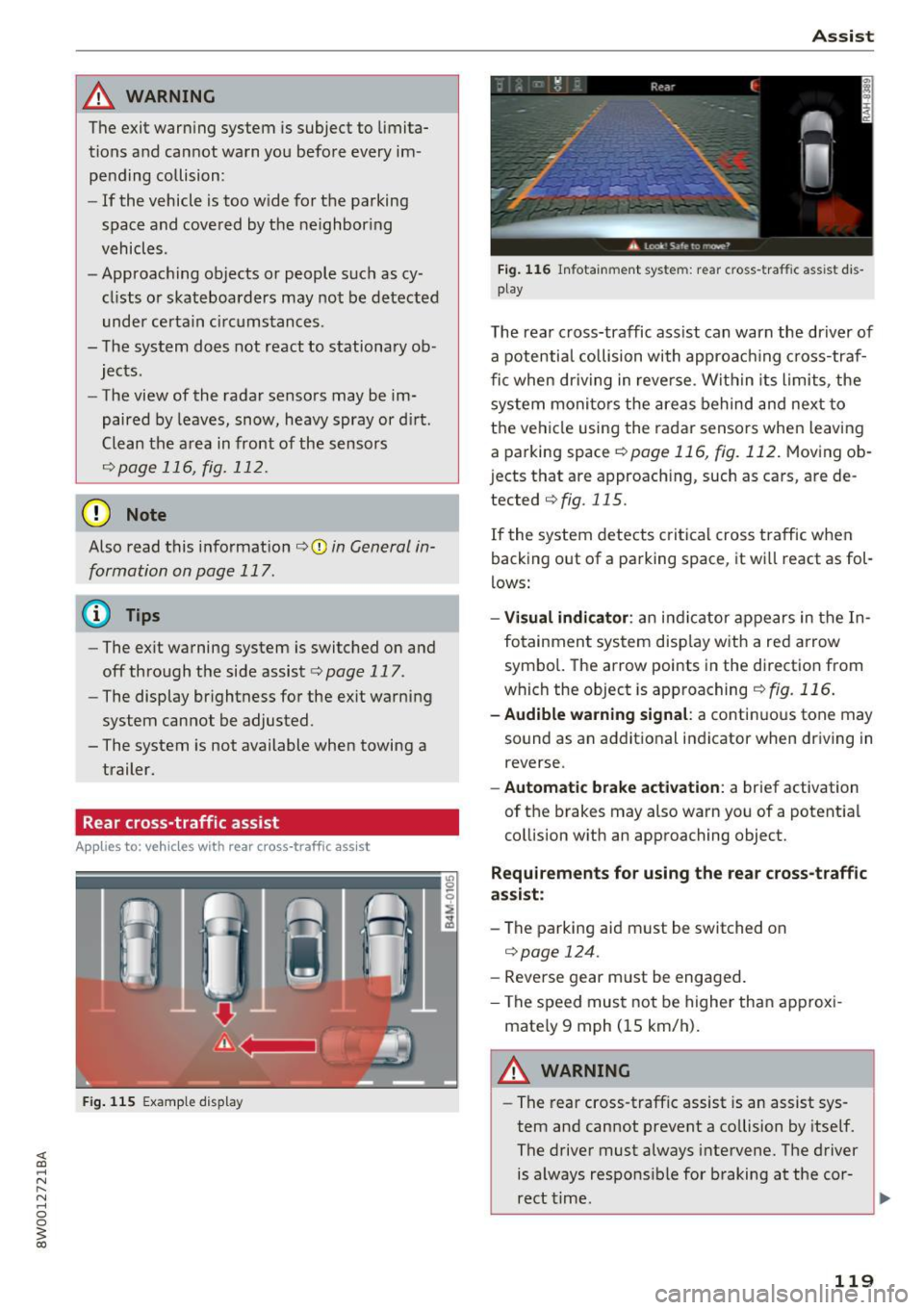
A ppl ies to: vehicl es with rear cross-traffic assist
Fig. 115 Example display
Assist
Fig. 116 Infotainment system: rear c ross -tra ffic assist dis
play
The rear cross-traffic ass ist can warn the driver of
a potential collision with approach ing cross-traf
fic when driving in reve rse. Within its limits, the
system monitors the areas behind and next to
the vehicle using the radar sensors when leaving
a parking space
r:!vpage 116, fig. 112. Moving ob
j ects that are approaching, such as cars, are de
tected
¢ fig. 115.
If the system detects critical cross traffic when
backing out of a parking space, it wi ll react as fol
lows:
- Visual indicator : an indicator appears in the In
fotainment system disp lay with a red arrow
symbo l. The arrow points in the direction from
which the object is approaching
¢fig. 116.
-Audible warning signal: a continuous tone may
sound as an additional indicator when driving in
reverse.
- Automatic brake activation : a brief activation
of the brakes may also warn you of a potent ial
collision with an approaching object.
Requirements for using the rear cross-traffic
assist :
-The parking aid m ust be switched on
¢page 124.
-Reverse gear m ust be engaged.
- The speed must not be higher than approxi-
mate ly 9 mph (15 km/h).
A WARNING
- The rear cross-traffic assist is an assist sys
tem and cannot prevent a co llision by itself.
The driver must always intervene. The driver
is always responsible for braking at the cor-
rect time .
~
119
Page 122 of 386
Ass is t
- Please note that the rear cross-traffic assist
may act ivate the brakes unexpectedly. Se
cure any cargo that you are transporting to
reduce the risk of damage or injury .
- An additional brake act ivat ion may be tr ig
gered within 20 seconds after an automat ic
brake activation.
- If there is an acoustic warning signa l from
the rear cross-traff ic assist, then the park
ing system may not warn you of detected
obstacles under certa in circumstances .
- The view of the radar sensors may be im paired by leaves, snow, heavy spray or d irt.
Clean the a rea in front of the sensors
~ page 116, fig . 112.
A WARNING
T he rear cross-t raff ic assist is s ubject to lim i
t at ions and cannot warn you before every im
pending collision:
- If the vehicle is too w ide fo r the pa rki ng
spa ce and covered by the ne ighbor ing
vehicles.
- People , such as cyclis ts, jogge rs, in line skat
ers and pedestrians, may not be detected
under certain circ umstances.
- If you are in a par allel par king sp ace.
(D Note
Also read this info rmation ~ CD in General in
formation on page 117.
(0 Tips
- You can cancel the automatic brake activa
tion with increasing braking force if you ap
ply the bra kes yourself or accele rate cons id
e rab ly.
- In some s ituations, rea r cross-traffic ass ist
may warn you even if t here is no cross traffi c
i n a critic al are a, for examp le w hen ba cking
i nto a parking space or maneuver ing.
- T he rea r cross -traffic ass ist also switches off
whe n you swi tch off the ESC.
- T he rea r cross traffic assist switches on and
off thro ugh the p arking aid<:?
page 12 4.
- T he system is not ava ilable when towing a
trailer.
120
' Messages
Applies to: vehicles with Audi side assist
A message appea rs in the ins trument cluster dis
play if the side ass ist sw itches off automat ica lly.
@j Audi side assist: currently unavailable . Sen
sor vi sion re stricted due to surroundings. See
owner' s manual
@j Audi side ass ist and ex it warning: currently
unav ailable . Sensor vi sion restricted due to sur
rounding s
The radar sensors ' vision is affected . The area in
front of the sensors must not be covered by bike
racks, stickers, leaves, snow or any other objects .
Clean the area in front of the sensors, if necessa
r y
<:? page 116, fig . 112.
@j Audi side ass ist: currently unavailable . See
owner's manual
@j Audi side ass ist and exit warning: currently
unavailable. See owne r's manual
Side assist ca nnot be switched on at this time be
cause ther e is a malfunction (for example, the
battery charge level may be too low).
@j Audi side as sist: malfunction! Plea se contact
Service
@j Audi side assi st and exit warning: malfunc
tion! Plea se contact Service
The system cannot guarantee that it will detect
vehicles correct ly and it has sw itched off. The
senso rs have been moved or are fa ulty . Have the
system checked by an authori zed Aud i dea ler o r
a uthorized Aud i Serv ice Facility soon.
@j Audi side assi st: unavailable in towing mode
@j Audi side ass ist and ex it warning: currently
unavailable. Towing mode
Side assist switches off automatically when the electrical connector in the factory-installed trail
er hitch is connected . There is no guarantee the
system will sw itch off when using a retrofitted
trailer hitch . Do not use side assist and the ex it
warning when tow ing a tra ile r.
Ill Rea r parking aid: obstacl e detection res trict-
ed ..,.
Page 306 of 386

Check ing and F illing
Engine compartment
Working in the engine compartment
Special care is required if you are working in the
engine compartment
Fo r wo rk in th e engine compa rtmen t, s uch as
c h ec kin g and filli ng flu id s, th ere is a risk of in
j u ry, sc aldin g, ac cide nts, a nd b urn s. For this
rea son, foll ow all the warning s and gener al
s a fe ty p recaution s pr ov ided in the f ollow ing in·
f o rm ation . Th e en gine c omp artmen t is a dan
ger ous are a.
¢ ,&.
_& WARNING
- T urn the engine off.
- Switch the ign ition off .
- Set the parking brake .
- Select the P selector lever pos ition .
- let the engine cool down.
- Never open the hood if you can see steam or coolant escaping from the engine compart
ment, because th is increases the r isk of
burns . Wait until no steam or coolant is es
caping .
- Keep ch ildren away from the engine com
partment .
- Never spill flu ids on a hot engine. These flu
ids (such as the anti -freezing agent con
ta ined in the coolant) can ignite .
- Avoid short circu its in the electrical system,
especially to the battery .
- When working in the engine compartment,
remember that the rad iator fan can sw itch
on even if the ign ition is switched off, which
increases the risk of injury .
- Never open the cap on the coolant expan sion tank when the eng ine is warm. The
cooling system is under pressu re .
- To protect your face, hands, and arms from
hot steam or coolant, cover the cap with a
large cloth when opening.
- Do not remove the engine cover under any
circumstances. This increases the risk of
burns.
- If tests need to be performed w ith the en
gine running, there is additional danger d ue
304
to moving components (such as the ribbed
be lt, alternator and rad iator fan) and from
the high-voltage ignition system.
- Do not under any circumstances activate the
throttle inadvertently (for example, by hand
from the engine compartment) if the vehi
cle is stat ionary but the eng ine is running
and a gear is engaged . Otherwise, the veh i
cle will start to move immediately and this
could result in an acc ident.
- Pay attent ion to the following warnings list
ed when wor k on the fue l system o r on the
electrical equipment is req uired.
- Always disconnect the vehicle battery
from the vehicle electrical system.
- Do not smoke .
- Never work near open flames.
- Always have a working fire extinguisher
nearby
- To reduce the r isk of e lectr ic shock and in
jury, never touch the follow ing components
when the engine is running or is being start
ed:
- Ign ition cable
- Other components in the electronic high-
voltage ign ition system
- If you must check or perform work on the engine whi le it is running:
- Set the parking brake and place the selec
tor lever in the P (park) pos ition first.
- Always proceed w ith extreme cau tion so
that clothing, jewelry or long hair do not become ca ught in the rad iator fan, fan
belt or other moving components or do
not come into contact with hot compo
nents. Tie back long hair before beginning
work and do not wear clothing that can hang down into the engine .
- Limit your exposure to exhaust and chemi
cals to as short a time as possible¢.&. .
_& WARNING
California Proposition 65 Warning :
- Engine exhaust, some of its constituents,
and certa in vehicle components conta in or
emit chemicals known to the State of Cali-
fornia to cause cancer and birth defects and ..,
Page 345 of 386

Emergency assistance
Trunk escape latch
In case of an emergency, the rear lid can be
opened from the inside using the trunk escape
latch.
Fig. 257 Luggage compartment: Trunk escape latc h
• Push the latch in the direction of the arrow un
t il the lock releases.
The trunk escape latch ins ide the rear lid is made
of fluorescent material to glow in the dark.
_& WARNING
The trunk escape latch is to be used only in an
emergency .
@ Tips
The emergency release lever should never be
used as a handle fo r closing the luggage com
par tment l id.
General information
• Park the vehicle as far as poss ible from moving
t raff ic in the event of a breakdown . In the event
of a flat tire , park the vehicle on a leve l surface .
It you are on a steep hill, be especially careful.
• Set the parking brake.
• Switch the emergency flashers on.
• Have the passengers exit the vehicle. They
should move to a safe place, for example be
hind a guard rail.
Emergen cy a ssis tanc e
_& WARNING
-Follow the steps given above. Th is is for your
protection and the for the safety of other driv
ers .
Equipment
Vehicle tool kit/vehicle jack
Applies to: vehicles wit h the vehicle tool kit and vehicle jack
Fig. 258 Lu ggage compa rt ment: vehicle tool kit, vehicle
jack*, tir e m ob ility kit and compressor
The vehicle tool kit, vehicle jack, tire mobility k it
and compressor are stored in the luggage com
partment under the cargo floor cover.
• Lift the cargo floor using the p lastic handle and
hook the handle onto the luggage compart
ment seal
c:> fig . 258.
• Vehicles with spare tire: turn the handle coun
ter -clockwise and remove the spare tire .
"' Unhook the cargo floor before closing the rear
lid .
Depending on vehicle equipment, the vehicle tool
k it, tire mobility kit and compressor may be lo
cated under another cover that is secured w ith a
handwheel.
(D Tips
The vehicle jack in your vehicle is mainte
nance-free.
Tire mobility kit
Preparation
"' Read and follow the important safety precau
tions
c:> page 343.
• Set the parking brake. ll>-
34 3