sport mode AUDI S4 2017 User Guide
[x] Cancel search | Manufacturer: AUDI, Model Year: 2017, Model line: S4, Model: AUDI S4 2017Pages: 386, PDF Size: 96.32 MB
Page 124 of 386
Assist
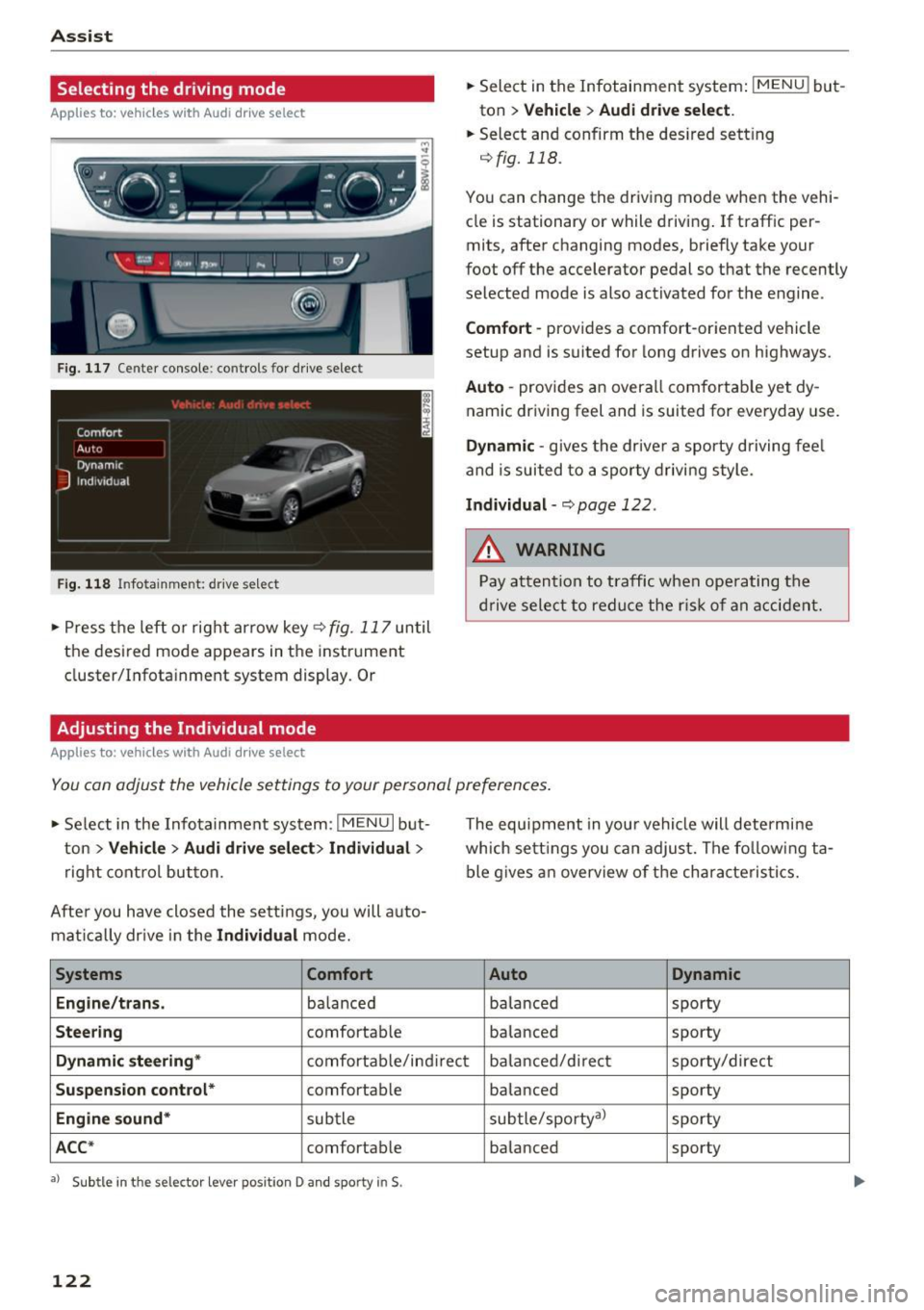
Selecting the driving mode
Applies to: vehicles with Audi drive select
:... ~ -'!. .:· ~ .:
LI , Ill .. tJ
------
Fig. 117 Center console: controls for drive select
Fig. 118 Infotainment: drive select
• Press the left or rig ht arrow key<=> fig. 117 until
the desired mode appears in the instrument
cluster/Infotainment system display. Or
Adjusting the Individual mode
Applies to: vehicles with Audi drive select
• Select in the Infotainment system: IMENU ! but
ton
> Vehicle > Audi drive select.
• Select and confirm the des ired sett ing
qfig. 118.
You can change the driv ing mode when the vehi
cle is stationary or while driving . If traffic per
mits, after changing modes, briefly take your
foot off the accelerator pedal so that the recently
selected mode is also activated for the engine.
Comfort -provides a comfort-oriented vehicle
setup and is suited for long drives on highways.
Auto -provides an overall comfortab le yet dy
namic driving feel and is suited for everyday use.
Dynamic -gives the dr ive r a sporty driving fee l
and is suited to a sporty driving style.
Individual-q page 122.
&_ WARNING
Pay attention to traffic when ope rating the
drive select to reduce the risk of an accident.
-
You can adjust the vehicle settings to your personal preferences .
• Se lect in the Infotainment system: I MENU I but
ton
>V ehicle > Audi drive select> Individual >
right control button.
After you have closed the sett ings, you will a uto
mat ically drive in the
Individual mode.
Systems Comfort
Engine/trans .
balanced
Steering comfortable The equipment in you
r vehicle will determine
which sett ings you can adjust. The fo llowing ta
ble gives an overview of the characteristics.
Auto Dynamic
balanced sporty
balanced sporty
Dynamic
steering* comfortable/indirect balanced/direct sporty/direct
Suspension control* comfortab le
balanced sporty
Engine
sound* subtle subtle/sporty
a)
sporty
ACC* comfortab le balanced sporty
•> Subtle in the selector lever position D and sporty in$.
122
Page 137 of 386

prevent collisions -there is still a risk of ac
cidents!
- Press the accelerator pedal carefully when
accelerating on smooth, slippery surfaces
such as ice and snow. The drive wheels can spin even when these control systems are
installed and this can affect driving stability
and increase the risk of a coll ision.
Switching on /off
Intelligent Technology
(D Tips
- The ABS and ASR only function correctly
when all four wheels have a sim ilar wear
condition. Different tire sizes can lead to a
reduction in engine power.
- You may hear noises when the systems de
scribed are working.
£SC turns on automatically when you start the engine.
--- --function of the ESC is limited or switched off . The
amount of stabilization control wi ll differ de
pending on the level.
--~
· :.__r" ,? .:'~~
,; ~ ... ,1
·· ----- ~
Fig. 138 Center co nso le w it h button ~ OFF
The following examples are unusua l situations
where it may make sense to switch sport mode on in order to allow the wheels to spin:
- Rocking the vehicle to free it when it is stuck
- Driving in deep snow or on loose ground
- Dr iving with snow chains
E SC is designed to function in levels. Depending
on the level that is selected, the stabilization
ESC levels
Sport mode on
Behavior
The ESC and ASR stabiliza-
tion funct ions are limited
~ .&. .
Operation Press the lfl OFFI button
briefly .
Indicator II turns on.
lights
Messages Stabilization control (ESC):
sport. Warning! Reduced
stability
A WARNING
You should only switch sport mode on or
switch ESC/ ASR off if your driving abilities and road conditions permit.
ESC/ASR off Sport mode off or
ESC/ASR on
The stabilization function is The full stabilization func-
no longer available ~.&. . tion of the ESC and ASR is
ESC and ASR are switched available again.
off.
Press and hold the
! fl O FFI Press the lfl OFFI button
button longer than 3 sec- again.
onds.
II and lf'tl•U~ turn on. fl turns off or fl and
lf'tl•l~~ turn off.
Stabilization control (ESC):
Stabilization control
off. Warning! Reduced sta- (ESC): on
bil ity
-The stabilization function is limited when
sport mode is switched on. The driving
wheels could spin and the vehicle could swerve, especially on slick or slippery road
surfaces.
135
Page 270 of 386

Airbag syste m
Make sure that the PASSENGER AIR BAG
OFF
11;; li ght comes on and stays on all t he
t ime whenever the ignition is switched on.
A WARNING
- If the PA SSEN GER AIR BAG OFF 11;; light
does not go out when an adult is si tting on
the front passe nger seat a fter ta king the
steps described above, make sure the adult is p roperly seated and restrained at one of
the rear seating positions.
- Have the airbag system inspected by your
authorized Aud i dealer before transporting
anyone on the front passenger seat.
@ Tips
If the capacitive passenger detection system
determines that the front passenger seat is
empty, the frontal airbag on the passenge r
side w ill be tu rned off, and the
PASSENGER
AIR BAG OFF
11;; light will stay on.
-
Repair , care and disposal of the airbags
Parts of the a irbag system are installed at many
different places on your Audi. Installing, remov ing, servic ing or repa iring a part in an area of the
ve hicle can damage a part of an airbag system
and prevent that system from working properly
i n a collision .
There are some important things you have to
know to make sure that the effectiveness of the
system w ill not be impaired and that discarded
components do not cause injury or pollute the
env ironment.
A WARNING
Improper care, serv icing and repai r proce
dures can increase the r is k of personal injury
and death by preventing an airbag from de
ploying when needed or dep loying an airbag
unexpectedly:
-
- Never cover, obstruct, or change the stee r
ing wheel horn pad or airbag cover or the in
strument pane l or modify them in any way.
268
- Never attach any objects s uch as c upholders
or telephone mountings to the surfaces cov
ering the a irbag un its.
- For cleaning the horn pad or instrument
panel, use only a soft, dry cloth or one mois
tened w ith plain water. Solvents or cleaners
could damage the airbag cover or change
the st iffness or strength of the material so
that the airbag canno t deploy and p rotect
properly.
- Never repair, adjust , or change any parts of
the airbag system.
- All work on the steering wheel, inst rument
panel, front seats or e lectr ica l system ( in
cluding the installation of a udio eq uipment,
cellular telephones and C B radios, etc.)
m ust be perfo rmed by a qualified techn ician
who has the training and specia l equipment
necessary.
- For any work on the airbag system, we strong ly recommend that you see your au
thorized A udi dealer or qualified workshop.
- Never modify the front b umper or parts of
the vehicle body.
- Always make sure that the side a irbag can
inflate w ithout interference:
- Never install seat covers or replacement
upholstery over the front seatbacks that
have not been specifically approved by
A udi.
- Never use additional seat c ushions that
cover the areas where the side airbags in
flate.
- Damage to the orig inal seat cove rs or to
the seam in the area of the s ide airbag
module mus t always be repaired immedi
ate ly by an autho riz ed Au di dealer.
- The a irbag system can deploy on ly once. Af
ter an airbag h as been deployed, i t m ust be
repla ced with new replacement parts de
signed and approved espec ia lly for your
Audi model version . Replacement of com
plete airbag systems or airbag components
must be perfo rmed by qua lified workshops
only. Make su re that any airbag service ac
tion is entered in your A udi Warranty
&
Ma intenance boo klet under AIRBAG RE-
PLAC EM EN T RECORD.
~
Page 282 of 386

Child safet y
one o f the rear seating posit ions . If in exception
al circumstances you must use it on the front passenger seat, carefully read all of the informa
tion on child safety and Advanced Airbags and heed a ll of the app licab le WARNINGS. Make cer
tain that the child and child restraint are correct ly recogn ized by the capacit ive passenger detec
tion system i n the front passenge r seat, that the
fron t passenger airbag is turned off, and that the
a irbag status is always cor rectly sig naled by the
PASSENGER AIR BA G OFF ~; light.
M any types and models of child rest raints have
been available ove r the yea rs , new models are in
troduced regularly incorporat ing new and im
p roved designs and older mode ls are taken o ut of
product ion . Chi ld restraints a re not standardized .
Ch ild rest raints of the same type typica lly have
d ifferent weights and s izes and d ifferent "foot
prints", the s ize and shape of the bottom of the
chi ld restraint that s its on the seat, when they
are installed on a vehicle seat . These differences
make it virtually impossible to ce rtify compliance
with the requ irements fo r advanced airbags with
each and eve ry ch ild rest raint that has ever been
sold in the past or will be sold ove r the co urse of
the useful life of your vehicle.
F or this reason, the Un ited States National High
way Traffi c Safety Administ ration has p ublished a
lis t of specific type, makes and models of child
restraints that must be used to cert ify comp li
ance of the Advanced Airbag System in your vehi
cle with the suppression requirements of Federal
Motor Vehicle Safety Standard 208. These child
restraints are:
Subpart A -Car bed child restraints
Model Manufactured on or
after
Angel G uard Angel September 25, 2007
Ride AA2403FOF
280
Subpart B -Rear -facing child rest raints
Model Manufactured on or
after
Century SmartFit 4543 December 1, 1999
Cosco Arriva September 25, 2007
22-013PAW and base
22-999WHO
Evenflo Discovery Ad- December 1, 1999
just R ight 212
Evenflo First Choice December 1,
1999
204
Graco Infant 8457 December 1, 1999
Graco Snugr ide September 25, 2007
P eg Perego P rimo Viag- September 25, 2007
g io SI P IMU NOOUS
Subpart C -Forward-facing and convertible
child r estraints
Mod el Manufactured on or
after
Br itax Roundabout September 25, 2007
E9L02xx
Cosco Tou riva 025 19 December 1, 1999
Cosco Summit De luxe September 25, 2007
H igh Back Booster
22-262
Cosco High Back Boos -September 25, 2007
ter 22 -209
Evenflo Tribute V September 25, 2007
379xxxx
Evenflo Meda llion 254 December 1, 1999
E venflo Generat ions September 25, 200 7
35 2xxxx
Graco ComfortSport September 25, 2007
Graco Todd le r Safety September 25, 200 7
Seat Step 2
Graco Plat inum Cargo September 25, 2007
A WARNING
To redu ce the ris k of serious injury, ma ke sure
that the
PASSENGER AIR BAG OFF ,;; light
comes on and stays on whenever a c hild re
straint is installed on the front passenger seat
and the ignition is switched on .
~
Page 335 of 386
<( a, .... N ,....
N .... 0 0
3 a,
A WARNING ,~
Using incorrect snow chains or insta lling snow
chains incorrectly can result in loss of vehicle
control, which increases the risk of an acc i
dent.
(D Note
Snow chains can damage the r ims/wheel cov
ers* if the chains come into d irect contact
w ith them. Remove the wheel covers* before
hand . Use coated snow chains.
{1) Tips
When using snow cha ins, it may be useful to
sw itch on sport mode
¢page 135.
Low aspect ratio tires
Your Aud i is facto ry-equipped with low aspect ra
tio ti res. These t ires have been tho rough ly tested
and been se lected specifically for yo ur model for
their superb per formance, road feel and handling
under a variety of driving conditions. Ask your au
thorized Audi dealer for more details .
The low aspect ratio of these t ires is indica ted by
a numera l of
55 or les s in the tire's size designa
tion. The numeral represents the ratio of the
tire's sidewall height in r elation to its tread width
expressed in percentage. Conventional tires have
a height/w idth rat io of 60 or more.
The performan ce of low-aspect- ratio tire s is par
ticularl y sensiti ve to improper inf lat ion pres
sure . It is therefore impo rtant that low aspect
ratio tir e s are infl ated to the specified pressu re
and tha t the inflation pr essure is regularly
checked and maint ained . Tire pre ssure s should
be check ed at lea st once a month and alwa ys
b efore a long trip<=:>
page 32 7.
What you can do to a void tire and rim
damage
L ow aspect rat io tires can be damaged more easi
l y by impact with potho les, cu rbs, gull ies or
r idges on the road, pa rtic ularly if the tire is un
derinflated.
Wh eel s
In order to min imize the occurrence o f impact
damage to the tires of your vehicle, we recom
mend that you observe the following precau
t ions:
- Always maintain recommended inflation pres
sures . Check your tire pressure every 2,000
m iles (3,000 km) and add air if necessary .
- Drive carefully on roads with potholes, deep
gu llies or ridges . The impact from driving
through or over such obstacles can damage
your tires. Impact with a curb may a lso cause
damage to your tires.
- After any impact, immed iate ly inspect your
tires or have them inspected by the nearest au
thorized Audi dealer . Replace a damaged tire as
soon as possible .
- Inspect your tires every 2,000 m iles (3,000 km)
for damage and wear. Damage is not always
easy to see . Damage can lead to loss of a ir and
underinflation, wh ich could eventually cause
tire fa ilu re . If yo u bel ieve that a tire may have
been damaged, replace the tire as soon as pos
sible.
= These tires may wear mo re quickly tha n others.
- Please also remember that , while these tires
de live r responsive ha nd ling, they may ride less
comfort ably and make more noise t han other
choices .
Reduced performance in w inter /cold season
conditions
All tires are des igned for certai n pu rposes. The
low aspect ratio, ultra high performance tires
origina lly installed on your vehicle are intended
for maximum dry and wet road performance and handling. They are not suitable for co ld, snowy or
icy weather conditions. If you drive under those
c ircumstances, you should equip your vehicle
with all -season or winter tires, which offer better
tract ion under those conditions . We suggest you
use the recommended s now or a ll-season tires
spe cified for your vehicle, o r their equiva lent.
Refer
to <=:> page 332 for more detailed informa
t ion regard ing winter tires.
Uniform tire quality grad ing
- Tread wear
333
Page 373 of 386
Switching displays . . . . . . . . . . . . . . . . . . . . 12
View . . . . . . . . . . . . . . . . . . . . . . . . . . . . . . . 14
Driver Information System . . . . . . . . . . . . . . 16
Service interval display ...... .. .. .... . 316
Driver seat
refer to Seating position . . . . . . . . . . . . . . 237
Driver's door (indicator light) . . . . . . . . . . . . . 35
Drives
refertoMed ia ............... .. .
209,217
Drive select . . . . . . . . . . . . . . . . . . . . . . . . . . 121
Driving economically . . . . . . . . . . . . . . . . . . . 73
Driving safely . . . . . . . . . . . . . . . . . . . . . . . . 236
Driving through water . . . . . . . . . . . . . . . . . . 73
Driving time . . . . . . . . . . . . . . . . . . . . . . . . . . 16
DVD drive (media dr ives) . ..... ... ... .. . 210
Dynamic steering
Indicator light
Dynamic volume 121
137
refer to System volume . . . . . . . . . . . . . . . 234
E
E-mail
E . l conom1ca route ............ ... ... .. .
166
194
eco (climate control system) . . . . . . . . . . . . . 69
EDL
refer to Electronic Differentia l Lock . . . . . 134
Electromechanical parking brake
refer to Parking brake . . . . . . . . . . . . . . . . . 81
Electromechanical power steering . . . . . . . 137
Indicator light . . . . . . . . . . . . . . . . . . . . . . 13 7
E lectronic differential lock . . . . . . . . . . . . . .
134
Electronic Differential Lock
Indicator light . . . . . . . . . . . . . . . . . . . . . . .
32
Electronic immobilizer . . . . . . . . . . . . . . . . . . 38
Electronic Stabilization Control . . . . . . . . . . 134
Indicator light . . . . . . . . . . . . . . . . . . . . . . . 32
Sport mode . . . . . . . . . . . . . . . . . . . . . . . . 135
Emergency assistance . . . . . . . . . . . . . . . . . 343
Emergency call
Audi connect emergency call and service .
184
Emergency flashers . . . . . . . . . . . . . . . . . . . . 53
Indicator light . . . . . . . . . . . . . . . . . . . . . . . 36
<( ~ Emergency locking the front passenger's door .42
N ~ Emergency starting . . . . . . . . . . . . . . . . . . . 356
.... 0 0
3
Emissions control system
Catalytic converter . . . . . . . . . . . . . . . . . . .
303
Diesel particulate filter . . . . . . . . . . . . . . . 303
Emissions data . . . . . . . . . . . . . . . . . . . . . . . 361
Energy consumers . . . . . . . . . . . . . . . . . . . . . 17
Energy management . . . . . . . . . . . . . . . . . . 138
Indicator light . . . . . . . . . . . . . . . . . . . . . . . 31
Engine
Coolant . . . . . . . . . . . . . . . . . . . . . . . . . . . .
310
preheating . . . . . . . . . . . . . . . . . . . . . . . . . . 76
Start/Stop system . . . . . . . . . . . . . . . . . . . . 78
starting . . . . . . . . . . . . . . . . . . . . . . . . . . . . . 76
Starting with jumper cables . . . . . . . . . . . 356
Stopping . . . . . . . . . . . . . . . . . . . . . . . . . . . . 76
Engine compartment
Closing the hood . . . . . . . . . . . . . . . . . . . .
305
Opening the hood . . . . . . . . . . . . . . . . . . . 305
Overv iew . . . . . . . . . . . . . . . . . . . . . . . . . . . 306
Safety precautions . . . . . . . . . . . . . . . . . . . 304
Engine control (indicator light) . . . . . . . . . . . 33
Engine oil . . . . . . . . . . . . . . . . . . . . . . . . . . . 306
adding . . . . . . . . . . . . . . . . . . . . . . . . . . . . 308
Chang ing . . . . . . . . . . . . . . . . . . . . . . . . . . 309
Checking oil leve l . . . . . . . . . . . . . . . . . . . . 308
Consumption . . . . . . . . . . . . . . . . . . . . . . .
308
Indicator light . . . . . . . . . . . . . . . . . . . . 32, 34
Oil consumption . . . . . . . . . . . . . . . . . . . . . 307
Oil grades . . . . . . . . . . . . . . . . . . . . . . . . . . 306
Specification and viscosity . . . . . . . . . . . . . 306
Engine sound . . . . . . . . . . . . . . . . . . . . . . . . 121
Engine speed limitation (indicator light) 34
Engine Start/Stop mode
refer to Start/Stop system . . . . . . . . . . . . . 80
Engine warm-up request
Indicator light . . . . . . . . . . . . . . . . . . . . . . .
34
Enhanced view .. .. .. ... ....... ... .. .. . 14
Entering characters/numbers (speller) ... . 148
Entering letters (speller) . . . . . . . . . . . . . . . 148
Entertainment sliding menu . . . . . . . . . . . . 146
Entry/exit lighting . . . . . . . . . . . . . . . . . . . . . 52
Environment
Proper disposal of drained brake fluid ...
311
Proper disposal of drained engine oil . . . . 309
Unleaded fuel . . . . . . . . . . . . . . . . . . . . . . . 296
Event Data Recorder (EDR) . . . . . . . . . . . . . 139
Exterior lighting . . . . . . . . . . . . . . . . . . . . . . . 50
External speech dialog system . . . . . . . . . . 159
371
Page 382 of 386
Index
Tires.... .. .... ... .. .. ..... ... .. .. ... 317
All whee l drive . . . . . . . . . . . . . . . . . . . . . . 13 7
L ow aspect rat io tires . . . . . . . . . . . . . . . . 333
Repair set . . . . . . . . . . . . . . . . . . . . . . . . . . 343
Replac ing . . . . . . . . . . . . . . . . . . . . . . . . . . 345
Service life . . . . . . . . . . . . . . . . . . . . . . . . . 325
T ire pressu re . . . . . . . . . . . . . . . . . . . . . . . 327
Tire pressu re monitoring system . . . . . . . 334
Tire Pressu re Monito ring System . . . . . . . 335
Ti re press ure table . . . . . . . . . . . . . . . . . . . 328
Tire press ure (t railer towing) . . . . . . . . . . . 90
Treadwear indicators . . . . . . . . . . . . . . . . . 325
unidirectional . . . . . . . . . . . . . . . . . . . . . . . 348
Unid irectional . ................... ... 319
Uniform t ire quality grad ing . . . . . . . . . . . 333
T ires and w heels
Glossary of tire and loading termi nology . 319
Tires and vehicle load limits . . . . . . . . . . . 329
T MC
refer to T raff ic informa tion . . . . . . . . . . . . 20 1
Tone (sound)
refer to Adjus ting the sound . . . . . . . . . . . 233
Tool . . . . . . . . . . . . . . . . . . . . . . . . . . . . . . . . 343
T o rn o r frayed s afety be lts . . . . . . . . . . . . . . 2 47
touch
refer to MMI touch
Towing Tow trucks
T owing loo p
TPMS 144
358
3S8,3 59
Tire Pressu re Monitoring System . . . . . . . 335
Traffic information . . . . . . . . . . . . . . . . 20 1, 202
T raff ic messages . . . . . . . . . . . . . . . . . . . . . . 197
Traffic sign recognit ion . . . . . . . . . . . . . . . . . 24
T railer mode (navigation) . . . . . . . . . . . . . . . 195
Trai ler tow ing . . . . . . . . . . . . . . . . . . . . . . . . . 90
I nformation . . . . . . . . . . . . . . . . . . . . . . . . . 9 1
P a rk ing syste m . . . . . . . . . . . . . . . . . . . . . . 132
T echnical requi rements . . . . . . . . . . . . . . . . 90
Towing capaci ty . . . . . . . . . . . . . . . . . . . . . . 90
T ransmiss ion malfunction (i ndicator light) . . 87
Transport Canada . . . . . . . . . . . . . . . . . . . . . 244
Tr ave l guide
referto Travel(travelg uide) . ... .. .. ... 175
Trave l (travel guide) . . . . . . . . . . . . . . . . . . . 17 5
Treb le (so und) . . . . . . . . . . . . . . . . . . . . . . . 233
380
Trunk lid
Tr unk escape latch . . . . . . . . . . . . . . . . . . . 343
Turn assist. . . . . . . . . . . . . . . . . . . . . . . . . . . 108
Turn signal Ind icator light . . . . . . . . . . . . . . . . . . . . . . . 36
Turn signals . . . . . . . . . . . . . . . . . . . . . . . . . . 51
u
UL SD No. 2 (Diesel fuel) . . . . . . . . . . . . . . . . 29 7
Un fastening safety belts . . . . . . . . . . . . . . . 250
U niform tire qua lity grading . . . . . . . . . . . . 333
Unl ocking/locking
On t he loc k cylinde r . . . . . . . . . . . . . . . . . . . 42
Wi th the cen tra l locking sw itch . . . . . . . . . 41
With the convenience key . . . . . . . . . . . . . . 40
With the remote control . . . . . . . . . . . . . . . 40
U pdat ing statio ns ( rad io) . . . . . . . . . . . . . . . 204
USB stick
refer to Aud i m usic interface.. ....... .. 21S
V
Va let park ing funct ion . . . . . . . . . . . . . . . . . . 47
Vani ty m irro r . . . . . . . . . . . . . . . . . . . . . . . . . . 56
Vehicle Care/cleaning .. .. .. .. ........ ..... .. 337
Dime nsions . . . . . . . . . . . . . . . . . . . . . . . . . 362
Ident ific at ion number . . . . . . . . . . . . . . . . 361
L ift ing . . . . . . . . . . . . . . . . . . . . . . . . . . . . . 34 7
Ou t of service . . . . . . . . . . . . . . . . . . . . . . . 3 42
Specifications . . . . . . . . . . . . . . . . . . . . . . . 361
Vehicle identification labe l . . . . . . . . . . . . 361
Vehicle con trol modules. . . . . . . . . . . . . . . . 139
Vehicle jack . . . . . . . . . . . . . . . . . . . . . . . . . . 343
Lifting po ints . . . . . . . . . . . . . . . . . . . . . . . 347
Vehicle key . . . . . . . . . . . . . . . . . . . . . . . . . . . 38
Vehicle sta tus report
A udi con nect vehicle co ntro l . . . . . . . . . . . 182
Vehicle too l kit . . . . . . . . . . . . . . . . . . . . . . . 343
Vent ilation . . . . . . . . . . . . . . . . . . . . . . . . . . . 68
Version informa tion . . . . . . . . . . . . . . . . . . . 232
VIEW button . . . . . . . . . . . . . . . . . . . . . . . . . . 12
VI N . . . . . . . . . . . . . . . . . . . . . . . . . . . . . . . . 3 61
Vo ice guidance
refer to Mul tifunction
stee ring wheel . . . . . . . . . . . . . . . . . 12 , 14 , 15