heating AUDI S4 2018 User Guide
[x] Cancel search | Manufacturer: AUDI, Model Year: 2018, Model line: S4, Model: AUDI S4 2018Pages: 403, PDF Size: 66.81 MB
Page 80 of 403

Warm and cold
system operates most efficiently in eco cooling
mode.
A/C MAX cooling mode*
You can switch the maximum cool ing mode on or
off using the rocker switch@. Th e air is not
coo led and humidity is not removed when cooling
mode is switched off. This can cause fog on the
windows. Cooling mode switches off automati
cally when the outside temperature is below
zero. When the cooling mode is switched on, the
vehicle interior is cooled as quickly as possible
and dehumidified .
c:E) Recirculation mode
In recirculation mode, the air inside the vehicle is
circu lated and filtered. This prevents the unfil
tered air outside the vehicle from entering the
vehicle interior. Switching recirculation mode on
when dr iv ing through a tunnel or when s itting in
traffic is recommended
Q &, .
Using the button, recirculation mode is~ using
the button. You can also switch the recirculation
mode off by pressing the knob (D or the ~ but
ton.
AUTO
Automatic mode
Automatic mode maintains a constant tempera
ture inside the vehicle. Air temperature, airflow
and air distribution are controlled automatically .
You can switch automatic mode on or off by
pressing the
knob@.
Temperature
You can adjust the temperature between 60°F
( + 16°()
and 84°F ( +28°() by turn ing the knob
(D . Outs ide of this range, LO or HI will appear in
the climate control system display . In both set
tings, the climate control runs constantly at the
maximum cooling or heating level. The tempera
ture is not regulated.
The temperature can be adjusted in the rear us
ing the rear contro ls
Q fig. 91.
86'~ Blower
You can adjust the vo lume of air generated by the
blower to your preference using the rocker switch
@ . The blower should always run at a low setting
78
to prevent the windows from fogging and to en
sure a continuous exchange of air inside the vehi
cle. To have the blower regulated automatically,
press one of the knobs
(D .
Air distribution
You can use the rocker sw itches @to adjust the
vents where the air will flow out of. Press the
rocker switches @repeatedly unti l the desired
air distribution setting is displayed in the climate
control system controls. To have the air distribu
tion regulated automatically, press one of the
knobs
(D .
""lll"' OPEN/CLOSE the wide vent
You can open and close the wide vent in the cock
pit using the rocker switch ®·
JI~ Seat heating and ventilation*
If you press the button J ,J, the seat heating/
ventilat ion is switched on at the highest leve l (3) .
The LEDs indicate the temperature level. To re
duce the temperature, press the button again. To
switch the seat heating/ventilation off, press the
button repeatedly until the LED turns
off.
3% Defrosting
The windshield and side windows are defrosted
or cleared of condensation as quick ly as possible .
The maximum amount of air flows mainly from
the vents below the windsh ield. Recirculation
mode switches off. The temperature should be
set at
+72°F (+22°() or higher . The temperature
i s controlled automat ically .
Defrost is switched on and off
3% using the but
ton. You can switch the function off by pressing a knob
(D .
Applies to vehicles with windshield defogger: the
windshield defogger switches on automatically
when outside temperatures are low. If you would like to sw itch the windshield defroster on man
ually, press the
3%. The LED in the button blinks.
ClWREAR Rear window defogger
Press the button [email protected] switch the rear window de
fogger on. It on ly operates when the engine is
running. It switches off automatically after
10 to .,,.
Page 81 of 403

a co .... N ,....
N .... 0 0
3 co
20 minutes, depending on the outside
temperature.
To keep the rear window defogger on contin uous
l y, press and hold the
QWREAR button longer
than
3 seconds. This is stored unti l the ignition is
switched off .
SYNC Synchronization
Use the rocker switc h® to sele ct the funct ion.
When synch ronization is switched on, the set
tings for the driver's side are applied to the front
passenger's side and the rear (except for seat
heating/venti lation*) . When the settings on the
front passenger's side or in the rear are changed,
the synchron iz at ion is automatically sw itched off
and
3 -z one appears in the display .
SET REAR function
Use t he rocker switch ® to select the function .
When the function is switched on, you can adjust
all settings for the rear us ing the climate control
system controls in the cockpit. The rear climate
control system controls cannot be operated at
the same time . This function switches off auto
mat ically after a certain period of time or after
leaving the menu.
Vent s
You can open or close the center and rear vents in
the cockpit and the vents in the rear center con
sole us ing the r idged thumbwheels . The levers
adjust the d irection of the airflow from the vents.
The wide vent is opened and closed using the
r ocker switch
® ·
Residu al heat
You can activate the residual heat funct ion when
the ignition is switched off by pressing the knob
(D . The res idual heat from the coolant is used to
h eat the vehicle inte rior. The residual heat func
tion swi tches off automatically afte r abou t 15
minu tes .
A WARNING
- You should not use the recirculation mode for an exten ded period of time, because no
fresh a ir is drawn in and the w indows can
Warm and c old
fog when cooling mode is switched off. This
increases the r isk of an accident.
- Individuals with reduced sensitivity to pain
or temperature could develop burns when
using the seat heat ing* function. To reduce
the risk of injury, these individua ls should
not use seat heating*.
(D Note
To avoid damaging the seat heat ing* ele
ments, do not knee l on the seats or place
heavy pressure on one area of the seat.
Setup
The climate control system basic settings ore ac
cessed in the Infotainment system .
.,. Select in the Infotainment system : I MENU! but
ton
> Vehicle > l eft control button > Ai r co ndi
tioning
Auto recircu lation
When switched on, a utomat ic rec irculat ion con
trols the recircu lation mode automatically . You
must press the
®MAX button if fog forms on
the windows.
Automatic auxiliary heater*
T he aux iliary hea ter he lps to wa rm the vehicle in
terior more q uickly.
Steering wheel heating
Applies to: vehicles with steering wheel heating
The steering wheel rim con be heated.
.,. Press the bu tton on the m ultif unct ion steeri ng
wheel to switch the steering whee l heating on
and
off~ r=:> poge 15, fig . 11 . The message
Steering wheel heating : on /Steering wheel
heating: off
appears in the instrument cluster
disp lay.
The temperature is maintained at a constant lev el when steering wheel heating is switched on .
T he s teer ing whee l heating se tt ings a re stored
automat ica lly and assigned to the remo te control
key that is in use.
79
Page 83 of 403
a co .... N ,....
N .... 0 0
3 co
engaged, for example when you notice that the next traffic light is red . This produces an engine
braking effect, which helps to protect the brakes
and tires and reduces the emissions and fuel con
sumpt ion to zero (fuel shut-off dur ing decelera
tion) .
Shift efficiently
Upshifting earlier is an effective way to save fuel.
Staying in a gear too long uses fuel unnecessari
ly.
Applies to: vehicles with manual transmission
Shift as soon as possible from first to second
gear. S hifting to the next highest gear at approxi
mately 2,000 RPMs if poss ible is recommended.
Applies to: vehicles with automatic transmissions
Press down on the acce le rator peda l slowly and
avoid "kick -down".
Avoid full acceleration
You should rarely travel at the maximum vehicle
speed. High speeds cause a disproportionately
high increase in fuel consumption, emissions and
traffic noise. Driving more slowly saves fuel.
Reduce idling time
The Start/Stop system* he lps to reduce the idling
time automatically. In vehicles without the Start/
Stop system*, it is efficient to switch the engine
off when stopped at railroad cross ings and long
r ed lights. Stopping the engine for 30-40 sec
onds already saves more fuel than the amount of
extra fuel needed to restart the eng ine.
It takes a very long time in idle to warm the en
g ine up to operating temperature. Wear and
emissions are especially h igh in the wa rm-up
phase . Therefore, you should begi n driving im
mediately a fter starting the engine . Avoid high
RPMs while do ing this .
Have maintenance performed regularly
By having maintenance performed regu larly on
your veh icle, yo u ca n he lp to reduce f uel con
sumption before yo u even start to drive. The
maintenance condition of your vehicle not only
affects traffic safety and long-term value but a l-
Driving
so impacts fuel consumption . A poorly main
tained engine can lead to fuel consumption that is 10% higher than norma l.
Avoid short trips
The eng ine and exhaust cleaning system must
reach their optimal operat ing temperatu re to ef
f ectively reduce consumption and emissions.
A cold engine uses a disproportionately high
amount of fue l. The engine reaches operating
temperat ure and consumption normalizes on ly
after approximate ly 2.5 miles (4 km).
Check the tire pressure
To save fuel, make sure the tires are always in
flated to the correct press ure
~ page 344. The
fuel consumption can increase by 5% if the pres
s u re is only 0.5 bar too low. Due to the increased
rolling resistance, low tire pressures wi ll also
l ead to greater tire wear and will affect driving
behavior.
Do not drive on winter tires year-round, as this
will consume up to 10% more fuel.
Eliminate unnecessary weight
S in ce eve ry po und of ext ra weight increases f uel
consumption , a quick inspection of the luggage
compartment may be worth it to avoid unneces
sary weight .
When not be ing used , a roof rack should be re
moved to decrease the wind resistance of the ve
hicle. This will save you approximately 12% fuel
at speeds from 62 -75 mph (100 - 120 km/h) .
Save energy
The eng ine drives the generator, which generates
electric ity; the fuel consumpt io n also incr eases
with the demand for electr icity. The refore, switch
electrical eq uipment off when you no longer
need it . Examples of equipment that uses a lo t of
energy are air blowers at a high setting, the rear
window defogger and seat heating* .
@ Note
Do not leave engine idling unattended after
starting. If warning lights shou ld come on to
indicate improper operation, they would go
81
Page 84 of 403
Driving
unheeded. Extended idling also produces
heat, which could result in overheating or
other damage to the vehicle or other proper
ty.
(D Note
- Have your vehicle maintained properly and
in accordance with the service recommenda
tions in your Warranty
& Maintenance book
let . Lack of proper maintenance as well as
improper use of the vehicle will impair the
function of the emission control system and
could lead to damage.
- Do not alter or remove any component of the Emission Control System unless approved by the manufacturer .
- Do not alter or remove any device, such as
heat shields, switches, ignition wires,
valves, which are designed to protect your
vehicle's Emission Control System and other
important vehicle components.
(D Tips
The consumption estimates as published by
ENVIRONMENTAL PROTECTION AGENCY (EPA) and Transport Canada may not corre
spond to your actual consumption on the
road, which will vary depending upon vehicle
load and speed, road and weather conditions,
trip length, etc.
Steering
Adjusting the steering wheel position
The steering wheel position is adjustable up and
down and forward and back.
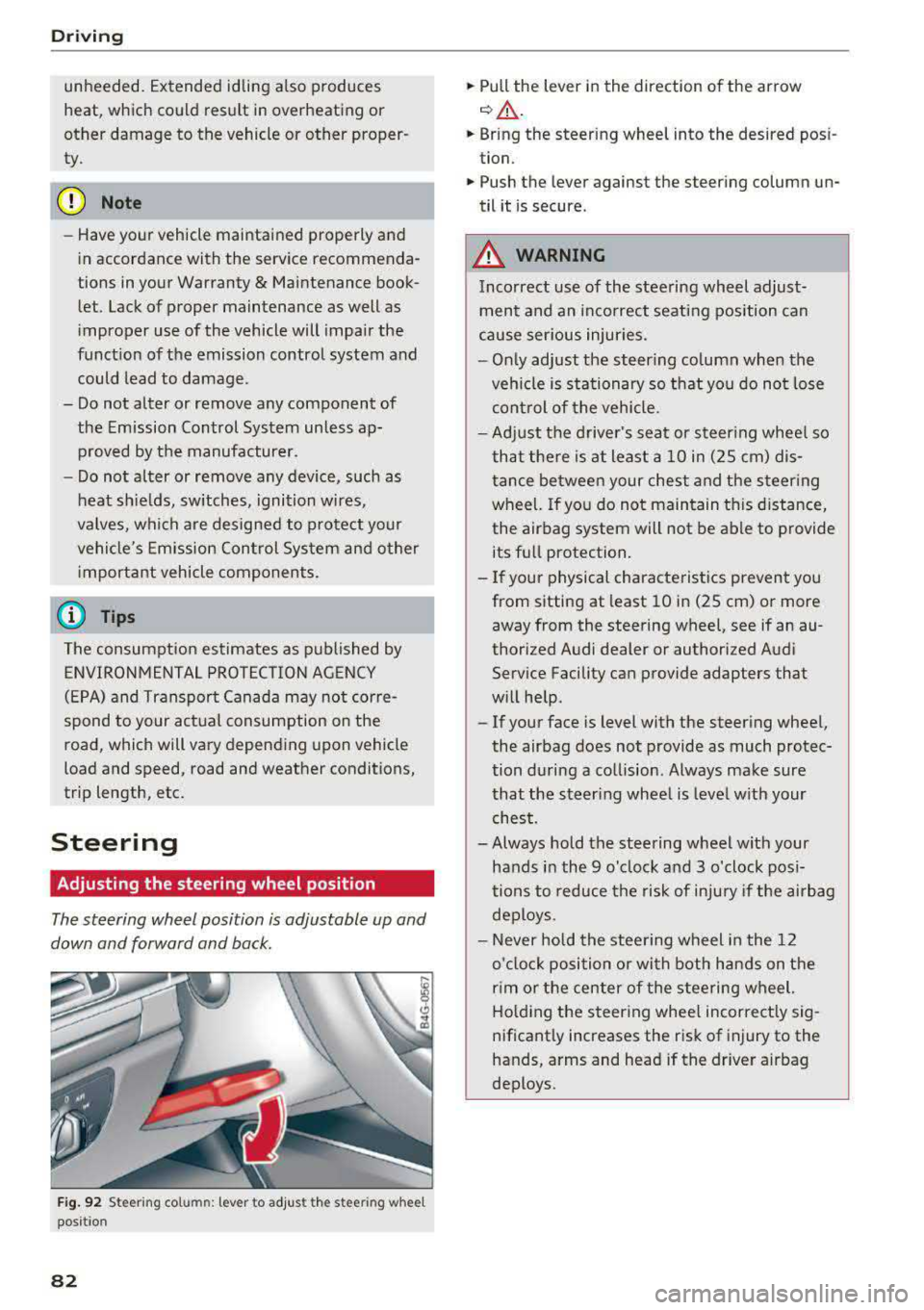
Fig. 92 S tee rin g col umn : le ver to adjus t the stee ring w heel
posit ion
82
.,. Pull the lever in the direction of the arrow
c::, A -
... Bring the steering wheel into the desired posi
tion .
.,. Push the lever against the steering column un
til it is secure .
_&. WARNING
Incorrect use of the steering wheel adjust
ment and an incorrect seating position can
cause serious injuries.
- Only adjust the steering column when the
vehicle is stationary so that you do not lose
control of the vehicle.
-
-Adjust the driver's seat or steering wheel so
that there is at least a 10 in (2S cm) dis
tance between your chest and the steering
wheel. If you do not maintain this distance,
the airbag system will not be able to provide
its full protection.
-If your physical characteristics prevent you
from sitting at least 10 in (2S cm) or more
away from the steering
wheel, see if an au
thorized Audi dealer or authorized Audi
Service Facility can provide adapters that
will help .
- If your face is level with the steering wheel,
the airbag does not provide as much protec
tion during a collision . Always make sure
that the steering wheel is level with your
chest.
- Always hold the steering wheel with your
hands in the 9 o'clock and 3 o'clock posi
tions to reduce the risk of injury if the airbag
deploys.
- Never hold the steering wheel in the 12
o'clock position or with both hands on the
rim or the center of the steering wheel.
Holding the steering wheel incorrectly sig
nificantly increases the risk of injury to the
hands, arms and head if the driver airbag
deploys .
Page 85 of 403

Starting and stopping
the engine
Starting the engine
The I S TAR T ENGIN E ST OP ! button switches the
ignition on and starts the engine.
F ig . 93 Cockp it: START ENGINE S TOP button
Starting the engin e
Applies to: vehicles with manual transmission
.. Press the clutch pedal all the way down and
move the sh ift lever to the neutr al position.
Applies to: vehicles with automatic transmissions
.,. Press the brake pedal.
.. Press the I START E NG IN E STOPI button
¢ fig . 93 . The engine will sta rt.
.,. T he re may be a s light de lay w hen start ing the
engine i n diese l vehicles in colder tempera
tures . Therefore, yo u must con tinue pressing
the clutch pedal (manual transmission) or the
brake pedal (automatic transmission) until the
engine starts. The
Iii indicator light t urns on
whi le the engine is preheating .
Switching the ignition on /off
If yo u wou ld like to swi tc h t he ign ition on wi th
out starting the engine, fol low these steps:
.,. Press t he I S T AR T ENG IN E ST OPI button with
o ut press ing the clutch pe dal (for manual
transm iss ions) or the brake peda l (f or au toma t
ic transmissions). Ve hicles w ithout the S tart/
Stop system *: the needle in the tachometer
moves into the
READ Y position .
.. To switch the ign ition off, press the button
again. The needle in the tachometer moves into
the
OFF posit ion.
D rivi ng
The prewa rming runs automat ica lly in diesel
vehicles when the ign ition is switched on .
E q uipment tha t uses a lot of e lec tricity is sw itch
ed off temporarily when you start the engine.
If the engi ne does not s tart immediately , the
sta rt ing procedure stops a utomat ica lly af ter a
sho rt time. Repea t the sta rting proced ure.
Start /Stop system*
See the information in c:> page 85, Start/Stop
system .
A WARNING
=
To reduce the risk of poisoning, never allow
the eng ine to run in co nfined spaces .
Q) Note
Avoid high engine speed, full th rottle, and
heavy engine load if the engine has not
r eached operat ing temperatu re ye t. You could
damage the eng ine.
@ For the sake of the environment
Do not let the e ngin e run wh ile pa rked to
warm up . Beg in dr iving immed iate ly . Thi s
re
duces un necessa ry emissions.
a) Tips
- Some noise afte r start ing the engine is nor
ma l and is no caus e for conce rn .
- If you leave t he ve hicle w ith the ignition
switched on, the ig nit ion w ill switch off af
ter a ce rtain amount of time . Ma ke sure t hat
elec trical e quipment such as the exterio r
ligh ts a re swi tched off .
Starting the eng ine
.. Bri ng the veh icle to a full sto p .
.. Press the !S TAR T ENGINE ST OP ! button
c:>
page 83, fig. 93.
-
83
Page 105 of 403

a co .... N ,....
N .... 0 0
3 co
operation. You are always responsible for
your speed and the distance between your
vehicle and other vehicles.
- For safety reasons, cruise control should not be used in the city, in stop-and-go traffic, on
winding roads and when road conditions are poor (such as ice, fog, gravel, heavy rain and
hydroplaning), because th is increases the
risk of an accident.
- Switch the cruise control off temporar ily
when driving in turn ing lanes, h ighway exits
o r in construction zones.
- Please note that unconsciously "resting"
your foot on the accelerator pedal prevents the cruise control from b raking. This is be
ca use p ressing the acce le ra to r peda l ove r
rides the cruise contro l system.
- If a brake system ma lf u nction such as over
heating occurs when the c ruise contro l sys
tem is switched on, the braking function in
the system may be switched off . The rest of
the cruise control system functions remain
act ive as long as the
@;\l)M~ (USA models) /
Bl (Canada models) indicator light is on.
Before driving downhill a long distance on a
steep hill, decrease your speed and select a
lower gear. Th is makes use of the eng ine
braking effect and relieves the brakes.
(D} Tips
-Applies to: vehicles with manual transmis sion: The set speed can on ly be reached if
the engaged gear permits it so that the en
gine is not over-rewed and will run smooth ly. Therefore, s hift into the higher or lower
gear in a timely manner .
- The brake lights turn on when the brakes are applied automatically.
Changing the speed
Applies to: vehicles with cruise control system
.. To inc rease/decrease the speed in 1 mph ( 1
km/h) increments, br iefly
tap the lever toward
0 10 ¢ page 102, fig. 103 to the first level.
A ss ista nce sys te m s
.. To increase/decrease the speed in 5 mph (10
km/h) increments, briefly
tap the lever toward
0 10 to the second level.
.. To increase or decrease the speed quick ly, hold
the lever toward 0 10 to the first or second
level unt il the desired speed is reached .
Overriding the speed
Applies to : vehicles with cruise control system
You can press the acce lerator pedal to increase
you r speed, fo r example if you want to pass
someone. The speed you set earl ier will resume
as soon as you release the acce lera to r pedal.
However, if you are exceeding the stored speed
by a considerable amount fo r a long time, the
c ruise contro l system will temporarily switch off.
T he
(ij;jl)~i~ (U SA mode ls) !Iii (Canada mode ls) in
dicator light in the inst rument cluste r turns off
and the stored speed is maintained.
Preselecting a speed
Applies to: vehicles with cruise control system
You can pre-select your desired speed when the
vehicle is stationary .
.. Switch the igni tion on.
.. Pull the lever i nto pos it ion (!) ¢page 102,
fig. 103 .
.. To increase or decrease the speed, tap the lever
toward
0 10 .
This function makes it possible, fo r example, to
save the speed you want before driving on the
highway. Once you are on the expressway, acti
vate the cruise contro l system by pull ing the lev
er into
position (!).
Switching off
Applies to : vehicles with cruise control system
Deact iva ting tempor aril y
.. Press the brake pedal, or
.. Press the lever toward @(not locked i nto
place)
¢ page 102, fig. 103 .
103
Page 148 of 403
Intelligent Technology
Intelligent Technology
Electronic stabilization
control (ESC)
Description
Elect ronic stabilization control (ESC) supports
driver safety.
It red uces the risk of slipping and
improves driving stability. ESC detects crit ica l sit
uations such as when the vehicle is oversteering
and understeering or the wheels are spinning.
The vehicle is stabilized by applying the brakes or reducing eng ine torq ue. When the ESC engages,
the hJ ind icator light blinks in the instrument
cluste r.
The fo llow ing systems are integrated in the ESC:
Ant i-loc k bra king system (ABS)
ABS prevents the whee ls from locking when brak
ing. The vehicle can sti ll be steered even during
hard brak ing. Apply steady pressure to the brake
pedal. Do not pump the pedal. A puls ing in the
brake pedal indicates that the system is acting to
stabilize the vehicle .
Brake assist system
The brake assist system can decrease brak ing dis
tance . It increases braking power when the driver
presses the brake pedal quick ly in emergency sit
uations . You must press and hold the b rake pedal
until the dangerous situat io n is over . In veh icles
with adapt ive cr uise control*, the bra ke assist
sys tem is more sensitive if the d ista nce detec ted
t o the vehicle dr iv ing ahead is too small.
Anti -Slip Regulation (ASR )
ASR reduces eng ine power when the drive wheels
begin sp inning a nd adapts the force to the road
conditions . This makes it easie r to start, acceler
a te and dr ive up h ills.
Electron ic differenti al lock (EDL )
The EDL applies the brakes to a wheel that starts
spinning and transfers the drive power to the
other driving wheel or wheels ( if the veh icle is
eq uipped w ith all whee l dr ive*) . T his function is
not available at higher speeds.
146 In extreme cases,
ED L automat ically switches off
to keep the brake on the braked wheel from over heating. The veh icle is still working correct ly. ED L
will switch on again automatically when condi
tions have returned to normal.
Steering r ecommendat ion
The ESC he lps to stabilize the vehicle by changing
the steering torque.
In veh icles with dynamic s teer ing*, ESC a lso
helps to stab ilize the steering in cr it ica l situa
tions.
Selective wheel torque control
Se lective whee l torque cont rol is used when d riv
i ng on curves. The front whee l on the inside of
t h e curve or both whee ls on the i nside of the
curve are braked se lectively as needed. This al
l ows more precise driving in curves.
Automatic post -collision b raking system
The "automat ic post-collis io n braking system"
can help to reduce the risk of sliding and of addi
tiona l collisions after an acc ident. If the a irbag
contro l modu le detects a collision, the ve hicle is
braked by the ESC.
The veh icle does not bra ke automatically if:
-the dr iver presses the accelerator pedal, or
-the ESC, the brake system or the veh icle electri-
cal system are not functioning.
&_ WARNING
-The ESC and its integrated systems cannot overcome the lim its imposed by natura l
phys ica l laws. This is espec ially important
on sl ippery or wet roads. If the systems be
gin acting to stabilize your vehicle, you
should immediately alter your speed to match the road and traffic conditions. Do
not let the increased safety provided tempt
you into taking risks. This could increase
your r isk of a coll is ion.
-Please note the r isk of a coll is ion increases
when dr iv ing fast, especially through curves
and on slippery or wet roads, and when dr iv
ing too close to objects ahead . The ESC and
its integrated systems cannot always
Page 317 of 403
Checking and Filling
fill up at busy gas stations where the seasonal
adjustm ent is more likely to be mad e in time.
0 Note
- Methanol fuels which do not meet these re
quirements may cause corrosion and dam
age to plastic and rubber components in the
fuel system.
- Do not use fuels that fail to meet the speci
fied criteria in this chapter .
- If you are unable to determine whether or
not a particular fuel blend meets the speci
fications, ask your service station or its fuel
supplier.
- Do not use fuel for which the contents can
not be identified.
- Fuel system damage and performance prob
lems resulting from the use of fuels differ
ent from those specified are not the respon
sibility of Audi and are not covered under
the New Vehicle or the Emission Control
System Warranties.
- If you experience a loss of fuel economy or
driveability and performance problems due
to the use of one of these fuel blends, we
recommend that you switch to unblended
fuel.
Gasoline additives
Applies to: vehicles with gasoline engine
A major concern among many auto manufactur
ers is carbon deposit build-up caused by the type
of gasoline you use .
Although gasoline grades differ from one manu
facturer to another, they have certain things in
common. All gasoline grades contain substances
that can cause deposits to collect on vital engine parts, such as fuel injectors and intake valves.
Al
though most gasoline brands include additives to keep engine and fuel systems clean, they are not
equally effective .
Audi recommends using TOP TIER Detergent Gas
oline. For more information on TOP TIER Deter
gent Gasoline, please go to the official website (www.toptiergas .com) .
316
After an extended period of using inadequate
fuels, built-up carbon deposits can rob your
en
gine of peak performance.
([) Note
- Damage or malfunction due to poor fuel
quality is not covered by the Audi New Vehi
cle Limited Warranty.
- Do not add aftermarket fuel additive prod
ucts to your fuel tank.
Diesel fuel
Applies to: vehicles with diesel engine
Always use ULSD (Ultra Low Sulfur Diesel) No. 2.
The ULSD No. 2 meets the ASTM 0975.
Diesel fuel with concentrations of biodiesel high
er than 5
% such as 811,820 or 8100 are strictly
prohibited.
Service station fuel pumps are labeled with the
correct fuel information for easy recognition by
the user. If the diesel fuel pump is not labeled
ask the station operator what fuel is being dis
pensed before filling up your vehicle.
ULSD No. 2 may not be available outside the USA
and Canada. Be sure to check before traveling to
other countries.
ULSD No. 2 can become thicker in very cold tem
peratures, and this can impair the engine's start
ing and running . Depending on the season , gas
stations provide ULSD No. 2 that flows better in
cold temperatures so that you can continue oper
ating your vehicle as usual.
(D Note
- Your vehicle's diesel engine was designed
soley for use with ULSD No. 2. Therefore,
never use gasoline, heating oil, other fuels
or flow improvers. These contain substances
that will severely damage the fuel system
and the engine. Such damage will not be
covered by your New Vehicle Limited War
ranty.
- If you put any amount of incorrect fuel in
the fuel tank, do not start the engine under
.,..
Page 323 of 403
Check ing and F illing
"' Position the bottle on the filler tube and turn
the bottle clockwise unti l it stops turning.
"' Press lightly aga inst the bottom of the bott le
to empty it. Continue pressing the bottom of
the bottle until it is empty or unti l fluid stops
flowing into the tank .
"' Remove the bottle and seal the filler neck
¢ page 322, Completing AdBlue refill .
0 Note
Only use refill bottles that are approved for
your vehicle. Us ing other systems can ca use
Ad Blue to leak.
-You can obta in refill bottles from an author
i zed Audi dealer or authorized A udi Service
F ac ility.
- A pe rm itted refill bottle conta ins approxi
mately 0 .5 gallon ( 1.9 liters) of Ad Blue.
Completing AdBlue refill
Applies to: vehicles with selective catalytic reduction
Closing the filler neck
"'Turn the Ad Blue cap to the r ight on the filler
tube unti l th e cap cl ic k s into
p lace ¢.&. in
Prepara tion on page 320,
¢ (Din Preparation
on page 320 ..
"' Then press on the left side of the tank door un-
ti l it latches.
After filling
The vehicle must be driven so tha t the system
recognizes t hat the Ad B lue was refilled. This can
t ake severa l m in utes.
"' If there was no Ad Blue left in the tank and a
r ange of O mi (0 km) was shown in the d isplay,
swi tch the ign ition on fo r abo ut 30 seconds be
f ore star ting the engine .
(D Tips
Ad Blue in the tank can free ze at very low tem
pera tures. If this happens, the system will
not detect that the AdB lue was refilled and it
w ill contin ue to inform you of the low AdBlue
322
leve l. The message tu rns off as soon as the
tank thaws out again .
Emissions control
systems
Cat alytic converter
Applies to: vehicles with gasoline engines
T he vehicle may only be driven w ith un leaded
gaso line, otherwise the catalytic converter will be
destroyed .
Never drive unti l the tan k is comp lete ly empty .
T he irregu lar supply of fuel that resu lts from that
can cause eng ine misfires. Uncombusted fuel will
enter the exhaust system , which can cause over
heating and damage to the catalytic converte r.
Di esel particulate filt er
Applies to: vehicles with diesel engines
The diese l particulate filter filters nearly all of
the soot part icles out of the exhaust. The filter
cleans itself automat ica lly under norma l dr iv ing
cond it io ns. If the filter cannot clean itself (for ex
amp le, because yo u are on ly driving short distan
ces), the filter becomes clogged with soot and
the
1111 i ndicato r light for the diese l particulate
filte r tu rns
on ¢ page 33.
_&. WARNING
The tempera ture o f the e xhaust sys tem is
h igh, both when driving and a fter stopping
the engine.
-
-Never tou ch the e xhaus t tail p ipes o nce they
have become hot. This cou ld resu lt in burns.
-D o not p ark your vehicle over flamm able
materials such as grass or leaves because
the hig h temperature of the emissions con
trol system (catalyt ic converter or d iese l
pa rticu late filter) co uld start a fire.
- Do not apply underbody protectant in the
exhaust system area, beca use this increases
the risk of f ire.
Page 331 of 403
Checking and Filling
.,. Push the release button again and remove the
cap comp lete ly .
.,. Make sure that the fluid level rema ins stable.
Add more coolant if necessary .
.,. Turn the cap to the right to secure it until you
feel resistance a second t ime.
Coolant loss usually indicates there is a leak . Im
mediately drive your vehicle to an authorized
Audi dealer or authorized Audi Serv ice Facility
and have the cooling system inspected . If the
coo ling system is not leaking, a loss can come
from the coolant boiling through overheating
and being pushed out of the cool ing system.
_& WARNING
- T he coo ling system is under pressure. Do
not open the coolant expansion tank cap
when the engine is hot. This increases the
risk of burns.
- The coo lant add itive and the coolant can be
dangerous to your healt h. For this reason,
keep the coolant in the origina l container
and away from children. There is a risk of poison ing.
- When working in the engine compartment, remember that the radiator fan can switch
on even if the ign ition is switc hed off, which
increases the risk of in jury.
(D Note
Do not add coolant if the expansion tank is
empty. There may be air in the cooling sys
tem, wh ic h increases the risk of engine dam
age.
If th is is the case, do not continue dr iv
ing . See an a uthorized Aud i dea le r or author
ized Aud i Service Fa cil ity fo r assistance.
330
Brake fluid
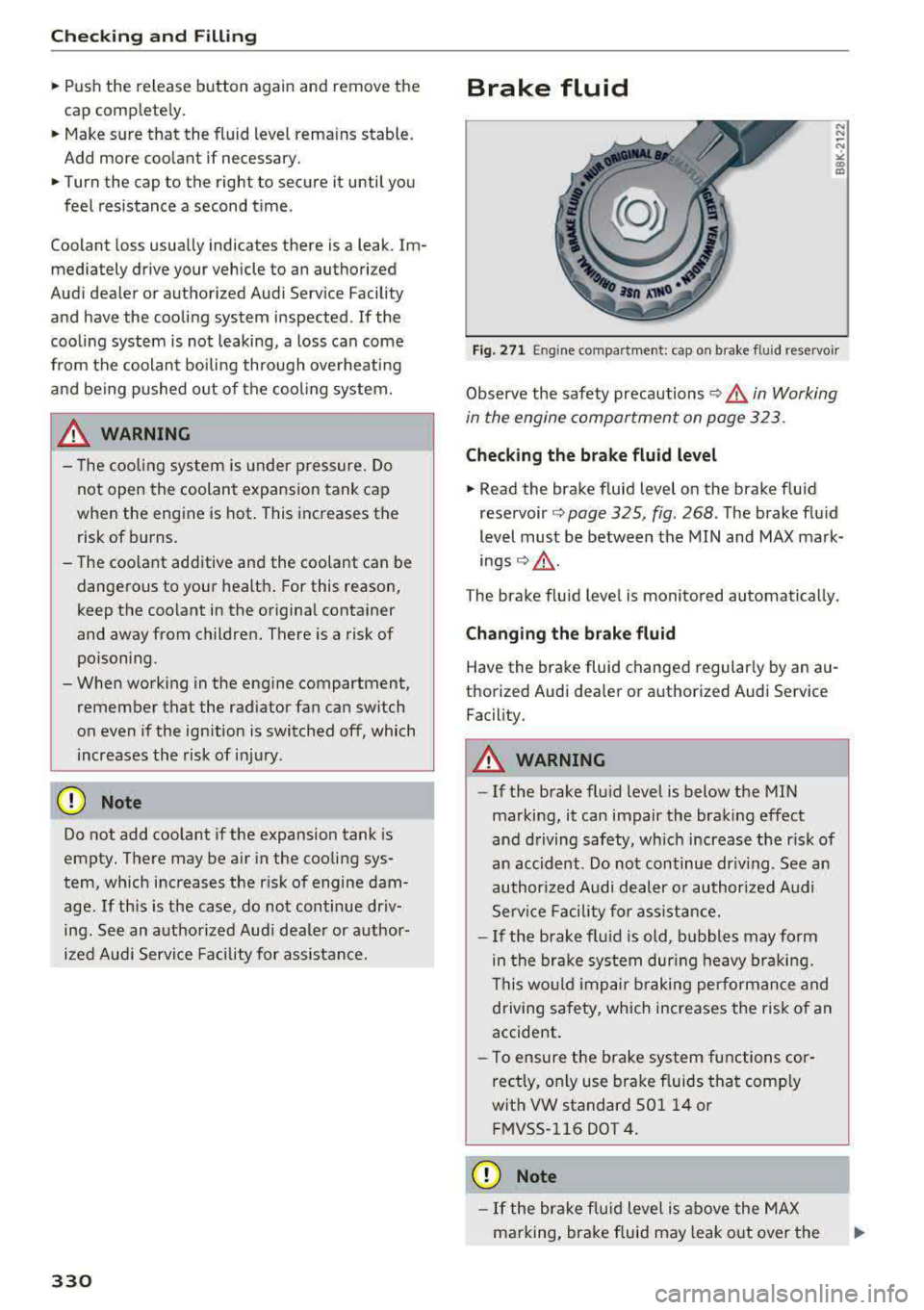
Fig. 271 En gine compa rtment: cap o n brake fluid reservo ir
Observe the safety precautions¢.&, in Working
in the engine compartment on page 32 3 .
Check ing the brake fluid level
.,. Read the brake fluid level on the brake fluid
reservoir ¢ page 325, fig . 268 . The brake flu id
level must be between the MI N and MAX ma rk
ings ¢.&, .
The brake f lu id level is monito red automatically.
Changing the brake fluid
Have the brake fluid changed regularly by an au
thorized Audi dea ler or authorized Audi Service
Facility.
_& WARNING -
- If the brake flu id leve l is below the MIN
marking, it ca n impair the brak ing effect
and driving safety, wh ich increase the r isk of
an accident. Do not continue dr iv ing . See an
author ized Audi dealer or au thori zed Audi
Serv ice Facility fo r ass ist ance.
- I f the brake fl uid is old, b ubbles may form
in the bra ke system dur ing heavy bra king.
This wo uld im pair b raking per formance and
driving safety, which increases the risk of an
accident.
- To ensure the brake system functions cor
rectly, only use bra ke fluids tha t comp ly
wit h VW standard 50 1 14 or
FMVSS- 116 DOT 4 .
(D Note
-If the bra ke f lu id leve l is ab ove the MAX
marking, bra ke fluid may le ak o ut over the