lane assist AUDI S4 2018 User Guide
[x] Cancel search | Manufacturer: AUDI, Model Year: 2018, Model line: S4, Model: AUDI S4 2018Pages: 403, PDF Size: 66.81 MB
Page 125 of 403

a co .... N ,....
N .... 0 0
3 co
(D Note
The radar sensors can be displaced by impacts
or damage to the bumper, wheel housing and
underbody. Pre sense rear can be impaired by
this. Have an authorized Audi dealer or au
thorized Audi Service Facility check their func
tion .
(D Tips
-The pre sense rear functions switch off
when towing a trailer .
- The pre sense rear functions may also
switch off if there is a malfunction in the
side assist* system.
Audi pre sense city
Description
Applies to: vehicles with Audi pre sense city
Within the limits of the system, pre sense city
can warn you of impending collisions with
vehicles and pedestrians and initiate the applica
ble braking maneuver if needed. Pre sense city is
active at speeds of approximately 6 mph (10 km/ h) and higher.
A pedestrian warning can occur at speeds up to
50 mph (85 km/h), and vehicle warnings can oc
cur at speeds up to 155 mph (250 km/h) . A pre
sense city braking maneuver is poss ible at speeds
up to 50 mph (85 km/h).
Warnings
Applies to: vehicles with Audi pre sense city
The system recognizes various dangerous s itua
tions. The
early warning occurs if:
- a vehicle driving ahead brakes suddenly,
- your own vehicle approaches a significantly
slower vehicle or stationary veh icle in the direc
t ion of travel.
- a pedestrian is standing in the lane or is moving
i nto the lane .
When this warning occurs, it may only be possi ble to avoid a collision by swerving or braking
strongly. The message
Audi pre sense .
Assistance systems
¢page 121, fig. 122 and a warning tone will
warn you about the danger.
Additionally, a jerk on the brakes may occur as an
acute warning when there is an imp ending colli
sion . If you do not react to the acute warning, pre
sense city can brake to the point of complete de
celeration within the limits of the system . T his
reduces the vehicle speed in the event of a colli
sion. The message
Audi pre sense . also ap
pears.
The following functions are triggered in conjunc
tion with pre sense basic/rear:
- Reversible tensioning of the front safety belts.
- Closing the windows and sunroof* .
- Inflating the side bolsters* on the seat back-
rest.
Audi drive select*: the function is not act ive de
pending on the mode selected.
A WARNING
- Pre sense city cannot overcome the laws of
physics.
It is a system designed to assist and
it cannot prevent a coll is ion in every circum
stance. The driver must always intervene.
The driver is always responsible for braking
at the correct time. Do not let the increased
safety provided tempt you into taking risks.
This could increase your risk of a collision.
- The system can dep loy incorrectly due to
system-specific limits.
- To reduce the risk of an accident, please
note that the camera does not always detect
every object.
- Pre sense city does not react to anima ls,
crossing or oncoming vehicles, objects such
as bars, railings or railcars, and objects that
are difficult to
detect ¢ A in General infor
mation on page 109 .
-In trailer mode, the braking behavior of the
tra iler can be d ifferent than usual during au
tomatic braking.
A WARNING
-Pre sense city may be restricted or not availa-
ble in the following example situations:
- in heavy fog, ra in, spray or snow
~
123
Page 127 of 403

a co .... N ,....
N .... 0 0
3 co
This message appears if the ESC is restricted or
switched off, for examp le .
Ill Aud i pre sen se : curren tly re stri cted . See
o wner 's manu al
This message appears when there is a temporary
fa ilu re in a subsystem, such as the ESC. If th is
message appea rs repeated ly, dr ive to an a uthor
ized A udi dealer or authorized Audi Service Fac ili
ty to have the malfunction corrected.
Ill Aud i pre sen se: e merg enc y braking syste m
off
This message appears if the pre sense functions
are switched off through the Infotainment sys
tem or if the system is not ready .
Audi active lane assist
Description
Applies to: ve hicles wit h Aud i act ive lane ass ist
Active lane assist (lane departure warning) de
tects lane marker lines within the limits of the
system using a camera in the windshield . If you
are approach ing a detected lane marker line and
it appears likely that you will leave the lane, the
system w ill wa rn you w it h corre ct ive steer ing .
You can overr ide th is steering at any time . If yo u
pass over a line, the steer ing whee l wi ll vibrate
lightly. In order for this warning vibration to oc
cur, it must first be switched on in the Infotain
ment system. Active lane assist is ready for oper
ation when the lane marker line is detected on at least one side of the vehicle.
The system is designed for driving on express
ways and highways and therefore only activates at speeds above approximately 40 mph (6S km/
h).
Applies to: vehicles with side assist: if you acti
vate a turn signal when active lane assist is ready
and it classif ies a lane change as critical because
of vehicles traveling alongside you or approach ing you, there w ill be not iceable correct ive steer
i ng shortly before you leave the lane . This will at
tempt to keep your veh icle in the la ne.
Applies to: vehicles w ithout s ide ass ist : the ready
system does not warn you if you activate a turn
A ss ista nce sys te m s
signal before crossing the lane marker line. In
t h is case, it assumes that you are changing lanes
intentionally .
Applies to: vehicles wi th adap tive c ruise contro l:
there is no corrective steering or warnings if the
system recognizes a distinct passing maneuver .
If the condit ions are met, traffic jam ass ist
switches on at speeds under approximately
40 mph (65 km/h)
qpage 116.
A WARNING
=
- The system warns the driver that the vehicle
is leaving the lane using corrective steering.
The driver is always responsible fo r keeping
the vehicle within the lane.
- The system can help you keep the vehicle in
the lane, but it does not drive by itself. Al
ways keep your hands on the stee ring
wheel.
- Cor rective stee ring may not occur in certain
situations, such as during heavy b raking.
- There may be cases whe re the camera does
not recognize all lane marker lines. Cor rec
tive steering can only take place on the s ide
of the vehicle where lane marker lines are
detected.
- Other road structu res or objects could poss i
b ly be identified unintentionally as lane
marker lines . As a result, corrective steering
may be unexpected or may not occur.
- The camera view can be restricted, for ex
ample by vehicles driving ahead or by rain,
snow, heavy spray or light shining into the
camera. Th is can result in active lane ass ist
not detecting the lane marker lines or de
tect ing them incorrectly .
- In certain s ituations where visibility is low,
the vehicle may switch from an "early" to
"late" steering correct ion.
- Under certain condit ions such as ruts in the
road, an inclined roadway or crosswinds, the
correct ive steer ing alo ne may not be enough
to keep the vehicle in the middle of the lane .
- For safety reasons, act ive lane assist must
not be used when there are poor road and/
or weather conditions such as slippery roads, fog, gravel, heavy rain, snow and the
125
Page 128 of 403
Assistance systems
potential for hydroplaning . Using active lane
assist under these conditions may increase
the risk of a crash.
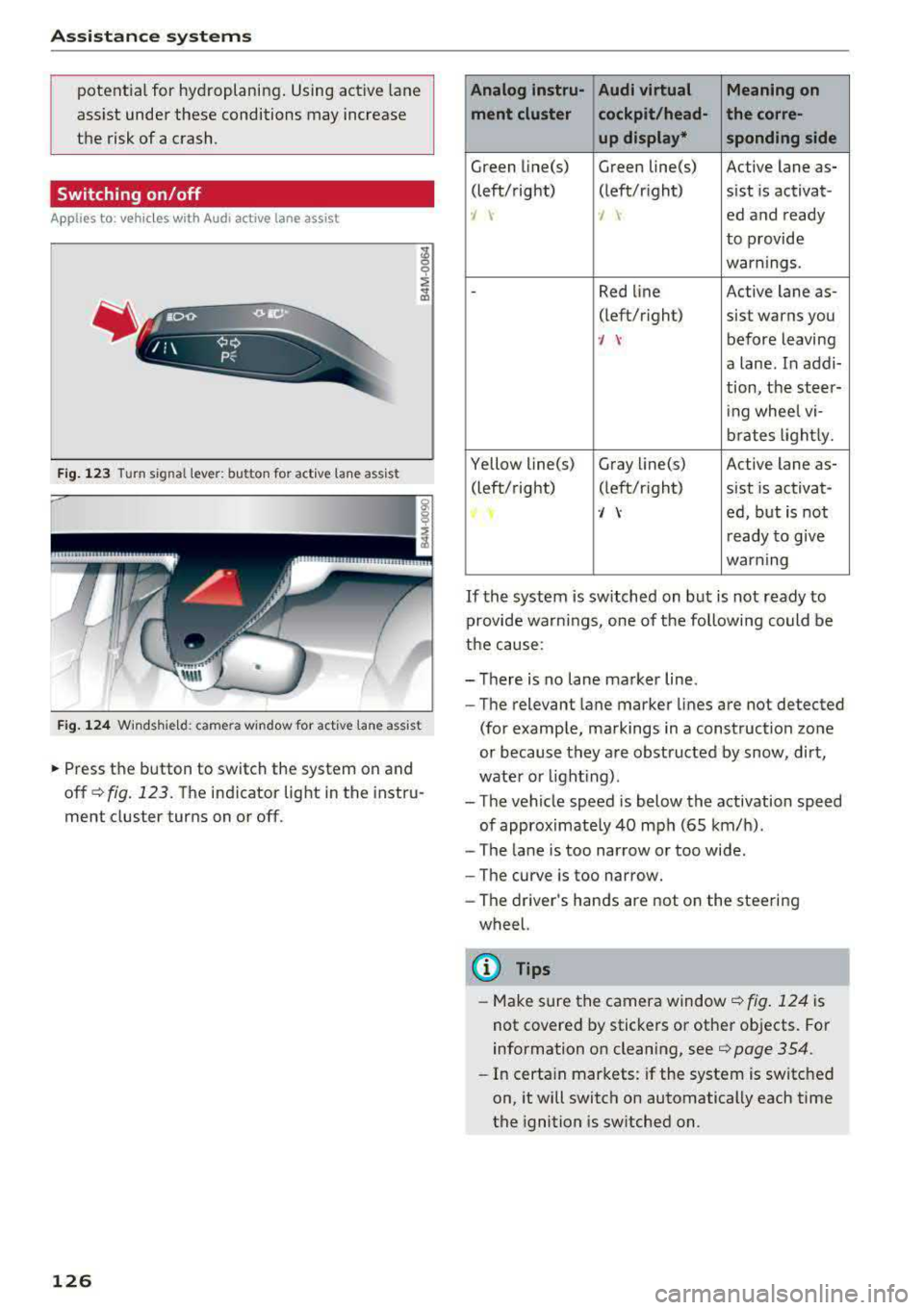
Switching on /off
A pp lies to: vehicl es w ith Audi active lane assist
Fig. 123 Turn signal lever: button for act ive lane ass ist
F ig . 124 Windsh ie ld: camera window for act ive lane ass ist
~ Press the button to switch the system on and
off
¢ fig. 123. The indicator light in the instru
ment cluster turns on or off.
126
Analog lnstru- Audi virtual Meaning on
ment cluster cockpit/head- the corre- up display* sponding side
Green line(s) Green line(s) Active lane as-
(left/right) (left/r ight) sist is activat-
-J -J ed and ready
to provide
warnings .
-Red line Active lane as-
(left/r ight)
sist warns you
·/ \-before leaving
a lane. In addi-
tion, the steer-
ing whee l vi-
brates lightly.
Yellow line(s) Gray
Li ne(s) Active lane as-
(left/right) (left/r ight) sist is activat-
·/ \-ed, but is not
ready to give
warning
If the system is switched on but is not ready to
provide wa rn ings, one of the following could be
the cause:
-There is no lane marker line .
-The relevant lane marker lines are not detected
(for example, markings in a construction zone
or because they are obstructed by snow, dirt,
wate r or lighting) .
-The vehicle speed is below the activation speed
of approximate ly 40 mph (65 km/h).
- The lane is too narrow or too wide .
- The curve is too narrow.
- The driver 's hands are not on the steering
wheel.
(D Tips
- Make sure the camera window ¢fig. 124 is
not covered by stickers or other objects. For
information on cleaning, see
¢ page 354.
- In certain markets: if the system is switched
on, it will switch on automatically each time
the ignition is switched on.
Page 129 of 403
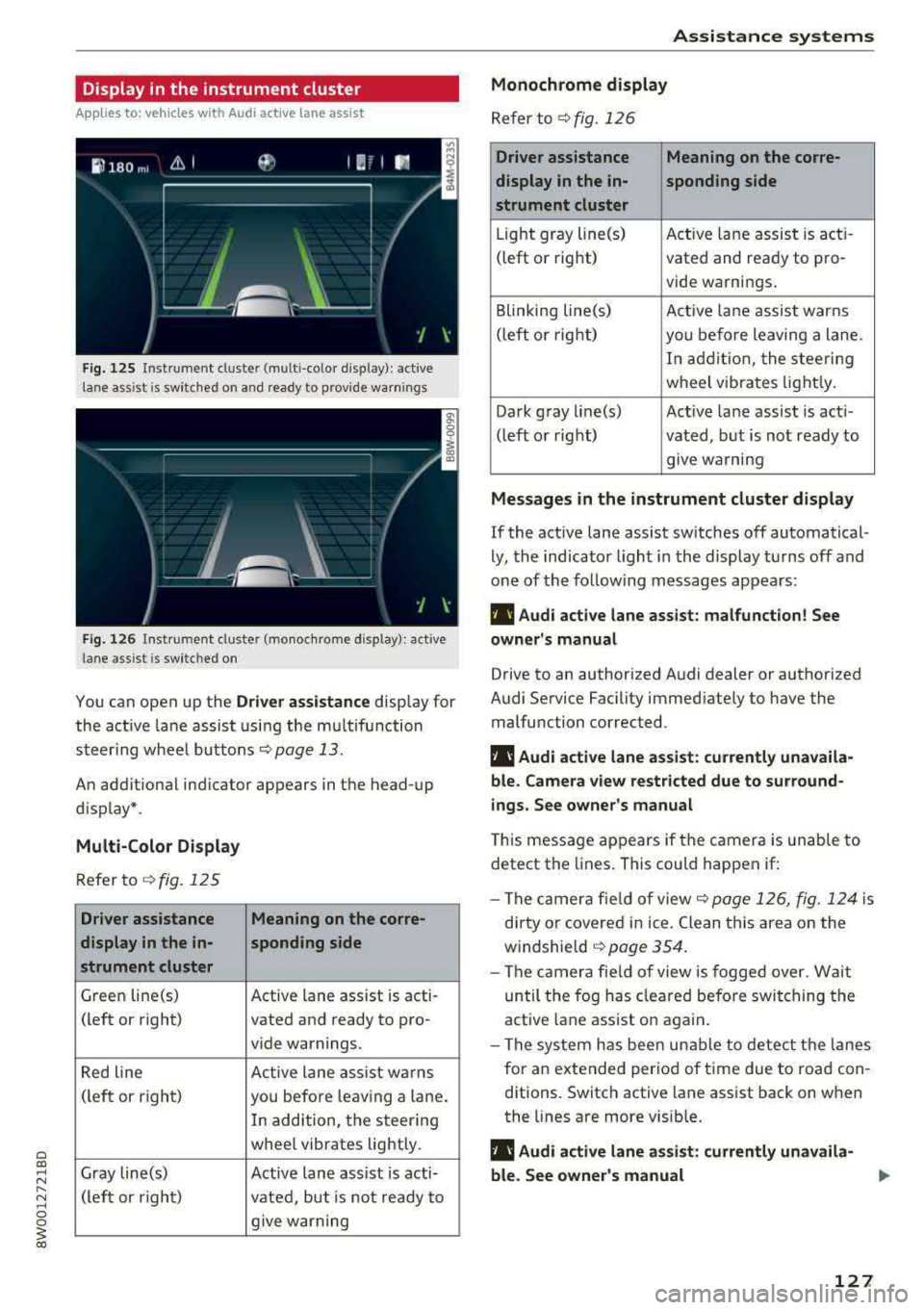
Display in the instrument cluster
App lies to: ve hicles with Audi active lane assist
Fig. 125 Instrument cluster (multi-color display): ac tive
lane ass ist is sw itched on and ready to provide warnings
Fig. 126 Instrument cl uster (monoc hrome display): active
lane ass ist is switched on
You can open up the Dr ive r assistance display for
the act ive lane assist using the multifunction
steer ing whee l buttons
c::> page 13.
An additional ind icator appears in the head-up
display*.
Multi-Color Display
Refer to¢ fig. 125
Driver assistance Meaning on the corre-
display in the in-sponding side
strument cluster
Green line(s) Active lane assist is acti -
(left or right) vated and ready to pro-
vide warnings.
Red line Active lane assist warns
(left or right) you before leav ing a lane.
In addition, the steering
whee l vibrates lightly.
Gray line(s) Active lane assist is acti-
(left or right)
vated, but is not ready to
give warning
Assistance systems
Monochrome display
Refer to¢ fig. 126
Driver assistance Meaning on the corre-
display in the in-
sponding side
strument cluster
Light gray line(s) Act ive lane assist is acti-
(left o r right) vated and ready to pro-
vide warnings .
Blinking line(s)
Active lane assist warns
(left or right)
you before leaving a lane.
In addition, the steering
wheel vibrates lightly.
Dark gray line(s) Active lane assist is acti-
(left or right) vated, but is not ready to
. . give warning
Messages in the instrument cluster display
If the active lane assist switches off automatical
ly, the indicator light in the display turns off and
one of the following messages appears:
fl! Audi active lane assist: malfunction! See
owner's manual
Drive to an authorized Audi dealer or authorized
Audi Service Facility immediately to have the
malfunction corrected.
fl! Audi active lane assist: currently unavaila
ble . Camera view restricted due to surround
ings. See owner's manual
This message appears if the camera is unable to
detect the lines. This could happen if:
- The camera fie ld of view
c::> page 126, fig. 124 is
dirty or covered in ice. Clean this area on the
windshie ld
¢ page 354.
- The camera field of view is fogged over. Wait
until the fog has cleared before switching the
active lane assist on again.
- The system has been unable to detect the lanes
for an extended period of time due to road con
ditions. Switch active lane assist back on when
the lines are more visible.
fl! Audi active lane as sist: currently unavaila
ble. See owner's manual
127
Page 130 of 403

Assistance systems
There is a temporary malfunction that may pre
vent the active lane assist from switching on. Try
sw itch ing the active lane assist on again later.
rl! Audi active lane assist: Please take over
steering!
This message appears if you are not steering by
yourse lf. Ac tive lane assist is activated, but is not
ready to give wa rning
& WARNING
Note that messages may be delayed or not
displayed on vehicles with accessories mount
ed on the steering whee l, s uch as a steering
wheel spinner knob. Always keep your hands
on the steer ing wheel.
Adjusting the steering time and vibration
warning
Applies to: veh icles with Audi active lane assist
You con adjust individual active lone assist set
tings in the Infotainment system .
-
.,. Select in the Infotainment system: IMENUI but
ton
> Vehicle > left contro l button > Driver as
sistance > Audi active lane assist .
Steering time
Early :
in this setting, the corrective steer ing hap
pens continuously to help keep the vehicle in the
center of the lane.
late : in this setting, the system provides correc
tive steering just before a wheel goes over a de
tected lane marker line.
Vibration warning
You can switch the additional vibration warning
in the steering wheel on or off.
WARNING
With the vibration warning switched off,
there will also be no visual warning in the in
strument cluster display when crossing a lane
marker line.
128
@ Tips
In certain ma rkets: your settings are stored
automat ically and assigned to the remote
control key in use.
Audi side assist
Description
Applies to: vehicles with Audi side assist
Fig. 127 Sensor detection range
Fig . 128 D isplay on the exterior mirror
Side assist (lane change ass ist) helps you mon itor
your blind spot and traffic behind yo ur vehicle.
Within the limits of the system, i t warns you
about veh icles that are coming closer or that are
traveling with you within sensor range
(D
¢ fig. 12 7. If a lane change is classified as criti
ca l, the display @in the exterior mirror turns on
¢fig. 128.
The display in the left exterior mirror provides as
sistance when making a lane change to the left,
while the display in the right exterior mirror pro
vides assistance when making a lane change to
the right.
Information stage
As long as you do not activate the turn signal,
side assist
informs yo u about vehicles that are
Page 131 of 403

detected and classified as crit ical. The display in
the mirror turns on, but is dim .
The display remains dim in the information stage
so that your view toward the front is not distur
bed.
Warning stage If the d isplay in a mirror blinks brightly when you
activate a turn signal, side assist is
warning you
about detected vehicles that it has classified as
critical. If this happens, check traffic by gla nc ing
in the exterior m irrors and over your shoulder
c::> .&. in General information on page 130 .
Applies to: vehicles with active lane assist : the
d isplay i n the mirror can also blink if you have not
act ivated a turn signal: if you are app roaching a
detected lane marker line and it appears you will
be leaving the lane, side assist will warn you
about detected vehicles that it ha s classified as
critical.
(D Tips
You can ad just the brightness on of the dis
play on the rearview mirror
c::;, page 130 .
General information
Applies to: vehicles with Audi side assist
®
®
©
Fig. 129 Drivi ng situat ion s
Assistance systems
0
r AUD I
• •
Fig. 130 Rear of the veh icle: pos it ion of th e se nso rs
S id e assist functions at speeds above approxi
mately 9 mph (15 km/h).
@ Vehicles that are approaching
In certain cases, a vehicle will be classified as
critical for a lane change even if it is still some
what far away . The faster a vehicle approaches,
the sooner the display in the exterior m irror will
turn on.
@ Vehicles traveling with you
Vehicles traveling with you are indicated in the
exter ior mirror if they are classified as cr itical for
a lane change . A ll vehicles detected by side assist
are ind icated by the time they enter your "blind
spot" , at the latest .
© Vehicles you are passing
If you s lowly pass a veh icle that s ide assist has
detected (the difference in speed between the
vehicle and your vehicle is less than approximate
ly 9 mph ( 15 km/h)) , the disp lay in the exter ior
mirror turns on as soon as the vehicle en ters your
blind spot.
The display w ill not turn on if you quickly pass a
vehicle that side assist has detected (the differ
ence in speed is greater than approximately 9
mph (15 km/h)) .
Functional limitations
T he radar sensors are designed to detect the left
and right adjacent lanes when the road lanes are
the normal width. In some situations, the display
in the exterior mirror may turn on even though
there is no vehicle located in the area that is criti-
cal for a lane change. For example :
..,.
129
Page 132 of 403

Ass is tan ce sys tems
-If the lanes are narrow or if your are driving on
the edge of your lane. If this is the case, the system may have detected a vehicle in another
lane that is
not adjacent to your current lane.
-If you are driving through a curve . Side assist
may react to a vehicle that is in the same lane
or one lane over from the adjacent lane.
-If side assist reacts to other objects (such as
roadside structures like guard rails).
- In poor weather condit ions . The side assist
funct ions are limited.
Do not cover the radar
sensors ¢ fig. 130 with
stickers, deposits, bicycle wheels or other ob
jects, because this will impair the function. Do
not use side assist when towing a trailer. For in
formation on cleaning,
see¢ page 354 .
A WARNING
-Always pay attention to traffic and to the
area around your vehicle. Side assist cannot
replace a dr iver's attention . The driver alone
is a lways responsible for lane changes and
similar d riving maneuvers.
-In some situat ions, the system may not
function or its funct ion may be limited. For
example :
-If vehicles are approach ing or being left
behind very quickly. The display may not
turn on in t ime .
-In poor weather conditions such as heavy
rain, snow or heavy mist.
-On very wide lanes, in tight curves, or if
there is a rise in the road surface. Vehicles in the adjacent lane may not be detected because they are outs ide of the sensor
range .
(D Note
The sensors can be displaced by impacts or
damage to the bumper, whee l housing and
underbody. Th is can impa ir the system. Have
an authorized A udi dealer or authorized Audi
Serv ice Facility check their function .
(i) Tips
-If the window glass in the driver's door or
front passenger's door has been tinted, the
130
-
display in the exterior mirror may be incor
rect.
-For an exp lanation on conform ity with the
FCC reg ulations in the United States and the
Industry Canada regulations, see
¢ page 386.
Switching on/off
App lies to: vehicles with A udi side ass ist
The system con be switched on/off in the Info
tainment system .
If the system is activated, the displays in the ex
terior mirrors wi ll turn on briefly when the igni
tion is switched on .
.,. Select in the Infotainment system: IMENU! but
ton
> V ehicl e > left control button > D riv er as·
s is tance
> Audi side a ssist. Off switches the
system off.
(D Tips
When yo u switch side assist on or off, the ex it
warning system activates or deact ivates
¢ page 131.
Setting the display brightness
App lies to: vehicles wit h Aud i side ass ist
The display brightness con be adjusted in the In
fotainment system.
.,. Select in the Infotainment system: IMENU ! but
ton
> Veh icle > left control button > Dri ver as
s ist ance
> Audi side a ssist.
The disp lay br igh tness adjusts au tomatically to
the brightness of the surroundings, both in the
information and in the warning stage. In very
dark or very bright surround ings, the automatic
adjustment will set the display to the minim um
or max imum level. In such cases, you may notice
no change when adjusting the br ightness, or the
c h ange may only be noticeable once the sur
r oundings change .
Adjust the br ightness to a leve l where the display
i n the information stage will not disrupt your
view ahead . If you change the br ightness, the dis-
play in the exterior mirror w ill briefly show the
.,.
Page 214 of 403
a co .... N ,....
N .... 0 0
3 co
a list of gas stations in the area. When a gas sta
tion is se lect ed, route guidance from the current
ve hicle position is calcu lated .
Trailer mode *
Trailer mode is sw itched off at the factory.
When the function is switched
on~' the maxi
mum permitted speed for vehicles with trailers is
in corporated into the route guidance and the ca l
culated arrival time is adjusted acco rding ly. Trail
e r mode is d isp layed us ing symbols -"" in the side
menu on the map .
Personal route assistance *
Pe rsonal ro ute assistance is sw itched off at the
factory.
Your tr ips are recorded and destinat ions are sug
gested by the MMI when this funct io n is switched
on~ <>page210 .
The persona l route ass istance is indicated by the
~ symbo l in the status line of the Infotainment
system display.
Not ification when ne arby *
The notification when nearby is switched off at
the factory .
The MM I notifies you when you are approaching
selected points of interest when this function is
switched
on ~-You can also have a Notification
tone .
Pres entation mode
The Pre sentation mode he lps yo u to e ffect ively
p lan a trip and follow the p lanned route without
moving the ve hicle . You can
Select starting point
when, for example, you wou ld like to ca lculate a
route starting from a locat ion other than the ve
h icle posit ion . Start
Pre sentation mod e to simu
late route gu idance .
1) Hig h occupa ncy v ehi cle
Na vigation
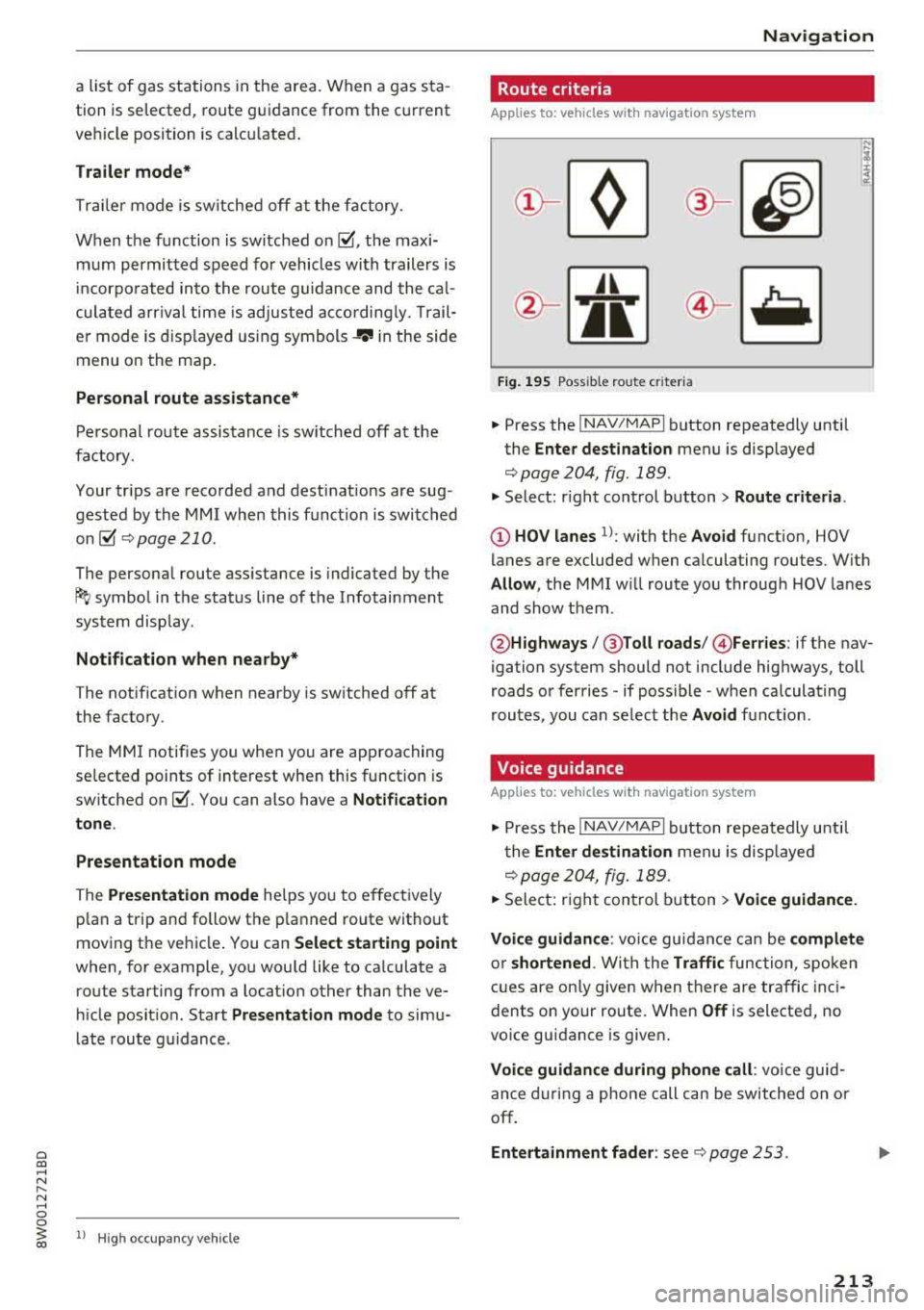
Route criteria
Applies to: vehicles with navigation system
Jl
Fig . 1 95 Possible ro ute c riter ia
.,. P ress the ! NAV/MAP I button repeatedly until
the
Enter dest ination menu is displayed
<> page 204, fig. 189 .
.,. Select: right cont rol button> Route criteri a.
@ HOV lanes 1>: with the Avoid function, HOV
lanes are excluded when ca lculating rou tes. With
Allow , the MMI w ill route you throug h HOV lanes
and show them .
@Highways /@ Toll roads /@ Ferries : if the nav
igation system should not include highways, toll
roads or ferries
-if possible -when calculating
routes , you can se lect the
Avoid function .
Voice guidance
Applies to: vehicles with navigation system
.,. Press the !NAV/MAPI button repeatedly u nti l
t he
Enter destination men u is disp layed
<> page 204, fig. 189.
.,. Sele ct: righ t con trol b utton > Voice guidance.
Voic e guidan ce :
vo ice gu idance can be compl ete
o r shortened . With the Traffic function, spoken
cues are on ly given when there are traffic inc i
dents on your route. When
Off is selected, no
vo ice guidance is given .
Voice guidance during phone call : voice guid
an ce d uring a phone call can be switched on or
off.
Entertainment fad er: see <> page 253 .
213
Page 388 of 403

a co .... N ,....
N .... 0 0
3 co
A
A/C MAX (button) ................ .... .. 78
A/C (button) ... .. . ..... ..... ... ... .. . 77
ABS .. .. ... . .. .. ............. .. .. .. . 146
Accessories 68 ,385
Active lane assist
Cleaning the camera area . . . . . . . . . . . . .
355
also refer to Audi active lane assist . . . . . 125
Adaptive cruise control . . . . . . . . . . . . . . . . . 108
Cleaning sensors . . . . . . . . . . . . . . . . . . . . 355
Distance indicator and distance warning . 118
Messages . . . . . . . . . . . . . . . . . . . . . . . . . . 118
Predictive control . . . . . . . . . . . . . . . . . . . . 115
Traffic jam assist . . . . . . . . . . . . . . . . . . . . 116
AdBlue .. .. .. .. ............... .. ..... 319
Messages
Additional accessories
Adjusting air distribution (automatic climate
control)
. .. .. .. ............... .. .. .. ..
Adjusting the sound ............ .. .. .. .
319
385
78
252
Adjusting the temperature (automatic climate
control) . . . . . . . . . . . . . . . . . . . . . . . . . . . . . .
78
Advanced key
refer to Convenience key . . . . . . . . . . . . . . . 83
Airbag .. .. .. .. ............... .. ..... 271
Airbag system . ................. .. 271,291
Advanced Airbag System components . . . 278
Care . . . . . . . . . . . . . . . . . . . . . . . . . . . . . . 286
Children . . . . . . . . . . . . . . . . . . . . . . . . . . . 297
Child restraints . . . . . . . . . . . . . . . . . . . . . 297
Components (front airbags) .. ..... ... .
Danger of fitting a child safety seat on the
front passenger seat ................ .
D. l 1sposa ... .. ............... .. .. .. .
Front airbags . .. ........... .. .. .... .
H ow do the front airbags work? ....... .
How many airbags does my vehicle have?
How the Advanced Airbag System compo-
nents work together ........ .. .. .... .
Important safety instructions on the knee
airbag system .... .. ..... ..... .. .... .
Indicator light ............ ...... ... .
Knee airbags .. ............ ...... ... .
Monitoring . .. ............. .. .. .... .
PASSENGER AIR BAG light ....... .. .. .
Repairs .. .. .. .. ........... .. .. .... .
278
272
286
276
281
278
280
289 283
287
283
283
286
Index
Safety instructions . . . . . . . . . . . . . . . . . . . 285
When must the system be inspected? 283
Air pressure
Tires ..... .. .. .. .. ............. .. ..
344
Alignment pin (changing the wheel) . . . . . . 360
All season tires . . . . . . . . . . . . . . . . . . . . . . . 349
All weather lights . . . . . . . . . . . . . . . . . . . . . . 54
All wheel drive
Indicator light . . . . . . . . . . . . . . . . . . . . . . .
35
also refer to quattro . . . . . . . . . . . . . . . . . 150
AMI
refer to Audi music interface . . . . . . . 233, 234
Android Auto
refer to Audi smartphone interface . .. ..
Anti -freeze
Windshield washer system ........... .
Anti- lock braking system
refer to ABS ..... .. ................ .
Anti-Slip Regulation
refer to ASR ... .. .................. .
Apple CarP lay
refer to Aud i smartphone interface ... ..
Arrow view
ASR
Audi active lane assist Messages
Audi connect emergency call and service ..
Online roadside assistance .......... . .
Audi connect vehicle contro l ........... .
Parking location .. .................. .
Remote locking and unlocking ..... .. . .
Vehicle status report ............... . .
246
332 146
146
246 23
146
125
127
202
203
198
199
199
199
Audi connect (Infotainment) . . . . . . . . 188, 195
Data protection . . . . . . . . . . . . . . . . . . . . . 196
Services overview ' .. ................ .
Starting ...... .. .. ................ .
Audi drive select
... .. ............. .. ..
Audi Entertainment mobile ...... ... .. . .
Audi music interface
.................. .
Audi music stream
refer to Wi-Fi .... .. ............... . .
Audio files
. . .... .. .. ............... . .
Audio player
B luetooth audio player .............. .
Wi-Fi audio player . ................. .
Audio track
189
189
133
235
233
231
236
230
231
239
387
Page 394 of 403

K
Key....... .. .. ................ ..... .. 38
Key not recognized . . . . . . . . . . . . . . . . . . .
85
Key replacement . . . . . . . . . . . . . . . . . . . . . 38
Mechanical key . . . . . . . . . . . . . . . . . . . .
38, 39
Replacing the battery . . . . . . . . . . . . . . . . . 39
Unlocking/locking . . . . . . . . . . . . . . . . . 40, 42
Vehicle code . . . . . . . . . . . . . . . . . . . . . . . . . 38
Kick-down (automatic transmission) . . . . . . .
95
Knee airbags . . . . . . . . . . . . . . . . . . . . . . . . . 287
Description . . . . . . . . . . . . . . . . . . . . . . . . . 287
How they work . . . . . . . . . . . . . . . . . . . . . . 288
Important safety instruct ions . . . . . . . . . . 289
L
Lane assist
refer to Audi active lane assist . . . . . . . . . 125
Lap timer . . . . . . . . . . . . . . . . . . . . . . . . . . . . 106
Evaluating . . . . . . . . . . . . . . . . . . . . . . . . . 106
Starting . . . . . . . . . . . . . . . . . . . . . . . . . . . 106
LATCH · · · · · . .... ............. .. .. .. . 309
Descr iption . . . . . . . . . . . . . . . . . . . . . . . . . 310
Install ing a child restraint ............ . 311
Location
· · . .. ..... ....... ... .. .. .. . 310
Mounting and releasing the anchorage
hook
. . .. .. .... ............. .. .. .. . 311
Launch control program . . . . . . . . . . . . . . . . . 95
Leather care/cleaning . . . . . . . . . . . . . . . . . 357
Left contro l button ............. .. .. .. .. 14
License agreement (MMI) . . . . . . . . . . . . . .
253
Lifting points (vehicle jack) ....... ..... . 364
Light/rain sensor
Headlights . . . . . . . . . . . . . . . . . . . . . . . . . .
54
Interval mode (w ipers) . . . . . . . . . . . . . . . . 60
Light functions . . . . . . . . . . . . . . . . . . . . . . . . 54
High beam assistant
55
Instrument illum ination . . . . . . . . . . . . . . . 58
Interior lighting . . . . . . . . . . . . . . . . . . . . . . 57
Lighting
Exterior
· · · · · · · · · · · · · · · · · · · · · · . .. .. .. 54
Interior . . . . . . . . . . . . . . . . . . . . . . . . . . . . . 5 7
Lights
~ Headlight range control system . . . . . . . . . 54
;::; Listening to mus ic ,....
8 refer to Media .. ............. .. . 227 , 236
3 Loading the luggage compartment . . . . . . . 259
Locking/unlocking
By remote control . . . . . . . . . . . . . . . . . . . . 40
With the centra l locking switch . . . . . . . . .
41
With the convenience key . . . . . . . . . . . . . . 40
With the lock cylinder . . . . . . . . . . . . . . . . .
42
Low beam headlights . . . . . . . . . . . . . . . . . . . 54
Luggage compartment . . . . . . . . . . . . . . . . . . 70
Cover..... .. .. .. .. ............. .. .. . 70
Pass-through . . . . . . . . . . . . . . . . . . . . . . . . 73
Socket.. .. .. .. . ............ .... .. .. . 68
Storing cargo correctly . . . . . . . . . . . . . . . 259
Tie-downs . . . . . . . . . . . . . . . . . . . . . . . . . . . 73
Val et parking function . . . . . . . . . . . . . . . . . 51
also refer to Loading the luggage compart-
ment ..... .. .. .. ................. ..
259
Luggage compartment lid . . . . . . . . . . . . . . . 43
Emergency release . . . . . . . . . . . . . . . . . . . . 47
Lumbar support . . . . . . . . . . . . . . . . . . . . . . . 65
M
Maintenance . . . . . . . . . . . . . . . . . . . . . . . . . 383
Maintenanc e intervals . . . . . . . . . . . . . . . . . 333
Making an emergency call . . . . . . . . . . . . . . 180
Malfunc tion indicator lamp (MIL) . . . . . . . . . 24
Map
Display
219
Operating . . . . . . . . . . . . . . . . . . . . . . . . . . 214
Settings . . . . . . . . . . . . . . . . . . . . . . . . . . . 215
Update . .. .. .. .. ............... .. ..
204
Mapupdate ... .. .. .................. . 217
Mechanical key . . . . . . . . . . . . . . . . . . . . . 38, 39
Media ... .. .. .. .. ............... 227, 236
Drives · · · · .. .. .. .. ....... ........ .. 228
Supported formats . . . . . . . . . . . . . . . . . . 242
Media center .. .. .. .. ............... .. 237
Memory buttons
refer to Shortcut keys . . . . . . . . . . . . 155, 162
Memory capa city
D. ,rectory . . . . . . . . . . . . . . . . . . . . . . . . . . . 185
Jukebox . . . . . . . . . . . . . . . . . . . . . . . . . . . . 229
Memory card SD card reader (MMI) . . . . . . . . . . . . . . . . .
228
Supported types/formats . . . . . . . . . . . . . 242
Memory function . . . . . . . . . . . . . . . . . . . . . . 67
MENU button
· · · · · · · · · · · · ·........ ... 155
393