steering wheel AUDI S4 2018 User Guide
[x] Cancel search | Manufacturer: AUDI, Model Year: 2018, Model line: S4, Model: AUDI S4 2018Pages: 403, PDF Size: 66.81 MB
Page 40 of 403
Opening and closing
Key set
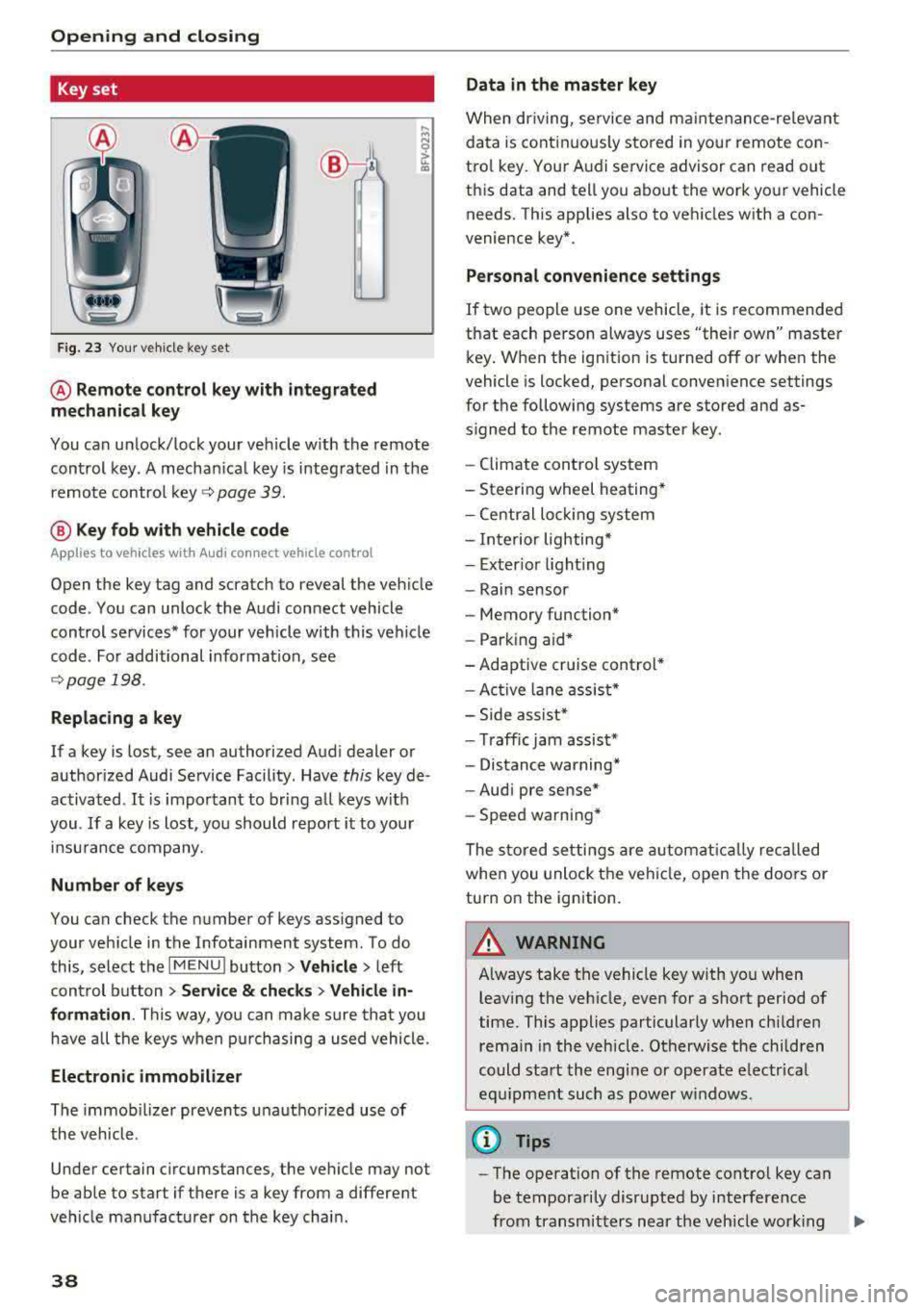
Fig. 23 Your veh icle key set
@ Remote control key with integrated
mechanical key
You can unlock/lock your veh icle w ith the remote
control key . A mechan ical key is integrated in the
remote control
key ~ page 39.
@ Key fob with vehicle code
Appl ies to veh icles with A udi co nnect vehicle con trol
Open the key tag and scratch to reveal the veh icle
code . You can unlock the Audi connect vehicle
control se rvices* for your vehicle with this vehicle
code . For additional information, see
~ page 198 .
Replacing a key
If a key is lost, see an authorized Audi dealer or
authorized Audi Service Facility. Have
this key de
activated .
It is important to bring all keys with
you .
If a key is lost, you should report it to your
insu rance company.
Number of keys
You can check the number of keys assigned to
your vehicle in the Infotainment system . To do
this, select the
IM ENU I button > Vehicle > left
control button
> Service & checks> Vehicle in·
formation . This way, you can make sure that you
have all the keys when purchasing a used vehicle.
Electronic immobilizer
The immob ilizer prevents unauthorized use of
the vehicle .
Under certain circumstances, the vehicle may not
be able to start if there is a key from a different
veh icle manufacturer on the key chain.
38
Data in the master key
When dr iving, service and maintenance-re levant
data is continuously stored in your remote con
trol key. Your A udi service advisor can read out
this data and tell you about the work your vehicle needs . This applies also to vehicles with a con
venience key*.
Personal convenience settings
If two people use one vehicle, it is recommended
that each person always uses "their own" master
key . When the ign ition is turned off or when the
vehicle is locked, personal convenience settings
for the following systems are stored and as
s igned to the remote master key.
- Climate control system
-Steering wheel heating*
-Central lockin g system
-Interior lighting*
-Exter ior lighting
- Rain sensor
- Memory function*
- Park ing a id *
-Adaptive cr uise control *
-Active lane assist*
-Side assist*
-Traff ic jam assist*
- Distance warning*
-Audi pre sense*
- Speed warning *
The stored settings are automatically recalled
when you unlock the vehicle, open the doors or
turn on the ignition .
~ WARNING
Always take the vehicle key with you when
leaving the vehicle, even for a short period of
time. This applies particularly when children
rema in in the vehicle . Otherwise the children
could start the engine or operate electrical
equipment such as power windows .
(© Tips
-
-The operation of the remote control key can
be temporarily disrupted by interference
from transmitters near the veh icle work ing
1J11,
Page 81 of 403

a co .... N ,....
N .... 0 0
3 co
20 minutes, depending on the outside
temperature.
To keep the rear window defogger on contin uous
l y, press and hold the
QWREAR button longer
than
3 seconds. This is stored unti l the ignition is
switched off .
SYNC Synchronization
Use the rocker switc h® to sele ct the funct ion.
When synch ronization is switched on, the set
tings for the driver's side are applied to the front
passenger's side and the rear (except for seat
heating/venti lation*) . When the settings on the
front passenger's side or in the rear are changed,
the synchron iz at ion is automatically sw itched off
and
3 -z one appears in the display .
SET REAR function
Use t he rocker switch ® to select the function .
When the function is switched on, you can adjust
all settings for the rear us ing the climate control
system controls in the cockpit. The rear climate
control system controls cannot be operated at
the same time . This function switches off auto
mat ically after a certain period of time or after
leaving the menu.
Vent s
You can open or close the center and rear vents in
the cockpit and the vents in the rear center con
sole us ing the r idged thumbwheels . The levers
adjust the d irection of the airflow from the vents.
The wide vent is opened and closed using the
r ocker switch
® ·
Residu al heat
You can activate the residual heat funct ion when
the ignition is switched off by pressing the knob
(D . The res idual heat from the coolant is used to
h eat the vehicle inte rior. The residual heat func
tion swi tches off automatically afte r abou t 15
minu tes .
A WARNING
- You should not use the recirculation mode for an exten ded period of time, because no
fresh a ir is drawn in and the w indows can
Warm and c old
fog when cooling mode is switched off. This
increases the r isk of an accident.
- Individuals with reduced sensitivity to pain
or temperature could develop burns when
using the seat heat ing* function. To reduce
the risk of injury, these individua ls should
not use seat heating*.
(D Note
To avoid damaging the seat heat ing* ele
ments, do not knee l on the seats or place
heavy pressure on one area of the seat.
Setup
The climate control system basic settings ore ac
cessed in the Infotainment system .
.,. Select in the Infotainment system : I MENU! but
ton
> Vehicle > l eft control button > Ai r co ndi
tioning
Auto recircu lation
When switched on, a utomat ic rec irculat ion con
trols the recircu lation mode automatically . You
must press the
®MAX button if fog forms on
the windows.
Automatic auxiliary heater*
T he aux iliary hea ter he lps to wa rm the vehicle in
terior more q uickly.
Steering wheel heating
Applies to: vehicles with steering wheel heating
The steering wheel rim con be heated.
.,. Press the bu tton on the m ultif unct ion steeri ng
wheel to switch the steering whee l heating on
and
off~ r=:> poge 15, fig . 11 . The message
Steering wheel heating : on /Steering wheel
heating: off
appears in the instrument cluster
disp lay.
The temperature is maintained at a constant lev el when steering wheel heating is switched on .
T he s teer ing whee l heating se tt ings a re stored
automat ica lly and assigned to the remo te control
key that is in use.
79
Page 84 of 403
Driving
unheeded. Extended idling also produces
heat, which could result in overheating or
other damage to the vehicle or other proper
ty.
(D Note
- Have your vehicle maintained properly and
in accordance with the service recommenda
tions in your Warranty
& Maintenance book
let . Lack of proper maintenance as well as
improper use of the vehicle will impair the
function of the emission control system and
could lead to damage.
- Do not alter or remove any component of the Emission Control System unless approved by the manufacturer .
- Do not alter or remove any device, such as
heat shields, switches, ignition wires,
valves, which are designed to protect your
vehicle's Emission Control System and other
important vehicle components.
(D Tips
The consumption estimates as published by
ENVIRONMENTAL PROTECTION AGENCY (EPA) and Transport Canada may not corre
spond to your actual consumption on the
road, which will vary depending upon vehicle
load and speed, road and weather conditions,
trip length, etc.
Steering
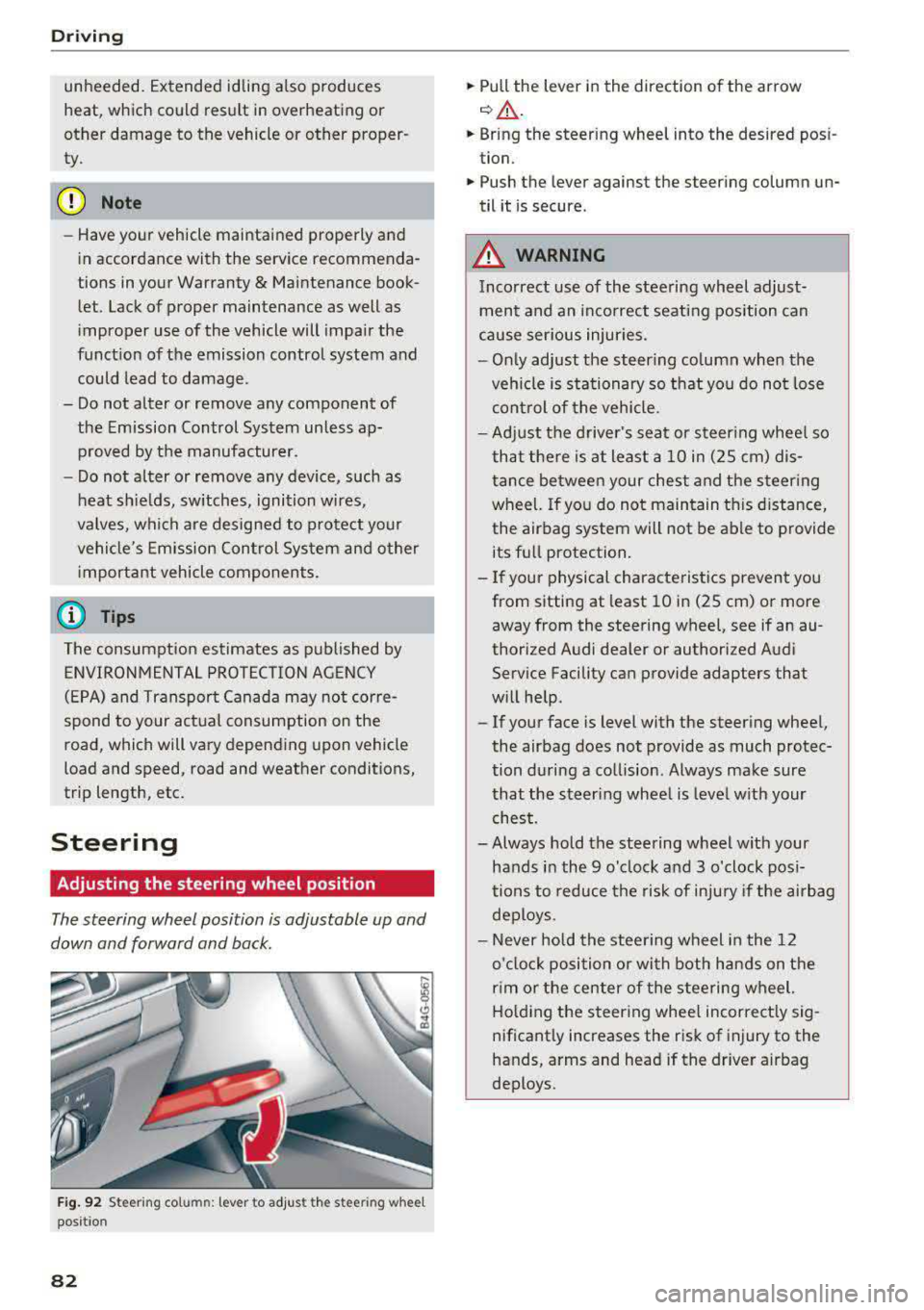
Adjusting the steering wheel position
The steering wheel position is adjustable up and
down and forward and back.
Fig. 92 S tee rin g col umn : le ver to adjus t the stee ring w heel
posit ion
82
.,. Pull the lever in the direction of the arrow
c::, A -
... Bring the steering wheel into the desired posi
tion .
.,. Push the lever against the steering column un
til it is secure .
_&. WARNING
Incorrect use of the steering wheel adjust
ment and an incorrect seating position can
cause serious injuries.
- Only adjust the steering column when the
vehicle is stationary so that you do not lose
control of the vehicle.
-
-Adjust the driver's seat or steering wheel so
that there is at least a 10 in (2S cm) dis
tance between your chest and the steering
wheel. If you do not maintain this distance,
the airbag system will not be able to provide
its full protection.
-If your physical characteristics prevent you
from sitting at least 10 in (2S cm) or more
away from the steering
wheel, see if an au
thorized Audi dealer or authorized Audi
Service Facility can provide adapters that
will help .
- If your face is level with the steering wheel,
the airbag does not provide as much protec
tion during a collision . Always make sure
that the steering wheel is level with your
chest.
- Always hold the steering wheel with your
hands in the 9 o'clock and 3 o'clock posi
tions to reduce the risk of injury if the airbag
deploys.
- Never hold the steering wheel in the 12
o'clock position or with both hands on the
rim or the center of the steering wheel.
Holding the steering wheel incorrectly sig
nificantly increases the risk of injury to the
hands, arms and head if the driver airbag
deploys .
Page 91 of 403
a co .... N ..... N .... 0 0
3 co
~ Applies to: automatic transmission: Select the
P selector lever position .
~ Turn the eng ine off ¢,&. .
~ Applies to: manual transmission: Engage 1st
gear.
~ Turn the steering wheel when parking on in
clines so that the wheels will roll into the curb
if the veh icle starts moving .
A WARNING
-Never accelerate or release the clutch pedal
carelessly when a gear or a selector lever
posit ion (automatic transmission) is engag
ed whi le the vehicle is stationary and the en
gine is running. Otherwise, the vehicle will
start to move immediately and this cou ld re
sult in an accident.
- Emergency braking should only be used in
an emergency, when the normal brake peda l
has failed or the brake pedal is obstructed.
During emergency braking, your veh icle will
brake sim ilar to heavy brak ing . ESC and the
associated components (ABS, ASR, EDL)
cannot overcome the laws of physics,
Around curves and when road or weather
conditions are bad, a full brake application
can cause the vehicle to skid or the rear end
to swerve, which increases the risk of an ac
c ident.
- If the power supply fails, you cannot set the
park ing brake if it is released . If th is is the
case, stop the veh icle on leve l ground and
secure it by engaging 1st gear (manual
transmiss ion) or select ing the P selector lev
er position (automatic transm iss ion). See an
authorized Aud i dealer or autho rized Aud i
Service Facility for assistance .
- Always take the vehicle key with you when
leaving your vehicle, even if for a short pe ri
od of time. This applies particu larly when
children remain in the vehicle. Otherwise,
children could start the engine, release the
parking brake or operate electrical equip
ment such as powe r windows, which in
creases the risk of an acc ident.
- No one, especially children, shou ld remain
in the vehicle when it is locked. Locked
doors make it more difficult for emergency
D riving
workers to get into the vehicle, which puts
lives at risk.
(D Tips
Ap plies to : vehicles with auto matic transmissions
When stopp ing at a traff ic signa l or stopp ing
i n city traffic, you can set the park ing brake
manually . The vehicle does not have to be
held with the brake pedal. The park ing brake
eliminates the tendency to creep when a se
l ector lever position is engaged. As soon as
you press the a ccelerator peda l, the parking
brake releases automatically and your vehicle
starts to move r=;,
page 89.
(j) Tips
-Occasional noises when the pa rking brake is
set and released are normal and are no t a
cause for concern.
- The parking brake goes through a self-test
cycle at regular intervals when the vehicle is
stopped. Any noises assoc iated with this are
normal.
- If there is a power failure, the parking brake
wi ll not set if it is released, and it will not
re lease if it is
set ¢.&. . See an a uthorized
Audi dealer or authorized Audi Service Fa cility for assistance.
Starting to drive
Various convenience and safety funct ions may be
available when the vehicle begins driving, de
pending on vehicle equipment .
Starting on hills with the p arking brake set
Requirement: the driver's door must be closed .
~ To start driving comfortably when on a hill , set
the parking brake and begin driving as usual.
The braking force of the parking brake does not
release a utomatically until the wheels build up
enough driving force.
Starting on hills with hill hold assist
Hi ll ho ld assist makes it easier to start on hills.
Requirement: the driver's door must be closed
and the engine must be running.
89
Page 96 of 403

Driving
-To reduce the risk of an accident, never select the R or P positions while driving.
-Do not inadvertently press the accelerator
pedal when the vehicle is stationary. Other
wise the risk of an accident increases be
cause the vehicle will start to move immedi
ately, even if the parking brake is set.
(D Tips
For safety reasons, the parking brake only re
leases automatically when the driver's door is
closed.
Hill descent control
A pp lies to: ve hicles w ith automat ic tra nsmissio ns
The hill descent control system assists the driver
when driving down hills.
Hill descent control activates when the transmis
sion is in the Dor S position and you press the
brake pedal. The transmiss ion automatically se
lects a gear that is suitable for the hill. Hill de
scent control tries to maintain the speed ach
ieved at the time of braking, within physical and
technical limitations. If may still be necessary to
adjust the speed with the brake pedal.
Hill descent control switches off once the hill lev
els out or you press the accelerator pedal.
When operating the cru ise contro l system*
c:;, page 102, hill descent control is also activated
when the speed is set.
A WARNING
Hill descent control cannot overcome physical
limitations, so it may not be able to maintain
a constant speed under all conditions. Always
be ready to apply the brakes.
94
Shifting manually (tiptronic mode )
Applies to : vehicles wit h automatic transmissions
The tiptronic mode allows the driver to shift the
gears manually .
Fig. 99 Cente r console: sh if ting ma nually with the selecto r
lever
Fig. 100 Steering wheel: sh ift ing manual ly
Shifting with the selector lever
You can shift into tiptronic mode while stationary
and while driving.
.,. To shift into tiptronic mode, push the selector
lever from the D/S position to the right. As
soon as the transmission switches over, the
M
transmission setting will appear in the instru
ment cluster display .
.,. To shift up a gear, tap the selector lever for
ward
0 c:;, fig. 99 .
.,. To shift down a gear, tap the selector lever back
0-
11> To switch t iptronic mode off, push the selector
lever back into the D/S position.
Shift ing with the shift paddles
You can operate the shift paddles in the D/S or M
selector lever positions .
.,. To shift up a gear, tap the shift paddle 0
c:;, fig. 100.
Page 97 of 403

a co .... N ,....
N .... 0 0
3 co
.,. To shift down a gear, tap the 0 shift paddle.
.. To engage the lowest gear, hold the 0 shift
paddle.
.. If you do not press a shift button within a short
time while in the D/S position, the transmission
will return to automatic mode. To keep shifting using the shift paddles, move the selector lever
to the right out of the D/S position .
.,. When you want to shift out of tiptronic mode,
press and hold the
0 shift paddle for a longer
period of time or move the selector lever back
and release it.
The transmission automatically shifts up or down before critical engine speed is reached.
The transmission only allows manual shifting
when the engine speed is within the permitted
range.
@ Tips
- If you shift to the next lowest gear, the
transmission will only shift if the engine will
not be over-revved.
- With kick-down, the transmission shifts to a
lower gear, depending on vehicle speed and
engine speed.
- tiptronic does not work if the transmission
is running in emergency mode.
Kick-down
Applies to: vehicles with automatic transm issions
Kick-down enables maximum acceleration.
When you press the accelerator pedal down be
yond the resistance point, the automatic trans
mission downshifts into a lower gear and the en
gine utilizes its full power , depending on vehicle
speed and engine RPM. It shifts up into the next
higher gear once the maximum specified engine
RPM is reached.
A WARNING
Please note that the wheels could spin on
slick or slippery roads when kick-down is ac
tive .
-
Driving
Launch control program
Applies to: vehicles with S tronic transmission
The launch control program provides the best
possible acceleration when starting from a stop .
Requirement: the engine must be at operating
temperature and the steering wheel must not be
turned .
.. Deactivate the Start/Stop system* c> page 87 .
The LED in the ICA> ~I button turns on .
.. Applies to: seda n: Press the I.B OFFI button
briefly while the engine is running
c> page 147.
The II indicator light turns on and the mes
sage
Stabilization control (ESC): sport. Warn·
ing! Restricted stability
appears in the instru
ment cluster display .
.. Applies to: allroad: Press the i.i, O FF I button
briefly while the engine is
running ¢ page 147.
The II indicator light turns on and the mes
sage
Stabilization control (ESC): offroad.
Warning! Reduced stability
appears in the in
strument cluster display .
.. Pull the selector lever back out of the D/S posi
tion briefly to select the S position or select the
Dynamic driving mode in drive se-
lect* ¢ page 134 .
.,. Press the brake pedal firmly with your left foot
and hold it all the way down for at least one
second .
.. At the same time, press the gas pedal all the
way down with your right foot until the engine
reaches and stays at a high RPM level.
.. Remove your foot from the brake pedal within
five
seconds ¢,,&. .
A WARNING ~
-Always adapt your driving to the traffic flow.
- Only use the Launch control program when
road and traffic conditions allow it and oth
er drivers will not be endangered or both
ered by your driving and the vehicle's accel
eration.
- Please note that the drive wheels can spin
and the vehicle can break away when sport
mode/offroad mode is switched on, espe
cially when the road is slippery.
95
Page 108 of 403

Assistance systems
The vehicle is in a country where the function is
not available.
Lap timer
Introduction
App lies to: ve hicles w ith la p timer
You can measure and analyze lap times with the
lap timer in the display.
Opening the lap timer
~ Open the first Vehicle tab (trip computer) using
the
l
wheel.
~ Select on the multifunction steering wheel: left
control button
> Lap times.
Operating the lap timer
~ On the multifunction steering wheel, turn the
left thumbwheel
(J) <=> page 13 until the desired
menu item is displayed in the instrument clus
ter .
~ Press the left thumbwheel to confirm the selec
tion.
_& WARNING
Your focus should always be on driving your
vehicle safely. As the drive r, you have com
plete responsibility for safety in traffic. Only
use the functions s uch as the lap timer in such
a way that you always maintain comp lete con
trol over your vehicle in all traffic situations.
@ Tips
You can retrieve information from the trip
computer while the lap timer stopwatch is running.
Lap times and timing
A ppl ies to: ve hicles w ith la p timer
Requirement: the lap timer must be open
<=> page 106.
Timing laps
~ To start timing manually, se lect Start lap 1 in
the menu.
106
~ T o start timing automatically as soon as you
begin to drive, select
Start lap 1 by driving off
or Start by driving off i n the menu.
~ To measure the lap time, select New lap in the
menu. This starts timing the next lap at the
same time.
After completing a lap, the difference between
the last lap and the previous best lap time will be
indicated with
a"-" or" +".
Pausing timing and displaying a split time
~ To insert a pause m, select Pause in the menu.
~ To resume timing, select Resume in the menu.
~ To display a split time, select Split time in the
menu. The split
time (~] appears for approxi
mately 10 seconds in the instrument cluster.
The timing of the current lap continues.
Resetting timing
~ Using the multifunction steering wheel, select
Reset times in the menu.
(D Tips
- A maximum of 99 lap times can be meas
ured.
-If timing is paused, you can continue it later
even if you switch the ignition
off.
-Saved lap times cannot be individually de
leted from the total results.
-The saved lap timer values w ill remain after
switching the ignition
off.
Lap statistics
App lies to: vehicles wi th lap t imer
Displaying lap statistics
You can display the number of laps driven, the
fastest lap" +", the slowest
lap" -", and the aver
age time
"0" in the instrument cluster.
~ On the multifunction steering wheel, select the
left control button
> Lap statistics or Statis·
tics.
~ Turn the thumbwheel down or up to d isplay the
individual lap times.
~ To return to the lap timing that was begun,
press the left thumbwheel.
Page 119 of 403

a co .... N ,....
N .... 0 0
3 co
In a speed range under 40 mph (65 km/h), traffic
jam assist can help to keep the vehicle within a lane calculated by the system. W ith in the lim its
of the system, the system controls the steering
automatically when adapt ive cruise control is
switched on . Since traffic jam assist is only an as
sist system, the driver must always keep his or
her hands on the steer ing whee l and be ready to
steer. The d rive r ca n override the control at any
time by actively steering.
The system is designed for driv ing on express
ways and highways.
Switching traffic jam ass ist on and off
... Press the button to switch the system on and
off<=> fig. 119.
... To turn the system off completely, select in the
Infotainment system:
I MENU ! button> Vehicle
> left contro l button > Driver a ssistance > Traf
fic jam a ssist .
If traff ic jam assist was deactivated through the
Infotainment system, you can cont inue operating
the act ive lane assist using
the<=> fig. 119 button
<=> page 126. The traffic jam ass ist functions are
no longer available.
Requirements for using traffic jam assist:
-Traffic jam assist must be switched on in the
Infota inment system .
-Adaptive cruise control must be switched on
and act ive
c;, page 110 .
Always switch off traffic jam assist in the
following situations:
-When increased attention is needed from the
driver .
-In poor weather conditions such as snow or
heavy rain .
-When driving on roads in poor condition .
-In construction zones.
-In city driving .
Traffic jam assist availability:
When you are in the Driver assistance view in the
in str ument cluster disp lay, the indicator light
turns
on ¥ and the message Traffic jam assist
available
appears if a traffic jam situation was
detected. You can open the
Driver assistance dis -
Assistance systems
play using the mu ltifunction steering wheel but
tons
c;, page 13 . To activate traffic jam assist, you
must press the
<=> fig. 119 button and switch on
the adaptive cruise control
c;, page 110.
Indicator lights
Ill and II-traff ic jam assist is switched on.
Vehicles driving ahead were detected. Your vehi
cle adapts whi le driving
c;, fig. 120.
•-Traffic jam ass ist switches off if the driver
does not take over steer ing after multiple driver
intervention requests . The system brakes the ve
hicle until it is stationary.
A WARNING
-A lways keep your hands on the steering wheel
so you can be ready to steer at any t ime . The
driver is always responsible for staying in a lane and for assessing traffic s ituations . Read
and follow the warnings
on<=>.& in General
information on page
109 . Never use traffic
jam ass ist in the following situations or you
will increase the risk of an accid ent.
-Driving offroad or on unpaved roads. Traffic
jam assist is only designed for use on paved
roads.
-I n city driv ing o r in construction zones.
-On curv ing stretches of road.
-In narrow lanes.
- In unclear traffic situat ions such as at inter-
sections or toll stat ions.
@ Tips
You are not necessarily guided to the center
of your lane.
117
Page 121 of 403

a co .... N ,....
N .... 0 0
3 co
reach the perm itted eng ine speed. The adaptive
cr uise control switches off automatically and can
not be switched back on.
II.I ACC with traffic jam a ssist : currently un
available. Parking b rake applied
The systems sw itch off if yo u se t the pa rking
bra ke. The systems a re av ailab le aga in after you
release t he p arking bra ke.
llJ ACC w ith traffic jam assist: currently un
available . Stabilization control (ESC) input
This message appears if the elect ronic stab iliza
tion co ntro l (ESC) is tak ing action to stab ilize the
ve hicl e. Th e syste ms switch off in th is scenar io.
IIJ ACC w ith traffic jam assist: manual control!
This message appears if the veh icle rolls bac k
when sta rting on a slight incl ine , even though the
systems are active . P ress t he b rake pedal to pre
ve nt the vehicle from rolling o r sta rt ing to move.
ll'J ACC with traffic jam assist: currently un
available. Downhill assist activated
You cannot ac tiva te the sys tem w hen hill hold as ·
sist is ac tive.
iii ACC with traffic jam a ssist: manual control!
T his message appea rs if the driver does not take
over steer ing after mu ltip le dr iver intervent io n
reques ts and the system switches off. The vehicle
br akes unt il it is st atio nar y.
l!I Traffic jam assist: unavailable. See own er's
manual
T he system can no longer ensure that the ve hicle
will stay in the lane and switches off. Have yo ur
ve hicle checked by an a uth orized Audi dea ler or
author ized Audi Service Facility if the ma lfu nc
tion is con tinuous.
l!I Traffic jam assist: Please take over steering!
This message appears as soon as the system
stops d etecting steer ing activity when the system
limits are reached. Always keep yo ur hands on
the steering wheel so you ca n be ready to stee r at
any time .
ifl Traffic jam assist: currently unavailable .
Please fasten seat belt
Assistance systems
T he system switches off when the drive r's safety
belt is unfastened .
fl ACC: efficiency assist not available in this
country
T he ada ptation to speed lim its and routes ahead
i s not available in th is co unt ry .
llJ ACC: predictive control currently unavaila
ble. See owner's manual
The adaptation to speed lim its and routes ahead
switches off at speed limits under 20 mph (30 km/h) .
The message can also appear if the adaptation to
speed limits and routes ahead has a temporary
failure. Have your vehicle checked by an autho r
ized Audi dea ler or author ized Audi Service Facili
ty if the malfunc tion is con tinuous .
Distance warning: malfunct ion! Please contact
Serv ice
T he system cannot gua rantee that it will detect
vehicl es cor rect ly and it has switched off . T he ra
dar sensors have shifted or are fa ulty . D rive to an
authorized Aud i dea le r or aut hori zed Audi Serv ice
Facility immed iate ly to have the malfu nction cor
r ec ted .
Distance warning: currently unavailable. Sensor
view restricted due to surroundings . See own
er 's manual
This message appears if the rada r senso r view is
obstructed, for examp le by leaves, snow, heavy
spray or dirt. Clean the sensors
c::, page 109,
fig. 108 .
Distance warning: currently unavailable. See
owner's manual
T his messa ge appears if the system has a tempo
rary fail ure. If this occurs mu ltip le t imes, drive to
an a uth o rized Aud i dea le r or a uth orized Audi
Se rvice Facility immed iate ly to have the ma lfunc
t ion co rrected.
ACC : Please fasten seat belt
T he sy stem is no t complete ly ava ilable if the dr iv
er's se at bel t is unfas tene d.
Stationary object ahead
.,..
119
Page 127 of 403

a co .... N ,....
N .... 0 0
3 co
This message appears if the ESC is restricted or
switched off, for examp le .
Ill Aud i pre sen se : curren tly re stri cted . See
o wner 's manu al
This message appears when there is a temporary
fa ilu re in a subsystem, such as the ESC. If th is
message appea rs repeated ly, dr ive to an a uthor
ized A udi dealer or authorized Audi Service Fac ili
ty to have the malfunction corrected.
Ill Aud i pre sen se: e merg enc y braking syste m
off
This message appears if the pre sense functions
are switched off through the Infotainment sys
tem or if the system is not ready .
Audi active lane assist
Description
Applies to: ve hicles wit h Aud i act ive lane ass ist
Active lane assist (lane departure warning) de
tects lane marker lines within the limits of the
system using a camera in the windshield . If you
are approach ing a detected lane marker line and
it appears likely that you will leave the lane, the
system w ill wa rn you w it h corre ct ive steer ing .
You can overr ide th is steering at any time . If yo u
pass over a line, the steer ing whee l wi ll vibrate
lightly. In order for this warning vibration to oc
cur, it must first be switched on in the Infotain
ment system. Active lane assist is ready for oper
ation when the lane marker line is detected on at least one side of the vehicle.
The system is designed for driving on express
ways and highways and therefore only activates at speeds above approximately 40 mph (6S km/
h).
Applies to: vehicles with side assist: if you acti
vate a turn signal when active lane assist is ready
and it classif ies a lane change as critical because
of vehicles traveling alongside you or approach ing you, there w ill be not iceable correct ive steer
i ng shortly before you leave the lane . This will at
tempt to keep your veh icle in the la ne.
Applies to: vehicles w ithout s ide ass ist : the ready
system does not warn you if you activate a turn
A ss ista nce sys te m s
signal before crossing the lane marker line. In
t h is case, it assumes that you are changing lanes
intentionally .
Applies to: vehicles wi th adap tive c ruise contro l:
there is no corrective steering or warnings if the
system recognizes a distinct passing maneuver .
If the condit ions are met, traffic jam ass ist
switches on at speeds under approximately
40 mph (65 km/h)
qpage 116.
A WARNING
=
- The system warns the driver that the vehicle
is leaving the lane using corrective steering.
The driver is always responsible fo r keeping
the vehicle within the lane.
- The system can help you keep the vehicle in
the lane, but it does not drive by itself. Al
ways keep your hands on the stee ring
wheel.
- Cor rective stee ring may not occur in certain
situations, such as during heavy b raking.
- There may be cases whe re the camera does
not recognize all lane marker lines. Cor rec
tive steering can only take place on the s ide
of the vehicle where lane marker lines are
detected.
- Other road structu res or objects could poss i
b ly be identified unintentionally as lane
marker lines . As a result, corrective steering
may be unexpected or may not occur.
- The camera view can be restricted, for ex
ample by vehicles driving ahead or by rain,
snow, heavy spray or light shining into the
camera. Th is can result in active lane ass ist
not detecting the lane marker lines or de
tect ing them incorrectly .
- In certain s ituations where visibility is low,
the vehicle may switch from an "early" to
"late" steering correct ion.
- Under certain condit ions such as ruts in the
road, an inclined roadway or crosswinds, the
correct ive steer ing alo ne may not be enough
to keep the vehicle in the middle of the lane .
- For safety reasons, act ive lane assist must
not be used when there are poor road and/
or weather conditions such as slippery roads, fog, gravel, heavy rain, snow and the
125