brakes AUDI S4 2018 Owner's Manual
[x] Cancel search | Manufacturer: AUDI, Model Year: 2018, Model line: S4, Model: AUDI S4 2018Pages: 403, PDF Size: 66.81 MB
Page 135 of 403

a co .... N ..... N .... 0 0
3 co
(D Note
Also read the informat ion in c::> (D in General
information on page 130 .
@ Tips
-You can can ce l the au toma tic b rake activa
tion w ith increasing braki ng fo rce if you ap
p ly the brakes yourse lf or accelerate cons id
erab ly.
-In some situations, rea r cross-traffic assist
may warn yo u even if there is no cross t raffic
i n a cr itical area, for examp le when back ing
i nto a parki ng space or maneuver ing.
-The rea r cross-traffic ass ist also switches of f
when you switch off the ESC.
-The rea r cross traffic assist switc hes on and
off thro ugh t he pa rking aid
c::>page 136.
-The system is not available when towin g a
trailer.
Messages
App lies to: ve hicles with Audi side assist
A message appears in the instrument cluster dis
p lay if the s ide assist switches off automatically .
@t Audi side assist: malfunction! Please contact
Service
@t Audi side assist and exit warning : malfunc
tion! Please contact Service
The system c annot guarantee th at it will detec t
ve hicl es co rrectly and i t has switched off. The
sensors have been moved o r are faul ty. Have the
system checked by an a uth orized Audi dea ler or
author ized Audi Service Facility soon.
@t Audi side a ssist: currently unavailable. Sen
sor vision restricted due to surround ings . See
owner 's manual
at Audi side a ssis t and exit warning : currently
unavailable. Sensor vision restricted due to sur roundings
The rada r se nso r vis io n is impaire d. T he ar ea in
fr on t of the senso rs must no t be covered by b ike
ra ck s, st ick ers, leaves, snow or any othe r o bj ects.
C lea n the area i n front of the senso rs, if necessa
ry
c::> page 129, fig . 130 .
Assistance systems
@t Audi side assist : currently unavailable. See
owne r's manual
at Audi side assist and exit warning: currently
unavailable. See owner's manual
S id e assist ca nnot be sw itched on at this time be
c a u se the re is a ma lfun ction ( for ex ample, the
ba ttery ch arge leve l may be too low).
@t Audi side assist: unavailable in towing mode
(it Audi side assist and exit warning: currently
unavailable. Towing mode
Sid e assist switches off automatically when the
electrica l connecto r in the factory-installed t rail
er hitch is connected. There is no guarantee the
system will sw itch off when using a retrofitted
t railer h itch . Do not use side assist and the ex it
warning w hen tow ing a traile r.
111 Rear parking aid: obstacle detection restrict
ed
T he rear cross-traffic ass ist is not available. E i
t h er the ESC is sw itched off, or the rada r senso rs
may be cove red by a bike rack, sticke rs, leaves,
snow or other objects. Switc h the ESC on , or
clean the area in front of the senso rs if necessary
c::> pag e 129, fig . 130 . If thi s m essage continues
to be displayed, dr ive immedia tely to an author
i z ed Audi de aler or author ized Audi Se rvice Facili
ty to ha ve the mal fu ncti on re paire d.
Audi drive select
Introduction
Applies to : vehicles with Aud i drive se lect
Drive select makes it possib le to exper ience dif
ferent types of ve hicle sett ings in one ve hicle .
T he driver can select
Offroad *, Comfort , Auto
and Dynamic mod es in the Info tainm ent system
t o swi tch b etwee n a sp orty and a comfo rtable
dr iv ing mo de, fo r ex ample . In t he
Individual
mode, the settings can be a djusted to you r per
sona l p references . This makes it possible to com
bine settings such as a sporty engine setting with
li ght steer ing.
133
Page 148 of 403
Intelligent Technology
Intelligent Technology
Electronic stabilization
control (ESC)
Description
Elect ronic stabilization control (ESC) supports
driver safety.
It red uces the risk of slipping and
improves driving stability. ESC detects crit ica l sit
uations such as when the vehicle is oversteering
and understeering or the wheels are spinning.
The vehicle is stabilized by applying the brakes or reducing eng ine torq ue. When the ESC engages,
the hJ ind icator light blinks in the instrument
cluste r.
The fo llow ing systems are integrated in the ESC:
Ant i-loc k bra king system (ABS)
ABS prevents the whee ls from locking when brak
ing. The vehicle can sti ll be steered even during
hard brak ing. Apply steady pressure to the brake
pedal. Do not pump the pedal. A puls ing in the
brake pedal indicates that the system is acting to
stabilize the vehicle .
Brake assist system
The brake assist system can decrease brak ing dis
tance . It increases braking power when the driver
presses the brake pedal quick ly in emergency sit
uations . You must press and hold the b rake pedal
until the dangerous situat io n is over . In veh icles
with adapt ive cr uise control*, the bra ke assist
sys tem is more sensitive if the d ista nce detec ted
t o the vehicle dr iv ing ahead is too small.
Anti -Slip Regulation (ASR )
ASR reduces eng ine power when the drive wheels
begin sp inning a nd adapts the force to the road
conditions . This makes it easie r to start, acceler
a te and dr ive up h ills.
Electron ic differenti al lock (EDL )
The EDL applies the brakes to a wheel that starts
spinning and transfers the drive power to the
other driving wheel or wheels ( if the veh icle is
eq uipped w ith all whee l dr ive*) . T his function is
not available at higher speeds.
146 In extreme cases,
ED L automat ically switches off
to keep the brake on the braked wheel from over heating. The veh icle is still working correct ly. ED L
will switch on again automatically when condi
tions have returned to normal.
Steering r ecommendat ion
The ESC he lps to stabilize the vehicle by changing
the steering torque.
In veh icles with dynamic s teer ing*, ESC a lso
helps to stab ilize the steering in cr it ica l situa
tions.
Selective wheel torque control
Se lective whee l torque cont rol is used when d riv
i ng on curves. The front whee l on the inside of
t h e curve or both whee ls on the i nside of the
curve are braked se lectively as needed. This al
l ows more precise driving in curves.
Automatic post -collision b raking system
The "automat ic post-collis io n braking system"
can help to reduce the risk of sliding and of addi
tiona l collisions after an acc ident. If the a irbag
contro l modu le detects a collision, the ve hicle is
braked by the ESC.
The veh icle does not bra ke automatically if:
-the dr iver presses the accelerator pedal, or
-the ESC, the brake system or the veh icle electri-
cal system are not functioning.
&_ WARNING
-The ESC and its integrated systems cannot overcome the lim its imposed by natura l
phys ica l laws. This is espec ially important
on sl ippery or wet roads. If the systems be
gin acting to stabilize your vehicle, you
should immediately alter your speed to match the road and traffic conditions. Do
not let the increased safety provided tempt
you into taking risks. This could increase
your r isk of a coll is ion.
-Please note the r isk of a coll is ion increases
when dr iv ing fast, especially through curves
and on slippery or wet roads, and when dr iv
ing too close to objects ahead . The ESC and
its integrated systems cannot always
Page 150 of 403
Intelligent Technology
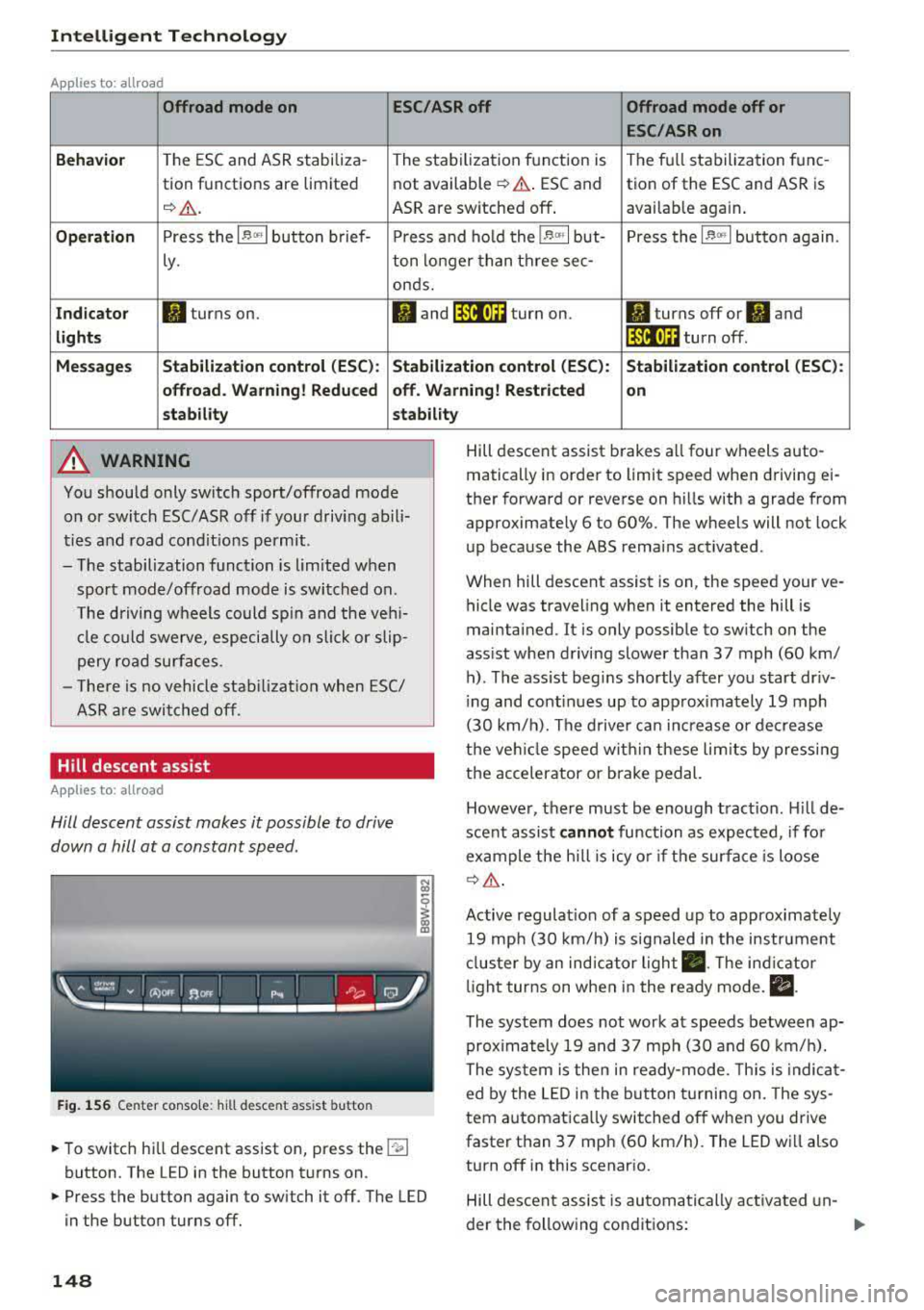
Applies to: allroad
Offroad mode on
ESC/ASR off Offroad mode off or
ESC /ASR on
Beha vior
T he ESC and ASR stabiliza -The stabi lization f unction is The f ull stabilization tune -
tion functions are limited not available
¢ .&. . ESC and tion of the ESC and ASR is
¢ & . ASR are sw itched off . available aga in .
Operation Press the l~ m l button b rief- Press an d ho ld the l~ "'' I but- Press the l~ "" I button again .
ly. ton longer than three sec-
onds.
Indicator II turns on. Iii and lf'tii•)H turn on. II turns off or II and
light s li'tii•)H turn off .
Message s Stabilization cont
rol (ESC ): Stabiliza tion control (ESC ): Stabilization cont rol (ESC ):
offroad . Warning! Redu ced off . Warning! Restricted
on
s tability stability
A WARNING
You should only switch sport/offroad mode
on or switch ESC/ASR off if you r drivi ng abili
ties and road cond it ions permit .
- The stabilization function is lim ited w hen
sport mode/offroad mode is swi tched on.
T he driving w heels could sp in and the veh i
cl e could swerve, especi ally o n slick or slip
pery road sur faces.
- T here is no vehicle sta biliz at ion when ESC/
ASR a re swi tched off.
Hill descent assist
Applies to: allroad
Hill descent assist makes it possible to drive
down a hill at a constant speed.
F ig. 1 56 Center co nso le: hil l desce nt ass ist button
~ To switc h hill descent assist on, press the !"~I
button. The LED in the button t urns on.
~ Press the button again to switch it off. The LED
in the button turns off.
148
Hill descent assist brakes a ll four wheels auto
matically in order to limit speed when d riving ei
ther forward or reverse on hills with a grade from
approximately 6 to 60%. The wheels will not lock
u p because the ABS remains activated.
When hill descent assist is on, the speed your ve
hicle was traveling when it entered the hill is
maintained. It is only possib le to sw itch on the
ass ist when driving slower tha n 37 mph (60 km/
h) . The ass ist beg ins shortly af ter you start dr iv
i ng and cont inues up to app roxima tely 19 mph
(30 km/h). The d rive r ca n in crease o r de crease
t h e ve hicle spee d wit hin these lim its by press ing
t h e accelerator or brake pedal.
However, there must be enough t ract ion . Hill de
sce nt assist
cannot function as e xpec ted, if fo r
ex ample the h ill is icy o r if t he surface is loose
¢ &.
Active regulat io n of a speed up to approximate ly
19 mp h (30 km/h) is s ignaled in the instr ument
cl us ter by an ind ic a tor light
• . The in dica tor
li gh t tur ns on when i n the ready mode.
II.
The system does not work at speeds between ap
prox imately 19 and 37 mph (30 and 60 km/ h).
The system is the n in ready-mode. This is indica t
ed by the L ED in the b utton t urnin g on. The sys
tem a utomatica lly switched o ff when you drive
faster than 37 mph (60 km/h). The LED w ill also
turn off in this scenar io.
Hill descen t assis t is au tomatically ac tiva ted un-
der the fo llowing cond itions:
.,.
Page 151 of 403
a co .... N ..... N .... 0 0
3 co
-the LED in the button turns on
-the vehicle speed is lower than 19 mph (30 km/
h)
-the h ill angle is at least app rox imately 6%
_& WARNING
-Always adapt yo ur speed to the weather,
road and traffic conditions. Do not let the
increased safety provided tempt you into
tak ing risks, because this increases the risk
of an accident.
-
-T he hill descent assist system cannot over
come the laws of physics. Your driving style
must a lways be adapted to the current road
and traffic conditions.
- Hill descent assist may not be able to hold your vehicle at a constant speed under a ll
condit ions while driving on a hill (for exam
ple if ground under the veh icle is loose) .
Brakes
New brake p ads
New brake pads do not ach ieve the ir full braking
effect during the first 250 mi (400 km). They
must be "broken
in" first. However, you can com
pensate for the slightly reduced brak ing fo rce by
p ressing firmly o n the brake pedal. Avoid heavy
b raking during t he b reak-in per iod.
Wear
B rake pad
wear depends largely on the way the
veh icle is driven a nd on operat ing cond itions.
This is especia lly true if you are d riving frequently
in t he c ity and on c urves or wi th a sporty driving
style.
Operating noise
Noises may occur when braking depend ing on the
speed, braking force and outs ide cond itions such
as temperature and humidity .
Wet conditions or road salt
In certain situations, for example after driving
through water, in heavy ra in or after washing
your car, the brak ing effect may be reduced due
to moisture or ice on the brake rotors and brake
Intellig ent Technology
pads. The brakes m ust be "dried" first with a few
carefu l brake app lications.
At higher speeds and w ith the win dshield wipe rs
tu rned on, the brake pads press agains t the b rake
roto rs fo r a short amount of time. This action,
which is not felt by the driver, happens at regu lar
i nterva ls and ensures a better reaction t ime for
the b rakes in wet weather.
T he brak ing effec t can a lso be reduced if yo u are
driving on salted roads and yo u do not app ly the
brakes for long per iods of t ime. The layer of sa lt
on the brake rotors and pads m ust be worn off
first whe n the brakes are applied.
Corrosion
Leaving the vehi cle parked for long periods o f
time, low mileage and avoiding heavy b raking
can contrib ute to corros ion on the brake rotors
and to dirty brake pads.
If you usu a lly avoid heavy bra king or if there is
corrosion present, occasiona l heavy braking at
high speeds is recommended to clean the brake
roto rs and
pads ¢~ -
Brake system malfunction
If you notice that the bra ke pedal trave l has sud
denly increased, then a brake circuit in the dua l
ci rcuit brake system may have malfunctioned.
Drive to an authorized Audi dealer or authorized
Audi Service Facility immed iate ly to have the
problem corrected. On the way there, drive w ith
reduced speed and keep in mind t hat you will
need a longer distance to stop and you will need
to press the bra ke ped al ha rder.
Low brake fluid level
When the bra ke fluid level is low, malfunctions in
the brake system may occur. The brake fluid level is elec tronically monitored.
Brake booster
The brake booster ampli fies the p ressure you ap-
ply to the brake pedal.
.,..
149
Page 152 of 403
Intelligent Technology
& WARNING
- Only apply the brakes for the purpose of
cleaning the brake system whe n road and
t raffic conditions perm it . You must not en
dange r othe r road users . This increases the
risk of an accide nt.
- Never let the vehicle roll while the e ng ine is
stopped because this increases the risk of a n
a cci den t.
([) Note
- Neve r let the brakes " rub" by pressing the
pedal lightly when braki ng is not actually
necessa ry . T his ca uses the bra kes to over
h ea t an d inc reases br akin g d istance an d
c a uses wear .
- B efo re driv ing downhill a long distance on a
steep hi ll, decre ase your spee d an d se lec t a
l ower gear . This makes use of t he engine
b raking effe ct and re lieves the brakes . If
you nee d to b rake additionally, b rake in in
tervals and not continuously .
(D Tips
- If the brake booste r is no t working, yo u
must press the brake pedal with much more
fo rce than normal.
- If you retrofit you r vehicle with a front spoil
er, whee l covers o r similar items, ma ke sure
that the a ir flow to the front whee ls is not
i nte rr u pted. Othe rw ise the brake system
ca n become too hot.
Electromechanical
steering, Dynamic
steering
T h e electromechanical st eering supports the
driver's steering movements.
Power steering adapts electronically based on
the vehicle speed.
Indicator lights and messages
• St ee ring : malfunction! Plea se stop vehicle
150
If this indicato r light turns on and stays on and
this message appears, the power steering may
have failed.
Stop t he vehi cle in a sa fe location as soon as pos
s ible . Do
not contin ue driving . See an authorized
Audi dealer or authorized A udi Service Facility for
ass istance .
'I- ij Steering: malfun ction! You may continue
driving
I f the indicato r light turns on and the message
a ppears, the steeri ng wheel may be more d iffi
cu lt to move o r more sensitive than usu al. The
stee ring wheel may also be at a n ang le when
driving straight.
D rive slowly to an auth o rized Audi dea ler or au
thorized Aud i Serv ice Facili ty to have t he mal
f unct io n corre cted .
t$Jj Dynamic steering: correcting steering wheel
position
If the indicator light turns on and this message
appears , the dynamic steering * is re in it ia liz ing .
The s teer ing whee l will be easy to move afte r
st ar ting t he engine . Reinitializa tio n might be
ne cessary if the stee ring w heel was moved while
t h e engine was switched off. The disp lay t urns
off if the initialization was successfu l.
(D Tips
- If the . or krfl i ndi cato r ligh t only s tays on
f or a sho rt time, you may cont inue driving .
- Th e dynamic stee ring s tabili ty sys tem s
¢ page 14 6 are not av ailabl e in the event of
a system malfunction .
- For add ition al informa tion o n dynamic
s teering, see
¢ page 133.
ALL-wheel drive (quattro)
App lies to: vehicles wi th all wheel drive
General information
In all whee l dr ive, the dr iv ing power is dis trib ut-
ed between all fo ur whee ls when needed. This
happens automatically depending on your driving
behavior as we ll as the c urrent road conditions.
.,_
Page 337 of 403

Wheel s
® Mud and snow capability
"M/5" or "M+S" indicates the tire
is sui table for driving on mud and
snow.
& indicates a winter tire.
@ Composition of the tire cord
and materials
The number of plies indicates the
number of rubberized fabric lay
ers in the t ire. In general: the
more layers, the more weight a
tire can carry . Tire manufacturers
must also specify the materials
used in the tire. These include
steel, nylon, po lyester and other
materials.
@ Maximum permitted load
This number indicates the maxi
mum load in kilograms and
pounds that the tire can carry .
@Uniform tire quality grade
standards for treadwear,
traction and temperature resist ance
Treadwear, traction and tempera
ture
ranges ¢ page 351.
@ Running direction
The arrows indicate the running
direction of unidirectional t ires .
You must always follow the speci
fied running direction
¢page 366 .
336
@ Maximum permitted
inflation pressure
This number indicates the maxi
mum pressure to which a tire can
be inflated under normal operat
ing condit ions.
Glossary of tire and loading
terminology
Acces sory we ight
means the combined weight (in
excess of those standard items
which may be replaced) of auto matic transmission, power steer
ing, power brakes, power win
dows, power seats, radio, and
heater, to the extent that these
items are available as factory-in
stalled equipment (whether in
stalled or not) .
Aspect ratio
means the ratio of the height to
the width of the tire in percent .
Numbers of 55 or lower indicate a
low sidewall for improved steer
ing response and better overall
handling on dry pavement.
Bead
means the part of the tire that is
made of steel wires, wrapped or
reinforced by ply cords and that is
shaped to fit the r im .
...
Page 339 of 403

Wheel s
Maximum (permissible)
inflation pressure
means the max imum cold infla
tion pressure to which a t ire may
be inflated . Also called "maxi
mum inflation pressure."
Normal occupant weight
means 150 lbs. (68 k ilograms)
times the number of occupants seated in the vehicle up to the to
tal seating capacity of your vehi
cle .
Occupant distribution
means distribution of occupants
in a vehicle.
Outer d iameter
means the overall diamete r of an
inflated new tire.
Overall width
means the linear distance be
tween the exteriors of the side
walls of an inflated tire , including
elevations due to labeling, deco rations, or protective bands or
ribs .
Ply
means a layer of rubber-coated
para llel cords.
338
Production options we ight
means the combined weight of
those installed regular product ion
options weighing over 5 lbs . (2 .3
kg) in excess of those standard
items which they replace, not pre
viously considered in curb weight or accessory weight , including
heavy duty brakes, ride levelers,
roof rack, heavy duty battery, and
special trim.
Radial ply ti re
means a pneumatic tire in which
the ply cords that extend to the beads are la id at substantially 90
degrees to the centerline of the
tread.
Recommended inflation
pressure
see ¢ page 33 7, Cold tire infla
tion pressure.
Reinforced tire
means a tire designed to operate
at higher loads and at higher in
flation pressures than the corre
sponding standard tire . Rein
forced tires may be identified as
"XL", "xl", "EXTRA LOAD", or "RF"
on the sidewall. ...
Page 349 of 403
Wheels
are listed on the safety compli
ance sticker on the driver's side B pillar respectively on the front
end of the driver's door.
& WARNING
-
Overloading a vehicle can cause
loss of vehicle control, a crash
or other accident, serious per
sonal injury, and even death.
-Carrying more weight than your vehicle was designed to carry will prevent the vehicle
from handling properly and increase the risk of the loss of
vehicle control.
-The brakes on a vehicle that
has been overloaded may not
be able to stop the vehicle
within a safe distance .
-Tires on a vehicle that has been overloaded can fail sud
denly, including a blowout and
sudden deflation, causing loss of control and a crash .
-Always make sure that the to tal load being transported -
including the weight of a trail
er hitch and the tongue
weight of a loaded trailer -
does not make the vehicle
heavier than the vehicle's
Gross Vehicle Weight Rating.
348
Determining correct load
limit
Use the example below to calcu
late the total weight of the pas
sengers and luggage or other
things that you plan to transport so that you can make sure that
your vehicle will not be overload
ed.
Steps for Determining Correct Load Limit
1. Locate the statement "THE
COMBINED WEIGHT OF OCCU
PANTS AND CARGO SHOULD
NEVER EXCEED XXX KG OR XXX
LBS" on your vehicle's placard
(tire inflation pressure label)
¢ page 344, fig. 277.
2. Determine the combined
weight of the driver and pas sengers that will be riding in
your vehicle.
3. Subtract the combined weight
of the driver and passengers
from
"XXX" kilograms or "XXX"
pounds shown on the stick
er ¢ page 344, fig. 2 77.
4. The resulting figure equals the
available amount of cargo and luggage load capacity . For ex
ample, if the "XXX" amount
equals 1400 lbs. and there will
.,.
Page 356 of 403

a co .... N ,....
N .... 0 0
3 co
wash operator to reduce the risk of accidents.
- To reduce the risk of cuts, protect yourself
from sharp metal components when wash
ing the underbody or the inside of the wheel
housings .
- After washing the vehicle, the brak ing effect
may be delayed due to mo isture on the
brake rotors or ice in the w inter . This in
creases the risk of an acc ident. The brakes
must be d ried fi rst w ith a few careful b rake
applications.
(D Note
- If you wash t he vehicle in an automatic car
wash, yo u m ust fold the exte rior m irrors in
to reduce the risk of damage to the mirrors.
Power folding exte rior m irrors* must on ly
be fo lded in a nd out using the power folding
fu nct ion.
- To reduce the risk of damage to the rims
and tires, compare the width between the
whee ls on your vehi cle w it h t he dis tan ce be
tween the g uide rai ls in the
car wash.
- To reduce t he risk of damage, compare the
height and width o f you r vehicle wi th the
Ca re and cleaning
height and w idth of the inside of the car
was h.
- T o red uce the risk of pa int damage, do not
was h the vehicle in d irect sun light .
- T o red uce the risk of d am age to the s urf ace,
do not use insect removing sponges, k itche n
sponges or similar items .
- Mat te finish painted veh icle components:
- To reduce the risk of damage to the sur-
face, do not use polishing agents or hard
wax .
- Never use protective wax. It can destroy
the matte finish effect .
- Do not place any stickers or magnetic
signs on vehicle parts painted with matte
finish paint . The paint cou ld be damaged
when the stickers or magne ts are re
moved .
@ For the sake of the environment
Only wash t he vehicle in facilities s pec ially de
s ign ed for that pu rpose . This will reduce the
r isk of dirty wate r contaminated with oil from
ente ring the sewe r sys tem.
Cleaning and care information
W hen cleani ng and ca ring for individua l vehicle
components, refer to the follow ing tables . The
i n formation contained there is simply recom
mendations. For quest ions or for components t
h at are not liste d, co n su lt an autho riz ed Au di
dealer or authorized A udi Se rvice Fac ility . Also
fo llow the information found
in ¢ .&. .
Exterior cleaning
Component Situation Solution
Windshield wiper
Deposits c:> page 61, Cleaning the wiper blades
blades
Headlights /
Deposi ts So
ft spo nge wi th a mild so ap sol ution3>
Tail light s
S ensors /
Deposits Sensors: soft cloth w it h solvent-free cleaning solut ion
Camera len ses Camera le nses: soft clot h w ith alcohol-free cleaning solu-
tion
Snow/ice H
and br ush/solvent-free de-icing spray
Wheels Road salt Water
Brake dust Acid-free special cleaning solution
355
Page 389 of 403
Index
Audi p re sense . . . . . . . . . . . . . . . . . . . . . . . 120
Messages . . . . . . . . . . . . . . . . . . . . . . . . . . 124
Sett ings . . . . . . . . . . . . . . . . . . . . . . . . . . . 124
Aud i Serv ice Repair Ma nuals and Literature 383
Aud i side assist . . . . . . . . . . . . . . . . . . . . . . . 128
Aud i smartphone interface . . . . . . . . . 246, 250
Aud i virt ua l cockp it
refer to Instr ume nt cl uster . . . . . . . . . . . . . 10
AUTO Automatic headlights . . . . . . . . . . . . . . . . . 54
Auto Lock (centra l locki ng system) . . . . . . . . 37
Automatic belt ret ractor . . . . . . . . . . . . . . . 266
Automatic climate control . . . . . . . . . . . . . . . 76
Aud i drive select. . . . . . . . . . . . . . . . . . . . . 134
Operation . . . . . . . . . . . . . . . . . . . . . . . . . . . 77
Automatic climate control system Setup . . . . . . . . . . . . . . . . . . . . . . . . . . . . . . 79
Automatic transm ission . . . . . . . . . . . . . . . . . 9 1
E me rgency prog ram . . . . . . . . . . . . . . . . . . 96
Hill descent contro l . . . . . . . . . . . . . . . . . . . 94
Kick -down . . . . . . . . . . . . . . . . . . . . . . . . . . . 95
Launch control program . . . . . . . . . . . . . . . 95
Manual sh ift ing . . . . . . . . . . . . . . . . . . . . . . 94
Parking lock emergency re lease . . . . . . . . . 97
Selector lever pos itions . . . . . . . . . . . . . . . . 91
Automatic wipe/wash system . . . . . . . . . . . . 60
Auto Safety Hotline . . . . . . . . . . . . . . . . . . . 26 1
AUTO (button) Automatic climate control . . . . . . . . . . . . . . 78
Auxiliary heater (automatic climate control) 79
AUX input . . . . . . . . . . . . . . . . . . . . . . . . . . . 234
Average consumption . . . . . . . . . . . . . . . . . . . 17
Ave rage spee d . . . . . . . . . . . . . . . . . . . . . . . . 17
B
BACK button . . . . . . . . . . . . . . . . . . . . . . . . . 155
Balance (sound) . . . . . . . . . . . . . . . . . . . . . . 252
Bass (sound) . . . . . . . . . . . . . . . . . . . . . . . . . 252
Ba tte ry
J u mp starting . . . . . . . . . . . . . . . . . . . . . . . 374
also refer to Veh icle bat tery . . . . . . . . . . . 33 1
Before driving . . . . . . . . . . . . . . . . . . . . . . . . 254
Belt tensione rs . . . . . . . . . . . . . . . . . . . . . . . 269
Blended gasoline . . . . . . . . . . . . . . . . . . . . . 315
Blower (automatic cl imate control) . . . . . . . . 78
388
B luetoot h
Audio player . . . . . . . . . . . . . . . . . . . . . . . . 230
Connect ing a cell phone . . . . . . . . . . . . . . 175
Settings . . . . . . . . . . . . . . . . . . . . . . . . . . . 2SO
Boost...... .. .. .. .. .. ............. ... 11
Booster seats . . . . . . . . . . . . . . . . . . . . . . . . 305
Boost pressure indicator . . . . . . . . . . . . . . . . 11
B rake fl uid
Check ing the b rake fluid level . . . . . . . . . . 330
Brakes . . . . . . . . . . . . . . . . . . . . . . . . . . . . . . 149
Brake ass ist . . . . . . . . . . . . . . . . . . . . . . . . 146
B rake fl uid . . . . . . . . . . . . . . . . . . . . . . . . . 330
El ec trome chanical parking b rake . . . . . . . . 88
E mergency b raking function . . . . . . . . . . . . 88
New brake pads . . . . . . . . . . . . . . . . . . . . . 149
Worn brake pads . . . . . . . . . . . . . . . . . . . . . 33
Breaking in New bra ke pads . . . . . . . . . . . . . . . . . . . . . 149
New engine . . . . . . . . . . . . . . . . . . . . . . . . . 80
New t ires . . . . . . . . . . . . . . . . . . . . . . . . . . 3 41
Browser
refer to M edia center . . . . . . . . . . . . . . . . . 237
Bu lbs ............................... 373
Buttons Cont ro l panel (M MI) . . . . . . . . . . . . . . . . . 155
Multifunctio n steering whee l . . . . . . . . 13, 16
P rogramming (multifunction steering
whee l) . . . . . . . . . . . . . . . . . . . . . . . . . . . . . . 15
C
Cable ( USB adapter/AUX connector cab le) 233
Californ ia Pr opos ition 65 Wa rning . . . . . . . 3 24
Battery specific . . . . . . . . . . . . . . . . . . . . . 331
Call list . . . . . . . . . . . . . . . . . . . . . . . . . . . . . 178
Call options . . . . . . . . . . . . . . . . . . . . . . . . . . 185
Capacities AdBl ue ... .. .. .. .. .. ... .......... .. 319
Fuel t ank . . . . . . . . . . . . . . . . . . . . . . . . . . . 381
Washer fluid reservoir . . . . . . . . . . . . . . . . 381
Care . . . . . . . . . . . . . . . . . . . . . . . . . . . . . . . . 354
Cargo area
refer to Loading the luggage compart-
ment .............................. 259
C atalytic converter . . . . . . . . . . . . . . . . . . . . 322
CD d rive (med ia d rives) . . . . . . . . . . . . . . . . 229