phone AUDI S4 2018 Workshop Manual
[x] Cancel search | Manufacturer: AUDI, Model Year: 2018, Model line: S4, Model: AUDI S4 2018Pages: 403, PDF Size: 66.81 MB
Page 235 of 403
Media
Audi music interface
Connect your mobile devices to the Audi music
interface in order to operate them through the
MMI and charge the battery.
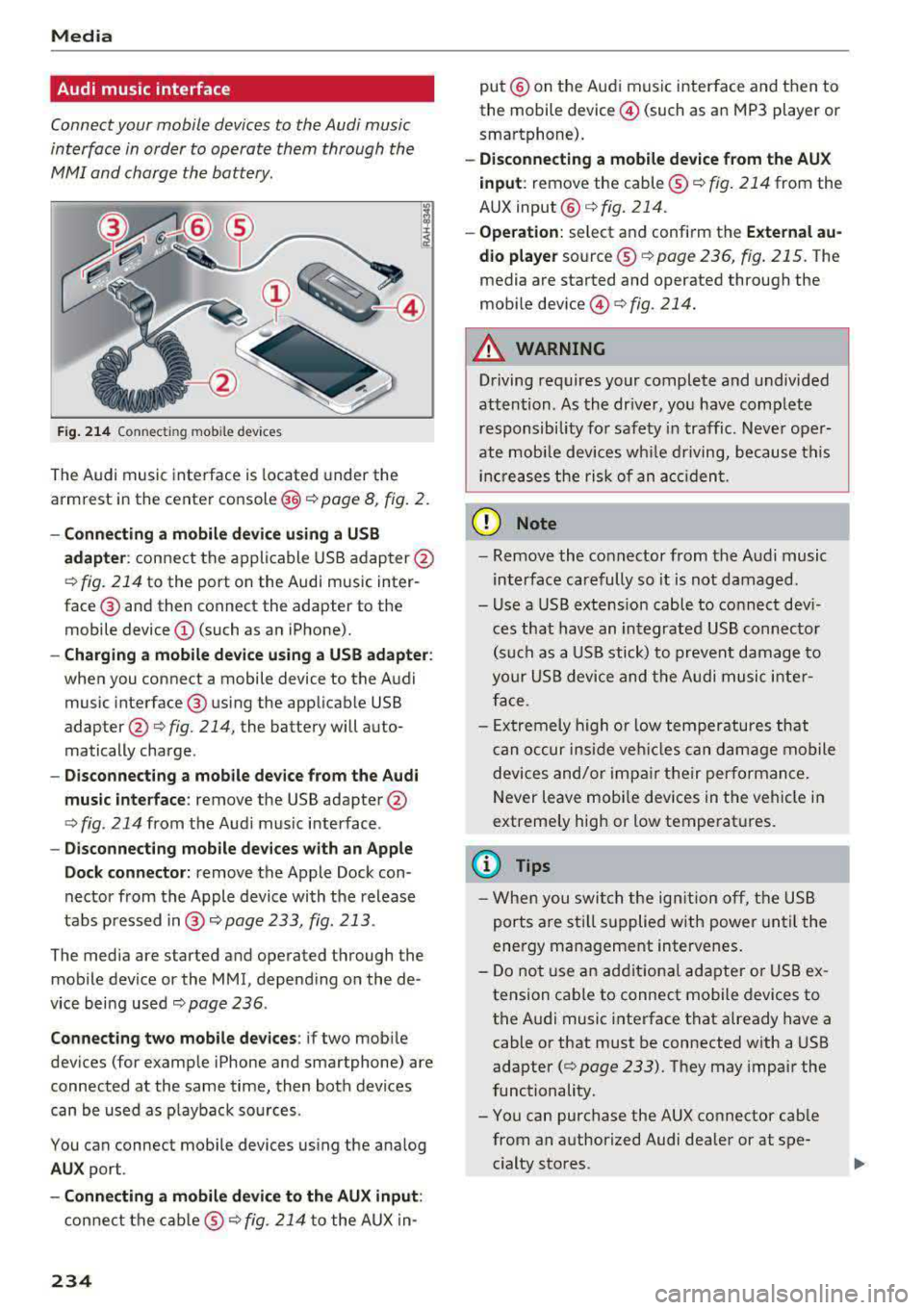
F ig . 214 Connec ting mob ile dev ices
The Audi music inte rface is located under the
armrest in the center
console @c::> page 8, fig. 2.
-Connecting a mobile device u sin g a U SB
a dapt er:
connect the applicable USB adap ter @
c::> fig. 214 to the port on the Audi music inter
face ® and then connect the adapter to the
mobile device @(such as an iPhone).
-Charging a mobile device u sing a USB adapter :
when you connect a mobile device to the Audi
music interface ® using the applicab le USB
adapter @
c::> fig. 214, the battery will auto
matically charge .
-Disconnec ting a mobil e dev ice from the Au di
music int erfac e:
remove the USB adapter@
<=> fig. 214 from the Audi music interface .
-Di sco nn ect ing mob ile d evices with an Apple
Do ck con nector:
remove the Apple Dock con
nector from the Apple device with the release
tabs pressed
i n @ c::> page 233, fig. 213 .
The media are started and operated through the
mobile device or the MMI, depending on the de
vice being used
c::> page 236 .
Connecting two m obile d evi ce s: if two mob ile
dev ices (for example iPhone and smartphone) are
connected at the same time, then both devices
can be used as p layback so urces .
You can connect mobile devices using the analog
AU X port .
-Conn ecting a mobile d evic e to th e AU X input :
connect the cab le ® c::> fig. 214 to the AUX in-
234
put @ on the Audi music interface and then to
the mobile device @(such as an MP3 player or
smartphone).
- Discon necti ng a mobile d evice from the AU X
i nput :
remove the cable ® c::> fig. 214 from the
AUX
input @c::> fig. 214.
-Ope ration: select and confirm the Extern al au
d io player
source ® c::> page 236, fig. 215 . The
media are started and operated through the
mobile
device @<=> fig. 214.
A WARNING
Driving requires your complete and undivided
attention . As the dr iver, you have complete
responsibility for safety in traffic . Neve r oper
ate mobi le devices wh ile driving, because this
inc reases the risk of an acc iden t.
(D Note
- Remove the connector from the A udi music
interface carefully so it is not damaged.
- Use a USB extens ion cable to connect dev i
ces that have an integrated USB connecto r
(s uch as a USB stick) to prevent damage to
your USB device and the A udi musi c inte r
face.
- Ex tremely high o r low temperatures that
c an occur inside veh icles can damage mobile
devices and/or impa ir their performan ce.
Never leave mobi le devices in the vehicle in
extremely high or low temperat ures.
(D Tips
- Whe n you swi tch the ign ition o ff, the USB
ports are sti ll supplied w ith power until the
energy management intervenes.
- Do not use an additiona l adapter o r USB ex
tension cab le to connect mobile devices to
the A udi music interface that already have a
cable or that must be connected with a USB
adapter
(c::> page 233). They may impair the
functionality.
- You can purchase the AUX connector cab le
from an authorized Audi dealer or at spe
cialty stores .
Page 236 of 403
a co .... N ,....
N .... 0 0
3 co
-Functionality is not guaranteed for mobile
devices that do not conform to the USB 2.0
specification.
-USB hubs are not supported.
-Some versions of the iPod such as the iPod
shuffle cannot be connected to the USB
adapter for devices with Apple Dock connec
tor. Connect these devices using a AUX con nector cable.
-Changed content on a mobile device l) that
is connected to the Audi music interface
may not be displayed in the media center.
In this case, reset the
Media settings back
to
Factory settings <=> page 249.
-Video playback through the Audi music in
terface is only supported if the connected
device is recognized as a USB storage device
(for example a USB stick). Apple devices and
MTP devices (such as smartphones) are not
recognized as USB storage devices.
-iPod/iPhone malfunctions also affect the
operation of the MMI. Reset your iPod/
iPhone if this happens.
-Audi recommends updating the iPod/iPhone
software to the latest version. For impor
tant information on operating your iPod/
iPhone, refer to the user guide for the de
vice.
-The USB adapter on the Audi music inter
face will support iPod touch/iPhone from
the Sth generation or later with the light
ning connector.
-For more information about the Audi music
interface and supported devices, check the
Audi database for mobile devices at
www.audiusa.com/mp3 or contact an au
thorized Audi dealer or authorized Audi
Service Facility.
1 > A pplies onl y to MTP devices. Does not app ly to App le dev i
ces and USB mass storage devices.
Media
Rear Seat Entertainment preparation
Applies to : vehicles wi th Rear Seat Enter ta inm ent preparat ion
The Rear Seat Entertainment preparation in
cludes cables and a mount for Audi Entertain
ment mobile in the driver's and front passenger's
seat backrests.
The suitable Audi Entertainment mobile Rear
Seat Entertainment package is available through
Audi Genuine Accessories.
Using Audi Genuine Accessories is recommended.
Audi has established their reliability, safety and
suitability.
We cannot evaluate or endorse other products in
t his way, even if the product is approved by acer
tified testing agency or government agency .
(D Note
Only use devices that are approved for the
Rear Seat Entertainment preparation. Unap
proved devices may cause damage to the vehi
cle electronics .
(D Tips
-Contact an authorized Audi dealer or au
thorized Audi Service Facility for additional
information about
Audi Entertainment mo
bile .
-Always read the chapter<=:> page 385.
-The Rear Seat Entertainment preparation is
not intended to charge external electronic
devices .
235
Page 237 of 403
Media
Playing media
Accessing media
You can start and operate various media
through the
MMI control panel.
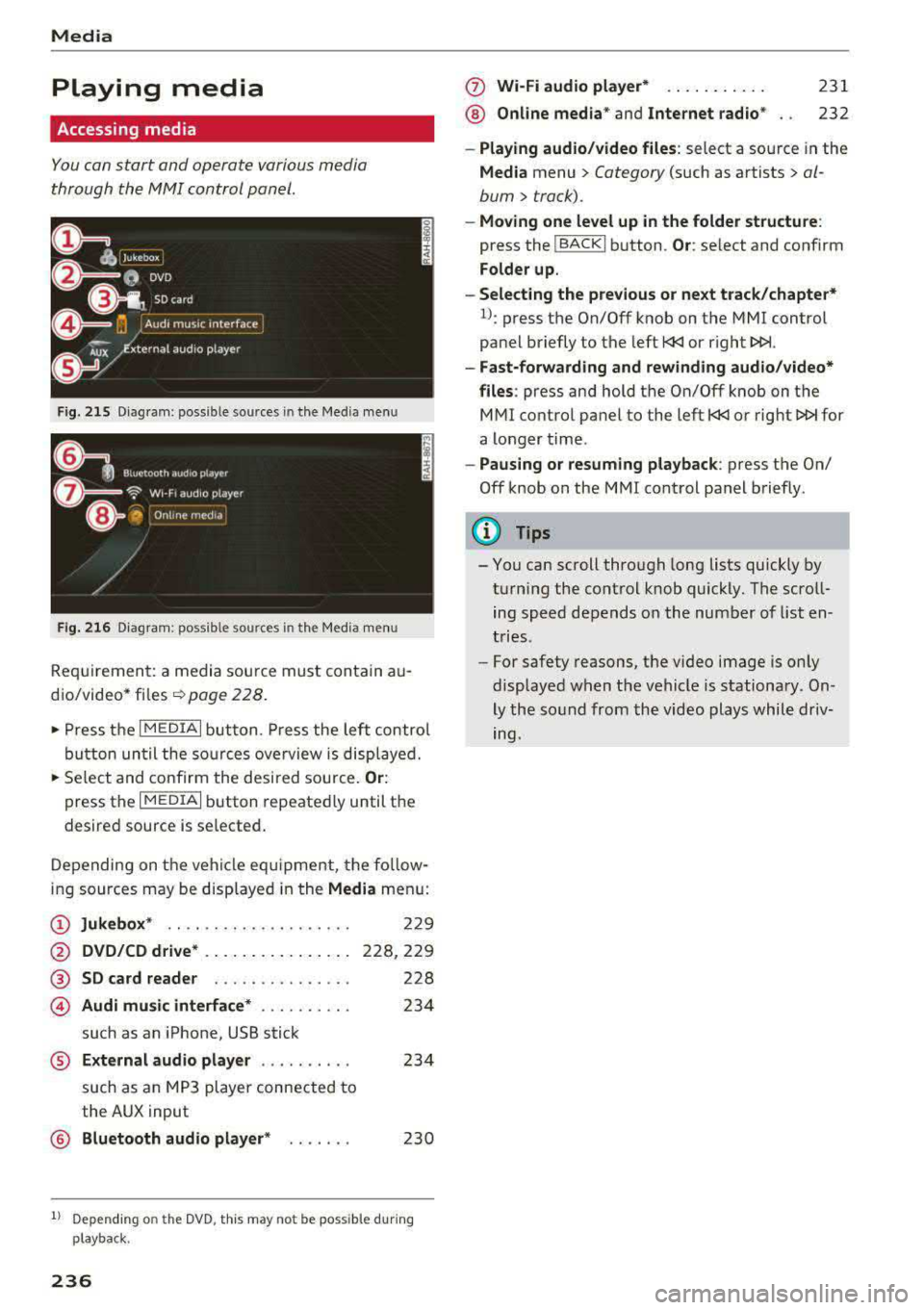
F ig . 215 D ia gr am : p oss ible sources in th e M ed ia m enu
F ig. 216 D iag ra m : possible sources in th e M edi a me nu
Re qu ir emen t: a media sou rce must contain a u
d io/video*
fi les -=> page 228.
• Press t he I M EDIAi bu tton. Press the left co ntro l
b utton until the so urces ove rview is disp layed.
• Se lect and confirm the desi red sou rce. Or :
press th e I M ED IAi b utton repeate dly until the
desired source is selected .
D epending on the ve hicle eq uipme nt, t he fo llow
i ng sources may be disp laye d in the
Media men u:
(D Jukebox * .. .... ........ ..... .
@ DVD/CD drive * .. .. .. .... .. ... .
@ SD card reader ... ..... .. ... . .
© Audi music interface * .. ..... .. .
such as an iPhone, USB stick
229
228,2 29
228
23 4
® External audio player . . . . . . . . . . 234
such as an MP3 player connected to
the AUX input
@ Bluetooth aud io player * . . . . . . . 230
1l Depe ndin g on the DVD , thi s may not be possible du rin g
p laybac k.
236
(f) Wi-Fi audio player* ... .. . .... .
® Online media* and Internet radio *
231
232
-Playing audio /video files : select a source in the
Media menu > Category (such as artists > al
bum
> track).
- Moving one level up in the folder structure :
press the !BACKI b utton . Or: select and confirm
Folder up.
-Selecting the previous or next track/chapter*
1l: press the On/Off knob on the MMI control
pa nel briefly to the left
l
-Fast-forwarding and rewinding audio /video*
files :
press and hold th e On/Off knob on the
M Ml control panel to the left
l
a longer time .
-Pausing or resuming playback : press th e On/
Off knob on the MMI cont rol panel b riefly.
(D Tips
- Yo u can scroll through long lists quickly by
t u rning the control knob quickly. T he scro ll
ing speed depends o n the num ber of list en
t ries.
- For safety reas ons, the video image is only
display ed w hen t he vehicl e is stationa ry . On
ly the so und from the vid eo plays whil e driv
ing.
Page 238 of 403
Media center
Various categories for selecting audio/video*
files are available in the media center .
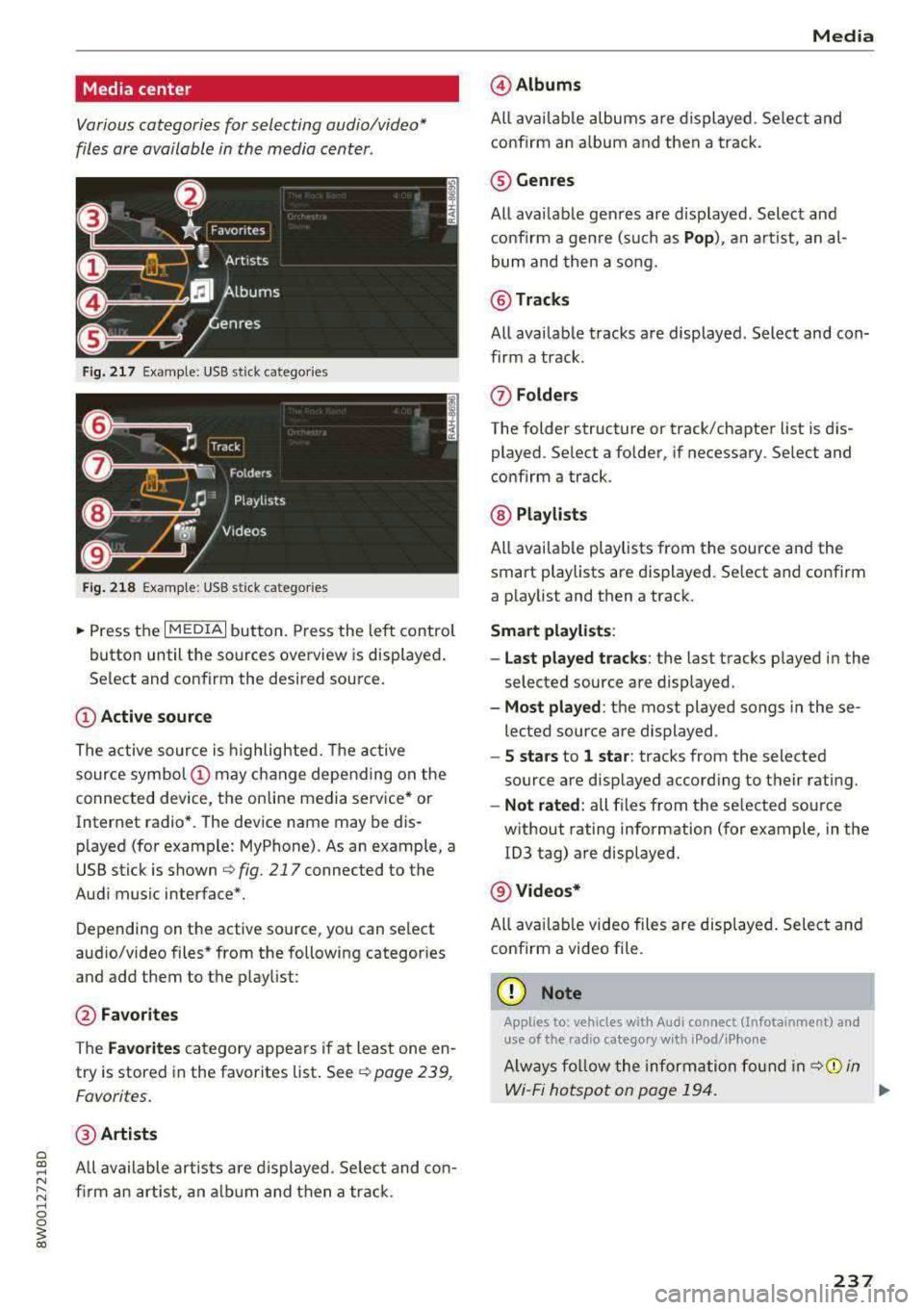
Fig. 217 Example: USB stick catego ries
Fig . 218 Examp le: USB s tick categories
~ Press the I MEDIAi button. Press the left control
button until the sources overview is displayed .
Se lect and confirm the desired source.
(!) Active source
The active source is highlighted. The active
source
symbol @ may change depending on the
connected device, t he online media service* or
Internet radio*. The device name may be dis
p layed (for example: MyPhone) . As an example, a
USB stick is shown
r::;, fig. 217 connected to the
Audi music interface*.
Depend ing on the active source, you can select
aud io/video files* from the following categor ies
and add them to the p laylist :
@Favorites
The Favorites category appears if at least one en
try is stored in the favorites list .
Seer::;, page 239,
Favorites.
@ Artists
All available artists a re displayed . Se lect and con
firm an artist , an album and then a track .
Media
@Albums
All available albums are displayed . Select and
confirm an album and then a track .
® Genres
All availab le genres are displayed . Select and
confirm a genre (such as
Pop), an artist, an al
bum and then a song.
@ Tracks
All available tracks are displayed . Select and con
firm a track.
0 Folders
The folder structure or track/chapter list is dis
played . Select a folder, if necessary . Select and
confirm a track .
® Playlists
All available playlists from the source and the
smart playlists are displayed. Se lect and confirm
a playlist and then a track.
Smart playlists :
- Last played tracks :
the last tracks played in the
selec ted source are displayed .
-Most played : the most played songs in these
lected source are displayed .
-5 stars to 1 star: tracks from the selected
source are displayed according to their rating.
- Not rated: all files from the selected source
without rating information (for example , in the
103 tag) are displayed.
@ Videos*
All ava ilab le video files are displayed . Select and
confirm a video file.
(D Note
Applies to: vehicles with Aud i connect (Infotainment) and
use of the radio category w ith iPod/iPhone
Always follow the information foun d in ¢Ci) in
Wi-Fi hotspot on page 194.
..,_
237
Page 239 of 403
Media
@ Tips
-Only the categories supported by the medi
um are available. For example, CD/DVD
ROM tracks cannot be selected with catego
ries such as
Ar tists, A lbum s or Ge nre s.
With an iPod/iPhone (so urce : Audi music in
terface <=>
page 233), the Podca st s, A udio
boo ks
and Compo ser s categories are also
available.
- For safety reasons, the video image is only
displayed when the vehicle is stationary. On
l y the sound from the v ideo p lays while d riv
ing .
-When synchronizing a po rtable device with
"Cloud " se rvices, p lay lists may display in co r
rectly in the MM I. Use the media center in
the device .
- With an iPod/iPhone (med ia source: Audi
music interface
<=> page 233), the Pod ca sts,
Audio bo oks
and C omp osers categories are
a lso available .
@ Tips
Applies to: iPod/iPhone on Audi music interface
- An Internet connection is requ ired to use
the add it ional
Radio category, an online
media serv ice. Also see the chapter
c:> page 194, Wi -Fi hotspot . Also read the in
formation on the Aud i mus ic interface and
the supported devices
c:> page 233.
- Depending on the Internet connection and
network traff ic, a connection loss can occur
d uring p layback o f on line media serv ices.
- The use of online media se rvices depends on
the service ava ilability of the third party
provide r.
- Audi AG simply makes the access to online
media serv ices possible through the MM I
and does not take any respo nsibility for the
contents of the on line med ia services .
238
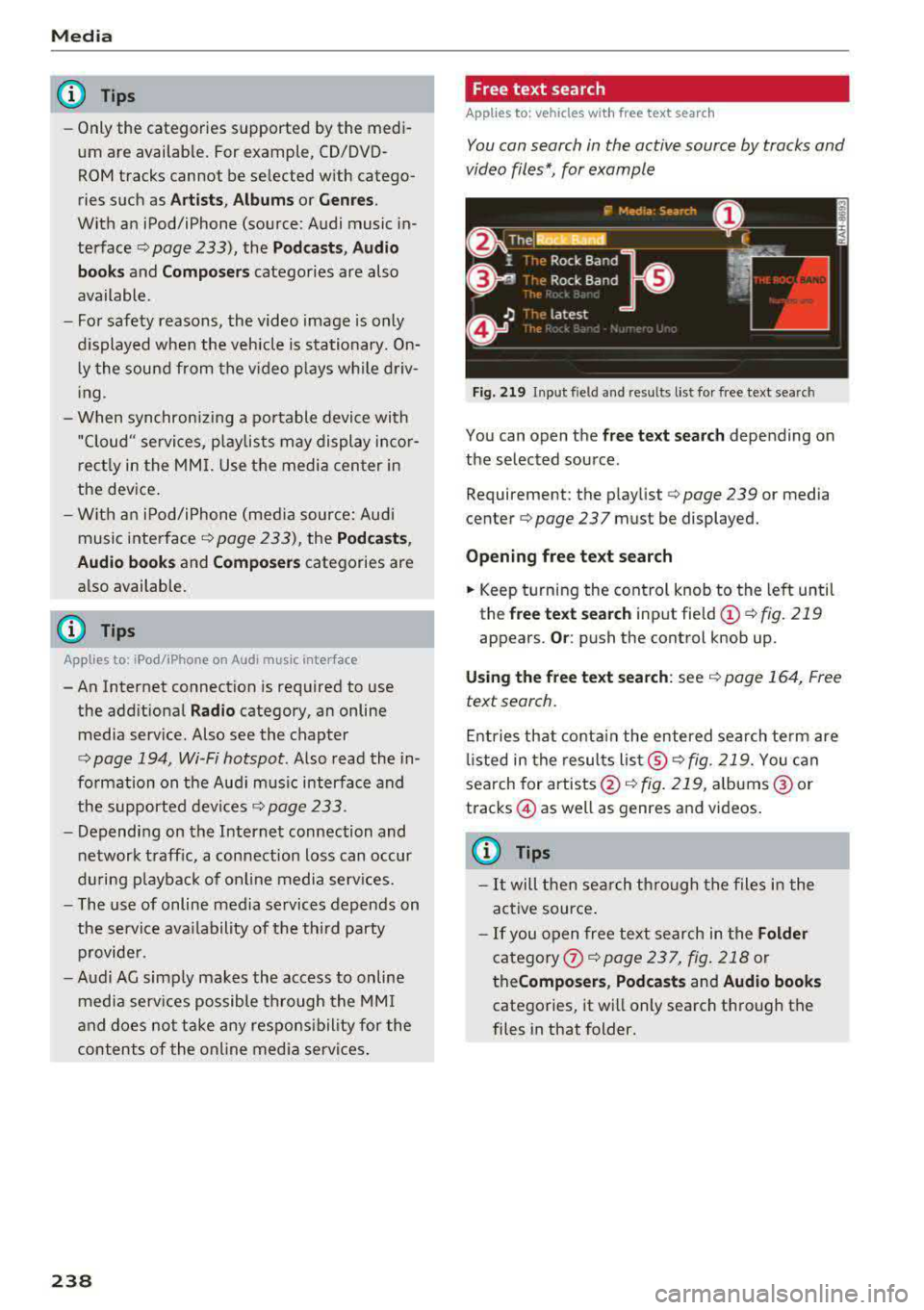
Free text search
Applies to: vehicles with free text search
You can search in the active sour ce by tracks and
video files*, for example
Fig. 219 Inp ut field and res ults list fo r fr ee text se arch
You can open the free te xt sea rch depending on
the selected source .
Requ irement: the p laylist
c:> page 239 or med ia
cen ter
c:> page 237 must be d isplayed.
Openin g free te xt s ear ch
.. Keep turning the cont rol knob to the left until
th e
free text searc h input field @c:>fig. 219
appears . Or: push the control knob up .
Usi ng the free text sea rch : see c:> page 164, Free
text search .
Entries that conta in the entered search te rm are
li sted in the results
lis t@ c:> fig . 219. You can
search for
artists @<=> fig. 219, albums @or
t racks @as w ell as g enres and vid eos .
(0 Tips
-It will then search through the files in the
active source .
- If you open free text search in the
Folder
category
the Compo ser s, Podca sts and Audio book s
categories, it will only search through the
files in that folder.
Page 241 of 403
Media
Change pl aying po sition
Tu rn the control knob to the left o r to the right .
Or: move your finger across the MMI to uch con
trol pad* from left to r ight .
Shuffle1
)
W ith the funct io n sw itched on~ . all files in the
p laylist a re played and show n in random orde r.
Repeat t rack1
l
When the function is switched on~ . the current
track repeats.
Repe at*
Req uirement: an iPod/ iPhone* must be selected
as the media source in the Aud i mu sic interface
¢ page 236, Accessing media.
- Trac k: th e current track will be rep eat ed .
- Folder : the tracks in the current folder are re -
peated contin uously in a loop.
- Off : the f un ct ion is swi tched off .
Back to 'Pla yback'
The options men u is closed. The track currently
p laying appears in the playlist .
Play similar music*
The track currently p lay ing is qu ic kly analy zed
(such as art ists, gen res, mood, beat) and a smart
playlist with s imilar tracks is shown .
Play mo re ...
A smart playlist is show n based on th e track cur
r ently p laying. You c an se lect between a playlist
with more tracks
b y this a rti st, from thi s album
or of this g en re .
Copy to ju keb ox*
See ¢ pag e 229, Adding files to the Jukebox.
Set a s ringtone*2
)
Requ irement: a cell phone must be connected to
the MMI. The track currently playing m ust be in
the Jukebo x*
¢ page 229 .
l) The fun ctio n auto matic ally sw itche s off when th e sour ce
is changed .
2> This fun ction is not a vai lable for all cell phon es.
240 The selected track will be
used as the ringtone
for incoming calls .
Gracenote online databa se *
Requirement: the MMI must be connected to t he
Interne t.
Depend ing on availab ility, var ious information
will load about the track current ly playing when
t hi s function is switc hed
on~-
Favori te s
See¢ page 239.
Addition al opt ion s
Requirement: the vehicle m ust be stationary and
a video fi le* or a DVD* must be playing .
Parental control*
Playback of video DVDs can be restr icted using
parenta l cont rol.
Ente r the passwo rd for parental control. Pass
word set at the factory: 1234. You have the fol
l owing opt ions:
- Prot ection lev el: select and confirm the protec
tion level (for example, Level S) . Eight different
content rat ing levels can be set for parental
cont rol.
If you se t the paren tal control level at
Level 5, all DVDs from level 1-5 c an be pl ayed.
Video DVDs with a higher level will not play . Se
lect
No re striction to remove all of the restr ic
tions .
-Change password : edit the c urrent password .
Switch to full screen
The video image is displayed. Tu rn the contro l
k nob to d isplay the playlist.
Or : press the I BAC KI
button.
Replay v ideo l)
When this function is switched on~' the current
video will replay .
.,._
Page 245 of 403
Media
Problem Solution
Audi music inte rface :
the porta- For many ce ll phones or mobile devices, playback is not possible
ble device is not recognized as a when the battery level is too low (less than 5% of its capacity).
source. The mobile device will only be recognized as a source in the MMI
after connecting if the battery charge is sufficient .
Audi music interface: malfunc-The Bluetooth audio player function is switched on. Switch this
tions during audio playback function
off¢ page 250 when you are not using the Bluetooth
through an iPod/ iPhone. audio player.
Audi music interface:
contents Reset the Media settings to the factory default settings
that are changed on a mobile de-
¢page 249.
vice connected to the Audi music
interface
al are not disp layed in
the media center.
AUX input: there is stat ic when When connecting and disconnecting, the External audio player
connecting and disconnecti ng the source is already selected. Before connecting or disconnecting the
AUX connection cable. mobile device, either mute the device
(see¢ page 252) or sw itch
to a different audio sourc e (fo r
example ¢ page 222, Opening the
radio).
Bluetooth audio player* /Wi-Fi Only one interface should be act ively used at a time to ensure
audio player*: audio playback in- problem-free playback.
terference.
Jukebox*: tracks on the imported When importing playlists, all of the fi les themselves must be im-
playlist are grayed out. ported.
Jukebox*: imported tracks ca nnot If you cannot find imported tracks in the media center, they may
be played or found. not be supported. Only copy supported
files¢ page 242 to the
Jukebox.
Online media *: connection fa iled To establish a connection to the MMI, the MMI connection switch
between the MMI and the
Audi must be switched on in the Audi MMI connect app status sc reen.
MMI connect app.
Audi music interface: contents Reset the Media settings to the factory default settings
that are changed on a mob ile de-
¢page 249.
vice connected to the Audi music
interface are not displayed in the
med ia center .
Bluetooth audio player *: interfer- Playback interference can occur when using the Bluetooth audio
ence with track d isp lay and aud io player if a music player app from a third party provider is open.
playback. Audi recommends using the integrated media player on your Blue-
tooth device (such as a smartphone) .
244
Page 247 of 403
Audi smartph one inte rfac e
Audi smartphone
interface
Setup
App lies to: ve hicles w ith Audi smartpho ne in te rface
You can connect your smartphone to th e MMI us
ing the Audi smartphone int erfac e. Certain con
te nt on your smartph on e is ada pted to the Info
t ainment syste m display while driving and can
be operated through the
MMI control panel.
Requirement
The vehicle must be stat ionary and the ignition
must be switched on .
iPhone generation 5 or higher with Lightning
connector and iOS 7.1.2 operating system or h igher.
Or :
Sma rtphone with Android Auto app and Android
5 .0 Lo llipop operating system or h ighe r.
"' Connect your smar tphone to the Audi music in -
te rface <=?
page 234 using a USB adapter
r=;,page 233 , fig . 213 .
.. Select and confirm A cti va te Apple CarPla y or
Activate And roid Auto now .
.. Follow the system instruct ions.
"' Pay attention to any additional system prompts
on your smartphone if applicable .
If you chose not to use Apple CarPlay or Andro id
Auto when connect ing your sma rtphone for the
first time, you can start the Audi smartp hone in
terface later on using the
Connection manager .
.. Select: I MENU I button > Audi smartphone in-
terfa ce > Change to conne ction manager .
.. Connect your sma rtphone to the A udi music in
terface using a USB adapter
r=;, page 233,
fig . 213.
.. Se lect and confirm Audi smartphone in the
Conne ction man ager r=;, page 249 . You can se
lect your smartphone in the list of devices that
are already paired
r=;, page 250.
"' Fol low the system instruct ions .
{U) Note
Always follow the information found in r=;,(D in
Wi-Fi hotspot on page 194.
246
(D Tips
- The functions t hat can be used depend on
t h e fo llow ing factors, among others :
- the brand of your smartpho ne
- the vers io n of the ope rating system in
your smartphone
- the software version of the app used
- the USB adapter cab le and correct connec-
tion
- your cell phone se rvice provide r
- the customized settings on your smart -
phone
- One o f the factors above or a combina tion
of any of them could cause your smartphone
to be incompatib le wit h the Audi smart
phone interface. Compatibility cannot be
guaranteed for all types of smartphones.
For more informat ion and assistance, refer
to the user guide and the manufactu rer of
you r smartphone .
- If the connected smartphone has voice con
t rol, you can ope ra t e you r smartpho ne usi ng
the externa l voice recognition system
r=;, page 173.
- The menu language shown in the MMI is
based on t he sett ing s in you r smartpho ne.
- Th e time d isp layed in the M MI is based on
t h e settings in yo ur smartp hone .
- Severa l MMI funct ions a re not availab le
when Apple Car Play o r Andro id Auto is ac
t ive.
- Yo u cannot connect any mobi le devices via
B lu etoo th when an App le Car Play connec
ti on is a ct ive .
Operating
App lies to: vehicles with A ud i smartp hone interface
Opening a menu
App le CarP lay:
you can go back to t he Apple Car
Play main menu regardless of the selec ted menu
i tem by p ressing and holdi ng the
!BACKI b utton .
Android Auto : to go back to the Andro id Auto
menu bar, pus h the co ntrol knob down.
Page 248 of 403
a co .... N ,....
N .... 0 0
3 co
Audi smartphone interface
Opening a menu item
Select and confi rm a menu item using the MMI
control panel.
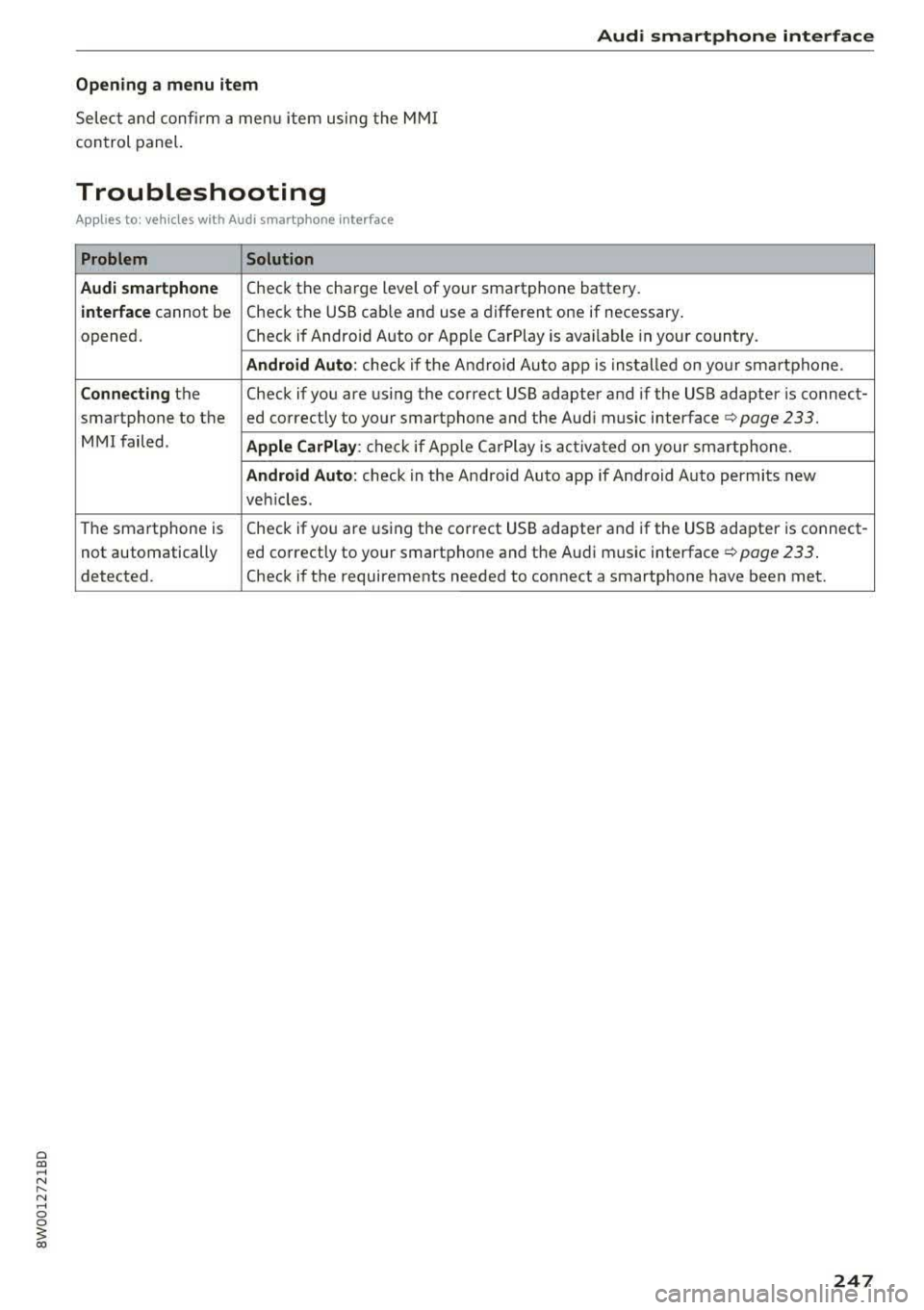
Troubleshooting
Applies to: vehicles with Audi smartphone interface
Problem Solution
Audi smartphone
Check the charge level of your smartphone battery.
interface cannot be Check the USB cable and use a different one if necessary.
opened. Check if Android Auto or Apple CarPlay is available in your country.
Android Auto : check if the Android Auto app is installed on your smartphone.
Connecting the Check if you are using the correct USB adapter and if the USB adapter is connect-
smartphone to the ed correctly to your smartphone and the Audi music interface
q page 233.
MMI failed . Apple CarPlay: check if AppLe Ca rPlay is activated on your smartphone.
Android Auto: check in the Android Auto app if Android Auto permits new
veh icles .
The smartphone is Check if you are using the correct USB adapter and if the USB adapter is connect-
not automatically ed correctly to your smartphone and the Audi music interface ¢
page 233.
detected. Check if the requirements needed to connect a smartphone have been met.
247
Page 250 of 403
wait for the signal tone (beep) to say a new
command.
Volum e: you can adjust t he volume of the
prompts by turning the control knob.
Indi vidual sp eech training (only when the vehi
cle is stationary): yo u can adapt the vo ice recog
ni tion system to yo ur vo ice or pronunc iation in
order to improve the system 's ability to recognize
your speech . Individua l train ing is comprised of
20 speech entries that consist of commands and
sequences of numbers. Yo u can delete the pro
grammed voice training w ith the
Reset indi vidu
al speech training
function.
Display brightnes s
You can adjust the brightness of the Infotain
m ent system disp lay by turning the control knob.
Factory s ettings
The fo llow ing funct ions can be reset to the facto
r y default settings :
-Sound setting s
- Rad io
- Media sett ings
- Jukebo x*
- Directory
-Tel ephone
- Bluetooth and Wi -Fi *
- Nav igat ion sett ings *
- Nav iga tion and onlin e mem ory *
- Voice recognition s ystem *
- Shortcut ke ys
- Me ssage se ttings *
-A pps*
- Tool tips
- Aud i conn ect *
- Aud i smartphone in terface *
You can se lect the desired functions individually
or all at once with the option
S ele ct all ent rie s.
Select and confirm Res tore factor y settings .
(D Tips
~ Make sure that not only the settings were de-....
~ leted but also the stored data, if applicable.
N .... 0 0
3
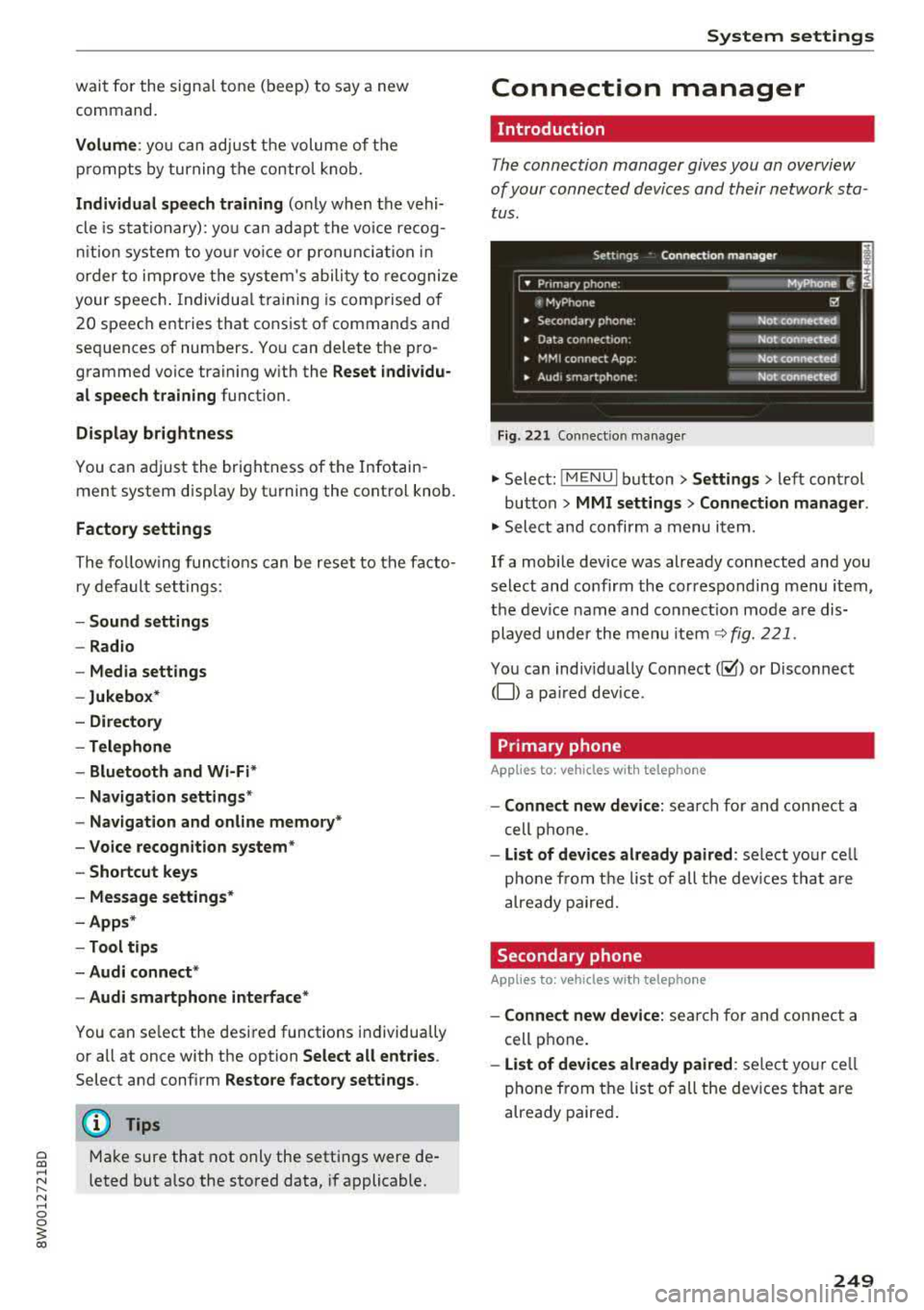
Connection manager
Introduction
The connection manager gives you an overview
of your connected devices and their network sta
tus .
Settings Connection mana ger I
====-... · • Prima hone: MyPhone ..
c M yPhone
• Secondary phone :
" Data connection:
• MM I connect App :
• Audi smartphone:
Fig. 221 Co nnect io n manager
@
Not connected
Not connected
Not connected
Not
connect"d
.,. Select: ! M EN UI button> Settings > left control
button >
MMI setting s> Connection manager .
.,. Select and confirm a menu item.
If a mobile device was already connected and you
select and confirm the corresponding menu item,
the device name and connect ion mode a re dis
played under the menu item
~ fig. 221.
You can indiv idually Connect(~ or Disconnect
(0) a pa ired dev ice .
Primary phone
Applies to : veh icles w ith telep hone
- Connect new de vice : search for and connect a
cell phone.
- List of d evic es alre ady pai red : select you r cell
phone from the list of all the dev ices that a re
already paired.
Secondary phone
Appl ies to: veh icles w ith telep hone
- Connect new device: sea rch fo r and connect a
cell phone .
-List of devi ces alre ad y paired : select yo ur ce ll
phone from the list of all the devices that a re
already paired .
249