start stop button AUDI S4 2019 User Guide
[x] Cancel search | Manufacturer: AUDI, Model Year: 2019, Model line: S4, Model: AUDI S4 2019Pages: 392, PDF Size: 99.53 MB
Page 91 of 392
8W0012721BG
Driving
>Toshiftupagear,tap theshiftpaddle@)
>fig.92.
>Toshiftdownagear,tapthe©)shiftpaddle.
>Toshiftintothelowestgear,holdthe©shift
paddle.
>Ifyoudonotpressashiftbuttonwithinashort
timewhileinthe"D/S"position,thetransmis-
sionwillreturn toautomaticmode.Tokeep
shiftingusingtheshiftpaddles,movethese-
lectorlevertotherightoutofthe"D/S"posi-
tion.
>Whenyouwanttoshiftoutoftiptronicmode,
pressandholdtheG)shiftpaddleforalonger
periodoftimeormovetheselectorleverback
andreleaseit.
The
transmissionautomaticallyshiftsupordown
beforecriticalenginespeedisreached.
Thetransmissiononly allowsmanualshifting
whentheenginespeediswithinthepermitted
range.
G)Tips
—Ifyoushifttothenextlowestgear,the
transmissionwillonlyshiftiftheenginewill
notbeover-rewved.
—Withkick-down,thetransmissionshiftstoa
lowergear,dependingonvehiclespeedand
enginespeed.
—tiptronicdoesnotworkifthetransmission
isrunninginemergencymode.
Appliesto:vehicleswithautomatictransmission
Kick-downenablesmaximumacceleration.
Whenyoupresstheacceleratorpedaldownbe-
yondtheresistancepoint,theautomatictrans-
missiondownshiftsintoalower gearandtheen-
gineutilizesitsfullpower,ifthevehiclespeed
andengineRPMpermit.Itshiftsupintothenext
highergearoncethemaximumpermittedengine
RPMisreached.
Z\WARNING
Pleasenotethatthewheelscouldspinon
slickorslipperyroadswhenkick-downisac-
tive.
Launchcontrolprogram
Appliesto:vehicleswithS tronictransmission
Thelaunchcontrolprogramprovidesthebest
possibleaccelerationwhenstartingfromastop.
Requirement:theenginemustbeatoperating
temperatureandthesteeringwheelmustnotbe
turned.
>DeactivatetheStart/Stopsystem*>page81.
TheLEDinthe||buttonturnson.
>Appliesto:sedan:whentheengineisrunning,
pressthe|&OFF]buttonbriefly>page139.
Theindicatorlightturnsonandthemes-
sageStabilizationcontrol(ESC):sport.Warn-
ing!Restrictedstabilityappearsintheinstru-
mentclusterdisplay.
>Appliesto:allroad:whentheengineisrunning,
pressthe2OFF]buttonbriefly>page139.
TheEjindicatorlightturnsonandthemes-
sageStabilizationcontrol(ESC):offroad.
Warning!Reducedstabilityappearsinthein-
strumentclusterdisplay.
> Pulltheselectorleverback outofthe"D/S"po-
sitionbrieflytoselectthe"S"positionorselect
theDynamicdrivingmodeindrivese-
lect*>page127.
>Pressthebrakepedalfirmlywithyourleftfoot
andholditallthewaydownforatleastone
second.
>Atthesametime,pressthegaspedalallthe
waydownwithyourrightfootuntiltheengine
reachesandstaysatahighRPMlevel.
>Removeyourfootfromthebrake pedalwithin
fiveseconds>A\.
AWARNING
—Alwaysadaptyourdrivingtothetrafficflow.
—OnlyusetheLaunchcontrolprogramwhen
roadandtrafficconditionsallowitandother
driverswillnot beendangeredorbothered
byyourdrivingandthevehicle'saccelera-
tion.
—Pleasenotethatthedrivewheelscanspin
andthevehiclecanbreakawaywhensport
mode/offroadmodeisswitchedon,espe-
ciallywhentheroadisslippery.>
89
Page 92 of 392
![AUDI S4 2019 User Guide Driving
—Oncethevehiclehasstartedmoving,press
the|&OFF]buttonbrieflytoturnthesport
mode/offroadmodeoff.
@Tips
—After acceleratingusingtheLaunchControl,
thetemperatureofsomevehiclecompo-
nentsm](/img/6/57555/w960_57555-91.png "AUDI S4 2019 User Guide Driving
—Oncethevehiclehasstartedmoving,press
the|&OFF]buttonbrieflytoturnthesport
mode/offroadmodeoff.
@Tips
—After acceleratingusingtheLaunchControl,
thetemperatureofsomevehiclecompo-
nentsm")
Driving
—Oncethevehiclehasstartedmoving,press
the|&OFF]buttonbrieflytoturnthesport
mode/offroadmodeoff.
@Tips
—After acceleratingusingtheLaunchControl,
thetemperatureofsomevehiclecompo-
nentsmayincreasegreatly.Ifthathappens,
thefunctionwillnot beavailable forafew
minutestoreducetheriskofdamage.After
acool-downperiod,LaunchControlwillbe
availableagain.
—Whenacceleratingusingthelaunchcontrol
program,allvehicleparts aresubjectto
heavyloads.Thiscanlead toincreasedwear.
Messages
Appliesto:vehicleswithautomatictransmission
fs}Transmission:toohot.Pleasestopvehicle
Donotcontinuedriving.Selectthe"P"selector
leverpositionandcontactanauthorizedAudi
dealerorauthorizedAudiServiceFacilityforas-
sistance.
fs}Transmission:malfunction!Safelystopvehi-
cle
Donotcontinuedriving.Stopthevehicleassoon
aspossibleinasafe locationandsecureitsoit
doesnotroll.SeeanauthorizedAudidealeror
authorizedAudiServiceFacilityforassistance.
fs}Selectorlever:malfunction!Youcancontin-
uedriving.PleasecontactService
Thereisasystemmalfunctioninthetransmis-
sion.DrivetoanauthorizedAudidealeror au-
thorizedAudiServiceFacilityimmediatelytohave
themalfunctioncorrected.
fs}Pbutton:malfunction!AutoPwhenengine
off.PleasecontactService
Thereisamalfunctioninthe"P"buttononthe
selectorlever.Thetransmissionautomatically
engages"P"whenyouswitchofftheengine.
DrivetoanauthorizedAudidealerorauthorized
AudiServiceFacilityimmediatelytohavethe
malfunctioncorrected.
90
flSelectorlever:malfunction!Gearchangeon-
lypossibleusingbothpaddlelevers.Pleasecon-
tactService
Thereisasystemmalfunctioninthe transmis-
sion.Youcancontinuedrivingwithrestricted
function.Theselectorleverisnotworking.Gears
canonlybeselectedbytappingbothshiftpad-
dlesatthesametimewhenthevehicleisstation-
ary>page88,fig.92.Payattentiontothese-
lectedtransmissionpositionintheinstrument
clusterdisplay.Theparkinglockengagesauto-
maticallywhenyouturnofftheengine.Driveto
anauthorizedAudidealerorauthorizedAudi
ServiceFacilityimmediatelytohavethemalfunc-
tioncorrected.
iTransmission:pleasepressbrake pedaland
selectgearagain
Pressthebrakepedalandselectthedesiredse-
lectorleverpositionagain.Youcanthencontinue
driving.
flTransmission:toohot.Pleaseadaptdriving
style
Thetransmissiontemperaturehasincreasedsig-
nificantly.Driveverycautiouslyortakeabreak
fromdrivinguntilthetemperaturereturnstothe
normalrangeandtheindicatorlightturnsoff.
flTransmission:malfunction!Youcancontin-
uedriving.Seeowner'smanual
Thereisasystemmalfunctioninthe transmis-
sion.Youmaycontinuedriving.Drivetoanau-
thorizedAudidealerorauthorizedAudiService
Facilitysoontohavethe malfunctioncorrected.
iTransmission:malfunction!Youcancontin-
uedrivinginDuntilengineisoff
Thereisasystemmalfunctioninthe transmis-
sion.Thetransmissionisswitchingtoemergency
mode.Ifyouturntheengineoff,youwillnotbe
abletoselectanyotherselectorleverpositions
afterstartingtheengineagain.Drivetoanau-
thorizedAudidealerorauthorizedAudiService
Facilityimmediatelytohave the malfunctioncor-
rected.
Page 101 of 392
8W0012721BG
Assistsystems
Laptimer
Introduction
Appliesto:vehicleswithlaptimer
Youcanmeasureandanalyzelaptimeswiththe
laptimerinthedisplay.
Openingthelaptimer
>OpenthefirstVehicletab(tripcomputer)using
the[<>]buttononthemultifunctionsteering
wheel.
>Selectonthemultifunctionsteeringwheel:left
controlbutton>Laptimes.
Operatingthelaptimer
>Onthemultifunctionsteeringwheel,turnthe
leftthumbwheel(7)>page15untilthedesired
menuitemisdisplayedintheinstrumentclus-
ter.
>Presstheleftthumbwheeltoconfirmtheselec-
tion.
ZAWARNING
Yourfocusshouldalways beondrivingyour
vehiclesafely.Asthedriver,youhavecom-
pleteresponsibilityforsafetyintraffic.Only
use thefunctionssuchasthelaptimerinsuch
awaythatyoualwaysmaintaincompletecon-
troloveryourvehicleinalltrafficsituations.
@)Tips
Youcanretrieveinformationfromthetrip
computerwhilethelaptimerstopwatchis
running.
eymeatalLl)
Appliesto:vehicleswithlaptimer
Requirement:thelaptimermustbeopen
=>page99.
Timinglaps
>Tostarttimingmanually,selectStartlap 1in
themenu.
>Tostarttimingautomaticallyassoonasyoube-
gintodrive,selectDriveofftostartlap 1or
Startbydrivingoffinthemenu.
>Tomeasurethelaptime,selectNewlapinthe
menu.
Thisstartstimingthenextlapatthe
sametime.
Aftercompletingalap,thedifferencebetween
thelastlapandthepreviousbestlaptimewillbe
ainaynindicatedwitha“~”or“+”.
Pausingtiminganddisplayingasplittime
>ToinsertapauseiyselectPauseinthemenu.
>Toresumetiming,selectResumeinthemenu.
>Todisplayasplittime,selectSplittimeinthe
menu.Thesplittimeappearsforapproxi-
mately10secondsintheinstrumentcluster.
Thetimingofthecurrentlapcontinues.
Resettingtiming
>»Usingthemultifunctionsteeringwheel,select
Resettimesinthemenu.
@Tips
—Amaximumof99laptimescanbemeas-
ured.
—Iftimingispaused,youcancontinueitlater
evenifyouswitchtheignitionoff.
—Savedlaptimescannotbeindividuallyde-
letedfromthetotalresults.
—Thesavedlaptimervalueswillremainafter
switchingtheignitionoff.
Lapstatistics
Appliesto:vehicleswithlaptimer
Displayinglapstatistics
Youcandisplaythenumberoflapsdriven,the
fastestlap“+”,theslowestlap“—”,andtheaver-
agetime“®”intheinstrumentcluster.
un
>Onthemultifunctionsteeringwheel,selectthe
leftcontrolbutton>LapstatisticsorStatis-
tics.
>Turn thethumbwheeldownoruptodisplaythe
individuallaptimes.
>Toreturn tothelaptimingthatwasbegun,
presstheleftthumbwheel.
Resettinglapstatistics
>Onthemultifunctionsteeringwheel,select:
therightcontrolbutton>Resetstatistics.>
99
Page 110 of 392
Assistsystems
Safestartmonitor
Ifanobstacleisdetectedwhenyoustartdriving,
youwillbealerted tothedangerbytheBAindi-
catorlightandtheimageintheinstrumentclus-
terdisplay>fig.108>A\.Anaudiosignalwill
alsosound.Yourvehiclewilldrivemoreslowly
whenstarting.Thismayalsooccurinsomesitua-
tionswhenthereisno apparentobstacle.
—Pressthebrakepedaltoslowyourvehicle
down.
Z\WARNING
IfthemessageACC:automaticgo”appears,
yourvehiclewillstartdrivingevenifthereis
anobstaclebetweenyourvehicleandtheve-
hicledrivingahead.Thisincreasestheriskof
anaccident.
G@)Tips
—Forsafetyreasons,yourvehiclewillonly
starttodriveautomaticallyif:
—Thedriver'ssafetybeltisfastened
—Alldoorsandthehoodareclosed
—Yourvehicleisnotstoppedforalongperi-
odoftime
Interruptingcruisecontrol
Appliesto:vehicleswithAudiadaptivecruisecontrol
B4M-0233
Fig.109Selectorlever
Requirement:adaptivecruisecontrolmustbe
switched
on.
D_Thisisnotavailableinsomecountries.
2)Thisisnotavailableinsomecountriesand onsomeequip-
mentversions.
108
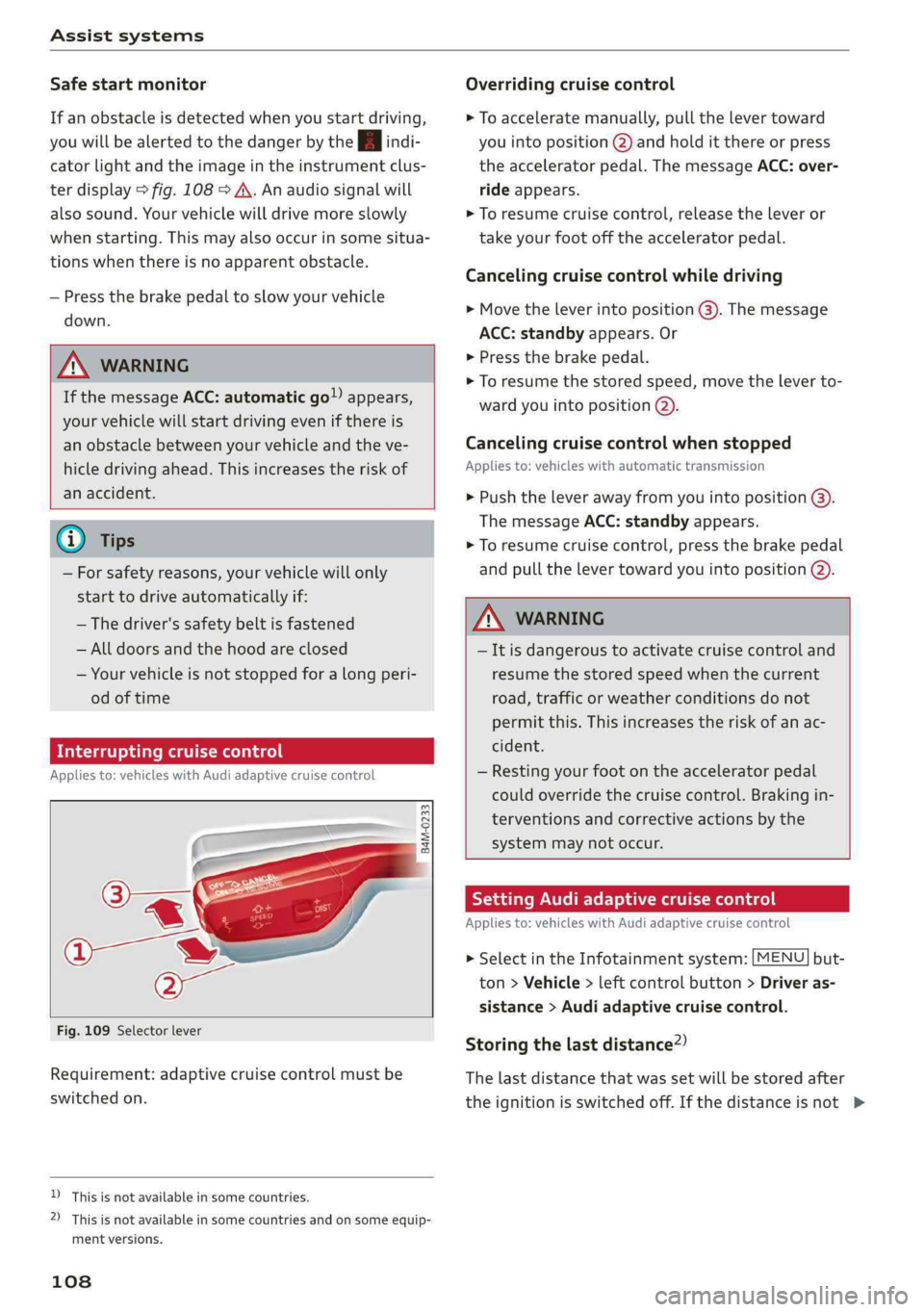
Overridingcruisecontrol
>Toacceleratemanually,pullthelevertoward
youintoposition@)andholditthereorpress
theacceleratorpedal.ThemessageACC:over-
rideappears.
>Toresumecruisecontrol,releasetheleveror
takeyourfootofftheacceleratorpedal.
Cancelingcruisecontrolwhiledriving
>Movetheleverintoposition@).Themessage
ACC:standbyappears.Or
>Pressthebrakepedal.
>Toresumethestoredspeed,movetheleverto-
wardyouintoposition@).
Cancelingcruisecontrolwhenstopped
Appliesto:vehicleswithautomatictransmission
>Pushtheleverawayfromyouintoposition@).
ThemessageACC:standbyappears.
>Toresumecruisecontrol,pressthebrakepedal
andpullthelevertowardyouintoposition@).
Z\WARNING
—Itisdangeroustoactivatecruisecontroland
resumethestoredspeedwhenthecurrent
road,trafficorweatherconditionsdonot
permitthis.Thisincreasestheriskofanac-
cident.
—Restingyourfootontheacceleratorpedal
couldoverridethecruisecontrol.Brakingin-
terventionsandcorrectiveactionsbythe
systemmaynotoccur.
SettingAudiadaptivecruisecontrol
Appliesto:vehicleswith Audiadaptivecruisecontrol
>SelectintheInfotainmentsystem:[MENU]but-
ton>Vehicle>leftcontrolbutton>Driveras-
sistance>Audiadaptivecruisecontrol.
Storingthelastdistance?)
Thelastdistancethatwassetwillbestoredafter
theignitionisswitchedoff.Ifthedistanceisnot>
Page 203 of 392
8W0012721BG
Navigation
—ThenselectandconfirmStartrouteguidance.
Additionaldirectoryfunctionsinthenavigation
systemcanbefoundunder>page206.
@)Tips
—Addressesthathavebeenimportedfrom
yourmobiledeviceintotheMMIcanalsobe
usedasadestination.
—If acontactisgrayed outinthedirectory,
thiscontacthasneitheradestinationnoran
addressassignedtoit.
elelm11a)
Appliesto:vehicleswithnavigationsystem
>Pressthe [NAV/MAP|buttonrepeatedlyuntil
the Enterdestinationmenuisdisplayed
=>page198,fig. 183.
>Select:leftcontrolbutton>POIs.
—Changingthesearcharea:selectandconfirm
Searcharea>asearchareafromthelist.
Thefollowingsearchcategoriesareavailable:
Nearby:pointsofinterestcanbeselectedfrom
differentcategories.Thepointsofinterestare
listedstartingfromtheimmediatevicinityofthe
vehicleuptoaradiusofapproximately124miles
(200km).
Alongtheroute:points ofinterestalongthe
routecanonlybeselectedduringactiveroute
guidance.Thepointsofinterestarelocateddi-
rectlyalongorintheimmediatevicinityofthe
calculatedroute.Thepointsofinterestcanlike-
wise beselectedfromvariouscategories.Forex-
ample,youcansearchforahotelorparkinglot
atthedestination.
Neardestination/Nearstopover:pointsofinter-
estnearadestinationorastopover canonlybe
selectedduringactiverouteguidance.Thepoints
ofinterestcanlikewisebeselectedfromvarious
categories.Forexample,youcan searchforaho-
telorparkinglotatthedestination.
In anewcity:selectacountry/stateorsearchin
anewcity.Enterthenameofthedesiredcity.
Points ofinterestcanbeselectedfromvarious
categories.Thisfunctionallowsyoutosearchfor
points ofinterestinanycityregardlessoftheac-
tiverouteguidanceorthevehicleposition.
—Searchingforapointofinterestnameinthe
selectedsearcharea:selectFindentry>Enter
pointofinterest.Enterthenameofthepoint
ofinterest.
—Searchingforapointofinterestinaspecific
category:selectSelectcategory.Selectand
confirmacategorysuchasRestaurants.
(i)Tips
—Distancestopointsofinterestaredisplayed
asastraight-linedistancefromyourcurrent
location.Theactualdistancefromyourcur-
rent locationtothepointofinterestisup-
datedautomatically.Thelistofpointsofin-
terestthatwerefoundisnotresortedwhen
thishappens.
—Theremaybeentriesinthelistthatcannot
bedisplayedcompletelyduetotheirlength.
Selectthecorrespondingentryfromthelist.
Select:rightcontrolbutton>Showdestina-
tiondetails.Detailedinformationforthese-
lectedentryinthelististhendisplayed.
pointofinterestsearch(online
Appliesto:vehicleswithanavigationsystem andAudicon-
nectInfotainment
You cansearchforpointsofinterestontheInter-
net.
Requirement:therequirementsforAudiconnect
Infotainmentmustbemet>page186.
>Pressthe [NAV/MAP]buttonrepeatedlyuntil
theEnterdestinationmenuisdisplayed
=>page198,fig.183.
>Select:leftcontrolbutton>Onlinesearch.The
searcharealastsetisdisplayedintheinput
field.
—Changingthesearcharea:select:rightcontrol
button>Selectsearcharea.
—Searchingforonlinedestinationsinthese-
lectedsearcharea:enteranewcity/stateif
necessary.Enterthesearchterm,suchashotel.
Pressthecontrolknob.Selectandconfirm an
onlinedestinationfromthelist.
201
Page 204 of 392
Navigation
—Searchingforonlinedestinationsinaspecific
category:selectandconfirmSelect category.
SelectandconfirmacategorysuchasRestau-
rants.
Findwhichsearchareasareavailableunder
=page201,Pointofinterestsearch.
Youcansearchforonlinedestinationsusingthe
voicerecognitionsystem>tableonpage167.
G)Tips
Alwaysreadthechapter>page186,Audi
connect.
AccessingdestinationsfrommyAudi
account
Appliesto:vehicleswithanavigationsystem andAudicon-
nectInfotainment
ImportindividualdestinationsfromyourmyAudi
accountintotheMMI.
Requirement:
TherequirementsforAudiconnectInfotainment
mustbemet>page186.
YoumusthavearegisteredmyAudiaccountat
www.audiusa.com/myaudi.Youmusthaveavehi-
cleassignedtoyourmyAudiaccountandyou
musthavestoredoneormoredestinations.
>Pressthe [NAV/MAP]buttonrepeatedlyuntil
theEnterdestinationmenuisdisplayed
=>page198,fig. 183.
>Select:leftcontrolbutton>myAudicontacts.
>Ifnecessary,enteryourmyAudiuserdataor
yourmyAudiPIN>page187.Thecontacts
storedinmyAudiaredisplayed.
—Selectandconfirmacontact.
—Selectandconfirmaprivateorbusinessdesti-
nation.
—SelectandconfirmStartrouteguidance.
@)Tips
—YouonlyneedtoenterthemyAudiuserdata
onetime.
—YoucanreceiveyourmyAudiPINifyouhave
setupamyAudiaccount.
202
—Foradditionalinformation,visitwww.
audiusa.com.
Enteringadestinationusinggeo
leey
Appliesto:vehicleswithnavigationsystem
>Pressthe [NAV/MAP]buttonrepeatedlyuntil
theEnterdestinationmenuisdisplayed
=>page198,fig.183.
>Select:leftcontrolbutton>Geographicalcoor-
dinates.
—SelectLatitude/Longitude.
—Pressthecontrolknobtosettheindividualval-
ues.
—Turn thecontrolknobtotheleft/rightto
change
theselectedvalue.
—SelectandconfirmStartrouteguidance.
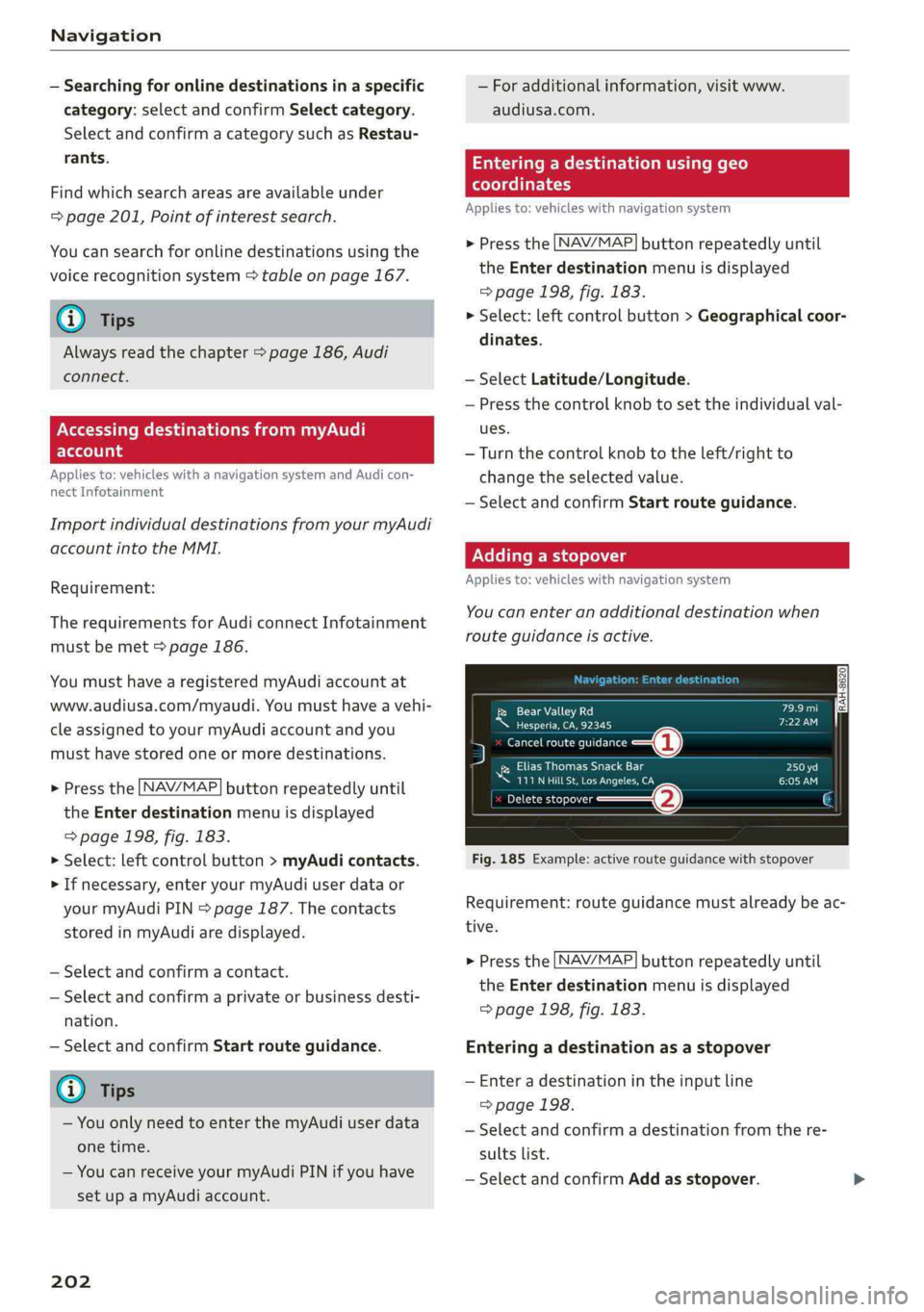
Addingastopover
Appliesto:vehicleswithnavigationsystem
You canenteranadditionaldestinationwhen
routeguidanceisactive.
[RAH-8620|DILCael
Neeueeres)
5Cancelrouteguidance—@
NiEliasThomasSnackBar
UUeterUreCome
Precis—@G
Fig.185Example:activerouteguidancewithstopover
Requirement:routeguidancemustalreadybeac-
tive.
>Pressthe [NAV/MAP]buttonrepeatedlyuntil
theEnterdestinationmenuisdisplayed
=>page198,fig.183.
Enteringadestinationas astopover
—Enteradestinationintheinputline
>page198.
—Selectandconfirmadestinationfromthere-
sultslist.
—SelectandconfirmAddasstopover.
Page 206 of 392
Navigation
Personalroute
assistance
Appliesto:vehicleswithnavigationsystemandpersonal
routeassistance
YourMMIcanlearntheroutesthatyoudrivefre-
quently(suchasyourdailycommutetoworkand
back)andsuggestrouteguidancebasedonthe
currentvehicleposition.
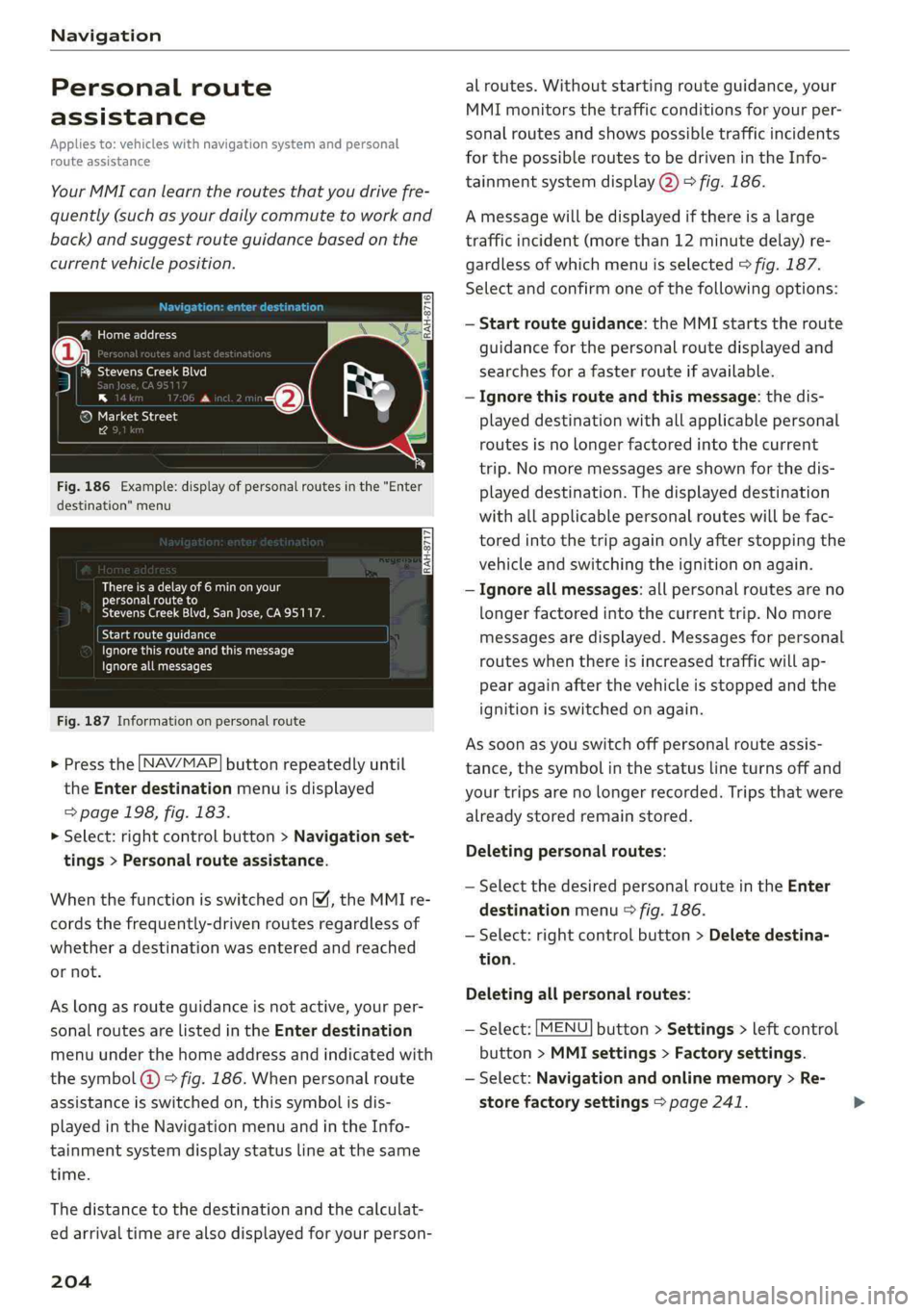
UnColnnt-e-lelelg-ey
5Siegal7)
®a
®MarketStreet
14
Fig.186Example:displayofpersonalroutesinthe"Enter
destination"menu
Thereisadelayof6minonyour
personalrouteto
StevensCreekBlvd,SanJose,CA95117.
yelamerella)
Pceuoersentkurtacorr
Ignoreallmessages
Fig.187Informationonpersonalroute
>Pressthe LNAV/MAP]buttonrepeatedlyuntil
the Enterdestinationmenuisdisplayed
=>page198,fig. 183.
>Select:rightcontrolbutton>Navigationset-
tings>Personalrouteassistance.
WhenthefunctionisswitchedonM,theMMIre-
cordsthefrequently-drivenroutesregardlessof
whetheradestinationwasenteredandreached
ornot.
Aslongasrouteguidanceisnotactive,yourper-
sonalroutesarelistedinthe Enterdestination
menuunderthehomeaddressandindicatedwith
thesymbol@©fig.186.Whenpersonalroute
assistanceisswitchedon,thissymbolisdis-
playedintheNavigationmenuandintheInfo-
tainmentsystemdisplaystatuslineatthesame
time.
Thedistancetothedestinationandthecalculat-
edarrivaltimearealsodisplayedforyourperson-
204
alroutes.Withoutstartingrouteguidance,your
MMImonitorsthetrafficconditionsforyourper-
sonalroutesandshowspossibletrafficincidents
forthepossibleroutestobedrivenintheInfo-
tainmentsystemdisplay@)>fig.186.
Amessagewillbedisplayedifthereisalarge
trafficincident(morethan12minutedelay)re-
gardlessofwhichmenuisselected>fig.187.
Selectandconfirmoneofthefollowingoptions:
—Startrouteguidance:theMMIstartstheroute
guidanceforthepersonalroutedisplayedand
searchesforafasterrouteifavailable.
—Ignorethisrouteandthismessage:thedis-
playeddestinationwithallapplicablepersonal
routesisnolongerfactoredintothecurrent
trip.Nomoremessagesareshownforthedis-
playeddestination.Thedisplayeddestination
withallapplicablepersonalrouteswillbefac-
toredintothetripagainonlyafterstoppingthe
vehicleandswitchingtheignitiononagain.
—Ignoreallmessages:allpersonalroutesareno
longerfactoredintothecurrenttrip.No more
messagesaredisplayed.Messagesforpersonal
routeswhenthereisincreasedtrafficwillap-
pearagainafterthevehicleisstoppedandthe
ignitionisswitchedonagain.
Assoonasyouswitchoffpersonalrouteassis-
tance,thesymbolinthestatuslineturnsoffand
yourtripsarenolongerrecorded.Tripsthatwere
alreadystoredremainstored.
Deletingpersonalroutes:
—SelectthedesiredpersonalrouteintheEnter
destinationmenu>fig.186.
—Select:rightcontrolbutton>Deletedestina-
tion.
Deletingallpersonalroutes:
—Select:[MENU]button>Settings>leftcontrol
button>MMIsettings>Factorysettings.
—Select:Navigationandonlinememory>Re-
storefactorysettings>page241.
Page 213 of 392
8W0012721BG
Navigation
MMIdisplayautomaticallyswitchestothe
2Dmaptypewhendrivingthroughtunnels.
—Also readtheinformationinthechapter
=>page186,Audiconnect.
—Foradditionalinformation,visitwww.
audiusa.com.
Mapupdate
Appliesto:vehicleswithnavigationsystem
Therearemultipleoptionsavailableforupdating
yourmapmaterial:
—Mapupdatesthroughthe onlinemapupdate*
>page211.
—ImportmapupdatesfromtheSDcard*toyour
MMI.Youcanfindadditionalinformationon-
lineatwww.audiusa.com/myaudi.
—MapupdateatanauthorizedAudidealeror au-
thorizedAudiServiceFacility.Thiscanresultin
additionalcosts.
Onlinemapupdate
Appliesto:vehicleswithanavigationsystem andAudicon-
nectInfotainment
Usingtheonlinemapupdate,youcanupdate
themapmaterialinyournavigationsystemdi-
rectlyfromyourvehicle.
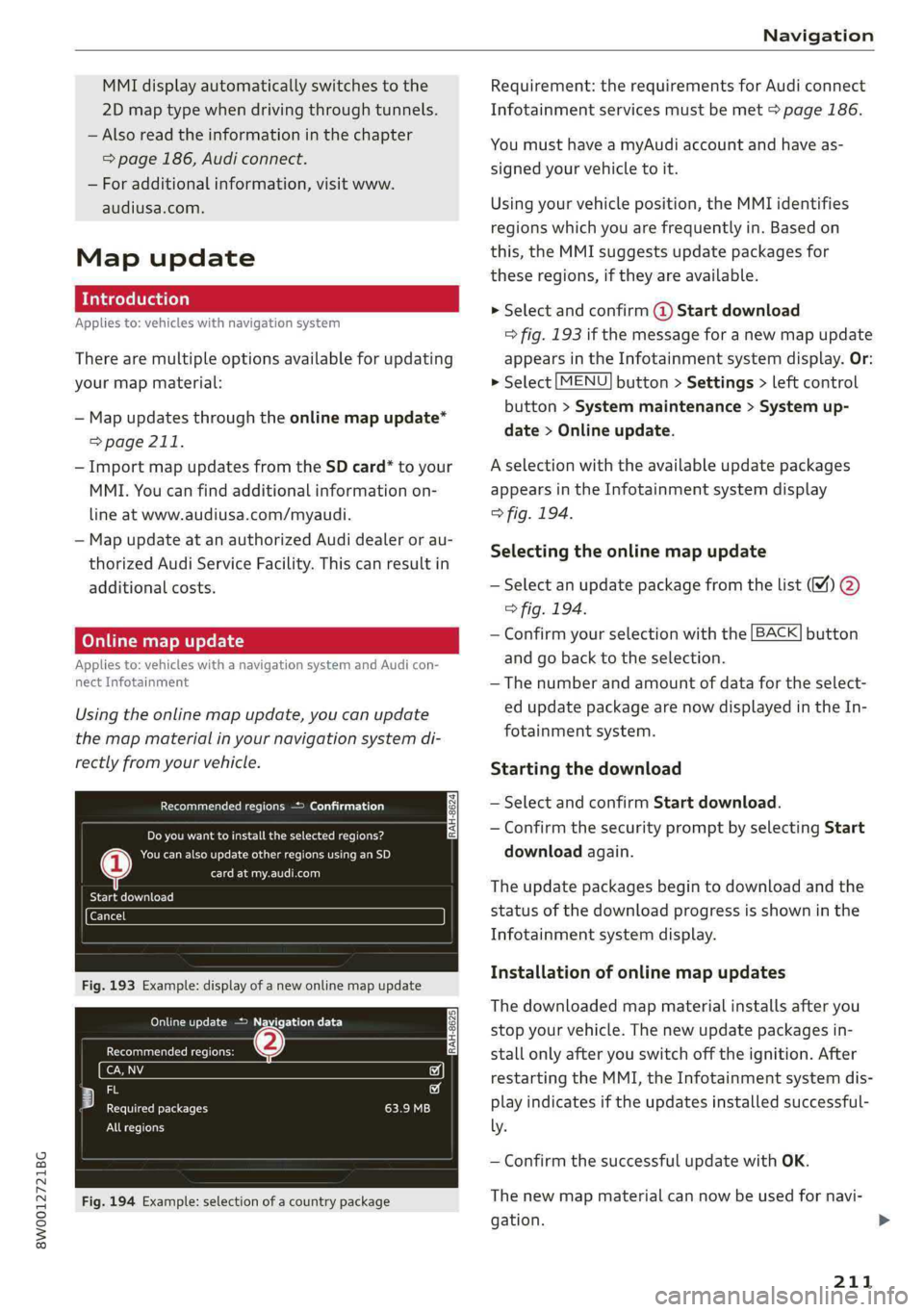
Recommendedregions>Confirmation
RAH-8624]Doyouwanttoinstalltheselected regions?
Neencaseseentcai)
CreanRel
BateCele)
Fig.193Example:displayofanewonlinemapupdate
OncmeetcEte)
Recommendedregions:(2)
any
eecf
PeeteBectaetry
Allregions
Fig.194Example:selectionofacountrypackage
Requirement:therequirementsforAudiconnect
Infotainmentservicesmustbemet>page186.
YoumusthaveamyAudiaccountandhaveas-
signedyourvehicletoit.
Usingyourvehicleposition,theMMIidentifies
regionswhichyouarefrequentlyin.Basedon
this,theMMIsuggestsupdatepackagesfor
theseregions,iftheyareavailable.
>Selectandconfirm@Startdownload
=>fig.193ifthemessageforanewmapupdate
appearsintheInfotainmentsystemdisplay.Or:
>Select[MENU]button>Settings>leftcontrol
button>Systemmaintenance>Systemup-
date>Onlineupdate.
Aselectionwiththeavailableupdatepackages
appearsintheInfotainmentsystemdisplay
>fig.194.
Selectingtheonlinemapupdate
—
Selectanupdatepackagefromthelist(M%)@
>fig.194.
—Confirmyourselectionwiththe[BACK]button
and gobacktotheselection.
—Thenumberandamountofdatafortheselect-
edupdatepackagearenowdisplayedintheIn-
fotainmentsystem.
Startingthedownload
—SelectandconfirmStartdownload.
—ConfirmthesecuritypromptbyselectingStart
downloadagain.
Theupdatepackagesbegintodownloadandthe
statusofthedownloadprogressisshowninthe
Infotainmentsystemdisplay.
Installationofonlinemapupdates
Thedownloadedmapmaterialinstallsafteryou
stopyourvehicle.Thenewupdatepackagesin-
stallonlyafteryouswitchofftheignition.After
restartingtheMMI,theInfotainmentsystemdis-
playindicatesiftheupdatesinstalledsuccessful-
ly.
—ConfirmthesuccessfulupdatewithOK.
Thenewmapmaterialcannowbeusedfornavi-
gation.>
211
Page 225 of 392
8W0012721BG
Media
—Thestatusofthedeletingprocessisshownin
theMMI.Jukeboxplaybackstopsduringthede-
letingprocessandstartsagainautomatically
oncethedeletioniscomplete.
@)Note
Donotimportaudio/videofileswhentheen-
gineisturnedoffbecausethiswilldrainthe
vehiclebattery.
@)Tips
—TracksfromaudioCDscannotbeimported
totheJukeboxforlegalreasons.
—Filesthathavealreadybeenimportedare
automaticallyrecognizedandcannotbe
copiedtotheJukeboxagain.
—Itisnotpossibletoplay audio/video*files
intheCD/DVD*drivewhileimportingthem.
— TheJukeboxdoesnotprovideanexport
functionduetolegalreasons.
—Filesortrackswithoutadditionalstoredin-
formationarelistedasUnknown.Audirec-
ommendsaddingadditionalinformation
(such asID3tags)toaudiofiles.
—ResettheJukeboxtothefactorydefaultset-
tingswhensellingyourvehicle>page241.
Bluetoothaudioplayer
Appliesto:vehicleswithBluetoothaudioplayer
WiththeBluetoothaudioplayer,youcanplay
musicwirelesslyfromyourBluetooth-capable
device(suchasacellphone)throughtheMMI.
Requirement:thevehiclemustbestationaryand
theignitionmustbe switchedon.TheBluetooth
settingswillopenonyourmobiledeviceduring
theconnectionsetup.TheBluetoothfunctionand
visibilityoftheMMI>page243andmobilede-
vicemustbe switchedon.TheBluetoothaudio
player>page243mustbe switchedoninthe
MMI.
—ConnectingaBluetoothplayer:pressthe
MEDIA]button.Presstheleftcontrolbutton
untilthesourcesoverviewisdisplayed.Select
andconfirmBluetoothaudioplayer©)
>page229,fig.207.
—Ifnecessary,selectandconfirm:Notconnected
>ConnectBluetoothaudioplayer.TheBlue-
toothdevicesearchstarts.Followtheinstruc-
tionsintheMMI.
—
SelectandconfirmthedesiredBluetoothdevice
fromthelist.TheMMIgeneratesaPINforthe
connection.
—SelectandconfirmYes.
—EnterthePINforconnectingonyourBluetooth
device.Or:ifthePINisalreadydisplayedon
yourBluetoothdevice,confirmitintheBlue-
toothdeviceandintheMMI.Thetimeallowed
forenteringthePINislimitedtoapproximately
30seconds.
Themediaisstartedandoperatedthroughthe
mobiledeviceortheMMI,dependingonthede-
vicebeingused.
Gi)Tips
—Checkforanyconnectionrequestsonyour
Bluetoothdevice.
—MultipleBluetooth audioplayerscan be
connectedtotheMMI,butonlyonemobile
devicecanbeactive.
—BluetoothprotocolsAVRCP(1.0/1.3/1.4)
andA2DParesupported.
—NotethevolumesettingonyourBluetooth
device.Audirecommendssettingyourmo-
biledevicetothemaximumvolumewhen
usingitasaBluetooth audioplayer.
—Thesupportedmediafunctions(such as
shuffle)dependontheBluetoothdevicebe-
ingused.
—Formoreinformationonsupporteddevices,
visitwww.audiusa.com/bluetoothorcon-
tactanauthorizedAudidealerorauthorized
AudiServiceFacility.
223
Page 387 of 392
8W0012721BG
Shortcut:Keys«esccnseovaevaceevmaea 2ow145,152
Shuteben22owswomeroewane6wanGotee232
alsorefertoShuffle................-.232
Sideairbags.............00.eee eeeeee279
Howtheywork.......0.ceceeeeeee281
Sideassist
Cleaningthesensors..............0---343
alsorefertoAudisideassist............121.
Sidecurtainairbagsiers¢ «swowssvseoomeson282
Description..........2...ceeeeeeee282
Howtheywork...........000-20eee eee283
Safetyinstructions...+cum» xyeass xecoe284
SIMCAOseess «ees3 xoes3 eeeeEEEER=186
SiriusXMalertnotifications..............217
Sliding/tiltingsunroof...............000842
Convenienceopeningandclosing.........41
Emergencyclosing............-..00-00542
Sunshade...............0ccece42
SnowchainS.......00.eee338
Socket
refertoPowersources..........--.000--62
Softwareupdate
refertoSystemupdate(MMI)..........244
Software(MMI)
Licensingagreements............00005246
Update........eeeeeeeeeee244
NGTSIOlis xawes:sewsa 2BoEGEeee& YBee244
Sourcesofinformationaboutchildrestraints
andtheirs’:« 4gems+aaav sgum@ xooa304
Space-savingsparetire(compactsparetire).355
SParetiies«sass¢ =RAGESTeBOHRTEBae2355
Speeddependentvolumecontrol.........244
Speedlimitinformation
refertoTrafficsignrecognition..........97
Speedlimits
refertoTrafficsignrecognition..........97
Speedometer«evsseseessteeneveReee13
Speedwarningsystem..............--00.95
Speller.....0...2eee eeeeeeee152
Sportdifferential..................126,143
IndicatorWhtsee.» see22saws5 2emies26
SPOFCVIEWox= «maceseRemteeeeEeeee17
Stabilizationprogram
PeertoESCseasa &esas3 &sewss ¢cave138,139
Start/Stop'systemiss« 2www=oween¥ravenoo80
MessageS...0.6...ceceeeeeee eee81
Switchingoffandon.............000ee81
STARTENGINESTOPbutton..............78
Startingtodrive...2...eeeeeeeee83
Starting(engine)...............0000578,80
Steering
Electromechanicalsteering............142
LOCKINGievc2 2enews2 2wee2eeevveeeoo78
alsorefertoElectromechanicalsteering..142
Steeringwheel
Adjusting...0.0.20...eeeeeeeee eeeee77
Shitt\paddles=sawss
alsorefertoMultifunction
steeringwheel...............--15, 17,18
Stepsfordeterminingcorrectloadlimit...336
Stopover(navigation)................0.202
Stopping(engine)..........ceceeeeeeeee80
Storagecompartments................0.63
Streaming
refertoOnlinemedia.................225
Stronic(automatictransmission)..........85
Subtitles(DVD).......0...ceceeeeeee232
Subwoofer...0.0...00eeeeeeeeeeee 244
Sunshade
Rearwindow/reardoors.............0453
SUN
VISOFS.1...eeeeeeeee53
SuSPeNsionCOMUHOlsn«6icesa6maea6omen126
SWapCallwise2owisioosi @wwnnswo+ween© +eesere177
Switchingtabs
refertoMultifunction
steeringwheel.............0-0515,17,18
Switchingtheignitionon/off..............78
Symbols...0.00...eee eeeeeeee155
Navigation............0cceceeeeeee207
Tratticsicin© 2sem=vreiesnesseoroe2>212
alsorefertoIndicatorlights.............10
SYNC(button)2.0...eeeeeeeee73
Systemsettings(MMI).................240
Systemupdate(MMI)...«evs.<2eeveeos244
SystemVOlUMEsacssseeveeeeeeseeees245
T
Tachometercis« xesauxwaens¢neem3 ¢ee13,14
385