infotainment AUDI S4 2019 Owner's Manual
[x] Cancel search | Manufacturer: AUDI, Model Year: 2019, Model line: S4, Model: AUDI S4 2019Pages: 392, PDF Size: 99.53 MB
Page 53 of 392
8W0012721BG
LightsandVision
@Tips
Thesettingisautomaticallystoredandas-
signedtotheremotecontrolkeythatisbeing
used.
Tideuateartela
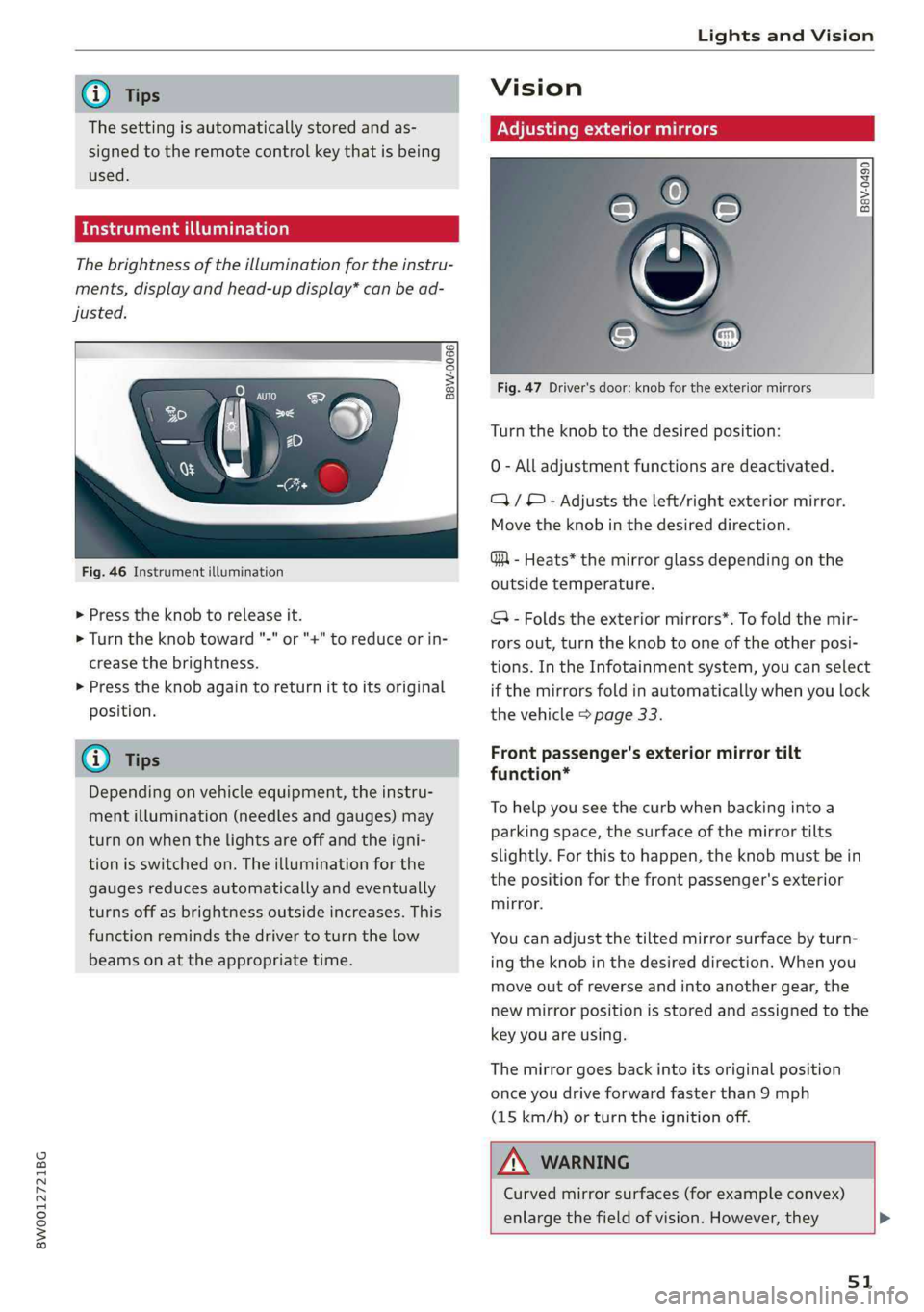
Thebrightnessoftheilluminationfortheinstru-
ments,displayandhead-updisplay*canbead-
justed.
Fig.46Instrumentillumination
>Presstheknobtoreleaseit.
>Turn theknobtoward"-"or"+"toreduceorin-
creasethebrightness.
>
Presstheknobagaintoreturnittoitsoriginal
Position.
@)Tips
Dependingonvehicleequipment,theinstru-
mentillumination(needlesandgauges)may
turnonwhenthelightsareoffandtheigni-
tionisswitchedon.Theilluminationforthe
gaugesreducesautomaticallyandeventually
turnsoffasbrightnessoutsideincreases.This
functionremindsthedrivertoturnthelow
beamsonattheappropriatetime.
Vision
Adjustingexteriormirrors
°azt
g>eoO
Fig.47Driver'sdoor:knobfortheexteriormirrors
Turntheknobtothedesiredposition:
0-Alladjustmentfunctionsaredeactivated.
Q/®-Adjuststheleft/rightexteriormirror.
Movetheknobinthedesireddirection.
GA-Heats*themirrorglassdependingonthe
outsidetemperature.
SA-Foldstheexteriormirrors*.Tofoldthemir-
rorsout,turntheknobtooneoftheotherposi-
tions.IntheInfotainmentsystem,youcanselect
ifthemirrorsfoldinautomaticallywhenyoulock
thevehicle>page33.
Frontpassenger'sexteriormirrortilt
function*
Tohelpyouseethecurbwhenbackingintoa
parkingspace,thesurfaceofthemirrortilts
slightly.Forthistohappen,theknobmustbein
thepositionforthefrontpassenger'sexterior
mirror.
Youcanadjustthetiltedmirrorsurfacebyturn-
ingtheknobinthedesireddirection.Whenyou
moveoutofreverseandintoanothergear,the
newmirrorpositionisstoredandassignedtothe
keyyouareusing.
Themirrorgoesbackintoitsoriginalposition
onceyoudriveforwardfasterthan9mph
(15km/h)orturntheignitionoff.
ZXWARNING
Curvedmirrorsurfaces(forexampleconvex)
enlargethefieldofvision.However,they>
51
Page 55 of 392

8W0012721BG
LightsandVision
— TheautomaticdimmingmirrorsdonotdimWindshieldwipers
whentheinteriorlightingisturnedonor
thereversegearisselected.Switchingthewiperson
:
a
2
\s
Fig.48Sunvisor=
a
Sunvisor
Thesunvisorsforthedriverandfrontpassenger
canbereleasedfromtheirmountsandturnedto-
wardthedoors©fig.48@.
Theycanalsobemovedbackandforthlength-
wiseinthisposition.-;;:
Fig.51allroad:rearwindowwiperoperation
Vanitymirror
Movethewindshieldwiperlevertothecorre-
Themirrorlighting*switchesonwhenthecoverspondingposition:
overthevanitymirror@)opens.
@-Windshieldwipersoff
@-Rainsensormode.Thewindshieldwipers
Appliesto:vehicleswithsunshadeswitchononcethevehiclespeedexceedsapprox-
imately2mph(4km/h)anditisraining.The
higherthesensitivityoftherainsensorthatisset
(switch@)totheright),theearlierthewind-
shieldwipersreacttomoistureonthewind-
shield.Youcandeactivatetherainsensormode
intheInfotainmentsystem,whichswitchesthe
intermittentmodeon.Todothis,select:[MENU
button>Vehicle>leftcontrolbutton>Driveras-
sistance>Rainsensor.Inintermittentmode,
youcanadjusttheintervaltimeusingtheswitch
<=
B4M-0166|
Fig.49Reardoor:sunshade®
Reardoorsunshade @-Slowwiping
>Pullthesunshadeoutandattachittothere-@-Fastwiping
tainerontheupperdoorframe>fig.49.
[email protected]
tionlonger,thewipersswitchfromslowwiping
tofastwiping.>
53
Page 57 of 392
8W0012721BG
LightsandVision
Replacingwiperblades
B8R-0379
@)—8
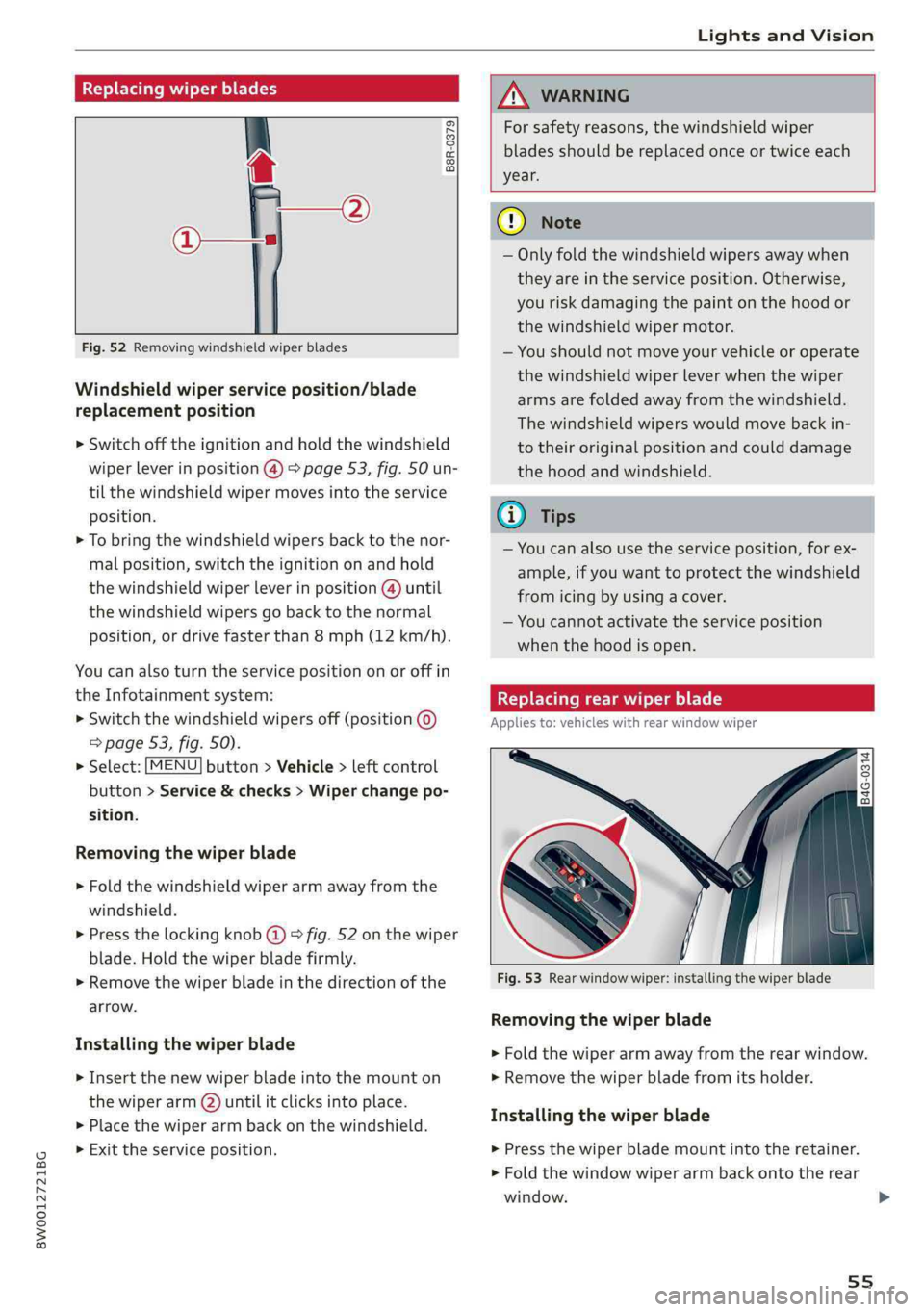
Fig.52Removingwindshieldwiperblades
Windshieldwiperserviceposition/blade
replacementposition
>Switchofftheignitionandholdthewindshield
wiperleverinposition@)>page53,fig.50un-
tilthewindshieldwipermovesintotheservice
position.
>Tobringthewindshieldwipersbacktothenor-
malposition,switchtheignitiononandhold
thewindshieldwiperleverinposition@)until
thewindshieldwipersgobacktothenormal
position,ordrivefasterthan8mph(12km/h).
Youcanalsoturntheservicepositiononoroffin
theInfotainmentsystem:
>Switchthewindshieldwipersoff(position@
=>page53,fig.50).
>Select:[MENU]button>Vehicle>leftcontrol
button>Service&checks>Wiperchangepo-
sition.
Removingthewiperblade
>Foldthewindshieldwiperarmawayfromthe
windshield.
>Pressthelockingknob@©fig.52onthewiper
blade.Holdthewiperbladefirmly.
>Removethewiperbladeinthedirectionofthe
arrow.
Installingthewiperblade
> Insertthenewwiperbladeintothemounton
thewiperarm(2)untilitclicksintoplace.
>Placethewiperarmbackonthewindshield.
>Exittheserviceposition.
ZAWARNING
Forsafetyreasons,thewindshieldwiper
bladesshouldbereplacedonceortwiceeach
year.
@)Note
—Onlyfoldthewindshieldwipersawaywhen
theyareintheserviceposition.Otherwise,
youriskdamagingthepaintonthehoodor
thewindshieldwipermotor.
—Youshouldnotmoveyourvehicleoroperate
thewindshieldwiperleverwhenthewiper
armsarefoldedawayfromthewindshield.
Thewindshieldwiperswouldmovebackin-
totheiroriginalpositionandcoulddamage
thehood andwindshield.
G)Tips
—Youcanalsousetheserviceposition,forex-
ample,ifyouwanttoprotectthewindshield
fromicingbyusingacover.
—Youcannotactivatetheserviceposition
whenthehoodisopen.
Replacingrearwiperblade
Appliesto:vehicleswithrearwindowwiper
B4G-0314
Fig.53Rearwindowwiper:installingthewiperblade
Removingthewiperblade
>Foldthewiperarmawayfromtherearwindow.
>Removethewiperbladefromitsholder.
Installingthewiperblade
>Pressthewiperblademountintotheretainer.
>Foldthewindowwiperarmbackontotherear
window.
55
>
Page 60 of 392
Seats
Seats
Generalinformation
ZAWARNING
See>page247,Drivingsafetyforimportant
information,tips,suggestionsandwarnings
thatyoushouldreadandfollowforyourown
safetyandthesafetyofyourpassengers.
Frontseats
Powerseatadjustment
&
Ee
,
BFY-0014
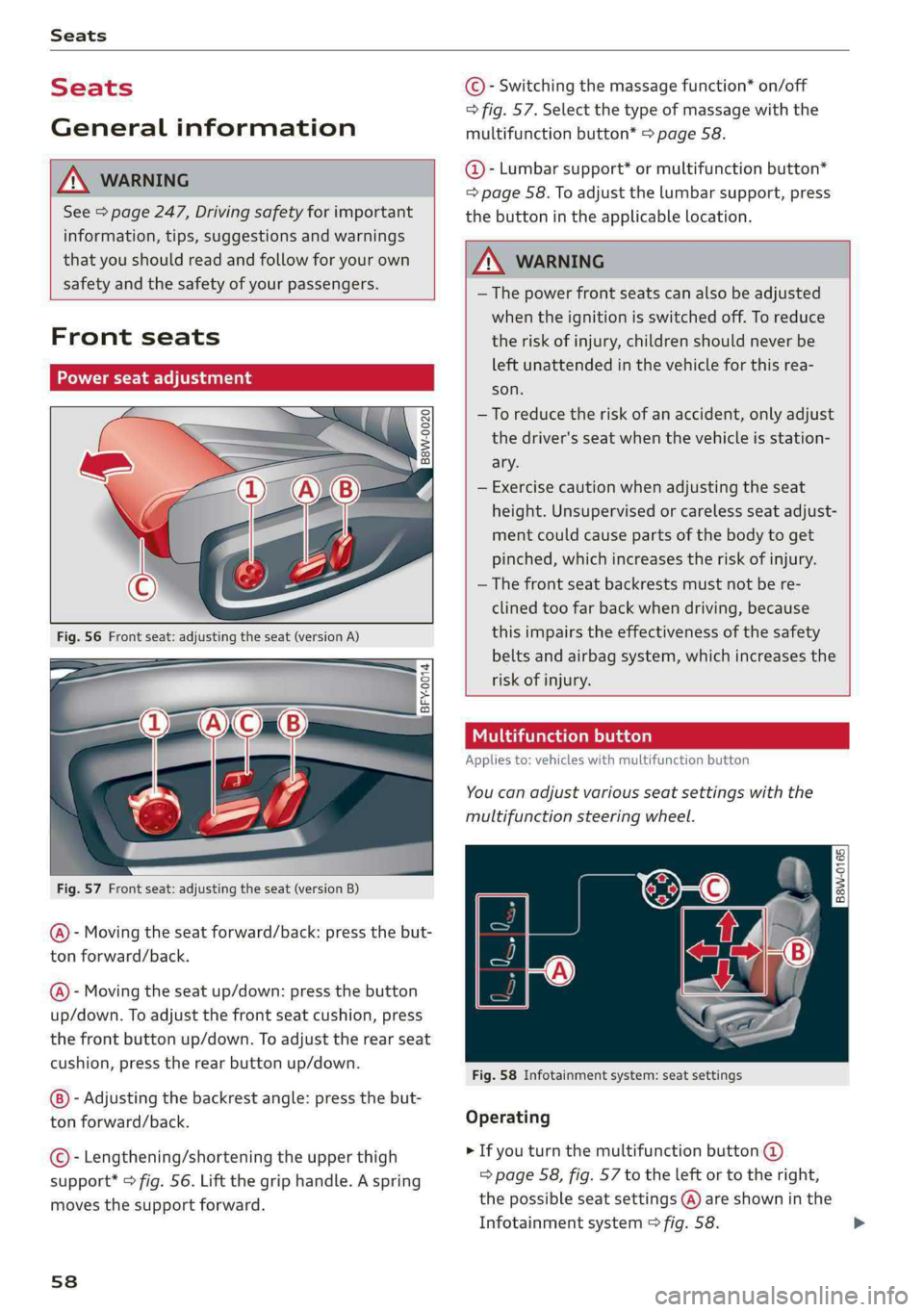
Fig.57Frontseat:adjustingtheseat(versionB)
@-Movingtheseatforward/back:pressthebut-
ton forward/back.
@-Movingtheseatup/down:pressthe button
up/down.Toadjustthefrontseatcushion,press
thefrontbuttonup/down.Toadjusttherearseat
cushion,presstherearbuttonup/down.
-Adjustingthebackrestangle:pressthebut-
tonforward/back.
©-Lengthening/shorteningtheupperthigh
support*>fig.56.Liftthegriphandle.Aspring
movesthesupportforward.
58
©-Switchingthemassagefunction*on/off
>fig.57.Selectthetypeofmassagewiththe
multifunctionbutton*>page58.
@-Lumbarsupport*ormultifunctionbutton*
=page58.Toadjustthelumbarsupport,press
thebuttonintheapplicablelocation.
ZAWARNING
— Thepowerfrontseatscanalsobeadjusted
whentheignitionisswitchedoff.To reduce
theriskofinjury,childrenshouldneverbe
leftunattendedinthevehicleforthisrea-
son.
—Toreducetheriskofanaccident,onlyadjust
thedriver'sseatwhenthevehicleisstation-
ary.
—Exercisecautionwhenadjustingtheseat
height.Unsupervisedorcarelessseatadjust-
mentcouldcausepartsofthebodytoget
pinched,whichincreasestheriskofinjury.
—Thefrontseatbackrestsmustnotbere-
clinedtoofarbackwhendriving,because
thisimpairstheeffectivenessofthesafety
beltsandairbagsystem,whichincreasesthe
riskofinjury.
tttlameleiacela)
Appliesto:vehicleswithmultifunctionbutton
You canadjustvariousseatsettingswiththe
multifunctionsteeringwheel.
|
BaW-0165)
Fig.58Infotainmentsystem:seatsettings
Operating
>Ifyouturnthemultifunctionbutton@
=>page58,fig.57totheleftortotheright,
thepossibleseatsettings(A)areshowninthe
Infotainmentsystem>fig.58.
Page 62 of 392
Seats
TaeMery
Appliesto:vehicleswithadjustableheadrestraints
B8W-0187
B8W-0157
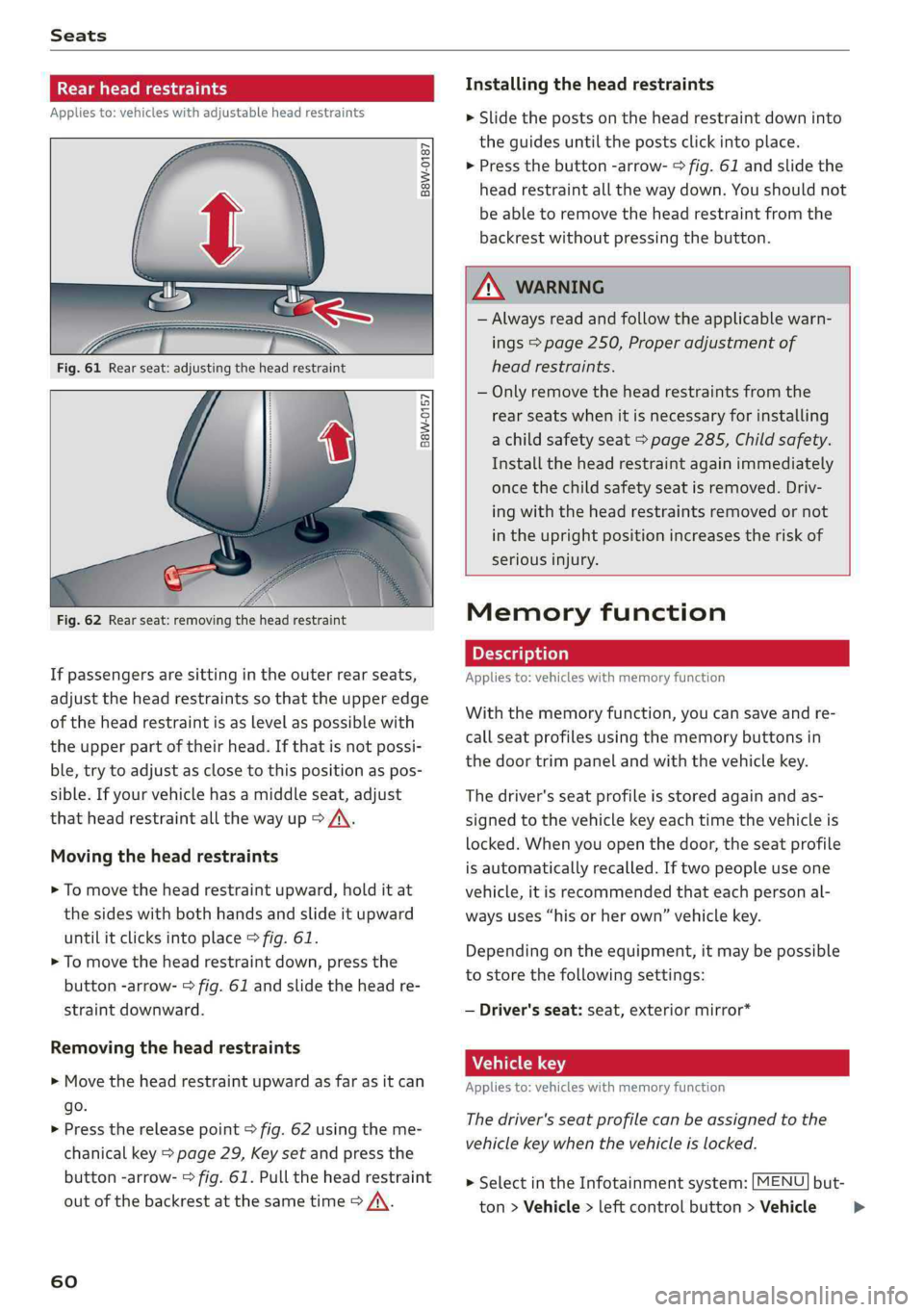
Fig.62Rearseat:removingtheheadrestraint
Ifpassengersaresittingintheouterrearseats,
adjusttheheadrestraintsso thattheupperedge
oftheheadrestraintisaslevelaspossiblewith
theupperpartoftheirhead.Ifthatisnotpossi-
ble,trytoadjustasclosetothispositionaspos-
sible.Ifyourvehiclehasamiddleseat,adjust
thatheadrestraintallthewayup>A\.
Movingtheheadrestraints
>Tomovetheheadrestraintupward,holditat
thesideswithbothhandsandslideitupward
untilitclicksintoplace>fig.61.
>
Tomovetheheadrestraintdown,pressthe
button-arrow->fig.61andslidetheheadre-
straintdownward.
Removingtheheadrestraints
>Movetheheadrestraintupwardasfarasitcan
go.
>Pressthereleasepoint>fig.62usingtheme-
chanicalkey>page29,Keysetandpressthe
button-arrow->fig.61.Pulltheheadrestraint
outofthebackrestatthesametime>A\.
60
Installingtheheadrestraints
>
Slidethepostsontheheadrestraintdowninto
theguidesuntilthepostsclickintoplace.
>Pressthebutton-arrow->fig.61 andslidethe
headrestraintallthewaydown.Youshould not
be
abletoremovetheheadrestraintfromthe
backrestwithoutpressingthebutton.
ZXWARNING
—Alwaysreadandfollowtheapplicablewarn-
ings>page250,Properadjustmentof
headrestraints.
—Onlyremovetheheadrestraintsfromthe
rearseatswhenitisnecessaryforinstalling
a child
safetyseat>page285,Childsafety.
Installtheheadrestraintagainimmediately
oncethechildsafetyseatisremoved.Driv-
ingwiththeheadrestraintsremovedornot
intheuprightpositionincreasestheriskof
seriousinjury.
Memoryfunction
Appliesto:vehicleswithmemoryfunction
Withthememoryfunction,youcansaveandre-
callseatprofilesusingthememorybuttonsin
thedoortrimpanelandwiththevehiclekey.
Thedriver'sseatprofileisstoredagainandas-
signedtothevehiclekeyeachtimethevehicleis
locked.Whenyouopenthedoor,theseatprofile
isautomaticallyrecalled.Iftwopeopleuseone
vehicle,itisrecommendedthateachpersonal-
waysuses“hisorherown”vehiclekey.
Depending ontheequipment,itmaybepossible
to
storethefollowingsettings:
—Driver'sseat:seat,exteriormirror*
NaC
Thedriver'sseatprofilecanbeassignedtothe
vehiclekeywhenthevehicleislocked.
MENU >SelectintheInfotainmentsystem:but-
ton>Vehicle> leftcontrolbutton>Vehicle
>
Page 76 of 392
Warmandcold
#5Seatventilation*
Pressingthe#J buttonswitchestheseatventila-
tion
onatthehighestlevel(3).TheLEDsindicate
thetemperaturelevel.Toreducetheventilation
level,pressthebuttonagain.Toswitchtheseat
ventilationoff,pressthebuttonrepeatedlyuntil
theLEDturnsoff.
&Defrosting
Thewindshieldandsidewindowsaredefrosted
orclearedofcondensationasquicklyaspossible.
Themaximumamountofairflowsmainlyfrom
theventsbelowthewindshield.Recirculation
modeswitchesoff. Thetemperatureshouldbe
setat+72°F(+22°C)orhigher.Thetemperature
iscontrolledautomatically.
Youcanswitchthedefrosteronoroffusingthe
&button.Youcanswitchthefunctionoffby
pressingaknob(@).
Appliesto:vehicleswithwindshielddefogger:
Thewindshielddefoggerswitchesonautomati-
callywhenoutsidetemperaturesarelow.Ifyou
wouldliketoswitchthewindshielddefoggeron
manually,pressthe§&button.TheLEDinthe
buttonblinks.
GP)REARRearwindowdefogger
Youcanswitchtherearwindowdefoggeronby
pressingthe&button.Itonlyoperateswhenthe
engineisrunning.Itswitchesoffautomatically
after10to20minutes,dependingontheoutside
temperature.
Topreventtherearwindowdefoggerfrom
switchingoffautomatically,pressandholdthe
GP)REARbuttonformorethanthreeseconds.
Thisisstoreduntiltheignitionisswitchedoff.
Vents
Youcanopenorclosethecenterandrearventsin
thecockpitandtheventsintherearcenter con-
soleusingtheridgedthumbwheels.Thelevers
adjustthedirectionoftheairflowfromthevents.
Thewideventisopenedandclosedusingthe
rockerswitchG).
74
Residualheat
Youcanactivatetheresidualheatfunctionwhen
theignitionisswitchedoffbypressingtheknob
©.Theresidualheatfromthecoolantisusedto
heatthevehicleinterior.Theresidualheatfunc-
tionswitchesoffautomaticallyafterabout15
minutes.
ZAWARNING
—Youshouldnotusetherecirculationmode
foranextendedperiodoftime,becauseno
freshairisdrawninandthewindowscan
fogwhencoolingmodeisswitchedoff.This
increasestheriskofanaccident.
—Individualswithreducedsensitivityto pain
ortemperaturecoulddevelopburnswhen
usingtheseatheating*function.To reduce
the
riskofinjury,theseindividualsshould
notuseseatheating*.
@)Note
To reducetheriskofdamagetotheseatheat-
ing*elements,donotkneelontheseatsor
placeheavypressureononeareaoftheseat.
Theclimatecontrolsystembasicsettingsareac-
cessedintheInfotainmentsystem.
>SelectintheInfotainmentsystem:[MENU]but-
ton>Vehicle> leftcontrolbutton>Aircondi-
tioning
Autorecirculation
Whenswitchedon,automaticrecirculationcon-
trolstherecirculationmodeautomatically.Ifthe
windowsfogup,presstheMAXbutton.
Automaticauxiliaryheater*
Theauxiliaryheaterhelpstowarmthevehiclein-
teriormorequickly.
Steeringwheelheating
Appliesto:vehicleswithsteeringwheelheating
>Pressthe@©page17,fig.11buttononthe
multifunctionsteeringwheeltoswitchthe
steeringwheelheatingonandoff.Themessage>
Page 97 of 392
8W0012721BG
Assistsystems
Assistsystems
Speedwarningsystem
Appliesto:vehicleswithspeedwarningsystem
Thespeedwarningsystemhelpsyoutostaybe-
low aspecifiedmaximumspeedthatcanbeset,
changedordeletedintheInfotainmentsystem.
Thespeedwarningsystemwarnsyouifyouare
exceeding themaximumspeedthatyouhaveset.
Awarningtonewillsoundassoonasyourspeed
exceedsthestoredvalueslightly.Theeein-
dicatorlightandamessageappearintheinstru-
mentclusterdisplayatthesametime.Theol
indicatorlightandthemessageturnoffifthe
speedfallsbackbelowthestoredmaximum
speed.
Settingathresholdisrecommendedifyouwould
liketoberemindedwhenyoureachacertain
maximumspeed.Situationswhereyoumaywant
todosoincludedrivinginacountrywithagener-
alspeedlimitorifthereisaspecifiedmaximum
speedforwintertires.
Settingthewarningthreshold
SelectintheInfotainmentsystem:[MENU]but-
ton>Vehicle>leftcontrolbutton>Driverassis-
tance>Speedwarning>Manual.
G)Tips
Regardlessofthespeedwarningsystem,you
shouldalwaysmonitoryourspeedusingthe
speedometerandmakesureyouarefollowing
thelegalspeedlimit.
Cruisecontrolsystem
Appliesto:vehicleswithcruisecontrolsystem
Thecruisecontrolsystemassiststhedriverin
maintainingaconstantspeedaboveapproxi-
mately 15mph(20km/h).Thesystemmaintains
thedesiredspeedbybrakingandaccelerating.
ZAWARNING
—Alwayspayattentiontothetrafficaround
yourvehiclewhenthecruisecontrolsystem
isinoperation.Asthedriver,youarealways
responsibleforcontrollingyourvehicle
speedandthedistancebetweenyourvehicle
andothervehicles.
—Forsafetyreasons,cruisecontrolshould not
beusedinthecity,instop-and-gotraffic,on
windingroads,andwhenroadconditionsare
poor(suchasice,fog,gravel,heavyrain,
andconditionsthatcouldlead tohydroplan-
ing),becausethisincreasestheriskofanac-
cident.
—Switchthecruisecontrolofftemporarily
whendrivinginturninglanes,highwayexits,
orinconstructionzones.
—Toreducetheriskofanaccident,youshould
onlyresumethestoredspeedifitissuitable
forthecurrenttrafficconditions.
()Note
Beforedrivingdownhillalongdistanceona
steephill,decreaseyourspeedandselecta
lowergear.Thismakesuseoftheenginebrak-
ingeffectandreducestheloadplacedonthe
brakes.
@)Tips
Thebrakelightsturnonwhenthebrakesare
appliedautomatically.
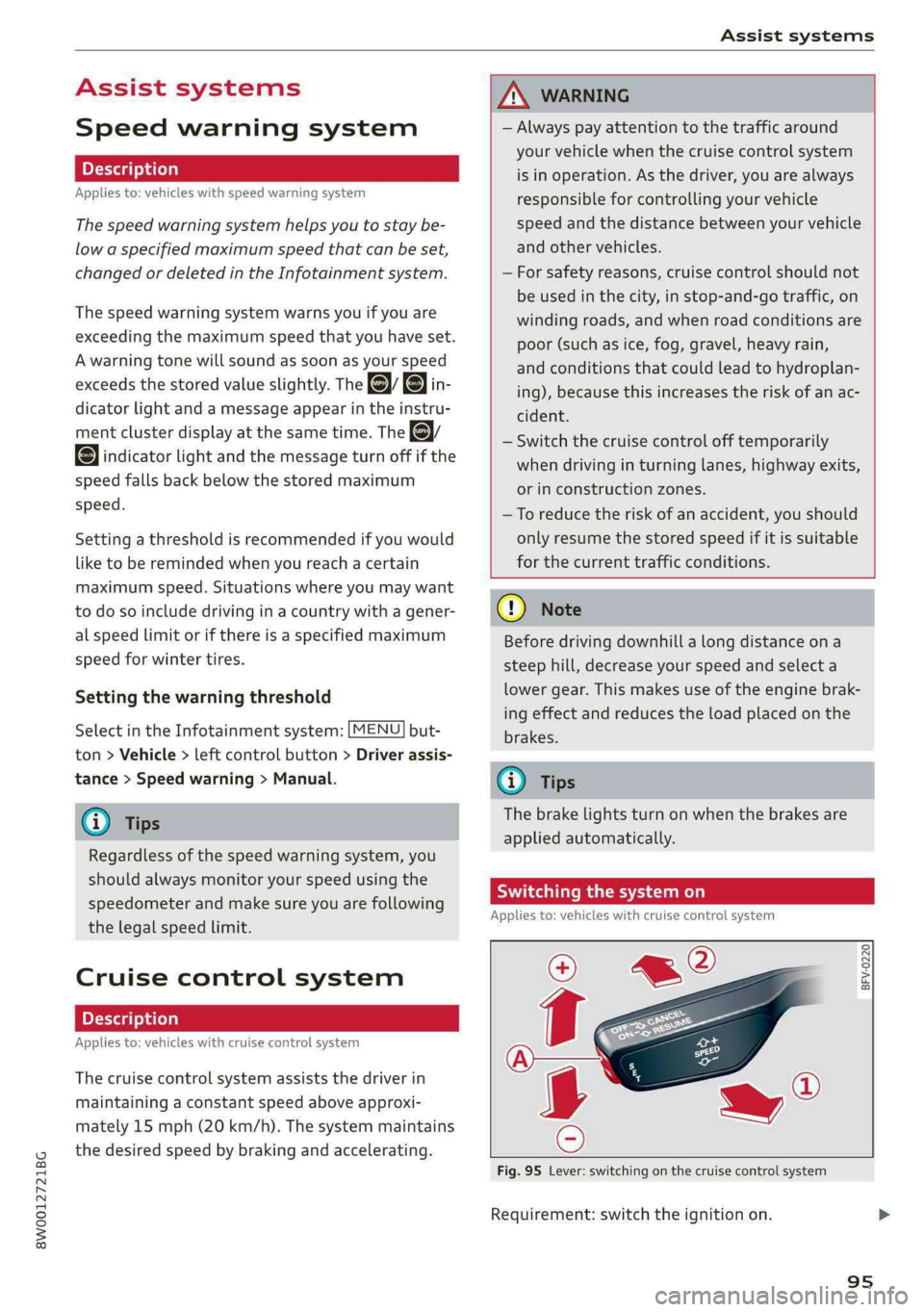
Switchingthesystemon
Appliesto:vehicleswithcruisecontrolsystem
BFV-0220
Fig.95Lever:switchingonthecruisecontrolsystem
Requirement:switchtheignitionon.
95
Page 100 of 392
Assistsystems
theinstrumentclustercanmeaneither
km/hormph,depending onthecountry.
Operating
Appliesto:vehicleswithcamera-basedtrafficsignrecognition
©.aaq
|
==a
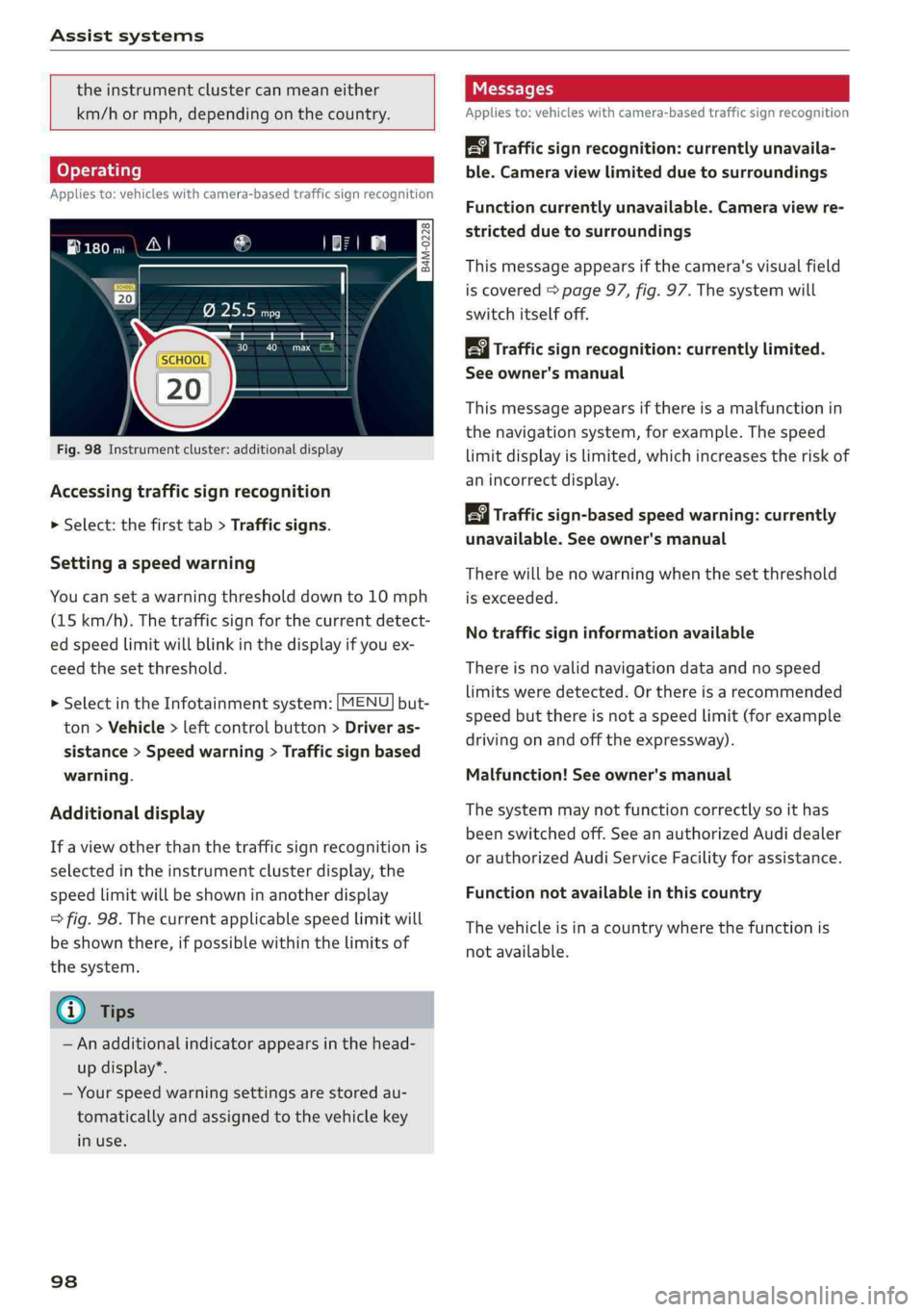
Fig.98Instrumentcluster:additionaldisplay
Accessingtrafficsignrecognition
>Select:thefirsttab>Trafficsigns.
Settingaspeedwarning
Youcansetawarningthresholddownto10mph
(15km/h).Thetrafficsignforthecurrentdetect-
edspeedlimitwillblinkinthedisplayifyouex-
ceed thesetthreshold.
> SelectintheInfotainmentsystem:[MENU]but-
ton>Vehicle>leftcontrolbutton>Driveras-
sistance>Speedwarning>Trafficsignbased
warning.
Additionaldisplay
If aviewotherthanthetrafficsignrecognitionis
selectedintheinstrumentclusterdisplay,the
speedlimitwillbeshowninanotherdisplay
=>fig.98.Thecurrentapplicablespeedlimitwill
beshownthere,ifpossiblewithinthelimitsof
thesystem.
G)Tips
—Anadditionalindicatorappearsinthehead-
updisplay*.
—Yourspeedwarningsettingsarestoredau-
tomaticallyandassignedtothevehiclekey
inuse.
98
Messages
Appliesto:vehicleswithcamera-basedtrafficsignrecognition
Trafficsign recognition:currently unavaila-
ble.Cameraviewlimitedduetosurroundings
Functioncurrentlyunavailable.Cameraviewre-
strictedduetosurroundings
Thismessageappearsifthecamera'svisualfield
iscovered>page97,fig.97.Thesystemwill
switchitselfoff.
Trafficsign recognition:currentlylimited.
Seeowner'smanual
Thismessageappearsifthereisamalfunctionin
thenavigationsystem,forexample.Thespeed
limitdisplayislimited,whichincreasestheriskof
anincorrectdisplay.
Trafficsign-basedspeedwarning:currently
unavailable.Seeowner'smanual
Therewillbenowarningwhenthesetthreshold
isexceeded.
Notrafficsigninformationavailable
Thereisnovalidnavigationdataandnospeed
limitsweredetected.Orthereisarecommended
speedbutthereisnotaspeedlimit(forexample
drivingonandoffthe expressway).
Malfunction!Seeowner'smanual
Thesystemmaynotfunctioncorrectlysoithas
beenswitchedoff.SeeanauthorizedAudidealer
orauthorizedAudiServiceFacilityforassistance.
Functionnotavailableinthiscountry
Thevehicleisinacountrywherethefunctionis
notavailable.
Page 104 of 392
Assistsystems
do.Brakethevehicleyourselfwhenneeded
toreducetheriskofanaccident.
Gi)Tips
—Ifaspeedlimitisdetected,thestored
speedisalsoadjustedinthespeedometer
LEDlinewhentheadaptivecruisecontrolis
notactive.
— Theadaptationby thesystemdependson
thedrivingmodesetindriveselect*.
—Switchingoffpredictivecontrol,forexam-
plewhendrivinginLowtrafficzones,does
notcausetheadaptivecruisecontrolto
switchoff.
—Afterswitchingontheignition,thesystem
initiallyadjuststoaspeedof80mph
(130km/h)whendrivingontohighways
withoutaspeedlimit.Thenthesystemad-
juststothelastspeedstoredbythedriver.
—Thereisnoadaptationtospeedlimitswhen
drivingthroughhighwayinterchangesand
whendrivingonorofftheexpressway.
—Thereisnopredictivecontrolatspeedlimits
under20mph(30 km/h).
—If aspeedlimitisonlydetectedbythecam-
eraandtheactualspeedissignificantly
higher,thenthespeedlimitwillblinkinthe
displayuntilyouhave reachedtherequired
speed>page98.
—Incorrectvaluesfromthecamera-based
trafficsignrecognition*oroutdatednaviga-
tionsystemmapdatacanleadtoincorrect
orimplausiblecontrol.
—Whenrouteguidanceisswitchedon,the
systemadaptstotherouteprovidedbythe
navigationsystem.Drivingwithoutroute
guidanceorleavingaroutecanresultinim-
plausiblecontrol.
—Thesystemswitchesoffwhenoutsideofa
roadsystemthatisrecordedinthenaviga-
tionsystemmapdata.
102
SettingsintheInfotainmentsystem
Appliesto:vehicleswithpredictiveefficiencyassist
Predictivemessages*
>IntheInfotainmentsystem,select:[MENU
button>Vehicle>leftcontrolbutton>Driver
assistance>Efficiencyassist.
Predictivemessagesareshownwhenthisfunc-
tionisswitchedon.
Predictivecontrol*
>SelectintheInfotainmentsystem:[MENU]but-
ton>Vehicle>leftcontrolbutton>Driveras-
sistance>Audiadaptivecruisecontrol>Pre-
dictivecontrol.
Setspeedlimit-whenthisfunctionisswitched
on,thesystemadjuststothespeedlimits.This
canalsobedonewithattolerance,ifdesired.In
this
scenario,youmayfallbeloworexceedthe
setspeedinfavorofincreasedefficiency.
Adaptationtorouteahead-whenthisfunction
isswitchedon,thesystemadaptstotheroute
ahead, suchasreducingthespeedwhendriving
aroundcurves.
@Tips
Nopredictivemessagesareshowninvehicles
withoutanavigationsystem.
Audiadaptivecruise
control
Appliesto:vehicleswith Audiadaptivecruisecontrol
B4m-0091
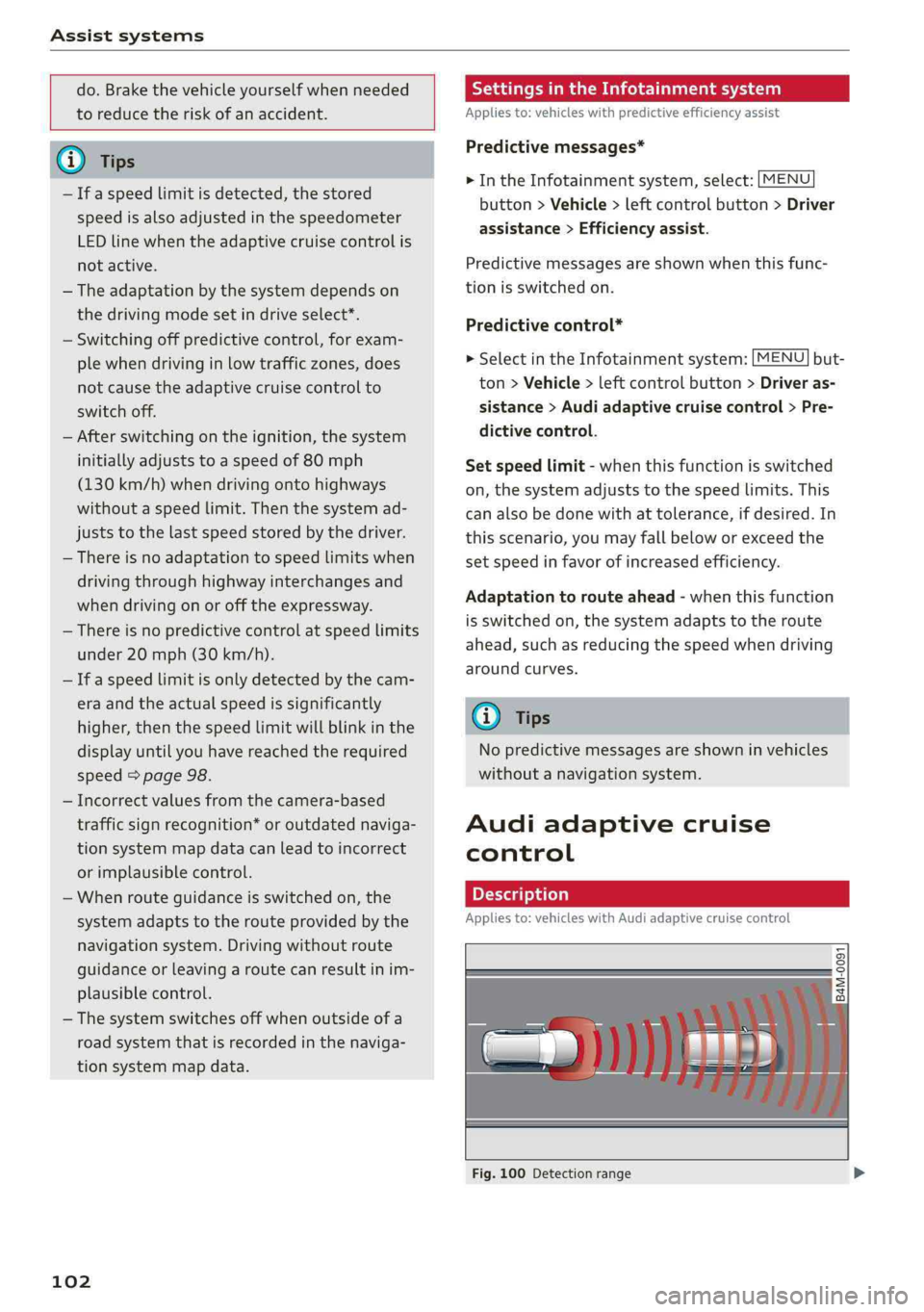
Fig.100Detectionrange
Page 110 of 392
Assistsystems
Safestartmonitor
Ifanobstacleisdetectedwhenyoustartdriving,
youwillbealerted tothedangerbytheBAindi-
catorlightandtheimageintheinstrumentclus-
terdisplay>fig.108>A\.Anaudiosignalwill
alsosound.Yourvehiclewilldrivemoreslowly
whenstarting.Thismayalsooccurinsomesitua-
tionswhenthereisno apparentobstacle.
—Pressthebrakepedaltoslowyourvehicle
down.
Z\WARNING
IfthemessageACC:automaticgo”appears,
yourvehiclewillstartdrivingevenifthereis
anobstaclebetweenyourvehicleandtheve-
hicledrivingahead.Thisincreasestheriskof
anaccident.
G@)Tips
—Forsafetyreasons,yourvehiclewillonly
starttodriveautomaticallyif:
—Thedriver'ssafetybeltisfastened
—Alldoorsandthehoodareclosed
—Yourvehicleisnotstoppedforalongperi-
odoftime
Interruptingcruisecontrol
Appliesto:vehicleswithAudiadaptivecruisecontrol
B4M-0233
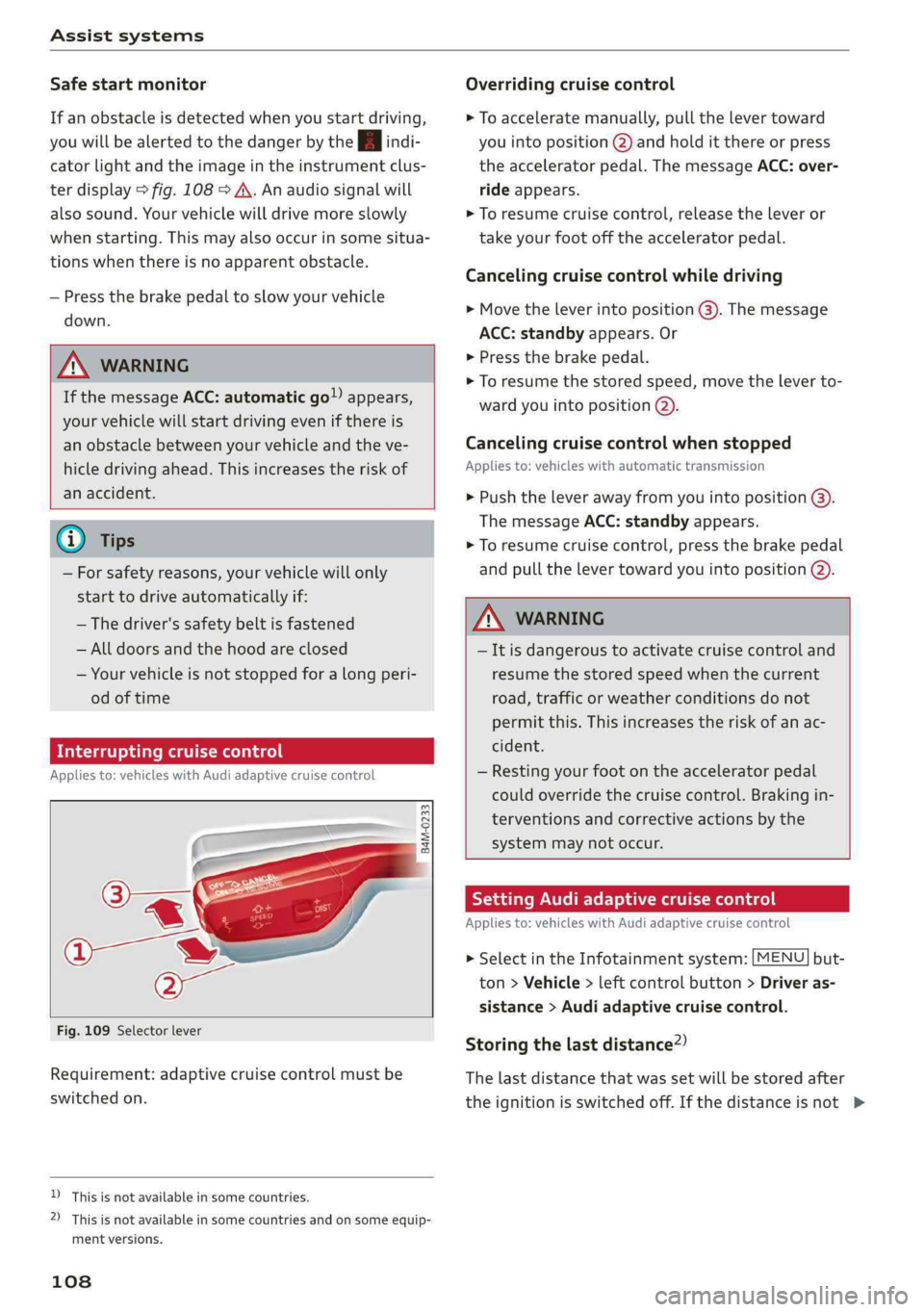
Fig.109Selectorlever
Requirement:adaptivecruisecontrolmustbe
switched
on.
D_Thisisnotavailableinsomecountries.
2)Thisisnotavailableinsomecountriesand onsomeequip-
mentversions.
108
Overridingcruisecontrol
>Toacceleratemanually,pullthelevertoward
youintoposition@)andholditthereorpress
theacceleratorpedal.ThemessageACC:over-
rideappears.
>Toresumecruisecontrol,releasetheleveror
takeyourfootofftheacceleratorpedal.
Cancelingcruisecontrolwhiledriving
>Movetheleverintoposition@).Themessage
ACC:standbyappears.Or
>Pressthebrakepedal.
>Toresumethestoredspeed,movetheleverto-
wardyouintoposition@).
Cancelingcruisecontrolwhenstopped
Appliesto:vehicleswithautomatictransmission
>Pushtheleverawayfromyouintoposition@).
ThemessageACC:standbyappears.
>Toresumecruisecontrol,pressthebrakepedal
andpullthelevertowardyouintoposition@).
Z\WARNING
—Itisdangeroustoactivatecruisecontroland
resumethestoredspeedwhenthecurrent
road,trafficorweatherconditionsdonot
permitthis.Thisincreasestheriskofanac-
cident.
—Restingyourfootontheacceleratorpedal
couldoverridethecruisecontrol.Brakingin-
terventionsandcorrectiveactionsbythe
systemmaynotoccur.
SettingAudiadaptivecruisecontrol
Appliesto:vehicleswith Audiadaptivecruisecontrol
>SelectintheInfotainmentsystem:[MENU]but-
ton>Vehicle>leftcontrolbutton>Driveras-
sistance>Audiadaptivecruisecontrol.
Storingthelastdistance?)
Thelastdistancethatwassetwillbestoredafter
theignitionisswitchedoff.Ifthedistanceisnot>