Fog AUDI S4 2020 Owners Manual
[x] Cancel search | Manufacturer: AUDI, Model Year: 2020, Model line: S4, Model: AUDI S4 2020Pages: 296, PDF Size: 80.45 MB
Page 9 of 296
8W1012721BB
Quick access
@0 Center armrest with storage com-
partment. Depending on vehicle
equipment, it may have:
— Audi music interface .......... 196
—Audi phone box ............... 160
— Starting the engine when there is
A
MALPUNGEION 2 2 aceon 2 wom © & ae 92
@) Electromechanical parking brake
BUGEON sieves so emene @ oe ent oo eecnie 102
@ Selector lever (automatic transmis-
SION) seve & # sere & o ES Go OE GB 94
@3 Storage compartment .......... 78
@) [START ENGINE STOP]button .... 92
@) Audi music interface ............ 196
@8 Steering wheel adjustment ...... 62
@) Lever for:
— Cruise control system ......... 123
— Audi adaptive cruise control .... 127
Button for switching the head-up
display on/off, adjusting the height . 23
Instrument illumination ......... 52
Connection port for the On Board
©®®
O®
©
Diagnostic System (OBD) ........ 269
Light switch ......... 0... e ee eee 48
Hoodireleased « a asics x x wosne x x smasain 215
Buttons for:
—All-weather lights ............ 48
—Rear fog lights ..............- 48
G4 Luggage compartment lid button . 36
65) Exterior mirror adjustment ...... 52
G8) Buttons for:
— Power windows .............. 42
—Child safety lock .............. 41
@ Tips
Some the equipment listed here is only instal-
led in certain models or is available as an op-
tion.
Indicator lights overview
The indicator lights in the instrument cluster
blink or turn on. They indicate functions or mal-
functions. Some warning and indicator lights
turn on when you switch the ignition on and must
turn off when the engine is running or while driv-
ing.
With some indicator lights, messages may ap-
pear and warning signals may sound. The indica-
tor lights and messages may be covered by other
displays. To show them again, select the second
tab for messages with the multifunction steering
wheel © page 12.
Some indicator lights in the display can display in
several colors.
Oe elle Ue
If the A or A indicator light turns on, check
the message in the instrument cluster.
Coal
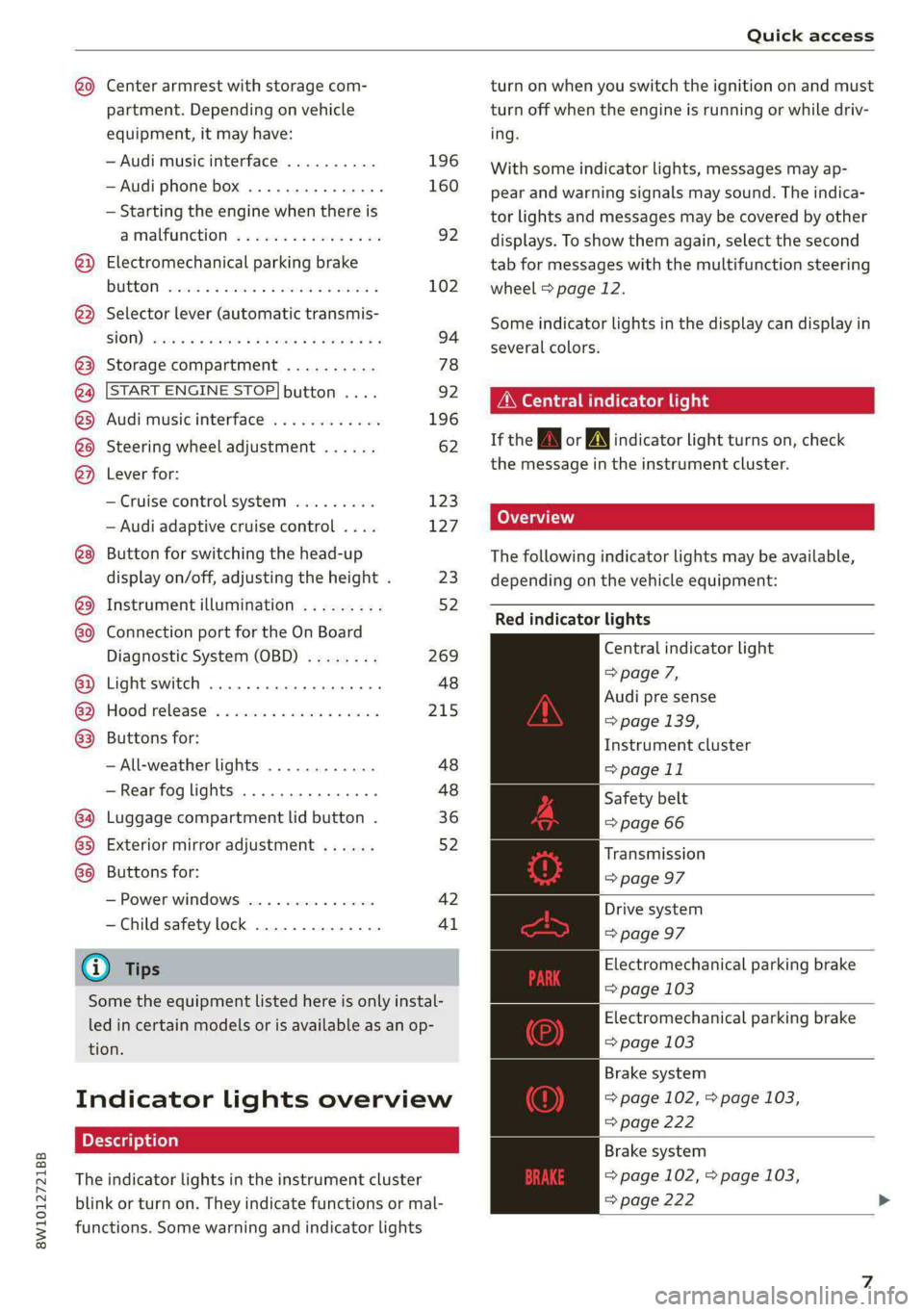
The following indicator lights may be available,
depending on the vehicle equipment:
Red indicator lights
Central indicator light
=> page 7,
Audi pre sense
=> page 139,
Instrument cluster
=> page 11
Safety belt
=> page 66
Transmission
=> page 97
Drive system
=> page 97
Electromechanical parking brake
=> page 103
Electromechanical parking brake
=> page 103
Brake system
=> page 102, > page 103,
=> page 222
Brake system
=> page 102, > page 103,
=> page 222
Page 50 of 296

Lights and Vision
Lights and Vision
Exterior lighting
Switching the lights on and off
Fig. 41 Instrument panel: light switch with button
@ Light switch &
Turn the light switch @ to the corresponding po-
sition when the ignition is switched on. 2a and
the selected position turn on (except position 0).
O
- The daytime running lights* will automatical-
ly turn on. In vehicles for some markets, you can
switch the automatic daytime running lights on
and off in the MMI.
AUTO - The headlights will automatically adapt to
the surrounding brightness.
300 — Parking lights
2D - Low beam headlights
@ All-weather lights &
Requirement: the light switch must be in the AU-
TO or ZO position.
The headlights automatically adjust so that there
will be less glare, for example when the road sur-
face is wet.
Automatic headlight range control
Your vehicle is equipped with automatic head-
light range control. It reduces glare for oncoming
traffic if the vehicle load changes. The headlight
range adjusts automatically.
Audi adaptive light
Applies to: vehicles with adaptive light
Audi adaptive light provides better visibility when
driving in the dark. The lights are adapted to the
48
road conditions based on speed, such as when
driving on expressways, rural roads, at intersec-
tions, and around curves. The adaptive lights only
function when the light switch is in the AUTO po-
sition and the all-weather lights are switched off.
ZX WARNING
— Follow the safety precautions and note the
limits of the assist systems, sensors, and
cameras > page 114.
— Automatic headlights are only intended to
assist the driver. They do not relieve the
driver of responsibility to check the head-
lights and to turn them on manually based
on the current light and visibility conditions.
For example, fog cannot be detected by the
light sensors. So always switch on the low
beams ZO under these weather conditions
and when driving in the dark.
@) Tips
— If the vehicle battery has been discharging
for a while, the parking light may switch off
automatically. Avoid using the parking
lights for several hours.
— Follow the regulations applicable to the
country where you are operating the vehicle
when stopping the vehicle and when using
the lighting systems.
—Awarning tone will sound if you open the
door when the exterior lights are switched
on.
— Only the front headlights turn on when the
daytime running lights are switched on*. In
vehicles in certain markets, the tail lights
will also turn on.
—Incool or damp weather, the inside of the
headlights, turn signals, and tail lights can
fog
over due to the temperature difference
between the inside and outside. They will
clear shortly after switching them on. This
does not affect the service life of the light-
ing.
Page 81 of 296

8W1012721BB
Stowing and using
— Glove compartment: the glove compartment
can be locked using the mechanical key
=> page 34.
— Storage compartments in the door trim panels
— Storage compartment in the center console
— Storage compartment under the front center
armrest
— Storage compartment in the rear center arm-
rest
— Storage compartment under the light switch
— Garment hooks above the rear doors
— Nets on the backrests of the front seats
— Storage compartments behind the rear head re-
straints: the storage compartments can be
used to store lightweight pieces of clothing.
— Nets on the left/right luggage compartment
trim panel
— Tie-downs on the left/right luggage compart-
ment trim panel
— Bag hooks in the luggage compartment
Z\ WARNING
—To reduce the risk of injury, make sure all
storage compartments are always closed
while driving.
— Loose objects can be thrown around the ve-
hicle interior during sudden driving or brak-
ing maneuvers, which increases the risk of
an accident. Store objects securely while
driving.
— Only use the storage compartments in the
door trim panels to store small objects that
will not stick out of the compartment and
impair the function of the side airbags.
— Due to strength reasons, only secure objects
up to 11 lbs (5 kg) with the tie-downs*.
Heavier objects are not adequately secured.
There is risk of personal injury.
— Applies to: vehicles with garment hooks: On-
ly lightweight clothing should be hung from
the garment hooks in the vehicle. Do not use
clothes hangers to hang clothing. The pock-
ets of the clothing must not contain any
heavy, breakable, or sharp-edged objects.
This could impair the effectiveness of the
side curtain airbags.
— Make sure your view toward the rear is not
blocked, for example by hanging clothing or
objects in the vehicle.
— Applies to: vehicles with storage areas be-
hind the rear head restraints: Do not store
any
heavy or hard objects or use to transport
animals. Such objects endanger vehicle oc-
cupants and increase the risk of injury dur-
ing sudden driving or braking maneuvers or
in an accident.
@) Note
Applies to: vehicles with storage areas behind
the rear head restraints: Make sure the heat-
ing grid strips for the rear window defogger
are not damaged by abrasive objects.
@) Tips
Applies to: vehicles with storage areas behind
the rear head restraints: To ensure the venti-
lation functions correctly, the ventilation slots
between the rear window and the storage
area must not be covered.
Luggage compartment
General information
All pieces of luggage or objects must be securely
fastened in the luggage compartment. Note the
following to maintain good vehicle handling:
> Distribute the load evenly in the luggage com-
partment.
> Stow heavy luggage as far forward in the lug-
gage compartment as possible.
> Use non-elastic cords attached to the tie-downs
to secure objects.
ZA\ WARNING
— Applies to: vehicles with luggage compart-
ment cover: The luggage compartment cov-
er is not a surface for storing objects. Ob-
jects placed on the cover increase the risk of
injury to all vehicle occupants during sudden
driving or braking maneuvers or in the event
of an accident. >
79
Page 82 of 296

Stowing and using
— Applies to: vehicles with luggage compart-
ment cover: The luggage compartment cov-
er must always be securely fastened when in
use to reduce the risk of an accident.
— Loose objects can be thrown around the ve-
hicle interior during sudden driving or brak-
ing maneuvers, which increases the risk of
an accident. Always stow objects securely in
the luggage compartment and secure them
at the tie-downs. Use straps suitable for
heavy objects.
— If pieces of luggage or objects are secured
to the tie-downs with unsuitable or dam-
aged straps, this can increase the risk of in-
jury during braking maneuvers or accidents.
— When transporting heavy objects, the vehi-
cle characteristics will change due to the
shift in the center of gravity, which increases
the risk of an accident. You may need to
adapt your driving style and speed to the
current conditions.
— The cargo net is only strong enough to se-
cure light objects. Heavy objects are not ade-
quately secured. Attempting to secure heavy
objects increases the risk of injury.
— Never exceed the permitted axle and load
and vehicle weight > page 278.
— Never secure a child safety seat to the tie-
downs.
— Never leave your vehicle unattended, espe-
cially if the luggage compartment lid is
open. Children could enter the luggage com-
partment and close the luggage compart-
ment lid from the inside. This creates the
risk of fatal injury, since the children would
be locked in and may not be able to escape
by themselves.
— Do not allow children to play in or on the ve-
hicle. Close and lock the luggage compart-
ment lid as well as all other doors when you
leave
the vehicle.
— Never transport passengers in the luggage
compartment. Every passenger must be cor-
rectly secured with the safety belts in the
vehicle > page 64.
— Be careful when releasing the backrest and
folding
it forward. To reduce the risk of be-
ing pinched, pay attention and check when
folding backrests forward.
— The backrest must be securely latched so
objects cannot slide forward out of the lug-
gage compartment during sudden braking.
— The backrest must be latched securely to en-
sure that the safety belt is protecting the
center seating position.
— Always pull forward on the backrest to make
sure it is check if it is correctly locked in
place.
80
() Note
—To reduce the risk of damage, move the rear
head restraints down before folding the rear
backrests forward > page 63.
— When folding the backrest forward, make
sure the outer safety belts are in the belt
guide recess so that they do not get pinched
in the backrest lock and damaged. Other ob-
jects should be removed from the rear
bench seat to protect the backrest from
damage.
— To reduce the risk of damaging the front
seats, make sure there is enough space be-
tween the front seat and the rear seat
equipment when folding the center backrest
forward.
— If you move the front seat back when the
rear seat backrest is folded forward, you
could damage the head restraints on the
rear seat.
— Make sure that the heating grid strips for
the rear window defogger are not damaged
by abrasive objects.
— Applies to: vehicles with manual luggage
compartment cover: Let the luggage com-
partment cover roll up slowly to reduce the
risk of damage.
— Applies to: vehicles with partition net: Let
the partition net roll up slowly to reduce the
risk of damage.
(i) Tips
— The tire pressure must be adapted to the
load > page 237.
— You can purchase straps at specialty stores.
Page 89 of 296

8W1012721BB
Warm and cold
Warm and cold
Climate control system
Your vehicle has a deluxe automatic climate con-
trol system with 3 zones where the temperature,
air distribution, and air supply can be set sepa-
rately on the left front side, the right front side,
and in the rear.
The climate control system warms, cools and re-
moves humidity from the air in the vehicle interi-
or. It is the most effective when the windows and
panoramic glass roof* are closed. If there is a
build-up of heat inside the vehicle, ventilation
can help to speed up the cooling process.
In all heating mode functions, except for defrost,
the blower only switches to a higher speed once
the refrigerant has reached a sufficient tempera-
ture.
Pollutant filter
The pollutant filter removes pollutants such as
dust and pollen from the air.
(@) For the sake of the environment
Energy can be saved by switching off the A/C
mode.
@) Tips
—To prevent interference with the heating
and cooling output and to prevent the win-
dows from fogging over, the air intake in
front of the windshield must be free of ice,
snow, and leaves.
— Condensation from the cooling system can
drip and form a puddle of water under the
vehicle. This is normal and does not mean
there is a leak.
— The energy management system may tem-
porarily switch off certain functions, such as
the seat heating* or rear window defogger.
These systems are available again as soon as
the energy supply has been restored.
—The climate control settings are automati-
cally stored and assigned to the vehicle key
that is in use.
87
Page 90 of 296
Warm and cold
3-zone deluxe automatic climate control
Applies to: vehicles with 3-zone deluxe automatic climate control system
B8W-0137
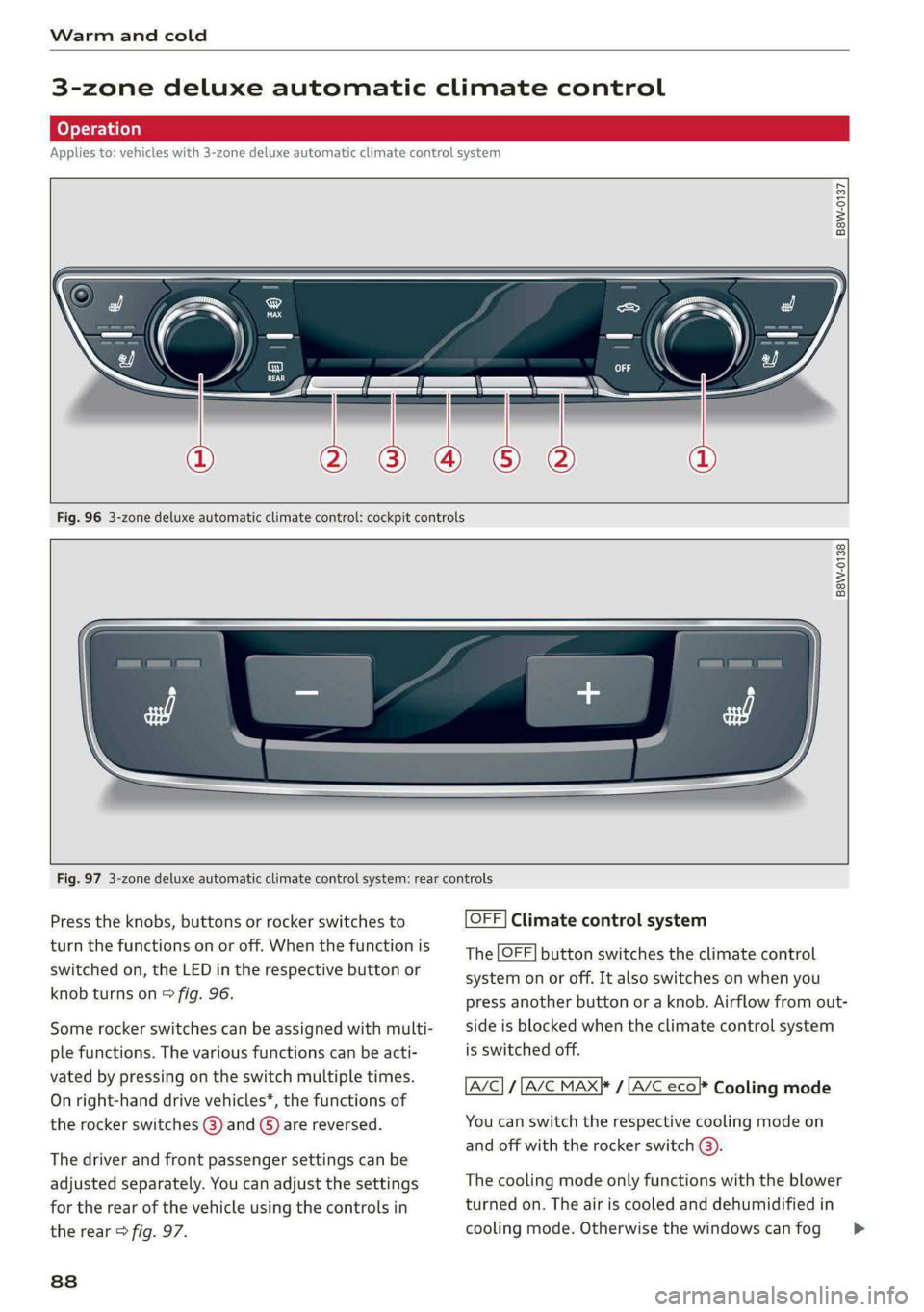
Fig. 96 3-zone deluxe automatic climate control: cockpit controls
B8W-0138
Fig. 97 3-zone deluxe automatic climate control system: rear controls
Press the knobs, buttons or rocker switches to
turn the functions on or off. When the function is
switched on, the LED in the respective button or
knob turns on > fig. 96.
Some rocker switches can be assigned with multi-
ple functions. The various functions can be acti-
vated by pressing on the switch multiple times.
On right-hand drive vehicles*, the functions of
the rocker switches @) and ©) are reversed.
The driver and front passenger settings can be
adjusted separately. You can adjust the settings
for the rear of the vehicle using the controls in
the rear > fig. 97.
838
OFF] Climate control system
The OFF] button switches the climate control
system on or off. It also switches on when you
press another button or a knob. Airflow from out-
side is blocked when the climate control system
is switched off.
A/C} / [A/C MAX|* / [A/C eco}* Cooling mode
You can switch the respective cooling mode on
and off with the rocker switch @).
The cooling mode only functions with the blower
turned on. The air is cooled and dehumidified in
cooling mode. Otherwise the windows can fog >
Page 91 of 296
![AUDI S4 2020 Owners Manual 8W1012721BB
Warm and cold
up. The cooling mode switches off automatically
at low outside temperatures.
If you activate [A/C ON], the cooling mode will be
automatically regulated. |A/C OFF](/img/6/57558/w960_57558-90.png "AUDI S4 2020 Owners Manual 8W1012721BB
Warm and cold
up. The cooling mode switches off automatically
at low outside temperatures.
If you activate [A/C ON], the cooling mode will be
automatically regulated. |A/C OFF")
8W1012721BB
Warm and cold
up. The cooling mode switches off automatically
at low outside temperatures.
If you activate [A/C ON], the cooling mode will be
automatically regulated. |A/C OFF] switches cool-
ing mode off.
If you activate [A/C MAX}*, the cooling mode will
operate with maximum output. To reduce unnec-
essary energy usage, only use this function brief-
ly.
If you activate [A/C eco}*, the climate control sys-
tem will operate in energy-saving mode.
<= Recirculation mode
In recirculation mode, the air inside the vehicle is
circulated and filtered. This prevents the unfil-
tered air outside the vehicle from entering the
vehicle interior > A\.
Pressing the <> button switches recirculation
mode on or off manually. You can also switch the
recirculation mode off by pressing the knob @ or
the ® button.
AUTO} Automatic mode
Automatic mode maintains a constant tempera-
ture inside the vehicle. Air temperature, airflow
and air distribution are controlled automatically.
You can switch automatic mode on or off by
pressing the knob ().
Temperature
You can adjust the temperature between 60°F
(+16°C) and 84°F (+28°C) by turning the knob
©. If outside of this range, LO or HI will appear
in the climate control system display. In both set-
tings, the climate control runs constantly at the
maximum cooling or heating level. The tempera-
ture is not regulated.
The temperature can be adjusted in the rear us-
ing
the rear controls > fig. 97.
= Blower
You can adjust the volume of air generated by the
blower to your preference using the rocker switch
@. The blower should always run at a low setting
to prevent the windows from fogging and to en-
sure a continuous exchange of air inside the vehi-
cle. To have the blower regulated automatically,
press one of the knobs (4).
Air distribution
You can use the rocker switches (2) to adjust the
vents where the air will flow out of. Press the
rocker switches (2) repeatedly until the desired
air distribution setting is displayed in the climate
control system controls. To have the air distribu-
tion regulated automatically, press one of the
knobs (a).
SYNC] Synchronization
Use the rocker switch ©) to select the function.
When synchronization is switched on, the set-
tings for the driver's side are applied to the front
passenger's side and the rear (except for seat
heating/ventilation*). When the settings on the
front passenger's side or in the rear are changed,
the synchronization is automatically switched off
and 3-ZONE appears in the display.
SET REAR] Function
Use the rocker switch () to select the function.
When the function is switched on, you can adjust
all settings for the rear using the climate control
system controls in the cockpit. The rear climate
control system controls cannot be operated at
the same time. This function switches off auto-
matically after a certain period of time or after
leaving the menu.
#/ Seat heating*
The seat heating temperature can be set at mul-
tiple levels. Press the w button once to switch on
the highest level. Press the a button again to de-
crease the temperature one level at a time. The
seat heating is off when all of the LEDs are off.
#5 Seat ventilation*
The seat ventilation intensity can be set to multi-
ple levels. Press the £J button once to switch on
the highest level. Press the #J button again to
decrease the intensity one level at a time. The
seat ventilation is off when all of the LEDs are off.
& Defrosting
The windshield and side windows are defrosted
or cleared of condensation as quickly as possible. >
89
Page 92 of 296

Warm and cold
The maximum amount of air flows mainly from
the vents below the windshield. Recirculation
mode switches off. The temperature should be
set at +72°F (+22°C) or higher. The temperature
is controlled automatically.
You can switch the defroster on or off using the
& button. You can switch the function off by
pressing a knob (4).
@ Rear window defogger
The rear window defogger only operates when
the engine is running. It switches off automati-
cally after 10 to 20 minutes, depending on the
outside temperature.
To prevent the rear window defogger from
switching off automatically, press and hold @ for
more than three seconds. This is stored until the
ignition is switched off.
Vents
You can open or close the center and rear vents in
the cockpit and the vents in the rear center con-
sole using the ridged thumbwheels. The levers
adjust the direction of the airflow from the vents.
Residual heat
You can activate the residual heat function when
the ignition is switched off by pressing the knob
@ (left side). The residual heat from the coolant
is used to heat the vehicle interior. The residual
heat function switches off automatically after
about 15 minutes.
ZA WARNING
— You should not use the recirculation mode
for an extended period of time, because no
fresh air is drawn in and the windows can
fog when cooling mode is switched off. This
increases the risk of an accident.
— Individuals with reduced sensitivity to pain
or temperature could develop burns when
using the seat heating* function. To reduce
the risk of injury, these individuals should
not use seat heating”.
90
C@) Note
To reduce the risk of damage to the seat heat-
ing* elements, do not kneel on the seats or
place heavy pressure on one area of the seat.
Additional settings
Applies to: vehicles with 3-zone deluxe automatic climate
control system
You can adjust additional settings.
> Applies to: MMI: Select on the home screen:
VEHICLE > Climate control.
Auto recirculation
When switched on, automatic recirculation con-
trols the recirculation mode automatically. You
must press the §& button if fog forms on the win-
dows.
Steering wheel heating
Siem eRe
Applies to: vehicles with steering wheel heating
> Press the @ button on the multifunction steer-
ing wheel to switch the steering wheel heating
on and off.
G) Tips
The steering wheel heating settings are stor-
ed automatically and assigned to the vehicle
key that is in use.
Applies to: vehicles with steering wheel heating
@ Steering wheel heating: on/Steering wheel
heating: off
This message appears if you switched the steer-
ing wheel heating on or off by pressing the but-
ton on the multifunction steering wheel.
Steering wheel heating: malfunction! See own-
er's manual
If this message appears, there is a malfunction.
Drive immediately to an authorized Audi dealer
or authorized Audi Service Facility to have the
malfunction repaired.
Page 120 of 296

Driving information
Driving information
Speed warning system
Applies to: vehicles with speed warning system
The speed warning system helps the driver to
stay below a specified maximum speed. A warn-
ing threshold can be set in the MMI for this pur-
pose.
Once the speed slightly exceeds the stored
threshold, the speed warning system will alert
the driver with an indicator in the instrument
cluster and a warning tone. Once the speed drops
below the stored maximum speed, the indicator
will turn off.
Setting a threshold is recommended if you would
like to be reminded when you reach a certain
maximum speed. Situations where you may want
to do so include driving in a country with a gener-
al speed limit or if there is a specified maximum
speed for winter tires.
@ Tips
Regardless of the speed warning system, you
should always monitor your speed using the
speedometer and make sure you are adhering
to the legal speed limit.
Setting the warning threshold
Applies to: vehicles with speed warning system
> Applies to: MMI: Select on the home screen:
VEHICLE > Driver assistance > Speed warning.
Messages
Applies to: vehicles with speed warning system
ey ) Manually set warning threshold XX mph
(km/h) exceeded
The stored speed was exceeded.
118
Camera-based traffic
sign recognition
Applies to: vehicles with camera-based traffic sign recognition
ia) meee et
Fig. 108 Instrument cluster: traffic sign recognition
The traffic sign recognition shows the traffic
signs detected by the front camera in the instru-
ment cluster display and in the head-up display”.
Data from the navigation system is also included
in the display. Up to three traffic signs can be dis-
played in the instrument cluster at once. The
speed limit that is currently applicable is dis-
played in the status line. If necessary, it will be
hidden if the system detects that turning right is
prohibited at a red light. The display in the head-
up display* can be switched off > page 23.
Within the limits of the system and depending
on the market, speed limit restrictions @ in
school zones, highways, construction zones, or at
night may be displayed.
Limitations
The traffic sign recognition is subject to certain
system limitations and may be unavailable or on-
ly partially available in the following situations:
— When visibility is poor, such as in snow, rain,
fog, or heavy spray
— When there is glare, for example from oncom-
ing traffic or the sun
— At high speeds
— If the camera's visual field > page 115 is cov-
ered, for example by dirt or stickers. Cleaning
information > page 247
— If the traffic signs are completely or partially
covered, for example by trees, snow, dirt, or
other vehicles
Page 125 of 296
8W1012721BB
Driver assistance
Driver assistance
Cruise control system
Applies to: vehicles with cruise control system
The cruise control system assists the driver in
maintaining a constant speed above approxi-
mately 15 mph (20 km/h). The system maintains
the desired speed by braking and accelerating.
ZA\ WARNING
— Always pay attention to the traffic around
your vehicle when the cruise control system
is in operation. As the driver, you are always
responsible for controlling your vehicle
speed and the distance between your vehicle
and
other vehicles.
— For safety reasons, cruise control should not
be used in the city, in stop-and-go traffic, on
winding roads, and when road conditions are
poor (such as ice, fog, gravel, heavy rain,
and conditions that could lead to hydroplan-
ing), because this increases the risk of an ac-
cident.
— Switch the cruise control off temporarily
when driving in turning lanes, highway exits,
or in construction zones.
—To reduce the risk of an accident, you should
only resume the stored speed if it is suitable
for the current traffic conditions.
() Note
Before driving downhill a long distance ona
steep hill, decrease your speed and select a
lower gear. This makes use of the engine brak-
ing effect and reduces the load placed on the
brakes.
@) Tips
The brake lights turn on when the brakes are
applied automatically.
Switching the system on
Applies to: vehicles with cruise control system
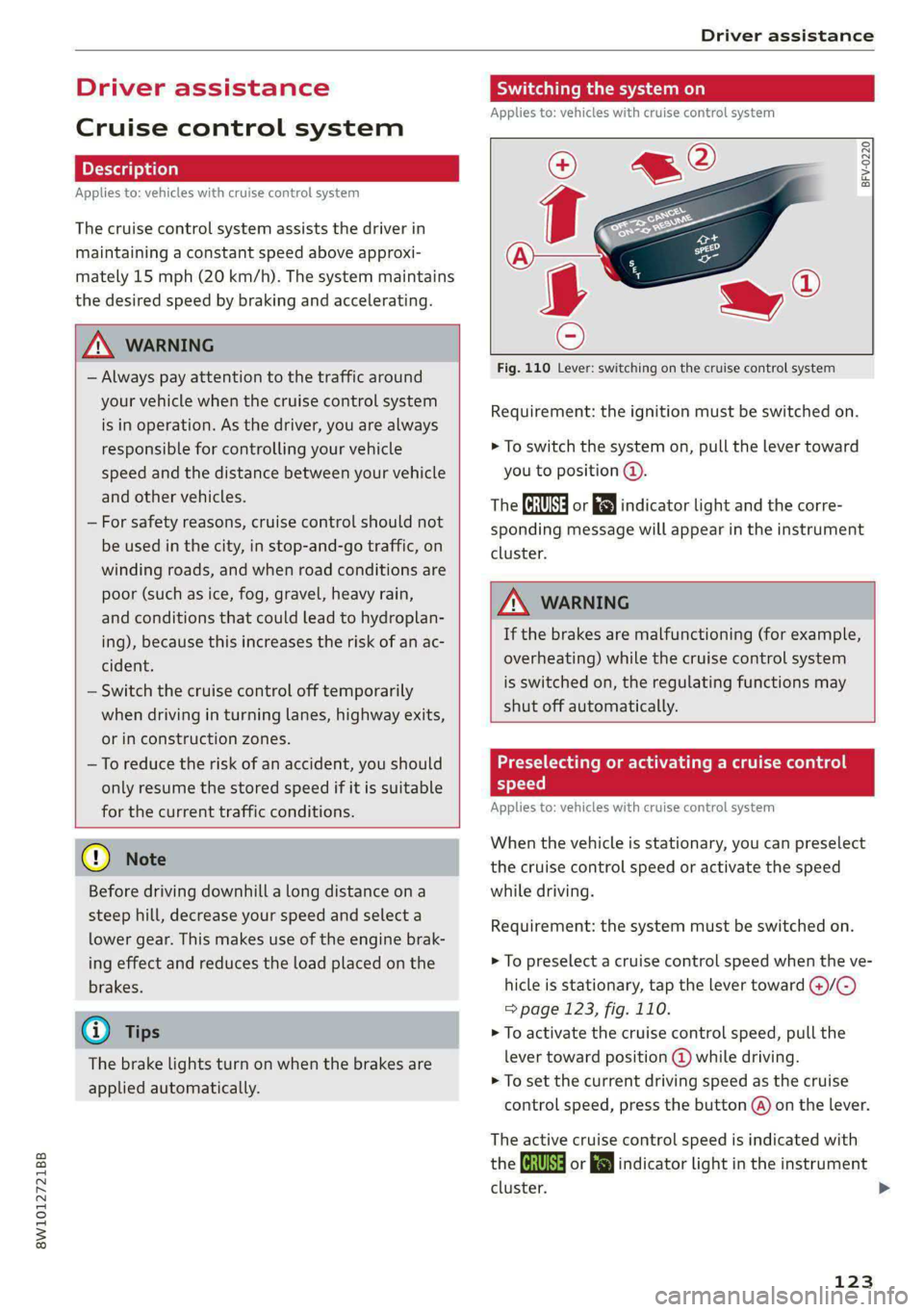
BFV-0220
Fig. 110 Lever: switching on the cruise control system
Requirement: the ignition must be switched on.
> To switch the system on, pull the lever toward
you to position @).
The ICRUISE| or i$) indicator light and the corre-
sponding message will appear in the instrument
cluster.
ZA\ WARNING
If the brakes are malfunctioning (for example,
overheating) while the cruise control system
is switched on, the regulating functions may
shut off automatically.
etal Rome ladle Rogen)
yet -t-te)
Applies to: vehicles with cruise control system
When the vehicle is stationary, you can preselect
the cruise control speed or activate the speed
while driving.
Requirement: the system must be switched on.
> To preselect a cruise control speed when the ve-
hicle is stationary, tap the lever toward (@)/G)
=> page 123, fig. 110.
> To activate the cruise control speed, pull the
lever
toward position @ while driving.
> To set the current driving speed as the cruise
control speed, press the button @) on the lever.
The active cruise control speed is indicated with
the Gl or indicator light in the instrument
cluster. >
123