Jack AUDI S4 2020 Owners Manual
[x] Cancel search | Manufacturer: AUDI, Model Year: 2020, Model line: S4, Model: AUDI S4 2020Pages: 296, PDF Size: 80.45 MB
Page 67 of 296
8W1012721BB
Sitting correctly and safely
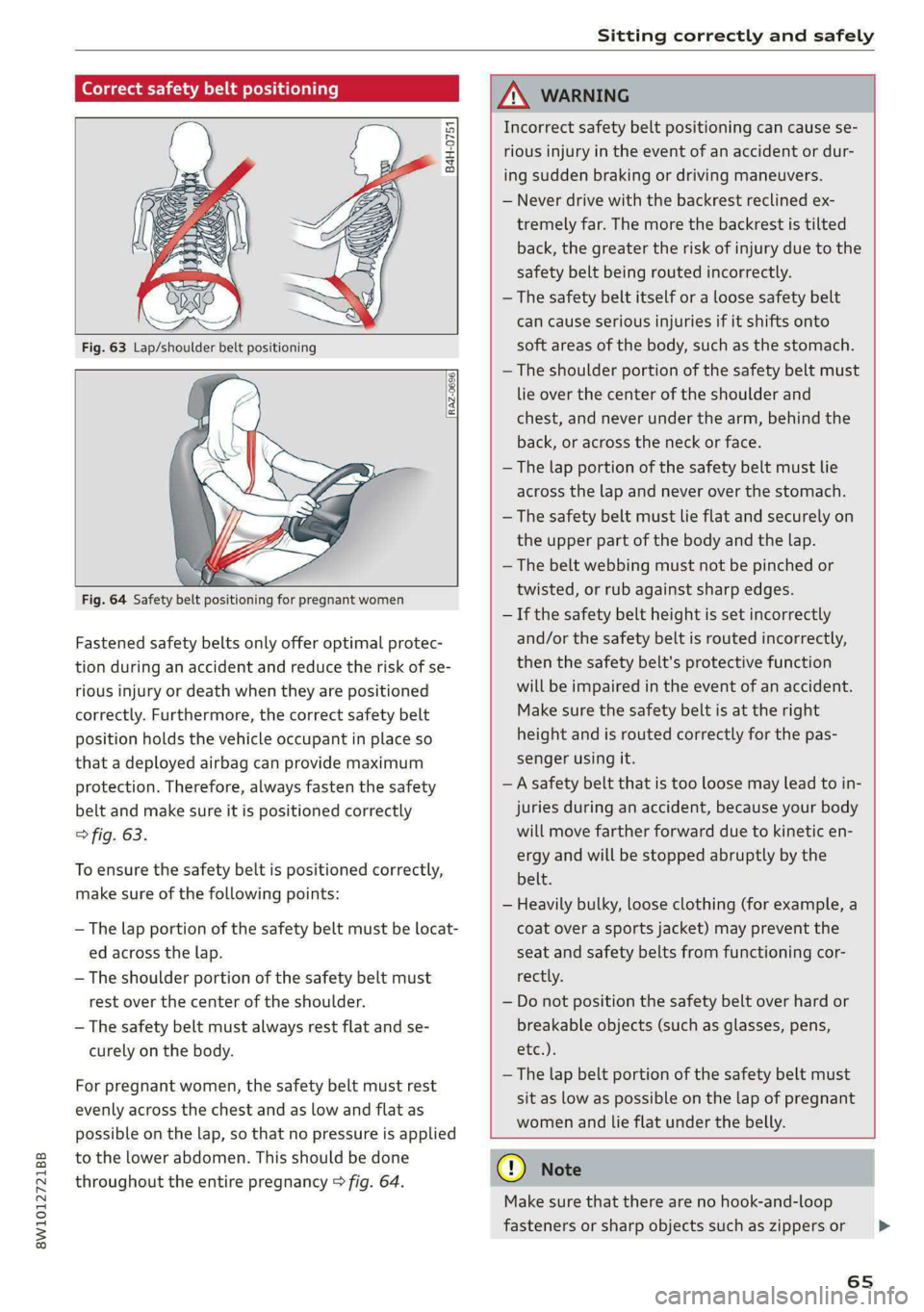
Correct safety belt positioning
B4H-0751
RAZ-0696
Fastened safety belts only offer optimal protec-
tion during an accident and reduce the risk of se-
rious injury or death when they are positioned
correctly. Furthermore, the correct safety belt
position holds the vehicle occupant in place so
that a deployed airbag can provide maximum
protection. Therefore, always fasten the safety
belt and make sure it is positioned correctly
> fig. 63.
To ensure the safety belt is positioned correctly,
make sure of the following points:
—The lap portion of the safety belt must be locat-
ed across the lap.
—The shoulder portion of the safety belt must
rest over the center of the shoulder.
— The safety belt must always rest flat and se-
curely on the body.
For pregnant women, the safety belt must rest
evenly across the chest and as low and flat as
possible on the lap, so that no pressure is applied
to the lower abdomen. This should be done
throughout the entire pregnancy > fig. 64.
ZA WARNING
Incorrect safety belt positioning can cause se-
rious injury in the event of an accident or dur-
ing sudden braking or driving maneuvers.
— Never drive with the backrest reclined ex-
tremely far. The more the backrest is tilted
back, the greater the risk of injury due to the
safety belt being routed incorrectly.
— The safety belt itself or a loose safety belt
can cause serious injuries if it shifts onto
soft areas of the body, such as the stomach.
— The shoulder portion of the safety belt must
lie over the center of the shoulder and
chest, and never under the arm, behind the
back, or across the neck or face.
— The lap portion of the safety belt must lie
across the lap and never over the stomach.
—The safety belt must lie flat and securely on
the upper part of the body and the lap.
— The belt webbing must not be pinched or
twisted, or rub against sharp edges.
— If the safety belt height is set incorrectly
and/or the safety belt is routed incorrectly,
then the safety belt's protective function
will be impaired in the event of an accident.
Make sure the safety belt is at the right
height and is routed correctly for the pas-
senger using it.
— A safety belt that is too loose may lead to in-
juries during an accident, because your body
will move farther forward due to kinetic en-
ergy and will be stopped abruptly by the
belt.
— Heavily bulky, loose clothing (for example, a
coat over a sports jacket) may prevent the
seat and safety belts from functioning cor-
rectly.
— Do not position the safety belt over hard or
breakable objects (such as glasses, pens,
etc.).
— The lap belt portion of the safety belt must
sit as low as possible on the lap of pregnant
women and lie flat under the belly.
@) Note
Make sure that there are no hook-and-loop
fasteners or sharp objects such as zippers or
65
>
Page 158 of 296
Parking and maneuvering
— The driver is always responsible when enter-
ing or exiting a parking space and during
similar maneuvers.
— Do not use this function if the vehicle cannot
move freely, for example when on a vehicle
jack.
— Sensors and cameras have spots in which
the surrounding area cannot be detected.
Objects, animals, and people may only be
detected with limitations may not be detect-
ed at all. Always monitor the traffic and the
vehicle's surroundings directly and do not
become distracted.
@ Note
— Do not use the park assist systems when
transporting cargo that extends out of the
vehicle, when snow chains are mounted, or
when the parking space is on a hill or in-
cline.
— Park assist guides the vehicle either away
from curbs or onto them if other vehicles
are parked on the curb. Make sure that your
vehicle's tires and rims are not damaged.
Resume control of the vehicle in time or
stop the parking process if needed to pre-
vent damage.
— In parking spaces without curbs, maintain a
distance of at least 19 inches (50 cm) from
walls and buildings in order to reduce the
risk of vehicle damage.
@ Tips
Follow the legal regulations in the country
where you are located when using Park assist.
Parking with the park assists
Applies to: vehicles with park assist
Requirement: a suitable parking space must be
found and selected > page 154. The vehicle must
initially be stationary.
> Select the reverse gear after stopping briefly.
> Remove your hands from the steering wheel.
> Pay attention to the path of the vehicle. If the
traffic situation permits, accelerate carefully
>A.
156
> Follow the visual instructions in the center dis-
play and the warning tones until the parking
process
has ended.
> The indicators in the center display show the
necessary direction of travel. Drive in the direc-
tion indicated by the arrows or symbols on the
roof in the parking aid image @) > page 154,
fig. 136.
Park assist automatically steers the vehicle into
the parking space while the driver presses the
pedals. The maximum parking speed is approxi-
mately 4 mph (7 km/h).
ZA WARNING
— Follow the safety precautions and note the
limits of the assist systems, sensors, and
cameras > page 114.
— The park assist is an assist system. The driv-
er is still responsible for monitoring the ve-
hicle's surroundings and preventing colli-
sions when using the system.
— When using park assist to drive into or out
of a parking space, the steering wheel turns
quickly on its own. Reaching into the steer-
ing wheel spokes while this is happening can
result in injury.
G) Tips
You can also cancel the driving direction set
by the system by shifting between D and re-
verse gear. Based on the position of the vehi-
cle, the system then calculates the additional
steering and driving directions for maneuver-
ing.
Exiting parking spaces with park assist
Applies to: vehicles with park assist
If you parked the vehicle in a parallel parking
space, park assist can help you drive out of it.
> Start the engine.
> Press the Pe button in the center console.
> Wait until a message appears in the center dis-
play that specifies the direction of travel re-
quired to exit the parking space.
Page 255 of 296

8W1012721BB
Emergency assistance
Emergency assistance
General information
> Park the vehicle as far as possible from moving
traffic in the event of a breakdown. In the event
of a flat tire, park the vehicle ona level surface.
If you are ona steep hill, be especially careful.
> Set the parking brake.
> Switch the emergency flashers on.
> Have the passengers exit the vehicle. They
should move to a safe place, for example be-
hind a guard rail.
Z\ WARNING
Follow the steps given above. This is for your
protection and the for the safety of others on
the road.
Equipment
Vehicle tool kit, tire
vehicle jack
Applies to: vehicles with the vehicle tool kit, tire mobility kit,
and vehicle jack
yi aYaLaL eae Tale|
Fig. 172 Luggage compartment: cargo floor cover
The vehicle tool kit, vehicle jack, tire mobility kit
and compressor are stored in the luggage com-
partment under the cargo floor cover.
» Applies to: sedan: To open the front compart-
ment, lift the cargo floor cover by the strap (@).
> Applies to: allroad: To open the front compart-
ment, pull the cargo floor cover by the plastic
handle @) slightly toward the rear. Lift the car-
go floor cover over the front compartment.
> To open the rear compartment, lift the cargo
floor cover by the plastic handle @).
» Applies to: sedan: Hook the plastic handle (2)
into the luggage compartment seal.
> To remove the cargo floor cover completely,
pull it toward the rear at the plastic handle @).
> Applies to: vehicles with spare tire: Turn the
handle counter-clockwise and remove the spare
tire.
> Applies to: sedan: Unhook the cargo floor cover
again
before closing the luggage compartment
lid.
Depending on vehicle equipment, the vehicle tool
kit, tire mobility kit, and compressor may be lo-
cated under another cover that is secured with a
handwheel.
Applies to: vehicles with vehicle jack in the stor-
age bag: The bag with the vehicle jack is secured
to the tie-downs in the luggage compartment
and must be secured to the tie-downs again after
using it.
ZX WARNING
Applies to: vehicles with vehicle jack in the storage bag
A vehicle jack that is unsecured, incorrectly se-
cured, or not secured in the luggage compart-
ment may slide out of place when braking,
turning,
or in an accident, which increases the
risk of injuries to vehicle passengers. To re-
duce the risk of an accident, never transport
the vehicle jack without securing it.
G) Tips
—Insome vehicles, the rear compartment
may not open.
— The vehicle jack in your vehicle is mainte-
nance-free.
Tire mobility kit
Applies to: vehicles with tire mobility kit
> Read and follow the important safety precau-
tions > page 253.
> Set the parking brake.
> Select the “P” position.
> Check if a repair with the tire mobility kit is pos-
sible > page 254.
253
Page 258 of 296
Emergency assistance
> Set the parking brake.
> Select the “P” position.
>» When towing a trailer: disconnect the trailer
from your vehicle.
> Lay out the vehicle tool kit > page 253 and the
spare tire > page 258.
> Switch the ignition off.
> Turn the wheel bolt approximately one turn to
the left. To achieve the required torque, hold
the end of the wheel wrench. If the wheel bolt
will not loosen, press carefully on the wheel
wrench with your foot. Hold onto the vehicle se-
curely while doing this and make sure your foot-
ing is stable.
ZA WARNING
The vehicle must also be secured to prevent it
from rolling when using the vehicle jack*. Use
suitable objects to block the front and back of
the wheel that is diagonal from the wheel
with the flat tire.
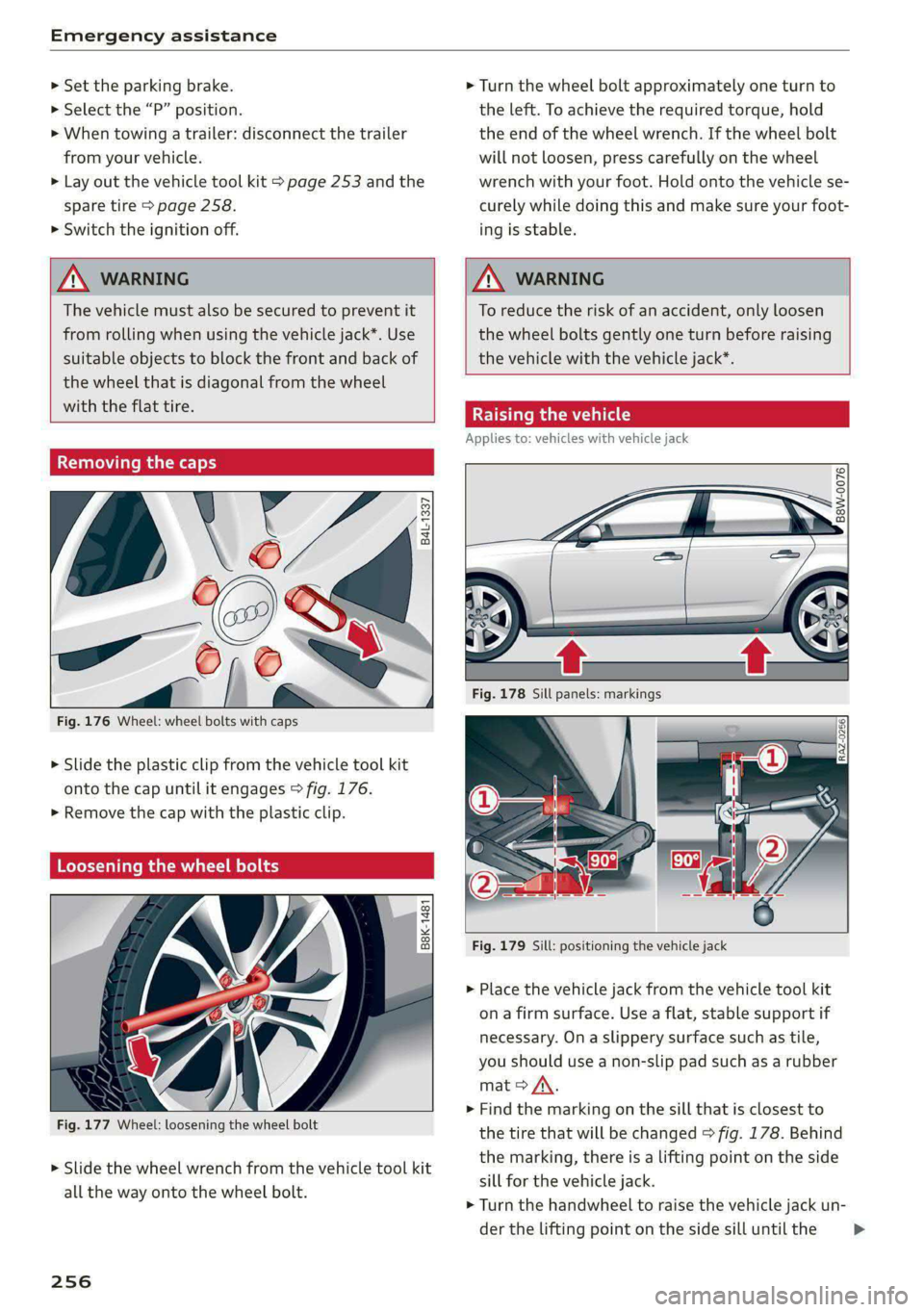
Removing the caps
@
ie
zis
Fig. 176 Wheel: wheel bolts with caps
?
> Slide the plastic clip from the vehicle tool kit
onto the cap until it engages > fig. 176.
> Remove the cap with the plastic clip.
Loosening the wheel bolts
©
i=
x © a
Fig. 177 Wheel: loosening the wheel bolt
> Slide the wheel wrench from the vehicle tool kit
all the way onto the wheel bolt.
256
ZA WARNING
To reduce the risk of an accident, only loosen
the wheel bolts gently one turn before raising
the vehicle with the vehicle jack*.
Raising the vehicle
Applies to: vehicles with vehicle jack
© & Ss
g
= % oo
Fig. 179 Sill: positioning the vehicle jack
> Place the vehicle jack from the vehicle tool kit
ona firm surface. Use a flat, stable support if
necessary. Ona slippery surface such as tile,
you should use a non-slip pad such as a rubber
mat > A\.
> Find the marking on the sill that is closest to
the tire that will be changed > fig. 178. Behind
the marking, there is a lifting point on the side
sill for the vehicle jack.
> Turn the handwheel to raise the vehicle jack un-
der the lifting point on the side sill until the >
Page 259 of 296
8W1012721BB
Emergency assistance
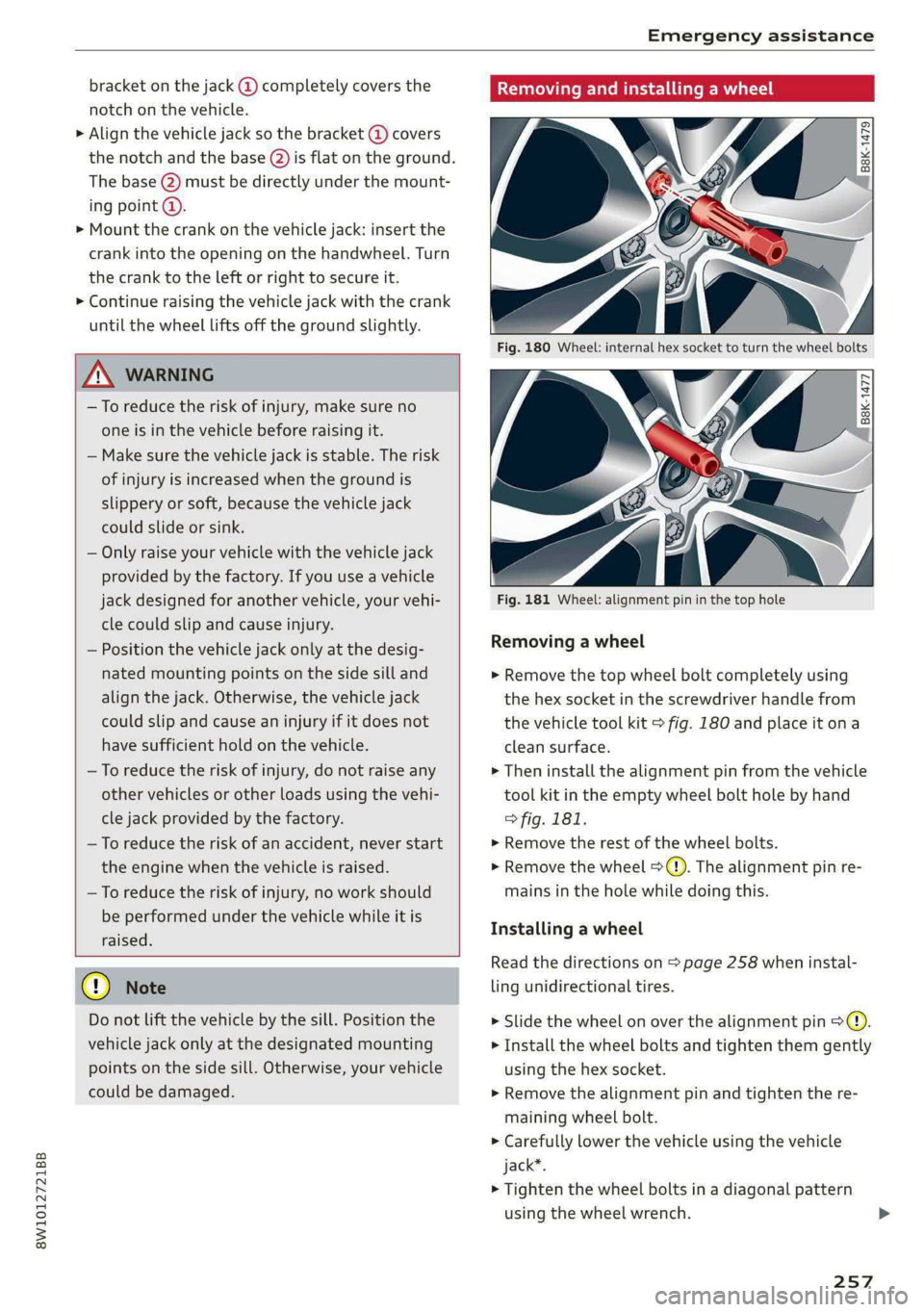
bracket on the jack @) completely covers the
notch on the vehicle.
> Align the vehicle jack so the bracket (@ covers
the notch and the base (2) is flat on the ground.
The base @) must be directly under the mount-
ing point @.
> Mount the crank on the vehicle jack: insert the
crank into the opening on the handwheel. Turn
the crank to the left or right to secure it.
> Continue raising the vehicle jack with the crank
until the wheel lifts off the ground slightly.
ZA WARNING
—To reduce the risk of injury, make sure no
one is in the vehicle before raising it.
— Make sure the vehicle jack is stable. The risk
of injury is increased when the ground is
slippery or soft, because the vehicle jack
could slide or sink.
— Only raise your vehicle with the vehicle jack
provided by the factory. If you use a vehicle
jack designed for another vehicle, your vehi-
cle could slip and cause injury.
— Position the vehicle jack only at the desig-
nated mounting points on the side sill and
align the jack. Otherwise, the vehicle jack
could slip and cause an injury if it does not
have sufficient hold on the vehicle.
—To reduce the risk of injury, do not raise any
other vehicles or other loads using the vehi-
cle jack provided by the factory.
— To reduce the risk of an accident, never start
the
engine when the vehicle is raised.
—To reduce the risk of injury, no work should
be performed under the vehicle while it is
raised.
@) Note
Do not lift the vehicle by the sill. Position the
vehicle jack only at the designated mounting
points on the side sill. Otherwise, your vehicle
could be damaged.
Removing and installing a wheel
2 Rg + ~
oO oO
B8K-1477
Fig. 181 Wheel: alignment pin in the top hole
Removing a wheel
> Remove the top wheel bolt completely using
the hex socket in the screwdriver handle from
the vehicle tool kit > fig. 180 and place it ona
clean surface.
> Then install the alignment pin from the vehicle
tool kit in the empty wheel bolt hole by hand
> fig. 181.
> Remove the rest of the wheel bolts.
>» Remove the wheel >(). The alignment pin re-
mains in the hole while doing this.
Installing a wheel
Read the directions on > page 258 when instal-
ling unidirectional tires.
> Slide the wheel on over the alignment pin >@.
> Install the wheel bolts and tighten them gently
using the hex socket.
> Remove the alignment pin and tighten the re-
maining wheel bolt.
> Carefully lower the vehicle using the vehicle
jack*.
> Tighten the wheel bolts in a diagonal pattern
using the wheel wrench.
257
Page 286 of 296

Index
HFP
refer to Hands Free Profile............. 158
High beams
High beam assistant................... 49
Highway lights ....... 0... ccc eee eee eee 48
Hill descent assist..............002000. 105
Hill descent control..... 00... .. ce eee eee 104
Hill HOLGIASSISE « move 2 os nanos © sues oo eae woe 94
Home
refer to Home address...........-0 008 183
Home address...........0 000. c eee eee 183
HomeLink
refer to Garage door opener............. 45
Home screen... . 2... cece eee eee ee eee 17
HOM... ee eee eee 6
Hotspot
refer to Wi-Fi...........0...0e eee eee 172
I
Idle
refer to Gears » scene = een ss een es ees ees 94
Ignition
Switchitig Orand Off sc ews se wows ss wean s 92
Imbalance (wheels) ............000 eee ee 236
Immobilizer
refer to Electronic immobilizer........... 34
IndicatOrlights « aon « ¢ way x 6 aeens s ¥ wares & 2 5 7
Inspection interWals « sew: < «sees se eeps a es 226
InStrurmient clusters s ¢ ews x «aes 2 eee i os 11
Adjusting the layout...............000. 12
Cleaning....... 0... cece eee eee 249
ENGING@:COdGs ¢ = ass + © canes f eros e Sees 208
Fail @tiss 2 was 2 x nese ov wie se ere 2 ee 11
On-board computer.............0 200 eee 15
Operating...............2.. 2000-0000 12
Service interval display................ 226
Software information................. 208
Switching tabs.................2200005 12
Switching the view............. eee eee 12
Vehicle FUmetions « cnvsscs « 2 sen w a avores 0 2 tens 15
Version information...............065 208
Instruments
Adjusting illumination.................. 52
Intelligent search
Navigationiss ¢ x sews + x uews 6 wuss 6 s wee 177
Intecior UGHEING « + ews + 2 eee s pager eo me 51, 52
284
Interior MONItOriNg’s ss cows + © vesse 2 ¥ aoeeene 33
Intermittent mode (windshield wipers) ..... 55
International travel wi: ¢ sass sé mews a owen 173
Internet
FEFErTOXCONNECE 5. = esses wo eieoees =v eeavee eH 169
Internet radio
refer to Online radio.............. 191, 192
iPhone
refer to Audi music interface........... 196
J
Jump starting ........... cece eee eens 260
K
Key... eee ee eee eee 30, 34
Convenience opening and closing......... 42
Key replacement..............---0 eee 34
Mechanical key..... 0... eee eee eee eee 34
PANIC. K6W iis: = © savon ¢ ¢ eane @ § SetR ys Hem ¢ & 34
Replacing the battery.................. 36
Unlocking and locking...............005 35
Vehicle code... 1... eee eee ee 34
Key user... 22. eee ee eee ee 28
Kick-down...... 2.20... 2 eee eee 96
L
Lane assist
refer to Audi active lane assist.......... 137
Laptimer................0..0.000000. Ii
EValW@Ling’: = x came + xameon 2 pee & & teem o 3 122
SEAM Gbcis ov svvins 6 o suncans w 2 eoTueDs © a KURA 9 121
LATCH (securing child safety seats)......... 74
Leather care and cleaning............... 250
Legal information
License subscriptions................. 208
Software information................. 208
Softwale licens@Sics ss wauy as meen ay weuee a 208
Versionsnformatiomss « s ssswe ¥ ccweasm & were 208
License plate bracket................... 274
Lifting points (vehicle jack).............. 256
Light/rain sensor
Automatic headlights .................. 48
Intermittent mode (windshield wipers).... 55
Page 292 of 296
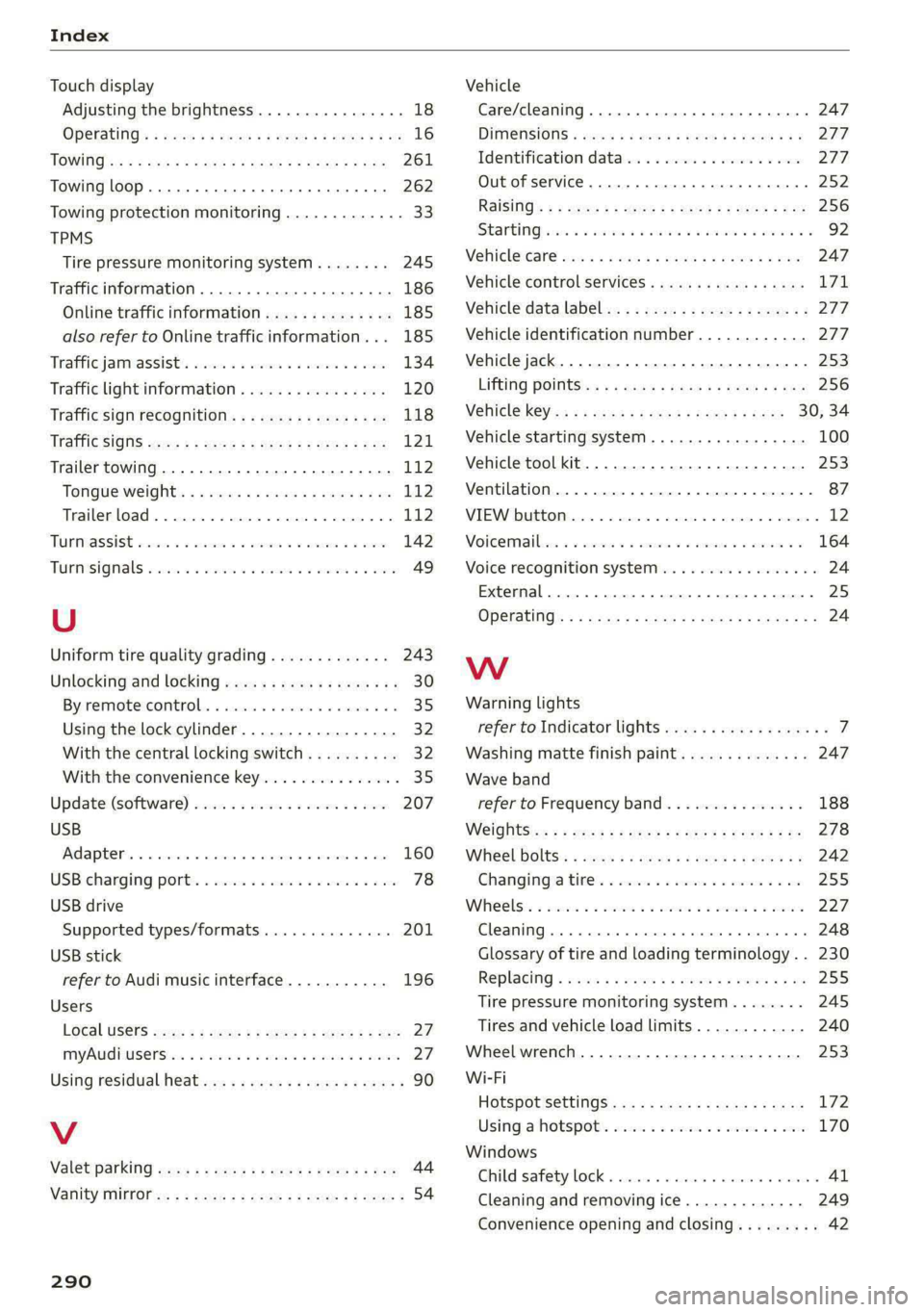
Index
Touch display
Adjusting the brightness..............-. 18
TPMS
Tire pressure monitoring system........ 245
Traffic information...............00000- 186
Online traffic information.............. 185
also refer to Online traffic information... 185
Trafficjamiassist's sss 2 sss vo even oo soe 134
Traffic light information................ 120
Traffic sign recognition................. 118
Traffic’ SigtS ses: < = seee ss mem tv eee soe 121
Trailer towing.......... 0... cee eee eee 112
TONGUE WEIGKts « & sess « » sever x 2 wawe a exe L12
Trailerload «5 ccc so sesmee « oramess ao coenees wo 112
TUPMASSISE secs oo csecers oo weaaee oe comin ao eee 142
Turnsignal srsics a = cies «2 meee «2 wawen 6 ee 49
U
Uniform tire quality grading............. 243
Unlocking and locking. ..............0005 30
Bysremiote:control.. « scsi sv nmin 6 o eames vee 35
Using the lock cylinder................. 32
With the central locking switch.......... 32
With the convenience key............... 35
Update (Software) ices cs sssseu oo savin oo swe 207
USB
IAGAPEOR « ss mec = suances 1 « wane a + swewon & 5 at 160
USBicharging ports. . wens «x swauue ¥ x sons © arene 78
USB drive
Supported types/formats.............. 201
USB stick
refer to Audi music interface........... 196
Users
LO¢al USERS wane: x x seme 5 2 meee 2 eee 2 5 oe 27
MMYAUGEUSCDS is oo cess 2 6 wanes + sete a = ea 27
Using residual heat. .... 0.0... 0c cece e nee 90
V
Valet parking sews «= sees = s eee es cee ee bes 44
Vanity OP icx « = cacy & 2 seus © 2 wows 5 y wee & 54
290
Vehicle
Care/cleaning........ 2. cece eee eee ee 247
DIMERSIONS « easy s x wee s wenn se Wee a 277
Identification data................0.. 277,
Out of service... 6... ee eee eee ee 252
RaiSinG’: 5 = sees & x ween 5 3 wees ¢ y eee ¢ eos 256
StartinGbsvis & + wwe 2 6 eww 2 6 ase 2 eww we 92
Vehicl@eare snow s eam ss wives a ¢ wens + & ess 247
Vehicle control services..............0.. L71,
Vehicle data label...............--0000- 277
Vehicle identification number............ 277
Vehicle jack. .... 2... ee eee eee eee 253
LifEiNG POINtS an « « aees s waas ao pews se row 256
Vehicle key os ¢ s seed co eee ss ease es pees 30, 34
Vehicle starting system. ............200- 100
Vehicle tool kit............. 00.22 eee eee 253
Ventilation... 2.0... . cee eee eee eee 87
VIEW button. ........ 0.00. f eee eee eee ee 12
Woicermaibecns ico ccnceie va comers vw asecone woo axes © « 164
Voice recognition system.............0-0. 24
External... 2... 2... eee eee eee 25
Operating s < = esos x s ewe < 4 eee ye GF Sanas Go 24
Ww
Warning lights
refer to Indicator lights...........--0000- 7
Washing matte finish paint.............. 247
Wave band
refer to Frequency band............... 188
Weightsies <= cess ss news se tees e aan se He 278
WHEEL bOltSs » snau se aeay sx meme 2 neem 2 a 242
Changingia tines 2 sxe x 2 snes «x ananan @ ona 255
Whee lst. & scent oo ome so emu oo vere 2s me 227
Cleaning... .. cece cece ee eee eee 248
Glossary of tire and loading terminology .. 230
Replacing « waa a s sone s ¢ wane 2 2 means ¢ 2 ve 255
Tire pressure monitoring system........ 245
Tires and vehicle load limits............ 240
Wheelwrench.............--000ee eee 253
Wi-Fi
Hotspot settingS............ceeeeveee 172
Using:a hotspots seicne so cvs 2 2 eae 2 & ewe 170
Windows
Child safety lock... 2... ee eee eee eee ee 4l
Cleaning and removing ice............. 249
Convenience opening and closing......... 42