Seat AUDI S4 2020 Owners Manual
[x] Cancel search | Manufacturer: AUDI, Model Year: 2020, Model line: S4, Model: AUDI S4 2020Pages: 296, PDF Size: 80.45 MB
Page 4 of 296
Table of contents
About this Owner's Manual......
SUMIMALY: ; « ss6% : osen ss sean cs poe s
QC CCeS Skis: si esis a 6 ores os ewe
Cockpit... 2... ee eee eee eee
Indicator lights overview...........0.
Display and operation............
Instrument cluster...............
Instrument cluster overview...........
Operating. ecco ws swacemn o © aero o erm 9
Adjusting the display.................
Coolant temperature display...........
Tachometer’. series s ewie so sie ¥ & overs
Odometer............ 0. cee eee eee eee
Outside temperature display...........
Engine oil temperature indicator.......
Boost indicator...............0--000-
Vehicle TuNCtiONnS ¢ ssc. ss sees ge eeew ge
Touch display.....................
General touch display operation........
Multi Media Interface................
Head-up display..................
DeSériptlonis ss wees « x wees so eee + ee
Voice recognition system........
Generalinformation.................
Operating’ « esses ss assur wx aeuew sv ewe &
External voice operation..............
Global FuUNCtiONS:. icc: 6 6 ese. 6 6 ces
Additional function buttons...........
Starting and driving.............
Personalization..................
Opening and closing.............
Central locking........-.....00-e eee
Child safety lock.............00.-0 08
Power Wind OwWSics «seus ys sms 5 4 wee
Sliding/tilting sunroof................
Panoramic glass roof.................
NOD
OO
12
16
16 18
20
23
24 24 24
25
26
26
27 27 27 30 30
34
36
41 42 43
44
Valetiparking = s sssec 2 x ence a cures oe oe 44
Garage door opener..........--.00 eee 45
Lights and Vision................. 48
Exterior lighting...................0. 48
Interior ligQhting ss =e aves sy cows so owas $1
ViSIOM a « 3 sees 2s oman 2 mena = HOR © oe 52
Windshield wipers................05- 55
Digital compass..............--.0000- 57
Sitting correctly and safely...... 59,
Correct passenger seating position...... 59
FrontS@ats:: 2 ss«s < = scws ¢ » sees + = eee e 59
Steering wheel sie < «cries + eee ss oeree 62
Head restraints..................000. 63
Safety DEltS': < sews + x neue 3 e eas Fe Hae 64
Memory function . « scion ss cee ve ero ee 67
Airbag system... .. 2.6... eee eee eee 67
Child
safety seats...............-000- 72
Stowing and using............... 78
POWEPFSOUICES csisu ¢ ¢ avons 8 Baws 2s Re 78
Gup holders'. ¢ scr 2 + wen 2 = wee 2 oe een 78
Storage areas and compartments....... 78
Luggage compartment............... 79
ROOf FaGK:: « = seve x ¢ saws 2 & noes 2 8 ewe es 86
Warm and cold.................65 87
Climate control system.............0. 87
3-zone deluxe automatic climate control. 88
Steering wheel heating............... 90
Fluids in the A/C system. .........0005 91
Driving.................. 00... eee 92
Startifiathe vehicle ian x x cats go wews 92
Whe nd riving isis ss iosvie so ce eo ane eee 93
Drive system... 2.2... ee eee eee 98
Start/Stop SysteM ; 00. s sees cece eee 99
Brakes’: so isemwe o eames av omceme 2 2 mess 6 ase 101
Electromechanical parking brake....... 102
Special driving situations.............. 104
Driving: dynamic. . . si... 6 6 ees 2 6 one 106
Audi drive select...............000005 106
SUSPENSION = « = exes ¢ ¢ eres 6 & teers + = ee 106
SUCOKIING 6 wvessse oo csisweus a & saosine 6 7 arexiKe WB 107
Page 25 of 296

8W1012721BB
Head-up display
Head-up display
Description
Applies to: vehicles with head-up display
Fig. 19 Instrument panel: knob for the head-up display
The head-up display projects certain warnings or
selected information from the assist systems on
the windshield. The display appears within the
driver's field of vision.
Switching on and off
> To switch the head-up display on, press the 67
knob @.
> To switch the head-up display off, press the S7
knob.
Adjusting the height
The height of the display can be adjusted to the
individual driver.
> Make sure you are seated correctly > page 59.
> Turn the knob S? to the right or Left.
Settings in the Infotainment system
> Applies to: MMI: Select on the home screen:
SETTINGS > Display & brightness > Head-up
display.
Possible settings:
— Picture rotation
— Brightness
— Display contents: you can set which informa-
tion should be displayed. The display of certain
information and some of the red indicator
lights cannot be hidden.
® Note
To reduce the risk of scratches on the glass
covering the head-up display, do not place any
objects in the projection opening.
iG) Tips
— Sunglasses with polarization filters and un-
favorable lighting conditions can impair visi-
bility of the display.
— An optimal display depends on the seat po-
sition and the height adjustment of the
head-up display.
—A special windshield is needed for the head-
up display function.
— For information on cleaning, see > table In-
terior cleaning on page 249.
23
Page 26 of 296
Voice recognition system
Voice recognition system
General information
Applies to: vehicles with voice recognition system
You can operate many functions in the vehicle
easily using voice commands.
Using the voice recognition system optimally
> Speak clearly and distinctly at a normal volume.
Speak louder when driving faster.
> Emphasize the words in the commands evenly
and do not leave long pauses.
> Close the doors, the windows, and the sunroof*
to reduce background noise. Make sure that
passengers are not speaking when you are giv-
ing a voice command.
> Do not direct the vents toward the hands-free
microphone, which is in the roof headliner near
the front interior lights.
> Only the driver should speak to the system, be-
cause the handsfree microphone is aimed to-
ward this seating position.
ZA\ WARNING
— Direct your full attention to driving. As the
driver, you have complete responsibility for
safety in traffic. Only use the functions in
such a way that you always maintain com-
plete control over your vehicle in all traffic
situations.
— Do not use the voice recognition system in
emergencies because your voice may change
in stressful situations. The system may take
longer to dial the number or may not be
able to dial it at all. Dial the emergency
number manually.
G) Tips
There are no voice guidance* prompts when a
dialog is active.
24
Operating
Applies to: vehicles with voice recognition system
See
Dat)
Where is a
Connect
Diala
coy
Es
ea
cog
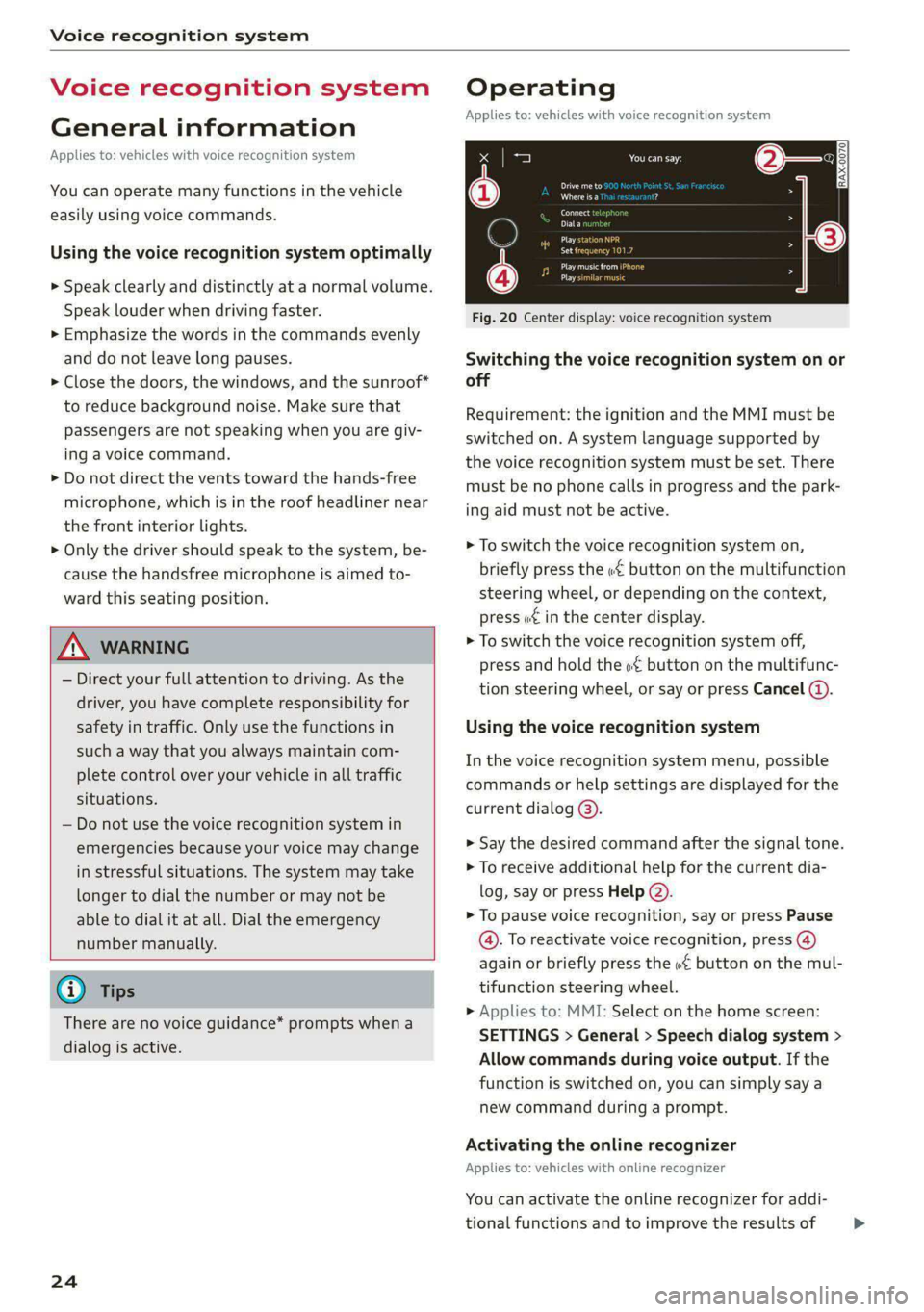
Fig. 20 Center display: voice recognition system
Switching the voice recognition system on or
off
Requirement: the ignition and the MMI must be
switched on. A system language supported by
the voice recognition system must be set. There
must be no phone calls in progress and the park-
ing aid must not be active.
> To switch the voice recognition system on,
briefly press the «€ button on the multifunction
steering wheel, or depending on the context,
press ¢ in the center display.
> To switch the voice recognition system off,
press and hold the « button on the multifunc-
tion steering wheel, or say or press Cancel (4).
Using the voice recognition system
In the voice recognition system menu, possible
commands or help settings are displayed for the
current dialog @).
> Say the desired command after the signal tone.
> To receive additional help for the current dia-
log, say or press Help (2).
> To pause voice recognition, say or press Pause
@. To reactivate voice recognition, press (@)
again or briefly press the «€ button on the mul-
tifunction steering wheel.
» Applies to: MMI: Select on the home screen:
SETTINGS > General > Speech dialog system >
Allow commands during voice output. If the
function is switched on, you can simply say a
new command during a prompt.
Activating the online recognizer
Applies to: vehicles with online recognizer
You can activate the online recognizer for addi-
tional functions and to improve the results of >
Page 42 of 296
Opening and closing
echanically unlocki
compartment lid
luggage
Applies to: vehicles with folding backrests
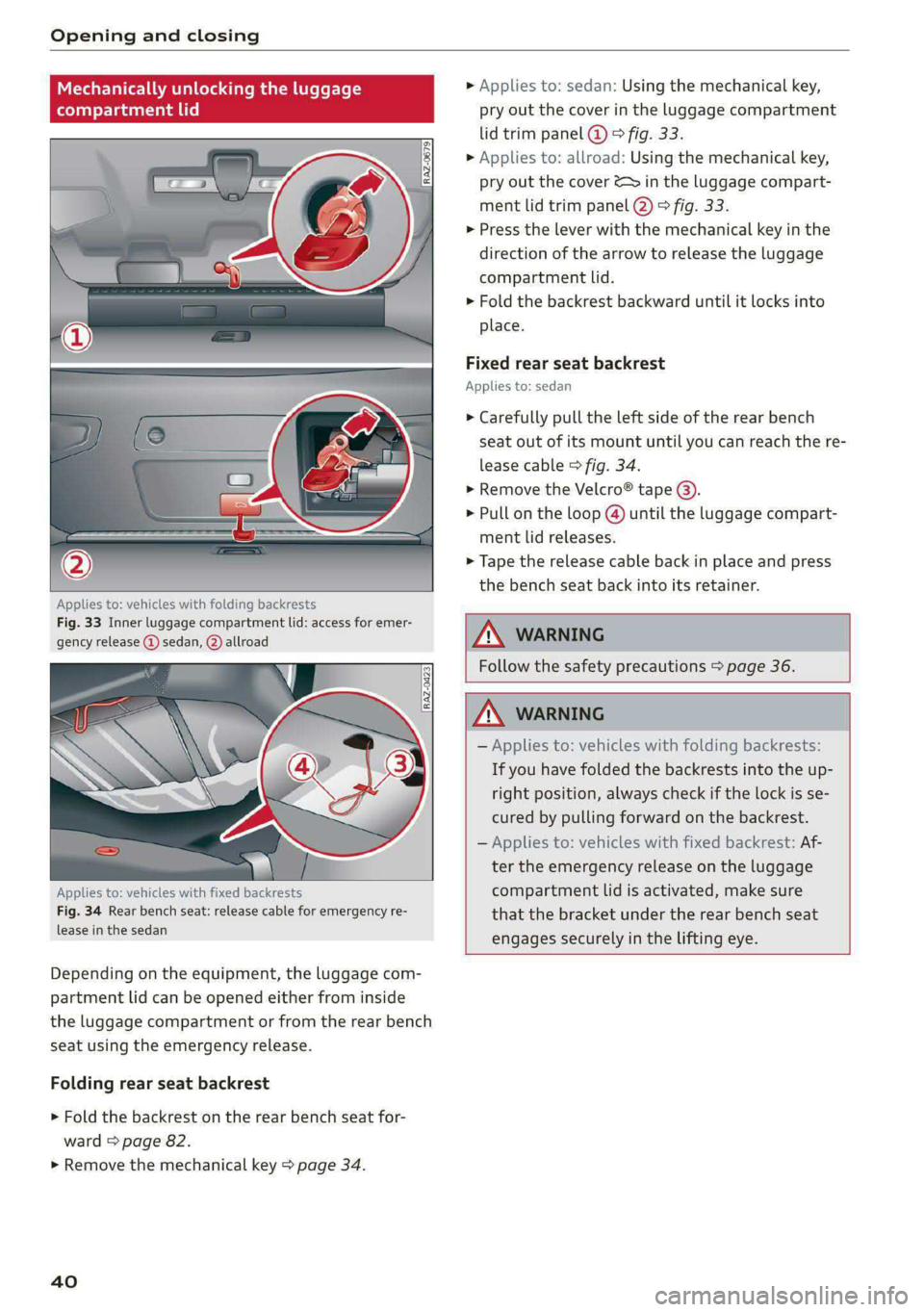
Fig. 33 Inner luggage compartment lid: access for emer-
gency release @) sedan, @) allroad
Applies to: vehicles with fixed backrests
Fig. 34 Rear bench seat: release cable for emergency re-
lease in the sedan
Depending on the equipment, the luggage com-
partment lid can be opened either from inside
the luggage compartment or from the rear bench
seat using the emergency release.
Folding rear seat backrest
> Fold the backrest on the rear bench seat for-
ward > page 82.
> Remove the mechanical key > page 34.
40
» Applies to: sedan: Using the mechanical key,
pry out the cover in the luggage compartment
lid trim panel @ ® fig. 33.
> Applies to: allroad: Using the mechanical key,
pry out the cover &s in the luggage compart-
ment lid trim panel @) ° fig. 33.
> Press the lever with the mechanical key in the
direction of the arrow to release the luggage
compartment lid.
>» Fold the backrest backward until it locks into
place.
Fixed rear seat backrest
Applies to: sedan
> Carefully pull the left side of the rear bench
seat out of its mount until you can reach the re-
lease cable > fig. 34.
> Remove the Velcro® tape @).
> Pull on the loop @) until the luggage compart-
ment lid releases.
> Tape the release cable back in place and press
the bench seat back into its retainer.
Follow the safety precautions > page 36.
— Applies to: vehicles with folding backrests:
If you have folded the backrests into the up-
right position, always check if the lock is se-
cured by pulling forward on the backrest.
— Applies to: vehicles with fixed backrest: Af-
ter the emergency release on the luggage
compartment lid is activated, make sure
that
the bracket under the rear bench seat
engages securely in the lifting eye.
Page 47 of 296
8W1012721BB
Opening and closing
You can switch the valet parking function on, for
example when someone else is parking your vehi-
cle ). The vehicle can be driven, locked, and un-
locked using the vehicle key, but access to the
luggage compartment is blocked.
> Remove the mechanical key > page 34.
> Press the [VALET] button in the glove compart-
ment. The LED in the button turns on if the
function is switched on.
> Lock the glove compartment with the mechani-
cal key.
» Applies to: vehicles with lockable pass-through
and lockable rear seat backrests: To secure the
luggage compartment from the vehicle interior,
lock the pass-through and the rear seat backr-
ests using the mechanical key > page 84 or
=> page 82.
> Give your vehicle key to the service personnel
who are parking your vehicle and keep the me-
chanical key.
The following buttons are deactivated when the
valet parking function is switched on:
— <3 button in the driver's door
— Zs button on the vehicle key
— Handle in the luggage compartment lid
If the valet parking function is switched on, a
message will appear every time the ignition is
switched on.
@ Tips
Please note that the luggage compartment
can still be accessed from the vehicle interior
in vehicles with fixed rear seat backrests or
ones that cannot be locked, even when the
valet parking function is switched on.
Garage door opener
Applies to: vehicles with garage door opener
With the garage door opener, you can activate
systems such as the garage doors, security sys-
D_ This function is not available in all countries.
2) The possible number of hand-held transmitters depends
on the equipment.
tems or house lights from inside your vehicle.
These functions are operated in the MMI. Multi-
ple receivers can be programmed, which can con-
trol the functions of up to eight2) hand-held
transmitters.
Z\ WARNING
— When operating or programming the garage
door opener, make sure that no people or
objects are in the area immediately sur-
rounding the equipment. People can be in-
jured or property can be damaged if struck
when closing.
— Do not allow yourself to be distracted from
traffic by the viewing and operating the dis-
plays.
G@) Tips
— Ifyou sell your vehicle, reset all settings to
the factory default settings > page 207.
—For an explanation on conformity with the
FCC regulations in the United States and the
Industry Canada regulations, see
=> page 275.
(i) Tips
Before you program your system to the ga-
rage door opener, first check the compatibili-
ty:
— Ask an authorized Audi dealer or authorized
Audi Service Facility or check at www.
homelink.com. You can also find more infor-
mation about HomeLink there.
— You can display information about Home-
Link (compatibility level/status/country
code/HomeLink generation) in the MMI:
— Select on the home screen: VEHICLE > Set-
tings & Service > Garage door opener > (.
Applies to: vehicles with garage door opener
Requirements: the remote control transmitter
must be programmed > page 46, the vehicle
4s
>
Page 61 of 296
8W1012721BB
Sitting correctly and safely
Sitting correctly and
safely
Correct passenger
seating position
General information
As the driver, you are responsible for making sure
every passenger is sitting correctly in their seat
and maintaining this seating position while driv-
ing. Make sure that:
— Every passenger in the vehicle has adjusted his
or her seat correctly > page 59
— The steering wheel is adjusted correctly
=> page 62
— The mirrors are adjusted so that there is a suffi-
cient view of the area around the vehicle
=> page 52
— Every passenger in the vehicle has his or her
head restraint adjusted correctly > page 63
— Every passenger in the vehicle has his or her
safety belt fastened correctly > page 64
—The activation status of the front passenger's
airbag is suitable for the passenger in the front
passenger's seat > page 70
— Children are secured in suitable child safety
seats that are secured to appropriate vehicle
seats > page 72. Read and observe the impor-
tant safety information pertaining to the use of
child safety seats on the front passenger's seat
=> A\ in General information on page 72.
Examples of incorrect seating positions
Safety belts can only provide its optimal protec-
tion when they are routed correctly. Incorrect
seating positions significantly reduce the protec-
tive functions of the safety belts and increase the
risk of injury due to incorrect belt routing.
The following list includes examples of seating
positions that could be dangerous for all vehicle
occupants. This is not a complete list. The pur-
pose is to provide examples to increase your
awareness of the topic. The following points ap-
ply when the vehicle is in motion:
— Never stand inside the vehicle.
— Never stand on the seats.
— Never kneel on the seats.
— Never tilt your backrest too far back.
— Never lean against the instrument panel.
— Never lie down on the rear bench seat.
— Never sit only on the front section of the seat.
— Never sit sideways on the seat.
— Never lean against the window.
— Never place your feet out of the window.
— Never place your feet on the instrument panel.
— Never place your feet on the seat cushion.
— Never ride in the footwell.
— Never sit on the armrests.
— Never drive or ride in a seat without fastening
your safety belt.
— Never ride in the luggage compartment.
ZA WARNING
Incorrect seating positions, failure to wear a
safety belt, or being too close to an airbag in-
crease the risk of serious or fatal injury to ve-
hicle occupants, especially if the airbags de-
ploy and come into contact with occupants
who are not seated correctly. Note the impor-
tant information and warnings in the chapters
for the topics given above.
Gi) Tips
If you or other vehicle passengers have physi-
cal limitations that prevent sitting in a correct
position, modifications to the vehicle may be
necessary. For more information, contact an
authorized Audi dealer or authorized Audi
Service Facility, or call Audi customer support
at 1-800-822-2834.
Front seats
General information
Make sure that:
— You can press the pedals down completely
while your legs are slightly bent
— The distance between your upper body and the
steering wheel or instrument panel is at least
10 inches (25 cm)
— The distance between your knees and the in-
strument panel is at least 4 inches (10 cm)
59
>
Page 62 of 296
Sitting correctly and safely
— Your thighs are lightly supported by the front
surface of the seat
— The backrest is in an upright position and your
back is resting against it
— You have a sufficient view of the area around
the vehicle
— You have a clear view of the instrument cluster,
indicator lights, and the head-up display*
ZA WARNING
— If you are too close to the steering wheel or
instrument panel, the airbag system cannot
provide the optimal protection, which in-
creases the risk of injury and death.
— To reduce the risk of injury in the event of
sudden braking maneuvers or accidents,
never drive with the backrest reclined very
far. The airbag system and seat belts can on-
ly provide optimal protection when the back-
rest is in an upright position and the driver
is wearing the seat belt correctly. If the
backrest is angled back too far, the safety
belt can shift to soft areas of the body, such
as the stomach, which increases the risk of
injury.
—To reduce the risk of an accident, only adjust
the seats when the vehicle is stationary.
— Be careful when adjusting the seat. Lack of
control or attention when adjusting can re-
sult in injuries due to pinching to vehicle oc-
cupants both in the front seats and rear
seats.
— Never place objects in the driver's footwell.
Objects could shift and enter the area
around the pedals, which could prevent you
from using them. You would then be unable
to use the pedals if sudden driving or brak-
ing maneuvers were needed, which increas-
es the risk of an accident.
— Make sure that the floor mats are always se-
curely attached.
— To reduce the risk of an accident, never place
additional floor mats or other floor covers
over the installed floor mats, because this
reduces the pedal's range of motion and can
impair pedal operation.
—To reduce the risk of injury, never place your
feet on the instrument panel, out of the
60
window, or on the seat surfaces. This also
applies to passengers in the rear seats.
@) Note
Applies to: vehicles with manually adjustable head re-
straints
To reduce the risk of damage, be very careful
when adjusting the seat to make sure the
head restraints do not hit the headliner or the
panorama glass roof*.
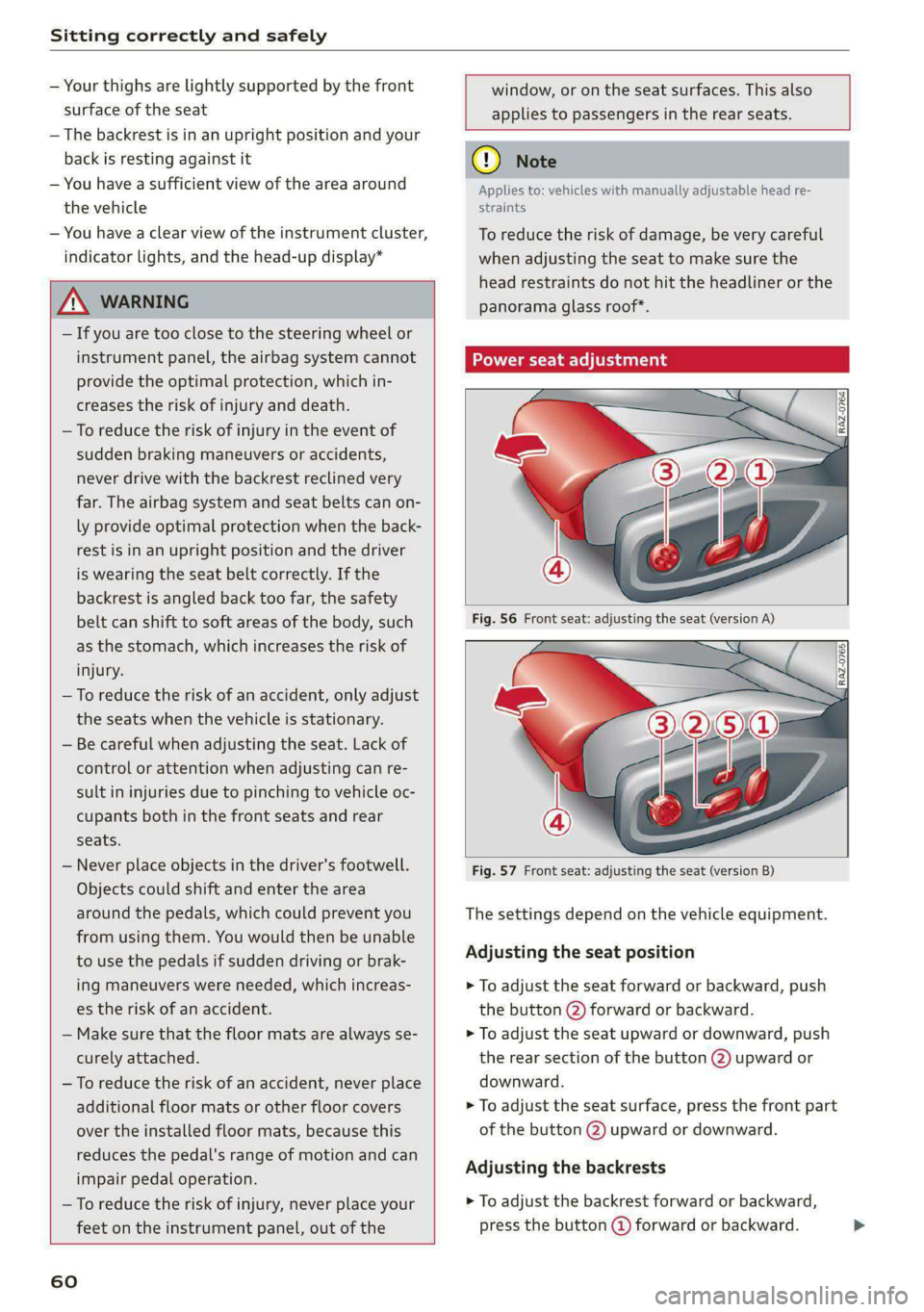
oN eet Lar feet ana)
Fig. 57 Front seat: adjusting the seat (version B)
The settings depend on the vehicle equipment.
Adjusting the seat position
> To adjust the seat forward or backward, push
the button @) forward or backward.
> To adjust the seat upward or downward, push
the rear section of the button @) upward or
downward.
> To adjust the seat surface, press the front part
of the button @) upward or downward.
Adjusting the backrests
> To adjust the backrest forward or backward,
press the button @ forward or backward. >
Page 63 of 296
8W1012721BB
Sitting correctly and safely
Adjusting the upper thigh support
> To increase or decrease the upper thigh sup-
port, lift the handle @) and move the upper
thigh support.
Massage function
> To switch the massage function on or off, press
the button © ° fig. 57.
Adjusting the lumbar support
> To adjust the lumbar support, press the button
@ at the applicable location.
Adjusting the side supports
You can adjust the side bolsters using the multi-
function button @) > fig. 57.
Z\ WARNING
—To reduce the risk of an accident, only adjust
the driver's seat when the vehicle is station-
ary.
— The power front seats can also be adjusted
when the ignition is switched off. To reduce
the risk of injury, children should never be
left unattended in the vehicle for this rea-
son.
— Exercise caution when adjusting the seat
height. Unsupervised or careless seat adjust-
ment could cause parts of the body to get
pinched, which increases the risk of injury.
— The front seat backrests must not be re-
clined too far back when driving, because
this impairs the effectiveness of the safety
belts and airbag system, which increases the
risk of injury.
Adjusting the front seats in the MMI
Applies to: vehicles with seat settings in the MMI
You can adjust additional settings in the MMI.
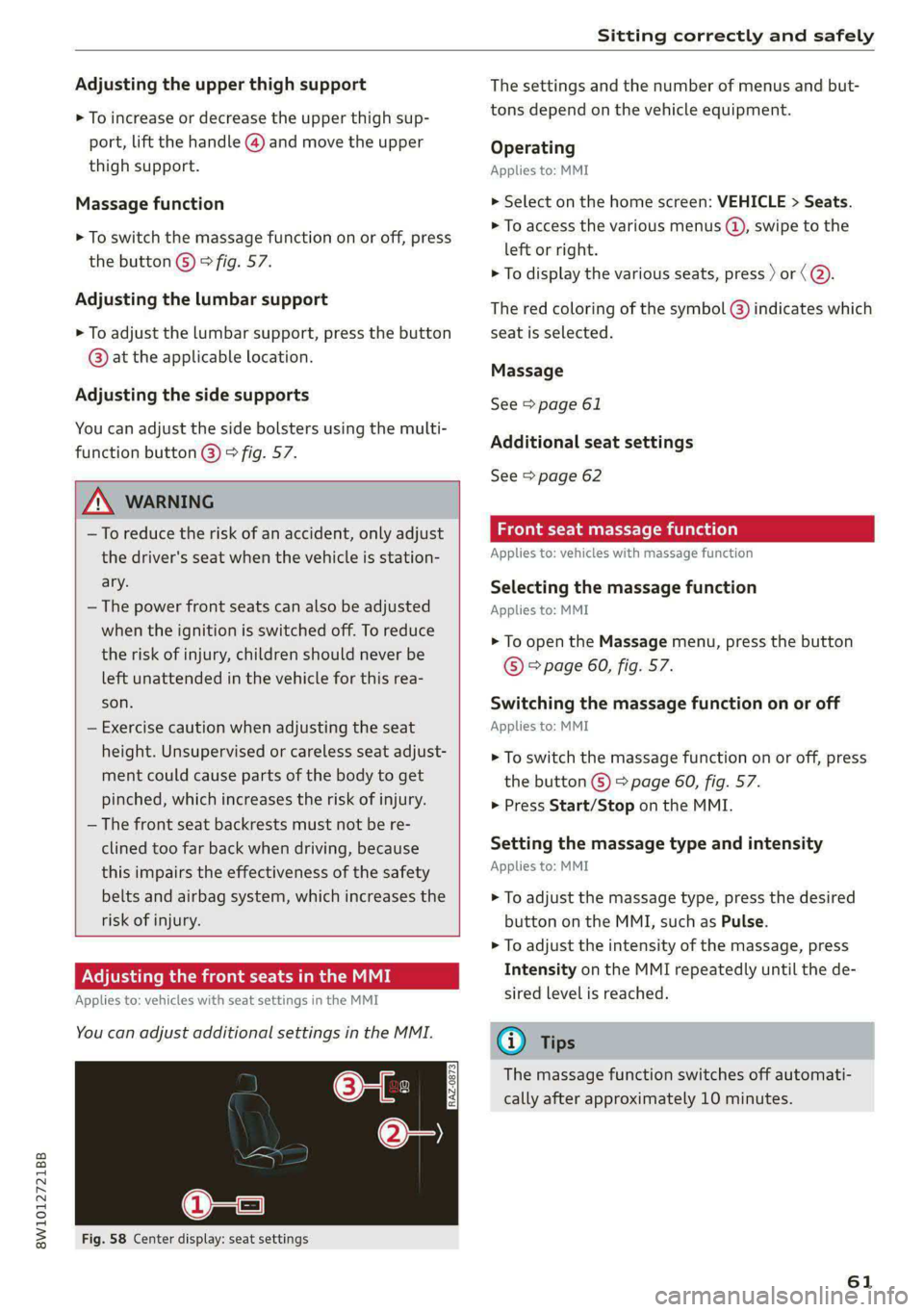
Fig. 58 Center display: seat settings
The settings and the number of menus and but-
tons depend on the vehicle equipment.
Operating
Applies to: MMI
> Select on the home screen: VEHICLE > Seats.
> To access the various menus (4), swipe to the
left or right.
> To display the various seats, press ) or ( @.
The red coloring of the symbol @) indicates which
seat is selected.
Massage
See > page 61
Additional seat settings
See > page 62
eae emia (ola)
Applies to: vehicles with massage function
Selecting the massage function
Applies to: MMI
> To open the Massage menu, press the button
© > page 60, fig. 57.
Switching the massage function on or off
Applies to: MMI
> To switch the massage function on or off, press
the button G) > page 60, fig. 57.
> Press Start/Stop on the MMI.
Setting the massage type and intensity
Applies to: MMI
> To adjust the massage type, press the desired
button on the MMI, such as Pulse.
> To adjust the intensity of the massage, press
Intensity on the MMI repeatedly until the de-
sired level is reached.
@) Tips
The massage function switches off automati-
cally after approximately 10 minutes.
61
Page 64 of 296
Sitting correctly and safely
Neer t Cela eae iale MU ME
You can adjust additional settings and switch
functions on or off in the MMI.
» Applies to: MMI: Select on the home screen:
VEHICLE > Seats.
> Swipe to the left if necessary.
Depending on the vehicle equipment, the follow-
ing options may be available.
Reset seat position
You can adjust the position of the front passeng-
er’s seat to match the driver's seat.
Driver's seat entry assistance
Entry assistance makes it easier to enter or exit
the vehicle.
Front passenger’s seat adjustment
You can adjust the front passenger's side with the
driver's seat buttons.
Front center armrest
Applies to: vehicles with a front center armrest
The front center armrest is located between the
front seats.
Adjusting the center armrest
The settings depend on the vehicle equipment.
> To adjust the armrest forward or backward,
move the armrest in the desired direction.
> To adjust the angle, raise the armrest in stages.
> To move the armrest back into the original posi-
tion, raise it slightly out of the top level and
fold it downward.
ZA WARNING
In certain positions, the front center armrest
can interfere with the driver’s arm movement,
which increases the risk of injury.
Steering wheel
General information
Make sure that:
62
— The distance between your upper body and the
steering wheel is at least 10 in (25 cm)
— Your arms are bent slightly at the elbows
— You have a sufficient view of the area around
the vehicle and you have a clear view of the in-
strument cluster
— You are always holding the steering wheel with
both hands on the outer edge at the sides (9:00
and
3:00 position) when driving
A WARNING
— If you are too close to the steering wheel,
the driver's airbag cannot provide optimal
protection, which increases the risk of injury
or fatality.
— Never hold the steering wheel in the 12:00
position or in any other way, such as holding
the center of the steering wheel. Otherwise,
your arms, hands, and head could be injured
in the event that the driver's airbag deploys.
Adjusting the steering wheel position
manually
Applies to: vehicles with manual steering wheel adjustment
The steering wheel position is adjustable up and
down and forward and back.
Fig. 59 Steering column: lever for adjusting the steering
wheel position
> Press the lever in the direction of the arrow.
> Bring the steering wheel into the desired posi-
tion.
> Push the lever all the way up until it engages.
ZA WARNING
—To reduce the risk of an accident, only adjust
the steering wheel before you start driving. |>
Page 65 of 296

8W1012721BB
Sitting correctly and safely
— Push the lever upward firmly so that the
steering wheel position does not change un-
intentionally while driving, which would in-
crease the risk of an accident.
Head restraints
General information
Applies to: vehicles with adjustable head restraints
B4G-0454
Fig. 60 Correctly adjusted head restraints
Make sure that:
— The upper edge of the head restraint is as even
as possible with the top of your head
— The head restraint is as close as possible to the
back of the head
— The head restraints in any occupied rear seats
are all the way up
Z\ WARNING
— There is one head restraint for each seating
position. All vehicle occupants must adjust
the head restraint correctly before every
trip. Having head restraints that are not ad-
justed correctly or not installed in the vehi-
cle increases the risk of a neck injury during
sudden or unexpected driving or braking
maneuvers or in a collision.
— Only remove the rear seat head restraints if
it is necessary to install a child safety seat
=> page 72. Stow the removed head re-
straints securely, for example in the luggage
compartment. Reinstall the head restraints
immediately once the child safety seat has
been removed. Driving without head re-
straints increases the risk of serious neck in-
juries.
Front head restraints
Applies to: vehicles with adjustable head restraints
[RAZ-0683]
Fig. 61 Front seat: adjusting the head restraint
Adjusting the head restraints
Applies to: vehicles with manually adjustable head restraints
> To adjust the head restraint upward or forward,
slide it until it locks into place.
> To adjust the head restraint downward or back-
ward, press the button on the side and slide the
head restraint. Release the button and slide the
head restraint farther until it locks into place.
Rear head restraints
Applies to: vehicles with adjustable head restraints
Fig. 62 Rear seat: adjusting or removing the head restraint
Adjusting the head restraints
> To adjust the head restraint upward, slide it un-
til it locks into place.
> To adjust the head restraint downward, press
the button @) and slide the head restraint. Re-
lease the button and slide the head restraint
farther until it locks into place.
Removing the headrests
Applies to: vehicles with removable head restraints
> Fold the backrest forward slightly > page 82.
> Move the head restraint upward all the way. >
63