lock AUDI S4 CABRIOLET 2009 User Guide
[x] Cancel search | Manufacturer: AUDI, Model Year: 2009, Model line: S4 CABRIOLET, Model: AUDI S4 CABRIOLET 2009Pages: 340, PDF Size: 77.32 MB
Page 29 of 340
Fuel filler cap not closed properly
M ....
~ :c IX) m
Fig. 14 Center disp lay:
fu el f iller ca p open
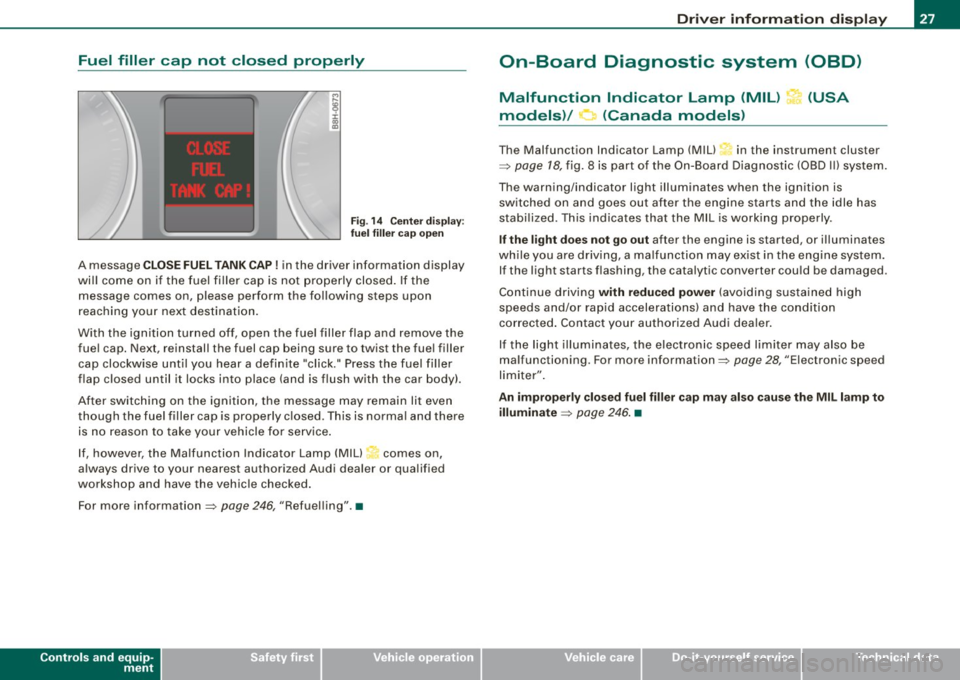
A message C LO SE FUEL TANK CAP! in the driver information display
wi ll come on if the fuel filler cap is not properly closed . If the
message comes on, please perform the following steps upon
reaching your next destination.
With the ignition turned off, open the fuel filler flap and remove the
fue l cap. Next, reinstall the fuel cap being sure to twist the fue l filler
cap clockwise until you hear a definite "click." Press the fuel filler
flap closed until it locks into place (and is flush with the car body).
After switching on the ignition, the message may remain lit even
though the fuel filler cap is properly c losed . This is norma l and there
is no reason to take your vehicle for service .
I f, however, the Malfunction Indicator Lamp (MIU~ comes on,
always drive to your nearest authorized Audi dealer or qualified
workshop and have the vehicle checked .
For more information =>
page 246, "Refuelling".•
Controls and equip
ment
Driv er inf ormati on di spl ay
On-Board Diagnostic system (08D)
Malfunction Indicator Lamp (MIL) ?-1' (USA
models)/ (Canada models)
The Malfunction Indicator Lamp (M IU in the instrument cluster
=>
page 18, fig. 8 is part of the On-Board Diagnostic (OBD I I) system.
The warning/indicator light illuminates when the ignition is switched on and goes out after the engine starts and the idle has
stabi lized. This indicates that the MIL is working properly.
If the l ight doe s not go out after the engine is started, or illuminates
wh ile you are driv ing, a ma lfunc tion may ex ist in the engine system .
If the light starts flashing, the catalytic converter cou ld be damaged.
Continue driving
with r educ ed power (avo iding sustained high
speeds and/or rapid accelerations) and have the condition
corrected . Contact your authorized Audi dea ler.
I f the light illuminates, the electron ic speed limiter may also be
malfunctioning . For more information=>
page 28, "Electronic speed
limiter" .
An improperly clo sed fu el filler cap may also cau se the MIL l amp to
illuminate
=> page 246 . •
Page 33 of 340
USA models: if there is a malfunction in the ABS system, the <
warning/indicator light illuminates along with the BRAKE system
malfunction warning/indicator light=>&.
Canada models: if there is a malfunction in the ABS system, the
warning/indicator light illuminates together with the
(Ci)) brake
system malfunction warning/indicator light=>& .
& WARNING
• Always observe the warnings in => page 242, "Engine compart
ment", before opening the engine hood and checking the brake
fluid.
• Driving with low brake fluid is a safety hazard! Stop the car and
get professional assistance.
• If the brake system warning/indicator light illuminates
together with the ABS warning/indicator light, then the ABS system is malfunctioning. The rear wheels could quickly lock up
when you apply the brakes. This could lead to loss of control and
your vehicle could slide! Drive carefully to the nearest authorized
Audi dealer and have the malfunction corrected. •
Engine cooling system malfunction -L
A malfunction in the engine cooling system must be
repaired as soon as possible.
When the -t symbol in the display flashes, then either the
engine coolant
temperature is too high, or the coolant level
is too low. In addition to the symbol, the following message
also appears in the display:
Switch off engine, check coolant level
Pull off the road and stop the vehicle.
- Turn off the engine.
Controls and equip
ment
Driver information display
Check coolant level ~ page 258.
-Add coolant if necessary~ page 259.
- Continue driving only after the engine coolant
warning/indicator light goes out.
- Contact your authorized Audi dealer for assistance if
necessary.
If the engine coolant level is correct, then the radiator fan may be
the cause of the malfunction.
If the generator warning/indicator light should also illuminate
=>
page 22, then the fan belt may be damaged.
& WARNING
• If your vehicle should break down for mechanical or other
reasons, park at a safe distance from moving traffic, turn off the
engine and turn on the hazard warning lights
=> page 82, "Emer
gency flasher
A".
• Never open the hood if you see or hear steam or coolant
escaping from the engine compartment -you risk being scalded.
Wait until you can no longer see or hear steam or coolant escaping.
• The engine compartment of any vehicle is a dangerous area.
Before you perform any work in the engine compartment, turn of
the engine and allow it to cool. Follow the warning stickers
=> page 242, "Engine compartment" .
0 Note
Do not continue driving if the -F-symbol illuminates. There is a
malfunction in the engine cooling system -you could damage your
engine. •
Page 39 of 340
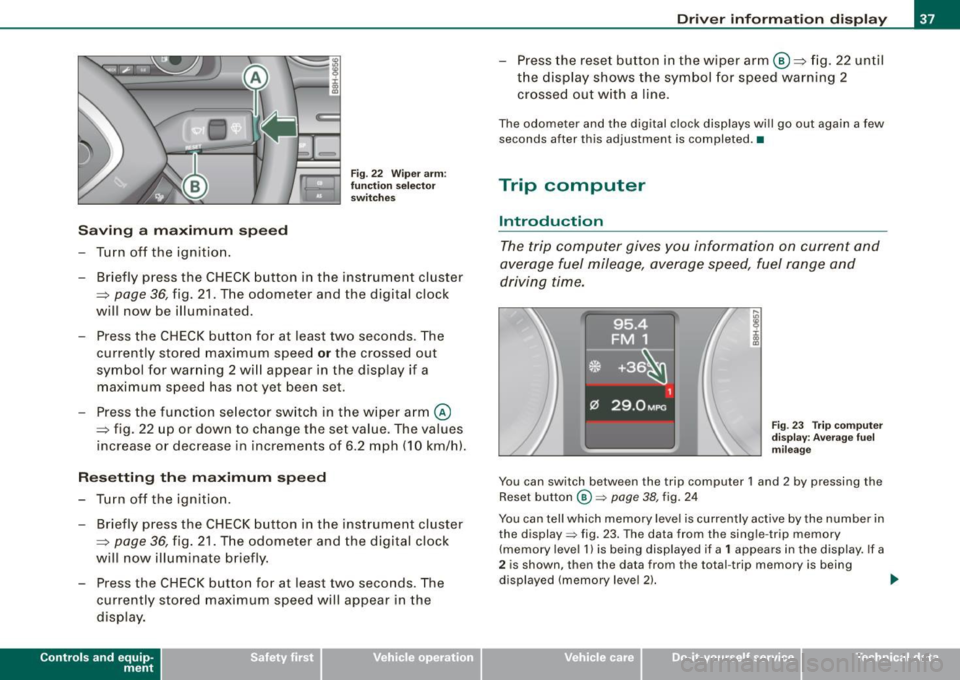
Saving a maximum sp eed
- Turn off the ignition .
Fig. 22 Wiper arm :
fu nc tio n se lec to r
switches
- Briefly press the CHECK button in the instrument cluster
=> page
36, fig. 21 . The odometer and the digital clock
will now be illuminated.
Press the CHECK button for at least two seconds. The
currently stored maximum speed
o r the crossed out
symbol for warning 2 wi ll appear in the display if a
maximum speed has not yet been set.
Press the function se lector switch in the wiper arm@
=> fig. 22 up or down to change the set value . The values
increase or decrease in increments of 6 .2 mph (10 km/h).
R ese tting th e m aximum sp eed
- Turn off the ignition .
- Briefly p ress the CHECK button in the instrument cluster
=> page 36, fig. 21. The odometer and the digital clock
will now illuminate briefly .
- Press the CHECK button for at least two seconds. The
cu rrently stored maximum speed will appear in the
disp lay.
Contro ls and eq uip
ment
Dri ver informa tio n di spl ay
- Press the rese t button in the wiper arm@=> fig. 22 until
t h e d isplay shows the symbol for spe ed warning 2
crossed out w ith a line .
The odometer and the digital clock disp lays wi ll go out again a few
seconds after this adjustment is completed .•
Trip computer
Introduction
The trip computer gives you information on current and
average fuel mileage, average speed, fuel range and
driving time.
F ig . 23 Tr ip co mput er
d is pl ay : Ave ra ge f uel
mi leage
You can switch between the trip computer 1 and 2 by pressing the
Reset button
@ => page 38, fig. 24
You can tell which memory level is currently active by the number in
the display => fig. 23. The data from the single -trip memory
(memory level 1 l is being displayed if a
1 appears in the display. If a
2 is shown, then the data from the total -trip memory is being
displayed (memory leve l 2) . ..,_
~ehicle care Technical data
Page 42 of 340
Driver inf orma tion d ispl ay
Some functions in your vehicle can be set, activated, and controlled
by
M enu s (e.g. Acoustic Park Assist*). With these menus you can
a lso select the information shown in the DIS disp lay, which operates
only with the ignition switched on. Operation is controlled by the
!Reset) button and the rocker switch on the wiper lever~
page 39,
fig. 25.
The
Start m enu shows you the different disp lay types :
Set
Check
Menu off
H el p
Each display type in the Start menu contains a submenu with addi
tional options.
S et
Check
Me nu off
H elp
Clock ~ page40
Computer
Speed alarm (speed
~ page35
warning)
Language (6 languages)
=> page40
Units (distance, fuel con-~ page40
sumption, temperature)
Service
~ page 17
All of the messages shown in vehicles without menu disp lay appear on the display screen.
The Help function helps you to make the right selection.
•
Navigating the menu
Use the rocker switch on the windshield wiper lever and
the[ResetJ button to operate the menu and carry out
inquiries and selections.
F ig . 27 Wipe r leve r:
Con trols for t he m en u
d is pl ay
!Reset] button @and rocker switch @=> fig. 27 functions:
To op en th e menu
- Press the
!Reset! button @unti l the menu display
=> page 39, fig. 26 appears
Sele ctions and setting s
- Press the rocker switc h
@ to reach a me nu display . The
switch is ope rated the sam e as the display (up/down).
Entering and confirming
- Press the
I Reset I button @.
R eturning to th e Start menu
- Press the
[Reset) butto n longer than 2 seconds to retur n
from any menu level to the Star t m en u. •
Page 49 of 340
Opening and closing
Keys
Key set
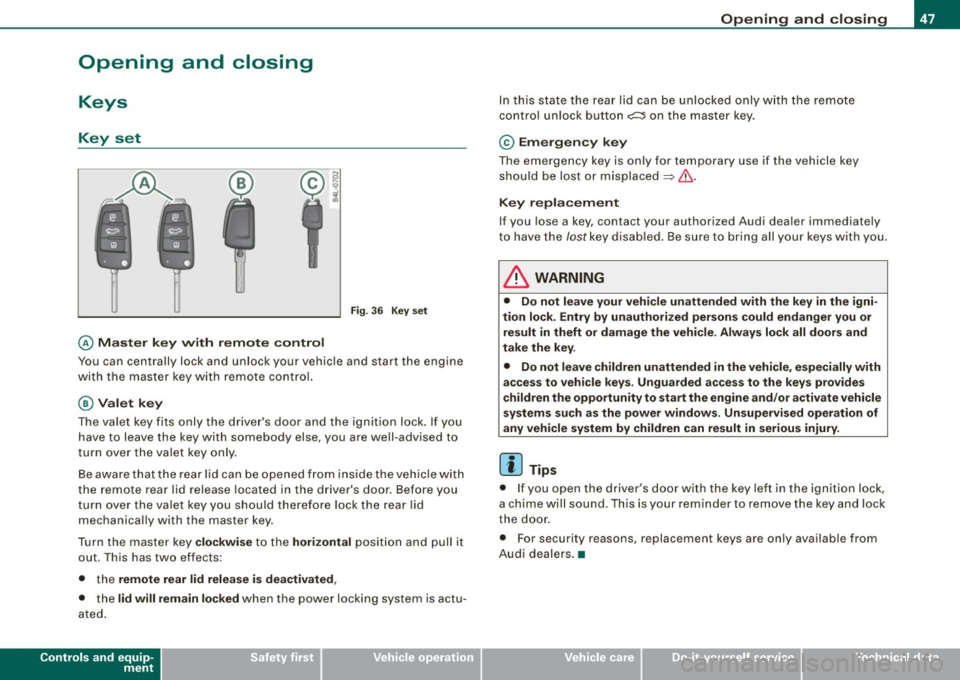
@ Master key w ith rem ote con tro l
Fig . 3 6 Key set
You can centrally lock and unlock your vehicle and start the engine
with the master key with remo te contro l.
@Val et k ey
The va le t key fits only the driver's door and the ignition lock. If you
have to leave the key with somebody else, you are well-advised to
turn over the valet key only.
Be aware that the rear lid can be opened from inside t he veh ic le with
the remote rear lid release located in the driver's door. Before you
turn ove r the valet key you should therefo re lock the rear lid
mechanica lly with the master key.
Turn t he master key
clo ckwi se to the hor izont al posit ion and pull it
out. This has two effects:
• the
remote rear lid release i s dea ctivated ,
• the lid will rem ain lo cked when the power locking system is actu
ated .
Controls and equip
ment
Op ening and clo sing
In this state the rear lid can be unlocked only with the remote
control unlock button
c::::5 on the master key.
© Em erg en cy key
The emergency key is only for temporary use if the vehicle key
should be lost or misplaced
~ & .
Key r epla cemen t
If you lose a key, contact your authorized Audi dea ler immediately
to have the /ostkey disab led. Be sure to bring all your keys with you.
& WARNING
• Do not leave your vehicle unattended wi th the key in the igni
tion lock. Entr y by un auth orized persons could e ndanger you or
re sult in theft or damage the vehi cle . Always lock all door s and
t a ke th e key.
• Do not le ave children unattend ed
in the vehicle , es pecially with
a cce ss to vehic le key s. Unguarded a ccess to the ke ys prov ide s
children th e opportunity to start th e eng ine and /or a ctivate vehicle
s y stem s suc h as the po wer w indo ws. Un sup erv is ed oper atio n of
an y vehi cle sy ste m by children can re sult in seriou s injury .
[ i ] Tips
• If you open the driver's door with the key left in the ignition lock,
a chime will sound . This is your reminder to remove the key and lock
the door .
• For security reasons, replacement keys are only available from
Audi dealers. •
Page 50 of 340
Opening and clos ing
Master key with remote control
The rem ote control allows you to lock or unlock the
vehicle electronically.
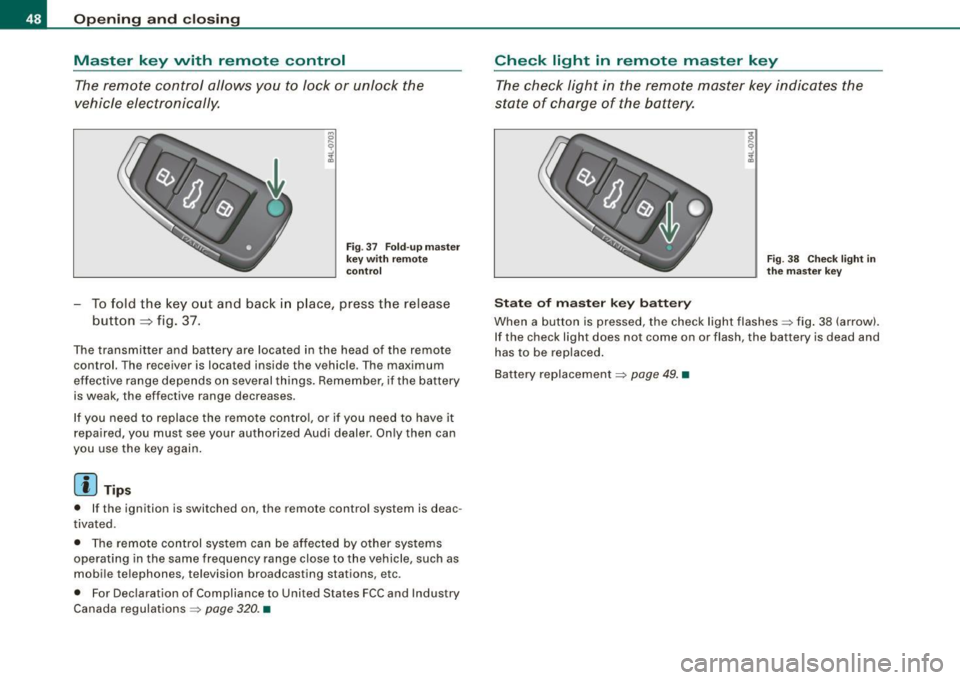
F ig . 37 Fo ld- up ma ster
key with re mote
co ntr ol
- To fold the key out and back i n place, press the release
button ::::, fig. 37.
The transmitter and battery are located in the head of the remote
control. The receiver is located inside the vehicle. The maximum
effective range depends on several things. Remember, if the ba ttery
is weak, the effective range decreases.
I f you need to replace the remote cont ro l, or if you need to have it
repaired, you must see your authorized Audi dealer. Only then can
you use the key again .
[ i ] Tips
• If the ignition is switched on, the remote control system is deac
tivated.
• The remote control system can be affected by other systems
operating in the same frequency range close to the vehicle, such as
mobile telephones, television broadcasting stations, etc.
• For Declaration of Compliance to United States FCC and Industry
Canada regulations =>
page 320. •
Check light in remote master key
The check light in the rem ote master key indic ates the
state of charge of the battery.
S ta te o f m aste r k ey ba tt e ry
F ig . 3 8 Check lig ht in
th e m as ter key
When a button is pressed, the check light flashes=> fig . 38 (arrow).
If the check light does not come on or flash, the battery is dead and
has to be replaced .
Battery replacement =>
page 49. •
Page 51 of 340
Master key battery replacement
Each master key contains a battery housed under the
cover.
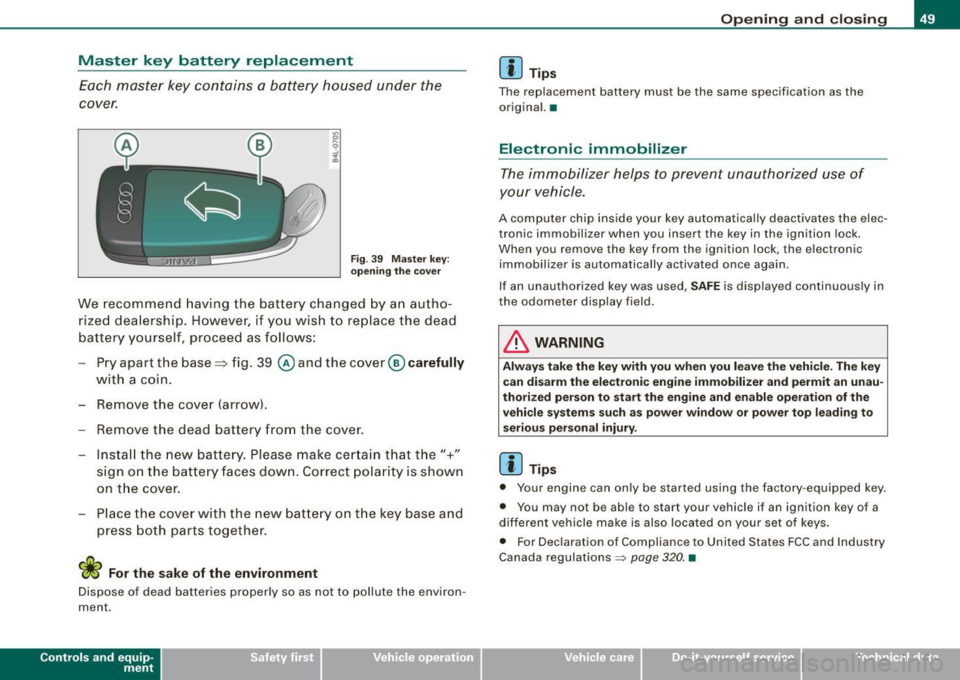
Fig. 39 Master key:
opening the cover
We recommend having the battery changed by an autho
rized dealership. However, if you wish to replace the dead
battery yourself, proceed as follows:
- Pry apart the base=> fig. 39
@ and the cover @carefully
with a coin.
- Remove the cover (arrow).
- Remove the dead battery from the cover.
- Install the new battery. Please make certain that the"+"
sign on the battery faces down. Correct polarity is shown
on the cover.
- Place the cover with the new battery on the key base and
press both parts together.
W For the sake of the environment
Dispose of dead batteries properly so as not to pollute the environ
ment.
Contro ls and eq uip
ment
Opening and closing
[ i] Tips
The replacement battery must be the same specification as the
original. •
Electronic immobilizer
The immobilizer helps to prevent unauthorized use of
your vehicle.
A computer chip inside your key automatically deactivates the elec
tronic immobilizer when you insert the key in the ignition lock.
When you remove the key from the ignition lock, the electronic
immobilizer is automatically activated once again.
If an unauthorized key was used,
SAFE is displayed continuously in
the odometer display field.
in. WARNING
Always take the key with you when you leave the vehicle. The key
can disarm the electronic engine immobilizer and permit an unau
thorized person to start the engine and enable operation of the
vehicle systems such as power window or power top leading to
serious personal injury.
[ i] Tips
• Your engine can only be started using the factory -equipped key.
• You may not be able to start your vehicle if an ignition key of a
different vehicle make is also located on your set of keys.
• For Declaration of Compliance to United States FCC and Industry
Canada regulations
~ page 320. •
~ehicle care irechnical data
Page 52 of 340
Openin g and clo sin g
Power locking system
General description
The power Jocking system Jocks all the vehicle doors and
rear lid simultaneously or allows you to unl ock either just
the driver's door or all the vehicle doors and rear lid
simultaneously.
The power locking system in your veh icle incorporates the following
f unctions:
• Central locking function
• Remote contro l feature~
page 51.
• Anti -theft alarm system ~ page 57 .
All the doors and the rear lid are locked by the central locking
system when you lock the vehicle .
Unlo cking th e vehicle
You can unlock the vehicle from outside either by using the remote contro l
or by inserting and turning the key in the driver's door lock.
When you
unlo ck your vehic le:
• The anti-theft alarm sys tem is deact ivated briefly.
• The vehicle interior lights i lluminate for approximately 30
seconds.
• All turn signal lights will flash twice when the car is un locked.
• After un locking the vehicle, you have 60 seconds to open a door
or the rear lid. After 60 seconds, t he vehicle automatically locks and
the anti-theft a larm system activates again .
T he rear lid can be locked or unlocked either by using the remote
co ntro l
or by inserti ng and turning the key in the driver's door lock .
Un locking the vehicle with the remote control will only
unlock the
r ear lid, to
open it, the lid handle needs to be pressed . Lo
cking th e veh icle
You can lock the vehic le from outside e ither by using the remote
control
or by inserting and turning the key in the drivers's door lock .
When you
lock the vehicle:
• All doors and t he rear lid are locked .
• All turn signal lights w ill flash once when the ca r is locked.
• The anti -theft alarm system is activated . The horn of the anti
theft alarm sys tem will sound and the anti -t heft ala rm sys tem readi
ness l ight, located in the upper par t of the driver's door panel , wi ll
start to blink.
• The vehicle interior lights turn off .
Automatic locking*
The automat ic locking feature locks all the vehicle doors and the
rear lid when you drive faster than 9 mph (15 km/h).
You can unlock the vehicle from the inside by:
• removing the key from the ignition switch (the vehicle wil l auto
matically u nlock itself) or
• pressing the unlock pa rt of the power lock switch €:Dor
pulling the door handle (twice to open the door) .
If you wish, you can have an authorized Audi dea ler convert your
powe r door lock sys tem to automatic locking.
& WARNING
• When you lock your vehic le from out side , nobody -especially
c h ildren - should remain in side the vehicle . Remembe r, when you
lo ck the vehicle from the out side the windows cannot be opened
from the in side .
• When you leave the vehicle , alway s remove the ignition key and
take it with you . Thi s w ill prev ent pa ssenger s (children , fo r
example) from ac cidentally being locked in the vehicle should they
ac cidentally pre ss the power locki ng swit ch in the front door s. .,
Page 53 of 340
& WARNING (co ntin u ed)
• Do n ot l ea ve c hildr en i ns ide th e vehicle un sup erv is ed. In an
e m erg en cy it w ould be impo ssible to op en the door s from the
out side without the key.
[ i ] Tip s
• In the event of a crash with airbag deployment all locked doors
wi ll be automat ically unlocked to give access to the vehicle occu
pants from the outside.
• If the power locking system should fail, you can st ill open the
fue l tank flap in an emergency~
page 248.
• You are we ll advised not to keep va luables inside an unattended
vehic le, visible or not. Even a properly locked vehicle cannot provide
the security of a safe! •
Keyless entry remote control
General description
The remote controls allows you to:
• lock or un lock the vehicle
• selective ly un lock the rear lid.
The turn signals wi ll flash briefly whenever you lock or unlock the
vehic le . Also, the interior light will come on or go off whenever you
open or c lose the driver's door.
The transmitter and battery are located in the head of the remote
control. The receiver is located inside the vehicle. The maximum
effective range depends on severa l things. Remember, if the battery
is weak, the effective range decreases .
The remote -control key contains a fo ld-ou t key that you can use to
manual ly lock or unlock the vehicle and to start the engine .
Controls and eq uip
ment
Op enin g and clo sing
If you need to replace the remote control, or if you need to have it
repaired, you must see your authorized Audi dealer. Only then can
you use the key again. •
Unlocking and locking the vehicle with the
remote control
How the remote control works.
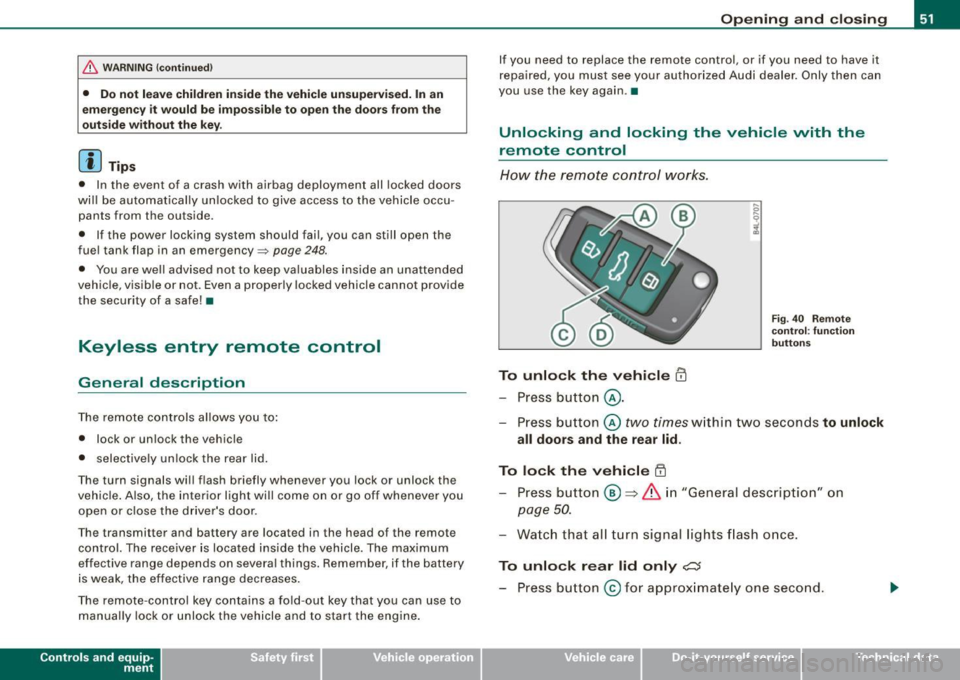
To unlock the v ehicle m
- Press button @.
Fig. 40 Remo te
co ntr ol: fu nctio n
b utt ons
- Press button @two times within two seconds to unlock
all doors and the rear lid .
To lock the vehicle [II
-Press bu tton @ => &, in "Gener al descri ption" on
page 50.
- Watch that all turn signal lights flash once.
To unlo ck r ear lid only ,c::;
- Press button @for approx imate ly one second.
~ehicle care Technical data
Page 54 of 340
Opening and clos ing
PANIC Button
- Push the red button@to activate the panic function. The
horn sounds and the turn signals flash.
- Push the button® again to deactivate the panic f unc
tion.
& WARNING
R ead a nd fo llo w all W ARNING S => & in "Ge nera l desc ription " on
page 50.
[ i ] Tips
• In order to make sure the locking function is working, you should
always keep your eye on the vehicle to make sure it is properly
locked.
• Do not use the remote control if you are inside the car, otherwise
you may unintentionally lock the vehic le, and then you would set off
the anti-theft alarm when you try to start the engine or open a door.
In case this happens anyhow, push the unlock button@.
• Use the panic function only if you are in an emergency
situation .•
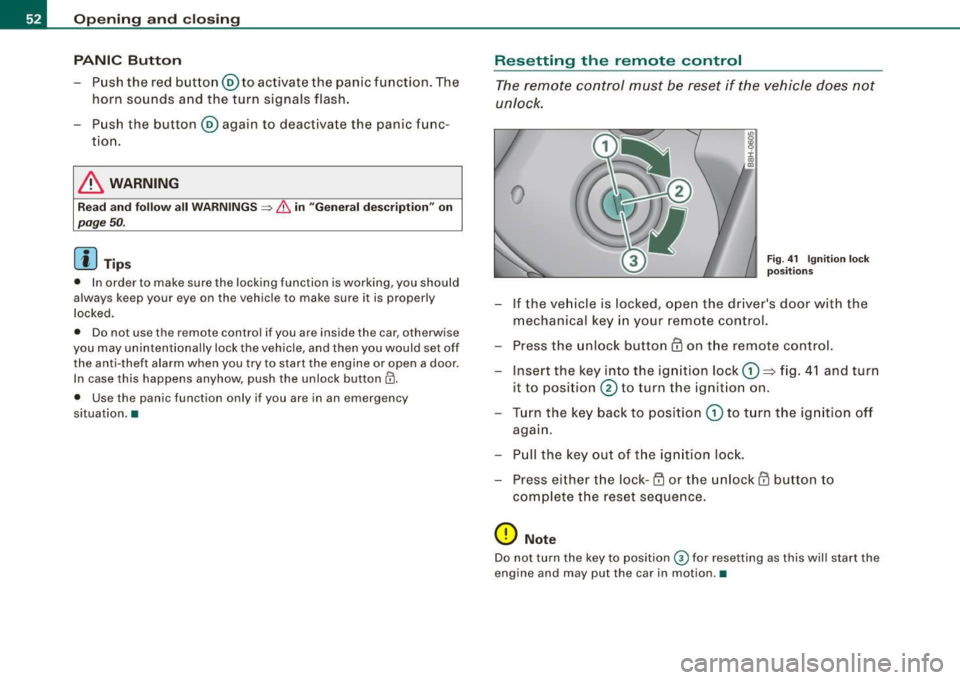
R ese tting the remote control
The remote c ontr ol must be reset if the vehicle does not
unlock .
0
Fig . 4 1 Ign itio n l ock
p os it ions
- If the ve hicle is locked, o pen the driver's door with the
mechanical key i n your remote con tro l.
- Press the unlock button
III on the remote control.
- Insert the key into the ign ition lock
CD => fig. 4 1 and turn
it to position
0 to turn the ignition on .
Turn the key back to position
CD to t urn the ig nition off
agai n.
- Pu ll the key out of t he ig nition loc k.
- Press e it her the lock-1'.D or the unlock
III button to
com plete the reset sequence .
0 Note
Do not turn the key to position 0 for resetting as this will start the
engine and may put the car in motion .•