brake AUDI S5 COUPE 2016 User Guide
[x] Cancel search | Manufacturer: AUDI, Model Year: 2016, Model line: S5 COUPE, Model: AUDI S5 COUPE 2016Pages: 264, PDF Size: 66.92 MB
Page 57 of 264
,-1 N
0 1-CX)
rl I.Cl U"I
,-1 I.Cl ......
sudden braking or an accident, you would not
be able to brake or accelerate.
Front passenger's seat
Always move the front passenger seat into the
r e armos t position .
To avoid contact with t he a irbag while it is de
p loying, do not sit any closer to the inst rument
panel than necessary and a lways wear the three
point saf ety b elt prov id ed adjust ed correctly. W e
r ecommend that you ad just the passenger's seat
in the following manner:
• Bring the backrest up to an (almost) upright
position .
Do not ride with the s eat r eclin ed .
• Applies to vehicles with adjustable head re
strain ts: Adjust the head restraint so the upper
edge is as even as possible with the top of your
head . If that is not possible, try to adjust the
head restraint so that it is as close to th is posi
t ion as poss ible
q poge 57.
• Place your feet on the floor in front of the pas
senger's seat.
Front seats
Power seat adjustment
App lies to vehicles : with power adjustable seats
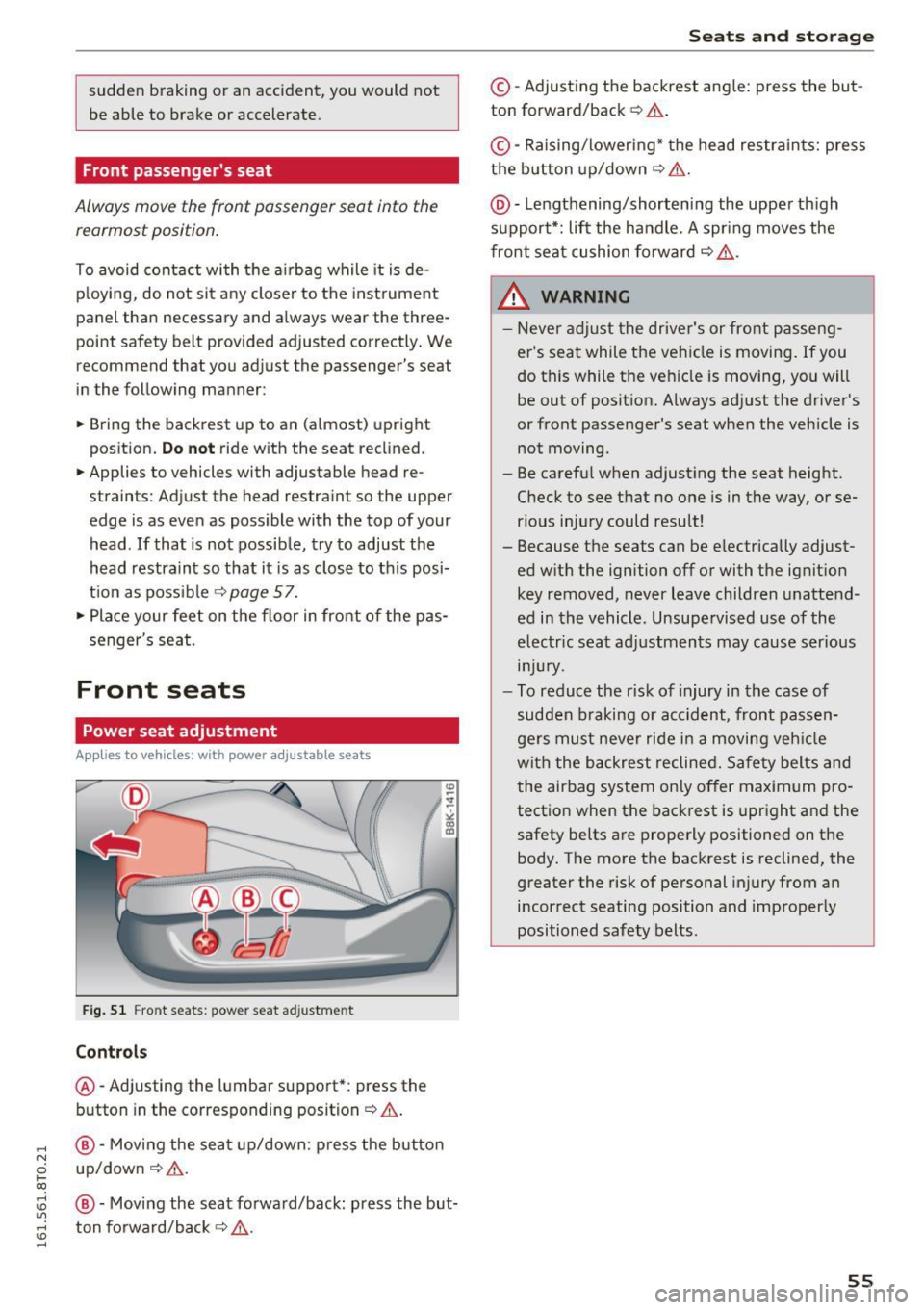
Fig. 51 Fro nt s eats: pow er se at ad just ment
Controls
@ -Adjusting the l umbar support *: press the
b utton in the corresponding position
q .&, .
@-Moving the se at up/down: p ress the but ton
up/dow n
q .&,.
@ -Mov ing the seat fo rwa rd/back: press the but
ton fo rwa rd/back
q .&, .
Seats and storag e
©-Adjust ing the backrest ang le: press the bu t
ton forward/back
~ ,& .
©-Raising/loweri ng* the head restra ints: press
t h e b utton up/down
q .&, .
@-Lengthening/shortening the upper th igh
support*: lift the handle. A spr ing moves the
front sea t cu shion fo rward
q ,.&. .
_& WARNING
-Never adjust the drive r's or front passen g
er's seat while the ve hicle is moving .
If you
do this while the veh icle is moving , you will
be out of position. Always adjust the d river's
or front passenger's seat when the vehicle is not moving.
- Be carefu l when adjust ing the seat height.
C heck to see t hat no one is in the way, or se
rious inju ry could result!
- Because the seats can be e lectrically adjust
ed w it h the ignition off or with the ignit ion
key removed, never leave children unatte nd
ed in the vehicle . Unsupe rvised use of the
electric seat ad justmen ts may cause ser ious
lnJ Ury.
- To reduce the risk of injury in the case of
sudden b raking or acc ident, front passen
ge rs must neve r ride i n a moving veh icle
wit h the backrest reclined. Safety belts and
the airbag system on ly o ffer maximum pro
tect ion when the bac krest is upr ight and the
safety belts a re prope rly positioned on the
body. The more the backrest is reclined, the
greater the risk of pe rsonal injury from an
incorrect seating position and improper ly
positioned safety belts .
55
Page 62 of 264
Sea ts and stor age
_& WARNING
Never put waste paper in the ashtray. Hot
ashes or other hot objects in the ashtray could
se t waste paper on fire.
Cigarette lighter
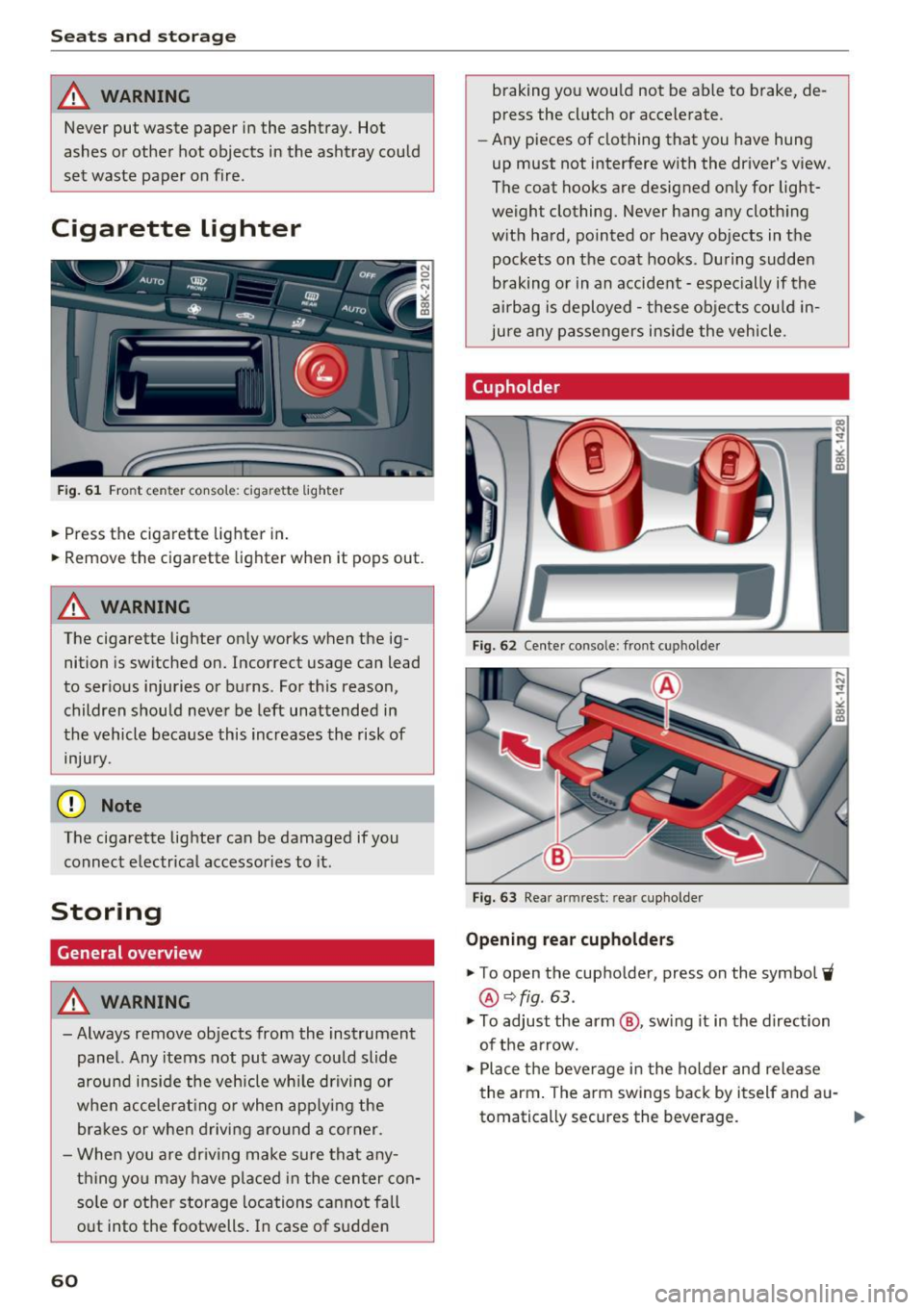
F ig. 61 Front center console: cigarette lighter
.,. Press the cigarette lighter in .
.,. Remove the cigarette lighter when it pops out.
_& WARNING
The cigarette lighter only works when the ig
nition is sw itched on. Incorrect usage can lead
to ser ious injuries or burns . For this reason,
children should never be left unattended in
the vehicle beca use this increases the risk of
inju ry.
(D Note
The cigarette lighter can be damaged if you
connect electrical accessories to it.
Storing
General overview
_& WARNING
- Always remove objects from the instrument
panel. Any items not put away could slide
around inside the vehicle wh ile driving or
when accelerat ing or when app ly ing the
bra kes or when driving aro und a corner.
- When you are dr iving make sure that any
t h ing yo u may have placed in the center con
so le or other storage locations cannot fall
o ut into the footwells . In case of sudden
60
braking you wo uld not be able to brake, de
press the cl utch or accelerate .
- Any pieces of clothing that you have hung
up must not interfere with the driver's view .
The coat hooks are designed on ly for light
weight clothing. Never hang any cloth ing
w ith hard, pointed or heavy objects in the
pockets on the coat hooks. Du ring sudden
braking or in an accident -espec ially if the
airbag is deployed -these obje cts cou ld in
ju re any passengers inside the veh icle .
Cupholder
Fig. 62 Center console: front cupholde r
Fig. 63 Rear armrest: rea r cupholde r
Opening rear cupholder s
.,. To open the cupholder, press on the symbol 'i
@~fig . 63 .
.,. To adjust the arm @, sw ing it in the d irection
of the a rrow.
.,. Place the beverage in the holder and release
the arm . The arm swings back by itself and a u-
tomatically secures the beverage. .,.
Page 63 of 264
,-1 N
0 1-CX)
,-1 I.Cl U"I
,-1 I.Cl ......
Closing cupholders
• To close the cupholder, press on the center sec
tion between the two arms and push the cu
pholder in the slot as far as it will go.
.&_ WARNING
Spilled hot liquid can cause an accident and
personal injury.
- Never carry any beverage containers with
hot liquids, such as hot coffee or hot tea, in
the vehicle while it is moving. In case of an
accident, sudden braking or other vehicle
movement, hot liquid could spill, causing
scalding burns. Spilled hot liquid can also
cause an accident and personal injury.
- Use only soft cups in the cupholder. Hard
cups and glasses can cause injury in an acci
dent.
- Never use the cupholder or adapter as an
ashtray -risk of fire.
(y Note
Only drink containers with lids should be car
ried in the cupholder. Liquid could spill out
and damage your vehicle's electronic equip
ment or stain the upholstery, etc.
Glove compartment
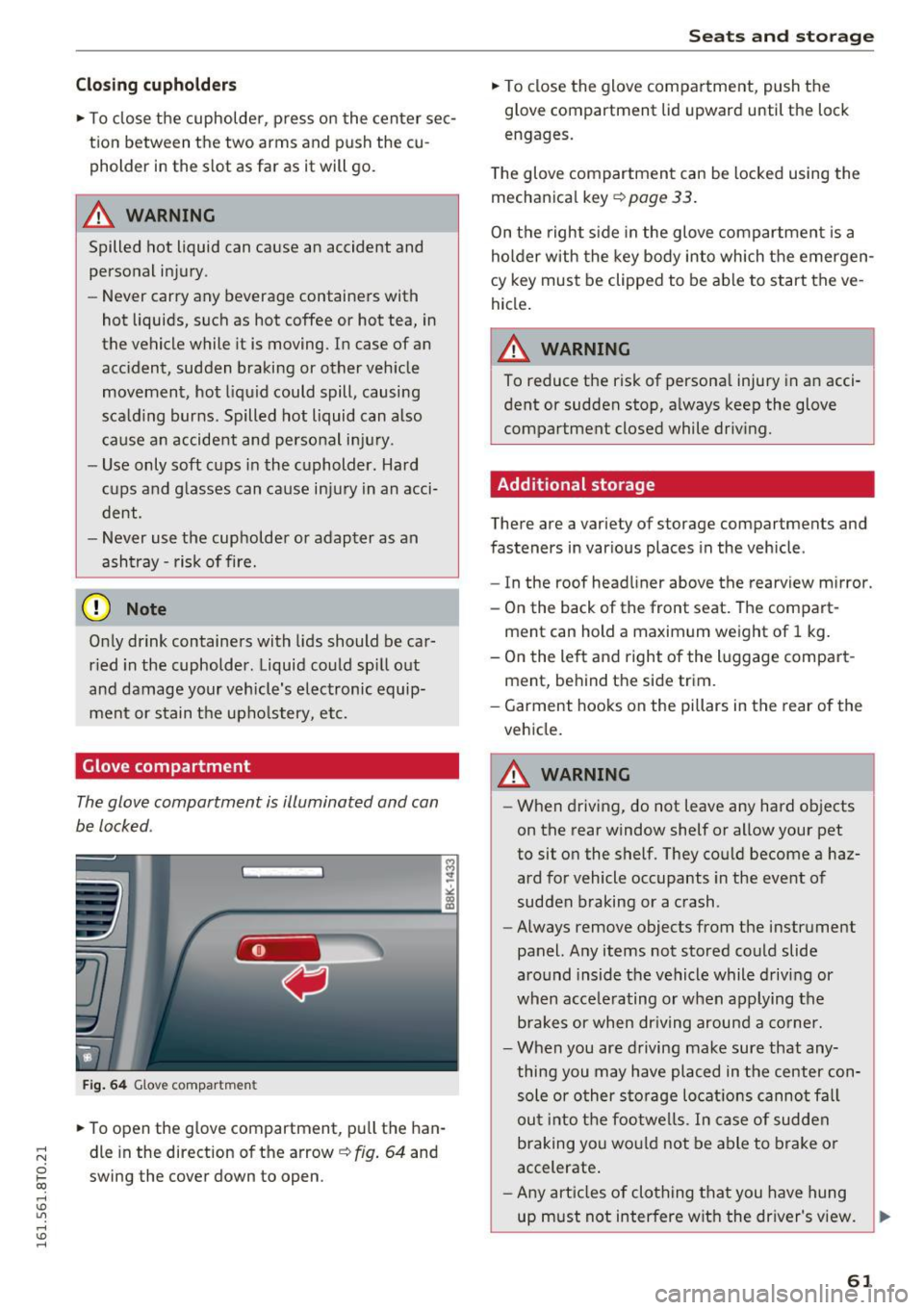
The glove compartment is illuminated and can
be locked .
Fig. 64 Glove compartmen t
• To open the glove compartment, pull the han
dle in the direction of the arrow
c:,:. fig. 64 and
swing the cover down to open.
Seats and storage
• To close the glove compartment, push the
glove compartment lid upward until the lock
engages.
The glove compartment can be locked using the
mechanical key
c:,:. page 33 .
On the right side in the glove compartment is a
holder with the key body into which the emergen
cy key must be clipped to be able to start the ve
hicle.
A WARNING
-
To reduce the risk of personal injury in an acci-
dent or sudden stop, always keep the glove
compartment closed while driving.
Additional storage
There are a variety of storage compartments and
fasteners in various places in the vehicle .
- In the roof headliner above the rearview mirror.
- On the back of the front seat. The compart-
ment can hold a maximum weight of 1 kg.
- On the left and right of the luggage compart
ment, behind the side trim.
- Garment hooks on the pillars in the rear of the
vehicle.
A WARNING ,..___
- When driving, do not leave any hard objects
on the rear window shelf or allow your pet
to sit on the shelf. They could become a haz
ard for vehicle occupants in the event of
sudden braking or a crash .
- Always remove objects from the instrument
panel. Any items not stored could slide
around inside the vehicle while driving or
when accelerating or when applying the brakes or when driving around a corner.
- When you are driving make sure that any
thing you may have placed in the center con
sole or other storage locations cannot fall
out into the footwells. In case of sudden
braking you would not be able to brake or
accelerate.
- Any articles of clothing that you have hung
up must not interfere with the driver's view. .,_
61
Page 75 of 264
.... N
0 I-co ....
peda l and move the se lector lever to the P or N
pos ition .
~ Press the key c::> fig. 76 - the engine will start.
Switchi ng the ignition on /off
If you wou ld like to switch the ig nition on with
out starting the engine , fo llow these steps :
~ Insert the key into the ignition lock.
~ Press t he key briefly withou t pressing the
clutch peda l (for manual transmissions) or the
brake pedal (for automatic transmissions).
~ To switch the ignition off, press th e key again .
When start ing t he engine, major elec trical loads
are switched off tempora rily.
You can on ly remove the key with the ignition
switched off.
If the engine should not start immed iately, the
starting process is automat ically stopped after a
short time. Repeat sta rting procedu re .
_& WARNING
- Never allow the e ngine to ru n in confined
spaces - danger of asp hyxiation .
- Never remove the ign it io n key from the ig ni
t ion look while the vehicle is moving . O ther
wise, the stee ring lock cou ld suddenly en
gage and you would not be able to steer t he
vehicle .
- Always take the key wi th you whenever you
leave your vehicle . Otherwise, the engine
cou ld be started or electrical equipment
such as the power windows cou ld be operat
ed . This can lead to serious injury.
- Never leave children or persons requiring as
sistance unattended in the vehicle. The
doors can be locked using the remote trans
mitter, preventing people from escap ing
from the vehicle on the ir own in the event of
an eme rgency . Depend ing on the t ime of
year, peop le inside the vehicle can be ex
posed to very hig h or very low tempera
tures .
-
D riv ing
(D Note
Avoid high engine rpm, full throttle and heavy
engine loads unti l the engine has reached op
erating temperature - otherwise you risk en
gine damage.
@ For the sake of the environment
Do not let the engine run w hile parked to
warm up. Beg in driving immed iate ly. Th is re
duces unnecessary emissions.
(D Tips
- If the key cannot be removed from the ign i
tion lock, you have to pull the mechanical
key out of the master key in order to be able
to lock the vehicle c::>
page 34.
-Some noise after starting the engine is nor
mal and is no cause for concern.
- If you leave the vehicle w ith the ignition
switched on, the ignit ion w ill switch off af
ter a certain per iod of t ime . Please note that
electrical equipment such as exterior lights
w ill switch off as we ll w hen that happens.
73
Page 76 of 264
Driving
Starting the vehicle with the emergency
key
Applies to veh icles: w ith ig ni tio n lock
You can use the emergency key as an ignition key
in an emergency.
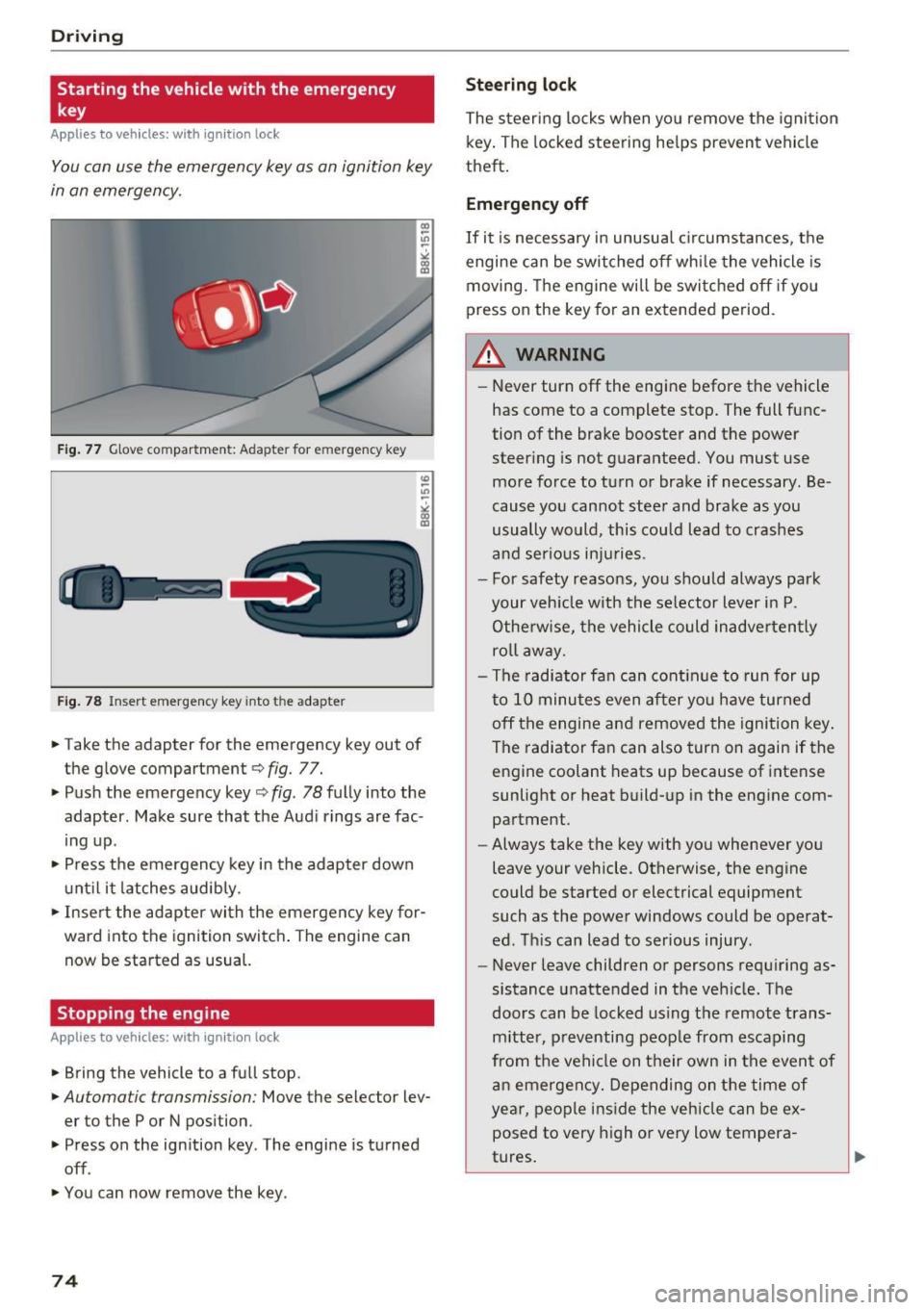
Fig. 77 Glove compartment: Adapter for e mergen cy key
Fig. 78 Insert emergency key into t he adapte r
.,. Take the adapter for the emergency key out of
the glove compartment ¢
fig. 77.
.,. Push the emergency key¢
fig. 78 fully into the
adapter. Make sure that the Audi rings are fac
ing up.
.,. Press the emergency key in the adapter down
until it latches audibly.
.,. Insert the adapter with the emergency key for
ward into the ignition switch. The engine can
now be started as usual.
Stopping the engine
App lies to veh icles: w ith ig ni tio n lock
.,. Bring the vehicle to a full stop.
.,. Automa tic transmission: Move the selector lev
er to the P or N position .
.,. Press on the ignition key . The engine is turned
off .
.,. You can now remove the key .
74
Steering lock
The steering locks when you remove the ignition
key. The locked steering helps prevent vehicle
theft.
Emergency off
If it is necessary in unusual circumstances, the
engine can be switched off while the vehicle is
moving. The engine will be switched off if you
press on the key for an extended period .
A WARNING
-Never turn off the engine before the vehicle
has come to a complete stop. The full func
tion of the brake booster and the power
steering is not guaranteed. You must use
more force to turn or brake if necessary . Be
cause you cannot steer and brake as you
usually would, this could lead to crashes
and serious injuries .
- For safety reasons, you should always park
your vehicle with the selector lever in P .
Otherwise, the vehicle could inadvertently
roll away.
- The radiator fan can continue to run for up
to 10 minutes even after you have turned
off the engine and removed the ignition key .
The radiator fan can also turn on again if the
engine coolant heats up because of intense
sunlight or heat build-up in the engine com
partment .
- Always take the key with you whenever you
leave your vehicle . Otherwise, the engine
could be started or electrical equipment
such as the power windows could be operat
ed. This can lead to serious injury .
- Never leave children or persons requiring as
sistance unattended in the vehicle. The
doors can be locked using the remote trans
mitter, preventing people from escaping
from the vehicle on their own in the event of
an emergency. Depending on the time of
year, people inside the vehicle can be ex
posed to very high or very low tempera
tures.
Page 77 of 264
,-1 N
0 1-CX)
rl I.Cl U"I
,-1 I.Cl ......
CD Note
If the engine has been under heavy load for
an extended per iod, heat builds up in the en
gine compartment after the engine is switch
ed off- there is a risk of damaging the eng ine .
Allow the engine to run at idle for about two
m inutes before switching it off .
Convenience key
Starting the engine
Applies to vehicles: with conve nien ce key
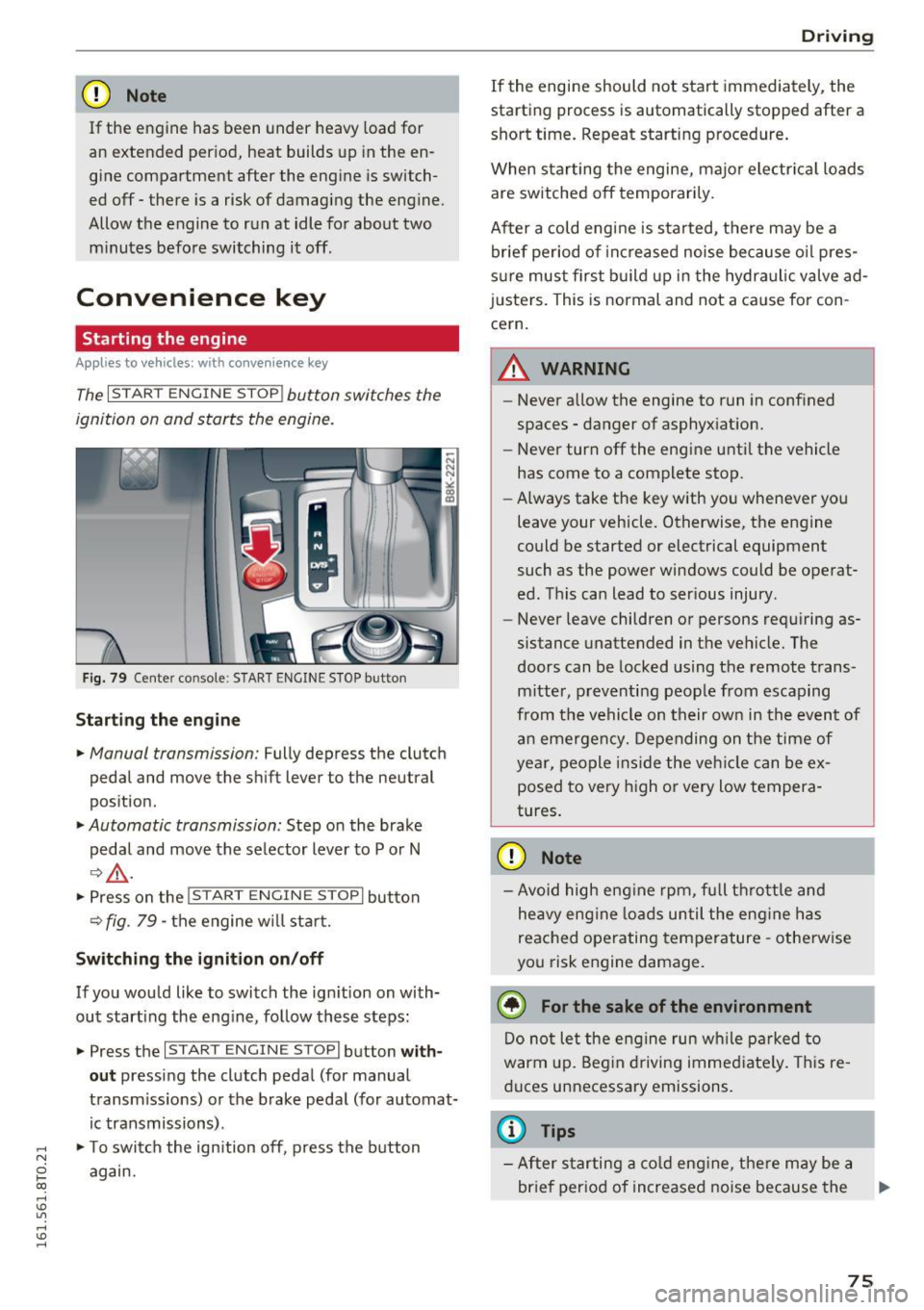
The I S TAR T ENGINE ST OP ! button switches the
ignition on and starts the engine.
Fig. 79 Cen ter co nsole : START ENGI NE STOP b utto n
Starting the engine
• Manual transmission: Fully depress the clut ch
pedal and move the s hift lever to the neutral
position.
• Automatic transmission: Step on the brake
peda l and move the se lector lever to P or N
¢,&. .
•Presson the !S TAR T ENGINE ST OPI button
¢fig . 79 -the engine w ill star t.
Sw itching the ignition on /off
If you wou ld like to switch the ign ition on with
out starting the eng ine, fo llow these steps:
• Press the
I START ENGIN E ST OP I button with
out press ing the clutch peda l (for manual
transm iss ions) or the brake peda l (for automat
ic transmissions) .
• To switch the ign ition off, press the b utton
again.
D rivi ng
If the engine should not start immediately, the
starting process is automatically stopped after a
short time . Repeat starting p rocedure .
When star ting the engine, majo r electr ical loads
are switched off temporarily.
After a cold engine is sta rted, t here may be a
br ief period of inc reased noise because o il pres
s ur e must first b uild up in the hydraulic valve ad
justers. This is normal and not a ca use for con
cern.
.&_ WARNING
-- ·
-Never a llow the engine to run in confined
spaces -danger of asphyx iat ion.
- Never turn off the engine unti l the vehicle
has come to a complete stop.
- Always take the key with you whenever yo u
leave your vehicle. Otherwise, the engine
could be started or electrical equipment
such as the power windows c ould be operat
ed . This can lead to ser ious injury .
- Never leave children or persons requiring as
sistance unattended in the vehicle. The
doors can be locked using the remote trans
mitter, p reve nti ng peop le from esca ping
from t he vehicle on their own in the even t of
a n emergen cy . Depending on the time of
ye ar, people i ns ide the ve hicle can be ex
posed to very high or very low tempera
tures .
CD Note
-Av oid high eng ine rpm, fu ll t hrottle and
he avy eng ine lo ad s u ntil the eng ine has
reac hed operating tem per ature -othe rw ise
you risk e ngine damage.
@ For the sake of the environment
Do no t let the e ng ine run w hile p arked to
warm up . Beg in d riving immed iate ly . T his re
du ces unnecessary emissions .
@ Tips
-After starting a cold engine, the re m ay be a
br ie f per iod of increased noise because the
lllJ,,
75
Page 78 of 264
Driving
oil pressure must first build up in the hy
draulic valve adjusters. This is normal and not a cause for concern.
- If you leave the vehicle with the ignition
switched on, the ignition will switch off af
ter a certain period of time. Please note that
electrical equipment such as exterior lights
will switch off as well when that happens .
Switching engine off
Applies to veh icles: w ith conven ience key
" Bring your vehicle to a complete stop .
" Automatic transmission: Move the selector lev
er to the P or N position.
"Press the
I STA RT ENG INE S TOPI button
~ page 75, fig. 79.
Steering lock
The steering locks when you turn the engine off
using the
I START E NGINE STOP ! button and
open the driver's door. The locked steering helps
prevent vehicle theft.
Emergency off
If necessary, the engine can be switched off with
the selector lever in the R or D/S positions . The
engine stops if you press and hold the
I STAR T ENGIN E STOPI button at speeds below
6 mph (10 km/h) and press the brake pedal.
A WARNING
-Never turn off the engine before the vehicle
has come to a complete stop. The full func
tion of the brake booster and the power
steering is not guaranteed. You must use
more force to turn or brake if necessary. Be
cause you cannot steer and brake as you
usually would, this could lead to crashes
and serious injuries.
- For safety reasons, you should always park
your vehicle with the selector lever in P.
Otherwise, the vehicle could inadvertently
roll away .
- The radiator fan can continue to run for up
to 10 minutes even after you have turned
off the engine and removed the ignition key.
The radiator fan can also turn on again if the
76
engine coolant heats up because of intense
sunlight or heat build-up in the engine com
partment.
- Always take the key with you whenever you
leave your vehicle . Otherwise, the engine
could be started or electrical equipment
such as the power windows could be operat
ed. This can lead to serious injury.
(D Note
If the engine has been under heavy load for
an extended period, heat builds up in the en
gine compartment after the engine is switch
ed off - there is a risk of damaging the engine .
Allow the engine to run at idle for about two
minutes before switching it off.
Driver messages
Ignition is on
This message appears and a warning tone sounds
if you open the driver's door when the ignition is
switched on .
No key identified
This message appears when the
I STAR T ENGINE ST OP ! button is pressed if there
is no master key inside the vehicle or if the sys
tem does not recogni ze it. For example, the mas
ter key cannot be recognized if it is covered by an
object (e .g . aluminum brief case) which
screens
the radio signal. Electronic devices such as cell
phones can also interfere with the radio signal.
Press brake pedal to start engine
This message appears if you do not press the
brake pedal to start the engine in a vehicle with
an automatic transmission.
Press clutch pedal to start engine
This message appears if you do not press the
clutch pedal to start the engine in a vehicle with
a manual transmission.
Shift to N or P to start engine
This message appears when attempting to start
the engine if the selector lever for the automatic
transmission is not in the P or N position . The .,_
Page 79 of 264
..... N
0 1-CX)
engine can only be star ted with the se lector in
these positions .
!I Is the key in the v ehicle?
This message appears if the master key is re
moved from the vehicle with the engine run ning .
If the maste r key is no longer in the veh icle, you
cannot swi tch on the ignition after stopping the
engine and yo u also cannot start the engine
again. Moreover, you cannot lock the vehicle
from the outside with the key .
Shift to P otherwise vehicle can roll away . Door s
do not lo ck if l ever i s not in
P.
This message appears fo r safety reasons a long
with a warning signal. It appears if the selec to r
l eve r fo r th e automatic transmission is not in the
P posit ion when switching off the ignition . M ove
the selector leve r to the P position, otherwise the
ve hicle is not secured against rolling away. You
also cannot lock the vehicle using the locking button* on the door handle or using the remote
key.
Con venien ce key d efectiv e! Use ignition lo ck
This message appea rs if the engine mus t be
s t arted or stopped us ing t he igni tion key and no t
the
! START ENGINE STOPI button .
Electromechanical
parking brake
Operation
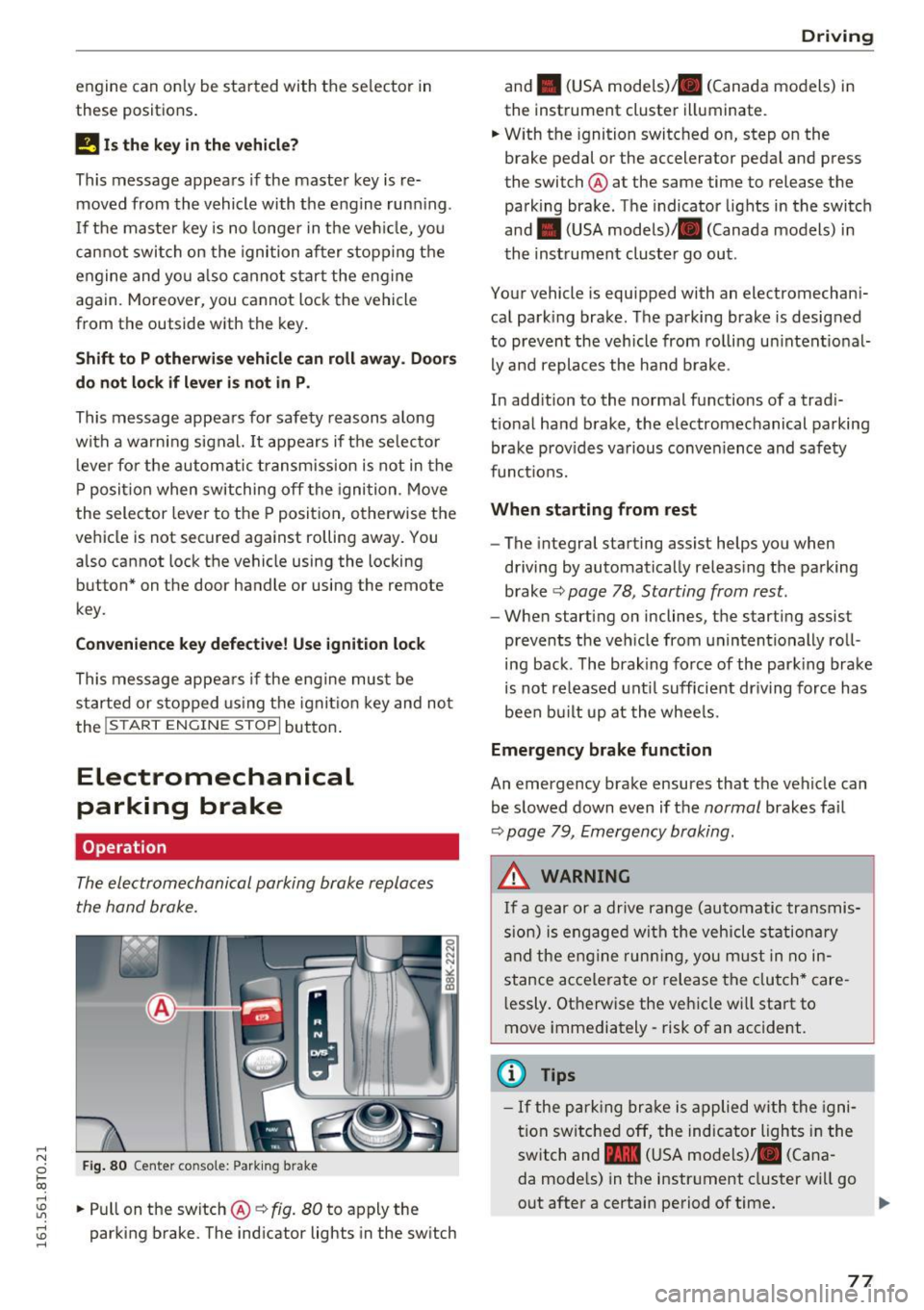
The electromechanical parking brake replaces
the hand brake.
Fig . 8 0 Center co nsole: Park ing b rake
rl
~ .. Pull on the switch@~ fig. 80 to apply the
~ parking brake. The ind icator lights in the sw itch ......
D rivi ng
and . (USA mode ls)/ . (Canada models) in
the instrument cluster illuminate.
.. W ith the ignition switc hed on, step on the
brake pedal or the accelerator pedal and press
the switch @ at the same time to release the
parking brake . The indicator lights in the switch
and . (USA models)/ . (Canada models) in
the instrument cluster go out .
Your vehicle is equipped with an electromechani
cal park ing brake. The parking brake is designed
to prevent the vehicle from rolling un intent ional
ly and replaces the ha nd b rake .
In add ition to the normal functions of a trad i
t ional ha nd brake, the electromechanical parking
brake prov ides va rious conven ience and safety
funct ions.
When starting from rest
- The integral starting assist helps you when
driving by automatically releas ing the parking
brake ~
page 78 , Starting from rest.
- When start ing on inclines, the starting assist
prevents the veh icle from unintentionally roll
ing back . T he brak ing force of the park ing brake
is not re leased unt il sufficient dr iving force has
been bu ilt up at the whee ls.
Emergency brake function
An emergency brake ensures that the veh icle can
be slowed down even if the
normal brakes fa il
~ page 79, Emergency braking .
A WARNING
If a gear or a drive range (automatic transmis
s ion) is engaged wi th the vehicle stationa ry
a nd the engine runn ing, you must in no in
stance acce lera te or release the clutch* care
l essly. Otherwise the vehicle wi ll sta rt to
move immediately- risk of an accident.
(1) Tips
- If the pa rk ing br ake is a pplied with the igni
tion swi tche d off, the indicator lights i n the
switch and -(USA models) . (Cana
da mode ls) in the instr ument cluster wi ll go
out after a certain period of time.
77
Page 80 of 264
Driving
- Occasional noises when the parking brake is
applied and released are normal and are not
a cause for concern.
- When the vehicle is parked, the parking
brake goes through a self-test cycle at regu
lar intervals. Any associated noises are nor
mal.
Parking
.,. Press the brake pedal to stop the vehicle .
.,. Pull the switch @¢
page 77, fig. 80 to set the
parking brake .
.,. Automatic transmission: Move the selector lev-
er to P.
.. Turn the engine off¢.&, .
.. Manual transmission: Shift into 1st gear.
.. When on inclines or declines, turn the steering
wheel so that the vehicle will roll into the curb
if it begins to move.
A WARNING
-
-When you leave your vehicle -even if only
briefly -always remove the ignition key. This
applies particularly when children remain in
the vehicle. Otherwise the children could
start the engine, release the parking brake
or operate electrical equipment (e.g. power
windows). There is the risk of an accident.
- When the vehicle is locked, no one -particu
larly not children should remain in the vehi
cle. Locked doors make it more difficult for
emergency workers to get into the vehicle -
putting lives at risk.
Starting from rest
The starting assist function ensures that the
parking broke is released automatically upon
starting .
Stopping and applying parking brake
.. Pull the switch @¢ page 77, fig. 80 to apply
the parking brake.
78
Starting and automatically releasing the parking brake
.. When you start to drive as usual, the parking
brake is automatically released and your vehicle
begins to move.
When stopping at a traffic signal or stopping in city traffic on vehicles with an automatic trans
mission, the parking brake can be applied. The
vehicle does not have to be held with the foot brake. The parking brake eliminates the tendency
to creep with a drive range engaged . As soon as
you drive off as usual, the parking brake is re leased automatically and the vehicle starts to
move .
Starting on slopes
When starting on inclines, the starting assist pre
vents the vehicle from unintentionally rolling back. The braking force of the parking brake is
not released until sufficient driving force has
been built up at the wheels.
(D Tips
For safety reasons, the parking brake is re
leased automatically only when the driver's
safety belt is engaged in the buckle.
Starting off with a trailer
To prevent rolling back unintentionally on an in
cline, do the following:
.. Keep the switch @¢ page 77, fig. 80 pulled
and depress the accelerator. The parking brake
stays applied and prevents the vehicle from
rolling backward.
.,. You can release the switch @once you are sure
that you are developing enough driving force at
the wheels by depressing the accelerator.
Depending on the weight of the rig (vehicle and
trailer) and the severity of the incline, you may
roll backwards as you start. You can prevent roll
ing backwards by holding the parking brake
switch @pulled out and accelerating -just as
you would when starting on a hill with a conven
tional hand brake .
Page 81 of 264
Emergency braking
In the event that the conventional brake system
fails or locks.
11-In an emergency, pull the sw itch @c:> page 77,
fig. 80 and cont inue to pull it to slow your vehi
cle down with the park ing brake .
11-As soon as you release the switch @ or acceler-
ate, the brak ing p rocess stops.
If you pull the sw itch @and hold it above a
speed of about
5 mph (8 km/h), the emergency
braking function is in itiated. The vehicle is braked
at all four wheels by activating the hydrau lic
b rake system. The brake performance is sim ila r
to making an eme rgency stop c:>
.&..
In order not to activate the emergency brak ing by
mistake, an audib le wa rning tone (buzze r)
sounds when the sw itch @ is pulled . As soon as
the switch @is re leased, or the acce lerator peda l
is depressed, emergency braking stops.
A WARNING
Emergency braking should only be used in an
emergency, when the normal foot brake has
failed or the brake pedal is obstructed. Using the parking brake to perform emergency
brak ing will slow your vehicle down as if you
had made a full bra ke appl ication . The laws of
physics cannot be suspended even with ESC
and its associated components (ABS, ASR, EDS). In corners and when road or weather
conditions a re bad, a f ull brake application
can ca use the vehicle to skid or the rear end to
break away- risking an accident.
Speed warning system
Overview
The speed warning sys tem helps you to keep your
driving speed below a set speed limit .
The speed warning system warns if the driver ex
ceeds a prev iously stored maximum speed. A
;::; warning tone w ill sound as soon as the vehicle
0 ~ speed exceeds the set speed by about 3 mph
~ (3 km/h). At the same time , a warning symbol Lil ,...., v:, ,....,
D riv ing
appea rs in the display. The symbo l's appearance
might be diff erent in some models.
T he speed warn ing system has two warning
thresholds that function independently of each
othe r and that have somewhat different p urpos
es:
Speed warning 1
You can use speed warning 1 to set the max imum
speed w hile you are dr iving . T his sett ing will re
main in effect until you tu rn off the ignit ion, as
sum ing that you have not changed o r reset the
setting .
T he . (USA models) /. (Canada models)
speed wa rning symbo l in the warning 1 disp lay
appears when you exceed the maximum speed .
It
goes out when the speed falls below the stored
maximum speed.
T he speed warn ing symbol will also go out if the
speed
exceeds the stored maximum speed by
more than about 2S mph
(40 km/h) for at least
10 seconds. The stored maximum speed is delet
ed.
Sp eed wa rning 2
Storing warning 2 is recommended if you always
want to be reminded of a certain speed, for ex
amp le wh en you are trav eling in a country that
has a genera l maximum speed limit, or if you do
not want to exceed a specified speed for winter
t ires .
T he . (USA models) /. (Canada mod els)
speed warning 2 symbol appears in the display
when you exceed the stored speed limi t. Unlike
warning 1 , it wilt not go out unt il the vehicle
speed drops below the stored speed limit .
Setting speed warning 2 c:>
page 80.
{D Tips
Even though your vehicle is eq uipped with a
speed warning system, you should still watch
the speedometer to make sure you are not
driving faster than the speed lim it.
79