engine AUDI S5 COUPE 2016 User Guide
[x] Cancel search | Manufacturer: AUDI, Model Year: 2016, Model line: S5 COUPE, Model: AUDI S5 COUPE 2016Pages: 264, PDF Size: 66.92 MB
Page 25 of 264
,-1 N
0 1-CX)
rl I.Cl U"I
,-1 I.Cl ......
Driver information
system
Introduction
The Driver information display inside the instru
ment cluster provides you, the driver, with im
portant information.
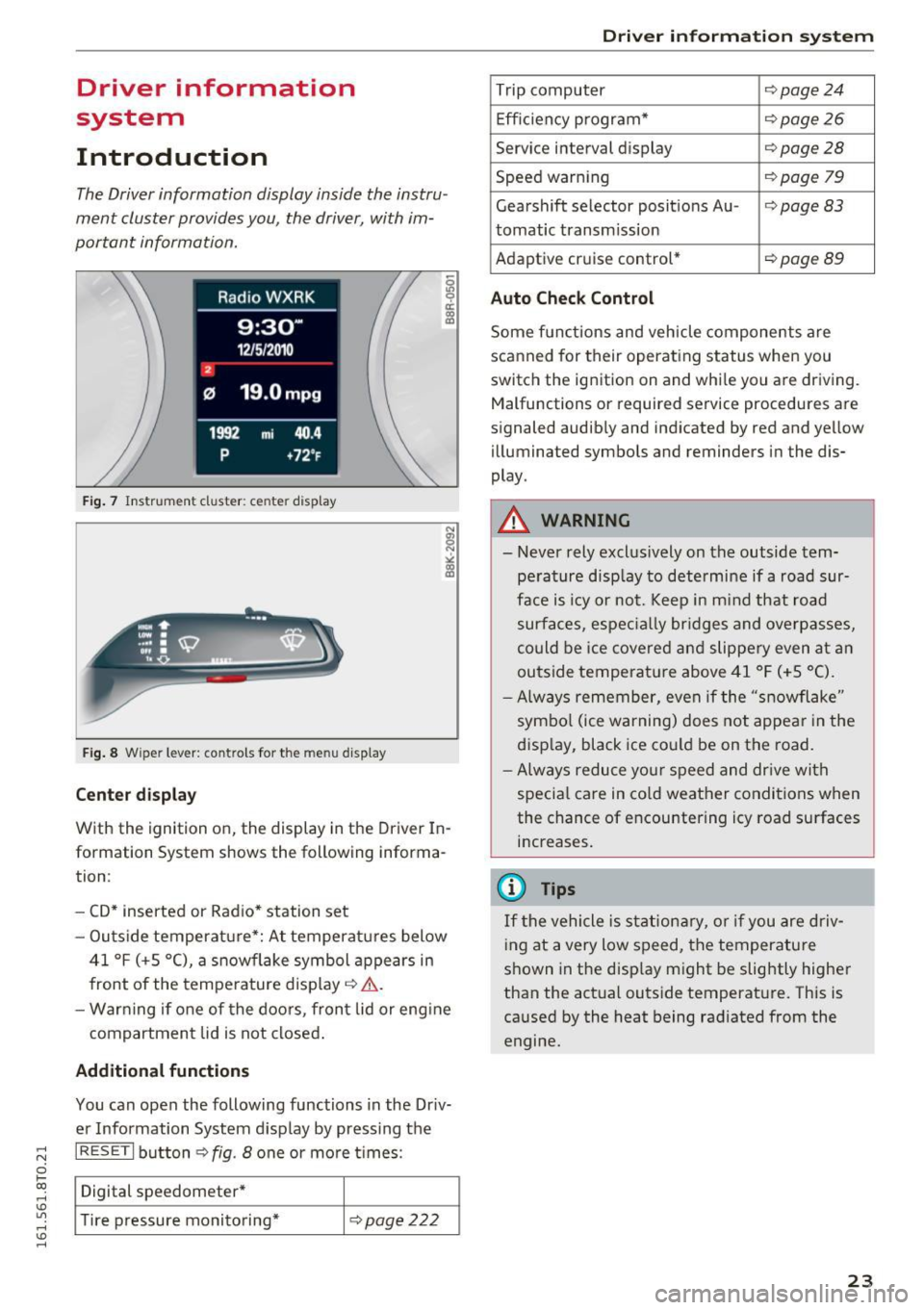
Fig. 7 Instrument cluster: ce nter display
Fig. 8 Wipe r lever: contro ls for the menu display
Center display
With the ignition on, the display in th e Driver In
formation System shows the following informa
tion :
- CD* inserted or Radio* station set
- Outs ide temperature*: At temperatures below
41 °f (+S
0
(), a snowflake symbol appears in
front of the temperature display¢ ,1,. .
- Warning if one of the doors, front lid or engine
compartment lid is not closed.
Additional functions
You can open the following functions in the Driv
er Information System display by pressing the
I RESETI button¢ fig. 8 one or more t imes :
Digital speedometer*
Tire pressure monitoring*
¢pag e222
Driver in forma tion system
Trip computer ¢page24
Efficiency program* ¢page26
Service interval display ¢page28
Speed warning ¢page 79
Gearshift selector posit ions Au -i=>page83
tomatic transm ission
Adaptive cruise control*
¢ page89
Auto Check Control
Some functions and vehicle components are
scanned for their operating status when you
switch the ignition on and while you are driving. Malfunctions or required service procedures are
signaled audibly and indicated by red and yellow
illum inated symbols and reminders in the dis
play.
A WARNING
--
- Never rely exclus ively on the outside tem
pe rature display to determine if a road sur
face is icy or not. Keep in m ind that road
surfaces, especially bridges and overpasses,
could be ice covered and slippery even at an
outside temperat ure above 41 °f (+S °C).
- Always remember, even if the "snowflake"
symbol (ice warning) does not appear in the
display, black ice could be on the road.
- Always reduce your speed and dr ive with
specia l care in cold weather conditions when
the chance of encountering icy road surfaces
increases.
(j) Tips
If the vehicle is stationary, or if you are driv
ing at a very low speed, the temperature
shown in the disp lay might be slightly higher
than the actual outside temperature. This is
caused by the heat being radiated from the
engine.
23
Page 31 of 264
,-1 N
0 1-CX)
rl I.Cl U"I
,-1 I.Cl ......
vehicle, particularly the engine, and main
taining its value. Even if the mileage driven
is low, the maximum period of one year
from one service to the next must not be ex
ceeded.
@ Tips
The informat ion in the Service Rem inder re
mains stored even when the vehicle battery is
disconnected.
On Board Diagnostic
System (OBD)
Malfunction Indicator Lamp (MIL)
The Malfunction Indicator Lamp (MIL) ¢..ift in the
instrument cluster is part of the On-Board Diag
nostic (OBD II) system .
The warning/indicator light illuminates when the
ignition is switched on and goes out after the en
gine starts and the idle has stabilized. This indi
cates that the MIL is working properly .
If the light does not go out after the engine is
started, or illuminates while you are driving, a malfunction may exist in the engine system.
If
the light illuminates, the catalytic converter
could be damaged.
Continue driving
with reduced power (avoiding
sustained high speeds and/or rapid accelera
tions) and have the condition corrected. Contact
your authorized Audi dealer.
If the light illuminates, the electronic speed limiter may also be malfunctioning. For more infor
mation
¢ page 29, Electronic speed limiter.
An improperly closed fuel filler cap may also
cause the MIL light to illuminate ¢
page 188.
Driver in forma tion system
On-Board Diagnostics
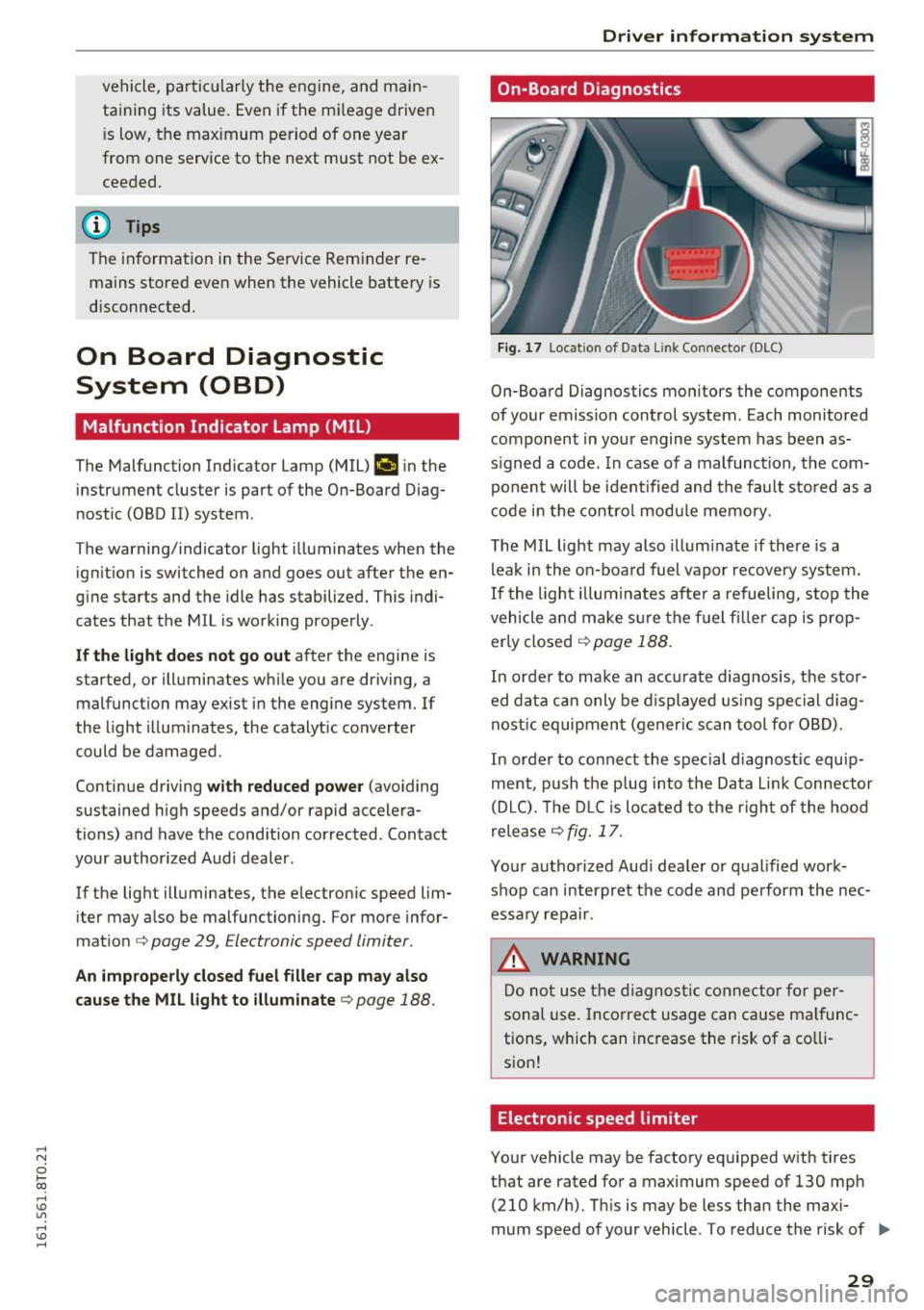
Fig. 17 Loca tion of Data Link Connector (DLC)
On-Board Diagnostics monitors the components
of your emission control system. Each monitored
component in your engine system has been as
s igned a code. In case of a malfunction, the com
ponent will be identified and the fault stored as a
code in the control module memory.
The MIL light may also illuminate if there is a
leak in the on-board fuel vapor recovery system.
If the light illuminates after a refueling, stop the
vehicle and make sure the fuel f iller cap is prop
erly closed
¢ page 188.
In order to make an accurate diagnosis, the stor
ed data can only be displayed using special diag
nostic equipment (gener ic scan tool for OBD).
In order to connect the special d iagnost ic equip
ment, push the p lug into the Data L ink Connector
(DLC). The DLC is located to the right of the hood
release
¢ fig. 17.
Your authorized Audi dealer or qualified work
shop can interpret the code and perform the nec
essary repair.
.&, WARNING
Do not use the diagnostic connector for per
sonal use. Incorrect usage can cause malfunc
tions, which can increase the risk of a co lli
sion!
Electronic speed limiter
Your vehicle may be factory equipped with tires
that are rated for a maximum speed of 130 mph (210 km/h). This is may be less than the maxi
mum speed of your vehicle . To reduce the risk of .,.
29
Page 32 of 264
Driver information s ystem
sudden tire failure and loss of contro l if the vehi
cle is operated at excessive speeds, your vehicle has an electronic speed limiter . The e lectronic
speed limiter prevents your veh icle from go ing
faster than the t ire speed rating. For more infor
mat io n
¢ page 205 .
If the engine contro l unit receives faulty vehicle
roadspeed signa ls, the Malfunct ion Indicator
Light (MIU
¢'4wil l illuminate. If this occurs, con
tact the nearest author ized Audi dealer for assis
tance .
A WARNING
Always observe the posted speed limits and
adjust you r speed to s uit prevailing road, traf
fic and we athe r con ditions. Never drive you r
vehicle fas ter than the maximum speed rat ing
of the tires installed.
30
-
Page 34 of 264
Opening and clo sin g
- If the power locking system should fail, you
can still open the fuel tank flap in an emer
gency ¢
page 190.
-You are well advised not to keep val uables
inside an unatte nded vehicle, v is ible or not.
Even a properly locked vehicle cannot pro
v ide the security of a safe.
- If the LED in the upper edge of the driver's
door panel comes on for about 30 seconds
after t he vehicle is locked, there is a mal
funct ion in the power lock ing or the anti
theft warning system . Have the malf unct io n
cor rected by an authorized Audi dealership
or q ualified repair facility.
Key set
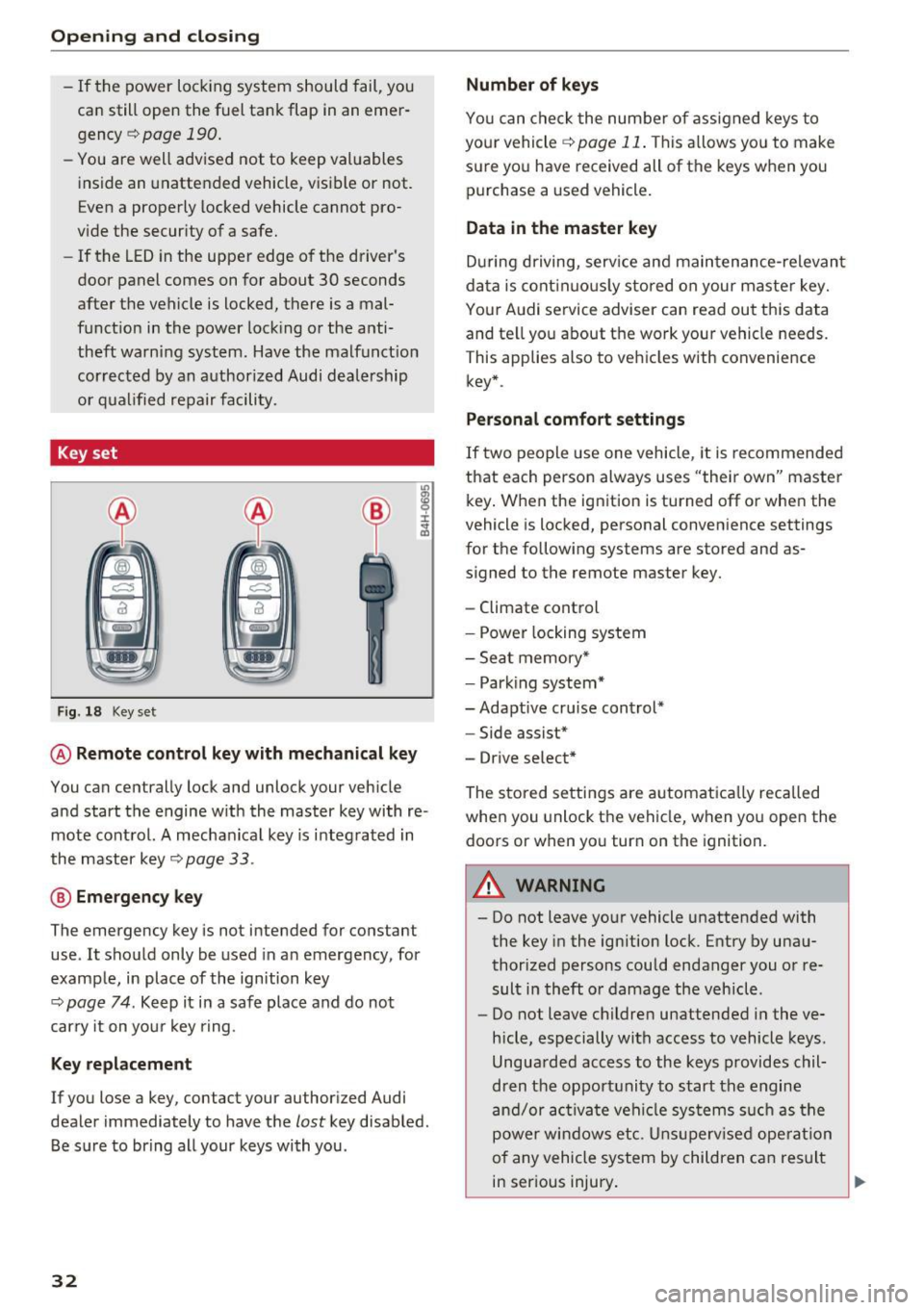
F ig . 18 Key set
m 0 ±
~
@ Remote control key with mechanical key
You can centrally lock and unlock your veh icle
and start the engine w it h the master key with re
mote cont rol. A mecha nical key is i nteg rated in
the master key ¢
page 33.
@ Eme rgency key
The emergency key is not intended for constant
use . It shou ld only be used in an emergency, for
example, in place of the ign ition key
¢
page 74 . Ke ep it in a safe place and do not
car ry it on yo ur key r ing.
Key replacement
If you lose a key, contact your author ized Audi
dealer immediately to have the
lost key disab led .
Be s ure to bring all your keys with you .
32
Number of keys
You can chec k the number of assigned keys to
your vehicle
r=;, page 11 . This a llows yo u to make
sure yo u have received all of the keys when you
purchase a used vehicle .
Data in the master key
During driving, serv ice and maintenance-re levan t
da ta is cont inuo usly stored on your master key.
You r A udi service adviser can read out this data
and te ll yo u about the work you r vehicle needs.
This applies also to veh icles with convenience
key* .
Personal comfort settings
If two people use one vehicle, it is recommended
that each person always uses "their own" maste r
k ey . W hen the ignit ion is turned off or when the
vehicle is loc ked, personal conven ience settings
for the following systems are stored and as
signed to the remote master key.
- Climate control
- Power locking system
- Sea t memory *
- Park ing system*
-Adaptive cr uise control*
- Side assist*
- Drive select*
The stored settings are a utomat ica lly rec alled
when you unlock t he vehicle, when yo u ope n the
doo rs or when yo u turn on the ignition.
A WARNING
- Do not leave you r vehicle unattended with
the key in the ignition lock. Entry by una u
thor ized persons could endanger you or re
sult i n theft o r damage the vehicle .
- Do not leave childre n unattended i n the ve
hicle, especially with access to vehicle keys .
Ungua rded access to the keys provides chil
dren t he oppor tunity to start the engine
an d/or activa te ve hicl e sys tems s uch as the
powe r windows etc. Unsupervised ope ration
of any vehicle system by children c an res ult
in ser ious injury.
.
Page 39 of 264
,-1 N
0 1-CX)
rl I.Cl U"I
,-1 I.Cl ......
Once the front passenger's door has been closed,
you cannot open it again from the outside. The door can be opened from the inside by pulling
the door hand le.
A WARNING
Read and follow all WARNINGS¢&. in Gener
al description on page 31 .
@ Tips
After the ignition is switched on, the power
locking system switch and the unlocking but
ton for the rear lid
c;:; in the door are ena
bled .
Electronic immobilizer
The immobilizer prevents your vehicle from being
started by unauthorized persons .
Inside the key there is a computer chip. This chip
automatically activates/deactivates the electron ic immobilizer.
Applies to vehicles with ignition lock:
The electronic immobilizer deactivates automati
cally when you insert the remote control key into
the ignition lock . It activates again automatically
when you remove the remote control key from
the ignition lock .
Applies to vehicles with convenience key:
If the remote control key is located inside the ve
hicle and you press the
I START ENGINE STOPI
button, the electronic immobilizer deactivates
automatically. If you switch the ignition off and remove the remote control key from the vehicle,
the electronic immob ilizer act ivates aga in auto
mat ically.
A WARNING
Always take the key with you when you leave
the vehicle. The key can disarm the electron ic
eng ine immobiliz er and permit an unauthor
ized pe rson to start the engine and enable op
eration of the vehicle systems such as power
w indow or power sunroof leading to serious
personal injury.
Open ing and closing
(D Tips
-The vehicle cannot be started if an unau
thorized key is used. The vehicle may not
start if another radio device such as a key
for another veh icle or a transponder is lo
cated on the key ring.
- For Declaration of Compliance to United
States FCC and Industry Canada regulations
¢ page 247.
Luggage compartment
Lid
Opening /closing rear lid
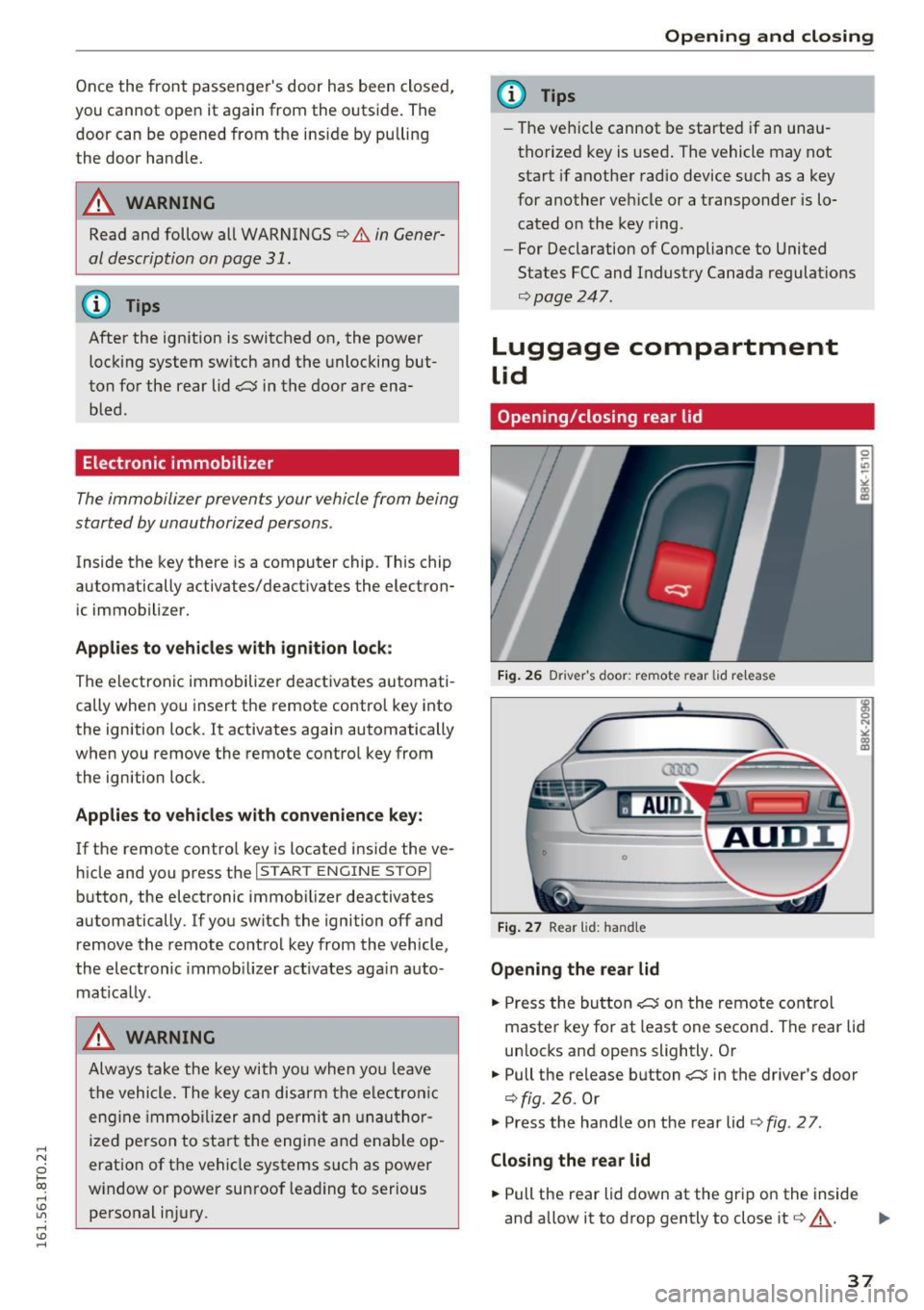
Fig. 26 Driver 's door: remote rear lid release
Fig. 27 Rear lid: handle
Opening the rear lid
.. Press the button c;:; on the remote control
master key for at least one second . The rear lid
unlocks and opens slightly. Or
.. Pull the release button
c;:; in the driver's door
¢fig. 26. Or
.,. Press the hand le on the rear lid ¢
fig. 2 7 .
Closing the rear lid
.. Pull the rear lid down at the grip on the inside
and allow it to drop gently to close it¢,&. . ..,.
37
Page 70 of 264
Warm and cold
Warm and cold
Climate control system
Description
The climate control system warms, cools and
adds humidity to the air in the veh icle inter ior. It
is the most effective when the windows and sun
roof are closed. If there is a build-up of heat in
side the vehicle, ventilation can help to speed up
the cooling process.
I n all heating mode functions except
defrost, the
b lower only switches to a higher speed once the
engine coolant has reached a certain tempera
ture .
Condensat ion from the cooling system can drip
and form a puddle of water under the veh icle.
This is normal and does not mean there is a leak.
P ollutant filt er
The pol lutant filte r removes pollutants such as
dust and pollen from the a ir.
The air pollutants filter must be changed at the intervals specif ied in your Warranty
& Mainte
nance booklet, so that the a ir cond it ione r can
properly work.
If you drive your vehicle in an area with high air pollut ion, the filter may need to be changed
more frequently than specified i n your Aud i War
ranty
& Maintenance booklet. If in doubt, ask
your author ized Audi Service Advisor for advice.
Ke y cod ed setting s
The climate control settings are automatically
stored and assigned to the remote control key
that is in use .
.8, WARNING
Reduced visib ility is dangerous and can ca use
accidents.
- For safe dr iv ing it is very impo rtan t that all
windows be free of ice, snow and condensa
t ion .
68
-Complete ly familiarize yourself with the
proper use and function of the heating and
ventilation system and espec ially how to de
fog and defrost the wi ndows .
- Never use the windshield wiper/washer sys
tem in freezing weather until you have
warmed the windshield first, using the heat ing and vent ilation system. The washer solu
tion may freeze on the windshield and re
duce visibi lity.
(D Note
- If you suspect that the air conditioner has
been damaged, sw itch the system off to
avoid further damage and have it inspected
by a q ualified dealership.
- Repa irs to the Aud i air cond itioner requ ire
special techn ica l know ledge and spec ial
tools. Contact an a uthorized Audi dealer fo r
assistance.
@ For the sake of the environment
By reduc ing the amo unt of fuel you use, you
also reduce the amount of pollutants emitted
into the a ir.
(D Tips
- Keep t he a ir intake slots (in front of the
windshield) free from ice, snow and debr is
in orde r to maintain the prope r funct ion of
the climate control system .
- The energy management sys tem may sw itch
the seat heating* o r rea r window defroster
off temporarily. These systems are available
again as soon as the energy balance has
been restored.
- Air escapes through vents under the rear
window. When placing items of clothing on
the luggage compartment cover, ensure
that the openings are not covered.
Page 72 of 264
Warm and cold
1- 1 Switching recirculation mode on/off
In r ecirculation mode, the air inside the vehicle is
circu lated and filtered. This prevents the unfil
tered air outside the vehicle from entering the
ve hicl e interior. We recommend switching recir
culation mode on when driving through a tunnel
or when sitting in traffic¢.&,.
The
IAUTOI button or l
IAUTO I Switching automatic mode on
Automatic mode maintains a constant tempera
ture inside the vehicle. Air temperature, airflow
and air distribution are controlled automatically.
Adjusting the temperature
Temperatures between 60 °f (+16 °C) and 84 °f
( + 28 °C) can be set. Outside of this range,
LO or
HI will appear in the climate control system dis
p la y. At both of these settings, the climate con
trol system runs continuously at maximum cool
ing or heating power. There is no temperature
regulation.
~ Adjusting the airflow
You can adjust the airflow manually to suit your
needs. To have the airflow regulated automati
cally, press the
IAU TO I button.
~ Adjusting the air distribution
You can manually select the vents where the air
will flow. To have the air dist ribution regulated
automatically , press the
IAU TO I button.
QJ Adjusting seat heating*
Pressing the button switches the seat heating on
at the highest setting (level 3) . The LEDs indicate
the temperature level. To reduce the tempera
ture, press the button aga in. To switch the seat
heating off, press the button repeated ly until the
L ED turns off.
After 10 minutes, the seat heating automatically
switches from level 3 to level 2.
~ Adjusting seat ventilation*
Pressing the button switches the seat vent ilation
on at the highest setting (level 3). The LEDs indi-
70
cate the ventilation level. To reduce the venti la
tion level, press the button again. To switch the
seat ventilation off, press the button repeatedly
until the LED turns off.
I@ FRONT I Switch the defroster on/off
The windshield and side windows are defrosted
or cleared of condensation as quick ly as possible.
The maximum amount of air f lows mainly from
the vents below the windshield. Recirculation
mode switches off. The temperature should be
set to 72 °f (22 °C) or higher. The temperature is
controlled automatically.
The
! AU TOI button switches the defroster off.
lliil REAR I Switching rear window heater on/
off
The rear window heater only operates when the
engine is running. It switches off automatically
after a few m inutes, depending on the outside
temperature.
To prevent the rear window heater from switch
ing off automatica lly, press and hold the
loo REARI
button for more than 2 seconds. T his remains
stored until the ignition is sw itched off.
Air vents
You can open and close the center and rear air
vents using the thumbwheels. The levers adjust
the direction of the airflow from the vents.
In vehicles with a 3-zone deluxe automatic cli
mate contro l system*, you can adjust the air tem
perature in the rear by turning the thumbwheel
toward the red side to make it warmer or toward
the blue side to make it cooler.
A WARNING
- Do not use the rec irculat ion for extended
periods of time. The windows could fog up
since no fresh air can enter the vehicle . If
the windows fog up, press the air recircula
tion button again immediate ly to switch off
the air recirculat ion function or select de
frost.
- Individuals with reduced sensitiv it y to pain
or temperature could develop burns when
using the seat heating function. To reduce
-
Page 73 of 264
.... N
0 Ico ....
@ Note
To avoid damage to the heat ing elements in
the seats, do not kneel on the seats or place
heavy loads on a small area of the seat.
Setup
The basic climate control settings can be adjust
ed in the radio or MMI*.
"" Se lect : I CAR I fu nct ion button > A /C control but
ton. Or
"" Se lect:
I CAR I function button > Car sys tems*
control button > AC.
Automatic recirculation *
When switched on, automatic recircu lation con
trols t he recirculation mode automat ica lly . If the
windows fog up , press the
I® F RONT I button .
Synchr onization *
When synchronization is switched on, the same
settings are app lied to both the drive r and front
passenger, except for the seat heating/venti la
tion* . Synchron ization switches
off when you ad
just the settings on the front passenge r's side .
You can a lso switch synch ronization on by press
i ng and ho ld ing the knob on the driver's side.
Supplementary he ater
T he supplementary heater warms the interior of
vehicles w ith flexible fuel engines more qu ickly .
The supplementary heater is controlled automat i cally in the
Auto setting .
Warm and c old
7 1
Page 74 of 264
Driving
Driving
Steering
Manually adjustable steering wheel
The steering wheel position is fully adjustable up
and down and forward and back .
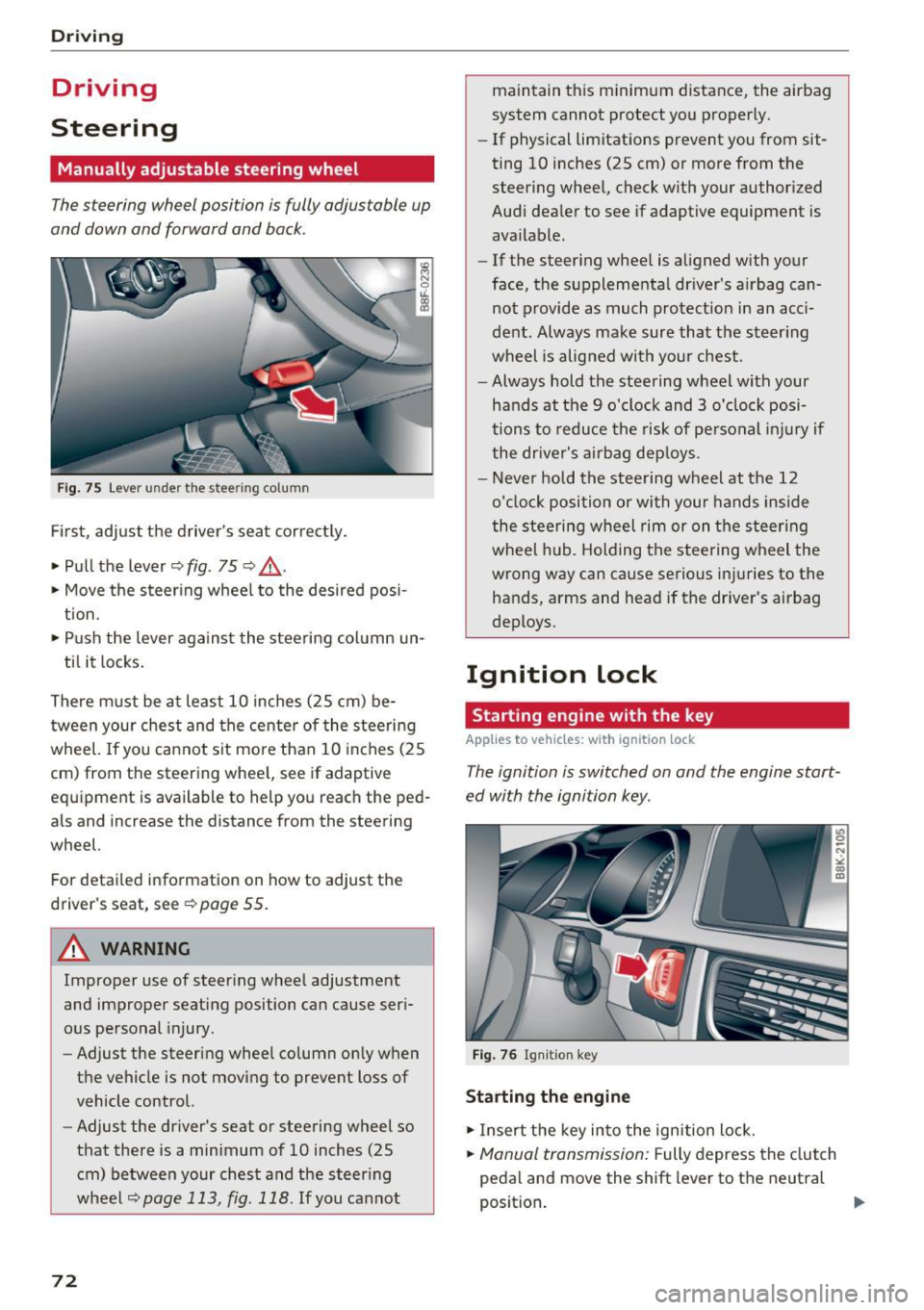
Fig. 75 Lever under the steering column
First, adjust the driver's seat correctly.
• Pull the lever¢
fig. 75 ¢ .&_ .
• Move the steering wheel to the desired posi
tion.
• Push the lever against the steering column un-
til it locks.
There must be at least 10 inches (25 cm) be tween your chest and the center of the steering
wheel. If you cannot sit more than 10 inches (25
cm) from the steering wheel, see if adaptive
equipment is available to help you reach the ped
als and increase the distance from the steering
wheel.
For detailed information on how to adjust the
driver's seat, see
¢page 55.
A WARNING
Improper use of steering wheel adjustment
and improper seating position can cause seri
ous personal injury.
- Adjust the steering wheel column only when
the vehicle is not moving to prevent loss of
vehicle control.
- Adjust the driver's seat or steering wheel so
that there is a minimum of 10 inches (25
cm) between your chest and the steering
wheel
¢page 113, fig. 118 . If you cannot
72
maintain this minimum distance, the airbag
system cannot protect you properly.
- If physical limitations prevent you from sit
ting 10 inches (25 cm) or more from the
steering wheel, check with your authorized
Audi dealer to see if adaptive equipment is
available.
- If the steering wheel is aligned with your
face, the supplemental driver's airbag can
not provide as much protection in an acci
dent. Always make sure that the steering
wheel is aligned with your chest.
- Always hold the steering wheel with your
hands at the 9 o'clock and 3 o'clock posi
tions to reduce the risk of personal injury if
the driver's airbag deploys.
- Never hold the steering wheel at the 12
o'clock position or with your hands inside
the steering wheel rim or on the steering
wheel hub. Holding the steering wheel the
wrong way can cause serious injuries to the
hands, arms and head if the driver's airbag
deploys.
Ignition lock
Starting engine with the key
Applies to vehicles: wit h ignition lock
The ignition is switched on and the engine start
ed with the ignition key .
Fig. 76 Ignition key
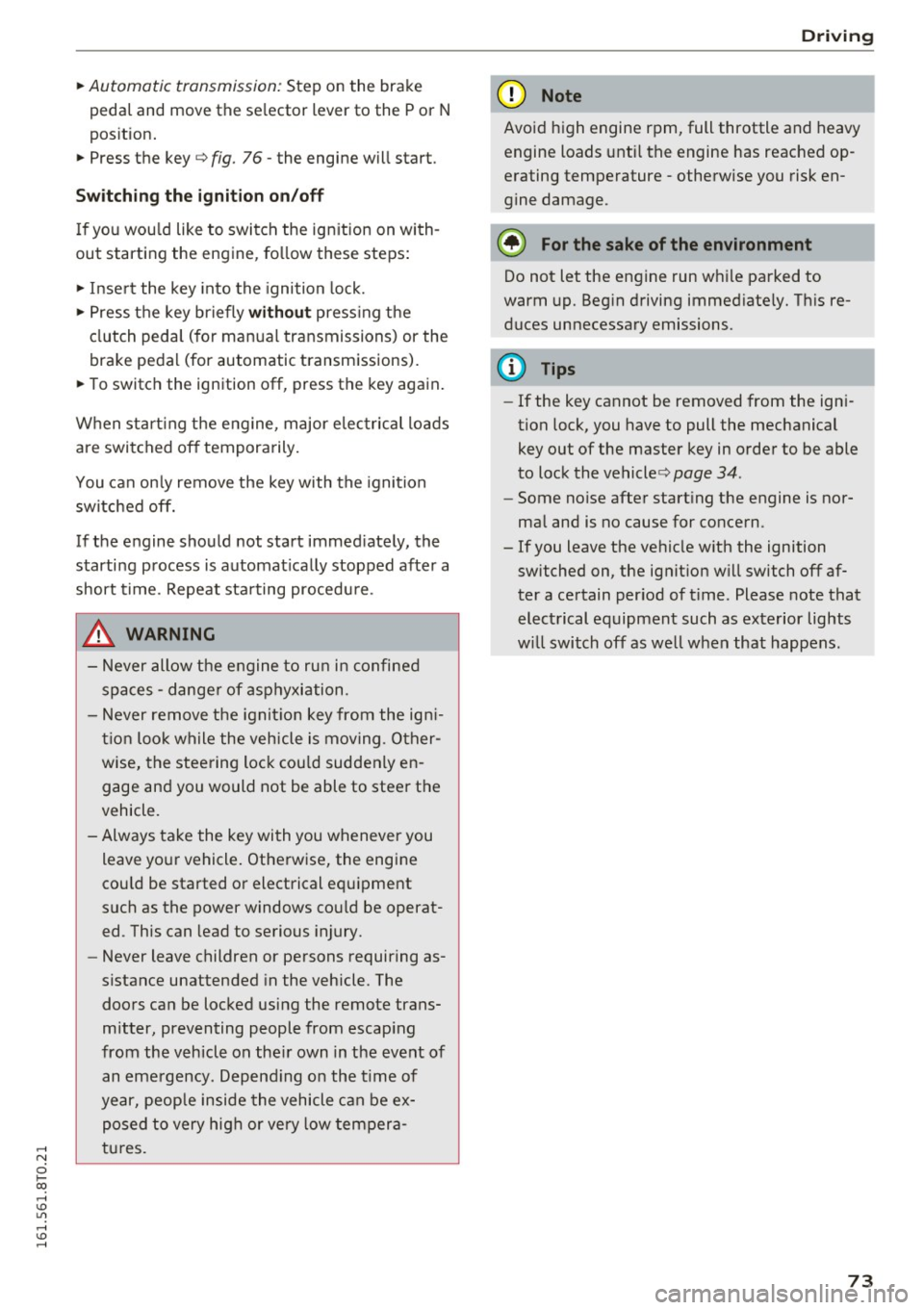
Starting the engine
• Insert the key into the ignition lock.
• Manual transmission: Fully depress the clutch
pedal and move the shift lever to the neutral
position. ..,.
Page 75 of 264
.... N
0 I-co ....
peda l and move the se lector lever to the P or N
pos ition .
~ Press the key c::> fig. 76 - the engine will start.
Switchi ng the ignition on /off
If you wou ld like to switch the ig nition on with
out starting the engine , fo llow these steps :
~ Insert the key into the ignition lock.
~ Press t he key briefly withou t pressing the
clutch peda l (for manual transmissions) or the
brake pedal (for automatic transmissions).
~ To switch the ignition off, press th e key again .
When start ing t he engine, major elec trical loads
are switched off tempora rily.
You can on ly remove the key with the ignition
switched off.
If the engine should not start immed iately, the
starting process is automat ically stopped after a
short time. Repeat sta rting procedu re .
_& WARNING
- Never allow the e ngine to ru n in confined
spaces - danger of asp hyxiation .
- Never remove the ign it io n key from the ig ni
t ion look while the vehicle is moving . O ther
wise, the stee ring lock cou ld suddenly en
gage and you would not be able to steer t he
vehicle .
- Always take the key wi th you whenever you
leave your vehicle . Otherwise, the engine
cou ld be started or electrical equipment
such as the power windows cou ld be operat
ed . This can lead to serious injury.
- Never leave children or persons requiring as
sistance unattended in the vehicle. The
doors can be locked using the remote trans
mitter, preventing people from escap ing
from the vehicle on the ir own in the event of
an eme rgency . Depend ing on the t ime of
year, peop le inside the vehicle can be ex
posed to very hig h or very low tempera
tures .
-
D riv ing
(D Note
Avoid high engine rpm, full throttle and heavy
engine loads unti l the engine has reached op
erating temperature - otherwise you risk en
gine damage.
@ For the sake of the environment
Do not let the engine run w hile parked to
warm up. Beg in driving immed iate ly. Th is re
duces unnecessary emissions.
(D Tips
- If the key cannot be removed from the ign i
tion lock, you have to pull the mechanical
key out of the master key in order to be able
to lock the vehicle c::>
page 34.
-Some noise after starting the engine is nor
mal and is no cause for concern.
- If you leave the vehicle w ith the ignition
switched on, the ignit ion w ill switch off af
ter a certain per iod of t ime . Please note that
electrical equipment such as exterior lights
w ill switch off as we ll w hen that happens.
73