turn signal AUDI S5 COUPE 2016 User Guide
[x] Cancel search | Manufacturer: AUDI, Model Year: 2016, Model line: S5 COUPE, Model: AUDI S5 COUPE 2016Pages: 264, PDF Size: 66.92 MB
Page 102 of 264
Audi side assist
-Improper reliance on the side assist system
can cause collisions and serious personal in
jury:
- Never rely only on side assist when chang
ing lanes.
- Always check rear view mirrors to make
sure that it is safe to change lanes.
- Side assist cannot detect all vehicles under
all conditions- danger of accident!
- Please note that side assist indicates there
are approaching vehicles, or vehicles in your blind spot, only after your vehicle has
reached a driving speed of at least 19 mph
(30 km/h).
- In certain situations, the system may not
function or its function may be limited. For
example:
- if vehicles are approaching or being left
behind very quickly . The display may not
turn on in time .
- in poor weather conditions such as heavy
rain, snow or heavy mist .
- on very wide lanes, in tight curves or if
there is a rise in the road surface . Vehicles
in the adjacent lane may not be detected
because they are outside of the sensor
range.
(D Note
The sensors can be displaced by impacts or damage to the bumper, wheel housing and
underbody . This can affect the system . Have
your authorized Audi dealer or authorized
Audi Service Facility check their function.
(D Tips
-If the window glass in the driver's door or
front passenger's door has been tinted, the
display in the exterior mirror may be misin
terpreted.
- For Declaration of Compliance to United
States FCC and Industry Canada regulations
c::> page 247.
100
Activating and deactivating
Applies to vehicles: with A udi side assist
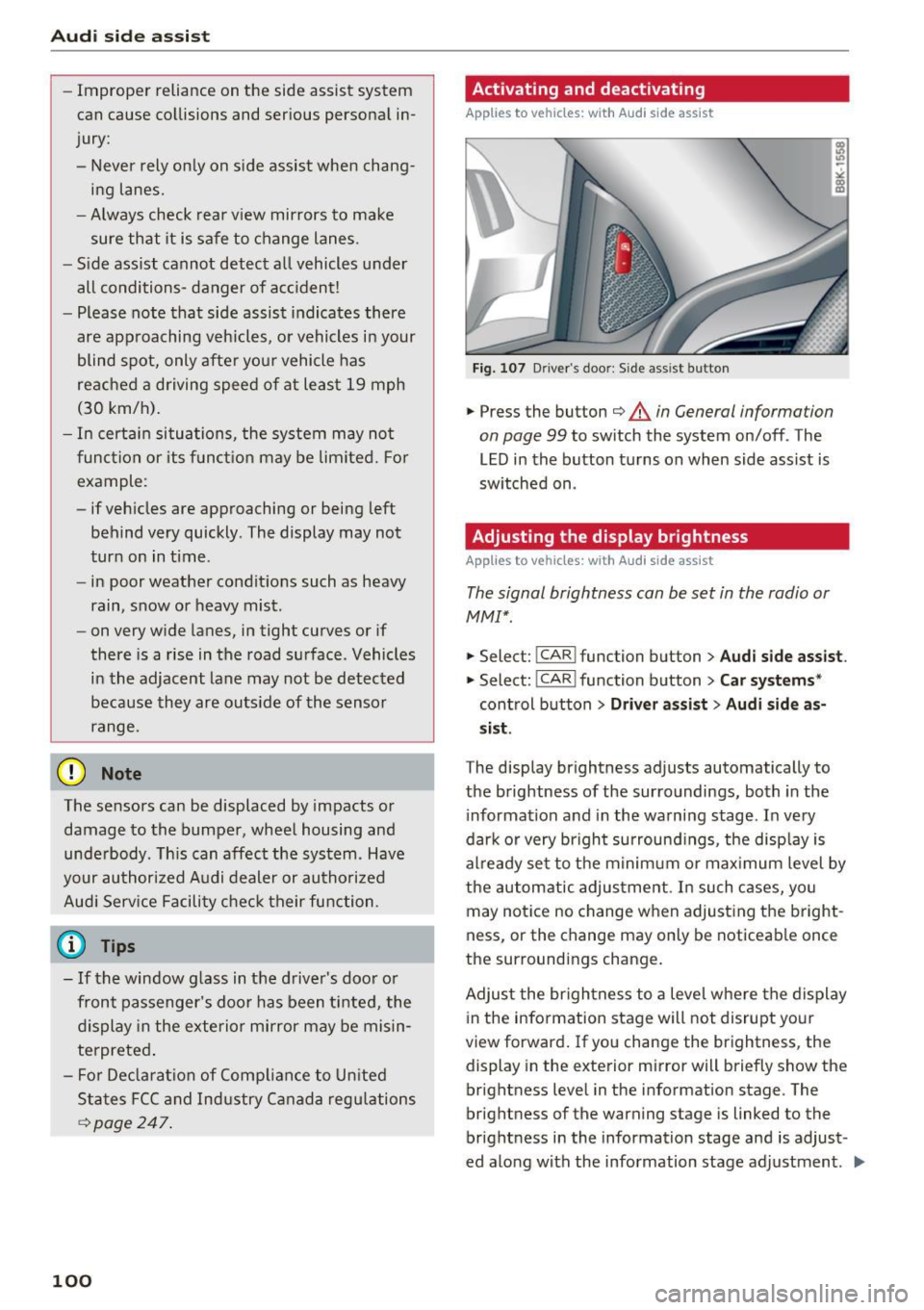
Fig. 107 D riv er's doo r: Side ass ist butto n
.,.. Press the button c::> &. in General information
on page 99
to switch the system on/off . The
LED in the button turns on when side assist is
switched on .
Adjusting the display brightness
Applies to vehicles: with A udi side ass ist
The signal brightness can be set in the radio or
MMI* .
.,.. Select: I CAR I function button > Audi side assist.
.,.. Select: I CAR I function button > Car systems*
control button > Driver assist> Audi side as
sist.
The display brightness adjusts automatically to
the brightness of the surroundings, both in the
information and in the warning stage . In very
dark or very bright surroundings, the display is
already set to the minimum or maximum level by
the automatic adjustment . In such cases, you
may notice no change when adjusting the bright
ness, or the change may only be noticeable once
the surroundings change.
Adjust the brightness to a level where the display
in the information stage will not disrupt your
view forward. If you change the brightness , the
display in the exterior mirror will briefly show the
brightness level in the information stage. The
brightness of the warning stage is linked to the
brightness in the information stage and is adjust
ed along with the information stage adjustment.
Iii>
Page 110 of 264
Parking System
-Dampen the lens with a household alcohol
based glass cleaner, and clean the lens with a
dry cloth
~0 .
- Remove snow with a hand brush and ice pref
erably with a de-icing spray
~ 0 .
A WARNING
-The parking aid cannot replace the driver's
attention. The driver alone is responsible for
parking and similar driving maneuvers.
-Always keep your eyes on the vehicle's sur roundings, using the rear view mirror as
well.
- Do not allow yourself to be distracted from
traffic by the rear view camera pictures.
- If the position and the installation angle of
the camera has changed, for example, after
a rear end collision, do not continue to use
the system for safety reasons . Have it
checked by a qualified dealership.
(D Note
-Low obstacles already signaled by a warning
can disappear from the system's detection
range as they are approached and will not
continue to be signaled. Objects such as
barrier chains, trailer draw bars, thin paint
ed vertical poles or fences may not be de
tected by the system, posing risk of dam
age.
- Never use warm or hot water to remove
snow or ice from the rear view camera lens -
danger of crack formation on the lens!
- When cleaning the lens, never use products
that are abrasive.
Switching on /off
A pp lies to veh icles : w ith pa rking system (rear, wit h rear view
camera)
The rear view camera switches on automatically
together with the acoustic park assist when you
put the vehicle in reverse.
Switching on
... Put the vehicle in reverse gear, the acoustic
parking system with rear view camera is acti
vated automatically. Activation of the acoustic
108
parking system is confirmed by a brief acknowl
edgement sound.
Switching off
""Drive faster than 9 mph (15 km/h), or
""take the vehicle out of reverse gear. The acous
tic parking system is immediately deactivated,
and the rear view camera picture is deactivated
automatically after a period of about 15 sec
onds, or
... switch off the ignition.
The delay in deactivating the camera provides an uninterrupted view behind the vehicle especially
when maneuvering in tight parking spaces and prevents the picture from turning off the every
time you shift out of reverse .
If the warning message appears in the display
but not the rear view camera picture, read and
confirm the warning message . The acoustic dis
tance signal is always active.
If you press a function button on the MMI control
console, the rear view camera picture disappears.
The rear view camera picture reappears the next
time you park.
Further information on the warning message and
the MMI control console can be found in the MMI
instruction booklet.
A WARNING
-Only use the rearview camera to assist you if
it shows a good, clear picture. For example,
the image may be affected by the sun shin
ing into the lens, dirt on the lens or if there
is a defect.
- Use the rearview camera only with the rear
lid completely closed. Make sure any objects
you may have mounted on the rear lid do
not block the rearview camera.
@ Tips
-The rear view camera picture is available as
soon as the MMI Display or the MMI is
switched on, or the start-up phase is com
pleted .
- The sensors must be kept clean and free of
snow and ice for the park assist to operate.
Page 111 of 264
,-1 N
0 1-CX)
,-1 I.Cl U"I
,-1 I.Cl ......
-You can change the volume and pitch of the
signals as well as the display
c::, page 111.
- What appears in the display is time-de
layed.
Reverse Parking
Applies to vehicles: with parking system (rear, with rear view
camera)
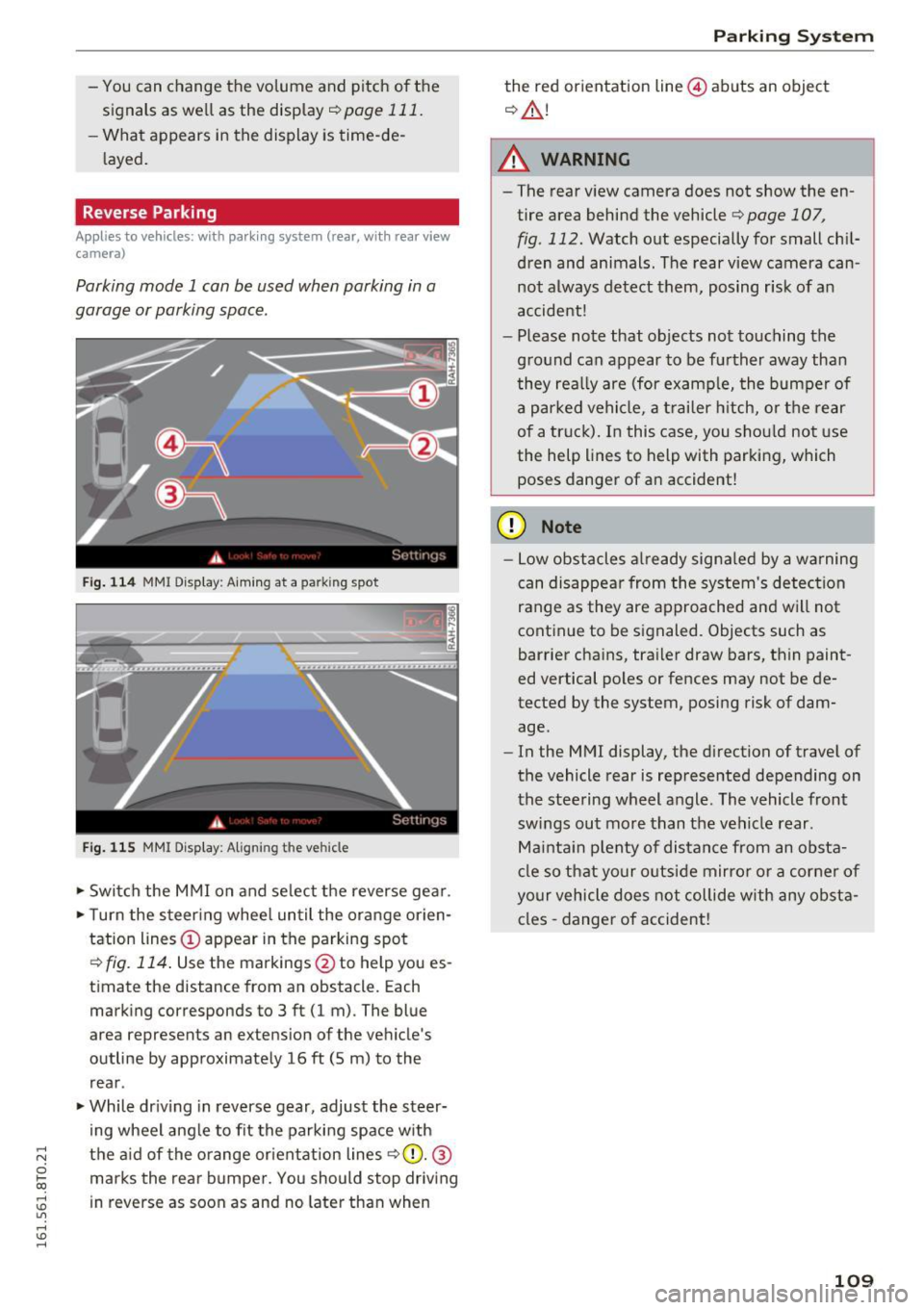
Parking mode 1 can be used when parking in a
garage or parking space .
Fig. 114 MM I Di splay : Aiming at a park in g spot
Fig. 115 MMI Display: Aligning t he ve hicle
• Switch the MMI on and select the reverse gear .
• Turn the steering wheel until the orange orien
tation lines © appear in the parking spot
c::> fig. 114. Use the markings @to help you es
timate the distance from an obstacle. Each marking corresponds to 3 ft (1 m) . The blue
area represents an extension of the vehicle 's
outline by approximately 16
ft (5 m) to the
rear .
• While driving in reverse gear, adjust the steer
ing wheel angle to fit the parking space with
the aid of the orange orientation lines
r=> (D. @
marks the rear bumper. You should stop driving
in reverse as soon as and no later than when
Parking System
the red orientation line@) abuts an object
c::, &.!
A WARNING
-The rear view camera does not show the en
tire area behind the vehicle r=>page 107 ,
fig . 112. Watch out especially for small chil
dren and animals. The rear view camera can
not always detect them, posing r isk of an
accident!
- Please note that objects not touching the
ground can appear to be further away than
they really are (for example, the bumper of
a parked vehicle, a trailer hitch, or the rear
of a truck). In this case, you should not use
the help lines to help with parking, which
poses danger of an accident!
(D Note
- Low obstacles already signaled by a warning
can disappear from the system's detection
range as they are approached and will not
continue to be signaled. Objects such as
barrier chains, trailer draw bars, thin paint
ed vertical poles or fences may not be de
tected by the system, posing risk of dam
age.
- In the MMI display, the direction of travel of
the vehicle rear is represented depending on
the steering wheel angle . The vehicle front
swings out more than the vehicle rear .
Maintain plenty of distance from an obsta
cle so that your outside mirror or a corner of
your vehicle does not collide with any obsta
cles -danger of accident!
109
Page 112 of 264
Parking System
Parallel Parking
Applies to vehicles: with park ing system (rear, with rear view
camera)
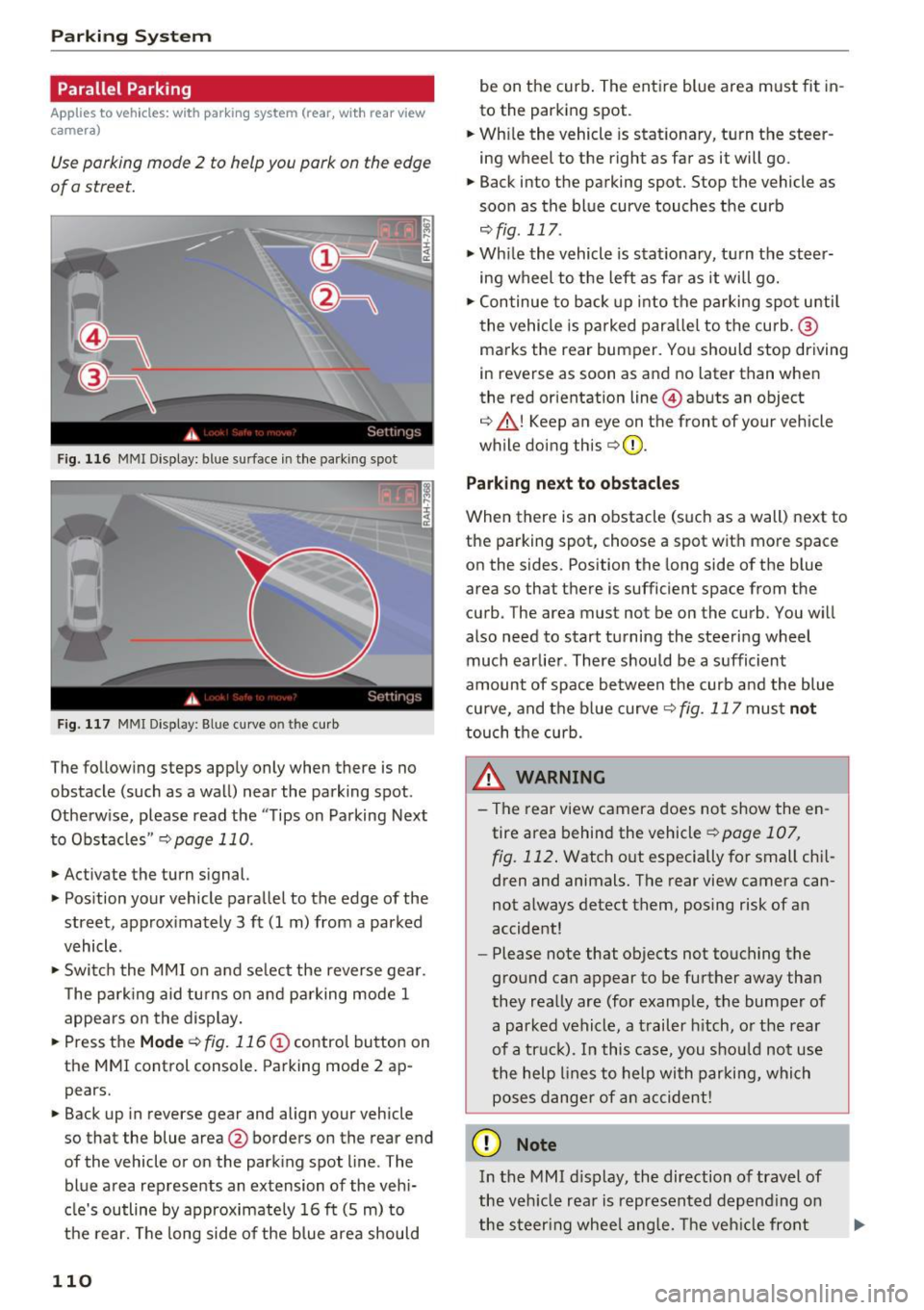
Use parking mode 2 to help you park on the edge
of a street.
Fig. 116 MMI Display: blue s urface in the park ing spot
Fig. 117 MMI Displ ay : Blue curve o n th e curb
The following steps apply only when there is no
obstacle (such as a wall) near the parking spot .
Otherw ise, please read the "Tips on Parking Next
to Obstacles "
r::;, page 110 .
.,. Activate the turn signal.
.,. Position your vehicle parallel to the edge of the
street, approx imately 3 ft (1 m) from a parked
vehicle.
.,. Switc h the MMI on and se lect the reverse gear .
The park ing aid tu rns on and pa rking mode 1
appears on the display.
... Press the
M ode r::;, fig. 116 (!) control button on
the MMI control console. Parking mode 2 ap pears.
... Back up in reverse gear and align your vehicle
so that the blue area@ borders on the rear end
of the vehicle or on the park ing spot line . The
blue area rep resents an extension of the vehi
cle's outline by approximately 16 ft (S m) to
the rear. The long side of the blue area should
110
be on the curb . The ent ire blue area m ust fit in
to the parking spot .
... Wh ile the vehicle is stationary, turn the steer
ing wheel to the right as far as it will go.
.,. Back into the parking spot. Stop the vehicle as
soon as the bl ue curve touches the curb
r::;, fig . 117 .
.,. While the vehicle is stationa ry, tu rn the steer
ing wheel to the left as fa r as it will go .
.,. Continue to back up into the parking spot u ntil
the vehicle is parked para llel to the curb. @
ma rks the rear bumper. You should stop driving
in reverse as soon as and no later than when
the red orientation line @abuts an object
r::;, ,& ! Keep an eye on the front of your vehicle
while doing th is
r::;, Q) .
Park ing n ext to obstacle s
When there is an obstacle (such as a wall) next to
the parking spot, choose a spot with more space
on the sides. Position the long side of the b lue
area so that there is sufficient space from the
curb . The area must not be on the curb . You w ill
also need to start turning the steering wheel
much earlier . There should be a sufficient
amount of space between the curb and the blue cu rve, and the blue curve
r::;, fig. 117 must not
touch the curb.
&_ WARNING
- The rear view camera does not show the en
tire area behind the vehicle
r::;, page 107 ,
fig. 112 .
Watch out especially for small chi l
dren and animals. The rear view camera can
not a lways detect them, posing risk of an
accident!
- Please note that objects not touching the
ground can appear to be further away than
they really are (for examp le, the bumper of
a parked vehicle, a trailer h itch, o r the rear
of a tr uc k). In this case, you shou ld not use
the help lines to help with parking, which poses dange r of an accident!
(D Note
In the M MI d is play, the direction of travel of
the veh icle rea r is represented depend ing on
the s teer ing whee l ang le. The veh icle front
Page 113 of 264
.... N
0 Ico ....
tain plenty of distance from an obstacle so
that your outside mirror or a co rner of your
veh icle does not collide w ith any obstacles -
danger of accident!
The left or right or ientation lines and surfaces
w ill be displayed, depending on the turn sig
na l being used.
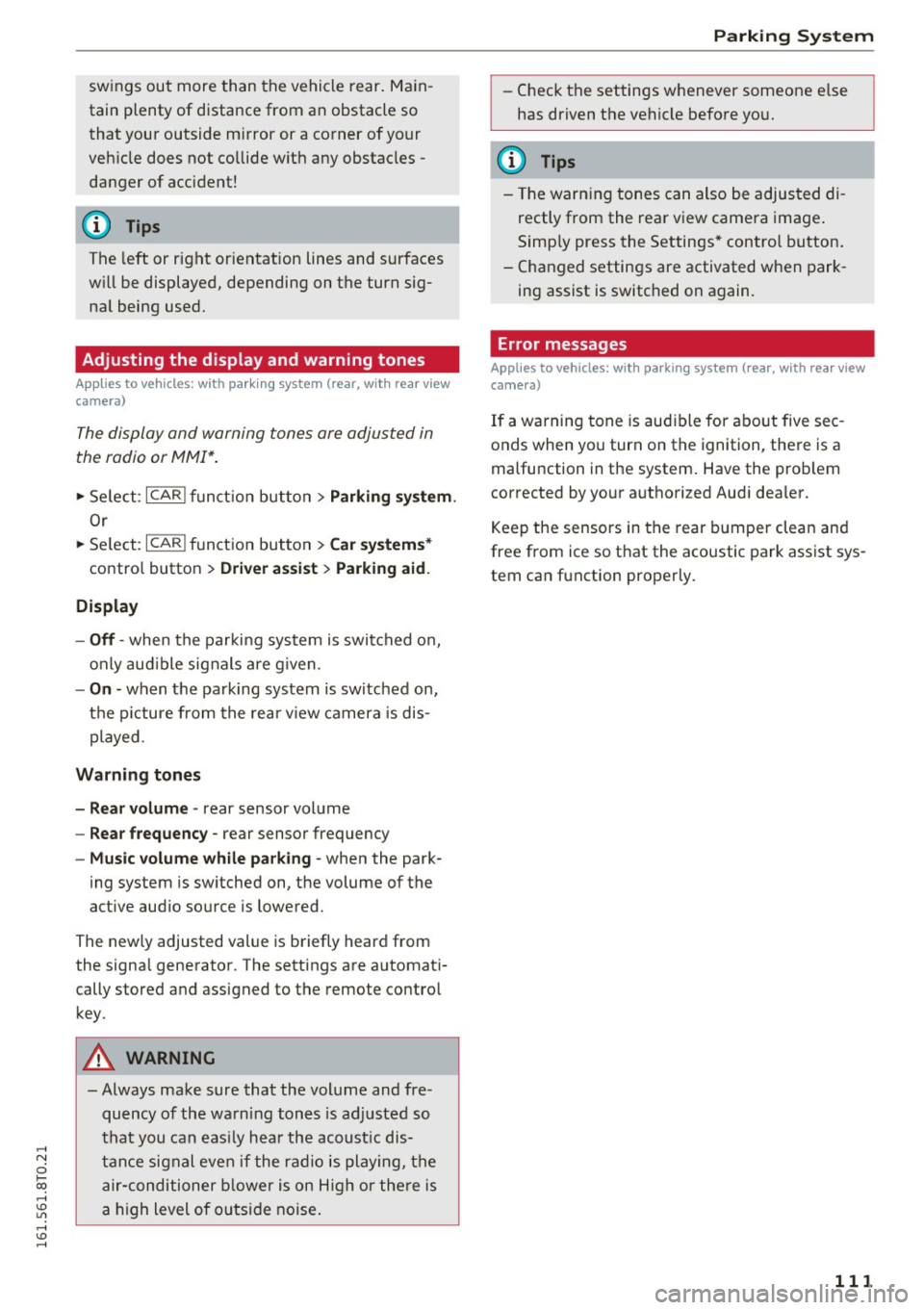
Adjusting the display and warning tones
Applies to vehicles: with parking system (rear, with rear view
camera)
The display and warning tones are adjusted in
the radio or MMI*.
~ Select: ICARI f u nct ion button> Parking syst em .
Or
~ Se lect: I CARI function button > Ca r sy stem s*
contro l button > Dri ver a ssis t> Pa rkin g aid .
Display
- Off -when the parki ng system is switched on,
only aud ible signals are g iven.
- On -when the pa rking system is switched on,
the p icture from the rear v iew camera is dis
played.
Warning tones
- Rea r v olum e -
rear sensor volume
- Rea r frequency -rear sensor frequency
-Music volume whil e par king -when the park-
ing system is sw itched on, the volume of the
active aud io source is lowered.
The new ly adjusted value is briefly heard from
the signa l generator. The settings are automat i
cally stored and assigned to the remote contro l
key.
A WARNING
- Always make sure that the volume and fre quency of the wa rning tones is adj usted so
that you can eas ily hea r the acoust ic dis
tance signal even if the radio is playing, the air-conditioner b lower is on H igh or the re is
a high level of outside noise .
Parking Sys tem
-Check the settings whenever someone e lse
has driven the vehicle before you.
(D Tips
- The warn ing tones can also be adjus ted di
rectly from the rea r view camera image .
Simp ly press the Settings* control button.
- Changed settings are activated when park
ing assist is switched on again.
Error messages
Applies to vehicles: with parking system (rear, with rear view
camera)
If a warning tone is aud ible for about five sec
onds when you turn on the ignition, there is a
malfunction in the system. Have the prob lem
corrected by your authorized Audi dea ler.
Keep the sensors in the rear bumper clean and
free from ice so that the acoustic park assist sys
tem can function properly.
111
Page 155 of 264
.... N
0 Ico ....
the control unit of the Advanced Airbag System .
When a child restraint is being used on the front
passenger seat with a typical 1 year-old child, the
Advanced Airbag System compares the weight measured by the weight sensing mat with the in
formation stored in the electronic control unit .
The electronic control unit also registers the ten
sion on the front passenger safety belt. The ten
sion on the safety belt for the front passenger
seat will be d ifferent fo r an adult who is properly
using the safety belt as compared to the tension
on the belt when it is used to attach a child re
straint to the seat. The senso r below the latch for
the safety belt for the front seat passenger
measures the tension on the belt. The input from
this sensor is then used with the weight to "de
cide", whether there is a child restraint with a
typical 1 year-old child on the front passenger
seat and whether or not the airbag must be
turned off .
Child restraints and Advanced Airbags
Regardless of the child restra int that you use,
make sure that it has been cert ified to meet Safe
ty Standards and has been certified by its manu
facturer for use wi th an airbag. A lways be sure
that the child restraint is properly insta lled at
one of the rear seating positions . If in exception
al circumstances you must use it on the front
passenger seat, carefully read all of the informa
tion on chi ld safety and Advanced Airbags and
heed all of the applicable WARNINGS. Make cer
tain that the child restra int is correctly recog
n iz ed by the weight-sensing mat inside the front
passenger seat, that the front passenger air bag
is t urned off and that the airbag status is always
corre ct ly signaled by the
PASSENGER AIR BAG
OFF light.
Many types and models of child rest raints have
been available over the yea rs, new mode ls are in
troduced regularly incorporating new and im
proved designs and older mode ls are taken o ut of
production . Chi ld restraints are not standardized .
Ch ild restraints of the same type typically have
d ifferent weights and s izes and different 'foot
prints,' the s ize and shape of the bottom of the
Child safety
child restraint that sits on the seat, when they
are installed on a vehicle seat . These differences
make it virtua lly impossib le to certify comp liance
with the requirements for advanced a irbags w ith
each and every child restraint that has ever been
sold in the past or wi ll be sold over the course of
the useful life of your vehicle.
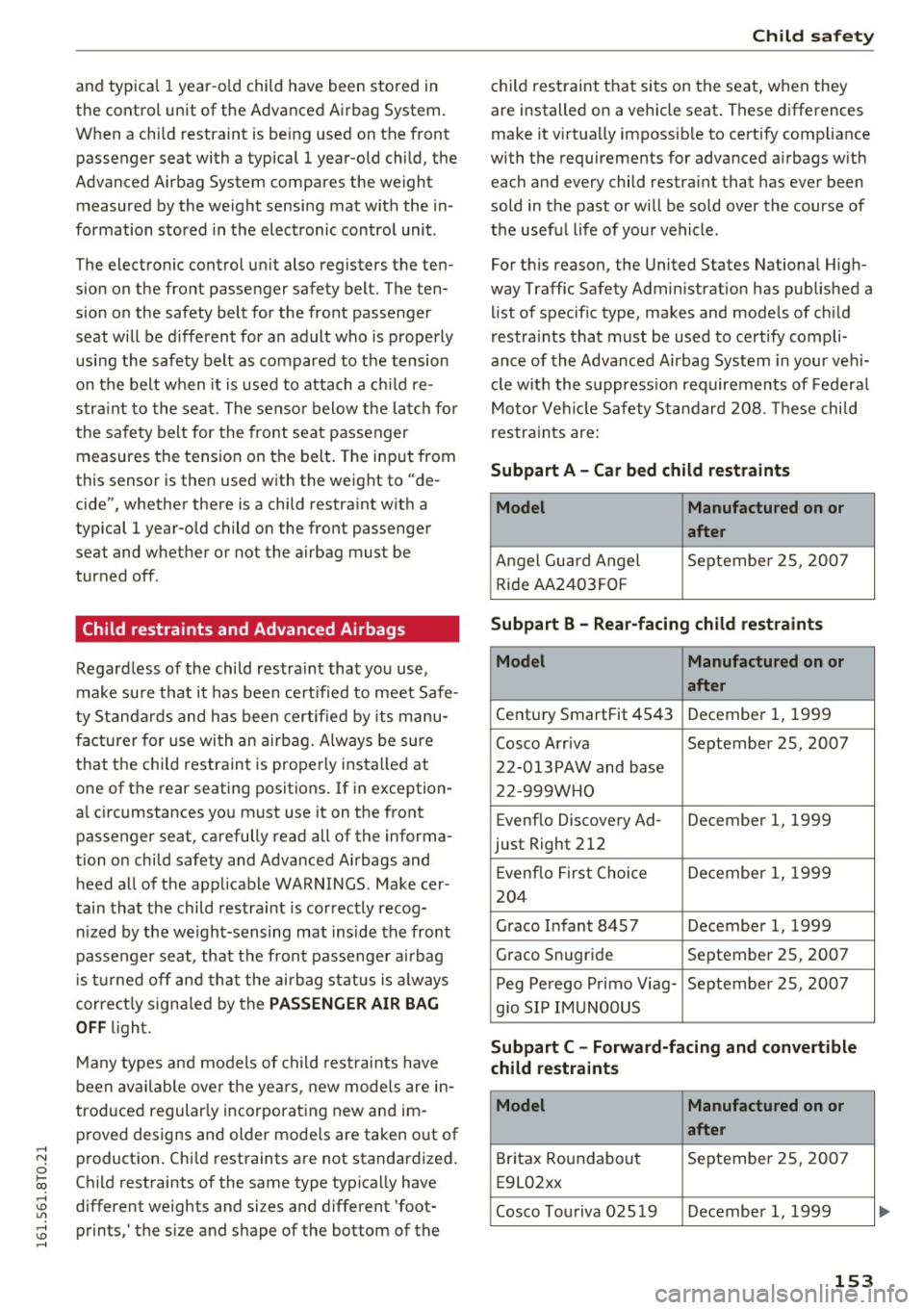
For this reason, the United States Nationa l High
way Traffic Safety Admin istrat ion has published a
list of spec ific type, makes and mode ls of ch ild
restraints that must be used to certify compli
ance of the Advanced Airbag System in your veh i
cl e w ith the suppress ion requirements of Federal
Motor Vehicle Safety Standard 208. These chi ld
restra ints are:
Subpart A - Car bed child restraints
Model Manufactured on or
after
Angel Guard Angel September 2S , 2007
Ride AA2403FOF
Subpart B - Rear-facing child restraints
Model Manufactured on or
after
Century SmartFit 4S43 December 1, 1999
Cosco Arriva September 2S, 2007
22-013PAW and base
22-999WHO
Evenflo Discovery Ad- December 1, 1999
just Right 212
E venflo First Choice December 1, 1999
204
Graco Infant 84S7 December 1, 1999
Graco Snugride September 25, 2007
Peg Perego Primo Viag- September 25, 2007
g io SIP IMUNOOUS
Subpart C - Forward-facing and convertible
child restraints
Model Manufactured on or
after
Britax Roundabout September 25, 2007
E9L02xx
Cosco Touriva 02519 December 1, 1999
153
Page 260 of 264
Index
Tires....... ... .................. ... . 205
Low aspect ratio tires . . . . . . . . . . . . . . . . 221
Replacing . . . . . . . . . . . . . . . . . . . . . . . . . . 226
Service life . . . . . . . . . . . . . . . . . . . . . . . . . 213
Tire pressure . .... .............. 215, 224
Tire pressure monitoring system . . . 222, 223
Tire pressure table . . . . . . . . . . . . . . . . . . . 216
Treadwear indicators . . . . . . . . . . . . . . . . . 213
Unid irectional. . . . . . . . . . . . . . . . . . . . . . . 207
Uniform t ire quality grad ing . . . . . . . . . . . 222
Tires and wheels Glossary of tire and loading terminology . 207
Tires and vehicle load limits . . . . . . . . . . . 217
Tool kit . . . . . . . . . . . . . . . . . . . . . . . . . . . . . 225
Torn or frayed safety be lts . . . . . . . . . . . . . . 123
Towing Front eyelet . . . . . . . . . . . . . . . . . . . . . . . . 238
Rear eyelet . . . . . . . . . . . . . . . . . . . . . . . . . 239
Tow trucks . . . . . . . . . . . . . . . . . . . . . . . . . 238
TPMS (tire pressure monitoring system) . . . 223
Trailer mode . . . . . . . . . . . . . . . . . . . . . . . . . 181
Notes . . . . . . . . . . . . . . . . . . . . . . . . . . . . . 183
Trailer towing
Operating instructions . . . . . . . . . . . . . . . . 181
Technical requirements . . . . . . . . . . . 181, 182
Transmission 6-speed manual transmission . . . . . . . . . . . 82
Transmission malfunction (indicator light) . . 87
Transport Canada . . . . . . . . . . . . . . . . . . . . . 120
Travel mode . . . . . . . . . . . . . . . . . . . . . . . . . . 46
Trip computer Fuel consumption . . . . . . . . . . . . . . . . . . . . 24
Mileage.. .. .. ... ............ .... .. .. 24
Single-trip memory . . . . . . . . . . . . . . . . . . . 24
Total-trip memory . . . . . . . . . . . . . . . . . . . . 24
Trip odometer . . . . . . . . . . . . . . . . . . . . . . . . . 12
Trunk
refer to Luggage compartment .... .. 64, 118
Trunk escape handle . . . . . . . . . . . . . . . . . . . . 38
Trunk lid
refer to Rear lid . . . . . . . . . . . . . . . . . . . . . . 3 7
Turn signa ls . . . . . . . . . . . . . . . . . . . . . . . . . . 45
Warning/indicator lights . . . . . . . . . . . . . . . 22
u
Unfastening safety belts . . . . . . . . . . . . . . . 126
258
Uniform tire quality grading
222
Unlocking Rear lid . . . . . . . . . . . . . . . . . . . . . . . . . . . . . 37
Un locking/locking at the lock cylinder . . . . . . . . . . . . . . . . . . . . 36
by remote control . . . . . . . . . . . . . . . . . . . . 34
with the central locking switch . . . . . . . . . . 35
with the conven ience key. . . . . . . . . . . . . . . 34
Use of jumper cables . . . . . . . . . . . . . . . . . . 237
V
Valet parking . . . . . . . . . . . . . . . . . . . . . . . . . 40
Vanity mirrors . . . . . . . . . . . . . . . . . . . . . . . . . 49
Vehicle Care/cleaning . . . . . . . . . . . . . . . . . . . . . . . 184
Out of service . . . . . . . . . . . . . . . . . . . . . . . 185
Vehicle control modules. . . . . . . . . . . . . . . . 169
Vehicle electr ica l system . . . . . . . . . . . . . . . . 16
Vehicle identification label . . . . . . . . . . . . . 241
Vehicle Identification Number (VIN) . . . . . . 241
Vehicle jack . . . . . . . . . . . . . . . . . . . . . . . . . . 229
Vehicle key . . . . . . . . . . . . . . . . . . . . . . . . . . . 32
Vehicle shut-down . . . . . . . . . . . . . . . . . . . . 178
Vehicle tool kit . . . . . . . . . . . . . . . . . . . . . . . 225
Ventilation . . . . . . . . . . . . . . . . . . . . . . . . . . . 68
w
Warning/indicator lights . . . . . . . . . . . . . . . . 13
Airbag system . . . . . . . . . . . . . . . . . . . . . . . 19
Anti- lock braking system (ABS) . . . . . . . . . . 19
Brake system . . . . . . . . . . . . . . . . . . . . . . . . 15
Electromechanical parking brake . . . . . . . . 16
Electronic power control . . . . . . . . . . . . . . . 20
Electronic Stab ilization Control (E5C) . . . . . 18
Generator . . . . . . . . . . . . . . . . . . . . . . . . . . . 16
Malfunction Ind icator Lamp (M IL) . . . . . . . 20
Safety belt . . . . . . . . . . . . . . . . . . . . . . . . . . 16
Safety systems . . . . . . . . . . . . . . . . . . . . . . . 19
Turn signals . . . . . . . . . . . . . . . . . . . . . . . . . 22
Warning/Indicator lights Airbag system . . . . . . . . . . . . . . . . . . . . . . 139
Warranty coverages . . . . . . . . . . . . . . . . . . . 244
Washer reservoir . . . . . . . . . . . . . . . . . . . . . 204
Washing matte finish paint . . . . . . . . . . . . . 184
Weights . . . . . . . . . . . . . . . . . . . . . . . . . . . . . 241