warning AUDI S5 COUPE 2016 Repair Manual
[x] Cancel search | Manufacturer: AUDI, Model Year: 2016, Model line: S5 COUPE, Model: AUDI S5 COUPE 2016Pages: 264, PDF Size: 66.92 MB
Page 88 of 264
Automatic transmission
¢ page 191. Otherwise, any increase in en
gine speed may set the vehicle in motion,
even with the parking brake applied.
(D Note
-When stopping on an incline, do not try to
hold the vehicle in place by pressing the ac
celerator pedal while a driving gear is se lected . This can cause the transmission to
overheat and can damage it. Activate the
parking brake or press the brake pedal to
prevent the vehicle from rolling .
- Allowing the vehicle to roll when the eng ine
i s stopped and the selector lever is in N w ill
damage the transmission because it is not
l ub ricated under those circumstances .
@ Tips
For safety reasons, the parking brake is re
leased automatically only when the dr iver's
safety belt is engaged in the buckle.
Hill descent control
Applies to veh icles: w ith S tronic/tiptron ic
The hill descent control system assists the driver
when driving down declines.
Hill descent contro l is activated when the selec
tor lever is in D/S and you press the brake pedal.
The transm ission automatically selects a gear
that is suitable for the incline. Hill descent con
trol tries to mainta in the speed achieved at the
time of braking, within physical and technical
limitations.
It may still be necessary to adjust the
speed with the brakes .
Hill descent control switches off once the decline
levels out or you press the accelerator peda l.
On veh icles w ith the cruise contro l system*
¢ page 80, hill descent control is also activated
when the speed is set.
& WARNING
Hill descent control cannot overcome physica l
limitations, so it may not be able to maintain
a constant speed under all condit ions . Always
be ready to apply the brakes.
86
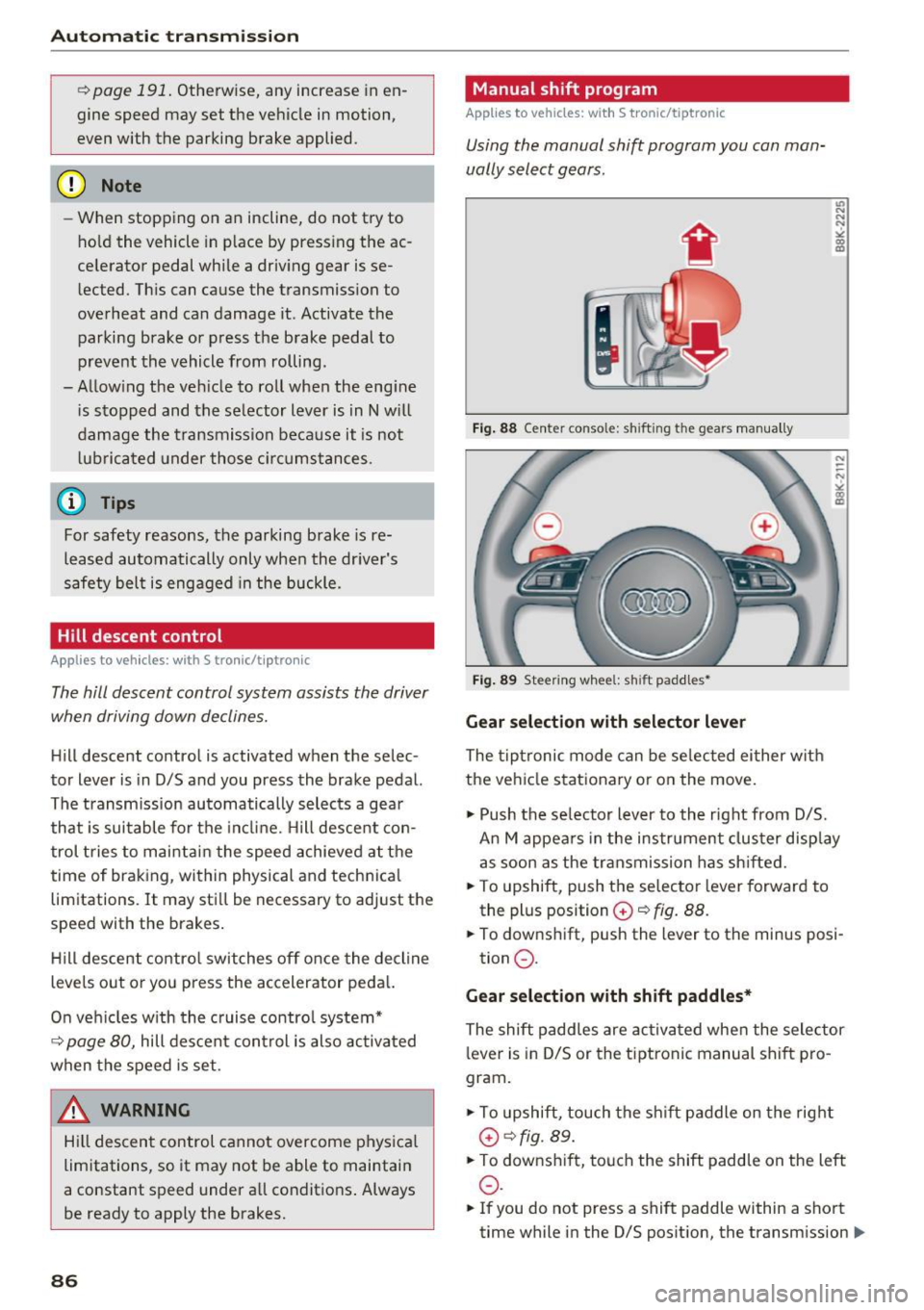
Manual sh ift program
App lies to vehicles: with S tronic/tiptronic
Using the manual shift program you can man
ually select gears.
'
Fig. 88 Center console: shift ing the gears manua lly
Fig. 89 Steering whee l: sh ift paddles•
Gear selection with selector lever
The tiptronic mode can be selected either w ith
the vehicle stationary or on the move.
.,. Push the se lector lever to the right from D/5.
An M appea rs in the instrument clus ter disp lay
as soon as the transmission has shifted.
.. To upshift, push the selector lever forward to
the plus position
G) ~ fig. 88.
.. To downshift, push the lever to the minus posi-
tion
0 .
Gear selection with shift paddles*
The shift paddles are activated when the selector
lever is in D/S or the tiptronic manual shift pro
gram.
.,. To upshift, touch the shift paddle on the right
G)¢fig. 89.
.. To downsh ift, touch the shift paddle on the left
0 .
.. If you do not press a shift paddle within a short
time while in the 0/5 position, the transmission
II>
Page 89 of 264
.... N
0 Ico ....
using the shift paddles, move the selector lever
to the right out of the 0/5 position.
The transmission automatically shifts up or down before critical engine speed is reached .
The transm ission only a llows manual sh ift ing
when the engine speed is within the permitted range.
@ Tips
- When you sh ift into the next lower gear, the
transm ission w ill downsh ift only when there
i s no poss ibility of over -rew ing the engine.
- When the kick-down comes on, the t rans
mission will sh ift down to a lowe r gear, de
pending on vehicle and engine speeds .
- Tiptron ic is inoperative when the transmis
s ion is in the fa il-safe mode .
Kick-down
Applies to vehicles: with S tronic/tiptronic
Kick-down enables maximum acceleration.
When you depress the accelerator pedal beyond
the resistance point, the automatic transm ission
downshifts into a lower gea r, depend ing on veh i
cle speed and engine speed. The upshift in to the
nex t higher gear ta kes place once the maximum
specified engine speed is reached.
A WARNING
Please note that the drive whee ls can spin if
kick-down is used on a smooth s lippery road -
there is a risk of skidding.
Launch Control Program
Applies to vehicles: with S tronic
The Launch Control Program provides the best
acceleration possible when starting from a stop .
Requirement: The engine must be at operating
temperature and the steering whee l must not be
turned .
.,. Press the
I~ OFF ! button¢ page 171 wh ile the
engine is running. The
II indicator light illumi
nates in the instrument cluster and
Stabiliza-
Autom atic tran sm iss ion
tion control (ESC ): Sport . Warning! R estricted
s tabilit y
appears in the driver information sys
tem disp lay .
.,. Move the selector lever to the 0/5 posit ion to
select sport mode (5) or select the
dynamic
driving mode in drive select*¢ page 103 .
.,. Press the brake pedal strongly w ith your left
foot and hold it down fo r at least 1 second.
.,. At the same time, p ress the accelerator pedal
down comp lete ly with yo ur right foo t unti l th e
eng ine reaches and ma intains a h igh RPM .
.,. Remove your foot from the brake peda l w ithin
5 seconds
¢ ,&. .
A WARNING
-Always adapt your driving to the traff ic flow.
- On ly use t he Launch Control Program when
road and traffic condit ions allow it and oth
er d rivers will not be endangered or an
noyed by your dr iving and the vehicle's ac
celerat io n.
- Please note that the d riving wheels can spin
and the vehicle can break away when sport
mode is switched on, especially when the
road is slippery.
- O nce you have acce lerated, you should
sw itch sport mode off by pressing the
I~ OFF ! button.
(D Tips
-The transmission temperature may increase
signif icant ly after using the Launch Contro l
Prog ram . If that happens, the program may
not be ava ilable for a few minutes. It will be
availab le aga in afte r a cool-down period.
- Whe n accelerating using the Launch Cont rol
prog ram, all vehicle parts a re subject to
heavy loads. This can res ult in increased
wear.
Transmission malfunction
Applies to vehicles: with S tronic/tip tron ic
[i] Transmi ss ion: Pre ss brake pedal and select
gear again . .,.
87
Page 91 of 264
,-1 N
0 1-CX)
rl I.Cl U"I
,-1 I.Cl ......
Audi ada pti ve c ruise contr ol and br akin g gu ard
Audi adaptive cruise
control and braking
guard
Introduction
App lies to vehicles: with Audi adaptive cruise contro l
The adaptive cruise contro l system assists the
driver by regulat ing vehicle speed and helping to
maintain a set distance to the vehicle ahead,
within the limits of the system.
If the system de
tects a moving vehicle up ahead, adaptive cruise
control can brake and then accelerate your veh i
cle . This helps to make driving more comfortable
on long highway stretches .
The braking gua rd system can warn you about an
impend ing collision and initiat e braking maneu
vers
c:> page 95.
Adaptive cruise control and braking guard have
technical lim itations that you must know, so
please read th is section carefully, understand
how the system works and use them properly at
all times.
General information
General information
Applies to vehicles: with Audi adaptive cruise control
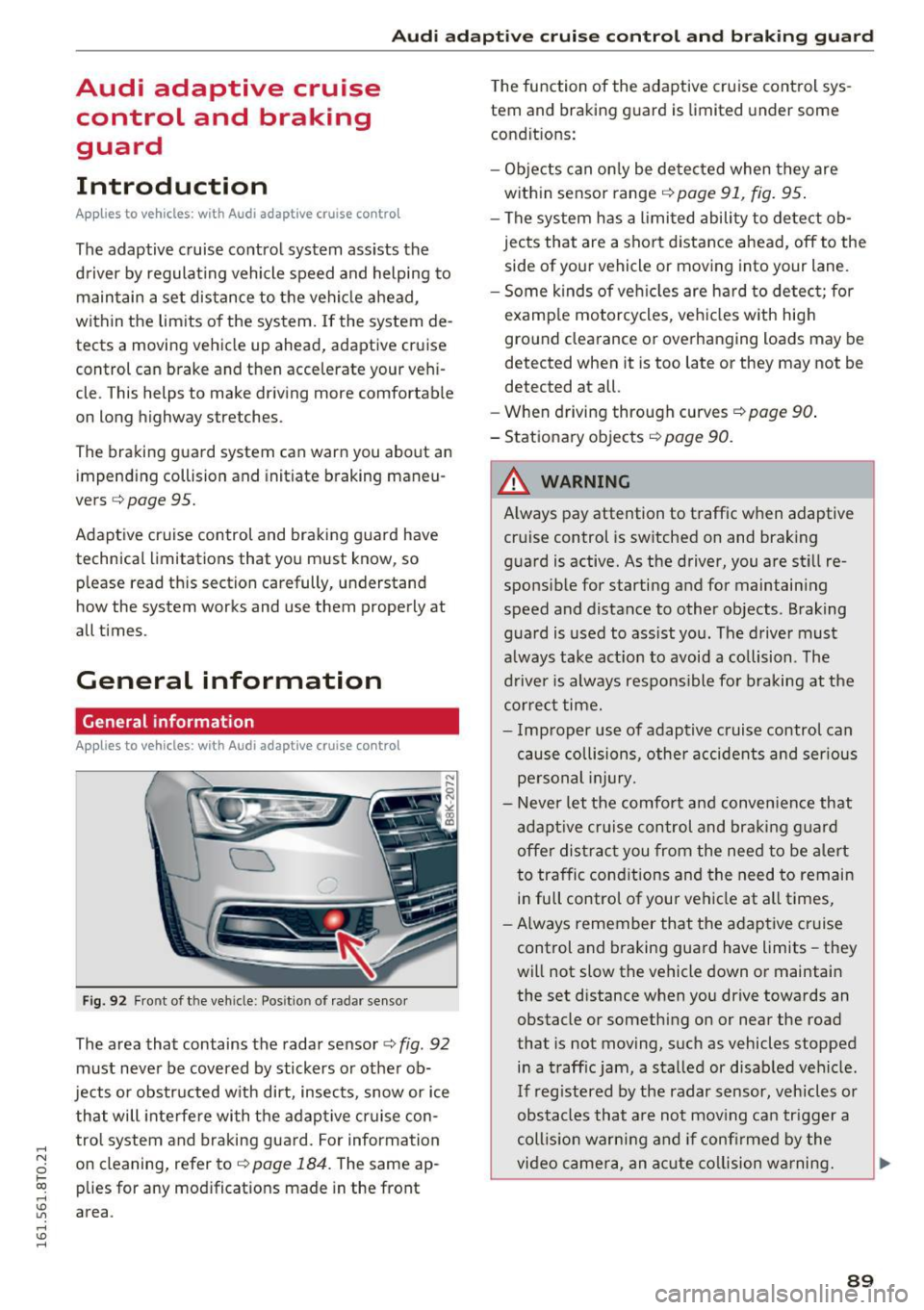
Fig. 92 Fro nt of t he veh icle : Pos itio n of rad ar sensor
The area that contains the radar sensor c:> fig . 92
must never be covered by stickers or other ob
jects or obstructed w ith dirt, insects, snow or ice
that will interfe re with the adaptive cruise con
trol system and braking guard. For information
on clean ing, refer to
C) page 184 . The same ap
plies for any modificat ions made in the front
area . T
he function of the adaptive cruise control sys
tem and braking guard is limited under some
condit ions:
- Ob jects can on ly be de tected when they are
within sensor range
C) page 91 , fig. 95 .
-The sys tem has a l imited ability to de tect ob
jects that are a short distance ahead, off to the
side of your vehicle or moving into your lane .
- Some kinds of veh icles are hard to detect; for
examp le motorcycles, ve hicles w ith hig h
ground clearance or overhanging loads may be
detect ed when it is too lat e or they may not b e
detected at all.
- When driving through curves ¢
page 90.
- Stationa ry objects C) page 90 .
,&_ WARNING
-= -Always pay attention to t raffic when adaptive
cruise control is switched on and braking
g uard is active. As the driver, you are still re
sponsible for starting and for maintain ing
speed and distance to other objects . Braking
g uard is used to ass ist you . The driver must
a lways take act ion to avoid a co llision . The
driver is always respons ible fo r braking at the
correct time.
- I mproper use of adaptive cruise control can
cause collisions, other accidents and ser ious
pe rsonal injury.
- Never let the comfort and conven ience that
adapt ive cr uise control and braki ng g uard
offe r distract you from the need to be a lert
to traffic cond itions and the need to remain
in full control of your vehicle at all times,
- Always remember that the adaptive cruise
control and braking guard have limits -they
will not slow the vehicle down or maintain
the set d istance when you drive towards an
obstacle or something on or near the road
that is not moving, such as vehicles stopped
in a traff ic jam, a stalled or disabled vehicle .
If reg istered by the radar sensor, vehicles or
obstacles that a re not mov ing ca n trigger a
coll is ion wa rning and if confi rmed by the
video camera, an acute co llision wa rning.
IJ,,
89
Page 94 of 264
Audi adaptive cruise control and braking guard
You can set any speed between 20 mph and 95
mph (30 and 150 km/h).
I ndicator lamps and messages in the instrument
cluster display inform you about the current sys
tem status and settings.
Switching Audi adaptive cruise control on
• Pull the lever toward you into position @
¢
fig. 96. ACC standby appears in the instru
ment cluster d isplay.
Setting the speed and activating regulation
• To set the current speed, press the !SETI button
¢ page 11, fig. 4. The set speed is shown in the
tachometer @ and is also shown briefly in the
display @¢
fig. 97.
Switching Audi adaptive cruise control off
• Push the lever away from you into position @
until it clicks into place . The message
ACC off
appears.
@ Indicator lights
II-Adaptive cruise control is switched on. No
vehicles are detected up ahead. The stored speed
is mainta ined .
• -A moving vehicle is detected up ahead . The
adapt ive cruise control system regulates the
speed and distance to the moving vehicle ahead
and accelerates/brakes automatically .
• -When automatic braking is not able to keep
enough d istance to a previously detected moving
vehicle up ahead, you must take control and
brake
c> page 94 , Request for driver interven
tion .
© Display
If adaptive cruise contro l is not shown in the dis
p lay, you can call it up with the
IRESETI button
c>page23.
Based on the symbo ls in the display, you can de
termine if the system is maintaining a distance to
the vehicle ahead and what that distance is .
No vehicle -No vehicle ahead was detected .
White vehicle -A vehicle ahead was detected.
92
Red vehicle -Prompt for the driver to take action
c>page 94.
Both arrows on the scale© indicate the distance
to the vehicle ahead. No arrow appears when the
vehicle is on an open road and there is no object
ahead. If an object is detected ahead, the arrow
moves on the scale .
The green zone on the scale shows the stored dis
tance . For information on changing the stored
distance, refer tor:!;>
page 93 . If the distance se
lected is too close or may soon become too close,
the arrows move into the red zone on the scale.
A WARNING
Improper use of the adaptive cruise control
can cause collisions, other accidents and seri
ous personal injuries.
- Press ing the
!SETI button when dr iving at
speeds below 20 mph (30 km/h), will auto
mat ica lly acce le rate the veh icle to 20 mph
(30 km/h), which is the minimum speed
that can be set.
(}) Tips
-If you switch the ign it ion or the adaptive
cruise control off, the set speed is erased
from the system memory.
- The electronic stabilization control (ESC)
and the anti-slip-regulation (ASR) are auto
matically turned on when the adaptive
cruise control is turned on . Both systems
cannot be turned off if the adaptive cruise
control is turned on.
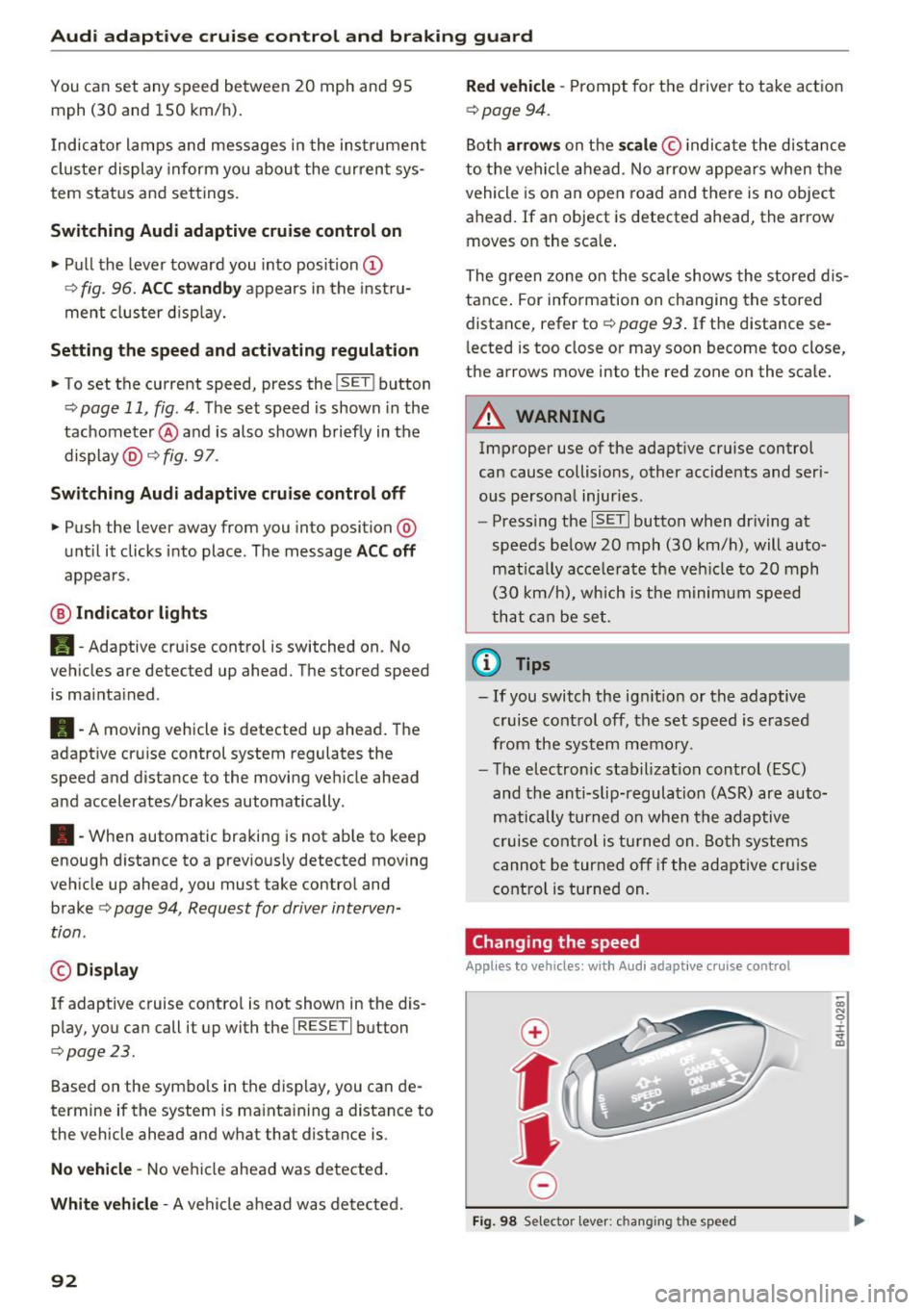
Changing the speed
Applies to veh icles: wit h Aud i adapt ive c ru ise control
0
f
jJ
0
Fig. 98 Selector lever: c hang ing the speed
co N 0 :i: .., m
Page 95 of 264
,-1 N
0 1-CX)
rl I.Cl U"I
,-1 I.Cl .-,
Audi adaptive cruise control and braking guard
.. To increase or reduce the speed in increments,
tap the lever up or down .
.. To increase or reduce the speed quickly,
hold
the lever up or down until the red LED ® reach
es the desired speed
<=:> page 91, fig. 97.
F ollowing any changes, the new stored speed will
be disp layed briefly in the display@r:::>
page 91,
fig. 97.
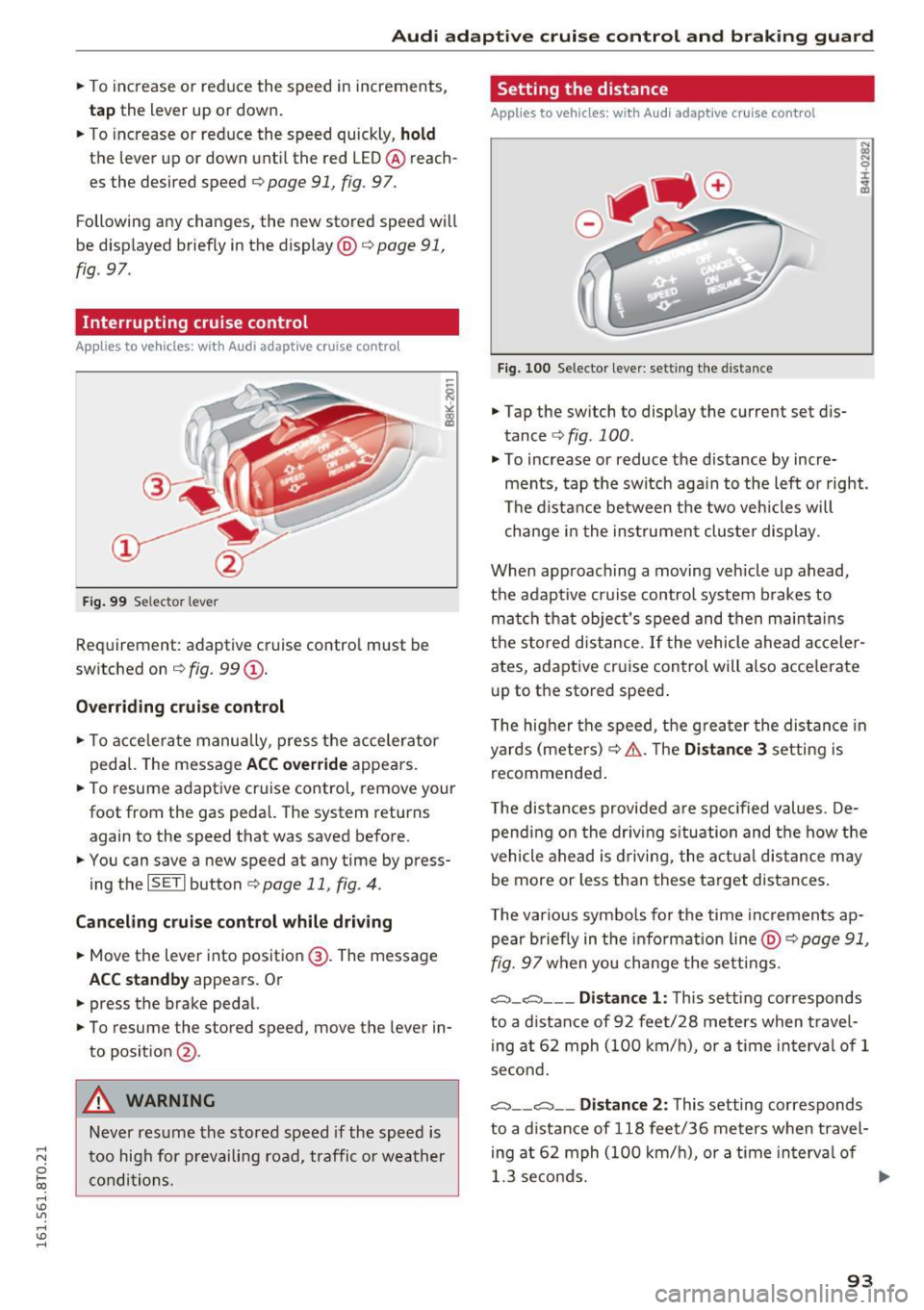
Interrupting cruise control
Appl ies to vehicles: w ith Audi a daptive cruise contro l
Fig. 99 Selec tor lever
Requirement: adaptive cruise contro l must be
switched on ¢
fig. 99 (D.
Overriding cruise control
.. To accelerate manually, press the accelerator
pedal. The message
ACC override appea rs.
.. To resume adaptive cruise control, remove your
foot from the gas pedal. The system returns again to the speed that was saved before.
.. You can save a new speed at any time by press
ing the
I SET I button ¢ page 11, fig . 4.
Canceling cruise control while driving
.. Move the lever into position @. The message
ACC standby appears. Or
.. press the brake pedal.
.. To resume the stored speed, move the lever in
to posit ion
@ .
A WARNING
Never resume the stored speed if the speed is
too high for prevailing road, traffic or weather
conditions.
Setting the distance
A pp lies to vehic les : with Aud i ada ptive cr uise con trol
Fig. 100 Selector lever: setting the distance
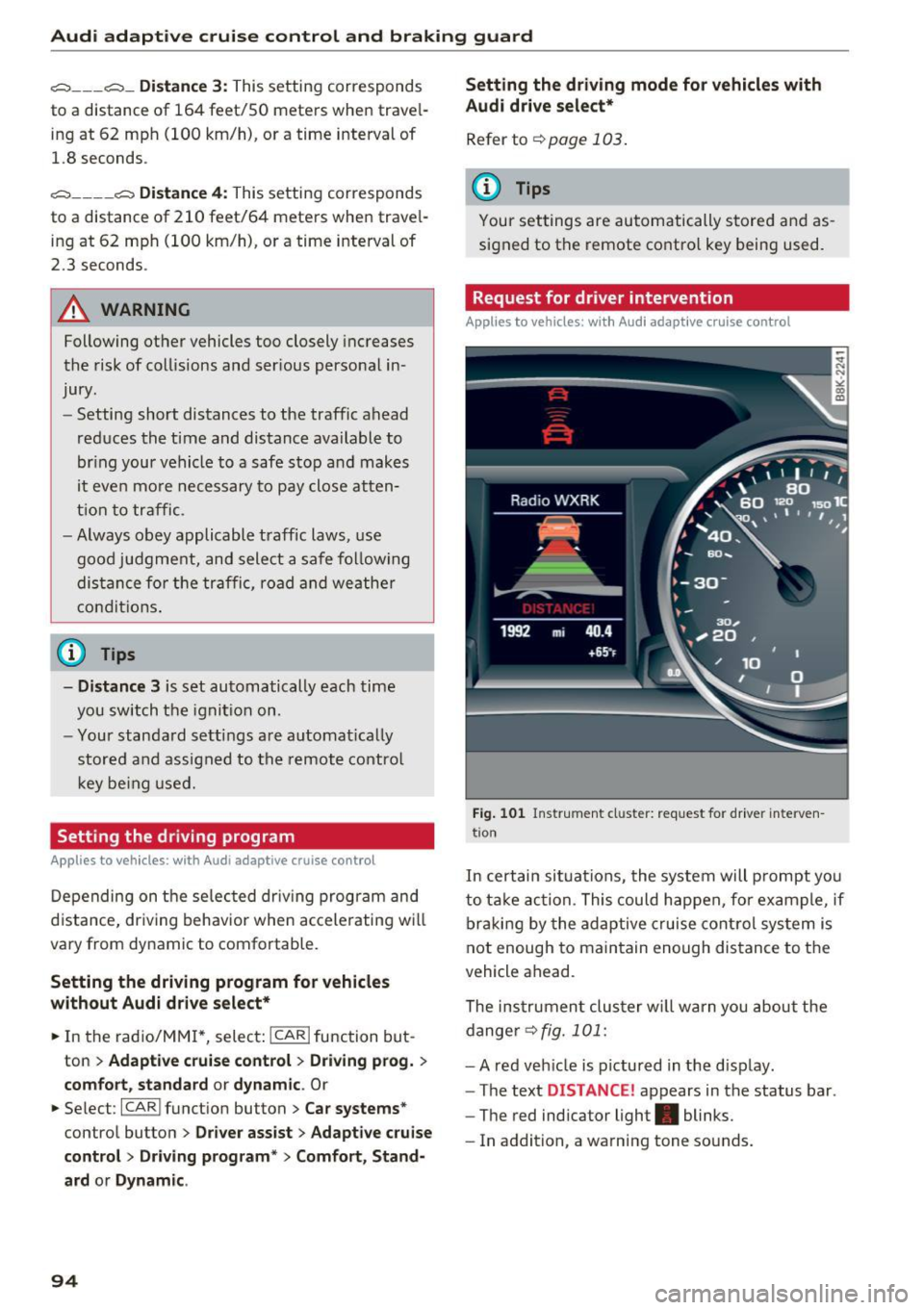
.. Tap the switch to display the current set dis
tance
r::::> fig. 100 .
.. To increase or reduce the d istance by incre
ments, tap the switch aga in to the left or right.
The distance between the two veh icles will
change in the instrument cluster display.
When approaching a moving vehicle up ahead,
the adaptive cruise control system brakes to
match that object's speed and then mainta ins
the stored distance.
If the vehicle ahead acceler
ates, adaptive cruise control will also accelerate
up to the stored speed .
T he higher the speed, the greater the distance in
yards (meters) ¢.& .T he
Distance 3 setting is
recommended .
T he distances provided are spec ified values. De
pending on the driving situation and the how the
vehicle ahead is driving, the actual distance may
be more or less than these target distances .
T he various symbols for the time increments ap
pear briefly in the info rmati on line @¢
page 91,
fig. 97 when you change the settings.
c:::::,_c:::::, ___ Distance 1: This setting corresponds
to a distance of 92 feet/28 meters when travel
ing at 62 mph (100 km/h), or a time interva l of 1
second.
c:::::, __ c:::::, __ Distance 2: This setting corresponds
to a distance of 118 feet/36 meters when travel
ing at 62 mph (100 km/h), or a time in terva l of
1.3 seconds.
ll>
93
Page 96 of 264
Audi adaptive cruise control and braking guard
c:::::, ___ c:::::,_ Distance 3 : This setting corresponds
to a distance of 164 feet/SO mete rs when trave l
ing at 62 mph (100 km/h), or a time interval of 1.8 seconds .
c:::::, ____ c:::::, Distance 4 : This setting corresponds
to a distance of 210 feet/64 meters when trave l
ing at 62 mph (100 km/h), or a time interval of
2 .3 seconds .
_&. WARNING
Following ot her vehicles too closely increases
the risk of collisions and ser ious personal in
jury.
- Setting short distances to the traffic ahead
reduces the t ime and distance ava ilable to
br ing your vehicle to a safe sto p an d makes
i t eve n mo re necessary to pay close atten
t ion t o traffic.
- Always obey applicable traffic laws, use
g ood ju dgment, and select a safe f ollow ing
di st ance f or th e tra ffic, road and we athe r
c ondition s.
¢j) Tips
- Distance 3
is set au tomati cally e ach time
yo u sw itch th e ig nit io n o n.
- Y our sta ndard setti ngs a re a uto mat ica lly
stor ed and as signed to th e re m ote contro l
k ey be ing used .
Setting the driving program
Applies to vehicles: with Audi adaptive cruise control
Depending on t he se lec ted dr iv ing program and
d istance, dr iv ing behavior whe n accelerating wi ll
vary from dynamic to comfo rtable.
Setting the driving program for vehicles
without Audi drive select*
~ In the radio/ MM!*, selec t: !CARI function but
ton
> Adaptive c ru ise control > Driving prog. >
comfort , standard or dynamic . Or
~ Select : I CARI funct ion button > Car systems*
contro l butto n > Driver assist > Adaptive cruise
contro l> Driving program*
> Comfort, Stand
ard
o r Dynamic .
94
Setting the driving mode for vehicles with
Audi drive select*
Refer to ¢page 103 .
(D Tips
Your settings are automatically store d and as
signed to t he remote contro l key being used.
Request for driver intervention
Applies to vehicles: with Audi adaptive cruise control
Fig. 101 In str um en t cl uster: req uest for dr ive r interve n
t io n
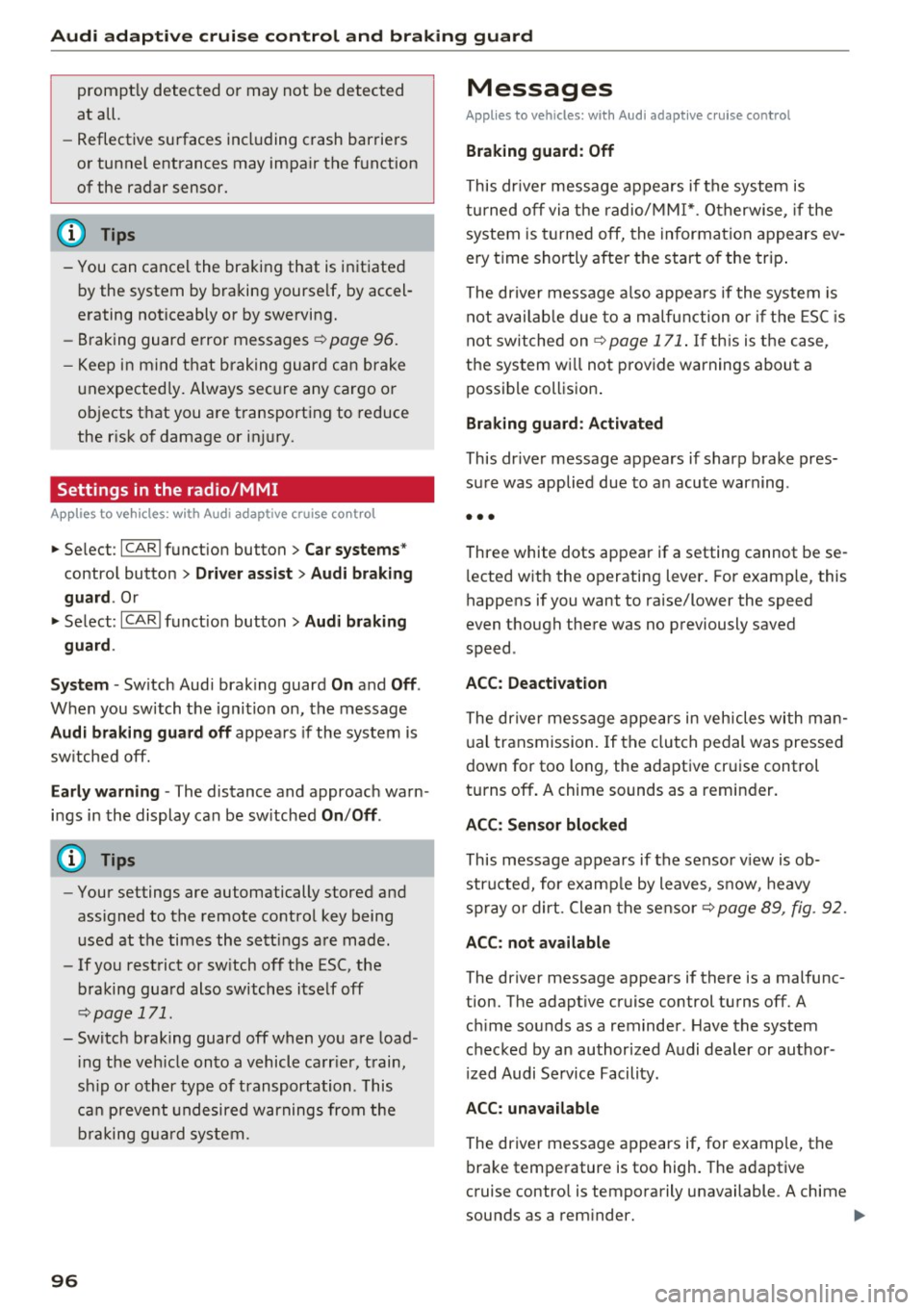
In cert ain sit uations, the system will p rompt yo u
to ta ke action. Thi s c ould hap pen, for ex ample, if
b rak in g by the adaptive cruise cont rol sys tem is
not enough to main tain enou gh dis tance to t he
vehicle ahead.
The ins trumen t clus ter w ill warn you about the
dange r
¢fig. 101:
- A red veh icle is pictured in the d isplay .
- The text
DISTANCE! appears in the status bar .
- The red indicator light . blinks.
- In addition, a wa rn in g tone so unds .
Page 97 of 264
Audi adaptive cruise control and braking guard
Audi braking guard
Description
Applies to vehicles: with Audi adaptive cruise co ntro l
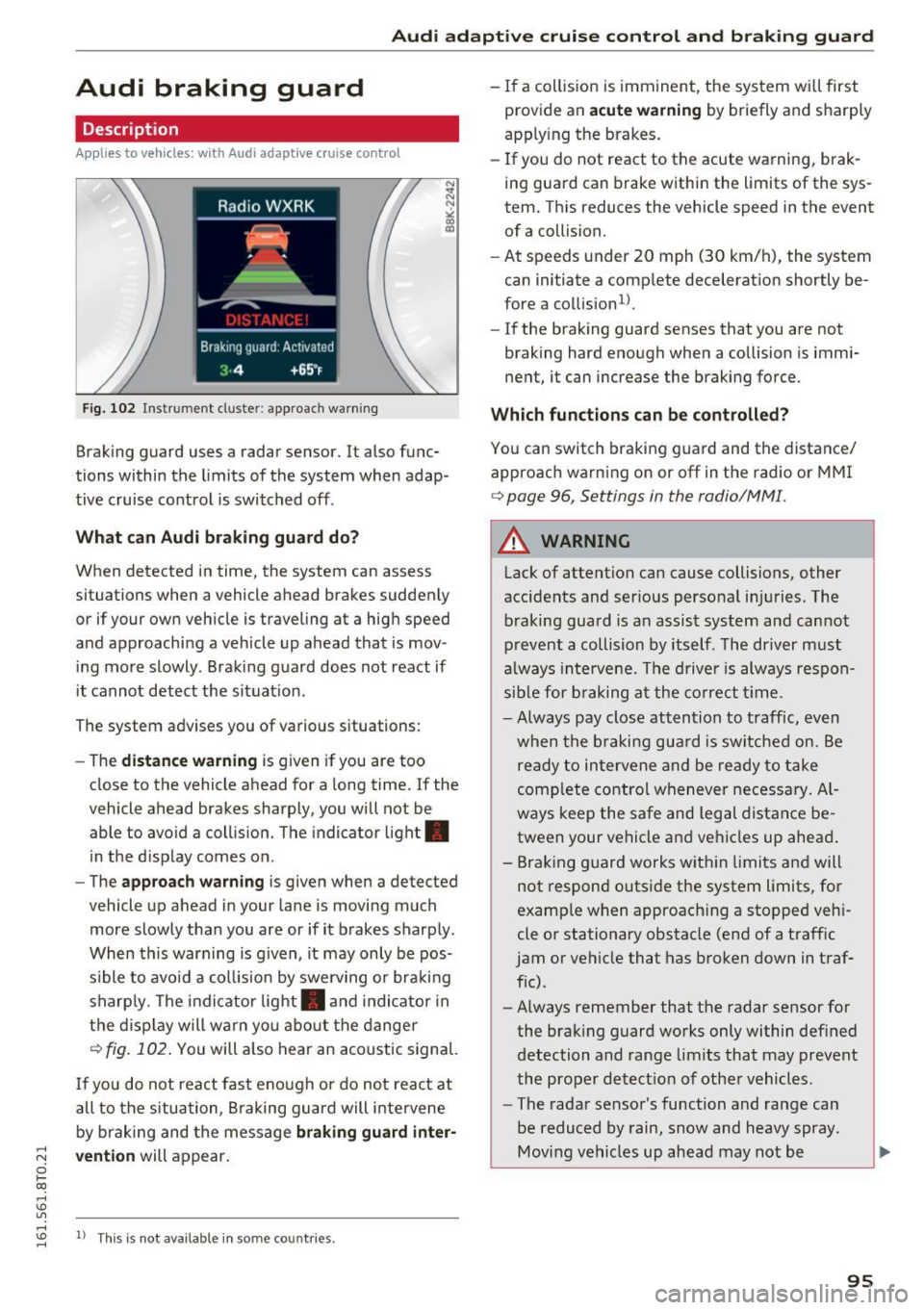
Fig. 102 Instrument cluste r: approach warning
Braking guard uses a radar sensor. It also func
tions within the limits of the system when adap
tive cruise control is switched off .
What can Audi braking guard do?
When detected in time, the system can assess
situations when a vehicle ahead brakes suddenly
or if your own vehicle is traveling at a high speed
and approaching a vehicle up ahead that is mov
ing more slowly . Braking guard does not react if
it cannot detect the situat ion.
The system advises you of various situations:
- The
distance warning is given if you are too
close to the vehicle ahead for a long time. If the
vehicle ahead brakes sharply, you will not be
able to avoid a collision. The indicator light .
in the display comes on.
- The
approach warning is given when a detected
vehicle up ahead in your lane is moving much
more slowly than you are or if it brakes sharply .
When this warning is g iven, it may only be pos
s ib le to avoid a collision by swerving or brak ing
sharply. The indicator light . and indicator in
the display will warn you about the danger
¢ fig. 102 . You will also hear an acoustic signal.
If you do not react fast enough or do not react at
all to the situation, Braking guard will intervene
by braking and the message
braking guard inter-
;::; vention
will appear.
0 l-ex)
rl I.Cl U'"I
rl
"' 1> Th
is is not availab le in some co untries. rl
-If a collision is imminent, the system wi ll first
provide an
acute warning by briefly and sharply
apply ing the brakes.
- If you do not react to the acute warning, brak
ing guard can brake within the limits of the sys
tem. This reduces the vehicle speed in the event of a collision.
- At speeds under 20 mph (30 km/h), the system
can initiate a comp lete decelerat ion shortly be
fore a collision
ll.
- If the braking guard senses that you are not
braking hard enough when a collision is immi
nent, it can increase the braking force .
Which functions can be controlled?
You can switch braking guard and the distance/
approach warn ing on or off in the radio or MMI
¢ page 96, Settings in the radio/MM! .
A WARNING
-
Lack of attention can cause collisions, other
accidents and ser ious personal in juries. The
braking guard is an assist system and cannot
prevent a collision by itself. The driver must
always intervene. The driver is always respon
sible for braking at the correct tim e.
- Always pay close attention to traffic, even
when the braking guard is switched on. Be
ready to intervene and be ready to take
comp lete control whenever necessary. Al
ways keep the safe and legal distance be
tween your vehicle and vehicles up ahead .
- Braking guard works within limits and will
not respond outside the system limits, for
examp le when approaching a stopped veh i
cle or stationary obstacle (end of a traff ic
jam or vehicle that has broken down in traf
fic).
- Always remember that the radar sensor for
the braking guard works only within def ined
detection and range limits that may prevent
the proper detect ion of other vehicles.
- The radar sensor's function and range can
be reduced by rain, snow and heavy spray.
Moving vehicles up ahead may not be
,.
95
Page 98 of 264
Audi adaptive cruise control and braking guard
promptly detected or may not be detected
at all.
- Reflective surfaces including crash barriers
or tunnel entrances may impair the function
oftheradarsensor.
(D Tips
-You can cancel the braking that is initiated
by the system by braking yourself, by accel
erating noticeably or by swerving.
- Braking guard error messages ¢
page 96.
- Keep in mind that braking guard can brake
unexpectedly. Always secure any cargo or
objects that you are transporting to reduce
the risk of damage or injury.
Settings in the radio/MM!
Applies to veh icles: w ith Audi adaptive cruise co ntrol
.,. Select : ICARI function button> Car systems*
control button > Driver assist> Audi braking
guard .
Or
.,. Select :
~I C-A-R~I funct ion button > Audi braking
guard .
System -
Switch Audi braking guard On and Off .
When you switch the ignition on, the message
Audi braking guard off appears if the system is
sw itched off.
Early warning -The distance and approach warn
ings in the display can be sw itched
On/ Off.
@ Tips
-Your settings are automatically stored and
assigned to the remote control key being
used at the times the sett ings are made .
- If you restrict or sw itch off the ESC, the
braking guard also switches itself off
¢page 171.
- Switch braking guard off when you are load
i ng the veh icle onto a vehicle carr ier, train,
sh ip or other type of transportation . This
can prevent undesired warnings from the
braking guard system.
96
Messages
Applies to vehicles: with Audi adapt ive c ru ise control
Braking guard: Off
This dr iver message appears if the system is
turned off via the radio/MM I* . Otherwise, if the
system is turned off, the information appears
ev
ery time shortly after the start of the trip.
The driver message also appears if the system is
not available due to a malfunction or if the ESC is
not switched on
¢ page 171 . If th is is the case,
the system wi ll not provide warnings about a
possible collision .
Braking guard: Activated
This dr iver message appears if sharp brake pres
sure was applied due to an acute warning .
•••
Three white dots appear if a setting cannot be se
l ected with the operating lever. For example, this
happens if you want to raise/lower the speed
even though there was no previously saved
speed .
ACC: Deactivation
The driver message appears in vehicles with man
ual transmission. If the clutch pedal was pressed
down for too long, the adaptive cruise control
turns off. A chime sounds as a reminder.
ACC: Sensor blocked
This message appears if the sensor v iew is ob
structed, for examp le by leaves, snow , heavy
spray or dirt. Clean the sensor¢
page 89, fig. 92.
ACC: not available
The driver message appears if there is a malfunc
tion. The adaptive cruise control turns off. A
chime sounds as a reminder . Have the system
checked by an authorized Audi dealer or author
i zed Audi Service Facility.
ACC: unavailable
The driver message appears if, for example, the
brake temperature is too high. The adaptive
cruise contro l is temporarily unavailable . A chime
sounds as a reminder. ..,.
Page 100 of 264
Audi side assist
Audi side assist
Side assist
Description
Applies to vehicles: with Audi side assist
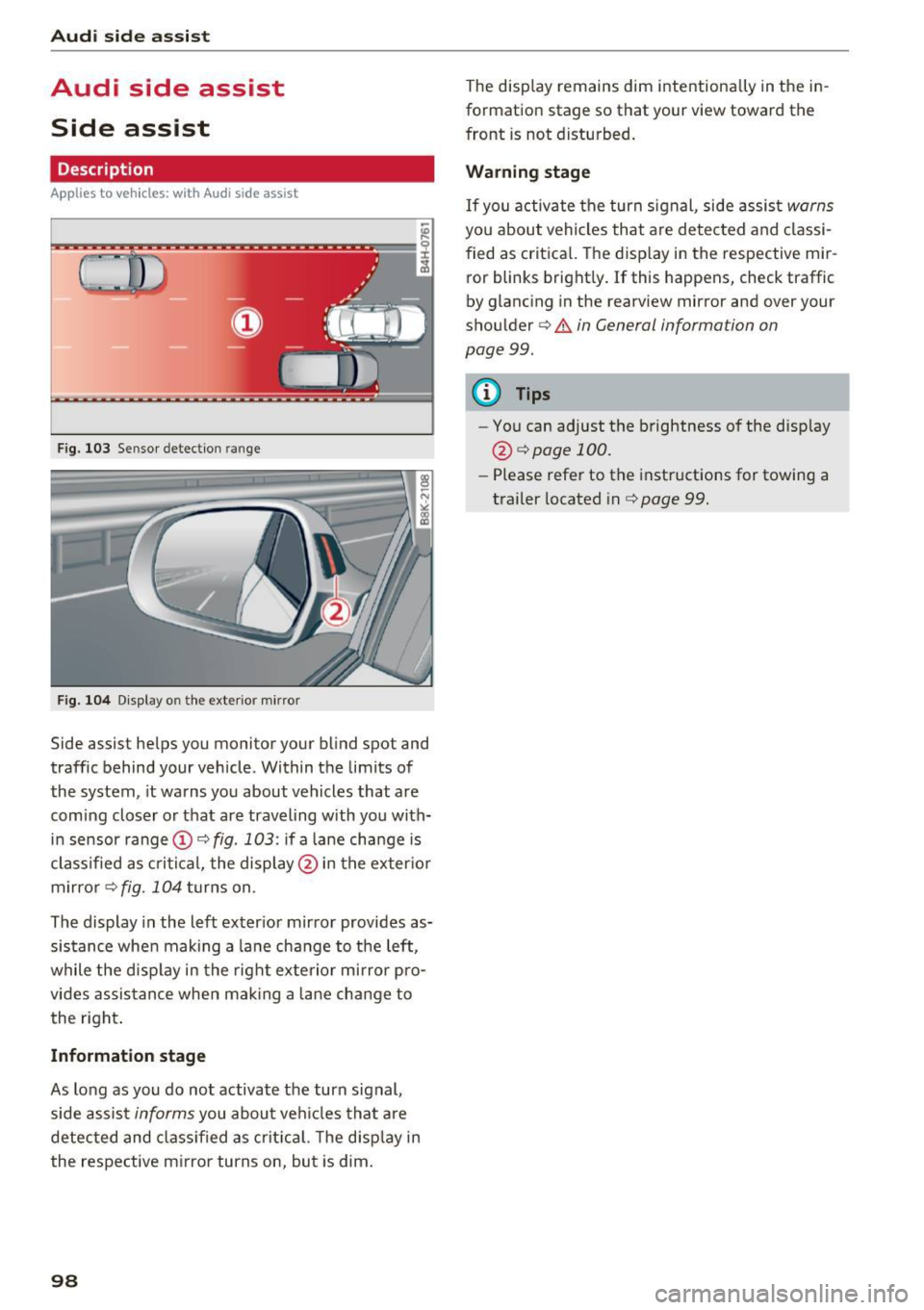
F ig. 103 Se nsor detec tion rang e
Fig . 10 4 Display o n the exte rio r m irror
Side assist helps you monitor your bl ind spot and
traffic behind your vehicle . Within the limits of
the system , it warns you about vehicles that are
comi ng closer o r that are traveling with you with
in sensor range
(D c:> fig. 103 : if a lane cha nge is
cl assified as c ritic al, the displ ay @ in the exter io r
m irro r
i=>fig . 104 tu rns on .
The display in the left exter ior mir ror provides as
sis tance whe n making a la ne change to the left,
while the disp lay in the rig ht exte rio r mi rror pro
vides assis tance when mak ing a lane chan ge to
the right .
Information stage
As long as you do no t activate the turn signal,
side assis t
informs you about ve hicles tha t are
detected and class if ied as crit ic al. T he disp lay in
the respe ctive m irror turns on, but is dim .
98
The display remains dim intentiona lly in the in
formation stage so that your view toward th e
front is not disturbed .
Warning stage
If you activate the turn signal, side assis t warns
you about vehicles tha t are detected and classi
fied as crit ica l. T he disp lay in the respect ive mir
ror blinks bright ly.
If this happens, check traffic
by glancing in the rearview mi rror and ove r you r
shou lder
c:> .&. in General information on
page
99.
{!) Tips
- You can adjust the b rightness of the disp lay
@ i=>pagel00.
-Please refe r to the instructions for towing a
trailer located in
i=> page 99.
Page 101 of 264
,-1 N
0 1-CX)
,-1
"' U"I
,-1
"' ......
General information
App lies to vehicles: with Audi side assist
®
®
©
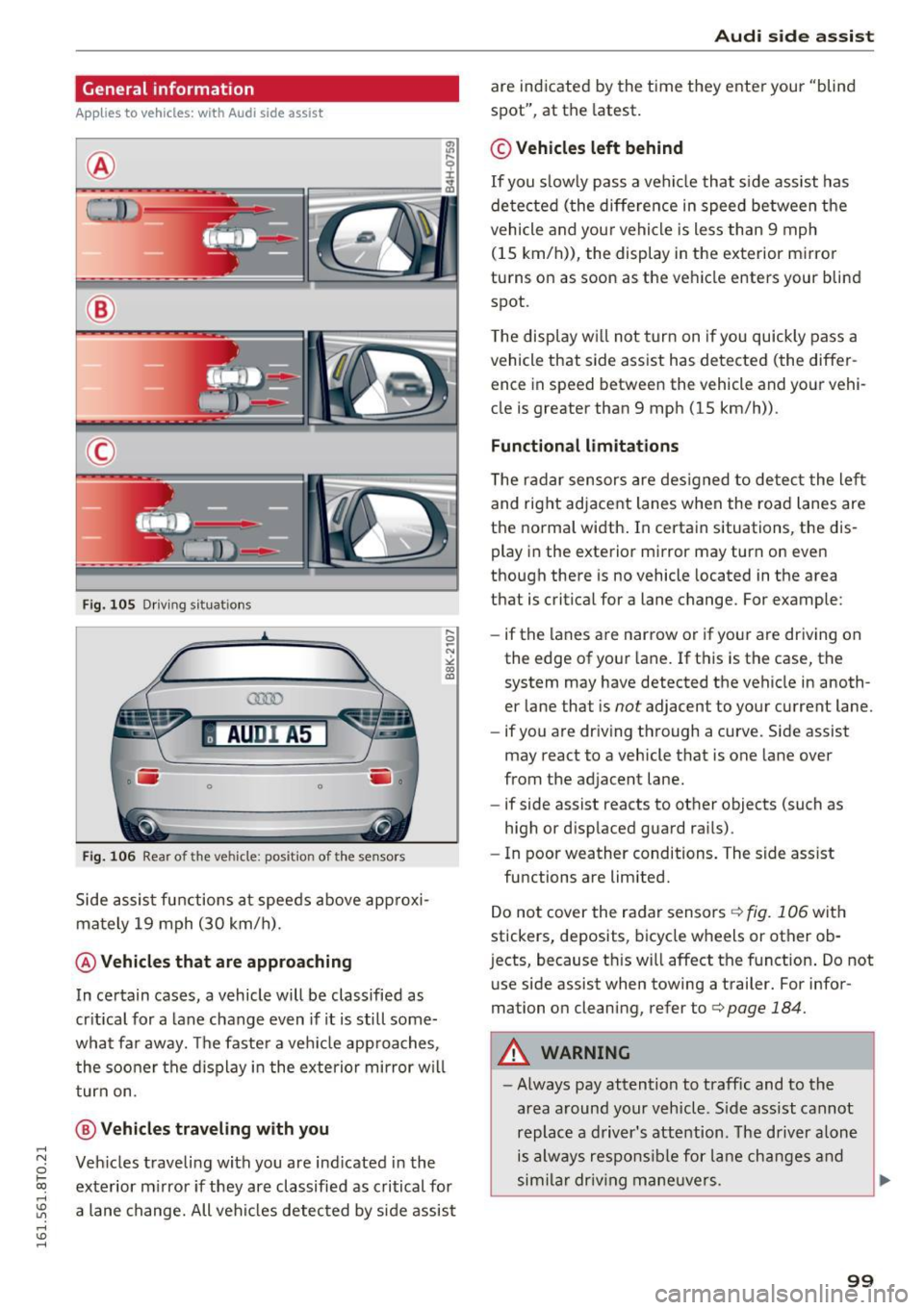
Fig. 105 Driving sit ua tio ns
AU DI A5
. .-0 0 iii .
Fig. 106 Rear of the vehicle: position of the senso rs
Side assist functions at speeds above approxi
mately 19 mph (30 km/h).
@ Vehicles that are approaching
In certain cases, a vehicle will be classified as
critical for a lane change even if it is still some
what far away. The faster a veh icle app roaches,
the sooner the display in the exterio r mirror w ill
turn on.
@ Vehicles traveling with you
Vehicles traveli ng with you are ind icated in the
exterior mi rror if they are classified as critical for
a lane change. All vehicles detected by side assist
Audi side assist
are indicated by the time they enter your "blind
spot", at the latest.
© Vehicles left behind
If you s low ly pass a vehi cle that side assist has
de tected (the difference in speed between the
vehicle and your vehicle is less than 9 mph
(15 km/h)), the display in the exterior mirror
turns on as soon as the vehicle enters your blind
spot.
T he display w ill not turn on if you quickly pass a
vehicle that side assist has detected (the differ ence in speed between the vehicle and your vehi
cle is greater than 9 mph (15 km/h)) .
Functional limitations
T he radar sensors are designed to detect the left
and right adjacent lanes when the road lanes are
the normal width . In certain situations, the dis
play in the exterior mirror may turn on even
though there is no vehicle located in the area
that is critical for a lane change. For example:
- if the lanes are narrow or if your are driving on
the edge of your lane. If this is the case, the
system may have detected the vehicle in anoth
er lane that is
not adjacent to your current lane.
- if you are driving through a curve. Side assist
may react to a vehicle that is one lane over
from the adjacent lane.
- if side assist reacts to other objects (such as
high or d isplaced guard rai ls) .
- In poor weather conditions. The side ass ist
functions are limited.
Do not cover the radar sensors
c:> fig. 106 with
stickers, deposits, bicycle wheels or other ob
j ects, because th is will affect the f unction . Do not
use side assist when towing a trailer. For infor
mation on cleaning, refer to
c:> page 184.
A WARNING
= -
-Always pay attention to traffic and to the
area around your vehicle. S ide assist cannot
replace a driver's attention. The driver alone
is always responsibl e for lane changes and
sim ilar drivin g maneuvers .
IJI,
99