sport mode AUDI S5 COUPE 2016 Owners Manual
[x] Cancel search | Manufacturer: AUDI, Model Year: 2016, Model line: S5 COUPE, Model: AUDI S5 COUPE 2016Pages: 264, PDF Size: 66.92 MB
Page 16 of 264
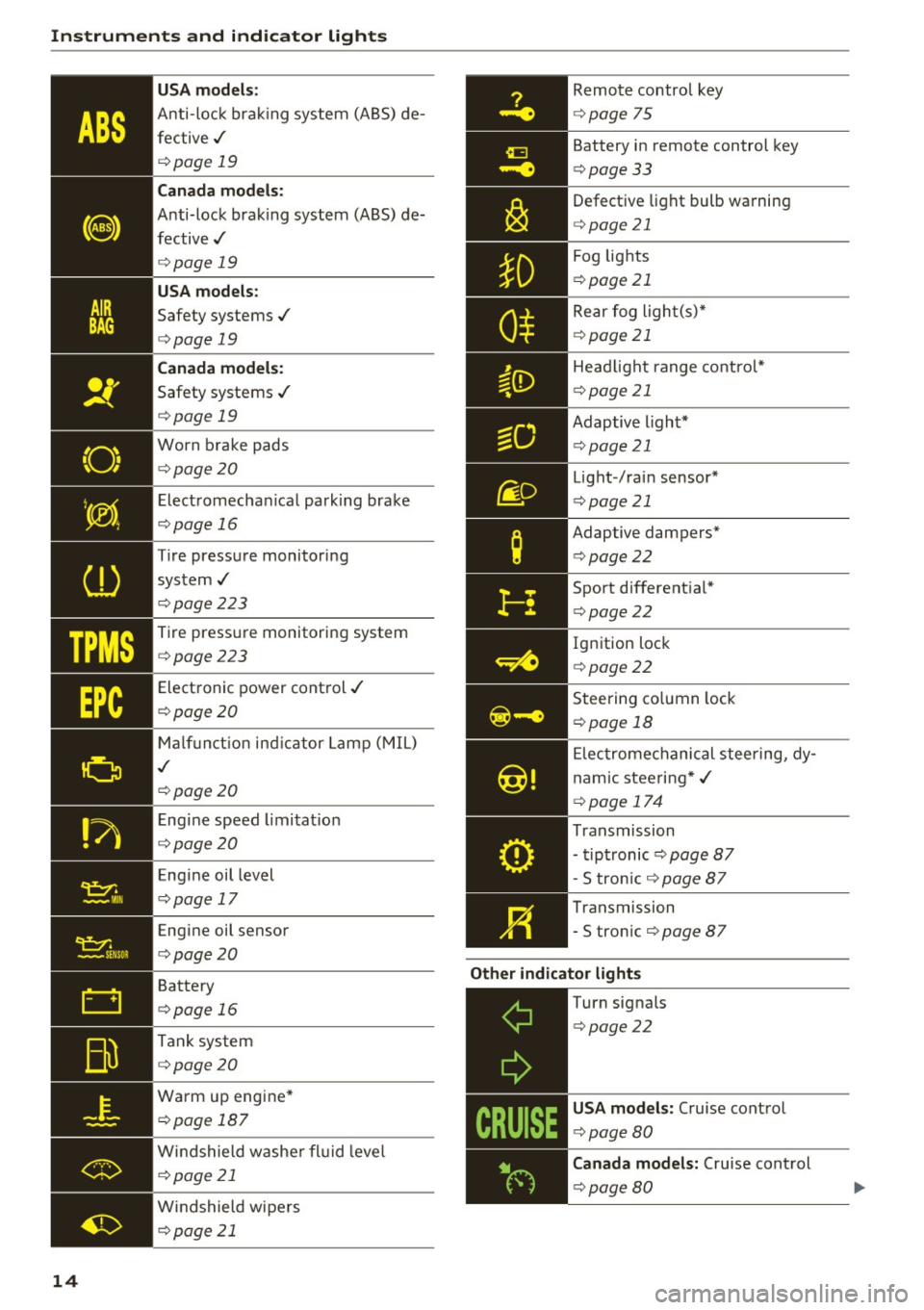
Instruments and indicator lights
TPMS
-~--
14 USA models
:
Anti-lock brak ing system (ABS) de
fective,/
¢ page 19
Canada mod els :
Anti-lock brak ing system (A BS) de
fective,/
¢ page 19
USA models :
Safety systems ./
¢page 19
Canada models :
Safety systems ./
¢page 19
Worn brake pads
¢page20
Elect romechan ical park ing brake
¢page 16
Tire pressure monitoring
system ,/
¢page 223
Tire pressure monitor ing system
¢page223
Electronic power control ,/
¢page20
Malf unct io n ind icator Lamp (MIL)
,I
c::> page 20
Engi ne speed limitat ion
c::> page20
Engine oil level
c::> page 17
Engine oil sensor
c::>page20
Battery
c::>page 16
Tank system
c::>page20
Wa rm up eng ine *
¢page 187
Windshield washe r fl uid leve l
¢page 21
Windshield wipers
¢page 21
Remote control key
¢ page 75
Battery in remote control key
¢page 33
Defect ive light bulb wa rning
<=> page 21
Fog lights
¢page 21
Rear fog ligh t(s)*
c> page 21
Headlight range control*
c> page 21
Adaptive light*
c>page 21
Light-/rai n sensor*
c> page 21
Adaptive dampers*
c>page22
Sport different ial*
<=> page22
Ig nition loc k
c>page22
Steering co lumn lock
¢ page 18
Elec tromechanical stee ring, dy
nam ic stee ring *,/
c>page 174
Transmission
- tipt ronic
c> page 87
- S tron ic c::> page 87
Transmission
- S tron ic
¢page 87
Other indicator light s
~--==------------Turn signals
<=>page22
USA mode ls: Cruise cont rol
c> page80
Canada model s: Cruise control
c> page 80
Page 84 of 264
Automatic transmission
Automatic transmission Manual transmission
Gearshift lever
Applies to vehicles: with manual transmiss ion
The clutch pedal must be depressed all the way
before you can start the engine .
The manua l transmission in your Audi is equip
ped with an
interlock-feature.
• Depress the clutch pedal a ll the way.
• Start the engine wit h the gearshift lever in Neu
tral and the clutch pedal depressed.
(D Note
Always depress the clutc h pedal fu lly when
chang ing gears. Do not ho ld the vehicle on a
hill with the clutch pedal partially depressed.
This may cause premature clutch wear or damage.
@ Tips
- Resting your hand o n the gearshift leve r
k nob while driving will cause premature
wear in the transmiss io n.
- The back-up lights go on when you shift into
Reverse w ith the ignition o n.
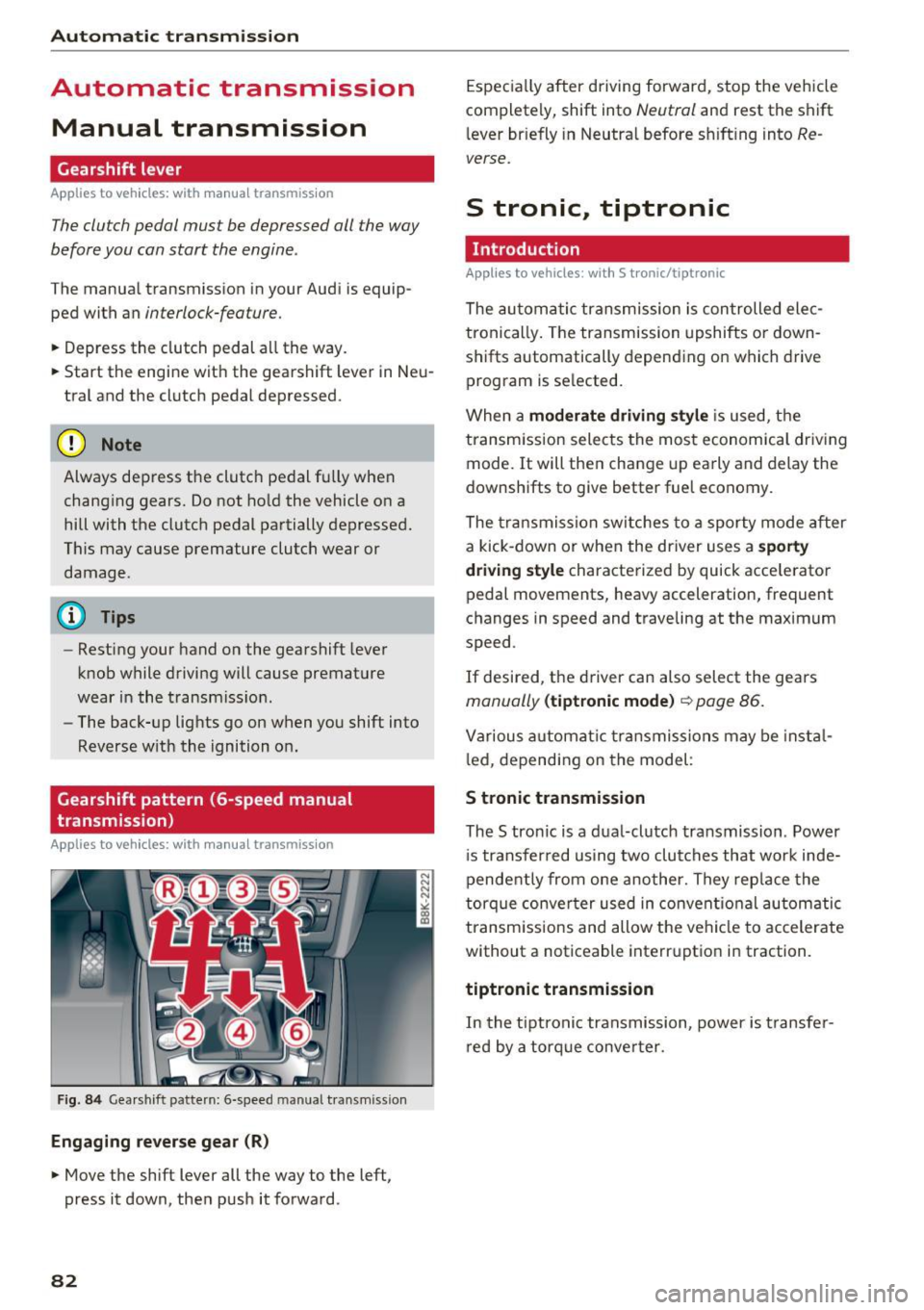
Gearshift pattern (6-speed manual
transmission)
Applies to vehicles: with man ual transmission
F ig. 84 Gea rshift pattern: 6 -speed manual transmiss io n
Engaging reverse gear (R)
• Move the shift lever all the way to the left,
press it down, then push it forward.
82
Espec ia lly after driving forward, stop the vehicle
completely, shift into
Neutral and rest the shift
l ever br iefly in Neutra l before s hift ing into
Re
verse.
S tronic., tiptronic
Introduction
Applies to vehicles: with S tronic/tip tronic
The au toma tic transmission is con trolled ele c
tronically . The transmission upshifts or down
shifts automatically depending on which drive program is se lected.
When a
moderate driving sty le is used, t he
transm ission selects the most economica l driv ing
mode. It will the n change up early and delay the
downshifts to give better fuel economy.
The tra nsmission sw itches to a sporty mode after
a kick-down or when the driver uses a
s porty
dri ving style
characterized by quick accelerato r
pedal movements, heavy acceleration, frequent
changes in speed and traveling at the max imum
speed .
If desired, the d river can also select the gears
manually (tiptronic mode ) ~ page 86.
Various automat ic tr ansmissio ns may be insta l
l ed, depending on the model :
S tronic transmission
The S tronic is a dual-clutch transmission . Power
i s transfer red using two clu tches that wor k inde
pendently from one another. They rep lace the
torque conve rter used in conven tiona l automatic
transm iss ions and allow the ve hicle to accelerate
without a noticeable interruption in traction.
tiptronic transmission
In the tiptroni c transmission, power is t ransfe r
r ed by a torq ue conve rter.
Page 85 of 264
,-1 N
0 1-CX)
rl I.Cl U"I
,-1 I.Cl ......
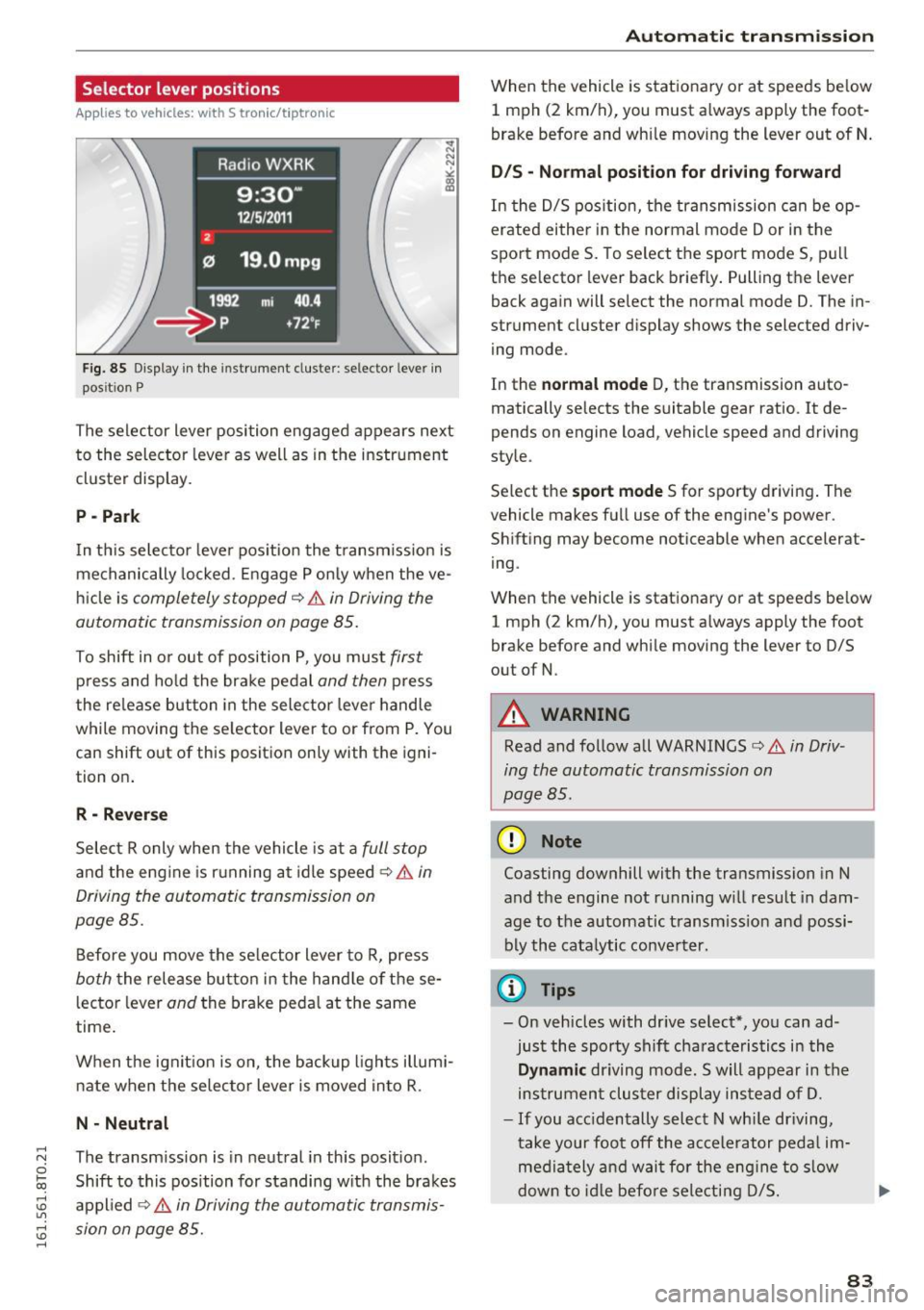
Selector lever positions
Applies to vehicles: with S tronic/t iptron ic
F ig. 85 Display in the instrument cluste r: selector leve r in
pos it ion P
The selector Lever position engaged appears next
to the selector Lever as well as in the instrument
cluster display.
P -Pa rk
In th is selector lever pos ition the t ransm iss ion is
mechanically locked . Engage P only when the ve
hi cle is
completely stopped¢&. in Driving the
automatic transmission on page 85.
To shift in o r out of position P, you must first
press and ho ld the brake pedal and then p ress
the re lease button in the selector lever handle
while moving the se lector lever to or from P. You
can shift out of this position only with the igni
tion on .
R - Rever se
Select R only when the vehicle is at a full stop
and the engine is r unning at idle speed ¢&. in
Driving the automatic transmission on
page 85.
Before you move the selector Lever to R, press
both the release button in the hand le of these
lector lever
and the brake pedal at the same
time .
When the ignit ion is on, the backup l ights illumi
nate when the se lecto r lever is moved into R .
N · N eutral
The transmission is in neutral in this posit ion .
Shift to this position for standing w ith the brakes
appl ied ¢&.
in Driving the automatic transmis
sion on page 85.
Aut oma tic tr ansm iss ion
When the vehicle is stationary or at speeds be low
1 mph (2 km/h), you must a lways apply the foot
brake before and wh ile moving the Lever out of N .
D/S · Normal position fo r driving fo rward
In the D/S pos ition, the transmission can be op
erated eithe r in the normal mode Dor in the
sport mode S. To select the sport mode S, pull
the se lector lever back briefly. Pulling the lever
back again will select the normal mode D. The in
strument cluster display shows the selected driv
ing mode.
In the
norm al mode D, the transmission auto
matically selects the suitable gear ratio . It de
pends on engine Load, vehicle speed and driving
style.
Se lect the
sport mode S for sporty driving . The
vehicle makes full use of the engine's power .
Shift ing may become noticeable when accelerat
ing .
When the vehicle is stat ionary or at speeds be low
1 mph (2 km/h), you must a lways apply the foot
brake before and while moving the Lever to D/S
out of N.
_& WARNING
-
Read and follow all WARNINGS¢&. in Driv
ing the automatic transmission on
page 85 .
(D Note
Coasting downhill with the transmission in N
and the engine not running w ill result in dam
age to the automatic transm iss ion and possi
bly the cata lytic conve rter.
¢j) Tips
- On vehicles with dr ive select*, you can ad
just the sporty shift cha racteristics in the
Dynamic driving mode. Swill appear in the
ins trument clus ter display instead of D.
- If you acc identally select N wh ile driving,
take your foot off the accelerator pedal im
media tely and wai t for the eng ine to s low
dow n to id le befo re sele cting D/S.
83
Page 89 of 264
.... N
0 Ico ....
using the shift paddles, move the selector lever
to the right out of the 0/5 position.
The transmission automatically shifts up or down before critical engine speed is reached .
The transm ission only a llows manual sh ift ing
when the engine speed is within the permitted range.
@ Tips
- When you sh ift into the next lower gear, the
transm ission w ill downsh ift only when there
i s no poss ibility of over -rew ing the engine.
- When the kick-down comes on, the t rans
mission will sh ift down to a lowe r gear, de
pending on vehicle and engine speeds .
- Tiptron ic is inoperative when the transmis
s ion is in the fa il-safe mode .
Kick-down
Applies to vehicles: with S tronic/tiptronic
Kick-down enables maximum acceleration.
When you depress the accelerator pedal beyond
the resistance point, the automatic transm ission
downshifts into a lower gea r, depend ing on veh i
cle speed and engine speed. The upshift in to the
nex t higher gear ta kes place once the maximum
specified engine speed is reached.
A WARNING
Please note that the drive whee ls can spin if
kick-down is used on a smooth s lippery road -
there is a risk of skidding.
Launch Control Program
Applies to vehicles: with S tronic
The Launch Control Program provides the best
acceleration possible when starting from a stop .
Requirement: The engine must be at operating
temperature and the steering whee l must not be
turned .
.,. Press the
I~ OFF ! button¢ page 171 wh ile the
engine is running. The
II indicator light illumi
nates in the instrument cluster and
Stabiliza-
Autom atic tran sm iss ion
tion control (ESC ): Sport . Warning! R estricted
s tabilit y
appears in the driver information sys
tem disp lay .
.,. Move the selector lever to the 0/5 posit ion to
select sport mode (5) or select the
dynamic
driving mode in drive select*¢ page 103 .
.,. Press the brake pedal strongly w ith your left
foot and hold it down fo r at least 1 second.
.,. At the same time, p ress the accelerator pedal
down comp lete ly with yo ur right foo t unti l th e
eng ine reaches and ma intains a h igh RPM .
.,. Remove your foot from the brake peda l w ithin
5 seconds
¢ ,&. .
A WARNING
-Always adapt your driving to the traff ic flow.
- On ly use t he Launch Control Program when
road and traffic condit ions allow it and oth
er d rivers will not be endangered or an
noyed by your dr iving and the vehicle's ac
celerat io n.
- Please note that the d riving wheels can spin
and the vehicle can break away when sport
mode is switched on, especially when the
road is slippery.
- O nce you have acce lerated, you should
sw itch sport mode off by pressing the
I~ OFF ! button.
(D Tips
-The transmission temperature may increase
signif icant ly after using the Launch Contro l
Prog ram . If that happens, the program may
not be ava ilable for a few minutes. It will be
availab le aga in afte r a cool-down period.
- Whe n accelerating using the Launch Cont rol
prog ram, all vehicle parts a re subject to
heavy loads. This can res ult in increased
wear.
Transmission malfunction
Applies to vehicles: with S tronic/tip tron ic
[i] Transmi ss ion: Pre ss brake pedal and select
gear again . .,.
87
Page 90 of 264
Automatic transmission
Press the brake pedal and se lec t the desired se
lecto r lever positio n again. You can then continue
driving .
rm Transmission overheating: Please drive con
servatively .
The transm ission tempe rature has increased s ig
n ifi cant ly due to the spo rty dr ivin g manne r. Dr ive
i n a less sporty m anner until the temperature re
turns to the normal range and the indicator light
switches of.
rm Transmission malfunction: You can continue
driving
There is a system malfunct io n in the t rans mis
sion . Yo u may continue dr iving . Dr ive to your au
t hor ized Audi dea ler or qu alified rep air facilit y
soon to have t he malfunc tion cor rec ted .
rm Transmission malfunction: limited driving
functionality
There is a system malfunct io n in the transm is
sion . T he transmission is sw itchi ng to emergency
mode . This mode only shifts in to certai n gea rs o r
w ill no longer shift at all. The engine may s tall.
D rive to yo ur author ized Aud i dea le r o r q ualified
repair fac ility immediately to have the malfunc
tion corrected.
l'§J Iii Transmission malfunction: No reverse
You can continue driving
S tron ic tra nsmission: There is a system malfunc
tion in th e tra nsmission . The t ransmiss io n is
sw itching to emergency mode. This m ode only
shifts in to cer tain gears or will no longer sh ift at
al l. The eng ine may st all. You canno t engage the
reverse gear. Drive to your authorized A udi dealer
or qualified repair facility immediate ly to have
the ma lfunction co rrected.
rm Transmission malfunction: Stop vehicle and
shift to park .
Do not cont inue d riving. Select the P se lector lev
er pos ition and see yo ur author ized Aud i de aler
or qu alified rep air facility for assis tance .
(D Note
If the tra ns missi on switches to emergency
m ode, you s ho uld t ake the veh icle to a n au-
88
thorized Audi dea lership a s soon as possible
to have the condition corrected .
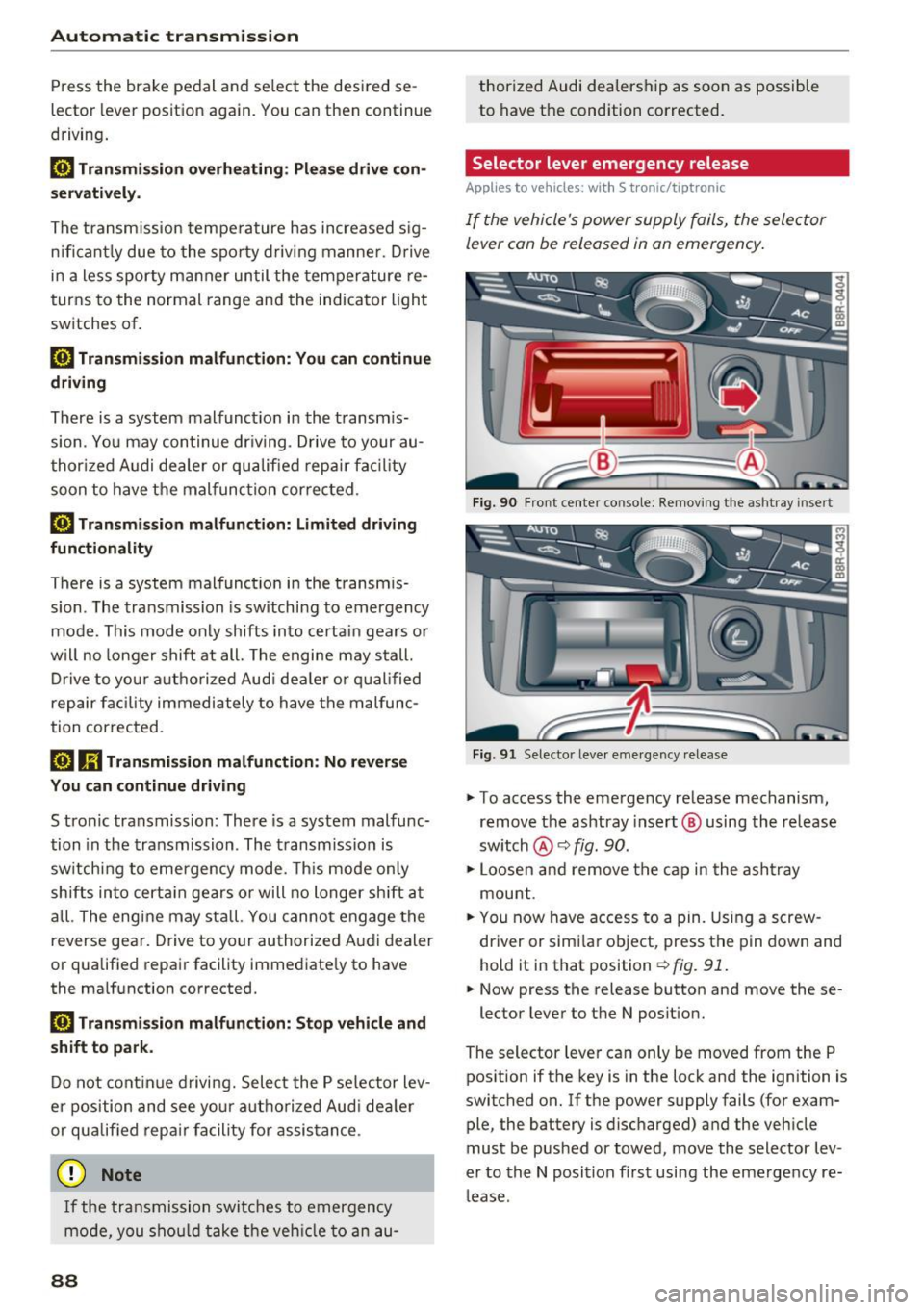
Selector lever emergency release
Applies to vehicles: with S tronic/tiptronic
I f the vehicle's power supply fail s, the sele ctor
lever con be released in on emergency.
Fi g. 90 Fro nt ce nter co nso le: Re mov ing the as htr ay i nse rt
F ig . 91 Selector leve r em ergency release
"" To access the emergency re lease mechanism,
remov e the ashtray insert @ using th e release
sw itch @¢
fig. 90.
""Loosen and rem ove the ca p in t he a sh tra y
mou nt.
"" You now have access to a pin. Using a screw
driver or simi la r object, press t he p in down and
hold it in that position ¢
fig. 91.
"" Now press the release button and move these-
lector lever to the N posit ion.
The selector leve r ca n only be moved from the P
pos ition if the key is in the lock and the ignition is
switched on . If the power supply fails (for exam
ple, the battery is disc harged) and the veh icle
must be pushed or towed, move the selector lev
er to the N position fi rst usi ng the emergency re
l ease .
Page 104 of 264
Audi drive select
Audi drive select
Driving settings
Introduction
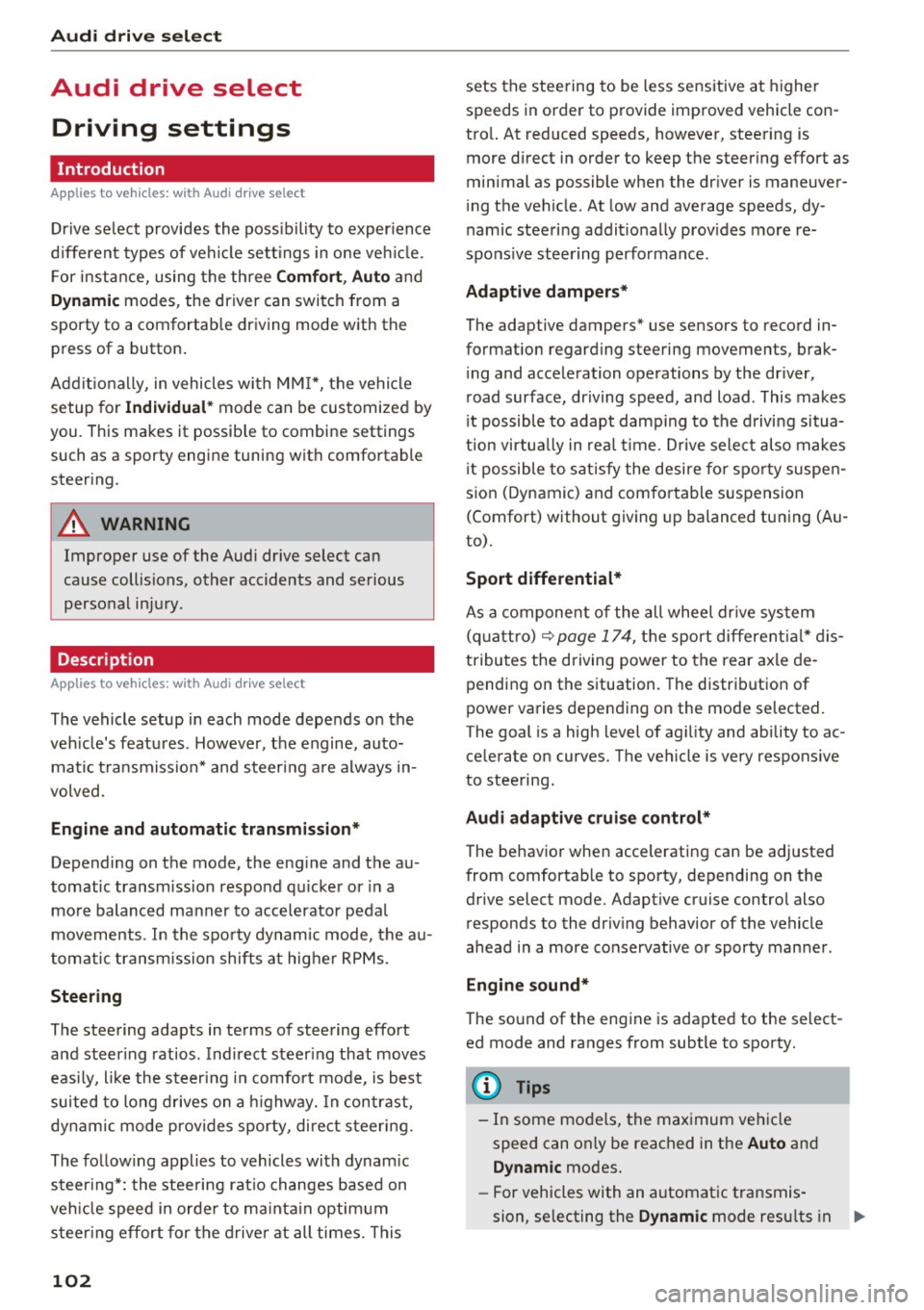
Applies to vehicles: with Audi drive select
Drive select provides the poss ibility to experience
d ifferent types of vehicle settings in one veh icle.
F or instance, using the three
Comfort, Auto and
Dynamic modes, the driver can switch from a
sporty to a comfortable driving mode with the
press of a button.
Addit ional ly, in vehicles with MM I*, the vehicle
setup for
Individual* mode can be customized by
you. This makes it possible to combine settings such as a sporty engine tuning with comfortable
steering .
A WARNING
-
Improper use of the Audi drive select can
cause collisions, other accidents and serious
personal injury .
Description
Applies to vehicles: with Audi drive select
The vehicle setup in each mode depends on the
veh icle's features . However, the engine, auto
mat ic transmission* and steering are always in
volved.
Engine and automatic transmission*
Depending on the mode, the engine and the au
tomatic transmission respond quicker or in a
more balanced manner to accelerator pedal
movements . In the sporty dynamic mode, the au
tomatic transmission shifts at higher RPMs.
Steering
The steering adapts in terms of steering effort
and steering ratios. Indirect steer ing that moves
easi ly, like the steering in comfort mode, is best
suited to long drives on a highway. In contrast,
dynamic mode provides sporty, direct steering.
The follow ing applies to vehicles with dynam ic
steer ing*: the stee ring rat io changes based on
veh icle speed in orde r to ma inta in optim um
steer ing effort for the driver at all times. This
102
sets the steering to be less sensitive at higher
speeds in order to provide improved vehicle con
tro l. At reduced speeds, however, steering is
more direct in order to keep the steering effort as
minimal as possible when the driver is maneuver
ing the vehicle . At low and average speeds, dy
nam ic steering addit ionally prov ides more re
spons ive steering perfo rmance .
Adaptive dampers*
The adaptive dampers* use sensors to record in
formation regarding steering movements, brak
ing and acceleration operations by the driver,
road surface, driving speed, and load . This makes
i t possible to adapt damping to the driving situa
tion virtua lly in real time . Drive select also makes
i t possible to satisfy the desire for spor ty suspen
sion (Dynamic) and comfortable suspension
(Comfort) without giving up balanced tuning (Au
to).
Sport differential*
As a component of the all wheel dr ive system
(quattro)
r=;, page 174, the sport differential* dis
tributes the driving power to the rear axle de
pending on the situation. The distribution of
power varies depending on the mode selected.
The goal is a high level of ag ility and ability to ac
ce lerate on curves. The vehicle is very respons ive
to steering.
Audi adaptive cruise control*
The behavior when accelerating can be adjusted
from comfortable to sporty, depending on the
drive select mode. Adaptive cruise control also responds to the driving behavior of the vehicle
ahead in a more conservative or sporty manner .
Engine sound*
The sound of the engine is adapted to the select
ed mode and ranges from subtle to sporty.
@ Tips
- In some models, the maximum vehicle
speed can only be reached in the
Auto and
Dynamic modes.
- For vehicles with an automatic transmis-
sion, se lecting the
Dynamic mode resu lts in ..,_
Page 105 of 264
,-1 N
0 1-CX)
rl I.Cl U"I
,-1 I.Cl ......
sporty shifting characteristics. The S gear
position engages automatically.
- In vehicles that have dynamic steering*, op
erating noise is heard when starting or stop ping the engine. This does not indicate a
problem.
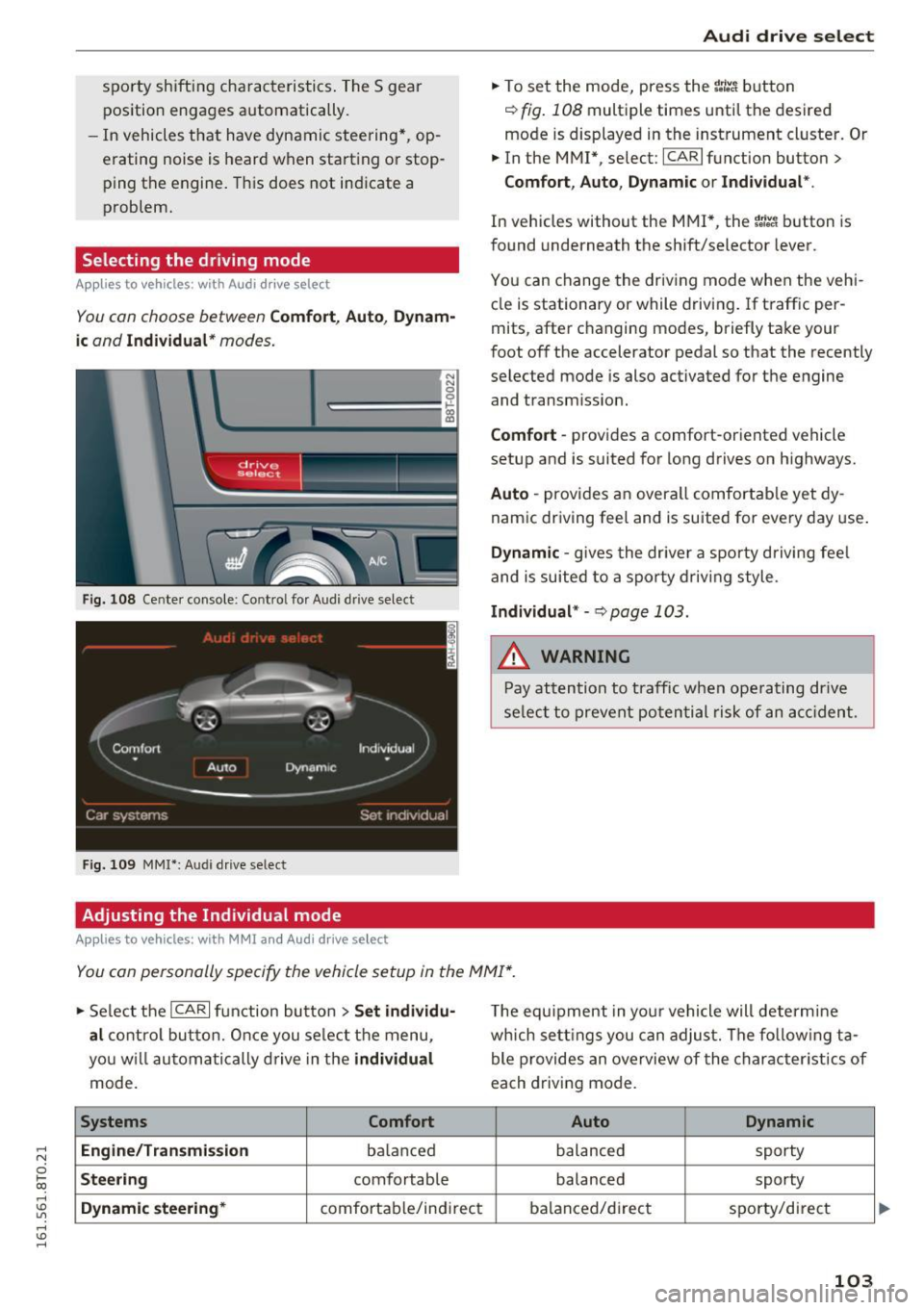
Selecting the driving mode
Applies to vehicles: with Audi drive select
You con choose between Comfort , Auto , Dynam
ic
and Individual* modes.
N N 0
~====:::: ~ ~
drive I se lect _ ~ -~-
Fig. 108 Center console : Co ntro l fo r Audi d rive select
Fig. 109 MMI*: Aud i drive select
Adjusting the Individual mode
Applies to vehicles: with MMI and Audi drive select
Audi drive select
.,. To set the mode, press the r:/tc'i button
~ fig. 108 multiple times until the desired
mode is displayed in the instrument cluster. Or
.,. In the MMI* , select: ICARlfunction button>
Comfort, Auto, Dynamic or Individual *.
In vehicles without the MMI*, the r:l:c'i button is
found underneath the shift/selector lever.
You can change the driving mode when the vehi
cle is stationary or while driving . If traffic per
mits, after changing modes, briefly take your
foot off the accelerator pedal so that the recently
selected mode is also activated for the engine and transm ission.
Comfort -provides a comfort-or iented vehicle
setup and is suited for long drives on highways.
Auto -provides an overa ll comfortable yet dy
namic driving feel and is suited for every day use.
Dynamic -gives the driver a sporty driving feel
and is suited to a sporty driving style .
Individual* -Qpoge 103 .
.&, WARNING
-Pay attention to traffic when operating drive
select to prevent potential risk of an accident.
You con personally specify the vehicle setup in the MMI* .
.,. Select the I CAR I function button > Set individu·
al
control button. Once you select the menu,
you w ill automatically drive in the
individual
mode.
Systems Comfort
Engine/Transmi ssion
ba lanc ed
Steering comfortable
Dynamic steering* comfortable/indi rect T
he equipment in your vehicle will determine
which settings you can adjust. The fo llowing ta
ble provides an overview of the characteristics of
each driving mode.
Auto Dynamic
balanced sporty
balanced sporty
balanced/d irect
sporty/direct
103
Page 106 of 264
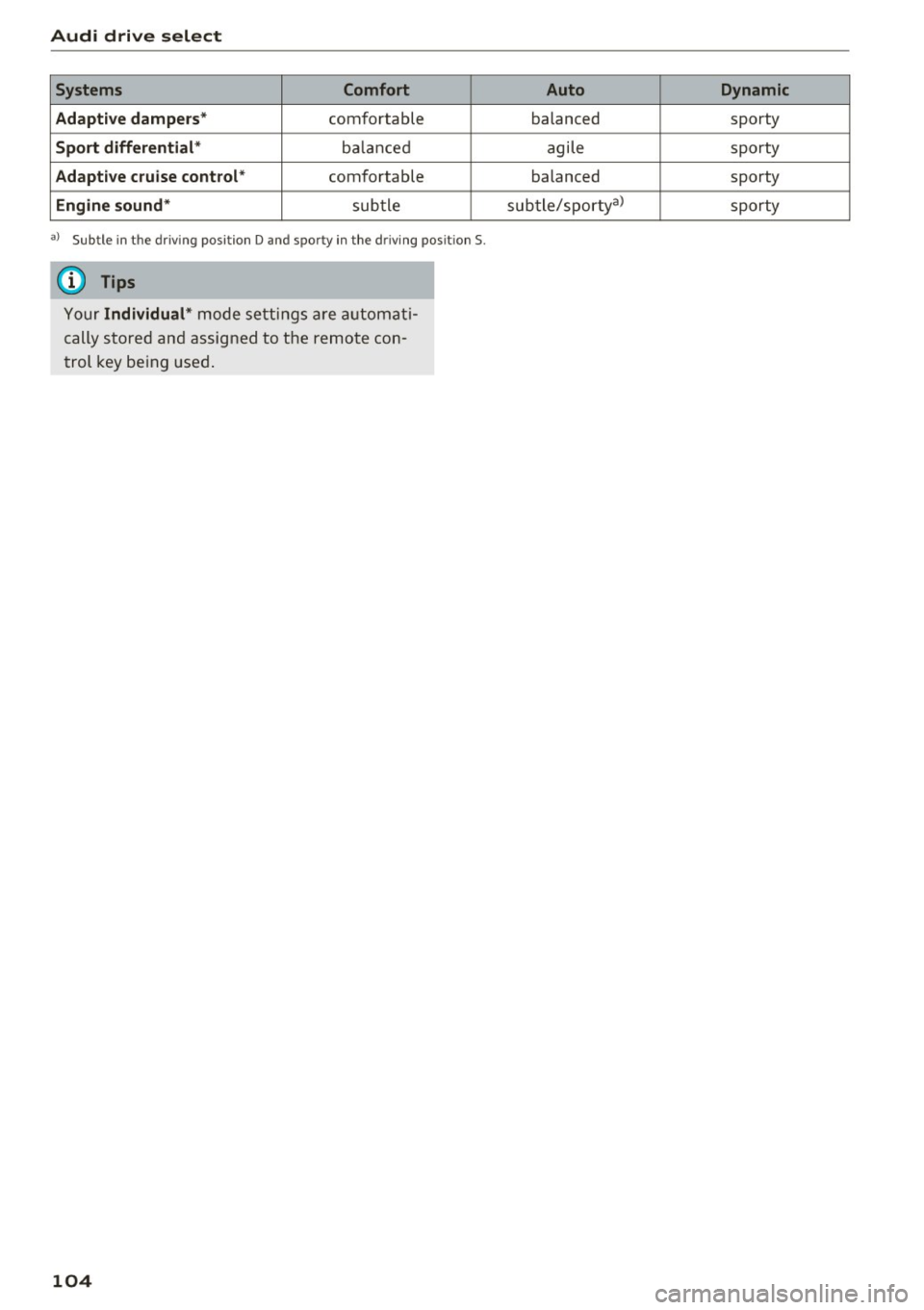
Audi drive select
Systems Comfort
Adaptive dampers*
comfortable
Sport differential * balanced
Adaptive cruise control* comfortable
Engine sound* subtle
al Sub tle in t he dr iving posit ion D and sp or ty in the driving posit ion S.
(D Tips
Your Individual* mode settings are automat i
cally stored and assigned to the remote con
trol key being used.
104
Auto Dynamic
balanced sporty
agile sporty
balanced sporty
subtle/sporty a)
sporty
Page 141 of 264
- Never place or attach accessories or other objects (such as cupholders, telephone
brackets, la rge, heavy or bulky objects) on
t h e doors, over or near th e area marked
"AIRBAG" on t he s teering wheel, instru
ment pane l, seat backrests or between
those areas and you rself. These objects
cou ld cause injury in a crash, especially
when the airbags inflate.
- Never re cline the front passenger's seat to
transport objects. Items can also move into
the area of the side airbag or t he front a ir
bag during braking or in a sudden maneu
ver . Objects near the airbags can become
projectiles and cause injury, particular ly
when the seat is reclined.
A WARNING
The fine dust created when airbags deploy can
cause breathing problems for people w ith a
history of asthma or other breathing condi
tions.
-To reduce the risk of breathing problems, those w ith asthma or other respiratory con
ditions should get fresh air right away by
gett ing out of the veh icle o r opening w in
dows or doo rs.
- If you are in a collision in which airbags de
ploy, wash your hands and face with mild
soap and wa ter before eat ing.
- Be careful not to get the dust into your eyes,
o r in to any cuts or s cratches.
- If the resid ue should get into your eyes,
flush them with water.
Monitoring the
Advanced Airbag System
fA (USA models) /!f (Canada models)
Airbag monitoring indicator light
Two separate indicators monitor the function of
the Advanced Airbag System: the airbag moni
toring indicator light and the
PASSENGER AIR
,..., BAG OFF
light. N
0
~ The Advanced Airbag System ( includ ing the elec-,...,
~ tro nic control un it, senso r cir cuits and system
~ w iri ng) is monitored continuously to make su re ......
Airb ag sys tem
that it is functioning properly whenever the igni
tion is on . Every time you turn on the ignition, the
airbag system indicator light
fl (USA models)/
El (Canada models) will come on for a few sec
onds (function check).
The system must be in spected when the
indicator light
II (USA models) , m
(Canada models ):
- does not come on when the ignition is sw itched
on,
- does not go out a few seconds after you have
sw itched on the ignit ion, or
- comes on while driv ing .
If an airbag system malfunction is detected, the
indicator light will first start flashing to catch the
driver's attention and then stay on continuously
to serve as a constant rem inder to have the sys
tem inspected immediately.
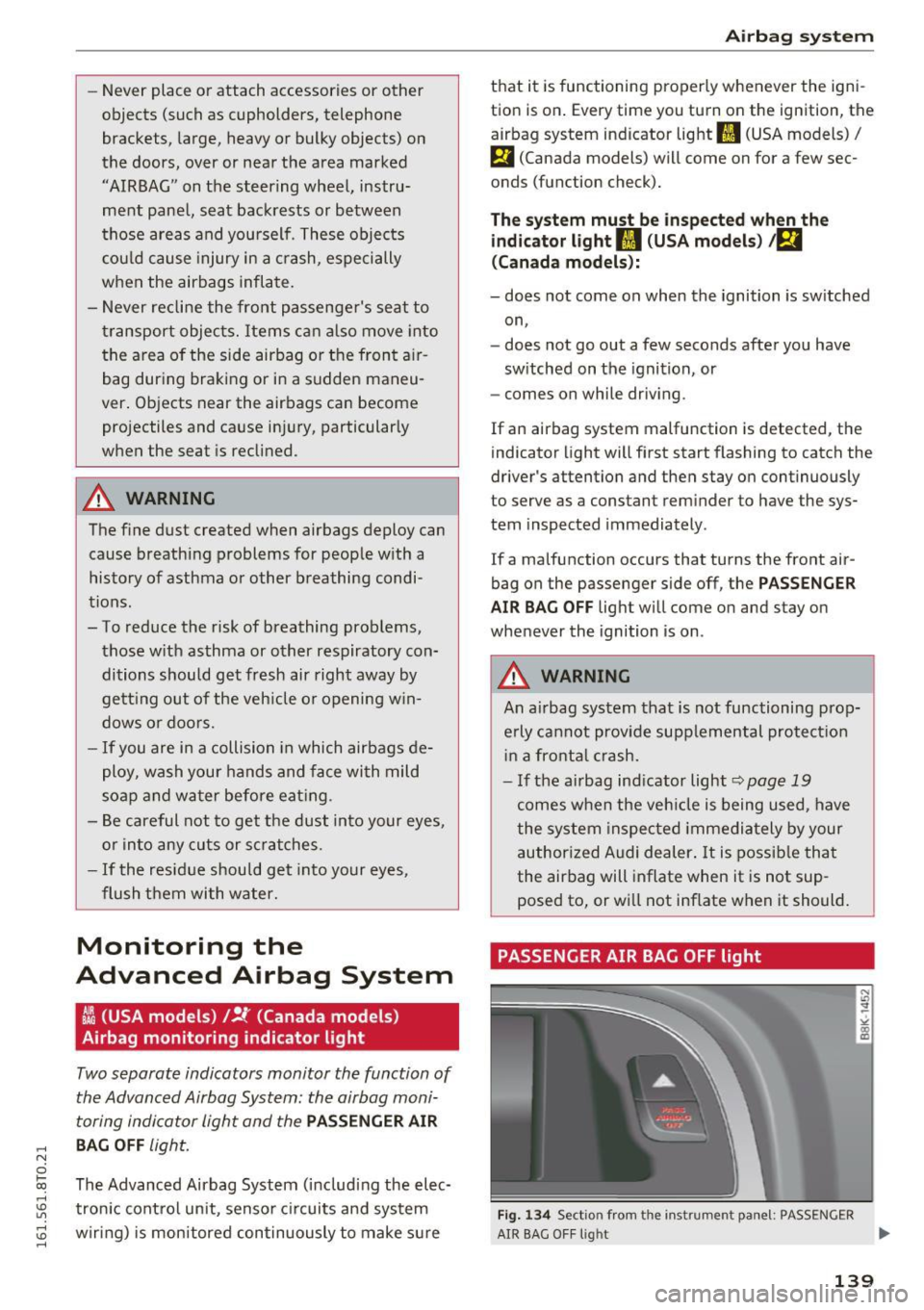
If a malfunction occurs that turns the front air
bag on the passenger side off, the
PAS SENGER
AIR BAG OFF
lig ht will come on and stay on
whenever the ignition is on .
A WARNING
f-
An airbag system that is not functioning prop-
e rly cannot provide supplemental protect ion
in a fronta l crash.
-If the ai rbag ind icator light~ page 19
comes when the veh icle is being used, have
the system inspec ted immedia tely by your
author ized Audi dealer. It is possi ble that
the air bag will inflate when it is not sup
posed to, or w ill not inflate when it should.
PASSENGER AIR BAG OFF light
Fig. 1 34 Sect ion from the instrument panel: PASSENGER
AIR BAG O FF light ...
139
Page 156 of 264
Child safet y
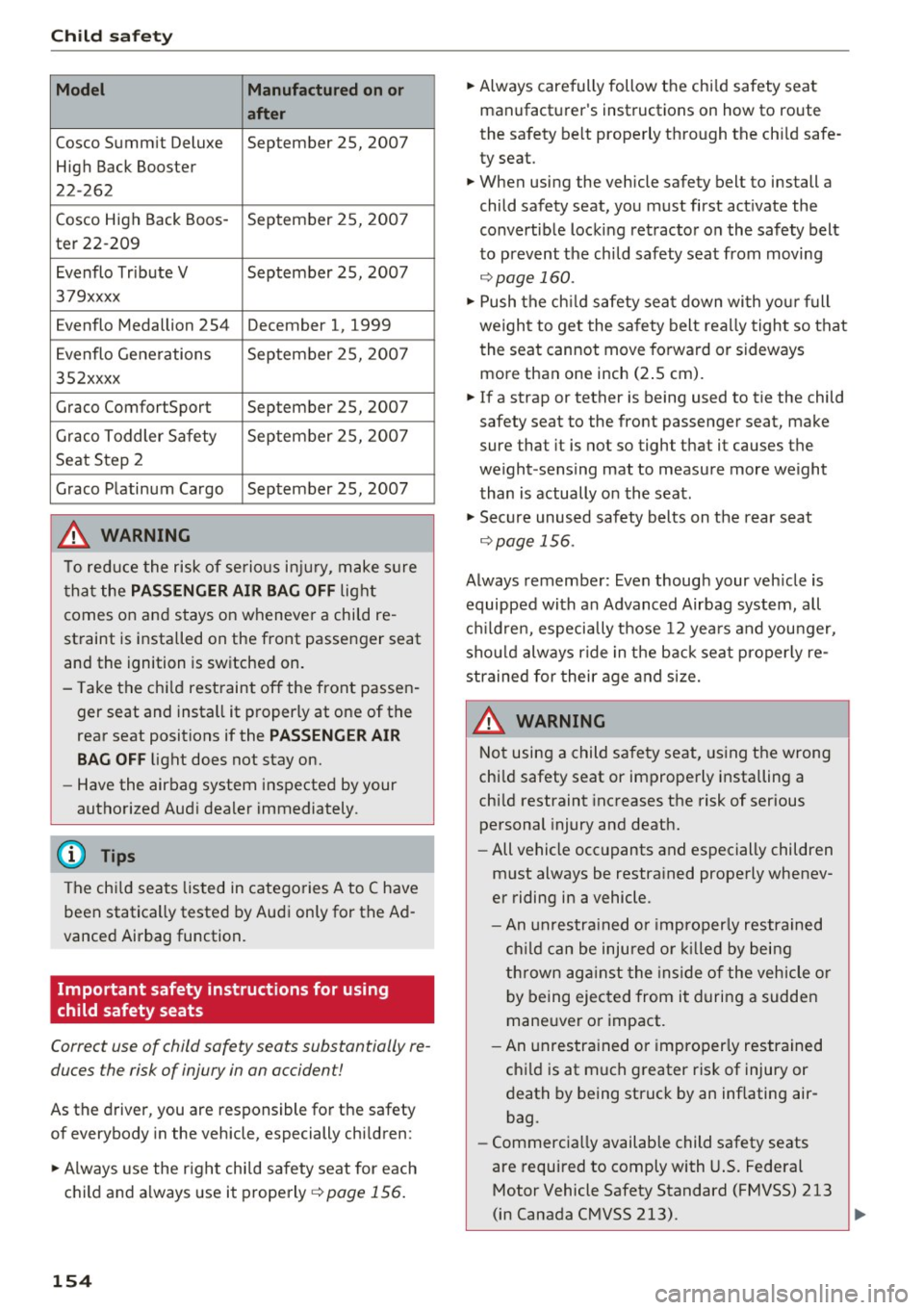
Model Manufactured on or
after
Cosco Summit Deluxe September 25, 2007
High Back Booster
22-262
Cosco High Back Boos -
September 25, 200 7
ter 22-209
Evenflo Tribute V September 25, 2007
379xxxx
Evenflo Medallion 254 December 1, 1999
E venflo Generations September 25, 200 7
352xxxx
Graco ComfortSport September 25, 2007
Graco Toddler Safety Sep tember 25, 200 7
Seat Step 2
Graco P latinum Cargo September 25, 2007
,& WARNING
T o red uce the risk of serio us i njur y, m ake s ure
t ha t the
PASSENGER AIR BAG OFF lig ht
comes o n and stays on wheneve r a child re
straint is installed on the front passenger seat
and the ignition is sw itche d on.
- Take the ch ild rest raint off the front passen
ger seat and insta ll it p roperly at one of the
rear seat positions if the
PASSENGER AIR
BAG OFF
light does not stay on.
- Have the airbag system inspecte d by your
autho rized Aud i dealer immediately.
(D Tips
The ch ild seats listed in catego ries A to C have
been statica lly tested by Au di only for the Ad
vanced Airbag function.
Important safety instructions for using
child safety seats
Correct use of child safety seats substantially re
duces the risk of injury in on occident!
As the driver, you are respons ible for the safety
of everybody in the vehicle, especially chi ldren:
... Always use the r ight chi ld safety seat for each
c h ild and a lways use it properly
¢ page 156.
154 ...
Always carefully follow the chi ld safety seat
manufact urer 's instructions on how to route
the sa fety be lt properly thro ugh the ch ild safe
ty seat.
... When using the vehicle safety belt to install a
child safety seat, you must first act ivate the
convertib le lock ing retracto r o n the safety belt
to prevent the chi ld safety seat from moving
¢ page 160.
... Push the ch ild sa fety sea t down wi th yo ur fu ll
weigh t to get the safety belt rea lly tight so tha t
the seat cannot move forward or sideways
more than one inch (2 .5 cm).
... If a strap or tether is being used to tie the child
safety seat to the front passenge r seat, make
sure that it is not so tight t hat it causes the
weight -sensing mat to measure more weight
t han is actually o n the seat .
... Secu re unused safety belts on the rear s eat
¢ page 156.
Always remember : Even though your veh icle is
equipped wi th an Advanced Airbag system, all
c hi ld ren, especially those 12 yea rs and you nger,
s h ould always ride in th e back sea t proper ly re
strained for their age and s ize.
,& WARNING
-
Not usin g a child sa fe ty seat, us ing t he wrong
c h ild safety seat or imprope rly installing a
chi ld restraint inc reases t he risk of serious
personal injury and death.
- All vehicle occupants and es pecially children
m ust always be restra ined properly whenev
er riding in a vehicle.
- An unrestra ined o r imprope rly restrained
c h ild ca n be injured or killed by bei ng
t h rown ag ai nst the inside of the vehicle or
b y being ejected from it durin g a sudden
maneuver o r impact.
- An unrestra ine d or i mprope rly restrained
ch ild is at much g reater risk of injury or
death by being struck by an inflating air
bag .
- Commerc ia lly available child safety seats
are required to comply with U.S. Federal
Motor Vehicle Safety Standard (FMVSS) 213
(in Canada C MVSS 213). ...