eco mode AUDI S6 2008 User Guide
[x] Cancel search | Manufacturer: AUDI, Model Year: 2008, Model line: S6, Model: AUDI S6 2008Pages: 390, PDF Size: 88.42 MB
Page 42 of 390
Driver informati on displ ay
Trip computer
Introduction
The trip computer gives you informati on on current and
average fuel mileage, average speed, fuel range and
driving time.
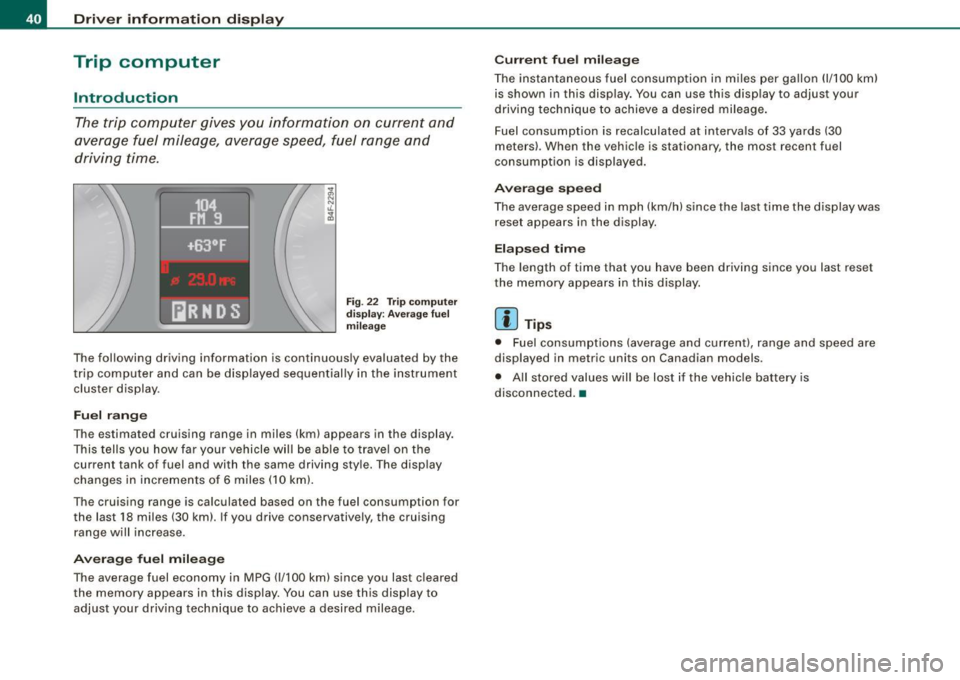
F ig. 22 T rip compu te r
di spl ay: Ave ra ge f uel
mil eage
The fol lowing driving information is continuously evaluated by the
t rip computer and can be displayed sequential ly in the instrument
cluster display.
Fuel r ang e
The estimated cruising range in miles (km) appears in the display.
This tells you how far your vehicle will be able to trave l on the
current tank of fuel and with the same driving sty le. The display
changes in increments of 6 miles (10 km).
The cruising range is ca lculated based on the fuel consumption for
the last 18 miles (30 km). If you drive conservatively, the cruising
range will increase .
Avera ge fu el mil eage
The average fuel economy in MPG (1/100 km) since you last cleared
the memory appears in this display. You can use this display to
adjust your driving technique to achieve a desired mileage.
C urr en t fu el mi leage
The instantaneous fuel consumption in m iles per gallon (1/ 100 km)
is shown in this disp lay. You can use this display to adjust your
driving technique to achieve a desired mileage .
Fuel consumption is recalculated at interva ls of 33 yards (30
meters) . When the vehicle is stationary, the most recent fuel
consumption is displayed .
Averag e sp eed
The average speed in mph (km/h) since the last time the display was
reset appears in the display.
E la psed time
The length of time that you have been driving since you last reset
the memory appears in this display.
[ i ] Tips
• Fuel consumptions (average and current), range and speed are
displayed in metric units on Canadian models .
• All stored values will be lost if the vehicle battery is
disconnected. •
Page 54 of 390
Openin g a nd clo sin g
for using the rear lid release handle in conjunction with the
advanced key*.
For this reason, be sure to only hand over the
valet key to the person
who wil l take charge of your vehicle.
[ i ] Tip s
Be sure to activate the function before handing over the valet key to
someone else. The valet key only fits the lock in the driver's door and
the ignition lock. •
Certification
The remote control device comp lies with
• USA model s: Part 15 of the FCC Rules.
• Cana da mo dels: RSS -210 of Industry Canada.
Operation is subject to the following conditions:
• this device may not cause harmful interference, and
• this device must accept any interference received, inc luding
interference that may cause undesired operation .
0 Note
The manufacturer is not responsible for ANY RADIO OR TV interfer
ence caused by unauthor ized modifications to th is equipment .
Changes or modifications to this unit not express ly approved by the
party responsib le for comp liance could void the user's authority to
operate the equipment. •
Power locking system
General description
The power locking system locks or unlocks all doors and
the rear lid simultaneously.
T he power locking system in your vehic le incorporates the fol lowing
functions :
• Central locking function
• Selective unlock feature~
page 55
• Remote contro l feature ~ page 49
• Advanced Key*~ page 59
• Anti -theft alarm system ~ page 61
All the doors and the rear lid are locked by the central locking
system when you lock the vehicle . You can set whether genera lly
only the driver's door or all doors and the rear lid should be
unlocked when you open the v ehicle in th e MMI menu
Central
lo cking
to suit your individual desires~ page 55 .
Un loc king t he vehicle
You can un lock the vehic le from outside either by using the remo te
control
or by inserting and turning the key in th e driver's door lock.
When you
unlock your vehicle :
• The anti-theft alarm system is deactivated briefly.
• The vehicle interior lights illuminate for approximate ly 30
seconds .
• All turn signal lights will flash twice when the car is unlocked.
• After un locking the vehicle, you have 60 seconds to open a door
or the rear lid. After 60 seconds, the vehicle automatically loc ks and
the anti-theft a larm system activates again .
The rear lid can be locked or unlocked either by using the remote
control
o r by inserting and turning the key in the driver's door lock . _,,
Page 74 of 390
Clear vision
Le av ing hom e
The Leaving home functions ensures that when unlock ing the
vehic le periphery is illumina ted in the dark. In addition, the front fog
lights, the tai l lights and the license plate light are tu rned on . This
f unction can be turned on and off .
Daytime running lights
USA models :
On vehicles with xenon lights the daytime runn ing
light s ca n be turned on or off using th is function . On veh ic les wi th
halogen lights there is no daytime runni ng lights funct ion .
Canad a models : The function cannot be turned off. It is activated
automat ically each time the ignition is turned on. Th is menu item is
shown "greyed out" .•
Front fog lights }0
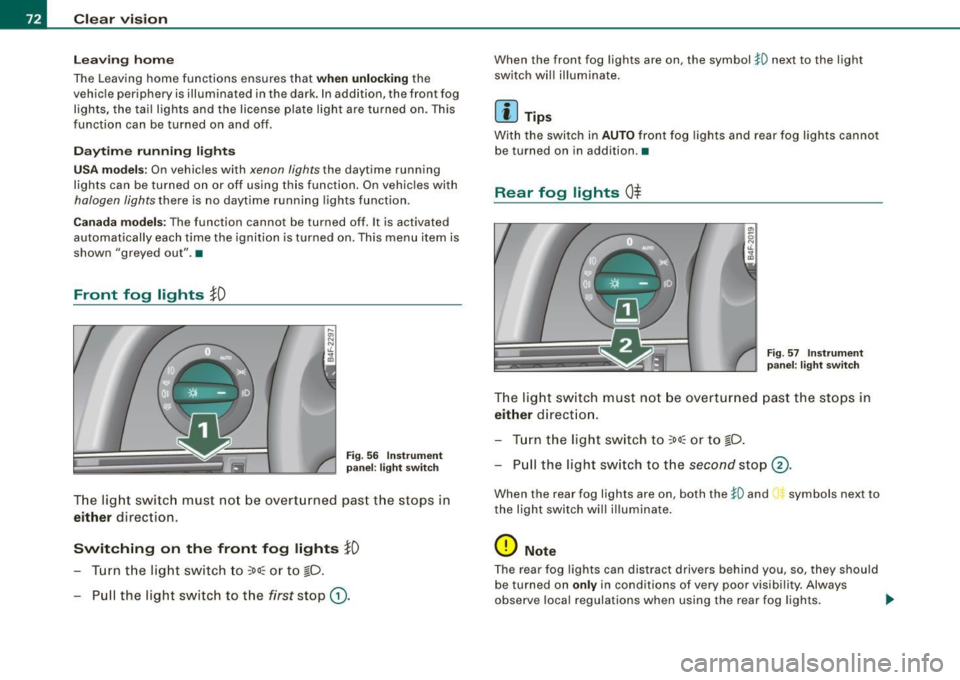
Fig . 5 6 In strument
p ane l: light switch
T he lig ht switc h must no t be overtu rn ed past t he stops in
either direction.
Switching on the front fog lights }D
- Turn t he lig ht switch to ~oo~ or t o ~D .
- Pull the light switc h to the first stop
G).
When the front fog lights are on, the symbol $0 next to the light
switch wil l il lumina te.
Ii ] Tips
With the swi tc h in AUTO front fog lights and rear fog lights canno t
be turned on in addition. •
Rear fog lights Ot
-
--
Fig . 57 In strument
p an el: lig ht switch
T he ligh t switch must no t be ov erturned past th e stops in
either direct ion .
- Tur n t he light sw itch to
~oo~ or to ~D.
- Pull the light switch to t he
second stop ©-
When the rear fog lights are on, both the $0 and symbols next to
the light swi tch wi ll i llumina te .
0 Note
T he rear fog lights can distract d rivers be hind you, so, they shou ld
be turned on
only in conditions of very poor vis ibi lity. Always
observe local regulations when using the rea r fog lights . .,
Page 81 of 390
High wiper sp eed
- Move the lever up to pos ition
G) .
Automatic w ip er/ washer
- Pull the lever to pos ition ® (toward the steering wheel)
and hold .
- Re lease t he lever. The washer stops a nd the wipers keep
going f or about four seconds. Depending on how long
the lever is held, d ifferent numbers of was h cyc les are
perform ed .
Turning off the wipers
- Move the lever back to position
® ·
Ge nera l inf ormati on
The w indshield wipers and the windshield washer system operate
only with the ignition on.
During a temporary stop, e.g. at a traffic signal, the set wipe speed
is automatically reduced by one stage.
The windshield washer nozzles are heated at low temperatures
when the ignition is on .
Rem ov ing w ate r dro ple ts
About 5 seconds after the wash cycle is complete, the wiper system
performs a single automatic wipe cycle to remove any water drop
lets that remain on the windshield .
If you wou ld like to deactivate this delayed wipe cycle while driving,
you have to pull the lever to position © again within 10 seconds
after this wipe cyc le.
Water droplet removal is reactivated after the ignition is switched off and then on again .
Controls and equip
ment
Cl ea r vision
Ra in se nso r
The rain sensor operates only in the interval wiper position . When it
starts to rain, the interval wiper mode is activated automatica lly .
If the windshie ld wiper lever is in the interval wipe position with the
ignit ion switched off, the rain sensor is not activated until vehicle
speed is above 4 mph (6 km/h).
To reduce the sensit ivity of the rain sensor, the switch © must be
moved down. To increase the sensitivity of the rain sensor, the
switch must be moved up.
The higher the sensitiv ity setting, the sooner the windsh ield w ipers
react to moisture on the windshield. Increased sensitivity is
s igna led by the windshie ld wipers making a sing le pass over the
windshield.
The rain sensor wiper interva ls depend on the se nsitivi ty setting as
we ll as vehicle speed. During brief stops, wiper motion will adjust in
re lation to the amount of rain on the windshield .
& WARNING
• Wiper bl ade s are cru cial f or s afe drivin g! Only w hen they are in
good condition ar e the y able to cle ar the w indo ws prop erly to
provide uncomp romi sed visibility . Worn or d amaged wiper blade s
a re a sa fety haz ard =>
pag e 81 , "In stalling n ew wiper bl ad es"!
• The rain s ensor i s onl y designed to a ssist and supp ort the
dri ver . It re mains e ntirel y th e dr iver' s res ponsibi lity to m onitor
out side weat her condition s and to manuall y activate the wiper s as
s oon as rain or dr iz zle redu ce s v is ibilit y throug h the wind shield.
• The wind shield mu st not be treat ed with w ater-repell ent mat e
ri als. Th ey ca n in crea se glare und er poor visi bilit y cond ition s s uch
as wetne ss, dar knes s, or when th e sun is low on th e horizon. In
a dd itio n, t hey ca n c aus e the w ind shield wiper s to chatter .
0 Note
In freezing or near freezing conditions :
I • •
Page 88 of 390
Clear vision
-Adjust the magnetic deflection zone by repeatedly
pressing on the © button. The set mode automatically
deactivates after a few seconds.•
Applies to vehic les: w ith dig ital compass
Calibrating the compass
The compass has to be recalibrated if the display is wrong
or inaccurate.
- Hold the© button down until the letter C is displayed on
the interior rear view mirror.
- Drive in a circle at a speed of about 5 mph (10 km/h) until
a direction is shown on the interior rear view mirror.
& WARNING
The digital compass is to be used as a directional aid only. Even
though you may want to look at it while you are driving, you must
still pay attention to traffic, road and weather conditions as well
as other possible hazards . •
Page 103 of 390
__________________________________________________ S_ e_ a_t _s _ a_n_ d_ s_ t_ o _r_a ..;:g::... e __ lJII
Roof rack
First things first
A roof rack can be fitted to carry additional luggage on
the roof.
- Always read and follow the i nstructions provided by the
roof rack manufacturer when t he roof rack system must
be installed.
If you are transporting luggage or other objects on the roof, please
note the following:
• Your vehicle has specially designed aerodynamic roof rails. On ly
install a roof rack specifically designed for your model. Contact the
nearest Audi dealer for information on approved modu lar roof racks
f or your vehicle.
• These approved roof racks are the basis for a complete roof rack
system. Addit ional attachments for the basic roo f rack are neces
sary to safely transport luggage, bicycles, surf boards, skis or small
boats . All necessary hardware for these systems is availab le at your
authori zed Audi dealer.
• We recommend that you keep the installation instructions for
your roof rack system together with your Owner's literature in the
veh ic le.
Wh en should th e roof ra ck b e remo ved?
• Before going through an automatic car wash (it is best to ask the
car wash operator for advice).
• When not in use, to reduce fuel consumption, wind noise and to
guard against theft .
Controls and equip
ment
& WARNING
• Use of an unappr oved roof r ack or in corre ct mounting of an
a pp ro ved roof r ack can cau se the roof rack or the ite ms attached
t o it t o fa ll off th e ro of ont o th e road .
• Obj ec ts falling fr om the roof of a v ehic le can c au se a cr ash and
per son al inju ry.
• Onl y mo unt th e sys te m betwe en the marking s shown in
=> page 102, fig. 9 6.
• The roo f rack sy stem mu st be in sta lled e xactly acc ording t o the
in stru ctio ns pr ov ided .
0 Note
• Your vehicle warranty does not cover any damages to the vehicle
caused by using roof racks or moun ting structures not approved by
Audi for your vehicle. The same applies to damage resulting from
incorrect roof rack installation.
• Always check the roof rack mountings and hardware before each
trip and during a trip to make sure everything is securely tightened .
If necessary , retighten the mountings and check the entire system
from time to time.
• After mounting a roof rack system, or when you transport
objects on the roof of your vehicle, the height of the vehic le is natu
ra lly increased . Be careful when driving under low bridges or in
parking garages for examp le . This could cause damage to the load
and even the vehicle itself. •
I • •
Page 112 of 390
• .___w_ a_ rm __ a_ n_ d_ c_o _l_d ________________________________________________ _
Warm and cold
Climate control
Description
The air conditioner is fully automatic and is designed to
maintain a comfortable and uniform climate inside the
vehicle.
We recommend the follow ing settings:
- Set the temperature to 75 °F (+23 °C).
- Press the !AUTO
I button.
With this setting, you attain maximum comfort in the least amount
of time. Change this setting, as desired, to meet your personal needs.
The climate controls are a combination of heating, ventilation and cooling systems, which automatically reduce humidity and cool the
air inside your vehicle.
The air temperature, air flow and air distribution are automatically
regulated to achieve and maintain the desired passenger compart
ment temperature as quickly as possible.
The system automatically compensates for changes in outside
temperature and for the intensity of the sunlight entering the
vehicle. We recommend you use the
Automatic mode=> page 113
for year-round comfort.
Please note the following:
Turn on the air conditioner to reduce humidity in the vehicle. This also prevents the windows from fogging up.
When the outside temperature is high and the air is very humid,
condensation from the evaporator may drip under the vehicle. This
is normal and does not indicate a leak. If the outside temperature is low,
the fan normally only switches to
a higher speed once the engine coolant has warmed up sufficiently.
The air conditioner temporarily switches off when you drive off from
a standstill using full throttle to save engine power.
The compressor also switches off if the coolant temperature is too
high, so that the engine can be adequately cooled under extreme
loads.
Air pollutants filter
The air pollutants filter (a combined particle filter and activated
charcoal filter) reduces or prevents outside air pollution (dust, or
pollen) from entering the vehicle.
The air pollutants filter must be changed at the intervals specified
in your Maintenance
& Warranty booklet, so that the air conditioner
can properly work.
If you drive your vehicle in an area with high air pollution, the filter
may need to be changed more frequently than specified in your
Audi Maintenance
& Warranty booklet. If in doubt, ask your autho
rized Audi Service Advisor for advice.
Key coded settings
The air conditioner settings selected are automatically stored and
assigned to the key being used. When the vehicle is started, the air
conditioner automatically selects the settings assigned to that key.
This way every driver will maintain his/her own personal settings
and does not have to reset them manually.
If a different driver uses your key and changes the air conditioner
settings, the latest adjustments will erase and replace the settings
you have stored.
Energy management
To prevent the battery from being discharged and to restore the
balance of energy, components which require large amounts of
Page 114 of 390
-Warm
and cold
L.-.:....:..-=..:..:..:....:.:.:...::....:... ____________ _
Controls
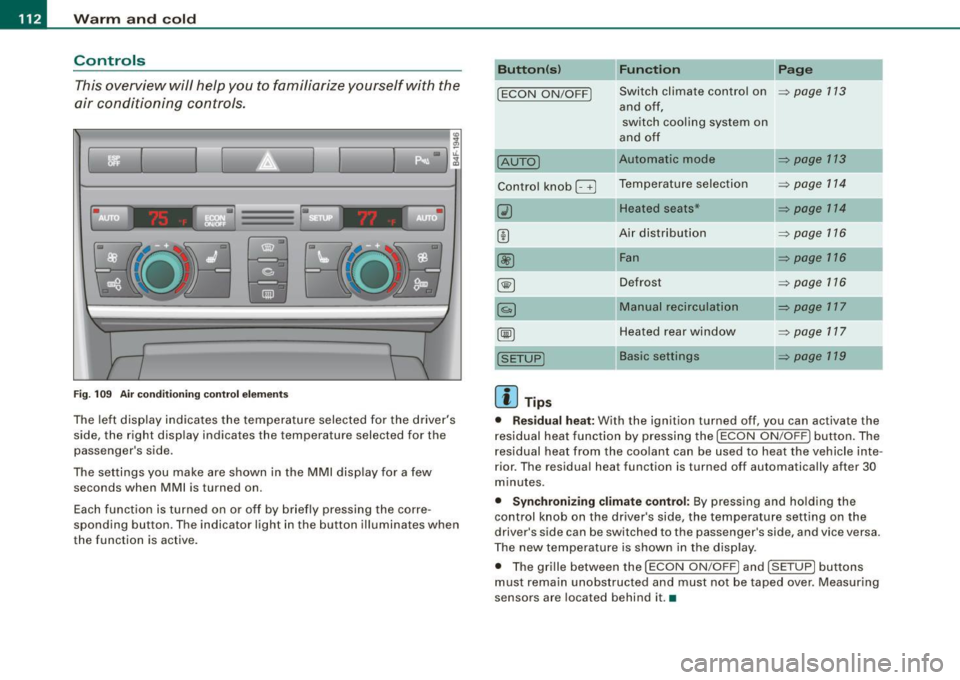
This overview will help you to familiarize yourself with the
air conditioning controls.
I I
Fig. 109 Air conditioning control elements
The left display indicates the temperature selected for the driver's
side, the right display indicates the temperature selected for the
passenger's side.
The settings you make are shown in the MMI display for a few seconds when MMI is turned on.
Each function is turned on or off by briefly pressing the corre
spond ing button. The indicator light in the button illuminates when
the function is active.
Button(s) Function Page
!ECON ON/OFFJ Switch climate control on ~ page 1 13
and off,
switch cooling system on
and off
IAUTOJ Automatic mode ~ page 113
Control knob G Temperature selection ~ page 114
Heated seats* ~ page 114
Air distribution ~ page 116
@ Fan ~ page 116
~ Defrost ~ page 116
Manual recirculation ~ page 117
Heated rear window ~ page 117
Basic settings ~ page 119
[ i] Tips
• Residual heat: With the ignition turned off, you can activate the
residual heat function by pressing the
!ECON ON/OFFJ button. The
residual heat from the coolant can be used to heat the vehicle inte
rior. The residual heat function is turned off automatically after 30
minutes.
• Synchronizing climate control: By pressing and holding the
control knob on the driver's side, the temperature setting on the
driver's side can be switched to the passenger's side, and vice versa.
The new temperature is shown in the display .
• The grille between the
!ECON ON/OFF] and !SETUP ] buttons
must remain unobstructed and must not be taped over. Measuring
sensors are located behind it.•
Page 115 of 390
![AUDI S6 2008 User Guide Warm and cold -
----------------
Turning on and off [ECON ON /OFF]
Turning th e air conditioning on
- Press [ECON ON/OF F] briefly, or
- Press [AUTO].
Turning the air conditioning](/img/6/57596/w960_57596-114.png "AUDI S6 2008 User Guide Warm and cold -
----------------
Turning on and off [ECON ON /OFF]
Turning th e air conditioning on
- Press [ECON ON/OF F] briefly, or
- Press [AUTO].
Turning the air conditioning")
Warm and cold -
----------------
Turning on and off [ECON ON /OFF]
Turning th e air conditioning on
- Press [ECON ON/OF F] briefly, or
- Press [AUTO].
Turning the air conditioning off
-Press the !ECON ON/OFF] button for at least 2 seconds to
switch the a ir cond itioning off and to block the air supply
f rom the outs ide .
"O FF" appears in the display.
Sw itchin g air c ondit ioning on /off
- Switching the air conditioning system on/off is done with
climate contro l switched on.
- Press the !ECON ON/OFF] button just
briefly.
The air conditioner turns back on if you press one of the control
buttons or the contro l knob.
ECON operation is indicated by the glowing LED on the right next to
the word ECON.
The air conditioning (compressor) is turned off in ECON mode .
"ECON" means "Economy" . You save fuel by switching off the air
conditioning=>
page 119.
Please note that vehicle interior temperature cannot be lower than
the outside temperature in the ECON mode. The air is no t cooled or
dehumidified. This can cause the windows to fog up.
[ i ) Tip s
Residu al he at: With the ignition turned off, you can activate the
residual heat function by pressing the !ECON ON/OFF] button. The
residual heat from the coo lant can be used to heat the vehic le inte-
Controls and equip
ment
rior. The residual heat function is turned off automatical ly after 30
minutes .•
Aut omati c mod e [AUTO ]
The automatic mode is the standard setting for all
seasons.
Turning on AUTO
- Selec t temperature be tween 60 °F (+ 1 6 °C) and 84 °F
(+28 °C) .
-Press [AUTO]~ page 112, fig. 109.
Automatic operation ensures constant temperatures in the interior and dehumidifies the air inside the vehicle . Air temperature, volume
and distribution are controlled automatically to reach or maintain
the desired interior temperature as quickly as possib le. Fluctuations
in exter ior temperature and the effects of temperature from the
position of the sun are compensated for automatica lly.
This operating mode works only in the adjustable temperature range, from 60 °F ( + 16 °C) to 84 °F ( +28 °C). If a temperature below
60 °F (+16 °C) is se lected,
LO appears in the display. At temperatures
above 84 °F (+28 °Cl,
HI is displayed. At both extreme settings,
climate control runs continuously at maximum cooling or heating
power. There is no temperature regulation. •
I • •
Page 119 of 390
![AUDI S6 2008 User Guide _________________________________________________ W_ a_ r_ m __ a_n_ d_ c_ o_ld _ __._
Manual air circulation I~]
Air recirculation prevents exhaust fumes or other pollu
tion from en](/img/6/57596/w960_57596-118.png "AUDI S6 2008 User Guide _________________________________________________ W_ a_ r_ m __ a_n_ d_ c_ o_ld _ __._
Manual air circulation I~]
Air recirculation prevents exhaust fumes or other pollu
tion from en")
_________________________________________________ W_ a_ r_ m __ a_n_ d_ c_ o_ld _ __._
Manual air circulation I~]
Air recirculation prevents exhaust fumes or other pollu
tion from entering the vehicle.
Turn in g o n air re circ ulation
- Press [ ~]
=> page 112, fig. 109 => &
Turnin g off air r ecir cul ation
- Press@ agai n, or
- press [AUTO], or
press[@].
In the air recirculation mode, the air in the passenger compartment
is recirculated and filtered to prevent exhaust fumes and other
pollution from entering the vehicle . We recommend that you use the
manual air recirculation under the following conditions:
• when driving through tunnels
• in a traffic jam .
& WARNING
Do not u se this s ett ing f or exte nded p erio ds of time. The w in d ows
c ould f og up since no fre sh air can ente r the v ehi cle . If the
w indo ws fog up , pre ss the air recirculati on button ag ain imm edi
a tel y to swit ch off the air r eci rcu la ti on f unction or se le ct defr ost. •
Con tro ls and eq uip
ment
Rear window defogger QW
I ._ _ _._ __ u.
1-----------------i
Fig. 116 Switch fo r
r e ar window defo gger
Press the (ffiJ switch to turn the rear wi ndow defogger on
and off =:> fig . 11 6.
The rear window defogger works only when the engine is running.
The light in the switch will illuminate when the defogger is on.
The rear window defogger is switched automatically after 10 to 20 minutes, depending on the outs ide temperature .
At very low outside temperatures, the rear window defogger can
switched on continuously by pushing the
Qw button for more than 2
seconds. This remains stored until the ignition is switched off . A
rear window defogger that was switched on also remains stored for
15 minutes after the ignition is switched off.
If the engine is restarted within these 15 minutes, the rear window
defogger is activated for 10 to 20 minutes, depending on outside
temperature. With a vehicle that is parked for a short time, the rear
window defogger does not need to be manually activated again.
<£> For th e sake of th e environm ent
Turn the defogger off when the rear window is clear . When you save
electricity, you save fuel. •
Vehicle care I I Technical data