reset AUDI S6 2008 User Guide
[x] Cancel search | Manufacturer: AUDI, Model Year: 2008, Model line: S6, Model: AUDI S6 2008Pages: 390, PDF Size: 88.42 MB
Page 135 of 390
On the road -
----------------
The display=> page 132, fig. 128 will show the set speed . The
display may vary depending on the type of disp lay in your vehicle .
The indicator light
CRU ISE (US model) I (')0 (Canadian mode l) wi ll also
light up in the instrument cluster.
The speed is kept constant via an engine output adjustment or active brake intervention .
_& WARNING
• Always pa y attent ion to traffic even whe n the crui se control is
switc hed on. You are alw ays r esp onsi ble for your speed and the
di sta nce b etween your vehi cle and other vehi cle s.
• For s afet y reason s, the crui se control should not be u sed in the
c ity , in stop- and-go traffic , on twi sting roads and when road condi
t ion s a re p oor (s uch a s ice , fo g, gra vel , he avy ra in and h ydro
planing ) - risk of accident.
• Turn off the crui se control tempor arily when e nte ring tu rn
lan es, highway exit lanes or in constru ction zone s.
• Plea se note that in adv ertentl y "re sting " yo ur foot on the accel
erator ped al cau se s the cruise control not to brake . Thi s is b ecau se
the crui se control i s overridden b y the dri ve r's acc eleration .
[ i] Tips
The brake lights il luminate as soon as the brakes decelerate
automatically .•
Ap plie s to v ehicl es: w it h c ruise contro l
Changing speed
-Press lever© in the 0 or O directi on => page 132,
fig. 127 t o in crease or d ec reas e your spe ed.
- Re lease the lever to s ave tha t speed.
Controls and equip
ment Change speed in increments of 1 mph (1 km/h) by
lightly pressing
the lever . If you keep the lever pressed down, you will a lter your
speed in 5 mph (10 km /h) increments .
You can a lso press the acce lerator pedal down to increase your
speed, e.g. if you want to pass someone. The speed you saved
earlier will resume as soon as you release the accelerator pedal.
If , however, you exceed your saved speed by 5 mph (10 km/h) for
longer than 5 minutes, the cruise control will turn off temporarily .
The symbol wi ll go ou t bu t the saved speed wi ll be retained. •
Applie s to v ehic le s: with c ruise cont ro l
Presetting your speed
You can prese t your desire d speed while the vehicle is not
moving.
- Turn o n the ignition .
Pu ll lever © into posit ion
G) => page 13 2, fig. 127 .
Press the lever in the
0 or O direction to increase or
decrease your speed .
- Release the lever to save that speed .
This function makes it possible, for example, to save the speed you
want before driving on the highway. Once on the highway , activate
the cruise contro l by pu lli ng the lever toward
G) . •
Ap plies to ve hic les: with c ruise contro l
Switching the system off
Temporary dea ctivation
- Press the brake pedal, or
I • •
Page 144 of 390
• ..__A_ d_a...: p:,..._ ti_v _ e_ C_ ru_ is_ e_ C_ o_n_ t_ r_ o _ l ___________________________________________ _
& WARNING (continued)
• Setting short distances to the traffic ahead reduces the time
and distance available to bring your vehicle to a safe stop and
makes it even more necessary to pay close attention to traffic.
• Always use good judgment and select a safe following distance
for the traffic, road and weather conditions.
[ i ] Tips
The distance setting is reset to the factory default DISTANCE 3 the
next time the ignition is turned on.•
Driver information
Applies to veh icles : with Ada ptive C ru is e Cont ro l
Displays in the instrument cluster
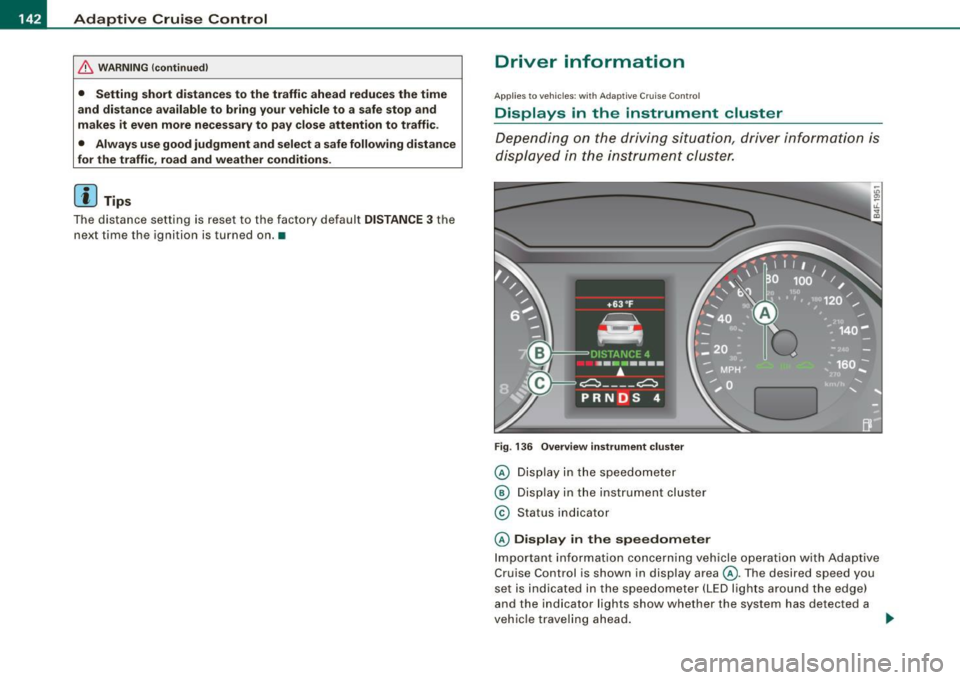
Depending on the driving situation, driver information is
displayed in the instrument cluster.
Fig. 136 Overview instrument cluster
© Display in the speedometer
® Display in the instrument cluster
© Status indicator
© Display in the speedometer
Important information concerning vehicle operation with Adaptive
Cruise Control is shown in display area@. The desired speed you
set is indicated in the speedometer (LED lights around the edge)
and the indicator lights show whether the system has detected a
vehicle traveling ahead. -.,
Page 145 of 390
_____________________________________________ A_ d_a ...: p_ t_ i_ v _e_ C_ ru_ is_ e_ C_ o_n _ t_ r_o _ l _ __.11111
@ Di spl ay in t he instrum ent clust er
In display area@ information from the navigation system and the
trip computer is disp layed in addition to information about Adap tive
Cruise Cont rol.
You can select among the different information by repeated brie f
taps on the
[RESET) button on the w indsh ie ld wiper lever
=> page 41, "Operation" .
© Statu s indi cator
The information in area@ is not displayed permanently . Informa
tion is displayed only if you set or change the speed setting, change
t he time interval, when messages are disp layed or if the Adaptive
Cruise Control is turned off for safety reasons. •
Applies to veh ic les: with Ad apt ive Cru ise Co nt rol
Display in the speedometer
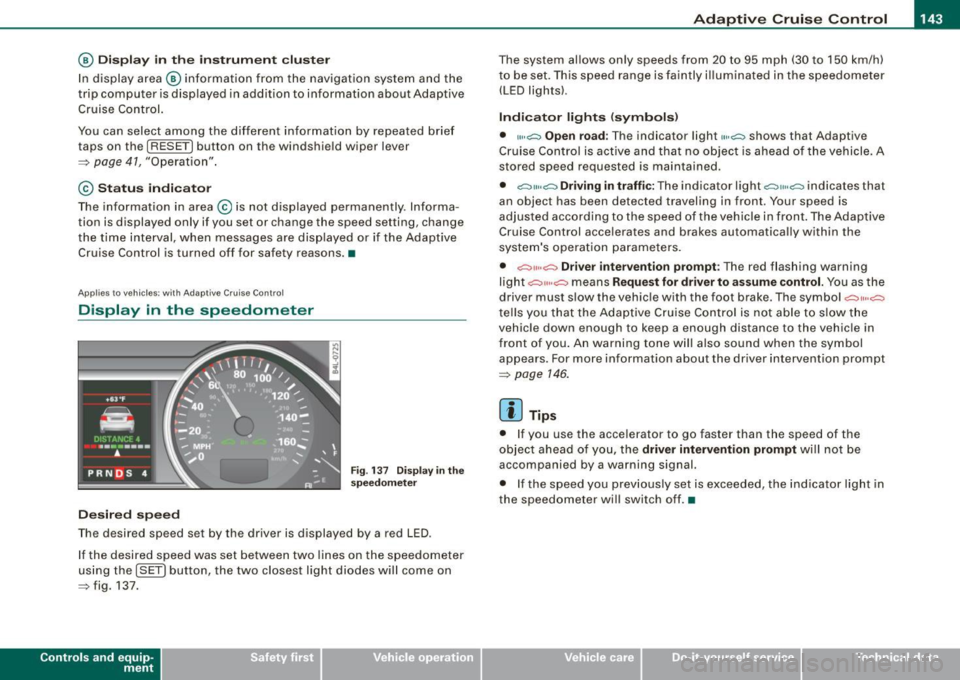
Desired speed
Fig . 1 37 Display in th e
s pe ed om eter
The desired speed set by the driver is displayed by a red LED .
I f the desired speed was set between two lines on the speedometer
us ing the
[ SET ) button, the two closest light diodes will come on
=> fig. 137.
Con tro ls and eq uip
ment
The system al lows only speeds from 20 to 95 mph (30 to 150 km/h)
t o be set. This speed range is faintly i lluminated in the speedome ter
(LED ligh ts) .
Ind icator light s (sy mbols )
• "'' ~ Open ro ad :
The indicator light""~ shows that Adaptive
Cruise Control is active and that no object is ahead o f the vehicle.
A
stored speed requested is maintained .
• ~'" '~ Driving in traffic: The indicator light~""~ indicates that
an object has been detected trav eling in front. Your speed is
adjusted according to the speed of the vehicle in fr ont . The Adap tive
Cruise Control acce lerates and brakes automatica lly within the
system's operation pa rameters.
• ~" "~ Driver inter vention p rompt : The red flashing warning
light
c::::, ,,, ,~ means Request for driver to a ssume control. Yo u as the
drive r must slow the vehic le with the foot brake . The symbol ~,, ..
~
tel ls you that the Adaptive Cruise Control is not able t o slow t he
vehicle down enough to keep a enough distance to the vehic le in
front of you . An warning tone will also sound when the symbol
appears. For more information about the driver intervention prompt
=> page 146.
[ i ] Tips
• I f you use the accelerator to go faster than the speed of the
object ahead of you, the
driver intervention prompt wi ll no t be
accompanied by a warning signal.
• I f the speed you prev iously set is exceeded, the ind icator light in
the speedometer will switch off. •
Vehicle care I I Technical data
Page 165 of 390
_________________________________________________ A_ u_ t_ o_ m_ a_t_ i_c _ t_ra _ n_s_ m __ is_s_ io_ n __ lllll
Autom ati c selec to r l eve r lock
The se lector lever is locked in the P and N positions when the igni
tion is turned on . To move the lever from these positions the driver
must depress the brake pedal. As a reminder to the driver, the
follow ing warning appears in the instrument cluster disp lay when
the selector is in
P and N :
When stationary app ly footbrake while selecting gear
A time delay e lement prevents the selector lever from locking when
it is moved through the
N position (going from R to Dl. The locking
e lement will lock the selector lever if the lever is left in N (Neutral)
for more than approximately 1 second, without the brake peda l
being pressed.
At speeds above about 3 mph (5 km/h) the Automatic Shift Lock is automatically deactivated in the
N posi tion .
Interl ock button
The lock button on the selector lever prevents the lever from being
accidentally shifted into certain posit ions. Pressing this button
deactivates the selector leve r lock. Dependi ng on the direction of
the shift, the se lector lever locks at different positions . The positions
are highligh ted in the illus trati on =>
page 162, fig . 160.
Igniti on k ey saf ety in te rlo ck
The key canno t be removed from the ignition un less the selector
lever is in the
P park position . When the ignition key is removed, the
selector lever wil l be l ocked in the
P posi tion .•
Ap plies to veh ic les : w ith mu ltitro nic ® Cont inuous ly Va riab le Transm iss io n (CVT )
Kick-down
The kick- down feature allo ws the ve hic le to generate
maximum acceler ati on .
When you press the acce lerator pedal beyond the resistance point
t hat is reached at ful l th rottle, the transmission wi ll select a lower
gear ratio based on vehic le speed and engine RPM. The engine RPM
Controls and equip
ment
wi ll be control led to produce maximum vehic le acceleration as long
as yo u conti nue to press the acce lerato r pedal beyond this resis
tance point .
& WARNING
Be careful when us ing the ki ck-down feature on slippery roads .
Rapid acceleration may cau se the vehicle to skid . •
Ap plies to veh icles : wi th mu ltitro nic® C ontinuou sly Vari ab le Tra nsm iss ion (C VT)
Dynamic shift program (DSP)
The multitronic® tr ansmissi on is elect ro nic ally
controlled.
The transmission se lects the appropriate gear ratio (upshifts and
downsh ifts) automatical ly based on preset driving programs.
The transmission wil l select one of the
economy programs when
yo u drive at a steady speed or a gra dually changing speeds without
heavy acceleration . T his gives best fuel efficiency, with early
upshifting and delayed downshif ting .
The transmission will au tomat ically select the
s porty shift programs
when you drive at higher speeds, or with heavy acce leration and
freque ntly changing speeds . Upshifts are delayed to make full use
of engine power. Downshifting takes place at higher engine speeds
t han in t he economy programs .
The se lection of the most suitable shift program is a continuous,
automatic process . The driver can also make the transmission
sw itch to a spor ty progra m by
quickly pressing down the gas peda l.
This causes the transmission to shift down into a lower gear ratio and makes qu ick acceleration possible (to pass another vehic le) You
do not need to press the gas peda l into the kickdown range . After
the trans missi on has upshifte d, the o riginal p rogram is selected
according to your driving style . _.,
I • •
Page 348 of 390
llft!I Fuses and bulbs ..._ __________________________________________ _
[ i J Tip s
You are wel l advised to keep a supply of spare fuses in your vehicle .
Fuses with the proper ampere ratings are availab le at your Audi
dea ler. •
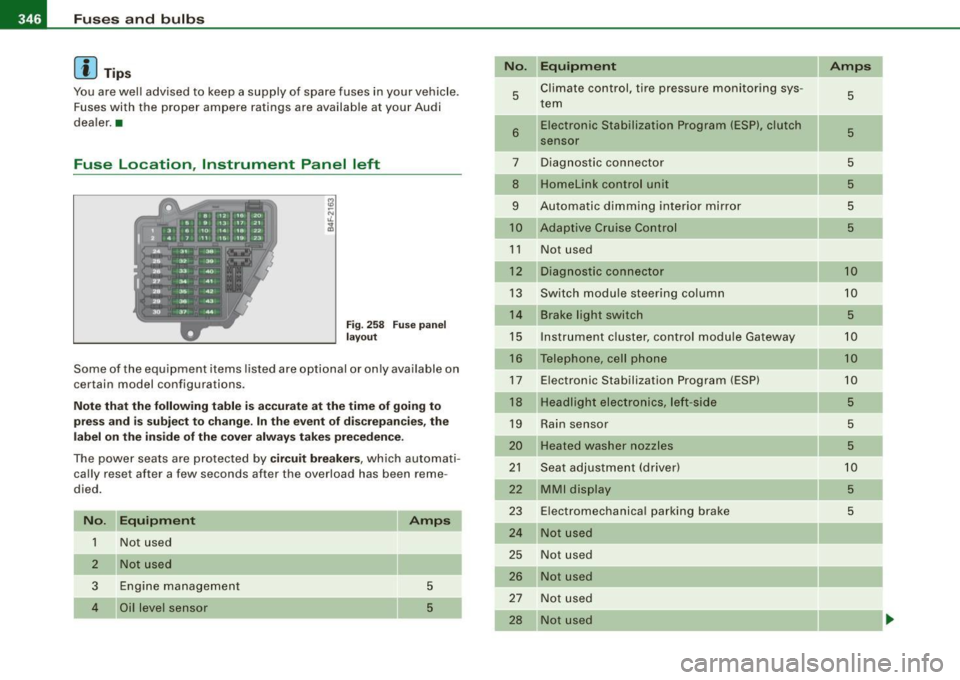
Fuse Location , Instrument Panel left
Fig . 258 Fuse pa nel
l ayo ut
Some of the equipment items listed are optional or only ava ilable on
certain model configurations .
Note th at t he fo llo wi ng t able i s acc urat e at th e time of goin g to
pr ess and is subject t o ch ang e. In th e eve nt of d iscrep ancie s, th e
labe l on th e in side of th e cover always ta kes prece de nce .
The power seats are protected by cir cuit br eaker s, which automati
cally reset after a few seconds after the overload has been reme
died.
N o. Equipm ent
1 Not used
2
3
4
Not used
Engine management
Oil level sensor Amps
5
5
No
.
5
6
..
7
8
9
10
1 1
12
13
14
15
16
17
18
19
20
21
22
23
24
25
26
27
28
Equipm ent
Climate cont rol , tire pressure monitoring sys
tem
Electronic Stabilization Program (ESP), clutch
sensor
Diagnostic connector
Homelink control unit
Automa tic dimming interior mirror
Adaptive Cruise Control
Not used
Diagnostic connector
Switch modu le steering column
Brake light switch
I nstrument c luster, control module Ga teway
Telephone, cell phone E lectronic Stabilization Program (ESP)
Headlight electronics, left -side
Rain sensor
Heated washer nozzles
Seat adjustment (driver)
MMI display
E lectromechanica l parking brake
Not used
Not used
Not used
N ot used
Not used Amps
5
5
5
5
5
5
10
10
5
10
10
10
5
5
5
10
5
5
-
Page 349 of 390
_______________________________________________ F_ u_ s...:....... e...;.s _ a_ n_d :.:.....:.: b:...: u:...: l:.:.: b :...:s:...___,J
No . Equipm ent
29 Not used
30 Not used
31 Back-up light swi
tch, transmission , engine
components
Intelligent power mo dule driver (footwell l ight
32 and front headlights , horn, wiper system, elec
tr ically adjusta ble steering wheel)
33 I
ntelligent power modu le driver
(lights left -side)
---,--
34
35
36
37
38
39 I
nte lligent power modu le driver
(lights right -side)
Not used
Headlight washer system
E lectronic Stabilization Program (ESP)
Wip er system
Door control module left -side
Horn
41 Heater fan
42 Control module electronic ignition lock/electri
cally adjustable steering wheel
43 Rear windsh iel d wiper (Avant)
4 4 Power window opener (left-side)
Amps
15
30
25
25
30 25
30
15
25
40
30
15
35
-
•
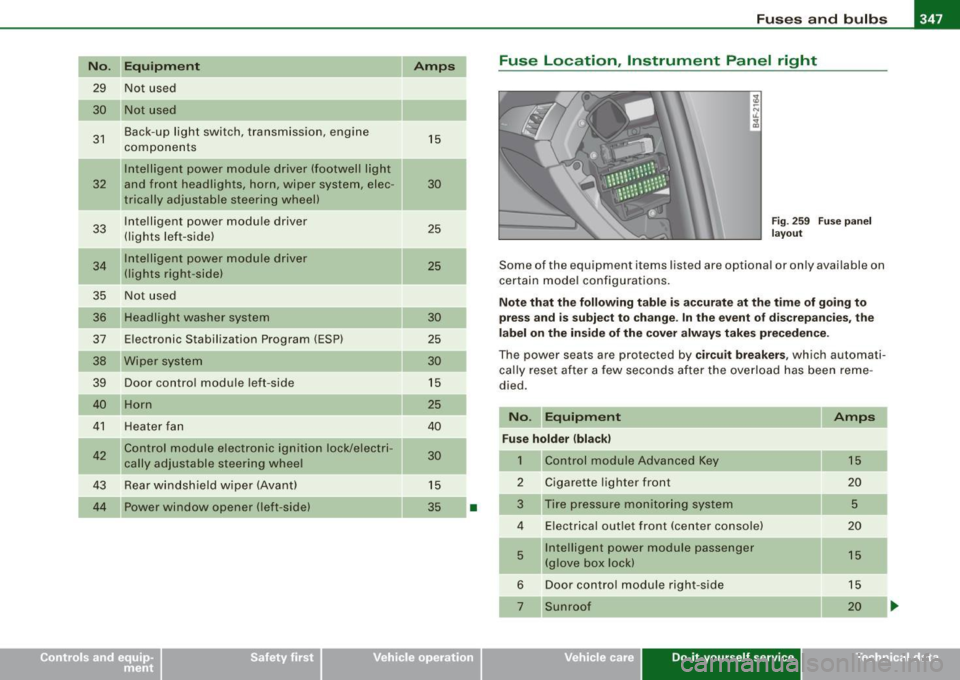
Fuse Location , Instrument Panel right
Fig . 2 59 F use p an el
la yo ut
Some of the equipm ent items lis ted are op tional or on ly available on
certain m ode l configu rations.
Note that the following table is ac curate at the time of g oing to
press and is subject t o change . In the ev ent of d iscrepan cies , th e
l a b el on t he in side of the cover alw ay s take s prec eden ce.
Th e power seats are pr otected by circuit breaker s, which automa ti
ca lly reset after a few seconds a fter the ove rload has been reme
died .
No. Equipment Amps
Fu se holder (bla ck )
1 Control module Advanced Key 15
2 Cigarette
lighter front
20
3 Tire pressure moni tor ing system
5
4 E lectrica l outlet front (center conso le) 20
5 Intellige
nt power module passenger
15
(glove box lock)
6 Door control module right -side 15
Sunroof 20
Vehicle care Do-it-yourself service irechnical data
Page 377 of 390
Alphab eti ca l ind ex -
--------------------------'-----
Plastic parts
Safety belts 286
289
Trim strips .... ... ....... ..... .. . 281
trim strips .... ........... ........ 282
Cleaning and protection .. .... ... ..... 278
Climate control ... .... .... .... .... .. 110
Synchronizing .. .... .... .... ..... 112
Warm and cold ........ .... .... ... 110
Climate controls Air distribution ........... .... .... 116
Air outlets ..... .. .... .... ...... .. 118
Air outlets (rear) ...... ....... .... . 118
Air recirculation .... .... .... .... .. 117
AUTO (standard setting) . .... .... .. 113
Basic settings . . . . . . . . . . . . . . . . . . . . 119
Center air vent ...... .... ....... .. 121
Controls ............. .... ....... 112
Defrosting/defogging . .... ... .... . 116
Description ... ..... .. .... ...... .. 110
ECON operation . . . . . . . . . . . . . . . . . . 120
Fan . .......... ...... .... ...... .. 116
Heated seats, front .... ... .... .... 114
Key coded setting ................ 110
Recirculation mode (automatic) ... .. 120
Recommended settings . .... .... .. 110
Residual heat .. ...... .... ...... .. 113
Setting the temperature . .... .... .. 114
SETUP ......... .... ... .. .... 119, 120
Solar blower fan/solar roof .. ...... . 119
Solar operation ... ........... .... 121
Switching on and off .. .... ...... .. 113
Synchronization .. .... ........... . 120
Using climate control economically . 119
Clock ......... ........ .... ... .... ... 14
Controls and equip
ment Safety first
Closing D
Power sun roof
. . . . . . . . . . . . . . . . . . . . 67
Coat hooks ... .... .... .... .... ... ... 109 Damping
Cold tire inflation pressure ....... .... 317
See Adaptive Air Suspension ...... . 182
Compass mirror .. ... ..... ... .... ... .. 85 Data ..
... .... .... .... ... .... .... ... 363
Consumer Information ......... .. 201, 365 Data recorder ..
...... .... ...... .... . 258
Contacting NH TSA .. .. .. ... ... .... .. 201 Date display
........... ........ ...... 14
Continuously Variable Transmission (CVT) Daytime
running lights ... .... .... .. 70, 71
See multitronic® .. .... .... .... ... 159 def
Convertible chi ld seats What does this mean when it appears in
How do I properly install a convertib le the trip odometer display? .
.... .... 15
child seat in my vehicle? ......... 240 Defective light bu
lb warning .... .... ... 27
Safety instructions ................ 240 Defrosting/defogging the windows .... 116
Convertible locking retractor Defrosting/defogging windows ..... ... 118
Activating .......... .... .... .... . 246
Determin ing correct load limit ........ . 322
Deactivating . .... .... ... ..... ... . 247
Digital clock ..... ..... ...... .... .... . 14
Using to secure a chi ld safety seat . 244,
246
Coolant system ..................... 303 Digital compass
... .. .... .... .... ..... 85
Digita l speedometer ........... ....... 27
Dimensions .... .... .... ........... . 362
Coo ling System
Expansion tank .. .... .... ... .. .... 304
Cornering light .... ... .... .... ... .. .. 73
Cruise control
Changing speed .................. 133
Presetting your speed ............. 133
Switching off .................... 133
Switching on .................... 132
Warning/indicator lights .. .... ...... 22
See also Adaptive Cruise Control . ... 135
Cruising range ......... ...... .... ... . 40
Cupholder . ... .. ...... ....... .... .. 103 Dipstick
Reading the dipstick properly .... .. 301
Distance control system
See Adaptive Cruise Control ........ 135
Doors Power child safety lock . ........ .... 59
Power side door closer ............. 56
Driver information system ...... .... . .. 25
Digita l speedometer . .. .. . ... .... .. 27
Driver information messages . .... ... 30
Open door or rear lid warning .... ... 27
Outside temperature display ...... .. 26
Sound system display .. .... .... .... 26
Vehicle operation Vehicle care Do-it-yourself service Technical data
Page 383 of 390
______________________________________________ A_ l_,_ p _h_ a_ b_e _t_ic _ a _ l _in _ d_e _ x __ _
Rain sensor defective .... .... ... ... ... 36
Reading lights
Front .... ............... ...... ... 75
Rear .... ... .. .... .... ........ ... . 76
Rear ashtray . . . . . . . . . . . . . . . . . . . . . . . . 105
Rear fog lights .... ..... ...... ...... .. 72
Rear lid Escape handle ............... .... 336
Opening and c losing .............. . 58
Valet key function .... ....... .... .. 51
Rear light
Defective . .... .... .... ............ 27
Rear seat bench .. .... ....... .... .... . 96
Rear View
See Rear-view camera .. ...... .... . 169
Rear view mirror Inside rear view mirror ............ . 82
Rear window blind Settings . .... .... ...... .... .... .. 78
Rear window defogger ...... .... .... . 117
Rear window shelf ................... 93
Rear-view camera .... ........... 169,171
Parking mode 1 . ...... ... .. .. .... 173
Parking mode 2 .................. 175
Red symbols ................... ..... 31
Refuel ling .......................... 293
Release lever for hood .... ... ..... ... 296
Remote control garage door opener
(Homelink®) .... ....... .... .... 186
Remote control key ...... .... ........ . 49
Unlocking and locking .. ........ ... 54
Remote rear lid release ...... ........ . 58
Controls and equip
ment Safety first
Repair manuals
.... . .. ... ... ........ 366
Repairs Airbag system ........ .... .... ... 226
Replacing Wheel rims ...................... 327
Replacing a fuse .... .......... ...... 345
Replacing light bulbs .... .... .... .... 349
Replacing tires and wheels ........... 325
Reporting safety defects ...... ... 201, 365
Reset button .. ... .. .... .... .... .... . 15
Residual heat ....................... 112
Retractor .......... .... .... .... .... 206
Rims Cast al loy ....................... 283
Replacing ........ .... .... .... ... 327
Roof rack ...... .... .... ...... ... .. . 101
Loading .. ... .... ... .. ...... ..... 102
Mounting locations ............... 102
Roof weight .. ...... ...... .... ... .. . 102
s
SA FE .... ...... ....... ...... ....... . 15
Safe driving habits ....... ... .... .... 192
Safety belt position ..... .. .... ....... 207
Safety belt height adjustment ...... 209
Safety belts worn by pregnant women ..
208
Safety belt tensioner Service and disposal . ....... ..... . 211
Safety belt tensioners ..... .... ....... 210
Safety belt warning light ...... ... . 21,202 Safety belts .
..... .. . ... .... .... .... 206
cleaning .. .... .... ... .... .... ... 289
Danger to passengers who do not wear a safety belt ...... .... .... .... ... 204
Fastening .... .... .... ........... 206
height adjustment . .... ... .... .... 209
Improperly worn .. .... ...... ..... 210
Not worn . .... ........ .... ...... . 204
Safety belt position ... .... .... .... 207
Safety instructions ..... .. . .... .. . . 205
Securing child safety seats ......... 244
Special considerations for pregnant
women .. ........ .... ... .... ... 208
Unfastening .......... ....... .... 209
Warning/indicator light ............ 202
Why YOU MUST wear them . ..... .. 202
Worn properly ................... 205
Safety comp liance sticker .. ...... .... 360
Safety equipment .... ... .... .... .... 192
Safety features for occupant restraint and
protection ... ... .... .... ....... . 192
Safety guidelines Seat adjustment ................... 87
Safety instructions Engine compartment ...... .... .... 297
for booster seats .. .... ... ... .... . 242
for side curtain airbags .... .... ... . 233
for using child safety seats ........ . 237
for using convertible child seats .... 240
for using infant seats ............. 239
for using safety belts ...... .... .... 205
Monitoring the Advanced Airbag System
225
Vehicle operation Vehicle care Do-it-yourself service Technical data