ABS AUDI S6 2008 Owner's Manual
[x] Cancel search | Manufacturer: AUDI, Model Year: 2008, Model line: S6, Model: AUDI S6 2008Pages: 390, PDF Size: 88.42 MB
Page 265 of 390
& WARNING
Although the ABS is very effective, always remember that braking
capability is limited by tire traction. Always adjust your driving
speed according to the road and traffic conditions. Do not let the
extra safety afforded by the ABS tempt you into taking extra risks.
The ABS cannot overcome the laws of physics.
[ i] Tips
• If ABS is not functioning properly, a warning light will come on .
See
=> page 22.
• If a fault occurs in the ABS , the EDL is also not functioning. This
is indicated by the ABS warning light. •
Brake assistant
The brake assistant is designed to achieve the optimum
braking effect.
The brake assistant helps to increase the effective braking power
and thus to achieve a shorter stopping distance . If the driver
presses the brake pedal very quickly, the brake assistant automati
cally boosts the braking force to the maximum level, up to the point
where the anti-lock brake function (ABS) intervenes to stop the
wheels from locking. You should then keep the brake pedal pressed
until the vehicle has braked to the required speed. The brake assis
tant switches itself off as soon as you release the brake pedal.
The brake assistant will not be operative if there is a malfunction in
the ABS.
In vehicles with Adaptive Cruise Control* (ACC), the distance to the
vehicle ahead is continuously calculated using a radar sensor,
within the limits of the system=>
page 135. If the radar system
detects a short distance to the vehicle ahead, the brake system
exerts a small braking force to reduce the brake response time in
Controls and equip
ment Safety first Vehicle operation
Intelligent technology
case of braking. In this way, the brake application can be quickened
and
the stopping distance reduced.
& WARNING
Please remember that the accident risk always increases if you
drive too fast, especially in corners or on a slippery road, or if you
follow the vehicle ahead of you too closely. Increased risk of an accident cannot be compensated for even by the brake assistant,
so always maintain a safe speed.
n
Servotronic® -advanced power
steering system
The power steering systems uses the power of the
running engine to allow precise steering with little effort.
The advanced Servotronic ® power steering system senses the road
speed and electronically adjusts power assistance to provide
comfortable and safe steering response exactly matched to the
vehicle speed.
Power steering will not work if the engine is off. As a result, the
steering wheel will be hard to turn.
The power steering fluid level is checked during the scheduled
maintenance services.
0 Note
If there is an electronic malfunction, servotronic will still function
like a conventional power steering system, providing a constant
steering support force that is no longer proportionate to the vehicle
speed. This is most noticeable when turning the steering wheel at
low speeds (for example when parking), -more effort will be
required than usual.
II-
Vehicle care Do-it-yourself service Technical data
Page 274 of 390
-Tr
aile r t ow ing ---=--------------
Trailer towing
Driving with a trailer
General information
Your Audi was designed primarily for passenger transpor
tation.
If you plan to tow a trailer, please remember that the additional load
wi ll affect durability, economy and performance.
Trai ler towing not on ly p laces more stress on the vehicle, it a lso ca lls
for more concentration from the driver.
For this reason, always fol low the operating and driving instructions
provided and use common sense.
0 Note
If you are going to tow a trai ler, you must activate the trailer opera
tion mode =>
page 184, "Towing a trailer".
Technical requirements
Tra iler hitch
Use a weight-carrying hitch conforming to the gross trailer weight .
The hitch must be suitable for your vehicle and trailer and must be
mounted secure ly on the ve hicle's chass is at a
technically sound
location. Use only a trailer hitch with a removable ball mount.
Always check with the trai ler hitch manufacturer to make sure that
you are using the correct hitch .
Do not use a bumper hit ch.
The hitch must be installed in such a way tha t it does not interfere
with the impact-absorbing bumper system. No modifications should be made to the vehic le exhaust and brake systems. From time to time, check that all hitch mounting bolts remain securely
fastened.
When you are no
t towing a trailer, remove the traile r hitch ball
mount. This prevents the hitch from causing damage shou ld your
vehic le be struck from behind=>& .
Traile r br akes
If your trailer is equipped with a braking system, check to be sure
that it conforms to al l regu lations.
The trai ler hydraulic brake system must no t be direct ly connected to
the vehicle's hydraulic brake system.
Safet y chains
Always use safety chains between your vehicle and the trailer.
Trailer light s
Trailer lights must meet a ll regulations. Be sure to check with your
Audi dealer for correc t wiring, sw itches and relays .
Mirrors
If you are unable to see the traf fic behind you using the regu lar
outside mirrors, then you
must install extended mirrors. It is impor
tant that you
always have c lear vision to the rear.
& WARNING
After rem oving the tr aile r hitch , do not store it in your vehi cle. In
ca se of sudde n braking , the hit ch co uld fl y for ward and injure you
or your p asseng ers. a
Page 277 of 390
-Wit h chocks i n place, slowly release the brakes until the
wheel chocks absorb the load .
- Turn the wheels towards the curb.
- Apply the parking brake.
- Move the selector lever to
P.
Wh en r est arting aft er parking :
-Apply the foot brake.
- Start the engine.
- Move the selector lever to
D .
- Release the parking brake and slowly pull out and away
f rom the whee l chocks.
- Stop and have someone retrieve the wheel chocks .
[ i ) Tip s
If you move the selector lever of the automatic transmission to P
befor e applying th e parking brake and before blocking th e wheels ,
you may have to use more force later to move the lever out of the
P
position .
Controls and equip ment Safety first Vehicle operation
Tr
aile r t owing
Vehicle care Do-it-yourself service Technical data
Page 287 of 390
_____________________________________________ C_ l_ e _a_ n_ in_ g_a _ n_d_ p_ r_ o_ t _e_ c_t _io _ n __ _
•
Care of interior
MMI display
-Clean th e MMI display with a soft c lean cloth and an LCD
cl eane r.
The MM I disp lay can be cleaned with a professional ly available "LCD
cleaner". The cloth should be s lightly dampened with the c leaning
fluid to clean the display.
0 Note
T o avoid scra tching the MMI display, you should never c lean it dry .•
MMI terminal
- First clean the MMI terminal with a brush to remove dust
from the housing.
- T hen wipe the MMI terminal wit h a clea n, soft, s lig htly
damp cloth .
The MMI terminal shou ld be c leaned with a brush first so that no
dirt is trapped between the buttons and the housing. We recom
mend giving the MM I terminal a final wipe with a c loth moistened
with water and dish washing dete rgent.
0 Note
To prevent damage, make sure that no flu id ever gets into the M MI
terminal. •
Aluminum trim
Use only neutral-pH products to remove spots and deposits from
a lum inum surfaces . C hro me care products an d alka line cleaners
wi ll attack aluminum surfaces and can damage them over time.
& WARNING
Always read and heed all WARNINGS and other information
~ page 278 .•
Fabrics and fabric coverings
Fabrics and fabric coverings (e.g . seats, door trim panels, etc.l
shou ld be c leaned at regular intervals with a vacuum cleaner . This
re moves surface dirt partic les which could become embedded in
the fabric through use. Steam cleaners shou ld not be used, because
t he steam tends to push the d irt deeper into the fabric and lock it
there.
Normal cl eaning
Genera lly, we recommend using a soft sponge or a lint -free
microf iber c loth to the clean fabric . Brushes should on ly be used for
carpets and floor mats, since other fabric surfaces could be harmed
by brushes.
Norma l surface stains can be cleaned using a commercially avail
able foam cleaner. Spread the foam on the surface of the fabric with
a soft sponge and work it in gent ly. Do not saturate the fabric . Then
pat the foam dry using absorbent, d ry cloths (e.g. microfiber cloth)
and vacuum it a fter it has dried completely .
Cleaning stains
Stains caused by beverages (e.g. coffee, fruit juice, etc.) can be
treated with a mild detergent so lution . Apply the detergent so lution
with a sponge. In the case of stubborn stains, a detergent paste can be applied direct ly to the stain and worked into the fabric. After -.,.
Vehicle care I t •
Page 288 of 390
___ C_ le_ a _ n_i_n ~g _ a_ n_ d __ p_r _o _t _e _c_ t_ i_o _n ___________________________________________ _
wards, use copious amounts of clean water to remove the
rema ining detergen t. App ly the wa ter w ith a damp cloth or sponge
and pat the fabric dry with an absorbent, dry c loth.
Stains from choco late or makeup should have detergent paste (e.g .
ox -ga ll soap) rubbed into them. A fterwards, remove the soap w it h
water (damp sponge).
A lcoh ol can be us ed t o t rea t sta ins fro m grease, oil, lipstick o r a ba ll
point pen. Melted grease or dye must be patted off using absorbent
ma te ri al. It may be neces sary to retreat the a reas w ith de tergent
paste and water .
In the case of genera l soiling of the upho lstery and cover material,
we recommend h ir ing a specialis t that has the equ ip m ent to c lea n
the seat covers and other fabric surfaces by shampooing and spray
e xt rac tion.
& WARNING
Always read and heed all WARNINGS and the information
~ page 278 .
[ i] Tips
Open Ve lcro fasteners on your clothing can damage the seat cover.
Please make sure that Velcro fas tene rs a re c losed .•
Plastic parts and instrument panel
A lways use a clean cloth mo iste ned in cl ear wa ter to clean these
areas . For persistent dirt use an Audi approved
solvent-free plastic
cleaner/ protectant.
in. WARNING
Solvents can change the properties of some plastics and make it
harder for the airbag to deploy.
& WARNING (continued )
• Never clean the instrument panel or the surface of airbag
modules with cleaning products that contain solvents .
• Products containing solvents will make the surface of this part
porou s.
• Serious injuries can result if plastic parts come loose when the
airbag is deployed .
• Alway s read and heed all WARNINGS and other information
~ page 278.
0 Note
Cleaning agents containing so lvents wil l attack the material and can
c hange t he way it behave s.•
App lies to vehicles: with natu ra l l eathe r
Natural leather
Aud i mak es gr eat effo rts to main ta in the p roperties ,
n atu ra l look an d fee l of interior le athe r.
General
We offe r ma ny diff erent typ es of leather on our v ehicles . M ost ar e
different types of nappa leather, which has a smooth surface and
comes in va rious co lors .
T he intens ity o f the color de termi nes t he visua l character ist ics a nd
appearance. If the surface of the leather has a typica l natural look,
th en the leathe r is a nappa leather t hat has bee n l eft in a re lat ive ly
natural condition. This leather offers particu lar ly good comfort and
b reathes well. Fi ne vei ns, closed g ra ins, ins ect bit es, ski n folds, a nd
subt le variations in color remain visib le. These character istics
dem onstrate tha t the mate rial is natural.
Natura l nappa leather is not covered by a color finis h. It is therefo re
more sens itive to so iling and wea r, which is something you need to ...
Page 290 of 390
___ C_ le_ a _ n_i_n ~g _ a_ n_ d __ p_r _o _t _e _c_ t_ i_o _n ___________________________________________ _
Cleaning spots
- Remove fresh water-based spots (such as coffee, tea,
juices, blood) with an absorbent cloth or paper towel.
- Remove fresh
grease or oil-based spots (such as butter,
mayonnaise, chocolate) with an absorbent cloth or paper
towel, or use the cleaner from the leather care kit if the
spot has not yet penetrated into the surface of the
leather.
- Use an oil/grease dissolving spray, if
oil/grease spots
have dried on.
- Remove specific kinds of spots (ballpoint pen, felt
marker, fingernail polish, water-based paint, shoe polish,
etc.) with a spot remover specifically formulated for leather.
Leather care
- Every half year use an approved leather care product
(available from your Audi dealer) to care for the leather.
- Apply the product very sparingly.
- Wipe it off with a damp cloth.
If you have any questions about cleaning and caring for the leather
in your vehicle, it is best to contact your authorized Audi dealer, who
will be glad to help you and tell you about our full range of leather
care products, such as:
• Leather cleaning and care kit
• Creams to care for colored leather
• Spot removers for ballpoint pens, shoe polish, etc .
• Oil/grease dissolving spray
• New and upcoming products.
& WARNING
Always read and heed all WARNINGS and other information
=> page 278.
0 Note
• Never use chemical solvents (e.g. lighter fluid, turpentine),
waxes, shoe polish or similar products on the leather surfaces in
your Audi.
• To avoid damage, have stubborn stains removed by a commer
cial cleaning specialist. •
Applies to ve hicle s : with A lc a nt ara up ho lst ery
Cleaning Alcantara ® (synthetic suede)
Removing dust and dirt
- Moisten a cloth, squeeze out excess water and wipe down
the seat surfaces.
Removing stains
- Moisten a cloth with lukewarm water or with diluted
ethyl (rubbing) alcohol.
- Dab at the stain. Start at the outside and work inwards.
- Once the stain is no longer visible, use a soft dry cloth or
tissue to soak up the moisture.
Do not use leather cleaning products on Alcantara .
You may use a suitable shampoo for removing dust and dirt.
Dust and grit in the pores and seams can scratch and damage the
surface . If the car is left standing in the sun for long periods , the
leather should be protected against direct sunlight to prevent it .,.
Page 309 of 390
___________________________________________ C_ h_e _c_ k_ i_n _g _ a_n _d_ f_il _li _n _g __ lll
•
T he fluid level may drop slightly after some time due to the auto
m atic adjustment of the brake pads. This is not cause for alarm .
If the brake fluid level fal ls
considerably below the "MIN" mark , the
brake warning/indicator light (U.S. models :
BRAKE, Canadian models:
{(j))) will come on~ page 23 and ~ page 32. Do not continue to
operate the vehic le. The complete brake system should be thor
oughly checked by an authorized Audi dealer or other qua lified
facili ty and the cause corrected . If the brake fluid level is too low, the
brake warning/indicator l ight will illuminate. Contact an au thorized
Audi dea ler
immediate ly .•
Changing brake fluid
Have the brake fl uid changed by an experienced techni
ci an.
Brake fluid absorbs moisture from the air. If the water content in the
brake fluid is too h igh, corrosion in the brake system may result
after a period of time. The boiling point of the brake fluid will also
decrease considerab ly and decrease braking performance .
Therefore , the brake fluid must be changed
e v ery tw o year s. Always
use new brake fluid which conforms to Federal Motor Vehic le Stan
dard "FMVSS 116 DOT 4".
T he brake fluid res ervoir can b e difficult to reach, th erefore, we
recommend that you have the brake fluid changed by your autho
rized
Audi de aler . Your dealer has the correct tools, the right brake
fl uid and the know -how to do t his fo r you .
& WARNING
• Brake fluid is poi sonous . It mu st be stored onl y in the clo sed
o riginal cont ainer out of the rea ch of children!
• Brake failure c an re sult from old or inappropri ate br ake flu id .
Obs erv e the se pre caution s:
& WAR N IN G (c ontinued )
-Use only brake fluid that meet s SAE specification J 1703 and
c onfo rm s to Feder al Moto r Vehicle St andard 116 . Al wa ys check
w ith your authori zed Audi dealer to make sure you are u sin g
the corre ct b rake flu id. The cor rect type of br ake fluid is als o
indic ated on the brake fl uid reservoir .
- The brake fluid mus t be ne w. Heav y use of th e brake s can
ca use a vapor lock if the bra ke fluid i s left in the sy stem too
long . Thi s can seriou sly affect the efficiency of the brake s as
w ell as your s afety . This could r esult in an a ccident .
0 Note
Brake fluid will damage the paint of your vehicle .
the special too ls required and the necessary expertise, we recom
mend that you have the brake fluid changed by your authori zed Audi
dea ler .•
Battery
General information
Und er n ormal operating conditions, the battery in your Audi does
not need any maintenance. With
high outside temperatures or long
daily drives we recommend that you have the electrolyte level
checked by a se rvice facility . The e lectrolyte level should a lso be
checked each time the battery is charged~
page 310 .
Have the batte ry checked when you take your vehic le in for service.
You are well advised to replace a battery that is o lder than 5 years . _,,
Vehicle care I t •
Page 310 of 390
lffl __ C _h_ e_ c_k _in --== g'-- a_n _d_ f_il _li _n ..:::g:::..- ___________________________________________ _
With certain types of airbag deployment, the battery is discon
nected from the vehicle electrical system for safety reasons=>&. in
"Repair, care and disposal of the airbags" on
page 226.
Di sc o nnect ing the b attery t ermin als
Some vehic le functions (power window regulators, for example) are
lost if the battery terminals are disconnected. These func tions have
to be relearned after the battery terminals are connected again . To
prevent this, the battery should only be disconnected from the
vehic le electrical system when absolute ly necessary for repairs.
V ehicle s not driven for long period s
If you do not drive your vehicle over a period of several days or
weeks, electrical components are gradually cut back or switched off .
This reduces energy consumption and maintains starting capability
over a longer period =>
page 265.
Take into consideration that when you un lock your vehicle, some
convenience functions, such as the master key remote function or
power seat adjustment, may not be available. The convenience
functions will be availab le again when you turn on the ignition and
start the engine .
Winter oper ation
During the w inter months, battery capacity tends to decrease as
temperatures drop. This is because more power is also consumed
while s tarti ng, an d the headlights, rear wi ndow defogger, etc ., are
used more often.
Avoid unnecessary p ow er consumption, particularly in ci ty traffic or
when trave ling only short distances. Let your authorized Audi dea ler
check the capacity of the vehicle battery before winter sets in
=> page 310. A we ll charged battery wil l not on ly prevent starting
problems when the weather is cold, but wi ll also last longer.
[ i J Tips
If your vehicle is left standing for severa l weeks at extremely low
t empera tures, the vehicle ba ttery should be r emoved and stored where it will not freeze
. This will prevent it from being damaged and
having to be replaced .•
Working on the battery
B e espec ially caref ul when working on or near the battery.
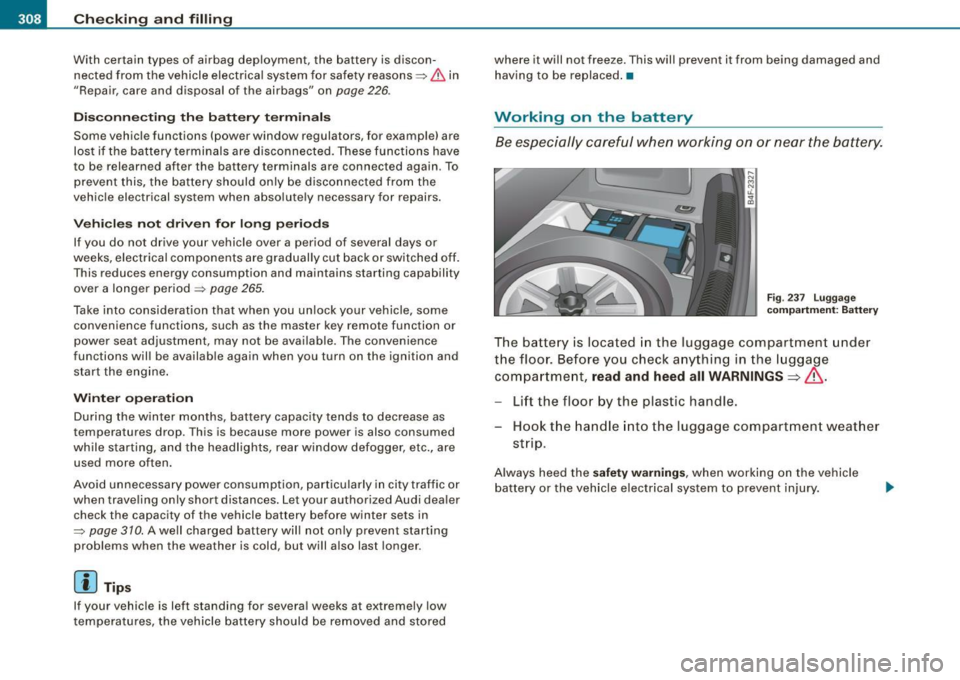
Fi g. 23 7 Lugg age
compartm ent : B attery
The battery is located in the luggage compartment under
the floor. Before you check a nything in the l uggage
com partme nt,
read and heed all WARNINGS=>& .
-Lift the floor by the plastic handle.
Hook t he hand le in to the luggage compartment weather
st rip.
Always heed the safety warnings , when working on the vehicle
ba ttery or the vehicle e lectrical system to prevent injury.
Page 375 of 390
Alphab eti ca l ind ex -
-------------=----
Anti-loc k brake syst em
H ow the ABS system works ....... . 262
War ning/i ndicato r lights ... ....... .. 22
Anti -Slip Regulation System (ASR)
How the system works ............ 260
Anti-theft systems Anti-theft alarm system . .... .... ... 61
Electronic immobilizer ... .. .... .... 51
Ti lt sensors . ... .. .... ..... .. ... ... 62
Ashtray Front . ...... .... .... ...... .... .. 104
Rear .... ... .. .... .... ... .... .... 105
ASR How the Anti -Slip Regu lation System
works . ... .. .... .... ... .... .... 260
As terisk
What does it mean when something is marked with an asterisk? .. ... ...... 6
Audi Parking System Acoustic parking sys tem tips ...... . 179
Adjusting the chimes -option 1 ... .. 178
Adjusting the chimes -option 2 ... .. 179
General Information ... .. .... .... . 167
Notes on distance information ..... 177
P arking next to obstacles .......... 176
rear . .............. .......... ... 167
rear, with rear-view camera ........ 169
Rear -view camera -parking mode 1 173
Rear -view camera -parking mode 2 . 175
Rear -view camera (Rear View) .. .... 17 1
Rear -view camera coverage area . ... 173
Rear-view camera tips .. ...... .... . 180
Specia l parking situations .... .... . 176
Controls and equip
ment Safety first
Audi Parking System
(rear)
Adjusting the chimes ... .. .... .... 168
Audi Service Repair Manua ls and Li terature
366
AUTO mode AC climate contro ls ............... 113
Au to Safety Hotline ..... .... .... ..... 201
Auto -Check Control .. .... ...... ....... 30
Automatic belt retractor ... .. .... .... . 206
Automatic car wash
See Was hing .. ... ..... ....... .... 279
Automatic Shift Lock (ASU ........ 155, 162
Automatic transmission
6 -speed automatic transmission .. .. 153
Automatic Shift Lock (ASU ... .. 1 55, 162
Driving .......................... 153
Dynamic shift program ............ 156
Emergency release for selector lever 159
Emergency release for selector lever
(mult itronic®) ...... .... .... .... 1 66
Fail -safe mode . ...... .... .... .... 158
I gnition key safety lock ............ 125
Kick -down . ....... .... .... .... ... 156
Manual shift program ............. 157
multitronic® ................... .. 159
Selector lever ................ 154, 161
Shift buttons ................ 158, 165
Steering wheel with tiptron ic® . 158, 165
Average speed ....................... 40
Avo id damaging the vehicle ...... .... . 269
B
Battery .. ........ ....... ........ ... 307
Battery location inside the lu ggage
compartment . ...... ... .... .... . 308
Charging .. .... ....... ..... .... .. 3 10
Important warnings when working on the
battery ...... .... ... .... ...... . 308
J ump starting ..... .... ... .... .... 35 1
Low ...... ... .... .... ...... ... .. 265
Replacing the battery ..... .... ... . 311
State of charge . .... ...... .... ... . 265
Voltage .. .... .................... 37
Winter operation ......... .... .... 307
Working on the battery ........ .... 308
Before driving ... .... .... ..... .. .... 193
Blended gasoline ...... ... .... .... ... 29 1
Body cav ity sealing .......... ........ 284
Booster seats .. ... .. .... .... .... ... . 242
How do I properly insta ll a b ooster sea t in
my vehicle? ....... ........ .... . 24 2
Safety instructions ................ 242
Brake assistant ....... ... .... .... ... 263
Brake booster .. ...... .... ... .... .... 262
Brake fluid Changing the brake fluid .......... . 307
Checking the brake fluid leve l ...... 306
Reservoir .. .... .... ............. . 306
What is the correct brake fluid leve l? 306
What should I do i f the brake f luid warning
light comes on? .. ....... ........ 306
Brake light Defective ... .. .... .... .... ...... .. 27
Vehicle operation Vehicle care Do-it-yourself service Technical data
Page 386 of 390
___ A_l.:,. p _h_ a_ b_e _t _ic _ a_l _in _ d_e _x ____________________________________________ _
Unlocking
Power locking switch . . . . . . . . . . . . . . 56
Rear lid/trunk lid .. .... .... .... .... 58
Remote control key . . . . . . . . . . . . . . . . 54
Using the key .. .... ....... ........ 55
V
Valet key function
Activating and deactivating .. ..... .. 51
Vanity mirror ...... .. .......... ...... 76
Vehic le electrical system . . . . . . . . . . . . . . 19
Vehicle Identification Number (VIN) .... 360
Vehicle jack ...... .... .......... 336, 34 1
Vehic le literature ..................... 5
Vehicle-care products . . . . . . . . . . . . . . . 278
w
Warning lights . . . . . . . . . . . . . . . . . . . . . . 17
Warning/indicator lights ... .. .... .... . 13
Adaptive Air Suspension . ........ .. 21
Adaptive Cruise Control ... .... .... 143
Airbag system .................... 20
Anti -lock brake system (ABS) . . . . . . . . 22
Brake system . . . . . . . . . . . . . . . . . . . . . 23
Cruise control . . . . . . . . . . . . . . . . . . . . 22
Electromechanical parking brake .... 23
Electronic power control ........... 19
Electronic stabilization program (ESP) 19
Generator . . . . . . . . . . . . . . . . . . . . . . . . 19
H igh beam . . . . . . . . . . . . . . . . . . . . . . . 22 T
ire pressure monitoring system .. .. 20
Turn signals ... ...... ...... ....... 20
Warranty coverages ...... .... .... ... 365
Washer reservoir .. ..... .. ...... ..... 312
Washing .. ........ ........... .... .. 278
Automatic car wash .............. 279
by hand ........................ 279
General information .............. 278
with a power washer ... .... .... ... 280
Waxing ... ........ ... .... .... .... .. 281
Wear indicato r .... .... ... .... .... ... 323
Weatherstrips ..................... .
Weights ....... .. .... ...... ... .. .. . 283
361
What happens if you wear your safety belt too
loose? .. ... .. .... .... .... ...... 207
What happens to unbelted occupants? . 204
What impairs driving safety? ......... . 193
What should I do after changing a wheel?
320
What should I do after replacing wheels?
320
Wheel bolts Torqu e ...... ....... ..... ..... .. 331
Wheels . ......... ... ... .. .... ...... 313
Cas t alloy ... ... ... .... .... .... .. 283
Checking tire pressure ...... ...... 319
Cold tire inflation pressure ...... .. 317
General notes .. ... .... .... .... .. 313
Glossary of tire and loading terminology.
314
New tir es and wheels . .... ... .. ... 325
Tires and vehicle load limits .. ..... 321
Malfunction Indicator Lamp (MIU . ... 20
Safety belt ..... .. .... .... ...... ..
21 When must a safety belt be
replaced? .. 205 When
must the airbag system be inspected?
223
When should I adjust the tire pressures?
320
When should I check the tire pressures? 320
Where can I find the tire pressures for my
car? ... .. .... .... .... ... .... ... 319
Why safety belts? ...... ...... ... 202, 203
Windows Cleaning .... ...... .... ..... .. ... 282
Convenience close/open feature ... .. 65
Defogging .... ... .... .... .... ... 116
Defrosting . . . . . . . . . . . . . . . . . . . . . . 116
Rapid defrosting/defogging ........ 118
Windshield washer fluid Low level .......... .... ... .... .... 36
Windshield wipers Faulty ............ ... .... .... .... 38
Inte rmittent wiping ......... ....... 78
One -tap wiping .. ...... ...... .... . 78
Rain sensor . ...... .... ... .... .... 78
Service position . ...... .... ........ 80
Washer reservoir ....... ..... .... . 312
Winter operation Battery . . . . . . . . . . . . . . . . . . . . . . . . . 307
Coolant system ............... ... 303
Steering wheel heating ...... .... .. 115
Tir es ...... .... ....... .... ...... 264
Windows ...... .... .... ..... .. ... 282
Winter tires ... .... ....... .... .... .. 329
All -wheel drive ... .. .... .... .... .. 329