horn AUDI S6 2008 Owners Manual
[x] Cancel search | Manufacturer: AUDI, Model Year: 2008, Model line: S6, Model: AUDI S6 2008Pages: 390, PDF Size: 88.42 MB
Page 13 of 390
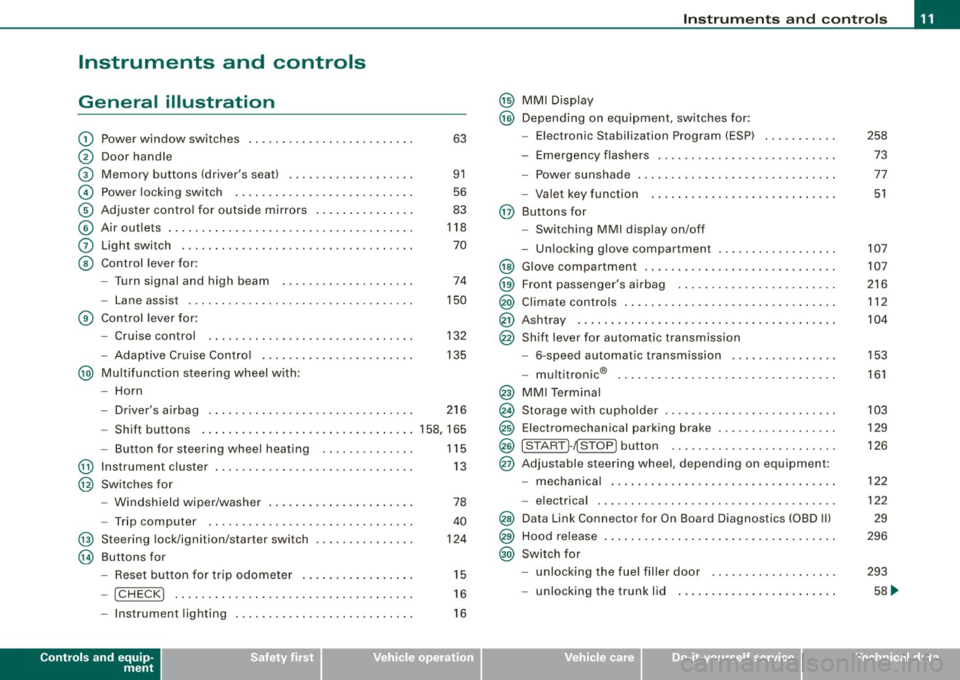
Instruments and controls
General illustration
G)
0
©
©
©
©
0
©
Power window switches .. ...... .... ... .. ...... . .
Door handle
Memory buttons (driver's seat)
Power locking switch ................ .......... .
Adjuster control for outside mirrors .. .... .. .. ... . .
Air outlets ..... .. .. . ... .... .... .. . ..... ... .... .
Light switch ...... ....... .. .... .... .... .... ... .
Control lever for :
- Turn signal and high b eam .......... ...... ... .
- Lane assist .... .... ... .... .... .... ... .... ... .
G) Control lever for:
-Cruise control .... ... .. .. ... ... .. .... .... ... .
- Adaptive Cruise Contro l .. .. .... .... .......... .
@ Multifunction steering wheel with:
- Horn 63
91
56
83
118
70
74
150
132
135
- Driver's airbag . . . . . . . . . . . . . . . . . . . . . . . . . . . . . . . 216
- Shift buttons ..................... ... .... .... 158, 165
- Button for steering wheel hea ting . . . . . . . . . . . . . . 115
@ Instrument cluster . . . . . . . . . . . . . . . . . . . . . . . . . . . . . . 13
@ Switches for
@
@
-Windshield wiper /washer ....... .... .... ... ... .
- Trip computer ..... .. .... .... ...... ....... .. .
St eering lock/ignition /starter sw itch
Buttons for
Reset button for trip odometer ... .. .... .... ... .
- !CHECK] .. ... ... ..... ...... ........ ... .. ... .
78
40
124
15
16
- Instrument lighting . . . . . . . . . . . . . . . . . . . . . . . . . . . 16
Controls and equip
ment
Instruments and controls
@ MMI Display
@ Depending on equipment , switches for:
- Elect ronic Stabilization Program (ESP)
- Emergency flashers .. ..... .... ... ... ... .... .. .
- Power sunshade ... ..... .... .... ... .... .. . ... .
- Valet key function . .... .... ..... ..... ... .. ... .
@ Buttons for
- Switching MMI display on/off
- Unlocking glove compartmen t
@ Glove compartment .. .... ... ... .. ..... ..... ... . .
@ Front passenger's a irbag ...... .... .... ... ..... . .
@ Climate controls .... . ... .... ... .. .... .... ...... .
@ Ashtray ... .. .... ................... .... ...... .
@ Shift lever for automatic transmission
- 6-speed automatic transmission .... .... ..... .. .
I .
.
® -mu t1trornc ... .. ... .... ... .... .... ... .. .. .. .
@ MMI Terminal
@ Storage with cupholder ... ..... .. .... .... ... .. .. .
@ Elec tromechanical parking brake ......... .. ...... .
@ ISTART ]-~STOP ] button .. ... .... .... .... .... ... .
@ Adjustable steering wheel, depending on equipment:
- mechanical .. .... .. .... ... .... .... .... .. .. .. .
- electrica l ... ...... ... .... ...... ...... .... ... .
@ Data Link Connector for On Board Diagnostics (OBD II)
@ Hood release ... .. .... ... .. .. .... .... .... .. . ... .
@ Switch for
- unlocking the fuel filler door ... ..... ... .... ... .
- unlocking the trunk lid ....... ...... .......... .
I • •
258
73
77
51
107
107
216
112
104
153
161
103
129
126
122
122
29
296
293
58 ...
Page 55 of 390
Unlocking the vehicle with the remote control wi ll only unlock the
rear lid, t o
open it, the lid handle needs to be pressed .
Locking the vehi cle
You can lock the vehicle from outside e ither by using the re mote
control
or by inserting and turning the key in the drivers 's door lock.
When you
l oc k th e vehicle:
• All doors and the rear lid are locked .
• All turn signal lights w ill flash once when the car i s locked.
• T he anti -theft alarm system is activated . The horn of the anti
t hef t alarm syste m wi ll sound and the an ti-the ft alarm sys tem readi
ness light, located in the upper part of the driver's door panel, wil l
sta rt to bl ink.
• T he vehicle interior lights turn off .
Unlocking and lo cking with Ad van ced Key *
On vehicles which a re equipped with the Advan ced Key * authoriza
tion system, the doors are unlocked
wi thout a key by means o f a
proximity sensor in the door hand le. The doors are simi lar ly locked
without a key usi ng t he locking button . Each door has a prox imity
sensor and a locking button .
Power side door closer*
The vehic le is equipped with a power side door closer. When c losing
a door, you simply need to gently push on the doo r. The door wil l
then automatica lly c lose by itself~
page 56.
Automatic lo cking
The automatic locking feature locks all the vehicle doors and the
rear lid when you drive fas ter than 9 mph (15 km/h) . This funct ion
can be turned on and off in the
MMI Central lo cking Menu
~ p age 55.
You can unlock the vehicle from the inside by :
• removing the key from the ignition switch (the vehicle will auto
matica lly un lock itself) or
Controls and equip
ment
Opening and clo sing
• pressing the unlock part of the power lock sw itch rw or
pull ing the door handle (twice to open the rear doo rs) .
& WARNING
• When you lock your veh icle from outside , nobody -especially
c hildren -should remain in side the vehi cle . Re membe r, when you
lock the vehicle from the out side the windows cannot be opened
from the in side .
• When you leave the vehicle, alway s remove the ignition key and
t ak e it with you . Th is will prevent passengers (children , for
example ) from accidentally being locked in the vehicle should they
accidentally p ress the po wer lock ing s witch in the front doors .
• Do not leave children ins ide the vehicle unsupervised. In an
emergen cy it would be impo ssible to open the doors from the
outside without the key.
[ i ] Tips
• I n the eve nt of a crash with airbag deploymen t all locked do ors
wi ll be automatically un locked to give access to the vehicle occu
pan ts from the ou tside.
• I f the power lock ing system should malfunction, you can lock
each door individua lly using the vehicle key~
page 57.
• If the power locking system should fail, you can still open the
fu el t ank flap in an emerg ency ~
pag e 295.
• You are well advised not to keep va luables inside an unattended
vehic le, visible o r not. Even a properly locke d veh ic le can not provide
the security of a safe .•
I • •
Page 56 of 390
Opening and closing
Unlocking and locking the vehicle with the
remote control
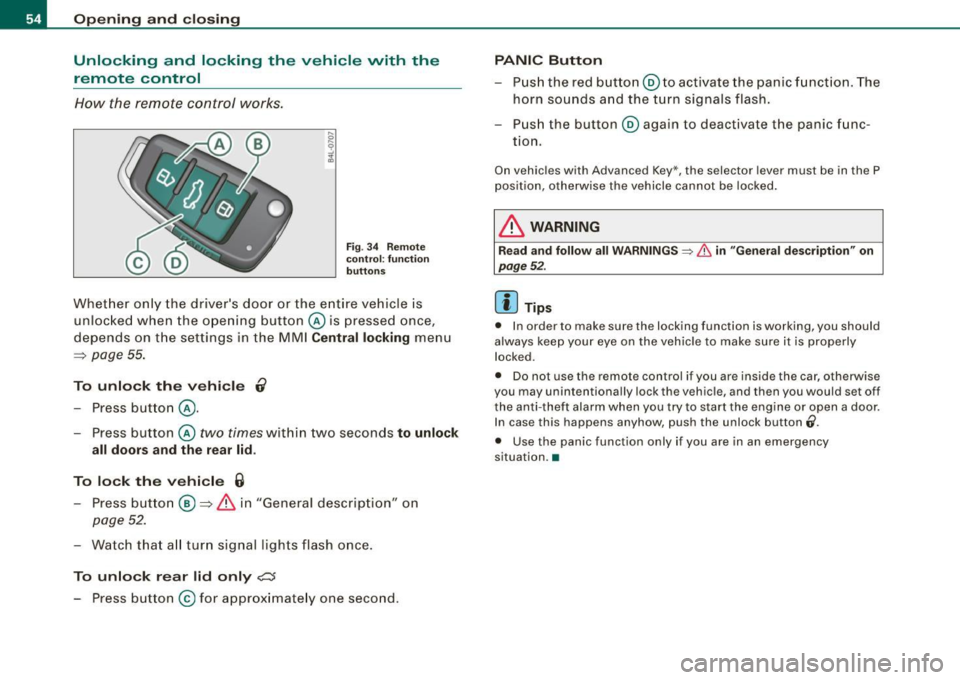
How t he remote control works .
Fig . 3 4 Remote
co ntr ol: func tion
bu tton s
Whet her only the driver's door or the e ntire vehicle is
unl ocke d when the ope ning button @ is pressed once,
d epends on t he settings in the MMI Central locking menu
=> page 55.
To unlock the vehicl e 0
Press button @.
- Press button @
two times within two seconds to unlock
all doors and the rear lid.
To lock th e vehi cle 6
- Press button@ => & in "General descrip tion" on
page 52.
-Watch tha t all tur n signal lig hts flash once .
To unlock r ear lid only c:::::5
- Press button @for ap prox imate ly one second.
PANIC Button
- Pus h the red button@ to activate the panic f unct ion. The
horn sounds and the turn signals flash.
- Pus h the button ® again to deactivate the panic func
tion.
On vehic les with Advanced Key*, the selector lever must be in the P
pos ition, otherwise the vehicle cannot be locked.
& WARNING
R ead and follow all WARNINGS => & in "General de scriptio n" on
page 5 2.
[ i ] Tips
• In order to make sure the locking function is working, you should
always keep your eye on the veh ic le to make sure it is properly
locked.
• Do not use the remote control if you are inside the car, otherwise
you may unintentionally lock the vehicle, and then you would set off
the anti -theft alarm when you try to s tart the engine or open a door.
In case this happens anyhow, push the unlock button
0.
• Use the panic function only if you are in an emergency
situation. •
Page 64 of 390
Opening and closing
H ow is th e a nti-th eft alarm s yste m swi tched off ?
The anti -theft alarm sys tem is switched off only whe n you un lock
your vehicle. If you do not open a door within 60 seconds after you have un locked with the remote control , the vehicle will lock itself
again automatically.
When will the anti -th eft alarm syst em be trigg ered ?
When the vehicle is locked, the alarm system monitors and protects
the following parts of the vehic le:
• engine compartment
• luggage compartment
• doors
• vehicle incline
• ignition
When the system is activated, the alarm will be trigge red if one of
the doors, the engine hood or the rear lid are opened, or if the igni
t ion is turned on or if the veh icle incline has been changed. The an ti
theft a larm system will also go off when the battery is disconnected.
You can also trigger the alarm by pressing the PA NIC button on your
remote control. This w ill alert other people in case of emergency.
Press the
PANIC button again to turn off the alarm.
H ow i s th e ant i-th eft al arm swit ch ed off whe n
tr igg ered ?
The alarm system is switched off when you unlock the vehic le or
when the ignition is switched on . T he alarm will a lso switch itself off
when it comes to the end of its cycle .
Emergency flasher and horn
The emergency flasher wi ll blink briefly and the horn sounds when
the doors, engine hood and rear lid are properly closed.
If the emergency flashers do not blink, or the horn does not sound ,
check the doors, engine hood and rear lid to make sure they are
properly c losed . If you close a doo r, the hood or the rear lid w ith the anti
-theft a larm switched on, the emergency flashers will blink and
t he horn will sound only af ter you have closed the door or l id .
Ii ] Tips
Fo r the anti -theft a larm system to function proper ly, make sure a ll
vehic le doors and windows are closed before leaving the vehicle .•
Tilt sensors 1Q
The tilt sensors trigger an alarm if they detect vehi cle
movement.
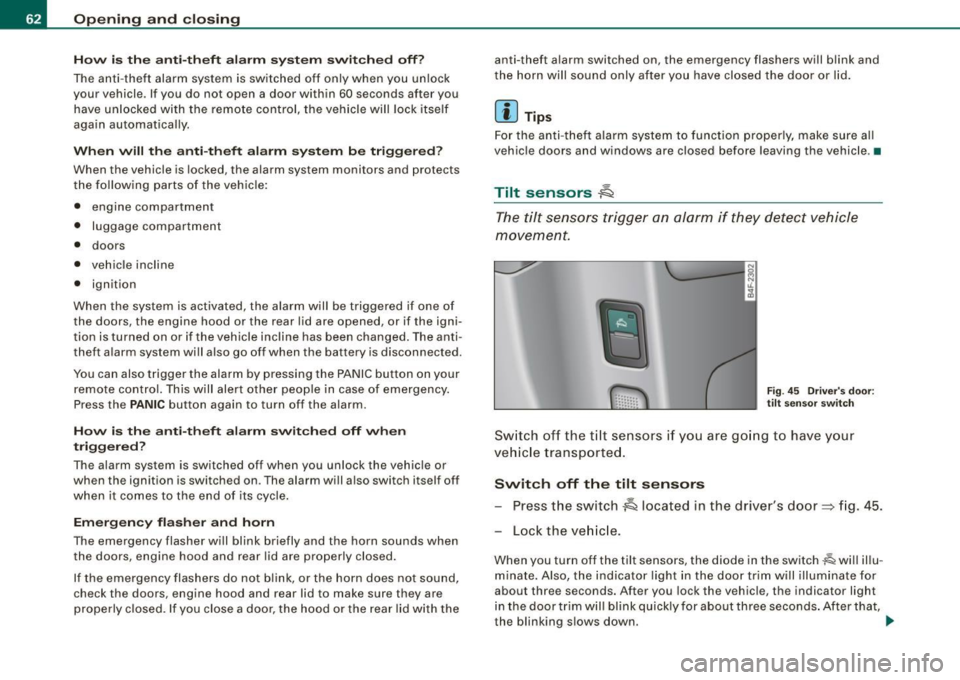
F ig . 4 5 Driver 's doo r:
tilt sensor swit ch
Sw itch o ff th e til t sensors if you ar e go ing to have your
vehic le transporte d.
Switch off the tilt sensors Press the switch
~ located in the driver's door~ fig. 45.
Lock the ve hicle .
When you turn off the tilt sensors, the diode in the switch~ will illu
minate. Also, the indicator light in the door trim will illuminate for
about three seconds. After you lock the vehicle, the indicator light
in the door t rim wil l bl ink quick ly for about three seconds . After that,
the blinking s lows down. .,.
Page 228 of 390
___ A_ ir_ b_ a-g _ s_y _s_ t_ e_ m _________________________________________________ _
& WARN ING (continued )
seating posit ion and have the airb ag system inspe cted by your
Audi dealer .
• A t ight tether or other strap on a rearward-fa cing child restr aint
att ached to the front pas senger se at can put too much pres sure
on the weight-sensing mat in the seat and reg ister more weight
than is actually on the seat. The heavier weight registered can
m ake the system work as though an adult were on the seat and
deploy the Advanced Airbag when it must be suppressed cau sing
ser ious or even fatal injury to the child .
• If, in exceptional circumstance s, you mu st in stall a forward
f a cing child restraint on the front passenger seat , always move the
seat into its rearmost position in the seat's fore and aft adjust
ment range , as far away from the airbag as po ssible . The ba ckrest
must be adjusted to an upright position. Make sure that the
PASSENGER AIR BAG OFF light comes on and stay s on all the time
whenever the ignition is switched on .
& WARNING
• If the PASSENGER AIR BAG OFF light does not go out when an
adult is sitting on the front passenger seat after tak ing the step s
described above, make sure the adult i s properly seated and
restrained at one of the rear seating posit ions .
• Have the airbag system inspected by your Audi dealer before
transport ing anyone on the front passenger seat .
[ i ] Tips
If the weight -sensing mat in the front passenger seat detects an
e m pty seat , the front a irbag on the passenge r side wil l be tur ned
off, and PASSENGER AIR BAG OFF will stay on.•
Repair, care and disposal of the airbags
P arts of the airbag system are installed at many different p laces on
you r Aud i. Insta ll ing, r emoving, servic ing or repa iring a pa rt in an
area of the vehicle can damage a part of an airbag system and
p revent that sys tem from working pr operly in a c ollisi on.
There are some important things you have to know to ma ke sure
t h at the effective ness of the system will not be impai red and that
discarded co mponents do not cause injury or po llute the env iro n
ment .
& WARNING
Improper care , servicing and repair procedures can increase the
risk of personal injury and death by pre venting an airbag from
deploying when needed or deploying an airbag unexpectedly:
• Never cover , obstruct , or change the steering wheel horn pad
or airbag cover or the instrument panel or modify them in any way .
• Never attach any objects such as cupholders or telephone
mountings to the surfaces covering the airbag units .
• For cleaning the horn pad or instrument panel , use only a soft,
dry cloth or one moistened with plain water. Solvents or cleaner s
c ould damage the airbag cover or change the stiffness or strength
of the material so that the airbag cannot deploy and protect prop
erly .
• Never repair , adju st, or change any parts of the airbag sy stem .
• All work on the steering wheel , instrument panel , front seats or
electrical system (including the installation of audio equipment ,
cellular telephones and CB radios , etc .I must be performed by a
qualified technician who has the training and special equipment
necessary .
• For any work on the airbag system, we strongly recommend
that you see your author ized Audi dealer or qual ified workshop .
• Never modify the front bumper or parts of the vehicle body .
Page 349 of 390
_______________________________________________ F_ u_ s...:....... e...;.s _ a_ n_d :.:.....:.: b:...: u:...: l:.:.: b :...:s:...___,J
No . Equipm ent
29 Not used
30 Not used
31 Back-up light swi
tch, transmission , engine
components
Intelligent power mo dule driver (footwell l ight
32 and front headlights , horn, wiper system, elec
tr ically adjusta ble steering wheel)
33 I
ntelligent power modu le driver
(lights left -side)
---,--
34
35
36
37
38
39 I
nte lligent power modu le driver
(lights right -side)
Not used
Headlight washer system
E lectronic Stabilization Program (ESP)
Wip er system
Door control module left -side
Horn
41 Heater fan
42 Control module electronic ignition lock/electri
cally adjustable steering wheel
43 Rear windsh iel d wiper (Avant)
4 4 Power window opener (left-side)
Amps
15
30
25
25
30 25
30
15
25
40
30
15
35
-
•
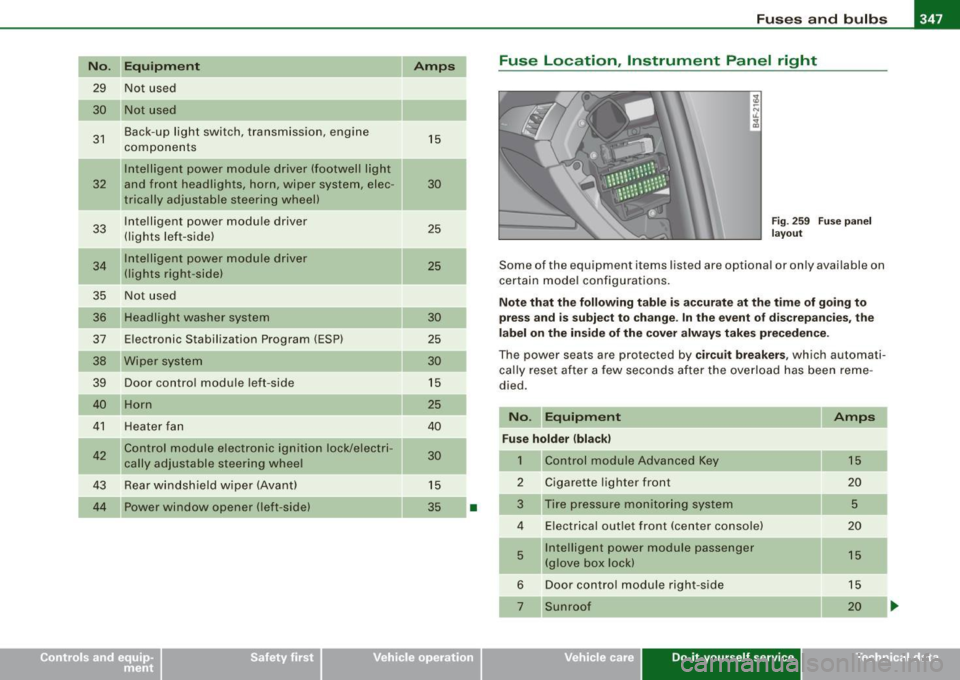
Fuse Location , Instrument Panel right
Fig . 2 59 F use p an el
la yo ut
Some of the equipm ent items lis ted are op tional or on ly available on
certain m ode l configu rations.
Note that the following table is ac curate at the time of g oing to
press and is subject t o change . In the ev ent of d iscrepan cies , th e
l a b el on t he in side of the cover alw ay s take s prec eden ce.
Th e power seats are pr otected by circuit breaker s, which automa ti
ca lly reset after a few seconds a fter the ove rload has been reme
died .
No. Equipment Amps
Fu se holder (bla ck )
1 Control module Advanced Key 15
2 Cigarette
lighter front
20
3 Tire pressure moni tor ing system
5
4 E lectrica l outlet front (center conso le) 20
5 Intellige
nt power module passenger
15
(glove box lock)
6 Door control module right -side 15
Sunroof 20
Vehicle care Do-it-yourself service irechnical data
Page 380 of 390
ffl __ A_l.:,. p _h_ a_ b_e _t _ic _ a_l _in _ d_e _x ____________________________________________ _
Headlights . . . . . . . . . . . . . . . . . . . . . . . . . . 70 I
Adap tive Light .... ..... ...... .... . 73
Defective . . . . . . . . . . . . . . . . . . . . . . . . 27
Front fog lights . . . . . . . . . . . . . . . . . . . 72
Headlight range control defective .. . 37
Switching off ..... .... .... ...... .. 70
Switching on ..... .... .... .. . ..... 70
Washer system . . . . . . . . . . . . . . . . . . . 80
Xenon headlights .... ........ .... . 70
Heated outside mirrors . . . . . . . . . . . . . . . 83
Heated sea ts
Front . . . . . . . . . . . . . . . . . . . . . . . . . . . 114
Rear ......... .... ....... .. .. ... 115
Heated steering wheel . . . . . . . . . . . . . . . 115
Heated washer jets
Wiper and washer system . . . . . . . . . . 78
Heavy clothing and safety b elts ... .... 205
High beam ........... ... .... ..... 70, 74
Warning /indicator lights ........... 22
High voltage warning label . ..... .. ... 360
Homelink® universal remote control 186
Hood Opening ...... ....... .... .. . .... 296
Re lease lever . . . . . . . . . . . . . . . . . . . . 296
Horn . . . . . . . . . . . . . . . . . . . . . . . . . . . . . . . 11
How many airbags does my vehicle have? . .
219
How often should I check my tire pr essures?
320 Ignition key
........... ........ .... . 124
Ignition lock ...... .... .... .... .... .. 124
Malfunction .. .... ... .... .... .. 35, 38
Ignition lock positions .......... ..... 124
Immobilizer .. .................. ..... 15
Important things to do before driving .. 193
Improperly worn safety be lts .... ... .. 210
Indicator lights ... ..... .. .... .. ... .. . 17
Airbag system . .......... .... 223, 224
PASSENGER AIR BAG OFF ......... 224
Infant seats .............. ....... ... 239
How do I properly insta ll an infant seat in
my veh icle? .. .... ..... .. .... ... 239
Safety instructions ..... ... .... ... 239
Inside rea r v iew mirror ....... ...... ... 82
Installing child safety seats Safety be lts ...... ............ ... 244
Instrument cluster illumination .... .... 16
Instruments and controls . . . . . . . . . . . . . 13
General illustration ....... .... .... . 11
Interior lights . ... ...... ...... ... .... 75
Rear ............... ... .... .... 75, 76
Inte rmittent wiping
Rain sensor ... ....... .... .... .... 78
J
How sa fe ty be lt tensioners work . . . . . . 210 Jack .... .... .... ... .... .... .... ... 336
Hydroplaning ... .. .. .... .... ... .... 324 Jump er cables .... .... .... .... .... .. 352
Jump-starting . ...... .. . ... ...... ... 351
K
Key .. .... .... ...... .... ... .... .... . 48
Battery replacement . ...... .... ... . 50
Coded settings .. .... ... .... .... .. 110
Convenience opening and closing of windows .... .... ... ... .... ... .. 65
Emergency key . ..... ...... .... .... 48
Key replacement . . . . . . . . . . . . . . . . . . 48
Master key ..... .. . .... .. . .. .. .... 48
Valet key . ........... .... .... ... .. 48
Key coded s ettings
Climate controls .. .... ..... .... .. 110
Key less entry remote control ... ... ..... 49
Kick-down multitronic® ... ... ... ... .. .... ... 163
tiptronic ® ... ..... .... ... ........ 156
L
Lane assist
Activating and deactivating 150
Description ............ .. .. .... .. 150
Instrument cluster indicator light ... 150
MMI settings ... .. .... .... .... .. . 151
Notes on instrument cluster display. 150
LATCH .... .... .... ... .... ..... .. ... 249
Description . ... .... .... .. . ... .... 249
Guidance fixtures for lower anchorages . .
250
Ins talling a child restraint .. ... ... . 252
Location . . . . . . . . . . . . . . . . . . . . . . . . 249
Moun ting and releasing the anchorage
hook ......... ....... .... ...... 253