turn signal AUDI S6 2009 User Guide
[x] Cancel search | Manufacturer: AUDI, Model Year: 2009, Model line: S6, Model: AUDI S6 2009Pages: 398, PDF Size: 43 MB
Page 122 of 398
• .___O_ n_ t_ h_ e_ r_ o_ a_d ____________________________________________________ _
& WARNING
• Never turn off the engine until the vehicle has come to a
complete stop.
• The brake booster and servotronic only work when the engine
is running. With the ignition turned off, you have to apply more
force when steering or braking. Since you cannot steer and stop
normally, this can lead to accidents and serious injuries.
• For safety reasons, you should always park your vehicle with
the selector lever in P. Otherwise, the vehicle could inadvertently roll away.
• After the engine has been switched off, the radiator fan can
continue to run for up to 10 minutes -even with the ignition
switched off. It can also switch on again after some time if the
coolant temperature rises as the result of a heat buildup or if the
engine is hot and the engine compartment is additionally heated
by the sun's rays.
0 Note
If the engine has been under heavy load for an extended period,
heat builds up in the engine compartment after the engine is
switched off -there is a risk of damaging the engine. Allow the
engine to run at idle for about 2 minutes before switching it off. •
Applies to vehicles: w ith Conven ience key
Driver messages in the instrument cluster
display
If a function is not present, a driver message appears.
No key identified
This message appears when the [STAR T) button is pressed if there
is no master key inside the vehicle or if the system does not recog
nize it . For example, the master key cannot be recognized if it is
covered by an object (e.g. aluminum brief case) which
screens the radio signal.
.Electronic devices such as cell phones can also inter
fere with the radio signal.
Press brake pedal to start engine
This message appears if you press the [ START) button to start the
engine and do not depress the brake pedal. The engine can only be
started if the brake pedal is depressed.
Engage N or P to start engine
This message appears when the engine is started if the selector
lever for the automatic transmission is not in the P or N position.
The engine can only be started with the selector in these positions.
? Key not in vehicle
This message appears along with the symbol if the master key is
removed from the vehicle with the engine running. It is intended to
remind you (e.g. when changing drivers) not to continue the journey
without the master key.
If the master key is no longer in the vehicle, you cannot switch off
the ignition after stopping the engine and you also cannot start the engine again. Moreover, you cannot lock the vehicle from the
outside with the key.
Shift to P, otherwise vehicle can roll away. Doors do not lock if lever
is not in
P.
This message appears for safety reasons along with a warning
buzzer if the selector lever for the automatic transmission is not in
the P position when the ignition is switched off with the
[STOP)
button and the driver's door is opened. Move the selector lever to
the P position, otherwise the vehicle is not secured against rolling
away. You also cannot lock the vehicle using the locking button on
the door handle or using the remote key.
To engage steering lock, press and hold STOP button
This message appears for safety reasons if the engine and the igni
tion have been switched off by pressing the [
STOP) button once, .,,_
Page 139 of 398
_____________________________________________ A_ d_a ...: p_ t_ i_ v _e_ C_ ru_ is_ e_ C_ o_n _ t_ r_o _ l _ __._
• Driv in g i n t raff ic: If a vehicle is detected ahead, the arrow moves
on the scale. The green area represents the distance set . When
approaching slowly, the arrow moves from the
gray zone to the
green zone on the sca le .
• Driver int erv ention prompt : When approaching rapidly, the
arrow serves as an early warning signal. If the distance selected is
exceeded or possibly not reached, the arrow moves into the
red
zone on the scale. In certain driving situations, you as the driver wi ll
have to take actio n=>
page 138, "Driver interve ntion prompt" .
© Status
• The text ACC OFF appears in white letters when Adaptive Cru ise
Control is turned off.
• The text
ACC AVAILABLE appears in white letters when the
system is turned on but no desired speed has been set.
• The text
OVERRIDE appears in white letters when you exceed the
desired speed by accelerating .
• The text
DISTANCE ! appears in red letters when the interval to a
vehicle traveling ahead is too sh ort and you have t o slow your
vehicle additionally with the foot brake .
• The tex t messages
DISTANCE 1 to DISTANCE 4 appea r in green
letters to indicate the time interva l you have set and Adaptive Cruise
Control is in management mode .
• I f the driving program "standard" is replaced by "comfort" or
" d ynamic" usi ng the M MI, the above text message is supplemented
by an appropriate prompt, e.g.
DISTANCE 1 -dyn .. •
Con tro ls and eq uip
ment
Ap plies to veh icles: wi th Ada ptive Crui se Co ntro l
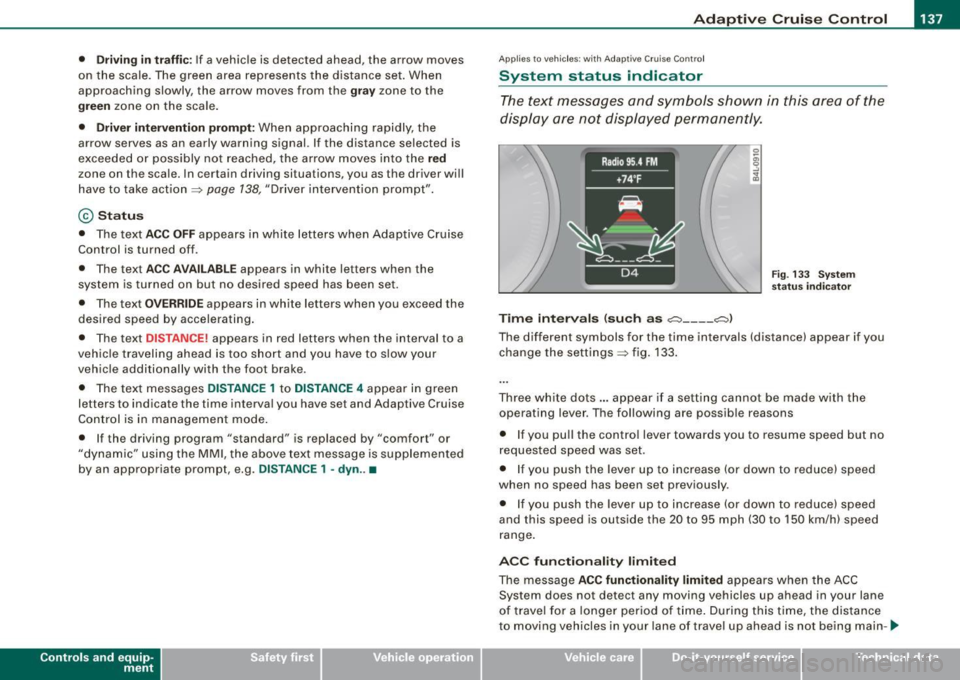
System status indicator
The text messages and symbols shown in this area of the
dis pla y are no t displaye d perm anen tly.
T ime intervals (such as c::::, ___ _ c::::,)
Fig. 133 S ystem
s ta tu s indi cator
The different symbols for the time intervals (distance) appear if you
change the settings=> fig. 133 .
Three wh ite do ts .. . appear if a setting cannot b e made with the
operating lever . The fol lowing are possib le reasons
• I f you pull the control lever towards you t o resume speed but no
requested speed was set.
• I f you push the lever up to increase (or down to reduce) speed
when no speed has been set previously .
• I f you push the lever up to increase (or d own to reduce) speed
and this speed is outside the 20 to 95 mph (30 to 1 50 km/h) speed
range .
ACC fun ction ality limited
The message ACC functionality limited appears when the ACC
System does not detect any moving vehicles up ahead in your lane
of trave l for a lo n ger period o f time . During this time, the dis tance
to moving vehicles in your lane of travel up ahead is not being main-~
Vehicle care I I irechnical data
Page 141 of 398
_____________________________________________ A_ d...;a..! p~ ti_v _ e---- C_ ru_ is_ e ___ C.::..: o;.:.n..:.. t.:.: r...; o:.. 1-----JIIII
In certain situations, the braking power of the Adaptive Cruise
Control is no t enough to maintain an adequate distance to the
vehicle up ahead . In these situations, the Adaptive Cruise Contro l
calls the driver to take action.
The
driv er in tervention pr omp t alerts you visually and audibly to
take over.
• A red vehicle is shown in the instrument c luster display
=>
page 138, fig. 134 .
• The text
DISTANCE! appears in the status line .
• The indicator light~'" '~ in the speedometer b links red.
• A warning tone sounds .
[ i J Tip s
• If the Adaptive cruise control initiates braking, the hydraulic
brake system is under pressure . Therefore, the brake peda l distance
is shorter and the pedal "fee ls" harder .
• Adaptive Cruise Contro l is switched off after pressing the foot
brake. The speed saved up this point can be resumed .
• To resume the saved speed, release the brake pedal and press
the control lever=>
page 132, "Turning Adaptive Cruise Cont ro l off
temporarily" .
• I f you use the accelerator to go faster than the speed of the
vehicle ahead of you, the
drive r inte rv e ntion prompt will not be
accompanied by a warning signal.
• If the speed you previously set is exceeded, the indicator light in
the speedometer wi ll switch off. •
Controls and equip
ment
Ap plies to veh ic les : w ith A dapt ive Crui se Co nt rol
MMI settings
Individual settings for Adap tive Cruise Control can be
selected in the
MM/ .
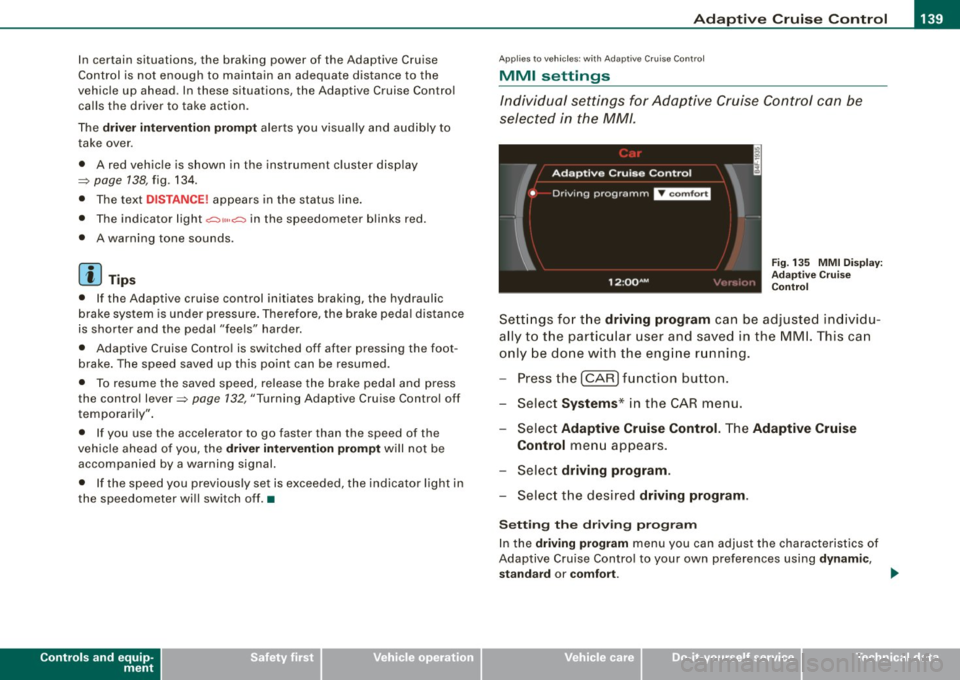
Fig. 135 MMI Disp lay :
Ad aptive C ruise
C ontrol
Sett ings fo r th e driving program can be adjusted individu
ally to the p artic ular user and saved in the MML This can
only be do ne with the eng ine r un ning.
Press the
I CAR] fu nction button.
Select
Systems * in the CAR menu .
Select
Adaptive Cruise Control . The Adaptive Cruise
Control
menu appears.
Selec t
driving program.
Select the desired driving program .
Sett ing th e dr iving pr ogram
In the driv ing prog ram menu you can adjust the characteristics of
Adaptive Cruise Contro l to your own preferences using
d ynami c,
s ta nd ard
or comf ort . _.,
I • •
Page 145 of 398
Audi lane ass is t 11111 -----------------------------------
Audi lane assist
Lane assist
A pplies to veh icles : with lane assist
Description
Lane a ssist helps you keep y our vehicle in your lane .
Lane assist uses a camera to detect lane boundary lines. If the
system detects that your vehicle is about to leave a lane boundary
line, the steering wheel
vibrates to alert the driver. If lane assist
detects boundary lines on both sides of the vehicle's lane, the
system enters active standby mode, which is indicated by the green
indica tor light /: on the instrument cluster .
I f the system is in active standby mode and the turn signal is acti
vated before driving ov er the boundary line, the warning does not
occur since the sys tem allows for intenti onal lane changes.
The system is designed for driving on freeways and expanded high
ways and t hus works on ly at speeds of 40 mph (65 km/h) or mo re .
& WARNING
• Lane ass ist will not k eep your vehicle in your lane. The sy stem
only warns the d riv er w hen t he vehicle i s le av ing the lan e. The
driv er is alway s re spon sible for keeping the vehicle in the lane.
• The camera is not able to d ete ct all lane boundary lines and in
s o me cases might al so dete ct lane str ucture s or objects as
boundary lines . This c an le ad to in corre ct wa rning s or warnings
that fa il to go off at all .
• The camer a's visibili ty ca n be i mpaired by vehi cle s ahe ad of
you , for instan ce, or by rain , snow , h eavy spray or li ght shining into
th e cam era lens . Thi s can ca use lane as sis t to f ail to d ete ct
boundary line s. •
Con tro ls and eq uip
ment
Ap plies to vehi cles : wi th la ne assi st
Activating and deactivating
Fig . 14 3 Turn signal
l ev er: La ne assis t
butt on
F ig . 144 Win dshie ld:
L ane assist ca mera
v iewing win dow
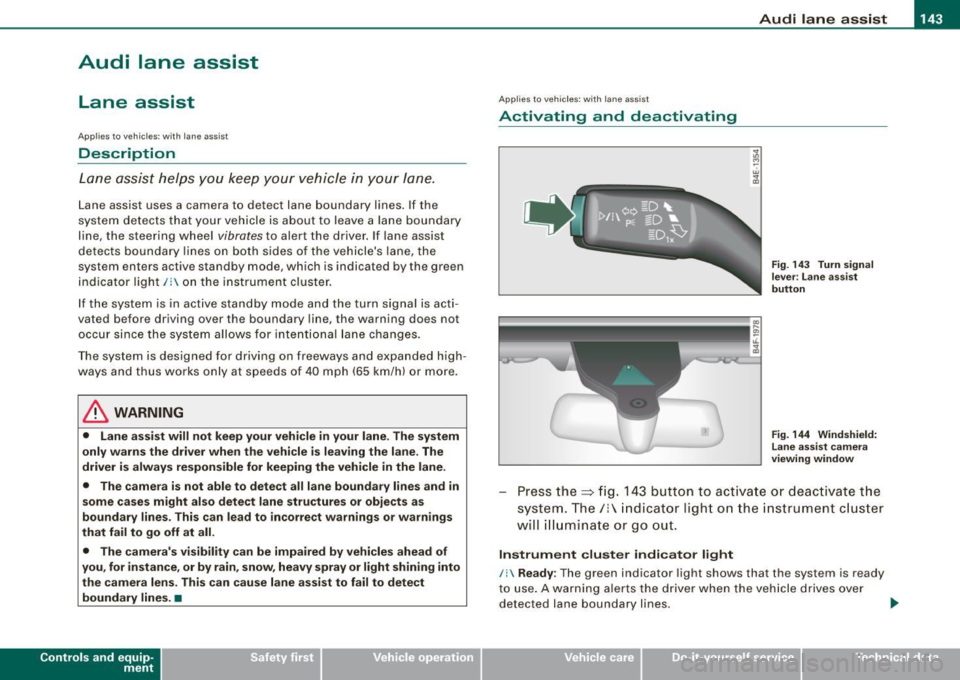
Press the :::> fig. 143 button to activa te or deactivate the
syst em . T he/ : in dica tor ligh t on t he i nstrument c luster
will illuminate or go out.
Instrument c lu ster indi ca tor light
/: Ready:
The green indicator light shows that the system is ready
to use . A warning a lerts the drive r when the veh icle drives over
dete cted lane boundary l ines. .,.
Vehicle care I I irechnical data
Page 148 of 398
• ..__A_ u_ d_ i _s _i_d _e_ a_ s_ s _ is_ t __________________________________________________ _
Audi side assist
Lane Change Assistant
Applies to vehicles: with side ass ist
Description
The side assist helps you when changing lanes.
AUDI
Fig . 146 Rear bumper:
Position of radar
sensors (not visible on
outside)
Fig . 147 Signal light
on the outside mirror -
driver's side
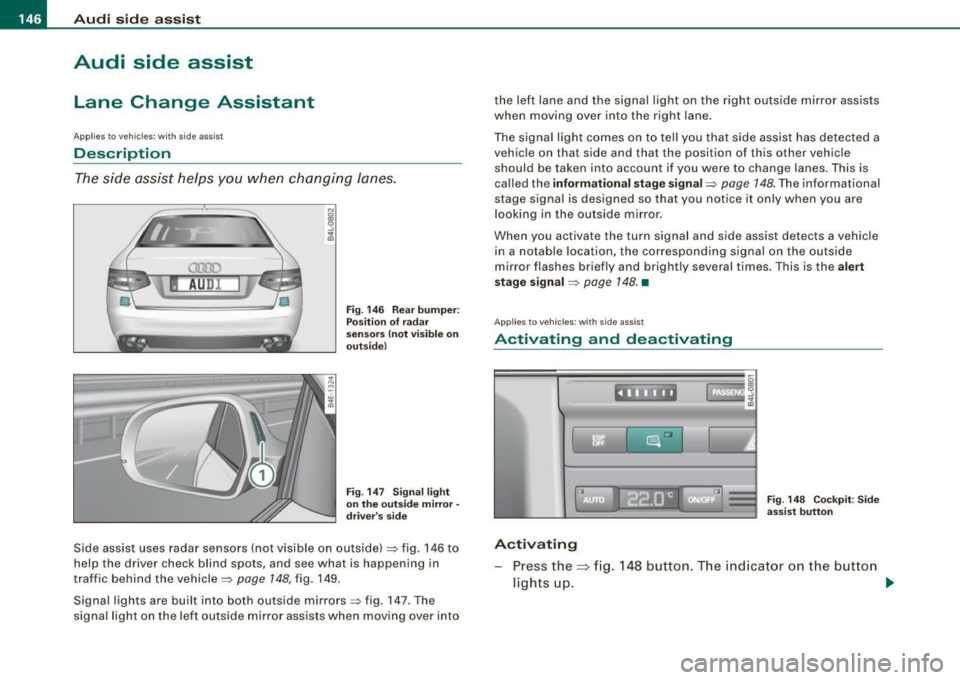
Side assist uses radar sensors (not visible on outside) ::::, fig. 146 to
help the driver check blind spots, and see what is happening in
traffic behind the vehicle::::,
page 148, fig. 149.
Signal lights are built into both outside mirrors::::, fig. 147. The
signal light on the left outside mirror assists when moving over into the left lane and the signal light on the right outside mirror assists
when moving over into the right
lane.
The signal light comes on to tell you that side assist has detected a
vehicle on that side and that the position of this other vehicle
should be taken into account if you were to change lanes. This is
called the
informational stage signal::::, page 148. The informational
stage signal is designed so that you notice it only when you are
looking in the outside mirror.
When you activate the turn signal and side assist detects a vehicle
in a notable location, the corresponding signal on the outside
mirror flashes briefly and brightly several times. This is the
alert
stage signal ::::,
page 148. •
Appl ies to veh icles: wi th side assist
Activating and deactivating
~~ l"I ~ ...
Activating
Fig. 148 Cockpit : Side
assist button
Press the=> fig. 148 button. The indicator on the button
ligh ts up. ..,
Page 149 of 398
_________________________________________________ A_u_ d _ i _s ... i __ d _e:....: a.:..: s:.. s:.. i:..: s :..:t;___ftllll
Deactivating
- Press t he button again . T he ind icato r light on the butto n
goes out.
T he system works at speeds faster than 19 mph (30 km/h) .
& WARNING
• Improper reliance on the side assist system can cause colli
sions and seriou s per sonal injury:
- Never rely only on side assist when changing lanes .
- Always check rear view mirrors to make sure that it is safe to c hange lanes.
• Side assist cannot detect all vehicles under all conditions
danger of accident!
• Side assist cannot detect vehicles in time to alert you when
they approach from behind at very high speed , or fall drop back
very quickly.
• The radar sensor's
vision can be reduced or entirely blocked by
rain , snow, and heavy spray . This can result in side assist not
adequately detecting veh icles or , in some cases, not detecting
them at all . Always keep an eye on the direction you are traveling
and the relevant area around the vehicle.
• Please note that side assi st indicates there are approaching
vehicles, or vehicles in your bl ind spot , only after your vehicle has
reached a driving speed of at lea st 19 mph (30 km /h).
• S ide assist signal does not work around tight corners (turning
radiu s less than 328 feet, or 100 m l.
• Side assist is no replacement for the driver's full attention . The
d river alone is responsible for lane changes and similar driv ing
maneuvers. Always keep an eye on the d ire ction you are travel ing
and the relevant area around the vehicle .
Controls and equip
ment
0 Note
• To e nsu re t hat you do not adverse ly a ffect s ide assist, do not
b lock the area on the rear bumper where the radar sensors are
located w it h f oreign objects (s uch as st ickers or bicycle rac ks).
• M ake su re that the signal light on the o utside mi rror is not
b loc ked by st ic ke rs or ot her items.
[ i ] Tips
• Side ass ist automaticall y deact ivates i f it detects t hat t he ra dar
sensors are blocked=> page
153. The indicator light on the button
goes out.
• The area on the bumper whe re the rada r sen so rs a re loca ted
must cons iste ntly re mai n fr ee o f snow, ice, and heavy so iling so t hat
side assist can function properly. Follow the additiona l notes on
=> page
154.
• Additiona l tinting on the front side windows can make it ha rder
t o see and co rrect ly unde rsta nd the s ignal light o n the outs ide
mirror.
• For Declaratio n of Comp liance to Un ited Sta tes FCC a nd I ndus try
Canada regulations => page
375 . •
I • •
Page 150 of 398
• .___A_ u_ d_ i_s_ i_ d _e_ a_ s_ s_i s_ t __________________________________________________ _
Applies to vehicles: with side ass ist
Sensor detection area
Fig. 149 Schem ati c
illu str ati on : Sens or
d etec tio n area
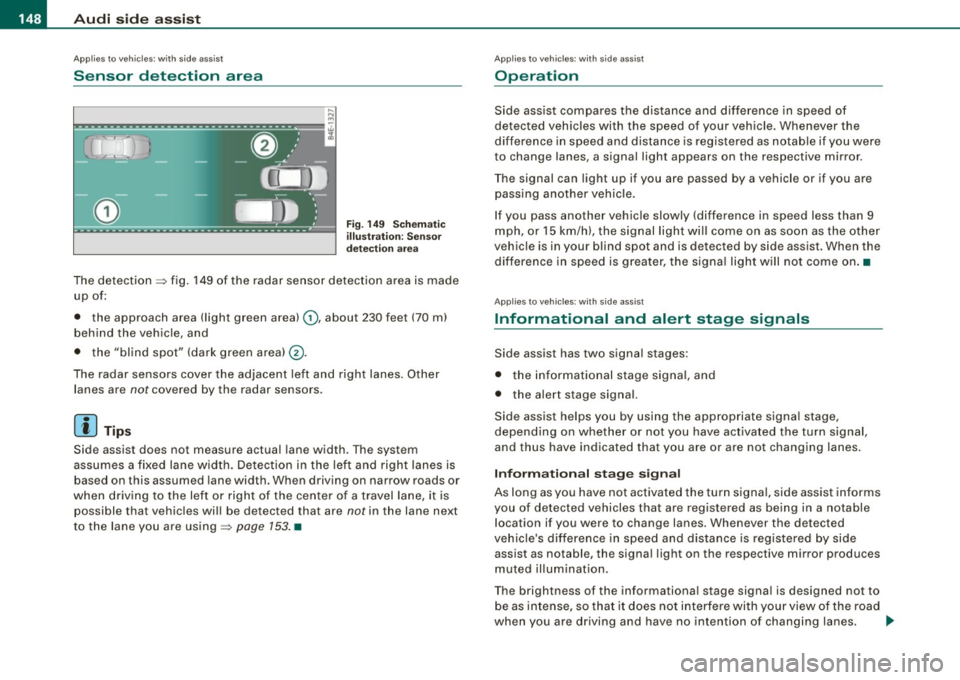
The detection ~ fig. 149 of the radar sensor detection area is made
up of:
• the approach area !light green area)
0, about 230 feet (70 ml
behind the veh icle, and
• the "blind spot" (dark green areal@.
The radar sensors cover the adjacent left and right lanes. Other
lanes are
not covered by the radar sensors .
[ i ] Tip s
Side assist does not measure actual lane width . The system
assumes a fixed lane width. Detection in the left and right lanes is based on this assumed lane width. When driving on narrow roads or
when driving to the left or right of the center of a travel lane, it is
possible that vehicles wi ll be detected that are
not in the lane next
to the lane you are using~
page 153 . •
Ap plies to vehicl es: with side assist
Operation
Side ass ist compares the distance and difference in speed of
detected vehicles with the speed of your vehicle. Whenever the
difference in speed and distance is registered as notab le if you were
to change lanes, a signal light appears on the respective mirror.
The signal can light up if you are passed by a vehic le or if you are
passing another vehicle.
If you pass another vehicle slowly (difference in speed less than 9 mph, or
15 km/h), the signal light will come on as soon as the other
vehicle is in your blind spot and is detected by side assist. When the
difference in speed is greater, the signa l light will not come on .•
Applies to vehic les : w ith side assist
Informational and alert stage signals
Side assist has two signal stages:
• the informational stage signal, and
• the alert stage signal.
Side assist helps you by using the appropriate signa l stage,
depend ing on whether or not you have act ivated the turn signal,
and thus have indicated that you are or are not changing lanes.
In fo rm ati onal stag e signal
As long as you have not activated the turn signa l, side assist informs
you of detected vehicles that are registered as being in a notable location if you were to change lanes. Whenever the detected
vehic le's difference in speed and distance is registered by side
assist as notable, the signa l light on the respective mirror produces
muted il luminatio n.
The brightness of the informationa l stage signal is designed not to
be as intense, so that it does not interfere with your view of the road
when you are driving and have no intention of changing lanes. .,,,
Page 151 of 398
___________________________________________________ A_u_ d_i_ s_ id_e_ a_ s_s _i_s _t _ __.BIII
When you look in the outside mirror, you can clea rly see the infor
mational s tage signal.
Ale rt sta ge signal
When you ac tivate the turn signal, and side assist has detected a
vehic le in a notab le location on that particu lar sid e, the signal light
on this side mirror flashes brightly. The repea ted brief and bright
flash ing of the aler t stage signa l reminds you to carefully check
t raffic to the rear in the outside mirror and over your shoulder, so
that you can safely complete the lane change=>
& in "Safety tips"
on
page 154.
[ i ] Tips
T he brightness of the signal light on the outside mirrors can be
adjusted with the
MMI => page 152 . •
Con tro ls and eq uip
ment
A pp lies to veh ic les: with s ide ass ist
Driving situation : Fast approaching vehicles
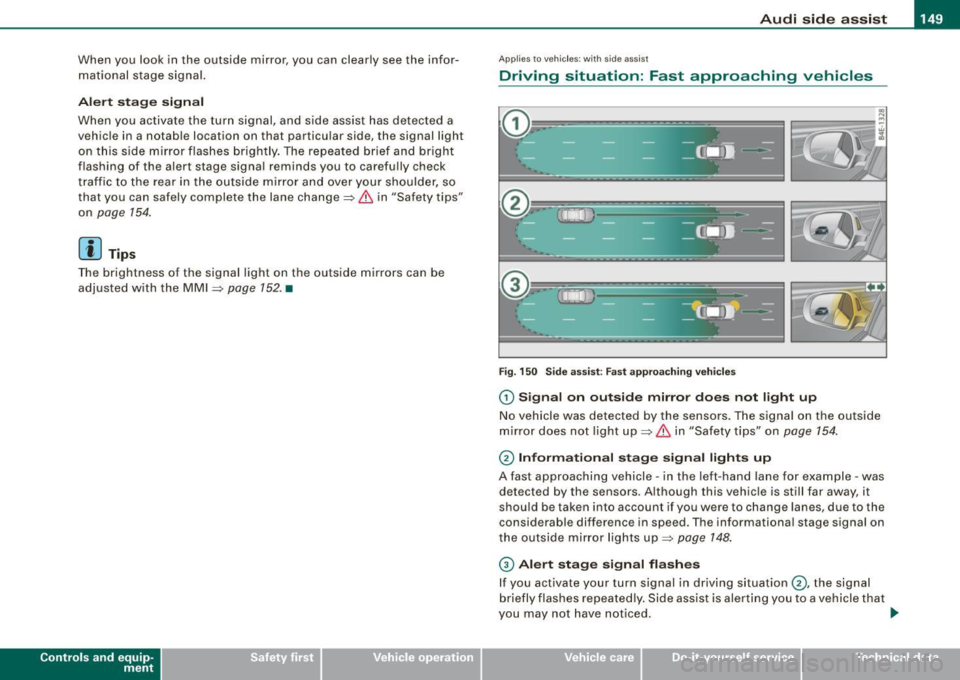
Fig . 15 0 Side ass ist : Fas t app roac hing veh ic le s
G) Si gn al o n outs ide mirror doe s not li ght up
No vehicle was detected by the sensors. The signal on the outside
mirror does not light up=>
& in "Safety tips" on page 754.
0 Informa tion al st age s ignal ligh ts up
A fast approaching vehicle -in the left-hand lane for example -was
detected by the sensors. Although this vehicle is still far away, it
shou ld be taken into account if you were to change lanes , due to the
consid erable difference in speed. The informationa l stage s ignal on
the outside mirror lights up=>
page 148 .
© Alert stage signal fl ashe s
If you activate your turn signal in driving situation 0 , the signal
briefly flashes repeated ly . Side assist is aler ting you to a vehicle that
you may not have not iced . _,.
Vehicle care I I irechnical data
Page 152 of 398
• ..__A_ u_ d_ i _s _i_d _e_ a_ s_ s _ is_ t __________________________________________________ _
[ i J Tips
• The faster a vehicle approaches from the rear, the sooner the
s ignal on the outside mirror lights up . Side assist will signal, at the
latest, when a detected vehicle enters your "blind spot".
• When vehicles approach very quickly, changing lanes can be
dangerous even if the signal on the outside mirror does not light
up. •
Applies to vehicles: with side assist
Driving situation : Slowly approaching
vehicles
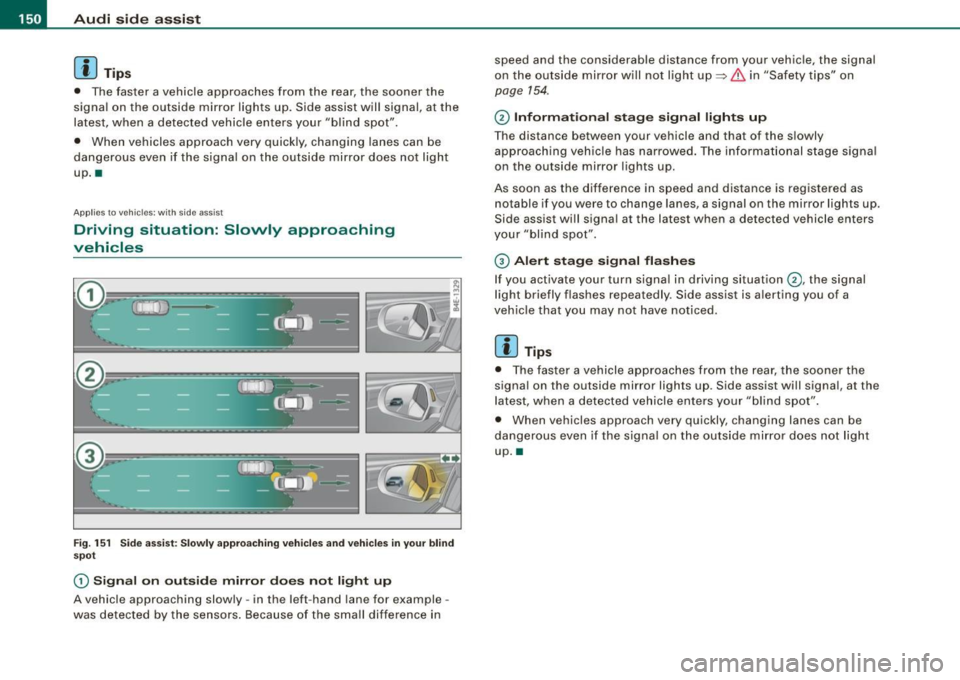
Fig. 151 Side assist: Slowly approaching vehicles and vehicles in your blind
spot
G) Signal on outside mirror does not light up
A vehicle approaching slowly -in the left -hand lane for example -
was detected by the sensors. Because of the small difference in speed and the considerable distance from your vehicle, the signal
on
the outside mirror will not light up
~ & in "Safety tips" on
page 154.
© Informational stage signal lights up
The distance between your vehicle and that of the slowly
approaching vehicle has narrowed. The informational stage signal
on the outside mi rror lights up.
As soon as the difference in speed and distance is registered as notable if you were to change lanes, a signal on the mirror lights up .
Side assis t will signal a t the latest when a detected vehicle enters
your "blind spot".
© Alert stage signal flashes
If you activate your turn signal in driving situation©, the signal
light briefly flashes repeatedly . Side assist is alerting you of a
vehicle that you may not have noticed.
[ i J Tips
• The faster a vehicle approaches from the rear, the sooner the
signal on the outside mirror lights up . Side assist will signal , at the
latest, when a detected vehicle enters your "blind spot".
• When veh icles approach very quickly, changing lanes can be
dangerous even if the signal on the outside mirror does not light
up. •
Page 153 of 398
Audi side assist -
-------------------'
Applies to vehicle s: with side assist
Driving situation : Vehicles dropping back
slowly
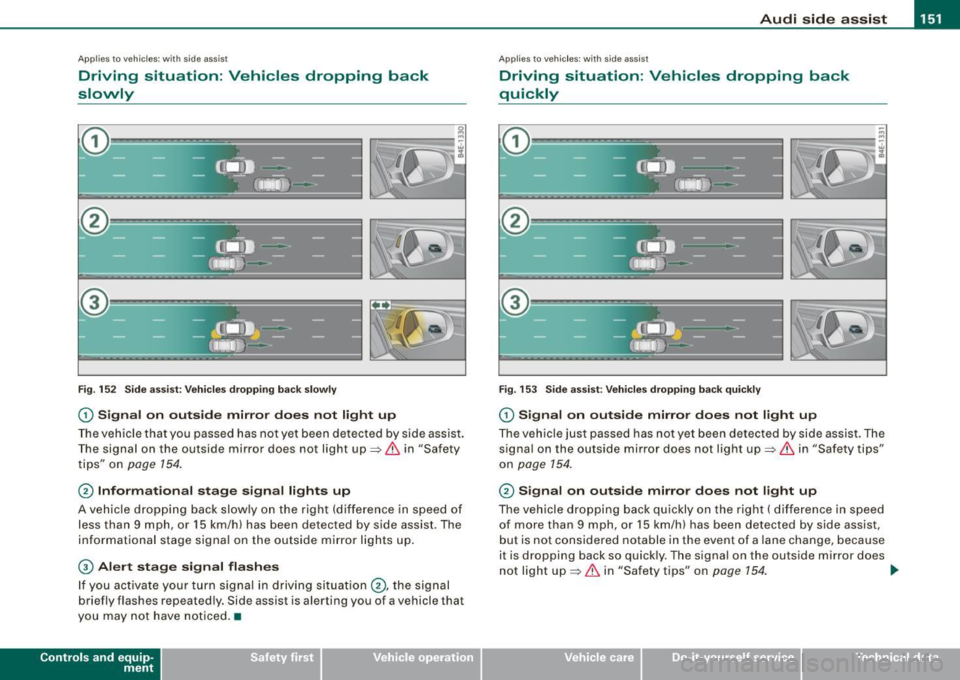
Fig. 152 Side assist: Vehicles dropping back slowly
G) Signal on outside mirror does not light up
The vehicle that you passed has not yet been detected by side assist.
The signal on the outside mirror does not light up=>
& in "Safety
tips" on
page 154.
@ Informational stage signal lights up
A vehicle dropping back slowly on the right (difference in speed of
less than 9 mph, or 15 km/h) has been detected by side assist . The
informational stage signal on the outside mirror lights up.
G) Alert stage signal flashes
If you activate your turn signal in driving situation@, the signal
briefly flashes repeatedly. Side assist is alerting you of a vehicle that
you may not have noticed. •
Contro ls and eq uip
ment
Ap plies to vehicles: with side assist
Driving situation : Vehicles dropping back
quickly
Fig . 153 Side assist: Vehicles dropping back quickly
G) Signal on outside mirror does not light up
The vehicle just passed has not yet been detected by side assist. The
signal on the outside mirror does not light up=>
& in "Safety tips"
on
page 154.
@ Signal on outside mirror does not light up
The vehicle dropping back quickly on the right ( difference in speed
of more than 9 mph, or 15 km/h) has been detected by side assist,
but is not considered notable in the event of a lane change, because
it is dropping back so quickly. The signal on the outside mirror does
not light up=>
& in "Safety tips" on page 154. tJ,,,
Vehicle care I I irechnical data