warning lights AUDI S6 2009 User Guide
[x] Cancel search | Manufacturer: AUDI, Model Year: 2009, Model line: S6, Model: AUDI S6 2009Pages: 398, PDF Size: 43 MB
Page 24 of 398
Instruments and warning/indicator lights
turned off, the warning/indicator light illuminates for about 30
s e co nds.
The warnin g/indicator li ght wi ll go out when the par kin g brak e is
r e lea sed .
I f the wa rn in g/ind ica tor l ig ht flas hes co ntinu ously
after applying th e
par king brake, brakin g force is not sufficient to prevent the veh ic le
fr om r olling u nint enti onally. Ple as e n ote the foll owin g:
• If the s lope of the ground is too steep to park the vehicle, the
additio nal drive message appea rs
Caution: Vehicle parked too
steep .
• In the even t of a parking brake malf unc tion, the yel low I sym bol
appears in the instrument c luster display and the driver m essage
Parking brake malfunction! is displayed. Have the ma lfunct ion
repa ired as soo n as possible b y a qua lified Aud i deale rship. •
Brake system BRAKE (USA models) /(©) (Canada
models)
Th e warn ing/indicator light f lashes if brake fluid level i s
low, if there is an ABS sy stem malfunct ion or a par kin g
b ra ke malfun cti on.
The light illuminate s when the ignition i s turned on . It goes out afte r
the engine has been start ed. Thi s ind icates t hat th e bra ke w arni ng
light is functioning properly .
If the brake warning light does not light up when the engine is
cranking , there may be a malfun ction in the electrical system . In this
case , contact your Audi dealer .
If the b rake system warni ng/ind icator l ight flas he s, t here is a b rake
system malfunction . By pressing the [
CH ECK ] button, you can bring
up a dr ive r m essage w hic h exp la in s the mal funct io n i n mor e deta il
=>
page 30 .
If the ABS fai ls, the A BS warning/indicator lig ht _. (USA
mod els)/ (Ca nada mode ls) flas hes toget he r w ith th e brake sys te m
warn ing/ indicator lig ht=>
& -
(U SA mode ls): If the warni ng light BRAKE and the warning light
illumin ate t oget her, im medi ate ly contact yo ur a uth orized Aud i
dea ler or qua lified workshop to have all brake pads ins pected
=>
p age 35.
When the l ig ht comes on, an aud ible warning signal is also giv en .
& WARNING
• USA models : If the BRAKE warning light and the Af'l~ warning
light come on together , the rear wheels could lock up first under
hard braking . Rear wheel lock-up can cause loss of vehicle control
and an accident . Have your vehicle repaired immediately by your
authorized Audi dealer or a qualified workshop . Drive slowly and
avoid sudden, hard brake applications.
• Canada model s: If the brake warning light (Q)) and the ABS
warning light come on together , the rear wheels could lock up
first under hard braking . Rear wheel lock -up can cause loss of
vehicle control and an accident . Have your vehicle repaired imme
diately by your authorized Audi dealer or a qualified workshop .
Drive slowly and avoid sudden , hard brake applications.
• If the brake warning /indicator light does not go out after a few
seconds and the parking brake released, or lights up while you are
driving , the fluid level in the brake fluid reservoir is too low . If you
believe that it is safe to do so , proceed immediately at low speed
to the nearest authorized Audi dealer or qualified repair facility and have the brake system inspected .
• Always keep
in mind that after several brake applications , you
will need greater pressure on the brake pedal to stop your vehicle. Do not rely on strained brakes to respond with maximum stopping
power in critical situations . You must allow for increased braking
distances . The extra di stance used up by fading brakes could lead
to an a ccident. •
Page 27 of 398
Digital speedometer
Fig. 11 Display: Digital
speedometer
Current speed appears in the display . Speed is shown in 1 mph
measures (USA models) or 1 km/h measures (Canada models).
You can switch the display from miles to kilometers and vice versa
via the MMI. •
Open door or trunk lid warning
The pictogram alerts you when doors or the rear lid have
been left open.
Fig . 12 Display: open
door or rear
lid
warning
With the ignition switched on, the open door or rear lid warning illu
minates when at least
one door or the hood or the trunk lid is not
Con tro ls and eq uip
ment
Driver information display
closed. The symbol also shows you which door(s) or lid is not
closed.
In the illustration=> fig. 12 it is the driver's door, the left rear door
and the rear lid. As soon as all the doors, the hood, the rear lid and
the fuel filler cap are properly closed, the door and rear lid warning
turns off and the Driver Information System functions selected are
displayed again .•
Defective light bulb warning
The defective light bulb warning tells you when a vehicle
light bulb has become defective.
Fig. 13 Display: defec
tive light bulb warning
The defective light bulb warning monitors the function of the light
bulbs . If this symbol illuminates, a brake light, a turn signal (front
or rear), a headlight, the backup light, a fog light or a rear fog light
has failed.
& WARNING
• Light bulbs are pressurized and could explode while they are
being changed causing serious personal injury.
• Work with due care when handling the high-voltage section of
gas discharge (xenon) lights. Failure to do so could result in death
or serious injury . ..,
Vehicle care I I Technical data
Page 32 of 398
Driver inf ormati on displ ay
• Speed warnings threshold 1 8 (USA modelsl/ 8 (Canada
models) and threshold 2
e , (USA modelsl/ 8 (Canada models) are
a lso shown as red symbols. The warning is always shown as a small
symbo l in the upper area of the display =>
page 36. •
Alternator malfunction 0
If the O symbol in the ins trument pane l disp lay flashes, then there
is a malfunction in the alternator or the vehicle electronics. A
warning to the driver will appear, too . The driver warning goes out
after about 5 seconds, but it can be brought up at any time by
pressing the
( C H ECK ] button again .
Usually, you can sti ll drive to the next dealership . Turn off a ll but the
most necessary electrical consumers, since these drain the vehicle's
battery.
0 Note
If the _t warning symbol (coolant system malfunction) also lights
up on the instrument pane l during the trip=>
page 31, then you
have to stop immediately and turn off the engine . The coolant pump
is not working anymore -danger of damage to the engine! •
Brake system malfunction
A malfunction in the brake system must be repaired as
soon as possible.
If the warning /indi cator light BRAKE (USA models)/ (©)
(Canada models) in the instr ument cl uster flashes, there is
a brake system malfunct io n. By pressing the [ CHECK ]
button, you can bring up a driver message w hich explains
the malfunction in more detail.
Stop v ehi cle a nd ch ec k brak e fluid l eve l
- Pull off the road .
- Stop t he vehicle .
- Tur n o ff the engine .
- Check the brake fluid level=>
page 310.
-Contact your nearest authorized repair facility if neces-
sary .
Warning! Fault in ABS brake syst em . Conta ct
workshop
- D rive carefully to the nearest au thorized repair fac ility
and have the malfunction corrected
=> ,& .
Parking br ake ! Ple ase c onta ct work sh o p
- If the warning/indicator light flashes when the vehicle is
stationary or after the ignition is turned on, c heck to see
if the parking brake c an be released . Dr ive to an aut ho
rized repair facility as soon as possible a nd have the
ma lfunctio n corrected. If the pa rking brake cannot be
released, contac t your nea rest authorized repa ir facil ity .
- If the warning/indicato r light flashes w hile you are
dr iving, i t is possible tha t the traction con tro l or the
emerge ncy brake has ma lfunc tioned . It is poss ib le that
the park ing brake cannot be applied . It is a lso possible
that the pa rking brake cannot be released after it has
been app lied . Drive to an aut horized A udi dealer to have
the malfunction corrected.
If the ABS system malfunctions, the ABS warning/indicator light i llu
minates together with the brake system malfunction warning/indi -
cator light=>& . .,_
Page 33 of 398
& WARNING
• Always observe the warnings in => page 293, "Engine compart
ment", before opening the hood and checking the brake fluid.
• Driving with low brake fluid is a safety hazard . Stop the car and
get professional assistance.
• USA models : If the BRAKE warning light and the -warning
light come on together, the rear wheels could lock up first under
hard braking . Rear wheel lock-up can cause loss of vehicle control
and an accident. Have your vehicle repaired immediately by your
authorized Audi dealer or a qualified workshop. Drive slowly and
avoid sudden, hard brake applications.
• Canada models: If the brake warning light «D> and the ABS
warning light come on together, the rear wheels could lock up first under hard braking. Rear wheel lock-up can cause loss of
vehicle control and an accident. Have your vehicle repaired imme diately by your authorized Audi dealer or a qualified workshop .
Drive slowly and avoid sudden, hard brake applications. •
Engine cooling system malfunction _t
A malfunction in the engine cooling system must be
repaired as soon as possible.
When the -t symbol in the display blinks, then either the
engine coolant
temperature is too high, or the coolant level
is too low. An additional driver message can also be
displayed by pressing the [
CHECK] button:
Switch off engine and check coolant level
- Pull off the road .
- Stop the vehicle.
- Turn off the engine.
Controls and equip
ment
Driver information display
Check coolant level ~ page 308.
-Add coolant if necessary~ page 309 .
Continue driving only after the engine coolant
warning/indicator light goes out.
Contact your authorized Audi dealer for assistance if
necessary.
If the engine coolant level is correct, then the radiator fan may be
the cause of the malfunction.
If the O warning symbol (alternator malfunction) also lights up on
the instrument panel=>
page 30, then the fan belt may be damaged.
& WARNING
• If your vehicle should break down for mechanical or other
reasons, park at a safe distance from moving traffic, turn off the
engine and turn on the hazard warning lights =>
page 67, "Emer
gency flasher
A".
• Never open the hood if you see or hear steam or coolant
escaping from the engine compartment - you risk being scalded.
Wait until you can no longer see or hear steam or coolant escaping.
• The engine compartment of any vehicle is a dangerous area.
Before you perform any work in the engine compartment, turn of
the engine and allow it to cool. Follow the warning stickers
=>
page 293, "Engine compartment" .
0 Note
Do not continue driving if the -F-symbol illuminates. There is a
malfunction in the engine cooling system -you could damage your
engine .•
I • •
Page 38 of 398
Driver inf ormati on displ ay
Ap plies to vehicles : wit h en gine sp eed limitat ion
Engine speed limitation ,-;,,
l.r1 Engine speed maximum XXXX RPM
The )t symbo l illuminates when there is an engine control malfunc
tion. The indicator light
C in the instrument cluster also illumi
nates . The engine speed is limited to the speed displayed in the
driver information system. Keep in mind that the engine speed will
not exceed the va lue displayed in the driver information system, for
example when downshifting.
P lease go to an authorized Audi dealer or other qua lified workshop
to have the ma lfunction repaired .•
Ap plies to vehicles: wit h A dapt ive Li ght
Adaptive Light defective t;: :
Adapti ve Li ght defect ive
When this symbol '" illuminates, it means that Adaptive Light is
defective. Go to an authorized dealership to have the head lights or
the control unit for the Adaptive Light repaired. •
Ignition lock malfunction ..,e
If the symbol in the d isplay c omes on, there is a malfunc -
tion in the e lectronic ignition lock. An additional driver
message can be displayed by press ing the [ CHECK ] button:
D efe ctiv e ignition swi tch
- Drive to an authorized service facility at your earliest
convenie nce to have the malfunction corrected .•
Windshield wipers faulty ->
. W in ds hield wi per m alfun ction
When this symbol il luminates, i t means tha t the electronics for
the windshield wipers are defective . Please go to an authorized
dea lership to have the windshield wiper system repaired .•
Speed warning system
Overview
The speed warning system helps you to keep your driving
speed below a set speed limit.
The speed warning system warns the driver if he exceeds a previ
ous ly stored maximum speed. A warning tone will sound as soon as
the vehicle speed exceeds th e set speed by about 3 mph (3 km/h). At
the same t ime, a warning symbol appears in the display .
The speed warning system has
t w o wa rnin g thr eshol ds that func
tion independent ly of each other and that have somewhat different
purposes:
S peed warnin g 1
You can use speed warning 1 to set the maximum speed while you
are driving. This setting will remain in effect until you turn off the
ignition , assuming that you have not changed or reset the se tting .
The speed warning symbol
0 (USA models) /0 (Canada models) in
the warning 1 display appears when you exceed the maximum speed . It goes out when the speed falls below the stored maximum
speed .
The speed warning symbol wi ll also go out if the speed
e xce eds the
stored maximum speed by more than about 25 mph
(40 km/h) for at
leas t 1 O seconds. The stored maximum speed is deleted .
Setting speed warning 1 :::::,
page 37.
Page 49 of 398
Whether on ly the driver's door or the entire vehicle is
unlocked w hen the o pen ing button © is pressed once,
depends on the settings in the MMI Central l ocking menu
=> page 48.
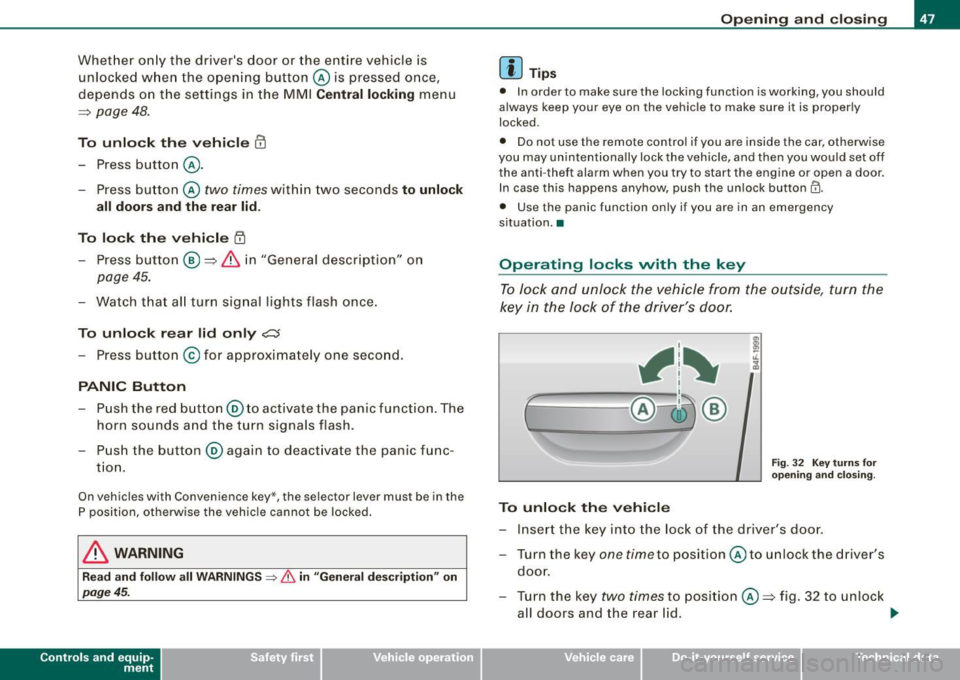
To unlock th e vehi cle CD
- Press button @.
- Press button @
two times within two seconds to unlock
all doors and the rear lid .
To lo ck th e vehicle
t'.D
- Press button ® => & in "General description" on
page 45.
- Watch that all turn signal lights flas h once .
To unlo ck r ear lid only
~
- Press button @ for app roximately one second .
PANIC Button
- Push the red button @to activate the panic function . The
horn sounds a nd t he turn signals flash.
- Push the button@ again to deact ivate the pa nic func
t io n.
On vehicles wi th Convenience key *, the sele ctor lever must be in the
P position, otherwise the vehic le cannot be locked.
& WARNING
Read and fo llow all WARNINGS ::::> & in "General de scription " on
page 45.
Con tro ls and eq uip
ment
Op ening and clo sing
[ i ] Tip s
• In order to make sure the locking function is working, you should
always keep your eye on the vehicle to make sure it is proper ly
locked .
• Do no t use the remote control if you are inside the car, otherwise
you may un intent ionally lock the vehicle , and then you would set off
the anti -theft alarm when you try to start the engine or open a door .
In case this happens anyhow, push the un lock button
II).
• Use the panic function only if you are in an emergency
s ituation. •
Operating locks vvith the key
To lock and unl ock the vehicle from the outside, turn the
key in the lock of the driver 's door.
, 1~
ff-= ~;:__, @-i3 ®
To unlock th e veh icle
F ig. 32 Key turn s for
o penin g and clos in g.
- Insert the key into the lock of the driver 's doo r.
- Turn the key
one time to posit ion @ to unlock the driver 's
doo r.
- Turn the key
two times to position @=> fig . 32 to unlock
all doors and the rear l id. .,_
Vehicle care I I irechnical data
Page 65 of 398
Clear vision
Lights
Switching the headlights on and off ·'t!-·
In the "AUTO " position, a light sensor automatically
s w itches t he head- and tailligh ts on and off in response to
l ight con ditio ns.
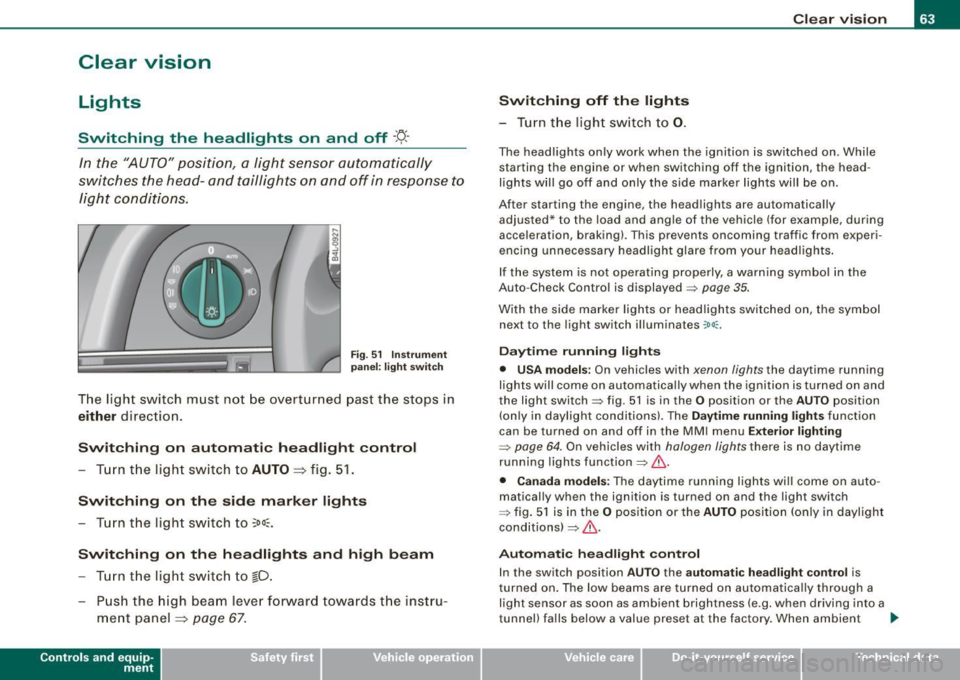
Fig . 5 1 In strument
p an el: l ight swit ch
The light switch must not be ove rt u rned pas t the stops in
either direction .
Switching on automatic headlight control
-Tu rn the light swi tch to AUTO => fig. 51 .
Switching on the side marker lights
- Turn t he light switch to ~oo~ .
Switching on the headlights and high beam
-Tur n t he light switch to gD.
- Pu sh th e hi gh bea m le v er for ward tow ards t he inst ru-
m ent panel
=> page 67 .
Con tro ls and eq uip
ment
Switching off the lights
- Tu rn the light sw itch to 0. Clear vision
The head
ligh ts only work when the ignitio n is switched on . While
starting the engine or when switching off the ignition, the head
lights wil l go off and only the side marker lights wil l be on.
After starting the engine, the headlights are automatica lly
adjus ted* to the load and ang le of the vehicle (for example, du ring
acceleration, braking) . This prevents oncoming traffic from experi
encing unnecessary headlight glare from you r headlights .
If the system is not operating properly, a warning symbol in the
Auto -Check Contro l is displayed
=> page 35.
With the side marker lights or headlights switched on, t he sym bol
next to the light switch illuminates
coo:.
Daytime running light s
• USA models :
On vehicles with xenon lights the daytime running
ligh ts will come on automa tically when the ignition is tur ned on and
the light switch=> fig. 51 is in the
O position or the AUTO position
(on ly in daylight conditions). The
Daytim e running lights func tion
can be turned on and off in the MMI menu
Exteri or lighting
=> page 6 4. On vehicles with halogen lights there is no daytime
running ligh ts function=> &,.
• Canada models: The daytime running lights wi ll come on au to
matically when the ignition is turned on and the ligh t switch
=> fig. 5 1 is in the O position or the AUTO positi on (only in dayligh t
conditions)
=> &, .
Automatic headlight control
In the switch posi tion AUTO the automatic headlight contro l is
turned on . The low beams are turned on automatica lly through a
light sensor as soon as ambient brightness (e .g. when driving into a
tunnel) fa lls below a value preset at the factory . When ambie nt ..,_
Vehicle care I I irechnical data
Page 66 of 398
Clear vision
brightness increases again, the low beams are turned off again
a uto matically =>& .
In t he
AUTO pos it ion the low b eams ar e switched off automatically
when the ignition is turned off .
Light Sensor Malfunction
In the e vent of a lig ht sensor m alfu n ction, th e drive r is noti fie d in the
instrument cluster display:
e. Automat ic headlights /automatic wipers defective
F or safe ty r eas o ns th e low bea ms are tur ned o n perma nently w ith
th e switch in
AUTO . However, you can continue to tur n the lights on
and off u sing the ligh t switc h. Have the light sen sor checked as s oon
as possib le at a dealership.
& WARNING
• Never use daytime running lights to see where you are going.
They are not bright enough and will not let you see far enough ahead for safety , espe cially at dusk or when it is dark. Always
switch on the low beams at dusk or when it is dark .
• Automatic headlights are only intended to assist the driver .
They do not relieve the driver of his responsibility to check the headlights and to turn them on manually according to the current
light and visibility conditions. For example , fog and rain cannot be
detected by the light sensors . So always switch on the headlights
under these weather conditions and when driving in the dark
tD .
• Crashes can happen when you cannot see the road ahead and
when you cannot be seen by other motorists.
-Always turn on the headlights so that you can see ahead and
so that others can see your car from the back.
[ i ] Tips
• W it h the sw it ch in AUTO front fo g ligh ts and re a r fo g ligh ts
cannot be turned on i n addition . • T
he light sensor for head light control is located in the rear view
mi rror mount . Do no t ap ply a ny s ticker s to th e windshie ld in thi s
area to p revent malfunctions or failures.
• I f you remov e the ignition fr om the ignition l oc k whil e th e he ad
l ights are still on, a buzzer will sound as long as the driver's door is
open to re mind you t o turn off the li g ht s.
• Al ways observe the specific local regulations for your area as to
w he n to u se yo ur ligh ts .•
Adjusting exterior lighting
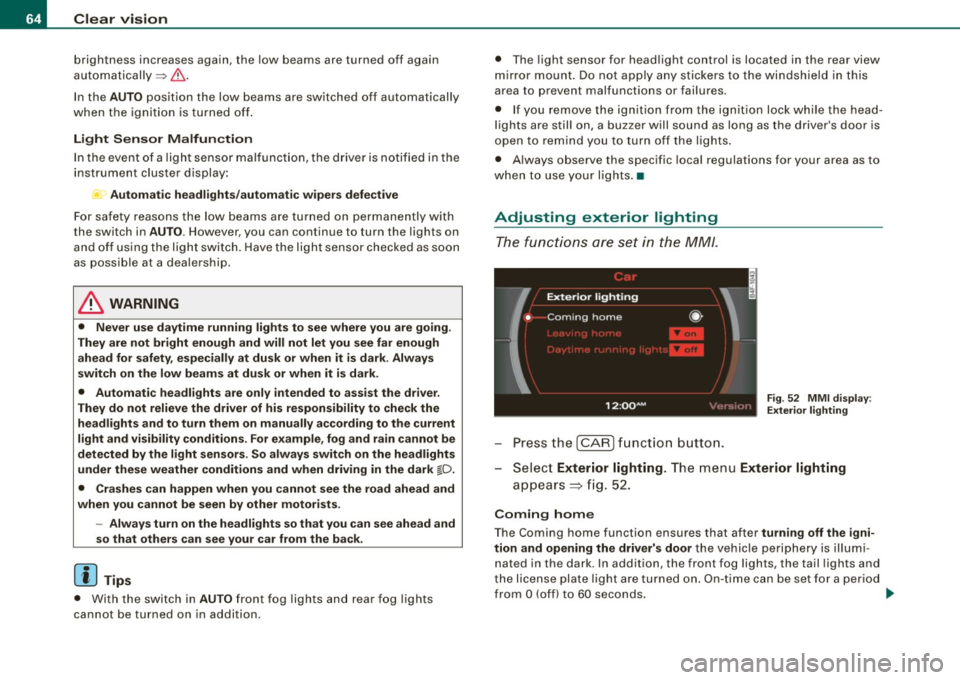
T he functi o ns are se t in th e MM /.
Fig. 52 MM I d is pl ay:
Exterior lighting
- Pre ss th e [ C AR] fun ction bu tto n.
- Selec t
Exterior lighting. The menu Exterior lighting
a pp ears => fig. 52.
Coming home
The Coming home function ensures that after turning off the igni
tion and opening the driver's door
t h e v ehicle per ip he ry is ill um i
nated in the dark. In addition, the front fog lights, the tail lights and
th e lic ense p la te li g ht are tur ned o n. O n-tim e ca n be set for a pe riod
from
O (off) to 60 seconds. .,,_
Page 77 of 398
& WARNING
Be sure to in sp ec t the co n dition of your wip er bl ade s regularl y. See
your authori zed Audi de aler for replaceme nt blade s.
(D Note
To prevent damage to the wiper system:
• Always loosen blades which are frozen to the windshield before
operating wipers.
• Do not use gasoline, kerosene, paint thinner , or other solvents on
or near the wiper blades.
• Do not attempt to move the wipers by hand .
• The windshield wiper blades mus t only be replaced when in the
service position =>
page 73! Otherwise, you risk damaging the paint
on the hood or the windshield wiper motor.
[ i J Tips
Commercial hot waxes app lied by automatic car washes affec t the
cleanability of the windshie ld. •
Mirrors
Manual anti -glare adjustment
Standard setting
Move the sma ll lever ( located o n the bottom edge of t he
mirr or) to the front.
Anti-glare setting
-Move the sma ll lever ( loc ate d on t he bo ttom e dge of t he
m ir ror) to th e rear. •
Contro ls and eq uip
ment
Clear vision
A pp lies to vehicles: w ith automatically dimming in side mi rror w it h digita l com pass
Automatically dimming inside mirror
The automatic dimming function can be turned on and off
if required .
Disabling auto dimming
Fig . 69 In side rear
vi ew mirror
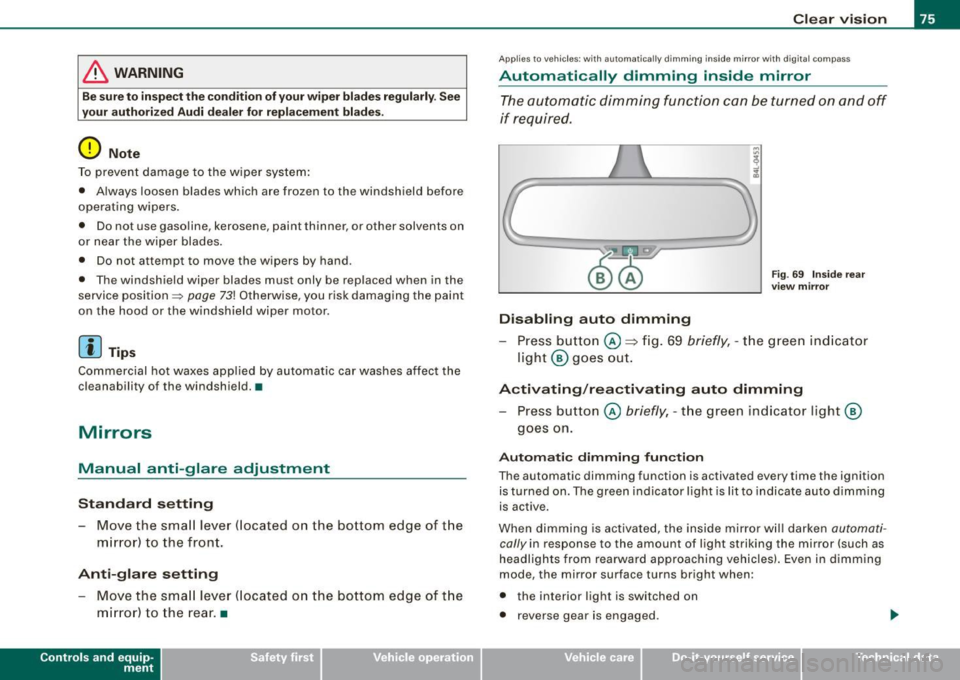
Pr ess button @ => fig. 69 briefly , -th e g reen ind ic ato r
light @ goes ou t.
Activating /rea ctivating auto dimming
Press button @ briefly, -th e green ind icator light @
goes on.
Automati c dimming fun ction
The automatic dimming function is activated every time the ignition is turned on. The green indicator light is lit to indica te auto dimming
is active .
When dimming is activated, the inside mirror w ill darken
automa ti
cally in response to the amount of light striking the mirror (such as
headlights from rearwa rd approaching vehicles). Even in d imm ing
mode, the mirror surface turns bright when:
• the interior light is switched on
• reverse gear is engaged .
Vehicle care I I irechnical data
Page 78 of 398
Clear vision
& WARNING
Broken glass of automatic dimming mirror can cause electrolyte
fluid leakage. Electrolyte fluid can irritate skin, eyes, and respira
tory system .
• Repeated or prolonged exposure to electrolyte can cause irrita
tion to the respiratory system, especially among people with
asthma or other respiratory conditions. Get fresh air immediately
by leaving the vehicle or, if that is not possible, open windows and
doors all the way.
• If electrolyte gets into the eyes, flush them thoroughly with
large amounts of clean water for at least 15 minutes; medical
attention is recommended.
• If electrolyte contacts skin, flush affected area with clean water
for at least 15 minutes and then wash affected area with soap and
water; medical attention is recommended. Thoroughly wash
affected clothing and shoes before reuse.
• If swallowed and person is conscious, rinse mouth with water
for at least 15 minutes. Do not induce vomiting unless instructed
to do so by medical professional. Get medical attention immedi
ately.
0 Note
Liquid electrolyte leaked from a broken mirror glass will damage any
plastic surfaces it comes in contact with . Clean up spilled electrolyte
immediately with clear water and a sponge .
[ i ] Tips
• If you switch off the automatic dimming function on the inside
mirror, automatic dimming of the outside mirrors will likewise be
disabled.
• Check to make sure there are no objects preventing light from
reaching the inside mirror. •
Do not attach any stickers to the windshield in front of the light
sensor, as this would interfere with the automatic operation of the
headlights and the automatic dimming of the inside mirror.
• Be aware that automatic dimming of the inside mirror can only
operate properly if the rear window sun blind * is retracted .•
Outside mirrors
The outside mirrors are electrically adjusted.
Adjusting the outside mirrors
Fig. 70 Forward
section of driver's
armrest: power mirror
controls
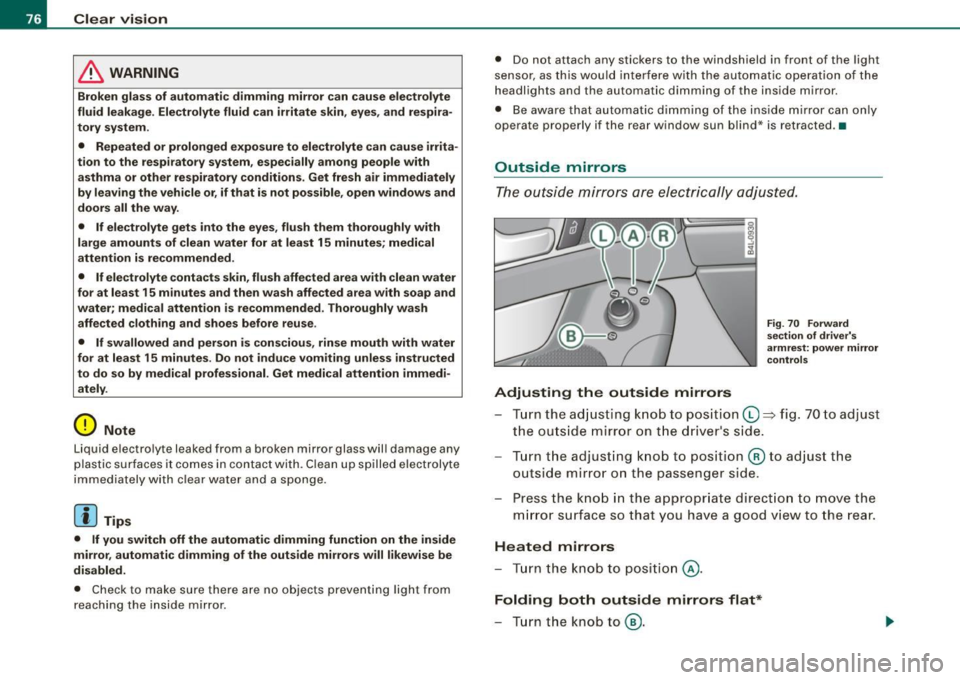
Turn the adjusting knob to position (D => fig. 70 to adjust
the outside mirror on the driver's side.
Turn the adjusting knob to position
@ to adjust the
outside mirror on the passenger side .
Press the knob in the appropriate direction to move the
mirror surface so that you have a good view to the rear .
Heated mirrors
- Turn the knob to position
@.
Folding both outside mirrors flat*
- Turn the knob to® ·