ESP AUDI S6 2009 Owner's Guide
[x] Cancel search | Manufacturer: AUDI, Model Year: 2009, Model line: S6, Model: AUDI S6 2009Pages: 398, PDF Size: 43 MB
Page 87 of 398
time. When the vehicle is unlocked, the settings stored on the
remote control key are restored.
If your vehicle is driven by other persons using your remote control
key, you should save your individual seat position on one of the
memory buttons. You can recall your settings again simply and
conveniently by pressing the corresponding memory button. When
the vehicle is locked , these settings are automatically re-assigned to
the remote control key and stored.
& WARNING
• For safety reasons, the seat setting can only be recalled when
the vehicle is stationary -otherwise you risk having an accident.
• In an emergency, the recall operation can be stopped by
pressing the [
ON/OFF) button or by briefly pressing any given
memory button. •
Applies to vehicles : w ith seat memory
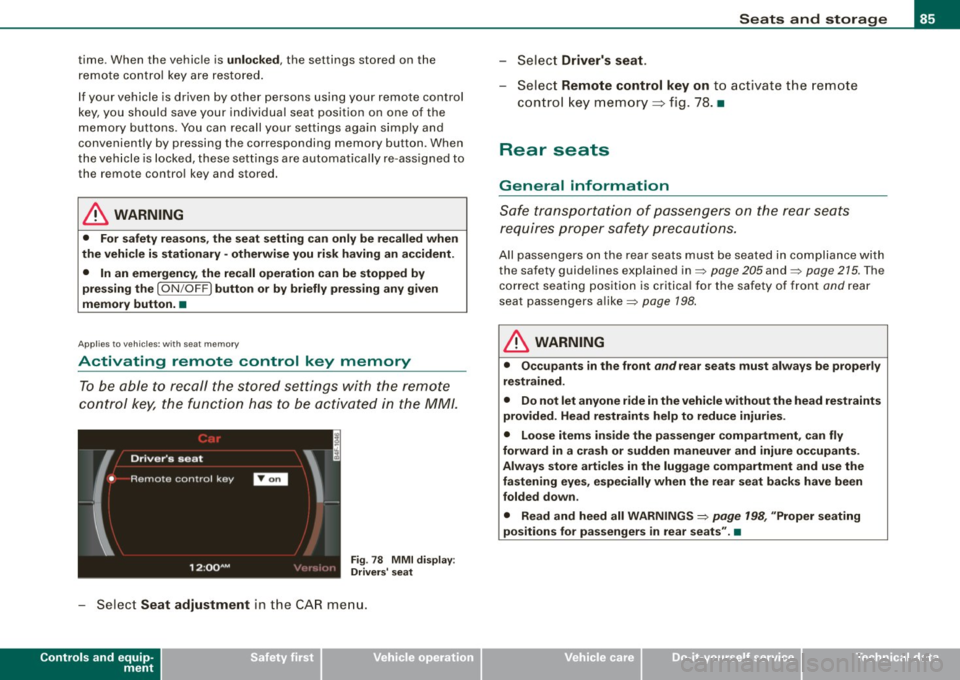
Activating remote control key memory
To be able to recall the stored settings with the remote
control key, the function has to be activated in the MM/.
Fig. 78 MMI display :
Drivers' seat
- Select Seat adjustment in the CAR menu.
Controls and equip
ment
Seats and storage
Select Driver's seat.
-Select Remote control key on to activate the remote
control key memory ~ fig. 78. •
Rear seats
General information
Safe transportation of passengers on the rear seats
requires proper safety precautions.
All passengers on the rear seats must be seated in compliance with
the safety guidelines explained in=> page 205 and=> page 215. The
correct seating position is critical for the safety of front and rear
seat passengers alike=> page 198.
& WARNING
• Occupants in the front and rear seats must always be properly
restrained.
• Do not let anyone ride in the vehicle without the head restraints
provided. Head restraints help to reduce injuries.
• Loose items inside the passenger compartment, can fly
forward in a crash or sudden maneuver and injure occupants.
Always store articles in the luggage compartment and use the
fastening eyes, especially when the rear seat backs have been
folded down .
• Read and heed all WARNINGS=>
page 198, "Proper seating
positions for passengers in rear seats". •
I • •
Page 93 of 398
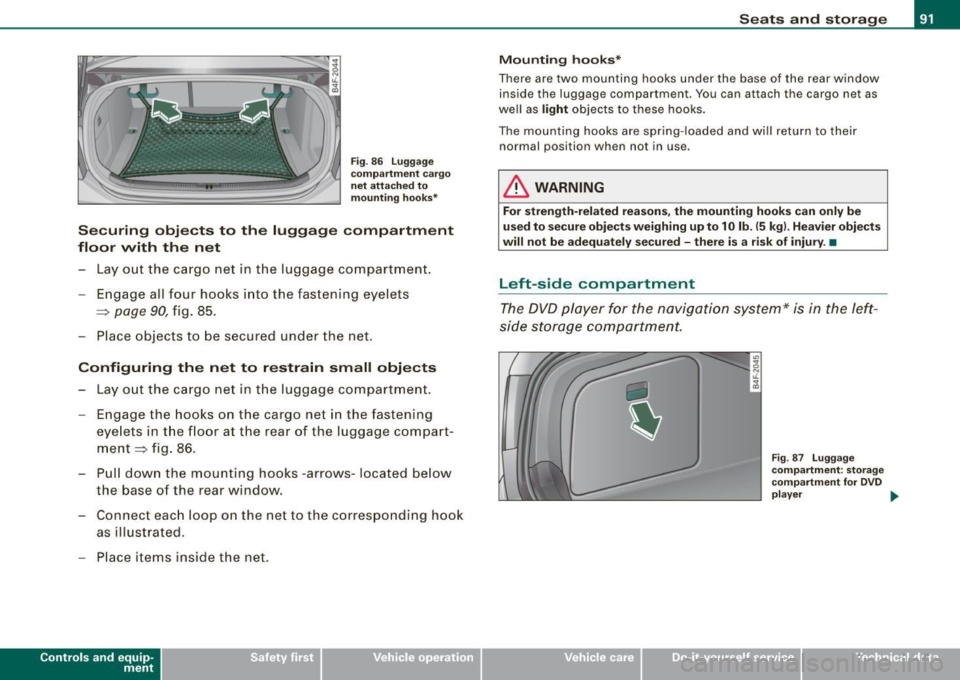
Fig. 86 Luggage
compartment cargo
net attached to
mounting hooks*
Securing objects to the luggage compartment
floor with the net
- Lay out the cargo net in the luggage compartment.
- Engage all four hooks into the fastening eyelets
=:> page 90, fig. 85.
- Place objects to be secured under the net.
Configuring the net to restrain small objects
-Lay out the cargo net in the luggage compartment.
- Engage the hooks on the cargo net in the fastening
eyelets in the floor at the rear of the luggage compart
ment :::::> fig. 86.
- Pull down the mounting hooks -arrows-located below
the base of the rear window.
- Connect each loop on the net to the corresponding hook
as illustrated .
- Place items inside the net.
Con tro ls and eq uip
ment
Seats and storage
Mounting hooks*
There are two mounting hooks under the base of the rear window
inside the luggage compartment . You can attach the cargo net as
well as light objects to these hooks.
The mounting hooks are spring-loaded and will return to their normal position when not in use.
& WARNING
For strength-related reasons, the mounting hooks can only be
used to secure objects weighing up to 10 lb. (5 kg). Heavier objects
will not be adequately secured -there is a risk of injury .•
Left-side compartment
The DVD player for the navigation system* is in the left
side storage comportment.
Vehicle care I I
Fig . 87 Luggage
compartment: storage
compartment for DVD
player .,._
irechnical data
Page 101 of 398
![AUDI S6 2009 Owners Guide 0 Note
To avoid damaging the socket, only use plugs that fit properly.
[ i] Tips
When the engine is off and accessories are still plugged in and are
on, the vehicle battery](/img/6/57595/w960_57595-100.png "AUDI S6 2009 Owners Guide 0 Note
To avoid damaging the socket, only use plugs that fit properly.
[ i] Tips
When the engine is off and accessories are still plugged in and are
on, the vehicle battery")
0 Note
To avoid damaging the socket, only use plugs that fit properly.
[ i] Tips
When the engine is off and accessories are still plugged in and are
on, the vehicle battery can still be drained. •
Storage
General overview
There are numerous places to store items in your vehicle.
Glove compartment
Storage compartment in roof
Coat hooks
Storage compartment in the trunk
& WARNING
~ page 99
~ page 100
~ page 101
~ page 91
• Always remove objects from the instrument panel. Any items
not stored could slide around inside the vehicle while driving or
when accelerating or when applying the brakes or when driving
around a corner.
• When you are driving make sure that anything you may have
placed in the center console or other storage locations cannot fall
out into the footwells. In case of sudden braking you would not be
able to brake or accelerate.
• Any articles of clothing that you have hung up must not inter
fere with the driver's view. The coat hooks are designed only for
lightweight clothing. Never hang any clothing with hard, pointed
or heavy objects in the pockets on the coat hooks. During sudden
Con tro ls and eq uip
ment
Seats and storage
& WARNING !continued)
braking or in an accident -especially if the airbag is deployed -
these objects could injure any passengers inside the vehicle. •
Glove compartment
The media player is in the glove compartment.
To open glove compartment
Fig. 99 Unlocking
button for glove
compartment
Press the button ::V => fig. 99 (arrow) - the lid opens auto
matically.
To close glove compartment
Push the glove compartment lid up unt il the lock
engages.
In the glove compartmen t lid you will find a place to store a pen and
a pad of paper.
CD changer*
The CD changer for the radio system and the Navigation drive* is located in the glove compartment . How to change CDs is described
in the pertinent Owner's Manual.
tJ,,,
Vehicle care I I irechnical data
Page 105 of 398
_________________________________________________ w_ a_ r_ m __ a_n_ d_ c_ o_ld __ _
energy are temporarily cut bac k or switched off~ page 269 .
Hea tin g sys tems in particu lar requi re a g rea t dea l of energy. If yo u
not ice, for example, that the seat * or rear w indow heating is not
heati ng, they have bee n tempora rily cu t bac k or switche d off by
energy management . These systems are avai lable a gain as soon as
the energy balance has been resto re d.
& WARNING
Reduced visibility is dangerous and can cause accidents .
• For safe driving it is very important that all windows be free of
ice , snow and condensation.
• Completely familiarize yourself with the proper use and func
tion of the heating and ventilation system and especially how to defog and defrost the windows .
• Never use the windshield wiper /washer system in freezing
weather until you have warmed the windshield first , using the
heating and ventilation system. The washer solution may freeze
on the windshield and reduce visibility.
0 Note
• I f you suspect that the air conditioner has been damaged, turn
on ECO N and con tac t an autho riz e d Aud i deale r to hav e the system
inspected .
• R epairs to the A udi air co nd it io ner requ ir e sp ecia l te chni cal
know ledge and special tools . Contact an authorized Audi dealer for
assista nce .
[ i J Tips
• Kee p th e air in ta ke s lots (in fron t of the w inds hield) free from i ce,
snow and debris in order to maintain the proper function of the
cl im ate c ontro l sy ste m.
Controls and equip
ment
• T he air flowing out of the vents and throughout the vehic le's
en tire int er ior is discha rge d at the rear o f the vehicle . Make sure th at
the outlet s lots are not covered by clothin g, etc .
• Climate c ontro l wor ks mo st e ffec tively if th e windo ws and the
sunroof are closed . However, if the interior of a park ed vehicl e is
e xt re me ly hot fro m the su n's rays , briefly open ing the windows can
speed up the cooling process .•
I • •
Page 124 of 398
![AUDI S6 2009 Owners Guide -On the road --------------------
[
i] Tips
• You can apply the parking brake at any time - even with the igni
tion turned off. The ignition must be turned on in order](/img/6/57595/w960_57595-123.png "AUDI S6 2009 Owners Guide -On the road --------------------
[
i] Tips
• You can apply the parking brake at any time - even with the igni
tion turned off. The ignition must be turned on in order")
-On the road --------------------
[
i] Tips
• You can apply the parking brake at any time - even with the igni
tion turned off. The ignition must be turned on in order to release
the parking brake .
• Occasional noises when the parking brake is applied and
released are normal and are not a cause for concern .
• The parking brake goes through a self -test cycle at regular inter
vals - when the vehicle is parked . Any associated noises are
normal. •
Parking
To prevent a parked vehicle from rolling away, there are a
few things you should do.
When you park your vehicle, do the following
- Stop the vehicle using the brake pedal.
- Pull the switch to apply the electromechanical parking
brake.
- Move the selector lever into the
P position ~& .
- Switch off the engine and remove the ignition key from
the ignition lock.
When you park your vehicle on hills, do the
following - Stop the vehicle using the brake pedal.
- Pull the switch to apply the electromechanical parking
brake.
- If you are parking headed downhill, turn the front wheels
toward the curb. - If you are
parking headed uphill, turn the front wheels
awayfrom the curb.
- Move the selector lever into the P position .
- Switch off the engine and remove the ignition key from
the ignition lock.
& WARNING
This is how you can reduce the risk of injury when leaving your
vehicle.
• Never park the vehicle where it can come in contact with dry
grass, spilled fuel or any other flammable materials.
• When parking on hills, always turn the wheels so that the front
wheels will first roll into the curb, if the vehicle should start to roll.
• Never allow anyone -especially small children -to remain in the
vehicle when it is locked. Locked doors make it more difficult for
rescuers to access the passenger compartment in the event of an
emergency. Danger to life!
• Never leave children unsupervised in the vehicle. Children
could release the parking brake or move the gearshift lever out of
gear. The vehicle could start to roll away and cause an accident.
• No matter what the season is, the temperature in a parked
vehicle can reach dangerous levels.
0 Note
• Please exercise care when you park your vehicle in parking areas
with parking barriers or curbs. Parking barriers and curbs vary in height and could damage your bumper and related components as
the front of your vehicle moves over a barrier or curb that is too
high, as you park or as you back out of a parking spot. In order to be
sure that no such damage can occur, you may wish to stop short of
having the front tires of your car touch the parking barrier or curb . ..,_
Page 127 of 398
On the road -
----------------
The display=> page 124, fig. 122 will show the set speed . The
display may vary depending on the type of disp lay in your vehicle .
The ind icator light
CRU ISE (US model) I (')0 (Canadian mode l) wi ll also
light up in the instrument cluster.
The speed is kept constant via an engine output adjust ment or
active brake intervention .
_& WARNING
• Always pay attent ion to traffic even when the crui se control is
s w it ched on. You are alw ays r esp onsi ble for your speed and the
di sta nce b etween your vehi cle and other vehi cle s.
• For s afet y reason s, the crui se control should not be u sed in the
c ity , in stop- and-go traffic , on twi sting roads and when road condi
t ion s a re p oor (s uch a s ice , fo g, gra vel , he avy ra in and h ydro
planing ) - risk of accident.
• Turn off the crui se control tempor arily when e nte ring tu rn
lan es, highway exit lanes or in constru ction zone s.
• Plea se note that in adv ertentl y "re sting " yo ur foot on the accel
erator ped al cau se s the cruise control not to brake . Thi s is b ecau se
the crui se control i s overridden b y the dri ve r's acc eleration .
[ i] Tips
The brake lights il luminate as soon as the brakes decelerate
automatically .•
Ap plie s to v ehicl es: w it h c ruise contro l
Changing speed
-Press lever in the 0 o r Q dir ection => page 124, fig. 121
to increase or decrease you r sp eed.
- Release the lever to s ave that speed.
Controls and equip
ment Change speed in increments of 1 mph (1 km/h) by
lightly pressing
the lever . If you keep the lever pressed down, you will a lter your
speed in 5 mph (10 km /h) increments .
You can a lso press the acce lerator pedal down to increase your
speed, e.g. if you want to pass someone. The speed you saved
earlier will resume as soon as you release the accelerator pedal.
If , however, you exceed your saved speed by 5 mph (10 km/h) for
longer than 5 minutes, the cruise control will turn off temporarily .
The symbol wi ll go ou t bu t the saved speed wi ll be retained. •
Applie s to v ehic le s: with c ru ise cont ro l
Presetting your speed
You can prese t your desire d speed while the vehicle is not
moving.
- Turn o n the ignition .
Pu ll lever into pos ition
G) => page 124, fig. 12 1.
Press the lever in the
0 or Q direction to increase or
decrease your speed .
- Release the lever to save that speed .
This function makes it possible, for example, to save the speed you
want before driving on the highway. Once on the highway , activate
the cruise contro l by pu lli ng the lever toward
G) . •
Ap plies to ve hic les: with c ruise contro l
Switching the system off
Temporary dea ctivation
- Press the brake pedal, or
I • •
Page 130 of 398
• .___A_ d_a_ p:- t_iv _ e_ C_ r_u _is _ e_C_ o_ n_ t_ r_ o_ l --------------------------------------------
& WARNING (continued)
• Never allow the closing speed between you and other vehicles
to be so high that the Adaptive Cruise Control may not be able to slow your vehicle safely. If closing speed is too high , you must
apply the brakes yourself to reduce the risk of a rear -end crash.
• Never rest your foot on the accelerator pedal, especially when
the Adaptive Cruise Control is being used. Pressure on the acceler
ator will override the ACC braking function and prevent the brakes
from being applied when ACC detects a situation when the brakes must be applied .
• Never use Adaptive Cruise Control when you cannot drive
safely at a steady speed, including on city streets, on winding
roads or when road conditions are poor (for example, on ice,
gravel, in fog, heavy rain or on wet roads that increase the risk of
hydroplaning).
• The radar sensor's
vision can be reduced by rain, snow and
heavy road spray. These and similar conditions can prevent vehi
cles up ahead from being accurately detected and in some cases
they may not be detected at all. Do not use ACC when the radar sensors cannot accurately detect vehicles moving ahead of you in
traffic.
• Always turn off Adaptive Cruise Control when entering turn
lanes, exit lanes and construction zones or in similar situations
because the vehicle will automatically accelerate to the stored
speed when the road ahead is clear.
• To prevent unintended operation, always switch ACC off when
it is not being used.
[ i) Tips
• For safety reasons, the stored speed is deleted when the ignition
is turned off .
• The Electronic Stabilization Program (ESP) and the Anti-Slip
Regulation (ASR) cannot be deactivated when the Adaptive Cruise
Control is switched on. If the ESP and the Anti-Slip Regulation (ASRI has been deactivated and you then switch on the
Adaptive Cruise
Control, the ESP function will also be activated automatically.
• Damage caused by accidents and some minor collisions can
affect the radar sensor settings and cause the system to malfunc
tion or switch off completely.
• The radar sensor cover is heated. In winter conditions, you
should still check before driving to make sure it is free of ice and
snow. If necessary, clean the area near the radar sensor carefully
=>
page 127, fig. 123.
• To ensure that the radar sensor is not blocked, foreign objects
(e.g. stickers, larger license plate mounts, add -on parts) must not
cover the area near the radar sensor=>
page 127, fig. 123. The area
near the radar sensor must not be painted, either.
• For Declaration of Compliance to United States FCC and Industry
Canada regulations =>
page 375. •
Applies 10 veh ic les: w ith Ada ptive Crui se Contro l
How does Adaptive Cruise Control work?
Vehicles traveling ahead are detected with the aid of a
radar sensor.
Fig. 124 Basic prin
ciple diagram : Radar
sensor measurement
range
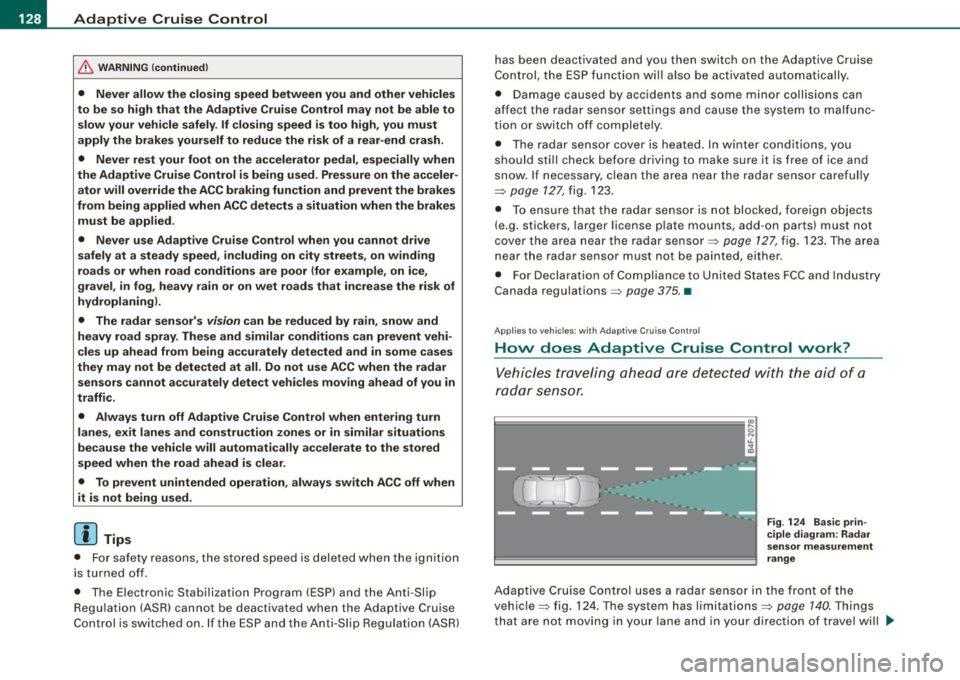
Adaptive Cruise Control uses a radar sensor in the front of the
vehicle=> fig. 124. Th e system has limitations=>
page 140. Things
that are not moving in your lane and in your direction of travel will
~
Page 131 of 398

Adaptiv e Crui se Contro l IIJ!IIIII ---------------------------------..:....:.:=:...:.;_;....::.....::...._ \
_______ _
not be detected. The sensor measures the distance to reflective
surfaces that must have a certain size. The system responds only
after the distance measurement has been made . If a measurement
is not possible, the system cannot respond and wil l not react to a
vehicle or something else up ahead.
O pen ro ad
When the road is clear, the Adaptive Cruise Control works like cruise
control. It main tains a constant target speed specified by the driver.
D riv in g in tr affic
If a slower vehic le driving ahead is detected, the Adaptive Cruise
Control dece lerates (within the limits of the system)::::;,
page 138,
"Driver intervention prompt" and::::;, page 140, "System limitations"
to its speed and after adjusting, tries to maintain the set distance
from the vehicle ahead . The vehicle may temporarily drive s lower
than the set speed while adjusting::::;,
& in "Description" on
page 127.
If the vehicle in front accelerates, Adaptive Cruise Control a lso acce l
erates up to the speed that you have set.
Sit uation s re qui ring d rive r int erve ntion
In some situations you will have to use the footbrake to s low the
vehicle down in order to keep a safe distance from vehic le in front
of you or to avoid a rear -end collision. In this situation, a symbol
appears and a warning tone sounds::::;,
page 138.
P assing anoth er veh icle
If you move into the pass ing lane and no vehicle is detected ahead,
the Adaptive Cruise Control accelerates to the speed you have set
and ma intains it.
O ve rridin g ACC
You can increase your speed at any time by stepping on the acceler
ator pedal. After you re lease the acce lerator pedal, the system
adjusts back down to the speed you previously set.
Controls and equip
ment R
edu cin g s topping di sta nce
If the radar sensor detects that the distance to the vehicle ahead is
less than defined minimum distance, the brakes are automatical ly
prepared for emergency braking by the driver . The brake pads are
moved very c lose to the brake discs without actual ly braking the
vehic le. This brake assistant feature reacts more quick ly to the
driver's braking, and also works when Adaptive Cruise Control is off.
The stopping distance is reduced as a result of this advance brake
preparation. This function does not perform any emergency brak ing
maneuvers by itself; the driver must always app ly the brakes.
& WARNING
• Never r ely on the d istan ce control feature of ACC alone t o
p re vent re ar- end colli sio ns. Alwa ys be prep ared t o br ake and take
eva sive ac tion to a void colli sio ns and ot her acc ident sit uation s.
• Never allo w the clo sing sp ee d b etwe en you and other vehi cle s
to be so hi gh th at th e Ada ptive Crui se Control may not b e able to
s low your vehicl e safely . If clo sing spe ed i s too h igh , you must
a pp ly the brake s yours elf to reduce the risk of a rea r-end cras h.
[ i ] Tip s
Please note that the amount of acceleration the Adaptive Cruise
Contro l uses depends on the Distance setting selected . DISTA NCE 1
gives you acceleration that is dynamic and sporty . D ISTANCE 4, on
t he o ther hand, gives more moderate acce leration. For more infor
mation about the time intervals::::;,
page 133, "How is the distance
(time interval) set?" .
• Please note that if the Adaptive Cruise Control has begun braking
t he vehicle and the driver chooses to brake the vehicle additional ly,
the brakes may feel "hard". This is simply due to the pressure build
up of the initial braking .
• Adaptive Cruise Control is switched off after pressing the foot
brake . The speed saved up this point can be resumed. To resume the
saved speed, release the brake pedal and pu ll the control lever _.,
I • •
Page 136 of 398

• .___A_ d_a_ p:- t_iv _ e_ C_ r_u _is _ e_C_ o_ n_ t_ r_ o_ l --------------------------------------------
How your vehicle responds when accelerating and fol lowing other
veh ic les w ith ACC operat ing can be a dapt ed to your persona l wishes
through different driving programs. Depending on which driving prog ram a nd whic h dis tance you choose, your vehicle will respond
Settings DISTANCE 1
Symbol for time interval
~ -~---
more dynamica lly or more comfortably when accelerating and
b raki ng. T he setting is selecte d throug h the MM I menu Adaptive
Cruise Control =>
page 139, "M M I settings".
DISTANCE 2 DISTANCE 3 DISTANCE4
~-- ~-- ~--- ~- ~---- ~
Support for: Bumper -to-bumper Bumper -to-bumper Bumper -to -bumper Secondary roads,
traffic, brisk driving
Response in "dynamic " driving program
1
Response in "standard " driving program 2
Response in "comfort " driving program 3
(dynamic) 1 ----2 ----- 3 ----- 4 ----- 5 (comfortable)
& WARNING
Following other veh icles too clo sely increases the risk of a crash
and serious personal injury .
• Following other vehicles too closely , parti cularly at h igher
speeds increases the risk of collisions and serious personal injury.
• Setting short distan ces to the traffic ahead reduces the time
and distance available to bring your vehicle to a safe stop and
makes it even more necessary to pay close attention to traffic .
• Always select a speed and distance to traffic ahead that is safe
and appropriate under the prevailing traffic , road , weather and
lighting conditions .
• Never rely on the distan ce control feature of ACC alone to
p revent rear-end collisions . Alw ays be prepared to brake and take
evasive action to avoid collisions and other accident situations.
• Never allow the closing speed between you and other vehicles
to be so high that the Adaptive Cruise Control may not be able to traf
fic, "keeping pace" traffic, "kee ping pace" trai ler operation
co mfortably comfortably
2
2 3
3 3 4
4 4
5
&, WARNING !continued )
slow your vehicle safely . If closing speed is too high, you must
apply the brakes your self to reduce the risk of a rear -end crash.
• Always select a greater following distance to the vehicle ahead
on wet road s than on dry roads.
• Always read and heed the information and WARNINGS =>
& in
" De script ion " on
page 127 .
[ i ] Tips
The distance setting is reset to the factory default DISTANCE 3 the
n ext t ime the ign ition is turne d on.•
Page 148 of 398
• ..__A_ u_ d_ i _s _i_d _e_ a_ s_ s _ is_ t __________________________________________________ _
Audi side assist
Lane Change Assistant
Applies to vehicles: with side ass ist
Description
The side assist helps you when changing lanes.
AUDI
Fig . 146 Rear bumper:
Position of radar
sensors (not visible on
outside)
Fig . 147 Signal light
on the outside mirror -
driver's side
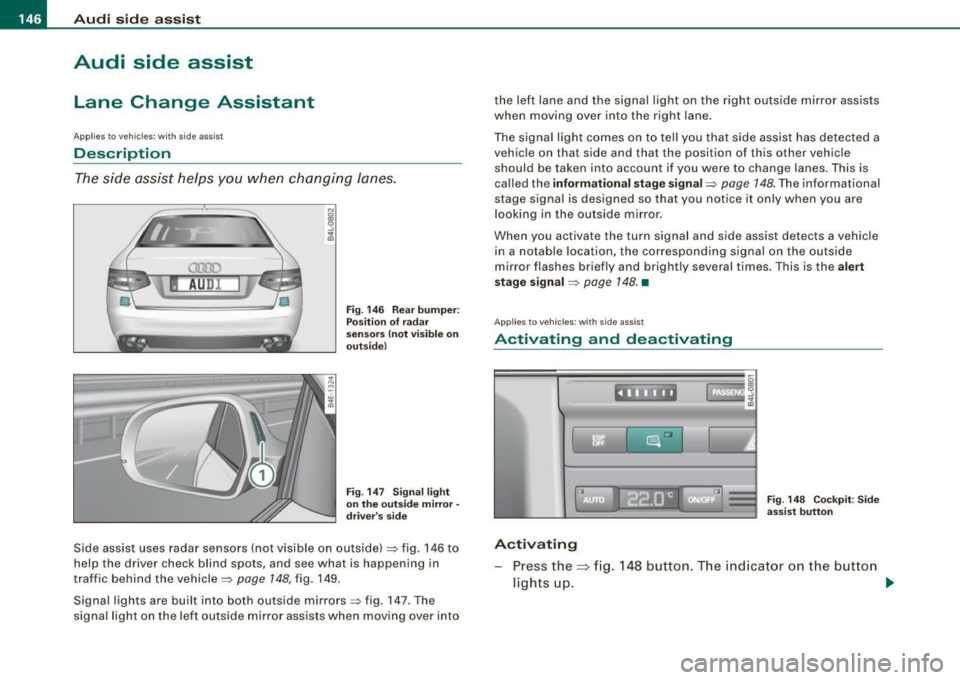
Side assist uses radar sensors (not visible on outside) ::::, fig. 146 to
help the driver check blind spots, and see what is happening in
traffic behind the vehicle::::,
page 148, fig. 149.
Signal lights are built into both outside mirrors::::, fig. 147. The
signal light on the left outside mirror assists when moving over into the left lane and the signal light on the right outside mirror assists
when moving over into the right
lane.
The signal light comes on to tell you that side assist has detected a
vehicle on that side and that the position of this other vehicle
should be taken into account if you were to change lanes. This is
called the
informational stage signal::::, page 148. The informational
stage signal is designed so that you notice it only when you are
looking in the outside mirror.
When you activate the turn signal and side assist detects a vehicle
in a notable location, the corresponding signal on the outside
mirror flashes briefly and brightly several times. This is the
alert
stage signal ::::,
page 148. •
Appl ies to veh icles: wi th side assist
Activating and deactivating
~~ l"I ~ ...
Activating
Fig. 148 Cockpit : Side
assist button
Press the=> fig. 148 button. The indicator on the button
ligh ts up. ..,