light AUDI S6 2009 Owner's Guide
[x] Cancel search | Manufacturer: AUDI, Model Year: 2009, Model line: S6, Model: AUDI S6 2009Pages: 398, PDF Size: 43 MB
Page 53 of 398
Opening the rear lid
- Press the center button c::5 on the master key or pull the
release button
c::5 in the driver's door=> page 50, fig. 37.
The rear lid is unlocked and opens.
Closing the rear lid
- Pull the rear lid down and allow it to drop gently into the
latch ~& -
& WARNING
• After closing the rear lid, always pull up on it to make sure that
it is properly closed. Otherwise it could open suddenly when the
vehicle is moving.
• To help prevent poisonous exhaust gas from being drawn into
the vehicle, always keep the rear lid closed while driving. Never
transport objects larger than those which fit completely into the luggage area, because then the rear lid cannot be fully closed.
• Never leave your vehicle unattended especially with the rear lid
left open. A child could crawl into the car through the luggage
compartment and pull the lid shut, becoming trapped and unable
to get out. To reduce the risk of personal injury, never let children
play in or around your vehicle. Always keep the rear lid as well as
the vehicle doors closed when not in use.
• Always ensure that no one is within range of the rear lid when
it is moving, in particular close to the hinges -fingers or hands can
be pinched.
[ i] Tips
• If the rear lid is open or not properly closed when the ignition is
turned on, the door and rear lid warning~
page 25 appears in the
instrument cluster display.
• Should you not be able to open the rear lid as described, make
sure the valet key function is not activated~
page 44.
Contro ls and eq uip
ment
Opening and closing
• If the central locking system fails (power supply), you can also
open the rear lid using the trunk escape handle from the inside
~ page 342. •
Child safety lock
Power child safety lock for the rear doors t
The power child safety lock prevents the rear doors from
being opened from the inside.
Fig. 39 Section from
driver's door: controls
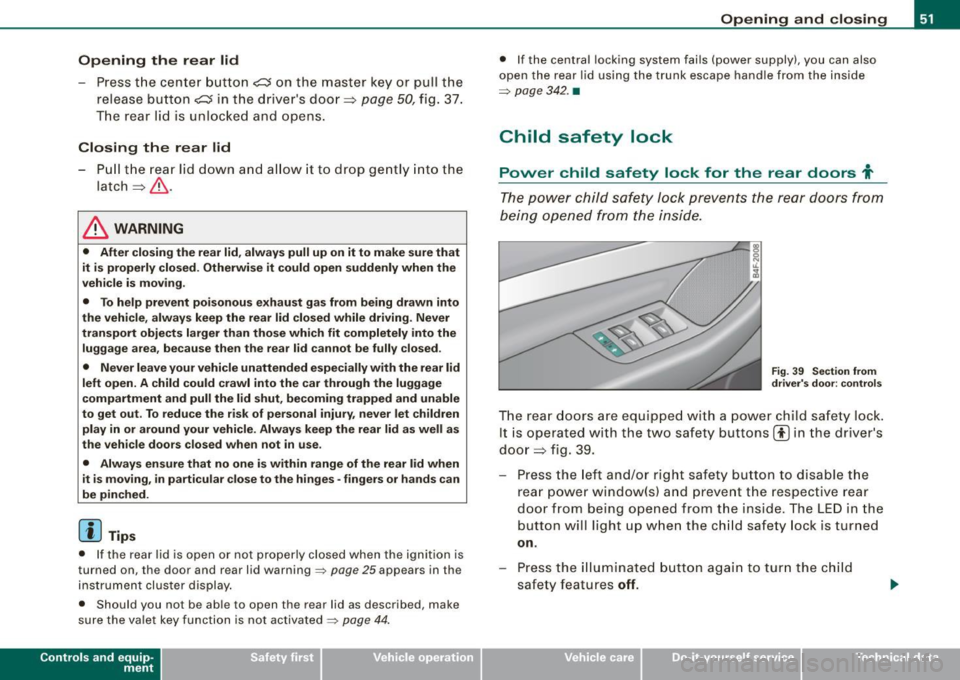
The rear doors are equipped with a power child safety lock.
It is operated with the two safety buttons(!) in the driver's
door ~ fig. 39.
- Press the left and/or right safety button to disable the
rear power window(sl and prevent the respective rear
door from being opened from the inside. The LED in the
button will light up when the child safety lock is turned
on.
- Press the illuminated button again to turn the child
safety features
off.
Vehicle care I I irechnical data
Page 54 of 398
Openin g a nd clo sin g
When the chi ld safety lock is activated, the interior door opening
lever is inoperative; the door can only be opened from the outside .
In addition, the window regulator for that door is a lso inoperative
when the child safety lock is activated.
[ i ] Tips
• In order to activate the child safety lock on the left and the right
side, you have to press the two safety buttons in succession .
• Make certain that the chec k light comes on in the corresponding
safety switch when the child safe ty lock is activated .•
Convenience key
A pplies to vehicles : wi th Con venien ce key
Description
Access and vehicle operation based on: Master key
remains in driver's pocket.
The Convenience key vehicle au thorization system allows k e yless
unlocking, locking and starting of the vehicle. You on ly have to carry
the master key on your p erson .
It makes no difference whether the master key is in your jacket
pocket or in your brief case. As soon as you approach your vehicle,
the Convenience key recognizes the request fo r access, checks fo r
authori zation and enab les the fo llowing functions:
• Unlocking the vehicle:::::,
page 53.
• Locking the vehicle:::::, page 53.
• Switching on ignition and starting the engine by pressing the
[ S TA RT] button; the master key does not have to be in the ignition
switch :::::,
page 118.
& WARNING
• When you lock your vehi cle fr om o uts ide , nobod y -espe ciall y
children -should remain in side the vehicle. Remember , when you
l o ck th e ve hicle from the out side the windo ws ca nnot be opened
from the in side .
• When you lea ve the vehi cle , al ways re m ov e the ign ition key and
take it with you. Thi s will prevent pa ss enger s (children , for
e xample ) from a ccidentally being l ocked in the vehi cle s hould the y
ac cidentall y pre ss the pow er lockin g switch in the front doors .
• Do not l eave childr en in side the vehi cle un sup erv is ed . In an
emerg ency it wo uld be impo ssible to open the door s from the
out side witho ut th e key.
[ i ] Tips
• In order for Convenience key to function, you must always carry
the master key with you.
• In order to be able to un lock or lock the vehicle, the authorized
master key must be within a range of about 1.5 meters from the
door or the rear lid.
• Of course, you can still un lock and lock your vehicle using the
buttons on the master key . The selector lever must be in the P posi
tion .
• For Declaration of Compliance to United States FCC and Industry
Canada regulations :::::,
page 375. •
Page 56 of 398
Opening and closing
& WARNING
• When you lock your vehicle from outside, nobody -especially
children - should remain inside the vehicle. Remember, when you
lock the vehicle from the outside the windows cannot be opened
from the inside.
• When you leave the vehicle, always remove the ignition key and
take it with you. This will prevent passengers (children, for example) from accidentally being locked in the vehicle should they
accidentally press the power locking switch in the front doors .
• Do not leave children inside the vehicle unsupervised. In an
emergency it would be impossible to open the doors from the
outside without the key.
[ i] Tips
It is not possible to re-open the door for a brief period directly after
closing it. This allows you to ensure that the doors are properly
locked .•
Anti -theft alarm system
Description
The anti-theft alarm triggers an alarm if anyone attempts
to break into the vehicle.
The anti-theft alarm system triggers an audible alarm and turns on
the emergency flasher if an unauthorized interference with the
vehicle is sensed by the system.
How is the anti-theft alarm system switched on?
The anti-theft alarm system is switched on when you lock the
vehicle. The system is activated approximately 30 seconds after the
vehicle is locked. The indicator light on top of the door trim start
flashing rapidly for 30 seconds and then blink slowly.
How is the anti-theft alarm system switched off?
The anti-theft alarm system is switched off only when you unlock
your vehicle. If you do not open a door within 60 seconds after you have unlocked with the remote control, the vehicle will lock itself
again automatically.
When will the anti-theft alarm system be triggered?
When the vehicle is locked, the alarm system monitors and protects
the following parts of the vehicle:
• engine compartment
• luggage compartment
• doors
• vehicle incline
• ignition
When the system is activated, the alarm will be triggered if one of
the doors, the engine hood or the rear lid are opened, or if the igni
tion is turned on or if the vehicle incline has been changed. The anti
theft alarm system will also go off when the battery is disconnected.
You can also trigger the alarm by pressing the PANIC button on your
remote control. This will alert other people in case of emergency .
Press the
PANIC button again to turn off the alarm .
How is the anti-theft alarm switched off when
triggered?
The alarm system is switched off when you unlock the vehicle or
when the ignition is switched on . The alarm will also switch itself off
when it comes to the end of its cycle.
Emergency flasher and horn
The emergency flasher will blink briefly and the horn sounds when
the doors, engine hood and rear lid are properly closed.
If the emergency flashers do not blink, or the horn does not sound,
check the doors, engine hood and rear lid to make sure they are
properly closed. If you close a door, the hood or the rear lid with the
~
Page 57 of 398
anti-theft alarm switched on, the emergency flashers will b link and
the horn will sound only after you have c losed the door or lid .
[ i J Tips
For the an ti-theft a larm system to function p rope rly, make sure a ll
vehicle doors and windows are c losed before leaving the vehicle .•
Tilt sensors -lQ
The tilt sensors t rigg er an alarm if they detect vehicle
movement.
Fi g. 4 2 Driver's door:
tilt senso r switch
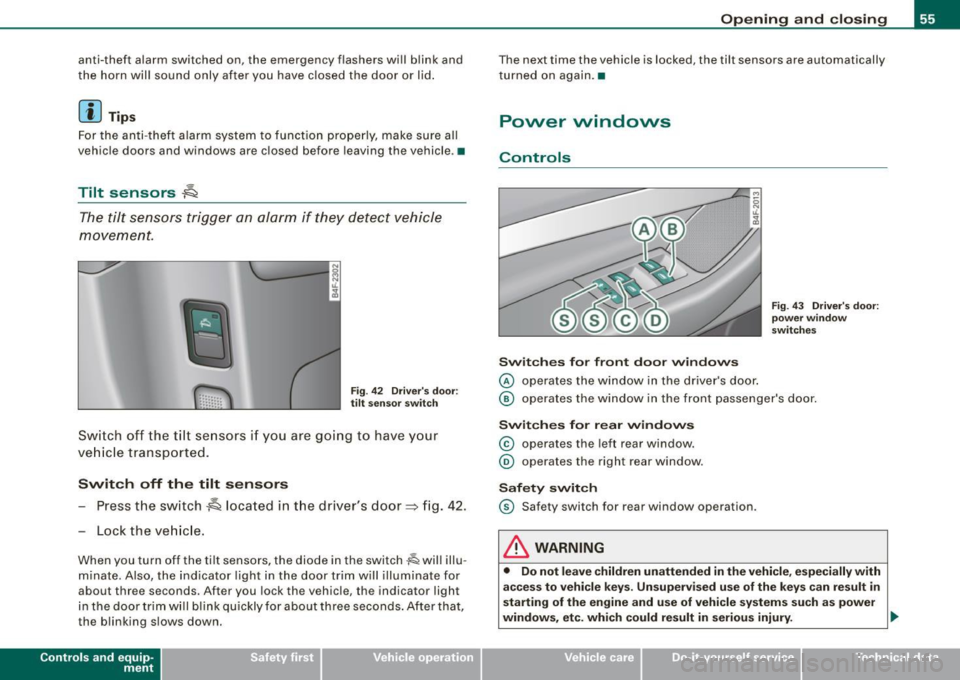
Sw it c h off the tilt se nsors i f you ar e go ing to have y our
ve hicle transported .
Switch off the tilt sensors
- Press the switch~ located in t he driver's door~ fig . 42.
- Lock the veh ic le.
When you turn off the tilt sensors, the diode in the switch~ will illu
m inate . Also, the ind icator light in the door trim wil l illuminate for
about three seconds. After you lock the v ehicl e, the indicator light
in the door trim wi ll blink quickly for about three seconds . After tha t,
the blinking slows down.
Con tro ls and eq uip
ment
Op ening and clo sing
The next time the vehicle is locked, the tilt sensors are automatically
turned on again .•
Power windows
Controls
Sw it c hes for fr ont do or window s
@ operates the window in the driver's door .
Fig. 43 Driv er's d oor:
pow er wind ow
s w it ch es
@ operates the window in the front passenger's door.
Switch es for rear window s
© operates the left rear window .
® operates the right rear window .
Safety swit ch
© Safety switch for rear window op eration.
& WARNING
• Do not l eave children unattended in the vehicl e, especially with
a cce ss to vehi cle keys . Un super vised u se of the ke ys c an result in
starting of the engine and use of vehi cle s ystem s suc h as power
windows , etc . which could re sult in seriou s injury. .,
Vehicle care I I irechnical data
Page 58 of 398
Openin g a nd clo sin g
& WAR NIN G (co ntinued)
• Rememb er - you can still open or cl ose the power windows for
a bout ten m inute s after the igniti on is swi tc h ed off . Only w hen
eithe r of the fr ont doors are opened are the po wer win do ws
s wit ched off .
• Be careful when c lo sing the window s. Check t o see that no one
i s in th e way , o r ser iou s inju ry could re sult !
• Alw ays rem ove the ignition ke y whenev er you leave your
v ehi cle.
• If you lock your vehi cle from the out side , no one , e speci ally chi l
d ren , sho uld remain in th e ve hic le .
• Do not stick anything on the window s or the wind shield that
m ay interf ere with t he dri ver 's fie ld of vis io n.
[ i ] Tip s
In addition to the switches in the driver's door there is a separate
switch in each door for the power window in that door~ page 57,
fig.
44 . •
Switches in the driver's door
The driver can operate all windows .
If the r espect ive switch is p ush ed or pulled the window w ill
op en o r close. The p ower window sw itch es have a
two-po si
t ion function:
Opening th e windows
- Pus h the switch to the first stop an d ho ld it there unti l the
window has lowered to t he desired posit ion .
- Push the sw itch briefly to the
second stop : the window
will automatically open al l the way.
Closing th e windows
- Pull the switch up to the first stop and hold it there until
the w indow has risen to the desired position.
- Pull the sw itch quickly to the
second position : the
window will automatically close all the way=>
& in
"Controls" on
page 55.
Activating /d eactivating rear windows
- Press the left 00 switc h=> page 55, fig. 43 to deactivate
only the window regulator in t he left doo r. The ind icator
light in the swi tch illum inates .
- Press the right
00 sw itch => page 55, fig. 43 to deactivate
only the wind ow regul ator in the right door. The indi cato r
light in the switch illum inates .
- Press the
00 sw itch aga in to reac tivate the window regu-
l ator. The indicator lig ht in the switch goes out.
This function can also deactivated. Press both (I) sw itches @ in
succession.
• If
only the left (I) switch was pressed, only the window regu lator
switch in the
left rear door is deactivated . In addition, the door is
l ocked.
• If
only th e right (!) switch was pressed, only the window regu
l ator swi tch in the
right rear door is deactivated. In add ition, the
door is locked.
This feature has been provided for the safety of smal l children riding
in the rear of the vehicle .
[ i ] Tips
• The windows can still be opened and c losed for about ten
minutes after the ignition has been turned off. The power windows
are not shut off until one of the front doors is opened.
~
Page 59 of 398
• In order to activate the child safety lock on the left and the right
side, you have to press the two safety swi tches in succession. Make
certain that the check light comes on the corresponding safety
switch when the child safety lock is activated. •
Switch in the front passenger's door and on
the rear doors
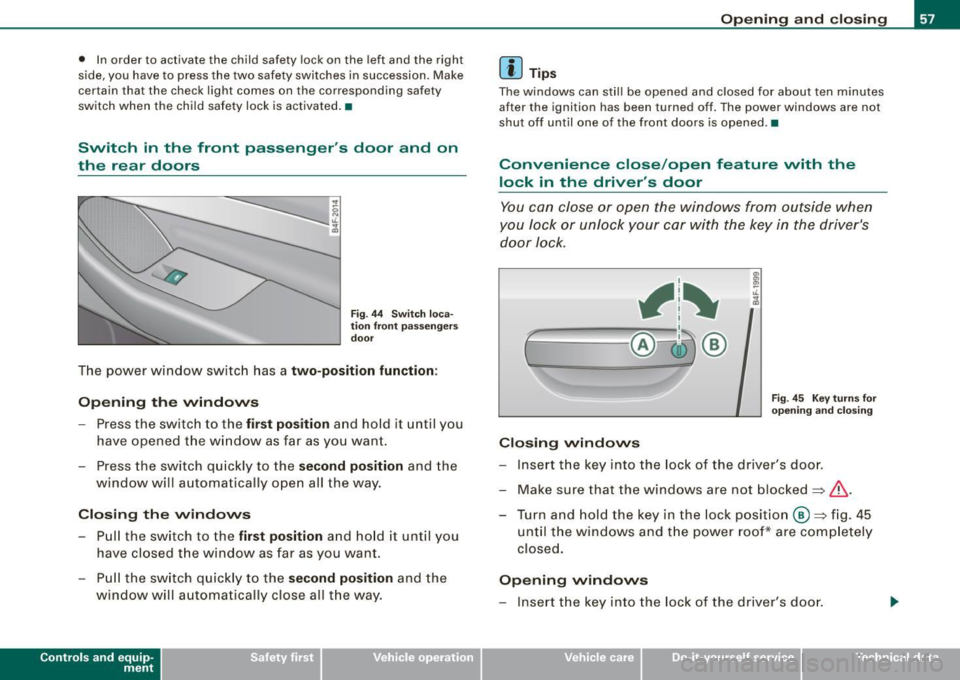
F ig . 44 Switch loca
ti on fron t pa ssengers
d oor
The power window switch has a two-position function:
Opening th e windows
- Press the switch to the fir st po sit ion and hold it until you
have opened the w indow as far as you wan t.
- Press the switch quickly to the
second po sition and the
window will automatically open all the way.
Closing th e w indows
- Pu ll the switch to the first position and ho ld it until you
have closed the window as far as you want.
- Pull the sw itch quickly to the
s econd position and the
window will automa tically close all t he way.
Con tro ls and eq uip
ment
Op ening and clo sing
[ i ] Tip s
The windows can stil l be opened and closed for about ten minutes
after the ignition has been turned off. The power windows are not
shut off until one of the front doors is opened .•
Convenience close /open feature vvith the
lock in the driver 's door
You can close or open the windows from outside when
y o u lock or unl ock your car with the key in the driver's
door lock.
f
, 1~
~__!ci5j ®
Fig . 4 5 Key tu rn s for
open ing and closin g
Closing windows
- Insert the key into the lock of the driver's door .
- Make sure that the windows are not blocked
=> &, .
- Turn a nd hold the key in the lock po sit io n @ => fig . 45
until the w indows and t he power roof* are comp letely
closed.
Opening windows
- Insert the key into the lock of the driver's door.
Vehicle care I I Technical data
Page 60 of 398
Opening and closing
- Turn a nd ho ld the key in the open pos ition
@ .
The automatic close/open function will cease if the key is returned
to its origina l pos ition.
& WARNING
• Be car eful wh en clos ing th e window s. Ch eck t o see that no one
i s in th e way, or se riou s inju ry could r esult !
• Alwa ys read and heed WARNING=>
& in "General de scription "
on
pa ge 4 5. •
Reactivating the system after battery
disconnection
If t he vehicle battery is disco nnected a nd then reconnected,
the automat ic closing and opening function w ill not work
until it is reactivated. To react iva te this fea ture, per form the
follow ing steps:
R eact ivating clo se /open f eatur e
Pull and hold the power window switch until the window
is completely closed .
- Re lease the switch.
- Pull the switch again for one secon d. T he automatic
cl osing/opening is now reactivate d.•
Sliding/tilting power sunroof
Ap plies to veh icle s: wit h slid ing/ tilt ing powe r su nroof
How the power sunroof works
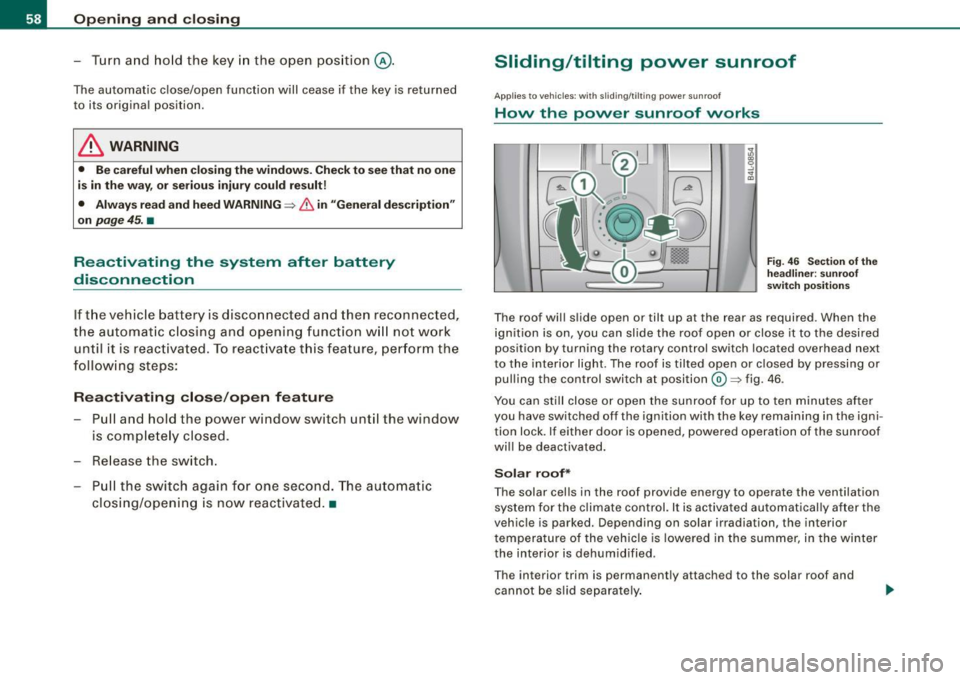
Fig. 4 6 Sect ion of th e
h ea dlin er: su nroof
s w it ch pos it ion s
The roof wil l s lide open or tilt up at the rear as required . When the
ignition is on, you can slide the roof open or close it to the desired
position by turning the rotary control switch located overhead next
to the interior light. The roof is tilted open or closed by pressing or pulling the control switch at position@=> fig . 46 .
You can still close or open the sunroof for up to ten minutes af ter
you have switched off the ignition with the key remaining in the igni
tion lock . If either doo r is opened, powered operation of the sunroof
wi ll be deactivated.
Solar roof*
The solar cells in the roof provide energy to operate the ventilation
system for the c limate control. It is activated automatically after the
vehic le is parked . Depending on solar irradiation, the interior
temperature of the vehicle is lowered in the summer, in the winter
the interior is dehumidified .
T he interior trim is permanent ly attached to the solar roof and
cannot be s lid separate ly .
Page 61 of 398
Sola r prot ection w ith slidin g g lass s un ro of*
The sliding glass sun roof is equipped with an adjus table sunshade
to reduce the effects of s trong sun light. The solar protection can be
moved at the recessed hand le to open and close it. To prevent the
vehicle interior from hea ting up , you should close the solar protec
tion when you park your vehicle in the sun.
When the roof is
slid op en , the sunshade is opened automatica lly .
When the roof is c losed , the sunshade can b e clos ed manually.
When the roof is
tilted open , the closed sunshade is also raised at
the rear edge . But it can still be slid open or closed .
0 Note
You should always closed the sliding/tilting sun roof when you leave
your veh icle. Sudden rain can drench the interior equipment and
damage the electron ic convenience features in your vehic le .
[ i ] Tips
If you park your vehicle in the sun, we recommend that you c lose the
sunshade *.•
Ap plies to vehicles: wit h sliding/tilt in g p ower sunroof
Sliding /tilting the power sunroof open
Sliding the power sunroof open to the comfort position
keeps wind noise to a minimum.
Sliding the roof open to the comfort position
- Tur n t he ro tary sw itch to position
G) :::::, page 58, fig. 46
(deten t can be fe lt). The roof is slid open only to a
co mfo rt p osition wi th low wi nd noise.
Controls and equip
ment
Opening and clo sing
Sliding th e roof op en all the way
- Turn the rota ry sw itch to posit ion @. Air flow over t he
fu lly opened sunroof may cause increased wind noise.
Tilting the roof open
- Turn the rota ry sw itch to position @.
- In posi tion @, br iefly
press t he c ontrol to t ilt the roof up
com pletel y.
- To ti lt the roof open to any intermediate position
press
and hold t he switch until the roof reac hes t he desired
p o si tion.
In posit ion @, the switch ju mps back to position G) again as soon
as the switch is released .
When the g lass roof opens, the sun v isor, which is designed to ward
o ff strong sunlight, opens alo ng w ith it. The visor ca n be closed
manual ly when the sunroof is closed .
[ i ] Tips
• Be aware that the sunroof may actually be open when the sun
v isor is c losed . Check and make sure that the sunroof is shut when
par king the car o r if it sudden ly starts raining .
• I f the sunroof is not fully closed but you have pressed and held
the switch for the ti lt position, the sunroof will not t ilt. •
Ap plie s to ve hic les: with sli di ng/ti lt ing powe r su nroo f
Closing the power sunroof
Sliding the roof shut
- Turn t he rota ry sw itch to positio n @ :::::,
page 58, fig. 46
?& . ..
I • •
Page 63 of 398
& WARNING !continued)
• Never leave children or persons requiring assistance alone in
the vehicle, especially when they could access the vehicle keys.
Unsupervised use of the keys can result in the engine being
started or use of vehicle systems such as the power windows, etc.
which could result in serious injury. The doors could be locked
with the remote key, delaying help in an emergency.
• The power sunroof will continue to operate until the ignition
key has been removed and one of the front doors has been
opened .•
Ap plies to veh icles: w it h sli ding/ tilt in g p ower su nroof
Emergency closing by hand (Step 1)
The sunroof can be closed by hand in case of a power
failure.
Con tro ls and eq uip
ment
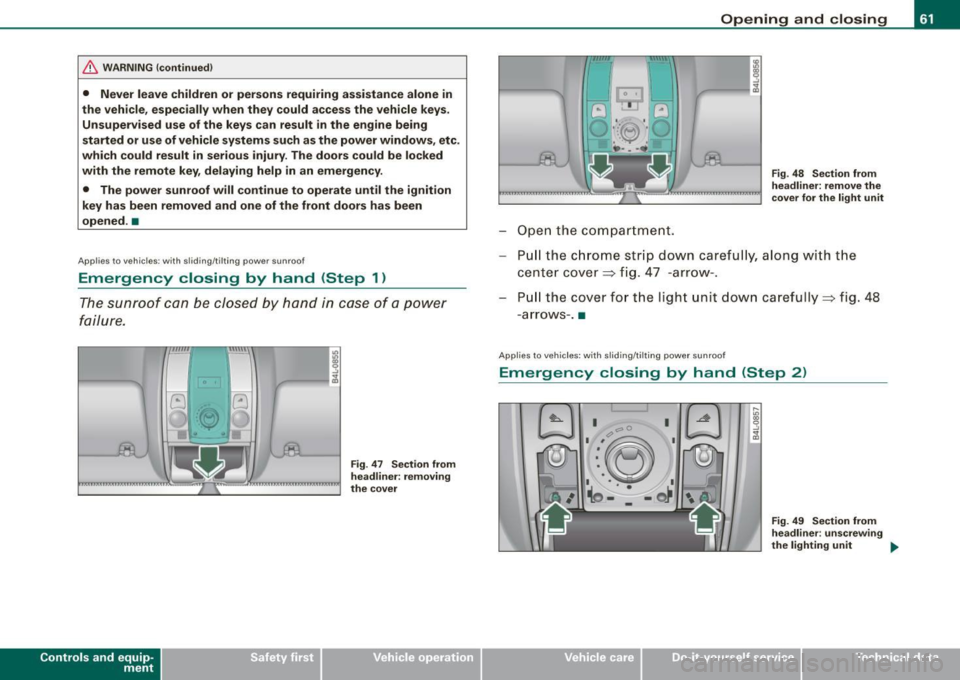
Fig . 47 Section from
headliner: removing
the cover
Opening and closing
Open the compartment.
Fig. 48 Section from
headliner: remove the
cover for the light unit
Pull the chrome strip down carefully, along with the
center cover=> fig. 47 -arrow-.
Pu ll the cover for the light unit down carefully=> fig. 48
- arrows -. •
A pplie s to v ehicle s: with sli di ng/ti lt in g p owe r sunroo f
Emergency closing by hand (Step 2)
Vehicle care I I
Fig. 49 Section from
headliner : unscrewing
the light ing unit
~
irechnical data
Page 64 of 398
Opening and closing
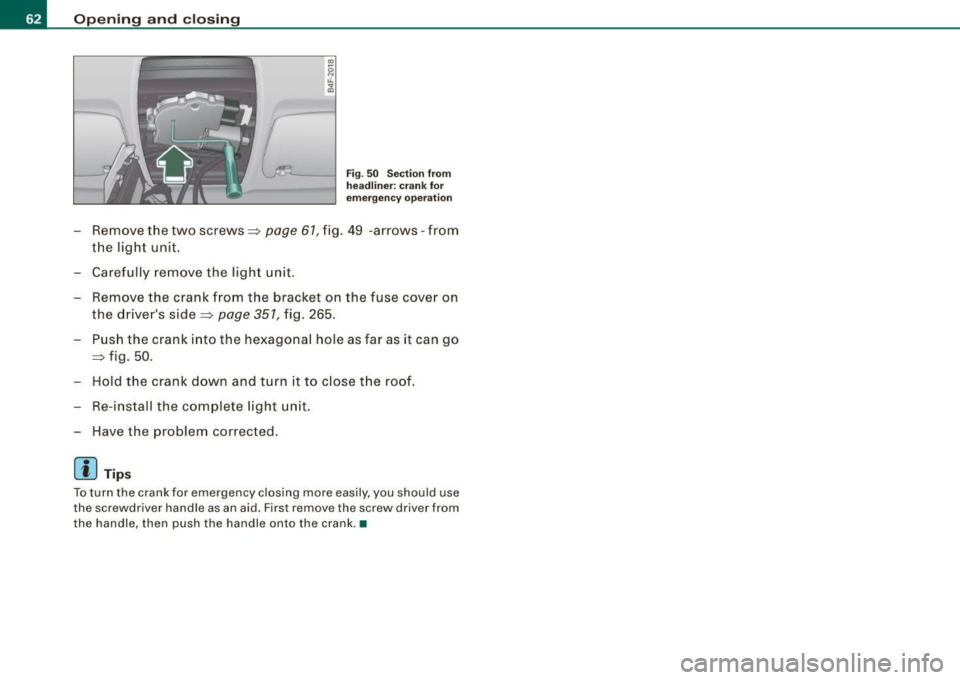
Fig. 50 Section from
headliner: crank for
emergency operation
- Remove the two screws::::> page 61, fig. 49 -arrows -from
the light unit.
- Carefully remove the light unit.
- Remove the crank from the bracket on the fuse cover on
the driver's side::::>
page 351, fig. 265.
-Push the crank into the hexagonal hole as far as it can go
::::> fig. 50 .
- Hold the crank down and turn it to close the roof.
Re-install the complete light unit.
Have the problem corrected.
[ i ] Tips
To turn the crank for emergency closing more easily , you should use
the screwd river handle as an aid . First remove the screw driver from
the handle, then push the handle onto the crank .•